 网硕互联帮助中心
概述与QA
本系列为我在vla上的第二个实践:基于piper机械臂完成数据采集–格式转换–pi05微调–评估–panda支线对比。本文主要介绍如何实现基于键盘遥操作采集数据。
1. 先验证自己的设备能不能支持键盘遥操
其实在进行这项实践我一直在担心自己的集显ubuntu电脑无法支持遥采,必须要去autodl上租卡然后做画面渲染和转发才能实现。进一步了解后才知道这项主要需求的是CPU,显卡只要能带动mujoco就行。
于是我通过下面的代码初步尝试了遥操作,并测试了自己电脑上能做到的fps:
import argparse
import time
from pathlib import Path
# 用于算均值
from statistics import mean
import numpy as np
# 用libero搭建任务套件环境
from libero.libero import benchmark, get_libero_path
from libero.libero.envs.env_wrapper import ControlEnv
# 用robosuite定义键盘输入设备和动作映射
from robosuite.devices import Keyboard
from robosuite.utils.input_utils import input2action
# 实现 python script.py –two-cameras,store_true表示命令行只要写了这个参数,其值就是true,不写就是false
parser = argparse.ArgumentParser()
parser.add_argument("–two-cameras", action="store_true")
args = parser.parse_args()
mode = "viewr + 两路相机" if args.two_cameras else "仅 viewer"
suite = benchmark.get_benchmark_dict()["libero_spatial"]()
task = suite.get_task(0)
# 用Path拼目录
bddl_path = (
Path(get_libero_path("bddl_files")) # 第 1 部分:根目录
/ task.problem_folder # 第 2 部分:任务子目录
/ task.bddl_file # 第 3 部分:BDDL 文件名
)
print(f"任务: {task.language}")
print(f"测试模式: {mode}")
env = ControlEnv(
bddl_file_name=str(bddl_path),
robots=["Panda"],
controller="OSC_POSE",
control_freq=20,
# 打开主窗口
has_renderer=True,
has_offscreen_renderer=True,
render_camera="agentview",
# 是否在观测obs里返回图像,True的话obs就有agentview_image、robot0_eye_in_hand_image图像
use_camera_obs=args.two_cameras,
camera_names=["agentview", "robot0_eye_in_hand"],
camera_widths=256,
camera_heights=256,
ignore_done=True,
)
device = None
try:
env.seed(1000)
observation = env.reset()
if args.two_cameras:
for key in ["agentview_image", "robot0_eye_in_hand_image"]:
print(key, observation[key].shape)
assert observation[key].shape == (256, 256, 3)
# 无移动,保持夹爪打开
idle_action = np.array([0, 0, 0, 0, 0, 0, -1], dtype=float)
# 预热
for _ in range(20):
env.step(idle_action)
# 把当前画面画到窗口
env.env.render()
print("开始测fps, 不需按键")
fps_records = []
# 每次测 100 个控制步,包括物理仿真、观测生成和窗口显示
# 此处不 sleep,测的是处理能力,不是人为限制的 20 FPS
for trial in range(3):
start = time.perf_counter()
for _ in range(100):
env.step(idle_action)
env.env.render()
elapsed = time.perf_counter() – start
fps = 100 / elapsed
fps_records.append(fps)
print(
f"第 {trial + 1} 次: "
f"100 步耗时={elapsed} 秒,FPS={fps}"
)
print("模式:", mode)
print("三次 FPS:", fps_records)
print("平均 FPS:", mean(fps_records))
# 测完重新初始化,避免测试过程改变场景状态
env.reset()
env.env.render()
device = Keyboard(
# 位置灵敏度和姿态灵敏度
pos_sensitivity=0.1,
rot_sensitivity=0.2
)
device.start_control()
print("\\n开始键盘操作:")
# 这个对应关系是robosuite Keyboard提前定义好的
print("W/A/S/D 水平移动:R/F 升降;空格开合夹爪。")
print("本脚本按 Q 结束,也可以在终端按 Ctrl+C。")
while True:
start = time.perf_counter()
action, grasp = input2action(
device=device,
robot=env.robots[0],
active_arm="right",
)
if action is None:
break
assert action.shape == (7, )
env.step(action)
env.env.render()
remaining = 1 / 20 – (time.perf_counter() – start)
if remaining > 0:
time.sleep(remaining)
except KeyboardInterrupt:
print("\\n测试结束。")
finally:
if device is not None:
device.listener.stop()
env.close()
我觉得这里的核心有两点:
1. 搭场景,跟之前mujoco在libero上的实践一样,先找到需求的任务,得到其bddl路径,通过libero搭建仿真场景
2. 使用 robosuite 提供的键盘输入工具和机械臂控制器,把按键转换成动作,通过 env.step(action) 驱动机械臂。robosuite 封装了机器人、传感器、控制器等接口,方便用户操作 MuJoCo 中的机器人。
此外,has_renderer表示要开主窗口,has_offscreen_renderer用于获取图像,之前autodl上进行mujoco实践用的OffScreenRenderEnv实质就是继承于ControlEnv,且其默认has_offscreen_renderer为true。
输出:
(libero) dukiya@dukiya-XiaoXinPro-14-APH8:~/libero-learning/week4$ python -u A1_libero_keyboard_fps.py
[robosuite WARNING] No private macro file found! (__init__.py:7)
[robosuite WARNING] It is recommended to use a private macro file (__init__.py:8)
[robosuite WARNING] To setup, run: python /home/dukiya/venvs/libero/lib/python3.10/site-packages/robosuite/scripts/setup_macros.py (__init__.py:9)
Unable to load module hid, required to interface with SpaceMouse.
Only macOS is officially supported. Install the additional
requirements with `pip install -r requirements-extra.txt`
[info] using task orders [0, 1, 2, 3, 4, 5, 6, 7, 8, 9]
任务: pick up the black bowl between the plate and the ramekin and place it on the plate
测试模式: 仅 viewer
Local assets not found. Downloading from HuggingFace Hub…
Assets already downloaded at /home/dukiya/.cache/libero/assets
qt.qpa.plugin: Could not find the Qt platform plugin "wayland" in "/home/dukiya/venvs/libero/lib/python3.10/site-packages/cv2/qt/plugins"
开始测fps, 不需按键
第 1 次: 100 步耗时=3.7127978919888847 秒,FPS=26.933865755464446
第 2 次: 100 步耗时=3.1702399159548804 秒,FPS=31.543354020851723
第 3 次: 100 步耗时=3.4133581139612943 秒,FPS=29.296662307708257
模式: 仅 viewer
三次 FPS: [26.933865755464446, 31.543354020851723, 29.296662307708257]
平均 FPS: 29.257960694674807
Keys Command
q reset simulation
spacebar toggle gripper (open/close)
w-a-s-d move arm horizontally in x-y plane
r-f move arm vertically
z-x rotate arm about x-axis
t-g rotate arm about y-axis
c-v rotate arm about z-axis
ESC quit
开始键盘操作:
W/A/S/D 水平移动:R/F 升降;空格开合夹爪。
本脚本按 Q 结束,也可以在终端按 Ctrl+C。
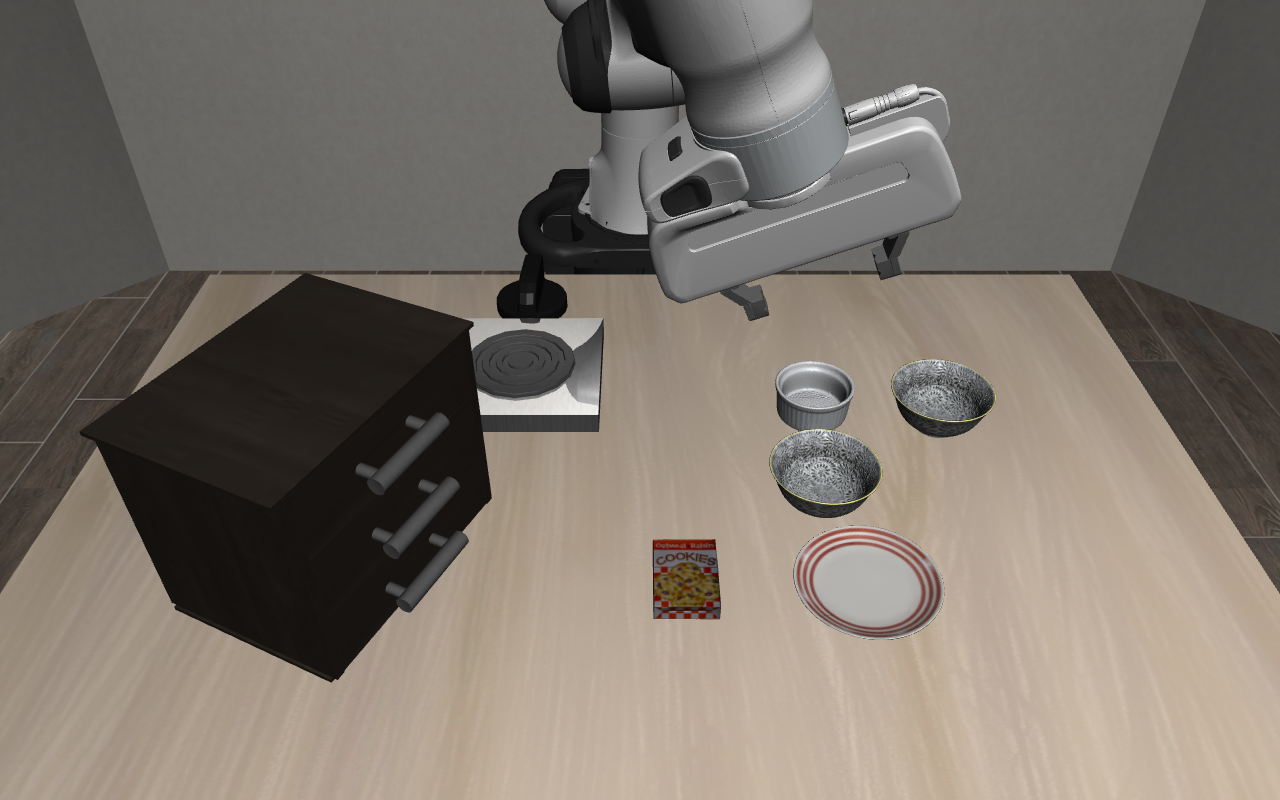
结果表明我的集成显卡遥操作完全没问题,平均帧率能达到30左右。
2. 在mujoco中引入piper
这一步是在了解piper是什么,长什么样。
2.1. piper是什么
Piper 是松灵机器人(AgileX)推出的一款六自由度机械臂,可以控制末端夹爪在空间中的位置和朝向,完成抓取、搬运、放置等操作。
进一步说,piper是国产的机械臂,pi05在训练过程中并没有在它的数据集上训练过,用piper做此实践,一方面是更好的适配国内多数企业的情况,一方面能更好的体验pi05在未见过的机械臂模型上的适配情况。
2.2. 下载piper模型并引入mujoco
通过下面的指令下载piper模型:
source /home/dukiya/venvs/libero/bin/activate
unset PYTHONPATH
unset PYTHONHOME
unset MUJOCO_GL
unset PYOPENGL_PLATFORM
mkdir -p /home/dukiya/libero-learning/week4/assets
cd /home/dukiya/libero-learning/week4/assets
# 只取 Piper 子目录,避免下载模型库中的全部机器人
git clone –depth 1 –filter=blob:none –sparse \\
https://github.com/google-deepmind/mujoco_menagerie.git
git -C mujoco_menagerie sparse-checkout set agilex_piper
# 保留这行输出,作为实际下载版本的记录
git -C mujoco_menagerie rev-parse HEAD
用之前mujoco引入自己写的mjcf的方法,把路径找对,就能在mujoco中看到piper的仿真:
from pathlib import Path
import mujoco
import mujoco.viewer
# scene.xml 是场景入口,内部包含机器人 piper.xml
model_path = (
Path(__file__).resolve().parent
/ "assets"
/ "mujoco_menagerie"
/ "agilex_piper"
/ "scene.xml"
)
model = mujoco.MjModel.from_xml_path(str(model_path))
data = mujoco.MjData(model)
# 按名字找id,中间的参数表明查询对象的类型
home_id = mujoco.mj_name2id(
model, mujoco.mjtObj.mjOBJ_KEY, "home"
)
assert home_id >= 0, "模型中没有找到 home 姿态"
mujoco.mj_resetDataKeyframe(model, data, home_id)
mujoco.mj_forward(model, data)
print("=== Piper 模型信息 ===")
print("模型路径:", model_path)
print("MuJoCo 版本:", mujoco.__version__)
print("关节数 njnt:", model.njnt)
print("位置状态长度 nq:", model.nq)
print("速度状态长度 nv:", model.nv)
print("执行器数 nu:", model.nu)
print("物理步长 dt:", model.opt.timestep)
print("\\n=== 关节名称与限位 ===")
for index in range(model.njnt):
name = mujoco.mj_id2name(
model, mujoco.mjtObj.mjOBJ_JOINT, index
)
joint_type = model.jnt_type[index]
if joint_type == mujoco.mjtJoint.mjJNT_HINGE:
description = "转动关节,单位 rad"
elif joint_type == mujoco.mjtJoint.mjJNT_SLIDE:
description = "滑动关节,单位 m"
else:
description = f"其他关节类型 {joint_type}"
print(name, description, "限位", model.jnt_range[index])
print("\\n=== 执行器与初始控制值 ===")
for index in range(model.nu):
name = mujoco.mj_id2name(
model, mujoco.mjtObj.mjOBJ_ACTUATOR, index
)
print(name, "初始 ctrl: ", data.ctrl[index])
# 核对当前选用的模型结构
assert (model.njnt, model.nq, model.nu) == (8, 8, 7)
# MuJoCo 原生查看器负责推进物理仿真
mujoco.viewer.launch(model, data)
输出:
(libero) dukiya@dukiya-XiaoXinPro-14-APH8:~/libero-learning/week4$ python -u A2_piper_model.py
=== Piper 模型信息 ===
模型路径: /home/dukiya/libero-learning/week4/assets/mujoco_menagerie/agilex_piper/scene.xml
MuJoCo 版本: 3.3.7
关节数 njnt: 8
位置状态长度 nq: 8
速度状态长度 nv: 8
执行器数 nu: 7
物理步长 dt: 0.002
=== 关节名称与限位 ===
joint1 转动关节,单位 rad 限位 [-2.618 2.618]
joint2 转动关节,单位 rad 限位 [0. 3.14]
joint3 转动关节,单位 rad 限位 [-2.697 0. ]
joint4 转动关节,单位 rad 限位 [-1.832 1.832]
joint5 转动关节,单位 rad 限位 [-1.22 1.22]
joint6 转动关节,单位 rad 限位 [-3.14 3.14]
joint7 滑动关节,单位 m 限位 [0. 0.035]
joint8 滑动关节,单位 m 限位 [-0.035 0. ]
=== 执行器与初始控制值 ===
joint1 初始 ctrl: 0.0
joint2 初始 ctrl: 1.57
joint3 初始 ctrl: -1.3485
joint4 初始 ctrl: 0.0
joint5 初始 ctrl: 0.0
joint6 初始 ctrl: 0.0
gripper 初始 ctrl: 0.0
/home/dukiya/venvs/libero/lib/python3.10/site-packages/glfw/__init__.py:917: GLFWError: (65548) b'Wayland: The platform does not provide the window position'
warnings.warn(message, GLFWError)
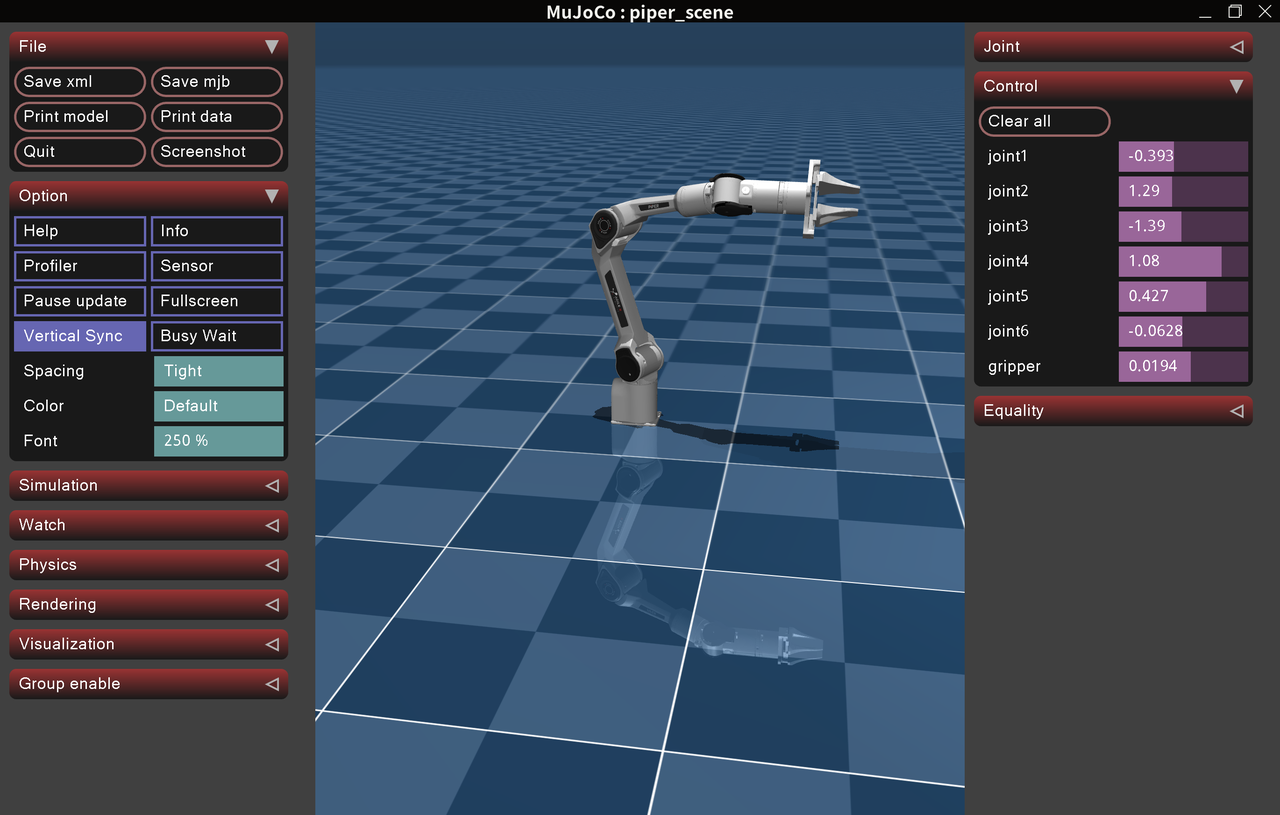
可以看到,piper为6个关节加1个夹爪组成。
3. 实现键盘驱动piper
我们同样是要基于robosuite的键盘接口做这个需求,由于robosuite并没有提前适配好piper,因此我们需要写好对应的适配接入robosuite,并实现对应的控制逻辑让键盘控制piper动起来。
3.1. 输出能被robosuite时用的机械臂xml和夹爪xml
这一步其实只是做一些格式的转换和标签补齐。原始的piper模型能够被mujoco读取,但还不满足robosuite读取,我们只需要建立脚本进行转换就行:
from copy import deepcopy
from pathlib import Path
import xml.etree.ElementTree as ET
from robosuite.models.base import MujocoXML
project = Path(__file__).resolve().parent
source_dir = project / "assets/mujoco_menagerie/agilex_piper"
output_dir = project / "assets/piper_robosuite"
output_dir.mkdir(parents=True, exist_ok=True)
source = ET.parse(source_dir / "piper.xml").getroot()
# 1. 展开嵌套 default 和 childclass
# robosuite 1.4.0 的读取器不能直接处理原模型的这套嵌套配置
defaults = {}
def collect_defaults(node, inherited):
settings = deepcopy(inherited)
for child in node:
if child.tag != "default":
settings.setdefault(child.tag, {}).update(child.attrib)
defaults[node.get("class", "main")] = settings
for child in node.findall("default"):
collect_defaults(child, settings)
def expand_defaults(node, inherited_class="main"):
class_name = node.attrib.pop("class", inherited_class)
for key, value in defaults[class_name].get(node.tag, {}).items():
node.attrib.setdefault(key, value)
child_class = node.attrib.pop("childclass", inherited_class)
for child in node:
expand_defaults(child, child_class)
default_node = source.find("default")
assert default_node is not None
collect_defaults(default_node, {})
source.remove(default_node)
expand_defaults(source)
# 2. 明确网格名称和文件路径
# 原模型有些 mesh 没写 name,MuJoCo 会自动命名,
# 但 robosuite 添加机器人前缀时需要明确的名称
source.find("compiler").attrib.pop("meshdir", None)
for mesh in source.findall("asset/mesh"):
original_file = mesh.get("file")
mesh.attrib.setdefault("name", Path(original_file).stem)
mesh.set(
"file",
str((source_dir / "assets" / original_file).resolve()),
)
# 3. 补几何体名称,并换成 robosuite 的显示分组
# group=0:碰撞几何;group=1:视觉几何
for body in source.iter("body"):
body.attrib.pop("gravcomp", None)
for index, geom in enumerate(body.findall("geom")):
geom.attrib.setdefault(
"name", f"{body.get('name')}_geom_{index}"
)
is_visual = (
geom.get("contype", "1") == "0"
and geom.get("conaffinity", "1") == "0"
)
geom.set("group", "1" if is_visual else "0")
arm = deepcopy(source)
gripper = deepcopy(source)
# 4. 机械臂:移除两根手指,添加夹爪安装位置
wrist = arm.find(".//body[@name='link6']")
assert wrist is not None
for name in ["link7", "link8"]:
finger = wrist.find(f"body[@name='{name}']")
assert finger is not None
wrist.remove(finger)
hand = ET.SubElement(
wrist, "body", name="right_hand", pos="0 0 0"
)
# 腕部相机先给一个初始配置,进入场景后再调整取景
ET.SubElement(
hand,
"camera",
name="eye_in_hand",
pos="0.04 0 0.025",
quat="0 1 0 0",
fovy="80",
)
# 原来的灯指向 link8;手指拆走后不再保留该灯
world = arm.find("worldbody")
for light in list(world.findall("light")):
world.remove(light)
for tag in ["equality", "keyframe"]:
node = arm.find(tag)
if node is not None:
arm.remove(node)
# 六个机械臂执行器改为力矩控制
actuators = arm.find("actuator")
actuators.clear()
for index in range(1, 7):
ET.SubElement(
actuators,
"motor",
name=f"joint{index}",
joint=f"joint{index}",
gear="1",
ctrllimited="true",
ctrlrange="-100 100",
forcelimited="true",
forcerange="-100 100",
)
# 5. 夹爪:保留原来的两根手指与联动约束
original_wrist = gripper.find(".//body[@name='link6']")
fingers = [
deepcopy(original_wrist.find(f"body[@name='{name}']"))
for name in ["link7", "link8"]
]
gripper_world = gripper.find("worldbody")
gripper_world.clear()
gripper_body = ET.SubElement(
gripper_world, "body", name="right_gripper", pos="0 0 0"
)
for finger, side in zip(fingers, ["left", "right"]):
boxes = [
geom for geom in finger.findall("geom")
if geom.get("type") == "box"
]
assert len(boxes) == 2
boxes[0].set("name", f"{side}_finger_collision")
boxes[1].set("name", f"{side}_fingerpad_collision")
gripper_body.append(finger)
for tag in ["contact", "keyframe"]:
node = gripper.find(tag)
if node is not None:
gripper.remove(node)
gripper_actuators = gripper.find("actuator")
position_actuator = deepcopy(
gripper_actuators.find("position[@name='gripper']")
)
assert position_actuator is not None
gripper_actuators.clear()
position_actuator.attrib.pop("inheritrange", None)
position_actuator.set("ctrllimited", "true")
position_actuator.set("ctrlrange", "0 0.035")
gripper_actuators.append(position_actuator)
# 6. 添加 robosuite 需要的末端标记和力/力矩传感器
# 0.09003 = 手指安装位置 0.13503 – 远端夹持块偏移 0.045
eef = ET.SubElement(
gripper_body, "body", name="eef", pos="0 0 0.09003"
)
for name, position in [
("grip_site", "0 0 0"),
("ee", "0 0 0"),
("ee_x", "0.03 0 0"),
("ee_y", "0 0.03 0"),
("ee_z", "0 0 0.03"),
]:
ET.SubElement(
eef, "site", name=name, pos=position,
type="sphere", size="0.004", group="1",
)
ET.SubElement(
eef, "site", name="grip_site_cylinder",
type="cylinder", size="0.003 0.03", group="1",
)
ET.SubElement(
gripper_body, "site", name="ft_frame",
pos="0 0 0", size="0.004", group="1",
)
sensors = gripper.find("sensor")
if sensors is None:
sensors = ET.SubElement(gripper, "sensor")
ET.SubElement(sensors, "force", name="force_ee", site="ft_frame")
ET.SubElement(sensors, "torque", name="torque_ee", site="ft_frame")
# 7. 删除各部分不再使用的网格、材质
def trim_assets(root):
meshes = {
geom.get("mesh") for geom in root.iter("geom")
if geom.get("mesh") is not None
}
materials = {
geom.get("material") for geom in root.iter("geom")
if geom.get("material") is not None
}
assets = root.find("asset")
for item in list(assets):
unused_mesh = (
item.tag == "mesh" and item.get("name") not in meshes
)
unused_material = (
item.tag == "material"
and item.get("name") not in materials
)
if unused_mesh or unused_material:
assets.remove(item)
trim_assets(arm)
trim_assets(gripper)
# 已有文件如果内容不同,则停止,避免覆盖后续手动修改
def save_text(path, text):
if path.exists():
if path.read_text(encoding="utf-8") != text:
raise FileExistsError(
f"{path} 已存在且内容不同,请先备份再重新生成"
)
else:
path.write_text(text, encoding="utf-8")
for root, filename in [
(arm, "piper_arm.xml"),
(gripper, "piper_gripper.xml"),
]:
ET.indent(root, space=" ")
save_text(
output_dir / filename,
ET.tostring(root, encoding="unicode"),
)
save_text(
output_dir / "LICENSE",
(source_dir / "LICENSE").read_text(encoding="utf-8"),
)
# 8. 用 robosuite 读取,再由 MuJoCo 编译,检查拆分和合并结构
arm_xml = MujocoXML(str(output_dir / "piper_arm.xml"))
gripper_xml = MujocoXML(str(output_dir / "piper_gripper.xml"))
arm_model = arm_xml.get_model()
gripper_model = gripper_xml.get_model()
print("机械臂 nq / nu:", arm_model.nq, arm_model.nu)
print("夹爪 nq / nu:", gripper_model.nq, gripper_model.nu)
assert (arm_model.nq, arm_model.nu) == (6, 6)
assert (gripper_model.nq, gripper_model.nu) == (2, 1)
arm_xml.merge(gripper_xml, merge_body="right_hand")
combined = arm_xml.get_model()
print("合并后 nq / nu:", combined.nq, combined.nu)
assert (combined.nq, combined.nu) == (8, 7)
print("适配文件目录:", output_dir)
print("A3_PIPER_XML_OK")
输出:
(libero) dukiya@dukiya-XiaoXinPro-14-APH8:~/libero-learning/week4$ /home/dukiya/venvs/libero/bin/python /home/dukiya/libero-learning/week4/A3_1_prepare_piper.py
[robosuite WARNING] No private macro file found! (__init__.py:7)
[robosuite WARNING] It is recommended to use a private macro file (__init__.py:8)
[robosuite WARNING] To setup, run: python /home/dukiya/venvs/libero/lib/python3.10/site-packages/robosuite/scripts/setup_macros.py (__init__.py:9)
机械臂 nq / nu: 6 6
夹爪 nq / nu: 2 1
合并后 nq / nu: 8 7
适配文件目录: /home/dukiya/libero-learning/week4/assets/piper_robosuite
A3_PIPER_XML_OK
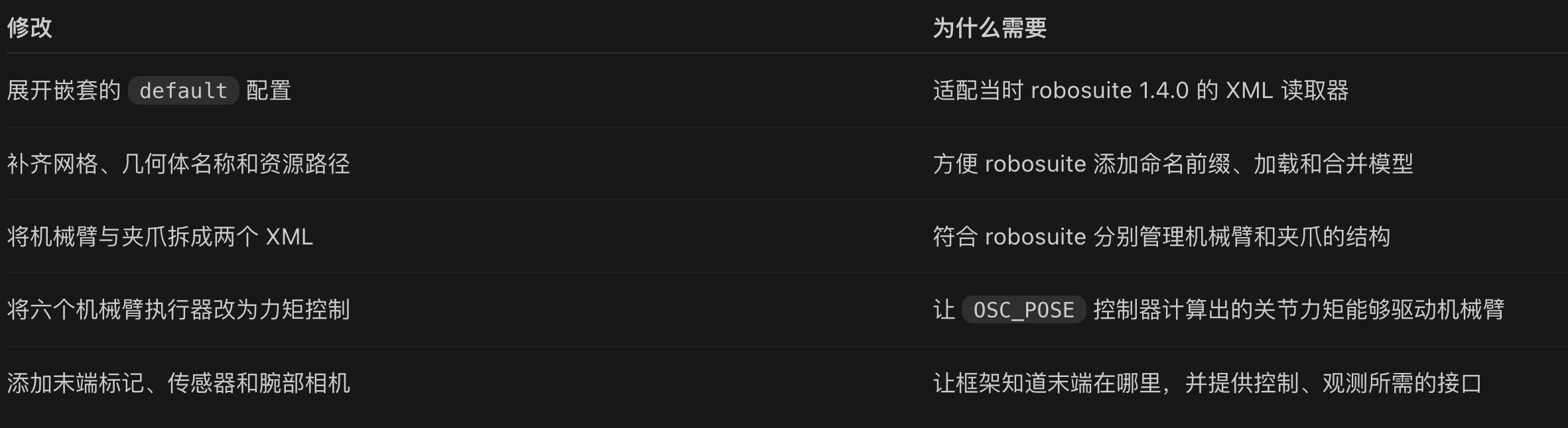
核心改变如下:
3.2. 注册piper
得到了能被robosuite识别的xml,我们下一步就需要进行相应的注册,让最后书写参数robots=["Piper"]能成功被系统识别。
注册类:
from pathlib import Path
import numpy as np
from robosuite.models.robots.manipulators.manipulator_model import ManipulatorModel
from robosuite.models.grippers.gripper_model import GripperModel
from robosuite.models.grippers import GRIPPER_MAPPING
from robosuite.robots import ROBOT_CLASS_MAPPING, SingleArm
# 在robosuite中注册piper这个全新的机械臂
MODEL_DIR = (
Path(__file__).resolve().parent
/ "assets"
/ "piper_robosuite"
)
class PiperGripper(GripperModel):
def __init__(self, idn=0):
super().__init__(
str(MODEL_DIR / "piper_gripper.xml"),
idn=idn,
)
@property
# @property可以让一个方法伪装成属性来使用,访问时不用再加括号
def init_qpos(self):
# 两根手指的位置:初始完全张开
return np.array([0.035, -0.035])
def format_action(self, action):
action = np.asarray(action, dtype=float)
assert action.shape == (1, )
# robosuite下,给夹爪-1表示张开,+1表示闭合
# 对piper xml来讲,控制值越大,夹爪张的越开
# 因此反转符号, 框架随后会映射到 [0, 0.035] 米
# clip用于收紧范围,不管取值为多少,最终的范围只能在-1,+1之间
self.current_action = -np.clip(action, -1.0, 1.0)
return self.current_action
@property
def _important_geoms(self):
# 指定哪些碰撞体是手指、哪些是夹持面
return {
"left_finger":[
"left_finger_collision",
"left_fingerpad_collision",
],
"right_finger":[
"right_finger_collision",
"right_fingerpad_collision",
],
"left_fingerpad":["left_fingerpad_collision"],
"right_fingerpad":["right_fingerpad_collision"],
}
class Piper(ManipulatorModel):
def __init__(self, idn=0):
super().__init__(
str(MODEL_DIR / "piper_arm.xml"),
idn=idn,
)
# 腕部相机:向侧面移开,并朝向夹爪前方
camera_name = self.correct_naming("eye_in_hand")
camera = self.worldbody.find(
f".//camera[@name='{camera_name}']"
)
assert camera is not None
# 设置手腕相机位置
camera.set("pos", "0.06 0 0.04")
camera.set("quat", "0 0.97324898946773 0 0.22975292054736")
# 给机械臂的6个关节设置统一0.1的阻尼系数
self.set_joint_attribute(
attrib="damping",
values=np.full(6, 0.1),
)
@property
def default_mount(self):
# 直接固定在桌面,不使用 Panda 的支撑架
return None
@property
def default_gripper(self):
return "PiperGripper"
@property
def default_controller_config(self):
return "osc_pose"
@property
def init_qpos(self):
# 基于原模型 home 姿态,稍微弯曲第五关节
# 避免初始腕部完全伸直;不是最终抓取姿态
return np.array([0.0, 1.57, -1.3485, 0.0, 0.35, 0.0])
# 下面四个属性让robosuite知道了机械臂的包围范围
@property
# 决定机械臂放在哪
def base_xpos_offset(self):
return {
# 当前黑碗场景桌面高 0.90 米
# 底座放在桌面的负 x 边缘附近,朝向正 x
"table": lambda table_length: (
-table_length / 2 + 0.05,
0.0,
0.90,
),
}
@property
# 机械臂最高点大约在底座上方 0.9 米处
def top_offset(self):
return np.array([0.0, 0.0, 0.9])
@property
# 机械臂水平方向半径
def _horizontal_radius(self):
return 0.9
@property
def horizontal_radius(self):
# 没有 mount 时,避免父类访问 mount.horizontal_radius
return self._horizontal_radius
@property
def arm_type(self):
return "single"
class MountedPiper(Piper):
pass
# 加入robosuite夹爪注册表
GRIPPER_MAPPING["PiperGripper"] = PiperGripper
# 加入机械臂注册表,SingleArm代表运行时类
ROBOT_CLASS_MAPPING.update({
"Piper": SingleArm,
"MountedPiper": SingleArm,
})
继承robotsuite的相关类,把信息改成piper就实现了注册。
3.3. 接入键盘控制
用如下代码实现键盘控制piper:
import time
from pathlib import Path
import cv2
from robosuite import macros
import numpy as np
import piper_robot
from libero.libero import benchmark, get_libero_path
from libero.libero.envs.env_wrapper import ControlEnv
# 用robosuite定义键盘输入设备和动作映射
from robosuite.devices import Keyboard
from robosuite.utils.input_utils import input2action
from robosuite.utils import transform_utils as T
# 键盘增量到目标位姿的缩放;可以在手感测试后调整
POSITION_GAIN = 0.01
ROTATION_GAIN = 0.5
# 限制目标领先实际末端的距离和角度,避免积累不可达目标
MAX_POSITION_LEAD = 0.03
MAX_ROTATION_LEAD = 0.2
suite = benchmark.get_benchmark_dict()["libero_spatial"]()
task = suite.get_task(0)
bddl_path = (
Path(get_libero_path("bddl_files")) # 第 1 部分:根目录
/ task.problem_folder # 第 2 部分:任务子目录
/ task.bddl_file # 第 3 部分:BDDL 文件名
)
print(f"任务: {task.language}")
# 机械臂用piper
env = ControlEnv(
bddl_file_name=str(bddl_path),
robots=["Piper"],
controller="OSC_POSE",
initialization_noise=None,
control_freq=20,
# 打开主窗口
has_renderer=True,
has_offscreen_renderer=True,
render_camera="agentview",
# 是否在观测obs里返回图像,True的话obs就有agentview_image、robot0_eye_in_hand_image图像
use_camera_obs=True,
camera_names=["agentview", "robot0_eye_in_hand"],
camera_widths=256,
camera_heights=256,
camera_depths=False,
ignore_done=True,
)
device = None
try:
env.seed(1000)
observation = env.reset()
robot = env.robots[0]
controller = robot.controller
controller.update(force=True)
target_pos = controller.ee_pos.copy()
target_ori = controller.ee_ori_mat.copy()
# 按键更新目标;松开后继续守住同一个目标,不追随实际位置漂移
controller.uncoupling = False
controller.use_delta = False
print("\\n=== Piper 接入信息 ===")
print("机器人模型:", type(robot.robot_model).__name__)
print("机械臂关节数:", robot.robot_model.dof)
print("夹爪:", type(robot.gripper).__name__)
print("动作维度:", robot.action_dim)
print("初始关节角:", observation["robot0_joint_pos"])
print("末端位置:", observation["robot0_eef_pos"])
print("夹爪位置:", observation["robot0_gripper_qpos"])
assert robot.robot_model.dof == 6
assert robot.action_dim == 7
print("\\n=== 控制器 ===")
print("类型:", controller.name)
print("相对控制:", controller.use_delta)
print("位置/朝向分开计算:", controller.uncoupling)
print("kp:", controller.kp)
print("kd(阻尼增益):", controller.kd)
print("damping_ratio(由 kp、kd 还原):",
controller.kd / (2 * np.sqrt(controller.kp)))
print("相对控制的默认缩放上限(当前绝对模式不使用):", controller.output_max)
print("键盘位置/旋转增益:", POSITION_GAIN, ROTATION_GAIN)
print("目标领先上限 / m、rad:", MAX_POSITION_LEAD, MAX_ROTATION_LEAD)
print("控制频率:", env.env.control_freq)
print("物理步长:", env.sim.model.opt.timestep)
root_body = robot.robot_model.root_body
print("\\n=== 底座 ===")
print("世界位置:", env.sim.data.get_body_xpos(root_body))
print("世界四元数 wxyz:", env.sim.data.get_body_xquat(root_body))
print("\\n=== 相机 ===")
for name in ["agentview", "robot0_eye_in_hand"]:
camera_id = env.sim.model.camera_name2id(name)
key = f"{name}_image"
print(name)
print(" 图像形状:", observation[key].shape)
print(" 局部位置:", env.sim.model.cam_pos[camera_id])
print(" 局部四元数:", env.sim.model.cam_quat[camera_id])
print(" fovy:", env.sim.model.cam_fovy[camera_id])
assert observation[key].shape == (256, 256, 3)
# 先保持位置并张开夹爪,观察是否稳定
# 绝对模式不能用全零位姿:保持初始化时的位置和朝向
idle_action = np.concatenate([
target_pos,
T.quat2axisangle(T.mat2quat(target_ori)),
[-1.0],
])
initial_eef = observation["robot0_eef_pos"].copy()
for _ in range(20):
observation, _, _, _ = env.step(idle_action)
env.env.render()
assert np.isfinite(env.sim.data.qpos).all()
print("\\n保持 20 步后的末端位移:")
print(observation["robot0_eef_pos"] – initial_eef)
print("A3_PIPER_ENV_READY")
device = Keyboard(
pos_sensitivity=0.1,
rot_sensitivity=0.2,
)
device.start_control()
print("\\n开始键盘测试:")
print("W/A/S/D 平移;R/F 升降;空格开合夹爪。")
print("Z/X、T/G、C/V 旋转;Q 结束。")
print("控制方式:按键更新固定目标,松开后保持目标。")
print("若明显抖动、失控或穿桌,立即 Ctrl+C,并保留输出。")
joint_names = robot.robot_model.joints
joint_ids = [
env.sim.model.joint_name2id(name)
for name in joint_names
]
print("关节顺序:", joint_names)
print("关节限位 / rad:\\n", env.sim.model.jnt_range[joint_ids])
last_log = time.perf_counter()
while True:
start = time.perf_counter()
action, grasp = input2action(
device=device,
robot=robot,
active_arm="right",
)
if action is None:
break
assert action.shape == (7,)
assert np.isfinite(action).all()
controller.update(force=True)
candidate_pos = target_pos + action[:3] * POSITION_GAIN
if np.linalg.norm(candidate_pos – controller.ee_pos) <= MAX_POSITION_LEAD:
target_pos = candidate_pos
delta_rotation = T.quat2mat(
T.axisangle2quat(action[3:6] * ROTATION_GAIN)
)
# 同样,转太猛了就舍弃,这里最好探究清楚线性代数关系
# 为啥不直接用delta_rotation算rotation_gap?因为循环跑起来之后target_ori跟controller.ee_ori_mat不一定相等
# 上面是原注释;现在超限只截断多余角度,不再整步舍弃
candidate_ori = delta_rotation @ target_ori
rotation_gap = T.quat2axisangle(
T.mat2quat(candidate_ori @ controller.ee_ori_mat.T)
)
if np.linalg.norm(rotation_gap) <= MAX_ROTATION_LEAD:
target_ori = candidate_ori
# action 是键盘增量;command 是发给 OSC 的绝对目标位姿
command = np.concatenate([
target_pos,
T.quat2axisangle(T.mat2quat(target_ori)),
action[6:7],
])
observation, _, _, _ = env.step(command)
env.env.render()
for key in ["agentview_image", "robot0_eye_in_hand_image"]:
frame = observation[key]
assert frame.shape == (256, 256, 3)
# 仅转换显示方向和颜色,不修改原始观测
if macros.IMAGE_CONVENTION == "opengl":
frame = frame[::-1]
# 只对夹爪相机额外逆时针旋转 90 度
if key == "robot0_eye_in_hand_image":
frame = np.rot90(frame, k=1, axes=(0, 1))
frame = np.ascontiguousarray(frame)
cv2.imshow(
key,
cv2.cvtColor(frame, cv2.COLOR_RGB2BGR),
)
cv2.waitKey(1)
# 每秒打印一次,避免刷屏影响操作
if time.perf_counter() – last_log >= 1.0:
angles = np.array([
env.sim.data.get_joint_qpos(name)
for name in joint_names
])
print("实际关节角 / rad:", angles)
print("键盘动作:", action)
print("实际末端位置 / m:", observation["robot0_eef_pos"])
print("目标末端位置 / m:", target_pos)
last_log = time.perf_counter()
assert np.isfinite(env.sim.data.qpos).all()
remaining = 1 / 20 – (time.perf_counter() – start)
if remaining > 0:
time.sleep(remaining)
print("A3_PIPER_KEYBOARD_TEST_ENDED")
except KeyboardInterrupt:
print("\\n用户停止测试。")
finally:
if device is not None:
device.listener.stop()
env.close()
cv2.destroyAllWindows()
可以看到ControlEnv实例化时已能成功用robots=["Piper"]做参数,这一步之后会继续往下传到robosuite,并被成功识别。
LIBERO:ControlEnv(robots=["Piper"])
↓ 传递机器人名称
robosuite:查找并创建 Piper,装上 PiperGripper 和控制器
↓ 加载、组装 XML
MuJoCo:计算机器人运动和接触
下面分析最为重要的控制逻辑部分:
candidate_pos = target_pos + action[:3] * POSITION_GAIN
if np.linalg.norm(candidate_pos – controller.ee_pos) <= MAX_POSITION_LEAD:
target_pos = candidate_pos
delta_rotation = T.quat2mat(
T.axisangle2quat(action[3:6] * ROTATION_GAIN)
)
# 同样,转太猛了就舍弃,这里最好探究清楚线性代数关系
# 为啥不直接用delta_rotation算rotation_gap?因为循环跑起来之后target_ori跟controller.ee_ori_mat不一定相等
candidate_ori = delta_rotation @ target_ori
rotation_gap = T.quat2axisangle(
T.mat2quat(candidate_ori @ controller.ee_ori_mat.T)
)
if np.linalg.norm(rotation_gap) <= MAX_ROTATION_LEAD:
target_ori = candidate_ori
# action 是键盘增量;command 是发给 OSC 的绝对目标位姿
command = np.concatenate([
target_pos,
T.quat2axisangle(T.mat2quat(target_ori)),
action[6:7],
])
action时是键盘读到的,表示每次按下键盘后的7维变化量,这个变化量加上上一步的期望目标就等于当前这一步的期望目标。
注意,为什么是加上一步的期望目标而不是当前的真实状态?因为需要纠偏。试想,假如你长按键盘想让机械臂左移到A,但此时机械臂走偏到了B,由于是长按键盘,期间的action都是0,如果是基于上一步的期望目标,也就是A,那么机械臂此时在B知道还需要继续往A走,实现纠偏;如果是基于当前状态,增量为0,那么机械臂此时的目标点也就是B点本身,机械臂不再移动,无法到达目标点A。
旋转量也是同样的纠偏思想,这里需要注意的是矩阵旋转的相关知识:
1. 旋转矩阵左乘当前状态矩阵,便能得到旋转之后的姿态矩阵
2. 旋转矩阵的逆矩阵等于其转置
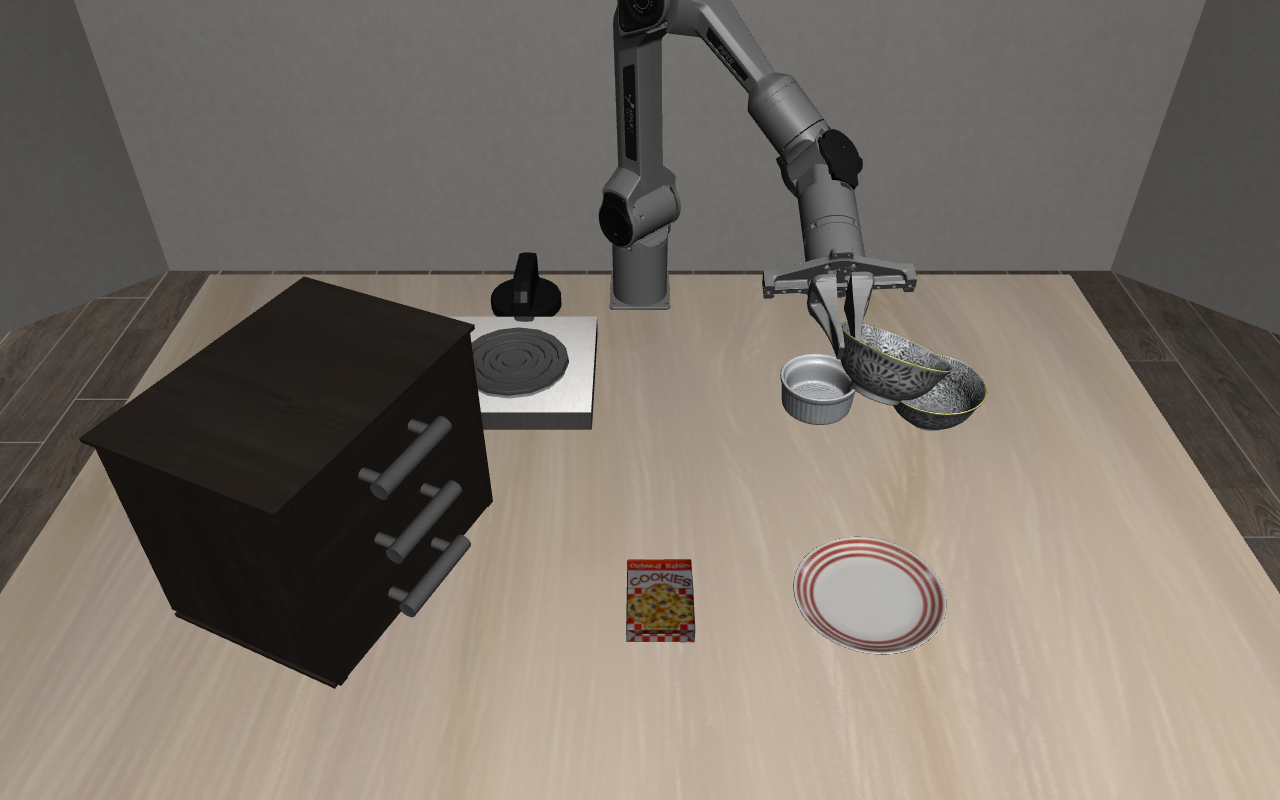
最终实现了键盘控制机械臂运动,并完成了物体夹取:
4. 数据采集与格式转换
4.1. 采集脚本
import argparse
import hashlib
import json
import time
from datetime import datetime
from pathlib import Path
from zoneinfo import ZoneInfo
import cv2
import h5py
import numpy as np
from A4_2_piper_env import PACK, load_piper_env
from piper_xml import PHYSICS_XML_VERSION, fix_piper_xml
from robosuite import macros
from robosuite.devices import Keyboard
from robosuite.utils import transform_utils as T
from robosuite.utils.input_utils import input2action
from libero.libero import benchmark
parser = argparse.ArgumentParser(description="Piper 训练开局键盘采集,一次一条")
parser.add_argument("–init-index", type=int, required=True, choices=range(30))
args = parser.parse_args()
CONTROL_FREQ = 20
MAX_STEPS = 1000
WRIST_FOV = 90.0
# 保留上周验证过的控制参数
POSITION_GAIN = 0.01
ROTATION_GAIN = 0.5
MAX_POSITION_LEAD = 0.03
MAX_ROTATION_LEAD = 0.2
# “近静止”的判据:一个控制步内的实际关节变化
ARM_STILL_THRESHOLD = 0.001 # rad
GRIPPER_STILL_THRESHOLD = 0.0001 # m
OUTPUT_DIR = (
Path(__file__).resolve().parent
/ "datasets/b1_piper_black_bowl_v2"
)
INIT_SOURCE = f"{PACK.name}/train.pruned_init"
INIT_SHA256 = hashlib.sha256((PACK / "train.pruned_init").read_bytes()).hexdigest()
INIT_MODEL_SHA256 = hashlib.sha256((PACK / "model.xml").read_bytes()).hexdigest()
MANIFEST = json.loads((PACK / "manifest.json").read_text(encoding="utf-8"))
assert len(MANIFEST["splits"]["train"]) == 30
RUN_ID = datetime.now(
ZoneInfo("Asia/Shanghai")
).strftime("%Y%m%d_%H%M%S_%f")
def display_image(frame, wrist=False):
"""只改变显示方向,不修改原始观测。"""
if macros.IMAGE_CONVENTION == "opengl":
frame = frame[::-1]
if wrist:
frame = np.rot90(frame, k=1)
return cv2.cvtColor(
np.ascontiguousarray(frame),
cv2.COLOR_RGB2BGR,
)
class CollectKeyboard(Keyboard):
def __init__(self, **kwargs):
self.retry_count = 0
self.recording = False
super().__init__(**kwargs)
def on_release(self, key):
# 松开 N 时计一次,避免长按重复计数
if getattr(key, "char", None) == "n":
if self.recording:
self.retry_count += 1
print("手动标记重试次数:", self.retry_count)
return
super().on_release(key)
def show_progress():
"""以实际成功文件为准;同一时间只运行一个采集进程。"""
counts = [0] * 30
for path in sorted(OUTPUT_DIR.glob("demo_*.hdf5")):
with h5py.File(path, "r") as file:
info = json.loads(file["data"].attrs["env_info"])
demo = file["data/demo_0"]
assert info["init_source"] == INIT_SOURCE, path
assert info["init_sha256"] == INIT_SHA256, path
assert info["init_model_sha256"] == INIT_MODEL_SHA256, path
index = info["init_index"]
assert 0 <= index < 30, path
assert bool(demo.attrs["success"]), path
assert 0 < len(demo["actions"]) <= MAX_STEPS, path
assert demo["actions"].shape == (len(demo["states"]), 7), path
counts[index] += 1
print("各训练开局成功条数(编号 0~29):", counts)
print("累计成功条数:", sum(counts), "/ 60")
print("当前开局:", args.init_index, "已成功:", counts[args.init_index], "/ 2")
return counts
counts = show_progress()
if counts[args.init_index] >= 2:
parser.exit(message="当前开局已有两条成功演示,请选择其他编号。\\n")
def save_result(
states, actions, stationary_flags,
initial_state, model_xml, env_info, attempt,
):
"""成功且未超长才保存 HDF5;所有已录制尝试都保留日志。"""
OUTPUT_DIR.mkdir(parents=True, exist_ok=True)
path = None
assert len(states) == len(actions) == len(stationary_flags)
if attempt["success"]:
assert 0 < len(actions) <= MAX_STEPS
state_array = np.asarray(states, dtype=np.float64)
action_array = np.asarray(actions, dtype=np.float64)
assert action_array.shape == (len(state_array), 7)
assert np.isfinite(state_array).all()
assert np.isfinite(action_array).all()
path = OUTPUT_DIR / f"demo_train_{args.init_index:02d}_{RUN_ID}.hdf5"
pending_path = path.with_suffix(".hdf5.partial")
# 写入中断的文件不计入成功条数,原文件始终不覆盖。
with h5py.File(pending_path, "x") as file:
data = file.create_group("data")
data.attrs["env"] = env_info["environment"]
data.attrs["env_info"] = json.dumps(
env_info, ensure_ascii=False
)
demo = data.create_group("demo_0")
demo.create_dataset("states", data=state_array)
demo.create_dataset("actions", data=action_array)
demo.create_dataset(
"settled_initial_state", data=initial_state
)
# 诊断字段,不作为模型输入
demo.create_dataset(
"stationary_flags",
data=np.asarray(stationary_flags, dtype=bool),
)
demo.attrs["model_file"] = model_xml
demo.attrs["success"] = True
demo.attrs["split"] = "train"
demo.attrs["init_index"] = args.init_index
demo.attrs["num_samples"] = len(actions)
demo.attrs["recording_seconds"] = attempt[
"recording_seconds"
]
demo.attrs["collection_fps"] = attempt["collection_fps"]
demo.attrs["stationary_ratio"] = attempt[
"stationary_ratio"
]
demo.attrs["retry_count_manual"] = attempt[
"retry_count_manual"
]
demo.attrs["gripper_switch_count"] = attempt[
"gripper_switch_count"
]
with h5py.File(pending_path, "r") as file:
demo = file["data/demo_0"]
assert demo["states"].shape == state_array.shape
assert demo["actions"].shape == action_array.shape
assert bool(demo.attrs["success"])
assert int(demo.attrs["init_index"]) == args.init_index
print("states shape:", demo["states"].shape)
print("actions shape:", demo["actions"].shape)
pending_path.rename(path)
print("HDF5:", path)
print("文件大小 / bytes:", path.stat().st_size)
print("B1_HDF5_READBACK_OK")
else:
print("本次不保存为成功示范,只记录尝试结果。")
attempt["hdf5_path"] = str(path) if path else None
attempt["env_info"] = env_info
# ponytail: 单个采集进程使用;并行采集时需独立日志
with (OUTPUT_DIR / "attempts.jsonl").open(
"a", encoding="utf-8"
) as file:
file.write(json.dumps(attempt, ensure_ascii=False) + "\\n")
print("\\n=== B1 采集结果 ===")
print("训练开局编号:", args.init_index)
for key in [
"success", "steps", "recording_seconds",
"collection_fps", "stationary_ratio",
"gripper_switch_count", "retry_count_manual",
"stop_reason",
]:
print(f"{key}: {attempt[key]}")
print("本次尝试日志:", OUTPUT_DIR / "attempts.jsonl")
show_progress()
env = None
device = None
states = []
actions = []
stationary_flags = []
record_start = None
success = False
success_count = 0
gripper_switch_count = 0
previous_gripper_command = -1.0
stop_reason = "用户按 Q 结束"
initial_state = None
model_xml = None
env_info = None
try:
env, observation, init_info = load_piper_env(
split="train", init_index=args.init_index, viewer=True,
)
suite = benchmark.get_benchmark_dict()[init_info["suite"]]()
task = suite.get_task(0)
robot = env.robots[0]
controller = robot.controller
controller.update(force=True)
controller.uncoupling = False
controller.use_delta = False
target_pos = controller.ee_pos.copy()
target_ori = controller.ee_ori_mat.copy()
# A4 的开局已稳定,不额外预热推进;首次动作前仍按原逻辑保持姿态。
initial_state = env.get_sim_state().copy()
np.testing.assert_allclose(
observation["akita_black_bowl_1_pos"],
init_info["expected_position"], rtol=0, atol=1e-7,
)
initial_objects = {
key: np.asarray(value).tolist()
for key, value in observation.items()
if not key.startswith("robot0_")
and key.endswith(("_pos", "_quat"))
}
camera_id = env.sim.model.camera_name2id(
"robot0_eye_in_hand"
)
assert np.isclose(env.sim.model.cam_fovy[camera_id], WRIST_FOV)
camera_config = {
"pos": env.sim.model.cam_pos[camera_id].tolist(),
"quat": env.sim.model.cam_quat[camera_id].tolist(),
"fovy": float(env.sim.model.cam_fovy[camera_id]),
}
# 与 A4 恢复开局时使用同一份 XML;相机已固定 90°,不再重复调参截图。
model_xml = fix_piper_xml((PACK / "model.xml").read_text(encoding="utf-8"))
env_info = {
"environment": type(env.env).__name__,
"physics_xml_version": PHYSICS_XML_VERSION,
"suite": init_info["suite"],
"task_id": 0,
"task": task.language,
"bddl_file": task.bddl_file,
"robots": ["Piper"],
"robot_model": type(robot.robot_model).__name__,
"seed": MANIFEST["seed"],
"split": "train",
"init_source": INIT_SOURCE,
"init_sha256": INIT_SHA256,
"init_model_sha256": INIT_MODEL_SHA256,
"init_index": init_info["init_index"],
"expected_initial_bowl_position": init_info["expected_position"],
"initial_objects": initial_objects,
"control_freq": CONTROL_FREQ,
"physics_dt": float(env.sim.model.opt.timestep),
"controller": {
"type": controller.name,
"control_delta": False,
"uncouple_pos_ori": False,
"kp": controller.kp.tolist(),
"kd": controller.kd.tolist(),
"input_min": controller.input_min.tolist(),
"input_max": controller.input_max.tolist(),
"output_min": controller.output_min.tolist(),
"output_max": controller.output_max.tolist(),
},
"action_representation": (
"world_xyz_m + world_axis_angle_rad + gripper"
),
"wrist_camera": camera_config,
"wrist_display_rotation_deg": 90,
"stationary_definition": {
"max_arm_joint_change_rad": ARM_STILL_THRESHOLD,
"max_gripper_joint_change_m": GRIPPER_STILL_THRESHOLD,
},
}
device = CollectKeyboard(
pos_sensitivity=0.1,
rot_sensitivity=0.2,
)
device.start_control()
print("\\n=== B1 Piper 训练数据采集 ===")
print("任务:", task.language)
print("训练开局编号:", args.init_index)
print("目标碗初始位置:", init_info["expected_position"])
print("物理模型版本:", init_info["physics_xml_version"])
print("目标碗质量 / kg:", init_info["target_bowl_mass_kg"])
print("腕部相机:", camera_config)
print("输出目录:", OUTPUT_DIR)
print("首次运动或闭合夹爪开始录制。")
print("移动、旋转和夹爪按键沿用上周。")
print("N:失败后重新尝试时,手动标记一次重试。")
print("Q:放弃;明显失控时 Ctrl+C。")
print("达到 1000 步仍未成功则终止。")
last_log = time.perf_counter()
while True:
loop_start = time.perf_counter()
action, _ = input2action(
device=device,
robot=robot,
active_arm="right",
)
if action is None:
break
assert action.shape == (7,)
assert np.isfinite(action).all()
controller.update(force=True)
candidate_pos = target_pos + action[:3] * POSITION_GAIN
if np.linalg.norm(
candidate_pos – controller.ee_pos
) <= MAX_POSITION_LEAD:
target_pos = candidate_pos
delta_rotation = T.quat2mat(
T.axisangle2quat(action[3:6] * ROTATION_GAIN)
)
candidate_ori = delta_rotation @ target_ori
rotation_gap = T.quat2axisangle(
T.mat2quat(candidate_ori @ controller.ee_ori_mat.T)
)
if np.linalg.norm(rotation_gap) <= MAX_ROTATION_LEAD:
target_ori = candidate_ori
command = np.concatenate([
target_pos,
T.quat2axisangle(T.mat2quat(target_ori)),
action[6:7],
])
assert np.isfinite(command).all()
if record_start is None and (
np.any(action[:6] != 0) or action[6] > 0
):
record_start = time.perf_counter()
device.recording = True
print("RECORDING_STARTED")
if record_start is not None:
state_before = env.get_sim_state().copy()
arm_before = observation["robot0_joint_pos"].copy()
gripper_before = observation[
"robot0_gripper_qpos"
].copy()
observation, _, _, _ = env.step(command)
if record_start is not None:
states.append(state_before)
actions.append(command.copy())
arm_change = np.max(np.abs(
observation["robot0_joint_pos"] – arm_before
))
gripper_change = np.max(np.abs(
observation["robot0_gripper_qpos"]
– gripper_before
))
stationary_flags.append(bool(
arm_change <= ARM_STILL_THRESHOLD
and gripper_change <= GRIPPER_STILL_THRESHOLD
))
if command[6] != previous_gripper_command:
gripper_switch_count += 1
previous_gripper_command = float(command[6])
assert np.isfinite(env.sim.data.qpos).all()
env.env.render()
for key in [
"agentview_image",
"robot0_eye_in_hand_image",
]:
assert observation[key].shape == (256, 256, 3)
cv2.imshow(
key,
display_image(
observation[key],
wrist=(key == "robot0_eye_in_hand_image"),
),
)
cv2.waitKey(1)
if record_start is not None:
success_count = (
success_count + 1
if env.check_success() and command[6] < 0
else 0
)
if success_count >= 10:
success = True
stop_reason = "连续成功并持续发送松爪指令"
print("TASK_SUCCESS")
break
if len(actions) >= MAX_STEPS:
stop_reason = "达到 1000 步,仍未满足成功条件"
break
if time.perf_counter() – last_log >= 1:
print(
"步数:", len(actions),
"夹爪切换:", gripper_switch_count,
"手动重试:", device.retry_count,
"连续成功:", success_count,
)
last_log = time.perf_counter()
remaining = (
1 / CONTROL_FREQ
– (time.perf_counter() – loop_start)
)
if remaining > 0:
time.sleep(remaining)
except KeyboardInterrupt:
success = False
stop_reason = "用户通过 Ctrl+C 结束"
except Exception as error:
success = False
stop_reason = f"{type(error).__name__}: {error}"
raise
finally:
record_end = time.perf_counter()
try:
if record_start is None:
print("没有开始录制,不计入采集尝试。")
else:
elapsed = record_end – record_start
attempt = {
"timestamp": RUN_ID,
"split": "train",
"init_index": args.init_index,
"success": success,
"steps": len(actions),
"recording_seconds": elapsed,
"collection_fps": (
len(actions) / elapsed if elapsed > 0 else 0.0
),
"stationary_ratio": (
float(np.mean(stationary_flags))
if stationary_flags else None
),
"gripper_switch_count": gripper_switch_count,
"retry_count_manual": (
device.retry_count if device else None
),
"stop_reason": stop_reason,
}
save_result(
states, actions, stationary_flags,
initial_state, model_xml, env_info, attempt,
)
finally:
try:
if device is not None:
device.listener.stop()
finally:
try:
if env is not None:
env.close()
finally:
cv2.destroyAllWindows()
本次定义了30种初始状态,也就是30种碗的初始位置,各自采两条数据,一共60条。
4.2. 绝对目标与相对输入之前的数量关系
这一步涉及到数据的转换。我们在采集数据时,得到的是绝对位姿,比如第0秒末端在0.2米,第1秒在0.21秒,这1秒间的变化量为0.01米,模型需要的7维action中每一位都是相对增量,那也就是说此时填入action的数值就是0.1吗?实际并不是,实际填入的数值跟这里的0.1存在倍数关系,具体数据由下面的代码得知:
import sys
from pathlib import Path
import inspect
import numpy as np
week4_dir = Path("/home/dukiya/libero-learning/week4")
assert (week4_dir / "piper_robot.py").is_file()
# 把 week4 目录加进 sys.path,让 Python 能找到 piper_robot.py。
sys.path.insert(0, str(week4_dir))
import piper_robot
from libero.libero import benchmark, get_libero_path
from libero.libero.envs.env_wrapper import ControlEnv
# 姿态转换工具
from robosuite.utils import transform_utils as T
suite = benchmark.get_benchmark_dict()["libero_spatial"]()
task = suite.get_task(0)
bddl_path = (
Path(get_libero_path("bddl_files"))
/ task.problem_folder
/ task.bddl_file
)
env = ControlEnv(
bddl_file_name=str(bddl_path),
robots=["Piper"],
controller="OSC_POSE",
initialization_noise=None,
control_freq=20,
# 不开窗口
has_renderer=False,
has_offscreen_renderer=False,
# 观测数据不返回图像
use_camera_obs=False,
)
try:
env.seed(1000)
env.reset()
# 拿到控制器,位置和姿态联合计算
controller = env.robots[0].controller
controller.uncoupling = False
controller.update(force=True)
current_pos = controller.ee_pos.copy()
current_ori = controller.ee_ori_mat.copy()
# 仿真器内的数据
original_qpos = env.sim.data.qpos.copy()
original_time = env.sim.data.time
# 看一下缩放系数是多少
# 物理位移 = output_min + (action – input_min) / (input_max – input_min) × (output_max – output_min)
print("=== 控制器配置 ===")
print("源码文件:", inspect.getfile(type(controller)))
print("input_min:", controller.input_min)
print("input_max:", controller.input_max)
print("output_min:", controller.output_min)
print("output_max:", controller.output_max)
print("impedance_mode:", controller.impedance_mode)
assert controller.control_dim == 6
assert controller.impedance_mode == "fixed"
target_pos = current_pos + np.array([0.01, -0.005, 0.003])
# 轴角 → 四元数 → 旋转矩阵,左乘当前姿态
rotation_change = np.array([0.02, -0.03, 0.04])
target_ori = (
T.quat2mat(T.axisangle2quat(rotation_change))
@ current_ori
)
# 绝对action值:位置+姿态轴角+夹爪是否开合
absolute_action = np.concatenate([
target_pos,
T.quat2axisangle(T.mat2quat(target_ori)),
[-1.0],
])
# False:输入的是绝对目标;True:输入的是相对增量
controller.use_delta = False
# 重新设定目标点,只取前6维,因为夹爪是单独处理的
controller.reset_goal()
controller.set_goal(absolute_action[:6])
absolute_goal_pos = controller.goal_pos.copy()
absolute_goal_ori = controller.goal_ori.copy()
# 开始计算相对改变量
position_delta = target_pos – current_pos
# 计算从当前姿态到目标姿态的相对旋转,先算旋转矩阵,再转角
# target_ori, current_ori都是矩阵,旋转矩阵的转置等于其逆
relative_rotation = target_ori @ current_ori.T
rotation_delta = T.quat2axisangle(
T.mat2quat(relative_rotation)
)
physical_delta = np.concatenate([
position_delta,
rotation_delta,
])
# 反算控制器缩放前的输入,不把“米”直接当动作输入
input_mid = (
controller.input_max + controller.input_min
) / 2
output_mid = (
controller.output_max + controller.output_min
) / 2
scale = (
(controller.output_max – controller.output_min)
/ (controller.input_max – controller.input_min)
)
assert np.all(scale > 0)
relative_arm_action = (
(physical_delta – output_mid) / scale + input_mid
)
# 本实验选择的小目标应在输入范围内,不能靠裁剪掩盖错误
assert np.all(
relative_arm_action >= controller.input_min – 1e-8
)
assert np.all(
relative_arm_action <= controller.input_max + 1e-8
)
# 机械臂+夹爪
relative_action = np.concatenate([
relative_arm_action,
[-1.0],
])
controller.use_delta = True
controller.reset_goal()
controller.set_goal(relative_action[:6])
# 计算相对动作和绝对动作之间的误差
position_error = np.linalg.norm(
controller.goal_pos – absolute_goal_pos
)
rotation_matrix_error = np.linalg.norm(
controller.goal_ori – absolute_goal_ori
)
print("\\n=== 同一目标的两种输入 ===")
print("绝对动作:", absolute_action)
print("实际位姿增量:", physical_delta)
print("relative 动作:", relative_action)
print("\\n=== 控制器生成的目标是否一致 ===")
print("位置误差 / m:", position_error)
print("旋转矩阵差的范数:", rotation_matrix_error)
assert absolute_action.shape == relative_action.shape == (7,)
assert np.isfinite(relative_action).all()
assert position_error < 1e-6
assert rotation_matrix_error < 1e-6
# 确认没有推进物理时间,也没有改变关节位置
assert env.sim.data.time == original_time
assert np.array_equal(env.sim.data.qpos, original_qpos)
print("\\n=== 本机 set_goal 源码 ===")
print(inspect.getsource(type(controller).set_goal))
print("A1_ACTION_MAPPING_OK")
finally:
env.close()
输出:
(libero) dukiya@dukiya-XiaoXinPro-14-APH8:~/libero-learning$ /home/dukiya/venvs/libero/bin/python /home/dukiya/libero-learning/week5/A1_3_check_action_mapping.py
[robosuite WARNING] No private macro file found! (__init__.py:7)
[robosuite WARNING] It is recommended to use a private macro file (__init__.py:8)
[robosuite WARNING] To setup, run: python /home/dukiya/venvs/libero/lib/python3.10/site-packages/robosuite/scripts/setup_macros.py (__init__.py:9)
[info] using task orders [0, 1, 2, 3, 4, 5, 6, 7, 8, 9]
Local assets not found. Downloading from HuggingFace Hub…
Assets already downloaded at /home/dukiya/.cache/libero/assets
=== 控制器配置 ===
源码文件: /home/dukiya/venvs/libero/lib/python3.10/site-packages/robosuite/controllers/osc.py
input_min: [-1. -1. -1. -1. -1. -1.]
input_max: [1. 1. 1. 1. 1. 1.]
output_min: [-0.05 -0.05 -0.05 -0.5 -0.5 -0.5 ]
output_max: [0.05 0.05 0.05 0.5 0.5 0.5 ]
impedance_mode: fixed
=== 同一目标的两种输入 ===
绝对动作: [ 1.54273714e-04 -3.58575396e-03 1.21355331e+00 -2.85290014e-02
2.02465343e+00 4.51160483e-02 -1.00000000e+00]
实际位姿增量: [ 0.01 -0.005 0.003 0.01999984 -0.02999977 0.03999976]
relative 动作: [ 0.2 -0.1 0.06 0.03999967 -0.05999953 0.07999952
-1. ]
=== 控制器生成的目标是否一致 ===
位置误差 / m: 0.0
旋转矩阵差的范数: 6.252380293787821e-07
=== 本机 set_goal 源码 ===
def set_goal(self, action, set_pos=None, set_ori=None):
"""
Sets goal based on input @action. If self.impedance_mode is not "fixed", then the input will be parsed into the
delta values to update the goal position / pose and the kp and/or damping_ratio values to be immediately updated
internally before executing the proceeding control loop.
Note that @action expected to be in the following format, based on impedance mode!
:Mode `'fixed'`: [joint pos command]
:Mode `'variable'`: [damping_ratio values, kp values, joint pos command]
:Mode `'variable_kp'`: [kp values, joint pos command]
Args:
action (Iterable): Desired relative joint position goal state
set_pos (Iterable): If set, overrides @action and sets the desired absolute eef position goal state
set_ori (Iterable): IF set, overrides @action and sets the desired absolute eef orientation goal state
"""
# Update state
self.update()
# Parse action based on the impedance mode, and update kp / kd as necessary
if self.impedance_mode == "variable":
damping_ratio, kp, delta = action[:6], action[6:12], action[12:]
self.kp = np.clip(kp, self.kp_min, self.kp_max)
self.kd = 2 * np.sqrt(self.kp) * np.clip(damping_ratio, self.damping_ratio_min, self.damping_ratio_max)
elif self.impedance_mode == "variable_kp":
kp, delta = action[:6], action[6:]
self.kp = np.clip(kp, self.kp_min, self.kp_max)
self.kd = 2 * np.sqrt(self.kp) # critically damped
else: # This is case "fixed"
delta = action
# If we're using deltas, interpret actions as such
if self.use_delta:
if delta is not None:
scaled_delta = self.scale_action(delta)
if not self.use_ori and set_ori is None:
# Set default control for ori since user isn't actively controlling ori
set_ori = np.array([[0.0, 1.0, 0.0], [1.0, 0.0, 0.0], [0.0, 0.0, -1.0]])
else:
scaled_delta = []
# Else, interpret actions as absolute values
else:
if set_pos is None:
set_pos = delta[:3]
# Set default control for ori if we're only using position control
if set_ori is None:
set_ori = (
T.quat2mat(T.axisangle2quat(delta[3:6]))
if self.use_ori
else np.array([[0.0, 1.0, 0.0], [1.0, 0.0, 0.0], [0.0, 0.0, -1.0]])
)
# No scaling of values since these are absolute values
scaled_delta = delta
# We only want to update goal orientation if there is a valid delta ori value OR if we're using absolute ori
# use math.isclose instead of numpy because numpy is slow
bools = [0.0 if math.isclose(elem, 0.0) else 1.0 for elem in scaled_delta[3:]]
if sum(bools) > 0.0 or set_ori is not None:
self.goal_ori = set_goal_orientation(
scaled_delta[3:], self.ee_ori_mat, orientation_limit=self.orientation_limits, set_ori=set_ori
)
self.goal_pos = set_goal_position(
scaled_delta[:3], self.ee_pos, position_limit=self.position_limits, set_pos=set_pos
)
if self.interpolator_pos is not None:
self.interpolator_pos.set_goal(self.goal_pos)
if self.interpolator_ori is not None:
self.ori_ref = np.array(self.ee_ori_mat) # reference is the current orientation at start
self.interpolator_ori.set_goal(
orientation_error(self.goal_ori, self.ori_ref)
) # goal is the total orientation error
self.relative_ori = np.zeros(3) # relative orientation always starts at 0
A1_ACTION_MAPPING_OK
重点在这里:
实际位姿增量: [ 0.01 -0.005 0.003 0.01999984 -0.02999977 0.03999976]
relative 动作: [ 0.2 -0.1 0.06 0.03999967 -0.05999953 0.07999952
-1. ]
可以发现,实际的增量为0.01,但填入action的相对量为0.2。简单来说,就是我们在转换数据时,需要把原始数据每一帧的变化量求出来,然后乘上20,才能变成模型需要的数据。
4.3. 数据转换
基于4.2,我们要将自己采的原始hdf5转换成模型所需要表征方式的hdf5,再转成训练所需要的lerobot格式。
4.3.1. 原始hdf5转中间hdf5
import sys
import json
import time
from pathlib import Path
import cv2
import h5py
import numpy as np
from piper_xml import PHYSICS_XML_VERSION, fix_piper_xml
# 复用已经适配好的 Piper
sys.path.insert(0, "/home/dukiya/libero-learning/week4")
import piper_robot
from robosuite import macros
from robosuite.utils import transform_utils as T
from libero.libero.envs.env_wrapper import ControlEnv
SOURCE = Path(
"/home/dukiya/libero-learning/week5/datasets/"
"a2_piper_black_bowl/"
"demo_20261015_234043_644558.hdf5"
)
# 每次使用新目录,避免覆盖之前的结果
OUTPUT = (
Path(__file__).resolve().parent
/ "datasets/a3_replay"
/ f"{SOURCE.stem}_{time.time_ns()}"
)
CAMERAS = {
"agentview_image": "observation.images.image",
"robot0_eye_in_hand_image": "observation.images.image2",
}
def absolute_to_relative(action, controller):
"""把世界坐标下的绝对目标,转换为控制器缩放前的相对动作。"""
target_rotation = T.quat2mat(
T.axisangle2quat(action[3:6])
)
position_delta = action[:3] – controller.ee_pos
# 相对旋转必须用矩阵计算,不能直接相减两个轴角
rotation_delta = (
target_rotation @ controller.ee_ori_mat.T
)
quat_delta = T.mat2quat(rotation_delta).astype(np.float64)
# 对增量选择较短的旋转;不改变 observation.state 的四元数约定
if quat_delta[3] < 0:
quat_delta = -quat_delta
# mat2quat 使用 float32;极小旋转的 w 可能舍入为 1。
# 用 atan2 保留向量部分携带的小旋转,避免 acos(w) 将其归零。
vector = quat_delta[:3]
vector_norm = np.linalg.norm(vector)
if vector_norm > 1e-12:
angle = 2.0 * np.arctan2(vector_norm, quat_delta[3])
rotation_vector = vector / vector_norm * angle
else:
rotation_vector = 2.0 * vector
physical_delta = np.concatenate([
position_delta,
rotation_vector,
])
input_mid = (
controller.input_max + controller.input_min
) / 2
output_mid = (
controller.output_max + controller.output_min
) / 2
scale = (
(controller.output_max – controller.output_min)
/ (controller.input_max – controller.input_min)
)
assert np.all(scale > 0)
relative_arm = (
(physical_delta – output_mid) / scale + input_mid
)
# 不静默裁剪,否则可能掩盖转换错误
if (
np.any(relative_arm < controller.input_min – 1e-6)
or np.any(relative_arm > controller.input_max + 1e-6)
):
raise ValueError(
f"相对动作超过控制器输入范围: {relative_arm}"
)
return np.concatenate([
relative_arm,
action[6:7], # 保留夹爪开合指令
])
start = time.perf_counter()
# 只读原始演示,不修改采集数据
with h5py.File(SOURCE, "r") as file:
demo = file["data/demo_0"]
assert bool(demo.attrs["success"])
states = demo["states"][:]
absolute_actions = demo["actions"][:]
model_xml = demo.attrs["model_file"]
env_info = json.loads(file["data"].attrs["env_info"])
# 兼容旧 HDF5 中缺失 compiler 属性的 XML;原始数据只读,不改写。
model_xml = fix_piper_xml(model_xml)
env_info["physics_xml_version"] = PHYSICS_XML_VERSION
count = len(states)
fps = int(env_info["control_freq"])
assert count > 0
assert absolute_actions.shape == (count, 7)
assert np.isfinite(states).all()
assert np.isfinite(absolute_actions).all()
assert np.all(np.abs(absolute_actions[:, 6]) <= 1)
assert env_info["action_representation"] == (
"world_xyz_m + world_axis_angle_rad + gripper"
)
# 完整仿真状态的第 0 维是时间
assert np.allclose(
np.diff(states[:, 0]),
1 / fps,
atol=1e-6,
rtol=0,
)
# 固定原始观测约定,避免换机器后图像被重复翻转
assert macros.IMAGE_CONVENTION == "opengl", (
"当前图像约定不是 opengl,请先核对图像处理方式"
)
# 不覆盖旧转换结果
OUTPUT.mkdir(parents=True, exist_ok=False)
env = None
writer = None
try:
env = ControlEnv(
bddl_file_name=env_info["bddl_file"],
robots=env_info["robots"],
controller="OSC_POSE",
initialization_noise=None,
control_freq=fps,
has_renderer=False,
has_offscreen_renderer=True,
use_camera_obs=True,
camera_names=["agentview", "robot0_eye_in_hand"],
camera_widths=256,
camera_heights=256,
camera_depths=False,
ignore_done=True,
)
env.seed(env_info["seed"])
env.reset()
# 必须恢复采集时保存的模型,包括最终的 90° 相机设置
env.reset_from_xml_string(model_xml)
controller = env.robots[0].controller
controller.uncoupling = False
assert controller.impedance_mode == "fixed"
assert states.shape[1] == env.get_sim_state().size
for name in [
"input_min", "input_max",
"output_min", "output_max",
]:
assert np.allclose(
getattr(controller, name),
env_info["controller"][name],
), f"控制器参数变化: {name}"
camera_id = env.sim.model.camera_name2id(
"robot0_eye_in_hand"
)
assert np.isclose(
env.sim.model.cam_fovy[camera_id], 90.0
)
writer = cv2.VideoWriter(
str(OUTPUT / "preview.mp4"),
cv2.VideoWriter_fourcc(*"mp4v"),
fps,
(512, 256),
)
assert writer.isOpened(), "无法创建预览视频"
max_position_error = 0.0
max_rotation_error = 0.0
check_frames = {0, count // 2, count – 1}
with h5py.File(OUTPUT / "episode.hdf5", "x") as file:
file.attrs["complete"] = False
file.attrs["source"] = str(SOURCE)
file.attrs["task"] = env_info["task"]
file.attrs["fps"] = fps
file.attrs["env_info"] = json.dumps(
env_info, ensure_ascii=False
)
file.attrs["action_representation"] = (
"relative controller input + gripper"
)
file.attrs["image_transform"] = (
"raw observation flipped in height and width"
)
state_data = file.create_dataset(
"observation.state",
shape=(count, 8),
dtype="float32",
)
action_data = file.create_dataset(
"action",
shape=(count, 7),
dtype="float32",
)
file.create_dataset(
"source_frame_index",
data=np.arange(count),
)
image_data = {
key: file.create_dataset(
key,
shape=(count, 256, 256, 3),
dtype="uint8",
chunks=(1, 256, 256, 3),
compression="lzf",
)
for key in CAMERAS.values()
}
for index, (sim_state, absolute_action) in enumerate(
zip(states, absolute_actions)
):
# 恢复动作执行前的同一帧状态;不会推进物理时间
observation = env.regenerate_obs_from_state(
sim_state
)
controller.update(force=True)
assert np.isclose(
env.sim.data.time, sim_state[0]
)
# 8 维 state:末端位置3 + 朝向轴角3 + 两指位置2
state = np.concatenate([
observation["robot0_eef_pos"],
T.quat2axisangle(
observation["robot0_eef_quat"].copy()
),
observation["robot0_gripper_qpos"],
]).astype(np.float32)
assert state.shape == (8,)
assert np.isfinite(state).all()
relative_action = absolute_to_relative(
absolute_action, controller
).astype(np.float32)
assert np.isfinite(relative_action).all()
# 检查两种动作输入是否指向同一个控制目标
controller.use_delta = False
controller.reset_goal()
controller.set_goal(absolute_action[:6])
absolute_goal_pos = controller.goal_pos.copy()
absolute_goal_ori = controller.goal_ori.copy()
controller.use_delta = True
controller.reset_goal()
controller.set_goal(relative_action[:6])
position_error = np.linalg.norm(
controller.goal_pos – absolute_goal_pos
)
rotation_error = np.linalg.norm(
controller.goal_ori – absolute_goal_ori
)
assert position_error < 1e-5, (
f"帧={index}, 目标位置误差={position_error}"
)
assert rotation_error < 1e-5, (
f"帧={index}, 目标旋转矩阵误差={rotation_error}, "
f"相对旋转输入={relative_action[3:6]}"
)
max_position_error = max(
max_position_error, position_error
)
max_rotation_error = max(
max_rotation_error, rotation_error
)
state_data[index] = state
action_data[index] = relative_action.astype(
np.float32
)
frames = []
for raw_key, dataset_key in CAMERAS.items():
raw = observation[raw_key]
assert raw.shape == (256, 256, 3)
assert raw.dtype == np.uint8
# 与在线 LIBERO 观测处理保持一致
rgb = np.ascontiguousarray(
raw[::-1, ::-1]
)
image_data[dataset_key][index] = rgb
frames.append(rgb)
if index in check_frames:
assert cv2.imwrite(
str(
OUTPUT
/ f"{index:06d}_{raw_key}.png"
),
cv2.cvtColor(
rgb, cv2.COLOR_RGB2BGR
),
)
preview = np.concatenate(frames, axis=1)
writer.write(
cv2.cvtColor(
preview, cv2.COLOR_RGB2BGR
)
)
if (index + 1) % 50 == 0:
print(f"已恢复: {index + 1}/{count}")
file.attrs["complete"] = True
writer.release()
writer = None
# 保存后读回检查
with h5py.File(OUTPUT / "episode.hdf5", "r") as file:
assert bool(file.attrs["complete"])
assert file["observation.state"].shape == (count, 8)
assert file["action"].shape == (count, 7)
for key in CAMERAS.values():
assert file[key].shape == (
count, 256, 256, 3
)
elapsed = time.perf_counter() – start
print("\\n=== A3 第一段结果 ===")
print("原始帧数:", count)
print("observation.state:", (count, 8))
print("action:", (count, 7))
print("两路图像分别为:", (count, 256, 256, 3))
print("最大目标位置误差 / m:", max_position_error)
print("最大目标旋转矩阵误差:", max_rotation_error)
print("恢复与导出耗时 / s:", elapsed)
print("输出目录:", OUTPUT)
print("A3_REPLAY_EXPORT_OK")
finally:
if writer is not None:
writer.release()
if env is not None:
env.close()
这一步做了刚刚提到的数值倍数转换,得到了带有图像信息、state、action的hdf5.
4.3.2. 中间hdf5转LeRobotDatasetv3格式
进行训练的数据还要进一步封装一下,比如需要阐述清楚这个数据对应哪个任务文本等等:
import time
from pathlib import Path
import h5py
import numpy as np
from lerobot.configs.video import RGBEncoderConfig
from lerobot.datasets.lerobot_dataset import LeRobotDataset
SOURCE = Path(
"/root/autodl-tmp/workspace/datasets/week5/"
"a3_replay_90deg/episode.hdf5"
)
ROOT = Path(
"/root/autodl-tmp/workspace/datasets/week5/"
"piper_black_bowl_a3_lerobot"
)
# 这里只是数据集标识,不会自动上传 Hugging Face
REPO_ID = "dukiya/piper_black_bowl_a3"
CAMERA_KEYS = (
"observation.images.image",
"observation.images.image2",
)
FEATURES = {
"observation.state": {
"dtype": "float32",
"shape": (8,),
"names": None,
},
"action": {
"dtype": "float32",
"shape": (7,),
"names": None,
},
}
for key in CAMERA_KEYS:
FEATURES[key] = {
"dtype": "video",
"shape": (256, 256, 3),
"names": ["height", "width", "channels"],
}
start = time.perf_counter()
assert SOURCE.is_file(), SOURCE
assert not ROOT.exists(), (
f"输出目录已存在,先检查是否已有转换结果:{ROOT}"
)
with h5py.File(SOURCE, "r") as source:
assert bool(source.attrs["complete"])
fps = int(source.attrs["fps"])
task = str(source.attrs["task"])
count = source["action"].shape[0]
assert source["observation.state"].shape == (count, 8)
assert source["action"].shape == (count, 7)
assert source.attrs["action_representation"] == (
"relative controller input + gripper"
)
for key in CAMERA_KEYS:
assert source[key].shape == (count, 256, 256, 3)
# 使用 CPU 的 H.264 编码,不依赖 GPU。
encoder = RGBEncoderConfig(
vcodec="h264",
crf=18,
preset="fast",
video_backend="pyav",
)
dataset = LeRobotDataset.create(
repo_id=REPO_ID,
root=ROOT,
robot_type="piper",
fps=fps,
features=FEATURES,
use_videos=True,
video_backend="pyav",
rgb_encoder=encoder,
image_writer_processes=0,
image_writer_threads=0,
encoder_threads=1,
)
try:
for index in range(count):
frame = {
"observation.state": source[
"observation.state"
][index],
"action": source["action"][index],
"task": task,
}
for key in CAMERA_KEYS:
frame[key] = source[key][index]
assert np.isfinite(
frame["observation.state"]
).all()
assert np.isfinite(frame["action"]).all()
dataset.add_frame(frame)
if (index + 1) % 50 == 0:
print(f"已写入: {index + 1}/{count}")
# 两路相机串行编码,避免额外启动编码子进程
dataset.save_episode(parallel_encoding=False)
finally:
# 必须调用,确保 parquet 等文件完整落盘
dataset.finalize()
conversion_seconds = time.perf_counter() – start
# 从最终数据集重新加载,而不是只检查中间文件
checked = LeRobotDataset(
repo_id=REPO_ID,
root=ROOT,
video_backend="pyav",
)
assert len(checked) == count
assert checked.meta.total_episodes == 1
assert checked.meta.info["codebase_version"] == "v3.0"
# 抽查首、中、末帧,检查低维数据与原文件一致,
# 并确认两路视频可以解码成模型读取的图像张量。
with h5py.File(SOURCE, "r") as source:
for index in (0, count // 2, count – 1):
sample = checked[index]
for key in ("observation.state", "action"):
np.testing.assert_allclose(
sample[key].numpy(),
source[key][index],
rtol=0,
atol=1e-7,
)
for key in CAMERA_KEYS:
image = sample[key].numpy()
assert image.shape == (3, 256, 256)
assert np.isfinite(image).all()
assert image.min() >= 0
assert image.max() <= 1
print("读回检查通过,帧:", index)
print("\\n=== A3 LeRobot 数据集结果 ===")
print("数据集格式:", checked.meta.info["codebase_version"])
print("episodes:", checked.meta.total_episodes)
print("总帧数:", len(checked))
print("fps:", checked.meta.fps)
print("任务:", task)
for key in (
"observation.state",
"action",
*CAMERA_KEYS,
):
feature = checked.meta.features[key]
print(
f"{key}: dtype={feature['dtype']}, "
f"shape={feature['shape']}"
)
print("本阶段转换耗时 / s:", conversion_seconds)
print("输出目录:", ROOT)
print("A3_LEROBOT_WRITE_OK")
做一个简单的可视化验证:
source /root/miniconda3/etc/profile.d/conda.sh
conda activate lerobot
export HF_HOME=/root/autodl-tmp/huggingface
export HF_HUB_OFFLINE=1
export OMP_NUM_THREADS=1
export MKL_NUM_THREADS=1
export OPENBLAS_NUM_THREADS=1
lerobot-dataset-viz \\
–repo-id dukiya/piper_black_bowl_a3 \\
–root /root/autodl-tmp/workspace/datasets/week5/piper_black_bowl_a3_lerobot \\
–episode-index 0 \\
–batch-size 1 \\
–num-workers 0 \\
–display-compressed-images \\
–save 1 \\
–output-dir /root/autodl-tmp/workspace/my_test/week5/a3_viz
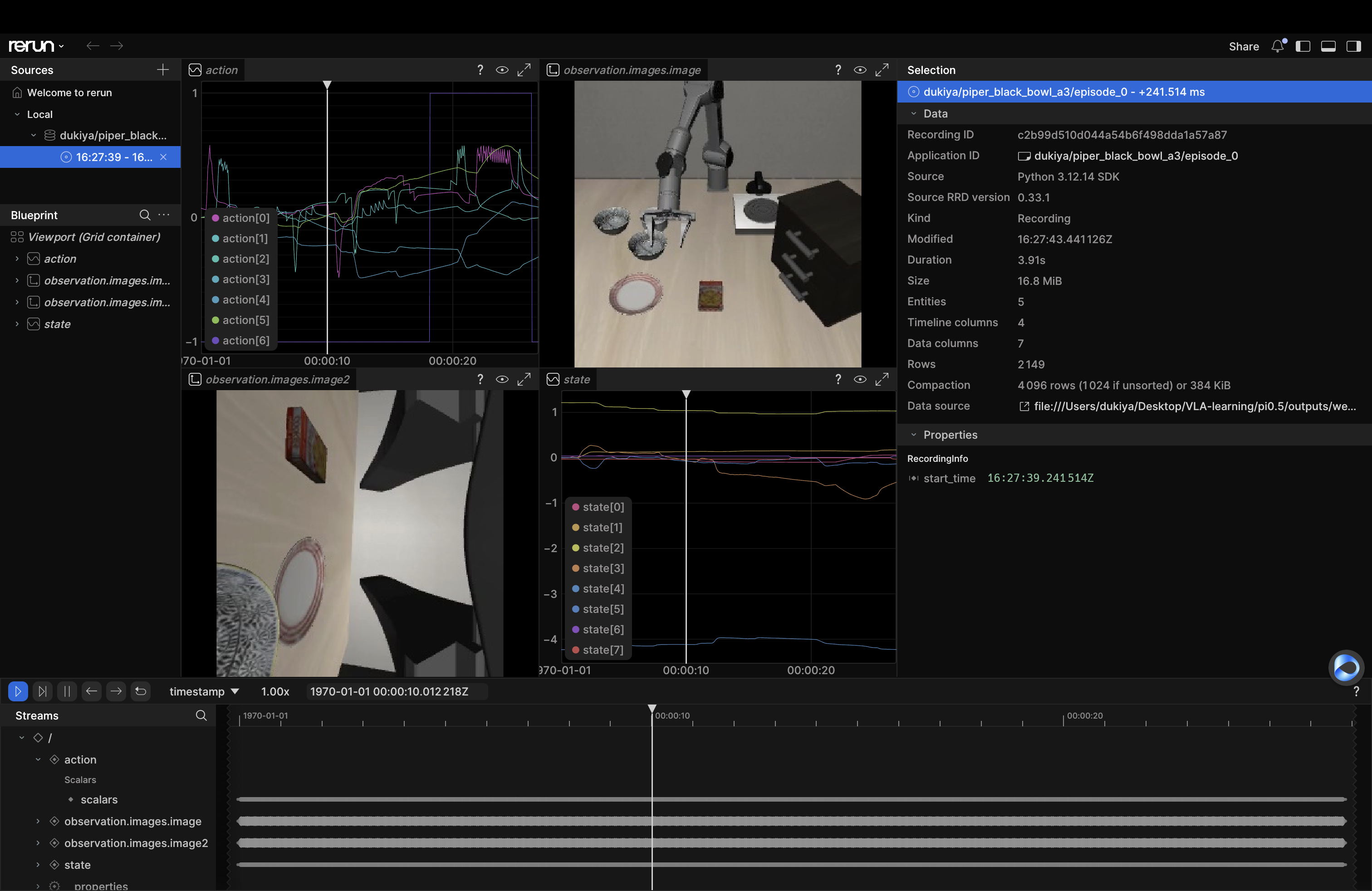
证明数据转换成功,能被lerobot识别。
总结
本文介绍了键盘遥操作采集piper黑碗任务数据集,设计遥操作的实现和数据转换。
文章仅做学习分享,如有谬误,欢迎指正。



评论前必须登录!
注册