 网硕互联帮助中心
在 CryptoJS 库中,Base64、MD5 和 AES 是三种不同性质的编码或加密方法,它们在原理、用途和安全性上有本质区别
特性
Base64 不安全(仅编码)常用于数据格式转换,输出形式是文本字符串
MD5 不安全(哈希) 常用于完整性校验、旧密码存储,输出形式是32位十六进制字符串
AES 安全(对称加密)常用于保密数据传输与存储,输出形式是二进制数据
安装 crypto-js
npm install crypto-js –save
Vue 3 组件中使用crypto-js进行 AES 加密和解密
<template>
<div>
<input v-model="plaintext" placeholder="输入要加密的文本" />
<button @click="encrypt">加密</button>
<button @click="decrypt">解密</button>
<p>加密后的文本: {{ ciphertext }}</p>
<p>解密后的文本: {{ decryptedText }}</p>
</div>
</template>
<script setup>
import { ref } from 'vue'
import CryptoJS from 'crypto-js'
defineProps({
msg: String,
})
const count = ref(0)
// 1. 定义响应式数据(替代选项式API的data)
const plaintext = ref('') // 原始文本
const ciphertext = ref('') // 加密后的文本
const decryptedText = ref('') // 解密后的文本
// 2. 定义加密函数(替代选项式API的methods)
const encrypt = () => {
const secretKey = 'your-secret-key' // 建议替换为自己的密钥
// AES加密并转换为字符串
ciphertext.value = CryptoJS.AES.encrypt(
plaintext.value,
secretKey,
).toString()
}
// 3. 定义解密函数
const decrypt = () => {
const secretKey = 'your-secret-key' // 必须和加密密钥一致
try {
// 解密并转换为UTF8字符串
const bytes = CryptoJS.AES.decrypt(ciphertext.value, secretKey)
decryptedText.value = bytes.toString(CryptoJS.enc.Utf8)
} catch (error) {
// 捕获解密失败的异常(比如密钥错误、密文无效)
decryptedText.value = '解密失败:密文无效或密钥错误'
console.error('解密出错:', error)
}
}
</script>
<style scoped>
.read-the-docs {
color: #888;
}
</style>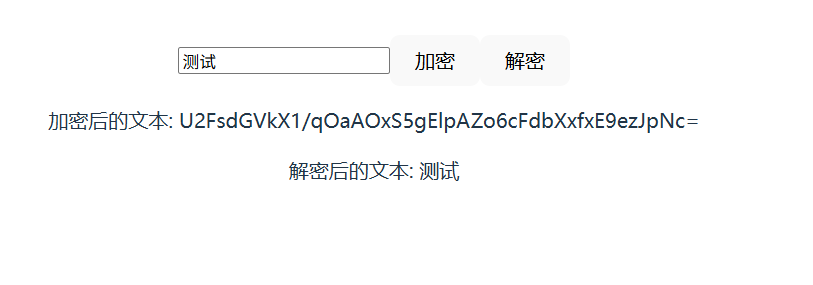
封装加密工具(推荐放在 src/utils/crypto.js)
1.导入 crypto-js 库的核心模块,该库封装了所有主流加密算法(AES、MD5、SHA 等),无需自己实现复杂的加密逻辑;
2.必须通过 npm install crypto-js 安装该依赖,否则会报 “找不到模块” 错误;
ciphertext:加密后的密文字符串(encryptAES 的返回值)
key:解密密钥(必须和加密密钥完全一致,否则解密失败)
***!!!注意解密方法,参数和加密对应:密文、解析后的密钥、相同的模式 / 填充配置;
AES 加密核心规则密钥长度要求:
- AES-128:密钥必须 16 位字符串(比如 1234567890123456);
- AES-256:密钥必须 32 位字符串(比如 12345678901234561234567890123456);
- 若密钥长度不符合,crypto-js 不会报错,但解密会失败(返回空 / 乱码);
填充的作用:
- AES 是分组加密,每次加密 16 字节(128 位)的明文块;
- 若明文长度不是 16 的整数倍(比如 “测试” 是 4 字节),必须填充到 16 字节;
- PKCS7 填充规则:缺 N 字节就填充 N 个值为 N 的字节(比如缺 12 字节,填充 12 个 0x0C);
- 解密时会自动移除填充的字节,还原原始长度。
import CryptoJS from 'crypto-js'
// AES/ECB/PKCS7Padding 加密函数 encryptAES
export function encryptAES(text, key) {
// 步骤1:将密钥转换为 UTF8 编码的 WordArray 格式
const keyHex = CryptoJS.enc.Utf8.parse(key)
// 步骤2:执行 AES 加密
const encrypted = CryptoJS.AES.encrypt(text, keyHex, {
mode: CryptoJS.mode.ECB,
padding: CryptoJS.pad.Pkcs7
})
// 步骤3:返回加密后的字符串
return encrypted.toString()
}
// AES/ECB/PKCS7Padding 解密函数 decryptAES
export function decryptAES(ciphertext, key) {
// 步骤1:将密钥转换为 UTF8 编码的 WordArray 格式(和加密一致)
const keyHex = CryptoJS.enc.Utf8.parse(key)
// 步骤2:执行 AES 解密
const decrypted = CryptoJS.AES.decrypt(ciphertext, keyHex, {
// 解密模式必须和加密一致
mode: CryptoJS.mode.ECB,
// 填充方式必须和加密一致
padding: CryptoJS.pad.Pkcs7
})
// 步骤3:将解密后的二进制数据转回 UTF8 字符串
return decrypted.toString(CryptoJS.enc.Utf8)
}
Vue3 组件中使用(组合式 API)
<template>
<div>
<input v-model="plaintext" placeholder="输入要加密的文本" />
<button @click="encrypt">加密</button>
<button @click="decrypt">解密</button>
<p>加密后的文本: {{ ciphertext }}</p>
<p>解密后的文本: {{ decryptedText }}</p>
</div>
</template>
<script setup>
import { ref } from 'vue'
// 引入封装的加解密方法(确保@别名已配置,crypto.js文件存在)
// Vite 不会默认识别 @ 作为 src 目录的别名,需要手动配置 vite.config.js
import { encryptAES, decryptAES } from '@/utils/crypto'
defineProps({
msg: String,
})
const count = ref(0)
const plaintext = ref('') // 原始文本
const ciphertext = ref('') // 加密后的文本
const decryptedText = ref('') // 解密后的文本
// 1. 加密方法(点击加密按钮触发)
const encrypt = () => {
// 校验:确保输入内容不为空
if (!plaintext.value.trim()) {
alert('请输入要加密的文本!')
return
}
// 定义加密密钥(建议16位或32位,实际项目不要硬编码)
const secretKey = '1234567890123456' // 16位密钥(AES-128)
try {
// 调用encryptAES方法加密
ciphertext.value = encryptAES(plaintext.value, secretKey)
console.log(ciphertext.value)
decryptedText.value = '' // 加密后清空解密结果
} catch (error) {
alert('加密失败:' + error.message)
console.error('加密错误:', error)
}
}
// 2. 解密方法(点击解密按钮触发)
const decrypt = () => {
// 校验:确保有加密后的密文
if (!ciphertext.value.trim()) {
alert('请先加密生成密文!')
return
}
// 解密密钥必须和加密密钥一致
const secretKey = '1234567890123456'
try {
// 调用decryptAES方法解密
decryptedText.value = decryptAES(ciphertext.value, secretKey)
} catch (error) {
alert('解密失败(密钥错误或密文无效):' + error.message)
console.error('解密错误:', error)
}
}
</script>
<style scoped>
.read-the-docs {
color: #888;
}
/* 简单美化样式,可选 */
div {
padding: 20px;
}
input {
padding: 8px;
width: 300px;
margin-right: 10px;
}
button {
padding: 8px 16px;
margin: 0 5px;
cursor: pointer;
background: #42b983;
color: white;
border: none;
border-radius: 4px;
}
button:hover {
background: #359469;
}
p {
margin: 10px 0;
color: #333;
}
</style>





评论前必须登录!
注册