 网硕互联帮助中心
hello~这里是维构lbs智能定位,如果有项目需求和技术交流欢迎来私信我们~点击文章最下方可获取免费获取技术文档和解决方案
患者安全与行为管理难?关键区域人员管控难?蓝牙信标能做到精准定位,实现智慧医院的美好图景,让医院管理真正实现“看得见、管得准、响应快”!本文将从原理到核心功能展开论述。
一、基于蓝牙信标技术医院患者定位原理
蓝牙信标作为一种小型、低功耗、低成本的无线信号发射装置,仅单向广播自身存在信息,不接收或连接其他设备。智能手机等终端接收到信号后,通过解析信号强度(RSSI)估算与信标的距离,实现区域级定位。
完整后端代码:
from flask import Flask, request,
jsonify
import
sqlite3
import
math
from datetime import
datetime
# 初始化Flask应用
app
= Flask(__name__)
# ———————- 数据库初始化(信标表+指纹库表)———————-
def init_db():
"""创建数据库和两张核心表:1.信标基础信息表 2.定位指纹库表"""
conn
= sqlite3.connect('hospital_beacon.db')
cursor
= conn.cursor()
# 1. 信标基础信息表(存储信标ID与物理位置的映射)
cursor
.execute(
'''
CREATE TABLE IF NOT EXISTS beacon_info (
id INTEGER PRIMARY KEY AUTOINCREMENT,
beacon_unique_id TEXT UNIQUE NOT NULL, — 信标唯一ID(蓝牙UUID+Major+Minor,全局唯一)
physical_location TEXT NOT NULL, — 物理位置描述(如:住院部B栋东侧楼梯口)
x REAL DEFAULT 0, — 信标横坐标(可选,用于三角定位)
y REAL DEFAULT 0, — 信标纵坐标(可选,用于三角定位)
install_time DATETIME DEFAULT CURRENT_TIMESTAMP, — 部署时间
status INTEGER DEFAULT 1 — 状态:1=正常,0=故障
)
'''
)
# 2. 定位指纹库表(离线采集的信标RSSI指纹,用于指纹定位)
# 每条记录对应一个物理位置的「信标ID-RSSI」集合(指纹)
cursor
.execute(
'''
CREATE TABLE IF NOT EXISTS location_fingerprint (
id INTEGER PRIMARY KEY AUTOINCREMENT,
physical_location TEXT NOT NULL, — 物理位置描述(与beacon_info关联)
beacon_rssi_map TEXT NOT NULL, — 信标ID与对应RSSI的映射(JSON格式字符串)
collect_time DATETIME DEFAULT CURRENT_TIMESTAMP — 指纹采集时间
)
'''
)
# 插入测试数据(方便演示,实际需后台录入或批量导入)
try:
# 测试信标1
cursor
.execute('INSERT INTO beacon_info (beacon_unique_id, physical_location, x, y) VALUES (?, ?, ?, ?)',
('789', '住院部B栋东侧楼梯口', 10.0, 20.0))
# 测试信标2
cursor
.execute('INSERT INTO beacon_info (beacon_unique_id, physical_location, x, y) VALUES (?, ?, ?, ?)',
('123', '内科门诊门口', 30.0, 20.0))
# 测试指纹库(住院部B栋东侧楼梯口附近的指纹)
cursor
.execute('INSERT INTO location_fingerprint (physical_location, beacon_rssi_map) VALUES (?, ?)',
('住院部B栋东侧楼梯口', '{"789": -50, "123": -70}'))
conn
.commit()
except sqlite3.IntegrityError:
# 避免重复插入测试数据
pass
finally:
conn
.close()
# 启动时初始化数据库
init_db
()
# ———————- 核心接口 ———————-
@app.route('/api/beacon/query', methods=['GET'])
def query_beacon():
"""查询单个信标信息(根据beacon_unique_id)"""
beacon_id
= request.args.get('beacon_id')
if not beacon_id:
return jsonify({'code': 400, 'msg': '缺少信标ID参数', 'data': None})
conn
= sqlite3.connect('hospital_beacon.db')
cursor
= conn.cursor()
cursor
.execute('SELECT * FROM beacon_info WHERE beacon_unique_id = ?', (beacon_id,))
result
= cursor.fetchone()
conn
.close()
if not result:
return jsonify({'code': 404, 'msg': '信标不存在', 'data': None})
# 构造返回数据
beacon_data
= {
'id': result[0],
'beacon_unique_id': result[1],
'physical_location': result[2],
'x': result[3],
'y': result[4],
'install_time': result[5],
'status': result[6]
}
return jsonify({'code': 200, 'msg': '查询成功', 'data': beacon_data})
@app.route('/api/location/fingerprint', methods=['POST'])
def fingerprint_location():
"""指纹定位核心接口:接收前端提交的信标RSSI列表,匹配指纹库返回物理位置"""
try:
# 接收前端提交的数据(JSON格式:{"beacon_rssi_map": {"789": -52, "123": -72}})
req_data
= request.get_json()
current_beacon_rssi
= req_data.get('beacon_rssi_map')
if not current_beacon_rssi or not isinstance(current_beacon_rssi, dict):
return jsonify({'code': 400, 'msg': '无效的信标RSSI数据', 'data': None})
# 1. 从指纹库中读取所有有效指纹
conn
= sqlite3.connect('hospital_beacon.db')
cursor
= conn.cursor()
cursor
.execute('SELECT physical_location, beacon_rssi_map FROM location_fingerprint')
fingerprints
= cursor.fetchall()
conn
.close()
if not fingerprints:
return jsonify({'code': 404, 'msg': '指纹库为空,无法进行定位', 'data': None})
# 2. 核心匹配逻辑:计算当前RSSI与指纹库中每条记录的「相似度」(误差平方和最小)
min_error
= float('inf') # 最小误差值
best_location
= None # 匹配到的最佳物理位置
for location, fingerprint_rssi_str in fingerprints:
# 解析指纹库中的RSSI映射(字符串转字典)
import
json
try:
fingerprint_rssi
= json.loads(fingerprint_rssi_str)
except:
continue
# 计算误差平方和(只对比双方都存在的信标ID)
error_sum
= 0
common_beacons
= set(current_beacon_rssi.keys()) & set(fingerprint_rssi.keys())
if not common_beacons:
continue
for beacon_id in common_beacons:
current_rssi
= int(current_beacon_rssi[beacon_id])
fingerprint_rssi_val
= int(fingerprint_rssi[beacon_id])
error_sum
+= (current_rssi – fingerprint_rssi_val) ** 2
# 更新最小误差和最佳位置
if error_sum < min_error:
min_error
=
error_sum
best_location
=
location
# 3. 返回定位结果
if best_location:
return jsonify({'code': 200, 'msg': '定位成功', 'data': {'physical_location': best_location}})
else:
return jsonify({'code': 500, 'msg': '未匹配到有效位置', 'data': None})
except Exception as e:
return jsonify({'code': 500, 'msg': f'服务器异常:{str(e)}', 'data': None})
@app.route('/api/location/triangle', methods=['POST'])
def triangle_location():
"""三角定位核心接口(补充):根据信标坐标和RSSI计算用户位置"""
try:
# 接收前端数据:{"beacon_list": [{"id": "789", "rssi": -50}, {"id": "123", "rssi": -70}]}
req_data
= request.get_json()
beacon_list
= req_data.get('beacon_list')
if not beacon_list or not isinstance(beacon_list, list):
return jsonify({'code': 400, 'msg': '无效的信标数据', 'data': None})
# 1. 批量查询信标坐标和参考RSSI(RSSI0:1米处的信号强度,默认-40,实际需离线采集)
beacon_coords
= {}
for beacon in beacon_list:
beacon_id
= beacon.get('id')
if not beacon_id:
continue
conn
= sqlite3.connect('hospital_beacon.db')
cursor
= conn.cursor()
cursor
.execute('SELECT x, y FROM beacon_info WHERE beacon_unique_id = ?', (beacon_id,))
result
= cursor.fetchone()
conn
.close()
if result:
beacon_coords
[beacon_id] = {
'x': result[0],
'y': result[1],
'rssi': beacon.get('rssi', -100)
}
if len(beacon_coords) < 3:
return jsonify({'code': 400, 'msg': '三角定位需要至少3个有效信标', 'data': None})
# 2. RSSI转距离(经典对数距离路径损耗模型)
# 公式:d = 10^((RSSI0 – RSSI) / (10 * n))
# RSSI0:1米处信号强度(默认-40),n:路径损耗指数(室内取2.5~3.5,这里取3.0)
RSSI0
= -40
n
= 3.0
beacon_distances
= []
for beacon_id, data in beacon_coords.items():
rssi
= data['rssi']
if rssi == 0:
distance
= 0
else:
distance
= math.pow(10, (RSSI0 – rssi) / (10 * n))
beacon_distances
.append({
'x': data['x'],
'y': data['y'],
'd':
distance
})
# 3. 三点定位解算(简化版,基于平面直角坐标系)
A
, B, C = beacon_distances[0], beacon_distances[1], beacon_distances[2]
# 解算公式(推导略,适合新手直接使用)
x1
, y1, d1 = A['x'], A['y'], A['d']
x2
, y2, d2 = B['x'], B['y'], B['d']
x3
, y3, d3 = C['x'], C['y'], C['d']
# 避免除零错误
denominator
= 2 * ((y3 – y1) * (x2 – x1) – (y2 – y1) * (x3 – x1))
if denominator == 0:
return jsonify({'code': 500, 'msg': '信标布局不合理,无法解算', 'data': None})
# 计算用户坐标(x, y)
x
= (
(y3 – y1) * (x2**2 – x1**2 + y2**2 – y1**2 + d1**2 – d2**2)
– (y2 – y1) * (x3**2 – x1**2 + y3**2 – y1**2 + d1**2 – d3**2)
) /
denominator
y
= (
(x2 – x1) * (x3**2 – x1**2 + y3**2 – y1**2 + d1**2 – d3**2)
– (x3 – x1) * (x2**2 – x1**2 + y2**2 – y1**2 + d1**2 – d2**2)
) /
denominator
# 4. 匹配最近的物理位置(简化:返回坐标+最近的信标位置)
conn
= sqlite3.connect('hospital_beacon.db')
cursor
= conn.cursor()
cursor
.execute('SELECT physical_location, x, y FROM beacon_info')
all_beacons
= cursor.fetchall()
conn
.close()
nearest_location
= None
min_dist
= float('inf')
for loc, bx, by in all_beacons:
dist
= math.hypot(x – bx, y – by)
if dist < min_dist:
min_dist
=
dist
nearest_location
=
loc
return jsonify({
'code': 200,
'msg': '定位成功',
'data': {
'user_coords': {'x': round(x, 2), 'y': round(y, 2)},
'nearest_physical_location':
nearest_location
}
})
except Exception as e:
return jsonify({'code': 500, 'msg': f'服务器异常:{str(e)}', 'data': None})
# 启动服务
if __name__ == '__main__':
app
.run(host='0.0.0.0', port=5000, debug=True)

二、基于蓝牙信标技术医院患者定位的核心功能
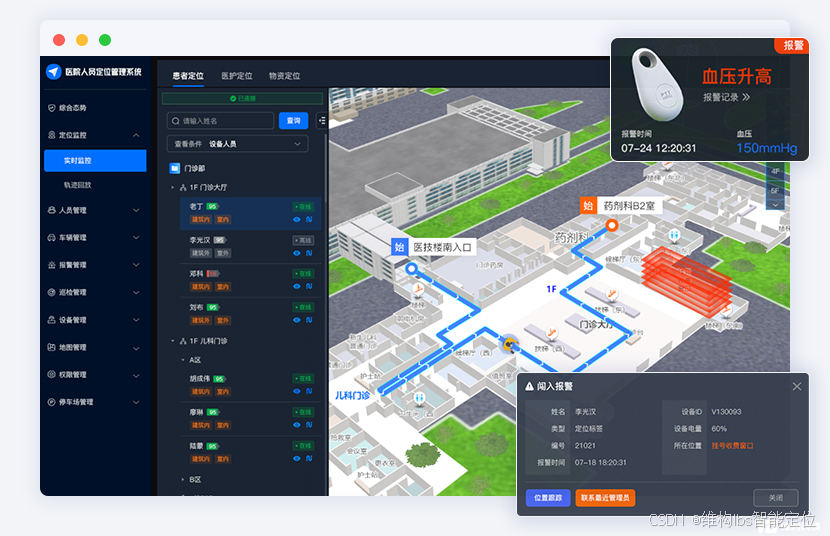
1.患者安全与智能监护
实时定位与电子围栏:动态追踪特殊患者位置,越界、滞留、聚集自动告警。
一键SOS紧急呼叫:患者触发求助,管理平台即时接收位置信息并联动响应。
轨迹追溯与行为分析:完整还原人员历史活动轨迹,为优化服务流程提供数据支撑。
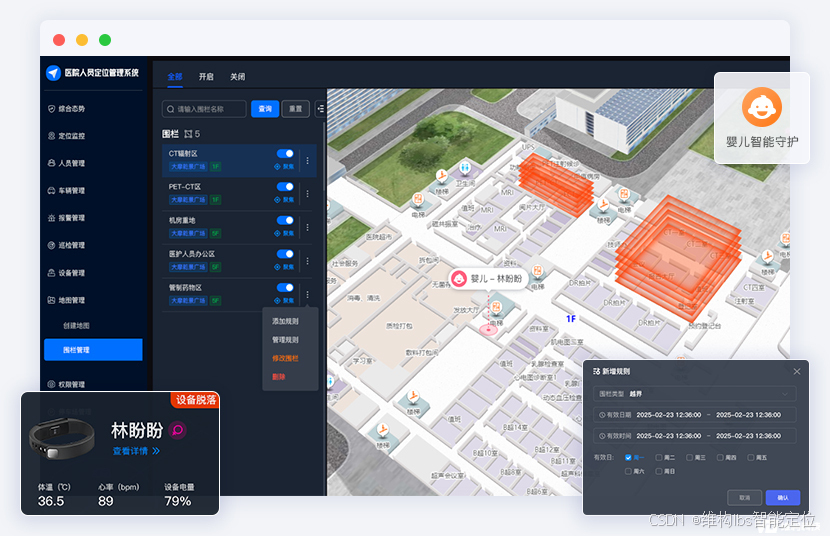
2.母婴安全保障体系
新生儿防盗定位:实时监控婴儿位置,非法离床、腕带剪断即时告警,杜绝安全隐患。
区域智能管控:对产房、新生儿室等重点区域实现电子围栏防护。
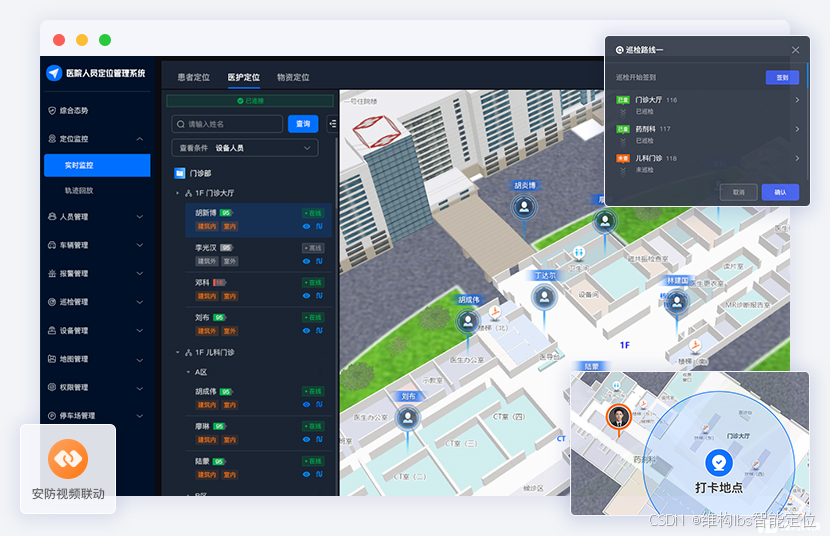
3.医护管理与运营增效
医护人员定位与调度:快速定位医护位置,实现紧急事件一键调度、就近支援。
智能巡检与签到:规范巡检路线与在岗管理,自动生成到岗记录与工作量报表。
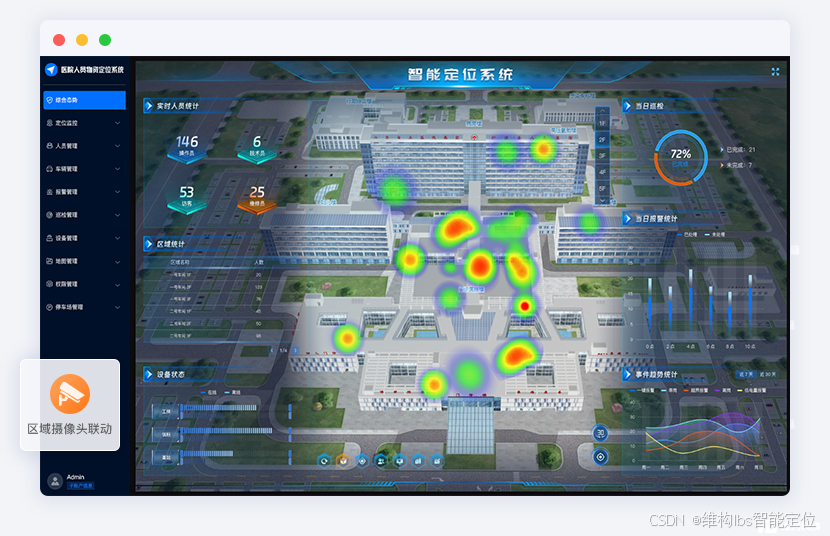
4.全院可视化与决策支持
人流量热力图与分析看板:实时呈现区域人流密度,辅助疏导分流与资源调配。
安防联动与应急指挥:与区域内的摄像头联动,突发事件快速定位与可视化处置。
蓝牙信标作为医院患者定位的“神经末梢”,是实现低成本、高覆盖室内定位服务的关键基础设施。它不仅提供精准的导航路标,更是隐形的安全守护者,通过优化人员流动管理、提升应急响应效率,为构建安全、高效、人性化的智慧医院提供核心支撑。
希望本篇对大家有所帮助~点击下方可获取免费获取技术文档和解决方案↓↓↓↓↓↓↓




评论前必须登录!
注册