 网硕互联帮助中心
一、简介:
HS12864TG10B 型LCD液晶显示屏可以显示 128 列*64 行 点阵单色图片,或显示 8 个/行*4 行 16*16 点阵的汉字,或显示 16 个/行*8 行 8*8 点阵的英文、数字、符 号。输入指令强,可组合成各种输入、显示、位移方式以满足不同的要求。可广泛应用于各种仪器仪表、PM2.5 检测仪,POS 刷卡机,考勤系统、门禁系统等。
二、主要技术特性:
△ 产品薄、轻、结构牢、FPC、插接工艺。
△ COG 工艺,IC 采用 ST7567,功能强大,稳定性好。
△ 显示内容:
●128*64 点阵单色图片;
●可选用 16*16 点阵或其他点阵的图片来自编汉字,按照 16*16 点阵汉字来计算可显示 8 字/行*4 行。
△ 指令功能强:可组合成各种输入、显示、移位方式以满足不同的要求;
△ 接口简单方便:串行接口。
三、基本参数:
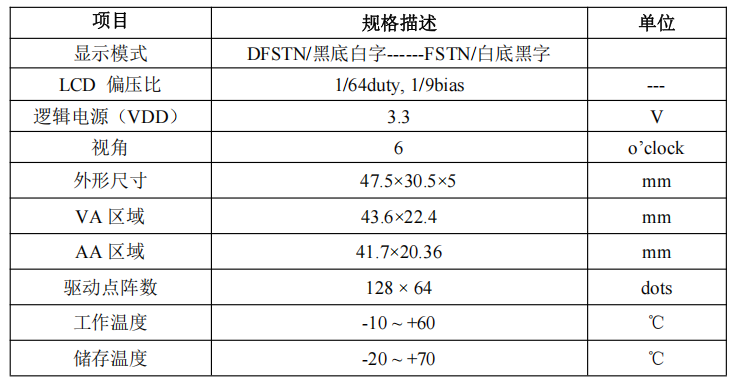
四、外形尺寸图:
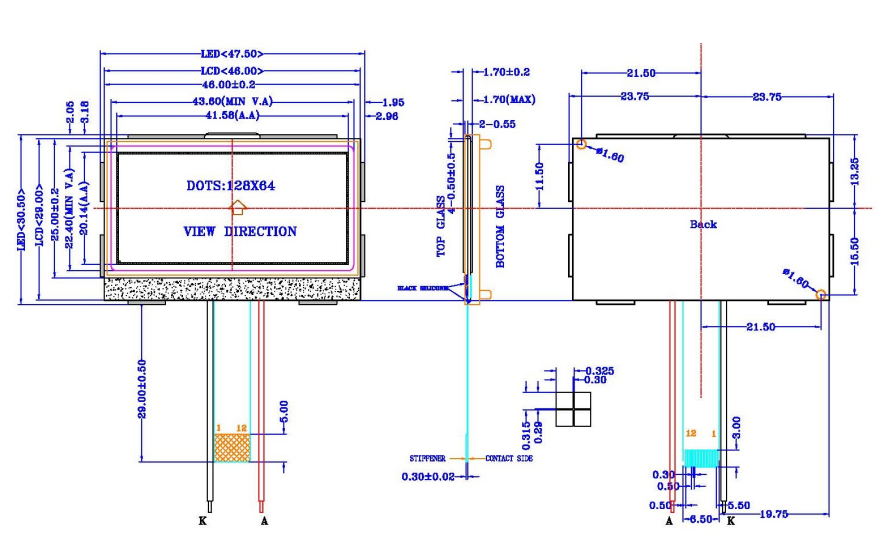
五、接口定义:
| 1 | VG | LCD倍压输出,与VSS之间接一个电容 |
| 2 | XVO | 倍压电路,两线之间接电容 |
| 3 | VO | 倍压电路,两线之间接电容 |
| 4 | VO | 倍压电路,两线之间接电容 |
| 5 | XVO | 倍压电路,两线之间接电容 |
| 6 | VSS | 接地 |
| 7 | VDD | 3.3V供电 |
| 8 | D7 (SDA) | 串行数据输入,高/低电平 |
| 9 | D6 (SCL) | 串行时钟输入,高/低电平 |
| 10 | A0 | 指令和数据选择端口:A0=H时为显示数据,A0=L时为控制指令 |
| 11 | RES | 硬件复位输入引脚,低电平复位 |
| 12 | CS | 片选输入引脚,低电平使能 |
六、典型应用电路:
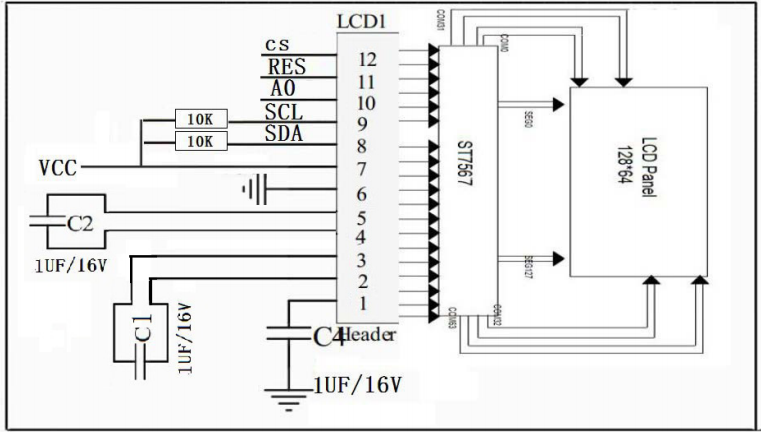
七、通用指令表:
| 显示开关 (display on/off) | 0 | 0 | 1 | 0 | 1 | 0 | 1 | 1 | 1 | D | D=1:显示开 D=0:显示关 |
| 设置起始行 (set start line) | 0 | 0 | 0 | 1 | S5 | S4 | S3 | S2 | S1 | S0 | 设置显示起始行 |
| 设置页地址 (page address) | 0 | 0 | 1 | 1 | Y3 | Y2 | Y1 | Y0 | 0 | 0 | 设置页地址 |
| 设置列地址(高位) | 0 | 0 | 0 | 0 | X7 | X6 | X5 | X4 | 0 | 0 | 设置列地址高4位 |
| 设置列地址(低位) | 0 | 0 | 0 | 0 | X3 | X2 | X1 | X0 | 0 | 0 | 设置列地址低4位 |
| 读状态 (read status) | 0 | 1 | 0 | M/X | D | RST | 0 | 0 | 0 | 0 | 读取IC状态 |
| 写数据 (write data) | 1 | 0 | D7 | D6 | D5 | D4 | D3 | D2 | D1 | D0 | 向DDRAM写入数据 |
| 读数据 (read data) | 1 | 1 | D7 | D6 | D5 | D4 | D3 | D2 | D1 | D0 | 从DDRAM读取数据 |
| SEG扫描方向 (seg direction) | 0 | 0 | 1 | 0 | 1 | 0 | 0 | 0 | 0 | MX | MX=1:左右颠倒 MX=0:正常 |
| 反显 (inverse display) | 0 | 0 | 1 | 0 | 1 | 0 | 0 | 1 | 1 | INV | INV=1:反显 INV=0:正常 |
| 全屏点亮 (all pixel on) | 0 | 0 | 1 | 0 | 1 | 0 | 0 | 1 | 0 | AP | AP=1:全亮 AP=0:正常 |
| 偏置选择 (bias select) | 0 | 0 | 1 | 0 | 1 | 0 | 0 | 1 | 1 | BS | BS=0:1/9 BS=1:1/7(1/65占空比) |
| 读-改-写模式 (read-modify-write) | 0 | 0 | 1 | 1 | 1 | 0 | 0 | 0 | 0 | 0 | 行地址增量:读=0,写=+1 |
| 读-改-写结束 (end) | 0 | 0 | 1 | 1 | 1 | 0 | 1 | 1 | 1 | 0 | 退出读-改-写模式 |
| 复位 (reset) | 0 | 0 | 1 | 1 | 1 | 0 | 0 | 0 | 0 | 0 | 软件复位 |
| COM扫描方向 (com direction) | 0 | 0 | 1 | 1 | 1 | 0 | 0 | MY | 0 | 0 | MY=1:上下颠倒 MY=0:正常 |
| 电源控制 (power control) | 0 | 0 | 0 | 0 | 1 | 0 | 1 | VB | VR | VF | 电源管理设置 |
| RR设置 (regulation ratio) | 0 | 0 | 0 | 0 | 0 | 1 | 0 | RR2 | RR1 | RR0 | 选择电阻调节范围 |
| EV设置 (set EV) | 0 | 0 | 0 | 0 | 0 | 1 | 0 | EV3 | EV2 | EV1 | 电子音量等级设置 |
| 倍压设置 (set booster) | 0 | 0 | 0 | 0 | 0 | 1 | 0 | EV3 | EV2 | EV1 | BL=0:4倍 BL=1:5倍 |
| 省电模式 (power save) | 0 | 0 | 0 | 0 | 0 | 0 | 1 | 0 | 0 | 0 | 显示关闭 + 全屏点亮 |
| 空操作 (nop) | 0 | 0 | 1 | 1 | 1 | 1 | 0 | 0 | 0 | 0 | 不执行操作 |
| 测试指令 (test) | 0 | 0 | 1 | 1 | 1 | 1 | 1 | 0 | 1 | 1 | 测试模式 |
八、头文件:
#ifndef __ST7567_H
#define __ST7567_H
#include "main.h"
#include <stdint.h>
// 屏幕尺寸定义
#define LCD_WIDTH 128
#define LCD_HEIGHT 64
#define LCD_PAGES 8 // 64/8 = 8页
// 命令定义
#define DISPLAY_ON 0xAF
#define DISPLAY_OFF 0xAE
#define SET_START_LINE 0x40
#define PAGE_ADDRESS 0xB0
#define COLUMN_ADDRESS 0x10
#define ADC_NORMAL 0xA0
#define ADC_REVERSE 0xA1
#define DISPLAY_NORMAL 0xA6
#define DISPLAY_REVERSE 0xA7
#define DISPLAY_ALL_ON 0xA5
#define DISPLAY_ALL_OFF 0xA4
#define LCD_BIAS_9 0xA2
#define LCD_BIAS_7 0xA3
#define RESET 0xE2
#define COM_NORMAL 0xC0
#define COM_REVERSE 0xC8
#define POWER_CTRL 0x28
#define REG_RES_RATIO 0x20
#define ELECTRONIC_VOLUME 0x81
#define BOOSTER_RATIO 0xF8
#define READ_MODIFY_WRITE 0xE0
#define END 0xEE
#define NOP 0xE3
// 引脚定义(根据实际硬件连接修改)
#define LCD_CS_PORT GPIOA
#define LCD_CS_PIN GPIO_PIN_4
#define LCD_RESET_PORT GPIOA
#define LCD_RESET_PIN GPIO_PIN_3
#define LCD_A0_PORT GPIOA
#define LCD_A0_PIN GPIO_PIN_2
#define LCD_SCL_PORT GPIOA
#define LCD_SCL_PIN GPIO_PIN_5
#define LCD_SDA_PORT GPIOA
#define LCD_SDA_PIN GPIO_PIN_7
// 函数声明
void LCD_Init(void);
void LCD_Clear(void);
void LCD_Refresh(void);
void LCD_SetContrast(uint8_t contrast);
void LCD_SetCursor(uint8_t x, uint8_t y);
void LCD_PutPixel(uint8_t x, uint8_t y, uint8_t color);
void LCD_DrawLine(uint8_t x1, uint8_t y1, uint8_t x2, uint8_t y2, uint8_t color);
void LCD_DrawRectangle(uint8_t x1, uint8_t y1, uint8_t x2, uint8_t y2, uint8_t color);
void LCD_DrawFilledRectangle(uint8_t x1, uint8_t y1, uint8_t x2, uint8_t y2, uint8_t color);
void LCD_DrawCircle(uint8_t x0, uint8_t y0, uint8_t r, uint8_t color);
void LCD_PrintChar(uint8_t x, uint8_t y, char ch);
void LCD_PrintString(uint8_t x, uint8_t y, const char *str);
void LCD_DrawBitmap(uint8_t x, uint8_t y, uint8_t width, uint8_t height, const uint8_t *bitmap);
// 底层硬件接口函数
static void LCD_WriteCommand(uint8_t cmd);
static void LCD_WriteData(uint8_t data);
static void LCD_Delay(uint32_t delay);
#endif /* __ST7567_H */
九、源文件:
#include "st7567.h"
// 显示缓存(128×64 = 1024 bits = 128 bytes x 8 pages)
static uint8_t framebuffer[LCD_PAGES][LCD_WIDTH];
// 6×8 ASCII字符集(基本字符)
static const uint8_t font6x8[][6] = {
{0x00, 0x00, 0x00, 0x00, 0x00, 0x00}, // 空格
{0x00, 0x00, 0x5F, 0x00, 0x00, 0x00}, // !
{0x00, 0x03, 0x00, 0x03, 0x00, 0x00}, // "
{0x14, 0x7F, 0x14, 0x7F, 0x14, 0x00}, // #
{0x24, 0x2A, 0x7F, 0x2A, 0x12, 0x00}, // $
{0x23, 0x13, 0x08, 0x64, 0x62, 0x00}, // %
{0x36, 0x49, 0x55, 0x22, 0x50, 0x00}, // &
{0x00, 0x05, 0x03, 0x00, 0x00, 0x00}, // '
{0x00, 0x1C, 0x22, 0x41, 0x00, 0x00}, // (
{0x00, 0x41, 0x22, 0x1C, 0x00, 0x00}, // )
{0x14, 0x08, 0x3E, 0x08, 0x14, 0x00}, // *
{0x08, 0x08, 0x3E, 0x08, 0x08, 0x00}, // +
{0x00, 0x50, 0x30, 0x00, 0x00, 0x00}, // ,
{0x08, 0x08, 0x08, 0x08, 0x08, 0x00}, // –
{0x00, 0x60, 0x60, 0x00, 0x00, 0x00}, // .
{0x20, 0x10, 0x08, 0x04, 0x02, 0x00}, // /
{0x3E, 0x51, 0x49, 0x45, 0x3E, 0x00}, // 0
{0x00, 0x42, 0x7F, 0x40, 0x00, 0x00}, // 1
{0x42, 0x61, 0x51, 0x49, 0x46, 0x00}, // 2
{0x21, 0x41, 0x45, 0x4B, 0x31, 0x00}, // 3
{0x18, 0x14, 0x12, 0x7F, 0x10, 0x00}, // 4
{0x27, 0x45, 0x45, 0x45, 0x39, 0x00}, // 5
{0x3C, 0x4A, 0x49, 0x49, 0x30, 0x00}, // 6
{0x01, 0x71, 0x09, 0x05, 0x03, 0x00}, // 7
{0x36, 0x49, 0x49, 0x49, 0x36, 0x00}, // 8
{0x06, 0x49, 0x49, 0x29, 0x1E, 0x00}, // 9
{0x00, 0x36, 0x36, 0x00, 0x00, 0x00}, // :
{0x00, 0x56, 0x36, 0x00, 0x00, 0x00}, // ;
{0x08, 0x14, 0x22, 0x41, 0x00, 0x00}, // <
{0x14, 0x14, 0x14, 0x14, 0x14, 0x00}, // =
{0x00, 0x41, 0x22, 0x14, 0x08, 0x00}, // >
{0x02, 0x01, 0x51, 0x09, 0x06, 0x00}, // ?
{0x32, 0x49, 0x79, 0x41, 0x3E, 0x00}, // @
{0x7E, 0x11, 0x11, 0x11, 0x7E, 0x00}, // A
{0x7F, 0x49, 0x49, 0x49, 0x36, 0x00}, // B
{0x3E, 0x41, 0x41, 0x41, 0x22, 0x00}, // C
{0x7F, 0x41, 0x41, 0x22, 0x1C, 0x00}, // D
{0x7F, 0x49, 0x49, 0x49, 0x41, 0x00}, // E
{0x7F, 0x09, 0x09, 0x09, 0x01, 0x00}, // F
{0x3E, 0x41, 0x49, 0x49, 0x7A, 0x00}, // G
{0x7F, 0x08, 0x08, 0x08, 0x7F, 0x00}, // H
{0x00, 0x41, 0x7F, 0x41, 0x00, 0x00}, // I
{0x20, 0x40, 0x41, 0x3F, 0x01, 0x00}, // J
{0x7F, 0x08, 0x14, 0x22, 0x41, 0x00}, // K
{0x7F, 0x40, 0x40, 0x40, 0x40, 0x00}, // L
{0x7F, 0x02, 0x0C, 0x02, 0x7F, 0x00}, // M
{0x7F, 0x04, 0x08, 0x10, 0x7F, 0x00}, // N
{0x3E, 0x41, 0x41, 0x41, 0x3E, 0x00}, // O
{0x7F, 0x09, 0x09, 0x09, 0x06, 0x00}, // P
{0x3E, 0x41, 0x51, 0x21, 0x5E, 0x00}, // Q
{0x7F, 0x09, 0x19, 0x29, 0x46, 0x00}, // R
{0x46, 0x49, 0x49, 0x49, 0x31, 0x00}, // S
{0x01, 0x01, 0x7F, 0x01, 0x01, 0x00}, // T
{0x3F, 0x40, 0x40, 0x40, 0x3F, 0x00}, // U
{0x1F, 0x20, 0x40, 0x20, 0x1F, 0x00}, // V
{0x3F, 0x40, 0x38, 0x40, 0x3F, 0x00}, // W
{0x63, 0x14, 0x08, 0x14, 0x63, 0x00}, // X
{0x07, 0x08, 0x70, 0x08, 0x07, 0x00}, // Y
{0x61, 0x51, 0x49, 0x45, 0x43, 0x00}, // Z
// 可以继续添加更多字符…
};
// 底层硬件控制函数
static void LCD_Delay(uint32_t delay)
{
HAL_Delay(delay);
}
static void LCD_CS_Low(void)
{
HAL_GPIO_WritePin(LCD_CS_PORT, LCD_CS_PIN, GPIO_PIN_RESET);
}
static void LCD_CS_High(void)
{
HAL_GPIO_WritePin(LCD_CS_PORT, LCD_CS_PIN, GPIO_PIN_SET);
}
static void LCD_A0_Low(void)
{
HAL_GPIO_WritePin(LCD_A0_PORT, LCD_A0_PIN, GPIO_PIN_RESET);
}
static void LCD_A0_High(void)
{
HAL_GPIO_WritePin(LCD_A0_PORT, LCD_A0_PIN, GPIO_PIN_SET);
}
static void LCD_RESET_Low(void)
{
HAL_GPIO_WritePin(LCD_RESET_PORT, LCD_RESET_PIN, GPIO_PIN_RESET);
}
static void LCD_RESET_High(void)
{
HAL_GPIO_WritePin(LCD_RESET_PORT, LCD_RESET_PIN, GPIO_PIN_SET);
}
static void LCD_WriteByte(uint8_t data)
{
// 这里使用软件模拟SPI,也可以使用硬件SPI
for(uint8_t i = 0; i < 8; i++) {
HAL_GPIO_WritePin(LCD_SCL_PORT, LCD_SCL_PIN, GPIO_PIN_RESET);
if(data & 0x80) {
HAL_GPIO_WritePin(LCD_SDA_PORT, LCD_SDA_PIN, GPIO_PIN_SET);
} else {
HAL_GPIO_WritePin(LCD_SDA_PORT, LCD_SDA_PIN, GPIO_PIN_RESET);
}
data <<= 1;
LCD_Delay(1);
HAL_GPIO_WritePin(LCD_SCL_PORT, LCD_SCL_PIN, GPIO_PIN_SET);
LCD_Delay(1);
}
}
static void LCD_WriteCommand(uint8_t cmd)
{
LCD_CS_Low();
LCD_A0_Low();
LCD_WriteByte(cmd);
LCD_CS_High();
}
static void LCD_WriteData(uint8_t data)
{
LCD_CS_Low();
LCD_A0_High();
LCD_WriteByte(data);
LCD_CS_High();
}
// 初始化LCD
void LCD_Init(void)
{
// 硬件复位
LCD_RESET_Low();
LCD_Delay(50);
LCD_RESET_High();
LCD_Delay(50);
// 初始化序列
LCD_WriteCommand(DISPLAY_OFF); // 关闭显示
LCD_WriteCommand(SET_START_LINE); // 设置起始行
LCD_WriteCommand(ADC_NORMAL); // 正常ADC
LCD_WriteCommand(DISPLAY_NORMAL); // 正常显示
LCD_WriteCommand(DISPLAY_ALL_OFF); // 全屏显示关闭
LCD_WriteCommand(LCD_BIAS_9); // 1/9偏压
LCD_WriteCommand(COM_NORMAL); // 正常COM扫描
LCD_WriteCommand(REG_RES_RATIO | 0x5); // 内部电阻比例
// 电源控制设置
LCD_WriteCommand(POWER_CTRL | 0x7); // 所有电源设置开启
// 设置对比度
LCD_WriteCommand(ELECTRONIC_VOLUME);
LCD_WriteCommand(0x1F); // 对比度值 (0-63)
// 开启显示
LCD_WriteCommand(DISPLAY_ON);
LCD_Delay(100);
// 清屏
LCD_Clear();
}
// 清屏
void LCD_Clear(void)
{
for(uint8_t page = 0; page < LCD_PAGES; page++) {
for(uint8_t col = 0; col < LCD_WIDTH; col++) {
framebuffer[page][col] = 0x00;
}
}
LCD_Refresh();
}
// 刷新显示
void LCD_Refresh(void)
{
for(uint8_t page = 0; page < LCD_PAGES; page++) {
LCD_WriteCommand(PAGE_ADDRESS | page); // 设置页地址
LCD_WriteCommand(COLUMN_ADDRESS | 0); // 设置列地址高4位
LCD_WriteCommand(0x00); // 设置列地址低4位
for(uint8_t col = 0; col < LCD_WIDTH; col++) {
LCD_WriteData(framebuffer[page][col]);
}
}
}
// 设置对比度
void LCD_SetContrast(uint8_t contrast)
{
if(contrast > 63) contrast = 63;
LCD_WriteCommand(ELECTRONIC_VOLUME);
LCD_WriteCommand(contrast);
}
// 设置光标位置
void LCD_SetCursor(uint8_t x, uint8_t y)
{
if(x >= LCD_WIDTH) x = LCD_WIDTH – 1;
if(y >= LCD_HEIGHT) y = LCD_HEIGHT – 1;
uint8_t page = y / 8;
uint8_t col = x;
LCD_WriteCommand(PAGE_ADDRESS | page);
LCD_WriteCommand(COLUMN_ADDRESS | (col >> 4));
LCD_WriteCommand(col & 0x0F);
}
// 画点
void LCD_PutPixel(uint8_t x, uint8_t y, uint8_t color)
{
if(x >= LCD_WIDTH || y >= LCD_HEIGHT) return;
uint8_t page = y / 8;
uint8_t bit = y % 8;
if(color) {
framebuffer[page][x] |= (1 << bit);
} else {
framebuffer[page][x] &= ~(1 << bit);
}
}
// 画线
void LCD_DrawLine(uint8_t x1, uint8_t y1, uint8_t x2, uint8_t y2, uint8_t color)
{
int16_t dx = abs(x2 – x1);
int16_t dy = abs(y2 – y1);
int16_t sx = (x1 < x2) ? 1 : -1;
int16_t sy = (y1 < y2) ? 1 : -1;
int16_t err = dx – dy;
while(1) {
LCD_PutPixel(x1, y1, color);
if(x1 == x2 && y1 == y2) break;
int16_t e2 = 2 * err;
if(e2 > -dy) {
err -= dy;
x1 += sx;
}
if(e2 < dx) {
err += dx;
y1 += sy;
}
}
}
// 画矩形
void LCD_DrawRectangle(uint8_t x1, uint8_t y1, uint8_t x2, uint8_t y2, uint8_t color)
{
LCD_DrawLine(x1, y1, x2, y1, color); // 上边
LCD_DrawLine(x1, y2, x2, y2, color); // 下边
LCD_DrawLine(x1, y1, x1, y2, color); // 左边
LCD_DrawLine(x2, y1, x2, y2, color); // 右边
}
// 画实心矩形
void LCD_DrawFilledRectangle(uint8_t x1, uint8_t y1, uint8_t x2, uint8_t y2, uint8_t color)
{
for(uint8_t y = y1; y <= y2; y++) {
for(uint8_t x = x1; x <= x2; x++) {
LCD_PutPixel(x, y, color);
}
}
}
// 画圆
void LCD_DrawCircle(uint8_t x0, uint8_t y0, uint8_t r, uint8_t color)
{
int16_t f = 1 – r;
int16_t ddF_x = 1;
int16_t ddF_y = -2 * r;
int16_t x = 0;
int16_t y = r;
LCD_PutPixel(x0, y0 + r, color);
LCD_PutPixel(x0, y0 – r, color);
LCD_PutPixel(x0 + r, y0, color);
LCD_PutPixel(x0 – r, y0, color);
while(x < y) {
if(f >= 0) {
y–;
ddF_y += 2;
f += ddF_y;
}
x++;
ddF_x += 2;
f += ddF_x;
LCD_PutPixel(x0 + x, y0 + y, color);
LCD_PutPixel(x0 – x, y0 + y, color);
LCD_PutPixel(x0 + x, y0 – y, color);
LCD_PutPixel(x0 – x, y0 – y, color);
LCD_PutPixel(x0 + y, y0 + x, color);
LCD_PutPixel(x0 – y, y0 + x, color);
LCD_PutPixel(x0 + y, y0 – x, color);
LCD_PutPixel(x0 – y, y0 – x, color);
}
}
// 显示字符
void LCD_PrintChar(uint8_t x, uint8_t y, char ch)
{
if(ch < 32 || ch > 126) ch = 32; // 只支持可打印字符
uint8_t index = ch – 32;
const uint8_t *font = font6x8[index];
for(uint8_t i = 0; i < 6; i++) {
uint8_t data = font[i];
for(uint8_t j = 0; j < 8; j++) {
if(data & (1 << j)) {
LCD_PutPixel(x + i, y + j, 1);
}
}
}
}
// 显示字符串
void LCD_PrintString(uint8_t x, uint8_t y, const char *str)
{
uint8_t x_pos = x;
while(*str) {
LCD_PrintChar(x_pos, y, *str++);
x_pos += 6; // 6像素宽字符
if(x_pos > LCD_WIDTH – 6) {
x_pos = 0;
y += 8; // 换行
}
}
}
// 显示位图
void LCD_DrawBitmap(uint8_t x, uint8_t y, uint8_t width, uint8_t height, const uint8_t *bitmap)
{
for(uint8_t j = 0; j < height; j++) {
for(uint8_t i = 0; i < width; i++) {
uint8_t byte = bitmap[(j * width + i) / 8];
uint8_t bit = (j * width + i) % 8;
if(byte & (1 << bit)) {
LCD_PutPixel(x + i, y + j, 1);
}
}
}
}
十、测试示例:
#include "st7567.h"
#include "main.h"
// 示例位图数据(16×16像素)
const uint8_t logo_bmp[] = {
0x00, 0x00, 0x00, 0x00, 0x00, 0x00, 0x00, 0x00,
0x00, 0x00, 0x00, 0x00, 0x00, 0x00, 0x00, 0x00,
0x00, 0x00, 0x00, 0x00, 0x00, 0x00, 0x00, 0x00,
0x00, 0x00, 0x00, 0x00, 0x00, 0x00, 0x00, 0x00
};
int main(void)
{
// HAL库初始化(假设使用STM32 HAL)
HAL_Init();
SystemClock_Config();
// GPIO初始化
MX_GPIO_Init();
// LCD初始化
LCD_Init();
// 设置对比度
LCD_SetContrast(0x1F);
// 显示示例内容
LCD_Clear();
// 显示标题
LCD_PrintString(10, 0, "HS12864 TEST");
LCD_DrawLine(0, 10, 127, 10, 1);
// 显示图形
LCD_DrawRectangle(20, 15, 60, 40, 1);
LCD_DrawFilledRectangle(70, 15, 110, 40, 1);
LCD_DrawCircle(65, 55, 10, 1);
// 显示文字
LCD_PrintString(5, 25, "Hello");
LCD_PrintString(75, 25, "World!");
// 显示位图
LCD_DrawBitmap(100, 50, 16, 16, logo_bmp);
// 刷新显示
LCD_Refresh();
// 动画示例
uint8_t x = 0;
while(1) {
// 移动的方块
LCD_DrawFilledRectangle(x, 45, x + 5, 50, 1);
LCD_Refresh();
HAL_Delay(50);
LCD_DrawFilledRectangle(x, 45, x + 5, 50, 0);
x++;
if(x > 123) x = 0;
// 按键检测等应用代码…
}
}
// 简单的GPIO初始化函数
void MX_GPIO_Init(void)
{
GPIO_InitTypeDef GPIO_InitStruct = {0};
// 使能GPIO时钟
__HAL_RCC_GPIOA_CLK_ENABLE();
// 配置LCD控制引脚
// CS引脚
GPIO_InitStruct.Pin = LCD_CS_PIN;
GPIO_InitStruct.Mode = GPIO_MODE_OUTPUT_PP;
GPIO_InitStruct.Pull = GPIO_NOPULL;
GPIO_InitStruct.Speed = GPIO_SPEED_FREQ_LOW;
HAL_GPIO_Init(LCD_CS_PORT, &GPIO_InitStruct);
// A0引脚
GPIO_InitStruct.Pin = LCD_A0_PIN;
HAL_GPIO_Init(LCD_A0_PORT, &GPIO_InitStruct);
// RESET引脚
GPIO_InitStruct.Pin = LCD_RESET_PIN;
HAL_GPIO_Init(LCD_RESET_PORT, &GPIO_InitStruct);
// SCL引脚
GPIO_InitStruct.Pin = LCD_SCL_PIN;
HAL_GPIO_Init(LCD_SCL_PORT, &GPIO_InitStruct);
// SDA引脚
GPIO_InitStruct.Pin = LCD_SDA_PIN;
HAL_GPIO_Init(LCD_SDA_PORT, &GPIO_InitStruct);
// 初始状态
HAL_GPIO_WritePin(LCD_CS_PORT, LCD_CS_PIN, GPIO_PIN_SET);
HAL_GPIO_WritePin(LCD_RESET_PORT, LCD_RESET_PIN, GPIO_PIN_SET);
}





评论前必须登录!
注册