 网硕互联帮助中心
/* MD / 富文本中的 .toc(含博客园搬家等嵌套结构);.toc-box 在侧栏,不受影响 */
#content_views .toc,
/* 编辑器常在目录前后插入空 p(:empty 仍占 20px),一并去掉避免顶空隙 */
#content_views.markdown_views > p:empty:has(+ .toc),
#content_views.markdown_views > .toc + p:empty,
/* 富文本旧版目录标记 */
#content_views.htmledit_views #main-toc,
#content_views.htmledit_views #hr-toc,
#content_views.htmledit_views p[id*=\”-toc\”] {
display: none !important;
}
/* 目录去掉后,紧跟的首个标题不再多出一块上边距 */
#content_views.markdown_views > .toc + h1,
#content_views.markdown_views > .toc + h2,
#content_views.markdown_views > .toc + h3,
#content_views.markdown_views > .toc + h4,
#content_views.markdown_views > .toc + p:empty + h1,
#content_views.markdown_views > .toc + p:empty + h2,
#content_views.markdown_views > .toc + p:empty + h3,
#content_views.markdown_views > .toc + p:empty + h4 {
margin-top: 0 !important;
}
import React,{Component} from 'react';
import './index.css';
export default class Demo extends Component{
state = {
count: 100,
}
render(){
console.log('父组件渲染');
return (
<div className="father">
<h1>我是父组件</h1>
<p className="count">当前计数: {this.state.count}</p>
<button onClick={() => this.setState({count: this.state.count + 1})}>增加</button>
<Child count={this.state.count} />
</div>
)
}
}
class Child extends Component{
render(){
console.log('子组件渲染');
return (
<div className="child">
<h1>我是子组件</h1>
<p className="count">当前计数: {this.props.count}</p>
</div>
)
}
}
以上代码当初次渲染时,后台打印

当渲染到父组件时,执行render,打印;执行到<Child count={this.state.count} /> 时,再去执行子组件中的render,打印。这是完全正常的流程。
当父组件执行<button onClick={() => this.setState({count: this.state.count + 1})}>增加</button> 时,父组件的状态发生改变,触发render,打印,进而子组件也会触发render
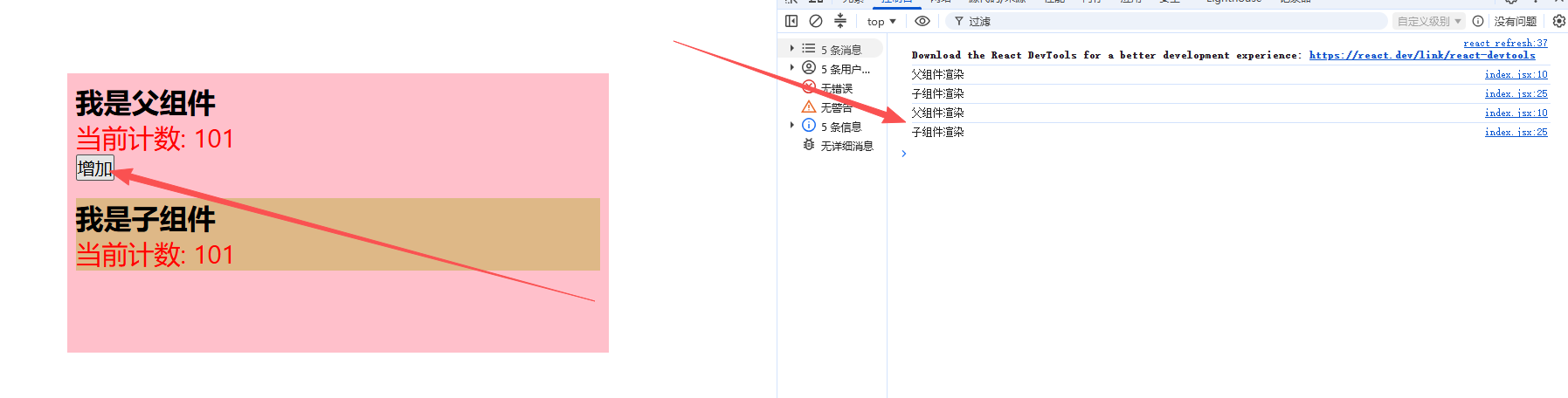
那当我不向子组件传递任何值,当我执行父组件中的改变count的方法时,两个组件会都打印吗?
import React,{Component} from 'react';
import './index.css';
export default class Demo extends Component{
state = {
count: 100,
}
render(){
console.log('父组件渲染');
return (
<div className="father">
<h1>我是父组件</h1>
<p className="count">当前计数: {this.state.count}</p>
<button onClick={() => this.setState({count: this.state.count + 1})}>增加</button>
<Child />
</div>
)
}
}
class Child extends Component{
render(){
console.log('子组件渲染');
return (
<div className="child">
<h1>我是子组件</h1>
{/* <p className="count">当前计数: {this.props.count}</p> */}
</div>
)
}
}
结果就是,子组件照样会执行render,重新进行渲染。而且当父组件执行 this.setState({}) 照样会出现相同的效果
子组件我只是想展示一下,只是父组件的状态改变了,他执行render完全没有问题,但是子组件再重新渲染就有点耗性能了。
Component的2个问题
1、只要执行setState(),即使不改变状态数据,组件也会重新render(),效率低
2、只当前组件重新render(),就会重新render子组件,纵使子组件没有用到父组件的任何数据
效率高的做法
只有当前组件的state或props数据发生改变时才重新render()
原因
Component中的shouldComponentUpdate()总是返回true
解决方法一
重写shouldComponentUpdate方法,比较新旧state或props数据,如果有变化参返回true,如果没有则返回false
import React,{Component} from 'react';
import './index.css';
export default class Demo extends Component{
state = {
count: 100,
}
shouldComponentUpdate(nextProps, nextState){
//nextProps: 下一个 props
//nextState: 下一个 state
//返回值: true 表示组件需要重新渲染,false 表示不需要重新渲染
console.log(nextProps, nextState);
//如果下一个 props 或下一个 state 与当前 props 或当前 state 相同,返回 false
//如果下一个 props 或下一个 state 与当前 props 或当前 state 不同,返回 true
if(nextState.count !== this.state.count){
return true;
}
return false;
// return nextState.count !== this.state.count;
}
render(){
console.log('父组件渲染');
return (
<div className="father">
<h1>我是父组件</h1>
<p className="count">当前计数: {this.state.count}</p>
<button onClick={() => this.setState({ count: this.state.count + 100 })}>增加</button>
{/* <Child /> */}
</div>
)
}
}
// class Child extends Component{
// render(){
// console.log('子组件渲染');
// return (
// <div className="child">
// <h1>我是子组件</h1>
// {/* <p className="count">当前计数: {this.props.count}</p> */}
// </div>
// )
// }
// }
当父组件执行方法,改变状态值,也触发render,完全正确。
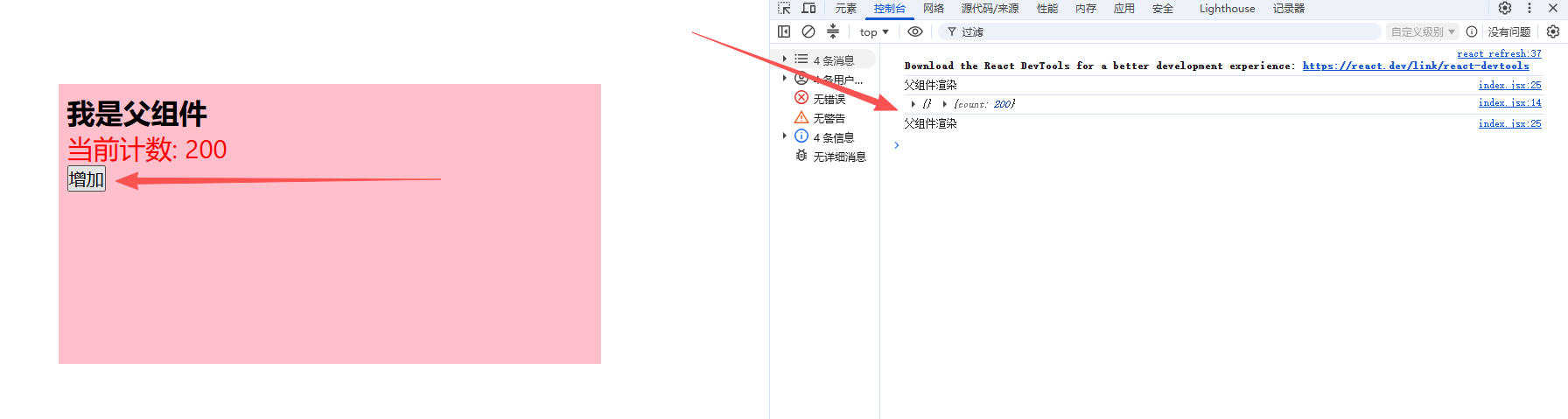
当执行 this.setState({})呢?
<button onClick={() => this.setState({})}>增加</button>
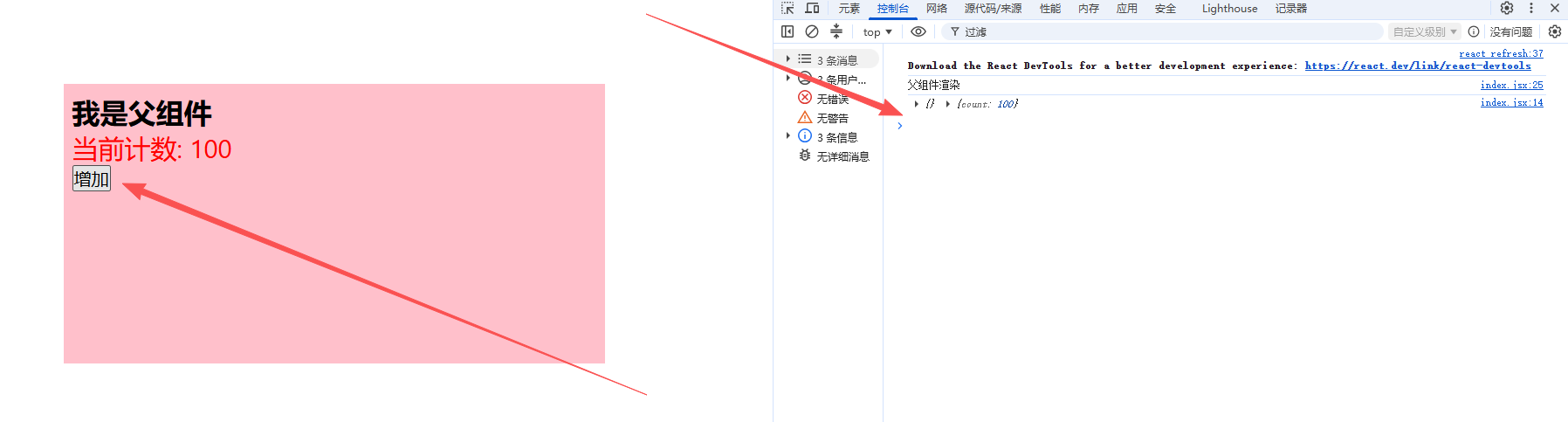
父组件的状态在前后都没有发生变化,自然不会重新render,达到了提升效率的目的。
同理子组件也可以这样做
import React,{Component} from 'react';
import './index.css';
export default class Demo extends Component{
state = {
count: 100,
}
shouldComponentUpdate(nextProps, nextState){
//nextProps: 下一个 props
//nextState: 下一个 state
//返回值: true 表示组件需要重新渲染,false 表示不需要重新渲染
console.log(nextProps, nextState);
//如果下一个 props 或下一个 state 与当前 props 或当前 state 相同,返回 false
//如果下一个 props 或下一个 state 与当前 props 或当前 state 不同,返回 true
if(nextState.count !== this.state.count){
return true;
}
return false;
// return nextState.count !== this.state.count;
}
render(){
console.log('父组件渲染');
return (
<div className="father">
<h1>我是父组件</h1>
<p className="count">当前计数: {this.state.count}</p>
<button onClick={() => this.setState({ count: this.state.count + 100 })}>增加</button>
<Child count={this.state.count} />
</div>
)
}
}
class Child extends Component{
shouldComponentUpdate(nextProps, nextState){
//nextProps: 下一个 props
//nextState: 下一个 state
//返回值: true 表示组件需要重新渲染,false 表示不需要重新渲染
if(nextProps.count !== this.props.count){
return true;
}
return false;
// return nextState.count !== this.state.count;
}
render(){
console.log('子组件渲染');
return (
<div className="child">
<h1>我是子组件</h1>
<p className="count">当前计数: {this.props.count}</p>
</div>
)
}
}
注意的是,当父组件执行 this.setState({}) 或者不给子组件传递值 <Child />,子组件都不会更新值的。
特别注意
import React,{Component} from 'react';
import './index.css';
export default class Demo extends Component{
state = {
count: 100,
stu:['张三','李四','王五']
}
shouldComponentUpdate(nextProps, nextState){
//nextProps: 下一个 props
//nextState: 下一个 state
//返回值: true 表示组件需要重新渲染,false 表示不需要重新渲染
console.log(nextProps, nextState);
//如果下一个 props 或下一个 state 与当前 props 或当前 state 相同,返回 false
//如果下一个 props 或下一个 state 与当前 props 或当前 state 不同,返回 true
if(nextState.count !== this.state.count){
return true;
}
if(nextState.stu !== this.state.stu){
return true;
}
return false;
// return nextState.count !== this.state.count;
}
addStu(){
const {stu} = this.state;
stu.push('赵六');
this.setState({
stu
})
}
render(){
console.log('父组件渲染');
return (
<div className="father">
<h1>我是父组件</h1>
<p className="count">当前计数: {this.state.count}</p>
<p className="stu">当前学生: {this.state.stu.join('、')}</p>
<button onClick={() => this.setState({ count: this.state.count + 100 })}>增加</button>
<button onClick={() => this.addStu()}>增加学生</button>
</div>
)
}
}
addStu(){
const {stu} = this.state;
stu.push('赵六');
this.setState({
stu
})
}
if(nextState.stu !== this.state.stu){
return true;
}
是触发不了更新的,因为结构出来的stu虽然值变了,但是shouldComponentUpdate判断中nextState.stu和this.state.stu的地址值是前后相同的,进而不会触发render,即便nextState在变化,
要想解决这个麻烦可以这样解决
addStu(){
this.setState({
stu: […this.state.stu, '赵六']
})
}
类似push和shift的操作需要下!!!
单独写
if(nextState.stu.join(',') !== this.state.stu.join(',')){
return true;
}
也是解决不了的
解决方法二
使用 PureComponent代替Component来让组件继承,它重写了shouldComponentUpdate(),只有state和props数据有变化才返回true
注意
只是进行state和props数据的试比较,如果只是数据对象内部数据变了,返回false
不要直接修改数据,而是产生新数据






评论前必须登录!
注册