 网硕互联帮助中心

Rust+Slint 实现个性化消息通知栏源码分享
- 一、效果展示
- 二、源码分享
-
- 1、工程结构
- 2、main.rs
- 3、build.rs
- 4、main.slint
- 5、Cargo.toml
- 三、实现原理
-
- 1、整体架构
- 2、数据流设计
-
- 2.1 消息数据结构
- 2.2 双向数据绑定
- 3、消息生命周期管理
-
- 3.1 添加消息
- 3.2 进度条计算
- 3.3 自动过期清理
- 4、UI 渲染原理
-
- 4.1 尖角箭头形状
- 4.2 颜色与图标映射
- 4.3 进度条
- 5、关闭消息的回调链路
- 6、关键设计总结
一、效果展示
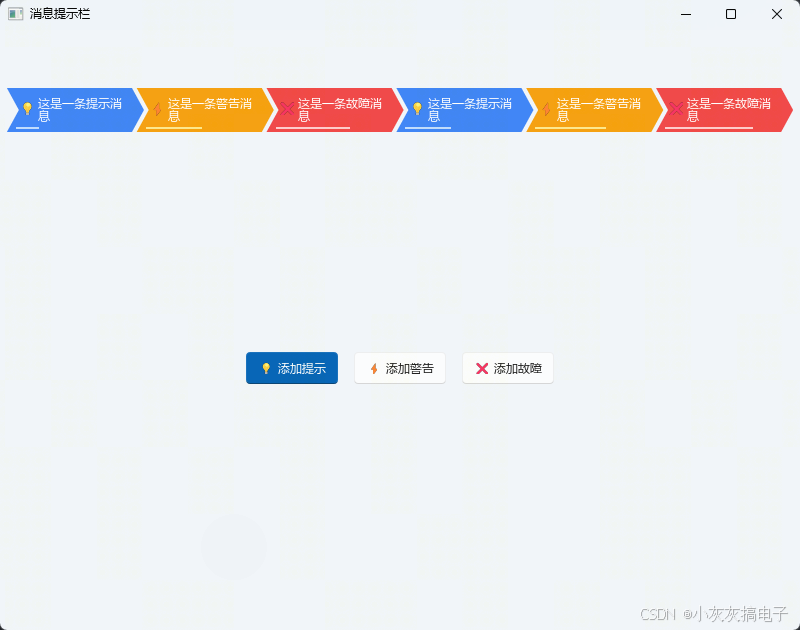
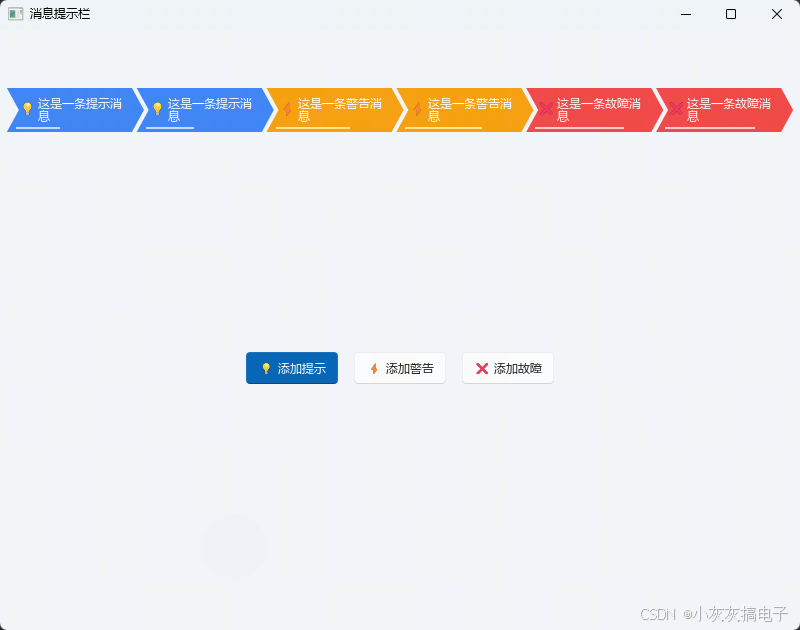
二、源码分享
1、工程结构
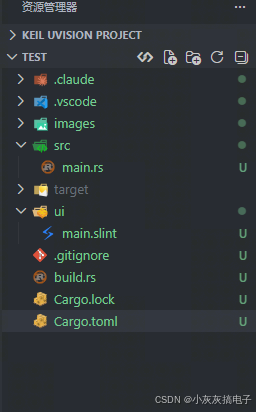
2、main.rs
slint::include_modules!();
use slint::{ModelRc, Timer, TimerMode, VecModel};
use std::rc::Rc;
use std::time::{Duration, Instant};
/// 消息内部数据(携带创建时间,用于计算剩余进度)
#[derive(Clone, Debug)]
struct MessageData {
id: i32,
text: String,
msg_type: MessageType,
created_at: Instant,
duration: Duration,
}
impl MessageData {
/// 转换为 Slint 可见的 Message 结构
fn to_slint(&self) -> Message {
let elapsed = self.created_at.elapsed().as_secs_f32();
let total = self.duration.as_secs_f32();
let remaining = if total > 0.0 {
(1.0 – elapsed / total).clamp(0.0, 1.0)
} else {
0.0
};
Message {
id: self.id,
text: self.text.clone().into(),
r#type: self.msg_type.clone(),
remaining,
}
}
}
fn main() {
let ui = MainWindow::new().expect("无法创建主窗口");
// 消息数据存储(含创建时间,Rust 侧维护)
let messages_data: Rc<std::cell::RefCell<Vec<MessageData>>> =
Rc::new(std::cell::RefCell::new(Vec::new()));
// 同步到 UI 的 ModelRc
let messages_model: Rc<VecModel<Message>> = Rc::new(VecModel::from(vec![]));
ui.set_messages(ModelRc::new(messages_model.clone()));
// ID 生成计数器
let next_id = Rc::new(std::cell::Cell::new(1_i32));
// 各类型消息默认显示时长
fn duration_for(t: &MessageType) -> Duration {
match t {
MessageType::Info => Duration::from_secs(5),
MessageType::Warning => Duration::from_secs(8),
MessageType::Error => Duration::from_secs(12),
}
}
// 添加一条新消息的闭包
let add_message = {
let data = messages_data.clone();
let model = messages_model.clone();
let id_gen = next_id.clone();
move |text: &str, msg_type: MessageType| {
let id = id_gen.get();
id_gen.set(id + 1);
let duration = duration_for(&msg_type);
data.borrow_mut().push(MessageData {
id,
text: text.to_string(),
msg_type,
created_at: Instant::now(),
duration,
});
// 刷新 UI 模型
let updated: Vec<Message> = data.borrow().iter().map(MessageData::to_slint).collect();
model.set_vec(updated);
}
};
// 注册添加消息的回调
{
let add = add_message.clone();
ui.on_add_info(move || {
add("这是一条提示消息", MessageType::Info);
});
}
{
let add = add_message.clone();
ui.on_add_warning(move || {
add("这是一条警告消息", MessageType::Warning);
});
}
{
let add = add_message.clone();
ui.on_add_error(move || {
add("这是一条故障消息", MessageType::Error);
});
}
// 注册关闭消息的回调(根据 id 移除)
{
let data = messages_data.clone();
let model = messages_model.clone();
ui.on_close_message(move |id| {
data.borrow_mut().retain(|m| m.id != id);
let updated: Vec<Message> = data.borrow().iter().map(MessageData::to_slint).collect();
model.set_vec(updated);
});
}
// 自动清除定时器:每 100ms 刷新进度条并移除过期消息
{
let data = messages_data.clone();
let model = messages_model.clone();
let timer = Timer::default();
timer.start(
TimerMode::Repeated,
Duration::from_millis(100),
move || {
// 移除已过期消息
data.borrow_mut()
.retain(|m| m.created_at.elapsed() < m.duration);
// 刷新 UI(更新进度条 + 移除过期项)
let updated: Vec<Message> =
data.borrow().iter().map(MessageData::to_slint).collect();
model.set_vec(updated);
},
);
// timer 需保持存活,泄漏到堆上使其与进程同生命周期
std::mem::forget(timer);
}
ui.run().expect("运行 UI 失败");
}
3、build.rs
fn main() {
// 编译 Slint UI
slint_build::compile("ui/main.slint").unwrap();
}
4、main.slint
import { Button, LineEdit, SpinBox, ComboBox, ScrollView } from "std-widgets.slint";
// ==================== 消息提示栏 ====================
// 消息类型枚举
export enum MessageType {
info, // 提示
warning, // 警告
error, // 故障
}
// 消息数据结构
export struct Message {
id: int,
text: string,
type: MessageType,
remaining: float, // 0.0 ~ 1.0 剩余进度
}
// 单条消息提示组件 – 左凹右凸的尖角箭头形状(首尾相连)
component MessageToast {
in property <string> message–text;
in property <MessageType> message–type;
in property <float> progress; // 0.0 ~ 1.0
callback close–clicked();
preferred–width: 160px;
preferred–height: 36px;
min–width: 160px;
min–height: 36px;
TouchArea {
width: 100%;
height: 100%;
clicked => { close–clicked(); }
// 箭头形状容器(比主体宽 12px,给右箭头留空间)
ribbon := Rectangle {
width: parent.width + 12px;
height: 100%;
clip: true;
// 形状:>__> 左右都是尖角 ">"
// 左边 "<" 凹入 12px,右边 ">" 凸出 12px
//
// (12,0)─────────(w-12,0)
// \\ \\
// \\ 消息内容 ▶ (w+12, h/2)
// / /
// (0,h/2) (w-12,h)
// \\
// \\
// (12,h)───────────
Path {
width: 100%;
height: 100%;
fill: message–type == MessageType.info
? #3b82f6
: message–type == MessageType.warning
? #f59e0b
: #ef4444;
commands: "M 12,0"
+ " L " + (ribbon.width / 1px – 12) + " 0"
+ " L " + (ribbon.width / 1px) + " " + (ribbon.height / 1px / 2)
+ " L " + (ribbon.width / 1px – 12) + " " + (ribbon.height / 1px)
+ " L 12 " + (ribbon.height / 1px)
+ " L 24 " + (ribbon.height / 1px / 2)
+ " Z";
}
// 半透明描边
Rectangle {
x: 0; y: 0;
width: ribbon.width;
height: ribbon.height;
border–width: 0px;
border–color: #ffffff30;
}
// 底部进度条
Rectangle {
x: 14px;
y: ribbon.height – self.height – 3px;
width: (ribbon.width – 45px) * progress;
height: 2px;
background: message–type == MessageType.info
? #bfdbfe
: message–type == MessageType.warning
? #fde68a
: #fecaca;
}
}
// 图标 + 文字叠加层
HorizontalLayout {
padding–left: 10px;
padding–right: 28px;
alignment: start;
Text {
text: message–type == MessageType.info
? "💡"
: message–type == MessageType.warning
? "⚡"
: "❌";
font–size: 14px;
vertical–alignment: center;
}
text–display := Text {
text: message–text;
color: #ffffff;
font–size: 12px;
vertical–alignment: center;
horizontal–alignment: left;
overflow: elide;
preferred–width: 100%;
horizontal–stretch: 1;
wrap: word–wrap;
}
}
}
}
// 消息栏容器 – 从左到右依次排列,消息多时可水平滚动
component MessageBar {
in property <[Message]> messages;
callback close–msg(int);
log–scroll := ScrollView {
vertical–scrollbar–policy: always–off;
horizontal–scrollbar–policy: always–off;
// 每条消息 160px,间距 -5px → 步长 155px,末尾 +5px 补偿
// 内容总宽 = messages.length * 155 + 5
viewport–x: –1*max(0px, (messages.length * 155 + 5) * 1px – self.width);
HorizontalLayout {
spacing: –5px;
alignment: start;
for msg[index] in messages : MessageToast {
message–text: msg.text;
message–type: msg.type;
progress: msg.remaining;
close–clicked => { close–msg(msg.id); }
}
}
}
}
// ==================== 主窗口 ====================
export component MainWindow inherits Window {
title: "消息提示栏";
preferred–width: 800px;
preferred–height: 600px;
background: #f1f5f9;
// 关闭消息回调
callback close–message(int);
// 添加消息回调(Rust 端处理)
callback add–info();
callback add–warning();
callback add–error();
// 消息列表(Rust 端设置,双向绑定到 MessageBar)
in property <[Message]> messages: [
{ id: 1, text: "这是一条信息提示", type: MessageType.info, remaining: 1.0 },
{ id: 2, text: "这是一条警告提示", type: MessageType.warning, remaining: 1.0 },
{ id: 3, text: "这是一条故障提示", type: MessageType.error, remaining: 1.0 },
{ id: 3, text: "这是一条故障提示", type: MessageType.error, remaining: 1.0 },
{ id: 3, text: "这是一条故障提示", type: MessageType.error, remaining: 1.0 },
{ id: 3, text: "这是一条故障提示", type: MessageType.error, remaining: 1.0 },
{ id: 3, text: "这是一条故障提示", type: MessageType.error, remaining: 1.0 },
{ id: 3, text: "这是一条故障提示", type: MessageType.error, remaining: 1.0 },
];
// 倒计时文本(Rust 端每秒更新)
property <int> countdown–sec: 0;
VerticalLayout {
Rectangle {
height: 50px;
}
// 顶部消息栏区域
Rectangle {
height: 60px;
background: transparent;
messages–bar := MessageBar {
x: 8px;
y: 8px;
width: parent.width – 16px;
height: parent.height – 16px;
messages: root.messages;
}
}
// 主内容区 – 演示按钮
Rectangle {
vertical–stretch: 1;
background: #f1f5f9;
VerticalLayout {
alignment: center;
spacing: 20px;
HorizontalLayout {
alignment: center;
spacing: 16px;
Button {
text: "💡 添加提示";
primary: true;
clicked => { add–info(); }
}
Button {
text: "⚡ 添加警告";
clicked => { add–warning(); }
}
Button {
text: "❌ 添加故障";
clicked => { add–error(); }
}
}
// 倒计时显示
Text {
text: countdown–sec > 0 ? "下一轮倒计时: " + countdown–sec + " 秒" : "";
font–size: 12px;
color: #94a3b8;
horizontal–alignment: center;
visible: countdown–sec > 0;
}
}
}
}
// 消息计数器(用于生成唯一 ID,Rust 端维护)
property <int> msg–counter: 0; // 保留供 Rust 端读写
}
5、Cargo.toml
[package]
name = "modbus-debug-assistant"
version = "0.1.0"
edition = "2024"
[dependencies]
slint = "1.17.1"
[build–dependencies]
slint–build = "1.17.1"
三、实现原理
1、整体架构
整个消息通知栏采用 Rust 负责业务逻辑、Slint 负责界面渲染 的前后端分离架构。Rust 侧维护消息的完整生命周期(创建、计时、过期清理),Slint 侧只负责把消息列表渲染成可视化的尖角箭头样式,并通过回调与 Rust 交互。
#mermaid-svg-73EoDCyw5E3WTppb{font-family:\”trebuchet ms\”,verdana,arial,sans-serif;font-size:16px;fill:#333;}@keyframes edge-animation-frame{from{stroke-dashoffset:0;}}@keyframes dash{to{stroke-dashoffset:0;}}#mermaid-svg-73EoDCyw5E3WTppb .edge-animation-slow{stroke-dasharray:9,5!important;stroke-dashoffset:900;animation:dash 50s linear infinite;stroke-linecap:round;}#mermaid-svg-73EoDCyw5E3WTppb .edge-animation-fast{stroke-dasharray:9,5!important;stroke-dashoffset:900;animation:dash 20s linear infinite;stroke-linecap:round;}#mermaid-svg-73EoDCyw5E3WTppb .error-icon{fill:#552222;}#mermaid-svg-73EoDCyw5E3WTppb .error-text{fill:#552222;stroke:#552222;}#mermaid-svg-73EoDCyw5E3WTppb .edge-thickness-normal{stroke-width:1px;}#mermaid-svg-73EoDCyw5E3WTppb .edge-thickness-thick{stroke-width:3.5px;}#mermaid-svg-73EoDCyw5E3WTppb .edge-pattern-solid{stroke-dasharray:0;}#mermaid-svg-73EoDCyw5E3WTppb .edge-thickness-invisible{stroke-width:0;fill:none;}#mermaid-svg-73EoDCyw5E3WTppb .edge-pattern-dashed{stroke-dasharray:3;}#mermaid-svg-73EoDCyw5E3WTppb .edge-pattern-dotted{stroke-dasharray:2;}#mermaid-svg-73EoDCyw5E3WTppb .marker{fill:#333333;stroke:#333333;}#mermaid-svg-73EoDCyw5E3WTppb .marker.cross{stroke:#333333;}#mermaid-svg-73EoDCyw5E3WTppb svg{font-family:\”trebuchet ms\”,verdana,arial,sans-serif;font-size:16px;}#mermaid-svg-73EoDCyw5E3WTppb p{margin:0;}#mermaid-svg-73EoDCyw5E3WTppb .label{font-family:\”trebuchet ms\”,verdana,arial,sans-serif;color:#333;}#mermaid-svg-73EoDCyw5E3WTppb .cluster-label text{fill:#333;}#mermaid-svg-73EoDCyw5E3WTppb .cluster-label span{color:#333;}#mermaid-svg-73EoDCyw5E3WTppb .cluster-label span p{background-color:transparent;}#mermaid-svg-73EoDCyw5E3WTppb .label text,#mermaid-svg-73EoDCyw5E3WTppb span{fill:#333;color:#333;}#mermaid-svg-73EoDCyw5E3WTppb .node rect,#mermaid-svg-73EoDCyw5E3WTppb .node circle,#mermaid-svg-73EoDCyw5E3WTppb .node ellipse,#mermaid-svg-73EoDCyw5E3WTppb .node polygon,#mermaid-svg-73EoDCyw5E3WTppb .node path{fill:#ECECFF;stroke:#9370DB;stroke-width:1px;}#mermaid-svg-73EoDCyw5E3WTppb .rough-node .label text,#mermaid-svg-73EoDCyw5E3WTppb .node .label text,#mermaid-svg-73EoDCyw5E3WTppb .image-shape .label,#mermaid-svg-73EoDCyw5E3WTppb .icon-shape .label{text-anchor:middle;}#mermaid-svg-73EoDCyw5E3WTppb .node .katex path{fill:#000;stroke:#000;stroke-width:1px;}#mermaid-svg-73EoDCyw5E3WTppb .rough-node .label,#mermaid-svg-73EoDCyw5E3WTppb .node .label,#mermaid-svg-73EoDCyw5E3WTppb .image-shape .label,#mermaid-svg-73EoDCyw5E3WTppb .icon-shape .label{text-align:center;}#mermaid-svg-73EoDCyw5E3WTppb .node.clickable{cursor:pointer;}#mermaid-svg-73EoDCyw5E3WTppb .root .anchor path{fill:#333333!important;stroke-width:0;stroke:#333333;}#mermaid-svg-73EoDCyw5E3WTppb .arrowheadPath{fill:#333333;}#mermaid-svg-73EoDCyw5E3WTppb .edgePath .path{stroke:#333333;stroke-width:2.0px;}#mermaid-svg-73EoDCyw5E3WTppb .flowchart-link{stroke:#333333;fill:none;}#mermaid-svg-73EoDCyw5E3WTppb .edgeLabel{background-color:rgba(232,232,232, 0.8);text-align:center;}#mermaid-svg-73EoDCyw5E3WTppb .edgeLabel p{background-color:rgba(232,232,232, 0.8);}#mermaid-svg-73EoDCyw5E3WTppb .edgeLabel rect{opacity:0.5;background-color:rgba(232,232,232, 0.8);fill:rgba(232,232,232, 0.8);}#mermaid-svg-73EoDCyw5E3WTppb .labelBkg{background-color:rgba(232, 232, 232, 0.5);}#mermaid-svg-73EoDCyw5E3WTppb .cluster rect{fill:#ffffde;stroke:#aaaa33;stroke-width:1px;}#mermaid-svg-73EoDCyw5E3WTppb .cluster text{fill:#333;}#mermaid-svg-73EoDCyw5E3WTppb .cluster span{color:#333;}#mermaid-svg-73EoDCyw5E3WTppb div.mermaidTooltip{position:absolute;text-align:center;max-width:200px;padding:2px;font-family:\”trebuchet ms\”,verdana,arial,sans-serif;font-size:12px;background:hsl(80, 100%, 96.2745098039%);border:1px solid #aaaa33;border-radius:2px;pointer-events:none;z-index:100;}#mermaid-svg-73EoDCyw5E3WTppb .flowchartTitleText{text-anchor:middle;font-size:18px;fill:#333;}#mermaid-svg-73EoDCyw5E3WTppb rect.text{fill:none;stroke-width:0;}#mermaid-svg-73EoDCyw5E3WTppb .icon-shape,#mermaid-svg-73EoDCyw5E3WTppb .image-shape{background-color:rgba(232,232,232, 0.8);text-align:center;}#mermaid-svg-73EoDCyw5E3WTppb .icon-shape p,#mermaid-svg-73EoDCyw5E3WTppb .image-shape p{background-color:rgba(232,232,232, 0.8);padding:2px;}#mermaid-svg-73EoDCyw5E3WTppb .icon-shape .label rect,#mermaid-svg-73EoDCyw5E3WTppb .image-shape .label rect{opacity:0.5;background-color:rgba(232,232,232, 0.8);fill:rgba(232,232,232, 0.8);}#mermaid-svg-73EoDCyw5E3WTppb .label-icon{display:inline-block;height:1em;overflow:visible;vertical-align:-0.125em;}#mermaid-svg-73EoDCyw5E3WTppb .node .label-icon path{fill:currentColor;stroke:revert;stroke-width:revert;}#mermaid-svg-73EoDCyw5E3WTppb :root{–mermaid-font-family:\”trebuchet ms\”,verdana,arial,sans-serif;}
Rust 侧维护消息数据
同步到 Slint 的 ModelRc
MessageBar 渲染消息列表
用户点击消息关闭
回调 close-message 通知 Rust
Rust 移除消息并刷新模型
2、数据流设计
2.1 消息数据结构
Rust 侧定义了一个内部结构 MessageData,它比 Slint 可见的 Message 多保存了 created_at(创建时间)和 duration(显示时长)两个字段:
struct MessageData {
id: i32,
text: String,
msg_type: MessageType,
created_at: Instant, // 记录创建时刻,用于计算剩余进度
duration: Duration, // 该类型消息应显示的时长
}
而 Slint 侧的 Message 结构只暴露 UI 渲染所需的最小字段:id、text、type、remaining。remaining 是一个 0.0 ~ 1.0 的浮点数,表示消息剩余显示时间的比例,直接驱动进度条的宽度。
2.2 双向数据绑定
Rust 侧通过 VecModel<Message> 维护一个可被 Slint 观察的模型,再包装成 ModelRc 传给 UI:
let messages_model: Rc<VecModel<Message>> = Rc::new(VecModel::from(vec![]));
ui.set_messages(ModelRc::new(messages_model.clone()));
Slint 侧的 MessageBar 组件通过 for msg[index] in messages 语法遍历该模型,每一条消息渲染为一个 MessageToast 组件。当 Rust 侧调用 model.set_vec(updated) 时,Slint 会自动检测到模型变化并重新渲染,无需手动刷新界面。
3、消息生命周期管理
3.1 添加消息
点击按钮后,Rust 端通过回调创建一条新消息:
fn duration_for(t: &MessageType) -> Duration {
match t {
MessageType::Info => Duration::from_secs(5),
MessageType::Warning => Duration::from_secs(8),
MessageType::Error => Duration::from_secs(12),
}
}
3.2 进度条计算
to_slint() 方法根据创建时间计算剩余进度:
let elapsed = self.created_at.elapsed().as_secs_f32();
let total = self.duration.as_secs_f32();
let remaining = (1.0 – elapsed / total).clamp(0.0, 1.0);
- elapsed:消息已存活的时间;
- total:消息总显示时长;
- remaining:剩余比例,clamp(0.0, 1.0) 保证不会出现负数。
3.3 自动过期清理
核心机制是一个每 100ms 触发一次的 Timer:
timer.start(TimerMode::Repeated, Duration::from_millis(100), move || {
// 移除已过期消息
data.borrow_mut().retain(|m| m.created_at.elapsed() < m.duration);
// 刷新 UI
let updated: Vec<Message> = data.borrow().iter().map(MessageData::to_slint).collect();
model.set_vec(updated);
});
这里有两个关键点:
4、UI 渲染原理
4.1 尖角箭头形状
MessageToast 组件用 Slint 的 Path 元素绘制左右尖角箭头形状。核心是 commands 字符串,它用 SVG 路径语法描述多边形:
M 12,0
L (w-12) 0
L w (h/2)
L (w-12) h
L 12 h
L 24 (h/2)
Z
这个路径定义了 6 个顶点:左上角凹入 12px、右侧凸出 12px、底部再凹回 12px,形成 >__> 的箭头造型。ribbon.width / 1px 把 Slint 的 length 类型转换成纯数字参与字符串拼接。
4.2 颜色与图标映射
消息类型通过三元表达式映射到不同的颜色和图标:
fill: message-type == MessageType.info
? #3b82f6 // 蓝色
: message-type == MessageType.warning
? #f59e0b // 橙色
: #ef4444; // 红色
图标同理:Info 显示 💡、Warning 显示 ⚡、Error 显示 ❌。
4.3 进度条
进度条是一个宽度动态变化的 Rectangle:
width: (ribbon.width – 45px) * progress;
progress 就是 Rust 侧计算的 remaining 值。每 100ms 定时器刷新一次模型,进度条就会平滑缩短,直到消息过期被移除。
5、关闭消息的回调链路
用户点击某条消息时,事件从 Slint 层逐级向上传递:
MessageToast.close-clicked()
→ MessageBar.close-msg(msg.id)
→ MainWindow.close-message(int)
→ Rust 端 on_close_message 回调
Rust 端收到 ID 后,用 retain 移除对应消息并刷新模型:
ui.on_close_message(move |id| {
data.borrow_mut().retain(|m| m.id != id);
let updated: Vec<Message> = data.borrow().iter().map(MessageData::to_slint).collect();
model.set_vec(updated);
});
6、关键设计总结
| 数据与 UI 分离 | Rust 维护 MessageData,Slint 只读 Message | 职责清晰,便于扩展 |
| 双向绑定 | VecModel + ModelRc | 数据变更自动刷新 UI |
| 自动过期 | Timer 每 100ms 检查一次 | 无需手动管理消息生命周期 |
| 进度条动画 | remaining 驱动 Rectangle 宽度 | 平滑展示剩余时间 |
| 定时器保活 | std::mem::forget | 防止定时器被提前析构 |
| 尖角造型 | Path + SVG 路径字符串 | 实现个性化箭头样式 |



评论前必须登录!
注册