 网硕互联帮助中心
目录
- 本节重点
- 1. 什么是库
- 2. 静态库
- 2-1 静态库生成
- 2-2 静态库使用
- 3. 动态库
- 3-1 动态库生成
- 3-2 动态库使用
- 3-3 库运行搜索路径
- 4. 使用外部库(课后尝试)
- 5. 目标文件
- 6. ELF 文件
- 7. ELF 从形成到加载轮廓
- 7-1 ELF 形成可执行
- 7-2 ELF 可执行文件加载
- 8. 理解链接与加载
- 8-1 静态链接
- 8-2 ELF 加载与进程地址空间
- 8-3 动态链接与动态库加载
- 附录:操作大全
本节重点
- 动静态库的制作
- 动静态库的使用
- 动态库的查找
- 可执行程序 ELF 格式
- 可执行程序的加载过程
- 虚拟地址空间和动态库加载的过程
1. 什么是库
库是写好的、现有的、成熟的、可以复用的代码。现实中每个程序都要依赖很多基础的底层库,不可能每个人的代码都从零开始,因此库的存在意义非同寻常。
本质上来说,库是一种可执行代码的二进制形式,可以被操作系统载入内存执行。库有两种:
- 静态库:.a(Linux)、.lib(Windows)
- 动态库:.so(Linux)、.dll(Windows)
# Ubuntu 动静态库
# C
$ ls -l /lib/x86_64-linux-gnu/libc-2.31.so
-rwxr-xr-x 1 root root 2029592 May 1 02:20 /lib/x86_64-linux-gnu/libc-2.31.so
$ ls -l /lib/x86_64-linux-gnu/libc.a
-rw-r–r– 1 root root 5747594 May 1 02:20 /lib/x86_64-linux-gnu/libc.a
# C++
$ ls /usr/lib/gcc/x86_64-linux-gnu/9/libstdc++.so -l
lrwxrwxrwx 1 root root 40 Oct 24 2022 /usr/lib/gcc/x86_64-linux-gnu/9/libstdc++.so –> ../../../x86_64-linux-gnu/libstdc++.so.6
$ ls /usr/lib/gcc/x86_64-linux-gnu/9/libstdc++.a
/usr/lib/gcc/x86_64-linux-gnu/9/libstdc++.a
# CentOS 动静态库
# C
$ ls /lib64/libc-2.17.so -l
-rwxr-xr-x 1 root root 2156592 Jun 4 23:05 /lib64/libc-2.17.so
[whb@bite-alicloud ~]$ ls /lib64/libc.a -l
-rw-r–r– 1 root root 5105516 Jun 4 23:05 /lib64/libc.a
# C++
$ ls /lib64/libstdc++.so.6 -l
lrwxrwxrwx 1 root root 19 Sep 18 20:59 /lib64/libstdc++.so.6 –> libstdc++.so.6.0.19
$ ls /usr/lib/gcc/x86_64-redhat-linux/4.8.2/libstdc++.a -l
-rw-r–r– 1 root root 2932366 Sep 30 2020 /usr/lib/gcc/x86_64-redhat-linux/4.8.2/libstdc++.a
预备工作:准备好历史封装的 libc 代码,在任意位置新增“库文件”。
my_stdio.h:
#pragma once
#define SIZE 1024
#define FLUSH_NONE 0
#define FLUSH_LINE 1
#define FLUSH_FULL 2
struct IO_FILE
{
int flag; // 刷新方式
int fileno; // 文件描述符
char outbuffer[SIZE];
int cap;
int size;
// TODO
};
typedef struct IO_FILE mFILE;
mFILE *mfopen(const char *filename, const char *mode);
int mfwrite(const void *ptr, int num, mFILE *stream);
void mfflush(mFILE *stream);
void mfclose(mFILE *stream);
my_stdio.c:
#include "my_stdio.h"
#include <string.h>
#include <stdlib.h>
#include <sys/stat.h>
#include <sys/types.h>
#include <fcntl.h>
#include <unistd.h>
mFILE *mfopen(const char *filename, const char *mode)
{
int fd = –1;
if (strcmp(mode, "r") == 0)
{
fd = open(filename, O_RDONLY);
}
else if (strcmp(mode, "w") == 0)
{
fd = open(filename, O_CREAT | O_WRONLY | O_TRUNC, 0666);
}
else if (strcmp(mode, "a") == 0)
{
fd = open(filename, O_CREAT | O_WRONLY | O_APPEND, 0666);
}
if (fd < 0)
return NULL;
mFILE *mf = (mFILE *)malloc(sizeof(mFILE));
if (!mf)
{
close(fd);
return NULL;
}
mf->fileno = fd;
mf->flag = FLUSH_LINE;
mf->size = 0;
mf->cap = SIZE;
return mf;
}
void mfflush(mFILE *stream)
{
if (stream->size > 0)
{
// 写到内核文件的文件缓冲区中!
write(stream->fileno, stream->outbuffer, stream->size);
// 刷新到外设
fsync(stream->fileno);
stream->size = 0;
}
}
int mfwrite(const void *ptr, int num, mFILE *stream)
{
// 1. 拷贝
memcpy(stream->outbuffer + stream->size, ptr, num);
stream->size += num;
// 2. 检测是否要刷新
if (stream->flag == FLUSH_LINE && stream->size > 0 &&
stream->outbuffer[stream->size – 1] == '\\n')
{
mfflush(stream);
}
return num;
}
void mfclose(mFILE *stream)
{
if (stream->size > 0)
{
mfflush(stream);
}
close(stream->fileno);
}
my_string.h:
#pragma once
int my_strlen(const char *s);
my_string.c:
#include "my_string.h"
int my_strlen(const char *s)
{
const char *end = s;
while (*end != '\\0')
end++;
return end – s;
}
2. 静态库
- 静态库(.a):程序在编译链接时把库的代码链接到可执行文件中,程序运行时将不再需要静态库。
- 一个可执行程序可能用到许多库,其中有的是静态库,有的是动态库。编译默认采用动态链接,只有找不到动态库 .so 时才会采用同名静态库。也可以使用 GCC 的 -static 选项强制链接静态库。
2-1 静态库生成
libmystdio.a: my_stdio.o my_string.o
@ar -rc $@ $^
@echo "build $^ to $@ … done"
%.o: %.c
@gcc -c $<
@echo "compiling $< to $@ … done"
.PHONY: clean
clean:
@rm -rf *.a *.o stdc*
@echo "clean … done"
.PHONY: output
output:
@mkdir -p stdc/include
@mkdir -p stdc/lib
@cp -f *.h stdc/include
@cp -f *.a stdc/lib
@tar -czf stdc.tgz stdc
@echo "output stdc … done"
- ar 是 GNU 归档工具,rc 表示 replace and create。
$ ar -tv libmystdio.a
rw-rw-r– 1000/1000 2848 Oct 29 14:35 2024 my_stdio.o
rw-rw-r– 1000/1000 1272 Oct 29 14:35 2024 my_string.o
- t:列出静态库中的文件。
- v(verbose):显示详细信息。
2-2 静态库使用
在任意目录下新建 main.c,引入库头文件:
#include "my_stdio.h"
#include "my_string.h"
#include <stdio.h>
int main()
{
const char *s = "abcdefg";
printf("%s: %d\\n", s, my_strlen(s));
mFILE *fp = mfopen("./log.txt", "a");
if (fp == NULL)
return 1;
mfwrite(s, my_strlen(s), fp);
mfwrite(s, my_strlen(s), fp);
mfwrite(s, my_strlen(s), fp);
mfclose(fp);
return 0;
}
# 场景 1:头文件和库文件安装到系统路径下
$ gcc main.c -lmystdio
# 场景 2:头文件、库文件和自己的源文件在同一路径下
$ gcc main.c -L. -lmystdio
# 场景 3:头文件和库文件有各自的独立路径
$ gcc main.c -I头文件路径 -L库文件路径 -lmystdio
- -L:指定库路径。
- -I:指定头文件搜索路径。
- -l:指定库名。
- 测试目标文件生成后,即使删除静态库,程序仍可运行。
- 关于 -static 选项,稍后介绍。
- 库文件名称和引入库的名称:去掉前缀 lib,去掉后缀 .so、.a,如 libc.so -> c。
3. 动态库
- 动态库(.so):程序运行时才去链接动态库的代码,多个程序共享使用库的代码。
- 与动态库链接的可执行文件仅包含它所使用的函数入口地址表,而不是外部函数所在目标文件的全部机器码。
- 可执行文件开始运行前,外部函数的机器码由操作系统从磁盘上的动态库复制到内存中,这个过程称为动态链接(dynamic linking)。
- 动态库可以在多个程序间共享,因此动态链接使可执行文件更小,节省磁盘空间。操作系统采用虚拟内存机制,让物理内存中的一份动态库供所有需要它的进程共用,从而节省内存和磁盘空间。
3-1 动态库生成
libmystdio.so: my_stdio.o my_string.o
gcc -o $@ $^ -shared
%.o: %.c
gcc -fPIC -c $<
.PHONY: clean
clean:
@rm -rf *.so *.o stdc*
@echo "clean … done"
.PHONY: output
output:
@mkdir -p stdc/include
@mkdir -p stdc/lib
@cp -f *.h stdc/include
@cp -f *.so stdc/lib
@tar -czf stdc.tgz stdc
@echo "output stdc … done"
- -shared:表示生成共享库格式。
- -fPIC:产生位置无关码(position independent code)。
- 库名规则:libxxx.so。
3-2 动态库使用
# 场景 1:头文件和库文件安装到系统路径下
$ gcc main.c -lmystdio
# 场景 2:头文件、库文件和自己的源文件在同一路径下
$ gcc main.c -L. -lmystdio # 从左到右搜索 -L 指定的目录
# 场景 3:头文件和库文件有各自的独立路径
$ gcc main.c -I头文件路径 -L库文件路径 -lmystdio
# 查看库或者可执行程序的依赖
$ ldd libmystdio.so
linux-vdso.so.1 => (0x00007fffacbbf000)
libc.so.6 => /lib64/libc.so.6 (0x00007f8917335000)
/lib64/ld-linux-x86-64.so.2 (0x00007f8917905000)
# 以场景 2 为例
$ ll
total 24
-rwxrwxr-x 1 whb whb 8592 Oct 29 14:50 libmystdio.so
-rw-rw-r– 1 whb whb 359 Oct 19 16:07 main.c
-rw-rw-r– 1 whb whb 447 Oct 29 14:50 my_stdio.h
-rw-rw-r– 1 whb whb 447 Oct 29 14:50 my_string.h
$ gcc main.c -L. -lmystdio
$ ll
total 36
-rwxrwxr-x 1 whb whb 8600 Oct 29 14:51 a.out
-rwxrwxr-x 1 whb whb 8592 Oct 29 14:50 libmystdio.so
-rw-rw-r– 1 whb whb 359 Oct 19 16:07 main.c
-rw-rw-r– 1 whb whb 447 Oct 29 14:50 my_stdio.h
-rw-rw-r– 1 whb whb 447 Oct 29 14:50 my_string.h
[whb@bite-alicloud other]$ ./a.out
...
3-3 库运行搜索路径
3-3-1 问题
$ ldd a.out
linux-vdso.so.1 => (0x00007fff4d396000)
libmystdio.so => not found
libc.so.6 => /lib64/libc.so.6 (0x00007fa2aef30000)
/lib64/ld-linux-x86-64.so.2 (0x00007fa2af2fe000)
3-3-2 解决方案
- 把 .so 文件复制到系统共享库路径下,一般指 /usr/lib、/usr/local/lib、/lib64 或开篇指明的库路径等。
- 在系统共享库路径下建立同名软链接。
- 更改环境变量 LD_LIBRARY_PATH。
- ldconfig 方案:配置 /etc/ld.so.conf.d/,然后使用 ldconfig 更新。
[root@localhost linux]# cat /etc/ld.so.conf.d/bit.conf
/root/tools/linux
[root@localhost linux]# ldconfig # 要生效,这里要执行 ldconfig,重新加载库搜索路径
4. 使用外部库(课后尝试)
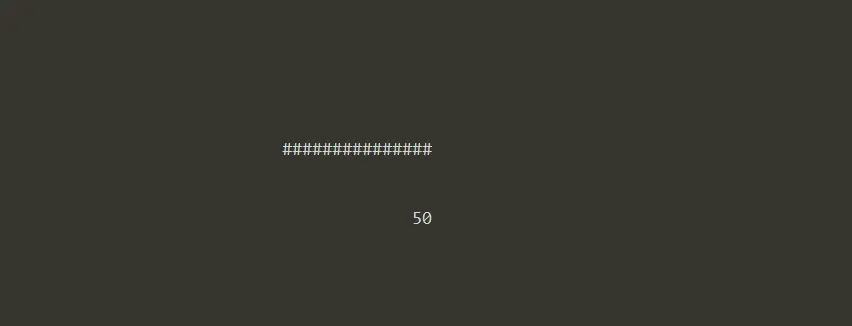
我们现在没有接触过太多库,唯一接触过的就是 C、C++ 标准库。这里推荐一个有趣的图形库:ncurses。
# 安装
# CentOS
$ sudo yum install -y ncurses-devel
# Ubuntu
$ sudo apt install -y libncurses-dev
系统中其实有很多库,它们通常由一组互相关联、用来完成某项常见工作的函数构成,比如用来处理屏幕显示的 ncurses 库。
// 示例代码由“文心一言”生成并调试通过;可自行了解具体功能。
#include <stdio.h>
#include <string.h>
#include <ncurses.h>
#include <unistd.h>
#define PROGRESS_BAR_WIDTH 30
#define BORDER_PADDING 2
#define WINDOW_WIDTH (PROGRESS_BAR_WIDTH + 2 * BORDER_PADDING + 2) // 加边框的宽度
#define WINDOW_HEIGHT 5
#define PROGRESS_INCREMENT 3
#define DELAY 300000 // 微秒(300 毫秒)
int main()
{
initscr();
start_color();
init_pair(1, COLOR_GREEN, COLOR_BLACK); // 已完成部分:绿色前景,黑色背景
init_pair(2, COLOR_RED, COLOR_BLACK); // 剩余部分:红色背景(仅用于演示)
cbreak();
noecho();
curs_set(FALSE);
int max_y, max_x;
getmaxyx(stdscr, max_y, max_x);
int start_y = (max_y – WINDOW_HEIGHT) / 2;
int start_x = (max_x – WINDOW_WIDTH) / 2;
WINDOW *win = newwin(WINDOW_HEIGHT, WINDOW_WIDTH, start_y, start_x);
box(win, 0, 0); // 加边框
wrefresh(win);
int progress = 0;
int max_progress = PROGRESS_BAR_WIDTH;
while (progress <= max_progress)
{
werase(win); // 清除窗口内容
// 计算已完成的进度和剩余的进度
int completed = progress;
int remaining = max_progress – progress;
// 显示进度条
int bar_x = BORDER_PADDING + 1; // 进度条在窗口中的 x 坐标
int bar_y = 1; // 进度条在窗口中的 y 坐标(居中)
// 已完成部分
attron(COLOR_PAIR(1));
for (int i = 0; i < completed; i++)
{
mvwprintw(win, bar_y, bar_x + i, "#");
}
attroff(COLOR_PAIR(1));
// 剩余部分(用背景色填充)
attron(A_BOLD | COLOR_PAIR(2)); // 加粗并设置背景色为红色(仅用于演示)
for (int i = completed; i < max_progress; i++)
{
mvwprintw(win, bar_y, bar_x + i, " ");
}
attroff(A_BOLD | COLOR_PAIR(2));
// 显示百分比
char percent_str[10];
snprintf(percent_str, sizeof(percent_str), "%d%%",
(progress * 100) / max_progress);
int percent_x = (WINDOW_WIDTH – strlen(percent_str)) / 2; // 居中显示
mvwprintw(win, WINDOW_HEIGHT – 1, percent_x, percent_str);
wrefresh(win); // 刷新窗口以显示更新
// 增加进度
progress += PROGRESS_INCREMENT;
// 延迟一段时间
usleep(DELAY);
}
// 清理并退出 ncurses 模式
delwin(win);
endwin();
return 0;
}
5. 目标文件
编译和链接这两个步骤,在 Windows 下被 IDE 封装得很完善,我们一般都能一键构建,非常方便。但一旦遇到错误,尤其是链接相关的错误,很多人就束手无策了。在 Linux 下,我们之前也学习过如何通过 GCC 编译器完成这一系列操作。
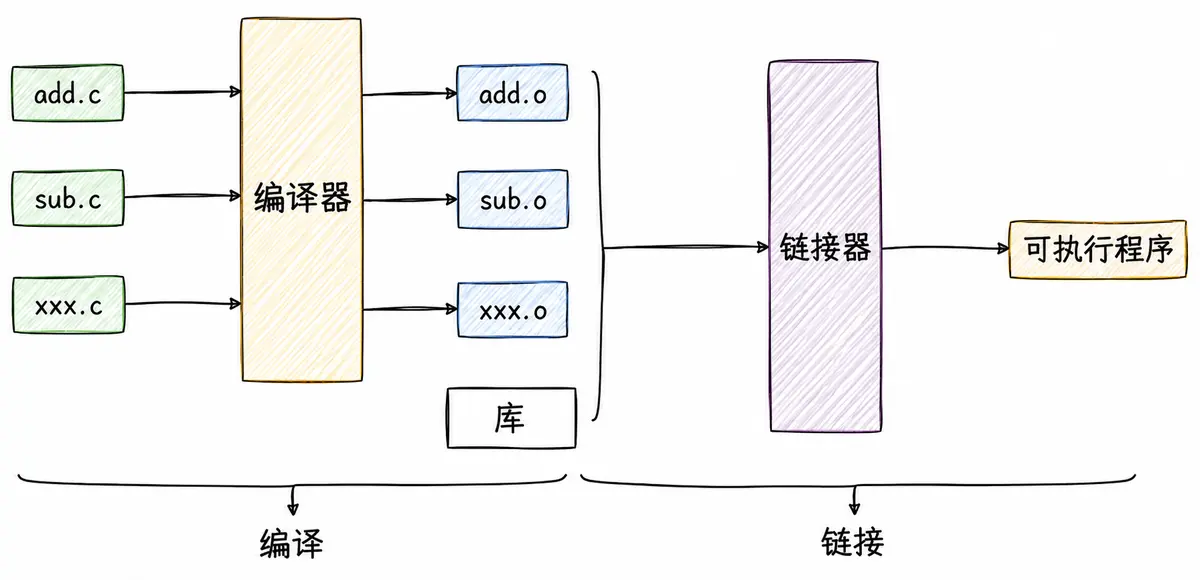
接下来深入探讨编译和链接的整个过程,以便更好地理解动静态库的使用原理。
先回顾一下什么是编译。编译的过程其实就是将程序的源代码翻译成 CPU 能够直接运行的机器代码。
例如,在源文件 hello.c 中简单输出 "hello world!",并调用一个 run 函数,而这个函数定义在另一个源文件 code.c 中。这里可以调用 gcc -c 分别编译这两个源文件。
hello.c:
#include <stdio.h>
void run();
int main()
{
printf("hello world!\\n");
run();
return 0;
}
code.c:
#include <stdio.h>
void run()
{
printf("running…\\n");
}
# 编译两个源文件
$ gcc -c hello.c
$ gcc -c code.c
$ ls
code.c code.o hello.c hello.o
编译后会生成两个扩展名为 .o 的文件,它们被称作目标文件。如果只修改了一个源文件,那么只需要单独编译这一个文件,无需浪费时间重新编译整个工程。目标文件是二进制文件,文件格式为 ELF,是对二进制代码的一种封装。
$ file hello.o
hello.o: ELF 64-bit LSB relocatable, x86-64, version 1 (SYSV), not stripped
file 命令用于辨识文件类型。
6. ELF 文件
要理解编译链接的细节,就需要了解 ELF 文件。以下四种文件其实都是 ELF 文件:
- 可重定位文件(Relocatable File):即 xxx.o 文件,包含适合与其他目标文件链接来创建可执行文件或共享目标文件的代码和数据。
- 可执行文件(Executable File):即可执行程序。
- 共享目标文件(Shared Object File):即 xxx.so 文件。
- 内核转储(core dumps):存放当前进程的执行上下文,用于 dump 信号触发。
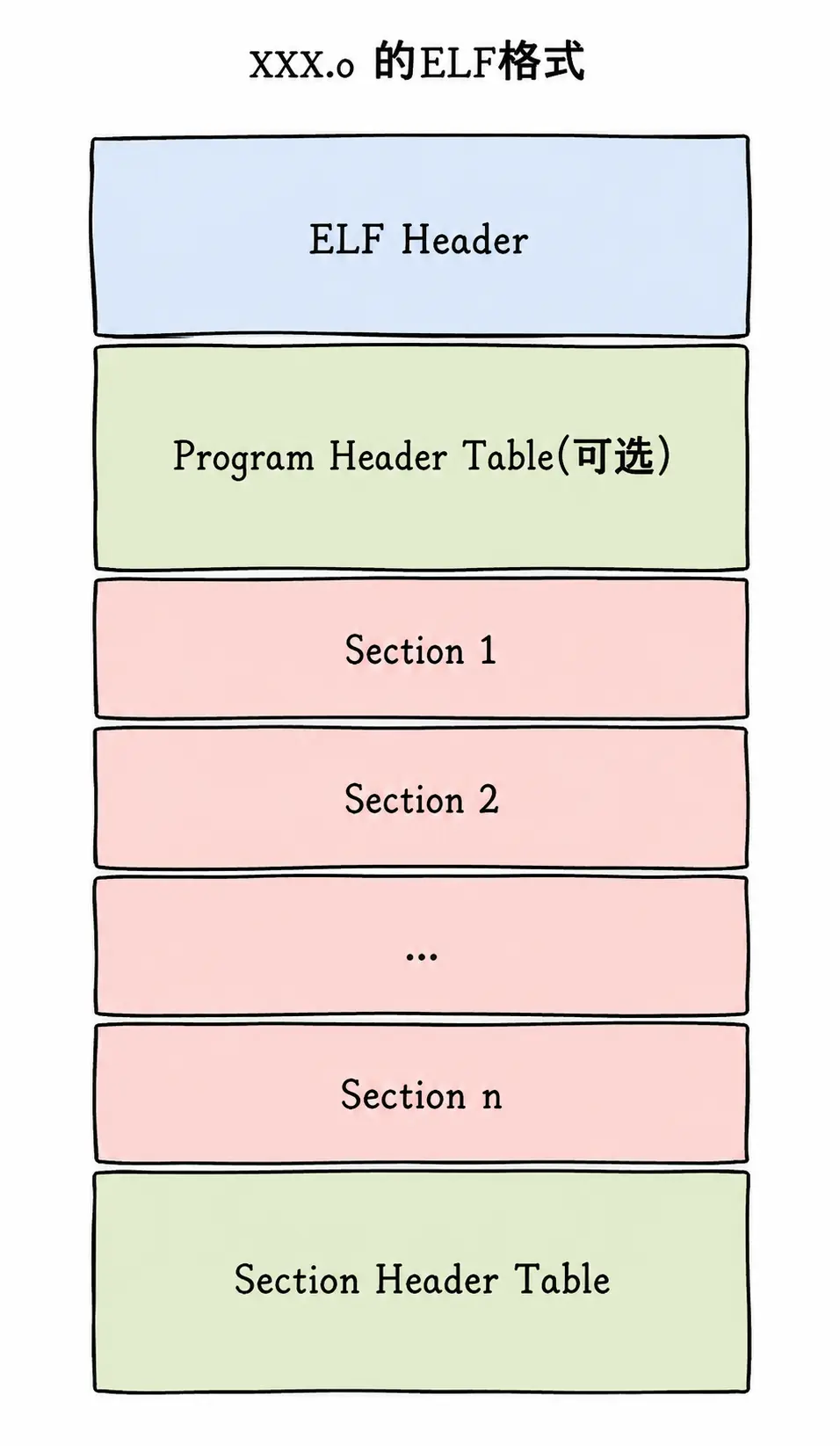
一个 ELF 文件由以下四部分组成:
- ELF 头(ELF header):描述文件的主要特性。它位于文件开始处,主要用于定位文件的其他部分。
- 程序头表(Program header table):列举所有有效的段(segments)及其属性。表中记录每个段的开始位置、位移(offset)和长度。由于这些段紧密地存放在二进制文件中,需要程序头表的描述信息才能将各段分开。
- 节头表(Section header table):包含对节(sections)的描述。
- 节(Section):ELF 文件的基本组成单位,包含特定类型的数据。ELF 文件的各种信息和数据存储在不同的节中,例如代码节存储可执行代码,数据节存储全局变量和静态数据等。
最常见的节:
- 代码节(.text):用于保存机器指令,是程序的主要执行部分。
- 数据节(.data):保存已初始化的全局变量和局部静态变量。
$ size code
text data bss dec hex filename
3312 636 4 3952 f70 code
7. ELF 从形成到加载轮廓
7-1 ELF 形成可执行
- step-1:将多份 C/C++ 源代码翻译为目标 .o 文件和动静态库(ELF)。
- step-2:将多份 .o 文件的 Section 进行合并。
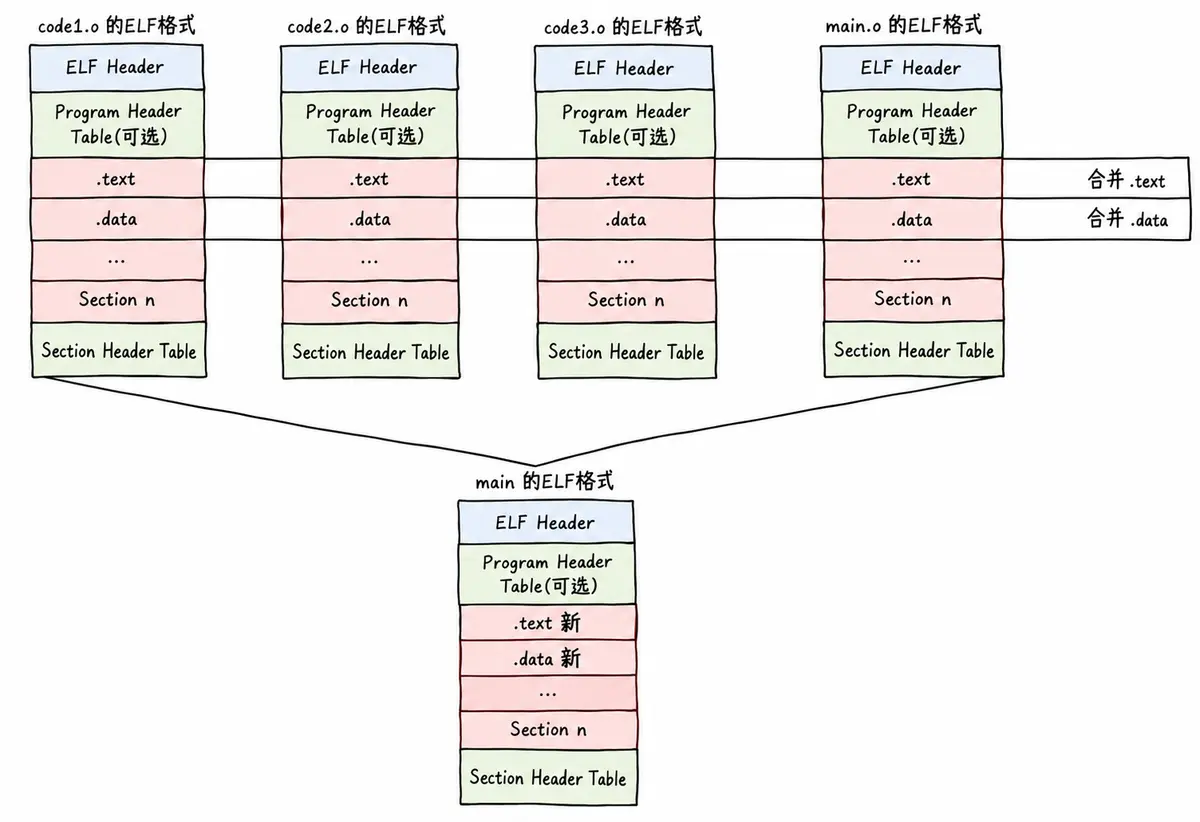
[!NOTE] 注意 实际合并是在链接时进行的,但并不是这么简单的合并,也会涉及对库的合并,此处不做过多追究。
7-2 ELF 可执行文件加载
- 一个 ELF 会有多种不同的 Section;加载到内存时,也会进行 Section 合并,形成 segment。
- 合并原则:属性相同,比如可读、可写、可执行、加载时需要申请空间等。
- 因此,即便是不同的 Section,加载到内存时也可能以 segment 的形式加载到一起。
- 这个合并工作在形成 ELF 时就已经确定,具体合并原则记录在 ELF 的程序头表(Program header table)中。
# 查看可执行程序的 Section
$ readelf -S a.out
There are 31 section headers, starting at offset 0x19d8:
Section Headers:
[Nr] Name Type Address Offset
Size EntSize Flags Link Info Align
[ 0] NULL 0000000000000000 00000000
0000000000000000 0000000000000000 0 0 0
[ 1] .interp PROGBITS 0000000000400238 00000238
000000000000001c 0000000000000000 A 0 0 1
[ 2] .note.ABI-tag NOTE 0000000000400254 00000254
0000000000000020 0000000000000000 A 0 0 4
[ 3] .note.gnu.build-i NOTE 0000000000400274 00000274
0000000000000024 0000000000000000 A 0 0 4
[ 4] .gnu.hash GNU_HASH 0000000000400298 00000298
000000000000001c 0000000000000000 A 5 0 8
[ 5] .dynsym DYNSYM 00000000004002b8 000002b8
0000000000000048 0000000000000018 A 6 1 8
[ 6] .dynstr STRTAB 0000000000400300 00000300
0000000000000038 0000000000000000 A 0 0 1
[ 7] .gnu.version VERSYM 0000000000400338 00000338
0000000000000006 0000000000000002 A 5 0 2
[ 8] .gnu.version_r VERNEED 0000000000400340 00000340
0000000000000020 0000000000000000 A 6 1 8
[ 9] .rela.dyn RELA 0000000000400360 00000360
0000000000000018 0000000000000018 A 5 0 8
[10] .rela.plt RELA 0000000000400378 00000378
0000000000000018 0000000000000018 AI 5 24 8
[11] .init PROGBITS 0000000000400390 00000390
…
查看 Section 合并后的 segment:
$ readelf -l a.out
Elf file type is EXEC (Executable file)
Entry point 0x4003e0
There are 9 program headers, starting at offset 64
Program Headers:
Type Offset VirtAddr PhysAddr
FileSiz MemSiz Flags Align
PHDR 0x0000000000000040 0x0000000000400040 0x0000000000400040
0x00000000000001f8 0x00000000000001f8 R E 8
INTERP 0x0000000000000238 0x0000000000400238 0x0000000000400238
0x000000000000001c 0x000000000000001c R 1
[Requesting program interpreter: /lib64/ld-linux-x86-64.so.2]
LOAD 0x0000000000000000 0x0000000000400000 0x0000000000400000
0x0000000000000744 0x0000000000000744 R E 200000
LOAD 0x0000000000000e10 0x0000000000600e10 0x0000000000600e10
0x0000000000000218 0x0000000000000220 RW 200000
DYNAMIC 0x0000000000000e28 0x0000000000600e28 0x0000000000600e28
0x00000000000001d0 0x00000000000001d0 RW 8
NOTE 0x0000000000000254 0x0000000000400254 0x0000000000400254
0x0000000000000044 0x0000000000000044 R 4
GNU_EH_FRAME 0x00000000000005a0 0x00000000004005a0 0x00000000004005a0
0x000000000000004c 0x000000000000004c R 4
GNU_STACK 0x0000000000000000 0x0000000000000000 0x0000000000000000
0x0000000000000000 0x0000000000000000 RW 10
GNU_RELRO 0x0000000000000e10 0x0000000000600e10 0x0000000000600e10
0x00000000000001f0 0x00000000000001f0 R 1
Section to Segment mapping:
Segment Sections…
00
01 .interp
02 .interp .note.ABI-tag .note.gnu.build-id .gnu.hash .dynsym .dynstr
.gnu.version .gnu.version_r .rela.dyn .rela.plt .init .plt .plt.got
.text .fini .rodata .eh_frame_hdr .eh_frame
03 .init_array .fini_array .jcr .dynamic .got .got.plt .data .bss
04 .dynamic
05 .note.ABI-tag .note.gnu.build-id
06 .eh_frame_hdr
07
08 .init_array .fini_array .jcr .dynamic .got
[!NOTE] 为什么要将 Section 合并成 segment
- Section 合并的主要原因是减少页面碎片、提高内存使用效率。假设页面大小为 4096 字节(内存加载和管理的基本单位),若 .text 为 4097 字节、.init 为 512 字节,不合并时将占用 3 个页面,合并后只需 2 个页面。
- 操作系统加载程序时,会把具有相同属性的 Section 合并成一个大的 segment,从而设置不同的访问权限,优化内存管理和权限控制。
程序头表和节头表分别有什么作用?ELF 文件提供了两个不同的视图来理解它们:
- 链接视图(Linking view)- 对应节头表 Section header table
- 文件结构的粒度更细,按功能模块的差异划分。静态链接分析通常关注链接视图,以理解 ELF 文件包含的各部分信息。
- 为提高空间布局效率,链接目标文件时,链接器会把多个节(Section)合并、规整成可执行段(segment)、可读写段、只读段等。否则很小的一段内容也要占用以物理内存页为单位分配的空间,例如 4 KB,造成浪费。
- 执行视图(execution view)- 对应程序头表 Program header table
- 告诉操作系统如何加载可执行文件,完成进程内存的初始化。可执行程序的格式中一定有 Program header table。
- 简单来说:一个在链接时起作用,一个在运行加载时起作用。
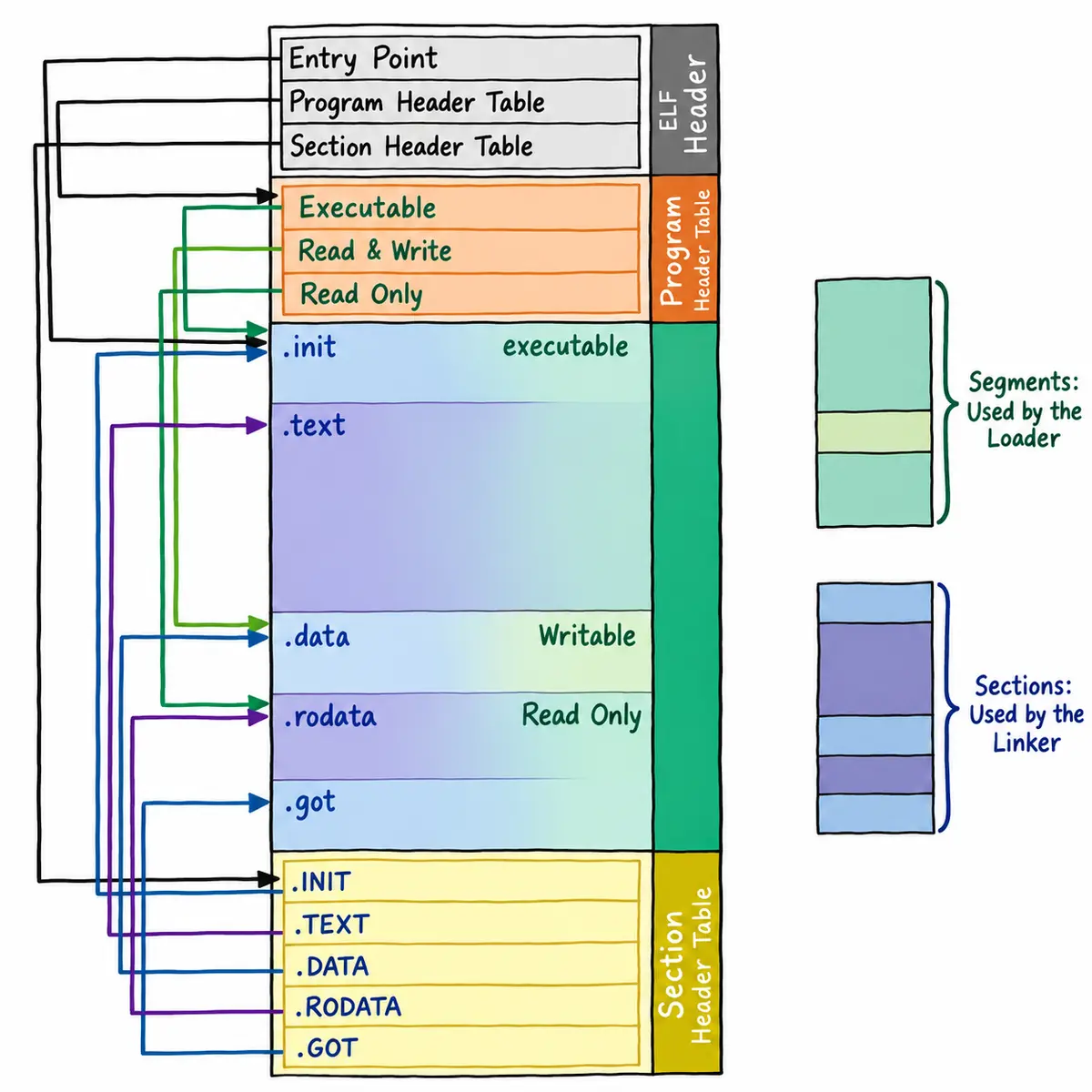
从链接视图来看:
- 命令 readelf -S hello.o 可以查看 ELF 文件的节头表。
- .text 节:保存程序代码指令的代码节。
- .data 节:保存已初始化的全局变量和局部静态变量等数据。
- .rodata 节:保存只读数据,例如 C 语言代码中的字符串。由于 .rodata 节只读,它只能位于可执行文件的只读段中,因此能在 text 段而不是 data 段中找到。
- .bss 节:为未初始化的全局变量和局部静态变量预留位置。
- .symtab 节(Symbol Table,符号表):记录源码中的函数名、变量名及其与代码的对应关系。
- .got.plt 节(全局偏移表 – 过程链接表):.got 节保存全局偏移表;.got 节和 .plt 节共同提供访问导入共享库函数的入口,由动态链接器在运行时修改。后文会继续介绍 GOT。
- 使用 readelf 查看 .so 文件时可以看到该节。
从执行视图来看:
- 告诉操作系统哪些模块可以加载进内存。
- 说明加载后哪些分段可读写、哪些只读、哪些可执行。
可以在 ELF Header 中找到文件的基本信息,并了解 ELF Header 如何定位程序头表和节头表。例如,查看 hello.o 这个可重定位文件的主要信息:
# 查看目标文件
$ readelf -h hello.o
ELF Header:
Magic: 7f 45 4c 46 02 01 01 00 00 00 00 00 00 00 00 00 # ELF 文件标识符(魔数)
Class: ELF64 # 文件类:64 位架构
Data: 2's complement, little endian
# 数据编码:小端序二进制补码
Version: 1 (current) # ELF 版本:当前版本
OS/ABI: UNIX – System V # 操作系统 ABI:System V UNIX
ABI Version: 0 # ABI 扩展版本:未扩展
Type: REL (Relocatable file) # 文件类型:可重定位文件
Machine: Advanced Micro Devices X86-64
# 目标平台:x86-64 架构
Version: 0x1 # 对象文件版本:1
Entry point address: 0x0 # 入口点地址:无
Start of program headers: 0 (bytes into file) # 程序头表起始偏移:无
Start of section headers: 728 (bytes into file) # 节头表起始偏移:728 字节
Flags: 0x0 # 无处理器特定标志
Size of this header: 64 (bytes) # ELF Header 大小:64 字节
Size of program headers: 0 (bytes) # 无程序头表条目
Number of program headers: 0 # 程序头表条目数:0
Size of section headers: 64 (bytes) # 节头表条目大小:64 字节
Number of section headers: 13 # 节头表条目数:13
Section header string table index: 12 # 节名称字符串表索引:12
查看可执行程序:
$ gcc *.o
$ readelf -h a.out
ELF Header:
Magic: 7f 45 4c 46 02 01 01 00 00 00 00 00 00 00 00 00
Class: ELF64
Data: 2's complement, little endian
Version: 1 (current)
OS/ABI: UNIX – System V
ABI Version: 0
Type: DYN (Shared object file)
Machine: Advanced Micro Devices X86-64
Version: 0x1
Entry point address: 0x1060
Start of program headers: 64 (bytes into file)
Start of section headers: 14768 (bytes into file)
Flags: 0x0
Size of this header: 64 (bytes)
Size of program headers: 56 (bytes)
Number of program headers: 13
Size of section headers: 64 (bytes)
Number of section headers: 31
Section header string table index: 30
对于 ELF Header,只需要知道它的作用即可:它的主要目的是定位文件的其他部分。
8. 理解链接与加载
8-1 静态链接
- 无论是自己的 .o,还是静态库中的 .o,本质上都是对 .o 文件进行链接。
- 所以,研究静态链接,本质上就是研究 .o 是如何链接的。
$ ll
-rw-rw-r– 1 whb whb 62 Oct 31 15:36 code.c
-rw-rw-r– 1 whb whb 103 Oct 31 15:36 hello.c
whb@bite:~/test/test/test$ gcc -c *.c
whb@bite:~/test/test/test$ gcc *.o -o main.exe
$ ll
-rw-rw-r– 1 whb whb 62 Oct 31 15:36 code.c
-rw-rw-r– 1 whb whb 1672 Oct 31 15:46 code.o
-rw-rw-r– 1 whb whb 103 Oct 31 15:36 hello.c
-rw-rw-r– 1 whb whb 1744 Oct 31 15:46 hello.o
-rwxrwxr-x 1 whb whb 16752 Oct 31 15:46 main.exe*
查看编译后的 .o 目标文件:
$ objdump -d code.o
code.o: file format elf64-x86-64
Disassembly of section .text:
0000000000000000 <run>:
0: f3 0f 1e fa endbr64
4: 55 push %rbp
5: 48 89 e5 mov %rsp,%rbp
8: 48 8d 3d 00 00 00 00 lea 0x0(%rip),%rdi # f <run+0xf>
f: e8 00 00 00 00 callq 14 <run+0x14>
14: 90 nop
15: 5d pop %rbp
16: c3 retq
$ objdump -d hello.o
hello.o: file format elf64-x86-64
Disassembly of section .text:
0000000000000000 <main>:
0: f3 0f 1e fa endbr64
4: 55 push %rbp
5: 48 89 e5 mov %rsp,%rbp
8: 48 8d 3d 00 00 00 00 lea 0x0(%rip),%rdi # f <main+0xf>
f: e8 00 00 00 00 callq 14 <main+0x14>
14: b8 00 00 00 00 mov $0x0,%eax
19: e8 00 00 00 00 callq 1e <main+0x1e>
1e: b8 00 00 00 00 mov $0x0,%eax
23: 5d pop %rbp
24: c3 retq
- objdump -d:反汇编查看代码段(.text)。
- hello.o 中的 main 函数还不知道 printf 和 run 函数的地址。
// hello.c
#include <stdio.h>
void run();
int main()
{
printf("hello world!\\n");
run();
return 0;
}
- code.o 也不知道 printf 函数的地址。
// code.c
#include <stdio.h>
void run()
{
printf("running…\\n");
}
可以看到反汇编中的 call 指令,它们分别对应之前调用的 printf 和 run 函数,但跳转地址都暂时被设成了 0。
这是因为编译 hello.c 时,编译器完全不知道 printf 和 run 函数位于内存的哪个区域,也不知道它们的代码是什么样的。因此,编译器只能先把这两个函数的跳转地址设为 0。
这些地址会在链接时被修正。目标文件中存在重定位表,链接器会根据表中记录的位置找到需要修正的地址,并在链接时完成重定位。
[!NOTE] 注意 printf 涉及动态库,此处暂不说明。
整个过程如下:
# 查看 code.o 的代码段
$ objdump -d code.o
code.o: file format elf64-x86-64
Disassembly of section .text:
0000000000000000 <run>:
0: f3 0f 1e fa endbr64
4: 55 push %rbp
5: 48 89 e5 mov %rsp,%rbp
8: 48 8d 3d 00 00 00 00 lea 0x0(%rip),%rdi # f <run+0xf>
f: e8 00 00 00 00 callq 14 <run+0x14>
14: 90 nop
15: 5d pop %rbp
16: c3 retq
# 查看 hello.o 的代码段
$ objdump -d hello.o
hello.o: file format elf64-x86-64
Disassembly of section .text:
0000000000000000 <main>:
0: f3 0f 1e fa endbr64
4: 55 push %rbp
5: 48 89 e5 mov %rsp,%rbp
8: 48 8d 3d 00 00 00 00 lea 0x0(%rip),%rdi # f <main+0xf>
f: e8 00 00 00 00 callq 14 <main+0x14>
14: b8 00 00 00 00 mov $0x0,%eax
19: e8 00 00 00 00 callq 1e <main+0x1e>
1e: b8 00 00 00 00 mov $0x0,%eax
23: 5d pop %rbp
24: c3 retq
至此可以得到之前的结论:多个 .o 文件彼此不知道对方。
读取 code.o 的符号表:
$ readelf -s code.o
Symbol table '.symtab' contains 13 entries:
Num: Value Size Type Bind Vis Ndx Name
0: 0000000000000000 0 NOTYPE LOCAL DEFAULT UND
1: 0000000000000000 0 FILE LOCAL DEFAULT ABS code.c
2: 0000000000000000 0 SECTION LOCAL DEFAULT 1
3: 0000000000000000 0 SECTION LOCAL DEFAULT 3
4: 0000000000000000 0 SECTION LOCAL DEFAULT 4
5: 0000000000000000 0 SECTION LOCAL DEFAULT 5
6: 0000000000000000 0 SECTION LOCAL DEFAULT 7
7: 0000000000000000 0 SECTION LOCAL DEFAULT 8
8: 0000000000000000 0 SECTION LOCAL DEFAULT 9
9: 0000000000000000 0 SECTION LOCAL DEFAULT 6
10: 0000000000000000 23 FUNC GLOBAL DEFAULT 1 run
11: 0000000000000000 0 NOTYPE GLOBAL DEFAULT UND _GLOBAL_OFFSET_TABLE_
12: 0000000000000000 0 NOTYPE GLOBAL DEFAULT UND puts
这里,源码中的简单 printf 调用被编译器优化成了对 puts 的调用。UND 是 undefined,表示该符号在当前 .o 文件中未定义。
读取 hello.o 的符号表:
whb@bite:~/test/test/test$ readelf -s hello.o
Symbol table '.symtab' contains 14 entries:
Num: Value Size Type Bind Vis Ndx Name
0: 0000000000000000 0 NOTYPE LOCAL DEFAULT UND
1: 0000000000000000 0 FILE LOCAL DEFAULT ABS hello.c
2: 0000000000000000 0 SECTION LOCAL DEFAULT 1
3: 0000000000000000 0 SECTION LOCAL DEFAULT 3
4: 0000000000000000 0 SECTION LOCAL DEFAULT 4
5: 0000000000000000 0 SECTION LOCAL DEFAULT 5
6: 0000000000000000 0 SECTION LOCAL DEFAULT 7
7: 0000000000000000 0 SECTION LOCAL DEFAULT 8
8: 0000000000000000 0 SECTION LOCAL DEFAULT 9
9: 0000000000000000 0 SECTION LOCAL DEFAULT 6
10: 0000000000000000 37 FUNC GLOBAL DEFAULT 1 main
11: 0000000000000000 0 NOTYPE GLOBAL DEFAULT UND _GLOBAL_OFFSET_TABLE_
12: 0000000000000000 0 NOTYPE GLOBAL DEFAULT UND puts
13: 0000000000000000 0 NOTYPE GLOBAL DEFAULT UND run
同样,puts 和 run 在 hello.o 中均未定义;run 的实现位于 code.o 中。
读取最终可执行程序的符号表:
$ readelf -s main.exe
Symbol table '.dynsym' contains 7 entries:
Num: Value Size Type Bind Vis Ndx Name
0: 0000000000000000 0 NOTYPE LOCAL DEFAULT UND
1: 0000000000000000 0 NOTYPE WEAK DEFAULT UND _ITM_deregisterTMCloneTab
2: 0000000000000000 0 FUNC GLOBAL DEFAULT UND puts@GLIBC_2.2.5 (2)
3: 0000000000000000 0 FUNC GLOBAL DEFAULT UND __libc_start_main@GLIBC_2.2.5 (2)
4: 0000000000000000 0 NOTYPE WEAK DEFAULT UND __gmon_start__
5: 0000000000000000 0 NOTYPE WEAK DEFAULT UND _ITM_registerTMCloneTable
6: 0000000000000000 0 FUNC WEAK DEFAULT UND __cxa_finalize@GLIBC_2.2.5 (2)
Symbol table '.symtab' contains 67 entries:
Num: Value Size Type Bind Vis Ndx Name
0: 0000000000000000 0 NOTYPE LOCAL DEFAULT UND
1: 0000000000000318 0 SECTION LOCAL DEFAULT 1
2: 0000000000000338 0 SECTION LOCAL DEFAULT 2
3: 0000000000000358 0 SECTION LOCAL DEFAULT 3
4: 000000000000037c 0 SECTION LOCAL DEFAULT 4
5: 00000000000003a0 0 SECTION LOCAL DEFAULT 5
6: 00000000000003c8 0 SECTION LOCAL DEFAULT 6
7: 0000000000000470 0 SECTION LOCAL DEFAULT 7
8: 00000000000004f2 0 SECTION LOCAL DEFAULT 8
9: 0000000000000500 0 SECTION LOCAL DEFAULT 9
10: 0000000000000520 0 SECTION LOCAL DEFAULT 10
11: 00000000000005e0 0 SECTION LOCAL DEFAULT 11
12: 0000000000001000 0 SECTION LOCAL DEFAULT 12
13: 0000000000001020 0 SECTION LOCAL DEFAULT 13
14: 0000000000001040 0 SECTION LOCAL DEFAULT 14
15: 0000000000001050 0 SECTION LOCAL DEFAULT 15
16: 0000000000001060 0 SECTION LOCAL DEFAULT 16
17: 0000000000001208 0 SECTION LOCAL DEFAULT 17
18: 0000000000002000 0 SECTION LOCAL DEFAULT 18
19: 000000000000201c 0 SECTION LOCAL DEFAULT 19
20: 0000000000002068 0 SECTION LOCAL DEFAULT 20
21: 0000000000003db8 0 SECTION LOCAL DEFAULT 21
22: 0000000000003dc0 0 SECTION LOCAL DEFAULT 22
23: 0000000000003dc8 0 SECTION LOCAL DEFAULT 23
24: 0000000000003fb8 0 SECTION LOCAL DEFAULT 24
25: 0000000000004000 0 SECTION LOCAL DEFAULT 25
26: 0000000000004010 0 SECTION LOCAL DEFAULT 26
27: 0000000000000000 0 SECTION LOCAL DEFAULT 27
28: 0000000000000000 0 FILE LOCAL DEFAULT ABS crtstuff.c
29: 0000000000001090 0 FUNC LOCAL DEFAULT 16 deregister_tm_clones
30: 00000000000010c0 0 FUNC LOCAL DEFAULT 16 register_tm_clones
31: 0000000000001100 0 FUNC LOCAL DEFAULT 16 __do_global_dtors_aux
32: 0000000000004010 1 OBJECT LOCAL DEFAULT 26 completed.8061
33: 0000000000003dc0 0 OBJECT LOCAL DEFAULT 22 __do_global_dtors_aux_fin
34: 0000000000001140 0 FUNC LOCAL DEFAULT 16 frame_dummy
35: 0000000000003db8 0 OBJECT LOCAL DEFAULT 21 __frame_dummy_init_array_
36: 0000000000000000 0 FILE LOCAL DEFAULT ABS code.c
37: 0000000000000000 0 FILE LOCAL DEFAULT ABS hello.c
38: 0000000000000000 0 FILE LOCAL DEFAULT ABS crtstuff.c
39: 000000000000218c 0 OBJECT LOCAL DEFAULT 20 __FRAME_END__
40: 0000000000000000 0 FILE LOCAL DEFAULT ABS
41: 0000000000003dc0 0 NOTYPE LOCAL DEFAULT 21 __init_array_end
42: 0000000000003dc8 0 OBJECT LOCAL DEFAULT 23 _DYNAMIC
43: 0000000000003db8 0 NOTYPE LOCAL DEFAULT 21 __init_array_start
44: 000000000000201c 0 NOTYPE LOCAL DEFAULT 19 __GNU_EH_FRAME_HDR
45: 0000000000003fb8 0 OBJECT LOCAL DEFAULT 24 _GLOBAL_OFFSET_TABLE_
46: 0000000000001000 0 FUNC LOCAL DEFAULT 12 _init
47: 0000000000001200 5 FUNC GLOBAL DEFAULT 16 __libc_csu_fini
48: 0000000000000000 0 NOTYPE WEAK DEFAULT UND _ITM_deregisterTMCloneTab
49: 0000000000004000 0 NOTYPE WEAK DEFAULT 25 data_start
50: 0000000000000000 0 FUNC GLOBAL DEFAULT UND puts@@GLIBC_2.2.5
51: 0000000000004010 0 NOTYPE GLOBAL DEFAULT 25 _edata
52: 0000000000001149 23 FUNC GLOBAL DEFAULT 16 run
53: 0000000000001208 0 FUNC GLOBAL HIDDEN 17 _fini
54: 0000000000000000 0 FUNC GLOBAL DEFAULT UND __libc_start_main@@GLIBC_
55: 0000000000004000 0 NOTYPE GLOBAL DEFAULT 25 __data_start
56: 0000000000000000 0 NOTYPE WEAK DEFAULT UND __gmon_start__
57: 0000000000004008 0 OBJECT GLOBAL HIDDEN 25 __dso_handle
58: 0000000000002000 4 OBJECT GLOBAL DEFAULT 18 _IO_stdin_used
59: 0000000000001190 101 FUNC GLOBAL DEFAULT 16 __libc_csu_init
60: 0000000000004018 0 NOTYPE GLOBAL DEFAULT 26 _end
61: 0000000000001060 47 FUNC GLOBAL DEFAULT 16 _start
62: 0000000000004010 0 NOTYPE GLOBAL DEFAULT 26 __bss_start
63: 0000000000001160 37 FUNC GLOBAL DEFAULT 16 main
64: 0000000000004010 0 OBJECT GLOBAL HIDDEN 25 __TMC_END__
65: 0000000000000000 0 NOTYPE WEAK DEFAULT UND _ITM_registerTMCloneTable
66: 0000000000000000 0 FUNC WEAK DEFAULT UND __cxa_finalize@@GLIBC_2.2
两个 .o 合并后,最终可执行程序中已经找到了 run:
- 0000000000001149 是地址,后文继续说明。
- FUNC 表示 run 符号的类型是函数。
- 16 是 run 所在 Section 的下标,说明它被合并到了最终可执行文件的第 16 个 Section 中。
读取可执行程序最终的全部 Section:
$ readelf -S main.exe
There are 31 section headers, starting at offset 0x39b0:
Section Headers:
[Nr] Name Type Address Offset
Size EntSize Flags Link Info Align
[ 0] NULL 0000000000000000 00000000
0000000000000000 0000000000000000 0 0 0
[ 1] .interp PROGBITS 0000000000000318 00000318
000000000000001c 0000000000000000 A 0 0 1
[ 2] .note.gnu.propert NOTE 0000000000000338 00000338
0000000000000020 0000000000000000 A 0 0 8
[ 3] .note.gnu.build-i NOTE 0000000000000358 00000358
0000000000000024 0000000000000000 A 0 0 4
[ 4] .note.ABI-tag NOTE 000000000000037c 0000037c
0000000000000020 0000000000000000 A 0 0 4
[ 5] .gnu.hash GNU_HASH 00000000000003a0 000003a0
0000000000000024 0000000000000000 A 6 0 8
[ 6] .dynsym DYNSYM 00000000000003c8 000003c8
00000000000000a8 0000000000000018 A 7 1 8
[ 7] .dynstr STRTAB 0000000000000470 00000470
0000000000000082 0000000000000000 A 0 0 1
[ 8] .gnu.version VERSYM 00000000000004f2 000004f2
000000000000000e 0000000000000002 A 6 0 2
[ 9] .gnu.version_r VERNEED 0000000000000500 00000500
0000000000000020 0000000000000000 A 7 1 8
[10] .rela.dyn RELA 0000000000000520 00000520
00000000000000c0 0000000000000018 A 6 0 8
[11] .rela.plt RELA 00000000000005e0 000005e0
0000000000000018 0000000000000018 AI 6 24 8
[12] .init PROGBITS 0000000000001000 00001000
000000000000001b 0000000000000000 AX 0 0 4
[13] .plt PROGBITS 0000000000001020 00001020
0000000000000020 0000000000000010 AX 0 0 16
[14] .plt.got PROGBITS 0000000000001040 00001040
0000000000000010 0000000000000010 AX 0 0 16
[15] .plt.sec PROGBITS 0000000000001050 00001050
0000000000000010 0000000000000010 AX 0 0 16
[16] .text PROGBITS 0000000000001060 00001060
00000000000001a5 0000000000000000 AX 0 0 16
[17] .fini PROGBITS 0000000000001208 00001208
000000000000000d 0000000000000000 AX 0 0 4
[18] .rodata PROGBITS 0000000000002000 00002000
000000000000001c 0000000000000000 A 0 0 4
[19] .eh_frame_hdr PROGBITS 000000000000201c 0000201c
000000000000004c 0000000000000000 A 0 0 4
[20] .eh_frame PROGBITS 0000000000002068 00002068
0000000000000128 0000000000000000 A 0 0 8
[21] .init_array INIT_ARRAY 0000000000003db8 00002db8
0000000000000008 0000000000000008 WA 0 0 8
[22] .fini_array FINI_ARRAY 0000000000003dc0 00002dc0
0000000000000008 0000000000000008 WA 0 0 8
[23] .dynamic DYNAMIC 0000000000003dc8 00002dc8
00000000000001f0 0000000000000010 WA 7 0 8
[24] .got PROGBITS 0000000000003fb8 00002fb8
0000000000000048 0000000000000008 WA 0 0 8
[25] .data PROGBITS 0000000000004000 00003000
0000000000000010 0000000000000000 WA 0 0 8
[26] .bss NOBITS 0000000000004010 00003010
0000000000000008 0000000000000000 WA 0 0 1
[27] .comment PROGBITS 0000000000000000 00003010
000000000000002b 0000000000000001 MS 0 0 1
[28] .symtab SYMTAB 0000000000000000 00003040
0000000000000648 0000000000000018 29 47 8
[29] .strtab STRTAB 0000000000000000 00003688
000000000000020e 0000000000000000 0 0 1
[30] .shstrtab STRTAB 0000000000000000 00003896
000000000000011a 0000000000000000 0 0 1
Key to Flags:
W (write), A (alloc), X (execute), M (merge), S (strings), I (info),
L (link order), O (extra OS processing required), G (group), T (TLS),
C (compressed), x (unknown), o (OS specific), E (exclude),
l (large), p (processor specific)
hello.o 和 code.o 的 .text 已被合并到 main.exe 的第 16 个 Section。下面通过反汇编检查 .o 中 call 后面的 00 00 00 00 是否已被修改为最终函数地址。
$ objdump -d main.exe
main.exe: file format elf64-x86-64
Disassembly of section .init:
0000000000001000 <_init>:
1000: f3 0f 1e fa endbr64
1004: 48 83 ec 08 sub $0x8,%rsp
1008: 48 8b 05 d9 2f 00 00 mov 0x2fd9(%rip),%rax # 3fe8 <__gmon_start__>
100f: 48 85 c0 test %rax,%rax
1012: 74 02 je 1016 <_init+0x16>
1014: ff d0 callq *%rax
1016: 48 83 c4 08 add $0x8,%rsp
101a: c3 retq
Disassembly of section .plt:
0000000000001020 <.plt>:
1020: ff 35 9a 2f 00 00 pushq 0x2f9a(%rip) # 3fc0 <_GLOBAL_OFFSET_TABLE_+0x8>
1026: f2 ff 25 9b 2f 00 00 bnd jmpq *0x2f9b(%rip) # 3fc8 <_GLOBAL_OFFSET_TABLE_+0x10>
102d: 0f 1f 00 nopl (%rax)
1030: f3 0f 1e fa endbr64
1034: 68 00 00 00 00 pushq $0x0
1039: f2 e9 e1 ff ff ff bnd jmpq 1020 <.plt>
103f: 90 nop
Disassembly of section .plt.got:
0000000000001040 <__cxa_finalize@plt>:
1040: f3 0f 1e fa endbr64
1044: f2 ff 25 ad 2f 00 00 bnd jmpq *0x2fad(%rip) # 3ff8 <__cxa_finalize@GLIBC_2.2.5>
104b: 0f 1f 44 00 00 nopl 0x0(%rax,%rax,1)
Disassembly of section .plt.sec:
0000000000001050 <puts@plt>:
1050: f3 0f 1e fa endbr64
1054: f2 ff 25 75 2f 00 00 bnd jmpq *0x2f75(%rip) # 3fd0 <puts@GLIBC_2.2.5>
105b: 0f 1f 44 00 00 nopl 0x0(%rax,%rax,1)
Disassembly of section .text:
0000000000001060 <_start>:
1060: f3 0f 1e fa endbr64
1064: 31 ed xor %ebp,%ebp
1066: 49 89 d1 mov %rdx,%r9
1069: 5e pop %rsi
106a: 48 89 e2 mov %rsp,%rdx
106d: 48 83 e4 f0 and $0xfffffffffffffff0,%rsp
1071: 50 push %rax
1072: 54 push %rsp
1073: 4c 8d 05 86 01 00 00 lea 0x186(%rip),%r8 # 1200 <__libc_csu_fini>
107a: 48 8d 0d 0f 01 00 00 lea 0x10f(%rip),%rcx # 1190 <__libc_csu_init>
1081: 48 8d 3d d8 00 00 00 lea 0xd8(%rip),%rdi # 1160 <main>
1088: ff 15 52 2f 00 00 callq *0x2f52(%rip) # 3fe0 <__libc_start_main@GLIBC_2.2.5>
108e: f4 hlt
108f: 90 nop
0000000000001090 <deregister_tm_clones>:
1090: 48 8d 3d 79 2f 00 00 lea 0x2f79(%rip),%rdi # 4010 <__TMC_END__>
1097: 48 8d 05 72 2f 00 00 lea 0x2f72(%rip),%rax # 4010 <__TMC_END__>
109e: 48 39 f8 cmp %rdi,%rax
10a1: 74 15 je 10b8 <deregister_tm_clones+0x28>
10a3: 48 8b 05 2e 2f 00 00 mov 0x2f2e(%rip),%rax # 3fd8 <_ITM_deregisterTMCloneTable>
10aa: 48 85 c0 test %rax,%rax
10ad: 74 09 je 10b8 <deregister_tm_clones+0x28>
10af: ff e0 jmpq *%rax
10b1: 0f 1f 80 00 00 00 00 nopl 0x0(%rax)
10b8: c3 retq
10b9: 0f 1f 80 00 00 00 00 nopl 0x0(%rax)
00000000000010c0 <register_tm_clones>:
10c0: 48 8d 3d 49 2f 00 00 lea 0x2f49(%rip),%rdi # 4010 <__TMC_END__>
10c7: 48 8d 35 42 2f 00 00 lea 0x2f42(%rip),%rsi # 4010 <__TMC_END__>
10ce: 48 29 fe sub %rdi,%rsi
10d1: 48 89 f0 mov %rsi,%rax
10d4: 48 c1 ee 3f shr $0x3f,%rsi
10d8: 48 c1 f8 03 sar $0x3,%rax
10dc: 48 01 c6 add %rax,%rsi
10df: 48 d1 fe sar %rsi
10e2: 74 14 je 10f8 <register_tm_clones+0x38>
10e4: 48 8b 05 05 2f 00 00 mov 0x2f05(%rip),%rax # 3ff0 <_ITM_registerTMCloneTable>
10eb: 48 85 c0 test %rax,%rax
10ee: 74 08 je 10f8 <register_tm_clones+0x38>
10f0: ff e0 jmpq *%rax
10f2: 66 0f 1f 44 00 00 nopw 0x0(%rax,%rax,1)
10f8: c3 retq
10f9: 0f 1f 80 00 00 00 00 nopl 0x0(%rax)
0000000000001100 <__do_global_dtors_aux>:
1100: f3 0f 1e fa endbr64
1104: 80 3d 05 2f 00 00 00 cmpb $0x0,0x2f05(%rip) # 4010 <__TMC_END__>
110b: 75 2b jne 1138 <__do_global_dtors_aux+0x38>
110d: 55 push %rbp
110e: 48 83 3d e2 2e 00 00 cmpq $0x0,0x2ee2(%rip) # 3ff8 <__cxa_finalize@GLIBC_2.2.5>
1115: 00
1116: 48 89 e5 mov %rsp,%rbp
1119: 74 0c je 1127 <__do_global_dtors_aux+0x27>
111b: 48 8b 3d e6 2e 00 00 mov 0x2ee6(%rip),%rdi # 4008 <__dso_handle>
1122: e8 19 ff ff ff callq 1040 <__cxa_finalize@plt>
1127: e8 64 ff ff ff callq 1090 <deregister_tm_clones>
112c: c6 05 dd 2e 00 00 01 movb $0x1,0x2edd(%rip) # 4010 <__TMC_END__>
1133: 5d pop %rbp
1134: c3 retq
1135: 0f 1f 00 nopl (%rax)
1138: c3 retq
1139: 0f 1f 80 00 00 00 00 nopl 0x0(%rax)
0000000000001140 <frame_dummy>:
1140: f3 0f 1e fa endbr64
1144: e9 77 ff ff ff jmpq 10c0 <register_tm_clones>
0000000000001149 <run>:
1149: f3 0f 1e fa endbr64
114d: 55 push %rbp
114e: 48 89 e5 mov %rsp,%rbp
1151: 48 8d 3d ac 0e 00 00 lea 0xeac(%rip),%rdi # 2004 <_IO_stdin_used+0x4>
1158: e8 f3 fe ff ff callq 1050 <puts@plt>
115d: 90 nop
115e: 5d pop %rbp
115f: c3 retq
0000000000001160 <main>:
1160: f3 0f 1e fa endbr64
1164: 55 push %rbp
1165: 48 89 e5 mov %rsp,%rbp
1168: 48 8d 3d a0 0e 00 00 lea 0xea0(%rip),%rdi # 200f <_IO_stdin_used+0xf>
116f: e8 dc fe ff ff callq 1050 <puts@plt>
1174: b8 00 00 00 00 mov $0x0,%eax
1179: e8 cb ff ff ff callq 1149 <run>
117e: b8 00 00 00 00 mov $0x0,%eax
1183: 5d pop %rbp
1184: c3 retq
1185: 66 2e 0f 1f 84 00 00 nopw %cs:0x0(%rax,%rax,1)
118c: 00 00 00
118f: 90 nop
0000000000001190 <__libc_csu_init>:
1190: f3 0f 1e fa endbr64
1194: 41 57 push %r15
1196: 4c 8d 3d 1b 2c 00 00 lea 0x2c1b(%rip),%r15 # 3db8 <__frame_dummy_init_array_entry>
119d: 41 56 push %r14
119f: 49 89 d6 mov %rdx,%r14
11a2: 41 55 push %r13
11a4: 49 89 f5 mov %rsi,%r13
11a7: 41 54 push %r12
11a9: 41 89 fc mov %edi,%r12d
11ac: 55 push %rbp
11ad: 48 8d 2d 0c 2c 00 00 lea 0x2c0c(%rip),%rbp # 3dc0 <__do_global_dtors_aux_fini_array_entry>
11b4: 53 push %rbx
11b5: 4c 29 fd sub %r15,%rbp
11b8: 48 83 ec 08 sub $0x8,%rsp
11bc: e8 3f fe ff ff callq 1000 <_init>
11c1: 48 c1 fd 03 sar $0x3,%rbp
11c5: 74 1f je 11e6 <__libc_csu_init+0x56>
11c7: 31 db xor %ebx,%ebx
11c9: 0f 1f 80 00 00 00 00 nopl 0x0(%rax)
11d0: 4c 89 f2 mov %r14,%rdx
11d3: 4c 89 ee mov %r13,%rsi
11d6: 44 89 e7 mov %r12d,%edi
11d9: 41 ff 14 df callq *(%r15,%rbx,8)
11dd: 48 83 c3 01 add $0x1,%rbx
11e1: 48 39 dd cmp %rbx,%rbp
11e4: 75 ea jne 11d0 <__libc_csu_init+0x40>
11e6: 48 83 c4 08 add $0x8,%rsp
11ea: 5b pop %rbx
11eb: 5d pop %rbp
11ec: 41 5c pop %r12
11ee: 41 5d pop %r13
11f0: 41 5e pop %r14
11f2: 41 5f pop %r15
11f4: c3 retq
11f5: 66 66 2e 0f 1f 84 00 data16 nopw %cs:0x0(%rax,%rax,1)
11fc: 00 00 00 00
0000000000001200 <__libc_csu_fini>:
1200: f3 0f 1e fa endbr64
1204: c3 retq
Disassembly of section .fini:
0000000000001208 <_fini>:
1208: f3 0f 1e fa endbr64
120c: 48 83 ec 08 sub $0x8,%rsp
1210: 48 83 c4 08 add $0x8,%rsp
1214: c3 retq
最终可以看到:
静态链接就是把库中的 .o 进行合并,与上述过程相同。
链接会把编译后的所有目标文件连同用到的静态库、运行时库组合起来,拼装成一个独立的可执行文件。其中包括之前提到的地址修正:所有模块组合后,链接器会根据 .o 文件或静态库中的重定位表,找到需要重定位的函数和全局变量,从而修正其地址。这就是静态链接的过程。
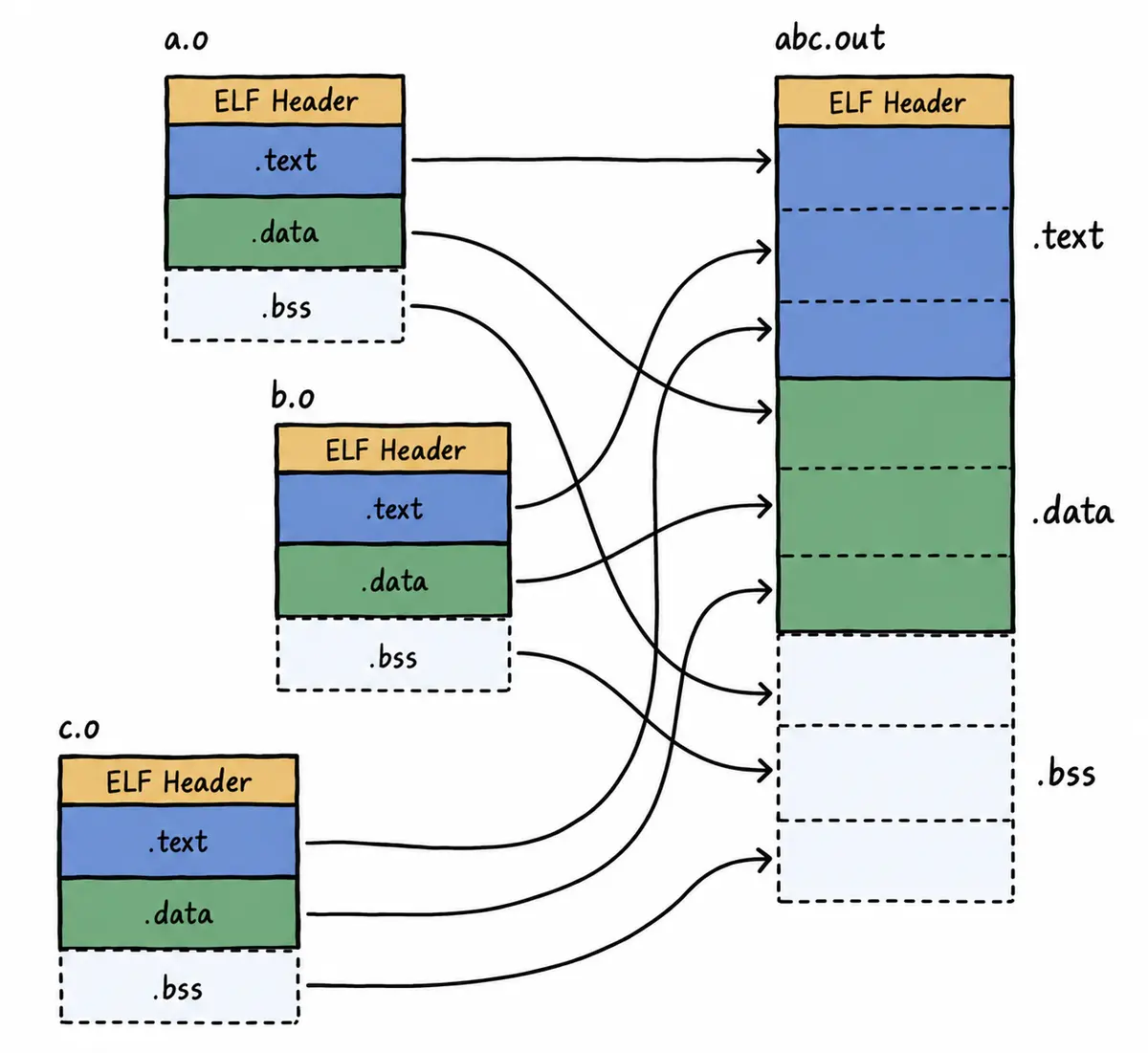
因此,链接过程中会对 .o 中的外部符号进行地址重定位。
8-2 ELF 加载与进程地址空间
8-2-1 虚拟地址/逻辑地址
问题:
- 一个 ELF 程序在没有被加载到内存时,有没有地址?
- 进程的 mm_struct、vm_area_struct 在进程刚刚创建时,其初始化数据来自哪里?
答案:
- 一个 ELF 程序即使还没有被加载到内存,本来就有地址。现代计算机工作时采用“平坦模式”,因此 ELF 也需要对自己的代码和数据统一编址。下面是执行 objdump -S 后得到的反汇编代码。
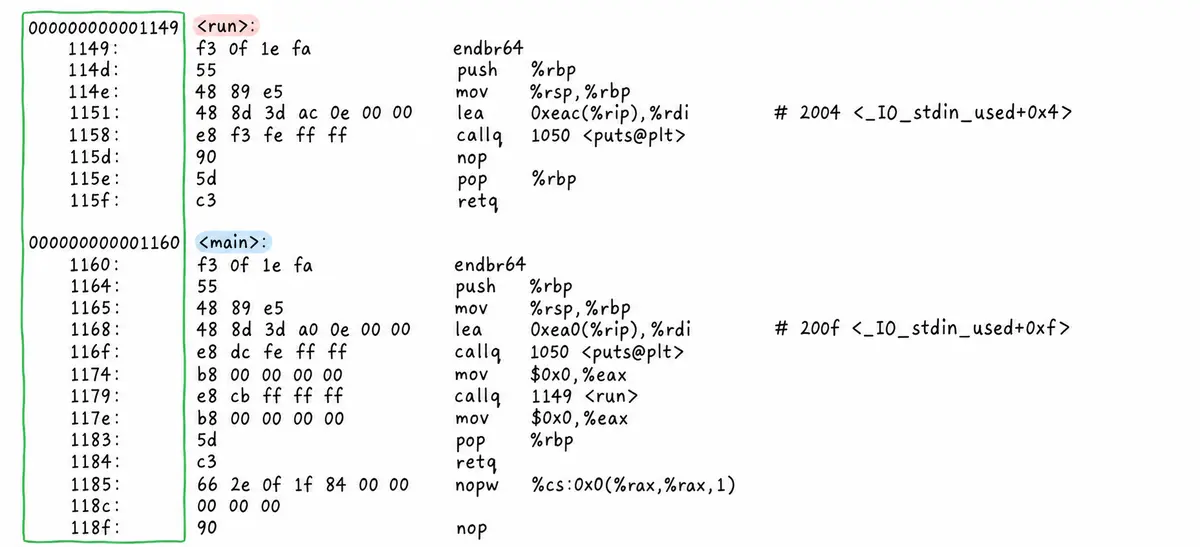
反汇编结果最左侧的是 ELF 的虚拟地址。严格来说,它应称为逻辑地址(起始地址 + 偏移量),但这里认为起始地址是 0。也就是说,在程序尚未加载到内存时,可执行程序就已经完成了统一编址。
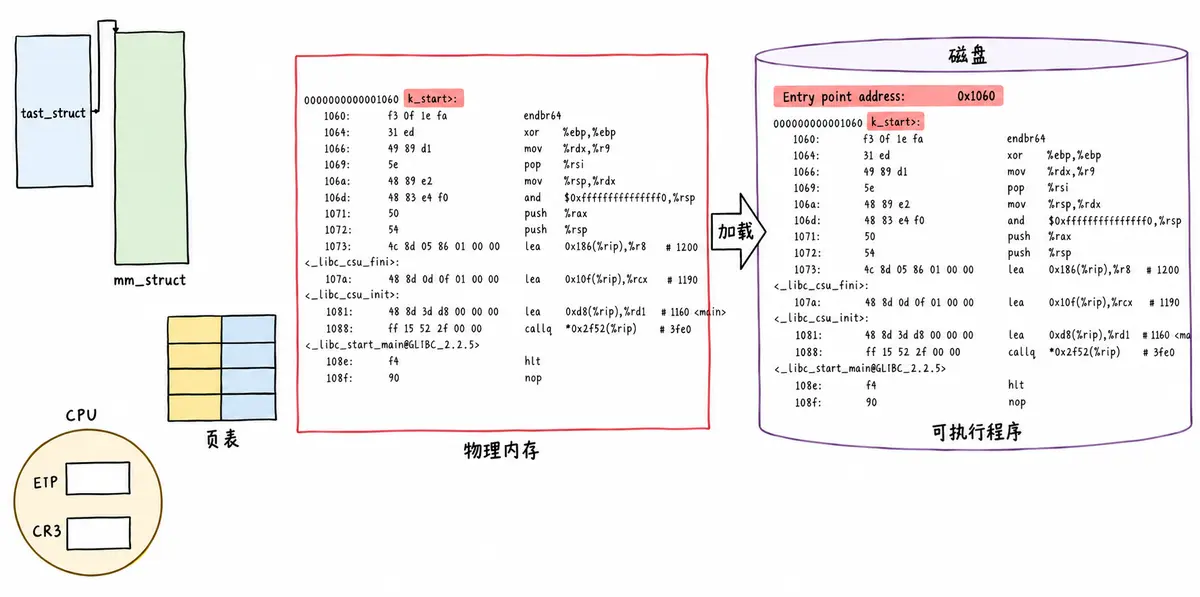
- 进程的 mm_struct、vm_area_struct 在刚刚创建时,初始化数据来自 ELF 的各个 segment。每个 segment 有自己的起始地址和长度,用于初始化内核结构中的 [start, end] 等范围数据;再使用详细地址填充页表。
所以,虚拟地址机制不只需要操作系统支持,编译器也需要支持。
8-2-2 重新理解进程虚拟地址空间
ELF 编译完成后,会把程序未来的入口地址记录在 ELF Header 的 Entry 字段中:
$ gcc *.o
$ readelf -h a.out
ELF Header:
Magic: 7f 45 4c 46 02 01 01 00 00 00 00 00 00 00 00 00
Class: ELF64
Data: 2's complement, little endian
Version: 1 (current)
OS/ABI: UNIX – System V
ABI Version: 0
Type: DYN (Shared object file)
Machine: Advanced Micro Devices X86-64
Version: 0x1
Entry point address: 0x1060
Start of program headers: 64 (bytes into file)
Start of section headers: 14768 (bytes into file)
Flags: 0x0
Size of this header: 64 (bytes)
Size of program headers: 56 (bytes)
Number of program headers: 13
Size of section headers: 64 (bytes)
Number of section headers: 31
Section header string table index: 30
画图说明这一过程:
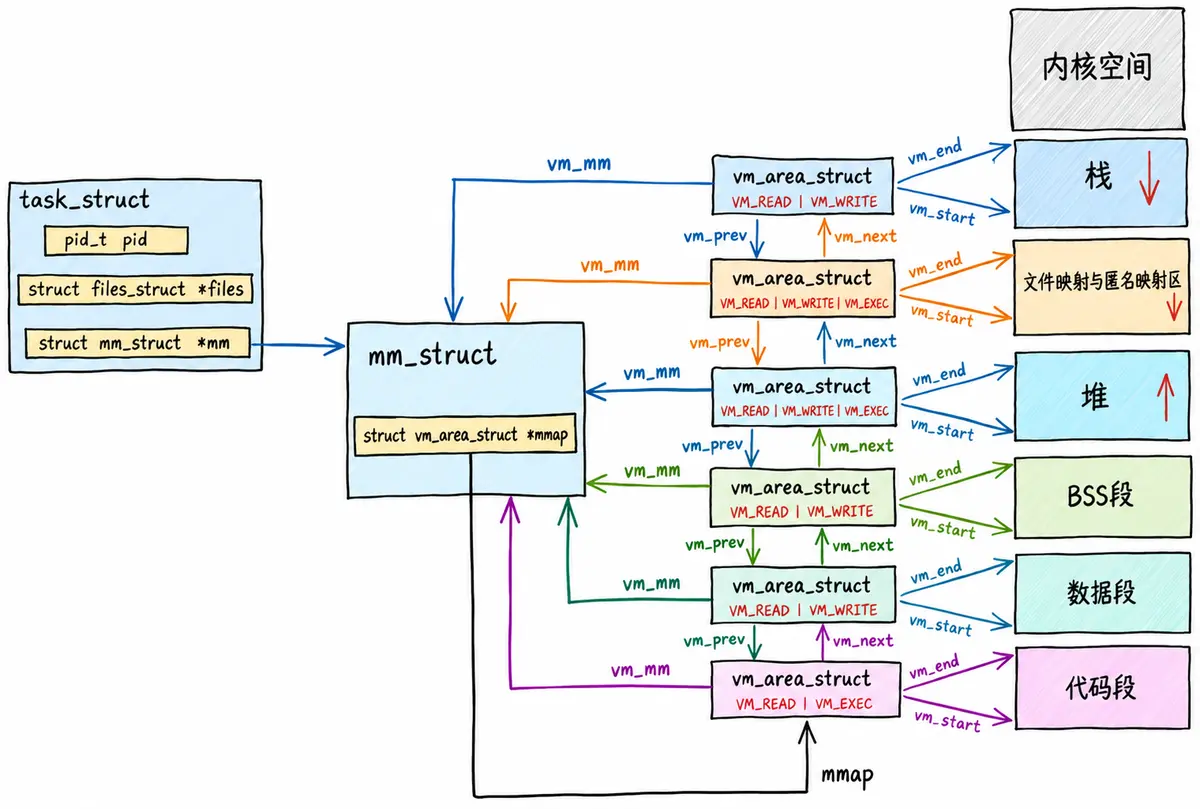
8-3 动态链接与动态库加载
8-3-1 进程如何看到动态库
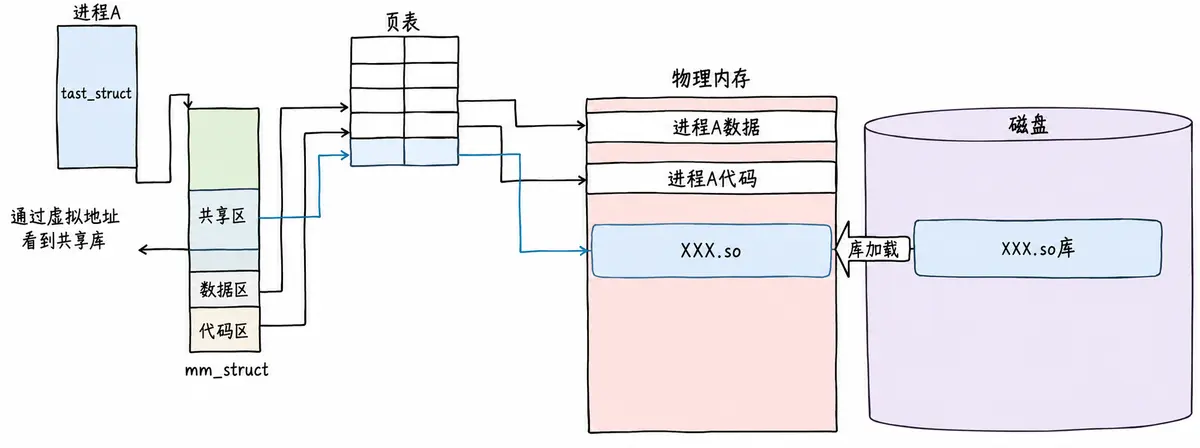
8-3-2 进程间如何共享库
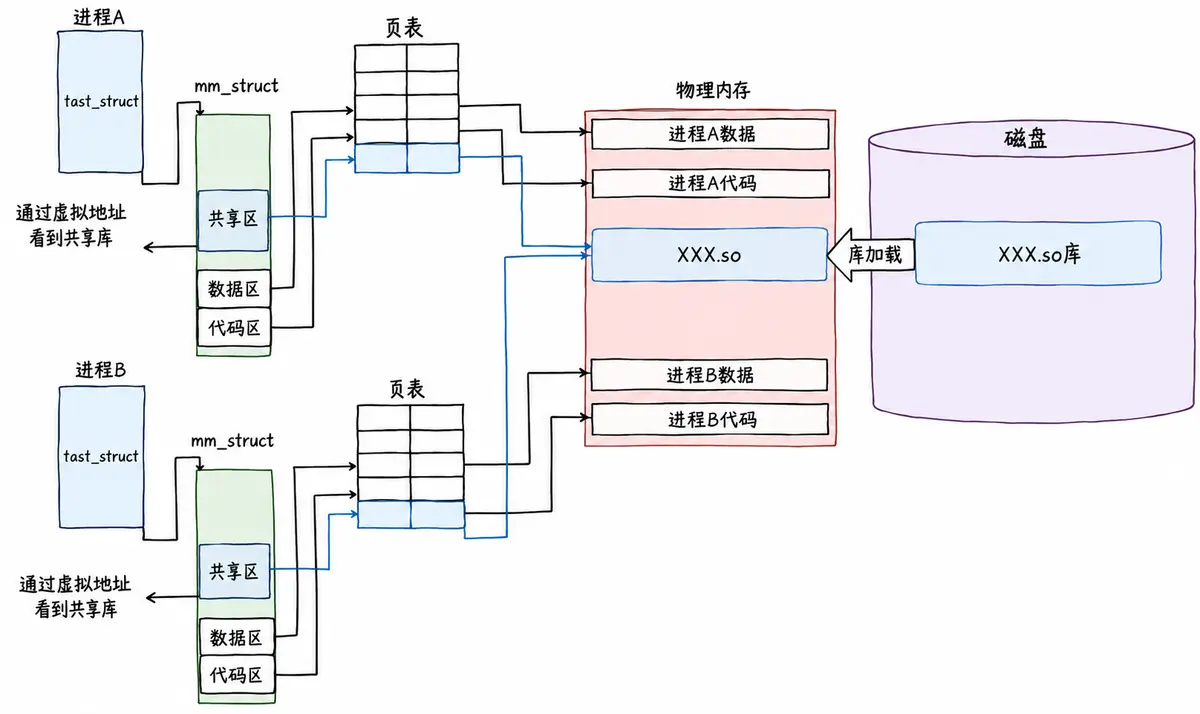
8-3-3 动态链接
8-3-3-1 概要
动态链接其实远比静态链接常用得多。比如查看 main.exe 这个可执行程序依赖的动态库,会发现它用到了 C 动态链接库:
$ ldd main.exe
linux-vdso.so.1 => (0x00007ffefd43f000)
libc.so.6 => /lib64/libc.so.6 (0x00007f533380b000)
/lib64/ld-linux-x86-64.so.2 (0x00007f5333bd9000)
ldd 命令用于打印程序或库文件所依赖的共享库列表。
这里的 libc.so 是 C 语言的运行时库,里面提供了常用的标准输入输出、文件、字符串处理等功能。
那为什么编译器默认不使用静态链接呢?静态链接会将编译产生的所有目标文件连同用到的各种库合并,形成一个独立的可执行文件,它不需要额外的依赖就可以运行。照理来说,这样应该更加方便才对。
静态链接最大的问题在于生成的文件体积大,并且相当耗费内存资源。 随着软件复杂度的提升,我们的操作系统也越来越臃肿,不同的软件可能都包含了相同的功能和代码,显然会浪费大量的硬盘空间。
这个时候,动态链接的优势就体现出来了:我们可以将需要共享的代码单独提取出来,保存成一个独立的动态链接库,等到程序运行的时候再将它们加载到内存。这样不但可以节省空间,而且同一个模块在内存中只需要保留一份副本,可以被不同的进程共享。
动态链接到底是如何工作的?
首先要交代一个结论:动态链接实际上将链接的整个过程推迟到了程序加载的时候。 比如运行一个程序时,操作系统会先将程序的数据、代码连同它用到的一系列动态库加载到内存。每个动态库的加载地址都不固定,操作系统会根据当前地址空间的使用情况,为它们动态分配一段内存。
当动态库被加载到内存以后,一旦它的内存地址确定,我们就可以修正动态库中的那些函数跳转地址了。
8-3-3-2 我们的可执行程序被编译器动了手脚
$ ldd /usr/bin/ls
linux-vdso.so.1 (0x00007fffdd85f000)
libselinux.so.1 => /lib/x86_64-linux-gnu/libselinux.so.1 (0x00007f42c025a000)
libc.so.6 => /lib/x86_64-linux-gnu/libc.so.6 (0x00007f42c0068000)
libpcre2-8.so.0 => /lib/x86_64-linux-gnu/libpcre2-8.so.0 (0x00007f42bffd7000)
libdl.so.2 => /lib/x86_64-linux-gnu/libdl.so.2 (0x00007f42bffd1000)
/lib64/ld-linux-x86-64.so.2 (0x00007f42c02b6000)
libpthread.so.0 => /lib/x86_64-linux-gnu/libpthread.so.0 (0x00007f42bffae000)
$ ldd main.exe
linux-vdso.so.1 (0x00007fff231d6000)
libc.so.6 => /lib/x86_64-linux-gnu/libc.so.6 (0x00007f197ec3b000)
/lib64/ld-linux-x86-64.so.2 (0x00007f197ee3e000)
在 C/C++ 程序中,程序开始执行时并不会直接跳转到 main 函数。实际上,程序的入口点是 _start,这是一个由 C 运行时库(通常是 glibc)或链接器(如 ld)提供的特殊函数。
在 _start 函数中,会执行一系列初始化操作:
设置堆栈:为程序创建一个初始的堆栈环境。
初始化数据段:将程序的数据段(如全局变量和静态变量)从初始化数据段复制到相应的内存位置,并清零未初始化的数据段。
动态链接:这是关键的一步,_start 函数会调用动态链接器的代码来解析和加载程序所依赖的动态库(shared libraries)。动态链接器会处理所有的符号解析和重定位,确保程序中的函数调用和变量访问能够正确映射到动态库中的实际地址。
动态链接器:
- 动态链接器(如 ld-linux.so)负责在程序运行时加载动态库。
- 当程序启动时,动态链接器会解析程序中的动态库依赖,并将这些库加载到内存中。
环境变量和配置文件:
- Linux 系统通过环境变量(如 LD_LIBRARY_PATH)和配置文件(如 /etc/ld.so.conf 及其子配置文件)指定动态库的搜索路径。
- 动态链接器在加载动态库时会搜索这些路径。
缓存文件:
- 为了提高动态库的加载效率,Linux 系统会维护一个名为 /etc/ld.so.cache 的缓存文件。
- 该文件包含系统中所有已知动态库的路径和相关信息,动态链接器在加载动态库时会先搜索这个缓存文件。
调用 __libc_start_main:动态链接完成后,_start 函数会调用 __libc_start_main(glibc 提供的函数)。__libc_start_main 负责执行一些额外的初始化工作,比如设置信号处理函数、初始化线程库(如果使用了线程)等。
调用 main 函数:最后,__libc_start_main 会调用程序的 main 函数,此时程序的执行控制权才正式交给用户编写的代码。
处理 main 函数的返回值:当 main 函数返回时,__libc_start_main 会负责处理这个返回值,并最终调用 _exit 函数终止程序。
上述过程描述了 C/C++ 程序在 main 函数之前执行的一系列操作。对于大多数程序员来说,这些操作是透明的,程序员通常只需要关注 main 函数中的代码,而不需要关心底层的初始化过程。然而,了解这些底层细节有助于更好地理解程序的执行流程和调试问题。
8-3-3-3 动态库中的相对地址
动态库为了支持随时加载并映射到任意进程的任意位置,对动态库中的方法统一采用相对编址的方案(其实可执行程序也一样,都要遵守平坦模式,只不过可执行程序是直接加载的)。
# Ubuntu 下查看任意一个库的反汇编
objdump -S /lib/x86_64-linux-gnu/libc-2.31.so | less
# CentOS 下查看任意一个库的反汇编
$ objdump -S /lib64/libc-2.17.so | less
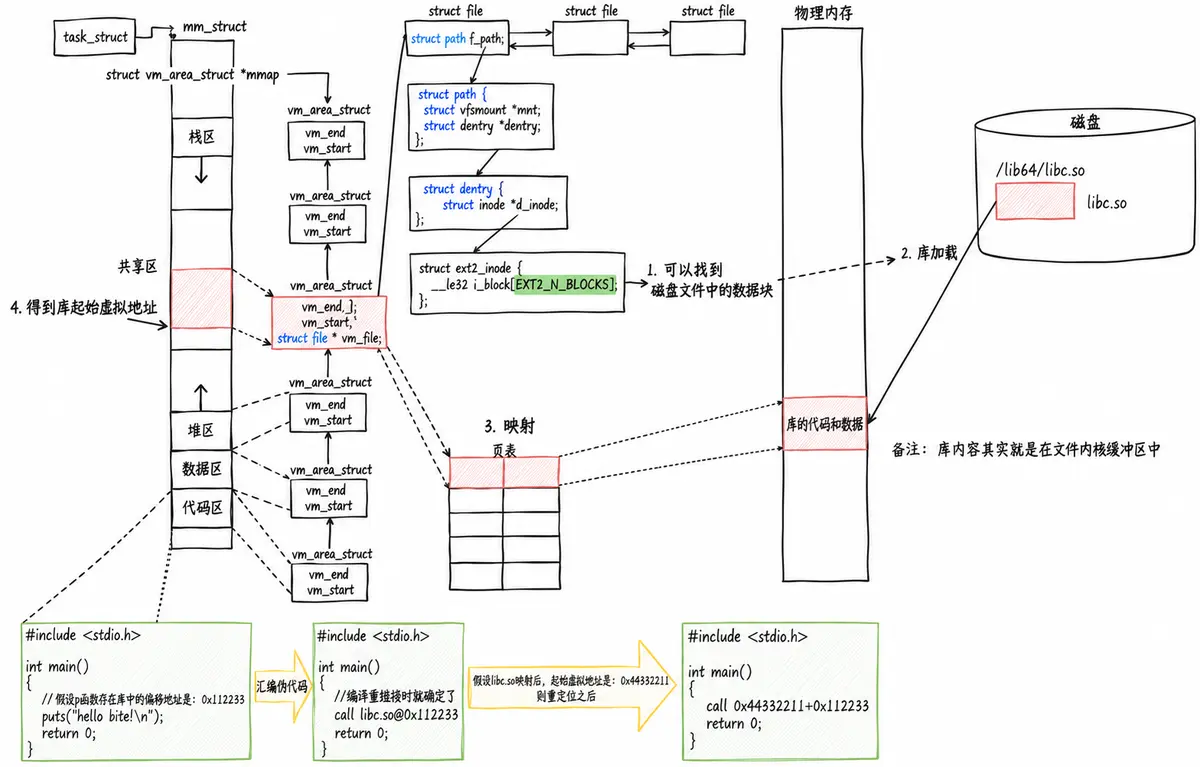
8-3-3-4 我们的程序怎么和库具体映射起来
[!NOTE] 注意
- 动态库也是一个文件,要访问它就要先加载,而加载前需要先打开。
- 让进程找到动态库的本质也是文件操作。不过,我们通过虚拟地址跳转访问库函数,因此需要把动态库映射到进程的地址空间中。
一张图解释清楚:
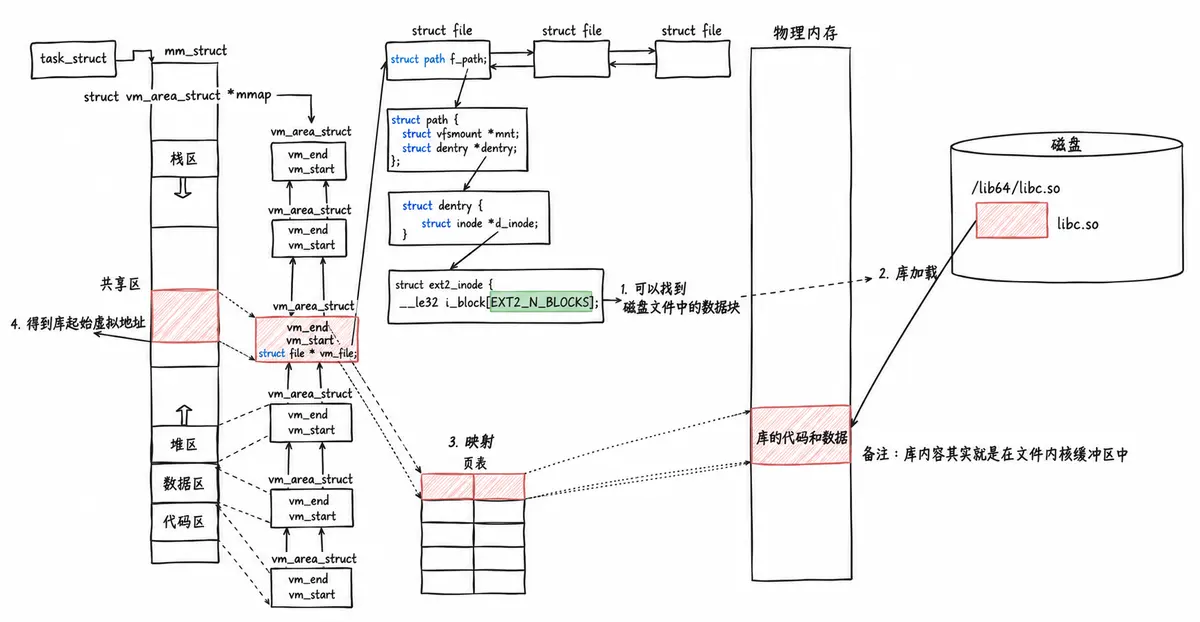
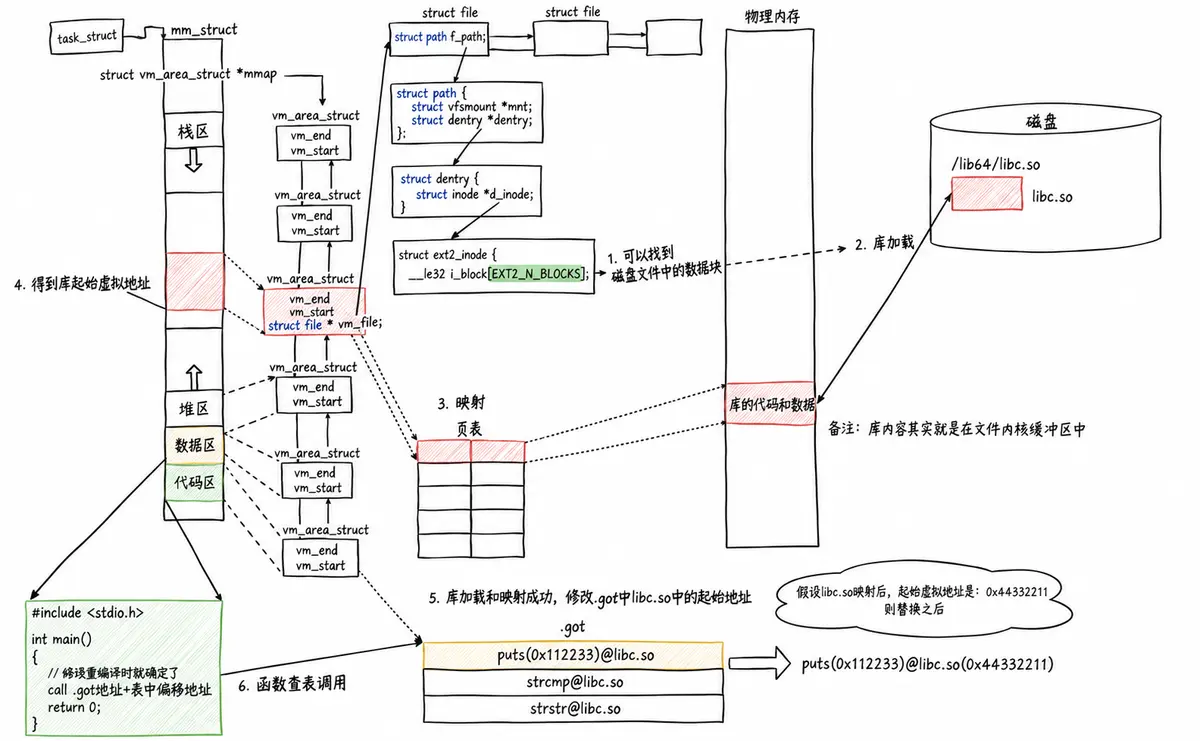
8-3-3-5 我们的程序怎么进行库函数调用
[!NOTE] 注意
- 库已经被映射到当前进程的地址空间中。
- 库的虚拟起始地址已经知道。
- 库中每一个方法的偏移量地址也已经知道。
- 所以,访问库中任意方法,只需要知道“库的起始虚拟地址 + 方法偏移量”,即可定位库中的方法。
- 整个调用过程从代码区跳转到共享区,调用完毕再返回代码区,全程在进程地址空间中进行。
8-3-3-6 全局偏移量表 GOT(Global Offset Table)
[!NOTE] 注意
- 程序运行之前,需要先加载并映射所有库,所有库的起始虚拟地址都应该提前知道。
- 然后修改加载到内存中的程序对库函数的调用地址,在内存中第二次完成地址设置,这称为加载地址重定位。
- 但是,修改的是代码区吗?代码区在进程中不是只读的吗?能修改吗?
动态链接采用的做法是:在可写数据区域中设置 .got / .got.plt 节,用于存放函数的跳转地址。它们属于全局偏移量表 GOT,表中每一项都是本运行模块要引用的一个全局变量或函数的地址。
- 因为 .got / .got.plt 所在的映射区域可写,所以动态链接器可以在运行时更新这些表项。
$ readelf -S a.out
…
[24] .got PROGBITS 0000000000003fb8 00002fb8
0000000000000048 0000000000000008 WA 0 0 8
…
$ readelf -l a.out # .got 在加载时会和 .data 合并成一个 segment,然后一起加载
…
05 .init_array .fini_array .dynamic .got .data .bss
…
$ objdump -S a.out
…
0000000000001050 <puts@plt>:
1050: f3 0f 1e fa endbr64
1054: f2 ff 25 75 2f 00 00 bnd jmpq *0x2f75(%rip) # 3fd0 <puts@GLIBC_2.2.5>
…
0000000000001149 <main>:
1149: f3 0f 1e fa endbr64
114d: 55 push %rbp
114e: 48 89 e5 mov %rsp,%rbp
1151: 48 8d 3d ac 0e 00 00 lea 0xeac(%rip),%rdi # 2004 <_IO_stdin_used+0x4>
1158: e8 f3 fe ff ff callq 1050 <puts@plt>
…
[!NOTE] 备注
- PLT 是什么?
8-3-3-7 库间依赖(简单说明即可)
注意:
- 不仅可执行程序会调用库。
- 库也会调用其他库,库之间存在依赖。如何做到库和库之间相互调用也与地址无关呢?
- 库中也有 GOT,和可执行程序一样。这也解释了为什么它们都是 ELF 格式。
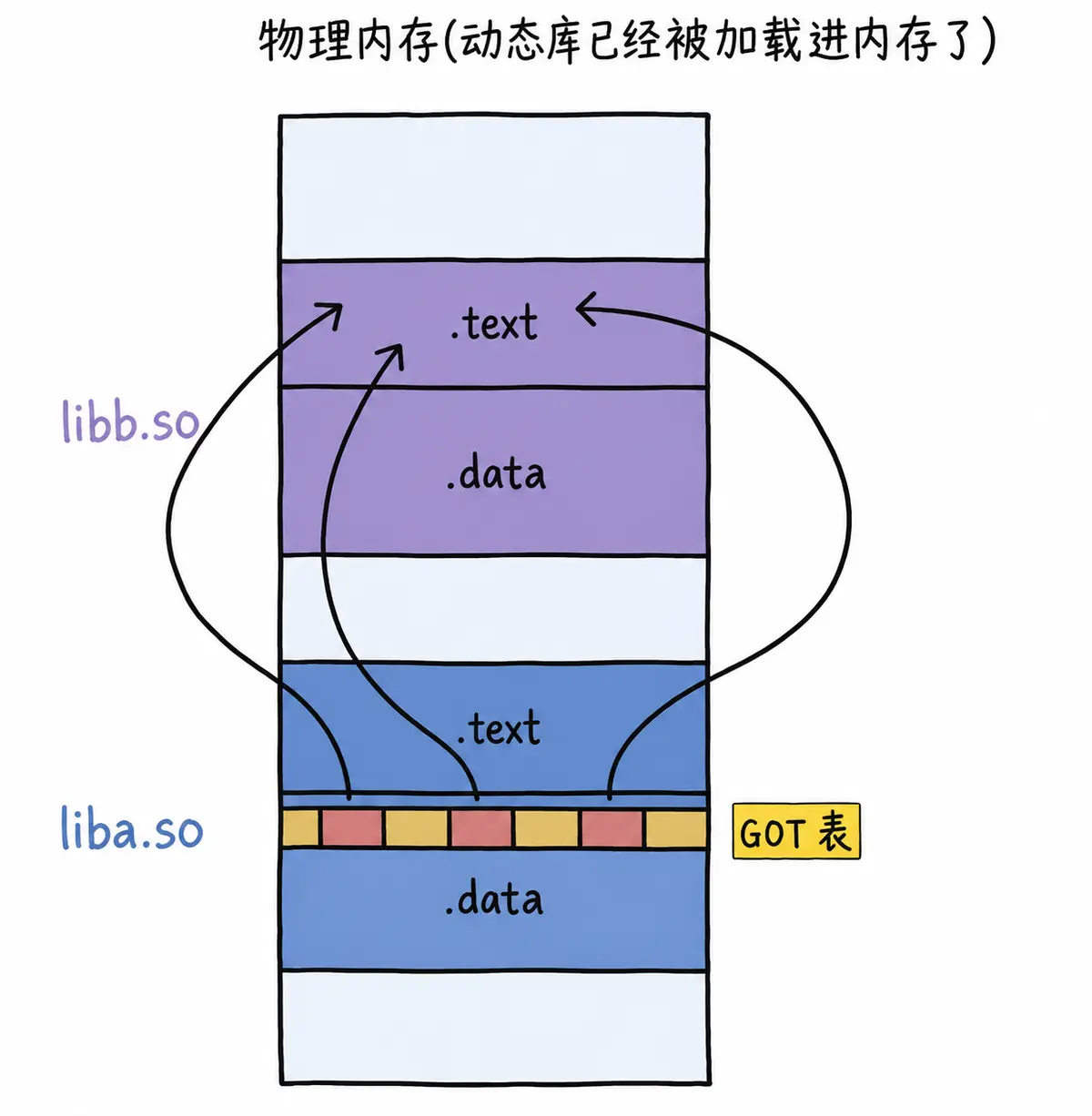
由于 GOT 表中的映射地址会在运行时修改,我们可以通过 GDB 调试观察 GOT 表的地址变化。这里只需要了解原理即可。
- 动态链接在程序加载时需要对大量函数进行重定位,这一步显然非常耗时。为了进一步降低开销,操作系统还做了一些优化,比如延迟绑定,也叫 PLT(过程链接表,Procedure Linkage Table)。与其在程序开始时就对所有函数进行重定位,不如将这个过程推迟到函数第一次被调用时,因为绝大多数动态库中的函数在程序运行期间可能一次都不会被使用。
思路是:GOT 中的跳转地址默认会指向一段辅助代码,它也被称为桩代码(stub)。第一次调用函数时,这段代码会负责查询真正的函数跳转地址,并更新 GOT 表。再次调用函数时,就会直接跳转到动态库中真正的函数实现。
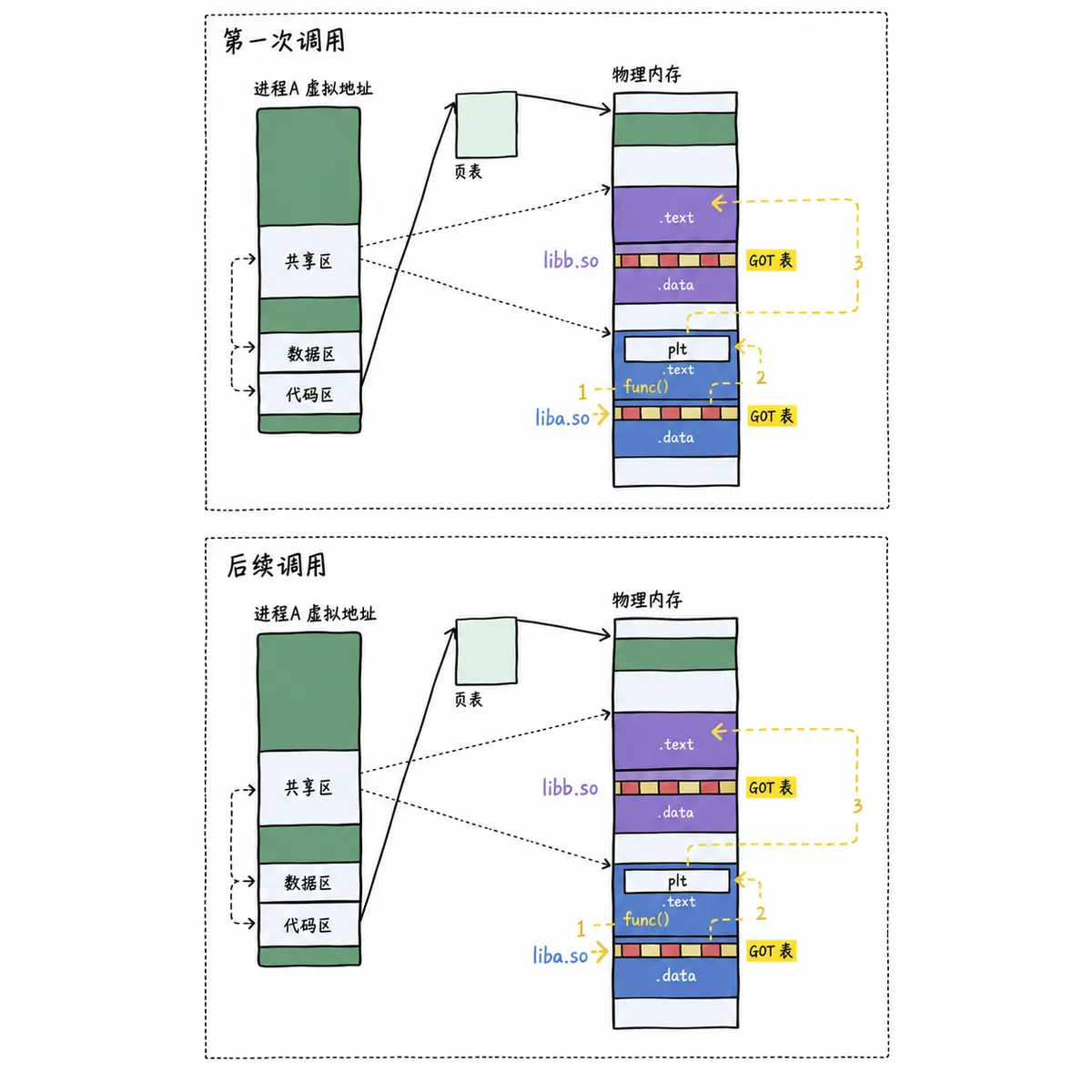
总而言之,动态链接将符号查询、地址重定位等整个链接过程从编译时推迟到了程序运行时。它虽然牺牲了一定的性能和程序加载时间,但绝对是物有所值的,因为动态链接能够更有效地利用磁盘空间和内存资源,也极大地方便了代码的更新和维护。更关键的是,它实现了二进制级别的代码复用。
[!NOTE] 解析依赖关系,就是加载并完善相互之间 GOT 表的过程。
8-3-4 总结
- 静态链接的出现提高了程序的模块化水平。对于一个大项目,不同的人可以独立测试和开发自己的模块,再通过静态链接生成最终的可执行文件。
- 静态链接会将编译产生的所有目标文件和用到的各种库合并成一个独立的可执行文件。在此过程中会修正模块间函数的跳转地址,这称为编译重定位,也叫静态重定位。
- 动态链接将整个链接过程推迟到了程序加载时。运行一个程序时,操作系统会先将程序的数据、代码连同它用到的一系列动态库加载到内存。每个动态库的加载地址都不固定,但无论加载到什么位置,都要映射到进程对应的地址空间,然后通过 GOT 方式调用,这称为运行重定位,也叫动态地址重定位。
附录:操作大全
附录 1:ELF 结构
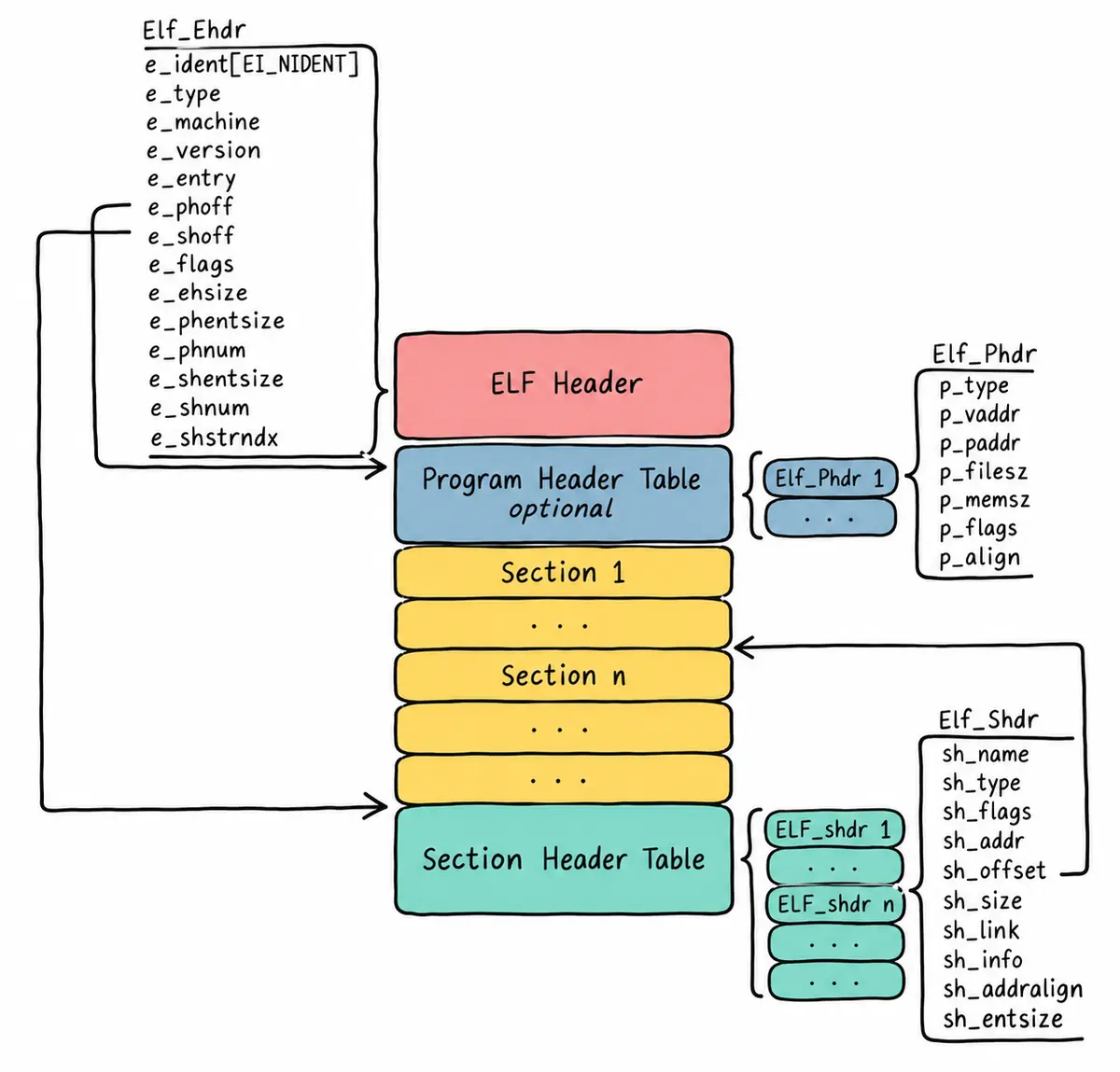
附录 2:查看 ELF Header
-h 或 –file-header:显示 ELF 文件的文件头信息。文件头包含了 ELF 文件的基本信息,比如文件类型、机器类型、版本、入口点地址、程序头表和节头表的位置和大小等。
# readelf -h main
ELF Header:
Magic: 7f 45 4c 46 02 01 01 00 00 00 00 00 00 00 00 00
Class: ELF64
Data: 2's complement, little endian
Version: 1 (current)
OS/ABI: UNIX – System V
ABI Version: 0
Type: EXEC (Executable file)
Machine: Advanced Micro Devices X86-64
Version: 0x1
Entry point address: 0x400640
Start of program headers: 64 (bytes into file)
Start of section headers: 7048 (bytes into file)
Flags: 0x0
Size of this header: 64 (bytes)
Size of program headers: 56 (bytes)
Number of program headers: 9
Size of section headers: 64 (bytes)
Number of section headers: 31
Section header string table index: 30
// 内核中关于 ELF Header 相关的数据结构
// 没错,操作系统自己必须能够识别特定格式的可执行程序:/linux/include/elf.h
typedef struct elf32_hdr {
unsigned char e_ident[EI_NIDENT];
Elf32_Half e_type;
Elf32_Half e_machine;
Elf32_Word e_version;
Elf32_Addr e_entry; /* Entry point */
Elf32_Off e_phoff;
Elf32_Off e_shoff;
Elf32_Word e_flags;
Elf32_Half e_ehsize;
Elf32_Half e_phentsize;
Elf32_Half e_phnum;
Elf32_Half e_shentsize;
Elf32_Half e_shnum;
Elf32_Half e_shstrndx;
} Elf32_Ehdr;
typedef struct elf64_hdr {
unsigned char e_ident[EI_NIDENT]; /* ELF "magic number" */
Elf64_Half e_type;
Elf64_Half e_machine;
Elf64_Word e_version;
Elf64_Addr e_entry; /* Entry point virtual address */
Elf64_Off e_phoff; /* Program header table file offset */
Elf64_Off e_shoff; /* Section header table file offset */
Elf64_Word e_flags;
Elf64_Half e_ehsize;
Elf64_Half e_phentsize;
Elf64_Half e_phnum;
Elf64_Half e_shentsize;
Elf64_Half e_shnum;
Elf64_Half e_shstrndx;
} Elf64_Ehdr;
附录 3:ELF Program Header Table
-l 或 –program-headers:显示 ELF 文件的程序头部(也称为段头)信息。可执行文件在内存中的布局和加载过程非常重要。
# readelf -l main
Elf file type is EXEC (Executable file)
Entry point 0x400640
There are 9 program headers, starting at offset 64
Program Headers:
Type Offset VirtAddr PhysAddr
FileSiz MemSiz Flags Align
PHDR 0x0000000000000040 0x0000000000400040 0x0000000000400040
0x00000000000001f8 0x00000000000001f8 R E 8
INTERP 0x0000000000000238 0x0000000000400238 0x0000000000400238
0x000000000000001c 0x000000000000001c R 1
[Requesting program interpreter: /lib64/ld-linux-x86-64.so.2]
LOAD 0x0000000000000000 0x0000000000400000 0x0000000000400000
0x0000000000000d24 0x0000000000000d24 R E 200000
LOAD 0x0000000000000e10 0x0000000000600e10 0x0000000000600e10
0x0000000000000254 0x0000000000000258 RW 200000
DYNAMIC 0x0000000000000e28 0x0000000000600e28 0x0000000000600e28
0x00000000000001d0 0x00000000000001d0 RW 8
NOTE 0x0000000000000254 0x0000000000400254 0x0000000000400254
0x0000000000000044 0x0000000000000044 R 4
GNU_EH_FRAME 0x0000000000000b34 0x0000000000400b34 0x0000000000400b34
0x000000000000005c 0x000000000000005c R 4
GNU_STACK 0x0000000000000000 0x0000000000000000 0x0000000000000000
0x0000000000000000 0x0000000000000000 RW 10
GNU_RELRO 0x0000000000000e10 0x0000000000600e10 0x0000000000600e10
0x00000000000001f0 0x00000000000001f0 R 1
Section to Segment mapping:
Segment Sections…
00
01 .interp
02 .interp .note.ABI-tag .note.gnu.build-id .gnu.hash .dynsym .dynstr
.gnu.version .gnu.version_r .rela.dyn .rela.plt .init .plt .plt.got .text
.fini .rodata .eh_frame_hdr .eh_frame
03 .init_array .fini_array .jcr .dynamic .got .got.plt .data .bss
04 .dynamic
05 .note.ABI-tag .note.gnu.build-id
06 .eh_frame_hdr
07
08 .init_array .fini_array .jcr .dynamic .got
- PhysAddr:现代 OS 可以不考虑了。
- LOAD:不是所有的 Section 都要被加载到内存,有的是与加载链接有关的字段,但是有 LOAD 的就是将来要加载的部分。
// 内核中关于 ELF Program Header 相关的数据结构
typedef struct elf32_phdr {
Elf32_Word p_type;
Elf32_Off p_offset;
Elf32_Addr p_vaddr;
Elf32_Addr p_paddr;
Elf32_Word p_filesz;
Elf32_Word p_memsz;
Elf32_Word p_flags;
Elf32_Word p_align;
} Elf32_Phdr;
typedef struct elf64_phdr {
Elf64_Word p_type;
Elf64_Word p_flags;
Elf64_Off p_offset; /* Segment file offset */
Elf64_Addr p_vaddr; /* Segment virtual address */
Elf64_Addr p_paddr; /* Segment physical address */
Elf64_Xword p_filesz; /* Segment size in file */
Elf64_Xword p_memsz; /* Segment size in memory */
Elf64_Xword p_align; /* Segment alignment, file & memory */
} Elf64_Phdr;
附录 4:ELF Section Header Table
-S 或 –section-headers:显示 ELF 文件的节头信息。节头描述了 ELF 文件各个节的起始地址、大小、标志等信息。
# readelf -S main
There are 31 section headers, starting at offset 0x1b88:
Section Headers:
[Nr] Name Type Address Offset
Size EntSize Flags Link Info Align
[ 0] NULL 0000000000000000 00000000
0000000000000000 0000000000000000 0 0 0
[ 1] .interp PROGBITS 0000000000400238 00000238
000000000000001c 0000000000000000 A 0 0 1
[ 2] .note.ABI-tag NOTE 0000000000400254 00000254
0000000000000020 0000000000000000 A 0 0 4
[ 3] .note.gnu.build-i NOTE 0000000000400274 00000274
0000000000000024 0000000000000000 A 0 0 4
[ 4] .gnu.hash GNU_HASH 0000000000400298 00000298
000000000000001c 0000000000000000 A 5 0 8
[ 5] .dynsym DYNSYM 00000000004002b8 000002b8
0000000000000108 0000000000000018 A 6 1 8
[ 6] .dynstr STRTAB 00000000004003c0 000003c0
0000000000000076 0000000000000000 A 0 0 1
[ 7] .gnu.version VERSYM 0000000000400436 00000436
0000000000000016 0000000000000002 A 5 0 2
[ 8] .gnu.version_r VERNEED 0000000000400450 00000450
0000000000000030 0000000000000000 A 6 1 8
[ 9] .rela.dyn RELA 0000000000400480 00000480
0000000000000018 0000000000000018 A 5 0 8
[10] .rela.plt RELA 0000000000400498 00000498
00000000000000d8 0000000000000018 AI 5 24 8
[11] .init PROGBITS 0000000000400570 00000570
000000000000001a 0000000000000000 AX 0 0 4
[12] .plt PROGBITS 0000000000400590 00000590
00000000000000a0 0000000000000010 AX 0 0 16
[13] .plt.got PROGBITS 0000000000400630 00000630
0000000000000008 0000000000000000 AX 0 0 8
[14] .text PROGBITS 0000000000400640 00000640
00000000000004b2 0000000000000000 AX 0 0 16
[15] .fini PROGBITS 0000000000400af4 00000af4
0000000000000009 0000000000000000 AX 0 0 4
[16] .rodata PROGBITS 0000000000400b00 00000b00
0000000000000032 0000000000000000 A 0 0 8
[17] .eh_frame_hdr PROGBITS 0000000000400b34 00000b34
000000000000005c 0000000000000000 A 0 0 4
[18] .eh_frame PROGBITS 0000000000400b90 00000b90
0000000000000194 0000000000000000 A 0 0 8
[19] .init_array INIT_ARRAY 0000000000600e10 00000e10
0000000000000008 0000000000000008 WA 0 0 8
[20] .fini_array FINI_ARRAY 0000000000600e18 00000e18
0000000000000008 0000000000000008 WA 0 0 8
[21] .jcr PROGBITS 0000000000600e20 00000e20
0000000000000008 0000000000000000 WA 0 0 8
[22] .dynamic DYNAMIC 0000000000600e28 00000e28
00000000000001d0 0000000000000010 WA 6 0 8
[23] .got PROGBITS 0000000000600ff8 00000ff8
0000000000000008 0000000000000008 WA 0 0 8
[24] .got.plt PROGBITS 0000000000601000 00001000
0000000000000060 0000000000000008 WA 0 0 8
[25] .data PROGBITS 0000000000601060 00001060
0000000000000004 0000000000000000 WA 0 0 1
[26] .bss NOBITS 0000000000601064 00001064
0000000000000004 0000000000000000 WA 0 0 1
[27] .comment PROGBITS 0000000000000000 00001064
000000000000002d 0000000000000001 MS 0 0 1
[28] .symtab SYMTAB 0000000000000000 00001098
0000000000000750 0000000000000018 29 49 8
[29] .strtab STRTAB 0000000000000000 000017e8
0000000000000291 0000000000000000 0 0 1
[30] .shstrtab STRTAB 0000000000000000 00001a79
000000000000010c 0000000000000000 0 0 1
Key to Flags:
W (write), A (alloc), X (execute), M (merge), S (strings), I (info),
L (link order), O (extra OS processing required), G (group), T (TLS),
C (compressed), x (unknown), o (OS specific), E (exclude),
l (large), p (processor specific)
.got 通常与全局偏移表(Global Offset Table,简称 GOT)有关,这块需要简化讲解。
// 内核中关于 ELF Section Header 相关的数据结构
typedef struct {
Elf32_Word sh_name;
Elf32_Word sh_type;
Elf32_Word sh_flags;
Elf32_Addr sh_addr;
Elf32_Off sh_offset;
Elf32_Word sh_size;
Elf32_Word sh_link;
Elf32_Word sh_info;
Elf32_Word sh_addralign;
Elf32_Word sh_entsize;
} Elf32_Shdr;
typedef struct elf64_shdr {
Elf64_Word sh_name; /* Section name, index in string tbl */
Elf64_Word sh_type; /* Type of section */
Elf64_Xword sh_flags; /* Miscellaneous section attributes */
Elf64_Addr sh_addr; /* Section virtual addr at execution */
Elf64_Off sh_offset; /* Section file offset */
Elf64_Xword sh_size; /* Size of section in bytes */
Elf64_Word sh_link; /* Index of another section */
Elf64_Word sh_info; /* Additional section information */
Elf64_Xword sh_addralign; /* Section alignment */
Elf64_Xword sh_entsize; /* Entry size if section holds table */
} Elf64_Shdr;
附录 5:查看具体的 Sections 信息
# objdump -S main
main: file format elf64-x86-64
Disassembly of section .init:
0000000000400570 <_init>:
400570: 48 83 ec 08 sub $0x8,%rsp
400574: 48 8b 05 7d 0a 20 00 mov 0x200a7d(%rip),%rax # 600ff8 <__gmon_start__>
40057b: 48 85 c0 test %rax,%rax
40057e: 74 05 je 400585 <_init+0x15>
400580: e8 ab 00 00 00 callq 400630 <.plt.got>
400585: 48 83 c4 08 add $0x8,%rsp
400589: c3 retq
Disassembly of section .plt:
0000000000400590 <.plt>:
400590: ff 35 72 0a 20 00 pushq 0x200a72(%rip) # 601008 <_GLOBAL_OFFSET_TABLE_+0x8>
400596: ff 25 74 0a 20 00 jmpq *0x200a74(%rip) # 601010 <_GLOBAL_OFFSET_TABLE_+0x10>
40059c: 0f 1f 40 00 nopl 0x0(%rax)
00000000004005a0 <write@plt>:
4005a0: ff 25 72 0a 20 00 jmpq *0x200a72(%rip) # 601018 <write@GLIBC_2.2.5>
4005a6: 68 00 00 00 00 pushq $0x0
4005ab: e9 e0 ff ff ff jmpq 400590 <.plt>
00000000004005b0 <printf@plt>:
4005b0: ff 25 6a 0a 20 00 jmpq *0x200a6a(%rip) # 601020 <printf@GLIBC_2.2.5>
4005b6: 68 01 00 00 00 pushq $0x1
4005bb: e9 d0 ff ff ff jmpq 400590 <.plt>
00000000004005c0 <close@plt>:
4005c0: ff 25 62 0a 20 00 jmpq *0x200a62(%rip) # 601028 <close@GLIBC_2.2.5>
4005c6: 68 02 00 00 00 pushq $0x2
4005cb: e9 c0 ff ff ff jmpq 400590 <.plt>
00000000004005d0 <__libc_start_main@plt>:
4005d0: ff 25 5a 0a 20 00 jmpq *0x200a5a(%rip) # 601030 <__libc_start_main@GLIBC_2.2.5>
4005d6: 68 03 00 00 00 pushq $0x3
4005db: e9 b0 ff ff ff jmpq 400590 <.plt>
查看编译后的 .o 目标文件
在了解了 ELF 文件的基本格式之后,我们就能来看看经过编译后产生的目标 .o 文件的细节了。
$ objdump -d hello.o
hello.o: file format elf64-x86-64
Disassembly of section .text:
0000000000000000 <main>:
0: 55 push %rbp
1: 48 89 e5 mov %rsp,%rbp
4: bf 00 00 00 00 mov $0x0,%edi
9: e8 00 00 00 00 callq e <main+0xe>
e: b8 00 00 00 00 mov $0x0,%eax
13: e8 00 00 00 00 callq 18 <main+0x18>
18: b8 00 00 00 00 mov $0x0,%eax
1d: 5d pop %rbp
1e: c3 retq



评论前必须登录!
注册