 网硕互联帮助中心
前言
上一篇《JavaScript篇 15》中,我们学会了用async/await和Fetch API从后端获取数据。这标志着前端"三板斧"——HTML(结构)、CSS(样式)、JavaScript(交互+数据)——你已经完整掌握。现在,你有能力构建一个真正的"动态数据驱动"的页面了:从API获取数据、用JS处理数据、再用DOM动态渲染到页面上。
本篇作为JavaScript篇的收官之作,我们将综合运用全部16篇文章的知识,从零构建一个交互式数据仪表板。这个项目会用到你学过的所有技能——HTML结构搭建、CSS Grid/Flex布局与动画、DOM操作、事件处理、异步Fetch、数组方法、对象与JSON——全部融合在一个完整的项目中。同时,这也是一个在简历中可以直接展示的前端项目。
本文为Python全栈开发者量身打造,采用"项目驱动"教学法,从项目需求分析到逐模块实现,完整还原一个前端数据看板的开发全过程。完成这个项目后,你就可以自信地说:“我能用JS独立开发前端交互应用了”。
本节核心学习内容:
文章目录
- 前言
- 一、项目架构设计
-
- 1.1 项目概述
- 1.2 技术栈
- 1.3 页面架构
- 二、完整代码
- 三、项目用到的所有JS技能回顾
- 四、JavaScript篇学习路径回顾
- 五、下篇预告:Web开发篇
- 六、专栏订阅
一、项目架构设计
1.1 项目概述
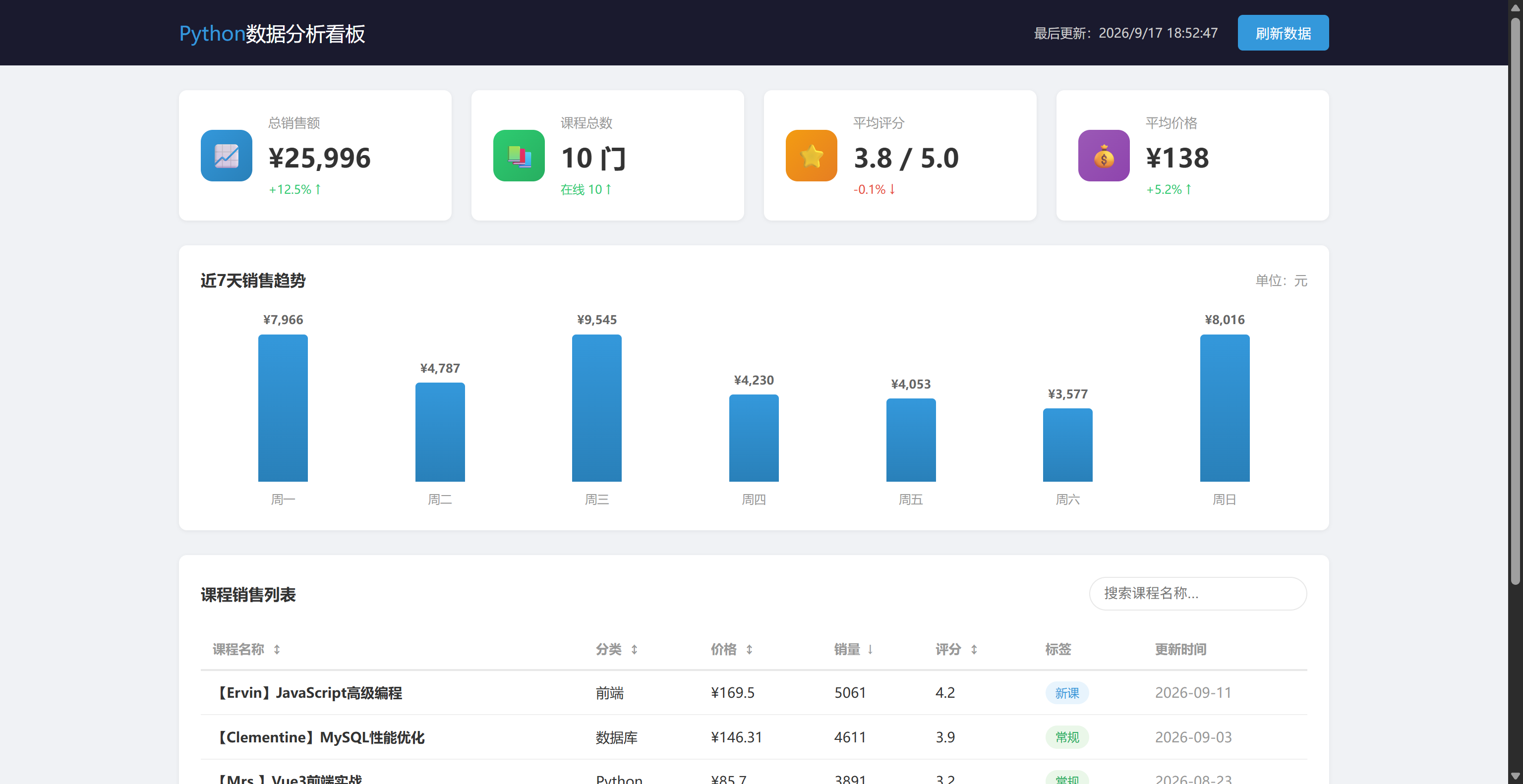
构建一个"课程销售数据看板",包含以下模块:
| 统计卡片 | 展示总销售额、订单数、学员数(动态更新) | 对象解构、数组reduce |
| 数据表格 | 展示课程列表,支持搜索/排序/分页 | 数组filter/sort/slice、事件委托 |
| 销售趋势图 | 纯CSS柱状图展示近7天销售额(可刷新) | 数组map、DOM动态渲染 |
| 顶部导航 | 刷新按钮 + 最后更新时间 | Fetch、事件处理、异步async/await |
1.2 技术栈
- 布局:CSS Grid + Flex
- 数据:Fetch API从JSONPlaceholder获取模拟数据
- 交互:事件委托、表单事件
- 渲染:DOM操作(innerHTML + map + join)
- 异步:async/await
- 动画:加载转圈、卡片悬停
1.3 页面架构
┌──────────────────────────────────────┐
│ 导航栏:标题 + 刷新按钮 + 更新时间 │
├──────────────────────────────────────┤
│ 统计卡片:4个指标卡片(Grid自适应) │
├──────────────────────────────────────┤
│ │
│ 销售趋势:柱状图(纯CSS+JS) │
│ │
├──────────────────────────────────────┤
│ │
│ 课程表格:搜索+排序+分页 │
│ │
└──────────────────────────────────────┘
二、完整代码
<!DOCTYPE html>
<html lang="zh-CN">
<head>
<meta charset="UTF-8">
<meta name="viewport" content="width=device-width, initial-scale=1.0">
<title>课程销售数据看板</title>
<style>
/* ========== 全局 ========== */
* { margin: 0; padding: 0; box-sizing: border-box; }
:root {
–primary: #3498db;
–success: #2ecc71;
–danger: #e74c3c;
–warning: #f39c12;
–dark: #1a1a2e;
–bg: #f0f2f5;
–card-bg: #ffffff;
–text: #333;
–text-light: #666;
–text-lighter: #999;
–border: #e8e8e8;
–radius: 8px;
–shadow: 0 1px 4px rgba(0,0,0,0.06);
}
body {
font-family: "微软雅黑", -apple-system, sans-serif;
background: var(–bg);
color: var(–text);
line-height: 1.6;
font-size: 14px;
}
/* ========== 导航栏 ========== */
.navbar {
background: var(–dark);
color: white;
padding: 0;
position: sticky;
top: 0;
z-index: 100;
}
.navbar-inner {
max-width: 1200px;
margin: 0 auto;
padding: 15px 20px;
display: flex;
justify-content: space-between;
align-items: center;
}
.navbar h1 {
font-size: 20px;
font-weight: 500;
}
.navbar h1 span {
color: var(–primary);
}
.navbar-right {
display: flex;
align-items: center;
gap: 20px;
font-size: 13px;
color: #ccc;
}
.refresh-btn {
padding: 8px 18px;
background: var(–primary);
color: white;
border: none;
border-radius: 5px;
cursor: pointer;
font-size: 14px;
transition: background 0.3s;
display: flex;
align-items: center;
gap: 6px;
}
.refresh-btn:hover {
background: #2980b9;
}
.refresh-btn.loading {
pointer-events: none;
opacity: 0.7;
}
.refresh-btn .spinner {
display: none;
width: 14px;
height: 14px;
border: 2px solid rgba(255,255,255,0.3);
border-top-color: white;
border-radius: 50%;
animation: spin 0.7s linear infinite;
}
.refresh-btn.loading .spinner { display: inline-block; }
@keyframes spin { to { transform: rotate(360deg); } }
/* ========== 主容器 ========== */
.container {
max-width: 1200px;
margin: 25px auto;
padding: 0 20px;
}
/* ========== 统计卡片 ========== */
.stats-grid {
display: grid;
grid-template-columns: repeat(auto-fill, minmax(240px, 1fr));
gap: 20px;
margin-bottom: 25px;
}
.stat-card {
background: var(–card-bg);
border-radius: var(–radius);
padding: 22px;
box-shadow: var(–shadow);
display: flex;
align-items: center;
gap: 16px;
transition: transform 0.3s;
}
.stat-card:hover {
transform: translateY(-3px);
}
.stat-icon {
width: 52px;
height: 52px;
border-radius: 12px;
display: flex;
justify-content: center;
align-items: center;
font-size: 24px;
color: white;
flex-shrink: 0;
}
.stat-icon.blue { background: linear-gradient(135deg, #3498db, #2980b9); }
.stat-icon.green { background: linear-gradient(135deg, #2ecc71, #27ae60); }
.stat-icon.orange { background: linear-gradient(135deg, #f39c12, #e67e22); }
.stat-icon.purple { background: linear-gradient(135deg, #9b59b6, #8e44ad); }
.stat-label {
font-size: 13px;
color: var(–text-lighter);
margin-bottom: 4px;
}
.stat-value {
font-size: 26px;
font-weight: bold;
color: var(–text);
}
.stat-change {
font-size: 12px;
margin-top: 2px;
}
.stat-change.up { color: var(–success); }
.stat-change.down { color: var(–danger); }
/* ========== 图表区 ========== */
.chart-card {
background: var(–card-bg);
border-radius: var(–radius);
padding: 22px;
box-shadow: var(–shadow);
margin-bottom: 25px;
}
.chart-card h3 {
font-size: 16px;
margin-bottom: 18px;
display: flex;
justify-content: space-between;
align-items: center;
}
.chart-container {
display: flex;
align-items: flex-end;
gap: 12px;
height: 200px;
padding: 0 10px;
}
.chart-bar-wrapper {
flex: 1;
display: flex;
flex-direction: column;
align-items: center;
height: 100%;
justify-content: flex-end;
}
.chart-bar {
width: 100%;
max-width: 50px;
background: linear-gradient(180deg, #3498db, #2980b9);
border-radius: 4px 4px 0 0;
transition: height 0.5s ease;
position: relative;
}
.chart-bar:hover {
background: linear-gradient(180deg, #5dade2, #3498db);
}
.chart-value {
font-size: 12px;
color: var(–text-light);
margin-bottom: 5px;
font-weight: bold;
}
.chart-label {
font-size: 12px;
color: var(–text-lighter);
margin-top: 8px;
}
/* ========== 表格区域 ========== */
.table-card {
background: var(–card-bg);
border-radius: var(–radius);
padding: 22px;
box-shadow: var(–shadow);
}
.table-header-bar {
display: flex;
justify-content: space-between;
align-items: center;
margin-bottom: 18px;
flex-wrap: wrap;
gap: 12px;
}
.table-header-bar h3 { font-size: 16px; }
.search-box input {
padding: 8px 14px;
border: 1px solid var(–border);
border-radius: 20px;
font-size: 14px;
outline: none;
width: 220px;
transition: border-color 0.3s;
}
.search-box input:focus {
border-color: var(–primary);
}
table {
width: 100%;
border-collapse: collapse;
}
th {
text-align: left;
padding: 10px 12px;
border-bottom: 2px solid var(–border);
font-size: 13px;
color: var(–text-lighter);
cursor: pointer;
user-select: none;
white-space: nowrap;
}
th:hover { color: var(–text); }
th .sort-arrow { margin-left: 4px; font-size: 11px; }
td {
padding: 10px 12px;
border-bottom: 1px solid #f0f0f0;
font-size: 14px;
}
tr:hover td { background: #fafafa; }
.tag {
display: inline-block;
padding: 2px 10px;
border-radius: 12px;
font-size: 12px;
}
.tag-hot { background: #fde8e8; color: #e74c3c; }
.tag-new { background: #e8f4fd; color: #3498db; }
.tag-normal { background: #eaf7e9; color: #27ae60; }
/* 分页 */
.pagination {
display: flex;
justify-content: center;
align-items: center;
gap: 6px;
margin-top: 20px;
}
.pagination button {
padding: 6px 12px;
border: 1px solid var(–border);
background: white;
border-radius: 4px;
cursor: pointer;
font-size: 13px;
transition: all 0.2s;
}
.pagination button:hover:not(:disabled) {
background: var(–primary);
color: white;
border-color: var(–primary);
}
.pagination button:disabled {
opacity: 0.4;
cursor: default;
}
.pagination button.active {
background: var(–primary);
color: white;
border-color: var(–primary);
}
.pagination .page-info {
font-size: 13px;
color: var(–text-lighter);
margin: 0 10px;
}
/* 无数据/错误状态 */
.empty-state {
text-align: center;
padding: 40px;
color: var(–text-lighter);
}
/* ========== 响应式 ========== */
@media (max-width: 768px) {
.navbar-inner { flex-direction: column; gap: 10px; }
.navbar-right { width: 100%; justify-content: center; }
.table-header-bar { flex-direction: column; align-items: stretch; }
.search-box input { width: 100%; }
.pagination { flex-wrap: wrap; }
.chart-container { height: 150px; }
}
</style>
</head>
<body>
<!– 导航栏 –>
<nav class="navbar">
<div class="navbar-inner">
<h1><span>Python</span>数据分析看板</h1>
<div class="navbar-right">
<span id="update-time">最后更新:–</span>
<button class="refresh-btn" id="refresh-btn">
<span class="spinner"></span>
刷新数据
</button>
</div>
</div>
</nav>
<!– 主内容 –>
<main class="container">
<!– 统计卡片 –>
<div class="stats-grid" id="stats-grid"></div>
<!– 销售趋势图 –>
<div class="chart-card">
<h3>近7天销售趋势 <span style="font-weight:normal;font-size:13px;color:#999">单位:元</span></h3>
<div class="chart-container" id="chart-container"></div>
</div>
<!– 数据表格 –>
<div class="table-card">
<div class="table-header-bar">
<h3>课程销售列表</h3>
<div class="search-box">
<input type="text" id="search-input" placeholder="搜索课程名称…">
</div>
</div>
<div id="table-wrapper">
<div class="empty-state">加载中…</div>
</div>
</div>
</main>
<script>
// ========== 全局状态 ==========
let allCourses = []; // 全量数据
let filteredCourses = []; // 搜索/排序后的数据
let sortField = "sales";
let sortOrder = "desc"; // "asc" 或 "desc"
let currentPage = 1;
const pageSize = 6;
// ========== 工具函数 ==========
function formatCurrency(num) {
return "¥" + num.toLocaleString("zh-CN");
}
function formatDate() {
const now = new Date();
return now.toLocaleString("zh-CN");
}
// ========== 数据获取 ==========
async function fetchDashboardData() {
const refreshBtn = document.querySelector("#refresh-btn");
refreshBtn.classList.add("loading");
try {
const response = await fetch("https://jsonplaceholder.typicode.com/users");
if (!response.ok) throw new Error(`HTTP ${response.status}`);
const users = await response.json();
// 用真实API的用户数据模拟课程销售数据
const tags = ["hot", "new", "normal"];
const tagLabels = { hot: "热门", new: "新课", normal: "常规" };
allCourses = users.slice(0, 12).map((user, i) => ({
id: i + 1,
title: `【${user.name.split(" ")[0]}】${["Python全栈实战", "JavaScript高级编程", "MySQL性能优化", "Django企业开发", "FastAPI微服务", "Vue3前端实战", "Linux运维部署", "Redis缓存技术", "Docker容器化", "AI大模型应用", "网络爬虫实战", "数据结构与算法"][i % 12]}`,
category: ["Python", "前端", "数据库", "运维", "AI"][i % 5],
price: (Math.random() * 200 + 50).toFixed(2) * 1,
sales: Math.floor(Math.random() * 5000) + 200,
rating: (Math.random() * 2 + 3).toFixed(1) * 1,
tag: tags[i % 3],
tagLabel: tagLabels[tags[i % 3]],
updated: new Date(Date.now() – Math.random() * 30 * 86400000).toISOString().split("T")[0]
}));
filteredCourses = […allCourses];
document.querySelector("#update-time").textContent = `最后更新:${formatDate()}`;
renderAll();
} catch (error) {
console.error("数据加载失败:", error.message);
document.querySelector("#table-wrapper").innerHTML = `
<div class="empty-state" style="color:#e74c3c;">
数据加载失败:${error.message}<br>
<button class="refresh-btn" onclick="fetchDashboardData()" style="margin-top:12px">重新加载</button>
</div>
`;
} finally {
refreshBtn.classList.remove("loading");
}
}
// ========== 渲染统计卡片 ==========
function renderStats() {
const totalSales = filteredCourses.reduce((sum, c) => sum + c.sales, 0);
const totalCourses = filteredCourses.length;
const avgRating = (filteredCourses.reduce((sum, c) => sum + c.rating, 0) / totalCourses).toFixed(1);
const avgPrice = (filteredCourses.reduce((sum, c) => sum + c.price, 0) / totalCourses).toFixed(0);
const stats = [
{ label: "总销售额", value: formatCurrency(totalSales), icon: "📈", color: "blue", change: "+12.5%", direction: "up" },
{ label: "课程总数", value: totalCourses + " 门", icon: "📚", color: "green", change: `在线 ${totalCourses}`, direction: "up" },
{ label: "平均评分", value: avgRating + " / 5.0", icon: "⭐", color: "orange", change: "-0.1%", direction: "down" },
{ label: "平均价格", value: formatCurrency(avgPrice), icon: "💰", color: "purple", change: "+5.2%", direction: "up" }
];
document.querySelector("#stats-grid").innerHTML = stats.map(s => `
<div class="stat-card">
<div class="stat-icon ${s.color}">${s.icon}</div>
<div>
<div class="stat-label">${s.label}</div>
<div class="stat-value">${s.value}</div>
<div class="stat-change ${s.direction}">${s.change} ${s.direction === "up" ? "↑" : "↓"}</div>
</div>
</div>
`).join("");
}
// ========== 渲染柱状图 ==========
function renderChart() {
const days = ["周一", "周二", "周三", "周四", "周五", "周六", "周日"];
const values = days.map(() => Math.floor(Math.random() * 8000) + 2000);
const maxValue = Math.max(…values);
document.querySelector("#chart-container").innerHTML = values.map((v, i) => {
const heightPercent = (v / maxValue * 100).toFixed(0);
return `
<div class="chart-bar-wrapper">
<div class="chart-value">${formatCurrency(v)}</div>
<div class="chart-bar" style="height:${heightPercent}%"></div>
<div class="chart-label">${days[i]}</div>
</div>
`;
}).join("");
}
// ========== 搜索与排序 ==========
function applyFilters() {
const keyword = document.querySelector("#search-input").value.toLowerCase().trim();
// 搜索过滤
let result = allCourses.filter(c =>
c.title.toLowerCase().includes(keyword) ||
c.category.toLowerCase().includes(keyword)
);
// 排序
result.sort((a, b) => {
const aVal = a[sortField];
const bVal = b[sortField];
if (sortOrder === "asc") return aVal > bVal ? 1 : –1;
return aVal < bVal ? 1 : –1;
});
filteredCourses = result;
currentPage = 1;
renderTable();
renderStats();
}
// ========== 渲染表格 ==========
function renderTable() {
const start = (currentPage – 1) * pageSize;
const end = start + pageSize;
const pageData = filteredCourses.slice(start, end);
const totalPages = Math.ceil(filteredCourses.length / pageSize) || 1;
// 排序箭头
function arrow(field) {
if (field !== sortField) return " ↕";
return sortOrder === "asc" ? " ↑" : " ↓";
}
const html = `
<table>
<thead>
<tr>
<th data-sort="title">课程名称<span class="sort-arrow">${arrow("title")}</span></th>
<th data-sort="category">分类<span class="sort-arrow">${arrow("category")}</span></th>
<th data-sort="price">价格<span class="sort-arrow">${arrow("price")}</span></th>
<th data-sort="sales">销量<span class="sort-arrow">${arrow("sales")}</span></th>
<th data-sort="rating">评分<span class="sort-arrow">${arrow("rating")}</span></th>
<th>标签</th>
<th>更新时间</th>
</tr>
</thead>
<tbody>
${pageData.length === 0 ? ` <tr><td colspan="7"><div class="empty-state">暂无匹配数据</div></td></tr> ` : pageData.map(c => ` <tr> <td><strong>${c.title}</strong></td> <td>${c.category}</td> <td>${formatCurrency(c.price)}</td> <td>${c.sales}</td> <td>${c.rating}</td> <td><span class="tag tag-${c.tag}">${c.tagLabel}</span></td> <td style="color:#999">${c.updated}</td> </tr> `).join("")}
</tbody>
</table>
${totalPages > 1 ? ` <div class="pagination"> <button ${currentPage === 1 ? "disabled" : ""} data-page="${currentPage – 1}">上一页</button> ${Array.from({length: totalPages}, (_, i) => i + 1).map(p => ` <button class="${p === currentPage ? 'active' : ''}" data-page="${p}">${p}</button> `).join("")} <button ${currentPage === totalPages ? "disabled" : ""} data-page="${currentPage + 1}">下一页</button> <span class="page-info">共 ${filteredCourses.length} 条 / ${totalPages} 页</span> </div> ` : ""}
`;
document.querySelector("#table-wrapper").innerHTML = html;
}
// ========== 事件委托:表格排序和分页 ==========
document.querySelector("#table-wrapper").addEventListener("click", (event) => {
const target = event.target;
// 点击表头排序
const th = target.closest("th");
if (th && th.dataset.sort) {
const field = th.dataset.sort;
if (field === sortField) {
sortOrder = sortOrder === "asc" ? "desc" : "asc";
} else {
sortField = field;
sortOrder = "desc";
}
applyFilters();
return;
}
// 点击分页按钮
const btn = target.closest("button[data-page]");
if (btn && !btn.disabled) {
currentPage = parseInt(btn.dataset.page);
renderTable();
// 滚动到表格顶部
document.querySelector(".table-card").scrollIntoView({ behavior: "smooth" });
return;
}
});
// 搜索事件
document.querySelector("#search-input").addEventListener("input", () => {
applyFilters();
});
// 刷新按钮
document.querySelector("#refresh-btn").addEventListener("click", fetchDashboardData);
// ========== 渲染全部 ==========
function renderAll() {
renderStats();
renderChart();
applyFilters();
}
// ========== 页面初始化 ==========
fetchDashboardData();
</script>
</body>
</html>
三、项目用到的所有JS技能回顾
这个数据看板项目将JS篇的全部知识融会贯通:
| 变量与类型(02篇) | let声明的全局状态、const声明的常量、模板字符串 |
| 运算符(03篇) | ===比较、&&短路、…展开、` |
| 流程控制(04篇) | if-else判断排序方向、for/forEach遍历数据 |
| 函数(05篇) | 大量箭头函数、回调函数(事件处理)、函数封装复用 |
| 数组方法(06篇) | map渲染HTML、filter搜索过滤、reduce统计求和、sort排序、slice分页 |
| 对象与JSON(07篇) | 对象字面量、解构赋值{ name }、API返回到对象的转换 |
| ES6+特性(08篇) | 模板字符串、扩展运算符、可选链 |
| 作用域与this(09篇) | 事件委托中的event.target判断 |
| DOM入门(10篇) | querySelector、innerHTML、classList操作加载状态 |
| DOM进阶(11篇) | 动态生成大量HTML节点、closest()向上查找 |
| 事件入门(12篇) | addEventListener、键盘事件、DOMContentLoaded |
| 事件进阶(13篇) | 事件委托(表格排序+分页统一用一个事件处理) |
| Promise(14篇) | .then链、.catch错误处理、.finally |
| async/await + Fetch(15篇) | async function、await fetch()、try-catch、并行/串行 |
四、JavaScript篇学习路径回顾
第一阶段(01-06):语言基础
JS入门 → 变量类型 → 运算符 → 流程控制 → 函数 → 数组字符串
目标:能用JS写独立的逻辑代码
第二阶段(07-09):核心进阶
对象与JSON → ES6+特性 → 作用域/闭包/this
目标:理解JS的核心机制和现代语法
第三阶段(10-13):DOM与事件
DOM入门 → DOM进阶 → 事件入门 → 事件进阶+表单实战
目标:能操作页面元素、响应用户交互
第四阶段(14-16):异步与实战
Promise → async/await+Fetch → 综合实战
目标:能获取后端数据、构建完整交互应用
从console.log("Hello World")到一个功能完整的交互式数据看板,你已经掌握了前端JavaScript开发的全部核心能力。你能获取API数据、处理数据、动态渲染页面、响应所有用户交互——这些都是真实项目中每天都在做的事情。
五、下篇预告:Web开发篇
JavaScript篇到此圆满结束。但这并不意味着全栈开发的终点——恰恰相反,你刚刚站到了最有意义的起点上。至此,你已经掌握了:
- Python(基础篇+进阶篇):后端逻辑和数据处理
- MySQL(数据库篇):数据存储和管理
- HTML+CSS(前端篇):页面结构和样式
- JavaScript(JavaScript篇):前端交互和数据通信
这四块拼图已经集齐。在接下来的Web开发篇中,我们将把这一切串联起来——学习如何使用FastAPI/Django构建真正的后端服务,接收前端JS的Fetch请求,操作MySQL数据库,将真正的业务数据返回给前端。届时你将看到一个完整的全栈应用是如何运转的:用户在浏览器中点击按钮 → JS发送请求 → Python后端处理 → 查询MySQL数据库 → 数据返回 → JS渲染到页面。这才是全栈开发的完整闭环。
我们Web开发篇见!
六、专栏订阅
- 专栏优点?《Python从入门到实战》,专栏内容涵盖:Python基础到高级编程、并发编程(进程/线程/协程)、网络编程(TCP/UDP/Socket)、核心内置/第三方模块、数据库核心实战、Web开发(Django/Flask/FastAPI框架)、数据库(MySQL/ORM/异步数据库)、网络爬虫(同步/异步/分布式)、AI实战、Linux部署运维、前端开发、JavaScript全栈等核心知识,以项目驱动教学,构建清晰学习路径,适合零基础入门和进阶提升的同学,跟着一步步从入门到精通!专栏地址:https://blog.csdn.net/zsh_1314520/category_13108073.html
- 文章是永久吗? 一次订阅后可永久免费查看专栏内所有文章,后续会持续更新全栈相关内容,第一时间获取最新教程!
- 有答疑交流群吗? 订阅专栏后有专属的全栈学习答疑群,群内提供专业问题答疑、和众多学习者抱团取暖,一起沉淀技术、赋能成长!
- 进群方式? 订阅专栏后可直接在专栏内申请加入答疑群,或私信博主沟通进群事宜:https://bbs.csdn.net/topics/620104702
- 更多干货? 点赞+收藏+关注博主不迷路!博主博客链接:https://blog.csdn.net/zsh_1314520?spm=1000.2115.3001.5343,专注Python全栈技术分享,评论区留言问题会一一回复,助力大家轻松搞定Python全栈!
【原创声明】 除本文原文地址以外,如发现同款内容皆为盗版,本文已收录于《Python全栈:从入门到实战》,请勿购买盗版文章和专栏,如购买盗版内容不提供任何服务。原文地址:https://blog.csdn.net/zsh_1314520/article/details/165755258





评论前必须登录!
注册