 网硕互联帮助中心
两个分支站点各有公网 IP,想让两边内网互通还要加密——经典做法就是 GRE 隧道打通 + IPSec 加密保护。GRE 负责把内网包封装进一条逻辑隧道,IPSec 负责把这条隧道里的流量加密,防在公网上被窃听。
这篇分两段走:先 GRE 打通隧道,再 IPSec 加密。命令按官方文档核对,复制即用。
先弄清两件事是一套里的两步
- GRE 隧道:建一个逻辑口 Tunnel,指定本端/对端公网 IP 作隧道源和目的,再给 Tunnel 口配一个互联 IP。配完两边内网就能通——但明文跑在公网。
- IPSec 保护:在物理出接口上套一套 IKE+IPSec 策略,把走隧道的内网流量加密。
统一任务:站点 A 公网 1.1.1.1、站点 B 公网 2.2.2.2,隧道口 IP 10.0.0.1/24,物理出接口 G0/0/2,预共享密钥 Huawei@123,感兴趣流 ACL 3000。
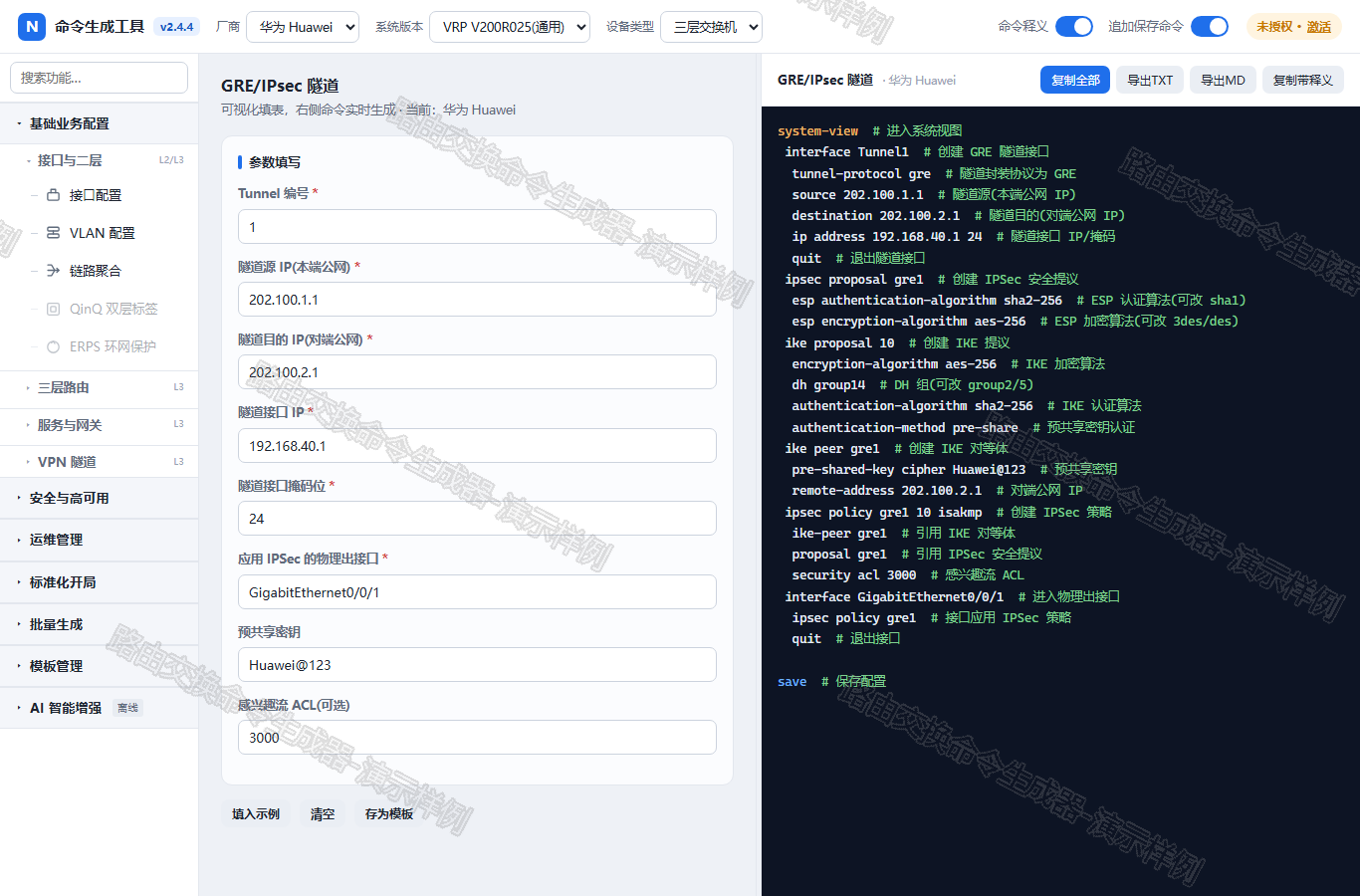
一、GRE 隧道(先打通)
华为交换机 GRE 隧道配置命令
system-view
interface Tunnel1
tunnel-protocol gre
source 1.1.1.1
destination 2.2.2.2
ip address 10.0.0.1 24
quit
华三交换机 GRE 隧道配置命令
system-view
interface Tunnel1 mode gre
source 1.1.1.1
destination 2.2.2.2
ip address 10.0.0.1 24
quit
锐捷 / 迈普 / 思科交换机 GRE 隧道配置命令
configure terminal
interface Tunnel1
tunnel mode gre ip
tunnel source 1.1.1.1
tunnel destination 2.2.2.2
ip address 10.0.0.1 24
exit
华为隧道协议用 tunnel-protocol gre,华三创建时 mode gre,IOS 系(锐捷/迈普/思科)用 tunnel mode gre ip。source/destination 是两端公网 IP,ip address 是 Tunnel 口互联地址,两端要同网段。
二、IPSec 加密保护(套在出接口上)
华为交换机 IPSec 配置命令
ipsec proposal gre1
esp authentication-algorithm sha2-256
esp encryption-algorithm aes-256
ike proposal 10
encryption-algorithm aes-256
dh group14
authentication-algorithm sha2-256
authentication-method pre-share
ike peer gre1
pre-shared-key cipher Huawei@123
remote-address 2.2.2.2
ipsec policy gre1 10 isakmp
ike-peer gre1
proposal gre1
security acl 3000
interface G0/0/2
ipsec policy gre1
quit
华三交换机 IPSec 配置命令
ipsec transform-set gre1
esp encryption-algorithm aes-cbc-256
esp authentication-algorithm sha256
ike proposal 10
encryption-algorithm aes-cbc-256
dh group14
authentication-algorithm sha256
authentication-method pre-share
ike profile gre1
proposal 10
pre-shared-key Huawei@123
match remote identity address 2.2.2.2
ipsec policy gre1 10 isakmp
transform-set gre1
ike-profile gre1
remote-address 2.2.2.2
security acl 3000
interface G0/0/2
ipsec apply policy gre1
quit
华三用 transform-set + ike profile,加密算法名是 aes-cbc-256(华为是 aes-256),别抄错。
锐捷 / 迈普 / 思科交换机 IPSec 配置命令
crypto isakmp policy 10
encryption aes
hash sha
authentication pre-share
group 14
crypto isakmp key 0 Huawei@123 address 2.2.2.2
crypto ipsec transform-set gre1 esp-aes esp-sha-hmac
crypto map gre1 10 ipsec-isakmp
set peer 2.2.2.2
set transform-set gre1
match address 3000
interface G0/0/2
crypto map gre1
exit
IOS 系(锐捷/迈普/思科)用 crypto isakmp + crypto map,出接口 crypto map 应用。思科部分型号 IPSec 命令仅索引级收录,上机前核对手册。
几个最容易踩的坑
华为 ipsec policy、华三 ipsec apply policy、思科 crypto map,应用命令各叫各的。用工具出命令,选厂商直接出对应写法。
我写的路由交换命令生成器:选厂商、填隧道源/目的/密钥,GRE+IPSec 命令一次生成,华为/华三/锐捷/迈普/思科都覆盖,每条按官方文档核过。现在 V2.5.6,离线绿色单文件。
说明
命令我都按各厂商官方文档和工具生成逻辑逐条核对过。但设备型号、软件版本、现网拓扑不一样,真上设备前请先在测试环境或模拟器里跑一遍,确认无误再动生产。按本文命令操作产生的后果,由操作方自行承担。
工具获取
三步拿走工具,全免费:
评论区回复"路由交换命令生成器"免费下载
下期预告:(十七)运维监控配置命令五厂商对照——SNMP 网管、NTP 时钟、syslog 日志主机一次配齐。
系列相关推荐(发布后回填同系列文章链接,提升整体收录与权重):
- (十五)PBR 策略路由配置命令五厂商对照
- (九)BGP 配置命令五厂商对照
- (四)静态路由配置命令五厂商对照



评论前必须登录!
注册