 网硕互联帮助中心
项目七 智能体互联网综合平台开发与运维
对应标准:GB/Z 185 全系列综合应用
建议学时:12 学时(理论 3 + 实践 9)
前置项目:项目一至项目六全部内容
项目导读
情境引入
经过前六个项目的学习,校园智能体已经具备了从身份认证到安全治理的全栈能力。但信息化办公室的王主任提出了新问题——
“现在我们有六七个独立的服务在跑——身份注册中心、发现服务、工具服务、安全网关、生命周期管理器、通知助手……学生和老师要跟智能体交互,得记六七个地址。而且哪个服务挂了,我们根本不知道。能不能做一个统一入口,再加一个监控大屏,让我一眼看到所有智能体的状态?”
这就是项目七要解决的——把前六个项目的所有能力整合为一个统一平台,并增加监控运维能力,实现从"能用"到"好管"的跨越。
学习目标
| 知识 | ① 理解 IoA 综合平台的分层架构与服务编排原理;② 掌握智能体监控的关键指标(健康状态、调用链路、性能 metrics);③ 理解容器化部署与系统集成测试方法 |
| 技能 | ① 能搭建统一 API 网关,实现服务路由与聚合;② 能开发监控看板,实时展示智能体运行状态;③ 能编写 Docker 部署配置和集成测试脚本 |
| 素养 | ① 建立"平台化思维"——从单点服务到统一编排;② 形成"可观测性意识"——看不见的系统管不好;③ 理解工程化部署对规模化落地的关键作用 |
项目任务总览
| 任务 7.1 | 综合平台架构与统一网关 | 服务路由、API 聚合 | unified_gateway.py——统一入口网关 |
| 任务 7.2 | 智能体监控与可视化看板 | 健康检查、指标采集、可视化 | monitoring_dashboard.py——监控看板 |
| 任务 7.3 | 智慧校园 IoA 平台部署实战 | 容器化部署、集成测试 | docker-compose.yml + integration_test.py |
#mermaid-svg-gydZsW1Qnc2BS0vI{font-family:\”trebuchet ms\”,verdana,arial,sans-serif;font-size:16px;fill:#333;}@keyframes edge-animation-frame{from{stroke-dashoffset:0;}}@keyframes dash{to{stroke-dashoffset:0;}}#mermaid-svg-gydZsW1Qnc2BS0vI .edge-animation-slow{stroke-dasharray:9,5!important;stroke-dashoffset:900;animation:dash 50s linear infinite;stroke-linecap:round;}#mermaid-svg-gydZsW1Qnc2BS0vI .edge-animation-fast{stroke-dasharray:9,5!important;stroke-dashoffset:900;animation:dash 20s linear infinite;stroke-linecap:round;}#mermaid-svg-gydZsW1Qnc2BS0vI .error-icon{fill:#552222;}#mermaid-svg-gydZsW1Qnc2BS0vI .error-text{fill:#552222;stroke:#552222;}#mermaid-svg-gydZsW1Qnc2BS0vI .edge-thickness-normal{stroke-width:1px;}#mermaid-svg-gydZsW1Qnc2BS0vI .edge-thickness-thick{stroke-width:3.5px;}#mermaid-svg-gydZsW1Qnc2BS0vI .edge-pattern-solid{stroke-dasharray:0;}#mermaid-svg-gydZsW1Qnc2BS0vI .edge-thickness-invisible{stroke-width:0;fill:none;}#mermaid-svg-gydZsW1Qnc2BS0vI .edge-pattern-dashed{stroke-dasharray:3;}#mermaid-svg-gydZsW1Qnc2BS0vI .edge-pattern-dotted{stroke-dasharray:2;}#mermaid-svg-gydZsW1Qnc2BS0vI .marker{fill:#333333;stroke:#333333;}#mermaid-svg-gydZsW1Qnc2BS0vI .marker.cross{stroke:#333333;}#mermaid-svg-gydZsW1Qnc2BS0vI svg{font-family:\”trebuchet ms\”,verdana,arial,sans-serif;font-size:16px;}#mermaid-svg-gydZsW1Qnc2BS0vI p{margin:0;}#mermaid-svg-gydZsW1Qnc2BS0vI .label{font-family:\”trebuchet ms\”,verdana,arial,sans-serif;color:#333;}#mermaid-svg-gydZsW1Qnc2BS0vI .cluster-label text{fill:#333;}#mermaid-svg-gydZsW1Qnc2BS0vI .cluster-label span{color:#333;}#mermaid-svg-gydZsW1Qnc2BS0vI .cluster-label span p{background-color:transparent;}#mermaid-svg-gydZsW1Qnc2BS0vI .label text,#mermaid-svg-gydZsW1Qnc2BS0vI span{fill:#333;color:#333;}#mermaid-svg-gydZsW1Qnc2BS0vI .node rect,#mermaid-svg-gydZsW1Qnc2BS0vI .node circle,#mermaid-svg-gydZsW1Qnc2BS0vI .node ellipse,#mermaid-svg-gydZsW1Qnc2BS0vI .node polygon,#mermaid-svg-gydZsW1Qnc2BS0vI .node path{fill:#ECECFF;stroke:#9370DB;stroke-width:1px;}#mermaid-svg-gydZsW1Qnc2BS0vI .rough-node .label text,#mermaid-svg-gydZsW1Qnc2BS0vI .node .label text,#mermaid-svg-gydZsW1Qnc2BS0vI .image-shape .label,#mermaid-svg-gydZsW1Qnc2BS0vI .icon-shape .label{text-anchor:middle;}#mermaid-svg-gydZsW1Qnc2BS0vI .node .katex path{fill:#000;stroke:#000;stroke-width:1px;}#mermaid-svg-gydZsW1Qnc2BS0vI .rough-node .label,#mermaid-svg-gydZsW1Qnc2BS0vI .node .label,#mermaid-svg-gydZsW1Qnc2BS0vI .image-shape .label,#mermaid-svg-gydZsW1Qnc2BS0vI .icon-shape .label{text-align:center;}#mermaid-svg-gydZsW1Qnc2BS0vI .node.clickable{cursor:pointer;}#mermaid-svg-gydZsW1Qnc2BS0vI .root .anchor path{fill:#333333!important;stroke-width:0;stroke:#333333;}#mermaid-svg-gydZsW1Qnc2BS0vI .arrowheadPath{fill:#333333;}#mermaid-svg-gydZsW1Qnc2BS0vI .edgePath .path{stroke:#333333;stroke-width:2.0px;}#mermaid-svg-gydZsW1Qnc2BS0vI .flowchart-link{stroke:#333333;fill:none;}#mermaid-svg-gydZsW1Qnc2BS0vI .edgeLabel{background-color:rgba(232,232,232, 0.8);text-align:center;}#mermaid-svg-gydZsW1Qnc2BS0vI .edgeLabel p{background-color:rgba(232,232,232, 0.8);}#mermaid-svg-gydZsW1Qnc2BS0vI .edgeLabel rect{opacity:0.5;background-color:rgba(232,232,232, 0.8);fill:rgba(232,232,232, 0.8);}#mermaid-svg-gydZsW1Qnc2BS0vI .labelBkg{background-color:rgba(232, 232, 232, 0.5);}#mermaid-svg-gydZsW1Qnc2BS0vI .cluster rect{fill:#ffffde;stroke:#aaaa33;stroke-width:1px;}#mermaid-svg-gydZsW1Qnc2BS0vI .cluster text{fill:#333;}#mermaid-svg-gydZsW1Qnc2BS0vI .cluster span{color:#333;}#mermaid-svg-gydZsW1Qnc2BS0vI div.mermaidTooltip{position:absolute;text-align:center;max-width:200px;padding:2px;font-family:\”trebuchet ms\”,verdana,arial,sans-serif;font-size:12px;background:hsl(80, 100%, 96.2745098039%);border:1px solid #aaaa33;border-radius:2px;pointer-events:none;z-index:100;}#mermaid-svg-gydZsW1Qnc2BS0vI .flowchartTitleText{text-anchor:middle;font-size:18px;fill:#333;}#mermaid-svg-gydZsW1Qnc2BS0vI rect.text{fill:none;stroke-width:0;}#mermaid-svg-gydZsW1Qnc2BS0vI .icon-shape,#mermaid-svg-gydZsW1Qnc2BS0vI .image-shape{background-color:rgba(232,232,232, 0.8);text-align:center;}#mermaid-svg-gydZsW1Qnc2BS0vI .icon-shape p,#mermaid-svg-gydZsW1Qnc2BS0vI .image-shape p{background-color:rgba(232,232,232, 0.8);padding:2px;}#mermaid-svg-gydZsW1Qnc2BS0vI .icon-shape .label rect,#mermaid-svg-gydZsW1Qnc2BS0vI .image-shape .label rect{opacity:0.5;background-color:rgba(232,232,232, 0.8);fill:rgba(232,232,232, 0.8);}#mermaid-svg-gydZsW1Qnc2BS0vI .label-icon{display:inline-block;height:1em;overflow:visible;vertical-align:-0.125em;}#mermaid-svg-gydZsW1Qnc2BS0vI .node .label-icon path{fill:currentColor;stroke:revert;stroke-width:revert;}#mermaid-svg-gydZsW1Qnc2BS0vI :root{–mermaid-font-family:\”trebuchet ms\”,verdana,arial,sans-serif;}
暴露统一入口
监控服务
部署运行
部署运行
任务 7.1统一网关服务路由+API聚合
任务 7.2监控看板健康检查+可视化
任务 7.3部署实战容器化+集成测试
项目与前序项目的关系
项目一:搭建智能体 → 体验协作 → 画架构图
项目二:身份码 → 注册中心 → 凭证验证
项目三:能力名片 → 发现服务 → 自动匹配
项目四:任务状态 → 流式交互 → 多轮对话 → 主从协作
项目五:工具服务 → 工具调用 → 综合实战
项目六:安全网关 → 合规检测 → 生命周期管理
项目七:统一网关 → 监控看板 → 部署实战 ← 你在这里(压轴项目)
项目定位:项目一至六解决了"怎么建、怎么认、怎么找、怎么交互、怎么用工具、怎么管安全"的问题。项目七解决"怎么整合、怎么监控、怎么部署"的工程化问题——这是从"实验原型"到"生产平台"的最后一公里。
全书服务端口总览
| 发现服务 | 8000 | 项目三 | 智能体发现与匹配 |
| 工具服务 | 8001 | 项目五 | 工具列表与工具调用 |
| 安全网关 | 8002 | 项目六 | 身份鉴别与访问控制 |
| 生命周期管理 | 8003 | 项目六 | 注册/锁定/注销管理 |
| 统一网关 | 8004 | 项目七 | 统一入口,服务路由 |
| 监控看板 | 8005 | 项目七 | 监控大屏,可视化 |
| 智能体服务 | 9999 | 项目一/四 | A2A 智能体(通知助手等) |
任务 7.1 综合平台架构与统一网关
建议学时:4 学时
① 任务情境
校园 IoA 平台已有 6 个独立服务在运行,但它们各自为政——用户要查天气得访问 8001,要发现智能体得访问 8000,要管理生命周期得访问 8003。信息化办公室需要一个统一入口,让所有操作都通过一个地址完成。
你需要搭建统一 API 网关,实现:
② 知识准备
一、API 网关模式
API 网关是微服务架构中的核心组件,它是所有外部请求的统一入口:
#mermaid-svg-qyQnIYm5dr98VSPU{font-family:\”trebuchet ms\”,verdana,arial,sans-serif;font-size:16px;fill:#333;}@keyframes edge-animation-frame{from{stroke-dashoffset:0;}}@keyframes dash{to{stroke-dashoffset:0;}}#mermaid-svg-qyQnIYm5dr98VSPU .edge-animation-slow{stroke-dasharray:9,5!important;stroke-dashoffset:900;animation:dash 50s linear infinite;stroke-linecap:round;}#mermaid-svg-qyQnIYm5dr98VSPU .edge-animation-fast{stroke-dasharray:9,5!important;stroke-dashoffset:900;animation:dash 20s linear infinite;stroke-linecap:round;}#mermaid-svg-qyQnIYm5dr98VSPU .error-icon{fill:#552222;}#mermaid-svg-qyQnIYm5dr98VSPU .error-text{fill:#552222;stroke:#552222;}#mermaid-svg-qyQnIYm5dr98VSPU .edge-thickness-normal{stroke-width:1px;}#mermaid-svg-qyQnIYm5dr98VSPU .edge-thickness-thick{stroke-width:3.5px;}#mermaid-svg-qyQnIYm5dr98VSPU .edge-pattern-solid{stroke-dasharray:0;}#mermaid-svg-qyQnIYm5dr98VSPU .edge-thickness-invisible{stroke-width:0;fill:none;}#mermaid-svg-qyQnIYm5dr98VSPU .edge-pattern-dashed{stroke-dasharray:3;}#mermaid-svg-qyQnIYm5dr98VSPU .edge-pattern-dotted{stroke-dasharray:2;}#mermaid-svg-qyQnIYm5dr98VSPU .marker{fill:#333333;stroke:#333333;}#mermaid-svg-qyQnIYm5dr98VSPU .marker.cross{stroke:#333333;}#mermaid-svg-qyQnIYm5dr98VSPU svg{font-family:\”trebuchet ms\”,verdana,arial,sans-serif;font-size:16px;}#mermaid-svg-qyQnIYm5dr98VSPU p{margin:0;}#mermaid-svg-qyQnIYm5dr98VSPU .label{font-family:\”trebuchet ms\”,verdana,arial,sans-serif;color:#333;}#mermaid-svg-qyQnIYm5dr98VSPU .cluster-label text{fill:#333;}#mermaid-svg-qyQnIYm5dr98VSPU .cluster-label span{color:#333;}#mermaid-svg-qyQnIYm5dr98VSPU .cluster-label span p{background-color:transparent;}#mermaid-svg-qyQnIYm5dr98VSPU .label text,#mermaid-svg-qyQnIYm5dr98VSPU span{fill:#333;color:#333;}#mermaid-svg-qyQnIYm5dr98VSPU .node rect,#mermaid-svg-qyQnIYm5dr98VSPU .node circle,#mermaid-svg-qyQnIYm5dr98VSPU .node ellipse,#mermaid-svg-qyQnIYm5dr98VSPU .node polygon,#mermaid-svg-qyQnIYm5dr98VSPU .node path{fill:#ECECFF;stroke:#9370DB;stroke-width:1px;}#mermaid-svg-qyQnIYm5dr98VSPU .rough-node .label text,#mermaid-svg-qyQnIYm5dr98VSPU .node .label text,#mermaid-svg-qyQnIYm5dr98VSPU .image-shape .label,#mermaid-svg-qyQnIYm5dr98VSPU .icon-shape .label{text-anchor:middle;}#mermaid-svg-qyQnIYm5dr98VSPU .node .katex path{fill:#000;stroke:#000;stroke-width:1px;}#mermaid-svg-qyQnIYm5dr98VSPU .rough-node .label,#mermaid-svg-qyQnIYm5dr98VSPU .node .label,#mermaid-svg-qyQnIYm5dr98VSPU .image-shape .label,#mermaid-svg-qyQnIYm5dr98VSPU .icon-shape .label{text-align:center;}#mermaid-svg-qyQnIYm5dr98VSPU .node.clickable{cursor:pointer;}#mermaid-svg-qyQnIYm5dr98VSPU .root .anchor path{fill:#333333!important;stroke-width:0;stroke:#333333;}#mermaid-svg-qyQnIYm5dr98VSPU .arrowheadPath{fill:#333333;}#mermaid-svg-qyQnIYm5dr98VSPU .edgePath .path{stroke:#333333;stroke-width:2.0px;}#mermaid-svg-qyQnIYm5dr98VSPU .flowchart-link{stroke:#333333;fill:none;}#mermaid-svg-qyQnIYm5dr98VSPU .edgeLabel{background-color:rgba(232,232,232, 0.8);text-align:center;}#mermaid-svg-qyQnIYm5dr98VSPU .edgeLabel p{background-color:rgba(232,232,232, 0.8);}#mermaid-svg-qyQnIYm5dr98VSPU .edgeLabel rect{opacity:0.5;background-color:rgba(232,232,232, 0.8);fill:rgba(232,232,232, 0.8);}#mermaid-svg-qyQnIYm5dr98VSPU .labelBkg{background-color:rgba(232, 232, 232, 0.5);}#mermaid-svg-qyQnIYm5dr98VSPU .cluster rect{fill:#ffffde;stroke:#aaaa33;stroke-width:1px;}#mermaid-svg-qyQnIYm5dr98VSPU .cluster text{fill:#333;}#mermaid-svg-qyQnIYm5dr98VSPU .cluster span{color:#333;}#mermaid-svg-qyQnIYm5dr98VSPU div.mermaidTooltip{position:absolute;text-align:center;max-width:200px;padding:2px;font-family:\”trebuchet ms\”,verdana,arial,sans-serif;font-size:12px;background:hsl(80, 100%, 96.2745098039%);border:1px solid #aaaa33;border-radius:2px;pointer-events:none;z-index:100;}#mermaid-svg-qyQnIYm5dr98VSPU .flowchartTitleText{text-anchor:middle;font-size:18px;fill:#333;}#mermaid-svg-qyQnIYm5dr98VSPU rect.text{fill:none;stroke-width:0;}#mermaid-svg-qyQnIYm5dr98VSPU .icon-shape,#mermaid-svg-qyQnIYm5dr98VSPU .image-shape{background-color:rgba(232,232,232, 0.8);text-align:center;}#mermaid-svg-qyQnIYm5dr98VSPU .icon-shape p,#mermaid-svg-qyQnIYm5dr98VSPU .image-shape p{background-color:rgba(232,232,232, 0.8);padding:2px;}#mermaid-svg-qyQnIYm5dr98VSPU .icon-shape .label rect,#mermaid-svg-qyQnIYm5dr98VSPU .image-shape .label rect{opacity:0.5;background-color:rgba(232,232,232, 0.8);fill:rgba(232,232,232, 0.8);}#mermaid-svg-qyQnIYm5dr98VSPU .label-icon{display:inline-block;height:1em;overflow:visible;vertical-align:-0.125em;}#mermaid-svg-qyQnIYm5dr98VSPU .node .label-icon path{fill:currentColor;stroke:revert;stroke-width:revert;}#mermaid-svg-qyQnIYm5dr98VSPU :root{–mermaid-font-family:\”trebuchet ms\”,verdana,arial,sans-serif;}
路由
路由
路由
路由
路由
聚合
用户/智能体
统一网关端口 8004
发现服务8000
工具服务8001
安全网关8002
生命周期8003
智能体服务9999
聚合接口一次请求多个服务
| 路由转发 | 请求路径 → 对应后端服务 | /discovery/* → 8000 |
| 服务聚合 | 一次请求获取多个服务数据 | /platform/overview |
| 健康检查 | 定期检测后端服务存活 | /health |
| 统一文档 | 聚合所有服务的 API 文档 | /docs |
二、服务编排与依赖关系
#mermaid-svg-BaNfzcRRj8GLeisD{font-family:\”trebuchet ms\”,verdana,arial,sans-serif;font-size:16px;fill:#333;}@keyframes edge-animation-frame{from{stroke-dashoffset:0;}}@keyframes dash{to{stroke-dashoffset:0;}}#mermaid-svg-BaNfzcRRj8GLeisD .edge-animation-slow{stroke-dasharray:9,5!important;stroke-dashoffset:900;animation:dash 50s linear infinite;stroke-linecap:round;}#mermaid-svg-BaNfzcRRj8GLeisD .edge-animation-fast{stroke-dasharray:9,5!important;stroke-dashoffset:900;animation:dash 20s linear infinite;stroke-linecap:round;}#mermaid-svg-BaNfzcRRj8GLeisD .error-icon{fill:#552222;}#mermaid-svg-BaNfzcRRj8GLeisD .error-text{fill:#552222;stroke:#552222;}#mermaid-svg-BaNfzcRRj8GLeisD .edge-thickness-normal{stroke-width:1px;}#mermaid-svg-BaNfzcRRj8GLeisD .edge-thickness-thick{stroke-width:3.5px;}#mermaid-svg-BaNfzcRRj8GLeisD .edge-pattern-solid{stroke-dasharray:0;}#mermaid-svg-BaNfzcRRj8GLeisD .edge-thickness-invisible{stroke-width:0;fill:none;}#mermaid-svg-BaNfzcRRj8GLeisD .edge-pattern-dashed{stroke-dasharray:3;}#mermaid-svg-BaNfzcRRj8GLeisD .edge-pattern-dotted{stroke-dasharray:2;}#mermaid-svg-BaNfzcRRj8GLeisD .marker{fill:#333333;stroke:#333333;}#mermaid-svg-BaNfzcRRj8GLeisD .marker.cross{stroke:#333333;}#mermaid-svg-BaNfzcRRj8GLeisD svg{font-family:\”trebuchet ms\”,verdana,arial,sans-serif;font-size:16px;}#mermaid-svg-BaNfzcRRj8GLeisD p{margin:0;}#mermaid-svg-BaNfzcRRj8GLeisD .label{font-family:\”trebuchet ms\”,verdana,arial,sans-serif;color:#333;}#mermaid-svg-BaNfzcRRj8GLeisD .cluster-label text{fill:#333;}#mermaid-svg-BaNfzcRRj8GLeisD .cluster-label span{color:#333;}#mermaid-svg-BaNfzcRRj8GLeisD .cluster-label span p{background-color:transparent;}#mermaid-svg-BaNfzcRRj8GLeisD .label text,#mermaid-svg-BaNfzcRRj8GLeisD span{fill:#333;color:#333;}#mermaid-svg-BaNfzcRRj8GLeisD .node rect,#mermaid-svg-BaNfzcRRj8GLeisD .node circle,#mermaid-svg-BaNfzcRRj8GLeisD .node ellipse,#mermaid-svg-BaNfzcRRj8GLeisD .node polygon,#mermaid-svg-BaNfzcRRj8GLeisD .node path{fill:#ECECFF;stroke:#9370DB;stroke-width:1px;}#mermaid-svg-BaNfzcRRj8GLeisD .rough-node .label text,#mermaid-svg-BaNfzcRRj8GLeisD .node .label text,#mermaid-svg-BaNfzcRRj8GLeisD .image-shape .label,#mermaid-svg-BaNfzcRRj8GLeisD .icon-shape .label{text-anchor:middle;}#mermaid-svg-BaNfzcRRj8GLeisD .node .katex path{fill:#000;stroke:#000;stroke-width:1px;}#mermaid-svg-BaNfzcRRj8GLeisD .rough-node .label,#mermaid-svg-BaNfzcRRj8GLeisD .node .label,#mermaid-svg-BaNfzcRRj8GLeisD .image-shape .label,#mermaid-svg-BaNfzcRRj8GLeisD .icon-shape .label{text-align:center;}#mermaid-svg-BaNfzcRRj8GLeisD .node.clickable{cursor:pointer;}#mermaid-svg-BaNfzcRRj8GLeisD .root .anchor path{fill:#333333!important;stroke-width:0;stroke:#333333;}#mermaid-svg-BaNfzcRRj8GLeisD .arrowheadPath{fill:#333333;}#mermaid-svg-BaNfzcRRj8GLeisD .edgePath .path{stroke:#333333;stroke-width:2.0px;}#mermaid-svg-BaNfzcRRj8GLeisD .flowchart-link{stroke:#333333;fill:none;}#mermaid-svg-BaNfzcRRj8GLeisD .edgeLabel{background-color:rgba(232,232,232, 0.8);text-align:center;}#mermaid-svg-BaNfzcRRj8GLeisD .edgeLabel p{background-color:rgba(232,232,232, 0.8);}#mermaid-svg-BaNfzcRRj8GLeisD .edgeLabel rect{opacity:0.5;background-color:rgba(232,232,232, 0.8);fill:rgba(232,232,232, 0.8);}#mermaid-svg-BaNfzcRRj8GLeisD .labelBkg{background-color:rgba(232, 232, 232, 0.5);}#mermaid-svg-BaNfzcRRj8GLeisD .cluster rect{fill:#ffffde;stroke:#aaaa33;stroke-width:1px;}#mermaid-svg-BaNfzcRRj8GLeisD .cluster text{fill:#333;}#mermaid-svg-BaNfzcRRj8GLeisD .cluster span{color:#333;}#mermaid-svg-BaNfzcRRj8GLeisD div.mermaidTooltip{position:absolute;text-align:center;max-width:200px;padding:2px;font-family:\”trebuchet ms\”,verdana,arial,sans-serif;font-size:12px;background:hsl(80, 100%, 96.2745098039%);border:1px solid #aaaa33;border-radius:2px;pointer-events:none;z-index:100;}#mermaid-svg-BaNfzcRRj8GLeisD .flowchartTitleText{text-anchor:middle;font-size:18px;fill:#333;}#mermaid-svg-BaNfzcRRj8GLeisD rect.text{fill:none;stroke-width:0;}#mermaid-svg-BaNfzcRRj8GLeisD .icon-shape,#mermaid-svg-BaNfzcRRj8GLeisD .image-shape{background-color:rgba(232,232,232, 0.8);text-align:center;}#mermaid-svg-BaNfzcRRj8GLeisD .icon-shape p,#mermaid-svg-BaNfzcRRj8GLeisD .image-shape p{background-color:rgba(232,232,232, 0.8);padding:2px;}#mermaid-svg-BaNfzcRRj8GLeisD .icon-shape .label rect,#mermaid-svg-BaNfzcRRj8GLeisD .image-shape .label rect{opacity:0.5;background-color:rgba(232,232,232, 0.8);fill:rgba(232,232,232, 0.8);}#mermaid-svg-BaNfzcRRj8GLeisD .label-icon{display:inline-block;height:1em;overflow:visible;vertical-align:-0.125em;}#mermaid-svg-BaNfzcRRj8GLeisD .node .label-icon path{fill:currentColor;stroke:revert;stroke-width:revert;}#mermaid-svg-BaNfzcRRj8GLeisD :root{–mermaid-font-family:\”trebuchet ms\”,verdana,arial,sans-serif;}
服务层
网关层
用户层
验证后放行
验证后放行
发现地址
状态管理
用户交互
统一网关 8004
安全网关 8002
发现服务 8000
工具服务 8001
生命周期 8003
智能体 9999
③ 任务实施
步骤 1:准备项目目录
cd d:\\ioa-lab
.venv\\Scripts\\activate
mkdir project7
cd project7
步骤 2:编写统一网关
新建文件 unified_gateway.py:
# unified_gateway.py
# 智能体互联网统一网关——服务路由与API聚合
# 整合项目一至六的所有服务
import asyncio
import os
from datetime import datetime
import httpx
from fastapi import FastAPI, Request, HTTPException, Response
from fastapi.middleware.cors import CORSMiddleware
from fastapi.responses import HTMLResponse, JSONResponse
def env(name: str, default: str) –> str:
"""读取环境变量,未设置时使用默认值(便于本地开发与 Docker 部署复用)。"""
return os.getenv(name, default)
app = FastAPI(
title='智能体互联网统一网关',
description='GB/Z 185 全系列综合应用——统一入口',
version='1.0.0',
)
app.add_middleware(
CORSMiddleware,
allow_origins=['*'],
allow_methods=['*'],
allow_headers=['*'],
)
# ============================================================
# 一、后端服务注册表
# ============================================================
SERVICES = {
'discovery': {
'name': '智能体发现服务',
'url': env('DISCOVERY_URL', 'http://127.0.0.1:8000'),
'port': 8000,
'project': '项目三',
'standard': 'GB/Z 185.5',
'health_path': '/discover/search',
'description': '智能体发现与匹配',
},
'tool': {
'name': '工具服务',
'url': env('TOOL_URL', 'http://127.0.0.1:8001'),
'port': 8001,
'project': '项目五',
'standard': 'GB/Z 185.7',
'health_path': '/tools/list',
'description': '工具列表与工具调用',
},
'security': {
'name': '安全网关',
'url': env('SECURITY_URL', 'http://127.0.0.1:8002'),
'port': 8002,
'project': '项目六',
'standard': 'GB/Z 185.3',
'health_path': '/',
'description': '身份鉴别与访问控制',
},
'lifecycle': {
'name': '生命周期管理',
'url': env('LIFECYCLE_URL', 'http://127.0.0.1:8003'),
'port': 8003,
'project': '项目六',
'standard': 'GB/Z 185.3',
'health_path': '/statistics',
'description': '注册/锁定/注销管理',
},
'agent': {
'name': '智能体服务(通知助手)',
'url': env('AGENT_URL', 'http://127.0.0.1:9999'),
'port': 9999,
'project': '项目一/四',
'standard': 'GB/Z 185.6',
'health_path': '/.well-known/agent.json',
'description': 'A2A 智能体服务',
},
}
# ============================================================
# 二、健康检查引擎
# ============================================================
class HealthChecker:
"""服务健康检查器。"""
@staticmethod
async def check_service(service_key: str) –> dict:
"""检查单个服务健康状态。"""
service = SERVICES[service_key]
url = service['url'] + service['health_path']
start_time = datetime.now()
try:
async with httpx.AsyncClient(timeout=3.0, trust_env=False) as client:
resp = await client.get(url)
elapsed = (datetime.now() – start_time).total_seconds() * 1000
return {
'service': service_key,
'name': service['name'],
'url': service['url'],
'port': service['port'],
'status': 'healthy' if resp.status_code < 500 else 'unhealthy',
'http_status': resp.status_code,
'latency_ms': round(elapsed, 1),
'checked_at': datetime.now().isoformat(),
}
except httpx.ConnectError:
return {
'service': service_key,
'name': service['name'],
'url': service['url'],
'port': service['port'],
'status': 'offline',
'http_status': None,
'latency_ms': None,
'checked_at': datetime.now().isoformat(),
'error': '连接失败(服务未启动)',
}
except httpx.TimeoutException:
return {
'service': service_key,
'name': service['name'],
'url': service['url'],
'port': service['port'],
'status': 'timeout',
'http_status': None,
'latency_ms': 3000,
'checked_at': datetime.now().isoformat(),
'error': '连接超时',
}
except Exception as e:
return {
'service': service_key,
'name': service['name'],
'url': service['url'],
'port': service['port'],
'status': 'error',
'http_status': None,
'latency_ms': None,
'checked_at': datetime.now().isoformat(),
'error': str(e),
}
@staticmethod
async def check_all() –> list[dict]:
"""并发检查所有服务。"""
tasks = [HealthChecker.check_service(key) for key in SERVICES]
results = await asyncio.gather(*tasks)
return list(results)
# ============================================================
# 三、服务路由代理
# ============================================================
async def proxy_request(
service_key: str,
path: str,
request: Request,
) –> Response:
"""将请求转发到后端服务。"""
if service_key not in SERVICES:
raise HTTPException(status_code=404, detail=f'未知服务:{service_key}')
service = SERVICES[service_key]
target_url = f'{service["url"]}/{path}'
# 转发请求
method = request.method
headers = {
k: v for k, v in dict(request.headers).items()
if k.lower() not in ('host', 'content-length')
}
body = await request.body()
try:
async with httpx.AsyncClient(timeout=30.0, trust_env=False) as client:
resp = await client.request(
method=method,
url=target_url,
headers=headers,
content=body,
params=request.query_params,
)
# 返回响应
return Response(
content=resp.content,
status_code=resp.status_code,
headers=dict(resp.headers),
media_type=resp.headers.get('content-type'),
)
except httpx.ConnectError:
raise HTTPException(
status_code=503,
detail=f'服务 {service["name"]} 不可用(未启动)',
)
except Exception as e:
raise HTTPException(status_code=502, detail=f'代理请求失败:{e}')
# ============================================================
# 四、API 接口
# ============================================================
@app.get('/')
async def root():
"""网关首页——平台概览。"""
return {
'name': '智能体互联网统一网关',
'version': '1.0.0',
'standard': 'GB/Z 185 全系列',
'registered_services': len(SERVICES),
'endpoints': {
'health': '/health',
'overview': '/platform/overview',
'services': '/services',
'docs': '/docs',
},
}
@app.get('/health')
async def health_check():
"""接口 1:全平台健康检查。"""
results = await HealthChecker.check_all()
healthy = sum(1 for r in results if r['status'] == 'healthy')
total = len(results)
return {
'overall': 'healthy' if healthy == total else 'degraded',
'healthy_count': healthy,
'total_count': total,
'services': results,
'checked_at': datetime.now().isoformat(),
}
@app.get('/services')
async def list_services():
"""接口 2:列出所有已注册服务。"""
return {
'count': len(SERVICES),
'services': [
{
'key': key,
**info,
}
for key, info in SERVICES.items()
],
}
@app.get('/platform/overview')
async def platform_overview():
"""接口 3:平台总览——聚合多个服务数据。
一次请求获取:服务健康状态 + 工具列表 + 智能体统计 + 生命周期统计。
"""
# 并发获取各服务数据
health_results = await HealthChecker.check_all()
# 尝试聚合各服务数据(失败则返回 None)
overview = {
'health': health_results,
'tools': None,
'lifecycle_stats': None,
'discovery_agents': None,
}
async with httpx.AsyncClient(timeout=5.0, trust_env=False) as client:
# 获取工具列表
try:
resp = await client.get(f'{SERVICES["tool"]["url"]}/tools/list')
if resp.status_code == 200:
data = resp.json()
overview['tools'] = {
'count': data.get('count', 0),
'tool_names': [t['toolName'] for t in data.get('tools', [])],
}
except Exception:
pass
# 获取生命周期统计
try:
resp = await client.get(f'{SERVICES["lifecycle"]["url"]}/statistics')
if resp.status_code == 200:
overview['lifecycle_stats'] = resp.json()
except Exception:
pass
# 获取发现服务中的智能体
try:
resp = await client.get(
f'{SERVICES["discovery"]["url"]}/discover/search',
params={'keyword': ''},
)
if resp.status_code == 200:
data = resp.json()
overview['discovery_agents'] = {
'count': data.get('total', data.get('count', 0)),
}
except Exception:
pass
return {
'platform': '智能体互联网综合平台',
'version': '1.0.0',
'generated_at': datetime.now().isoformat(),
**overview,
}
# ============================================================
# 五、服务路由——代理转发
# ============================================================
@app.api_route('/proxy/{service_key}/{path:path}', methods=['GET', 'POST', 'PUT', 'DELETE'])
async def proxy_to_service(service_key: str, path: str, request: Request):
"""接口 4:通用服务代理。
使用方式:
– GET /proxy/discovery/discover/search?keyword=通知
– POST /proxy/tool/tools/call
– GET /proxy/lifecycle/statistics
"""
return await proxy_request(service_key, path, request)
# ============================================================
# 六、监控数据上报接口(供任务 7.2 使用)
# ============================================================
# 内存中的调用记录(实际场景应使用时序数据库)
call_records: list[dict] = []
@app.post('/monitor/record')
async def record_call(request: Request):
"""接口 5:记录一次服务调用(供监控使用)。"""
data = await request.json()
record = {
'timestamp': datetime.now().isoformat(),
'service': data.get('service', 'unknown'),
'action': data.get('action', 'unknown'),
'duration_ms': data.get('duration_ms', 0),
'success': data.get('success', True),
'caller': data.get('caller', ''),
}
call_records.append(record)
# 只保留最近 1000 条
if len(call_records) > 1000:
call_records.pop(0)
return {'recorded': True}
@app.get('/monitor/records')
async def get_records(count: int = 50):
"""接口 6:获取调用记录。"""
return {
'total': len(call_records),
'records': call_records[–count:],
}
# ============================================================
# 入口
# ============================================================
if __name__ == '__main__':
import uvicorn
print('=' * 60)
print('智能体互联网统一网关')
print('GB/Z 185 全系列综合应用')
print('服务地址:http://127.0.0.1:8004')
print('API 文档:http://127.0.0.1:8004/docs')
print(f'已注册后端服务:{len(SERVICES)} 个')
for key, info in SERVICES.items():
print(f' · {info["name"]}(:{info["port"]})[{info["project"]}]')
print('\\n主要接口:')
print(' /health – 全平台健康检查')
print(' /services – 服务列表')
print(' /platform/overview – 平台总览(聚合数据)')
print(' /proxy/{{service}}/{{path}} – 服务代理转发')
print('=' * 60)
uvicorn.run(app, host='127.0.0.1', port=8004)
步骤 3:启动统一网关
python unified_gateway.py
预期输出:
============================================================
智能体互联网统一网关
GB/Z 185 全系列综合应用
服务地址:http://127.0.0.1:8004
API 文档:http://127.0.0.1:8004/docs
已注册后端服务:5 个
· 智能体发现服务(:8000)[项目三]
· 工具服务(:8001)[项目五]
· 安全网关(:8002)[项目六]
· 生命周期管理(:8003)[项目六]
· 智能体服务(通知助手)(:9999)[项目一/四]
主要接口:
/health – 全平台健康检查
/services – 服务列表
/platform/overview – 平台总览(聚合数据)
/proxy/{service}/{path} – 服务代理转发
============================================================
INFO: Uvicorn running on http://127.0.0.1:8004 (Press CTRL+C to quit)
步骤 4:测试统一网关
测试 1:平台健康检查
curl http://127.0.0.1:8004/health
应返回所有服务的健康状态(已启动的服务显示 healthy,未启动的显示 offline)。
测试 2:平台总览(聚合数据)
curl http://127.0.0.1:8004/platform/overview
应返回聚合了健康状态、工具列表、生命周期统计的综合数据。
测试 3:服务代理转发
curl http://127.0.0.1:8004/proxy/tool/tools/list
应通过网关代理访问工具服务的 /tools/list 接口。
✅ 验证要点:
- 服务路由:通过 /proxy/{service}/{path} 可访问任意后端服务
- 服务聚合:/platform/overview 一次请求获取多服务数据
- 健康检查:/health 并发检测所有服务,返回状态和延迟
- 容错处理:后端服务未启动时返回明确错误,不影响网关运行
④ 任务评价
| 服务路由 | 5 个服务全部代理 + 显式路由 | 3-4 个服务代理 | 2 个服务代理 | 无代理 |
| 服务聚合 | 聚合 3+ 服务数据 | 聚合 2 个服务 | 聚合 1 个服务 | 无聚合 |
| 健康检查 | 并发检查 + 延迟统计 + 容错 | 并发检查 | 串行检查 | 无检查 |
| 容错处理 | 全部异常类型处理 | 基本容错 | 简单 try-catch | 无容错 |
任务 7.2 智能体监控与可视化看板
建议学时:4 学时
① 任务情境
统一网关解决了"统一入口"的问题,但王主任还有一个需求——
“我要一个监控大屏,像交通指挥中心那样,一眼看到所有智能体的运行状态:哪些在线、哪些离线、今天有多少次调用、哪个服务最慢……”
你需要开发一个监控看板,实时展示平台运行状态。
② 知识准备
一、智能体监控三大维度
#mermaid-svg-U9EngfBiyd8vAqsK{font-family:\”trebuchet ms\”,verdana,arial,sans-serif;font-size:16px;fill:#333;}@keyframes edge-animation-frame{from{stroke-dashoffset:0;}}@keyframes dash{to{stroke-dashoffset:0;}}#mermaid-svg-U9EngfBiyd8vAqsK .edge-animation-slow{stroke-dasharray:9,5!important;stroke-dashoffset:900;animation:dash 50s linear infinite;stroke-linecap:round;}#mermaid-svg-U9EngfBiyd8vAqsK .edge-animation-fast{stroke-dasharray:9,5!important;stroke-dashoffset:900;animation:dash 20s linear infinite;stroke-linecap:round;}#mermaid-svg-U9EngfBiyd8vAqsK .error-icon{fill:#552222;}#mermaid-svg-U9EngfBiyd8vAqsK .error-text{fill:#552222;stroke:#552222;}#mermaid-svg-U9EngfBiyd8vAqsK .edge-thickness-normal{stroke-width:1px;}#mermaid-svg-U9EngfBiyd8vAqsK .edge-thickness-thick{stroke-width:3.5px;}#mermaid-svg-U9EngfBiyd8vAqsK .edge-pattern-solid{stroke-dasharray:0;}#mermaid-svg-U9EngfBiyd8vAqsK .edge-thickness-invisible{stroke-width:0;fill:none;}#mermaid-svg-U9EngfBiyd8vAqsK .edge-pattern-dashed{stroke-dasharray:3;}#mermaid-svg-U9EngfBiyd8vAqsK .edge-pattern-dotted{stroke-dasharray:2;}#mermaid-svg-U9EngfBiyd8vAqsK .marker{fill:#333333;stroke:#333333;}#mermaid-svg-U9EngfBiyd8vAqsK .marker.cross{stroke:#333333;}#mermaid-svg-U9EngfBiyd8vAqsK svg{font-family:\”trebuchet ms\”,verdana,arial,sans-serif;font-size:16px;}#mermaid-svg-U9EngfBiyd8vAqsK p{margin:0;}#mermaid-svg-U9EngfBiyd8vAqsK .label{font-family:\”trebuchet ms\”,verdana,arial,sans-serif;color:#333;}#mermaid-svg-U9EngfBiyd8vAqsK .cluster-label text{fill:#333;}#mermaid-svg-U9EngfBiyd8vAqsK .cluster-label span{color:#333;}#mermaid-svg-U9EngfBiyd8vAqsK .cluster-label span p{background-color:transparent;}#mermaid-svg-U9EngfBiyd8vAqsK .label text,#mermaid-svg-U9EngfBiyd8vAqsK span{fill:#333;color:#333;}#mermaid-svg-U9EngfBiyd8vAqsK .node rect,#mermaid-svg-U9EngfBiyd8vAqsK .node circle,#mermaid-svg-U9EngfBiyd8vAqsK .node ellipse,#mermaid-svg-U9EngfBiyd8vAqsK .node polygon,#mermaid-svg-U9EngfBiyd8vAqsK .node path{fill:#ECECFF;stroke:#9370DB;stroke-width:1px;}#mermaid-svg-U9EngfBiyd8vAqsK .rough-node .label text,#mermaid-svg-U9EngfBiyd8vAqsK .node .label text,#mermaid-svg-U9EngfBiyd8vAqsK .image-shape .label,#mermaid-svg-U9EngfBiyd8vAqsK .icon-shape .label{text-anchor:middle;}#mermaid-svg-U9EngfBiyd8vAqsK .node .katex path{fill:#000;stroke:#000;stroke-width:1px;}#mermaid-svg-U9EngfBiyd8vAqsK .rough-node .label,#mermaid-svg-U9EngfBiyd8vAqsK .node .label,#mermaid-svg-U9EngfBiyd8vAqsK .image-shape .label,#mermaid-svg-U9EngfBiyd8vAqsK .icon-shape .label{text-align:center;}#mermaid-svg-U9EngfBiyd8vAqsK .node.clickable{cursor:pointer;}#mermaid-svg-U9EngfBiyd8vAqsK .root .anchor path{fill:#333333!important;stroke-width:0;stroke:#333333;}#mermaid-svg-U9EngfBiyd8vAqsK .arrowheadPath{fill:#333333;}#mermaid-svg-U9EngfBiyd8vAqsK .edgePath .path{stroke:#333333;stroke-width:2.0px;}#mermaid-svg-U9EngfBiyd8vAqsK .flowchart-link{stroke:#333333;fill:none;}#mermaid-svg-U9EngfBiyd8vAqsK .edgeLabel{background-color:rgba(232,232,232, 0.8);text-align:center;}#mermaid-svg-U9EngfBiyd8vAqsK .edgeLabel p{background-color:rgba(232,232,232, 0.8);}#mermaid-svg-U9EngfBiyd8vAqsK .edgeLabel rect{opacity:0.5;background-color:rgba(232,232,232, 0.8);fill:rgba(232,232,232, 0.8);}#mermaid-svg-U9EngfBiyd8vAqsK .labelBkg{background-color:rgba(232, 232, 232, 0.5);}#mermaid-svg-U9EngfBiyd8vAqsK .cluster rect{fill:#ffffde;stroke:#aaaa33;stroke-width:1px;}#mermaid-svg-U9EngfBiyd8vAqsK .cluster text{fill:#333;}#mermaid-svg-U9EngfBiyd8vAqsK .cluster span{color:#333;}#mermaid-svg-U9EngfBiyd8vAqsK div.mermaidTooltip{position:absolute;text-align:center;max-width:200px;padding:2px;font-family:\”trebuchet ms\”,verdana,arial,sans-serif;font-size:12px;background:hsl(80, 100%, 96.2745098039%);border:1px solid #aaaa33;border-radius:2px;pointer-events:none;z-index:100;}#mermaid-svg-U9EngfBiyd8vAqsK .flowchartTitleText{text-anchor:middle;font-size:18px;fill:#333;}#mermaid-svg-U9EngfBiyd8vAqsK rect.text{fill:none;stroke-width:0;}#mermaid-svg-U9EngfBiyd8vAqsK .icon-shape,#mermaid-svg-U9EngfBiyd8vAqsK .image-shape{background-color:rgba(232,232,232, 0.8);text-align:center;}#mermaid-svg-U9EngfBiyd8vAqsK .icon-shape p,#mermaid-svg-U9EngfBiyd8vAqsK .image-shape p{background-color:rgba(232,232,232, 0.8);padding:2px;}#mermaid-svg-U9EngfBiyd8vAqsK .icon-shape .label rect,#mermaid-svg-U9EngfBiyd8vAqsK .image-shape .label rect{opacity:0.5;background-color:rgba(232,232,232, 0.8);fill:rgba(232,232,232, 0.8);}#mermaid-svg-U9EngfBiyd8vAqsK .label-icon{display:inline-block;height:1em;overflow:visible;vertical-align:-0.125em;}#mermaid-svg-U9EngfBiyd8vAqsK .node .label-icon path{fill:currentColor;stroke:revert;stroke-width:revert;}#mermaid-svg-U9EngfBiyd8vAqsK :root{–mermaid-font-family:\”trebuchet ms\”,verdana,arial,sans-serif;}
监控维度
维度1: 健康状态在线/离线/延迟
维度2: 调用链路谁调用了谁/成功/失败
维度3: 性能指标QPS/延迟/错误率
服务存活检测
响应延迟统计
调用记录
调用成功率
吞吐量 QPS
平均延迟
错误率
| 健康状态 | 在线/离线、延迟 | 定期 ping | 状态卡片 |
| 调用链路 | 调用次数、成功率 | 网关记录 | 时间线图表 |
| 性能指标 | QPS、平均延迟、错误率 | 统计计算 | 数字仪表盘 |
二、可观测性三支柱
| Metrics(指标) | 可量化的数值数据 | 延迟、QPS、错误率 |
| Logs(日志) | 事件记录 | 调用记录、审计日志 |
| Traces(链路) | 请求在服务间的传播路径 | 调用链路记录 |
③ 任务实施
步骤 1:编写监控看板
新建文件 monitoring_dashboard.py:
# monitoring_dashboard.py
# 智能体互联网监控看板——健康状态、调用链路、性能指标可视化
# 对接统一网关(8004)的监控数据
import asyncio
import os
from collections import defaultdict, deque
from datetime import datetime, timedelta
import httpx
from fastapi import FastAPI, Request
from fastapi.middleware.cors import CORSMiddleware
from fastapi.responses import HTMLResponse
app = FastAPI(
title='智能体互联网监控看板',
version='1.0.0',
)
app.add_middleware(
CORSMiddleware,
allow_origins=['*'],
allow_methods=['*'],
allow_headers=['*'],
)
# ============================================================
# 一、监控数据存储
# ============================================================
GATEWAY_URL = os.getenv('GATEWAY_URL', 'http://127.0.0.1:8004')
# 服务健康历史(保留最近 60 个数据点,模拟 60 秒)
health_history: dict[str, deque] = defaultdict(lambda: deque(maxlen=60))
# 调用记录(保留最近 500 条)
call_records: deque = deque(maxlen=500)
# ============================================================
# 二、监控数据采集器
# ============================================================
class MetricsCollector:
"""监控指标采集器。"""
@staticmethod
async def collect_health() –> list[dict]:
"""从统一网关采集健康数据。"""
try:
async with httpx.AsyncClient(timeout=5.0, trust_env=False) as client:
resp = await client.get(f'{GATEWAY_URL}/health')
if resp.status_code == 200:
data = resp.json()
services = data.get('services', [])
# 记录历史
for svc in services:
key = svc['service']
health_history[key].append({
'timestamp': datetime.now().isoformat(),
'status': svc['status'],
'latency_ms': svc.get('latency_ms', 0),
})
return services
except Exception:
pass
return []
@staticmethod
async def collect_call_records() –> list[dict]:
"""从统一网关采集调用记录。"""
try:
async with httpx.AsyncClient(timeout=5.0, trust_env=False) as client:
resp = await client.get(f'{GATEWAY_URL}/monitor/records', params={'count': 100})
if resp.status_code == 200:
data = resp.json()
return data.get('records', [])
except Exception:
pass
return []
@staticmethod
def calculate_metrics(records: list[dict]) –> dict:
"""计算性能指标。"""
total = len(records)
if total == 0:
return {
'total_calls': 0,
'success_rate': 0,
'avg_latency_ms': 0,
'calls_per_service': {},
'latency_per_service': {},
}
successful = sum(1 for r in records if r.get('success', True))
latencies = [r.get('duration_ms', 0) for r in records if r.get('duration_ms')]
calls_per_service = defaultdict(int)
latency_per_service = defaultdict(list)
for r in records:
svc = r.get('service', 'unknown')
calls_per_service[svc] += 1
if r.get('duration_ms'):
latency_per_service[svc].append(r['duration_ms'])
avg_latency = sum(latencies) / len(latencies) if latencies else 0
return {
'total_calls': total,
'successful_calls': successful,
'failed_calls': total – successful,
'success_rate': round(successful / total * 100, 1) if total > 0 else 0,
'avg_latency_ms': round(avg_latency, 1),
'calls_per_service': dict(calls_per_service),
'avg_latency_per_service': {
k: round(sum(v) / len(v), 1)
for k, v in latency_per_service.items()
},
}
# ============================================================
# 三、监控 API 接口
# ============================================================
@app.get('/api/metrics')
async def get_metrics():
"""接口 1:获取当前监控指标。"""
health = await MetricsCollector.collect_health()
records = await MetricsCollector.collect_call_records()
calculated = MetricsCollector.calculate_metrics(records)
return {
'generated_at': datetime.now().isoformat(),
'health': health,
'metrics': calculated,
'health_history': {
key: list(history) for key, history in health_history.items()
},
}
@app.get('/api/health')
async def get_health():
"""接口 2:获取服务健康状态。"""
health = await MetricsCollector.collect_health()
healthy_count = sum(1 for h in health if h['status'] == 'healthy')
return {
'services': health,
'healthy': healthy_count,
'total': len(health),
'overall': 'all_healthy' if healthy_count == len(health) else 'degraded',
'checked_at': datetime.now().isoformat(),
}
@app.get('/api/records')
async def get_records(count: int = 50):
"""接口 3:获取调用记录。"""
records = await MetricsCollector.collect_call_records()
return {
'total': len(records),
'records': records[–count:],
}
# ============================================================
# 四、可视化看板页面(HTML)
# ============================================================
DASHBOARD_HTML = '''<!DOCTYPE html>
<html lang="zh-CN">
<head>
<meta charset="UTF-8">
<meta name="viewport" content="width=device-width, initial-scale=1.0">
<title>智能体互联网监控看板</title>
<style>
* { margin: 0; padding: 0; box-sizing: border-box; }
body {
font-family: "Microsoft YaHei", sans-serif;
background: #0d1117; color: #c9d1d9; padding: 20px;
}
h1 { color: #58a6ff; text-align: center; margin-bottom: 20px; }
.subtitle { text-align: center; color: #8b949e; margin-bottom: 30px; }
.dashboard { max-width: 1200px; margin: 0 auto; }
/* 状态卡片 */
.cards { display: grid; grid-template-columns: repeat(auto-fill, minmax(220px, 1fr)); gap: 16px; margin-bottom: 30px; }
.card {
background: #161b22; border: 1px solid #30363d; border-radius: 8px;
padding: 16px; text-align: center;
}
.card h3 { color: #8b949e; font-size: 14px; margin-bottom: 8px; }
.card .value { font-size: 32px; font-weight: bold; }
.card .unit { font-size: 14px; color: #8b949e; }
.healthy { color: #3fb950; }
.unhealthy { color: #f85149; }
.offline { color: #8b949e; }
/* 服务列表 */
.section { background: #161b22; border: 1px solid #30363d; border-radius: 8px; padding: 20px; margin-bottom: 20px; }
.section h2 { color: #58a6ff; font-size: 18px; margin-bottom: 16px; }
table { width: 100%; border-collapse: collapse; }
th, td { padding: 10px; text-align: left; border-bottom: 1px solid #30363d; }
th { color: #8b949e; font-size: 13px; }
td { font-size: 14px; }
.status-badge { padding: 2px 10px; border-radius: 12px; font-size: 12px; }
.badge-healthy { background: #1a3a2a; color: #3fb950; }
.badge-unhealthy { background: #3a1a1a; color: #f85149; }
.badge-offline { background: #2a2a2a; color: #8b949e; }
.refresh-info { text-align: center; color: #8b949e; font-size: 13px; margin-top: 10px; }
</style>
</head>
<body>
<h1>IoA 监控看板</h1>
<p class="subtitle">智能体互联网综合平台 · 实时运行状态</p>
<div class="dashboard">
<div class="cards" id="summaryCards"></div>
<div class="section">
<h2>服务健康状态</h2>
<table>
<thead><tr><th>服务</th><th>端口</th><th>状态</th><th>延迟</th><th>检查时间</th></tr></thead>
<tbody id="healthTable"></tbody>
</table>
</div>
<div class="section">
<h2>性能指标</h2>
<table>
<thead><tr><th>指标</th><th>值</th></tr></thead>
<tbody id="metricsTable"></tbody>
</table>
</div>
<div class="section">
<h2>调用记录(最近 20 条)</h2>
<table>
<thead><tr><th>时间</th><th>服务</th><th>操作</th><th>耗时(ms)</th><th>状态</th></tr></thead>
<tbody id="recordsTable"></tbody>
</table>
</div>
<p class="refresh-info" id="refreshInfo">正在加载…</p>
</div>
<script>
async function fetchData() {
try {
const resp = await fetch('/api/metrics');
const data = await resp.json();
// 汇总卡片
const health = data.health || [];
const metrics = data.metrics || {};
const healthy = health.filter(h => h.status === 'healthy').length;
const total = health.length;
document.getElementById('summaryCards').innerHTML = [
card('在线服务', healthy + '/' + total, healthy === total ? 'healthy' : 'unhealthy'),
card('总调用数', metrics.total_calls || 0, 'healthy'),
card('成功率', (metrics.success_rate || 0) + '%', (metrics.success_rate || 0) >= 95 ? 'healthy' : 'unhealthy'),
card('平均延迟', (metrics.avg_latency_ms || 0), 'healthy', 'ms'),
].join('');
// 健康表
document.getElementById('healthTable').innerHTML = health.map(h =>
`<tr>
<td>${h.name || h.service}</td>
<td>:${h.port}</td>
<td><span class="status-badge badge-${h.status}">${h.status}</span></td>
<td>${h.latency_ms !== null ? h.latency_ms + 'ms' : '-'}</td>
<td>${(h.checked_at || '').substring(11, 19)}</td>
</tr>`
).join('') || '<tr><td colspan="5" style="text-align:center;color:#8b949e;">暂无数据</td></tr>';
// 指标表
const m = metrics;
const metricsRows = [
['总调用数', m.total_calls || 0],
['成功调用', m.successful_calls || 0],
['失败调用', m.failed_calls || 0],
['成功率', (m.success_rate || 0) + '%'],
['平均延迟', (m.avg_latency_ms || 0) + 'ms'],
];
for (const [svc, count] of Object.entries(m.calls_per_service || {})) {
metricsRows.push([svc + ' 调用数', count]);
}
document.getElementById('metricsTable').innerHTML = metricsRows.map(r =>
`<tr><td>${r[0]}</td><td>${r[1]}</td></tr>`
).join('');
// 调用记录
const resp2 = await fetch('/api/records?count=20');
const recData = await resp2.json();
document.getElementById('recordsTable').innerHTML = (recData.records || []).reverse().map(r =>
`<tr>
<td>${(r.timestamp || '').substring(11, 19)}</td>
<td>${r.service || '-'}</td>
<td>${r.action || '-'}</td>
<td>${r.duration_ms || '-'}</td>
<td><span class="status-badge ${r.success ? 'badge-healthy' : 'badge-unhealthy'}">${r.success ? '成功' : '失败'}</span></td>
</tr>`
).join('') || '<tr><td colspan="5" style="text-align:center;color:#8b949e;">暂无调用记录</td></tr>';
document.getElementById('refreshInfo').textContent = '最后更新:' + new Date().toLocaleTimeString() + '(每 5 秒自动刷新)';
} catch(e) {
document.getElementById('refreshInfo').textContent = '数据加载失败:' + e.message;
}
}
function card(title, value, cls, unit) {
return `<div class="card"><h3>${title}</h3><div class="value ${cls}">${value}</div>${unit ? '<div class="unit">' + unit + '</div>' : ''}</div>`;
}
fetchData();
setInterval(fetchData, 5000);
</script>
</body>
</html>'''
@app.get('/', response_class=HTMLResponse)
async def dashboard():
"""监控看板主页。"""
return DASHBOARD_HTML
# ============================================================
# 入口
# ============================================================
if __name__ == '__main__':
import uvicorn
print('=' * 60)
print('智能体互联网监控看板')
print('服务地址:http://127.0.0.1:8005')
print('看板页面:http://127.0.0.1:8005/')
print(f'数据来源:统一网关 {GATEWAY_URL}')
print('刷新频率:每 5 秒自动刷新')
print('=' * 60)
uvicorn.run(app, host='127.0.0.1', port=8005)
步骤 2:启动监控看板
确保统一网关(8004)正在运行,然后新开窗口:
python monitoring_dashboard.py
预期输出:
============================================================
智能体互联网监控看板
服务地址:http://127.0.0.1:8005
看板页面:http://127.0.0.1:8005/
数据来源:统一网关 http://127.0.0.1:8004
刷新频率:每 5 秒自动刷新
============================================================
INFO: Uvicorn running on http://127.0.0.1:8005 (Press CTRL+C to quit)
步骤 3:查看监控看板
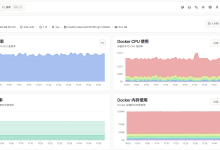
打开浏览器,访问 http://127.0.0.1:8005/,应看到:
✅ 验证要点:
- 健康监控:实时显示各服务在线/离线状态和延迟
- 指标计算:自动统计总调用数、成功率、平均延迟
- 可视化:暗色主题看板,5 秒自动刷新
- 容错:网关或后端服务不可用时看板仍能加载
④ 任务评价
| 数据采集 | 并发采集+历史记录 | 并发采集 | 串行采集 | 无采集 |
| 指标计算 | 5+ 项指标 | 3-4 项指标 | 2 项指标 | 无计算 |
| 可视化 | 暗色看板+自动刷新+多表格 | 有基本看板 | 有数据展示 | 无可视化 |
| 容错性 | 全部异常处理 | 基本容错 | 简单处理 | 无容错 |
任务 7.3 智慧校园 IoA 平台部署实战
建议学时:4 学时
① 任务情境
平台开发和测试都完成了,现在要正式部署到校园服务器上。王主任要求:
“所有服务要用 Docker 容器化部署,一键启动。部署后要跑一遍集成测试,确认所有功能正常。”
你需要编写 Docker 部署配置和集成测试脚本。
② 知识准备
一、容器化部署优势
| 手动安装依赖 | 镜像内置依赖 |
| 环境不一致 | 环境完全一致 |
| 手动启动各服务 | 一键启动全部 |
| 难以扩展 | 容器弹性伸缩 |
二、IoA 平台完整服务拓扑
#mermaid-svg-lBBC8MyhGBsbEAC2{font-family:\”trebuchet ms\”,verdana,arial,sans-serif;font-size:16px;fill:#333;}@keyframes edge-animation-frame{from{stroke-dashoffset:0;}}@keyframes dash{to{stroke-dashoffset:0;}}#mermaid-svg-lBBC8MyhGBsbEAC2 .edge-animation-slow{stroke-dasharray:9,5!important;stroke-dashoffset:900;animation:dash 50s linear infinite;stroke-linecap:round;}#mermaid-svg-lBBC8MyhGBsbEAC2 .edge-animation-fast{stroke-dasharray:9,5!important;stroke-dashoffset:900;animation:dash 20s linear infinite;stroke-linecap:round;}#mermaid-svg-lBBC8MyhGBsbEAC2 .error-icon{fill:#552222;}#mermaid-svg-lBBC8MyhGBsbEAC2 .error-text{fill:#552222;stroke:#552222;}#mermaid-svg-lBBC8MyhGBsbEAC2 .edge-thickness-normal{stroke-width:1px;}#mermaid-svg-lBBC8MyhGBsbEAC2 .edge-thickness-thick{stroke-width:3.5px;}#mermaid-svg-lBBC8MyhGBsbEAC2 .edge-pattern-solid{stroke-dasharray:0;}#mermaid-svg-lBBC8MyhGBsbEAC2 .edge-thickness-invisible{stroke-width:0;fill:none;}#mermaid-svg-lBBC8MyhGBsbEAC2 .edge-pattern-dashed{stroke-dasharray:3;}#mermaid-svg-lBBC8MyhGBsbEAC2 .edge-pattern-dotted{stroke-dasharray:2;}#mermaid-svg-lBBC8MyhGBsbEAC2 .marker{fill:#333333;stroke:#333333;}#mermaid-svg-lBBC8MyhGBsbEAC2 .marker.cross{stroke:#333333;}#mermaid-svg-lBBC8MyhGBsbEAC2 svg{font-family:\”trebuchet ms\”,verdana,arial,sans-serif;font-size:16px;}#mermaid-svg-lBBC8MyhGBsbEAC2 p{margin:0;}#mermaid-svg-lBBC8MyhGBsbEAC2 .label{font-family:\”trebuchet ms\”,verdana,arial,sans-serif;color:#333;}#mermaid-svg-lBBC8MyhGBsbEAC2 .cluster-label text{fill:#333;}#mermaid-svg-lBBC8MyhGBsbEAC2 .cluster-label span{color:#333;}#mermaid-svg-lBBC8MyhGBsbEAC2 .cluster-label span p{background-color:transparent;}#mermaid-svg-lBBC8MyhGBsbEAC2 .label text,#mermaid-svg-lBBC8MyhGBsbEAC2 span{fill:#333;color:#333;}#mermaid-svg-lBBC8MyhGBsbEAC2 .node rect,#mermaid-svg-lBBC8MyhGBsbEAC2 .node circle,#mermaid-svg-lBBC8MyhGBsbEAC2 .node ellipse,#mermaid-svg-lBBC8MyhGBsbEAC2 .node polygon,#mermaid-svg-lBBC8MyhGBsbEAC2 .node path{fill:#ECECFF;stroke:#9370DB;stroke-width:1px;}#mermaid-svg-lBBC8MyhGBsbEAC2 .rough-node .label text,#mermaid-svg-lBBC8MyhGBsbEAC2 .node .label text,#mermaid-svg-lBBC8MyhGBsbEAC2 .image-shape .label,#mermaid-svg-lBBC8MyhGBsbEAC2 .icon-shape .label{text-anchor:middle;}#mermaid-svg-lBBC8MyhGBsbEAC2 .node .katex path{fill:#000;stroke:#000;stroke-width:1px;}#mermaid-svg-lBBC8MyhGBsbEAC2 .rough-node .label,#mermaid-svg-lBBC8MyhGBsbEAC2 .node .label,#mermaid-svg-lBBC8MyhGBsbEAC2 .image-shape .label,#mermaid-svg-lBBC8MyhGBsbEAC2 .icon-shape .label{text-align:center;}#mermaid-svg-lBBC8MyhGBsbEAC2 .node.clickable{cursor:pointer;}#mermaid-svg-lBBC8MyhGBsbEAC2 .root .anchor path{fill:#333333!important;stroke-width:0;stroke:#333333;}#mermaid-svg-lBBC8MyhGBsbEAC2 .arrowheadPath{fill:#333333;}#mermaid-svg-lBBC8MyhGBsbEAC2 .edgePath .path{stroke:#333333;stroke-width:2.0px;}#mermaid-svg-lBBC8MyhGBsbEAC2 .flowchart-link{stroke:#333333;fill:none;}#mermaid-svg-lBBC8MyhGBsbEAC2 .edgeLabel{background-color:rgba(232,232,232, 0.8);text-align:center;}#mermaid-svg-lBBC8MyhGBsbEAC2 .edgeLabel p{background-color:rgba(232,232,232, 0.8);}#mermaid-svg-lBBC8MyhGBsbEAC2 .edgeLabel rect{opacity:0.5;background-color:rgba(232,232,232, 0.8);fill:rgba(232,232,232, 0.8);}#mermaid-svg-lBBC8MyhGBsbEAC2 .labelBkg{background-color:rgba(232, 232, 232, 0.5);}#mermaid-svg-lBBC8MyhGBsbEAC2 .cluster rect{fill:#ffffde;stroke:#aaaa33;stroke-width:1px;}#mermaid-svg-lBBC8MyhGBsbEAC2 .cluster text{fill:#333;}#mermaid-svg-lBBC8MyhGBsbEAC2 .cluster span{color:#333;}#mermaid-svg-lBBC8MyhGBsbEAC2 div.mermaidTooltip{position:absolute;text-align:center;max-width:200px;padding:2px;font-family:\”trebuchet ms\”,verdana,arial,sans-serif;font-size:12px;background:hsl(80, 100%, 96.2745098039%);border:1px solid #aaaa33;border-radius:2px;pointer-events:none;z-index:100;}#mermaid-svg-lBBC8MyhGBsbEAC2 .flowchartTitleText{text-anchor:middle;font-size:18px;fill:#333;}#mermaid-svg-lBBC8MyhGBsbEAC2 rect.text{fill:none;stroke-width:0;}#mermaid-svg-lBBC8MyhGBsbEAC2 .icon-shape,#mermaid-svg-lBBC8MyhGBsbEAC2 .image-shape{background-color:rgba(232,232,232, 0.8);text-align:center;}#mermaid-svg-lBBC8MyhGBsbEAC2 .icon-shape p,#mermaid-svg-lBBC8MyhGBsbEAC2 .image-shape p{background-color:rgba(232,232,232, 0.8);padding:2px;}#mermaid-svg-lBBC8MyhGBsbEAC2 .icon-shape .label rect,#mermaid-svg-lBBC8MyhGBsbEAC2 .image-shape .label rect{opacity:0.5;background-color:rgba(232,232,232, 0.8);fill:rgba(232,232,232, 0.8);}#mermaid-svg-lBBC8MyhGBsbEAC2 .label-icon{display:inline-block;height:1em;overflow:visible;vertical-align:-0.125em;}#mermaid-svg-lBBC8MyhGBsbEAC2 .node .label-icon path{fill:currentColor;stroke:revert;stroke-width:revert;}#mermaid-svg-lBBC8MyhGBsbEAC2 :root{–mermaid-font-family:\”trebuchet ms\”,verdana,arial,sans-serif;}
服务层
安全层
统一入口
用户接入
师生浏览器
监控看板:8005
统一网关:8004
安全网关:8002
发现服务:8000
工具服务:8001
生命周期:8003
智能体:9999
③ 任务实施
步骤 1:编写 Docker 部署配置
新建文件 docker-compose.yml:
# docker-compose.yml
# 智能体互联网综合平台——Docker Compose 部署配置
# 一键启动全部服务:docker-compose up -d
version: '3.8'
services:
# ============================================================
# 1. 智能体发现服务(项目三)
# ============================================================
discovery:
build: ./project3
ports:
– "8000:8000"
environment:
– SERVICE_NAME=discovery
healthcheck:
test: ["CMD", "curl", "-f", "http://localhost:8000/discover/search"]
interval: 30s
timeout: 5s
retries: 3
networks:
– ioa–network
# ============================================================
# 2. 工具服务(项目五)
# ============================================================
tool-service:
build: ./project5
ports:
– "8001:8001"
environment:
– SERVICE_NAME=tool–service
healthcheck:
test: ["CMD", "curl", "-f", "http://localhost:8001/tools/list"]
interval: 30s
timeout: 5s
retries: 3
networks:
– ioa–network
# ============================================================
# 3. 安全网关(项目六)
# ============================================================
security-gateway:
build: ./project6
ports:
– "8002:8002"
environment:
– SERVICE_NAME=security–gateway
healthcheck:
test: ["CMD", "curl", "-f", "http://localhost:8002/"]
interval: 30s
timeout: 5s
retries: 3
networks:
– ioa–network
# ============================================================
# 4. 生命周期管理(项目六)
# ============================================================
lifecycle-manager:
build: ./project6
ports:
– "8003:8003"
environment:
– SERVICE_NAME=lifecycle–manager
healthcheck:
test: ["CMD", "curl", "-f", "http://localhost:8003/statistics"]
interval: 30s
timeout: 5s
retries: 3
networks:
– ioa–network
# ============================================================
# 5. 统一网关(项目七)
# ============================================================
unified-gateway:
build: ./project7
ports:
– "8004:8004"
environment:
– SERVICE_NAME=unified–gateway
– DISCOVERY_URL=http://discovery:8000
– TOOL_URL=http://tool–service:8001
– SECURITY_URL=http://security–gateway:8002
– LIFECYCLE_URL=http://lifecycle–manager:8003
– AGENT_URL=http://notify–agent:9999
depends_on:
– discovery
– tool–service
– security–gateway
– lifecycle–manager
– notify–agent
healthcheck:
test: ["CMD", "curl", "-f", "http://localhost:8004/health"]
interval: 30s
timeout: 5s
retries: 3
networks:
– ioa–network
# ============================================================
# 6. 监控看板(项目七)
# ============================================================
monitoring-dashboard:
build: ./project7
ports:
– "8005:8005"
environment:
– SERVICE_NAME=monitoring–dashboard
– GATEWAY_URL=http://unified–gateway:8004
depends_on:
– unified–gateway
networks:
– ioa–network
# ============================================================
# 7. 智能体服务——通知助手(项目一/四)
# ============================================================
notify-agent:
build: ./project1
ports:
– "9999:9999"
environment:
– SERVICE_NAME=notify–agent
healthcheck:
test: ["CMD", "curl", "-f", "http://localhost:9999/.well-known/agent.json"]
interval: 30s
timeout: 5s
retries: 3
networks:
– ioa–network
# ============================================================
# 网络
# ============================================================
networks:
ioa-network:
driver: bridge
教学说明:Docker 部署需要各项目目录中包含 Dockerfile。教学中可先用手动方式(分别在各窗口启动 python xxx.py)验证功能,再引入 Docker 容器化。
步骤 2:编写集成测试脚本
新建文件 integration_test.py:
# integration_test.py
# 智能体互联网综合平台——集成测试脚本
# 自动测试所有服务的端到端功能
import asyncio
import sys
import time
from datetime import datetime
import httpx
# 兼容不同控制台编码(如 Windows GBK),避免输出 emoji 时报错
try:
sys.stdout.reconfigure(encoding='utf-8', errors='replace')
except Exception:
pass
# ============================================================
# 配置
# ============================================================
GATEWAY_URL = 'http://127.0.0.1:8004'
# 服务直连地址(用于直接测试)
SERVICES = {
'discovery': 'http://127.0.0.1:8000',
'tool': 'http://127.0.0.1:8001',
'security': 'http://127.0.0.1:8002',
'lifecycle': 'http://127.0.0.1:8003',
'gateway': 'http://127.0.0.1:8004',
'monitor': 'http://127.0.0.1:8005',
'agent': 'http://127.0.0.1:9999',
}
# ============================================================
# 测试结果记录
# ============================================================
class TestResult:
def __init__(self):
self.passed = 0
self.failed = 0
self.skipped = 0
self.details: list[dict] = []
def record(self, name: str, status: str, detail: str = '') –> None:
self.details.append({
'name': name,
'status': status,
'detail': detail,
'time': datetime.now().isoformat(),
})
if status == 'PASS':
self.passed += 1
elif status == 'FAIL':
self.failed += 1
else:
self.skipped += 1
def summary(self) –> str:
total = self.passed + self.failed + self.skipped
return (
f'总计 {total} 项 | '
f'通过 {self.passed} | '
f'失败 {self.failed} | '
f'跳过 {self.skipped}'
)
# ============================================================
# 测试用例
# ============================================================
async def test_service_health(result: TestResult, client: httpx.AsyncClient) –> None:
"""测试 1:统一网关健康检查。"""
try:
resp = await client.get(f'{GATEWAY_URL}/health', timeout=5.0)
if resp.status_code == 200:
data = resp.json()
healthy = data.get('healthy_count', 0)
total = data.get('total_count', 0)
result.record(
'网关健康检查',
'PASS' if resp.status_code == 200 else 'FAIL',
f'在线 {healthy}/{total} 个服务',
)
else:
result.record('网关健康检查', 'FAIL', f'HTTP {resp.status_code}')
except Exception as e:
result.record('网关健康检查', 'FAIL', f'连接失败:{e}')
async def test_service_list(result: TestResult, client: httpx.AsyncClient) –> None:
"""测试 2:服务列表查询。"""
try:
resp = await client.get(f'{GATEWAY_URL}/services', timeout=5.0)
if resp.status_code == 200:
data = resp.json()
count = data.get('count', 0)
result.record(
'服务列表查询',
'PASS' if count >= 5 else 'FAIL',
f'已注册 {count} 个服务',
)
else:
result.record('服务列表查询', 'FAIL', f'HTTP {resp.status_code}')
except Exception as e:
result.record('服务列表查询', 'FAIL', f'连接失败:{e}')
async def test_platform_overview(result: TestResult, client: httpx.AsyncClient) –> None:
"""测试 3:平台总览聚合接口。"""
try:
resp = await client.get(f'{GATEWAY_URL}/platform/overview', timeout=10.0)
if resp.status_code == 200:
data = resp.json()
has_health = 'health' in data
result.record(
'平台总览聚合',
'PASS' if has_health else 'FAIL',
f'聚合字段:{list(data.keys())}',
)
else:
result.record('平台总览聚合', 'FAIL', f'HTTP {resp.status_code}')
except Exception as e:
result.record('平台总览聚合', 'FAIL', f'连接失败:{e}')
async def test_tool_proxy(result: TestResult, client: httpx.AsyncClient) –> None:
"""测试 4:通过网关代理访问工具服务。"""
try:
resp = await client.get(f'{GATEWAY_URL}/proxy/tool/tools/list', timeout=5.0)
if resp.status_code == 200:
data = resp.json()
tool_count = data.get('count', 0)
result.record(
'工具服务代理',
'PASS' if tool_count > 0 else 'FAIL',
f'工具数量:{tool_count}',
)
else:
result.record('工具服务代理', 'SKIP', f'服务未启动:HTTP {resp.status_code}')
except Exception as e:
result.record('工具服务代理', 'SKIP', f'连接失败:{e}')
async def test_security_gateway(result: TestResult, client: httpx.AsyncClient) –> None:
"""测试 5:安全网关接口。"""
try:
resp = await client.get(f'{SERVICES["security"]}/agents', timeout=5.0)
if resp.status_code == 200:
data = resp.json()
count = data.get('count', 0)
result.record(
'安全网关',
'PASS' if count > 0 else 'FAIL',
f'已注册智能体:{count} 个',
)
else:
result.record('安全网关', 'FAIL', f'HTTP {resp.status_code}')
except Exception as e:
result.record('安全网关', 'SKIP', f'服务未启动:{e}')
async def test_lifecycle_manager(result: TestResult, client: httpx.AsyncClient) –> None:
"""测试 6:生命周期管理接口。"""
try:
resp = await client.get(f'{SERVICES["lifecycle"]}/statistics', timeout=5.0)
if resp.status_code == 200:
data = resp.json()
total = data.get('total', 0)
result.record(
'生命周期管理',
'PASS' if total >= 0 else 'FAIL',
f'管理中智能体:{total} 个',
)
else:
result.record('生命周期管理', 'FAIL', f'HTTP {resp.status_code}')
except Exception as e:
result.record('生命周期管理', 'SKIP', f'服务未启动:{e}')
async def test_monitoring_dashboard(result: TestResult, client: httpx.AsyncClient) –> None:
"""测试 7:监控看板接口。"""
try:
resp = await client.get(f'{SERVICES["monitor"]}/api/metrics', timeout=5.0)
if resp.status_code == 200:
data = resp.json()
result.record(
'监控看板',
'PASS',
f'指标数据已获取',
)
else:
result.record('监控看板', 'FAIL', f'HTTP {resp.status_code}')
except Exception as e:
result.record('监控看板', 'SKIP', f'服务未启动:{e}')
async def test_agent_card(result: TestResult, client: httpx.AsyncClient) –> None:
"""测试 8:智能体名片获取。"""
try:
resp = await client.get(
f'{SERVICES["agent"]}/.well-known/agent.json', timeout=5.0
)
if resp.status_code == 200:
data = resp.json()
name = data.get('name', 'unknown')
result.record(
'智能体名片',
'PASS',
f'智能体名称:{name}',
)
else:
result.record('智能体名片', 'FAIL', f'HTTP {resp.status_code}')
except Exception as e:
result.record('智能体名片', 'SKIP', f'服务未启动:{e}')
async def test_tool_call(result: TestResult, client: httpx.AsyncClient) –> None:
"""测试 9:通过网关代理调用天气工具。"""
try:
resp = await client.post(
f'{GATEWAY_URL}/proxy/tool/tools/call',
json={'toolId': 'weather_query', 'params': {'city': '上海'}},
timeout=10.0,
)
if resp.status_code == 200:
data = resp.json()
city = data.get('city', '')
result.record(
'工具调用(天气查询)',
'PASS' if city else 'FAIL',
f'查询城市:{city}',
)
else:
result.record('工具调用(天气查询)', 'SKIP', f'服务不可用:HTTP {resp.status_code}')
except Exception as e:
result.record('工具调用(天气查询)', 'SKIP', f'服务未启动:{e}')
# ============================================================
# 主测试流程
# ============================================================
async def main():
print('=' * 60)
print('智能体互联网综合平台——集成测试')
print(f'测试时间:{datetime.now().isoformat()}')
print(f'网关地址:{GATEWAY_URL}')
print('=' * 60)
result = TestResult()
async with httpx.AsyncClient(trust_env=False) as client:
# 执行所有测试
await test_service_health(result, client)
await test_service_list(result, client)
await test_platform_overview(result, client)
await test_tool_proxy(result, client)
await test_security_gateway(result, client)
await test_lifecycle_manager(result, client)
await test_monitoring_dashboard(result, client)
await test_agent_card(result, client)
await test_tool_call(result, client)
# 输出测试报告
print(f'\\n{"─" * 60}')
print('测试报告')
print(f'{"─" * 60}')
for detail in result.details:
status_icon = {
'PASS': '✅',
'FAIL': '❌',
'SKIP': '⏭️',
}.get(detail['status'], '?')
print(f' {status_icon} {detail["name"]}')
if detail['detail']:
print(f' └ {detail["detail"]}')
print(f'\\n{"─" * 60}')
print(f' {result.summary()}')
print(f'{"─" * 60}')
# 返回码:全部通过返回 0,有失败返回 1
return 0 if result.failed == 0 else 1
if __name__ == '__main__':
exit_code = asyncio.run(main())
sys.exit(exit_code)
步骤 3:运行集成测试
启动需要测试的服务(至少启动统一网关 8004 + 工具服务 8001),然后运行:
python integration_test.py
预期输出(部分服务在线时):
============================================================
智能体互联网综合平台——集成测试
测试时间:2026-08-01T17:00:00
网关地址:http://127.0.0.1:8004
============================================================
────────────────────────────────────────────────────────────
测试报告
────────────────────────────────────────────────────────────
✅ 网关健康检查
└ 在线 3/5 个服务
✅ 服务列表查询
└ 已注册 5 个服务
✅ 平台总览聚合
└ 聚合字段:['platform', 'version', 'generated_at', 'health', 'tools', …]
✅ 工具服务代理
└ 工具数量:4
⏭️ 安全网关
└ 服务未启动:…
⏭️ 生命周期管理
└ 服务未启动:…
⏭️ 监控看板
└ 服务未启动:…
⏭️ 智能体名片
└ 服务未启动:…
✅ 工具调用(天气查询)
└ 查询城市:上海
────────────────────────────────────────────────────────────
总计 9 项 | 通过 5 | 失败 0 | 跳过 4
────────────────────────────────────────────────────────────
✅ 验证要点:
- 网关路由:通过统一网关可代理访问后端服务
- 服务聚合:平台总览接口一次返回多服务数据
- 端到端调用:天气工具调用从网关→工具服务→返回结果
- 容错测试:未启动的服务标记为 SKIP,不影响整体测试
④ 任务评价
| 部署配置 | 完整 Docker Compose + healthcheck | 有 Compose 配置 | 有 Dockerfile | 无容器化 |
| 测试覆盖 | 9+ 项测试覆盖全服务 | 6-8 项测试 | 3-5 项测试 | ❤️ 项测试 |
| 测试报告 | 分项+汇总+返回码 | 有基本报告 | 有输出 | 无格式化 |
| 容错处理 | 区分 FAIL/SKIP | 有异常处理 | 简单 try-catch | 无容错 |
项目总结与全书完结
项目七知识体系
项目七:智能体互联网综合平台开发与运维
├── 任务 7.1:综合平台架构与统一网关
│ ├── API 网关模式:路由转发、服务聚合、健康检查
│ ├── 服务路由:/proxy/{service}/{path} 通用代理
│ ├── 服务聚合:/platform/overview 一次请求多服务数据
│ ├── 健康检查:并发检测+延迟统计+容错处理
│ └── 监控数据上报:调用记录采集
├── 任务 7.2:智能体监控与可视化看板
│ ├── 监控三维度:健康状态、调用链路、性能指标
│ ├── 可观测性三支柱:Metrics、Logs、Traces
│ ├── 数据采集:并发采集+历史记录
│ ├── 指标计算:成功率、平均延迟、各服务调用数
│ └── 可视化:暗色主题看板+5秒自动刷新
└── 任务 7.3:智慧校园IoA平台部署实战
├── Docker 容器化部署:docker-compose.yml
├── 集成测试:9项端到端测试用例
├── 测试报告:分项+汇总+FAIL/SKIP 区分
└── 全书服务端口总览:8000-8005 + 9999
全书七个项目完整知识体系
| 项目一 | 认识智能体互联网 | GB/Z 185.1 | L1 认知 | 社团通知助手 |
| 项目二 | 身份码与身份管理 | GB/Z 185.2-3 | L2 安全 | AID 生成器、注册中心 |
| 项目三 | 描述与发现 | GB/Z 185.4-5 | L3 可见 | Agent Card、发现 API |
| 项目四 | 智能体交互 | GB/Z 185.6 | L4 交互 | 状态管理、多轮对话、编排器 |
| 项目五 | 工具调用 | GB/Z 185.7 | L5 增强+L6 整合 | 工具服务、综合助理 |
| 项目六 | 安全与生命周期 | GB/Z 185 全系列 | L7 治理 | 安全网关、合规工具、管理平台 |
| 项目七 | 综合平台与运维 | GB/Z 185 全系列 | L8 工程化 | 统一网关、监控看板、部署测试 |
GB/Z 185 全系列标准与全书对照
GB/Z 185.1 总体架构 ← 项目一(概念模型、四层架构、五大概念域)
↓
GB/Z 185.2 身份码 ← 项目二(OID 分层结构、AID 生成器)
GB/Z 185.3 身份管理 ← 项目二(注册中心、凭证验证)
← 项目六(安全网关、生命周期管理)
↓
GB/Z 185.4 智能体描述 ← 项目三(14 项属性、Agent Card)
GB/Z 185.5 智能体发现 ← 项目三(发现服务、双路径发现)
↓
GB/Z 185.6 智能体交互 ← 项目四(三种模式、四种元素、三种协作)
↓
GB/Z 185.7 工具调用 ← 项目五(五大实体、三大流程、调用循环)
↓
全系列合规检测 ← 项目六(七大维度自动化检测)
全系列综合应用 ← 项目七(统一网关、监控看板、部署实战)
能力进阶全路径
| L1 认知 | 知道 IoA 是什么 | 项目一 |
| L2 安全 | 能给智能体上身份 | 项目二 |
| L3 可见 | 能让智能体被发现 | 项目三 |
| L4 交互 | 能让智能体协作 | 项目四 |
| L5 增强 | 能让智能体调用工具 | 项目五 |
| L6 整合 | 能构建完整 IoA 系统 | 项目五综合实战 |
| L7 治理 | 能管安全、查合规、管生命周期 | 项目六 |
| L8 工程化 | 能统一网关、做监控、容器化部署 | 项目七 |
课后拓展
全书结语
恭喜你完成了全部七个项目的学习!
从项目一的"认识 IoA",到项目七的"综合平台与运维",你已经走完了智能体互联网从认知到工程化的完整旅程:
- 身份层:让智能体可信(GB/Z 185.2-3)→ 项目二 + 项目六
- 描述层:让智能体可见(GB/Z 185.4-5)→ 项目三
- 交互层:让智能体协作(GB/Z 185.6)→ 项目四
- 工具层:让智能体强大(GB/Z 185.7)→ 项目五
- 治理层:让智能体安全可控(GB/Z 185 全系列)→ 项目六
- 工程层:让智能体好管好运维(GB/Z 185 全系列)→ 项目七
七个项目,七个台阶,从 L1 认知到 L8 工程化,你已掌握了智能体互联网的全栈技术与工程化能力。
智能体互联网正在改变人机交互的方式。未来,每一个服务都可能成为一个智能体,每一次交互都可能跨越多个智能体。掌握这些标准和技术,你就已经站在了智能体时代的前沿。
这不是终点,而是起点。继续探索,继续创造!





评论前必须登录!
注册