 网硕互联帮助中心
第20章 HarmonyOs开发图解之 二维码
HarmonyOS 学习系统 | 阶段三:高级深耕期
学习目标
| 1 | 能够使用 VisionManager 生成二维码/条形码 |
| 2 | 能够使用 IBarcodeDetector 识别图片中的二维码 |
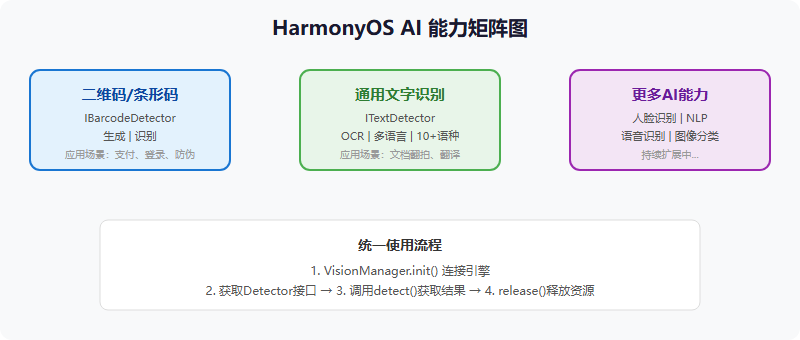
| 3 | 理解 AI 引擎的统一接入流程(init -> detect -> release) |
核心图解
内容讲解
20.1 二维码概述
二维码(QR Code,Quick Response Code)是一种高密度的二维条码,能在横向和纵向两个方向上存储信息。相比一维码(条形码),信息密度大幅提升。HarmonyOS 通过 AI 引擎的 IBarcodeDetector 接口提供二维码/条形码的生成和识别能力。
生活化类比:二维码就像"商品条码的升级版"
一维码(条形码)就像一条单行道,只能从左到右记录信息;二维码就像一个停车场,横竖两个方向都能停车,信息密度大幅提升。QR 码最多能存约 2953 个字符(Java 语言),相当于把一小段文章"压缩"进一个方块图案里。
20.2 二维码生成
所有 AI 能力都遵循统一的接入流程:VisionManager.init() -> 获取 Detector -> detect() -> release()。
// Step 1: 连接 AI 能力引擎
VisionManager.init(context, new ConnectionCallback() {
@Override
public void onServiceConnect() {
// 引擎连接成功,执行生成操作
generateQRCode();
}
@Override
public void onServiceDisconnect() {
HiLog.info(TAG, "AI引擎断开连接");
}
});
// Step 2: 生成二维码
private void generateQRCode() {
IBarcodeDetector barcodeDetector = VisionManager.getBarcodeDetector(context);
int width = 300, height = 300;
byte[] bitmapOutput = new byte[width * height * 4]; // ARGB_8888 格式
// detect 方法用于生成二维码
int result = barcodeDetector.detect("https://harmonyos.com",
bitmapOutput, width, height);
if (result == 0) {
// 生成成功,将 bitmapOutput 转为 PixelMap 显示
PixelMap pixelMap = PixelMap.create(bitmapOutput, width, height,
PixelFormat.ARGB_8888);
image.setPixelMap(pixelMap);
}
// Step 3: 释放资源
barcodeDetector.release();
}
20.3 二维码识别
// 从 PixelMap 中识别二维码
IBarcodeDetector barcodeDetector = VisionManager.getBarcodeDetector(context);
VisionImage image = VisionImage.fromPixelMap(pixelMap);
Barcode barcode = new Barcode();
int result = barcodeDetector.detect(image, barcode, new VisionCallback<Barcode>() {
@Override
public void onResult(Barcode barcode) {
String value = barcode.getValue(); // 获取二维码内容
HiLog.info(TAG, "识别结果: " + value);
}
@Override
public void onError(int errorCode, String errorMessage) {
HiLog.error(TAG, "识别失败: " + errorMessage);
}
});
barcodeDetector.release();
20.4 约束与限制
- Java 语言字符串长度不超过 2953 字符,JS 不超过 256 字符
- 图片宽度不超过 1920px,高度不超过 1680px
- 建议使用正方形尺寸,矩形会在周围留白
- 支持的条码格式:QR Code、EAN-13、EAN-8、Code 128、Code 39 等
代码速查卡
| VisionManager.init(ctx, cb) | 初始化 AI 引擎 | VisionManager.init(context, callback) |
| getBarcodeDetector(ctx) | 获取条码检测器 | VisionManager.getBarcodeDetector(context) |
| detect(text, output, w, h) | 生成二维码 | detector.detect("https://…", output, 300, 300) |
| detect(image, barcode, cb) | 识别二维码 | detector.detect(image, barcode, callback) |
| barcode.getValue() | 获取识别结果文本 | barcode.getValue() |
| barcodeDetector.release() | 释放检测器资源 | barcodeDetector.release() |
| VisionManager.destroy() | 销毁 AI 引擎 | VisionManager.destroy() |
与 Android/iOS 对比
| 二维码生成 | IBarcodeDetector (AI 引擎) | ZXing 库 / Google ML Kit | CoreImage (CIFilter) |
| 二维码识别 | IBarcodeDetector | Google ML Kit / ZXing | AVFoundation (AVCaptureMetaDataOutput) |
| 条码支持 | QR/EAN/Code128 等 | 取决于库 | AVFoundation 内置 |
| 引擎接入 | VisionManager 统一入口 | 各库独立接入 | 各框架独立接入 |
⚠️ 踩坑回忆录
二维码生成成功但扫不出来
我把二维码做成了一张很小的图片(100×100),结果扫描识别率极低,经常扫不出来。后来才知道,二维码的有效信息区域太小会导致扫码失败。建议尺寸至少 200×200 以上,300×300 最佳。
还有一个细节:如果二维码是矩形而非正方形,会在信息周围留白,看起来就像缺了一块。所以要生成标准的正方形二维码。另外,VisionManager.init() 是异步操作,必须在 onServiceConnect 回调之后才能调用 detect(),如果引擎还没连上就调 detect,会返回错误码。
必做实操任务
| 1 | 实现输入文本生成二维码并显示 | 中 |
| 2 | 实现从相册选取图片识别二维码内容 | 中 |
| 3 | 实现相机实时扫码功能(结合第 15 章相机能力) | 高 |
| 4 | 实现不同尺寸二维码的生成,测试最佳识别尺寸 | 低 |
| 5 | 实现一个完整的扫码 App(生成 + 识别 + 历史记录) | 高 |
学习检查清单
- 能说出 AI 引擎的统一接入流程(init -> detect -> release)
- 能使用 IBarcodeDetector 生成二维码
- 能使用 IBarcodeDetector 识别二维码
- 知道为什么 VisionManager.init 是异步的
- 知道二维码建议的最小尺寸(200×200)
- 能区分生成模式和识别模式的 detect 方法调用
- 知道 Java 和 JS 环境下字符串长度限制的区别
- 能正确释放 AI 引擎资源
进阶方向
- 结合第 21 章 OCR,实现"扫码 + 文字识别"的混合方案
- 实现带 Logo 的自定义二维码
- 探索 AI 引擎的其他能力(人脸识别、图像分类等)
t 方法调用 - 知道 Java 和 JS 环境下字符串长度限制的区别
- 能正确释放 AI 引擎资源
进阶方向
- 结合第 21 章 OCR,实现"扫码 + 文字识别"的混合方案
- 实现带 Logo 的自定义二维码
- 探索 AI 引擎的其他能力(人脸识别、图像分类等)




评论前必须登录!
注册