 网硕互联帮助中心
YOLOv8 + ByteTrack 车辆跟踪计数实战:跨线统计完整流程
这篇教程根据我复现车辆跟踪计数流程时整理,重点演示视频准备、YOLOv8 检测、ByteTrack 跟踪、跨线计数和结果视频导出。
本文整理自我的学习和项目复现过程,尽量按实操顺序保留 notebook 的关键步骤,同时把数据集获取方式调整为适合中文教程发布的写法。
本文会重点跑通以下流程:
- 准备车辆计数视频
- 安装 YOLOv8 和 ByteTrack
- 封装跟踪器参数与匹配逻辑
- 筛选车辆类别并运行检测
- 按跨线方向统计车辆数量
如果你正在系统学习目标检测、实例分割、OCR、多目标跟踪或视觉大模型,建议收藏本文;配套 notebook、示例图片和运行环境说明后续会继续整理。如果环境配置卡住,可以在评论区说明具体报错。
📚 文章目录
- YOLOv8 + ByteTrack 车辆跟踪计数实战:跨线统计完整流程
-
- ⚙️ 检查环境
- 🎬 准备车辆视频
- 🧩 安装 YOLOv8
- 🧩 安装 ByteTrack
- 🔧 封装跟踪参数
- 🧩 安装 Supervision
- 🚗 加载检测模型
- 🏷️ 筛选车辆类别
- 🖼️ 单帧检测预览
- 📏 设置计数线
- 📹 生成计数视频
- 📌 小结
- 📚 同系列教程汇总
⚙️ 检查环境
确认 GPU 和工作目录。
!nvidia–smi
import os
HOME = os.getcwd()
print(HOME)
🎬 准备车辆视频
下载车辆计数示例视频,也可以替换为自己的视频。
%cd {HOME}
!wget ––load–cookies /tmp/cookies.txt "https://docs.google.com/uc?export=download&confirm=$(wget –quiet –save-cookies /tmp/cookies.txt –keep-session-cookies –no-check-certificate 'https://docs.google.com/uc?export=download&id=1pz68D1Gsx80MoPg-_q-IbEdESEmyVLm-' -O- | sed -rn 's/.*confirm=([0-9A-Za-z_]+).*/\\1\\n/p')&id=1pz68D1Gsx80MoPg-_q-IbEdESEmyVLm-" –O vehicle–counting.mp4 && rm –rf /tmp/cookies.txt
SOURCE_VIDEO_PATH = f"{HOME}/vehicle-counting.mp4"
🧩 安装 YOLOv8
安装 Ultralytics 并关闭匿名同步。
# Pip install method (recommended)
!pip install "ultralytics<=8.3.40"
from IPython import display
display.clear_output()
# 关闭 Ultralytics 匿名同步
!yolo settings sync=False
import ultralytics
ultralytics.checks()
🧩 安装 ByteTrack
安装 ByteTrack 及相关依赖。
%cd {HOME}
!git clone https://github.com/ifzhang/ByteTrack.git
%cd {HOME}/ByteTrack
# 兼容旧版依赖
!sed –i 's/onnx==1.8.1/onnx==1.9.0/g' requirements.txt
!pip3 install –q –r requirements.txt
!python3 setup.py –q develop
!pip install –q cython_bbox
!pip install –q onemetric
# 兼容旧版依赖
!pip install –q loguru lap thop
from IPython import display
display.clear_output()
import sys
sys.path.append(f"{HOME}/ByteTrack")
import yolox
print("yolox.__version__:", yolox.__version__)
🔧 封装跟踪参数
定义 ByteTrack 参数和检测框匹配逻辑。
from yolox.tracker.byte_tracker import BYTETracker, STrack
from onemetric.cv.utils.iou import box_iou_batch
from dataclasses import dataclass
@dataclass(frozen=True)
class BYTETrackerArgs:
track_thresh: float = 0.25
track_buffer: int = 30
match_thresh: float = 0.8
aspect_ratio_thresh: float = 3.0
min_box_area: float = 1.0
mot20: bool = False
🧩 安装 Supervision
安装视频读取、标注和跨线计数工具。
!pip install supervision==0.1.0
from IPython import display
display.clear_output()
import supervision
print("supervision.__version__:", supervision.__version__)
from supervision.draw.color import ColorPalette
from supervision.geometry.dataclasses import Point
from supervision.video.dataclasses import VideoInfo
from supervision.video.source import get_video_frames_generator
from supervision.video.sink import VideoSink
from supervision.notebook.utils import show_frame_in_notebook
from supervision.tools.detections import Detections, BoxAnnotator
from supervision.tools.line_counter import LineCounter, LineCounterAnnotator
from typing import List
import numpy as np
# converts Detections into format that can be consumed by match_detections_with_tracks function
def detections2boxes(detections: Detections) –> np.ndarray:
return np.hstack((
detections.xyxy,
detections.confidence[:, np.newaxis]
))
# converts List[STrack] into format that can be consumed by match_detections_with_tracks function
def tracks2boxes(tracks: List[STrack]) –> np.ndarray:
return np.array([
track.tlbr
for track
in tracks
], dtype=float)
# matches our bounding boxes with predictions
def match_detections_with_tracks(
detections: Detections,
tracks: List[STrack]
) –> Detections:
if not np.any(detections.xyxy) or len(tracks) == 0:
return np.empty((0,))
tracks_boxes = tracks2boxes(tracks=tracks)
iou = box_iou_batch(tracks_boxes, detections.xyxy)
track2detection = np.argmax(iou, axis=1)
tracker_ids = [None] * len(detections)
for tracker_index, detection_index in enumerate(track2detection):
if iou[tracker_index, detection_index] != 0:
tracker_ids[detection_index] = tracks[tracker_index].track_id
return tracker_ids
🚗 加载检测模型
加载 YOLOv8 车辆检测模型。
# 参数设置
MODEL = "yolov8x.pt"
from ultralytics import YOLO
model = YOLO(MODEL)
model.fuse()
🏷️ 筛选车辆类别
只保留 car、motorcycle、bus、truck 等类别。
# 类别 ID 到类别名的映射
CLASS_NAMES_DICT = model.model.names
# 关注车辆类别:car、motorcycle、bus、truck
CLASS_ID = [2, 3, 5, 7]
🖼️ 单帧检测预览
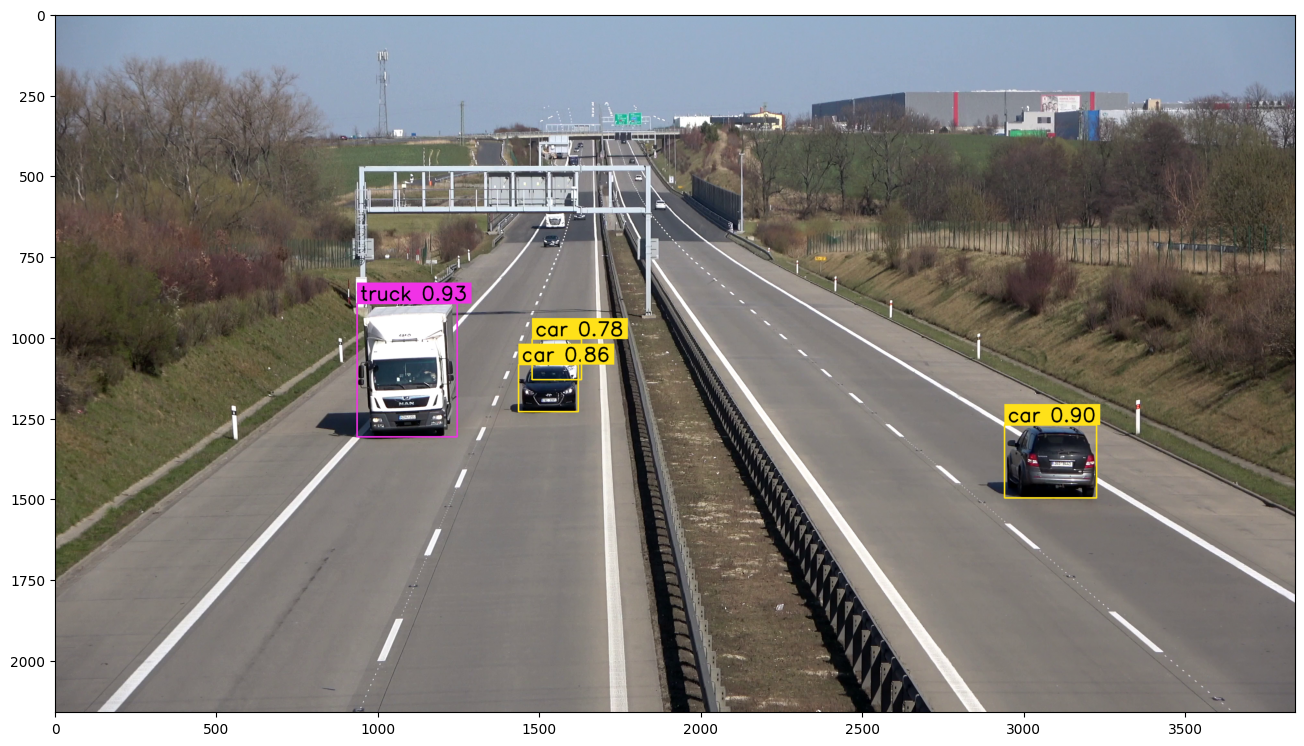
在单帧上检查检测框和类别标签。
# 创建视频帧生成器
generator = get_video_frames_generator(SOURCE_VIDEO_PATH)
# create instance of BoxAnnotator
box_annotator = BoxAnnotator(color=ColorPalette(), thickness=4, text_thickness=4, text_scale=2)
# acquire first video frame
iterator = iter(generator)
frame = next(iterator)
# model prediction on single frame and conversion to supervision Detections
results = model(frame)
detections = Detections(
xyxy=results[0].boxes.xyxy.cpu().numpy(),
confidence=results[0].boxes.conf.cpu().numpy(),
class_id=results[0].boxes.cls.cpu().numpy().astype(int)
)
# format custom labels
labels = [
f"{CLASS_NAMES_DICT[class_id]} {confidence:0.2f}"
for _, confidence, class_id, tracker_id
in detections
]
# annotate and display frame
frame = box_annotator.annotate(frame=frame, detections=detections, labels=labels)
%matplotlib inline
show_frame_in_notebook(frame, (16, 16))
📏 设置计数线
定义跨线统计位置和输出视频路径。
# 参数设置
LINE_START = Point(50, 1500)
LINE_END = Point(3840–50, 1500)
TARGET_VIDEO_PATH = f"{HOME}/vehicle-counting-result.mp4"
VideoInfo.from_video_path(SOURCE_VIDEO_PATH)
📹 生成计数视频
逐帧检测、跟踪并统计车辆通过数量。
from tqdm.notebook import tqdm
# create BYTETracker instance
byte_tracker = BYTETracker(BYTETrackerArgs())
# create VideoInfo instance
video_info = VideoInfo.from_video_path(SOURCE_VIDEO_PATH)
# 创建视频帧生成器
generator = get_video_frames_generator(SOURCE_VIDEO_PATH)
# create LineCounter instance
line_counter = LineCounter(start=LINE_START, end=LINE_END)
# create instance of BoxAnnotator and LineCounterAnnotator
box_annotator = BoxAnnotator(color=ColorPalette(), thickness=4, text_thickness=4, text_scale=2)
line_annotator = LineCounterAnnotator(thickness=4, text_thickness=4, text_scale=2)
# open target video file
with VideoSink(TARGET_VIDEO_PATH, video_info) as sink:
# loop over video frames
for frame in tqdm(generator, total=video_info.total_frames):
# model prediction on single frame and conversion to supervision Detections
results = model(frame)
detections = Detections(
xyxy=results[0].boxes.xyxy.cpu().numpy(),
confidence=results[0].boxes.conf.cpu().numpy(),
class_id=results[0].boxes.cls.cpu().numpy().astype(int)
)
# filtering out detections with unwanted classes
mask = np.array([class_id in CLASS_ID for class_id in detections.class_id], dtype=bool)
detections.filter(mask=mask, inplace=True)
# tracking detections
tracks = byte_tracker.update(
output_results=detections2boxes(detections=detections),
img_info=frame.shape,
img_size=frame.shape
)
tracker_id = match_detections_with_tracks(detections=detections, tracks=tracks)
detections.tracker_id = np.array(tracker_id)
# filtering out detections without trackers
mask = np.array([tracker_id is not None for tracker_id in detections.tracker_id], dtype=bool)
detections.filter(mask=mask, inplace=True)
# format custom labels
labels = [
f"#{tracker_id} {CLASS_NAMES_DICT[class_id]} {confidence:0.2f}"
for _, confidence, class_id, tracker_id
in detections
]
# updating line counter
line_counter.update(detections=detections)
# annotate and display frame
frame = box_annotator.annotate(frame=frame, detections=detections, labels=labels)
line_annotator.annotate(frame=frame, line_counter=line_counter)
sink.write_frame(frame)
📌 小结
这篇教程完整整理了 YOLOv8 车辆跟踪计数 的核心复现流程。实际操作时,建议先确认 GPU、依赖版本、数据集路径和模型权重路径,再逐段运行 notebook。
后续我会继续按源项目顺序整理同系列中的目标检测、实例分割、OCR、多目标跟踪和视觉大模型教程。
📚 同系列教程汇总
-
Google Gemini 3.5 Flash 零样本目标检测教程:从提示词到可视化结果
-
GLM-OCR 文档识别实战教程:从验证码、公式到车牌 OCR
-
RF-DETR + ByteTrack 多目标跟踪实战教程:从命令行到 Python 视频轨迹可视化
-
SAM 3 图像分割实战教程:文本、框和点提示的多种分割方式
-
YOLOv8 + ByteTrack 车辆跟踪计数实战:跨线统计完整流程


评论前必须登录!
注册