 网硕互联帮助中心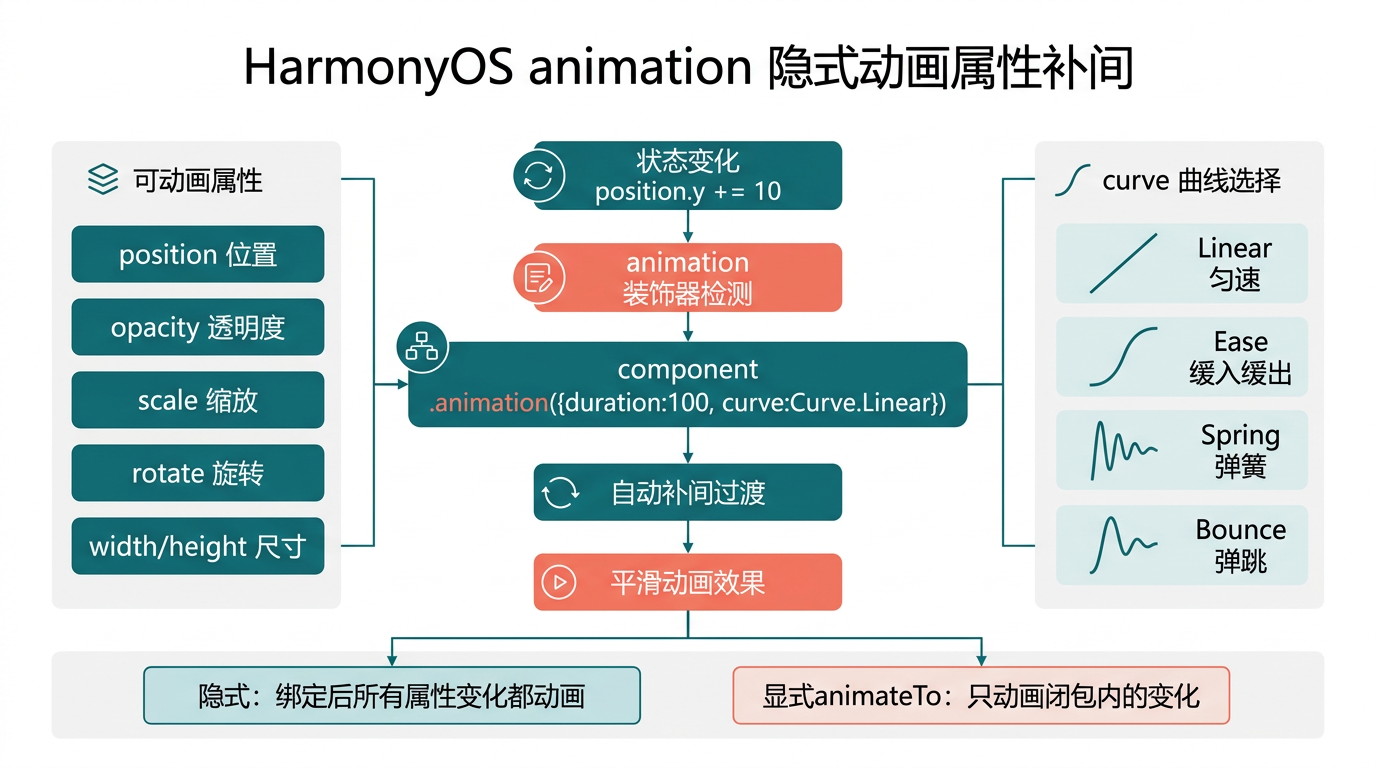
前言
上一篇我们用 animateTo 做了「主动触发特效」——得分弹跳、合并放大。但「猫猫大作战」猫咪下落用的是另一种动画——.animation({ duration: 100 })(第 16、33 篇用过),改 position 自动补间。这是隐式动画:给组件绑个动画参数,之后任何属性变化都自动补间。本篇专讲 animation 装饰器的机制和实战。
本篇以「猫猫大作战」猫咪下落 position 补间为锚点,把 animation 装饰绑定、隐式补间机制、与 animateTo 的取舍、curve 曲线选四大要点讲透。
提示:本系列不讲 ArkTS 基础语法与环境搭建,假设你已跟完第 1–55 篇。本篇是阶段三第六篇。
一、场景拆解:猫咪下落 position 补间
回顾「猫猫大作战」猫咪渲染(第 16、33、43 篇):
// 来源:entry/src/main/ets/pages/Index.ets GameView() 棋盘 Stack
ForEach(this.cats, (cat: Cat) => {
Column() { /* emoji */ }
.width(/* size */).height(/* size */)
.position({ x: /* x * 60 */, y: /* y * 60 */ }) // ← 读 cat.x/cat.y
.animation({ duration: 100, curve: Curve.Linear }) // ← 隐式动画
}, (cat: Cat) => cat.id)
机制:
关键经验:animation 隐式补间 = 改属性自动动——绑一次 .animation({…}),之后 position/scale/opacity 等属性变化都自动补间,不用每次主动调 animateTo。
二、animation 装饰绑定
2.1 基本用法
Column() { /* … */ }
.position({ x: 100, y: 200 })
.animation({ duration: 300, curve: Curve.EaseInOut }) // ← 绑动画
拆解:
| .animation({…}) | 装饰器,绑定动画参数 |
| duration: 300 | 补间时长 300ms |
| curve: Curve.EaseInOut | 缓动曲线 |
机制:绑后,该组件任何可动画属性(position/scale/opacity/rotate/backgroundColor 等)变化都自动用这参数补间。
2.2 改属性自动补间
@State catX: number = 0;
Column() { /* … */ }
.position({ x: this.catX * 60, y: 100 })
.animation({ duration: 300, curve: Curve.EaseInOut })
// 之后改 catX 自动补间
this.catX = 5; // 从 x=0 补间到 x=300,300ms EaseInOut
关键经验:animation 绑一次,后续改属性自动动——不用每次改都包 animateTo。
2.3 多属性同补
Column() { /* … */ }
.position({ x: this.catX, y: this.catY })
.scale({ x: this.catScale, y: this.catScale })
.opacity(this.catOpacity)
.animation({ duration: 300, curve: Curve.EaseInOut })
// 改 catX/catY/catScale/catOpacity 任一,都自动补间
this.catX = 100;
this.catScale = 1.5;
this.catOpacity = 0.5;
// 三属性同时补间,300ms 平滑过渡
三、隐式补间机制
3.1 ArkUI 如何识别「属性变化」
Column()
.position({ x: 100, y: 200 })
.animation({ duration: 300 })
// 第 1 次渲染:position = (100, 200),记录为「旧值」
// 改 catX 触发重渲染:
// position = (300, 200),ArkUI 检测到 x 从 100 → 300
// .animation 检测到变化,用 300ms 补间 x: 100 → 300
// y 没变,不补间
机制:
3.2 哪些属性可补间
| position | ✅ | 猫咪下落 |
| scale | ✅ | 放大缩小 |
| opacity | ✅ | 淡入淡出 |
| rotate | ✅ | 旋转 |
| backgroundColor | ✅ | 颜色过渡 |
| width/height | ✅ | 尺寸变化 |
| margin/padding | ✅ | 间距变化 |
| fontSize | ✅ | 字号变化 |
| borderRadius | ✅ | 圆角变化 |
| Text 文本内容 | ❌ | 文本瞬切(非数值) |
| if 条件渲染 | ❌ | 出现/销毁不补间(用 transition) |
关键经验:数值型属性可补间,文本/条件渲染不补间——文本变化要淡出旧+淡入新(用 opacity 或 transition)。
3.3 补间打断与重启
// 假设 catX 从 0 补间到 300,进行到 150ms(x=150)
this.catX = 500; // 中途改新目标
// ArkUI 从当前 x=150 重新开始补间到 500,300ms EaseInOut
// 不等待原补间完成,立即重启
实战经验:animation 补间可中途打断——改新目标立即从当前值重启补间,适合「实时跟随」场景(猫咪下落每 100ms 改目标)。
四、与 animateTo 的取舍
4.1 两种动画 API 对比
| 触发 | 改属性自动补间 | 主动调 API |
| 绑定 | 绑在组件装饰链 | 调用时包闭包 |
| 参数 | 固定一次 | 每次可传不同 |
| 多段串联 | ❌ 难 | ✅ onFinish 串联 |
| 适合 | 「属性自然变化」 | 「主动触发特效」 |
4.2 场景对照
// 场景 A:猫咪下落(position 自然变)→ 隐式 animation
ForEach(this.cats, (cat: Cat) => {
Column() { /* … */ }
.position({ x: cat.x * 60, y: cat.y * 60 })
.animation({ duration: 100, curve: Curve.Linear }) // ← 隐式
}, (cat: Cat) => cat.id)
// 场景 B:得分弹跳(点击主动触发)→ 显式 animateTo
handleScoreChange() {
animateTo({ duration: 300, curve: Curve.EaseOut }, () => {
this.scoreScale = 1.5; // 主动触发
});
}
Text(this.score.toString())
.scale({ x: this.scoreScale, y: this.scoreScale })
// 不绑 .animation,靠 animateTo 主动触发
4.3 取舍决策
动画触发时机?
├─ 属性自然变化(每帧/每次循环改)→ 隐式 .animation
└ 主动触发一次(点击/合并/连击)→ 显式 animateTo
关键经验:「循环改属性」用隐式 animation,「点击触发一次」用显式 animateTo——猫咪下落每 100ms 改 position 用隐式,得分弹跳点击触发用显式。
4.4 两者混用
// 同组件可同时用:隐式管 position,显式管 scale
ForEach(this.cats, (cat: Cat) => {
Column() { /* … */ }
.position({ x: cat.x * 60, y: cat.y * 60 })
.animation({ duration: 100, curve: Curve.Linear }) // 隐式管位置
.scale({
x: cat.id === this.newCatId ? this.newCatScale : 1,
y: cat.id === this.newCatId ? this.newCatScale : 1
})
// 不绑 .animation 给 scale,靠 animateTo 主动触发合并放大
}, (cat: Cat) => cat.id)
实战经验:隐式和显式可混用——不同属性分别用,各管各的。
五、curve 曲线选
5.1 常用 Curve
enum Curve {
Linear, // 匀速
Ease, // 先慢后快再慢
EaseIn, // 先慢后快
EaseOut, // 先快后慢
EaseInOut, // 两端慢中间快
FastOut, // 快出
SlowOut, // 慢出
// 等更多
}
5.2 场景对照
| 猫咪下落(重力感) | Linear 或 FastOut | 匀速或加速下落 |
| 位置移动(UI 切换) | EaseInOut | 两端慢中间快,自然 |
| 放大出现 | EaseOut | 先快后慢有冲击 |
| 缩小消失 | EaseIn | 先慢后快渐隐 |
| 弹性反馈 | Spring(ICurve) | 弹簧回弹 |
5.3 自定义 ICurve
import { curves } from '@kit.ArkUI';
// 弹性曲线
const springCurve = curves.springMotion(0.5, 0.8);
Column()
.position({ x: this.catX, y: 100 })
.animation({ duration: 300, curve: springCurve }) // ← 用 ICurve
关键经验:复杂曲线用 ICurve 自定义——本系列第 59 篇会专讲 Spring 弹性物理。
六、完整代码:猫咪下落 + 多属性补间
// 来源:entry/src/main/ets/pages/Index.ets(animation 隐式动画完整版)
@Entry
@Component
struct Index {
@State gameState: GameState = GameState.IDLE;
@State score: number = 0;
@State cats: Cat[] = [];
@State combo: ComboInfo = { count: 0, multiplier: 1, lastMergeTime: 0 };
@State nextCatLevel: CatLevel = CatLevel.SMALL;
@State highScore: number = 0;
@State gameTime: number = 0;
/* … 其他 state */
private gameEngine: GameEngine = new GameEngine();
private gameLoopTimer: number = –1;
private spawnTimer: number = –1;
private timeTimer: number = –1;
private readonly cols: number[] = [0, 1, 2, 3, 4];
startGame() {
this.clearTimers();
this.gameEngine.reset();
this.gameState = GameState.PLAYING;
this.score = 0;
this.cats = [];
this.gameTime = 0;
this.combo = { count: 0, multiplier: 1, lastMergeTime: 0 };
this.nextCatLevel = this.gameEngine.getNextCatLevel();
// 主循环:每 100ms 改 cat.y,animation 隐式补间下落
this.gameLoopTimer = setInterval(() => {
if (this.gameState !== GameState.PLAYING) return;
this.cats = this.gameEngine.updateCats(); // 改 cat.y
// animation 自动从旧 y 补间到新 y,100ms 平滑下落
this.score = this.gameEngine.getScore();
this.combo = this.gameEngine.getCombo();
if (this.gameEngine.isGameOver()) { this.endGame(); }
}, 100);
/* spawnTimer、timeTimer 筥略 */
}
/* pauseGame / resumeGame / endGame / handleColumnClick / clearTimers / formatTime / aboutToDisappear 筥略 */
@Builder
GameView() {
Column() {
this.GameHUD()
Column() {
Row() { /* 预告区 */ }
Stack() {
// 棋盘背景网格
Column() {
ForEach(this.rows, (row: number) => {
Row() {
ForEach(this.cols, (col: number) => {
Column()
.width(GameConfig.CELL_SIZE).height(GameConfig.CELL_SIZE)
.border({ width: 1, color: 'rgba(255,255,255,0.5)' })
}, (col: number) => `grid_${row}_${col}`)
}
}, (row: number) => `grid_row_${row}`)
}
// 猫咪渲染:animation 隐式动画(本篇重点)
ForEach(this.cats, (cat: Cat) => {
Column() {
Text(CatConfig[cat.level].emoji)
.fontSize(CatConfig[cat.level].size * 0.5)
}
.width(CatConfig[cat.level].size)
.height(CatConfig[cat.level].size)
.borderRadius(CatConfig[cat.level].size / 2)
.backgroundColor(CatConfig[cat.level].color)
.justifyContent(FlexAlign.Center)
.shadow({ radius: 4, color: 'rgba(0,0,0,0.2)', offsetY: 2 })
// position 读 cat.x/cat.y,主循环改 cat.y 触发补间
.position({
x: cat.x * 60 + (60 – CatConfig[cat.level].size) / 2,
y: cat.y * 60 + (60 – CatConfig[cat.level].size) / 2
})
// ← 隐式动画:100ms Linear 补间位置变化
.animation({ duration: 100, curve: Curve.Linear })
}, (cat: Cat) => cat.id)
// 列点击层
Row() {
ForEach(this.cols, (col: number) => {
Column()
.width(GameConfig.CELL_SIZE)
.height(GameConfig.BOARD_HEIGHT * GameConfig.CELL_SIZE)
.backgroundColor('rgba(0,0,0,0)')
.onClick(() => { this.handleColumnClick(col); })
}, (col: number) => `click_${col}`)
}
}
.width(GameConfig.BOARD_WIDTH * GameConfig.CELL_SIZE)
.height(GameConfig.BOARD_HEIGHT * GameConfig.CELL_SIZE)
.borderRadius(12).clip(true).backgroundColor('#D6EEF5')
}.alignItems(HorizontalAlign.Center)
Spacer()
Row() { /* 底部控制栏 */ }
.width('100%').padding({ left: 24, right: 24, bottom: 24, top: 12 })
}
.width('100%').height('100%')
.linearGradient({
direction: GradientDirection.Bottom,
colors: [['#E8F4F8', 0.0], ['#D6EEF5', 0.5], ['#C9E8F2', 1.0]]
})
.alignItems(HorizontalAlign.Center)
}
/* GameHUD / MainMenuView / PauseOverlay / GameOverOverlay / StatItem 筥略 */
}
七、踩坑提示
7.1 animation 绑在不可补间属性
// ❌ 错误:绑 animation 但改的是文本内容(不可补间)
Text(this.score.toString())
.animation({ duration: 300 })
// 改 score 文本瞬切,animation 无效
// ✅ 正确:文本变化用 opacity 淡入淡出,或 animateTo 显式
Text(this.score.toString())
.opacity(this.scoreOpacity)
.animation({ duration: 300 }) // 改 opacity 可补间
7.2 忘绑 animation 改属性瞬切
// ❌ 错误:没绑 animation,改 position 瞬切
Column()
.position({ x: this.catX, y: 100 })
// 忠了 .animation({…})
// 改 catX,位置瞬间跳到新值,无补间
// ✅ 正确:绑 animation
Column()
.position({ x: this.catX, y: 100 })
.animation({ duration: 100, curve: Curve.Linear }) // 绑
// 改 catX,100ms 平滑过渡
7.3 duration 太长导致拖影
// ⚠️ 猫咪下落用 1000ms 会拖影:主循环每 100ms 改 y,补间还没完又改新 y
.animation({ duration: 1000 }) // 太长,补间跟不上主循环改速
// ✅ 正确:补间时长 ≤ 主循循周期
.animation({ duration: 100 }) // 100ms 补间 = 100ms 主循环周期,刚好
关键经验:循环改属性的 animation duration ≤ 循环周期——否则补间跟不上改速,拖影或卡顿。
7.4 ForEach 密钥用会变字段
// ❌ 错误:密钥用 y,下落时密钥变,ForEach 销毁新建,animation 失效
ForEach(this.cats, (cat: Cat) => { /* … */ }, (cat: Cat) => `y_${cat.y}`)
// ✅ 正确:密钥用不变的 id,复用 CatItem,animation 连续补间
ForEach(this.cats, (cat: Cat) => { /* … */ }, (cat: Cat) => cat.id)
第 15、44 篇讲过这个坑——密钥变会销毁新建,animation 重置,补间断裂。
八、调试技巧
九、性能与最佳实践
十、阶段三进度(51–56)
本篇是阶段三「交互与动画」第 6 篇:
| 51 | onTouch | 手势三阶段 |
| 52 | onHover | 悬停反馈 |
| 53 | onKeyEvent | 键盘/遥控按键 |
| 54 | bindContextMenu | 上下文菜单 |
| 55 | animateTo | 显式动画触发 |
| 56(本篇) | animation | 隐式补间,改属性自动动 |
接下来第 57–60 篇会覆盖:Hero 共享元素、transition 转场、Spring 弹性物理、Hero Style Player。
总结
本篇我们从 animation 隐式动画切入,掌握了装饰绑定与自动补间机制、可补间属性(数值型)vs 不可补间(文本/条件)、与 animateTo 的取舍(循环改隐式,点击触发显式)、curve 曲线选四大要点,并给出了猫咪下落 animation 隐式补间的完整代码。核心要点:animation 绑一次改属性自动补间;duration ≤ 循环周期避拖影;数值可补间文本不可;密钥用不变字段保补间连续。
下一篇我们将拆解 Hero——共享元素跳转连续动画。
如果这篇文章对你有帮助,欢迎点赞👍、收藏⭐、关注🔔,你的支持是我持续创作的动力!
相关资源:
- 「猫猫大作战」项目源码:本仓库 entry/src/main/ets/pages/Index.ets
- ArkUI animation 隐式动画官方指南
- Curve 缓动曲线官方文档
- HarmonyOS 动画性能最佳实践
- 开源鸿蒙跨平台社区
- HarmonyOS 开发者官方文档首页
- 系列索引:本仓库 articles/INDEX.md







评论前必须登录!
注册