 网硕互联帮助中心
学习类 HarmonyOS 应用里,“收藏页”通常不是一个单纯的列表页。用户在答题页收藏一道题、写一条笔记、答错一次题,回到学习夹时希望马上看到变化;如果点开收藏题目继续练习,又希望从这道题附近开始,而不是跳到无关题目。这个页面如果自己维护一份独立副本,很容易出现列表数量不刷新、空状态不消失、题卡点击错位的问题。
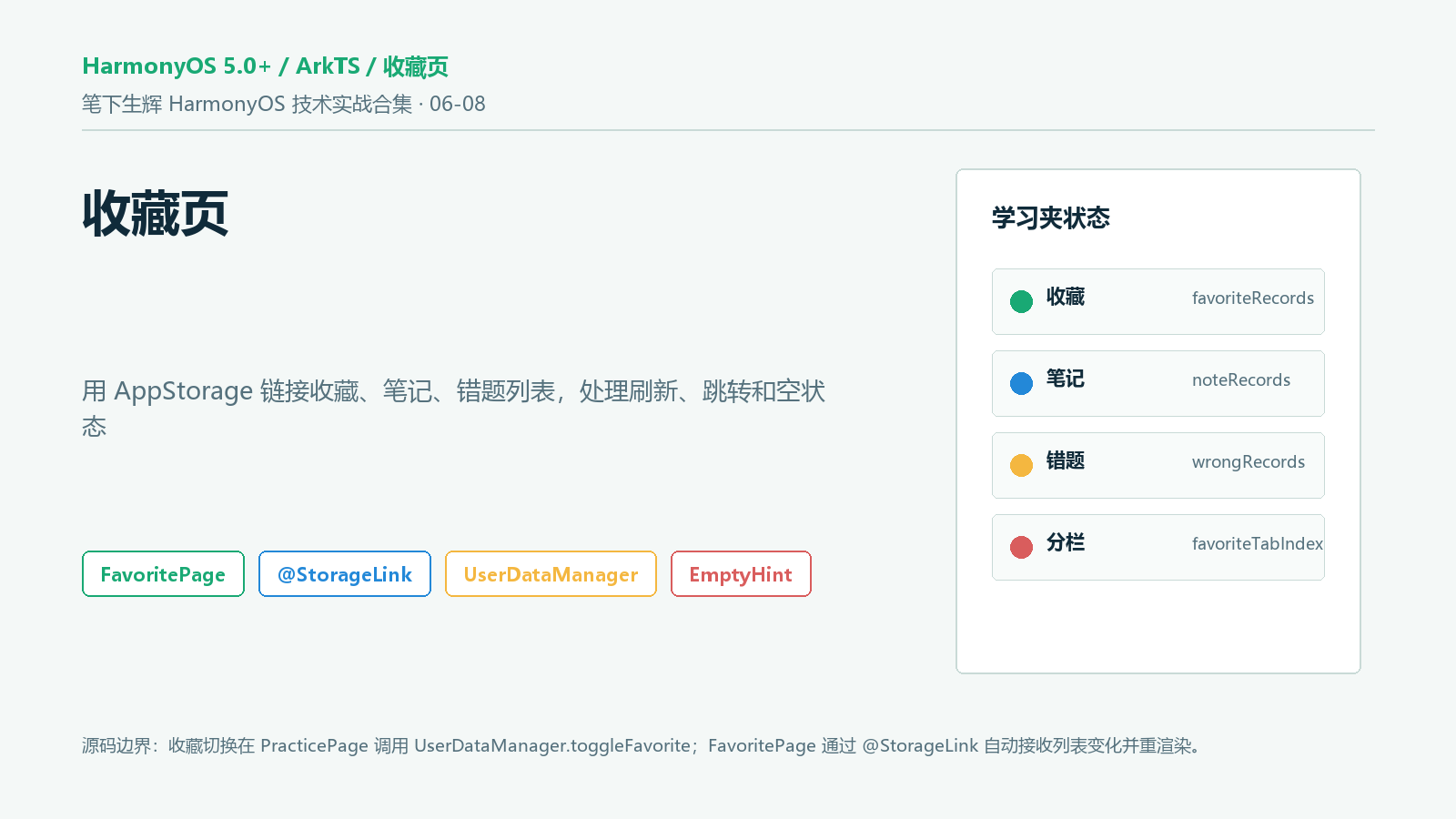
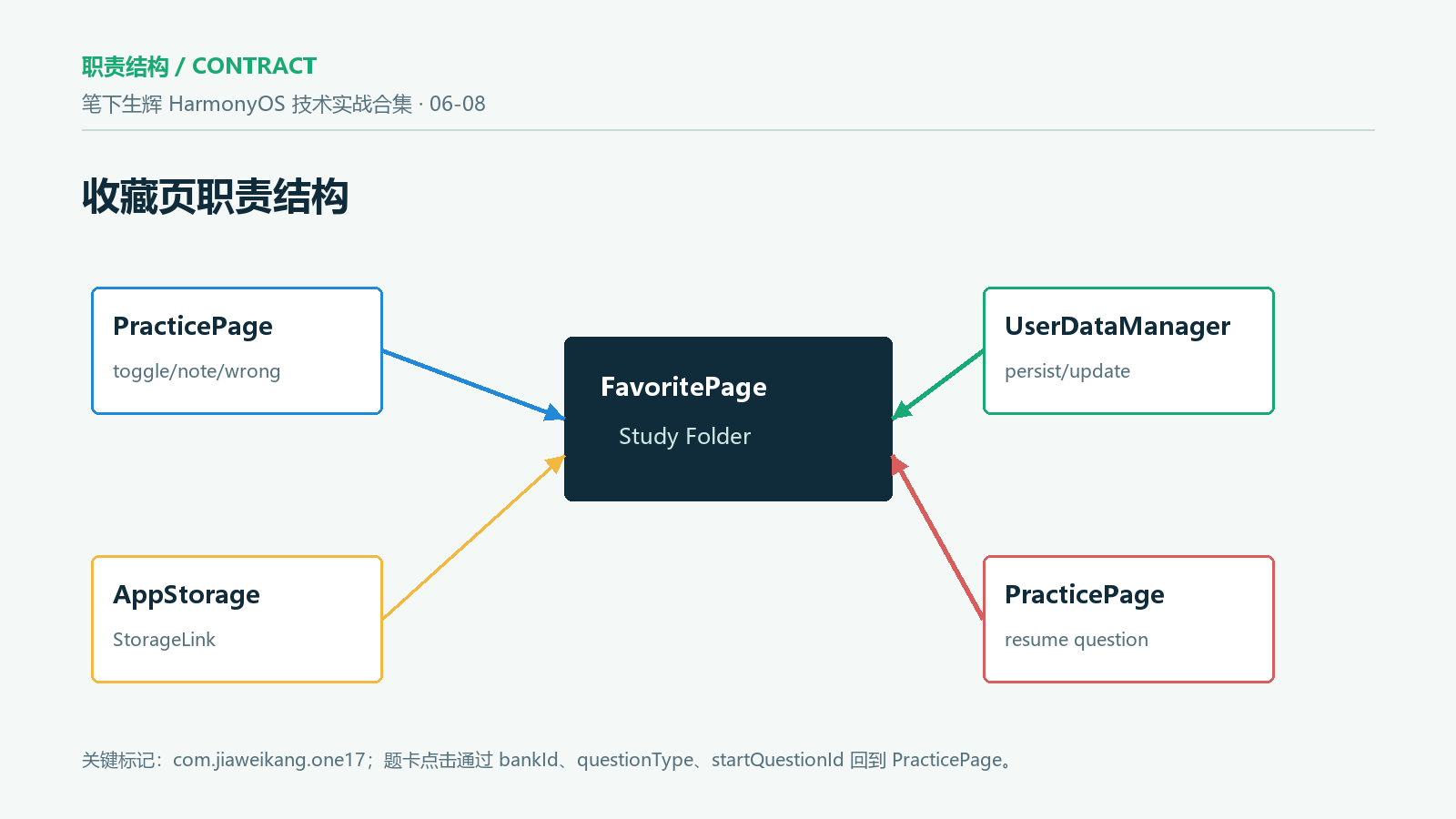
笔下生辉的收藏页由 FavoritePage.ets 承担。它没有重新拉取远程数据,也没有创建单独的页面缓存,而是通过 @StorageLink 直接订阅 favoriteRecords、noteRecords、wrongRecords 和 favoriteTabIndex。收藏切换、笔记保存、错题收录主要发生在 PracticePage.ets 和 UserDataManager.ets,收藏页只根据共享状态渲染三类列表、三个空状态、笔记编辑弹层和继续练习入口。
本文基于本地工程 D:\\huawei\\one17-11 的真实源码编写,包名标记为 com.jiaweikang.one17。这里需要明确边界:当前源码没有云同步、账号收藏夹、服务端收藏接口或跨设备协同;它是基于 Preferences + AppStorage 的本地学习记录管理。文章只讨论源码可复核的收藏切换、列表刷新、空状态、笔记编辑、错题清空和题卡跳转。
本文重点解决五个工程问题:
一、收藏页不是数据源,而是共享状态的视图
FavoritePage.ets 开头就能看出它的数据来源。三个记录列表和当前分栏都来自 @StorageLink,这意味着它们和其他页面共享同一份 AppStorage 状态。
@StorageLink('favoriteRecords') favRecords: FavoriteRecord[] = []
@StorageLink('noteRecords') noteRecords: NoteRecord[] = []
@StorageLink('wrongRecords') wrongRecords: WrongRecord[] = []
@StorageLink('favoriteTabIndex') tab: number = 0
@State showEditNote: boolean = false
@State editingQuestionId: string = ''
@State editingBankId: string = ''
@State editingNoteText: string = ''
这里可以分清两类状态:
| favRecords/noteRecords/wrongRecords | @StorageLink | 跨页面共享和持久化恢复 |
| tab | @StorageLink | 外部页面可切换收藏页分栏 |
| showEditNote/editing* | @State | 当前页面临时编辑态 |
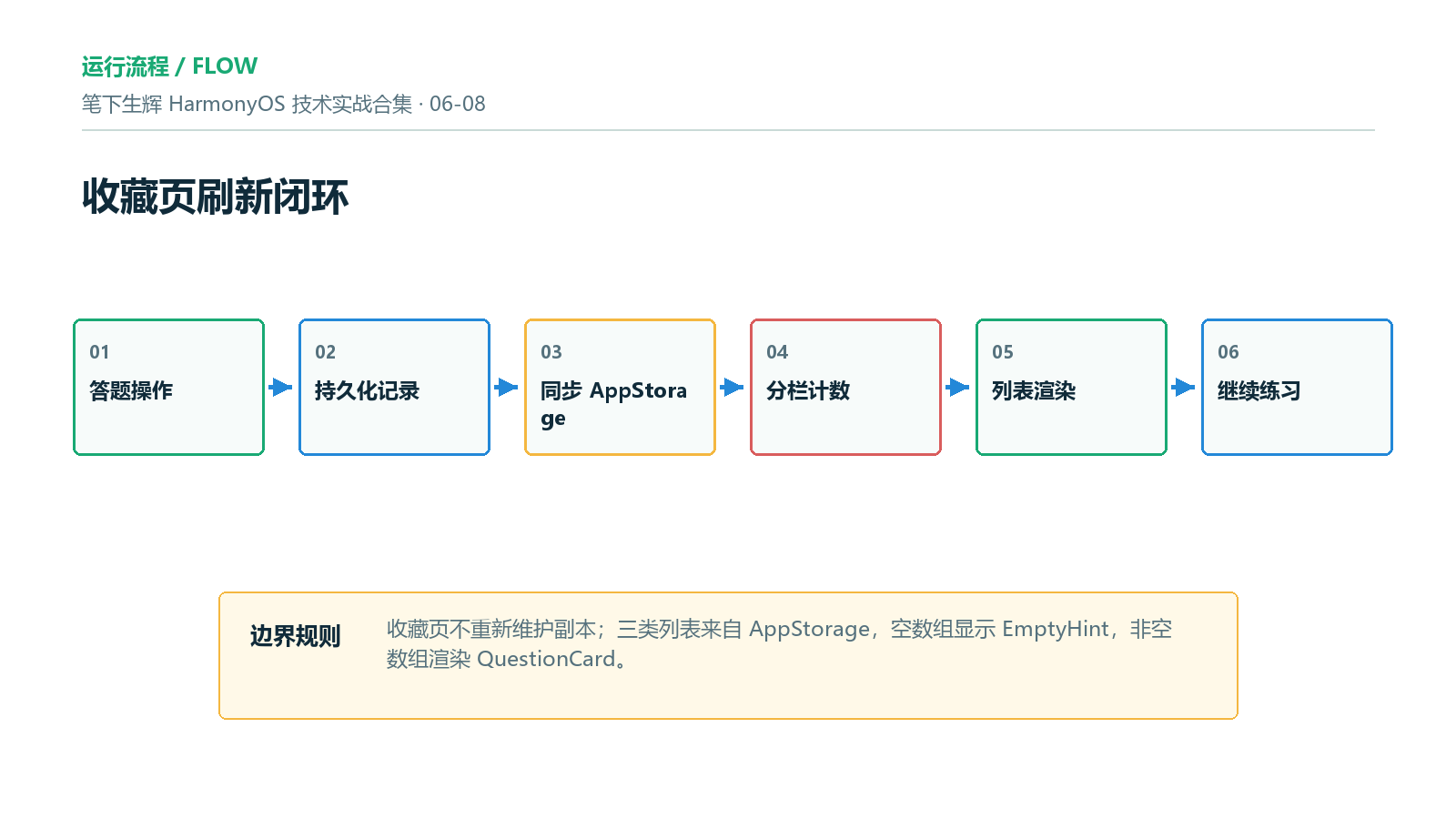
这种拆分能避免收藏页在 aboutToAppear 里反复手动刷新。只要答题页或设置页更新了 AppStorage 里的数组,收藏页重新渲染时就能使用最新值。
二、数据初始化发生在 EntryAbility,不由页面各自处理
EntryAbility.ets 初始化用户数据,并创建 favoriteTabIndex。
UserDataManager.init(this.context);
AppStorage.setOrCreate<number>('favoriteTabIndex', 0);
UserDataManager.init 读取 Preferences 并写入 AppStorage:
const favStr = UserDataManager.prefs.getSync(UserDataManager.K_FAV, '[]') as string
const noteStr = UserDataManager.prefs.getSync(UserDataManager.K_NOTES, '[]') as string
const wrongStr = UserDataManager.prefs.getSync(UserDataManager.K_WRONG, '[]') as string
AppStorage.setOrCreate<FavoriteRecord[]>('favoriteRecords', JSON.parse(favStr) as FavoriteRecord[])
AppStorage.setOrCreate<NoteRecord[]>('noteRecords', JSON.parse(noteStr) as NoteRecord[])
AppStorage.setOrCreate<WrongRecord[]>('wrongRecords', JSON.parse(wrongStr) as WrongRecord[])
这条链路很关键。收藏页不应该直接读取 Preferences,否则答题页、设置页、统计页各自读写存储,很容易出现状态不同步。当前源码把持久化恢复集中在 UserDataManager,页面通过 AppStorage 消费结果。
三、收藏切换在答题页发生,收藏页自动接收结果
收藏按钮位于 PracticePage.ets。当前题目存在时,点击收藏会调用 UserDataManager.toggleFavorite,并把返回的新数组赋给 favRecords。
this.favRecords = UserDataManager.toggleFavorite(this.favRecords, q.id, q.bankId)
toggleFavorite 的逻辑是:如果已经收藏,就过滤掉这条记录;如果未收藏,就把新记录插到数组前面,并持久化。
static toggleFavorite(records: FavoriteRecord[], questionId: string, bankId: string): FavoriteRecord[] {
const exists = records.some((record: FavoriteRecord) => record.questionId === questionId)
let result: FavoriteRecord[]
if (exists) {
result = records.filter((record: FavoriteRecord) => record.questionId !== questionId)
} else {
result = [{ questionId, bankId, createdAt: nowStr() }, …records]
}
UserDataManager.persist(UserDataManager.K_FAV, result)
return result
}
这不是原地修改数组,而是返回新数组。对 ArkUI 状态刷新来说,这一点很重要:赋值给 @StorageLink 后,依赖该数组的页面才更容易触发重新渲染。
四、Tabs 用同一套长度显示实时计数
收藏页顶部是三个分栏:收藏、笔记、错题。数量通过 countFor(index) 从当前数组长度计算。
private countFor(index: number): number {
if (index === 0) return this.favRecords.length
if (index === 1) return this.noteRecords.length
return this.wrongRecords.length
}
渲染时每个 tab 都展示标签和数量:
ForEach(['收藏', '笔记', '错题'], (label: string, index: number) => {
Row({ space: 5 }) {
Text(label)
.fontSize(Sizes.CAPTION_FONT)
.fontWeight(this.tab === index ? FontWeight.Bold : FontWeight.Normal)
.fontColor(this.tab === index ? Color.White : Colors.TEXT_SECONDARY)
Text(`${this.countFor(index)}`)
.fontSize(Sizes.SMALL_FONT)
.fontColor(this.tab === index ? Color.White : Colors.TEXT_HINT)
}
.layoutWeight(1)
.height(38)
.justifyContent(FlexAlign.Center)
.borderRadius(19)
.backgroundColor(this.tab === index ? Colors.PRIMARY : Colors.SURFACE)
.onClick(() => { this.tab = index })
}, (label: string, index: number) => `ftab_${index}`)
这里没有单独维护 favCount、noteCount、wrongCount。计数从数组长度直接派生,可以避免“列表已经删空但顶部数字仍是 1”的问题。
五、外部页面可以通过 favoriteTabIndex 定位分栏
favoriteTabIndex 是共享状态,因此其他页面可以先改分栏,再切到收藏页。例如首页错题复习入口会这样做:
this.favoriteTabIndex = 2
this.currentTabIndex = 3
设置页也可以打开对应学习数据页:
private openFavoriteTab(tabIndex: number): void {
this.currentTabIndex = 3
this.favoriteTabIndex = tabIndex
}
收藏页只需要把 tab 绑定到 @StorageLink('favoriteTabIndex'),就能承接外部导航意图。这比给收藏页维护多个路由参数更轻,适合这种底部 Tab 内部页面。
六、主体渲染按分栏拆成三个列表
收藏页主体根据 tab 选择渲染收藏、笔记或错题。
if (this.tab === 0) {
this.FavList()
} else if (this.tab === 1) {
this.NoteList()
} else {
this.WrongList()
}
这个分支的价值是让每类记录拥有自己的空状态和动作,而不是把三类记录强行塞到一个泛型列表里。
| 收藏 | favRecords | 点击题卡继续练习 |
| 笔记 | noteRecords | 展示笔记内容并支持编辑 |
| 错题 | wrongRecords | 错题练习、清空错题 |
对题库应用来说,收藏、笔记、错题不是同一种业务。源码保持同一个 QuestionCard 展示框架,同时让列表入口有差异,是比较稳的折中。
七、收藏列表为空时显示明确动作提示
收藏列表先判断数组长度。为空时进入 EmptyHint,非空时用 List 渲染。
@Builder
FavList() {
if (this.favRecords.length === 0) {
this.EmptyHint('还没有收藏题目', '答题时点击收藏按钮即可添加')
} else {
List({ space: 10 }) {
ForEach(this.favRecords, (record: FavoriteRecord) => {
ListItem() {
this.QuestionCard(record.questionId, record.bankId, record.createdAt, '')
}
.padding({ left: Sizes.PADDING_LARGE, right: Sizes.PADDING_LARGE })
}, (record: FavoriteRecord) => record.questionId)
}
.layoutWeight(1)
.scrollBar(BarState.Off)
.edgeEffect(EdgeEffect.Spring)
.padding({ bottom: 16 })
}
}
这里的空状态不是“暂无数据”四个字,而是告诉用户“答题时点击收藏按钮即可添加”。对学习应用来说,空状态应该指向下一步动作,避免用户误以为功能不可用。
八、笔记列表复用题卡并附加编辑入口
笔记列表的数据来自 noteRecords。每条笔记传入 QuestionCard 的 note.content,题卡内部会额外渲染笔记摘要和编辑按钮。
ForEach(this.noteRecords, (note: NoteRecord) => {
ListItem() {
this.QuestionCard(note.questionId, note.bankId, note.updatedAt, note.content)
}
.padding({ left: Sizes.PADDING_LARGE, right: Sizes.PADDING_LARGE })
}, (note: NoteRecord) => note.questionId)
题卡内部判断笔记内容是否存在:
if (noteContent.length > 0) {
Row({ space: 8 }) {
Column()
.width(3)
.height(32)
.borderRadius(1.5)
.backgroundColor(Colors.PRIMARY)
Text(noteContent)
.fontSize(Sizes.CAPTION_FONT)
.fontColor(Colors.TEXT_SECONDARY)
.lineHeight(18)
.maxLines(2)
.textOverflow({ overflow: TextOverflow.Ellipsis })
.layoutWeight(1)
Text('编辑')
.fontSize(Sizes.CAPTION_FONT)
.fontColor(Colors.PRIMARY)
.fontWeight(FontWeight.Medium)
.padding({ left: 10, right: 10, top: 6, bottom: 6 })
.borderRadius(14)
.backgroundColor(Colors.PRIMARY_LIGHT)
.onClick(() => { this.openEditNote(questionId, bankId, noteContent) })
}
}
maxLines(2) 和省略号能防止长笔记把卡片撑得过高。移动端列表里,这类文本约束很必要。
九、笔记编辑弹层只维护临时编辑态
点击“编辑”后,收藏页会记录当前题目、题库和笔记内容,然后打开弹层。
private openEditNote(questionId: string, bankId: string, content: string): void {
this.editingQuestionId = questionId
this.editingBankId = bankId
this.editingNoteText = content
this.showEditNote = true
}
保存时调用 UserDataManager.upsertNote,并把返回的新数组赋给 noteRecords。
this.noteRecords = UserDataManager.upsertNote(
this.noteRecords, this.editingQuestionId, this.editingBankId, this.editingNoteText)
this.showEditNote = false
这保证了弹层编辑态和真实列表态分离。用户输入过程中只改 editingNoteText,点击保存后才更新 noteRecords。如果用户点遮罩关闭弹层,列表不会被中途写入。
十、错题列表提供批量练习和清空
错题分栏和收藏、笔记不同,它额外提供“练习错题”和“清空”两个动作。
Text('练习错题')
.fontSize(Sizes.CAPTION_FONT)
.fontColor(Color.White)
.fontWeight(FontWeight.Medium)
.padding({ left: 14, right: 14, top: 7, bottom: 7 })
.borderRadius(16)
.backgroundColor(Colors.PRIMARY)
.onClick(() => {
router.pushUrl({ url: 'pages/PracticePage', params: { bankId: this.wrongRecords[0].bankId, mode: 'wrong' } })
})
Text('清空')
.fontSize(Sizes.CAPTION_FONT)
.fontColor(Colors.ERROR)
.padding({ left: 12, right: 0, top: 7, bottom: 7 })
.onClick(() => { this.wrongRecords = UserDataManager.clearWrong() })
这里有一个前置分支保护:只有 wrongRecords.length > 0 时才渲染这两个按钮。因此 this.wrongRecords[0].bankId 不会在空数组状态下执行。清空错题后,wrongRecords 变成空数组,页面下一次渲染就进入空状态。
十一、题卡点击要尽量回到原题
收藏页的题卡整体可点击。它会先找到当前题目,再把题型和起始题目传给 PracticePage。
private findQuestion(questionId: string, bankId: string): Question | undefined {
return getQuestions(bankId).find(q => q.id === questionId)
}
private practiceQuestion(questionId: string, bankId: string): void {
const q = this.findQuestion(questionId, bankId)
const qType: string = q ? q.type : ''
try {
router.pushUrl({
url: 'pages/PracticePage',
params: {
bankId: bankId,
mode: 'random',
questionType: qType,
startQuestionId: questionId
}
})
} catch (_) {
}
}
这里不是只传 bankId。如果收藏题还在题库中,附带 questionType 可以让练习页先进入同类型题池;附带 startQuestionId 可以让练习页优先把这道题放到前面。
PracticePage 对 questionType 和 startQuestionId 有对应承接:
if (this.mode === 'random' && params.questionType && params.questionType.length > 0) {
const typedQuestions = this.questions.filter((q: Question) => q.type === params.questionType)
if (typedQuestions.length > 0) {
this.questions = typedQuestions
}
}
this.questions = this.pickRandomPracticeQuestions(this.questions, 20, params.startQuestionId || '')
这条链路能降低“点了收藏题却看到别的题”的概率。
十二、题目缺失时要有兜底文案
收藏记录里保存的是 questionId 和 bankId,而不是完整题干。渲染题卡时需要回查题目。
private getStem(questionId: string, bankId: string): string {
const q = this.findQuestion(questionId, bankId)
return q ? q.stem : `题目 ${questionId}`
}
如果后续题库数据调整,某条旧收藏找不到原题,页面不会崩溃,而是显示 题目 ${questionId}。这不是最完美的业务体验,但在本地题库迭代中是必要兜底。
十三、空状态组件统一三类列表
EmptyHint 是三类列表共同使用的空状态组件。
@Builder
EmptyHint(msg: string, sub: string) {
Column({ space: 8 }) {
Image($r('app.media.img_empty_default'))
.width(120)
.height(120)
.objectFit(ImageFit.Contain)
.opacity(0.6)
Text(msg)
.fontSize(Sizes.BODY_FONT)
.fontColor(Colors.TEXT_HINT)
Text(sub)
.fontSize(Sizes.CAPTION_FONT)
.fontColor(Colors.TEXT_HINT)
}
.layoutWeight(1)
.width('100%')
.justifyContent(FlexAlign.Center)
.alignItems(HorizontalAlign.Center)
}
三类文案不同,但视觉结构一致:
| 收藏 | 还没有收藏题目 | 答题时点击收藏按钮即可添加 |
| 笔记 | 还没有写过笔记 | 答题时点击笔记按钮记录心得 |
| 错题 | 暂无错题记录 | 答错的题会自动收录到这里 |
这种统一能让学习夹保持一致,也避免每个列表各写一套空状态样式。
十四、本地复核清单
可以按下面清单复核源码与文章是否一致。
| 三类列表状态 | FavoritePage.ets 顶部 | @StorageLink 绑定三个记录数组 |
| 分栏状态 | favoriteTabIndex | 外部页面可切换收藏页分栏 |
| 收藏切换 | PracticePage.ets | 调用 UserDataManager.toggleFavorite |
| 列表刷新 | FavList/NoteList/WrongList | 直接使用当前数组长度和数组内容 |
| 笔记编辑 | EditNoteDialog | 保存后 upsertNote 并关闭弹层 |
| 错题清空 | WrongList | this.wrongRecords = UserDataManager.clearWrong() |
| 题卡跳转 | practiceQuestion | 传 bankId/questionType/startQuestionId |
| 空状态 | EmptyHint | 三类列表空时显示不同文案 |
建议手工验证五条路径:
十五、常见问题与修复方向
| 收藏后列表不刷新 | 原地修改数组,没有重新赋值 | 使用 toggleFavorite 返回新数组并赋给 favRecords |
| 顶部数量和列表不一致 | 单独维护计数状态 | 从数组长度派生计数 |
| 点击题卡进入无关题 | 只传 bankId | 同时传 questionType 和 startQuestionId |
| 笔记编辑未保存 | 只改临时编辑态 | 保存时调用 upsertNote 更新 noteRecords |
| 清空错题后仍显示旧列表 | 没把返回空数组赋值给状态 | this.wrongRecords = UserDataManager.clearWrong() |
总结
FavoritePage.ets 的核心不是“收藏按钮怎么画”,而是让收藏、笔记、错题三类学习记录围绕 AppStorage 做状态闭环。答题页通过 UserDataManager 修改数组并持久化,收藏页通过 @StorageLink 接收最新数组,根据当前分栏渲染列表或空状态,再通过题卡点击把用户带回练习页。
这套实现适合当前笔下生辉的本地学习记录场景:不引入服务端,不伪造跨设备能力,只把本地收藏、笔记、错题做成可恢复、可刷新、可继续练习的闭环。后续如果要扩展账号同步,可以在 UserDataManager 后面替换 Repository 或同步服务,但收藏页的分栏、空状态和题卡跳转边界仍然可以保留。
部分内容由AI辅助生成。





评论前必须登录!
注册