 网硕互联帮助中心
一、新增员工
1. 代码实现
(1) EmpController
@Slf4j
@RestController
@RequestMapping("/emps")
public class EmpController {
@Autowired
private EmpService empService;
//新增
@PostMapping
public Result save(@RequestBody Emp emp){
//记录日志
log.info("新增员工, emp:{}",emp);
//调用业务层新增功能
empService.save(emp);
//响应
return Result.success();
}
//省略…
}
(2) EmpService
public interface EmpService {
/**
* 保存员工信息
* @param emp
*/
void save(Emp emp);
//省略…
}
(3) EmpServiceImpl
@Slf4j
@Service
public class EmpServiceImpl implements EmpService {
@Autowired
private EmpMapper empMapper;
@Override
public void save(Emp emp) {
//补全数据
emp.setCreateTime(LocalDateTime.now());
emp.setUpdateTime(LocalDateTime.now());
//调用添加方法
empMapper.insert(emp);
}
//省略…
}
(4) EmpMapper
@Mapper
public interface EmpMapper {
//新增员工
@Insert("insert into emp (username, name, gender, image, job, entrydate, dept_id, create_time, update_time) " +
"values (#{username}, #{name}, #{gender}, #{image}, #{job}, #{entrydate}, #{deptId}, #{createTime}, #{updateTime});")
void insert(Emp emp);
//省略…
}
二、文件上传
1. 前端程序
(1) 代码
<form action="/upload" method="post" enctype="multipart/form-data">
姓名: <input type="text" name="username"><br>
年龄: <input type="text" name="age"><br>
头像: <input type="file" name="image"><br>
<input type="submit" value="提交">
</form>
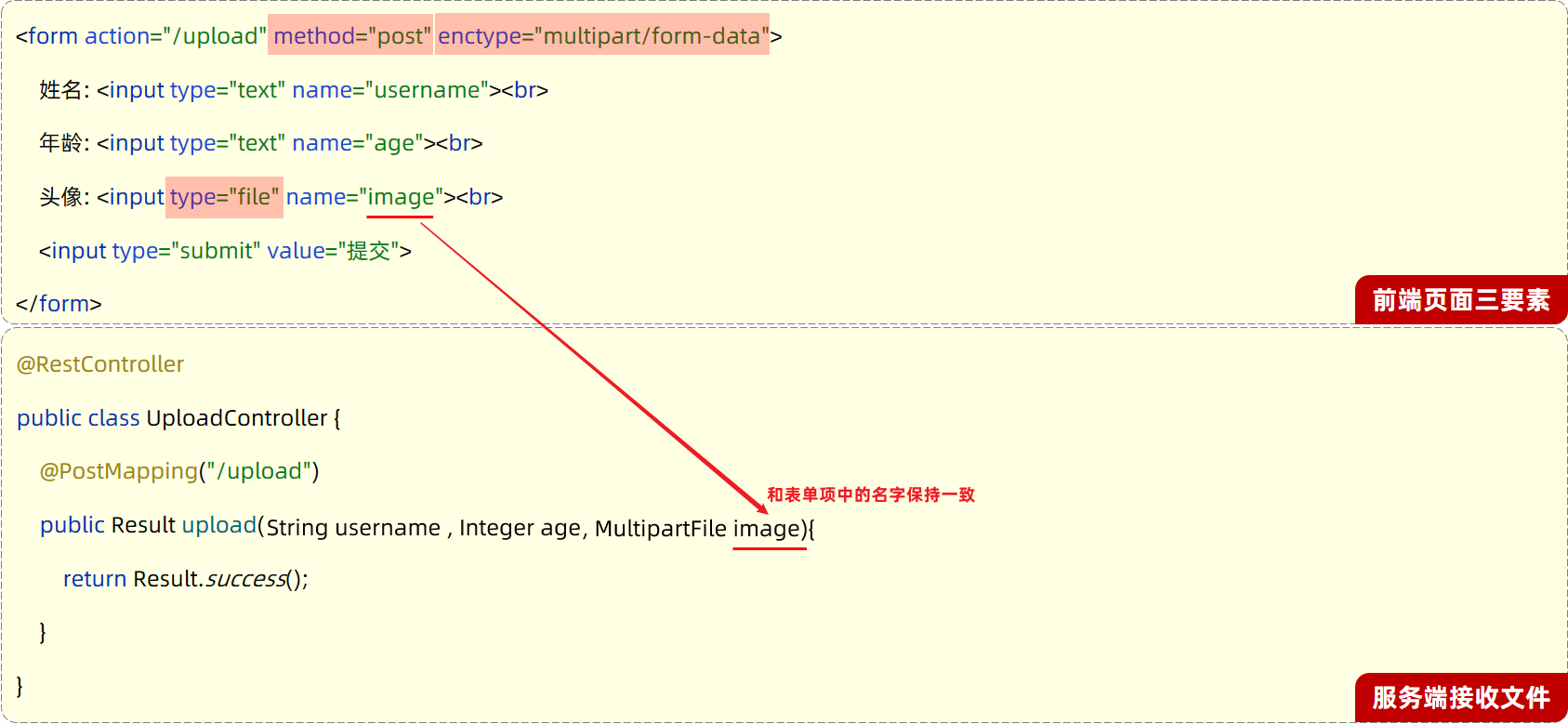
上传文件的原始form表单,要求表单必须具备以下三点(上传文件页面三要素):
① 表单必须有file域,用于选择要上传的文件
<input type="file" name="image"/>
② 表单提交方式必须为 POST
通常上传的文件会比较大,所以需要使用 POST 提交方式
③ 表单的编码类型enctype必须要设置为:multipart/form-data
普通默认的编码格式是不适合传输大型的二进制数据的,所以在文件上传时,表单的编码格式必须设置为multipart/form-data
2. 后端程序
(1) 思路分析
① 在服务端定义这么一个controller,用来进行文件上传,然后在controller当中定义一个方法来处理/upload 请求
② 在定义的方法中接收提交过来的数据 (方法中的形参名和请求参数的名字保持一致)
-
用户名:String name
-
年龄: Integer age
-
文件: MultipartFile image
Spring中提供了一个API:MultipartFile,使用这个API就可以来接收到上传的文件
(2) 代码实现
@Slf4j
@RestController
public class UploadController {
@PostMapping("/upload")
public Result upload(String username, Integer age, MultipartFile image) {
log.info("文件上传:{},{},{}",username,age,image);
return Result.success();
}
}
3. 本地存储
(1) 思路分析
① 在服务器本地磁盘上创建images目录,用来存储上传的文件(例:E盘创建images目录)
② 使用MultipartFile类提供的API方法,把临时文件转存到本地磁盘目录下
-
String getOriginalFilename(); //获取原始文件名
-
void transferTo(File dest); //将接收的文件转存到磁盘文件中
-
long getSize(); //获取文件的大小,单位:字节
-
byte[] getBytes(); //获取文件内容的字节数组
-
InputStream getInputStream(); //获取接收到的文件内容的输入流
(2) 代码实现
@Slf4j
@RestController
public class UploadController {
@PostMapping("/upload")
public Result upload(String username, Integer age, MultipartFile image) throws IOException {
log.info("文件上传:{},{},{}",username,age,image);
//获取原始文件名
String originalFilename = image.getOriginalFilename();
//构建新的文件名
String extname = originalFilename.substring(originalFilename.lastIndexOf("."));//文件扩展名
String newFileName = UUID.randomUUID().toString()+extname;//随机名+文件扩展名
//将文件存储在服务器的磁盘目录
image.transferTo(new File("E:/images/"+newFileName));
return Result.success();
}
}
核心逻辑:
① originalFilename.lastIndexOf("."):找到原始文件名中最后一个.的索引位置
- 文件名可能包含多个.(比如doc.123.pdf),只有取最后一个.,才能正确拿到文件的真实扩展名(.pdf),如果取第一个.会得到错误的.123。
- substring(索引位置):从指定索引位置开始,截取字符串到末尾,最终得到带.的文件扩展名。
② String newFileName = UUID.randomUUID().toString()+extname;
- UUID:Java 提供的通用唯一识别码工具类,能生成全球唯一的 32 位 + 横线的字符串(比如f2a7c90a-8e05-4f3a-91b6-7d28901e2345),无论多少次生成,都不会出现重复;
- UUID.randomUUID():生成一个 UUID 随机对象;
(3) 我们再次上传一个较大的文件(超出1M)时发现,后端程序报错:

报错原因:在SpringBoot中,文件上传时默认单个文件最大大小为1M
那么如果需要上传大文件,可以在application.properties进行如下配置
#配置单个文件最大上传大小
spring.servlet.multipart.max-file-size=10MB
#配置单个请求最大上传大小(一次请求可以上传多个文件)
spring.servlet.multipart.max-request-size=100MB
4. 阿里云OSS
(1) 参照官方提供的SDK,改造一下,即可实现文件上传功能:
import com.aliyun.oss.ClientException;
import com.aliyun.oss.OSS;
import com.aliyun.oss.OSSClientBuilder;
import com.aliyun.oss.OSSException;
import com.aliyun.oss.model.PutObjectRequest;
import com.aliyun.oss.model.PutObjectResult;
import java.io.FileInputStream;
import java.io.InputStream;
public class AliOssTest {
public static void main(String[] args) throws Exception {
// Endpoint以华东1(杭州)为例,其它Region请按实际情况填写。
String endpoint = "oss-cn-shanghai.aliyuncs.com";
// 阿里云账号AccessKey拥有所有API的访问权限,风险很高。强烈建议您创建并使用RAM用户进行API访问或日常运维,请登录RAM控制台创建RAM用户。
String accessKeyId = "LTAI5t9MZK8iq5T2Av5GLDxX";
String accessKeySecret = "C0IrHzKZGKqU8S7YQcevcotD3Zd5Tc";
// 填写Bucket名称,例如examplebucket。
String bucketName = "web-framework01";
// 填写Object完整路径,完整路径中不能包含Bucket名称,例如exampledir/exampleobject.txt。
String objectName = "1.jpg";
// 填写本地文件的完整路径,例如D:\\\\localpath\\\\examplefile.txt。
// 如果未指定本地路径,则默认从示例程序所属项目对应本地路径中上传文件流。
String filePath= "C:\\\\Users\\\\Administrator\\\\Pictures\\\\1.jpg";
// 创建OSSClient实例。
OSS ossClient = new OSSClientBuilder().build(endpoint, accessKeyId, accessKeySecret);
try {
InputStream inputStream = new FileInputStream(filePath);
// 创建PutObjectRequest对象。
PutObjectRequest putObjectRequest = new PutObjectRequest(bucketName, objectName, inputStream);
// 设置该属性可以返回response。如果不设置,则返回的response为空。
putObjectRequest.setProcess("true");
// 创建PutObject请求。
PutObjectResult result = ossClient.putObject(putObjectRequest);
// 如果上传成功,则返回200。
System.out.println(result.getResponse().getStatusCode());
} catch (OSSException oe) {
System.out.println("Caught an OSSException, which means your request made it to OSS, "
+ "but was rejected with an error response for some reason.");
System.out.println("Error Message:" + oe.getErrorMessage());
System.out.println("Error Code:" + oe.getErrorCode());
System.out.println("Request ID:" + oe.getRequestId());
System.out.println("Host ID:" + oe.getHostId());
} catch (ClientException ce) {
System.out.println("Caught an ClientException, which means the client encountered "
+ "a serious internal problem while trying to communicate with OSS, "
+ "such as not being able to access the network.");
System.out.println("Error Message:" + ce.getMessage());
} finally {
if (ossClient != null) {
ossClient.shutdown();
}
}
}
}
在以上代码中,需要替换的内容为:
-
accessKeyId:阿里云账号AccessKey
-
accessKeySecret:阿里云账号AccessKey对应的秘钥
-
bucketName:Bucket名称
-
objectName:对象名称,在Bucket中存储的对象的名称
-
filePath:文件路径
(2) 集成
① 代码实现
UploadController:
import com.itheima.pojo.Result;
import com.itheima.utils.AliOSSUtils;
import lombok.extern.slf4j.Slf4j;
import org.springframework.beans.factory.annotation.Autowired;
import org.springframework.web.bind.annotation.PostMapping;
import org.springframework.web.bind.annotation.RestController;
import org.springframework.web.multipart.MultipartFile;
import java.io.IOException;
@Slf4j
@RestController
public class UploadController {
@Autowired
private AliOSSUtils aliOSSUtils;
@PostMapping("/upload")
public Result upload(MultipartFile image) throws IOException {
//调用阿里云OSS工具类,将上传上来的文件存入阿里云
String url = aliOSSUtils.upload(image);
//将图片上传完成后的url返回,用于浏览器回显展示
return Result.success(url);
}
}
三、修改员工
1. 查询回显
(1) 代码实现
① EmpMapper
@Mapper
public interface EmpMapper {
//根据ID查询员工信息
@Select("select id, username, password, name, gender, image, job, entrydate, dept_id, create_time, update_time " +
"from emp " +
"where id = #{id}")
public Emp findById(Integer id);
//省略…
}
② EmpService
public interface EmpService {
/**
* 根据ID查询员工
* @param id
* @return
*/
public Emp getById(Integer id);
//省略…
}
③ EmpServiceImpl
@Slf4j
@Service
public class EmpServiceImpl implements EmpService {
@Autowired
private EmpMapper empMapper;
@Override
public Emp getById(Integer id) {
return empMapper.findById(id);
}
//省略…
}
由于 empMapper 里的 findById() 是有返回值的,所以要加个 return
④ EmpController
@Slf4j
@RestController
@RequestMapping("/emps")
public class EmpController {
@Autowired
private EmpService empService;
//根据id查询
@GetMapping("/{id}")
public Result getById(@PathVariable Integer id){
Emp emp = empService.getById(id);
return Result.success(emp);
}
//省略…
}
2. 修改员工
(1) 代码实现
① EmpMapper
@Mapper
public interface EmpMapper {
//修改员工信息
public void update(Emp emp);
//省略…
}
② EmpMapper.xml
<?xml version="1.0" encoding="UTF-8" ?>
<!DOCTYPE mapper
PUBLIC "-//mybatis.org//DTD Mapper 3.0//EN"
"http://mybatis.org/dtd/mybatis-3-mapper.dtd">
<mapper namespace="com.itheima.mapper.EmpMapper">
<!–更新员工信息–>
<update id="update">
update emp
<set>
<if test="username != null and username != ''">
username = #{username},
</if>
<if test="password != null and password != ''">
password = #{password},
</if>
<if test="name != null and name != ''">
name = #{name},
</if>
<if test="gender != null">
gender = #{gender},
</if>
<if test="image != null and image != ''">
image = #{image},
</if>
<if test="job != null">
job = #{job},
</if>
<if test="entrydate != null">
entrydate = #{entrydate},
</if>
<if test="deptId != null">
dept_id = #{deptId},
</if>
<if test="updateTime != null">
update_time = #{updateTime}
</if>
</set>
where id = #{id}
</update>
<!– 省略… –>
</mapper>
③ EmpService
public interface EmpService {
/**
* 更新员工
* @param emp
*/
public void update(Emp emp);
//省略…
}
④ EmpServiceImpl
@Slf4j
@Service
public class EmpServiceImpl implements EmpService {
@Autowired
private EmpMapper empMapper;
@Override
public void update(Emp emp) {
emp.setUpdateTime(LocalDateTime.now()); //更新修改时间为当前时间
empMapper.update(emp);
}
//省略…
}
⑤ EmpController
@Slf4j
@RestController
@RequestMapping("/emps")
public class EmpController {
@Autowired
private EmpService empService;
//修改员工
@PutMapping
public Result update(@RequestBody Emp emp){
empService.update(emp);
return Result.success();
}
//省略…
}
四、配置文件
1. 参数配置化
(1) 存在的问题:
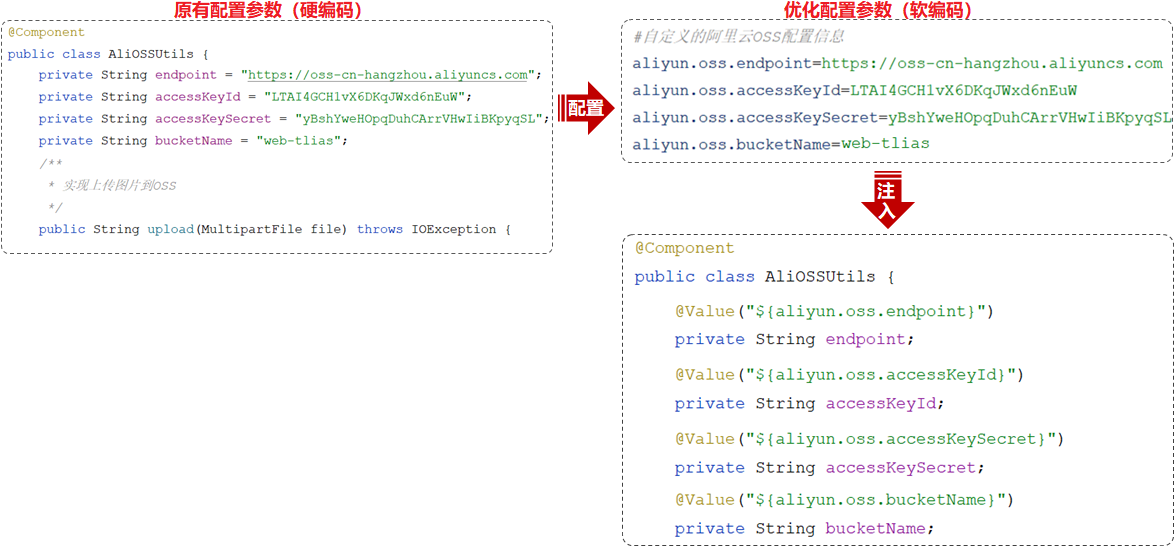
如果我们开发的是一个真实的企业级项目, Java类可能会有很多,如果将这些参数分散的定义在各个Java类当中,我们要修改一个参数值,我们就需要在众多的Java代码当中来定位到对应的位置,再来修改参数,修改完毕之后再重新编译再运行。(参数配置过于分散,是不方便集中的管理和维护)
(2) 解决方案:
① 我们可以将参数配置在配置文件中。如下:
#自定义的阿里云OSS配置信息
aliyun.oss.endpoint=https://oss-cn-hangzhou.aliyuncs.com
aliyun.oss.accessKeyId=LTAI4GCH1vX6DKqJWxd6nEuW
aliyun.oss.accessKeySecret=yBshYweHOpqDuhCArrVHwIiBKpyqSL
aliyun.oss.bucketName=web-tlias
在将阿里云OSS配置参数交给properties配置文件来管理之后,我们的AliOSSUtils工具类就变为以下形式:
@Component
public class AliOSSUtils {
/*以下4个参数没有指定值(默认值:null)*/
private String endpoint;
private String accessKeyId;
private String accessKeySecret;
private String bucketName;
//省略其他代码…
}
② 因为application.properties是springboot项目默认的配置文件,所以springboot程序在启动时会默认读取application.properties配置文件,而我们可以使用一个现成的注解:@Value,获取配置文件中的数据。
@Value 注解通常用于外部配置的属性注入,具体用法为: @Value("${配置文件中的key}")
@Component
public class AliOSSUtils {
@Value("${aliyun.oss.endpoint}")
private String endpoint;
@Value("${aliyun.oss.accessKeyId}")
private String accessKeyId;
@Value("${aliyun.oss.accessKeySecret}")
private String accessKeySecret;
@Value("${aliyun.oss.bucketName}")
private String bucketName;
//省略其他代码…
}
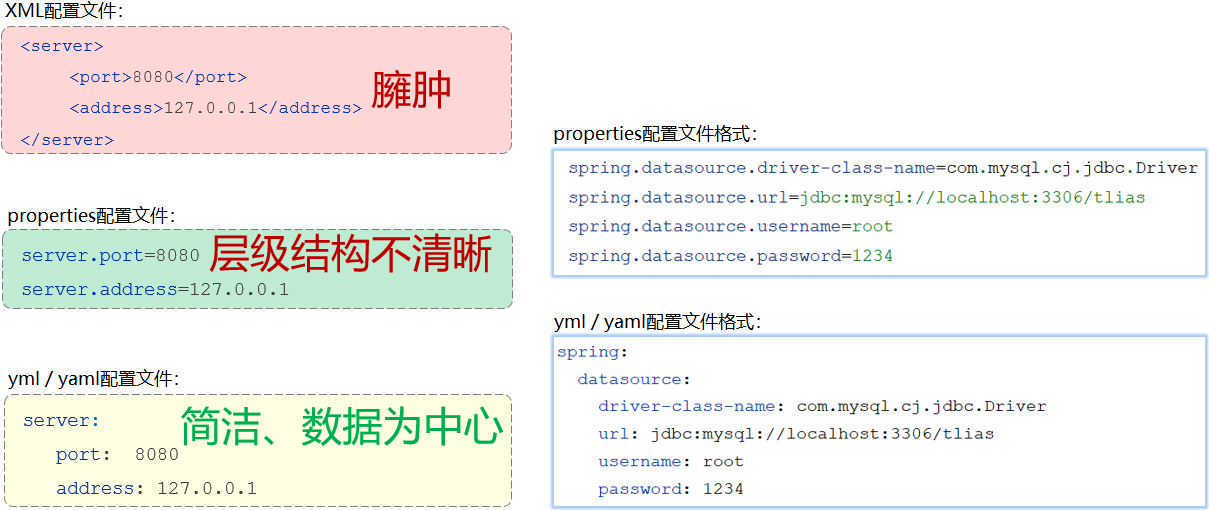
2. yml配置文件
(1) 配置格式
application.yml
server:
port: 8080
address: 127.0.0.1
(2) 基本语法
-
大小写敏感
-
数值前边必须有空格,作为分隔符
-
使用缩进表示层级关系,缩进时,不允许使用Tab键,只能用空格(idea中会自动将Tab转换为空格)
-
缩进的空格数目不重要,只要相同层级的元素左侧对齐即可
-
#表示注释,从这个字符一直到行尾,都会被解析器忽略

(3) yml的数据格式
① 对象/Map集合
user:
name: zhangsan
age: 18
password: 123456
② 数组/List/Set集合
hobby:
– java
– game
– sport
(4) 新建的application.yml文件:
spring:
datasource:
driver-class-name: com.mysql.cj.jdbc.Driver
url: jdbc:mysql://localhost:3306/tlias
username: root
password: 1234
servlet:
multipart:
max-file-size: 10MB
max-request-size: 100MB
mybatis:
configuration:
log-impl: org.apache.ibatis.logging.stdout.StdOutImpl
map-underscore-to-camel-case: true
aliyun:
oss:
endpoint: https://oss-cn-hangzhou.aliyuncs.com
accessKeyId: LTAI4GCH1vX6DKqJWxd6nEuW
accessKeySecret: yBshYweHOpqDuhCArrVHwIiBKpyqSL
bucketName: web-397
3. @ConfigurationProperties
(1) 存在的问题:
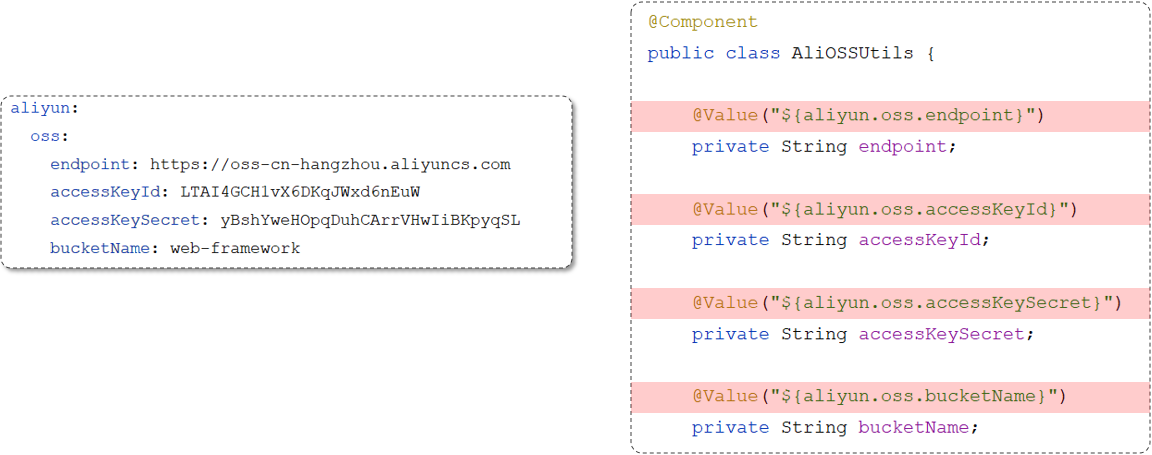
我们在application.yml中配置了阿里云OSS的四项参数之后,如果java程序中需要这四项参数数据,我们直接通过@Value注解来进行注入。这种方式本身没有什么问题,但是如果说需要注入的属性较多(例:需要20多个参数数据),我们写起来就会比较繁琐。
那么有没有一种方式可以简化这些配置参数的注入呢?答案是肯定有,在Spring中给我们提供了一种简化方式,可以直接将配置文件中配置项的值自动的注入到对象的属性中。
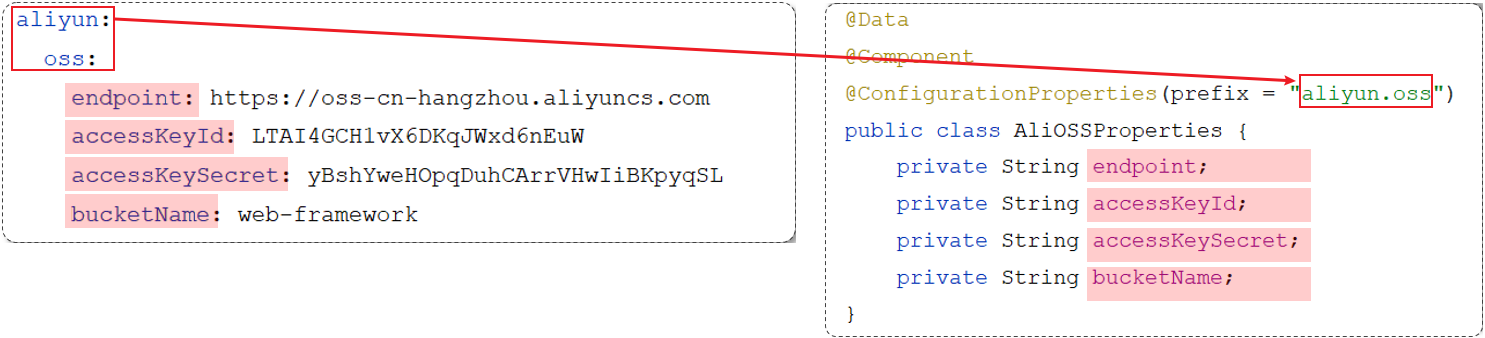
(2) 解决方案:
① 需要创建一个实现类,且实体类中的属性名和配置文件当中key的名字必须要一致
② 需要将实体类交给Spring的IOC容器管理,成为IOC容器当中的bean对象
③ 在实体类上添加@ConfigurationProperties注解,并通过perfix属性来指定配置参数项的前缀
(3) 代码实现
① 实体类:AliOSSProperties
import lombok.Data;
import org.springframework.boot.context.properties.ConfigurationProperties;
import org.springframework.stereotype.Component;
/*阿里云OSS相关配置*/
@Data
@Component
@ConfigurationProperties(prefix = "aliyun.oss")
public class AliOSSProperties {
//区域
private String endpoint;
//身份ID
private String accessKeyId ;
//身份密钥
private String accessKeySecret ;
//存储空间
private String bucketName;
}
② AliOSSUtils工具类:
import com.aliyun.oss.OSS;
import com.aliyun.oss.OSSClientBuilder;
import org.springframework.beans.factory.annotation.Autowired;
import org.springframework.stereotype.Component;
import org.springframework.web.multipart.MultipartFile;
import java.io.IOException;
import java.io.InputStream;
import java.util.UUID;
@Component //当前类对象由Spring创建和管理
public class AliOSSUtils {
//注入配置参数实体类对象
@Autowired
private AliOSSProperties aliOSSProperties;
/**
* 实现上传图片到OSS
*/
public String upload(MultipartFile multipartFile) throws IOException {
// 获取上传的文件的输入流
InputStream inputStream = multipartFile.getInputStream();
// 避免文件覆盖
String originalFilename = multipartFile.getOriginalFilename();
String fileName = UUID.randomUUID().toString() + originalFilename.substring(originalFilename.lastIndexOf("."));
//上传文件到 OSS
OSS ossClient = new OSSClientBuilder().build(aliOSSProperties.getEndpoint(),
aliOSSProperties.getAccessKeyId(), aliOSSProperties.getAccessKeySecret());
ossClient.putObject(aliOSSProperties.getBucketName(), fileName, inputStream);
//文件访问路径
String url =aliOSSProperties.getEndpoint().split("//")[0] + "//" + aliOSSProperties.getBucketName() + "." + aliOSSProperties.getEndpoint().split("//")[1] + "/" + fileName;
// 关闭ossClient
ossClient.shutdown();
return url;// 把上传到oss的路径返回
}
}




评论前必须登录!
注册