 网硕互联帮助中心
我通过阿里的通义千问模型来举例,第一步要先获取一个apikey: 前往密钥管理(北京)或密钥管理(新加坡)或密钥管理(弗吉尼亚)页面,在API-Key页签(下图位置①)下单击创建API-KEY(下图位置②)。 点击API Key旁的image图标(上图位置③)获取该API Key先保存下来。
如弹出服务协议,说明阿里云百炼服务尚未开通。阅读并同意协议后将自动开通服务。如果开通服务时提示“您尚未进行实名认证”,请先进行实名认证。
1、请求api:  2、请求地址: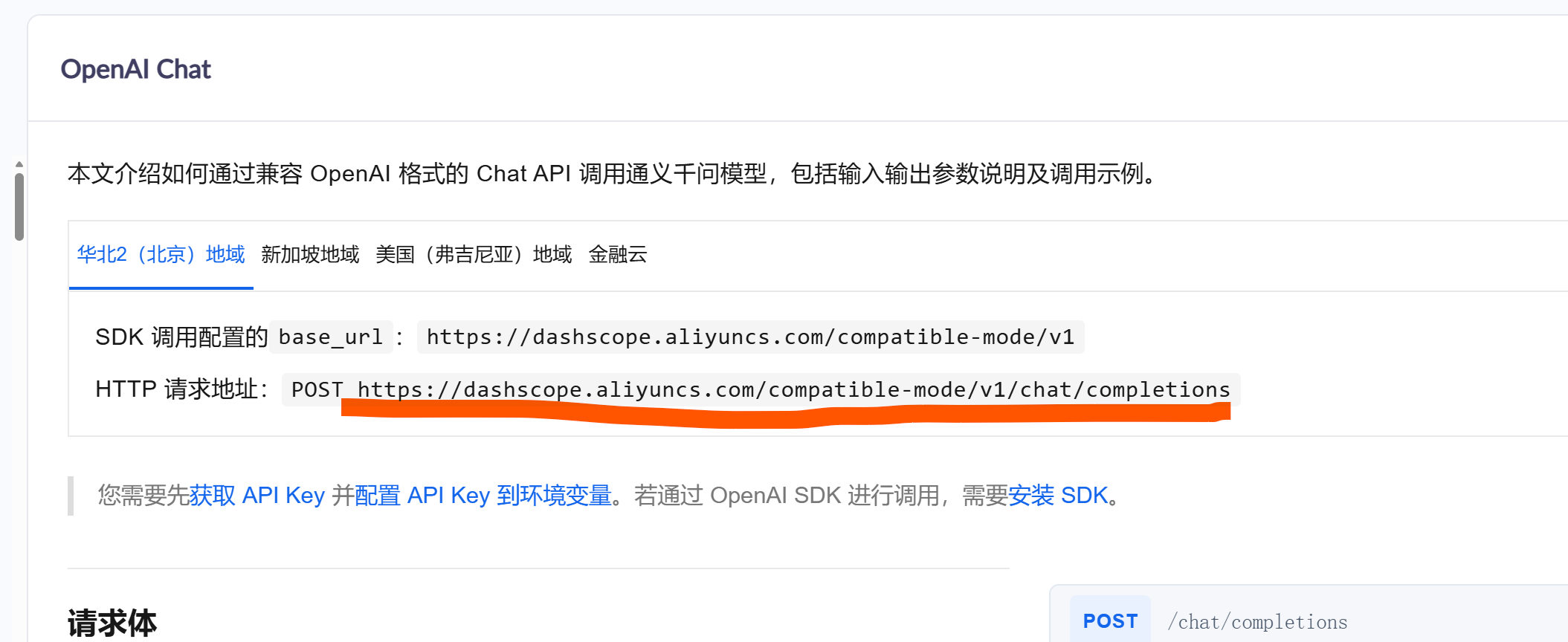
private static final String DASHSCOPE_API_KEY = "你保存的apikey";
// 文档提供的官方兼容接口地址(HTTP请求地址)
private static final String API_URL = "https://dashscope.aliyuncs.com/compatible-mode/v1/chat/completions";
private static final OkHttpClient OK_HTTP_CLIENT = new OkHttpClient();
private static final Gson GSON = new Gson();
接下来就是设置请求体: 格式为:
"model": "qwen-plus",
"stream": false,
"messages": [
{
"role": "system",
"content": "You are a helpful assistant."
},
{
"role": "user",
"content": "你是谁?"
}
]
对应的代码(主要输入的内容是message数组的第二个content)
Map<String, Object> requestBody = new HashMap<>();
requestBody.put("model", "qwen-plus");
List<Map<String, String>> messages = new ArrayList<>();
Map<String, String> systemMsg = new HashMap<>();
systemMsg.put("role", "system");
systemMsg.put("content", "你是一名专业的高尔夫动作分析专家,仅返回纯JSON格式的分析结果,无额外文字、表情和说明。");
Map<String, String> userMsg = new HashMap<>();
userMsg.put("role", "user");
userMsg.put("content", "请基于以下数据对高尔夫挥杆进行分析,返回纯JSON格式,包含4个字段:\\n" +
"1. score:0-100的整数(挥杆综合评分)\\n" +
"2. advantage:字符串(1-2句话描述核心优势)\\n" +
"3. disadvantage:字符串(1-2句话描述存在不足)\\n" +
"4. suggestion:字符串(1-2句话给出改进建议)\\n" +
"挥杆数据:{\\"user_id\\":1001,\\"action_type\\":\\"driver\\",\\"metrics\\":{\\"club_speed\\":88.2,\\"attack_angle\\":-2.7,\\"path_angle\\":1.2,\\"face_angle\\":0.9,\\"swing_angle\\":82,\\"hip_rotation_angle\\":45.4},\\"hit_point_deviation\\":3.96,\\"swing_coherence\\":94}");
messages.add(systemMsg);
messages.add(userMsg);
requestBody.put("messages", messages);
RequestBody requestBodyJson = RequestBody.create(
MediaType.parse("application/json; charset=utf-8"),
GSON.toJson(requestBody)
获取响应信息 格式为:
{
"choices": [
{
"message": {
"role": "assistant",
"content": "我是通义千问,由阿里云研发的超大规模语言模型。我能够回答问题、创作文字,如写故事、公文、邮件、剧本等,还能进行逻辑推理、编程,甚至表达观点和玩游戏。我在多国语言上都有很好的掌握,能为你提供帮助。你可以叫我通义千问或Qwen。很高兴认识你!"
},
"finish_reason": "stop",
"index": 0,
"logprobs": null
}
],
"object": "chat.completion",
"usage": {
"prompt_tokens": 22,
"completion_tokens": 77,
"total_tokens": 99,
"prompt_tokens_details": {
"cached_tokens": 0
}
},
"created": 1768633928,
"system_fingerprint": null,
"model": "qwen-plus",
"id": "chatcmpl-862b7cc0-2224-92ac-9120-fb912b04b292"
}
也就是获取choices里面的信息
// 7. 提取模型返回的核心分析内容
List<Map<String, Object>> choices = (List<Map<String, Object>>) responseMap.get("choices");
if (choices == null || choices.isEmpty()) {
throw new RuntimeException("响应结果中无有效choices数据");
}
Map<String, Object> firstChoice = choices.get(0);
Map<String, Object> message = (Map<String, Object>) firstChoice.get("message");
String golfAnalysisJson = (String) message.get("content");
完整代码:
package com.dubz.gorf.util;
import com.dubz.gorf.pojo.GolfAnalysisResult;
import com.google.gson.Gson;
import com.google.gson.reflect.TypeToken;
import okhttp3.*;
import java.lang.reflect.Type;
import java.util.*;
public class TongyiGolfAnalysisUtil {
// 文档提供的官方兼容接口地址
private static final String DASHSCOPE_API_KEY = "sk-e81ace85bd1e43a8b296769570da9e82";
private static final String API_URL = "https://dashscope.aliyuncs.com/compatible-mode/v1/chat/completions";
private static final OkHttpClient OK_HTTP_CLIENT = new OkHttpClient();
private static final Gson GSON = new Gson();
public static void main(String[] args) {
/* 请求体
"model": "qwen-plus",
"stream": false,
"messages": [
{
"role": "system",
"content": "You are a helpful assistant."
},
{
"role": "user",
"content": "你是谁?"
}
]
*/
try {
Map<String, Object> requestBody = new HashMap<>();
requestBody.put("model", "qwen-plus");
List<Map<String, String>> messages = new ArrayList<>();
Map<String, String> systemMsg = new HashMap<>();
systemMsg.put("role", "system");
systemMsg.put("content", "你是一名专业的高尔夫动作分析专家,仅返回纯JSON格式的分析结果,无额外文字、表情和说明。");
Map<String, String> userMsg = new HashMap<>();
userMsg.put("role", "user");
userMsg.put("content", "请基于以下数据对高尔夫挥杆进行分析,返回纯JSON格式,包含4个字段:\\n" +
"1. score:0-100的整数(挥杆综合评分)\\n" +
"2. advantage:字符串(1-2句话描述核心优势)\\n" +
"3. disadvantage:字符串(1-2句话描述存在不足)\\n" +
"4. suggestion:字符串(1-2句话给出改进建议)\\n" +
"挥杆数据:{\\"user_id\\":1001,\\"action_type\\":\\"driver\\",\\"metrics\\":{\\"club_speed\\":88.2,\\"attack_angle\\":-2.7,\\"path_angle\\":1.2,\\"face_angle\\":0.9,\\"swing_angle\\":82,\\"hip_rotation_angle\\":45.4},\\"hit_point_deviation\\":3.96,\\"swing_coherence\\":94}");
messages.add(systemMsg);
messages.add(userMsg);
requestBody.put("messages", messages);
RequestBody requestBodyJson = RequestBody.create(
MediaType.parse("application/json; charset=utf-8"),
GSON.toJson(requestBody)
);
Request request = new Request.Builder()
.url(API_URL)
.addHeader("Content-Type", "application/json")
//Authorization: Bearer sk-e81ace85bd1e43a8b296769570da9e82
.addHeader("Authorization", "Bearer " + DASHSCOPE_API_KEY)
.post(requestBodyJson)
.build();
try (Response response = OK_HTTP_CLIENT.newCall(request).execute()) {
if (!response.isSuccessful()) {
String errorContent = response.body() != null ? response.body().string() : "无错误详情";
throw new RuntimeException("接口调用失败,HTTP状态码:" + response.code() + ",错误详情:" + errorContent);
}
String responseJson = response.body() != null ? response.body().string() : "{}";
Type responseType = new TypeToken<Map<String, Object>>() {}.getType();
Map<String, Object> responseMap = GSON.fromJson(responseJson, responseType);
// 7. 提取模型返回的核心分析内容
List<Map<String, Object>> choices = (List<Map<String, Object>>) responseMap.get("choices");
if (choices == null || choices.isEmpty()) {
throw new RuntimeException("响应结果中无有效choices数据");
}
Map<String, Object> firstChoice = choices.get(0);
Map<String, Object> message = (Map<String, Object>) firstChoice.get("message");
String golfAnalysisJson = (String) message.get("content");
// 8. 打印结果(原始JSON + 解析后的实体类)
System.out.println("==================== 高尔夫挥杆分析原始JSON ====================");
System.out.println(golfAnalysisJson);
// 解析为实体类,方便后续业务处理
GolfAnalysisResult analysisResult = GSON.fromJson(golfAnalysisJson, GolfAnalysisResult.class);
System.out.println("\\n==================== 高尔夫挥杆分析结构化结果 ====================");
System.out.println("挥杆综合评分:" + analysisResult.getScore());
System.out.println("核心优势:" + analysisResult.getAdvantage());
System.out.println("存在不足:" + analysisResult.getDisadvantage());
System.out.println("改进建议:" + analysisResult.getSuggestion());
}
} catch (Exception e) {
System.err.println("高尔夫挥杆分析执行异常:" + e.getMessage());
e.printStackTrace();
}
}
}



评论前必须登录!
注册