 网硕互联帮助中心
本文通过一个完整、可运行的示例,演示如何在 Python 中使用 execjs 调用 CryptoJS 实现 AES 解密。 适合:接口逆向、数据采集、前端加密分析等场景。
一、最终效果说明
我们要实现的效果是:
- 前端(JS)用 CryptoJS AES-CBC 加密 JSON
- Python 通过 execjs 调用 JS 解密
- 最终在 Python 中拿到 原始 JSON 数据
二、准备环境
1️⃣ 安装 Node.js
node -v
如果没有:
sudo apt install nodejs npm
2️⃣ 安装 Python 依赖
pip install PyExecJS
3️⃣ 安装 CryptoJS(JS 依赖)
在项目目录下执行:
npm init -y
npm install crypto-js
三、项目目录结构
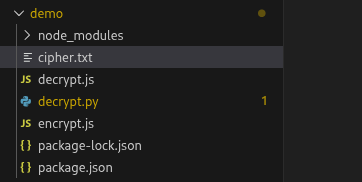
aes-demo/
├── encrypt.js # (模拟前端)AES 加密
├── decrypt.js # CryptoJS 解密函数
├── decrypt.py # Python 调用 execjs
└── cipher.txt # AES 密文
四、模拟前端 AES 加密(encrypt.js)
这一步是为了生成真实密文,方便你测试 实际项目中,这一步通常是网站前端完成的
const CryptoJS = require("crypto-js");
const key = "1234567890abcdef"; // 16 字节
const iv = "abcdef1234567890"; // 16 字节
const data = {
user: "admin",
age: 18,
role: "tester"
};
const plaintext = JSON.stringify(data);
const encrypted = CryptoJS.AES.encrypt(
plaintext,
CryptoJS.enc.Utf8.parse(key),
{
iv: CryptoJS.enc.Utf8.parse(iv),
mode: CryptoJS.mode.CBC,
padding: CryptoJS.pad.Pkcs7
}
).toString();
console.log(encrypted);
运行:
node encrypt.js > cipher.txt
此时 cipher.txt 中就是 AES 密文。
五、CryptoJS 解密函数(decrypt.js)
⚠️ execjs 只能调用全局函数
const CryptoJS = require("crypto-js");
function decryptData(key, iv, ciphertext) {
const decrypted = CryptoJS.AES.decrypt(
ciphertext,
CryptoJS.enc.Utf8.parse(key),
{
iv: CryptoJS.enc.Utf8.parse(iv),
mode: CryptoJS.mode.CBC,
padding: CryptoJS.pad.Pkcs7
}
);
return decrypted.toString(CryptoJS.enc.Utf8);
}
六、Python 调用 JS 解密(decrypt.py)
这是核心代码 👇
import execjs
import json
def aes_decrypt(ciphertext):
key = "1234567890abcdef"
iv = "abcdef1234567890"
with open("decrypt.js", "r", encoding="utf-8") as f:
js_code = f.read()
ctx = execjs.compile(js_code)
plaintext = ctx.call("decryptData", key, iv, ciphertext)
return plaintext
if __name__ == "__main__":
# 读取密文
with open("cipher.txt", "r", encoding="utf-8") as f:
cipher = f.read().strip()
result = aes_decrypt(cipher)
print("解密后的字符串:")
print(result)
print("\\n解析为 JSON:")
data = json.loads(result)
print(data)
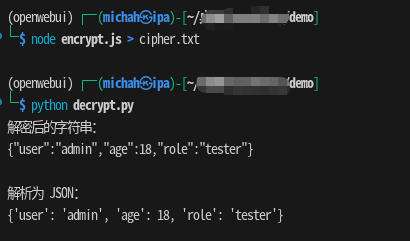
七、运行结果示例
解密后的字符串:
{"user":"admin","age":18,"role":"tester"}
解析为 JSON:
{'user': 'admin', 'age': 18, 'role': 'tester'}
✅ 解密成功
八、关键点总结(一定要看)
🔹 1. key / iv / mode / padding 必须一致
任何一个不一致,都会:
- 解密为空字符串
- JSON 解析失败
🔹 2. execjs 本质是「Python → Node」
所以:
- Node.js 必须可用
- crypto-js 必须能被 require
🔹 3. 解密失败先不要 json.loads
先:
print(result)
九、常见问题速查
❌ 解密结果为空
✔ key / iv 错 ✔ AES 模式不一致 ✔ padding 不一致
❌ 报错 Cannot find module ‘crypto-js’
npm install crypto-js
❌ execjs 报 RuntimeUnavailableError
说明 Node.js 没装或不可用
十、适用场景
这个方案非常适合:
- Web 接口 AES 逆向
- 前端加密参数分析
- Python 自动化解密
- 不想手写 AES 算法





评论前必须登录!
注册