 网硕互联帮助中心
Rust+Slint 实现智能家居控制面板源码分享
- 一、效果展示
- 二、源码分享
-
- 1、工程结构
- 2、main.rs
- 3、build.rs
- 4、main.slint
- 5、Cargo.toml
- 三、实现原理
-
- 1、整体架构
- 2、数据模型与绑定机制
- 3、回调机制与状态同步
- 4、组件化设计与图形绘制
- 5、动画与交互反馈
- 6、构建流程
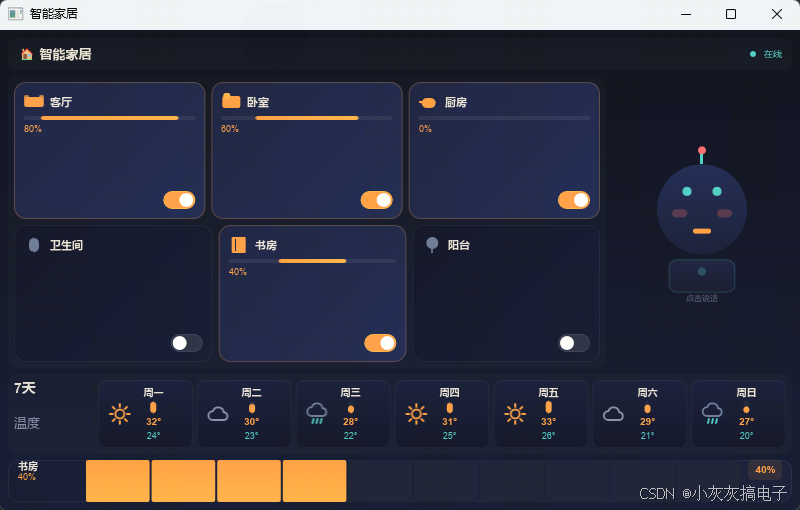
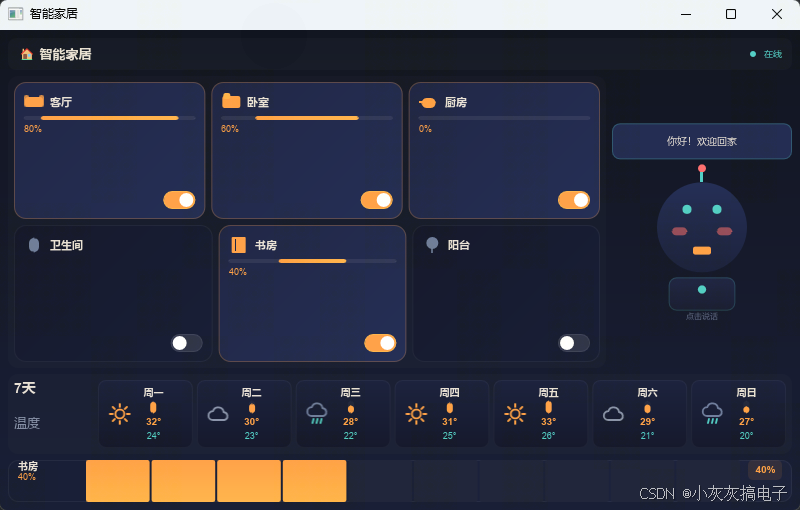
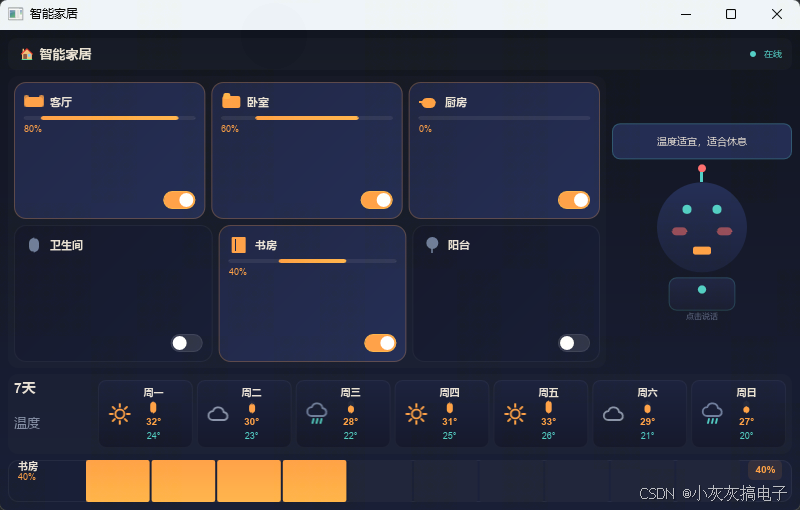
一、效果展示
二、源码分享
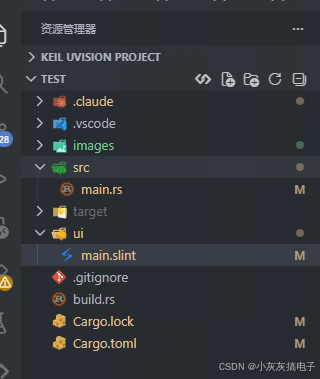
1、工程结构
2、main.rs
use std::cell::Cell;
use std::rc::Rc;
use slint::{Model, ModelRc, SharedString, VecModel, Timer};
slint::include_modules!();
fn main() -> Result<(), slint::PlatformError> {
let ui = SmartHomeWindow::new()?;
// ── 初始化 6 盏灯 ──
let rooms: Vec<(&str, i32)> = vec![
("客厅", 0), ("卧室", 1), ("厨房", 2),
("卫生间", 3), ("书房", 4), ("阳台", 5),
];
let lights: Vec<LightData> = rooms
.iter()
.enumerate()
.map(|(i, (name, icon_type))| LightData {
id: i as i32,
name: SharedString::from(*name),
icon_type: *icon_type,
is_on: i < 2,
brightness: if i == 0 { 80 } else if i == 1 { 60 } else { 0 },
})
.collect();
let lights_model = Rc::new(VecModel::from(lights.clone()));
ui.set_lights(ModelRc::from(lights_model.clone()));
// ── 初始化 7 天温度 ──
let days: Vec<(&str, i32, i32, i32)> = vec![
("周一", 32, 24, 0), ("周二", 30, 23, 1),
("周三", 28, 22, 2), ("周四", 31, 25, 0),
("周五", 33, 26, 0), ("周六", 29, 21, 1),
("周日", 27, 20, 2),
];
let temps: Vec<DayTemp> = days
.iter()
.map(|(name, high, low, wtype)| DayTemp {
day_name: SharedString::from(*name),
temp_high: *high,
temp_low: *low,
weather_type: *wtype,
})
.collect();
ui.set_temperatures(ModelRc::new(VecModel::from(temps)));
ui.set_temp_max(33);
ui.set_temp_min(20);
// ── 默认选中第一盏灯 ──
ui.set_selected_light_id(0);
ui.set_slider_brightness(80);
// ── 宠物初始状态 ──
ui.set_pet_state(PetState {
is_speaking: false,
speech_text: SharedString::from(""),
is_blinking: false,
});
// ── 用 Cell 包装可变状态 ──
let lights_vec = Rc::new(Cell::new(lights));
// ── 回调:切换灯开关 ──
let lights_ref = lights_vec.clone();
let lights_model_ref = lights_model.clone();
ui.on_toggle_light(move |id| {
let mut current: Vec<LightData> = lights_ref.take();
let idx = id as usize;
current[idx].is_on = !current[idx].is_on;
lights_model_ref.set_row_data(idx, current[idx].clone());
lights_ref.set(current);
});
// ── 回调:选中灯(用于调光) ──
let ui_weak = ui.as_weak();
let lights_ref = lights_vec.clone();
ui.on_select_light(move |id| {
let current: Vec<LightData> = lights_ref.take();
lights_ref.set(current.clone());
if let Some(ui) = ui_weak.upgrade() {
ui.set_selected_light_id(id);
ui.set_slider_brightness(current[id as usize].brightness);
}
});
// ── 回调:设置亮度 ──
let lights_ref = lights_vec.clone();
let lights_model_ref = lights_model.clone();
ui.on_set_brightness(move |id, brightness| {
let mut current: Vec<LightData> = lights_ref.take();
let idx = id as usize;
current[idx].brightness = brightness;
lights_model_ref.set_row_data(idx, current[idx].clone());
lights_ref.set(current);
});
// ── 回调:点击宠物 ──
let ui_weak = ui.as_weak();
let speak_index = Rc::new(Cell::new(0usize));
let phrases: Vec<&str> = vec![
"你好!欢迎回家",
"今天天气不错哦",
"客厅灯已打开",
"温度适宜,适合休息",
"所有设备运行正常",
"晚安,好梦",
];
ui.on_click_pet(move || {
if let Some(ui) = ui_weak.upgrade() {
let idx = speak_index.get();
let phrase = phrases[idx % phrases.len()];
speak_index.set(idx + 1);
ui.set_pet_state(PetState {
is_speaking: true,
speech_text: SharedString::from(phrase),
is_blinking: false,
});
let ui_weak2 = ui.as_weak();
Timer::single_shot(
std::time::Duration::from_millis(5000),
move || {
if let Some(ui) = ui_weak2.upgrade() {
ui.set_pet_state(PetState {
is_speaking: false,
speech_text: SharedString::from(""),
is_blinking: false,
});
}
},
);
}
});
ui.run()
}
3、build.rs
fn main(){
slint_build::compile("ui/main.slint")
.unwrap()
}
4、main.slint
// ── 数据结构 ──
export struct LightData {
id: int,
name: string,
icon–type: int, // 0=沙发 1=床 2=厨房 3=浴 4=书 5=草
is–on: bool,
brightness: int,
}
export struct DayTemp {
day–name: string,
temp–high: int,
temp–low: int,
weather–type: int, // 0=晴 1=多云 2=雨
}
export struct PetState {
is–speaking: bool,
speech–text: string,
is–blinking: bool,
}
// ── 小组件 ──
component ToggleSwitch inherits Rectangle {
in–out property <bool> is–on: false;
callback toggled();
width: 32px; height: 18px; border–radius: 9px;
background: is–on ? #ff9f43 : #2a2f45;
border–width: 1px;
border–color: is–on ? #ffb347 : #3a3f55;
animate background { duration: 200ms; }
TouchArea {
mouse–cursor: pointer;
clicked => { is–on = !is–on; root.toggled(); }
}
Rectangle {
y: 2px;
x: is–on ? parent.width – 16px : 2px;
width: 14px; height: 14px; border–radius: 7px;
background: white;
animate x { duration: 200ms; easing: ease–in–out; }
}
}
// ── 房间图标(图形绘制)──
// 0=沙发 1=床 2=厨房 3=浴 4=书 5=草
component RoomIcon inherits Rectangle {
in property <int> room–type;
in property <bool> active: false;
width: 20px; height: 20px;
// 0: 沙发
if room–type == 0: Rectangle {
width: 18px; height: 10px; border–radius: 3px;
x: 1px; y: 5px;
background: active ? #ff9f43 : #6b7a99;
Rectangle { width: 5px; height: 12px; border–radius: 2px; x: –1px; y: –2px; background: active ? #ff9f43cc : #6b7a99cc; }
Rectangle { width: 5px; height: 12px; border–radius: 2px; x: 14px; y: –2px; background: active ? #ff9f43cc : #6b7a99cc; }
}
// 1: 床
if room–type == 1: Rectangle {
width: 18px; height: 12px; border–radius: 2px;
x: 1px; y: 4px;
background: active ? #ff9f43 : #6b7a99;
Rectangle { width: 7px; height: 6px; border–radius: 2px; x: 1px; y: –3px; background: active ? #ffb347 : #8892a8; }
}
// 2: 厨房(锅)
if room–type == 2: Rectangle {
width: 14px; height: 10px; border–radius: 5px;
x: 3px; y: 6px;
background: active ? #ff9f43 : #6b7a99;
Rectangle { width: 6px; height: 2px; x: –3px; y: 3px; background: active ? #ff9f43 : #6b7a99; }
}
// 3: 浴(水滴)
if room–type == 3: Rectangle {
width: 10px; height: 14px; border–radius: 5px;
x: 5px; y: 3px;
background: active ? #4ecdc4 : #6b7a99;
}
// 4: 书
if room–type == 4: Rectangle {
width: 14px; height: 16px; border–radius: 1px;
x: 3px; y: 2px;
background: active ? #ff9f43 : #6b7a99;
Rectangle { width: 1px; height: 12px; x: 3px; y: 2px; background: active ? #1a2040 : #0e1225; }
}
// 5: 草(叶子)
if room–type == 5: Rectangle {
width: 12px; height: 12px; border–radius: 6px;
x: 4px; y: 2px;
background: active ? #4ecdc4 : #6b7a99;
Rectangle { width: 2px; height: 8px; x: 5px; y: 8px; background: active ? #4ecdc4cc : #6b7a99cc; }
}
}
// ── 天气图标(SVG图片)──
// 0=晴 1=多云 2=雨
component WeatherIcon inherits Rectangle {
in property <int> weather–type;
// width: 24px; height: 24px;
if weather–type == 0: Image {
source: @image–url("../images/weather-sunny.svg");
// width: 100%; height: 100%;
}
if weather–type == 1: Image {
source: @image–url("../images/weather-cloudy.svg");
// width: 100%; height: 100%;
}
if weather–type == 2: Image {
source: @image–url("../images/weather-rainy.svg");
// width: 100%; height: 100%;
}
}
component LightCard inherits Rectangle {
in property <LightData> light–data;
callback toggled(int);
callback selected(int);
border–radius: 12px;
background: light–data.is–on
? @linear–gradient(135deg, #1a2040 0%, #1e2850 100%)
: @linear–gradient(135deg, #0e1225 0%, #121830 100%);
border–width: 1px;
border–color: light–data.is–on ? #ff9f4344 : #ffffff0d;
animate background { duration: 250ms; }
animate border–color { duration: 250ms; }
TouchArea {
mouse–cursor: pointer;
clicked => { root.selected(light–data.id); }
}
VerticalLayout {
padding: 10px; spacing: 4px;
HorizontalLayout {
spacing: 6px;
RoomIcon { room–type: light–data.icon–type; active: light–data.is–on; }
Text { text: light–data.name; color: #e8e0d4; font–size: 11px; font–weight: 600; vertical–alignment: center; horizontal–stretch: 1; overflow: elide; }
}
// 亮度条区域始终保留,避免开关切换时高度变化
if light–data.is–on : Rectangle {
height: 4px; border–radius: 2px; background: #ffffff12;
Rectangle {
width: parent.width * light–data.brightness / 100;
height: 100%; border–radius: 2px;
background: light–data.is–on ? @linear–gradient(90deg, #ff9f43, #ffb347) : transparent;
animate width { duration: 150ms; }
}
}
if !light–data.is–on : Rectangle {
height: 4px; border–radius: 2px; background: transparent;
}
Text {
text: light–data.brightness + "%";
color: #ff9f43; font–size: 9px;
opacity: light–data.is–on ? 1 : 0;
}
Rectangle { vertical–stretch: 1; }
HorizontalLayout {
alignment: end;
ToggleSwitch {
is–on: light–data.is–on;
toggled => { root.toggled(light–data.id); }
}
}
}
}
component TempCard inherits Rectangle {
in property <DayTemp> day;
in property <int> global–max–temp;
in property <int> global–min–temp;
border–radius: 8px;
background: @linear–gradient(180deg, #161c38 0%, #0e1225 100%);
border–width: 1px; border–color: #ffffff0a;
HorizontalLayout {
padding–left: 20px;
padding–right: 20px;
spacing: 12px;
WeatherIcon {
horizontal–stretch: 0.5;
weather–type: day.weather–type;
}
VerticalLayout {
horizontal–stretch: 1;
padding: 6px; spacing: 3px;
Text { text: day.day–name; color: #e8e0d4; font–size: 10px; font–weight: 600; horizontal–alignment: center; }
Rectangle {
vertical–stretch: 1;
HorizontalLayout {
alignment: center;
Rectangle {
width: 6px; border–radius: 3px; background: #ffffff0a;
Rectangle {
y: parent.height – self.height;
width: 100%; border–radius: 3px;
height: parent.height * (day.temp–high – global–min–temp) / max(1, global–max–temp – global–min–temp);
background: day.temp–high >= 35 ? #ff6b6b : day.temp–high >= 25 ? #ff9f43 : #4ecdc4;
animate height { duration: 300ms; }
}
}
}
}
Text { text: day.temp–high + "°"; color: #ff9f43; font–size: 10px; font–weight: 600; horizontal–alignment: center; }
Text { text: day.temp–low + "°"; color: #4ecdc4; font–size: 9px; horizontal–alignment: center; }
}
}
}
component RobotPet inherits Rectangle {
in property <PetState> pet;
callback clicked–pet();
background: transparent;
pet–touch := TouchArea { mouse–cursor: pointer; clicked => { root.clicked–pet(); } }
VerticalLayout {
alignment: center;
if pet.is–speaking: Rectangle {
height: 36px;
//width: parent.parent.width;
border–radius: 8px; background: #1e2850ee;
border–width: 1px; border–color: #4ecdc444;
Text { text: pet.speech–text; color: #e8e0d4; font–size: 10px; horizontal–alignment: center; vertical–alignment: center; overflow: elide; }
}
Rectangle {
height: 5px;
}
Rectangle {
x:parent.width/2 – self.width/2;
width:8px;height: self.width;
border–radius: self.width/2;
background: #ff6b6b;
}
Rectangle {
x:parent.width/2 – self.width/2;
width:3px;height: 10px;
background: #4ecdc4;
}
Rectangle {
x:parent.width/2 – self.width/2;
width:parent.width/2;height: self.width;
border–radius: self.width/2;
background: @linear–gradient(180deg, #1e2850 0%, #161c38 100%);
// 眼睛
Rectangle { x: parent.width/3 – self.width/2; y: parent.height/4; width: pet.is–blinking ? parent.width/9 : parent.width/10; height: pet.is–blinking ? parent.height/9 : parent.height/10; border–radius: 4px; background: #4ecdc4; animate height { duration: 100ms; } }
Rectangle { x: parent.width/3*2 – self.width/2; y: parent.height/4; width: pet.is–blinking ? parent.width/9 : parent.width/10; height: pet.is–blinking ? parent.height/9 : parent.height/10; border–radius: 4px; background: #4ecdc4; animate height { duration: 100ms; } }
// 脸颊
Rectangle { x: parent.width/4 – self.width/2; y: parent.height/2.0; width: parent.width/6; height: 8px; border–radius: self.height/2; background: pet.is–speaking ? #ff6b6b88 : #ff6b6b44; }
Rectangle { x: parent.width/4 *3 – self.width/2; y: parent.height/2.0; width: parent.width/6; height: 8px; border–radius: self.height/2; background: pet.is–speaking ? #ff6b6b88 : #ff6b6b44; }
// 嘴巴
Rectangle { x: parent.width / 2 – self.width/2; y: parent.height/1.4; width: parent.width/5; height: pet.is–speaking ? 8px : 5px; border–radius: 2px; background: #ff9f43; animate height { duration: 150ms; } }
}
Rectangle {height: 5px;}
// 身体
Rectangle {
x: parent.width / 2 – self.width/2;
width: parent.width/2.7; height: self.width/2; border–radius: 8px;
background: @linear–gradient(180deg, #1a2040 0%, #14182e 100%);
border–width: 1px; border–color: #4ecdc433;
Rectangle { x: parent.width / 2 – self.width/2; y: 8px; width: parent.width/8; height: parent.width/8; border–radius: self.width/2; background: pet.is–speaking ? #4ecdc4 : #4ecdc444; animate background { duration: 200ms; } }
}
Text { width: 100%; text: "点击说话"; color: #5a6380; font–size: 8px; horizontal–alignment: center; }
}
}
// 分段式调光滑块(10段,每段10%,纯int操作)
component DimmingSlider inherits Rectangle {
in property <string> current–light–name;
in property <bool> current–light–on;
in–out property <int> brightness;
callback brightness–changed(int);
height: 42px; border–radius: 10px;
background: @linear–gradient(90deg, #121830 0%, #161c38 100%);
border–width: 1px; border–color: #ffffff0d;
HorizontalLayout {
padding–left: 10px; padding–right: 10px; spacing: 8px;
VerticalLayout {
width: 60px; alignment: start;
Text { text: current–light–name; color: #e8e0d4; font–size: 10px; font–weight: 600; overflow: elide; }
Text { text: current–light–on ? brightness + "%" : "已关闭"; color: current–light–on ? #ff9f43 : #6b7a99; font–size: 9px; }
}
// 分段滑块条
HorizontalLayout {
vertical–stretch: 1; spacing: 2px;
for seg[idx] in [1, 2, 3, 4, 5, 6, 7, 8, 9, 10] : Rectangle {
horizontal–stretch: 1;
border–radius: 2px;
background: (seg * 10) <= root.brightness
? @linear–gradient(180deg, #ff9f43 0%, #ffb347 100%)
: #1a1f35;
animate background { duration: 100ms; }
TouchArea {
mouse–cursor: pointer;
clicked => {
root.brightness = seg * 10;
root.brightness–changed(seg * 10);
}
}
}
}
// 数值显示
Rectangle {
width: 34px; height: 20px; border–radius: 5px; background: #ff9f4318;
Text { text: brightness + "%"; color: #ff9f43; font–size: 10px; font–weight: 600; horizontal–alignment: center; vertical–alignment: center; }
}
}
}
// ── 主窗口 ──
export component SmartHomeWindow inherits Window {
title: "智能家居";
preferred–width: 800px; preferred–height: 480px;
min–width: 800px; min–height: 480px;
background: @linear–gradient(180deg, #0a0e1a 0%, #121830 100%);
in property <[LightData]> lights;
in property <[DayTemp]> temperatures;
in–out property <int> selected–light–id;
in–out property <int> slider–brightness;
in property <PetState> pet–state;
in property <int> temp–max;
in property <int> temp–min;
callback toggle–light(int);
callback select–light(int);
callback set–brightness(int, int);
callback click–pet();
VerticalLayout {
padding: 8px; spacing: 6px;
// ═══ 顶部栏 ═══
Rectangle {
height: 32px; border–radius: 8px; background: #ffffff06;
HorizontalLayout {
padding–left: 10px; padding–right: 10px; spacing: 8px;
Text { text: "\\u{1F3E0} 智能家居"; color: #e8e0d4; font–size: 13px; font–weight: 700; vertical–alignment: center; }
Rectangle { y:parent.height/2 – self.height/2;horizontal–stretch: 1; }
Rectangle { y:parent.height/2 – self.height/2;width: 6px; height: 6px; border–radius: 3px; background: #4ecdc4; }
Text { text: "在线"; color: #4ecdc4; font–size: 9px; vertical–alignment: center; }
}
}
// ═══ 灯光网格 + 宠物 ═══
HorizontalLayout {
vertical–stretch: 1; spacing: 6px;
// 灯光网格 3×2
Rectangle {
horizontal–stretch: 3;
border–radius: 10px; background: #ffffff04;
VerticalLayout {
x: 6px; y: 6px;
width: parent.width – 12px;
height: parent.height – 12px;
spacing: 6px;
// 第一行: 灯 0, 1, 2
HorizontalLayout {
spacing: 6px;
LightCard {
horizontal–stretch: 1;
light–data: root.lights[0];
toggled(id) => { root.toggle–light(0); }
selected(id) => { root.select–light(0); }
}
LightCard {
horizontal–stretch: 1;
light–data: root.lights[1];
toggled(id) => { root.toggle–light(1); }
selected(id) => { root.select–light(1); }
}
LightCard {
horizontal–stretch: 1;
light–data: root.lights[2];
toggled(id) => { root.toggle–light(2); }
selected(id) => { root.select–light(2); }
}
}
// 第二行: 灯 3, 4, 5
HorizontalLayout {
spacing: 6px;
LightCard {
horizontal–stretch: 1;
light–data: root.lights[3];
toggled(id) => { root.toggle–light(3); }
selected(id) => { root.select–light(3); }
}
LightCard {
horizontal–stretch: 1;
light–data: root.lights[4];
toggled(id) => { root.toggle–light(4); }
selected(id) => { root.select–light(4); }
}
LightCard {
horizontal–stretch: 1;
light–data: root.lights[5];
toggled(id) => { root.toggle–light(5); }
selected(id) => { root.select–light(5); }
}
}
}
}
// 宠物
Rectangle {
width: 180px;
RobotPet {
width: 100%;
// height: 100%;
pet: root.pet–state;
clicked–pet => { root.click–pet(); }
}
}
}
// ═══ 温度预报 ═══
Rectangle {
height: 80px; border–radius: 10px; background: #ffffff04;
HorizontalLayout {
padding: 6px; spacing: 4px;
VerticalLayout {
width: 80px; spacing: 1px;
Text { text: "7天"; color: #e8e0d4; font–size: 14px; font–weight: 600; }
Text { text: "温度"; color: #8892a8; font–size: 13px; }
}
for day in root.temperatures : Rectangle {
horizontal–stretch: 1;
TempCard {
width: parent.width; height: parent.height;
day: day;
global–max–temp: root.temp–max;
global–min–temp: root.temp–min;
}
}
}
}
// ═══ 调光控制 ═══
DimmingSlider {
current–light–name: root.lights[root.selected–light–id].name;
current–light–on: root.lights[root.selected–light–id].is–on;
brightness <=> root.slider–brightness;
brightness–changed(val) => {
root.set–brightness(root.selected–light–id, val);
}
}
}
}
5、Cargo.toml
[package]
name = "slint-smarthome"
version = "0.1.0"
edition = "2021"
build = "build.rs"
[dependencies]
slint = "1.17"
[build–dependencies]
slint–build = "1.17"
三、实现原理
1、整体架构
本项目采用 Rust + Slint 的前后端分离架构:Rust 负责业务逻辑与数据管理,Slint 负责界面声明与渲染。两者通过 Slint 自动生成的类型安全接口进行通信,无需手动编写 FFI 绑定。
#mermaid-svg-A1yihBpigPPxqZDw{font-family:\”trebuchet ms\”,verdana,arial,sans-serif;font-size:16px;fill:#333;}@keyframes edge-animation-frame{from{stroke-dashoffset:0;}}@keyframes dash{to{stroke-dashoffset:0;}}#mermaid-svg-A1yihBpigPPxqZDw .edge-animation-slow{stroke-dasharray:9,5!important;stroke-dashoffset:900;animation:dash 50s linear infinite;stroke-linecap:round;}#mermaid-svg-A1yihBpigPPxqZDw .edge-animation-fast{stroke-dasharray:9,5!important;stroke-dashoffset:900;animation:dash 20s linear infinite;stroke-linecap:round;}#mermaid-svg-A1yihBpigPPxqZDw .error-icon{fill:#552222;}#mermaid-svg-A1yihBpigPPxqZDw .error-text{fill:#552222;stroke:#552222;}#mermaid-svg-A1yihBpigPPxqZDw .edge-thickness-normal{stroke-width:1px;}#mermaid-svg-A1yihBpigPPxqZDw .edge-thickness-thick{stroke-width:3.5px;}#mermaid-svg-A1yihBpigPPxqZDw .edge-pattern-solid{stroke-dasharray:0;}#mermaid-svg-A1yihBpigPPxqZDw .edge-thickness-invisible{stroke-width:0;fill:none;}#mermaid-svg-A1yihBpigPPxqZDw .edge-pattern-dashed{stroke-dasharray:3;}#mermaid-svg-A1yihBpigPPxqZDw .edge-pattern-dotted{stroke-dasharray:2;}#mermaid-svg-A1yihBpigPPxqZDw .marker{fill:#333333;stroke:#333333;}#mermaid-svg-A1yihBpigPPxqZDw .marker.cross{stroke:#333333;}#mermaid-svg-A1yihBpigPPxqZDw svg{font-family:\”trebuchet ms\”,verdana,arial,sans-serif;font-size:16px;}#mermaid-svg-A1yihBpigPPxqZDw p{margin:0;}#mermaid-svg-A1yihBpigPPxqZDw .label{font-family:\”trebuchet ms\”,verdana,arial,sans-serif;color:#333;}#mermaid-svg-A1yihBpigPPxqZDw .cluster-label text{fill:#333;}#mermaid-svg-A1yihBpigPPxqZDw .cluster-label span{color:#333;}#mermaid-svg-A1yihBpigPPxqZDw .cluster-label span p{background-color:transparent;}#mermaid-svg-A1yihBpigPPxqZDw .label text,#mermaid-svg-A1yihBpigPPxqZDw span{fill:#333;color:#333;}#mermaid-svg-A1yihBpigPPxqZDw .node rect,#mermaid-svg-A1yihBpigPPxqZDw .node circle,#mermaid-svg-A1yihBpigPPxqZDw .node ellipse,#mermaid-svg-A1yihBpigPPxqZDw .node polygon,#mermaid-svg-A1yihBpigPPxqZDw .node path{fill:#ECECFF;stroke:#9370DB;stroke-width:1px;}#mermaid-svg-A1yihBpigPPxqZDw .rough-node .label text,#mermaid-svg-A1yihBpigPPxqZDw .node .label text,#mermaid-svg-A1yihBpigPPxqZDw .image-shape .label,#mermaid-svg-A1yihBpigPPxqZDw .icon-shape .label{text-anchor:middle;}#mermaid-svg-A1yihBpigPPxqZDw .node .katex path{fill:#000;stroke:#000;stroke-width:1px;}#mermaid-svg-A1yihBpigPPxqZDw .rough-node .label,#mermaid-svg-A1yihBpigPPxqZDw .node .label,#mermaid-svg-A1yihBpigPPxqZDw .image-shape .label,#mermaid-svg-A1yihBpigPPxqZDw .icon-shape .label{text-align:center;}#mermaid-svg-A1yihBpigPPxqZDw .node.clickable{cursor:pointer;}#mermaid-svg-A1yihBpigPPxqZDw .root .anchor path{fill:#333333!important;stroke-width:0;stroke:#333333;}#mermaid-svg-A1yihBpigPPxqZDw .arrowheadPath{fill:#333333;}#mermaid-svg-A1yihBpigPPxqZDw .edgePath .path{stroke:#333333;stroke-width:2.0px;}#mermaid-svg-A1yihBpigPPxqZDw .flowchart-link{stroke:#333333;fill:none;}#mermaid-svg-A1yihBpigPPxqZDw .edgeLabel{background-color:rgba(232,232,232, 0.8);text-align:center;}#mermaid-svg-A1yihBpigPPxqZDw .edgeLabel p{background-color:rgba(232,232,232, 0.8);}#mermaid-svg-A1yihBpigPPxqZDw .edgeLabel rect{opacity:0.5;background-color:rgba(232,232,232, 0.8);fill:rgba(232,232,232, 0.8);}#mermaid-svg-A1yihBpigPPxqZDw .labelBkg{background-color:rgba(232, 232, 232, 0.5);}#mermaid-svg-A1yihBpigPPxqZDw .cluster rect{fill:#ffffde;stroke:#aaaa33;stroke-width:1px;}#mermaid-svg-A1yihBpigPPxqZDw .cluster text{fill:#333;}#mermaid-svg-A1yihBpigPPxqZDw .cluster span{color:#333;}#mermaid-svg-A1yihBpigPPxqZDw div.mermaidTooltip{position:absolute;text-align:center;max-width:200px;padding:2px;font-family:\”trebuchet ms\”,verdana,arial,sans-serif;font-size:12px;background:hsl(80, 100%, 96.2745098039%);border:1px solid #aaaa33;border-radius:2px;pointer-events:none;z-index:100;}#mermaid-svg-A1yihBpigPPxqZDw .flowchartTitleText{text-anchor:middle;font-size:18px;fill:#333;}#mermaid-svg-A1yihBpigPPxqZDw rect.text{fill:none;stroke-width:0;}#mermaid-svg-A1yihBpigPPxqZDw .icon-shape,#mermaid-svg-A1yihBpigPPxqZDw .image-shape{background-color:rgba(232,232,232, 0.8);text-align:center;}#mermaid-svg-A1yihBpigPPxqZDw .icon-shape p,#mermaid-svg-A1yihBpigPPxqZDw .image-shape p{background-color:rgba(232,232,232, 0.8);padding:2px;}#mermaid-svg-A1yihBpigPPxqZDw .icon-shape .label rect,#mermaid-svg-A1yihBpigPPxqZDw .image-shape .label rect{opacity:0.5;background-color:rgba(232,232,232, 0.8);fill:rgba(232,232,232, 0.8);}#mermaid-svg-A1yihBpigPPxqZDw .label-icon{display:inline-block;height:1em;overflow:visible;vertical-align:-0.125em;}#mermaid-svg-A1yihBpigPPxqZDw .node .label-icon path{fill:currentColor;stroke:revert;stroke-width:revert;}#mermaid-svg-A1yihBpigPPxqZDw :root{–mermaid-font-family:\”trebuchet ms\”,verdana,arial,sans-serif;}
main.rs 业务逻辑
slint::include_modules! 生成接口
SmartHomeWindow 界面
LightCard 灯光卡片
TempCard 温度卡片
RobotPet 宠物组件
DimmingSlider 调光滑块
回调 toggle-light / select-light
数据绑定 temperatures
回调 click-pet
回调 set-brightness
2、数据模型与绑定机制
Slint 使用声明式 UI 语言,通过 export struct 定义跨语言数据结构。Rust 侧通过 slint::include_modules!() 宏引入这些结构,实现类型安全的双向绑定。
// main.slint 中定义
export struct LightData {
id: int,
name: string,
icon–type: int,
is–on: bool,
brightness: int,
}
Rust 侧创建 VecModel 作为数据源,通过 ModelRc 传递给 UI:
let lights_model = Rc::new(VecModel::from(lights.clone()));
ui.set_lights(ModelRc::from(lights_model.clone()));
当 UI 中修改数据时,通过 set_row_data 更新模型,Slint 自动触发界面刷新,无需手动操作 DOM。
3、回调机制与状态同步
Slint 的 callback 机制实现了 UI 事件到 Rust 逻辑的传递。以灯光开关为例:
// main.slint 中声明
callback toggle–light(int);
// main.rs 中注册
ui.on_toggle_light(move |id| {
let mut current: Vec<LightData> = lights_ref.take();
let idx = id as usize;
current[idx].is_on = !current[idx].is_on;
lights_model_ref.set_row_data(idx, current[idx].clone());
lights_ref.set(current);
});
这里使用 Rc<Cell<Vec<LightData>>> 包装可变状态,配合 take() / set() 实现借用检查器友好的状态更新。每次修改后调用 set_row_data 通知模型更新,Slint 自动重绘对应组件。
4、组件化设计与图形绘制
Slint 支持组件化开发,本项目将界面拆分为多个可复用组件:
- LightCard:灯光卡片,包含图标、名称、亮度条和开关
- TempCard:温度卡片,包含天气图标和温度柱状图
- RobotPet:宠物组件,包含表情、身体和对话气泡
- DimmingSlider:分段式调光滑块
图标采用纯图形绘制而非图片资源,例如沙发图标:
if room-type == 0: Rectangle {
width: 18px; height: 10px; border-radius: 3px;
x: 1px; y: 5px;
background: active ? #ff9f43 : #6b7a99;
Rectangle { width: 5px; height: 12px; border-radius: 2px; x: -1px; y: -2px; background: active ? #ff9f43cc : #6b7a99cc; }
Rectangle { width: 5px; height: 12px; border-radius: 2px; x: 14px; y: -2px; background: active ? #ff9f43cc : #6b7a99cc; }
}
通过 if 条件渲染不同图形,配合 active 属性实现开关状态的视觉反馈。
5、动画与交互反馈
Slint 内置动画系统,通过 animate 关键字声明属性过渡:
animate background { duration: 200ms; }
animate x { duration: 200ms; easing: ease-in-out; }
宠物对话功能使用 Timer::single_shot 实现定时恢复:
Timer::single_shot(
std::time::Duration::from_millis(5000),
move || {
if let Some(ui) = ui_weak2.upgrade() {
ui.set_pet_state(PetState {
is_speaking: false,
speech_text: SharedString::from(""),
is_blinking: false,
});
}
},
);
6、构建流程
build.rs 在编译时调用 slint_build::compile 将 .slint 文件编译为 Rust 代码:
fn main(){
slint_build::compile("ui/main.slint")
.unwrap()
}
编译产物通过 include_modules!() 宏在运行时引入,实现 UI 定义与业务逻辑的完全解耦。




评论前必须登录!
注册