 网硕互联帮助中心
文章目录
- 一、它是什么(一句话 + 一张图)
- 二、为什么又来一个 GUI 方案
- 三、先看边界:它不适合什么
- 四、装什么
- 五、五分钟:从零到第一个 exe
- 六、它提供什么
- 七、五篇正文讲什么(建议按顺序看)
这是系列的第 0 篇(导读)。读完它你会知道:这套东西解决什么问题、适合谁、五分钟怎么跑起来第一个 exe、
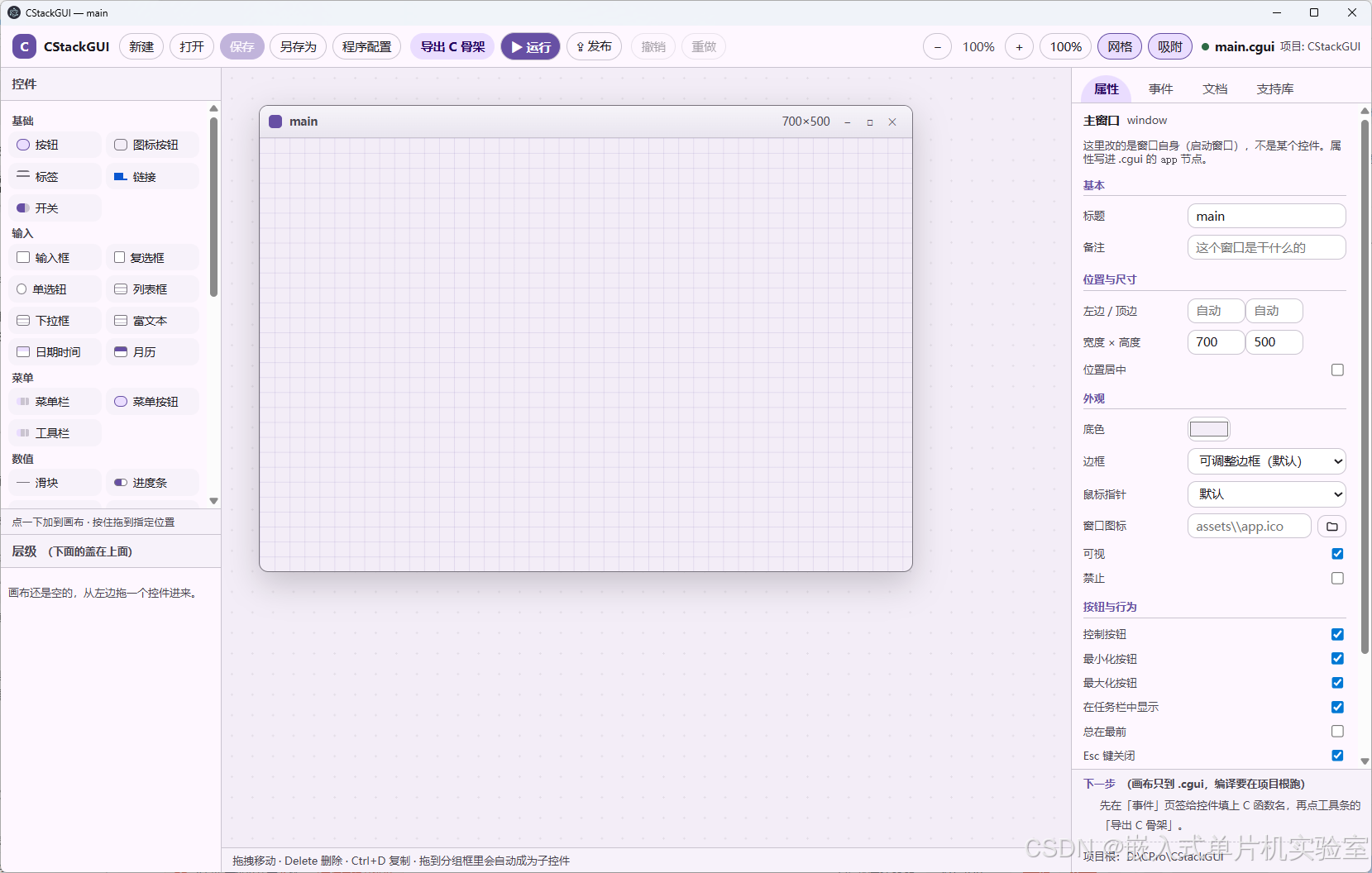
一、它是什么(一句话 + 一张图)
界面用画布拖出来存成一个 .cgui 文件(JSON),运行时读它;业务逻辑写 C,只 include 一个头文件; 最后链成一个独立的 exe。
三个概念,记住就够:
| .cgui | 界面文件(JSON):控件、位置、事件名、初始值 | 画布(或手改文本) |
| 运行时 | 解析 .cgui、创建原生控件、派发事件、自绘外观 | 框架(runtime\\) |
| 业务 C | 你的回调:读值、写值、干活 | 你(main.c) |
最实在的两条好处:
整体架构一句话,用图说更清楚:
#mermaid-svg-EICOBy7LENDJo0LU{font-family:\”trebuchet ms\”,verdana,arial,sans-serif;font-size:16px;fill:#333;}@keyframes edge-animation-frame{from{stroke-dashoffset:0;}}@keyframes dash{to{stroke-dashoffset:0;}}#mermaid-svg-EICOBy7LENDJo0LU .edge-animation-slow{stroke-dasharray:9,5!important;stroke-dashoffset:900;animation:dash 50s linear infinite;stroke-linecap:round;}#mermaid-svg-EICOBy7LENDJo0LU .edge-animation-fast{stroke-dasharray:9,5!important;stroke-dashoffset:900;animation:dash 20s linear infinite;stroke-linecap:round;}#mermaid-svg-EICOBy7LENDJo0LU .error-icon{fill:#552222;}#mermaid-svg-EICOBy7LENDJo0LU .error-text{fill:#552222;stroke:#552222;}#mermaid-svg-EICOBy7LENDJo0LU .edge-thickness-normal{stroke-width:1px;}#mermaid-svg-EICOBy7LENDJo0LU .edge-thickness-thick{stroke-width:3.5px;}#mermaid-svg-EICOBy7LENDJo0LU .edge-pattern-solid{stroke-dasharray:0;}#mermaid-svg-EICOBy7LENDJo0LU .edge-thickness-invisible{stroke-width:0;fill:none;}#mermaid-svg-EICOBy7LENDJo0LU .edge-pattern-dashed{stroke-dasharray:3;}#mermaid-svg-EICOBy7LENDJo0LU .edge-pattern-dotted{stroke-dasharray:2;}#mermaid-svg-EICOBy7LENDJo0LU .marker{fill:#333333;stroke:#333333;}#mermaid-svg-EICOBy7LENDJo0LU .marker.cross{stroke:#333333;}#mermaid-svg-EICOBy7LENDJo0LU svg{font-family:\”trebuchet ms\”,verdana,arial,sans-serif;font-size:16px;}#mermaid-svg-EICOBy7LENDJo0LU p{margin:0;}#mermaid-svg-EICOBy7LENDJo0LU .label{font-family:\”trebuchet ms\”,verdana,arial,sans-serif;color:#333;}#mermaid-svg-EICOBy7LENDJo0LU .cluster-label text{fill:#333;}#mermaid-svg-EICOBy7LENDJo0LU .cluster-label span{color:#333;}#mermaid-svg-EICOBy7LENDJo0LU .cluster-label span p{background-color:transparent;}#mermaid-svg-EICOBy7LENDJo0LU .label text,#mermaid-svg-EICOBy7LENDJo0LU span{fill:#333;color:#333;}#mermaid-svg-EICOBy7LENDJo0LU .node rect,#mermaid-svg-EICOBy7LENDJo0LU .node circle,#mermaid-svg-EICOBy7LENDJo0LU .node ellipse,#mermaid-svg-EICOBy7LENDJo0LU .node polygon,#mermaid-svg-EICOBy7LENDJo0LU .node path{fill:#ECECFF;stroke:#9370DB;stroke-width:1px;}#mermaid-svg-EICOBy7LENDJo0LU .rough-node .label text,#mermaid-svg-EICOBy7LENDJo0LU .node .label text,#mermaid-svg-EICOBy7LENDJo0LU .image-shape .label,#mermaid-svg-EICOBy7LENDJo0LU .icon-shape .label{text-anchor:middle;}#mermaid-svg-EICOBy7LENDJo0LU .node .katex path{fill:#000;stroke:#000;stroke-width:1px;}#mermaid-svg-EICOBy7LENDJo0LU .rough-node .label,#mermaid-svg-EICOBy7LENDJo0LU .node .label,#mermaid-svg-EICOBy7LENDJo0LU .image-shape .label,#mermaid-svg-EICOBy7LENDJo0LU .icon-shape .label{text-align:center;}#mermaid-svg-EICOBy7LENDJo0LU .node.clickable{cursor:pointer;}#mermaid-svg-EICOBy7LENDJo0LU .root .anchor path{fill:#333333!important;stroke-width:0;stroke:#333333;}#mermaid-svg-EICOBy7LENDJo0LU .arrowheadPath{fill:#333333;}#mermaid-svg-EICOBy7LENDJo0LU .edgePath .path{stroke:#333333;stroke-width:2.0px;}#mermaid-svg-EICOBy7LENDJo0LU .flowchart-link{stroke:#333333;fill:none;}#mermaid-svg-EICOBy7LENDJo0LU .edgeLabel{background-color:rgba(232,232,232, 0.8);text-align:center;}#mermaid-svg-EICOBy7LENDJo0LU .edgeLabel p{background-color:rgba(232,232,232, 0.8);}#mermaid-svg-EICOBy7LENDJo0LU .edgeLabel rect{opacity:0.5;background-color:rgba(232,232,232, 0.8);fill:rgba(232,232,232, 0.8);}#mermaid-svg-EICOBy7LENDJo0LU .labelBkg{background-color:rgba(232, 232, 232, 0.5);}#mermaid-svg-EICOBy7LENDJo0LU .cluster rect{fill:#ffffde;stroke:#aaaa33;stroke-width:1px;}#mermaid-svg-EICOBy7LENDJo0LU .cluster text{fill:#333;}#mermaid-svg-EICOBy7LENDJo0LU .cluster span{color:#333;}#mermaid-svg-EICOBy7LENDJo0LU div.mermaidTooltip{position:absolute;text-align:center;max-width:200px;padding:2px;font-family:\”trebuchet ms\”,verdana,arial,sans-serif;font-size:12px;background:hsl(80, 100%, 96.2745098039%);border:1px solid #aaaa33;border-radius:2px;pointer-events:none;z-index:100;}#mermaid-svg-EICOBy7LENDJo0LU .flowchartTitleText{text-anchor:middle;font-size:18px;fill:#333;}#mermaid-svg-EICOBy7LENDJo0LU rect.text{fill:none;stroke-width:0;}#mermaid-svg-EICOBy7LENDJo0LU .icon-shape,#mermaid-svg-EICOBy7LENDJo0LU .image-shape{background-color:rgba(232,232,232, 0.8);text-align:center;}#mermaid-svg-EICOBy7LENDJo0LU .icon-shape p,#mermaid-svg-EICOBy7LENDJo0LU .image-shape p{background-color:rgba(232,232,232, 0.8);padding:2px;}#mermaid-svg-EICOBy7LENDJo0LU .icon-shape .label rect,#mermaid-svg-EICOBy7LENDJo0LU .image-shape .label rect{opacity:0.5;background-color:rgba(232,232,232, 0.8);fill:rgba(232,232,232, 0.8);}#mermaid-svg-EICOBy7LENDJo0LU .label-icon{display:inline-block;height:1em;overflow:visible;vertical-align:-0.125em;}#mermaid-svg-EICOBy7LENDJo0LU .node .label-icon path{fill:currentColor;stroke:revert;stroke-width:revert;}#mermaid-svg-EICOBy7LENDJo0LU :root{–mermaid-font-family:\”trebuchet ms\”,verdana,arial,sans-serif;}
导出 .cgui
gcc 编译链接
改界面只改 .cgui
画布 Designer拖控件、存布局
界面文件 .cguiJSON:控件/位置/事件/初值
运行时 Runtime解析 .cgui、建控件、派发事件
业务 C 代码main.c:读值、写值、干活
独立 exe+ 旁边一个 .cgui
二、为什么又来一个 GUI 方案
不是说别的不好,而是"给自己/给同事写个小工具"这个场景有它自己的取舍:
| MFC / WTL | 代码量最大 | 一个 exe ✅ | 改界面要重新编译 |
| Qt | 有 Designer,但从"拖完"到"跑"要一圈构建 | 要带 dll 或静态链(体积大) | 上手成本高 |
| Python + tkinter | 最好写 | 要装解释器/依赖 ❌ | 发人最麻烦 |
| Electron / 套网页 | 前端那一套很熟 | 体积大(100MB+) | 串口这类本地能力要绕 |
| CStackGUI | 画布拖 | 一个 exe + 一个 json ✅ | 见下节"边界",它也有明显不擅长的 |
它盯的场景很具体:一个人、一台 Windows、一个给自己或小团队用的小工具 (读串口、批量改文件、连设备看数据、写个小配置工具),要能一个 exe 发出去。
选型取舍,一张图看明白:
#mermaid-svg-QoFMhnbS03xqwiSb{font-family:\”trebuchet ms\”,verdana,arial,sans-serif;font-size:16px;fill:#333;}@keyframes edge-animation-frame{from{stroke-dashoffset:0;}}@keyframes dash{to{stroke-dashoffset:0;}}#mermaid-svg-QoFMhnbS03xqwiSb .edge-animation-slow{stroke-dasharray:9,5!important;stroke-dashoffset:900;animation:dash 50s linear infinite;stroke-linecap:round;}#mermaid-svg-QoFMhnbS03xqwiSb .edge-animation-fast{stroke-dasharray:9,5!important;stroke-dashoffset:900;animation:dash 20s linear infinite;stroke-linecap:round;}#mermaid-svg-QoFMhnbS03xqwiSb .error-icon{fill:#552222;}#mermaid-svg-QoFMhnbS03xqwiSb .error-text{fill:#552222;stroke:#552222;}#mermaid-svg-QoFMhnbS03xqwiSb .edge-thickness-normal{stroke-width:1px;}#mermaid-svg-QoFMhnbS03xqwiSb .edge-thickness-thick{stroke-width:3.5px;}#mermaid-svg-QoFMhnbS03xqwiSb .edge-pattern-solid{stroke-dasharray:0;}#mermaid-svg-QoFMhnbS03xqwiSb .edge-thickness-invisible{stroke-width:0;fill:none;}#mermaid-svg-QoFMhnbS03xqwiSb .edge-pattern-dashed{stroke-dasharray:3;}#mermaid-svg-QoFMhnbS03xqwiSb .edge-pattern-dotted{stroke-dasharray:2;}#mermaid-svg-QoFMhnbS03xqwiSb .marker{fill:#333333;stroke:#333333;}#mermaid-svg-QoFMhnbS03xqwiSb .marker.cross{stroke:#333333;}#mermaid-svg-QoFMhnbS03xqwiSb svg{font-family:\”trebuchet ms\”,verdana,arial,sans-serif;font-size:16px;}#mermaid-svg-QoFMhnbS03xqwiSb p{margin:0;}#mermaid-svg-QoFMhnbS03xqwiSb .label{font-family:\”trebuchet ms\”,verdana,arial,sans-serif;color:#333;}#mermaid-svg-QoFMhnbS03xqwiSb .cluster-label text{fill:#333;}#mermaid-svg-QoFMhnbS03xqwiSb .cluster-label span{color:#333;}#mermaid-svg-QoFMhnbS03xqwiSb .cluster-label span p{background-color:transparent;}#mermaid-svg-QoFMhnbS03xqwiSb .label text,#mermaid-svg-QoFMhnbS03xqwiSb span{fill:#333;color:#333;}#mermaid-svg-QoFMhnbS03xqwiSb .node rect,#mermaid-svg-QoFMhnbS03xqwiSb .node circle,#mermaid-svg-QoFMhnbS03xqwiSb .node ellipse,#mermaid-svg-QoFMhnbS03xqwiSb .node polygon,#mermaid-svg-QoFMhnbS03xqwiSb .node path{fill:#ECECFF;stroke:#9370DB;stroke-width:1px;}#mermaid-svg-QoFMhnbS03xqwiSb .rough-node .label text,#mermaid-svg-QoFMhnbS03xqwiSb .node .label text,#mermaid-svg-QoFMhnbS03xqwiSb .image-shape .label,#mermaid-svg-QoFMhnbS03xqwiSb .icon-shape .label{text-anchor:middle;}#mermaid-svg-QoFMhnbS03xqwiSb .node .katex path{fill:#000;stroke:#000;stroke-width:1px;}#mermaid-svg-QoFMhnbS03xqwiSb .rough-node .label,#mermaid-svg-QoFMhnbS03xqwiSb .node .label,#mermaid-svg-QoFMhnbS03xqwiSb .image-shape .label,#mermaid-svg-QoFMhnbS03xqwiSb .icon-shape .label{text-align:center;}#mermaid-svg-QoFMhnbS03xqwiSb .node.clickable{cursor:pointer;}#mermaid-svg-QoFMhnbS03xqwiSb .root .anchor path{fill:#333333!important;stroke-width:0;stroke:#333333;}#mermaid-svg-QoFMhnbS03xqwiSb .arrowheadPath{fill:#333333;}#mermaid-svg-QoFMhnbS03xqwiSb .edgePath .path{stroke:#333333;stroke-width:2.0px;}#mermaid-svg-QoFMhnbS03xqwiSb .flowchart-link{stroke:#333333;fill:none;}#mermaid-svg-QoFMhnbS03xqwiSb .edgeLabel{background-color:rgba(232,232,232, 0.8);text-align:center;}#mermaid-svg-QoFMhnbS03xqwiSb .edgeLabel p{background-color:rgba(232,232,232, 0.8);}#mermaid-svg-QoFMhnbS03xqwiSb .edgeLabel rect{opacity:0.5;background-color:rgba(232,232,232, 0.8);fill:rgba(232,232,232, 0.8);}#mermaid-svg-QoFMhnbS03xqwiSb .labelBkg{background-color:rgba(232, 232, 232, 0.5);}#mermaid-svg-QoFMhnbS03xqwiSb .cluster rect{fill:#ffffde;stroke:#aaaa33;stroke-width:1px;}#mermaid-svg-QoFMhnbS03xqwiSb .cluster text{fill:#333;}#mermaid-svg-QoFMhnbS03xqwiSb .cluster span{color:#333;}#mermaid-svg-QoFMhnbS03xqwiSb div.mermaidTooltip{position:absolute;text-align:center;max-width:200px;padding:2px;font-family:\”trebuchet ms\”,verdana,arial,sans-serif;font-size:12px;background:hsl(80, 100%, 96.2745098039%);border:1px solid #aaaa33;border-radius:2px;pointer-events:none;z-index:100;}#mermaid-svg-QoFMhnbS03xqwiSb .flowchartTitleText{text-anchor:middle;font-size:18px;fill:#333;}#mermaid-svg-QoFMhnbS03xqwiSb rect.text{fill:none;stroke-width:0;}#mermaid-svg-QoFMhnbS03xqwiSb .icon-shape,#mermaid-svg-QoFMhnbS03xqwiSb .image-shape{background-color:rgba(232,232,232, 0.8);text-align:center;}#mermaid-svg-QoFMhnbS03xqwiSb .icon-shape p,#mermaid-svg-QoFMhnbS03xqwiSb .image-shape p{background-color:rgba(232,232,232, 0.8);padding:2px;}#mermaid-svg-QoFMhnbS03xqwiSb .icon-shape .label rect,#mermaid-svg-QoFMhnbS03xqwiSb .image-shape .label rect{opacity:0.5;background-color:rgba(232,232,232, 0.8);fill:rgba(232,232,232, 0.8);}#mermaid-svg-QoFMhnbS03xqwiSb .label-icon{display:inline-block;height:1em;overflow:visible;vertical-align:-0.125em;}#mermaid-svg-QoFMhnbS03xqwiSb .node .label-icon path{fill:currentColor;stroke:revert;stroke-width:revert;}#mermaid-svg-QoFMhnbS03xqwiSb :root{–mermaid-font-family:\”trebuchet ms\”,verdana,arial,sans-serif;}
要一个 exe 发出去
要华丽动效/跨平台
要最快写界面
要极致原生
要写个小工具给自己/小团队用
交付形态?
CStackGUI画布拖 + 一个 json ✅
Qt / Electron体积大、要带运行时
Python + tkinter发人要装解释器 ❌
MFC / WTL代码量大、改界面要重编译
三、先看边界:它不适合什么
买之前先看"不提供什么",能省掉很多返工:
- 外观是 Win32 原生控件打底:按钮、开关、勾选、输入框、滑块、进度条、圆环走 GDI+ 自绘外观层 (能吃圆角与配色);列表框、树、表格、标签页等系统控件不吃自定义外观(Win32 固有限制)。
- 窗口尺寸固定,没有布局引擎:绝对坐标、所见即所得,拉伸窗口不会重排。 (也正因为如此,很多行为是"直给"的:拖分隔条只改两块、容器变窄子控件不会跟着缩 —— 后面第 4 篇专门讲。)
- 画布是单选:没有多选、组合、对齐工具条(有网格吸附和邻近参考线)。
- 菜单是声明式的:能读"点了哪一项",但没有运行时增删菜单项的 API。
- 控件绑定只镜像"值 / 文字 / 勾选"三类语义,不做格式换算(不能把 0~100 映射成 0~5、也不会自动加 %); 要格式化还是写回调。
- 网页浏览控件是实验性的(走系统 WebBrowser 控件,IE 内核)。
如果你的需求是"复杂自适应布局 / 跨平台 / 华丽动效",这套东西会让你难受 —— 换方案更省事。
四、装什么
| MinGW-w64 gcc | 8+(实测 16.2) | 编译 exe 时。默认找 C:\\mingw64\\bin;gcc –version 能跑就行 |
| Node.js | 22.12+ / 24+ | 只在你想改画布本身、重新打包画布时 |
只想用它写工具的话,只要一个 gcc。 画布是现成的(仓库里已打包好 designer\\release\\CStackGUI.exe), 双击就能用。
五、五分钟:从零到第一个 exe
:: ① 编译(在仓库根)
build-app.bat lesson01_basics
:: ② 跑(双击也行)
examples\\lesson01_basics\\lesson01_basics.exe
:: ③ 不开窗自检:把每个绑定的事件合成调一次,专门用来发现"事件名写错了"
examples\\lesson01_basics\\lesson01_basics.exe –selftest examples\\lesson01_basics\\lesson01_basics.cgui
③ 会给你一份体检报告,长这样:
结果: 控件 30 个, 触发回调 10 次, 未登记 0 个, 事件不支持 0 个, 绑定出错 0 个
selftest OK
最后两个 0 才是重点:没有"名字对不上的回调",也没有"给这个控件绑了它不支持的事件"。
产物就在示例自己的目录里,结构很简单:
examples\\lesson01_basics\\
lesson01_basics.exe <– 双击就能跑(界面文件就在旁边,不用安装)
lesson01_basics.cgui <– 界面:用画布打开改,改完不用重新编译
main.c <– 业务:你要读、要改的就是这个文件
lib\\ <– 运行时库副本
试一下第 1 条好处:用画布打开那个 .cgui(或者直接当文本改),把某个控件的 "text" 改掉, 不用编译,直接重跑 exe —— 界面就变了。
从零到第一个 exe 的完整链路:
#mermaid-svg-OSZAJy6ji3L36YjP{font-family:\”trebuchet ms\”,verdana,arial,sans-serif;font-size:16px;fill:#333;}@keyframes edge-animation-frame{from{stroke-dashoffset:0;}}@keyframes dash{to{stroke-dashoffset:0;}}#mermaid-svg-OSZAJy6ji3L36YjP .edge-animation-slow{stroke-dasharray:9,5!important;stroke-dashoffset:900;animation:dash 50s linear infinite;stroke-linecap:round;}#mermaid-svg-OSZAJy6ji3L36YjP .edge-animation-fast{stroke-dasharray:9,5!important;stroke-dashoffset:900;animation:dash 20s linear infinite;stroke-linecap:round;}#mermaid-svg-OSZAJy6ji3L36YjP .error-icon{fill:#552222;}#mermaid-svg-OSZAJy6ji3L36YjP .error-text{fill:#552222;stroke:#552222;}#mermaid-svg-OSZAJy6ji3L36YjP .edge-thickness-normal{stroke-width:1px;}#mermaid-svg-OSZAJy6ji3L36YjP .edge-thickness-thick{stroke-width:3.5px;}#mermaid-svg-OSZAJy6ji3L36YjP .edge-pattern-solid{stroke-dasharray:0;}#mermaid-svg-OSZAJy6ji3L36YjP .edge-thickness-invisible{stroke-width:0;fill:none;}#mermaid-svg-OSZAJy6ji3L36YjP .edge-pattern-dashed{stroke-dasharray:3;}#mermaid-svg-OSZAJy6ji3L36YjP .edge-pattern-dotted{stroke-dasharray:2;}#mermaid-svg-OSZAJy6ji3L36YjP .marker{fill:#333333;stroke:#333333;}#mermaid-svg-OSZAJy6ji3L36YjP .marker.cross{stroke:#333333;}#mermaid-svg-OSZAJy6ji3L36YjP svg{font-family:\”trebuchet ms\”,verdana,arial,sans-serif;font-size:16px;}#mermaid-svg-OSZAJy6ji3L36YjP p{margin:0;}#mermaid-svg-OSZAJy6ji3L36YjP .label{font-family:\”trebuchet ms\”,verdana,arial,sans-serif;color:#333;}#mermaid-svg-OSZAJy6ji3L36YjP .cluster-label text{fill:#333;}#mermaid-svg-OSZAJy6ji3L36YjP .cluster-label span{color:#333;}#mermaid-svg-OSZAJy6ji3L36YjP .cluster-label span p{background-color:transparent;}#mermaid-svg-OSZAJy6ji3L36YjP .label text,#mermaid-svg-OSZAJy6ji3L36YjP span{fill:#333;color:#333;}#mermaid-svg-OSZAJy6ji3L36YjP .node rect,#mermaid-svg-OSZAJy6ji3L36YjP .node circle,#mermaid-svg-OSZAJy6ji3L36YjP .node ellipse,#mermaid-svg-OSZAJy6ji3L36YjP .node polygon,#mermaid-svg-OSZAJy6ji3L36YjP .node path{fill:#ECECFF;stroke:#9370DB;stroke-width:1px;}#mermaid-svg-OSZAJy6ji3L36YjP .rough-node .label text,#mermaid-svg-OSZAJy6ji3L36YjP .node .label text,#mermaid-svg-OSZAJy6ji3L36YjP .image-shape .label,#mermaid-svg-OSZAJy6ji3L36YjP .icon-shape .label{text-anchor:middle;}#mermaid-svg-OSZAJy6ji3L36YjP .node .katex path{fill:#000;stroke:#000;stroke-width:1px;}#mermaid-svg-OSZAJy6ji3L36YjP .rough-node .label,#mermaid-svg-OSZAJy6ji3L36YjP .node .label,#mermaid-svg-OSZAJy6ji3L36YjP .image-shape .label,#mermaid-svg-OSZAJy6ji3L36YjP .icon-shape .label{text-align:center;}#mermaid-svg-OSZAJy6ji3L36YjP .node.clickable{cursor:pointer;}#mermaid-svg-OSZAJy6ji3L36YjP .root .anchor path{fill:#333333!important;stroke-width:0;stroke:#333333;}#mermaid-svg-OSZAJy6ji3L36YjP .arrowheadPath{fill:#333333;}#mermaid-svg-OSZAJy6ji3L36YjP .edgePath .path{stroke:#333333;stroke-width:2.0px;}#mermaid-svg-OSZAJy6ji3L36YjP .flowchart-link{stroke:#333333;fill:none;}#mermaid-svg-OSZAJy6ji3L36YjP .edgeLabel{background-color:rgba(232,232,232, 0.8);text-align:center;}#mermaid-svg-OSZAJy6ji3L36YjP .edgeLabel p{background-color:rgba(232,232,232, 0.8);}#mermaid-svg-OSZAJy6ji3L36YjP .edgeLabel rect{opacity:0.5;background-color:rgba(232,232,232, 0.8);fill:rgba(232,232,232, 0.8);}#mermaid-svg-OSZAJy6ji3L36YjP .labelBkg{background-color:rgba(232, 232, 232, 0.5);}#mermaid-svg-OSZAJy6ji3L36YjP .cluster rect{fill:#ffffde;stroke:#aaaa33;stroke-width:1px;}#mermaid-svg-OSZAJy6ji3L36YjP .cluster text{fill:#333;}#mermaid-svg-OSZAJy6ji3L36YjP .cluster span{color:#333;}#mermaid-svg-OSZAJy6ji3L36YjP div.mermaidTooltip{position:absolute;text-align:center;max-width:200px;padding:2px;font-family:\”trebuchet ms\”,verdana,arial,sans-serif;font-size:12px;background:hsl(80, 100%, 96.2745098039%);border:1px solid #aaaa33;border-radius:2px;pointer-events:none;z-index:100;}#mermaid-svg-OSZAJy6ji3L36YjP .flowchartTitleText{text-anchor:middle;font-size:18px;fill:#333;}#mermaid-svg-OSZAJy6ji3L36YjP rect.text{fill:none;stroke-width:0;}#mermaid-svg-OSZAJy6ji3L36YjP .icon-shape,#mermaid-svg-OSZAJy6ji3L36YjP .image-shape{background-color:rgba(232,232,232, 0.8);text-align:center;}#mermaid-svg-OSZAJy6ji3L36YjP .icon-shape p,#mermaid-svg-OSZAJy6ji3L36YjP .image-shape p{background-color:rgba(232,232,232, 0.8);padding:2px;}#mermaid-svg-OSZAJy6ji3L36YjP .icon-shape .label rect,#mermaid-svg-OSZAJy6ji3L36YjP .image-shape .label rect{opacity:0.5;background-color:rgba(232,232,232, 0.8);fill:rgba(232,232,232, 0.8);}#mermaid-svg-OSZAJy6ji3L36YjP .label-icon{display:inline-block;height:1em;overflow:visible;vertical-align:-0.125em;}#mermaid-svg-OSZAJy6ji3L36YjP .node .label-icon path{fill:currentColor;stroke:revert;stroke-width:revert;}#mermaid-svg-OSZAJy6ji3L36YjP :root{–mermaid-font-family:\”trebuchet ms\”,verdana,arial,sans-serif;}
要
不要
装 MinGW-w64 gccgcc –version 能跑就行
仓库根执行build-app.bat lesson01_basics
生成产物lesson01_basics.exe + .cgui
要不要体检?
–selftest 跑一遍事件名写没写错、绑定对不对
看报告:未登记 0、不支持 0
直接双击 exe 跑起来
用画布改 .cgui 的 text不用编译,重跑 exe 就变
六、它提供什么
控件 42 种:按钮、图标钮、标签、链接、开关、输入框(单行/多行/数值框)、富文本、复选框、单选钮、 下拉框、列表框、标签页、树、表格、进度条、圆环、滑块、仪表盘、状态灯、评分、分页、徽章、标签片、 菜单栏、菜单按钮、工具栏、分组框、容器块、卡片、分割线、分隔条、图片、外形框、时钟、画板、颜色选择、 状态栏、终端(日志视图)、图表、网页浏览……
事件 13 种:click / dblclick / change / submit / select / release / expand / collapse / tick / check / gotfocus / lostfocus(另加窗口级的 close)。 事件是按控件特性分配的:标签、进度条、状态栏一个事件都没有;只有树有展开/折叠。
业务侧不用碰 Windows API:cstackgui.h 里带了一套基础能力 —— 读写文件、INI 配置、路径处理、 文本编码转换(UTF-8 ↔ GBK)、剪贴板、用默认程序打开文件/网址、启动外部程序、读写注册表、写日志。
串口与网口也在同一层:cg_serial_*(枚举/打开/收发)、cg_net_*(TCP 客户端与服务端、 UDP 数据报)。串口与 TCP 由运行时在读线程里搬进环形缓冲,业务在时钟回调里取。
能打包交付:仓库里有打包脚本(画布 + 预编译运行时库 + 示例 + 编译脚本 + 使用者说明), 打包前会真编译真跑一遍示例自检。
它提供的能力分层,从下往上看:
#mermaid-svg-jrW4LGsylxWEIEKa{font-family:\”trebuchet ms\”,verdana,arial,sans-serif;font-size:16px;fill:#333;}@keyframes edge-animation-frame{from{stroke-dashoffset:0;}}@keyframes dash{to{stroke-dashoffset:0;}}#mermaid-svg-jrW4LGsylxWEIEKa .edge-animation-slow{stroke-dasharray:9,5!important;stroke-dashoffset:900;animation:dash 50s linear infinite;stroke-linecap:round;}#mermaid-svg-jrW4LGsylxWEIEKa .edge-animation-fast{stroke-dasharray:9,5!important;stroke-dashoffset:900;animation:dash 20s linear infinite;stroke-linecap:round;}#mermaid-svg-jrW4LGsylxWEIEKa .error-icon{fill:#552222;}#mermaid-svg-jrW4LGsylxWEIEKa .error-text{fill:#552222;stroke:#552222;}#mermaid-svg-jrW4LGsylxWEIEKa .edge-thickness-normal{stroke-width:1px;}#mermaid-svg-jrW4LGsylxWEIEKa .edge-thickness-thick{stroke-width:3.5px;}#mermaid-svg-jrW4LGsylxWEIEKa .edge-pattern-solid{stroke-dasharray:0;}#mermaid-svg-jrW4LGsylxWEIEKa .edge-thickness-invisible{stroke-width:0;fill:none;}#mermaid-svg-jrW4LGsylxWEIEKa .edge-pattern-dashed{stroke-dasharray:3;}#mermaid-svg-jrW4LGsylxWEIEKa .edge-pattern-dotted{stroke-dasharray:2;}#mermaid-svg-jrW4LGsylxWEIEKa .marker{fill:#333333;stroke:#333333;}#mermaid-svg-jrW4LGsylxWEIEKa .marker.cross{stroke:#333333;}#mermaid-svg-jrW4LGsylxWEIEKa svg{font-family:\”trebuchet ms\”,verdana,arial,sans-serif;font-size:16px;}#mermaid-svg-jrW4LGsylxWEIEKa p{margin:0;}#mermaid-svg-jrW4LGsylxWEIEKa .label{font-family:\”trebuchet ms\”,verdana,arial,sans-serif;color:#333;}#mermaid-svg-jrW4LGsylxWEIEKa .cluster-label text{fill:#333;}#mermaid-svg-jrW4LGsylxWEIEKa .cluster-label span{color:#333;}#mermaid-svg-jrW4LGsylxWEIEKa .cluster-label span p{background-color:transparent;}#mermaid-svg-jrW4LGsylxWEIEKa .label text,#mermaid-svg-jrW4LGsylxWEIEKa span{fill:#333;color:#333;}#mermaid-svg-jrW4LGsylxWEIEKa .node rect,#mermaid-svg-jrW4LGsylxWEIEKa .node circle,#mermaid-svg-jrW4LGsylxWEIEKa .node ellipse,#mermaid-svg-jrW4LGsylxWEIEKa .node polygon,#mermaid-svg-jrW4LGsylxWEIEKa .node path{fill:#ECECFF;stroke:#9370DB;stroke-width:1px;}#mermaid-svg-jrW4LGsylxWEIEKa .rough-node .label text,#mermaid-svg-jrW4LGsylxWEIEKa .node .label text,#mermaid-svg-jrW4LGsylxWEIEKa .image-shape .label,#mermaid-svg-jrW4LGsylxWEIEKa .icon-shape .label{text-anchor:middle;}#mermaid-svg-jrW4LGsylxWEIEKa .node .katex path{fill:#000;stroke:#000;stroke-width:1px;}#mermaid-svg-jrW4LGsylxWEIEKa .rough-node .label,#mermaid-svg-jrW4LGsylxWEIEKa .node .label,#mermaid-svg-jrW4LGsylxWEIEKa .image-shape .label,#mermaid-svg-jrW4LGsylxWEIEKa .icon-shape .label{text-align:center;}#mermaid-svg-jrW4LGsylxWEIEKa .node.clickable{cursor:pointer;}#mermaid-svg-jrW4LGsylxWEIEKa .root .anchor path{fill:#333333!important;stroke-width:0;stroke:#333333;}#mermaid-svg-jrW4LGsylxWEIEKa .arrowheadPath{fill:#333333;}#mermaid-svg-jrW4LGsylxWEIEKa .edgePath .path{stroke:#333333;stroke-width:2.0px;}#mermaid-svg-jrW4LGsylxWEIEKa .flowchart-link{stroke:#333333;fill:none;}#mermaid-svg-jrW4LGsylxWEIEKa .edgeLabel{background-color:rgba(232,232,232, 0.8);text-align:center;}#mermaid-svg-jrW4LGsylxWEIEKa .edgeLabel p{background-color:rgba(232,232,232, 0.8);}#mermaid-svg-jrW4LGsylxWEIEKa .edgeLabel rect{opacity:0.5;background-color:rgba(232,232,232, 0.8);fill:rgba(232,232,232, 0.8);}#mermaid-svg-jrW4LGsylxWEIEKa .labelBkg{background-color:rgba(232, 232, 232, 0.5);}#mermaid-svg-jrW4LGsylxWEIEKa .cluster rect{fill:#ffffde;stroke:#aaaa33;stroke-width:1px;}#mermaid-svg-jrW4LGsylxWEIEKa .cluster text{fill:#333;}#mermaid-svg-jrW4LGsylxWEIEKa .cluster span{color:#333;}#mermaid-svg-jrW4LGsylxWEIEKa div.mermaidTooltip{position:absolute;text-align:center;max-width:200px;padding:2px;font-family:\”trebuchet ms\”,verdana,arial,sans-serif;font-size:12px;background:hsl(80, 100%, 96.2745098039%);border:1px solid #aaaa33;border-radius:2px;pointer-events:none;z-index:100;}#mermaid-svg-jrW4LGsylxWEIEKa .flowchartTitleText{text-anchor:middle;font-size:18px;fill:#333;}#mermaid-svg-jrW4LGsylxWEIEKa rect.text{fill:none;stroke-width:0;}#mermaid-svg-jrW4LGsylxWEIEKa .icon-shape,#mermaid-svg-jrW4LGsylxWEIEKa .image-shape{background-color:rgba(232,232,232, 0.8);text-align:center;}#mermaid-svg-jrW4LGsylxWEIEKa .icon-shape p,#mermaid-svg-jrW4LGsylxWEIEKa .image-shape p{background-color:rgba(232,232,232, 0.8);padding:2px;}#mermaid-svg-jrW4LGsylxWEIEKa .icon-shape .label rect,#mermaid-svg-jrW4LGsylxWEIEKa .image-shape .label rect{opacity:0.5;background-color:rgba(232,232,232, 0.8);fill:rgba(232,232,232, 0.8);}#mermaid-svg-jrW4LGsylxWEIEKa .label-icon{display:inline-block;height:1em;overflow:visible;vertical-align:-0.125em;}#mermaid-svg-jrW4LGsylxWEIEKa .node .label-icon path{fill:currentColor;stroke:revert;stroke-width:revert;}#mermaid-svg-jrW4LGsylxWEIEKa :root{–mermaid-font-family:\”trebuchet ms\”,verdana,arial,sans-serif;}
运行时层
框架层(cstackgui.h)
业务层(你写)
main.c 回调:读值、写值、干活
控件 42 种 + 事件 13 种
基础能力:文件/INI/路径/编码/剪贴板/注册表/日志
串口 cg_serial_* / 网口 cg_net_*
解析 .cgui、建原生控件、派发事件、自绘外观
七、五篇正文讲什么(建议按顺序看)
| 01 基础与容器 | 能点的、能显示的、能装东西的 | 按钮、图标钮、标签、链接、开关、徽章、标签片、分组框、容器块、卡片、分割线、状态栏 |
| 02 输入与选择 | 一个表单要用的全部输入控件 | 输入框(单行/多行/数值框)、复选、单选、下拉、列表、富文本、日期、月历 |
| 03 数值与指示] | 把数字显示出来 | 滑块、进度条、圆环、仪表盘、状态灯、评分、分页(含"一行 C 都不用写"的控件绑定) |
| 04 数据与日志 | 组织、刷新、看得见 | 标签页、树、表格、终端、图表、分隔条、时钟 |
| 05 命令与图形 | 菜单、画板、媒体 | 菜单栏、工具栏、菜单按钮、画板、外形框、图片、取色器、网页 |
| 06 实战:记事本 | 一个"组装好的"真实工具 | 菜单分发、脏标记、状态栏刷新、配置持久化、关闭前拦截 |
学习顺序建议:先把 01~05 都编译、运行、各改一处东西跑通(每篇 10 分钟); 然后打开 examples\\gallery(控件陈列室)当字典翻; 最后照着 06 的结构写自己的第一个工具:用画布画界面 → 导出 C 骨架 → 填回调。
下一篇 入门 01|基础与容器:12 类基础控件 + 三种容器,以及那条最容易搞混的 “容器里的坐标是相对的”。
五篇正文的学习路径,按顺序走:
#mermaid-svg-BcHawUEwozzsrcHO{font-family:\”trebuchet ms\”,verdana,arial,sans-serif;font-size:16px;fill:#333;}@keyframes edge-animation-frame{from{stroke-dashoffset:0;}}@keyframes dash{to{stroke-dashoffset:0;}}#mermaid-svg-BcHawUEwozzsrcHO .edge-animation-slow{stroke-dasharray:9,5!important;stroke-dashoffset:900;animation:dash 50s linear infinite;stroke-linecap:round;}#mermaid-svg-BcHawUEwozzsrcHO .edge-animation-fast{stroke-dasharray:9,5!important;stroke-dashoffset:900;animation:dash 20s linear infinite;stroke-linecap:round;}#mermaid-svg-BcHawUEwozzsrcHO .error-icon{fill:#552222;}#mermaid-svg-BcHawUEwozzsrcHO .error-text{fill:#552222;stroke:#552222;}#mermaid-svg-BcHawUEwozzsrcHO .edge-thickness-normal{stroke-width:1px;}#mermaid-svg-BcHawUEwozzsrcHO .edge-thickness-thick{stroke-width:3.5px;}#mermaid-svg-BcHawUEwozzsrcHO .edge-pattern-solid{stroke-dasharray:0;}#mermaid-svg-BcHawUEwozzsrcHO .edge-thickness-invisible{stroke-width:0;fill:none;}#mermaid-svg-BcHawUEwozzsrcHO .edge-pattern-dashed{stroke-dasharray:3;}#mermaid-svg-BcHawUEwozzsrcHO .edge-pattern-dotted{stroke-dasharray:2;}#mermaid-svg-BcHawUEwozzsrcHO .marker{fill:#333333;stroke:#333333;}#mermaid-svg-BcHawUEwozzsrcHO .marker.cross{stroke:#333333;}#mermaid-svg-BcHawUEwozzsrcHO svg{font-family:\”trebuchet ms\”,verdana,arial,sans-serif;font-size:16px;}#mermaid-svg-BcHawUEwozzsrcHO p{margin:0;}#mermaid-svg-BcHawUEwozzsrcHO .label{font-family:\”trebuchet ms\”,verdana,arial,sans-serif;color:#333;}#mermaid-svg-BcHawUEwozzsrcHO .cluster-label text{fill:#333;}#mermaid-svg-BcHawUEwozzsrcHO .cluster-label span{color:#333;}#mermaid-svg-BcHawUEwozzsrcHO .cluster-label span p{background-color:transparent;}#mermaid-svg-BcHawUEwozzsrcHO .label text,#mermaid-svg-BcHawUEwozzsrcHO span{fill:#333;color:#333;}#mermaid-svg-BcHawUEwozzsrcHO .node rect,#mermaid-svg-BcHawUEwozzsrcHO .node circle,#mermaid-svg-BcHawUEwozzsrcHO .node ellipse,#mermaid-svg-BcHawUEwozzsrcHO .node polygon,#mermaid-svg-BcHawUEwozzsrcHO .node path{fill:#ECECFF;stroke:#9370DB;stroke-width:1px;}#mermaid-svg-BcHawUEwozzsrcHO .rough-node .label text,#mermaid-svg-BcHawUEwozzsrcHO .node .label text,#mermaid-svg-BcHawUEwozzsrcHO .image-shape .label,#mermaid-svg-BcHawUEwozzsrcHO .icon-shape .label{text-anchor:middle;}#mermaid-svg-BcHawUEwozzsrcHO .node .katex path{fill:#000;stroke:#000;stroke-width:1px;}#mermaid-svg-BcHawUEwozzsrcHO .rough-node .label,#mermaid-svg-BcHawUEwozzsrcHO .node .label,#mermaid-svg-BcHawUEwozzsrcHO .image-shape .label,#mermaid-svg-BcHawUEwozzsrcHO .icon-shape .label{text-align:center;}#mermaid-svg-BcHawUEwozzsrcHO .node.clickable{cursor:pointer;}#mermaid-svg-BcHawUEwozzsrcHO .root .anchor path{fill:#333333!important;stroke-width:0;stroke:#333333;}#mermaid-svg-BcHawUEwozzsrcHO .arrowheadPath{fill:#333333;}#mermaid-svg-BcHawUEwozzsrcHO .edgePath .path{stroke:#333333;stroke-width:2.0px;}#mermaid-svg-BcHawUEwozzsrcHO .flowchart-link{stroke:#333333;fill:none;}#mermaid-svg-BcHawUEwozzsrcHO .edgeLabel{background-color:rgba(232,232,232, 0.8);text-align:center;}#mermaid-svg-BcHawUEwozzsrcHO .edgeLabel p{background-color:rgba(232,232,232, 0.8);}#mermaid-svg-BcHawUEwozzsrcHO .edgeLabel rect{opacity:0.5;background-color:rgba(232,232,232, 0.8);fill:rgba(232,232,232, 0.8);}#mermaid-svg-BcHawUEwozzsrcHO .labelBkg{background-color:rgba(232, 232, 232, 0.5);}#mermaid-svg-BcHawUEwozzsrcHO .cluster rect{fill:#ffffde;stroke:#aaaa33;stroke-width:1px;}#mermaid-svg-BcHawUEwozzsrcHO .cluster text{fill:#333;}#mermaid-svg-BcHawUEwozzsrcHO .cluster span{color:#333;}#mermaid-svg-BcHawUEwozzsrcHO div.mermaidTooltip{position:absolute;text-align:center;max-width:200px;padding:2px;font-family:\”trebuchet ms\”,verdana,arial,sans-serif;font-size:12px;background:hsl(80, 100%, 96.2745098039%);border:1px solid #aaaa33;border-radius:2px;pointer-events:none;z-index:100;}#mermaid-svg-BcHawUEwozzsrcHO .flowchartTitleText{text-anchor:middle;font-size:18px;fill:#333;}#mermaid-svg-BcHawUEwozzsrcHO rect.text{fill:none;stroke-width:0;}#mermaid-svg-BcHawUEwozzsrcHO .icon-shape,#mermaid-svg-BcHawUEwozzsrcHO .image-shape{background-color:rgba(232,232,232, 0.8);text-align:center;}#mermaid-svg-BcHawUEwozzsrcHO .icon-shape p,#mermaid-svg-BcHawUEwozzsrcHO .image-shape p{background-color:rgba(232,232,232, 0.8);padding:2px;}#mermaid-svg-BcHawUEwozzsrcHO .icon-shape .label rect,#mermaid-svg-BcHawUEwozzsrcHO .image-shape .label rect{opacity:0.5;background-color:rgba(232,232,232, 0.8);fill:rgba(232,232,232, 0.8);}#mermaid-svg-BcHawUEwozzsrcHO .label-icon{display:inline-block;height:1em;overflow:visible;vertical-align:-0.125em;}#mermaid-svg-BcHawUEwozzsrcHO .node .label-icon path{fill:currentColor;stroke:revert;stroke-width:revert;}#mermaid-svg-BcHawUEwozzsrcHO :root{–mermaid-font-family:\”trebuchet ms\”,verdana,arial,sans-serif;}
01 基础与容器能点的、能显示的、能装东西的
02 输入与选择表单要用的全部输入控件
03 数值与指示把数字显示出来
04 数据与日志组织、刷新、看得见
05 命令与图形菜单、画板、媒体
06 实战:记事本组装一个真实工具
自己的第一个工具画布画界面 → 导出 C 骨架 → 填回调



评论前必须登录!
注册