 网硕互联帮助中心
专栏:Python 自动化测试从入门到实战 · 第 4 篇 上接:第 3 篇《pytest 参数化与 Mark 标记》 下接:第 5 篇《pytest 插件生态与 Allure 报告》(预告) 适读人群:已掌握 Fixture 基础(scope / yield)的 pytest 使用者
前言:为什么第 2 篇不够用?
第 2 篇里,我们学会了用 @pytest.fixture 把 setup/teardown 写进一个函数。那时的 fixture 和测试写在同一个文件里,像这样:
# test_calc.py
import pytest
@pytest.fixture
def calc():
from calculator import Calculator
return Calculator()
def test_add(calc):
assert calc.add(1, 2) == 3
这在单文件 demo 里没问题。但真实项目的目录长这样:
project/
├── src/calculator.py
├── tests/
│ ├── test_add.py
│ ├── test_sub.py
│ ├── test_mul.py
│ └── test_div.py
问题来了:如果每个测试文件都 copy 一份 calc fixture,改一个逻辑就要改四处——这违反了 DRY,也不是"进阶"该有的样子。
这一篇要解决的就是:fixture 如何跨文件共享、如何分层组织、如何像搭积木一样组合依赖。 三个关键词:
- conftest.py —— fixture 的"公共仓库"
- Fixture 分层与作用域链 —— 项目级 / 模块级 / 用例级各司其职
- 依赖注入(DI) —— pytest 的"声明即注入"哲学
一、conftest.py:Fixture 的共享层
1.1 它是什么
conftest.py 是 pytest 自动识别的配置文件,用于存放多个测试模块共用的 fixture 和 hook。 它不需要 import——pytest 会在测试收集阶段自动发现并加载。
核心规则:一个目录一个 conftest,作用范围向下递归。
project/
├── conftest.py ← ① 全局级(整个 project)
├── src/calculator.py
└── tests/
├── conftest.py ← ② 模块级(仅 tests/ 下生效)
├── test_add.py
└── api/
├── conftest.py ← ③ 子模块级(仅 api/ 下生效)
└── test_api.py
就近原则:test_api.py 请求一个 fixture 时,pytest 的查找顺序是:
tests/api/conftest.py → tests/conftest.py → project/conftest.py → 内置
离请求最近的先匹配,这跟 Python 的变量作用域(LEGB)一个道理。
1.2 第一原则:共享的放 conftest,私有的留本地
| ✅ conftest.py | 数据库连接、浏览器实例、登录态、配置加载 | 多文件共用,改一处全局生效 |
| ✅ 测试文件内 | 某个用例专属的临时数据 | 只有这一个文件用,别污染全局 |
| ❌ 别放 __init__.py | —— | pytest 不自动加载,且污染业务包 |
💡 经验法则:当你发现自己在第三个文件里 copy 同一个 fixture 时,就是把它搬进 conftest.py 的信号。
1.3 动手:把计算器 fixture 搬进 conftest
沿用专栏一贯的项目结构:
pytest_series/
├── src/
│ └── calculator.py
├── tests/
│ ├── conftest.py ← 🆕 本篇核心
│ ├── test_add.py
│ ├── test_sub.py
│ └── test_mul.py
└── pytest.ini
src/calculator.py(与第 1~3 篇保持一致):
class Calculator:
def add(self, a, b): return a + b
def sub(self, a, b): return a – b
def mul(self, a, b): return a * b
def div(self, a, b):
if b == 0:
raise ValueError("除数不能为 0")
return a / b
tests/conftest.py(共享 fixture):
import sys, os
import pytest
# 让 tests/ 能 import src/(小型项目常用技巧,大项目建议用 pip install -e .)
sys.path.insert(0, os.path.abspath(os.path.join(os.path.dirname(__file__), "..", "src")))
@pytest.fixture(scope="function")
def calc():
"""每个测试用例一个全新的 Calculator 实例"""
print("\\n[setup] 创建 Calculator")
c = __import__("calculator").Calculator()
yield c
print("\\n[teardown] 销毁 Calculator")
tests/test_add.py(干干净净,不再定义 fixture):
def test_add_int(calc):
assert calc.add(1, 2) == 3
def test_add_negative(calc):
assert calc.add(–1, –2) == –3
tests/test_mul.py:
def test_mul(calc):
assert calc.mul(2, 3) == 6
运行:
$ pytest tests/ -v -s
输出(关键部分):
tests/test_add.py::test_add_int
[setup] 创建 Calculator
PASSED
[teardown] 销毁 Calculator
tests/test_add.py::test_add_negative
[setup] 创建 Calculator
PASSED
[teardown] 销毁 Calculator
tests/test_mul.py::test_mul
[setup] 创建 Calculator
PASSED
[teardown] 销毁 Calculator
✅ 3 个用例各自拿到独立的 calc,setup/teardown 清晰可见(-s 让 print 输出到终端)。
看到这里你已经验证了第一句话:fixture 从 conftest 里"自动出现"在测试函数参数里,无需 import。
二、Fixture 分层:项目级 vs 模块级
2.1 三层 conftest 的职责划分
| 全局级 | 项目根 conftest.py | 配置加载、日志、浏览器/Appium 驱动、数据库引擎 | session |
| 模块级 | tests/ 下 conftest.py | 业务通用的测试数据、共享 mock | module / function |
| 子模块级 | tests/api/conftest.py | API 专属的 client、token、fixture 组合 | 按需要 |
2.2 示例:配置 → 数据库 → 业务数据,逐级依赖
project/
├── conftest.py ← 全局:加载配置 + 启动 DB
├── tests/
│ ├── conftest.py ← 模块:基于 DB 构造业务数据
│ └── users/
│ ├── conftest.py ← 子模块:用户相关的 fixture
│ └── test_user.py
# 项目根 conftest.py
@pytest.fixture(scope="session")
def config():
return {"db_url": "sqlite:///:memory:", "env": "test"}
@pytest.fixture(scope="session")
def db_engine(config):
from sqlalchemy import create_engine
eng = create_engine(config["db_url"])
yield eng
eng.dispose()
# tests/conftest.py
@pytest.fixture(scope="module")
def db_session(db_engine): # ← 直接"注入"上层 fixture
conn = db_engine.connect()
tx = conn.begin()
yield conn
tx.rollback()
conn.close()
# tests/users/conftest.py
@pytest.fixture
def user_factory(db_session):
def _make(name):
# …插入一条用户记录…
return {"id": 1, "name": name}
return _make
这就是分层的核心价值:db_session 依赖 db_engine,user_factory 依赖 db_session——每一层只关心"我要用什么",不关心"它从哪来、怎么造"。
三、依赖注入(DI):pytest 的核心哲学
3.1 什么是依赖注入
依赖注入(Dependency Injection):一个对象所需要的依赖,由外部(框架)在运行时"注入"进来,而不是自己在内部 hard-code 创建。
对比两种写法:
# ❌ 不用 DI:测试自己 new 依赖(紧耦合、难替换)
def test_order():
db = MySQLConnection(...) # 真实数据库,慢且不稳定
service = OrderService(db)
...
# ✅ 用 DI:依赖由 fixture 提供(松耦合、可替换)
def test_order(db_session): # ← db_session 从哪来?不用管
service = OrderService(db_session)
...
pytest 的 DI 是"声明式"的:你只要在参数里写 def test_xxx(db_session):,pytest 就会:
你只声明"我需要什么",不写"怎么造"。 这就是 pytest 被称为"依赖注入框架"的原因。
3.2 自动发现 + 类型无关
注意一个细节:pytest 不要求 fixture 有类型注解,完全靠名字匹配。这既是优点(灵活)也是坑点(名字打错就收集不到)。
def test_foo(calc): ... # ✅ 参数名 = fixture 名,自动注入
def test_bar(calculator): ... # ❌ 名字对不上 → fixture 'calculator' not found
💡 名字打错是最常见的 conftest 报错。记住:参数名必须 == fixture 函数名。
3.3 依赖注入的实战好处
① 测试即文档:看参数列表就知道这个用例依赖哪些资源。
② 轻松替换实现(Mock):
# tests/conftest.py
@pytest.fixture
def payment_gateway():
# 真实环境用支付宝,测试环境用一个假实现
return FakePaymentGateway() # 永远返回成功
def test_checkout(payment_gateway): # ← 用的是 Fake,不扣真钱
assert checkout(100, payment_gateway).ok
③ 并行安全的基础:因为每个 worker 拿到的是自己 scope 内的实例,彼此隔离。
四、Fixture 依赖图:看清谁依赖谁
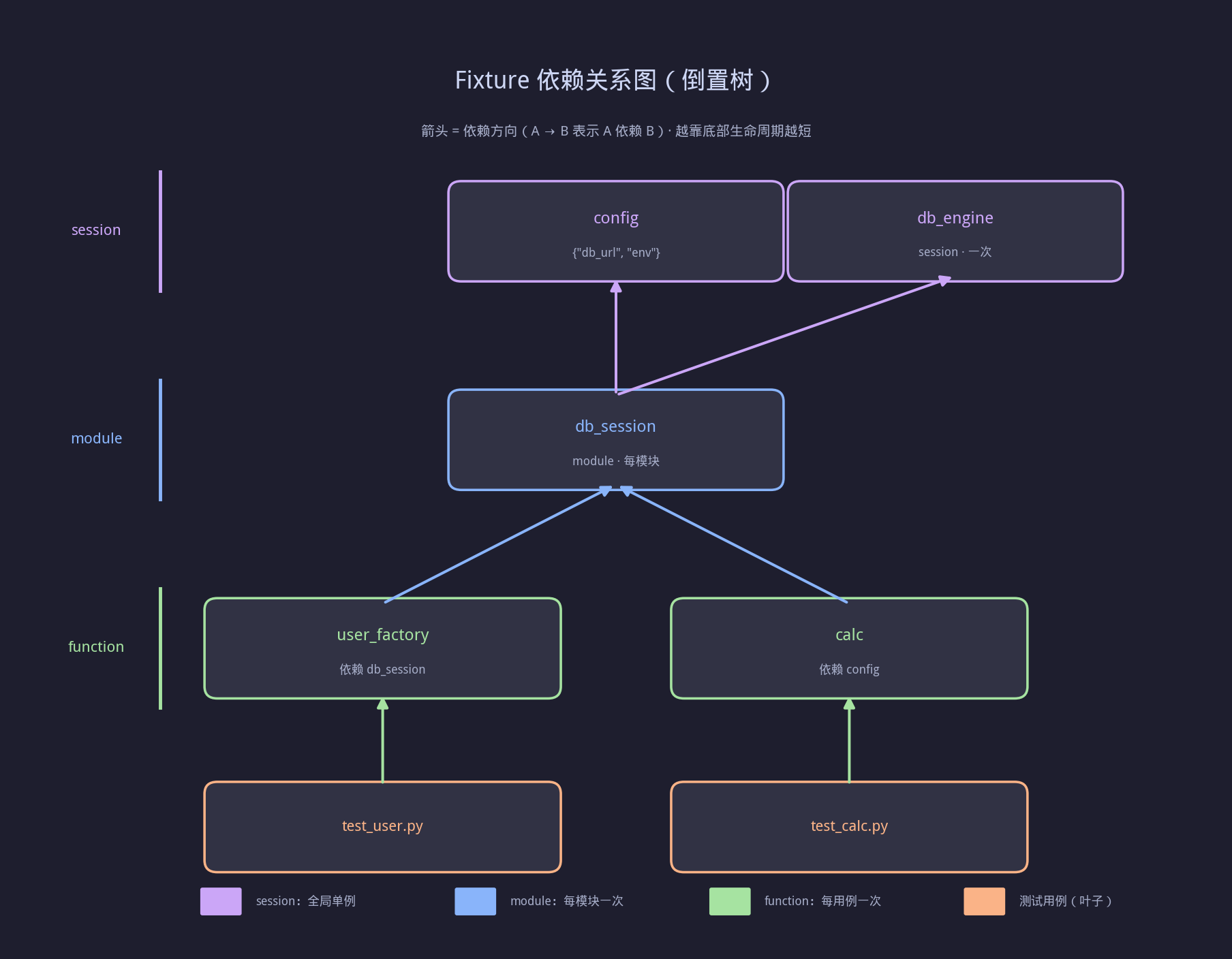
▲ Fixture 依赖关系(倒置树):config → db_engine → db_session → user_factory,calc 依赖 config,箭头指向被依赖方。
上图展示了第 2~4 篇 fixture 体系的完整依赖关系:
- config(session)→ db_engine(session)→ db_session(module)→ user_factory(function)
- 箭头方向 = 依赖方向(A → B 表示 A 依赖 B)
- 越靠近底部,scope 越短、生命周期越短
这张图要记住一句话:fixture 的依赖图,就是一棵"倒置的树",根是配置,叶是测试用例。
五、conftest 进阶用法
5.1 fixture 重命名:@pytest.fixture(name=…)
@pytest.fixture(name="db") # ← 测试里用 db,而不是长长的 fixture 名
def database_connection():
...
def test_xxx(db): ... # ✅ 用别名
5.2 带参数的 fixture:params + ids
@pytest.fixture(params=["chrome", "firefox", "edge"], ids=lambda b: f"browser={b}")
def browser(request):
yield request.param
def test_ui(browser):
assert browser in ("chrome", "firefox", "edge")
运行会产生 3 个用例:test_ui[browser=chrome] / [browser=firefox] / [browser=edge]。
5.3 autouse=True:自动生效的 fixture
@pytest.fixture(autouse=True, scope="function")
def log_case_start():
print(">>> 用例开始")
yield
print("<<< 用例结束")
每个用例自动套用,无需写在参数里。 慎用——它会隐式影响所有测试,适合做日志、计时、清理临时状态。
5.4 动态切换实现:结合 @pytest.mark.parametrize
@pytest.fixture
def gateway(request):
if request.config.getoption("–real"):
return RealGateway()
return FakeGateway()
命令行 –real 时切真实实现,否则用假实现——一套测试跑两种环境。
六、常见踩坑与排错
| fixture 'xxx' not found | 参数名 ≠ fixture 名 / 不在 conftest 链上 | 检查拼写、conftest 位置 |
| fixture 没被复用(每次都新建) | scope 设成了 function | 按需改为 module/session |
| session fixture 状态串味 | 跨用例共享可变对象 | session 级只用不可变/连接池,数据用 module/function |
| conftest 里改了不生效 | pytest 缓存 / IDE 没识别根目录 | 删除 __pycache__、设为 pytest rootdir |
| 循环依赖 | A 依赖 B,B 又依赖 A | 拆分公共部分到第三个 fixture |
⚠️ 最重要的提醒:session 级 fixture 是"全局单例",千万不要在里面存可变测试数据——否则用例间会互相污染,调试起来极其痛苦。
七、完整运行效果示例
$ pytest tests/ -v
================================== test session starts ==================================
collected 5 items
tests/test_add.py::test_add_int PASSED [ 20%]
tests/test_add.py::test_add_negative PASSED [ 40%]
tests/test_sub.py::test_sub PASSED [ 60%]
tests/test_mul.py::test_mul PASSED [ 80%]
tests/test_div.py::test_div_by_zero PASSED [100%]
================================== 5 passed in 0.08s ===================================
✅ 5 个用例全部通过,fixture 从 conftest 自动注入——测试文件里没有任何 setup 代码。
八、本篇小结
- ✅ conftest.py 是 fixture 的共享层,就近覆盖、自动发现、无需 import
- ✅ Fixture 分三层:全局(session)→ 模块(module)→ 子模块,职责清晰
- ✅ 依赖注入:测试只声明"要什么",pytest 负责"怎么造",靠名字匹配
- ✅ 进阶技巧:name 重命名、params 参数化、autouse 自动生效
- ✅ 避坑:session 级不存可变状态,参数名必须 == fixture 名
九、动手练习
十、思考题(欢迎评论区讨论)
下一篇预告
👉 第 5 篇《pytest 插件生态与 Allure 测试报告》
你将学到:
- 常用插件(pytest-cov / pytest-xdist / pytest-html)
- 如何用 pytest –plugins 管理插件
- Allure 报告生成与美化
- CI 中集成测试报告


评论前必须登录!
注册