 网硕互联帮助中心
本项目使用 Python + PySide6 制作了一个具有互动效果的告白窗口。当鼠标靠近“不愿意”按钮时,按钮会自动躲开,卡通表情也会逐渐生气;当鼠标靠近“愿意”按钮时,表情会变开心。点击“愿意”后,窗口会显示爱心动画。项目同时提供一个无需安装依赖、双击即可运行的 HTML 版本。
一、项目效果
这个小项目并不是一个普通的静态弹窗,而是加入了多种实时交互效果:
– 眼睛会跟随鼠标移动;
– 鼠标靠近“不愿意”按钮时,表情逐渐生气;
– “不愿意”按钮会主动躲避鼠标;
– 点击“不愿意”后,窗口会抖动并提示“点错了,重来”;
– 鼠标靠近“愿意”按钮时,表情会逐渐开心;
– 点击“愿意”后,按钮文字改变并出现上浮爱心;
– 在确认之前,桌面版会阻止直接关闭或最小化窗口;
– 同时提供 Python 桌面版和 HTML 网页版。
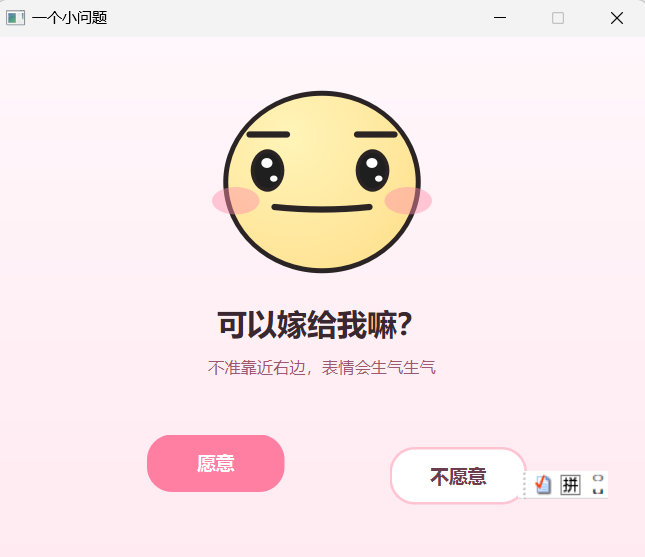
———————————————————初始界面———————————————————-
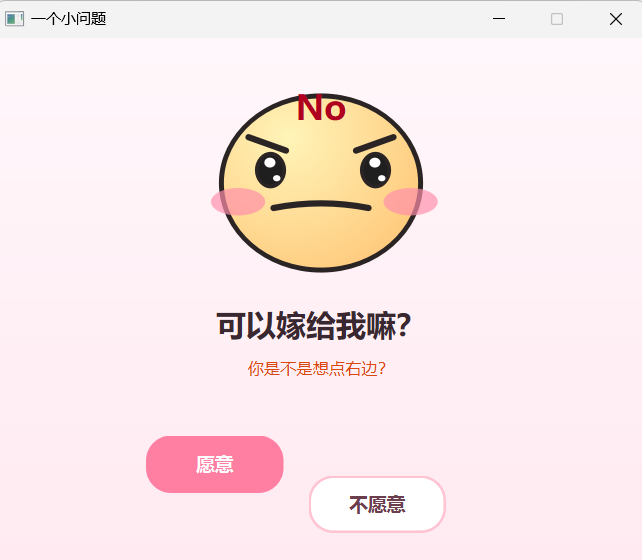
——————————————————–不愿意界面———————————————————
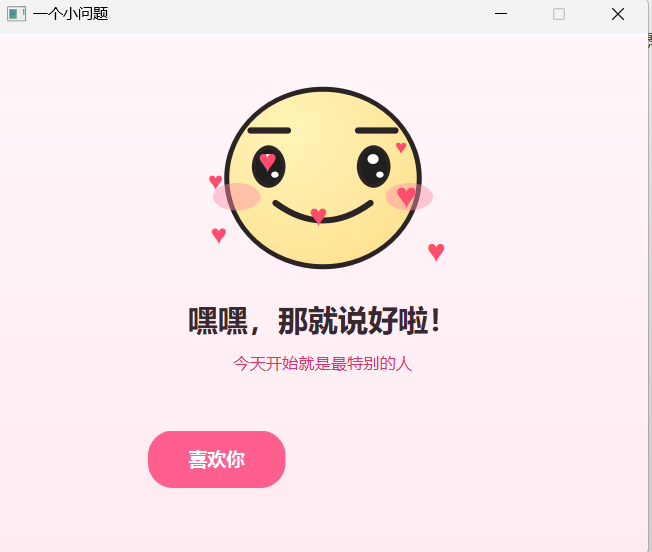
——————————————————–愿意后界面———————————————————
二、使用到的技术
>Python 桌面版
– Python 3
– PySide6
– QPainter 自定义绘图
– QTimer 定时刷新动画
– 鼠标位置检测
– 距离计算与线性插值
– Qt 事件处理
>HTML 网页版
– HTML5
– CSS3
– JavaScript
– Canvas 2D 绘图
– `requestAnimationFrame` 动画循环
– DOM 事件监听
三、项目文件结构
```text
confession-project/
├─ confession_reactive_window.py # PySide6 桌面版
├─ confession_reactive_window.html # HTML 网页版
├─ requirements.txt # Python 依赖
└─ README.md # 项目说明
四、运行 Python 桌面版
1. 确认 Python 环境
在终端中执行:python –version
建议使用 Python 3.9 及以上版本。
2. 安装 PySide6
pip install PySide6
也可以使用项目中的依赖文件:
pip install -r requirements.txt
3. 启动项目
进入代码所在目录,执行:
python confession_reactive_window.py
如果 Windows 中存在多个 Python,可以尝试:
py confession_reactive_window.py
五、运行 HTML 网页版
HTML 版本不需要安装 Python,也不需要配置服务器。
直接双击:
confession_reactive_window.html
浏览器会自动打开页面。如果直接打开时浏览器限制了部分功能,也可以在当前目录启动一个简单服务器:
python -m http.server 8000
然后访问:
http://localhost:8000/confession_reactive_window.html
六、核心实现思路
6.1 使用定时器构建动画循环
桌面版通过 `QTimer` 每隔约 16 毫秒调用一次动画函数:
```python
self.timer = QTimer(self)
self.timer.timeout.connect(self.animate)
self.timer.start(16)
```
16 毫秒对应的刷新频率大约是 60 FPS。每次刷新时,程序会依次完成:
1. 获取当前鼠标位置;
2. 计算情绪强度;
3. 判断“不愿意”按钮是否需要移动;
4. 更新爱心位置;
5. 调用 `update()` 重新绘制窗口。
```python
def animate(self):
self.tick_count += 1
if not self.accepted:
self.update_intensity()
self.move_no_button_if_needed()
else:
self.float_hearts()
self.update()
```
这种结构与游戏中的“更新状态 + 绘制画面”循环非常相似。
6.2 根据鼠标距离计算“生气程度”
程序会计算鼠标与“不愿意”按钮中心点之间的欧氏距离:
```python
cursor = self.mapFromGlobal(QCursor.pos())
center = self.no_button.geometry().center()
dx = cursor.x() – center.x()
dy = cursor.y() – center.y()
distance = math.hypot(dx, dy)
```
随后将距离映射为 0~1 之间的情绪值:
```python
target = clamp(1 – (distance – 25) / 160)
self.intensity += (target – self.intensity) * 0.18
```
其中:
– 鼠标距离越远,`intensity` 越接近 0;
– 鼠标距离越近,`intensity` 越接近 1;
– 使用插值而不是直接赋值,可以让表情变化更加平滑。
这里的更新公式可以写成:
```text
当前值 = 当前值 + (目标值 – 当前值) × 平滑系数
```
它是一种非常常用的缓动方法。
6.3 鼠标靠近“愿意”按钮时变开心
程序还会单独计算鼠标与“愿意”按钮之间的距离:
```python
yes_center = self.yes_button.geometry().center()
yes_distance = math.hypot(
cursor.x() – yes_center.x(),
cursor.y() – yes_center.y()
)
happy_target = clamp(1 – (yes_distance – 20) / 150)
```
当鼠标靠近左侧按钮时,`happiness` 会增加。嘴巴的二次贝塞尔曲线控制点会随之下移,从而形成笑脸。
6.4 让“不愿意”按钮躲开鼠标
首先扩大按钮的检测区域:
```python
rect = self.no_button.geometry().adjusted(-90, -70, 90, 70)
```
当鼠标进入该范围时,程序会准备多个候选位置:
```python
candidates = [
QPointF(286, 300),
QPointF(330, 350),
QPointF(378, 302),
QPointF(250, 350),
QPointF(358, 334),
]
```
随后选择距离鼠标最远的位置:
```python
self.target_no_pos = max(
candidates,
key=lambda p: math.hypot(
p.x() + 55 – cursor.x(),
p.y() + 23 – cursor.y()
)
)
```
这样可以避免按钮随机移动到鼠标附近,使躲避效果更加自然。
为了让按钮不是瞬间跳跃,程序再次使用插值:
```python
next_pos = current + (self.target_no_pos – current) * 0.55
self.no_button.move(round(next_pos.x()), round(next_pos.y()))
```
当鼠标非常接近时,按钮会直接移动到目标位置,以免被快速点击。
6.5 使用 QPainter 绘制动态表情
整个卡通脸并不是图片,而是通过 `QPainter` 实时绘制的:
```python
def paintEvent(self, _event):
painter = QPainter(self)
painter.setRenderHint(QPainter.Antialiasing)
self.draw_background(painter)
self.draw_face(painter)
self.draw_hearts(painter)
```
绘制内容包括:
– 渐变背景;
– 椭圆形脸部;
– 眉毛;
– 眼睛和高光;
– 腮红;
– 嘴巴曲线;
– 接受后的爱心。
表情为什么会“生气”?
随着 `intensity` 增加:
– 脸部颜色逐渐变深;
– 眉毛内侧向下移动;
– 眼睛高度缩小;
– 腮红透明度增加;
– 嘴巴从微笑变平,再变成向下弯曲;
– 强度超过阈值后出现额外文字提示。
例如眉毛位置的计算:
```python
brow_outer_y = 78 + anger * 2
brow_inner_y = 78 + anger * 18
```
当 `anger` 增大时,眉毛内侧变化更明显,因此会形成生气的视觉效果。
6.6 让眼睛跟随鼠标
程序计算鼠标相对于脸部中心的方向:
```python
dx = cursor.x() – cx
dy = cursor.y() – cy
distance = max(1, math.hypot(dx, dy))
eye_dx = dx / distance * (5 – anger * 2)
eye_dy = dy / distance * (4 – anger * 1.5)
```
这里先对方向向量进行归一化,再乘以一个较小的移动距离。这样眼球只会在有限范围内移动,不会跑出眼眶。
6.7 点击按钮后的交互
点击“愿意”
```python
def say_yes(self):
self.accepted = True
self.intensity = 0.0
self.title.setText("嘿嘿,那就说好啦!")
self.tip.setText("今天开始就是最特别的人")
self.no_button.hide()
self.yes_button.setText("喜欢你")
self.hearts = []
```
确认后会隐藏“不愿意”按钮,并进入爱心动画状态。
点击“不愿意”
```python
def say_no(self):
self.intensity = 1.0
self.tip.setText("点错了,重来!")
self.shake()
```
窗口抖动使用多个延迟任务实现:
```python
offsets = [8, -8, 6, -6, 3, -3, 0]
for index, offset in enumerate(offsets):
QTimer.singleShot(
index * 35,
lambda o=offset: self.move(start.x() + o, start.y())
)
```
这里在 `lambda` 参数中写 `o=offset` 很重要,可以避免循环变量延迟绑定导致所有任务使用同一个值。
6.8 爱心上浮动画
接受后,程序定期创建新的爱心:
```python
self.hearts.append([
random.randint(160, 360),
185,
random.uniform(-0.8, 0.8),
random.randint(18, 28)
])
```
每次刷新时修改爱心的位置和尺寸:
```python
heart[0] += heart[2]
heart[1] -= 1.8
heart[3] -= 0.18
```
这分别表示:
– 水平方向产生轻微漂移;
– 纵坐标不断减小,实现向上移动;
– 字号逐渐减小;
– 超出范围后从列表中删除。
6.9 阻止关闭和最小化
桌面版重写了 `closeEvent`:
```python
def closeEvent(self, event):
if self.accepted:
event.accept()
return
event.ignore()
self.intensity = 1.0
self.tip.setText("先点愿意才可以关闭")
self.shake()
```
在用户点击“愿意”之前,关闭请求会被忽略。
项目还监听窗口状态变化,在最小化时恢复窗口。这个设计适合用于趣味演示,但实际分享时应提前告知对方,并保留明确的退出方式,避免影响正常使用。
七、HTML 版本的实现差异
网页版本与桌面版的交互逻辑基本一致,但实现方式不同:
| 功能 | PySide6 版本 | HTML 版本 |
|—|—|—|
| 图形绘制 | QPainter | Canvas 2D |
| 动画刷新 | QTimer | requestAnimationFrame |
| 鼠标位置 | QCursor | mousemove 事件 |
| 按钮移动 | QWidget.move | 修改 CSS left/top |
| 爱心动画 | QPainter 绘制 | 动态创建 DOM 元素 |
| 关闭提示 | closeEvent | beforeunload |
HTML 动画循环如下:
```javascript
function loop() {
updateEmotion();
moveNoButton();
draw();
requestAnimationFrame(loop);
}
loop();
```
`requestAnimationFrame` 会在浏览器准备下一帧画面时调用回调函数,比固定时间间隔更适合网页动画。
需要注意:不同浏览器对离开页面提示的处理方式不同,浏览器可能只显示统一提示,而不会显示代码中自定义的文字。
八、常见问题
1. 提示 `No module named 'PySide6'`
说明当前 Python 环境没有安装 PySide6:
```bash
python -m pip install PySide6
```
安装后重新运行。
2. 已安装 PySide6,运行时仍然报错
可能是 `pip` 和 `python` 对应的不是同一个环境。执行:
```bash
python -m pip show PySide6
```
如果没有输出,再执行:
```bash
python -m pip install PySide6
```
3. 双击 Python 文件一闪而过
不要直接双击,建议在终端运行:
```bash
python confession_reactive_window.py
```
这样可以看到具体报错信息。
4. 中文字体显示异常
项目默认使用“Microsoft YaHei UI”。如果系统中没有该字体,可以改为:
```python
QFont("SimHei", 18, QFont.Bold)
```
Linux 下也可以改成系统中已安装的中文字体。
5. HTML 页面可以直接发给别人吗?
可以。HTML 文件已经包含 CSS 和 JavaScript,不依赖其他本地文件。对方下载后双击即可打开。
6. 可以打包成 EXE 吗?
可以使用 PyInstaller:
```bash
pip install pyinstaller
pyinstaller –onefile –windowed confession_reactive_window.py
```
生成结果位于:
```text
dist/confession_reactive_window.exe
```
如果想设置图标:
```bash
pyinstaller –onefile –windowed –icon=app.ico confession_reactive_window.py
```
九、可以继续扩展的功能
这个项目还可以继续加入:
1. 背景音乐与音效;
2. 自定义姓名和告白文字;
3. 输入框生成专属版本;
4. 更多表情状态,例如害羞、惊讶、委屈;
5. 粒子烟花动画;
6. 记录按钮被躲避的次数;
7. 手机端触摸适配;
8. PyInstaller 一键打包;
9. 将 HTML 部署到 GitHub Pages;
10. 生成二维码供手机扫码打开。
十、项目总结
这个项目虽然体量不大,但涵盖了 GUI 和前端动画中的多个基础知识点:
– 鼠标交互;
– 动画循环;
– 距离计算;
– 平滑插值;
– 自定义绘图;
– 窗口事件;
– DOM 操作;
– Canvas 绘图;
– 简单状态机设计。
相比只使用静态图片,这种完全通过代码绘制并实时变化的表情更有互动感,也很适合作为 Python GUI、PySide6 或 JavaScript Canvas 的入门练习。
如果这篇文章对你有帮助,欢迎点赞、收藏和评论。后续还可以继续尝试增加音乐、配置页面、EXE 打包和在线部署功能。
附录:
-项目完整代码
import math
import random
import sys
from PySide6.QtCore import QEvent, QPointF, QRectF, Qt, QTimer
from PySide6.QtGui import QColor, QCursor, QFont, QLinearGradient, QPainter, QPainterPath, QPen, QRadialGradient
from PySide6.QtWidgets import QApplication, QLabel, QPushButton, QWidget
def clamp(value, low=0.0, high=1.0):
return max(low, min(high, value))
class ReactiveConfessionWindow(QWidget):
def __init__(self):
super().__init__()
self.setWindowTitle("一个小问题")
self.setFixedSize(520, 420)
self.setStyleSheet("background: #fff4f8;")
self.intensity = 0.0
self.happiness = 0.0
self.target_no_pos = QPointF(314, 328)
self.hearts = []
self.accepted = False
self.tick_count = 0
self.title = QLabel("可以嫁给我嘛?", self)
self.title.setGeometry(0, 210, 520, 38)
self.title.setAlignment(Qt.AlignCenter)
self.title.setStyleSheet("color: #3a2830; background: transparent;")
self.title.setFont(QFont("Microsoft YaHei UI", 18, QFont.Bold))
self.tip = QLabel("不要靠近右边,表情会生气", self)
self.tip.setGeometry(0, 250, 520, 28)
self.tip.setAlignment(Qt.AlignCenter)
self.tip.setStyleSheet("color: #9b5a70; background: transparent;")
self.tip.setFont(QFont("Microsoft YaHei UI", 10))
self.yes_button = QPushButton("愿意", self)
self.yes_button.setGeometry(120, 318, 110, 46)
self.yes_button.clicked.connect(self.say_yes)
self.yes_button.setStyleSheet(
"""
QPushButton {
border: 0;
border-radius: 20px;
background: #ff7fa3;
color: white;
font: bold 15px "Microsoft YaHei UI";
}
QPushButton:hover { background: #ff5f8e; }
"""
)
self.no_button = QPushButton("不愿意", self)
self.no_button.setGeometry(314, 318, 110, 46)
self.no_button.clicked.connect(self.say_no)
self.no_button.setStyleSheet(
"""
QPushButton {
border: 2px solid #ffc3d2;
border-radius: 20px;
background: white;
color: #6a3e4d;
font: bold 15px "Microsoft YaHei UI";
}
QPushButton:hover { background: #fff0f5; }
"""
)
self.timer = QTimer(self)
self.timer.timeout.connect(self.animate)
self.timer.start(16)
def animate(self):
self.tick_count += 1
if not self.accepted:
self.update_intensity()
self.move_no_button_if_needed()
else:
self.float_hearts()
self.update()
def update_intensity(self):
cursor = self.mapFromGlobal(QCursor.pos())
center = self.no_button.geometry().center()
dx = cursor.x() – center.x()
dy = cursor.y() – center.y()
distance = math.hypot(dx, dy)
target = clamp(1 – (distance – 25) / 160)
self.intensity += (target – self.intensity) * 0.18
yes_center = self.yes_button.geometry().center()
yes_distance = math.hypot(cursor.x() – yes_center.x(), cursor.y() – yes_center.y())
happy_target = clamp(1 – (yes_distance – 20) / 150)
if self.intensity > 0.15:
happy_target *= 0.25
self.happiness += (happy_target – self.happiness) * 0.16
if self.intensity > 0.78:
self.tip.setText("不许靠近那个按钮!")
self.tip.setStyleSheet("color: #b00020; background: transparent;")
elif self.intensity > 0.35:
self.tip.setText("你是不是想点右边?")
self.tip.setStyleSheet("color: #d9480f; background: transparent;")
else:
self.tip.setText("不准靠近右边,表情会生气生气")
self.tip.setStyleSheet("color: #9b5a70; background: transparent;")
def move_no_button_if_needed(self):
cursor = self.mapFromGlobal(QCursor.pos())
rect = self.no_button.geometry().adjusted(-90, -70, 90, 70)
if rect.contains(cursor):
candidates = [
QPointF(286, 300),
QPointF(330, 350),
QPointF(378, 302),
QPointF(250, 350),
QPointF(358, 334),
]
self.target_no_pos = max(candidates, key=lambda p: math.hypot(p.x() + 55 – cursor.x(), p.y() + 23 – cursor.y()))
current = QPointF(self.no_button.x(), self.no_button.y())
distance_to_cursor = math.hypot(current.x() + 55 – cursor.x(), current.y() + 23 – cursor.y())
if distance_to_cursor < 95:
next_pos = self.target_no_pos
else:
next_pos = current + (self.target_no_pos – current) * 0.55
self.no_button.move(round(next_pos.x()), round(next_pos.y()))
def say_yes(self):
self.accepted = True
self.intensity = 0.0
self.title.setText("嘿嘿,那就说好啦!")
self.tip.setText("今天开始就是最特别的人")
self.tip.setStyleSheet("color: #d6336c; background: transparent;")
self.no_button.hide()
self.yes_button.setText("喜欢你")
self.hearts = []
def say_no(self):
self.intensity = 1.0
self.tip.setText("点错了,重来!")
self.shake()
def shake(self):
start = self.pos()
offsets = [8, -8, 6, -6, 3, -3, 0]
for index, offset in enumerate(offsets):
QTimer.singleShot(index * 35, lambda o=offset: self.move(start.x() + o, start.y()))
def float_hearts(self):
if self.tick_count % 8 == 0:
self.hearts.append([random.randint(160, 360), 185, random.uniform(-0.8, 0.8), random.randint(18, 28)])
next_hearts = []
for heart in self.hearts:
heart[0] += heart[2]
heart[1] -= 1.8
heart[3] -= 0.18
if heart[1] > 20 and heart[3] > 4:
next_hearts.append(heart)
self.hearts = next_hearts
def paintEvent(self, _event):
painter = QPainter(self)
painter.setRenderHint(QPainter.Antialiasing)
self.draw_background(painter)
self.draw_face(painter)
self.draw_hearts(painter)
def draw_background(self, p):
gradient = QLinearGradient(0, 0, 0, self.height())
gradient.setColorAt(0, QColor("#fff7fb"))
gradient.setColorAt(1, QColor("#ffeaf1"))
p.fillRect(self.rect(), gradient)
def draw_face(self, p):
anger = self.intensity
cx, cy = 260, 116
face_w = 154 + anger * 8
face_h = 142 – anger * 4
face_color = QColor(
int(255),
int(222 – anger * 42),
int(138 – anger * 38),
)
face_gradient = QRadialGradient(QPointF(cx – 26, cy – 36), 145)
face_gradient.setColorAt(0, QColor("#fff4b8"))
face_gradient.setColorAt(1, face_color)
p.setBrush(face_gradient)
p.setPen(QPen(QColor("#2b2424"), 4))
p.drawEllipse(QRectF(cx – face_w / 2, cy – face_h / 2, face_w, face_h))
cursor = self.mapFromGlobal(QCursor.pos())
dx = cursor.x() – cx
dy = cursor.y() – cy
distance = max(1, math.hypot(dx, dy))
eye_dx = dx / distance * (5 – anger * 2)
eye_dy = dy / distance * (4 – anger * 1.5)
p.setPen(QPen(QColor("#2b2424"), 5, Qt.SolidLine, Qt.RoundCap))
brow_outer_y = 78 + anger * 2
brow_inner_y = 78 + anger * 18
brow_outer_offset = 15
brow_inner_offset = 15
left_brow_center = 217
right_brow_center = 303
p.drawLine(
QPointF(left_brow_center – brow_outer_offset, brow_outer_y),
QPointF(left_brow_center + brow_inner_offset, brow_inner_y),
)
p.drawLine(
QPointF(right_brow_center – brow_inner_offset, brow_inner_y),
QPointF(right_brow_center + brow_outer_offset, brow_outer_y),
)
self.draw_eye(p, 218, 103, eye_dx, eye_dy, anger)
self.draw_eye(p, 302, 103, eye_dx, eye_dy, anger)
blush = QColor("#ff8fab")
blush.setAlphaF(0.45 + anger * 0.35)
p.setPen(Qt.NoPen)
p.setBrush(blush)
p.drawEllipse(QRectF(172, 120, 38 + anger * 8, 22))
p.drawEllipse(QRectF(310, 120, 38 + anger * 8, 22))
p.setPen(QPen(QColor("#2b2424"), 5, Qt.SolidLine, Qt.RoundCap))
p.setBrush(Qt.NoBrush)
self.draw_mouth(p, anger, self.happiness)
if anger > 0.55:
p.setFont(QFont("Microsoft YaHei UI", 20, QFont.Bold))
p.setPen(QColor("#b00020"))
p.drawText(QRectF(238, 38, 44, 34), Qt.AlignCenter, "No")
def draw_eye(self, p, cx, cy, dx, dy, anger):
eye_w = 24 – anger * 3
eye_h = 31 – anger * 7
p.setPen(QPen(QColor("#2b2424"), 3))
p.setBrush(QColor("#1f1f1f"))
p.drawEllipse(QRectF(cx – eye_w / 2 + dx, cy – eye_h / 2 + dy, eye_w, eye_h))
p.setPen(Qt.NoPen)
p.setBrush(QColor("#ffffff"))
p.drawEllipse(QRectF(cx – 5 + dx, cy – 10 + dy, 9, 8))
p.drawEllipse(QRectF(cx + 2 + dx, cy + 4 + dy, 6, 5))
def draw_mouth(self, p, anger, happiness):
left = QPointF(222, 136)
right = QPointF(298, 136)
smile_control = QPointF(260, 140 + happiness * 24)
flat_control = QPointF(260, 137)
frown_control = QPointF(260, 116)
if anger < 0.45:
amount = anger / 0.45
control = QPointF(
smile_control.x() + (flat_control.x() – smile_control.x()) * amount,
smile_control.y() + (flat_control.y() – smile_control.y()) * amount,
)
else:
amount = (anger – 0.45) / 0.55
control = QPointF(
flat_control.x() + (frown_control.x() – flat_control.x()) * amount,
flat_control.y() + (frown_control.y() – flat_control.y()) * amount,
)
mouth = QPainterPath()
mouth.moveTo(left)
mouth.quadTo(control, right)
p.drawPath(mouth)
def draw_hearts(self, p):
if not self.accepted:
return
p.setFont(QFont("Arial", 22, QFont.Bold))
p.setPen(QColor("#ff4d6d"))
for x, y, _speed, size in self.hearts:
p.setFont(QFont("Arial", int(size), QFont.Bold))
p.drawText(QPointF(x, y), "♥")
def closeEvent(self, event):
if self.accepted:
event.accept()
return
event.ignore()
self.intensity = 1.0
self.tip.setText("先点愿意才可以关闭")
self.tip.setStyleSheet("color: #b00020; background: transparent;")
self.shake()
def changeEvent(self, event):
if event.type() == QEvent.WindowStateChange and not self.accepted:
if self.windowState() & Qt.WindowMinimized:
QTimer.singleShot(0, self.restore_from_minimize)
super().changeEvent(event)
def restore_from_minimize(self):
self.setWindowState(self.windowState() & ~Qt.WindowMinimized)
self.showNormal()
self.raise_()
self.activateWindow()
self.intensity = 1.0
self.tip.setText("先点愿意才可以最小化")
self.tip.setStyleSheet("color: #b00020; background: transparent;")
self.shake()
def main():
app = QApplication(sys.argv)
window = ReactiveConfessionWindow()
window.show()
sys.exit(app.exec())
if __name__ == "__main__":
main()
-HTML 版完整代码
<!doctype html>
<html lang="zh-CN">
<head>
<meta charset="utf-8" />
<meta name="viewport" content="width=device-width, initial-scale=1" />
<title>一个小问题</title>
<style>
* { box-sizing: border-box; }
body {
min-height: 100vh;
margin: 0;
display: grid;
place-items: center;
overflow: hidden;
background: linear-gradient(180deg, #fff8fb 0%, #ffeaf1 100%);
font-family: "Microsoft YaHei UI", system-ui, sans-serif;
color: #2b2424;
}
.card {
width: min(520px, calc(100vw – 28px));
padding: 22px 24px 28px;
border-radius: 28px;
background: rgba(255, 255, 255, 0.72);
box-shadow: 0 26px 80px rgba(255, 117, 156, 0.24);
text-align: center;
user-select: none;
}
canvas { width: 100%; height: 190px; display: block; }
h1 { margin: 4px 0 8px; font-size: 26px; }
.tip { height: 26px; margin: 0 0 22px; color: #9b5a70; font-weight: 600; }
.buttons { position: relative; height: 78px; }
button {
position: absolute;
top: 14px;
width: 118px;
height: 48px;
border-radius: 24px;
font: 700 16px "Microsoft YaHei UI", system-ui, sans-serif;
cursor: pointer;
}
#yesBtn {
left: 88px;
border: 0;
color: #fff;
background: #ff7fa3;
box-shadow: 0 12px 22px rgba(255, 95, 142, 0.28);
}
#yesBtn:hover { background: #ff5f8e; }
#noBtn {
left: 296px;
border: 2px solid #ffc3d2;
color: #6a3e4d;
background: #fff;
}
.shake { animation: shake 260ms linear; }
@keyframes shake {
0%, 100% { transform: translateX(0); }
20% { transform: translateX(8px); }
40% { transform: translateX(-8px); }
60% { transform: translateX(5px); }
80% { transform: translateX(-5px); }
}
.heart {
position: fixed;
color: #ff4d6d;
font: 800 24px Arial, sans-serif;
pointer-events: none;
animation: floatUp 1.8s ease-out forwards;
}
@keyframes floatUp {
from { transform: translateY(0) scale(0.8); opacity: 1; }
to { transform: translateY(-120px) scale(1.35); opacity: 0; }
}
</style>
</head>
<body>
<main class="card" id="card">
<canvas id="face" width="520" height="190"></canvas>
<h1 id="title">可以和我在一起吗?</h1>
<p class="tip" id="tip">鼠标越靠近右边,表情越生气</p>
<div class="buttons" id="buttonArea">
<button id="yesBtn">愿意</button>
<button id="noBtn">不愿意</button>
</div>
</main>
<script>
const canvas = document.getElementById("face");
const ctx = canvas.getContext("2d");
const card = document.getElementById("card");
const title = document.getElementById("title");
const tip = document.getElementById("tip");
const buttonArea = document.getElementById("buttonArea");
const yesBtn = document.getElementById("yesBtn");
const noBtn = document.getElementById("noBtn");
const mouse = { x: 260, y: 95, pageX: innerWidth / 2, pageY: innerHeight / 2 };
let anger = 0, happiness = 0, accepted = false;
let noTarget = { x: 296, y: 14 };
window.addEventListener("mousemove", (event) => {
mouse.pageX = event.clientX;
mouse.pageY = event.clientY;
const rect = canvas.getBoundingClientRect();
mouse.x = (event.clientX – rect.left) * (canvas.width / rect.width);
mouse.y = (event.clientY – rect.top) * (canvas.height / rect.height);
});
window.addEventListener("beforeunload", (event) => {
if (!accepted) {
event.preventDefault();
event.returnValue = "先点愿意才可以离开哦";
}
});
yesBtn.onclick = () => {
accepted = true;
anger = 0;
title.textContent = "嘿嘿,那就说好啦!";
tip.textContent = "今天开始就是特别的人";
tip.style.color = "#d6336c";
yesBtn.textContent = "喜欢你";
noBtn.style.display = "none";
for (let i = 0; i < 18; i++) setTimeout(spawnHeart, i * 90);
};
noBtn.onclick = () => {
anger = 1;
tip.textContent = "点错了,重来!";
tip.style.color = "#b00020";
card.classList.remove("shake");
void card.offsetWidth;
card.classList.add("shake");
dodgeNoButton(true);
};
function clamp(v, lo = 0, hi = 1) { return Math.max(lo, Math.min(hi, v)); }
function center(el) {
const r = el.getBoundingClientRect();
return { x: r.left + r.width / 2, y: r.top + r.height / 2 };
}
function updateEmotion() {
if (accepted) {
happiness += (1 – happiness) * 0.08;
anger += (0 – anger) * 0.16;
return;
}
const nc = center(noBtn);
const nd = Math.hypot(mouse.pageX – nc.x, mouse.pageY – nc.y);
const angerTarget = clamp(1 – (nd – 18) / 170);
anger += (angerTarget – anger) * 0.18;
const yc = center(yesBtn);
const yd = Math.hypot(mouse.pageX – yc.x, mouse.pageY – yc.y);
let happyTarget = clamp(1 – (yd – 18) / 150);
if (anger > 0.15) happyTarget *= 0.25;
happiness += (happyTarget – happiness) * 0.16;
if (anger > 0.78) {
tip.textContent = "不许靠近那个按钮!";
tip.style.color = "#b00020";
} else if (anger > 0.35) {
tip.textContent = "你是不是想点右边?";
tip.style.color = "#d9480f";
} else {
tip.textContent = "鼠标越靠近右边,表情越生气";
tip.style.color = "#9b5a70";
}
}
function dodgeNoButton(force = false) {
if (accepted) return;
const area = buttonArea.getBoundingClientRect();
const r = noBtn.getBoundingClientRect();
const near = r.left – 105 < mouse.pageX && mouse.pageX < r.right + 105 &&
r.top – 78 < mouse.pageY && mouse.pageY < r.bottom + 78;
if (!force && !near) return;
const lx = mouse.pageX – area.left, ly = mouse.pageY – area.top;
const candidates = [
{ x: 246, y: 3 }, { x: 312, y: 26 }, { x: 366, y: 4 },
{ x: 222, y: 28 }, { x: 334, y: 8 }
];
noTarget = candidates.reduce((best, item) => {
const bd = Math.hypot(best.x + 59 – lx, best.y + 24 – ly);
const id = Math.hypot(item.x + 59 – lx, item.y + 24 – ly);
return id > bd ? item : best;
}, candidates[0]);
}
function moveNoButton() {
if (accepted) return;
dodgeNoButton(false);
const x0 = parseFloat(noBtn.style.left || "296");
const y0 = parseFloat(noBtn.style.top || "14");
const nc = center(noBtn);
const d = Math.hypot(mouse.pageX – nc.x, mouse.pageY – nc.y);
const speed = d < 98 ? 1 : 0.58;
noBtn.style.left = `${x0 + (noTarget.x – x0) * speed}px`;
noBtn.style.top = `${y0 + (noTarget.y – y0) * speed}px`;
}
function draw() {
ctx.clearRect(0, 0, canvas.width, canvas.height);
const cx = 260, cy = 92;
const faceW = 154 + anger * 8, faceH = 142 – anger * 4;
const grad = ctx.createRadialGradient(cx – 26, cy – 36, 4, cx, cy, 145);
grad.addColorStop(0, "#fff4b8");
grad.addColorStop(1, `rgb(255, ${Math.round(222 – anger * 42)}, ${Math.round(138 – anger * 38)})`);
ctx.lineWidth = 4; ctx.strokeStyle = "#2b2424"; ctx.fillStyle = grad;
ellipse(cx, cy, faceW / 2, faceH / 2); ctx.fill(); ctx.stroke();
const dx = mouse.x – cx, dy = mouse.y – cy;
const dist = Math.max(1, Math.hypot(dx, dy));
const eyeDx = dx / dist * (5 – anger * 2);
const eyeDy = dy / dist * (4 – anger * 1.5);
drawBrows(); drawEye(218, 100, eyeDx, eyeDy); drawEye(302, 100, eyeDx, eyeDy);
drawBlush(); drawMouth();
if (anger > 0.55) {
ctx.fillStyle = "#b00020";
ctx.font = "bold 24px 'Microsoft YaHei UI'";
ctx.textAlign = "center";
ctx.fillText("怒", cx, 52);
}
}
function ellipse(cx, cy, rx, ry) { ctx.beginPath(); ctx.ellipse(cx, cy, rx, ry, 0, 0, Math.PI * 2); }
function line(x1, y1, x2, y2) { ctx.beginPath(); ctx.moveTo(x1, y1); ctx.lineTo(x2, y2); ctx.stroke(); }
function drawBrows() {
const outerY = 56 + anger * 2, innerY = 56 + anger * 18;
ctx.strokeStyle = "#2b2424"; ctx.lineWidth = 5; ctx.lineCap = "round";
line(187, outerY, 232, innerY);
line(288, innerY, 333, outerY);
}
function drawEye(cx, cy, dx, dy) {
const w = 24 – anger * 3, h = 31 – anger * 7;
ctx.strokeStyle = "#2b2424"; ctx.lineWidth = 3; ctx.fillStyle = "#1f1f1f";
ellipse(cx + dx, cy + dy, w / 2, h / 2); ctx.fill(); ctx.stroke();
ctx.fillStyle = "white";
ellipse(cx – 5 + dx, cy – 10 + dy, 4.5, 4); ctx.fill();
ellipse(cx + 4 + dx, cy + 4 + dy, 3, 2.5); ctx.fill();
}
function drawBlush() {
ctx.fillStyle = `rgba(255, 143, 171, ${0.45 + anger * 0.35})`;
ellipse(191, 120, 19 + anger * 4, 11); ctx.fill();
ellipse(329, 120, 19 + anger * 4, 11); ctx.fill();
}
function drawMouth() {
const smileY = 139 + happiness * 25, flatY = 136, frownY = 115;
let controlY;
if (anger < 0.45) controlY = smileY + (flatY – smileY) * (anger / 0.45);
else controlY = flatY + (frownY – flatY) * ((anger – 0.45) / 0.55);
ctx.strokeStyle = "#2b2424"; ctx.lineWidth = 5; ctx.lineCap = "round";
ctx.beginPath(); ctx.moveTo(222, 135); ctx.quadraticCurveTo(260, controlY, 298, 135); ctx.stroke();
}
function spawnHeart() {
const h = document.createElement("div");
h.className = "heart"; h.textContent = "♥";
h.style.left = `${innerWidth / 2 + (Math.random() – 0.5) * 190}px`;
h.style.top = `${innerHeight / 2 – 10 + (Math.random() – 0.5) * 60}px`;
document.body.appendChild(h); setTimeout(() => h.remove(), 1900);
}
function loop() { updateEmotion(); moveNoButton(); draw(); requestAnimationFrame(loop); }
loop();
</script>
</body>
</html>




评论前必须登录!
注册