 网硕互联帮助中心
上图!!!
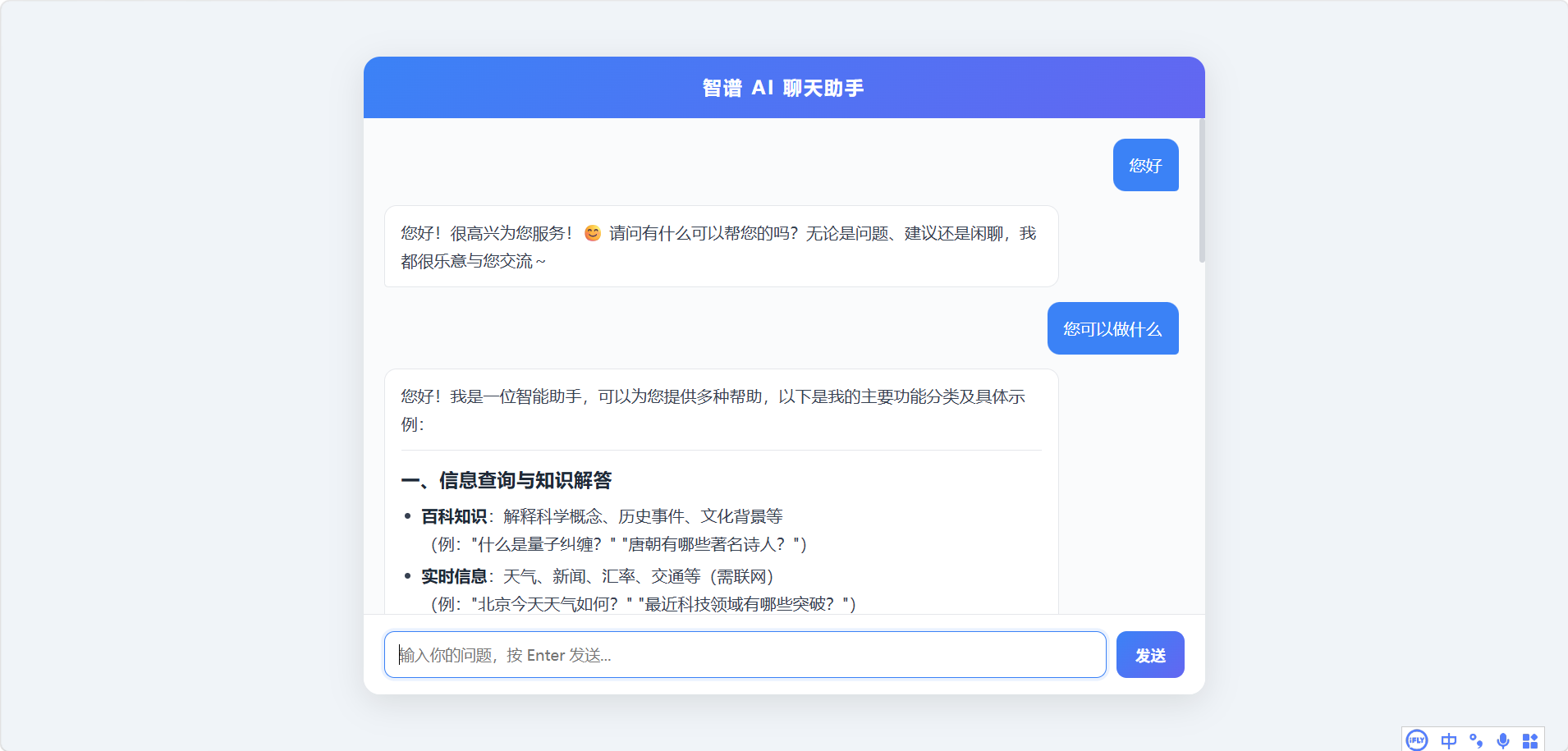
HTML源码
<!DOCTYPE html>
<html lang="zh-CN">
<head>
<meta charset="UTF-8">
<meta name="viewport" content="width=device-width, initial-scale=1.0">
<title>智谱 AI 聊天助手</title>
<!– marked.js: Markdown 转 HTML(国内 CDN + 自建兜底) –>
<script src="https://cdn.bootcdn.net/ajax/libs/marked/9.1.6/marked.min.js"></script>
<style>
* { margin: 0; padding: 0; box-sizing: border-box; }
body {
font-family: 'Microsoft YaHei', 'PingFang SC', sans-serif;
background: #f0f4f8;
height: 100vh;
display: flex;
justify-content: center;
align-items: center;
}
.chat-container {
width: 820px;
max-width: 98vw;
height: 85vh;
background: #fff;
border-radius: 16px;
box-shadow: 0 8px 32px rgba(0,0,0,0.1);
display: flex;
flex-direction: column;
overflow: hidden;
}
.chat-header {
background: linear-gradient(135deg, #3b82f6, #6366f1);
color: #fff;
padding: 18px 24px;
font-size: 18px;
font-weight: 600;
text-align: center;
letter-spacing: 2px;
}
.chat-messages {
flex: 1;
padding: 20px;
overflow-y: auto;
display: flex;
flex-direction: column;
gap: 14px;
background: #fafbfc;
min-height: 0;
}
.chat-messages::-webkit-scrollbar { width: 6px; }
.chat-messages::-webkit-scrollbar-thumb {
background: #d1d5db;
border-radius: 3px;
}
.message {
max-width: 85%;
padding: 12px 16px;
border-radius: 12px;
line-height: 1.7;
animation: fadeIn 0.3s ease;
overflow-x: auto;
flex-shrink: 0;
min-height: 0;
}
@keyframes fadeIn {
from { opacity: 0; }
to { opacity: 1; }
}
.message.user {
align-self: flex-end;
background: #3b82f6;
color: #fff;
border-bottom-right-radius: 4px;
overflow-wrap: break-word;
word-break: break-word;
}
.message.assistant {
align-self: flex-start;
background: #fff;
border: 1px solid #e5e7eb;
border-bottom-left-radius: 4px;
color: #374151;
overflow-x: auto;
overflow-wrap: break-word;
word-break: break-word;
}
.message.loading {
background: #f3f4f6;
color: #9ca3af;
font-style: italic;
}
/* ========== Markdown 渲染样式 ========== */
/* 段落 */
.message.assistant p {
margin-bottom: 8px;
}
.message.assistant p:last-child {
margin-bottom: 0;
}
/* 加粗 / 斜体 */
.message.assistant strong { color: #1f2937; font-weight: 700; }
.message.assistant em { color: #6b7280; }
/* 行内代码 */
.message.assistant code {
background: #f1f5f9;
color: #e11d48;
padding: 2px 6px;
border-radius: 4px;
font-size: 0.9em;
font-family: 'Consolas', 'Courier New', monospace;
}
/* 代码块 */
.message.assistant pre {
background: #1e293b;
color: #e2e8f0;
padding: 14px 16px;
border-radius: 8px;
overflow-x: auto;
margin: 10px 0;
font-size: 13px;
line-height: 1.5;
position: relative;
}
.message.assistant pre code {
background: none;
color: inherit;
padding: 0;
font-size: inherit;
}
/* 有序/无序列表 */
.message.assistant ul,
.message.assistant ol {
padding-left: 20px;
margin: 6px 0;
}
.message.assistant li {
margin-bottom: 4px;
}
/* 引用 */
.message.assistant blockquote {
border-left: 3px solid #3b82f6;
padding-left: 12px;
margin: 8px 0;
color: #6b7280;
background: #f8fafc;
border-radius: 0 4px 4px 0;
}
/* 分割线 */
.message.assistant hr {
border: none;
border-top: 1px solid #e5e7eb;
margin: 12px 0;
}
/* ========== 链接 ========== */
.message.assistant a {
color: #3b82f6;
text-decoration: underline;
word-break: break-all;
}
.message.assistant a:hover {
color: #2563eb;
}
/* ========== 表格样式(重点) ========== */
.message.assistant .table-wrapper {
overflow-x: auto;
margin: 10px 0;
border-radius: 6px;
border: 1px solid #e5e7eb;
}
.message.assistant table {
width: 100%;
border-collapse: collapse;
font-size: 14px;
white-space: nowrap;
}
.message.assistant thead {
background: #f1f5f9;
}
.message.assistant th {
padding: 10px 14px;
text-align: left;
font-weight: 600;
color: #374151;
border-bottom: 2px solid #d1d5db;
white-space: nowrap;
}
.message.assistant td {
padding: 8px 14px;
border-bottom: 1px solid #f1f5f9;
color: #4b5563;
}
.message.assistant tbody tr:hover {
background: #f8fafc;
}
.message.assistant tbody tr:last-child td {
border-bottom: none;
}
/* ========== 文件信息卡片 ========== */
.file-card {
display: flex;
align-items: center;
gap: 10px;
padding: 10px 14px;
border: 1px solid #e5e7eb;
border-radius: 8px;
background: #f8fafc;
margin: 6px 0;
transition: background 0.2s;
}
.file-card:hover { background: #f1f5f9; }
.file-icon {
width: 36px;
height: 36px;
border-radius: 6px;
background: #3b82f6;
color: #fff;
display: flex;
align-items: center;
justify-content: center;
font-size: 14px;
font-weight: 700;
flex-shrink: 0;
}
.file-info {
flex: 1;
min-width: 0;
}
.file-name {
font-weight: 600;
color: #1f2937;
font-size: 14px;
white-space: nowrap;
overflow: hidden;
text-overflow: ellipsis;
}
.file-meta {
font-size: 12px;
color: #9ca3af;
margin-top: 2px;
}
.file-link {
color: #3b82f6;
font-size: 13px;
text-decoration: none;
flex-shrink: 0;
padding: 4px 10px;
border: 1px solid #3b82f6;
border-radius: 4px;
transition: all 0.2s;
}
.file-link:hover {
background: #3b82f6;
color: #fff;
}
/* ========== 输入区域 ========== */
.chat-input-area {
padding: 16px 20px;
background: #fff;
border-top: 1px solid #e5e7eb;
display: flex;
gap: 10px;
align-items: flex-end;
}
.chat-input-area textarea {
flex: 1;
resize: none;
border: 1px solid #d1d5db;
border-radius: 10px;
padding: 12px 14px;
font-size: 15px;
font-family: inherit;
outline: none;
min-height: 46px;
max-height: 120px;
transition: border-color 0.2s;
}
.chat-input-area textarea:focus {
border-color: #3b82f6;
box-shadow: 0 0 0 3px rgba(59,130,246,0.1);
}
.chat-input-area button {
width: 66px;
height: 46px;
background: linear-gradient(135deg, #3b82f6, #6366f1);
color: #fff;
border: none;
border-radius: 10px;
font-size: 15px;
font-weight: 600;
cursor: pointer;
transition: opacity 0.2s, transform 0.1s;
flex-shrink: 0;
}
.chat-input-area button:hover { opacity: 0.9; }
.chat-input-area button:active { transform: scale(0.96); }
.chat-input-area button:disabled {
opacity: 0.5;
cursor: not-allowed;
}
</style>
</head>
<body>
<div class="chat-container">
<div class="chat-header">智谱 AI 聊天助手</div>
<div class="chat-messages" id="messages"></div>
<div class="chat-input-area">
<textarea
id="userInput"
rows="1"
placeholder="输入你的问题,按 Enter 发送…"
></textarea>
<button id="sendBtn" onclick="sendMessage()">发送</button>
</div>
</div>
<script>
// ========== Markdown 渲染:优先 marked.js,兜底自建解析器 ==========
var usingMarked = (typeof marked !== 'undefined');
if (usingMarked) {
marked.setOptions({
breaks: true,
gfm: true,
sanitize: false
});
}
// 简易 Markdown → HTML(兜底方案,覆盖表格、代码块、常见格式)
function simpleMarkdown(text) {
var html = text;
// 转义 HTML
html = html.replace(/&/g, '&').replace(/</g, '<').replace(/>/g, '>');
// 代码块 ```…```
html = html.replace(/```(\\w*)\\n([\\s\\S]*?)```/g, function(m, lang, code) {
return '<pre><code>' + code.replace(/\\n$/, '') + '</code></pre>';
});
// 行内代码 `…`
html = html.replace(/`([^`]+)`/g, '<code>$1</code>');
// 表格:逐行处理
html = html.replace(/(\\|[^\\n]+\\|\\n\\|[-:| ]+\\|\\n(?:\\|[^\\n]+\\|\\n?)*)/g, function(tableBlock) {
var lines = tableBlock.trim().split('\\n');
var htmlTable = '<div class="table-wrapper"><table>';
var isHeader = true;
for (var i = 0; i < lines.length; i++) {
// 跳过分隔行
if (/^\\|[-:| ]+\\|$/.test(lines[i])) { isHeader = false; continue; }
var cells = lines[i].replace(/^\\||\\|$/g, '').split('|');
var tag = isHeader ? 'th' : 'td';
htmlTable += '<tr>';
for (var j = 0; j < cells.length; j++) {
htmlTable += '<' + tag + '>' + cells[j].trim() + '</' + tag + '>';
}
htmlTable += '</tr>';
}
htmlTable += '</table></div>';
return htmlTable;
});
// 标题
html = html.replace(/^###### (.+)$/gm, '<h6>$1</h6>');
html = html.replace(/^##### (.+)$/gm, '<h5>$1</h5>');
html = html.replace(/^#### (.+)$/gm, '<h4>$1</h4>');
html = html.replace(/^### (.+)$/gm, '<h3>$1</h3>');
html = html.replace(/^## (.+)$/gm, '<h2>$1</h2>');
html = html.replace(/^# (.+)$/gm, '<h1>$1</h1>');
// 加粗和斜体
html = html.replace(/\\*\\*\\*(.+?)\\*\\*\\*/g, '<strong><em>$1</em></strong>');
html = html.replace(/\\*\\*(.+?)\\*\\*/g, '<strong>$1</strong>');
html = html.replace(/\\*(.+?)\\*/g, '<em>$1</em>');
// 图片
html = html.replace(/!\\[([^\\]]*)\\]\\(([^)]+)\\)/g, '<img src="$2" alt="$1" style="max-width:100%;">');
// 链接
html = html.replace(/\\[([^\\]]+)\\]\\(([^)]+)\\)/g, '<a href="$2" target="_blank">$1</a>');
// 引用
html = html.replace(/^> (.+)$/gm, '<blockquote>$1</blockquote>');
// 分割线
html = html.replace(/^—$/gm, '<hr>');
// 无序列表
html = html.replace(/^[\\-\\*] (.+)$/gm, '<li>$1</li>');
html = html.replace(/(<li>.*<\\/li>\\n?)+/g, '<ul>$&</ul>');
// 有序列表
html = html.replace(/^\\d+\\. (.+)$/gm, '<li>$1</li>');
// 换行
html = html.replace(/\\n\\n/g, '</p><p>');
html = html.replace(/\\n/g, '<br>');
html = '<p>' + html + '</p>';
// 清理空段落和多余嵌套
html = html.replace(/<p><\\/p>/g, '');
html = html.replace(/<p><(h[1-6]|ul|ol|pre|blockquote|hr|table)/g, '<$1');
html = html.replace(/<\\/(h[1-6]|ul|ol|pre|blockquote|table)><\\/p>/g, '</$1>');
return html;
}
function renderMarkdown(text) {
if (usingMarked) {
var html = marked.parse(text);
html = html.replace(/<table>/g, '<div class="table-wrapper"><table>');
html = html.replace(/<\\/table>/g, '</table></div>');
return html;
} else {
return simpleMarkdown(text);
}
}
// 检测并格式化文件信息(智谱返回的链接/文件引用)
function formatFileInfo(text) {
// 匹配图片链接
text = text.replace(
/!\\[([^\\]]*)\\]\\(([^)]+)\\)/g,
'<div class="file-card">' +
'<div class="file-icon">IMG</div>' +
'<div class="file-info"><div class="file-name">$1</div><div class="file-meta">图片文件</div></div>' +
'<a class="file-link" href="$2" target="_blank">查看</a>' +
'</div>'
);
// 匹配常见文件链接 (.pdf, .doc, .xlsx, .zip 等)
text = text.replace(
/\\[([^\\]]+)\\]\\((https?:\\/\\/[^)]+\\.(pdf|docx?|xlsx?|pptx?|zip|rar|txt|csv|json|xml))\\)/gi,
function(match, name, url, ext) {
var extUpper = ext.toUpperCase();
return '<div class="file-card">' +
'<div class="file-icon">' + extUpper + '</div>' +
'<div class="file-info"><div class="file-name">' + name + '</div><div class="file-meta">' + extUpper + ' 文件</div></div>' +
'<a class="file-link" href="' + url + '" target="_blank">下载</a>' +
'</div>';
}
);
return text;
}
const messagesDiv = document.getElementById('messages');
const userInput = document.getElementById('userInput');
const sendBtn = document.getElementById('sendBtn');
const conversation = []; // 保存对话历史
// 添加消息到界面
function addMessage(role, content, isLoading) {
const msgDiv = document.createElement('div');
msgDiv.className = 'message ' + role + (isLoading ? ' loading' : '');
if (role === 'assistant' && !isLoading) {
// 助手消息:Markdown → HTML
let formatted = formatFileInfo(content); // 先处理文件信息
let html = renderMarkdown(formatted); // 再渲染 Markdown
msgDiv.innerHTML = html;
// 让所有链接在新标签页打开
msgDiv.querySelectorAll('a').forEach(function(a) {
a.setAttribute('target', '_blank');
a.setAttribute('rel', 'noopener noreferrer');
});
} else {
// 用户消息和加载提示保持纯文本
msgDiv.textContent = content;
}
messagesDiv.appendChild(msgDiv);
messagesDiv.scrollTop = messagesDiv.scrollHeight;
return msgDiv;
}
// 发送消息
async function sendMessage() {
const content = userInput.value.trim();
if (!content) return;
// 禁用按钮
sendBtn.disabled = true;
userInput.disabled = true;
// 显示用户消息
addMessage('user', content);
conversation.push({ role: 'user', content: content });
userInput.value = '';
userInput.style.height = 'auto';
// 显示加载提示
const loadingMsg = addMessage('assistant', 'AI 正在思考…', true);
try {
const response = await fetch('http://localhost:3000/chat', {
method: 'POST',
headers: { 'Content-Type': 'application/json' },
body: JSON.stringify({ messages: conversation })
});
if (!response.ok) {
throw new Error('请求失败: ' + response.status);
}
const data = await response.json();
// 移除加载提示
loadingMsg.remove();
const reply = data.choices[0].message.content;
addMessage('assistant', reply);
conversation.push({ role: 'assistant', content: reply });
} catch (err) {
loadingMsg.remove();
addMessage('assistant', '出错了: ' + err.message + '\\n请确保已启动 node server.js');
console.error(err);
}
// 恢复按钮
sendBtn.disabled = false;
userInput.disabled = false;
userInput.focus();
}
// Enter 发送,Shift+Enter 换行
userInput.addEventListener('keydown', function(e) {
if (e.key === 'Enter' && !e.shiftKey) {
e.preventDefault();
sendMessage();
}
});
// 自动调整输入框高度
userInput.addEventListener('input', function() {
this.style.height = 'auto';
this.style.height = Math.min(this.scrollHeight, 120) + 'px';
});
</script>
</body>
</html>
CSS源码
/**
* 智谱 AI 聊天代理服务器
* ================================================================
* 作用:前端页面通过本代理转发请求到智谱 API,解决两个问题:
* 1. CORS 跨域 —— 浏览器不能直接调 open.bigmodel.cn,代理无此限制
* 2. API Key 安全 —— Key 只保存在服务端,不会暴露给前端
*
* 使用:node server.js 然后打开 智谱聊天.html
* ================================================================
*/
// http :创建本地服务,接收前端请求
// https :转发请求到智谱 API(智谱用 HTTPS)
const http = require('http');
const https = require('https');
// —- 配置 —-
const PORT = 3000; // 代理监听端口
const API_KEY = '你的 API Key'
// 智谱 API Key(从 https://open.bigmodel.cn 获取)
/**
* 创建 HTTP 服务器
* 工作流程:前端 fetch → 本代理 → 智谱 API → 本代理 → 前端
*/
const server = http.createServer((req, res) => {
// ========================================
// 第一步:设置 CORS 响应头
// 允许任意来源的前端页面调用本代理
// ========================================
res.setHeader('Access-Control-Allow-Origin', '*'); // 允许所有域名
res.setHeader('Access-Control-Allow-Methods', 'POST, OPTIONS'); // 允许的请求方法
res.setHeader('Access-Control-Allow-Headers', 'Content-Type'); // 允许的请求头
// ========================================
// 第二步:处理浏览器预检请求(OPTIONS)
// 浏览器在发送 POST 前会先发 OPTIONS 试探,直接返回 200 即可
// ========================================
if (req.method === 'OPTIONS') {
res.writeHead(200);
res.end();
return;
}
// ========================================
// 第三步:处理 /chat 聊天接口
// 前端 POST 到此路径,携带对话历史
// ========================================
if (req.method === 'POST' && req.url === '/chat') {
let body = '';
// 分段接收前端传来的请求体数据
req.on('data', chunk => {
body += chunk.toString();
});
// 接收完毕后,转发给智谱 API
req.on('end', () => {
// 构造发给智谱的请求体
// model: 模型名称,GLM-4.5-Flash 是轻量快速版
// stream: false 表示一次性返回(非流式),前端处理更简单
const postData = JSON.stringify({
model: 'GLM-4.5-Flash',
stream: false,
messages: JSON.parse(body).messages // 透传前端的对话历史
});
// 智谱 API 请求配置
const options = {
hostname: 'open.bigmodel.cn', // 智谱 API 域名
path: '/api/paas/v4/chat/completions', // 聊天补全接口路径
method: 'POST',
headers: {
'Content-Type': 'application/json',
'Authorization': `Bearer ${API_KEY}`, // Bearer Token 鉴权
'Content-Length': Buffer.byteLength(postData) // 设置请求体长度(必需)
}
};
// 发起 HTTPS 请求到智谱
const proxyReq = https.request(options, proxyRes => {
let data = '';
// 接收智谱的分段响应
proxyRes.on('data', chunk => {
data += chunk.toString();
});
// 响应接收完毕,原样返回给前端
proxyRes.on('end', () => {
res.writeHead(proxyRes.statusCode, {
'Content-Type': 'application/json'
});
res.end(data); // 智谱的响应直接透传给前端
});
});
// 网络错误处理:智谱服务不可达或超时
proxyReq.on('error', err => {
console.error('代理请求出错:', err.message);
res.writeHead(500, { 'Content-Type': 'application/json' });
res.end(JSON.stringify({ error: '服务器出错: ' + err.message }));
});
// 发送请求体并结束请求
proxyReq.write(postData);
proxyReq.end();
});
} else {
// ========================================
// 其他路径一律返回 404
// ========================================
res.writeHead(404, { 'Content-Type': 'text/plain' });
res.end('Not Found');
}
});
// 启动服务器,监听 3000 端口
server.listen(PORT, () => {
console.log(`代理服务器已启动: http://localhost:${PORT}/chat`);
console.log('请在浏览器中打开 智谱聊天.html');
});


评论前必须登录!
注册