 网硕互联帮助中心
欢迎加入开源鸿蒙跨平台社区:https://openharmonycrossplatform.csdn.net

前言
在 OpenHarmony 应用中,如果我们需要编写自动化脚本、动态修改应用的本地配置文件,或者开发一个专门管理鸿蒙 oh-package.json5(其结构与 YAML 类似)的工具,你会发现直接使用 jsonEncode 转换后会丢失所有的注释和原有的排版缩进。
yaml_edit 正是为了解决这个问题。它能带上下文地修改 YAML 文档,就像你在记事本里手动更改某一行一样,它能完美保留文件原有的注释、空格和缩进,是工具开发者保持代码“整洁”的必选。
一、核心技术原理
不同于普通的序列化,yaml_edit 维护了一个“编辑操作链”。它会解析 YAML 的源映射(Source Map),精准锁定要修改的节点位置。
#mermaid-svg-cPNUeqo7wWmtOZuE{font-family:\”trebuchet ms\”,verdana,arial,sans-serif;font-size:16px;fill:#333;}@keyframes edge-animation-frame{from{stroke-dashoffset:0;}}@keyframes dash{to{stroke-dashoffset:0;}}#mermaid-svg-cPNUeqo7wWmtOZuE .edge-animation-slow{stroke-dasharray:9,5!important;stroke-dashoffset:900;animation:dash 50s linear infinite;stroke-linecap:round;}#mermaid-svg-cPNUeqo7wWmtOZuE .edge-animation-fast{stroke-dasharray:9,5!important;stroke-dashoffset:900;animation:dash 20s linear infinite;stroke-linecap:round;}#mermaid-svg-cPNUeqo7wWmtOZuE .error-icon{fill:#552222;}#mermaid-svg-cPNUeqo7wWmtOZuE .error-text{fill:#552222;stroke:#552222;}#mermaid-svg-cPNUeqo7wWmtOZuE .edge-thickness-normal{stroke-width:1px;}#mermaid-svg-cPNUeqo7wWmtOZuE .edge-thickness-thick{stroke-width:3.5px;}#mermaid-svg-cPNUeqo7wWmtOZuE .edge-pattern-solid{stroke-dasharray:0;}#mermaid-svg-cPNUeqo7wWmtOZuE .edge-thickness-invisible{stroke-width:0;fill:none;}#mermaid-svg-cPNUeqo7wWmtOZuE .edge-pattern-dashed{stroke-dasharray:3;}#mermaid-svg-cPNUeqo7wWmtOZuE .edge-pattern-dotted{stroke-dasharray:2;}#mermaid-svg-cPNUeqo7wWmtOZuE .marker{fill:#333333;stroke:#333333;}#mermaid-svg-cPNUeqo7wWmtOZuE .marker.cross{stroke:#333333;}#mermaid-svg-cPNUeqo7wWmtOZuE svg{font-family:\”trebuchet ms\”,verdana,arial,sans-serif;font-size:16px;}#mermaid-svg-cPNUeqo7wWmtOZuE p{margin:0;}#mermaid-svg-cPNUeqo7wWmtOZuE .label{font-family:\”trebuchet ms\”,verdana,arial,sans-serif;color:#333;}#mermaid-svg-cPNUeqo7wWmtOZuE .cluster-label text{fill:#333;}#mermaid-svg-cPNUeqo7wWmtOZuE .cluster-label span{color:#333;}#mermaid-svg-cPNUeqo7wWmtOZuE .cluster-label span p{background-color:transparent;}#mermaid-svg-cPNUeqo7wWmtOZuE .label text,#mermaid-svg-cPNUeqo7wWmtOZuE span{fill:#333;color:#333;}#mermaid-svg-cPNUeqo7wWmtOZuE .node rect,#mermaid-svg-cPNUeqo7wWmtOZuE .node circle,#mermaid-svg-cPNUeqo7wWmtOZuE .node ellipse,#mermaid-svg-cPNUeqo7wWmtOZuE .node polygon,#mermaid-svg-cPNUeqo7wWmtOZuE .node path{fill:#ECECFF;stroke:#9370DB;stroke-width:1px;}#mermaid-svg-cPNUeqo7wWmtOZuE .rough-node .label text,#mermaid-svg-cPNUeqo7wWmtOZuE .node .label text,#mermaid-svg-cPNUeqo7wWmtOZuE .image-shape .label,#mermaid-svg-cPNUeqo7wWmtOZuE .icon-shape .label{text-anchor:middle;}#mermaid-svg-cPNUeqo7wWmtOZuE .node .katex path{fill:#000;stroke:#000;stroke-width:1px;}#mermaid-svg-cPNUeqo7wWmtOZuE .rough-node .label,#mermaid-svg-cPNUeqo7wWmtOZuE .node .label,#mermaid-svg-cPNUeqo7wWmtOZuE .image-shape .label,#mermaid-svg-cPNUeqo7wWmtOZuE .icon-shape .label{text-align:center;}#mermaid-svg-cPNUeqo7wWmtOZuE .node.clickable{cursor:pointer;}#mermaid-svg-cPNUeqo7wWmtOZuE .root .anchor path{fill:#333333!important;stroke-width:0;stroke:#333333;}#mermaid-svg-cPNUeqo7wWmtOZuE .arrowheadPath{fill:#333333;}#mermaid-svg-cPNUeqo7wWmtOZuE .edgePath .path{stroke:#333333;stroke-width:2.0px;}#mermaid-svg-cPNUeqo7wWmtOZuE .flowchart-link{stroke:#333333;fill:none;}#mermaid-svg-cPNUeqo7wWmtOZuE .edgeLabel{background-color:rgba(232,232,232, 0.8);text-align:center;}#mermaid-svg-cPNUeqo7wWmtOZuE .edgeLabel p{background-color:rgba(232,232,232, 0.8);}#mermaid-svg-cPNUeqo7wWmtOZuE .edgeLabel rect{opacity:0.5;background-color:rgba(232,232,232, 0.8);fill:rgba(232,232,232, 0.8);}#mermaid-svg-cPNUeqo7wWmtOZuE .labelBkg{background-color:rgba(232, 232, 232, 0.5);}#mermaid-svg-cPNUeqo7wWmtOZuE .cluster rect{fill:#ffffde;stroke:#aaaa33;stroke-width:1px;}#mermaid-svg-cPNUeqo7wWmtOZuE .cluster text{fill:#333;}#mermaid-svg-cPNUeqo7wWmtOZuE .cluster span{color:#333;}#mermaid-svg-cPNUeqo7wWmtOZuE div.mermaidTooltip{position:absolute;text-align:center;max-width:200px;padding:2px;font-family:\”trebuchet ms\”,verdana,arial,sans-serif;font-size:12px;background:hsl(80, 100%, 96.2745098039%);border:1px solid #aaaa33;border-radius:2px;pointer-events:none;z-index:100;}#mermaid-svg-cPNUeqo7wWmtOZuE .flowchartTitleText{text-anchor:middle;font-size:18px;fill:#333;}#mermaid-svg-cPNUeqo7wWmtOZuE rect.text{fill:none;stroke-width:0;}#mermaid-svg-cPNUeqo7wWmtOZuE .icon-shape,#mermaid-svg-cPNUeqo7wWmtOZuE .image-shape{background-color:rgba(232,232,232, 0.8);text-align:center;}#mermaid-svg-cPNUeqo7wWmtOZuE .icon-shape p,#mermaid-svg-cPNUeqo7wWmtOZuE .image-shape p{background-color:rgba(232,232,232, 0.8);padding:2px;}#mermaid-svg-cPNUeqo7wWmtOZuE .icon-shape rect,#mermaid-svg-cPNUeqo7wWmtOZuE .image-shape rect{opacity:0.5;background-color:rgba(232,232,232, 0.8);fill:rgba(232,232,232, 0.8);}#mermaid-svg-cPNUeqo7wWmtOZuE .label-icon{display:inline-block;height:1em;overflow:visible;vertical-align:-0.125em;}#mermaid-svg-cPNUeqo7wWmtOZuE .node .label-icon path{fill:currentColor;stroke:revert;stroke-width:revert;}#mermaid-svg-cPNUeqo7wWmtOZuE :root{–mermaid-font-family:\”trebuchet ms\”,verdana,arial,sans-serif;}
update(['version'], '1.2.0')
旧的 YAML 文本 (含大量注释)
YamlEditor 加载
锁定 Offset 位置,执行局部替换
新的 YAML 文本 (注释依然存在)
二、核心 API 实战
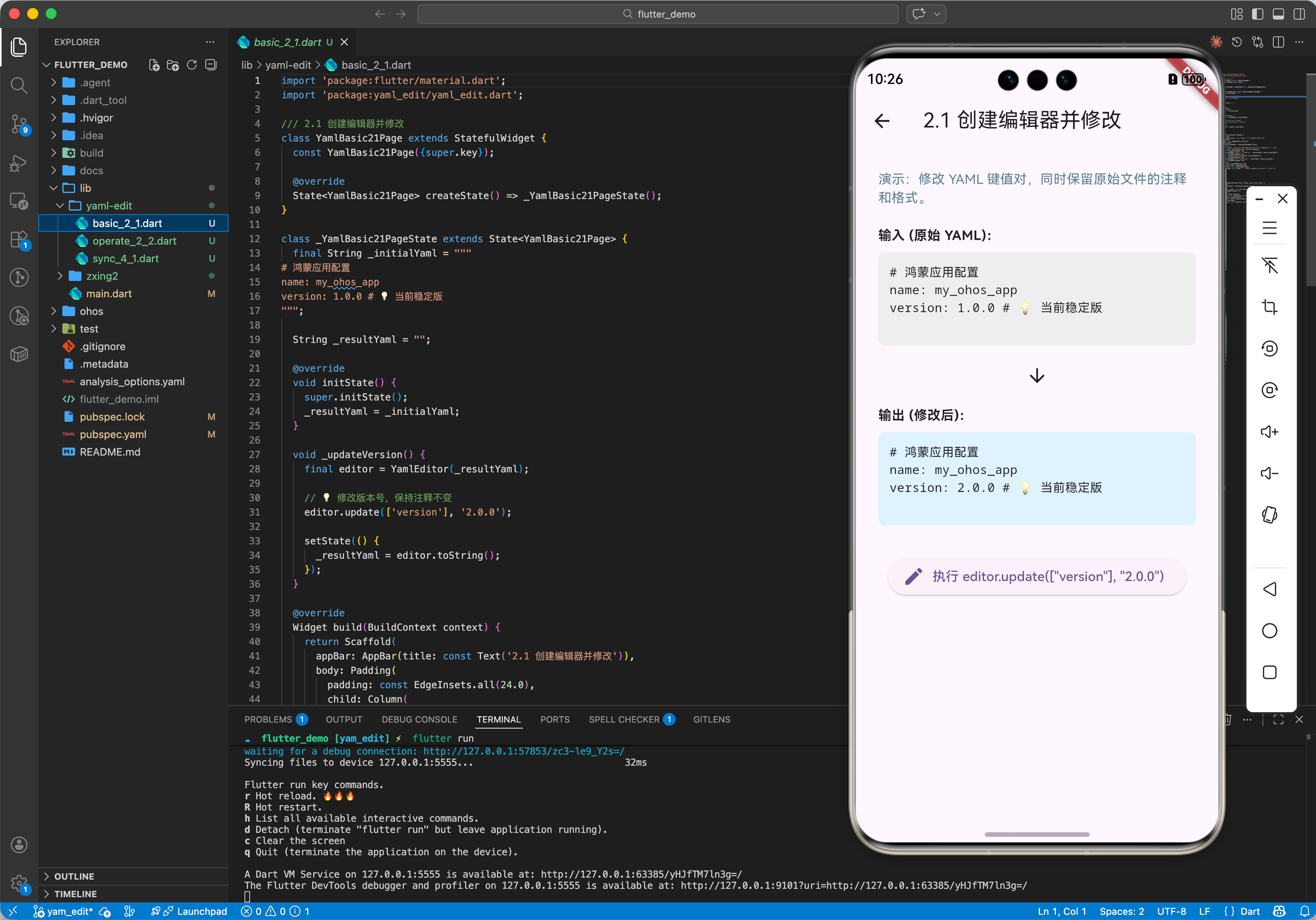
2.1 创建编辑器并修改
import 'package:yaml_edit/yaml_edit.dart';
void basicUsage() {
final yamlText = """
# 鸿蒙应用配置
name: my_ohos_app
version: 1.0.0 # 💡 当前稳定版
""";
final editor = YamlEditor(yamlText);
// 💡 修改版本号,保持注释不变
editor.update(['version'], '2.0.0');
print(editor.toString());
}
2.2 删除指定的键值对
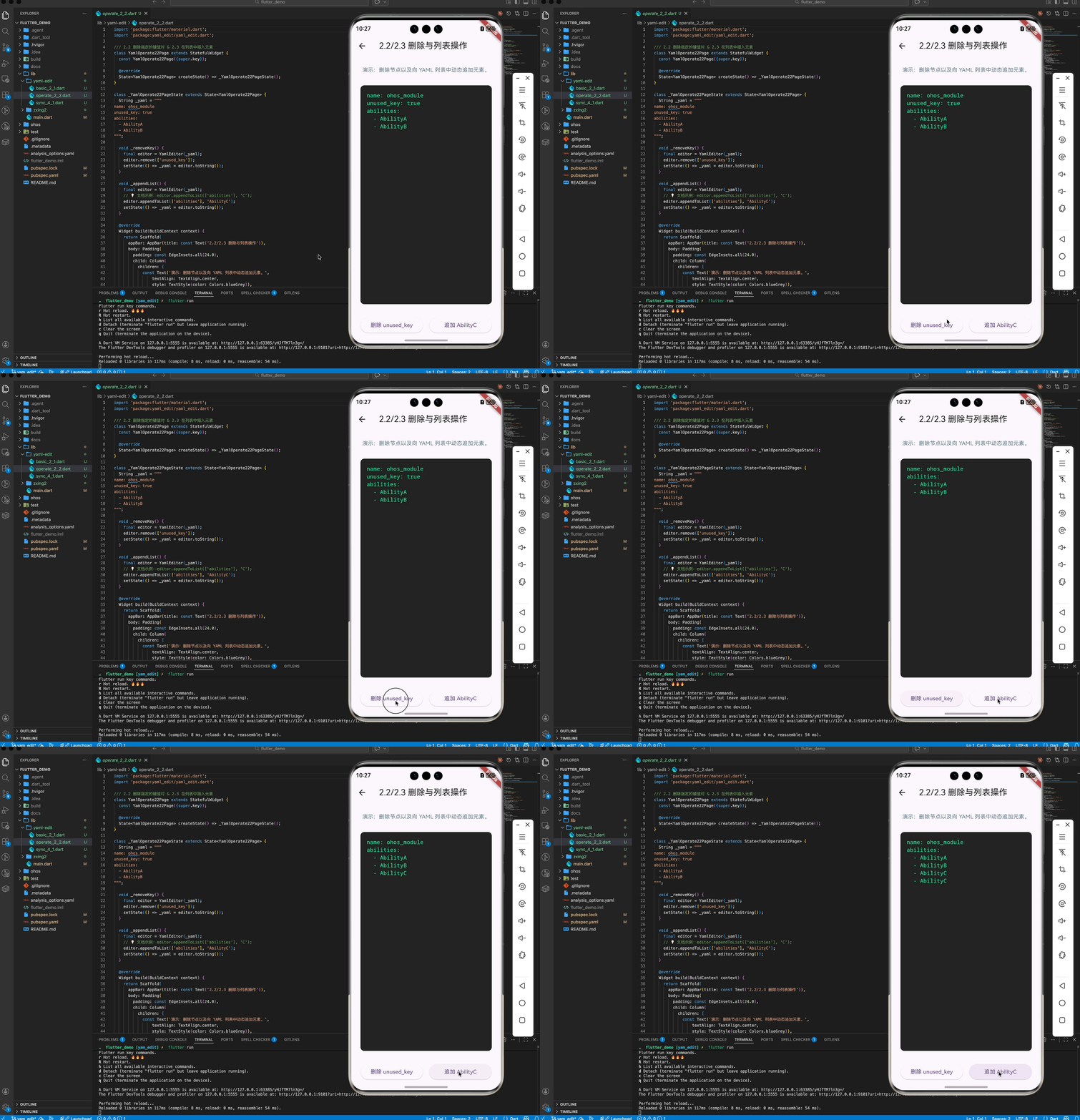
editor.remove(['unused_key']);
2.3 在列表中插入元素
// yaml: abilities: [A, B]
editor.appendToList(['abilities'], 'C');
三、OpenHarmony 平台适配
3.1 跨端脚本编写
💡 技巧:如果你在利用 Flutter 编写专门给鸿蒙开发者使用的 Mac/Windows 端辅助工具(如批量更新多个 HAP 模块的配置),yaml_edit 是最稳健的后端引擎,能确保它修改后的配置文件对鸿蒙主编辑器(DevEco Studio)十分友好。
3.2 鸿蒙沙箱内应用
在真机沙箱环境下,如果需要动态修改配置文件并保存,由于它是纯 Dart 解析,不需要额外的 C++ 编译,非常适合集成在鸿蒙应用的“设置同步”或“热配置更新”功能中。
四、完整实战示例:鸿蒙模块版本同步器
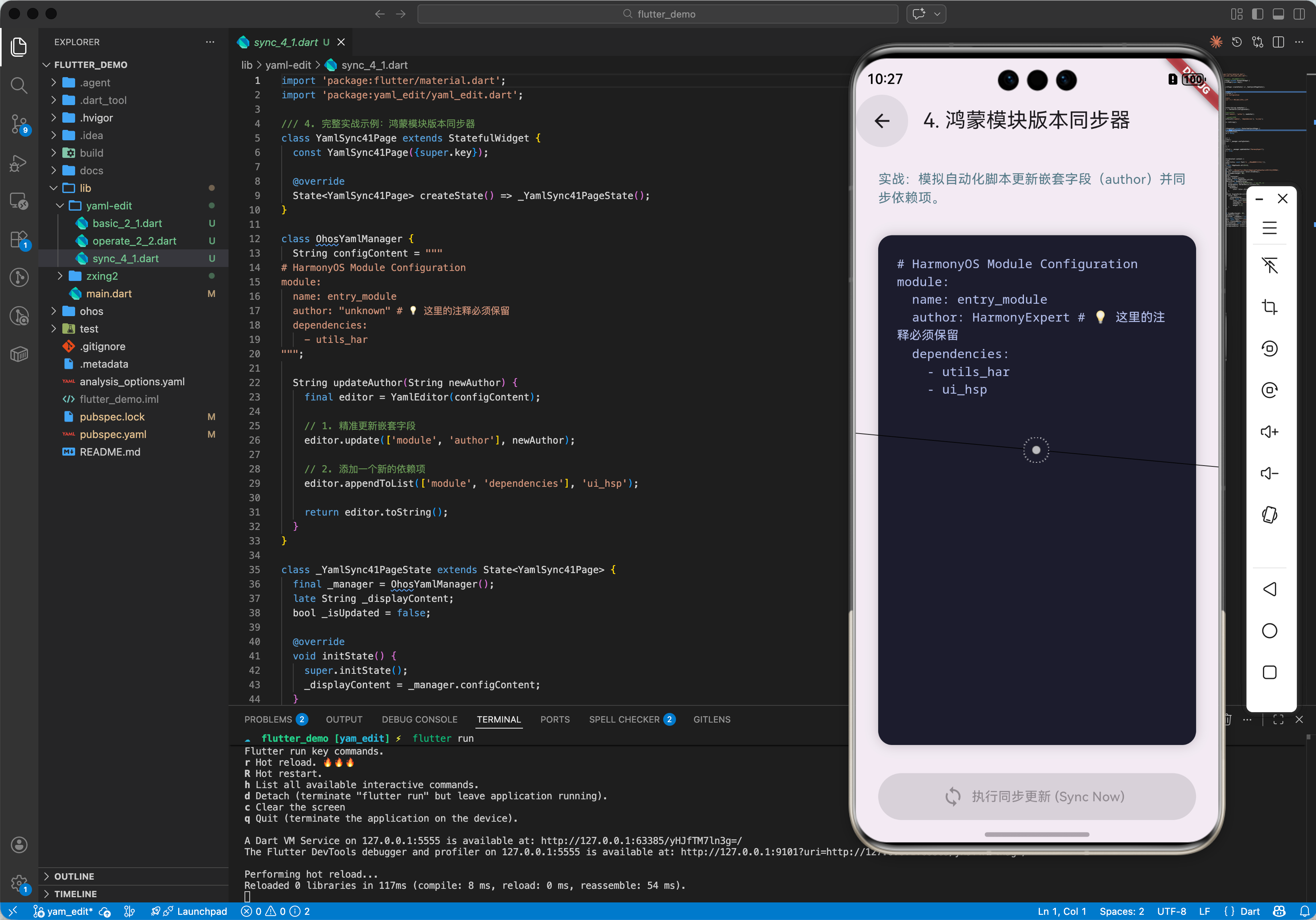
本示例展示如何编写一个脚本,自动读取并安全更新一组鸿蒙配置文件中的作者信息。
import 'package:yaml_edit/yaml_edit.dart';
class OhosYamlManager {
String _configContent = """
# HarmonyOS Module Configuration
module:
name: entry_module
author: "unknown" # 💡 这里的注释必须保留
dependencies:
– utils_har
""";
void updateAuthor(String newAuthor) {
print('— 正在更新鸿蒙模块元数据 —');
final editor = YamlEditor(_configContent);
// 1. 精准更新嵌套字段
editor.update(['module', 'author'], newAuthor);
// 2. 添加一个新的依赖项
editor.appendToList(['module', 'dependencies'], 'ui_hsp');
_configContent = editor.toString();
print(_configContent);
}
}
void main() {
var manager = OhosYamlManager();
manager.updateAuthor("HarmonyExpert");
}
五、总结
yaml_edit 软件包在“数据持久化”和“自动化工具”领域具有不可替代的地位。它不仅具备读写能力,更具备“尊重原始格式”的高级修养。对于对代码和配置一致性有严格要求的鸿蒙大型工程,它是实现“程序化运维配置”的最佳实践。


评论前必须登录!
注册