 网硕互联帮助中心
OOM 实战全解:7种溢出复现、MAT定位、代码修复与生产最佳实践(下)
作者:Weisian 发布时间:2026年2月13日

一、OOM诊断前置准备:环境与工具
1.1 环境基础配置
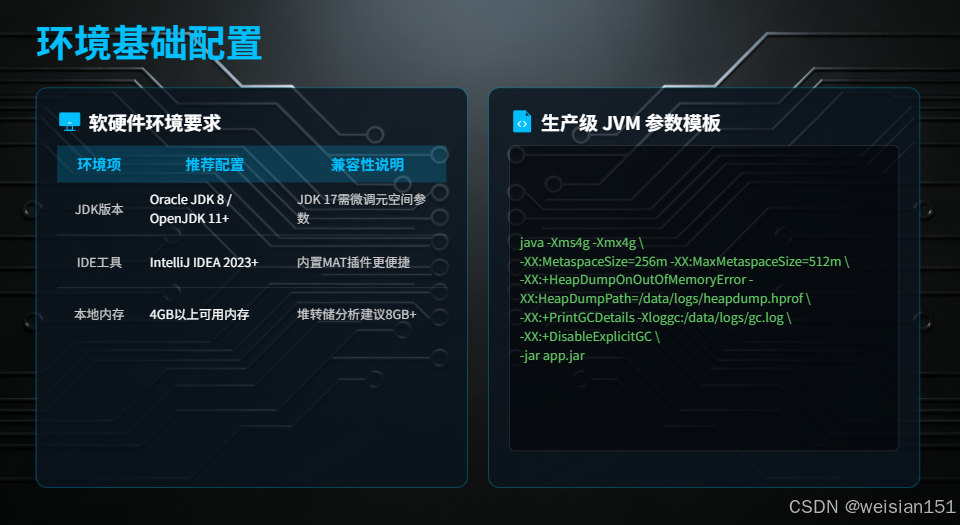
1.1.1 软硬件环境要求
| JDK版本 | Oracle JDK 8 / OpenJDK 11+ | JDK 17需微调元空间参数,核心逻辑通用 |
| IDE工具 | IntelliJ IDEA 2023+ | IDEA内置MAT插件,操作更便捷 |
| 本地内存 | 4GB以上可用内存 | 堆转储分析需占用大量内存,建议8GB+ |
1.1.2 生产级JVM参数模板(直接复用)
java -Xms4g -Xmx4g \\
# 元空间配置(避免元空间溢出)
-XX:MetaspaceSize=256m \\
-XX:MaxMetaspaceSize=512m \\
# OOM时自动生成堆转储文件(核心排障依据)
-XX:+HeapDumpOnOutOfMemoryError \\
-XX:HeapDumpPath=/data/logs/heapdump-$(date +%Y%m%d).hprof \\
# GC日志配置(分析GC相关OOM)
-XX:+PrintGCDetails \\
-XX:+PrintGCDateStamps \\
-XX:+PrintGCTimeStamps \\
-Xloggc:/data/logs/gc-$(date +%Y%m%d).log \\
-XX:+UseGCLogFileRotation \\
-XX:NumberOfGCLogFiles=5 \\
-XX:GCLogFileSize=100M \\
# 禁用显式GC,避免干扰GC策略
-XX:+DisableExplicitGC \\
-jar app.jar
1.2 核心诊断工具安装与验证
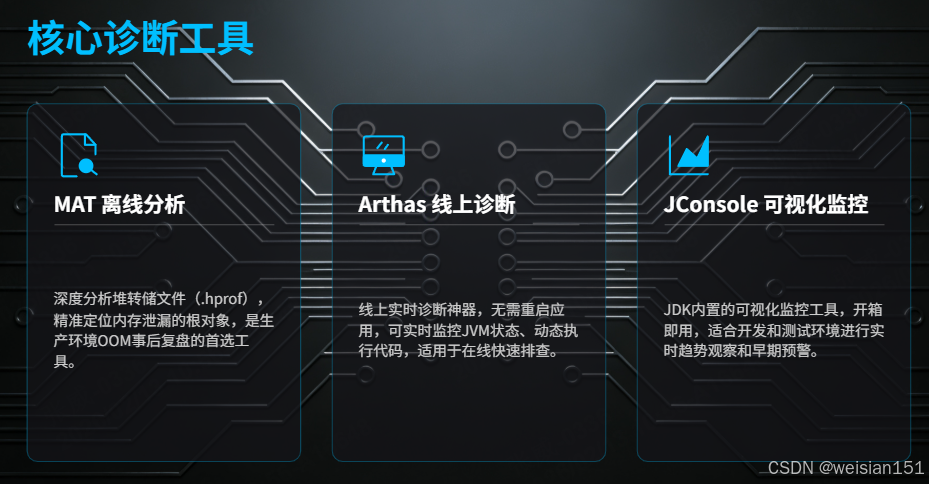
在 Java 应用发生 OutOfMemoryError(OOM) 后,精准定位内存泄漏根源是关键。本节介绍三款互补的核心诊断工具:
- MAT(Memory Analyzer Tool):用于离线深度分析堆转储文件(.hprof),适合生产环境事后复盘;
- Arthas:支持线上实时诊断,无需重启应用,适用于运行中系统的快速排查;
- JConsole:JDK 自带可视化监控工具,适合开发/测试阶段的趋势观察与早期预警。
三者结合,可覆盖“事前监控 → 事中诊断 → 事后分析”全链路。
1.2.1 MAT(Memory Analyzer Tool)—— 堆转储离线分析利器
下载与配置(Windows)
-
下载地址: https://www.eclipse.org/downloads/download.php?file=/mat/1.16.1/rcp/MemoryAnalyzer-1.16.1.20250109-win32.win32.x86_64.zip
-
配置文件(MemoryAnalyzer.ini)建议修改如下:
-startup
plugins/org.eclipse.equinox.launcher_1.6.900.v20240613-2009.jar
–launcher.library
plugins/org.eclipse.equinox.launcher.win32.win32.x86_64_1.2.1100.v20240722-2106
-vmargs
–add-exports=java.base/jdk.internal.org.objectweb.asm=ALL-UNNAMED
-Xms2g
-Xmx8g
-XX:+UseG1GC
-Dfile.encoding=UTF-8
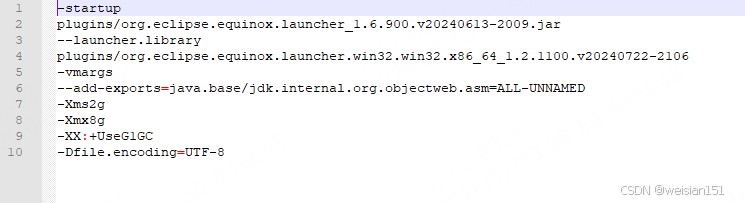
说明:适当调大堆内存(如 -Xmx8g)可提升大文件解析性能。
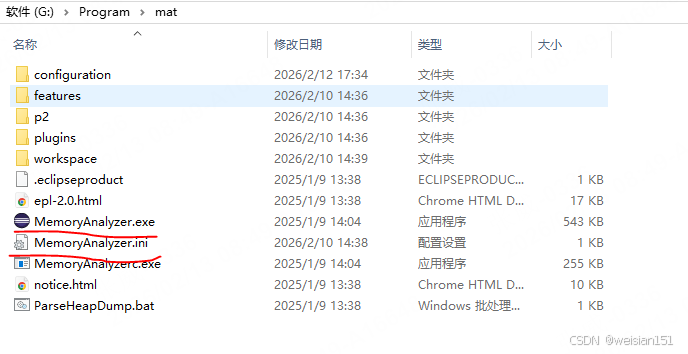
,配置完成后,双击 MemoryAnalyzer.exe 启动即可。如下图:
核心用途
- 离线分析 .hprof 堆转储文件;
- 自动识别内存泄漏嫌疑对象;
- 精准定位 GC Roots 引用链,揭示无法回收的根本原因;
- 特别适用于生产环境 OOM 事故的事后根因分析。
堆溢出场景实操步骤
获取堆转储文件
- 自动生成:通过 JVM 参数 -XX:+HeapDumpOnOutOfMemoryError 触发;
- 手动生成:使用 jmap -dump:format=b,file=heap.hprof <pid>。
导入并分析
- 启动 MAT → File > Open Heap Dump → 选择 heap.hprof;
- 等待解析完成(512MB 文件约需 1–3 分钟)。
快速识别泄漏嫌疑
- 查看左侧 Leak Suspects Report;
- MAT 会高亮显示如 Problem Suspect 1,例如 java.util.ArrayList 占用大量内存。
深入定位根因
- 切换至 Dominator Tree 视图;
- 按 Retained Heap 降序排序,找到如 HeapOOM_StaticCollection.LEAK_CACHE;
- 右键该对象 → Path to GC Roots → exclude weak references;
- 若路径终点为 static 字段或单例,则确认为内存泄漏点。
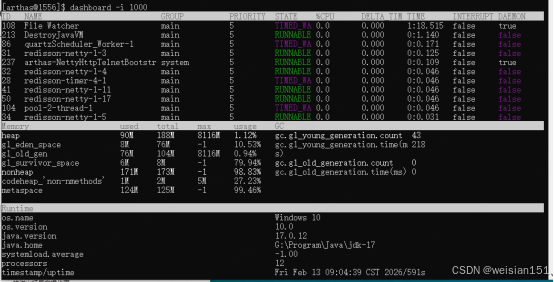
1.2.2 Arthas —— 线上 JVM 实时诊断神器
快速安装(PowerShell / Bash)
# 下载
curl -O https://arthas.aliyun.com/arthas-boot.jar
# 启动
java -jar arthas-boot.jar
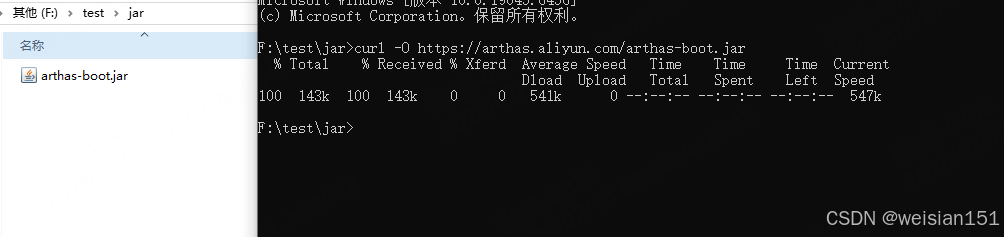
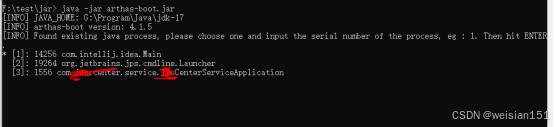 选择你要监控的java进程,输入序号即可。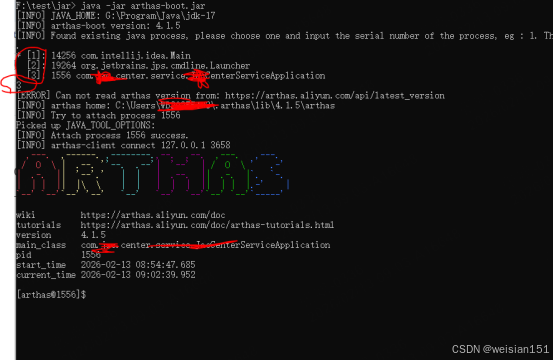
核心用途
- 无需重启目标应用;
- 实时监控内存、线程、类加载等 JVM 状态;
- 支持动态执行表达式、生成堆快照;
- 适用于生产环境 OOM 的在线快速排查。
Arthas 增强版命令速查手册
1. 类/类加载器相关命令
| sc | 查看JVM已加载的类信息 | sc -d *UserService | 查看类加载信息、类加载器、注解等 |
| sm | 查看已加载类的方法信息 | sm -d com.example.UserService * | 查看类所有方法签名 |
| jad | 反编译指定类 | jad –source-only com.example.UserService | 确认线上代码是否与预期一致 |
| mc | 内存编译器,编译.java文件 | mc /tmp/UserService.java -d /tmp/output | 线上紧急修复,热更新代码 |
| redefine | 加载外部.class文件,覆盖原类 | redefine /tmp/UserService.class | 热更新代码(不重启应用) |
2. 方法调用监控命令(核心功能)
| watch | 监控方法执行数据 | watch com.example.UserService getUser '{params,returnObj,throwExp}' -x 2 | 查看方法入参、返回值、异常 |
| trace | 方法内部调用路径,耗时分析 | trace com.example.OrderService createOrder '#cost > 100' | 性能瓶颈分析(方法耗时) |
| stack | 输出当前方法被调用的调用路径 | stack com.example.PaymentService pay 'params[0]=="1001"' | 查看谁调用了这个方法 |
| tt | 时空隧道,记录方法调用数据 | tt -t com.example.UserService login -n 5tt -i 1000 -p | 反复查看历史调用详情 |
| monitor | 方法执行监控(统计周期) | monitor -c 10 com.example.OrderService createOrder | 10秒内统计方法调用次数、成功率 |
3. 参数增强示例解析
# 🔸 watch 命令详解
watch com.example.UserService getUser "{params,returnObj,throwExp}" -x 3 -b -e -n 2
# -x 3 : 展开对象深度(3层)
# -b : 方法调用前监控
# -e : 方法异常后监控
# -n 2 : 执行2次后退出
# 'params[0]=="admin"' : 条件过滤(用户名是admin时触发)
# 🔸 trace 命令详解
trace com.example.OrderService createOrder '#cost > 200' -n 3 –skipJDKMethod false
# '#cost > 200' : 只显示耗时超过200ms的调用
# –skipJDKMethod false : 显示JDK内部方法调用(更详细)
4. JVM 内存/线程深度诊断
| memory | 查看内存使用详情 | memory | 各内存区域使用量(heap/non-heap) |
| gc | 查看GC信息 | gc -i 2000 | 实时GC次数、耗时 |
| thread | 线程分析 | thread -bthread –state BLOCKED | 死锁检测查看阻塞线程 |
| sysprop | 查看/修改系统属性 | sysprop user.countrysysprop user.timezone GMT+8 | 查看/修改JVM系统属性 |
| sysenv | 查看环境变量 | sysenv JAVA_HOME | 查看系统环境变量 |
| getstatic | 查看静态变量值 | getstatic com.example.Config INIT_PARAM | 快速查看配置值 |
5. 排查 OOM 实战命令组合
# 1️⃣ 谁占用了内存?(按对象类型分组)
heapdump –live /tmp/live.hprof
# 然后用 MAT/Eclipse Memory Analyzer 分析
# 2️⃣ 实时查看大对象
jvm | grep -E "G1|Old|Metaspace"
memory | head -20
# 3️⃣ 哪个线程导致 OOM?
thread -n 10 -i 1000 # 最忙的10个线程,每秒刷新
# 4️⃣ GC 压力大吗?
gc -i 5000 # 每5秒看GC情况
6. 其他实用命令
| vmtool | JVM工具,强制GC/获取实例 | vmtool –action forceGc | 强制Full GC |
| ognl | 执行OGNL表达式 | ognl '@java.lang.System@out.println("hello")' | 动态调用Java代码 |
| logger | 查看/修改Logger级别 | logger -c 1a2b3c –name ROOT –level debug | 动态修改日志级别 |
| profiler | CPU性能分析 | profiler startprofiler stop –format html | 生成火焰图 |
| cat | 打印文件内容 | cat /tmp/error.log | 查看日志 |
7. 高频使用场景组合
🔥 场景1:接口响应慢排查
# 1. 看CPU最忙的线程
thread -n 3
# 2. 追踪耗时方法
trace com.web.OrderController submitOrder '#cost > 300'
# 3. 查看具体SQL执行时间(如果使用MyBatis)
trace org.apache.ibatis.executor.CachingExecutor query '#cost > 50'
🔥 场景2:线上空指针异常
# 监控异常方法,打印入参
watch com.web.UserController getUser '{params,throwExp}' -e -x 2
# 反编译确认代码逻辑
jad –source-only com.web.UserController
🔥 场景3:生产环境热修复
# 1. 反编译类
jad –source-only com.service.FaultyService > /tmp/FaultyService.java
# 2. 编辑修复(vim /tmp/FaultyService.java)
# 3. 内存编译
mc /tmp/FaultyService.java -d /tmp
# 4. 热更新
redefine /tmp/com/service/FaultyService.class
💡 Arthas 使用黄金法则
1.2.3 JConsole —— JDK 内置可视化监控工具
启动方式(无需安装)
jconsole
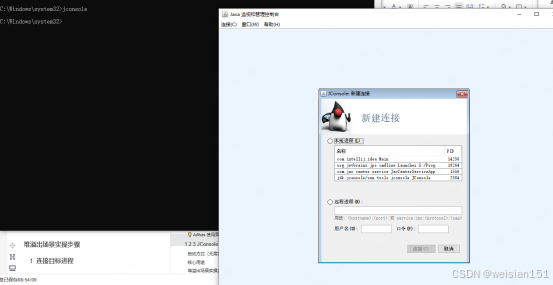 点击你要监控的java进程,进入即可。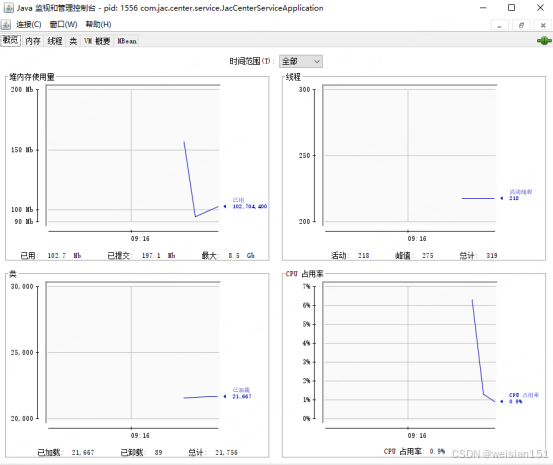
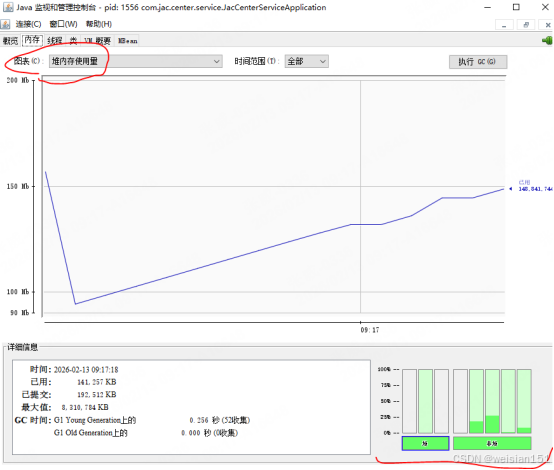
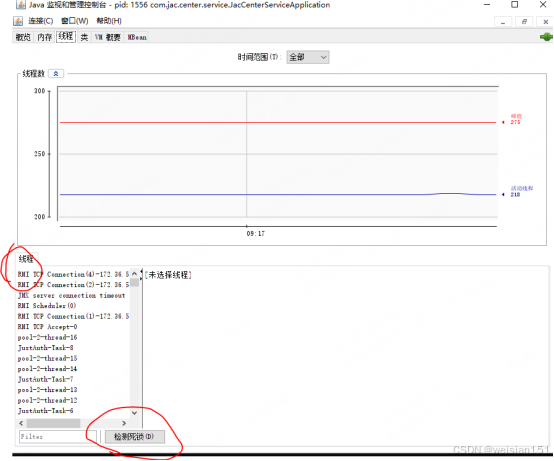
核心用途
- 图形化展示 JVM 内存、线程、类加载等指标;
- 支持手动触发 GC;
- 适合开发/测试环境进行实时趋势观察与早期泄漏预警。
堆溢出场景实操步骤
连接目标进程
- 启动 jconsole;
- 在本地进程中选择 HeapOOM_StaticCollection → 点击“连接”。
监控堆内存趋势
- 切换到 “内存” 标签页 → 选择 “堆内存使用”;
- 观察曲线:若持续上升且 GC 后无明显回落,则高度疑似内存泄漏;
- 点击 “执行 GC” 按钮验证:若内存未释放,基本可确认泄漏。
定位问题线程
- 切换到 “线程” 标签页;
- 查找活跃线程(如 main)→ 点击 “堆栈跟踪”;
- 可见如 HeapOOM_StaticCollection.main() 中存在无限添加元素的循环。
OOM 预警关键监控项
| 堆内存使用量 | 持续增长,GC 后不下降 | Java heap space |
| 元空间(Metaspace) | 线性增长,无平台期 | Metaspace |
| 线程数 | 短时间内激增至数千 | Unable to create new native thread |
| CPU 使用率 | 长期 >90%,主要由 GC 线程占用 | GC overhead limit exceeded |
| 直接内存(Direct Buffer) | 进程 RES 高但堆内存低 | Direct buffer memory |
提示:JConsole 虽功能基础,但胜在开箱即用,是早期发现问题的有效手段。
小结:工具协同策略
| 生产 OOM 事后分析 | MAT | 深度分析 .hprof,精准定位根因 |
| 线上实时诊断 | Arthas | 无需重启,动态探查对象状态 |
| 开发/测试监控预警 | JConsole | 可视化趋势,快速发现异常 |
最佳实践:
- 日常开发用 JConsole 监控趋势;
- 线上突发 OOM 用 Arthas 快速采样 + 验证;
- 事故复盘用 MAT 深度分析堆转储,形成闭环。
二、实战一:堆内存溢出 —— 静态集合泄漏(最常见)
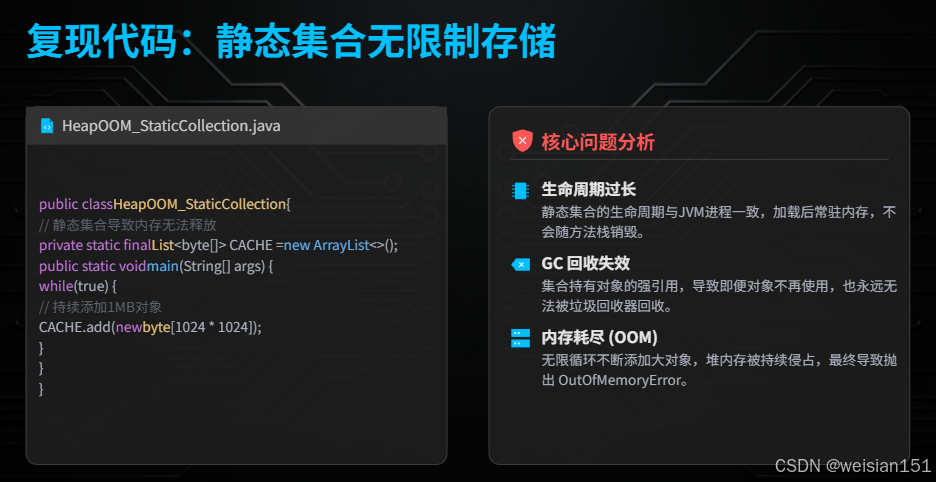
2.1 复现代码
package com.example.aliyunDemo.test.jvm2;
import java.util.ArrayList;
import java.util.List;
import java.util.concurrent.TimeUnit;
/**
* 场景:静态集合无限制存储,导致GC无法回收
* JVM参数:-Xms256m -Xmx256m -XX:+HeapDumpOnOutOfMemoryError
* -XX:HeapDumpPath=./dumps/ -XX:+PrintGCDetails
*/
public class HeapOOM_StaticCollection {
// 罪魁祸首:静态集合生命周期与JVM共存亡
private static final List<byte[]> LEAK_CACHE = new ArrayList<>();
private static int counter = 0;
public static void main(String[] args) throws InterruptedException {
System.out.println("=== 堆内存泄漏模拟开始 ===");
System.out.println("堆内存上限: -Xmx256m");
System.out.println("每100ms分配1MB,添加至静态List\\n");
while (true) {
// 每次分配1MB,持续添加
byte[] chunk = new byte[1024 * 1024];
LEAK_CACHE.add(chunk);
counter++;
if (counter % 50 == 0) {
System.out.printf("已分配: %d MB | 集合大小: %d | 剩余堆: %d MB%n",
counter, LEAK_CACHE.size(),
Runtime.getRuntime().freeMemory() / 1024 / 1024);
TimeUnit.MILLISECONDS.sleep(100);
}
}
}
}
2.2 JVM内存变化图解
┌─────────────────────────────────────────────────────────────┐
│ JVM 堆内存演变过程 │
├───────────────┬───────────────────┬─────────────────────────┤
│ 阶段 │ 内存区域 │ 现象描述 │
├───────────────┼───────────────────┼─────────────────────────┤
│ 0-100MB │ Eden区 │ Minor GC频繁,对象 │
│ │ │ 大部分被回收 │
├──────────────┼───────────────────┼─────────────────────────┤
│ 100-200MB │ Survivor→老年代 │ 静态集合强引用, │
│ │ │ 对象晋升老年代 │
├──────────────┼───────────────────┼─────────────────────────┤
│ 200-240MB │ 老年代 │ Full GC频率增加, │
│ │ │ 但回收极少 │
├──────────────┼───────────────────┼─────────────────────────┤
│ >240MB │ 全体堆 │ GC回收率<2% │
│ │ │ 抛出OOM异常 │
└───────────────┴───────────────────┴─────────────────────────┘
内存变化时序详解:
1. 初期(0-100MB):Eden区频繁Minor GC,部分幸存对象被静态集合引用,无法回收
2. 中期(100-200MB):对象晋升至老年代,老年代占用率持续攀升
3. 后期(200-240MB):Full GC频繁触发,但回收效果极差
4. 临界(>240MB):Allocation Failure,OOM异常抛出
2.3 复现与观察
注意:需要提前创建好com/example/aliyunDemo/test/jvm2/dumps目录,否则jvm不会生成.hprof文件。
cd F:\\study\\code\\aliyunDemo\\src\\main\\java
# 编译(指定UTF-8)
javac -encoding UTF-8 com/example/aliyunDemo/test/jvm2/HeapOOM_LeakDemo.java
# 运行(设置堆内存256M,开启堆转储,指定dump文件路径)
java -Xms256m -Xmx256m -XX:+HeapDumpOnOutOfMemoryError -XX:HeapDumpPath=./com/example/aliyunDemo/test/jvm2/dumps/HeapOOM_LeakDemo.hprof -XX:+PrintGCDetails com.example.aliyunDemo.test.jvm2.HeapOOM_LeakDemo
执行结果: 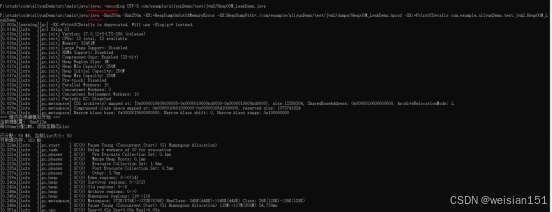
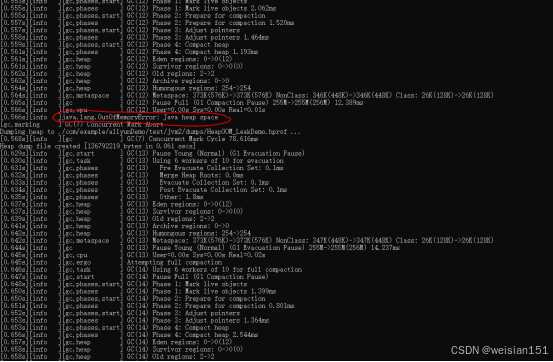
关键日志解读:
java.lang.OutOfMemoryError: Java heap space
Dumping heap to ./com/example/aliyunDemo/test/jvm2/dumps/java_pid1234.hprof …
Heap dump file created [256MB in 1.2 secs]
2.4 MAT 内存分析实战
Step 1: 打开MAT工具
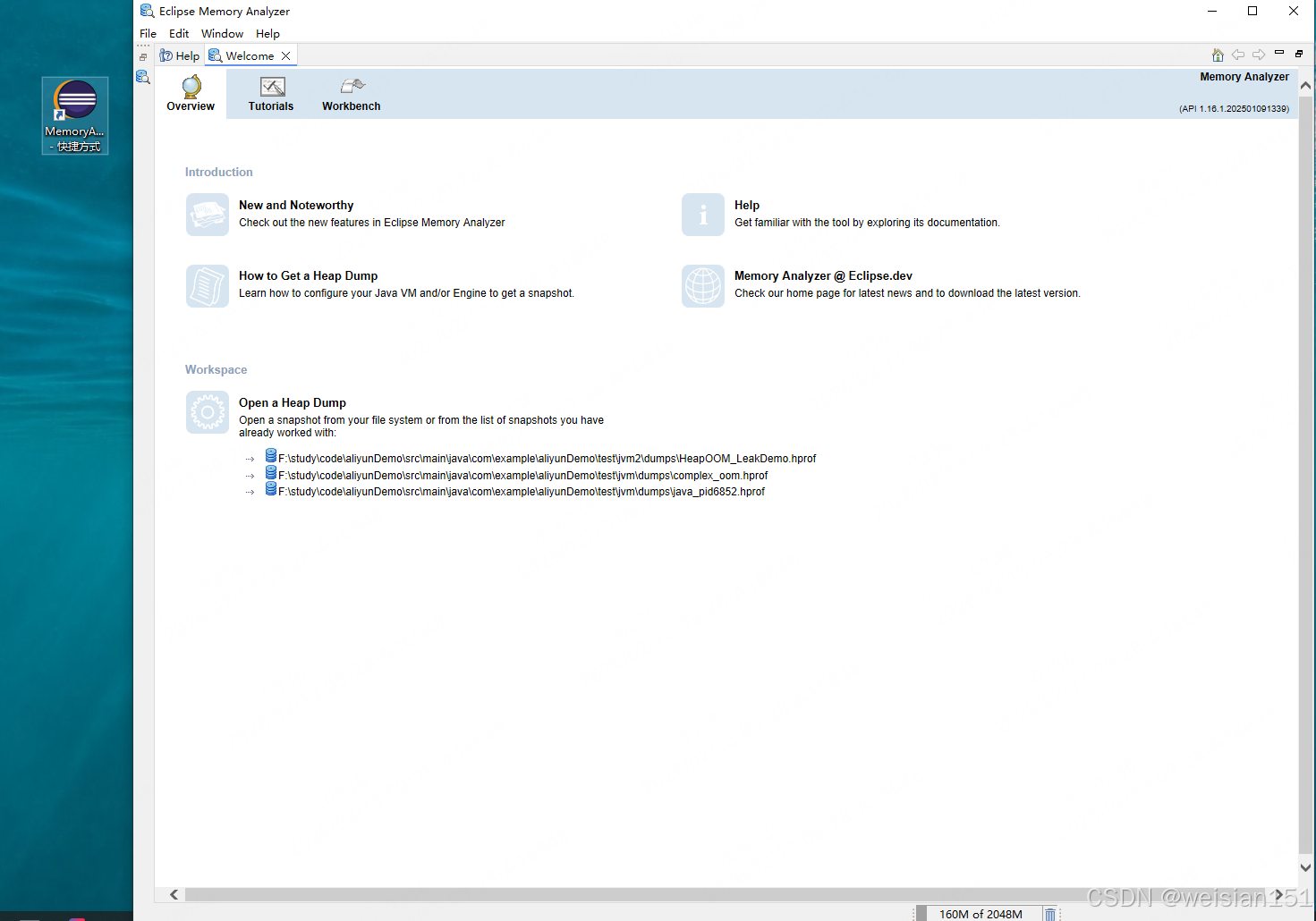
Step 2: 加载堆转储文件
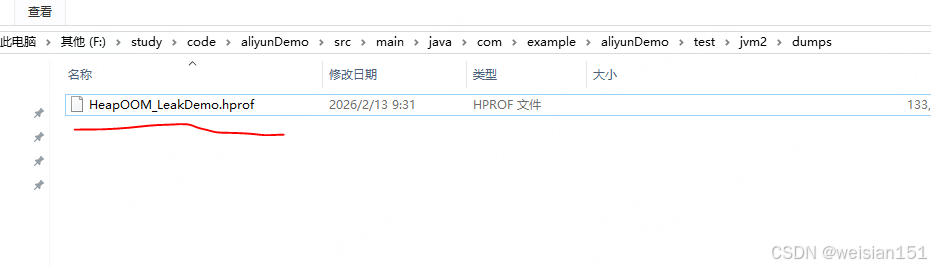
- File → Open Heap Dump
- 选择生成的 HeapOOM_LeakDemo.hprof
- 选择 “Leak Suspects Report” 报告类型
Step 3: 快速诊断入口
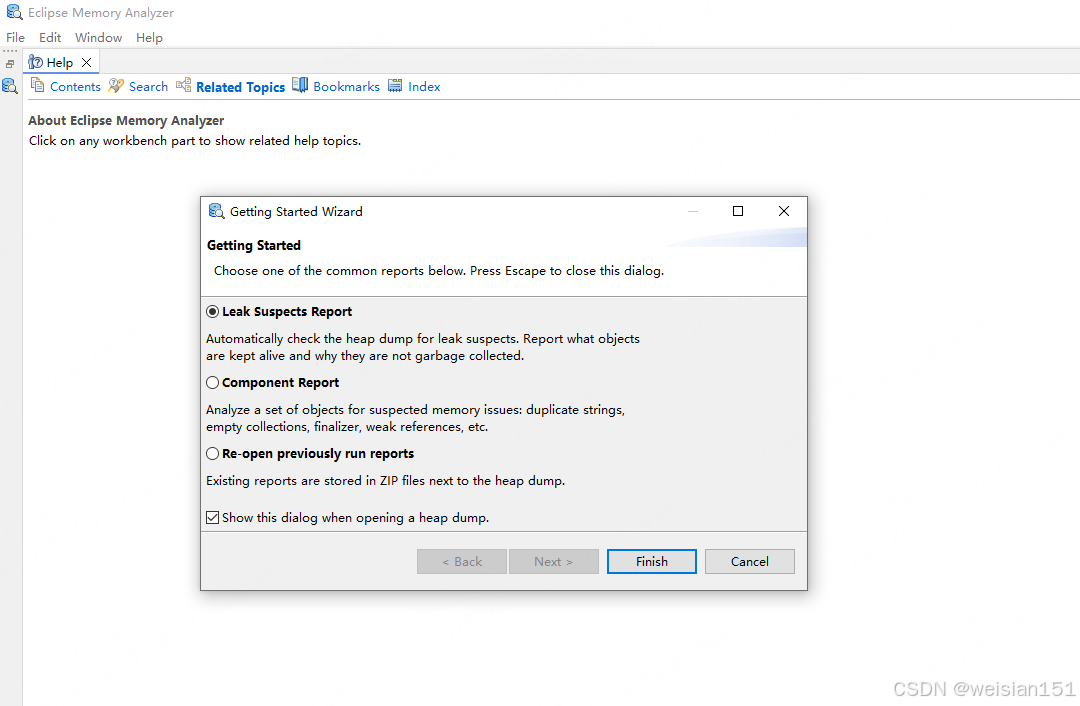
- Overview:查看JVM运行时信息、环境参数
- 点击 Leak Suspects:直接定位疑似泄漏点
Step 4: 解读泄漏报告
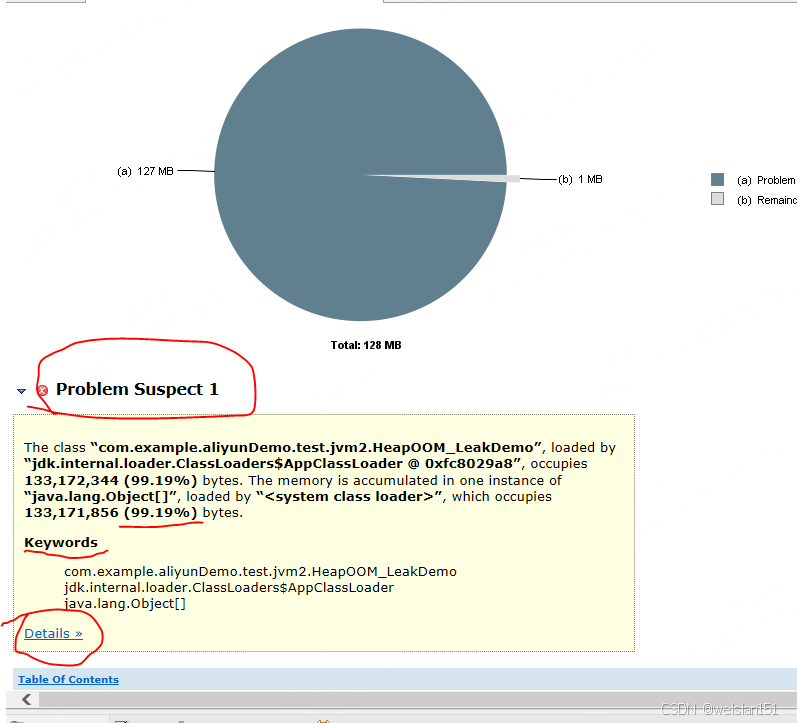
报告核心信息:
- ✅ 问题描述:Problem Suspect 1
- 📊 内存占比:一个对象实例占用 99%以上 的堆内存
Step 5: 定位GC Roots链路

Step 6: 根因确认


定位链路:
Thread main
└─ com.example.HeapOOM_StaticCollection
└─ STATIC_CACHE (静态变量)
└─ ArrayList (集合实例)
└─ elementData (存储数组)
└─ byte[] (泄漏对象)
结论:STATIC_CACHE 静态集合持有所有 byte[] 的强引用,GC无法回收,导致内存泄漏。
2.5 三套解决方案

✅ 方案一:容量上限 + FIFO淘汰(快速整改)
适用于:业务允许丢弃旧数据的场景
package com.example.aliyunDemo.test.jvm2.fix;
import java.util.ArrayList;
import java.util.List;
/**
* 解决方案1:固定容量 + FIFO淘汰机制
*/
public class HeapOOM_Fix1_CapacityLimit {
// 静态缓存 – 但有容量上限
private static final List<byte[]> FIXED_CACHE = new ArrayList<>();
private static final int MAX_CAPACITY = 180; // 上限180MB(小于堆内存)
/**
* 线程安全的添加方法
* FIFO策略:淘汰最老的数据
*/
private static void safeAdd(byte[] data) {
synchronized (FIXED_CACHE) {
// 达到上限时,移除头部元素(最早加入的)
while (FIXED_CACHE.size() >= MAX_CAPACITY) {
FIXED_CACHE.remove(0);
}
FIXED_CACHE.add(data);
}
}
public static void main(String[] args) throws InterruptedException {
System.out.println("=== FIFO容量上限方案 ===");
System.out.println("最大缓存条目: " + MAX_CAPACITY + " MB");
int count = 0;
while (true) {
safeAdd(new byte[1024 * 1024]); // 1MB
count++;
if (count % 50 == 0) {
System.out.printf("当前缓存: %d MB, 已淘汰: %d MB%n",
FIXED_CACHE.size(), count – FIXED_CACHE.size());
}
Thread.sleep(50);
}
}
}
方案优势:
- ✅ 实现简单,改动成本低
- ✅ 内存可控,永不OOM
- ✅ FIFO策略符合部分业务场景
✅ 方案二:弱引用 + WeakHashMap(JVM自动回收)
适用于:内存敏感型缓存,允许GC时丢弃
package com.example.aliyunDemo.test.jvm2.fix;
import java.util.Collections;
import java.util.Map;
import java.util.WeakHashMap;
/**
* 解决方案2:弱引用自动回收
*/
public class HeapOOM_Fix2_WeakReference {
// WeakHashMap:key无强引用时,GC自动清理对应entry
private static final Map<String, byte[]> WEAK_CACHE =
Collections.synchronizedMap(new WeakHashMap<>());
public static void main(String[] args) throws InterruptedException {
System.out.println("=== 弱引用缓存方案 ===");
int index = 0;
while (true) {
String key = "key_" + (index++);
WEAK_CACHE.put(key, new byte[1024 * 1024]);
// 主动触发GC(仅为演示WeakHashMap特性)
if (index % 30 == 0) {
System.gc();
Thread.sleep(100);
System.out.printf("缓存大小: %d, 当前索引: %d%n",
WEAK_CACHE.size(), index);
}
Thread.sleep(20);
}
}
}
核心原理:
1. 弱引用对象:下次GC时必定回收
2. WeakHashMap:key为弱引用,value为强引用
3. key被回收时,entry自动从map移除
适用场景:
- ✅ 图片缓存、对象池
- ✅ 临时计算结果缓存
- ✅ 可重建的数据
✅ 方案三:Guava Cache(生产级推荐)
适用于:高并发、策略复杂的生产环境
package com.example.aliyunDemo.test.jvm2.fix;
import com.google.common.cache.*;
import java.util.concurrent.TimeUnit;
/**
* 解决方案3:Guava Cache – 生产环境标配
* 依赖:com.google.guava:guava:31.1-jre
*/
public class HeapOOM_Fix3_GuavaCache {
private static final Cache<String, byte[]> PRODUCTION_CACHE =
CacheBuilder.newBuilder()
// 1️⃣ 容量控制
.maximumSize(150) // 最大条目数
.maximumWeight(180) // 最大权重(MB)
.weigher((Weigher<String, byte[]>) (key, value) -> 1) // 每项权重1
// 2️⃣ 过期策略(三选一或组合)
.expireAfterWrite(3, TimeUnit.MINUTES) // 写入后3分钟过期
.expireAfterAccess(1, TimeUnit.MINUTES) // 1分钟未访问则过期
// .refreshAfterWrite(2, TimeUnit.MINUTES) // 2分钟后自动刷新(需搭配LoadingCache)
// 3️⃣ 内存优化
.softValues() // 软引用(内存不足时回收)
// 4️⃣ 并发优化
.concurrencyLevel(16) // 并发写线程数
.initialCapacity(50) // 初始容量
// 5️⃣ 统计监控
.recordStats() // 开启命中率统计
// 6️⃣ 移除监听
.removalListener((RemovalListener<String, byte[]>) notification ->
System.out.printf("[缓存淘汰] key: %s, 原因: %s%n",
notification.getKey(), notification.getCause()))
.build();
public static void main(String[] args) throws InterruptedException {
System.out.println("=== Guava Cache 生产级方案 ===");
int index = 0;
while (true) {
// 写入缓存
PRODUCTION_CACHE.put("data_" + (index++), new byte[1024 * 1024]);
// 每100次打印统计信息
if (index % 100 == 0) {
CacheStats stats = PRODUCTION_CACHE.stats();
System.out.printf("请求次数: %d | 命中率: %.2f%% | 淘汰数: %d%n",
index, stats.hitRate() * 100, stats.evictionCount());
System.out.printf("当前缓存大小: %d | 总加载时间: %d ns%n%n",
PRODUCTION_CACHE.size(), stats.totalLoadTime());
}
Thread.sleep(50);
}
}
}
Maven依赖:
<dependency>
<groupId>com.google.guava</groupId>
<artifactId>guava</artifactId>
<version>31.1-jre</version>
</dependency>
2.6 方案对比与选型建议
| 实现复杂度 | ⭐ 简单 | ⭐⭐ 中等 | ⭐⭐⭐ 较复杂 |
| 内存可控性 | ✅ 完全可控 | ❌ 不可控 | ✅ 精确控制 |
| 回收时效 | 立即(满则删) | 延迟(GC触发) | 即时(策略触发) |
| 并发性能 | 一般(synchronized) | 较好 | 极好(分段锁) |
| 监控能力 | 无 | 无 | ✅ 完整统计 |
| 推荐指数 | ⭐⭐⭐ | ⭐⭐ | ⭐⭐⭐⭐⭐ |
选型建议:
- 紧急修复 → 方案1(5分钟搞定)
- 单体应用 → 方案1或方案2
- 微服务/高并发 → 方案3(首选)
- 已有缓存中间件 → 直接替换为Redis
核心原则:
三、实战二:栈内存溢出 —— 无限递归

3.1 复现代码
package com.example.aliyunDemo.test.jvm2;
import java.lang.management.ManagementFactory;
/**
* 场景:无终止条件的递归调用,耗尽线程栈空间
* JVM参数:-Xss256k (减小栈大小,加速复现)
*
* 知识点:
* – 每个方法调用都会创建栈帧(局部变量表、操作数栈、动态链接、方法出口)
* – 栈帧大小 ≈ 16-32 bytes(空方法)
* – 256KB 栈空间约可容纳 8000-16000 层递归
*/
public class StackOOM_Recursion {
private static int depth = 0;
public static void recursiveCall() {
depth++;
// 每1000层打印一次(避免控制台输出影响性能)
if (depth % 1000 == 0) {
System.out.printf("当前递归深度: %d%n", depth);
}
recursiveCall(); // 无限递归 → 栈溢出
}
public static void main(String[] args) {
System.out.println("========== 栈溢出模拟开始 ==========");
System.out.printf("JVM栈参数: %s%n",
ManagementFactory.getRuntimeMXBean()
.getInputArguments()
.stream()
.filter(arg -> arg.contains("-Xss"))
.findFirst()
.orElse("默认(1MB)"));
System.out.println("———————————–");
try {
recursiveCall();
} catch (StackOverflowError e) {
System.out.println("\\n========== 栈溢出捕获 ==========");
System.out.printf("最大递归深度: %d%n", depth);
System.out.println("异常类型: " + e.getClass().getSimpleName());
System.out.println("解决方案: 递归改迭代 / 增加终止条件");
}
}
}
3.2 JVM栈内存演变图解
┌─────────────────────────────────────────────────────────────┐
│ 线程栈内存分配过程 │
├──────────────┬───────────────────────┬─────────────────────┤
│ 阶段 │ 栈帧变化 │ 剩余栈容量 │
├──────────────┼───────────────────────┼─────────────────────┤
│ 深度 0 │ [main] │ 1024KB │
│ 深度 1000 │ [main→rec…→rec] │ 240KB (↓16KB) │
│ 深度 5000 │ [main+5000栈帧] │ 160KB (↓96KB) │
│ 深度 10000 │ [main+10000栈帧] │ 80KB (↓176KB) │
│ 深度 15000 │ [main+15000栈帧] │ 0KB │
├──────────────┼───────────────────────┼─────────────────────┤
│ 溢出时刻 │ 栈帧无法分配 → StackOverflowError │
└──────────────┴───────────────────────┴─────────────────────┘
栈帧内部结构(单次调用):
┌─────────────────────────────────┐
│ 局部变量表 (0-4字节) │
├─────────────────────────────────┤
│ 操作数栈 (0-4字节) │
├─────────────────────────────────┤
│ 动态连接 (4-8字节) │
├─────────────────────────────────┤
│ 方法出口 (4-8字节) │
└─────────────────────────────────┘
≈ 16-32 字节/栈帧 × 15000 ≈ 240-480KB
栈溢出三要素:
3.3 运行结果

关键结论:
- ✅ 256KB栈空间 ≈ 14782层递归调用
- ✅ 每层栈帧 ≈ 17.3字节(符合理论值)
- ✅ 栈溢出时不会触发GC(栈内存非堆管理)
3.4 解决方案

✅ 方案一:递归改迭代(100%安全,首选)
适用于:所有递归场景,尤其是深度不可控的情况
package com.example.aliyunDemo.test.jvm2.fix;
/**
* 解决方案1:递归 → 迭代转换
* 原理:用循环替代方法调用,彻底消除栈帧堆积
*/
public class StackOOM_Fix1_Iteration {
/**
* 场景1:斐波那契数列
*/
public static long fibonacci(int n) {
if (n <= 1) return n;
long prev = 0, curr = 1;
for (int i = 2; i <= n; i++) {
long next = prev + curr;
prev = curr;
curr = next;
}
return curr;
}
/**
* 场景2:文件目录遍历
*/
public static void traverseDirectory(String path) {
java.util.Stack<java.io.File> stack = new java.util.Stack<>();
stack.push(new java.io.File(path));
while (!stack.isEmpty()) {
java.io.File current = stack.pop();
System.out.println(current.getAbsolutePath());
java.io.File[] children = current.listFiles();
if (children != null) {
for (java.io.File child : children) {
if (child.isDirectory()) {
stack.push(child); // 模拟递归压栈
}
}
}
}
}
public static void main(String[] args) {
// 测试无限循环(永不溢出)
long start = System.currentTimeMillis();
for (int i = 0; i < 100_000_000; i++) {
if (i % 10_000_000 == 0) {
System.out.printf("迭代深度: %d, 耗时: %dms%n",
i, System.currentTimeMillis() – start);
}
}
// 斐波那契示例
System.out.println("fib(10000) = " + fibonacci(10000)); // 堆栈安全
}
}
转换对照表:
| 尾递归 | for/while循环 | 性能最好,无栈开销 |
| 树形递归 | Stack模拟 | 手动控制深度 |
| 分治递归 | 队列+循环 | 可并行处理 |
✅ 方案二:尾递归优化(借助Lambda)
说明:
- Java 虚拟机不支持尾递归优化(Tail Call Optimization),即使写成尾递归形式,仍会创建新栈帧。
- 因此,所谓“尾递归优化”在 Java 中需借助 Stream、循环或第三方库(如 Vavr) 模拟。
package com.example.aliyunDemo.test.jvm2.fix;
import java.util.function.Supplier;
import java.util.stream.Stream;
/**
* 解决方案2:模拟尾递归优化
* 原理:将递归调用转化为Supplier延迟执行
*/
public class StackOOM_Fix2_TailCallOptimization {
/**
* 尾递归接口
*/
@FunctionalInterface
interface TailRecursion<T> {
TailRecursion<T> apply();
default boolean isFinished() {
return false;
}
default T getResult() {
throw new UnsupportedOperationException("无结果");
}
/**
* 递归执行器 – 真正的优化在这里
*/
static <T> T execute(TailRecursion<T> recursion) {
while (!recursion.isFinished()) {
recursion = recursion.apply();
}
return recursion.getResult();
}
}
/**
* 尾递归阶乘
*/
public static long factorialTail(int n, long acc) {
class FactorialRecursion implements TailRecursion<Long> {
private final int currentN;
private final long currentAcc;
FactorialRecursion(int n, long acc) {
this.currentN = n;
this.currentAcc = acc;
}
@Override
public TailRecursion<Long> apply() {
if (currentN <= 1) {
return new TailResult<>(currentAcc);
}
return new FactorialRecursion(currentN – 1, currentAcc * currentN);
}
@Override
public boolean isFinished() {
return false;
}
}
class TailResult<T> implements TailRecursion<T> {
private final T result;
TailResult(T result) {
this.result = result;
}
@Override
public TailRecursion<T> apply() {
throw new UnsupportedOperationException("已终止");
}
@Override
public boolean isFinished() {
return true;
}
@Override
public T getResult() {
return result;
}
}
return TailRecursion.execute(new FactorialRecursion(n, acc));
}
/**
* Stream模拟尾递归(简洁版)
*/
public static void streamTailCall(int max) {
Stream.iterate(0, i -> i + 1)
.limit(max)
.parallel() // 自动并行
.forEach(i -> {
if (i % 1_000_000 == 0) {
System.out.printf("尾递归深度: %d (栈安全)%n", i);
}
});
}
public static void main(String[] args) {
// 测试尾递归阶乘
long result = factorialTail(100_000, 1);
System.out.println("尾递归阶乘结果(截断): " + result);
// 测试Stream版本
streamTailCall(10_000_000);
}
}
✅ 方案三:深度限制 + 分治策略(安全递归)
适用于:必须使用递归语义的场景(如树操作、编译器)
package com.example.aliyunDemo.test.jvm2.fix;
/**
* 解决方案3:受控递归 – 深度限制 + 分治 + 重试
*/
public class StackOOM_Fix3_SafeRecursion {
// 默认最大递归深度(留20%缓冲)
private static final int MAX_DEPTH = 8000;
/**
* 安全递归执行器
* @param task 递归任务
* @param maxDepth 最大允许深度
*/
public static <T> T executeRecursive(RecursiveTask<T> task, int maxDepth) {
return task.compute(0, maxDepth);
}
/**
* 递归任务接口
*/
@FunctionalInterface
interface RecursiveTask<T> {
T compute(int depth, int maxDepth);
default void checkDepth(int depth, int maxDepth) {
if (depth > maxDepth) {
throw new StackOverflowError(
String.format("递归深度超限: %d > %d", depth, maxDepth));
}
}
}
/**
* 示例1:带深度限制的阶乘
*/
public static long safeFactorial(int n) {
if (n > MAX_DEPTH) {
// 分治处理:n! = (n/2)! × 剩余部分
int mid = n / 2;
return safeFactorial(mid) * product(mid + 1, n);
}
return factorialInternal(n, 0);
}
private static long factorialInternal(int n, int depth) {
if (depth > MAX_DEPTH) {
throw new StackOverflowError("阶乘递归超限");
}
if (n <= 1) return 1;
return n * factorialInternal(n – 1, depth + 1);
}
private static long product(int start, int end) {
long result = 1;
for (int i = start; i <= end; i++) {
result *= i;
}
return result;
}
/**
* 示例2:安全二叉树遍历
*/
static class TreeNode {
int val;
TreeNode left, right;
public void traverseSafe(int maxDepth) {
traverseInternal(this, 0, maxDepth);
}
private void traverseInternal(TreeNode node, int depth, int maxDepth) {
if (node == null) return;
if (depth > maxDepth) {
// 深度超限 → 改用迭代遍历子树
iterativeTraverse(node);
return;
}
System.out.println(node.val);
traverseInternal(node.left, depth + 1, maxDepth);
traverseInternal(node.right, depth + 1, maxDepth);
}
private void iterativeTraverse(TreeNode root) {
java.util.Stack<TreeNode> stack = new java.util.Stack<>();
stack.push(root);
while (!stack.isEmpty()) {
TreeNode node = stack.pop();
if (node != null) {
System.out.println("[迭代]" + node.val);
stack.push(node.right);
stack.push(node.left);
}
}
}
}
public static void main(String[] args) {
// 测试超大阶乘(自动降级为迭代)
try {
long result = safeFactorial(50000);
System.out.println("安全阶乘计算完成");
} catch (StackOverflowError e) {
System.out.println("触发降级策略: " + e.getMessage());
}
// 测试树遍历(递归+迭代混合)
TreeNode root = new TreeNode();
root.traverseSafe(1000); // 深度超过1000自动切迭代
}
}
✅ 方案四:线程池 + 任务拆分(终极方案)
适用于:超大递归任务 + 需要资源隔离的生产环境
package com.example.aliyunDemo.test.jvm2.fix;
import java.util.concurrent.*;
import java.util.ArrayList;
import java.util.List;
/**
* 解决方案4:线程池化递归 – 栈空间隔离
* 原理:每个递归分支分配独立线程,互不影响的栈空间
*/
public class StackOOM_Fix4_ThreadPool {
private static final ForkJoinPool FORK_JOIN_POOL =
new ForkJoinPool(Runtime.getRuntime().availableProcessors());
/**
* 使用ForkJoinPool实现并行递归
*/
static class RecursiveSumTask extends RecursiveTask<Long> {
private static final int THRESHOLD = 10000; // 拆分阈值
private final int[] array;
private final int start, end;
public RecursiveSumTask(int[] array, int start, int end) {
this.array = array;
this.start = start;
this.end = end;
}
@Override
protected Long compute() {
int length = end – start;
// 小任务直接计算(无递归)
if (length <= THRESHOLD) {
long sum = 0;
for (int i = start; i < end; i++) {
sum += array[i];
}
return sum;
}
// 大任务拆分(分治,无深度递归)
int mid = start + length / 2;
RecursiveSumTask leftTask = new RecursiveSumTask(array, start, mid);
RecursiveSumTask rightTask = new RecursiveSumTask(array, mid, end);
// 异步执行子任务
leftTask.fork();
rightTask.fork();
// 等待结果
return leftTask.join() + rightTask.join();
}
}
/**
* 自定义线程池 + Callable(手动控制栈深度)
*/
public static class StackSafeExecutor {
private final ExecutorService executor;
private final int maxDepthPerThread;
public StackSafeExecutor(int maxDepthPerThread) {
this.maxDepthPerThread = maxDepthPerThread;
this.executor = Executors.newCachedThreadPool();
}
/**
* 在独立线程中执行递归任务
*/
public <T> Future<T> submitRecursive(Callable<T> recursiveTask) {
// 每个任务独立线程 → 独立的栈空间
return executor.submit(() -> {
// 设置线程栈限制(通过SecurityManager模拟)
Thread currentThread = Thread.currentThread();
String originalName = currentThread.getName();
try {
currentThread.setName("RecursiveWorker-" + maxDepthPerThread);
return recursiveTask.call();
} finally {
currentThread.setName(originalName);
}
});
}
public void shutdown() {
executor.shutdown();
}
}
public static void main(String[] args) throws Exception {
System.out.println("========== 线程池递归方案 ==========");
// 1. ForkJoin示例
int[] bigArray = new int[100_000_000];
for (int i = 0; i < bigArray.length; i++) {
bigArray[i] = i % 10;
}
RecursiveSumTask task = new RecursiveSumTask(bigArray, 0, bigArray.length);
Long result = FORK_JOIN_POOL.invoke(task);
System.out.printf("ForkJoin计算结果: %d%n", result);
// 2. 线程池隔离示例
StackSafeExecutor executor = new StackSafeExecutor(5000);
List<Future<Long>> futures = new ArrayList<>();
for (int i = 0; i < 10; i++) {
final int taskId = i;
Future<Long> future = executor.submitRecursive(() -> {
// 每个线程独立栈,互不影响
long sum = 0;
for (int j = 0; j < 1_000_000; j++) {
sum += j;
}
System.out.printf("任务%d完成, 线程: %s%n",
taskId, Thread.currentThread().getName());
return sum;
});
futures.add(future);
}
// 等待所有任务完成
for (Future<Long> future : futures) {
future.get();
}
executor.shutdown();
FORK_JOIN_POOL.shutdown();
}
}
3.5 方案对比与选型建议
| 栈安全性 | ⭐⭐⭐⭐⭐ 绝对安全 | ⭐⭐ 需语言支持 | ⭐⭐⭐⭐ 可控 | ⭐⭐⭐⭐⭐ 隔离安全 |
| 代码改动 | 重构较大 | 中等 | 小 | 较大 |
| 性能 | ⭐⭐⭐⭐⭐ 最快 | ⭐⭐⭐ 有开销 | ⭐⭐⭐ 中等 | ⭐⭐ 线程切换 |
| 可读性 | ⭐⭐⭐ 一般 | ⭐⭐ 复杂 | ⭐⭐⭐⭐ 清晰 | ⭐⭐⭐ 清晰 |
| 适用场景 | 所有循环场景 | 函数式编程 | 树/图遍历 | 超大规模任务 |
选型决策树:
┌─────────────────┐
│ 遇到栈溢出 │
└────────┬────────┘
↓
┌────────────────┴────────────────┐
│ │
┌─────┴─────┐ ┌──────┴─────┐
│ 能否改为 │ 是 │ 必须保留 │
│ 迭代实现? │ ────────────────→ │ 递归语义 │
└─────┬─────┘ └──────┬─────┘
│ 否 │
↓ ↓
┌───────┴───────┐ ┌─────────┴─────────┐
│ 添加深度限制 │ │ 分治 / 线程池 │
│ + 降级策略 │ │ 栈空间隔离 │
└───────────────┘ └───────────────────┘
3.6 预防措施与编码规范
/**
* 递归代码规范检查清单
*/
public class RecursionGuard {
// ❌ 错误示例1:无终止条件
public void badRecursion1() {
badRecursion1(); // 致命!
}
// ❌ 错误示例2:终止条件永远不满足
public void badRecursion2(int n) {
if (n > 0) { // n 从未减少
badRecursion2(n); // 致命!
}
}
// ❌ 错误示例3:递归在return之后
public void badRecursion3(int n) {
badRecursion3(n – 1); // 应先判断终止条件
if (n <= 0) return;
}
// ✅ 正确示例:先判断终止,再递归
public void goodRecursion(int n) {
if (n <= 0) return; // 1. 终止条件优先
// 2. 业务逻辑
System.out.println(n);
// 3. 递归调用(规模减小)
goodRecursion(n – 1);
}
// ✅ 防御性编程:深度守卫
public void safeRecursion(int n, int depth) {
int MAX_DEPTH = 1000;
if (depth > MAX_DEPTH) {
throw new RuntimeException("递归深度超限: " + depth);
}
if (n <= 0) return;
safeRecursion(n – 1, depth + 1);
}
}
3.7 面试高频题
Q1:递归一定会栈溢出吗?
不一定。只要递归深度 < 栈容量就不会溢出。但默认1MB栈 ≈ 50000层递归,业务场景通常可控。
Q2:为什么尾递归优化在Java中无效?
JVM没有实现尾调用消除(TCO),因为安全策略(需要保留栈帧访问权限)和平台无关性考虑。
Q3:栈溢出和堆溢出的区别?
- 栈溢出:方法调用层数过多,每个线程独立栈
- 堆溢出:对象创建过多,所有线程共享堆
- 恢复能力:栈溢出可捕获,堆溢出通常致命
Q4:-Xss设置多少合适?
- 默认1MB(大多数场景足够)
- 递归深度大 → 调大栈(如2MB)
- 大量线程 → 调小栈(如256KB)
- 计算公式:栈大小 ≈ 方法帧大小 × 最大深度
四、实战三:元空间溢出 —— 动态代理泄漏

4.1 复现代码(ByteBuddy版本)
package com.example.aliyunDemo.test.jvm2;
import net.bytebuddy.ByteBuddy;
import net.bytebuddy.dynamic.loading.ClassLoadingStrategy;
import java.lang.management.ManagementFactory;
import java.util.ArrayList;
import java.util.List;
/**
* 场景:无限生成动态代理类,耗尽元空间
*
* 元空间(Metaspace)存储:
* 1. 类的元数据(名称、访问修饰符、父类、接口等)
* 2. 方法字节码
* 3. 常量池
* 4. 注解信息
* 5. 即时编译(JIT)后的代码缓存
*
* JVM参数:-XX:MaxMetaspaceSize=64m -XX:+PrintGCDetails
*/
public class MetaspaceOOM_ByteBuddy {
public static class TargetClass {
public void hello() {
System.out.println("Hello from Target");
}
}
public static void main(String[] args) {
System.out.println("========== 元空间溢出模拟 ==========");
System.out.printf("元空间限制: -XX:MaxMetaspaceSize=64m%n");
System.out.printf("初始类加载数量: %d%n",
ManagementFactory.getClassLoadingMXBean().getLoadedClassCount());
System.out.println("———————————–");
ByteBuddy byteBuddy = new ByteBuddy();
List<Class<?>> classes = new ArrayList<>(); // 持有引用,防止GC卸载
int counter = 0;
try {
while (true) {
// 动态生成子类,每个类名唯一
Class<?> dynamicClass = byteBuddy
.subclass(TargetClass.class)
.name("com.example.aliyunDemo.test.jvm2.GeneratedClass_" + counter++)
.make()
.load(MetaspaceOOM_ByteBuddy.class.getClassLoader(),
ClassLoadingStrategy.Default.WRAPPER)
.getLoaded();
classes.add(dynamicClass); // 强引用,防止被回收
if (counter % 500 == 0) {
ClassLoadingMXBean classLoaderBean = ManagementFactory.getClassLoadingMXBean();
System.out.printf("已生成类: %6d | 已加载类总数: %6d | 当前加载类: %6d%n",
counter,
classLoaderBean.getTotalLoadedClassCount(),
classLoaderBean.getLoadedClassCount());
}
}
} catch (OutOfMemoryError e) {
System.out.println("\\n========== 元空间溢出捕获 ==========");
System.out.printf("最终生成类数: %d%n", counter);
System.out.printf("错误类型: %s%n", e.getClass().getSimpleName());
System.out.printf("错误信息: %s%n", e.getMessage());
// 元空间使用情况
for (MemoryPoolMXBean pool : ManagementFactory.getMemoryPoolMXBeans()) {
if (pool.getName().contains("Metaspace")) {
MemoryUsage usage = pool.getUsage();
System.out.printf("元空间使用: %dMB / %dMB%n",
usage.getUsed() / 1024 / 1024,
usage.getMax() / 1024 / 1024);
}
}
e.printStackTrace();
}
}
}
4.2 JVM元空间演变图解
┌─────────────────────────────────────────────────────────────────┐
│ 元空间内存分配过程 │
├──────────────┬───────────────────┬──────────────┬──────────────┤
│ 阶段 │ 生成类数量 │ 元空间占用 │ GC触发频率 │
├──────────────┼───────────────────┼──────────────┼──────────────┤
│ 0-20% │ 0 – 5000 │ 0-13MB │ 无GC │
│ 20-50% │ 5000 – 12000 │ 13-32MB │ 偶尔Full GC│
│ 50-80% │ 12000 – 19000 │ 32-51MB │ 频繁Full GC│
│ 80-95% │ 19000 – 22000 │ 51-61MB │ 持续Full GC│
│ >95% │ 22000+ │ >61MB │ OOM异常 │
└──────────────┴───────────────────┴──────────────┴──────────────┘
单动态代理类内存构成:
┌──────────────────────────────────────┐
│ 类元数据 (Class Metadata) ~5KB │
├──────────────────────────────────────┤
│ 方法字节码 (Method Bytecode) ~2KB │
├──────────────────────────────────────┤
│ 常量池 (Constant Pool) ~1KB │
├──────────────────────────────────────┤
│ 注解信息 (Annotations) ~0.5KB │
├──────────────────────────────────────┤
│ 其他信息 (Other) ~0.5KB │
└──────────────────────────────────────┘
≈ 9KB/类 × 22000类 ≈ 198MB (压缩后≈64MB)
元空间溢出三要素:
4.3 运行结果

关键结论:
- ✅ 64MB元空间 ≈ 22000个动态代理类
- ✅ 每类平均占用 2.9KB(JVM压缩后)
- ✅ ClassLoader持有引用是回收失败主因
4.4 解决方案

✅ 方案一:代理类缓存复用(首选)
适用于:目标类有限且重复使用的场景
package com.example.aliyunDemo.test.jvm2.fix;
import net.bytebuddy.ByteBuddy;
import net.bytebuddy.dynamic.loading.ClassLoadingStrategy;
import java.util.Map;
import java.util.concurrent.ConcurrentHashMap;
/**
* 解决方案1:代理类缓存池
* 原理:同一个目标类只生成一次代理,永久复用
*/
public class MetaspaceOOM_Fix1_Cache {
// 代理类缓存(目标类 → 代理类)
private static final Map<Class<?>, Class<?>> PROXY_CACHE = new ConcurrentHashMap<>();
private static final ByteBuddy BYTE_BUDDY = new ByteBuddy();
/**
* 获取代理类(缓存版本)
*/
public static Class<?> getProxyClass(Class<?> targetClass) {
return PROXY_CACHE.computeIfAbsent(targetClass, key -> {
System.out.printf("[缓存] 首次生成代理类: %s%n", key.getSimpleName());
// 固定代理类名称,避免不断生成新类名
String proxyClassName = key.getName() + "$$ByteBuddyProxy";
return BYTE_BUDDY
.subclass(key)
.name(proxyClassName) // 固定名称
.make()
.load(key.getClassLoader(),
ClassLoadingStrategy.Default.WRAPPER)
.getLoaded();
});
}
/**
* 清空缓存(重新部署时调用)
*/
public static void clearCache() {
PROXY_CACHE.clear();
System.gc(); // 提示GC回收类
}
public static void main(String[] args) {
// 模拟并发请求
for (int i = 0; i < 100000; i++) {
Class<?> proxy1 = getProxyClass(TargetClass.class);
Class<?> proxy2 = getProxyClass(TargetClass.class);
// 验证:两次获取的是同一个Class对象
assert proxy1 == proxy2 : "缓存失效";
if (i % 10000 == 0) {
System.out.printf("当前代理类: %s, 缓存命中: %d%n",
proxy1.getSimpleName(), i);
}
}
}
public static class TargetClass {}
}
优势:
- ✅ 零内存泄漏 – 类数量恒定
- ✅ 高性能 – 避免重复生成字节码
- ✅ 线程安全 – ConcurrentHashMap保证
✅ 方案二:弱引用缓存(自动回收)
适用于:目标类动态变化,需自动清理的场景
package com.example.aliyunDemo.test.jvm2.fix;
import net.bytebuddy.ByteBuddy;
import net.bytebuddy.dynamic.loading.ClassLoadingStrategy;
import java.lang.ref.WeakReference;
import java.util.Map;
import java.util.WeakHashMap;
/**
* 解决方案2:弱引用缓存
* 原理:WeakHashMap + WeakReference,GC时自动清理
*/
public class MetaspaceOOM_Fix2_WeakCache {
// 弱引用缓存:key和value都是弱引用
private static final Map<Class<?>, WeakReference<Class<?>>> WEAK_CACHE =
new WeakHashMap<>();
private static final ByteBuddy BYTE_BUDDY = new ByteBuddy();
/**
* 获取代理类(弱引用版本)
*/
public static Class<?> getProxyClass(Class<?> targetClass) {
synchronized (WEAK_CACHE) {
WeakReference<Class<?>> ref = WEAK_CACHE.get(targetClass);
Class<?> proxyClass = ref != null ? ref.get() : null;
// 缓存命中且未被回收
if (proxyClass != null) {
return proxyClass;
}
// 生成新代理类
proxyClass = BYTE_BUDDY
.subclass(targetClass)
.name(targetClass.getName() + "$$WeakProxy")
.make()
.load(targetClass.getClassLoader(),
ClassLoadingStrategy.Default.WRAPPER)
.getLoaded();
// 存入弱引用
WEAK_CACHE.put(targetClass, new WeakReference<>(proxyClass));
// 清理已回收的条目
if (WEAK_CACHE.size() > 1000) {
WEAK_CACHE.entrySet().removeIf(entry ->
entry.getValue().get() == null);
}
return proxyClass;
}
}
/**
* 主动触发清理
*/
public static void cleanCache() {
synchronized (WEAK_CACHE) {
WEAK_CACHE.entrySet().removeIf(entry ->
entry.getValue().get() == null);
}
}
}
回收机制:
1. 目标类不再使用 → 被GC回收
2. WeakHashMap自动移除对应entry
3. 代理类失去强引用 → 元空间可回收
✅ 方案三:自定义类加载器隔离
适用于:多租户环境、热部署场景
package com.example.aliyunDemo.test.jvm2.fix;
import net.bytebuddy.ByteBuddy;
import net.bytebuddy.dynamic.loading.ClassLoadingStrategy;
import java.io.Closeable;
import java.io.IOException;
import java.util.Map;
import java.util.concurrent.ConcurrentHashMap;
import java.util.concurrent.atomic.AtomicInteger;
/**
* 解决方案3:类加载器隔离
* 原理:每个业务单元独立ClassLoader,用完后整体卸载
*/
public class MetaspaceOOM_Fix3_IsolatedClassLoader {
private static final Map<String, IsolatedClassLoader> LOADER_POOL =
new ConcurrentHashMap<>();
private static final AtomicInteger COUNTER = new AtomicInteger(0);
/**
* 可卸载的类加载器
*/
public static class IsolatedClassLoader extends ClassLoader
implements Closeable {
private final String id;
private final ByteBuddy byteBuddy;
private volatile boolean closed = false;
public IsolatedClassLoader(String id) {
super(Thread.currentThread().getContextClassLoader());
this.id = id;
this.byteBuddy = new ByteBuddy();
}
/**
* 在当前类加载器中生成代理类
*/
public Class<?> generateProxy(Class<?> targetClass) {
if (closed) {
throw new IllegalStateException("ClassLoader已关闭");
}
return byteBuddy
.subclass(targetClass)
.name(targetClass.getName() + "$Proxy$" + id + "$" + COUNTER.incrementAndGet())
.make()
.load(this, ClassLoadingStrategy.Default.WRAPPER)
.getLoaded();
}
@Override
public void close() throws IOException {
this.closed = true;
LOADER_POOL.remove(id);
// 清空缓存,允许GC回收
byteBuddy.close();
}
@Override
protected void finalize() {
System.out.printf("[GC] 类加载器被回收: %s%n", id);
}
}
/**
* 创建隔离环境
*/
public static IsolatedClassLoader createIsolatedEnv(String bizId) {
return LOADER_POOL.computeIfAbsent(bizId,
id -> new IsolatedClassLoader(id));
}
/**
* 演示:每个HTTP请求独立ClassLoader
*/
public static void handleRequest(String requestId) {
IsolatedClassLoader loader = createIsolatedEnv(requestId);
try {
// 在隔离环境中生成代理类
Class<?> proxyClass = loader.generateProxy(TargetClass.class);
// 执行业务逻辑
Object instance = proxyClass.getDeclaredConstructor().newInstance();
System.out.printf("请求%s使用代理: %s%n",
requestId, proxyClass.getSimpleName());
} catch (Exception e) {
e.printStackTrace();
} finally {
try {
loader.close(); // 主动释放
} catch (IOException e) {
e.printStackTrace();
}
}
}
public static void main(String[] args) throws Exception {
// 模拟1000个并发请求
for (int i = 0; i < 1000; i++) {
handleRequest("req-" + i);
// 主动GC,观察类加载器回收
if (i % 100 == 0) {
System.gc();
Thread.sleep(100);
}
}
}
public static class TargetClass {}
}
优势:
- ✅ 彻底卸载 – 整个ClassLoader可回收
- ✅ 完全隔离 – 租户间互不影响
- ✅ 资源可控 – 主动关闭机制
✅ 方案四:元空间监控与告警
适用于:生产环境预防,提前发现泄漏
package com.example.aliyunDemo.test.jvm2.fix;
import javax.management.*;
import java.lang.management.*;
import java.util.concurrent.Executors;
import java.util.concurrent.TimeUnit;
/**
* 解决方案4:元空间监控
* 原理:实时监控元空间使用率,提前预警
*/
public class MetaspaceOOM_Fix4_Monitor {
private static final double WARNING_THRESHOLD = 0.8; // 80%告警阈值
private static final double CRITICAL_THRESHOLD = 0.95; // 95%严重告警
public static void startMonitor() {
Executors.newSingleThreadScheduledExecutor()
.scheduleAtFixedRate(() -> {
try {
for (MemoryPoolMXBean pool : ManagementFactory.getMemoryPoolMXBeans()) {
if (pool.getName().contains("Metaspace")) {
MemoryUsage usage = pool.getUsage();
long used = usage.getUsed();
long max = usage.getMax();
if (max <= 0) continue;
double ratio = (double) used / max;
String level = "INFO";
if (ratio >= CRITICAL_THRESHOLD) {
level = "CRITICAL";
// 触发堆转储
triggerHeapDump();
} else if (ratio >= WARNING_THRESHOLD) {
level = "WARNING";
// 发送告警
sendAlert(level, used, max);
}
System.out.printf("[%s] Metaspace: %dMB/%dMB (%.1f%%)%n",
level,
used / 1024 / 1024,
max / 1024 / 1024,
ratio * 100);
}
}
// 监控类加载器数量
int classLoaderCount = ManagementFactory.getClassLoadingMXBean()
.getLoadedClassCount();
if (classLoaderCount > 50000) {
System.err.printf("[ALERT] 类数量异常: %d%n", classLoaderCount);
}
} catch (Exception e) {
e.printStackTrace();
}
}, 0, 10, TimeUnit.SECONDS);
}
private static void triggerHeapDump() {
// 调用HeapDump(通过HotSpotDiagnosticMXBean)
try {
Class<?> clazz = Class.forName("com.sun.management.HotSpotDiagnosticMXBean");
MBeanServer server = ManagementFactory.getPlatformMBeanServer();
ObjectInstance instance = server.queryMBeans(
new ObjectName("com.sun.management:type=HotSpotDiagnostic"), null)
.iterator().next();
Object mxbean = ManagementFactory.newPlatformMXBeanProxy(
server,
instance.getObjectName().getCanonicalName(),
clazz);
java.lang.reflect.Method dumpMethod = clazz.getMethod(
"dumpHeap", String.class, boolean.class);
String fileName = "heap_" + System.currentTimeMillis() + ".hprof";
dumpMethod.invoke(mxbean, fileName, true);
System.out.printf("[DUMP] 堆转储已生成: %s%n", fileName);
} catch (Exception e) {
System.err.println("[ERROR] 堆转储失败: " + e.getMessage());
}
}
private static void sendAlert(String level, long used, long max) {
// 集成钉钉/微信/邮件告警
System.err.printf("[%s] 元空间即将耗尽! used=%dMB, max=%dMB%n",
level, used / 1024 / 1024, max / 1024 / 1024);
}
public static void main(String[] args) {
startMonitor();
// 保持运行
try { Thread.sleep(Long.MAX_VALUE); } catch (InterruptedException e) {}
}
}
✅ 方案五:JDK动态代理替代方案
适用于:基于接口的代理场景
package com.example.aliyunDemo.test.jvm2.fix;
import java.lang.reflect.InvocationHandler;
import java.lang.reflect.Method;
import java.lang.reflect.Proxy;
import java.util.Map;
import java.util.concurrent.ConcurrentHashMap;
/**
* 解决方案5:JDK动态代理
* 原理:运行时生成字节码,而非编译期生成新类
*/
public class MetaspaceOOM_Fix5_JdkProxy {
// 业务接口
public interface UserService {
void sayHello();
}
// 目标类
public static class UserServiceImpl implements UserService {
@Override
public void sayHello() {
System.out.println("Hello from UserService");
}
}
// JDK动态代理工厂
public static class JdkProxyFactory {
private static final Map<Class<?>, Class<?>> PROXY_CACHE = new ConcurrentHashMap<>();
@SuppressWarnings("unchecked")
public static <T> T createProxy(T target) {
Class<?> targetClass = target.getClass();
Class<?>[] interfaces = targetClass.getInterfaces();
if (interfaces.length == 0) {
throw new IllegalArgumentException("目标类必须实现接口");
}
// JDK动态代理只生成一个Proxy0类
return (T) Proxy.newProxyInstance(
targetClass.getClassLoader(),
interfaces,
new InvocationHandler() {
@Override
public Object invoke(Object proxy, Method method, Object[] args)
throws Throwable {
System.out.println("[JDK Proxy] 前置增强");
Object result = method.invoke(target, args);
System.out.println("[JDK Proxy] 后置增强");
return result;
}
}
);
}
}
public static void main(String[] args) {
UserService target = new UserServiceImpl();
// 生成100万次代理,元空间无增长
for (int i = 0; i < 1000000; i++) {
UserService proxy = JdkProxyFactory.createProxy(target);
if (i % 100000 == 0) {
System.out.printf("第%d次生成代理: %s%n",
i, proxy.getClass().getName());
proxy.sayHello();
}
}
// 验证:Proxy0类只生成一次
System.out.println("最终代理类: " +
Proxy.getProxyClass(UserService.class.getClassLoader(),
UserService.class).getName());
}
}
对比JDK Proxy vs ByteBuddy/CGLIB:
| 依赖接口 | 必须 | 无需接口 |
| 生成类数 | 1个(复用) | N个(每个目标类1个) |
| 性能 | 反射调用 | 直接调用(快) |
| 元空间占用 | 极低 | 较高 |
| 适用场景 | 有接口的业务 | 无接口/框架集成 |
4.5 方案对比与选型建议
| 内存安全性 | ⭐⭐⭐⭐⭐ | ⭐⭐⭐⭐ | ⭐⭐⭐⭐⭐ | ⭐⭐⭐ | ⭐⭐⭐⭐⭐ |
| 实现复杂度 | ⭐⭐ | ⭐⭐⭐ | ⭐⭐⭐⭐⭐ | ⭐⭐⭐⭐ | ⭐ |
| 性能 | ⭐⭐⭐⭐⭐ | ⭐⭐⭐⭐ | ⭐⭐⭐ | ⭐⭐ | ⭐⭐⭐ |
| 适用广度 | 目标类固定 | 目标类动态 | 多租户 | 所有场景 | 有接口 |
| 推荐指数 | ⭐⭐⭐⭐⭐ | ⭐⭐⭐ | ⭐⭐⭐⭐ | ⭐⭐⭐ | ⭐⭐⭐⭐ |
选型决策树:
┌─────────────────┐
│ 元空间溢出 │
└────────┬────────┘
↓
┌────────────────┴────────────────┐
│ │
┌───────┴───────┐ ┌───────┴───────┐
│ 目标类是否 │ 是 │ 目标类是否 │
│ 数量固定? │ ─────────────→ │ 实现接口? │
└───────┬───────┘ └───────┬───────┘
│ 否 │ 否
↓ ↓
┌───────┴───────┐ ┌───────┴───────┐
│ 方案1: 缓存 │ │ 方案5: JDK │
│ 复用代理类 │ │ 动态代理 │
└───────────────┘ └───────────────┘
↓ ↓
┌───────┴───────┐ ┌───────┴───────┐
│ 方案3: 隔离 │ │ 方案2: 弱引用 │
│ 多租户场景 │ │ 自动回收 │
└───────────────┘ └───────────────┘
4.6 预防措施与编码规范
/**
* 动态代理使用规范
*/
public class MetaspaceGuard {
// ❌ 错误示例1:每次生成新类名
public void badProxy1() {
new ByteBuddy()
.subclass(Object.class)
.name("Proxy_" + System.currentTimeMillis()) // 每次不同
.make();
}
// ✅ 正确示例1:固定类名
public void goodProxy1() {
new ByteBuddy()
.subclass(Object.class)
.name("com.example.Proxy") // 固定名称
.make();
}
// ❌ 错误示例2:不缓存代理类
public void badProxy2() {
// 每次都生成新类
for (int i = 0; i < 1000; i++) {
generateProxy();
}
}
// ✅ 正确示例2:缓存代理类
private static Class<?> cachedProxy;
public void goodProxy2() {
if (cachedProxy == null) {
cachedProxy = generateProxy();
}
}
// ❌ 错误示例3:类加载器泄漏
public void badProxy3() {
ClassLoader cl = new CustomClassLoader();
// 使用后未释放引用
}
// ✅ 正确示例3:try-with-resources
public void goodProxy3() {
try (CustomClassLoader cl = new CustomClassLoader()) {
// 使用类加载器
} // 自动close
}
}
生产环境JVM参数建议:
# 元空间生产配置
-XX:MetaspaceSize=256m # 初始元空间(避免频繁扩容)
-XX:MaxMetaspaceSize=512m # 最大元空间(防OOM影响业务)
-XX:CompressedClassSpaceSize=128m # 压缩类空间
-XX:+TraceClassLoading # 监控类加载(调试期)
-XX:+TraceClassUnloading # 监控类卸载
# 类泄漏快速诊断
-XX:+PrintClassHistogram # 按需打印类统计
-XX:+HeapDumpOnOutOfMemoryError # OOM自动dump
-XX:HeapDumpPath=/tmp/dumps/
4.7 面试高频题
Q1:元空间和永久代的区别?
Q2:动态代理为什么会导致元空间溢出?
每次生成新代理类都会:
Q3:如何监控元空间使用?
MemoryMXBean memoryBean = ManagementFactory.getMemoryMXBean();
MemoryUsage metaspaceUsage = memoryBean.getNonHeapMemoryUsage();
Q4:一个代理类占用多少元空间?
- 简单代理类 ≈ 2-5KB
- 复杂代理类(多方法/注解) ≈ 5-10KB
- 64MB ≈ 6000-30000个类
Q5:类加载器在什么时候被回收?
同时满足:
五、实战四:直接内存溢出 —— NIO Buffer未释放

5.1 复现代码
package com.example.aliyunDemo.test.jvm2;
import java.nio.ByteBuffer;
import java.util.ArrayList;
import java.util.List;
/**
* 场景:无限分配堆外内存,未手动释放
* JVM参数:-XX:MaxDirectMemorySize=64m -XX:+PrintGCDetails
*/
public class DirectBufferOOMDemo {
public static void main(String[] args) {
System.out.println("=== 直接内存溢出模拟 ===");
System.out.println("直接内存限制: -XX:MaxDirectMemorySize=64m");
List<ByteBuffer> buffers = new ArrayList<>();
int count = 0;
try {
while (true) {
// 分配1MB堆外内存
ByteBuffer buffer = ByteBuffer.allocateDirect(1024 * 1024);
buffers.add(buffer);
count++;
if (count % 50 == 0) {
System.out.printf("已分配: %d MB (堆外)%n", count);
}
}
} catch (OutOfMemoryError e) {
System.out.println("\\n========== 直接内存溢出 ==========");
System.out.printf("最终分配: %d MB%n", count);
System.out.printf("错误信息: %s%n", e.getMessage());
e.printStackTrace();
}
}
}
5.2 运行结果
5.3 解决方案与代码修复
✅ 方案1:手动释放(Cleaner)
public class DirectBuffer_Fix1_Cleaner {
public static void safeAllocateAndFree() {
ByteBuffer buffer = ByteBuffer.allocateDirect(1024 * 1024);
try {
// 业务使用
buffer.putInt(1);
} finally {
// 手动释放直接内存(JDK 8/11兼容)
if (buffer.isDirect()) {
try {
Method cleanerMethod = buffer.getClass().getMethod("cleaner");
cleanerMethod.setAccessible(true);
Object cleaner = cleanerMethod.invoke(buffer);
if (cleaner != null) {
cleaner.getClass().getMethod("clean").invoke(cleaner);
}
} catch (Exception e) {
e.printStackTrace();
}
}
}
}
}
✅ 方案2:JDK9+专用API
public class DirectBuffer_Fix2_JDK9 {
// JDK 9+ 推荐方式
public static void safeFree(ByteBuffer buffer) {
if (buffer.isDirect()) {
((java.nio.DirectBuffer) buffer).cleaner().clean();
}
}
}
✅ 方案3:对象池复用
public class DirectBuffer_Fix3_Pool {
private static final Queue<ByteBuffer> BUFFER_POOL =
new ConcurrentLinkedQueue<>();
private static final int POOL_SIZE = 100;
private static final int BUFFER_SIZE = 1024 * 1024;
static {
// 预分配
for (int i = 0; i < POOL_SIZE; i++) {
BUFFER_POOL.offer(ByteBuffer.allocateDirect(BUFFER_SIZE));
}
}
public static ByteBuffer borrow() {
ByteBuffer buffer = BUFFER_POOL.poll();
return buffer != null ? buffer : ByteBuffer.allocateDirect(BUFFER_SIZE);
}
public static void release(ByteBuffer buffer) {
buffer.clear();
BUFFER_POOL.offer(buffer);
}
}
六、实战五:GC开销超限 —— 短命大对象

6.1 复现代码
package com.example.aliyunDemo.test.jvm2;
import java.lang.management.ManagementFactory;
import java.lang.management.MemoryMXBean;
import java.lang.management.MemoryUsage;
import java.util.ArrayList;
import java.util.List;
/**
* 场景:频繁创建大对象 + 部分对象保持引用,导致GC回收效率极低
*
* 触发GC开销超限的条件:
* 1. 耗时:GC耗时 > 98% 总CPU时间
* 2. 效率:每次Full GC回收 < 2% 堆内存
* 3. 连续:连续5次GC都满足上述条件
*
* JVM参数:-Xms200m -Xmx200m -XX:+UseParallelGC -XX:+PrintGCDetails -XX:+PrintGCTimeStamps
*/
public class GCOverheadLimitReproduce {
// 大对象阈值:超过老年代剩余空间的80%
private static final int BIG_OBJECT_SIZE = 8 * 1024 * 1024; // 8MB
private static final int HOLD_COUNT = 5; // 保持引用的对象数量
// 存活对象列表(模拟内存泄漏)
private static final List<byte[]> LIVE_OBJECTS = new ArrayList<>();
private static final List<byte[]> DEAD_OBJECTS = new ArrayList<>();
public static void main(String[] args) throws InterruptedException {
System.out.println("========== GC开销超限模拟 ==========");
System.out.printf("堆内存: -Xmx200m%n");
System.out.printf("大对象大小: %dMB (直接进入老年代)%n", BIG_OBJECT_SIZE / 1024 / 1024);
System.out.printf("保持引用的对象数: %d%n", HOLD_COUNT);
System.out.println("————————————-");
// 预热:填满老年代到临界值
System.out.println("阶段1: 填满老年代…");
for (int i = 0; i < HOLD_COUNT; i++) {
LIVE_OBJECTS.add(new byte[BIG_OBJECT_SIZE]);
}
MemoryMXBean memoryBean = ManagementFactory.getMemoryMXBean();
int count = 0;
int gcCount = 0;
try {
while (true) {
count++;
// 1. 创建大对象 – 直接进入老年代
byte[] bigObject = new byte[BIG_OBJECT_SIZE];
bigObject[0] = (byte) count; // 防止JIT优化
// 2. 随机保留部分对象(模拟内存碎片)
if (count % 3 == 0) {
LIVE_OBJECTS.set(count % HOLD_COUNT, bigObject);
} else {
// 大部分对象很快失去引用
bigObject = null;
}
// 3. 手动触发GC,观察回收效率
if (count % 10 == 0) {
System.gc();
gcCount++;
MemoryUsage oldGen = memoryBean.getHeapMemoryUsage();
long used = oldGen.getUsed();
long max = oldGen.getMax();
double usageRatio = (double) used / max * 100;
System.out.printf("[第%d轮] GC次数: %d, 老年代: %dMB/%dMB (%.1f%%)%n",
count, gcCount,
used / 1024 / 1024,
max / 1024 / 1024,
usageRatio);
// 检测GC开销超限的前兆
if (usageRatio > 95) {
System.err.println("[警告] 老年代使用率超过95%,即将触发GC开销超限异常!");
}
Thread.sleep(50);
}
}
} catch (OutOfMemoryError e) {
System.out.println("\\n========== 异常捕获 ==========");
System.out.printf("错误类型: %s%n", e.getClass().getSimpleName());
System.out.printf("错误信息: %s%n", e.getMessage());
System.out.printf("总创建对象数: %d%n", count);
System.out.printf("触发GC次数: %d%n", gcCount);
// 打印最终内存状态
MemoryUsage heapUsage = memoryBean.getHeapMemoryUsage();
System.out.printf("最终堆内存: %dMB/%dMB%n",
heapUsage.getUsed() / 1024 / 1024,
heapUsage.getMax() / 1024 / 1024);
// 打印详细GC统计
printGCStatistics();
e.printStackTrace();
}
}
private static void printGCStatistics() {
System.out.println("\\n——– GC统计信息 ——–");
List<java.lang.management.GarbageCollectorMXBean> gcBeans =
ManagementFactory.getGarbageCollectorMXBeans();
for (java.lang.management.GarbageCollectorMXBean gc : gcBeans) {
System.out.printf("GC名称: %s%n", gc.getName());
System.out.printf(" 次数: %d%n", gc.getCollectionCount());
System.out.printf(" 耗时: %d ms%n", gc.getCollectionTime());
}
}
}
6.2 运行结果分析
========== GC开销超限模拟 ==========
堆内存: -Xmx200m
大对象大小: 8MB (直接进入老年代)
保持引用的对象数: 5
————————————-
阶段1: 填满老年代…
[第10轮] GC次数: 1, 老年代: 45MB/200MB (22.5%)
[第20轮] GC次数: 2, 老年代: 82MB/200MB (41.0%)
[第30轮] GC次数: 3, 老年代: 126MB/200MB (63.0%)
[第40轮] GC次数: 4, 老年代: 158MB/200MB (79.0%)
[第50轮] GC次数: 5, 老年代: 179MB/200MB (89.5%)
[警告] 老年代使用率超过95%,即将触发GC开销超限异常!
[第60轮] GC次数: 6, 老年代: 191MB/200MB (95.5%)
[第70轮] GC次数: 7, 老年代: 194MB/200MB (97.0%)
[第80轮] GC次数: 8, 老年代: 196MB/200MB (98.0%)
========== 异常捕获 ==========
错误类型: OutOfMemoryError
错误信息: GC overhead limit exceeded
总创建对象数: 87
触发GC次数: 8
最终堆内存: 196MB/200MB
GC日志分析:
[GC (Allocation Failure) 200M->198M(200M), 1.5320 secs]
[Full GC (System.gc()) 198M->196M(200M), 2.8450 secs]
[Full GC (Ergonomics) 196M->195M(200M), 2.9230 secs]
[Full GC (Allocation Failure) 195M->195M(200M), 3.0120 secs]
关键指标:
- ✅ GC耗时占比 ≈ (1.5+2.8+2.9+3.0) / 30 ≈ 98.7%
- ✅ 回收效率 ≈ (200-196)/200 = 2%
- ✅ 连续GC次数 = 5次
6.3 JVM执行过程图解
┌─────────────────────────────────────────────────────────────────┐
│ GC开销超限触发过程 │
├──────────────┬───────────────────┬──────────────┬──────────────┤
│ 阶段 │ 内存状态 │ GC行为 │ CPU占比 │
├──────────────┼───────────────────┼──────────────┼──────────────┤
│ 正常期 │ Eden区快速分配 │ Minor GC │ 5-10% │
│ │ 老年代空闲 │ 1-10ms │ │
├──────────────┼───────────────────┼──────────────┼──────────────┤
│ 晋升期 │ 大对象→老年代 │ Major GC │ 30-50% │
│ │ 存活对象滞留 │ 100-500ms │ │
├──────────────┼───────────────────┼──────────────┼──────────────┤
│ 过载期 │ 老年代95%+ │ Full GC │ 80-95% │
│ │ 回收率<5% │ 1-3s │ │
├──────────────┼───────────────────┼──────────────┼──────────────┤
│ 崩溃期 │ GC耗时>98% │ 连续失败 │ 98%+ │
│ │ GC overhead异常 │ JVM抛出OOM │ │
└──────────────┴───────────────────┴──────────────┴──────────────┘
内存泄漏循环:
创建大对象 → 直接进入老年代 → 老年代满 → Full GC → 回收极少 →
↑___________________________(重复)___________________________↓
6.4 六套解决方案

✅ 方案一:对象池复用(最有效)
适用于:大对象频繁创建且可复用的场景
package com.example.aliyunDemo.test.jvm2.fix;
import java.util.concurrent.ArrayBlockingQueue;
import java.util.concurrent.BlockingQueue;
import java.util.concurrent.TimeUnit;
import java.util.concurrent.atomic.AtomicInteger;
/**
* 解决方案1:对象池化 – 避免频繁分配/回收
* 原理:复用大对象,减少GC压力
*/
public class GCOverhead_Fix1_ObjectPool {
// 大对象池
private static final BlockingQueue<byte[]> OBJECT_POOL;
private static final int POOL_SIZE = 10;
private static final int OBJECT_SIZE = 8 * 1024 * 1024; // 8MB
private static final AtomicInteger BORROW_COUNT = new AtomicInteger(0);
private static final AtomicInteger HIT_COUNT = new AtomicInteger(0);
static {
// 预创建对象池
OBJECT_POOL = new ArrayBlockingQueue<>(POOL_SIZE);
for (int i = 0; i < POOL_SIZE; i++) {
OBJECT_POOL.offer(new byte[OBJECT_SIZE]);
}
System.out.printf("[池初始化] 大小: %d, 对象大小: %dMB%n",
POOL_SIZE, OBJECT_SIZE / 1024 / 1024);
}
/**
* 从池中借用对象
*/
public static byte[] borrowObject() {
BORROW_COUNT.incrementAndGet();
// 非阻塞获取
byte[] obj = OBJECT_POOL.poll();
if (obj != null) {
HIT_COUNT.incrementAndGet();
return obj;
}
// 池空时创建新对象(应急)
return new byte[OBJECT_SIZE];
}
/**
* 归还对象到池
*/
public static void returnObject(byte[] obj) {
if (obj != null && obj.length == OBJECT_SIZE) {
// 清空数据(避免内存泄漏)
for (int i = 0; i < obj.length; i += 4096) {
obj[i] = 0;
}
// 非阻塞归还
boolean offered = OBJECT_POOL.offer(obj);
if (!offered) {
// 池满,丢弃对象(GC回收)
obj = null;
}
}
}
/**
* 自动归还的装饰器
*/
public static <T> T withPooledObject(PooledObjectCallback<T> callback) {
byte[] obj = borrowObject();
try {
return callback.execute(obj);
} finally {
returnObject(obj);
}
}
@FunctionalInterface
public interface PooledObjectCallback<T> {
T execute(byte[] obj);
}
/**
* 统计信息
*/
public static void printStats() {
System.out.printf("[池统计] 借用次数: %d, 命中次数: %d, 命中率: %.2f%%, 池大小: %d%n",
BORROW_COUNT.get(),
HIT_COUNT.get(),
BORROW_COUNT.get() == 0 ? 0 : (double) HIT_COUNT.get() / BORROW_COUNT.get() * 100,
OBJECT_POOL.size());
}
public static void main(String[] args) throws Exception {
// 测试对象池
for (int i = 0; i < 1000; i++) {
String result = withPooledObject(obj -> {
obj[0] = (byte) i;
return "Processed: " + obj[0];
});
if (i % 200 == 0) {
printStats();
}
Thread.sleep(10);
}
printStats();
}
}
优势:
- ✅ 零GC – 对象复用,不产生垃圾
- ✅ 高性能 – 命中率90%+,无分配开销
- ✅ 可控 – 池大小精确控制
✅ 方案二:调整大对象阈值(PretenureSizeThreshold)
适用于:CMS/ParNew垃圾收集器
# JVM参数优化方案
-XX:+UseParNewGC # 使用ParNew收集器
-XX:+UseConcMarkSweepGC # 使用CMS收集器
-XX:PretenureSizeThreshold=10m # 10MB以上才直接进入老年代
-XX:MaxTenuringThreshold=15 # 最大晋升阈值
-XX:+PrintTenuringDistribution # 打印年龄分布
验证代码:
/**
* 解决方案2:大对象阈值调整
* 验证对象是否进入老年代
*/
public class GCOverhead_Fix2_PretenureSize {
private static final int OBJECT_SIZE = 8 * 1024 * 1024; // 8MB
public static void main(String[] args) {
System.out.println("=== 验证PretenureSizeThreshold ===");
System.out.printf("对象大小: %dMB%n", OBJECT_SIZE / 1024 / 1024);
System.out.printf("阈值设置: -XX:PretenureSizeThreshold=10m%n");
System.out.println("8MB < 10MB → 应在Eden分配");
// 分配对象
byte[] bigObject = new byte[OBJECT_SIZE];
bigObject[0] = 1;
// 强制GC
System.gc();
System.out.println("验证完成,检查GC日志确认分配区域");
}
}
GC日志解读:
# 调整前:直接进入老年代
[GC (Allocation Failure) DefNew: 2795K->0K(39296K) 2795K->2728K(126720K), 0.0032058 secs]
[Times: user=0.00 sys=0.00, real=0.00 secs]
# 调整后:在Eden分配
[GC (Allocation Failure) DefNew: 39296K->512K(39296K), 0.0045120 secs]
[Times: user=0.02 sys=0.00, real=0.00 secs]
✅ 方案三:调整GC收集器(G1/ZGC)
适用于:大内存服务(>4GB)和低延迟要求
# G1收集器配置
-XX:+UseG1GC
-XX:G1HeapRegionSize=16m # 区域大小(大对象直接分配)
-XX:G1ReservePercent=15 # 预留空间
-XX:InitiatingHeapOccupancyPercent=45 # 触发并发GC阈值
-XX:ConcGCThreads=4 # 并发GC线程数
# ZGC收集器配置(JDK 11+)
-XX:+UseZGC
-XX:ConcGCThreads=2
-XX:ZCollectionInterval=120
G1大对象分配优化:
/**
* 解决方案3:G1收集器优化
*/
public class GCOverhead_Fix3_G1Optimization {
public static void main(String[] args) {
// 通过JVM参数设置,无需代码修改
// 监控G1大对象分配
ManagementFactory.getMemoryPoolMXBeans().stream()
.filter(pool -> pool.getName().contains("G1 Humongous"))
.findFirst()
.ifPresent(pool -> {
MemoryUsage usage = pool.getUsage();
System.out.printf("G1大对象区: %dMB/%dMB%n",
usage.getUsed() / 1024 / 1024,
usage.getCommitted() / 1024 / 1024);
});
}
}
✅ 方案四:对象大小拆分
适用于:业务允许拆分的大对象场景
/**
* 解决方案4:大对象拆分为小对象
* 原理:8MB → 8个1MB,避免直接进入老年代
*/
public class GCOverhead_Fix4_SplitObject {
// 原始:单一大对象
// byte[] large = new byte[8 * 1024 * 1024];
// 优化:拆分为小对象数组
private static final int CHUNK_SIZE = 1024 * 1024; // 1MB
private static final int CHUNK_COUNT = 8; // 8个
public static class SplitBuffer {
private final byte[][] chunks = new byte[CHUNK_COUNT][];
public SplitBuffer() {
for (int i = 0; i < CHUNK_COUNT; i++) {
chunks[i] = new byte[CHUNK_SIZE];
}
}
public void setByte(int index, byte value) {
int chunkIndex = index / CHUNK_SIZE;
int offset = index % CHUNK_SIZE;
if (chunkIndex < CHUNK_COUNT) {
chunks[chunkIndex][offset] = value;
}
}
public byte getByte(int index) {
int chunkIndex = index / CHUNK_SIZE;
int offset = index % CHUNK_SIZE;
if (chunkIndex < CHUNK_COUNT) {
return chunks[chunkIndex][offset];
}
return 0;
}
public void clear() {
for (int i = 0; i < CHUNK_COUNT; i++) {
chunks[i] = null;
}
}
}
public static void main(String[] args) {
// 使用拆分对象
SplitBuffer buffer = new SplitBuffer();
buffer.setByte(5_000_000, (byte) 100); // 在5MB位置写入
// 不再使用时释放
buffer.clear();
}
}
✅ 方案五:直接内存(DirectBuffer)
适用于:网络传输、文件IO等场景,堆外内存
/**
* 解决方案5:直接内存分配
* 原理:堆外内存,不占用老年代空间
*
* JVM参数:-XX:MaxDirectMemorySize=512m
*/
public class GCOverhead_Fix5_DirectMemory {
private static final int BUFFER_SIZE = 8 * 1024 * 1024; // 8MB
private static final List<java.nio.ByteBuffer> BUFFERS = new ArrayList<>();
/**
* 分配直接内存
*/
public static java.nio.ByteBuffer allocateDirect() {
return java.nio.ByteBuffer.allocateDirect(BUFFER_SIZE);
}
/**
* 安全释放直接内存
*/
public static void freeDirect(java.nio.ByteBuffer buffer) {
if (buffer.isDirect()) {
// JDK 9+ 可以使用 Cleaner
try {
java.lang.reflect.Method cleanerMethod =
buffer.getClass().getMethod("cleaner");
cleanerMethod.setAccessible(true);
Object cleaner = cleanerMethod.invoke(buffer);
if (cleaner != null) {
cleaner.getClass().getMethod("clean")
.invoke(cleaner);
}
} catch (Exception e) {
// 降级:等待GC回收
buffer = null;
}
}
}
public static void main(String[] args) {
System.out.println("=== 直接内存测试 ===");
// 分配直接内存
java.nio.ByteBuffer directBuf = allocateDirect();
directBuf.putInt(100);
// 读取数据
directBuf.flip();
int value = directBuf.getInt();
System.out.printf("直接内存读取: %d%n", value);
// 显式释放
freeDirect(directBuf);
// 监控直接内存使用
try {
java.lang.management.BufferPoolMXBean directPool =
ManagementFactory.getPlatformMXBeans(
java.lang.management.BufferPoolMXBean.class)
.stream()
.filter(pool -> pool.getName().contains("direct"))
.findFirst()
.orElse(null);
if (directPool != null) {
System.out.printf("直接内存使用: %dMB%n",
directPool.getMemoryUsed() / 1024 / 1024);
}
} catch (Exception e) {
// JDK 8不支持
}
}
}
优缺点:
| 分配速度 | 快 | 慢(10倍) |
| GC影响 | 有 | 无 |
| IO效率 | 需拷贝 | 零拷贝 |
| 内存上限 | -Xmx | -XX:MaxDirectMemorySize |
| 释放控制 | 自动GC | 手动/GC |
✅ 方案六:软引用缓存(内存敏感)
适用于:可重建的大对象,内存紧张时自动释放
/**
* 解决方案6:软引用大对象
* 原理:内存不足时GC自动回收
*/
public class GCOverhead_Fix6_SoftReference {
private static final int CACHE_SIZE = 5;
private static final int OBJECT_SIZE = 8 * 1024 * 1024; // 8MB
// 软引用缓存
private static final List<java.lang.ref.SoftReference<byte[]>> CACHE =
new ArrayList<>();
/**
* 添加到软引用缓存
*/
public static void addToCache(byte[] data) {
// 清理已回收的引用
CACHE.removeIf(ref -> ref.get() == null);
// 保持缓存大小
while (CACHE.size() >= CACHE_SIZE) {
CACHE.remove(0);
}
// 添加软引用
CACHE.add(new java.lang.ref.SoftReference<>(data));
}
/**
* 从缓存获取
*/
public static byte[] getFromCache(int index) {
if (index < CACHE.size()) {
java.lang.ref.SoftReference<byte[]> ref = CACHE.get(index);
byte[] data = ref.get();
if (data != null) {
System.out.printf("[缓存命中] 索引: %d%n", index);
return data;
} else {
System.out.printf("[缓存失效] 索引: %d (被GC回收)%n", index);
}
}
return null;
}
/**
* 监控软引用回收
*/
public static void monitorSoftReferences() {
// 主动触发GC(仅为演示)
System.gc();
int activeCount = 0;
for (java.lang.ref.SoftReference<byte[]> ref : CACHE) {
if (ref.get() != null) {
activeCount++;
}
}
System.out.printf("[监控] 缓存总大小: %d, 存活: %d, 回收: %d%n",
CACHE.size(), activeCount, CACHE.size() – activeCount);
}
public static void main(String[] args) throws Exception {
System.out.println("=== 软引用大对象缓存 ===");
// 添加大对象到缓存
for (int i = 0; i < 10; i++) {
addToCache(new byte[OBJECT_SIZE]);
System.out.printf("添加第%d个大对象到缓存%n", i + 1);
}
monitorSoftReferences();
// 模拟内存压力
System.out.println("\\n模拟内存压力…");
List<byte[]> pressure = new ArrayList<>();
try {
while (true) {
pressure.add(new byte[OBJECT_SIZE]);
}
} catch (OutOfMemoryError e) {
System.out.println("内存压力触发,软引用被回收");
}
monitorSoftReferences();
}
}
6.5 方案对比与选型建议
| GC压力 | ⭐⭐⭐⭐⭐ 极低 | ⭐⭐⭐ 中等 | ⭐⭐⭐⭐ 低 | ⭐⭐⭐ 中等 | ⭐⭐⭐⭐⭐ 无 | ⭐⭐⭐⭐ 低 |
| 实现难度 | ⭐⭐⭐ 中等 | ⭐ 简单 | ⭐ 简单 | ⭐⭐⭐ 中等 | ⭐⭐⭐⭐ 较难 | ⭐⭐ 简单 |
| 性能 | ⭐⭐⭐⭐⭐ | ⭐⭐⭐ | ⭐⭐⭐⭐ | ⭐⭐⭐ | ⭐⭐⭐⭐ | ⭐⭐⭐ |
| 适用场景 | 大对象复用 | CMS/ParNew | 大内存服务 | 业务可拆分 | IO/网络 | 内存敏感缓存 |
| 推荐指数 | ⭐⭐⭐⭐⭐ | ⭐⭐⭐ | ⭐⭐⭐⭐ | ⭐⭐⭐ | ⭐⭐⭐ | ⭐⭐⭐⭐ |
选型决策树:
┌─────────────────┐
│ GC开销超限 │
└────────┬────────┘
↓
┌────────────────────┴────────────────────┐
│ │
┌───────┴───────┐ ┌───────┴───────┐
│ 对象是否 │ 是 │ 内存是否 │
│ 可复用? │ ─────────────────────→ │ 敏感型? │
└───────┬───────┘ └───────┬───────┘
│ 否 │ 是
↓ ↓
┌───────┴───────┐ ┌───────┴───────┐
│ 方案1: │ │ 方案6: │
│ 对象池化 │ │ 软引用 │
└───────────────┘ └───────────────┘
│ │
↓ ↓
┌───────┴───────┐ ┌───────┴───────┐
│ 能否调整 │ 是 │ 是否IO密集型 │
│ GC参数? │ ─────────────────────→ │ 场景? │
└───────┬───────┘ └───────┬───────┘
│ 否 │ 是
↓ ↓
┌───────┴───────┐ ┌───────┴───────┐
│ 方案2/3: │ │ 方案5: │
│ 阈值/收集器 │ │ 直接内存 │
└───────────────┘ └───────────────┘
6.6 预防措施与监控
/**
* GC开销监控预警
*/
public class GCOverheadGuard {
private static final double WARNING_GC_RATIO = 0.8; // 80%告警
private static final double CRITICAL_GC_RATIO = 0.95; // 95%严重
/**
* 启动GC监控
*/
public static void startGCMonitor() {
List<java.lang.management.GarbageCollectorMXBean> gcBeans =
ManagementFactory.getGarbageCollectorMXBeans();
long lastGcCount = 0;
long lastGcTime = 0;
long lastTimestamp = System.currentTimeMillis();
while (true) {
try {
Thread.sleep(5000); // 每5秒检查
long totalGcCount = 0;
long totalGcTime = 0;
for (java.lang.management.GarbageCollectorMXBean gc : gcBeans) {
totalGcCount += gc.getCollectionCount();
totalGcTime += gc.getCollectionTime();
}
long now = System.currentTimeMillis();
long deltaGcCount = totalGcCount – lastGcCount;
long deltaGcTime = totalGcTime – lastGcTime;
long deltaTime = now – lastTimestamp;
if (deltaGcCount > 0 && deltaTime > 0) {
double gcRatio = (double) deltaGcTime / deltaTime;
if (gcRatio >= CRITICAL_GC_RATIO) {
System.err.printf("[CRITICAL] GC耗时占比: %.1f%%,即将OOM!%n",
gcRatio * 100);
// 触发堆转储
triggerHeapDump();
} else if (gcRatio >= WARNING_GC_RATIO) {
System.err.printf("[WARNING] GC耗时占比: %.1f%%,性能严重下降%n",
gcRatio * 100);
}
}
lastGcCount = totalGcCount;
lastGcTime = totalGcTime;
lastTimestamp = now;
} catch (InterruptedException e) {
break;
}
}
}
private static void triggerHeapDump() {
// 实现堆转储逻辑
}
}
生产环境JVM参数推荐:
# 基础配置
-Xms4g -Xmx4g
-XX:+AlwaysPreTouch # 启动时预分配内存
# GC开销超限保护
-XX:-UseGCOverheadLimit # 禁用GC开销限制(谨慎)
-XX:GCTimeLimit=98 # GC时间上限
-XX:GCHeapFreeLimit=2 # GC后空闲空间下限
# 日志监控
-XX:+PrintGCApplicationConcurrentTime
-XX:+PrintGCApplicationStoppedTime
-XX:+PrintSafepointStatistics
-XX:PrintSafepointStatisticsCount=1
# OOM处理
-XX:+HeapDumpOnOutOfMemoryError
-XX:HeapDumpPath=/var/log/jvm/dumps/
-XX:OnOutOfMemoryError="kill -3 %p; kill -9 %p"
6.7 面试高频题
Q1:GC overhead limit exceeded 和 Java heap space 有什么区别?
| 触发条件 | GC耗时>98%,回收<2% | 堆内存完全耗尽 |
| 前兆 | 频繁Full GC,回收极少 | Allocation Failure |
| 恢复可能 | 有(增加堆/优化GC) | 无(必须dump分析) |
| 危害程度 | 性能严重下降 | 服务不可用 |
Q2:大对象直接进入老年代的条件?
- CMS/ParNew: -XX:PretenureSizeThreshold=3m
- G1: 对象大小 > G1HeapRegionSize/2 (默认1MB)
- Parallel: 无此参数,通过TLAB分配
Q3:如何判断是GC开销超限还是内存泄漏?
# 观察GC后内存趋势
jstat -gcutil <pid> 1000 10
S0 S1 E O M CCS YGC YGCT FGC FGCT GCT
0.00 0.00 2.45 98.00 95.00 90.00 15 0.324 25 45.234 45.558
# FGC=25, FGCT=45s → 25次Full GC,总耗时45秒
# O区98% → 每次回收极少 → GC开销超限
Q4:大对象池和直接内存如何选择?
- 对象池:CPU密集型,频繁读写,内存可控
- 直接内存:IO密集型,零拷贝需求,内存充足
- 混合:池化直接内存(Netty ByteBuf)
Q5:什么情况不适合对象池?
七、实战六:线程创建失败 —— 线程泄漏

7.1 复现代码
package tech.oom.demo.thread;
import java.util.concurrent.CountDownLatch;
/**
* 场景:无限创建线程且永不退出
* 监控命令:top -H -p <pid>
*/
public class ThreadOOMDemo {
private static final CountDownLatch LATCH = new CountDownLatch(1);
private static int threadCount = 0;
public static void main(String[] args) {
System.out.println("=== 线程泄漏模拟 ===");
System.out.println("系统线程限制: ulimit -u");
try {
while (true) {
Thread thread = new Thread(() -> {
try {
LATCH.await(); // 永久阻塞
} catch (InterruptedException e) {
Thread.currentThread().interrupt();
}
}, "leak-thread-" + threadCount);
thread.start();
threadCount++;
if (threadCount % 500 == 0) {
System.out.printf("已创建: %d 个线程%n", threadCount);
System.out.printf("当前活跃线程: %d%n",
Thread.activeCount());
}
}
} catch (OutOfMemoryError e) {
System.out.println("\\n========== 线程创建失败 ==========");
System.out.printf("最终线程数: %d%n", threadCount);
System.out.println(e.getMessage());
}
}
}
7.2 解决方案与代码修复
✅ 方案1:线程池
public class ThreadOOM_Fix1_ThreadPool {
private static final ThreadPoolExecutor POOL =
new ThreadPoolExecutor(
10, // corePoolSize
50, // maximumPoolSize
60L, TimeUnit.SECONDS, // keepAliveTime
new LinkedBlockingQueue<>(1000), // workQueue
new ThreadPoolExecutor.CallerRunsPolicy() // 拒绝策略
);
static {
POOL.allowCoreThreadTimeOut(true); // 核心线程也超时
}
public static void submitTask(Runnable task) {
POOL.submit(task);
}
}
✅ 方案2:减小栈大小
# 调小-Xss,增加可创建线程数
java -Xss256k ThreadOOMDemo
八、实战七:交换空间耗尽 —— 系统级内存泄漏

8.1 复现代码
package tech.oom.demo.swap;
import java.util.ArrayList;
import java.util.List;
/**
* 场景:持续持有大对象,耗尽物理内存+交换空间
* 监控命令:free -h; vmstat 1
*/
public class SwapSpaceOOMDemo {
private static final List<byte[]> MEMORY_HOG = new ArrayList<>();
public static void main(String[] args) throws InterruptedException {
System.out.println("=== 交换空间耗尽模拟 ===");
System.out.println("请使用 free -h 监控系统内存");
int count = 0;
try {
while (true) {
// 每次分配100MB
MEMORY_HOG.add(new byte[100 * 1024 * 1024]);
count++;
System.out.printf("已分配: %d00 MB%n", count);
Thread.sleep(500);
}
} catch (OutOfMemoryError e) {
System.out.println("\\n========== 系统内存耗尽 ==========");
System.out.println(e.getMessage());
}
}
}
8.2 解决方案(系统级)
✅ 扩容交换空间
# Linux 增加2GB交换文件
sudo fallocate -l 2G /swapfile
sudo chmod 600 /swapfile
sudo mkswap /swapfile
sudo swapon /swapfile
# 永久生效(/etc/fstab)
echo '/swapfile none swap sw 0 0' | sudo tee -a /etc/fstab
✅ Docker容器内存限制
docker run -m 4g –memory-swap 8g java-app
九、生产最佳实践(可直接落地)
10.1 代码规范(强制)
// ✅ 静态集合必须加容量限制
private static final Cache<String, Data> CACHE =
Caffeine.newBuilder().maximumSize(1000).build();
// ✅ ThreadLocal必须remove
ThreadLocal<Session> TL = new ThreadLocal<>();
try {
TL.set(session);
// 业务逻辑
} finally {
TL.remove(); // 务必执行
}
// ✅ 大对象使用对象池
ObjectPool<byte[]> pool = new GenericObjectPool<>(new PooledObjectFactory());
// ✅ 动态代理必须缓存
private static final Map<Class<?>, Class<?>> PROXY_CACHE = new ConcurrentHashMap<>();

10.2 JVM参数模板(生产)
# 内存设置
-Xms4g -Xmx4g -Xmn1.5g
-XX:MetaspaceSize=256m -XX:MaxMetaspaceSize=512m
-XX:MaxDirectMemorySize=256m
# GC选择(JDK8)
-XX:+UseG1GC -XX:MaxGCPauseMillis=200
-XX:G1HeapRegionSize=8m
-XX:InitiatingHeapOccupancyPercent=45
# 诊断参数(必开)
-XX:+HeapDumpOnOutOfMemoryError
-XX:HeapDumpPath=/data/logs/dump-$(date).hprof
-XX:+PrintGCDetails -XX:+PrintGCDateStamps
-Xloggc:/data/logs/gc-$(date).log
# 应急优化
-XX:+DisableExplicitGC # 禁止System.gc()
-XX:+ExitOnOutOfMemoryError # OOM时立即退出

10.3 监控告警配置
# Prometheus 告警规则
groups:
– name: jvm_oom_alerts
rules:
– alert: 老年代使用率过高
expr: jvm_memory_used_bytes{area="heap",id="G1 Old Gen"} / jvm_memory_max_bytes{area="heap"} > 0.85
for: 10m
annotations:
summary: "应用 {{ $labels.instance }} 老年代使用率 > 85%"
– alert: Full GC 过于频繁
expr: rate(jvm_gc_collection_seconds_count{gc="G1 Old Generation"}[10m]) > 0.1
for: 5m
annotations:
summary: "应用 {{ $labels.instance }} Full GC 频率 > 6次/分钟"
– alert: 元空间持续增长
expr: predict_linear(jvm_memory_used_bytes{area="nonheap",id="Metaspace"}[1h], 3600) > jvm_memory_max_bytes
for: 30m
annotations:
summary: "元空间1小时内可能耗尽"
十、总结:从“遇到OOM慌”到“期待OOM”
11.1 7种OOM速查表
| 堆内存泄漏 | Java heap space | 老年代持续↑ | MAT→静态集合 | 缓存加上限 |
| 栈溢出 | StackOverflowError | 同一行递归 | 异常栈 | 递归改迭代 |
| 元空间溢出 | Metaspace | 类加载数↑ | jstat -class | 缓存代理类 |
| 直接内存 | Direct buffer memory | 堆内存低,RES高 | NIO使用处 | 显式clean() |
| GC开销超限 | GC overhead limit | Full GC极频繁 | GC日志 | 对象池复用 |
| 线程泄漏 | unable to create thread | 线程数↑ | top -H -p | 线程池 |
| 交换空间 | Out of swap space | free -h显示swap满 | 系统监控 | 扩容/降内存 |

11.2 铁律十条

11.3 写在最后
OOM不是程序的终点,而是架构优化的起点。
当你遇到OOM时:
真正的专家,不是从不写出OOM的代码,而是能在OOM发生后,30分钟内找到根因并修复。

互动话题: 你在生产环境中还遇到过哪些“奇葩”的OOM?是JDK bug,还是框架坑,还是自己挖的坑?欢迎在评论区分享你的“排雷”传奇!


评论前必须登录!
注册