 网硕互联帮助中心
一、二层链路聚合配置:
首条命令创建了一个Eth-Trunk口,并且进入该Eth-Trunk口视图。trunk-id的取值可以是0到63之间的任何一个整数。
如果指定的Eth-Trunk口已经存在,执行interface eth-trunk命令会直接进入该Eth-Trunk口视图。
Eth-trunk 的负载均衡模式:
默认情况下,在 Eth-trunk 上的各成员链路之间的负载均衡模式为“SIP-DIP”
即数据通过 Eth-trunk进行转发的时候,如果 SIP变化,或者 DIP 变化,
那么数据在 eth-trunk 中转发链路,都会变化;
如果发送的数据,SIP和 DIP一直都不变化,那么使用 Eth-trunk 时,会一直使用
其中的某一个成员链路;
配置命令 :
[SW1]interface Eth-Trunk 12
[SW1-Eth-Trunk12]load-balance ?
dst-ip According to destination IP hash arithmetic
dst-mac According to destination MAC hash arithmetic
src-dst-ip According to source/destination IP hash arithmetic
src-dst-mac According to source/destination MAC hash arithmetic
src-ip According to source IP hash arithmetic
src-mac According to source MAC hash arithmetic
配置Eth-Trunk口和成员口,需要注意以下规则:
1、只能删除不包含任何成员口的Eth-Trunk口。
2、把接口加入Eth-Trunk口时,二层Eth-Trunk口的成员口必须是二层接口,三层Eth-Trunk口的成员口必须是三层接口。
3、一个Eth-Trunk口最多可以加入8个成员口。
4、加入Eth-Trunk口的接口必须是hybrid接口(默认的接口类型)。
5、一个Eth-Trunk口不能充当其他Eth-Trunk口的成员口。
6、一个以太接口只能加入一个Eth-Trunk口。如果把一个以太接口加入另一个Eth-Trunk口,必须先把该以太接口从当前所属的Eth-Trunk口中删除。
7、一个Eth-Trunk口的成员口类型必须相同。例如,一个快速以太口(FE口)和一个千兆以太口(GE口)不能加入同一个Eth-Trunk。
8、位于不同接口板(LPU)上的以太口可以加入同一个Eth-Trunk口。两端必须都是Eth-Trunk口,否则两端无法通信。
9、如果成员口的速率不同,速率较低的接口可能会拥塞,报文可能会被丢弃。
10、接口加入Eth-Trunk口后,Eth-Trunk口学习MAC地址,成员口不再学习。
如果接口处于Down状态,表明所有成员口物理层发生故障。如果管理员手动关闭端口,接口处于Administratively DOWN状态。
二、手工模式配置:

方式一:
interface Eth-Trunk1
#
interface GigabitEthernet0/0/1
eth-trunk 1
interface GigabitEthernet0/0/2
eth-trunk 1
方式二:
interface Eth-Trunk 1
trunkport GigabitEthernet 0/0/1
trunkport GigabitEthernet 0/0/2
#
display eth-trunk 1
display interface eth-trunk 1
三、LACP的工作原理及要点:
端口优先级:
LACP链路聚合中,优先级低的端口将成为非活动端口,优先级取值越高,优先级越低,华为默认的LACP优先级为 32768。
(活跃的,非活跃的)
设备优先级:
当使用LACP负载分担模式的时候需要通过优先级来选举出一个主设备,目的是为了确定对应的活动接口以及维护集合链路,
主设备通过比较优先级进行选举,越小越优先,华为默认的LACP优先级为 32768。
(主动端)
LACP模式配置:
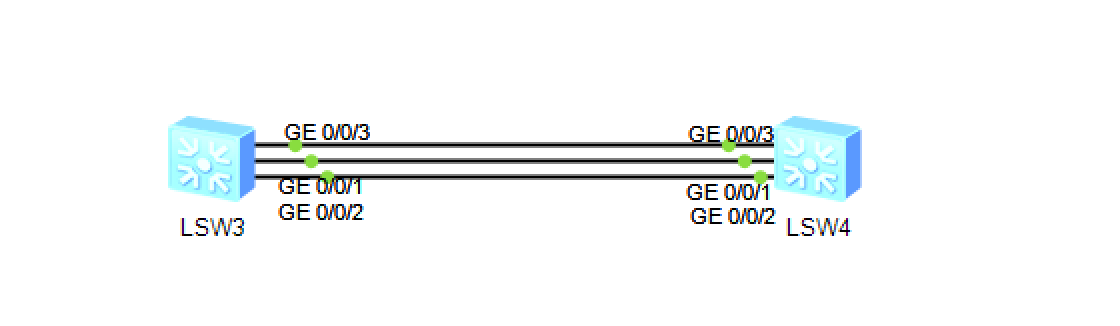
[sw1]interface Eth-Trunk 1
[sw1-Eth-Trunk1]mode lacp-static
[sw1-Eth-Trunk1]trunkport GigabitEthernet 0/0/1
[sw1-Eth-Trunk1]trunkport GigabitEthernet 0/0/2
[sw1-Eth-Trunk1]trunkport GigabitEthernet 0/0/3
[sw1-Eth-Trunk1]max active-linknumber 2 //调整最大的活动链路数量
[sw1-Eth-Trunk1]least active-linknumber 2 //调整最少必须有2个互动的成员链路
[sw1-Eth-Trunk1]lacp preempt enable //开启抢占功能
[sw1-Eth-Trunk1]lacp preempt delay 10 //调整抢占时间
[sw1]lacp priority 100
[sw1-GigabitEthernet0/0/3]lacp priority 50000
[sw2]interface Eth-Trunk 1
[sw2-Eth-Trunk1]mode lacp-static
[sw2-Eth-Trunk1]trunkport GigabitEthernet 0/0/1
[sw2-Eth-Trunk1]trunkport GigabitEthernet 0/0/2
[sw2-Eth-Trunk1]trunkport GigabitEthernet 0/0/3
[sw1]display eth-trunk 1
[sw1]display interface Eth-Trunk 1
四、三层链路聚合配置:
把聚合链路从二层转为三层链路。执行undo portswitch命令后,可以为Eth-Trunk逻辑口分配一个IP地址。
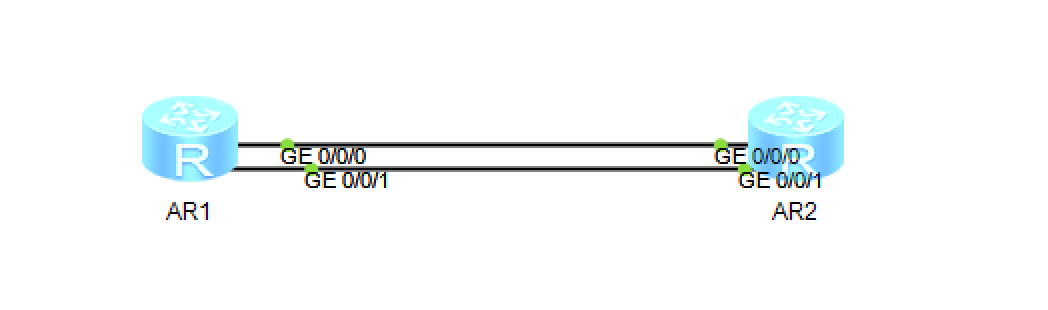
interface eth-trunk 1
undo portswitch
ip address 100.1.1.1 24
trunkport GigabitEthernet 0/0/1
trunkport GigabitEthernet 0/0/2
查看相关命令:
display eth-trunk // 查看 eth-trunk 的成员链路信息;
display interface Eth-Trunk 1 //查看 端口状态带宽等信息;






评论前必须登录!
注册