 网硕互联帮助中心
在很多项目里,邮件功能往往是“能发就行”,但一旦进入生产环境,就会面临:
• 并发发送慢 • 连接不稳定 • 异常无法定位 • 密钥泄露风险 • 被邮箱服务商封号 • 大量失败无法补偿
本文为一套真正生产可用的邮件系统设计方案。
目标只有一个:
不只是“能发邮件”,而是“稳定、安全、可扩展、可治理”。
在Spring Boot中集成邮件功能通常使用Spring Framework的spring-boot-starter-mail起步依赖。该依赖包含了Spring的邮件发送支持,主要基于JavaMail API,并提供了更简单的抽象层。
核心概念 1、JavaMailSender:这是Spring邮件发送的核心接口,提供了发送简单邮件和复杂邮件(包括附件和内联资源)的能力。
2、SimpleMailMessage:用于表示简单的邮件消息,包括发件人、收件人、抄送、主题和文本内容。
3、MimeMessage:用于表示复杂的邮件消息,支持HTML内容、附件和内联资源。
配置步骤 1、添加依赖:在pom.xml中添加spring-boot-starter-mail依赖。
2、配置邮件服务器:在application.properties或application.yml中配置邮件服务器的主机、端口、用户名、密码等属性。
常用的配置属性包括:
spring.mail.host:邮件服务器主机,例如smtp.163.com。
spring.mail.port:邮件服务器端口,例如465或25。
spring.mail.username:发件人邮箱地址。
spring.mail.password:发件人邮箱密码或授权码。
spring.mail.protocol:协议,如smtp。
spring.mail.properties:额外的JavaMail会话属性,可以用来启用加密、认证等。
3、发送邮件:
注入JavaMailSender。
创建SimpleMailMessage或MimeMessage实例。
调用JavaMailSender的send方法。
发送简单邮件 简单邮件只包含文本内容,使用SimpleMailMessage。
发送复杂邮件 复杂邮件可以包含HTML内容、附件、内联资源(如图片)等,使用MimeMessage。需要借助MimeMessageHelper来构建邮件
高级特性 模板邮件:结合Thymeleaf、Freemarker等模板引擎,可以发送动态内容的邮件。
异步发送:使用@Async注解实现异步发送邮件,避免阻塞主线程。
邮件队列:在高并发场景下,可以使用队列来管理邮件发送任务,确保可靠性和性能。
注意事项 安全性:避免将邮箱密码硬编码在配置文件中,建议使用加密或从安全存储中获取。
错误处理:邮件发送可能会因为网络问题或服务器问题而失败,需要适当的异常处理和重试机制。
性能:邮件发送是相对耗时的操作,考虑异步发送。
测试:在实际发送邮件之前,可以使用假的邮件服务器(如GreenMail)进行测试。
实战
一、引入依赖
<!— 邮件发送 —>
<dependency>
<groupId>org.springframework.boot</groupId>
<artifactId>spring–boot–starter–mail</artifactId>
</dependency>
<!— 模板引擎(可选,用于HTML邮件模板) —>
<dependency>
<groupId>org.springframework.boot</groupId>
<artifactId>spring–boot–starter–thymeleaf</artifactId>
</dependency>
<!— 重试机制(生产增强用) —>
<dependency>
<groupId>org.springframework.retry</groupId>
<artifactId>spring–retry</artifactId>
</dependency>
二、邮件配置(推荐使用 465 SSL 端口)
比 587 TLS 更稳定,线上常用。
spring:
mail:
host: smtp.qq.com
port: 465
username: ${MAIL_USERNAME}
password: ${MAIL_PASSWORD}
protocol: smtps
default–encoding: UTF–8
properties:
mail:
smtp:
auth: true
ssl:
enable: true
connectiontimeout: 5000
timeout: 5000
writetimeout: 5000
pool: true
debug: false
强烈推荐使用环境变量或 K8s Secret,不要把账号密码写死在配置文件里:
export MAIL_USERNAME=xxx@qq.com
export MAIL_PASSWORD=授权码
三、统一异常模型
public class EmailSendException extends RuntimeException {
public EmailSendException(String msg, Throwable cause) {
super(msg, cause);
}
}
四、邮件服务接口
public interface EmailService {
void sendSimpleMail(String to, String subject, String content);
void sendHtmlMail(String to, String subject, String content);
void sendAttachmentMail(String to, String subject, String content, String filePath);
void sendInlineResourceMail(String to, String subject, String content,
String rscPath, String rscId);
void sendTemplateMail(String to, String subject, String templateName,
Map<String, Object> variables);
}
五、核心实现(生产增强版)
@Service
@Slf4j
public class EmailServiceImpl implements EmailService {
@Autowired
private JavaMailSender mailSender;
@Autowired
private TemplateEngine templateEngine;
@Value("${spring.mail.username}")
private String from;
/**
* 简单文本邮件
*/
@Override
public void sendSimpleMail(String to, String subject, String content) {
try {
SimpleMailMessage message = new SimpleMailMessage();
message.setFrom(from);
message.setTo(to);
message.setSubject(subject);
message.setText(content);
mailSender.send(message);
} catch (Exception e) {
log.error("发送简单邮件失败, to={}", to, e);
throw new EmailSendException("发送简单邮件失败", e);
}
}
/**
* HTML 邮件
*/
@Override
@Retryable(value = EmailSendException.class,
maxAttempts = 3,
backoff = @Backoff(delay = 3000))
public void sendHtmlMail(String to, String subject, String content) {
try {
MimeMessage message = mailSender.createMimeMessage();
MimeMessageHelper helper = new MimeMessageHelper(message, true, "UTF-8");
helper.setFrom(from);
helper.setTo(to);
helper.setSubject(subject);
helper.setText(content, true);
mailSender.send(message);
} catch (MessagingException e) {
log.error("发送HTML邮件失败, to={}", to, e);
throw new EmailSendException("发送HTML邮件失败", e);
}
}
/**
* 附件邮件
*/
@Override
public void sendAttachmentMail(String to, String subject, String content, String filePath) {
try {
MimeMessage message = mailSender.createMimeMessage();
MimeMessageHelper helper = new MimeMessageHelper(message, true, "UTF-8");
helper.setFrom(from);
helper.setTo(to);
helper.setSubject(subject);
helper.setText(content, true);
FileSystemResource file = new FileSystemResource(new File(filePath));
helper.addAttachment(file.getFilename(), file);
mailSender.send(message);
} catch (MessagingException e) {
log.error("发送附件邮件失败, to={}", to, e);
throw new EmailSendException("发送附件邮件失败", e);
}
}
/**
* 内联资源邮件
*/
@Override
public void sendInlineResourceMail(String to, String subject, String content,
String rscPath, String rscId) {
try {
MimeMessage message = mailSender.createMimeMessage();
MimeMessageHelper helper = new MimeMessageHelper(message, true, "UTF-8");
helper.setFrom(from);
helper.setTo(to);
helper.setSubject(subject);
helper.setText(content, true);
FileSystemResource res = new FileSystemResource(new File(rscPath));
helper.addInline(rscId, res);
mailSender.send(message);
} catch (MessagingException e) {
log.error("发送内联资源邮件失败, to={}", to, e);
throw new EmailSendException("发送内联资源邮件失败", e);
}
}
/**
* 模板邮件
*/
@Override
public void sendTemplateMail(String to, String subject, String templateName,
Map<String, Object> variables) {
try {
Context context = new Context();
context.setVariables(variables);
String content = templateEngine.process(templateName, context);
sendHtmlMail(to, subject, content);
} catch (Exception e) {
log.error("发送模板邮件失败, to={}", to, e);
throw new EmailSendException("发送模板邮件失败", e);
}
}
}
六、HTML 模板示例(Thymeleaf)
resources/templates/email-template.html
<!DOCTYPE html>
<html xmlns:th="http://www.thymeleaf.org">
<head>
<meta charset="UTF-8">
</head>
<body>
<h2>您好,<span th:text="${username}">用户</span></h2>
<p>您的验证码是:</p>
<h1 style="color: #409EFF" th:text="${verificationCode}">123456</h1>
<p>有效期 10 分钟,请勿泄露。</p>
<hr>
<p style="color: gray">本邮件为系统自动发送,请勿回复。</p>
</body>
</html>
七、异步发送(防阻塞主流程)
@Component
@Slf4j
public class AsyncEmailService {
@Autowired
private EmailService emailService;
@Async
public void sendAsync(String to, String subject, String content) {
try {
emailService.sendSimpleMail(to, subject, content);
} catch (Exception e) {
log.error("异步发送邮件失败", e);
}
}
}
启用:
@SpringBootApplication
@EnableAsync
@EnableRetry
public class Application {
public static void main(String[] args) {
SpringApplication.run(Application.class, args);
}
}
八、邮件频控(防止被封号)
@Component
public class EmailRateLimiter {
private final RateLimiter limiter = RateLimiter.create(2.0); // 每秒2封
public void acquire() {
limiter.acquire();
}
}
使用:
@Autowired
private EmailRateLimiter limiter;
public void sendHtmlMail(...) {
limiter.acquire();
...
}
九、控制器示例(验证码发送)
@RestController
@RequestMapping("/api/email")
public class EmailController {
@Autowired
private EmailService emailService;
@PostMapping("/verification")
public ResponseEntity<String> sendCode(@RequestParam String email) {
String code = String.valueOf(new Random().nextInt(899999) + 100000);
Map<String, Object> vars = new HashMap<>();
vars.put("username", "用户");
vars.put("verificationCode", code);
emailService.sendTemplateMail(email, "验证码邮件", "email-template", vars);
// TODO 保存验证码到 Redis
return ResponseEntity.ok("验证码发送成功");
}
}
十、最终生产级架构形态
Controller
↓
MQ(推荐)
↓
Email Consumer
↓
EmailService
↓
SMTP Server
并配套: 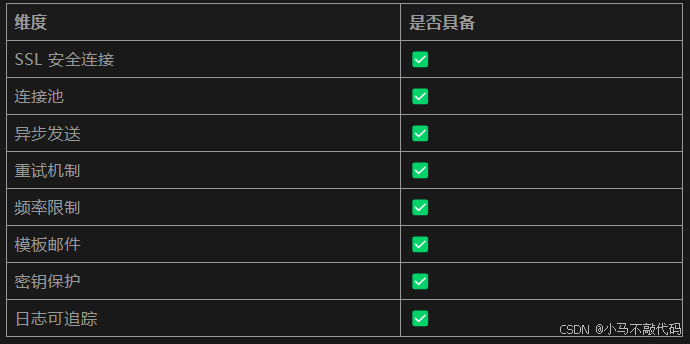
结语
大多数教程只教你“怎么发一封邮件”, 而这套方案解决的是:如何在真实生产环境里,让邮件系统敢用、能扛、可治理。




评论前必须登录!
注册