 网硕互联帮助中心
一、报错分析
1、Hive 侧现象:TezTask 执行失败
在 Hue 中执行 INSERT 后,Hive 直接返回 TezTask 失败:
Error while processing statement: FAILED: Execution Error, return code 2 from org.apache.hadoop.hive.ql.exec.tez.TezTask.
Vertex failed, vertexName=Map 1
...
DAG did not succeed due to VERTEX_FAILURE. failedVertices:1 killedVertices:1
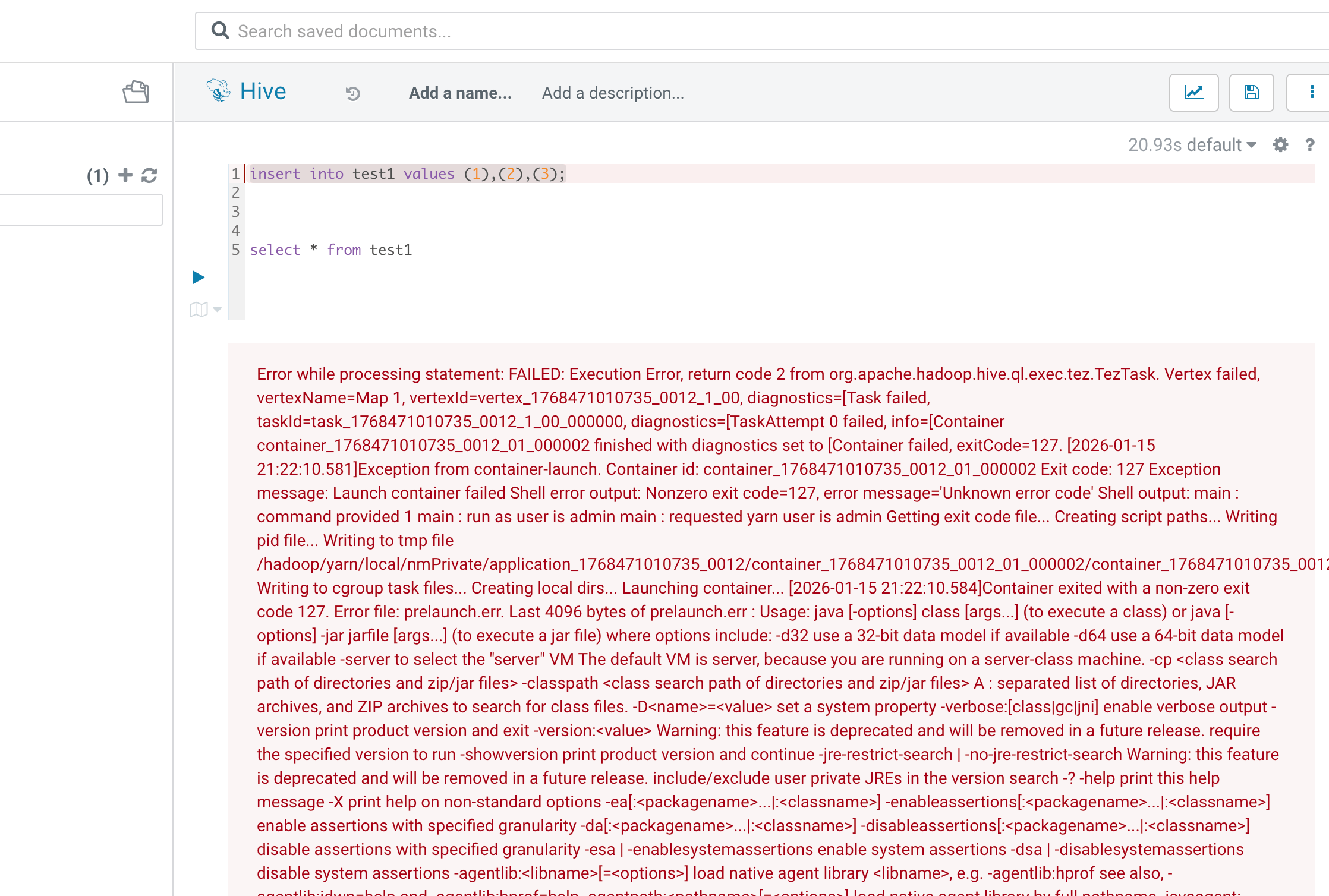
从 Hive 的报错文案来看,容易把注意力放在:
- Tez Vertex 失败
- Map 阶段异常
- Reducer 被 Kill(联动失败)
但这类报错通常只是“上层结果”,真正原因需要下钻到 YARN Container 的启动诊断。
2、YARN 侧关键信号:ExitCode=127 + prelaunch.err
日志中出现非常关键的组合信号:
- Container exited with a non-zero exit code 127
- prelaunch.err 中出现 command not found
- Java Usage 输出被反复打印
典型片段如下(取你日志中的关键内容):
Container failed, exitCode=127.
...
Last 4096 bytes of stderr :
/bin/bash: line 1: -XX:+PrintGCDetails: command not found
经验判断 ExitCode=127 在 Linux 语义里通常指向:命令不存在 / 命令无法执行。 放在 YARN Container 场景中,优先怀疑:启动脚本拼接后的命令行被 Shell 误解析。
3、Tez 失败形态:Map Vertex 反复重试后失败
这类问题在 Tez 运行界面里呈现出“高度一致的确定性失败”:
- TaskAttempt 反复重试
- 每次都在 Container 启动阶段失败
- 最终 Map Vertex 标记失败,Reducer 触发联动 Kill
这里的关键点在于: 不是跑着跑着挂了,而是 JVM 压根没成功起来。
处理办法可参考 22201:解决办法
三、处理结果
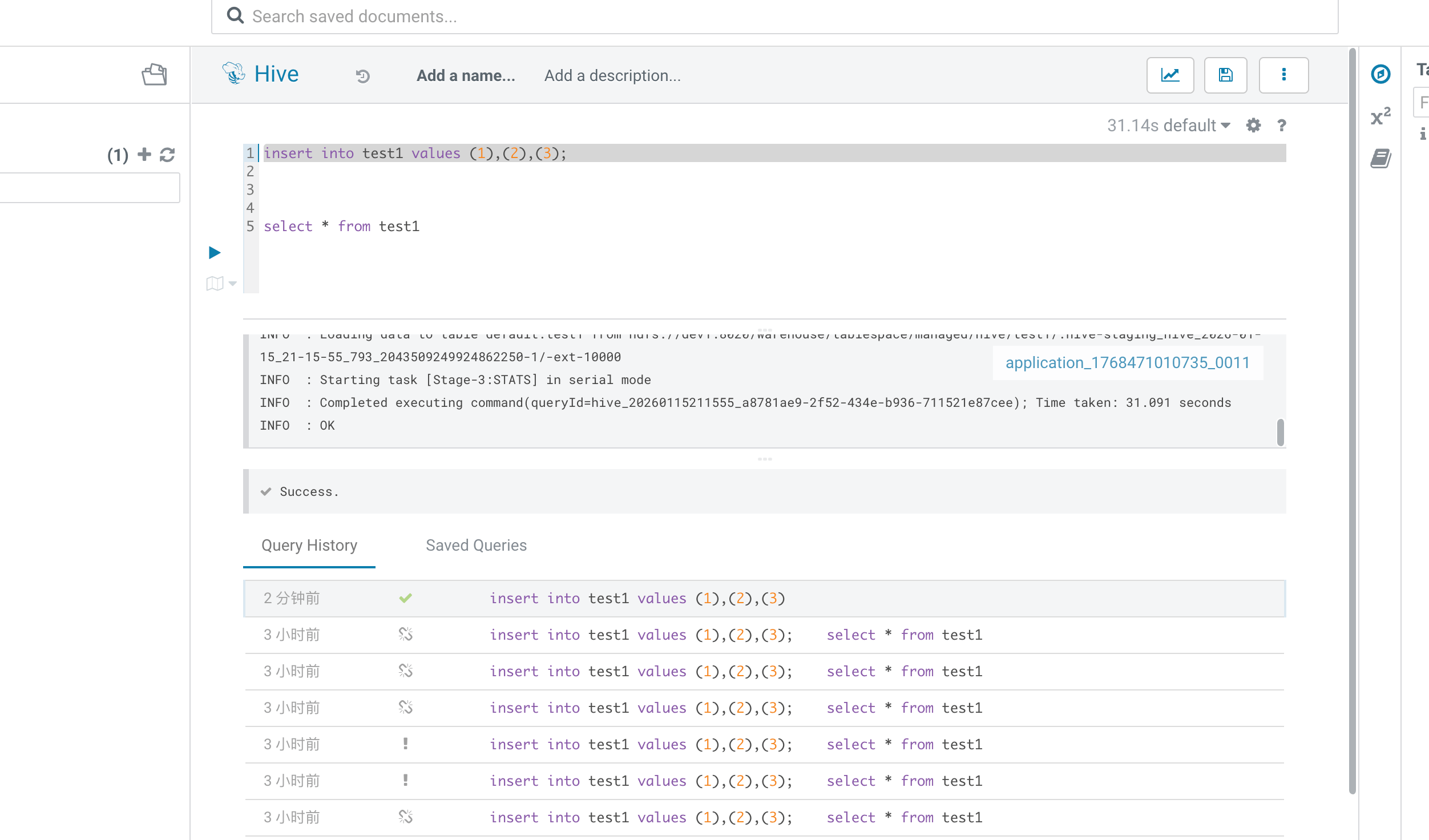
1、回到 Hue 再次执行 INSERT
配置生效后,再回到 Hue 中执行同一条插入语句。
现象变化非常明确:
- 不再出现 Tez Vertex 启动失败
- TaskAttempt 不再因 ExitCode=127 重试
- SQL 可以正常执行完成
2、完整的报错日志
Error while processing statement: FAILED: Execution Error, return code 2 from
org.apache.hadoop.hive.ql.exec.tez.TezTask. Vertex failed, vertexName=Map 1, vertexId=vertex_1768471010735_0012_1_00,
diagnostics=[Task failed, taskId=task_1768471010735_0012_1_00_000000, diagnostics=[TaskAttempt 0 failed, info=[Container
container_1768471010735_0012_01_000002 finished with diagnostics set to [Container failed,
exitCode=127. [2026-01-15 21:22:10.581]Exception from container-launch. Container id:
container_1768471010735_0012_01_000002 Exit code: 127 Exception message: Launch container failed Shell error output:
Nonzero exit code=127, error message='Unknown error code' Shell output: main : command provided 1 main : run as user is
admin main : requested yarn user is admin Getting exit code file... Creating script paths... Writing pid file... Writing
to tmp file
/hadoop/yarn/local/nmPrivate/application_1768471010735_0012/container_1768471010735_0012_01_000002/container_1768471010735_0012_01_000002.pid.tmp
Writing to cgroup task files... Creating local dirs... Launching container... [2026-01-15 21:22:10.584]Container exited
with a non-zero exit code 127. Error file: prelaunch.err. Last 4096 bytes of prelaunch.err : Usage: java [-options]
class [args...] (to execute a class) or java [-options] -jar jarfile [args...] (to execute a jar file) where options
include: -d32 use a 32-bit data model if available -d64 use a 64-bit data model if available -server to select the "
server" VM The default VM is server, because you are running on a server-class machine. -cp <class search path of
directories and zip/jar files> -classpath <class search path of directories and zip/jar files> A : separated list of
directories, JAR archives, and ZIP archives to search for class files. -D<name>=<value> set a system property
-verbose:[class|gc|jni] enable verbose output -version print product version and exit -version:<value> Warning: this
feature is deprecated and will be removed in a future release. require the specified version to run -showversion print
product version and continue -jre-restrict-search | -no-jre-restrict-search Warning: this feature is deprecated and will
be removed in a future release. include/exclude user private JREs in the version search -? -help print this help message
-X print help on non-standard options -ea[:<packagename>...|:<classname>]
-enableassertions[:<packagename>...|:<classname>] enable assertions with specified granularity
-da[:<packagename>...|:<classname>] -disableassertions[:<packagename>...|:<classname>] disable assertions with specified
granularity -esa | -enablesystemassertions enable system assertions -dsa | -disablesystemassertions disable system
assertions -agentlib:<libname>[=<options>] load native agent library <libname>, e.g. -agentlib:hprof see also,
-agentlib:jdwp=help and -agentlib:hprof=help -agentpath:<pathname>[=<options>] load native agent library by full
pathname -javaagent:<jarpath>[=<options>] load Java programming language agent, see java.lang.instrument
-splash:<imagepath> show splash screen with specified image
See http://www.oracle.com/technetwork/java/javase/documentation/index.html for more details. Last 4096 bytes of stderr :
/bin/bash: line 1:undefined: -XX:+PrintGCDetails: command not found [2026-01-15 21:22:10.585]Container exited with a
non-zero exit code 127. Error file: prelaunch.err. Last 4096 bytes of prelaunch.err : Usage: java [-options]
class [args...] (to execute a class) or java [-options] -jar jarfile [args...] (to execute a jar file) where options
include: -d32 use a 32-bit data model if available -d64 use a 64-bit data model if available -server to select the "
server" VM The default VM is server, because you are running on a server-class machine. -cp <class search path of
directories and zip/jar files> -classpath <class search path of directories and zip/jar files> A : separated list of
directories, JAR archives, and ZIP archives to search for class files. -D<name>=<value> set a system property
-verbose:[class|gc|jni] enable verbose output -version print product version and exit -version:<value> Warning: this
feature is deprecated and will be removed in a future release. require the specified version to run -showversion print
product version and continue -jre-restrict-search | -no-jre-restrict-search Warning: this feature is deprecated and will
be removed in a future release. include/exclude user private JREs in the version search -? -help print this help message
-X print help on non-standard options -ea[:<packagename>...|:<classname>]
-enableassertions[:<packagename>...|:<classname>] enable assertions with specified granularity
-da[:<packagename>...|:<classname>] -disableassertions[:<packagename>...|:<classname>] disable assertions with specified
granularity -esa | -enablesystemassertions enable system assertions -dsa | -disablesystemassertions disable system
assertions -agentlib:<libname>[=<options>] load native agent library <libname>, e.g. -agentlib:hprof see also,
-agentlib:jdwp=help and -agentlib:hprof=help -agentpath:<pathname>[=<options>] load native agent library by full
pathname -javaagent:<jarpath>[=<options>] load Java programming language agent, see java.lang.instrument
-splash:<imagepath> show splash screen with specified image
See http://www.oracle.com/technetwork/java/javase/documentation/index.html for more details. Last 4096 bytes of stderr :
/bin/bash: line 1: -XX:+PrintGCDetails: command not found ]], TaskAttempt 1 failed, info=[Container
container_1768471010735_0012_01_000003 finished with diagnostics set to [Container failed,
exitCode=127. [2026-01-15 21:22:14.372]Exception from container-launch. Container id:
container_1768471010735_0012_01_000003 Exit code: 127 Exception message: Launch container failed Shell error output:
Nonzero exit code=127, error message='Unknown error code' Shell output: main : command provided 1 main : run as user is
admin main : requested yarn user is admin Getting exit code file... Creating script paths... Writing pid file... Writing
to tmp file
/hadoop/yarn/local/nmPrivate/application_1768471010735_0012/container_1768471010735_0012_01_000003/container_1768471010735_0012_01_000003.pid.tmp
Writing to cgroup task files... Creating local dirs... Launching container... [2026-01-15 21:22:14.375]Container exited
with a non-zero exit code 127. Error file: prelaunch.err. Last 4096 bytes of prelaunch.err : Usage: java [-options]
class [args...] (to execute a class) or java [-options] -jar jarfile [args...] (to execute a jar file) where options
include: -d32 use a 32-bit data model if available -d64 use a 64-bit data model if available -server to select the "
server" VM The default VM is server, because you are running on a server-class machine. -cp <class search path of
directories and zip/jar files> -classpath <class search path of directories and zip/jar files> A : separated list of
directories, JAR archives, and ZIP archives to search for class files. -D<name>=<value> set a system property
-verbose:[class|gc|jni] enable verbose output -version print product version and exit -version:<value> Warning: this
feature is deprecated and will be removed in a future release. require the specified version to run -showversion print
product version and continue -jre-restrict-search | -no-jre-restrict-search Warning: this feature is deprecated and will
be removed in a future release. include/exclude user private JREs in the version search -? -help print this help message
-X print help on non-standard options -ea[:<packagename>...|:<classname>]
-enableassertions[:<packagename>...|:<classname>] enable assertions with specified granularity
-da[:<packagename>...|:<classname>] -disableassertions[:<packagename>...|:<classname>] disable assertions with specified
granularity -esa | -enablesystemassertions enable system assertions -dsa | -disablesystemassertions disable system
assertions -agentlib:<libname>[=<options>] load native agent library <libname>, e.g. -agentlib:hprof see also,
-agentlib:jdwp=help and -agentlib:hprof=help -agentpath:<pathname>[=<options>] load native agent library by full
pathname -javaagent:<jarpath>[=<options>] load Java programming language agent, see java.lang.instrument
-splash:<imagepath> show splash screen with specified image
See http://www.oracle.com/technetwork/java/javase/documentation/index.html for more details. Last 4096 bytes of stderr :
/bin/bash: line 1: -XX:+PrintGCDetails: command not found [2026-01-15 21:22:14.375]Container exited with a non-zero exit
code 127. Error file: prelaunch.err. Last 4096 bytes of prelaunch.err : Usage: java [-options] class [args...] (to
execute a class) or java [-options] -jar jarfile [args...] (to execute a jar file) where options include: -d32 use a
32-bit data model if available -d64 use a 64-bit data model if available -server to select the "server" VM The default
VM is server, because you are running on a server-class machine. -cp <class search path of directories and zip/jar
files> -classpath <class search path of directories and zip/jar files> A : separated list of directories, JAR archives,
and ZIP archives to search for class files. -D<name>=<value> set a system property -verbose:[class|gc|jni] enable
verbose output -version print product version and exit -version:<value> Warning: this feature is deprecated and will be
removed in a future release. require the specified version to run -showversion print product version and continue
-jre-restrict-search | -no-jre-restrict-search Warning: this feature is deprecated and will be removed in a future
release. include/exclude user private JREs in the version search -? -help print this help message -X print help on
non-standard options -ea[:<packagename>...|:<classname>] -enableassertions[:<packagename>...|:<classname>] enable
assertions with specified granularity -da[:<packagename>...|:<classname>]
-disableassertions[:<packagename>...|:<classname>] disable assertions with specified granularity -esa |
-enablesystemassertions enable system assertions -dsa | -disablesystemassertions disable system assertions
-agentlib:<libname>[=<options>] load native agent library <libname>, e.g. -agentlib:hprof see also, -agentlib:jdwp=help
and -agentlib:hprof=help -agentpath:<pathname>[=<options>] load native agent library by full pathname
-javaagent:<jarpath>[=<options>] load Java programming language agent, see java.lang.instrument -splash:<imagepath> show
splash screen with specified image See http://www.oracle.com/technetwork/java/javase/documentation/index.html for more
details. Last 4096 bytes of stderr : /bin/bash: line 1: -XX:+PrintGCDetails: command not found ]], TaskAttempt 2 failed,
info=[Container container_1768471010735_0012_01_000004 finished with diagnostics set to [Container failed,
exitCode=127. [2026-01-15 21:22:15.376]Exception from container-launch. Container id:
container_1768471010735_0012_01_000004 Exit code: 127 Exception message: Launch container failed Shell error output:
Nonzero exit code=127, error message='Unknown error code' Shell output: main : command provided 1 main : run as user is
admin main : requested yarn user is admin Getting exit code file... Creating script paths... Writing pid file... Writing
to tmp file
/hadoop/yarn/local/nmPrivate/application_1768471010735_0012/container_1768471010735_0012_01_000004/container_1768471010735_0012_01_000004.pid.tmp
Writing to cgroup task files... Creating local dirs... Launching container... [2026-01-15 21:22:15.378]Container exited
with a non-zero exit code 127. Error file: prelaunch.err. Last 4096 bytes of prelaunch.err : Usage: java [-options]
class [args...] (to execute a class) or java [-options] -jar jarfile [args...] (to execute a jar file) where options
include: -d32 use a 32-bit data model if available -d64 use a 64-bit data model if available -server to select the "
server" VM The default VM is server, because you are running on a server-class machine. -cp <class search path of
directories and zip/jar files> -classpath <class search path of directories and zip/jar files> A : separated list of
directories, JAR archives, and ZIP archives to search for class files. -D<name>=<value> set a system property
-verbose:[class|gc|jni] enable verbose output -version print product version and exit -version:<value> Warning: this
feature is deprecated and will be removed in a future release. require the specified version to run -showversion print
product version and continue -jre-restrict-search | -no-jre-restrict-search Warning: this feature is deprecated and will
be removed in a future release. include/exclude user private JREs in the version search -? -help print this help message
-X print help on non-standard options -ea[:<packagename>...|:<classname>]
-enableassertions[:<packagename>...|:<classname>] enable assertions with specified granularity
-da[:<packagename>...|:<classname>] -disableassertions[:<packagename>...|:<classname>] disable assertions with specified
granularity -esa | -enablesystemassertions enable system assertions -dsa | -disablesystemassertions disable system
assertions -agentlib:<libname>[=<options>] load native agent library <libname>, e.g. -agentlib:hprof see also,
-agentlib:jdwp=help and -agentlib:hprof=help -agentpath:<pathname>[=<options>] load native agent library by full
pathname -javaagent:<jarpath>[=<options>] load Java programming language agent, see java.lang.instrument
-splash:<imagepath> show splash screen with specified image
See http://www.oracle.com/technetwork/java/javase/documentation/index.html for more details. Last 4096 bytes of stderr :
/bin/bash: line 1: -XX:+PrintGCDetails: command not found [2026-01-15 21:22:15.379]Container exited with a non-zero exit
code 127. Error file: prelaunch.err. Last 4096 bytes of prelaunch.err : Usage: java [-options] class [args...] (to
execute a class) or java [-options] -jar jarfile [args...] (to execute a jar file) where options include: -d32 use a
32-bit data model if available -d64 use a 64-bit data model if available -server to select the "server" VM The default
VM is server, because you are running on a server-class machine. -cp <class search path of directories and zip/jar
files> -classpath <class search path of directories and zip/jar files> A : separated list of directories, JAR archives,
and ZIP archives to search for class files. -D<name>=<value> set a system property -verbose:[class|gc|jni] enable
verbose output -version print product version and exit -version:<value> Warning: this feature is deprecated and will be
removed in a future release. require the specified version to run -showversion print product version and continue
-jre-restrict-search | -no-jre-restrict-search Warning: this feature is deprecated and will be removed in a future
release. include/exclude user private JREs in the version search -? -help print this help message -X print help on
non-standard options -ea[:<packagename>...|:<classname>] -enableassertions[:<packagename>...|:<classname>] enable
assertions with specified granularity -da[:<packagename>...|:<classname>]
-disableassertions[:<packagename>...|:<classname>] disable assertions with specified granularity -esa |
-enablesystemassertions enable system assertions -dsa | -disablesystemassertions disable system assertions
-agentlib:<libname>[=<options>] load native agent library <libname>, e.g. -agentlib:hprof see also, -agentlib:jdwp=help
and -agentlib:hprof=help -agentpath:<pathname>[=<options>] load native agent library by full pathname
-javaagent:<jarpath>[=<options>] load Java programming language agent, see java.lang.instrument -splash:<imagepath> show
splash screen with specified image See http://www.oracle.com/technetwork/java/javase/documentation/index.html for more
details. Last 4096 bytes of stderr : /bin/bash: line 1: -XX:+PrintGCDetails: command not found ]], TaskAttempt 3 failed,
info=[Container container_1768471010735_0012_01_000005 finished with diagnostics set to [Container failed,
exitCode=127. [2026-01-15 21:22:16.835]Exception from container-launch. Container id:
container_1768471010735_0012_01_000005 Exit code: 127 Exception message: Launch container failed Shell error output:
Nonzero exit code=127, error message='Unknown error code' Shell output: main : command provided 1 main : run as user is
admin main : requested yarn user is admin Getting exit code file... Creating script paths... Writing pid file... Writing
to tmp file
/hadoop/yarn/local/nmPrivate/application_1768471010735_0012/container_1768471010735_0012_01_000005/container_1768471010735_0012_01_000005.pid.tmp
Writing to cgroup task files... Creating local dirs... Launching container... [2026-01-15 21:22:16.837]Container exited
with a non-zero exit code 127. Error file: prelaunch.err. Last 4096 bytes of prelaunch.err : Usage: java [-options]
class [args...] (to execute a class) or java [-options] -jar jarfile [args...] (to execute a jar file) where options
include: -d32 use a 32-bit data model if available -d64 use a 64-bit data model if available -server to select the "
server" VM The default VM is server, because you are running on a server-class machine. -cp <class search path of
directories and zip/jar files> -classpath <class search path of directories and zip/jar files> A : separated list of
directories, JAR archives, and ZIP archives to search for class files. -D<name>=<value> set a system property
-verbose:[class|gc|jni] enable verbose output -version print product version and exit -version:<value> Warning: this
feature is deprecated and will be removed in a future release. require the specified version to run -showversion print
product version and continue -jre-restrict-search | -no-jre-restrict-search Warning: this feature is deprecated and will
be removed in a future release. include/exclude user private JREs in the version search -? -help print this help message
-X print help on non-standard options -ea[:<packagename>...|:<classname>]
-enableassertions[:<packagename>...|:<classname>] enable assertions with specified granularity
-da[:<packagename>...|:<classname>] -disableassertions[:<packagename>...|:<classname>] disable assertions with specified
granularity -esa | -enablesystemassertions enable system assertions -dsa | -disablesystemassertions disable system
assertions -agentlib:<libname>[=<options>] load native agent library <libname>, e.g. -agentlib:hprof see also,
-agentlib:jdwp=help and -agentlib:hprof=help -agentpath:<pathname>[=<options>] load native agent library by full
pathname -javaagent:<jarpath>[=<options>] load Java programming language agent, see java.lang.instrument
-splash:<imagepath> show splash screen with specified image
See http://www.oracle.com/technetwork/java/javase/documentation/index.html for more details. Last 4096 bytes of stderr :
/bin/bash: line 1: -XX:+PrintGCDetails: command not found [2026-01-15 21:22:16.837]Container exited with a non-zero exit
code 127. Error file: prelaunch.err. Last 4096 bytes of prelaunch.err : Usage: java [-options] class [args...] (to
execute a class) or java [-options] -jar jarfile [args...] (to execute a jar file) where options include: -d32 use a
32-bit data model if available -d64 use a 64-bit data model if available -server to select the "server" VM The default
VM is server, because you are running on a server-class machine. -cp <class search path of directories and zip/jar
files> -classpath <class search path of directories and zip/jar files> A : separated list of directories, JAR archives,
and ZIP archives to search for class files. -D<name>=<value> set a system property -verbose:[class|gc|jni] enable
verbose output -version print product version and exit -version:<value> Warning: this feature is deprecated and will be
removed in a future release. require the specified version to run -showversion print product version and continue
-jre-restrict-search | -no-jre-restrict-search Warning: this feature is deprecated and will be removed in a future
release. include/exclude user private JREs in the version search -? -help print this help message -X print help on
non-standard options -ea[:<packagename>...|:<classname>] -enableassertions[:<packagename>...|:<classname>] enable
assertions with specified granularity -da[:<packagename>...|:<classname>]
-disableassertions[:<packagename>...|:<classname>] disable assertions with specified granularity -esa |
-enablesystemassertions enable system assertions -dsa | -disablesystemassertions disable system assertions
-agentlib:<libname>[=<options>] load native agent library <libname>, e.g. -agentlib:hprof see also, -agentlib:jdwp=help
and -agentlib:hprof=help -agentpath:<pathname>[=<options>] load native agent library by full pathname
-javaagent:<jarpath>[=<options>] load Java programming language agent, see java.lang.instrument -splash:<imagepath> show
splash screen with specified image See http://www.oracle.com/technetwork/java/javase/documentation/index.html for more
details. Last 4096 bytes of stderr : /bin/bash: line 1: -XX:+PrintGCDetails: command not found ]]], Vertex did not
succeed due to OWN_TASK_FAILURE, failedTasks:1 killedTasks:0, Vertex vertex_1768471010735_0012_1_00 [Map 1]
killed/failed due to:OWN_TASK_FAILURE]Vertex killed, vertexName=Reducer 2, vertexId=vertex_1768471010735_0012_1_01,
diagnostics=[Vertex received Kill while in RUNNING state., Vertex did not succeed due to OTHER_VERTEX_FAILURE,
failedTasks:0 killedTasks:1, Vertex vertex_1768471010735_0012_1_01 [Reducer 2] killed/failed due to:
OTHER_VERTEX_FAILURE]DAG did not succeed due to VERTEX_FAILURE. failedVertices:1 killedVertices:1






评论前必须登录!
注册