 网硕互联帮助中心
注:本文为 “Windows Server | 域” 相关合辑。 英文引文,机翻未校。 中文引文,略作重排。(部分资料有点陈旧) 未整理去重,图片清晰度受引文原图所限。 如有内容异常,请看原文。
THE DOMAIN, THE TREE AND THE FOREST
域、域树与域林
Domains, Trees and Forests, what now? I thought we were talking about donkeys and blueprints. 域、域树、域林,突然讲这些是为什么?我记得我们之前聊的可不是这些无关的内容。
Bear with me here, it might not fit into our last theme, but since this is the actual real terminology used by Microsoft, I’d like to stick by them. 请耐心听我讲解,这一内容或许和我们上一个主题无关,但这些是微软实际使用的官方术语,我希望沿用这些表述。
The Domain is basically the overall group that contains ALL the objects stored in the Active Directory database. A Domain can be hosted on 1 or multiple Domain Controllers (that thing we created previously). When using multiple Domain Controllers within 1 domain the changes to the Active Directory Database (NTDS) are replicated between all Domain Controllers. 域本质上是一个整体的组,包含存储在 Active Directory 数据库中的所有对象。一个域可以部署在 1 台或多台域控制器上(就是我们之前创建的服务端)。当在 1 个域中部署多台域控制器时,对 Active Directory 数据库(NTDS)所做的所有更改都会在所有域控制器之间进行复制。

This is a singular domain 这是一个单域
Regardless of how big your AD becomes or on how many locations in the world its located, when possible (the scalability/limits are pretty huge.), and I can’t stress this enough, you want to use a singular Domain since it simplifies AD management a ton. However this sadly isn’t always possible due to support for other versions Active Directory servers (Functional Levels) or corporate shenanigans/politics. 无论你的 AD 规模变得多大,也无论其部署在全球多少个地点,在条件允许的情况下(AD 的可扩展性和上限数值都非常高),我必须反复强调,建议使用单域架构,因为这能极大简化 AD 的管理工作。但遗憾的是,由于需要兼容其他版本的 Active Directory 服务器(功能级别),或是受企业内部的各类考量与组织架构影响,单域架构并非总能实现。
There’s also this concept called a Enhanced Security Administrative Environment (ESAE), also known as a Red Forest which Microsoft released after NotPetya hit the world. If implemented correctly this greatly reduces known attack vectors in AD, but its way too complicated to cover during this stage of the guide. 还有一个概念名为增强安全管理环境(ESAE),也被称作红林,是微软在 NotPetya 勒索病毒席卷全球后推出的架构。若配置得当,该架构能大幅减少 AD 中已知的攻击向量,但其实现逻辑过于复杂,本指南现阶段暂不展开讲解。
Child Domain
子域
Let’s say that ‘Threepwood’s Fine Leather Jackets and Pirate Paraphernalia’ wants all the Office monkeys to work in their own Child Domain. Why would they want that? I have no idea. Let’s just settle it under ‘Corporate Shenanigans’. This would look something like this. 假设一家名为“思里普伍德优质皮夹克与海盗用品店”的企业,希望所有办公人员都在独立的子域中开展工作。至于企业为何会有这样的需求,我们无从得知,姑且将其归为“企业内部的特殊考量”。该架构的呈现形式如下。

This is a Root Domain with a Child Domain 这是一个包含子域的根域
Tree
域树
When you have a child domain within the same Root Domain it is referred to ‘being in the same Tree’. They are however still separate domains. Each Domain needs at least 1 separate Domain Controller. This means that each Domain in a Tree has its own Active Directory Database (NTDS) with its own objects such users, groups etc. 当同一根域下存在子域时,这些域被称作“处于同一域树中”。但它们依旧是相互独立的域,每个域都至少需要 1 台独立的域控制器。这意味着,域树中的每个域都拥有独立的 Active Directory 数据库(NTDS),并存储着专属的用户、组等对象。
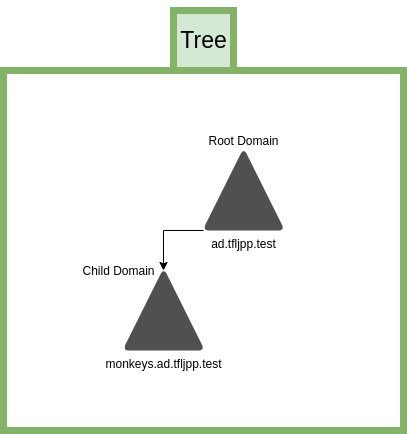
This is what the Tree looks like. 这是域树的呈现形式。
A tree can consist of multiple child domains, they can even be inherited from each other, but there can only be 1 Root Domain, this is also referred to as the Tree Root. The advantage of creating these child domains from the Tree Root is that there is a trust created between each of the domains. This means that users from monkeys child domain can access resources in the pirates child domain, if they would have the appropriate rights to that resource of course. 一个域树可以包含多个子域,这些子域甚至可以层层嵌套,但一个域树中只能有 1 个根域,该根域也被称作域树根。从域树根创建子域的优势在于,各域之间会自动建立信任关系。这意味着,monkeys子域中的用户,若拥有相应的资源访问权限,即可访问pirates子域中的资源。
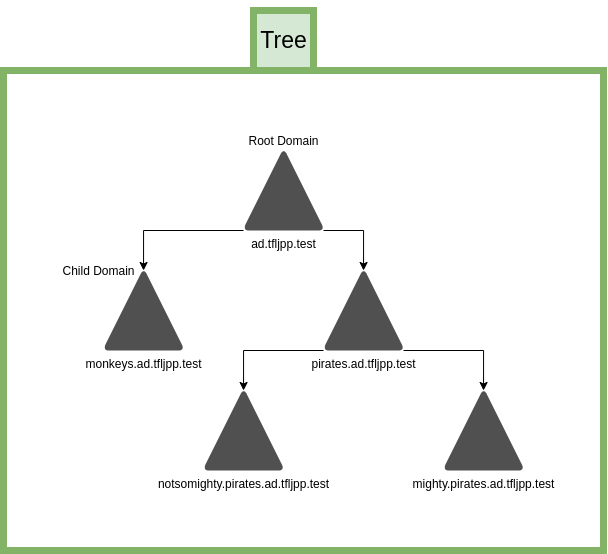
Domains can have multiple child domains, including child domains themselves 域可以拥有多个子域,子域也可再包含下级子域
Forest
域林
Now let’s say that over time the TFLJPP company grows and acquires another company, ‘Wally B. Feed Cartography and Co’. The acquired company already has an AD configured with their own Tree. You could migrate over all the users/systems from this over to your Tree, but this can be a daunting and time-consuming task. So, what we can do is add their Tree to our Forest. Doing this adds a trust between these two tree’s. This means that, like with child domains, access to resources can now be shared cross company. 假设随着时间推移,TFLJPP 公司不断发展,并收购了另一家名为“沃利 B 饲料制图公司”的企业。被收购的企业已配置好 AD,并拥有独立的域树。你可以将该企业所有的用户和系统迁移至自身的域树中,但这一操作繁琐且耗时。因此,另一种方案是将对方的域树加入自身的域林中,操作后两个域树之间会建立信任关系。这意味着,和子域间的资源访问逻辑一致,两家企业之间也可以实现资源共享。
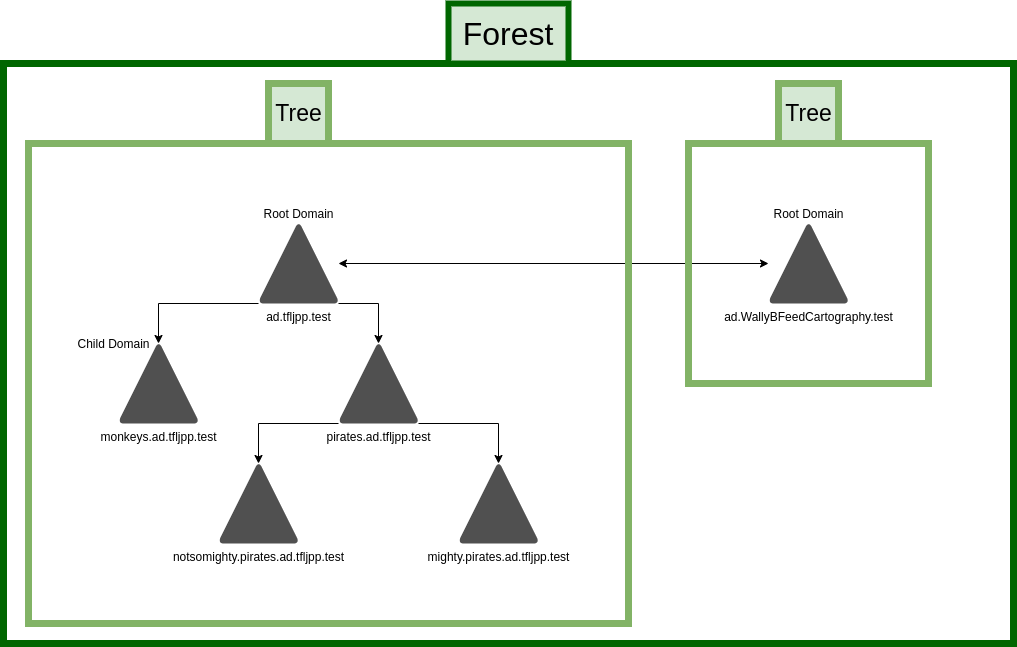
This is what a Forest looks like with multiple Tree’s 这是包含多个域树的域林呈现形式。
There are actually other types of trusts, such as shortcut, forest, external and realm trusts. Each with different characteristics (Transitive vs. Non-Transitive), direction types (One-way or Two-way) and authentication mechanism (Kerberos
V
5
V5
V5 or NTLM). I will not go into details here since if I were to cover it fully it would require a lot more of preexisting knowledge of AD internals such as NTLM and Kerberos, which are even heavy topics to cover on their own. Just remember that I generally recommend against multiple domains/tree’s/forest and trusts due the added complexity and security risks, unless you truly understand what you are doing/are building a Red Forest. 实际上,信任关系还有其他类型,例如快捷信任、林信任、外部信任和领域信任。不同类型的信任关系具备不同的特性(可传递与不可传递)、方向类型(单向或双向)和身份验证机制(Kerberos
V
5
V5
V5 或 NTLM)。这里暂不展开讲解,因为要全面介绍这些内容,需要读者具备大量 AD 底层的前置知识,而 NTLM 和 Kerberos 本身就是两个庞大的知识点。只需记住,我通常不建议部署多域、多域树、多域林及复杂的信任关系,因为这会增加架构的复杂性和安全风险,除非你对相关操作有清晰的认知,或是正在搭建红林架构。
What we currently build
我们当前的搭建内容
A forest can encompass multiple domains and trees into 1 structure but doesn’t have to. We already created a Forest and a tree when we setup Active Directory. These are created automatically. 域林可将多个域和域树整合为 1 个架构,但并非必须如此。我们在搭建 Active Directory 的过程中,已经自动创建了一个域林和一个域树。
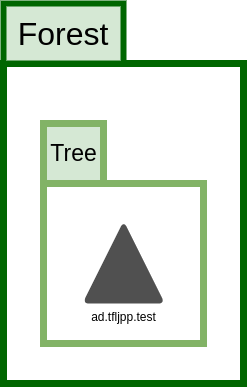
This what a setup with a singular domain actually looks like. 这是单域架构的实际搭建呈现形式。
Active Directory Forest – Trees and Domain and Sites
Active Directory 域林——域树、域与站点
Posted on 11/04/2020 By Christian
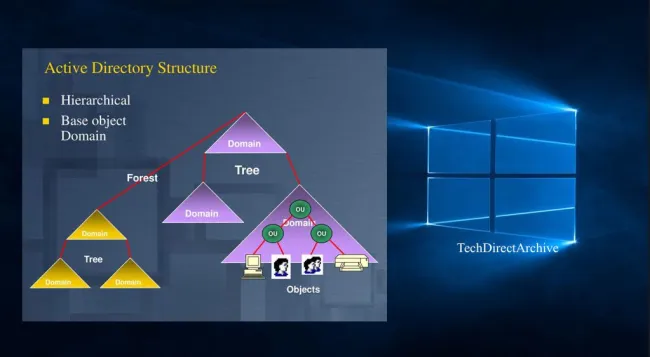
In this article, we will discuss “Active Directory Forest – Trees and Domain and Sites”. Active Directory (AD) is a directory service developed by Microsoft for the Windows domain environment. AD forest is the top container in an Active Directory setup that contains domains, users, computers, and group policies. 本文将讲解“Active Directory 域林——域树、域与站点”相关内容。Active Directory(AD)是微软为 Windows 域环境开发的一款目录服务,域林是 Active Directory 架构中的顶级容器,其中包含域、用户、计算机和组策略。
The Active Directory structure is built on the domain level. The framework that holds the objects can be viewed at different levels namely forest, domain trees, and domains. An Active Directory framework can have more than one domain, and the above tiers are referred to as a forest. Active Directory 的架构以域为基础层级构建,存储对象的框架可分为不同层级,即域林、域树和域。一个 Active Directory 架构中可包含多个域,这些层级共同构成的整体被称作域林。
Note: Under each domain, you can have as many trees as possible. Having an Active Directory environment of this nature can create autonomy and segregation of duty thereby increasing security and if not configured correctly. It can also lead to exploitation in the Active Directory environment. 注:每个域下可创建多个域树。此类 Active Directory 环境能实现权限自治和职责分离,进而提升安全性;但如果配置不当,也会成为 Active Directory 环境中被攻击利用的漏洞。
Active Directory Structure
Active Directory 的架构
Within a deployment, objects are grouped into domains as shown in the below diagram. The objects for a single domain are stored in a single database (which can be replicated). Domains are identified by their DNS name structure, (namespace). 在实际部署中,对象会按域进行分组,如下图所示。单个域的所有对象存储在一个独立的数据库中(该数据库支持复制),域通过自身的 DNS 名称结构(命名空间)进行标识。
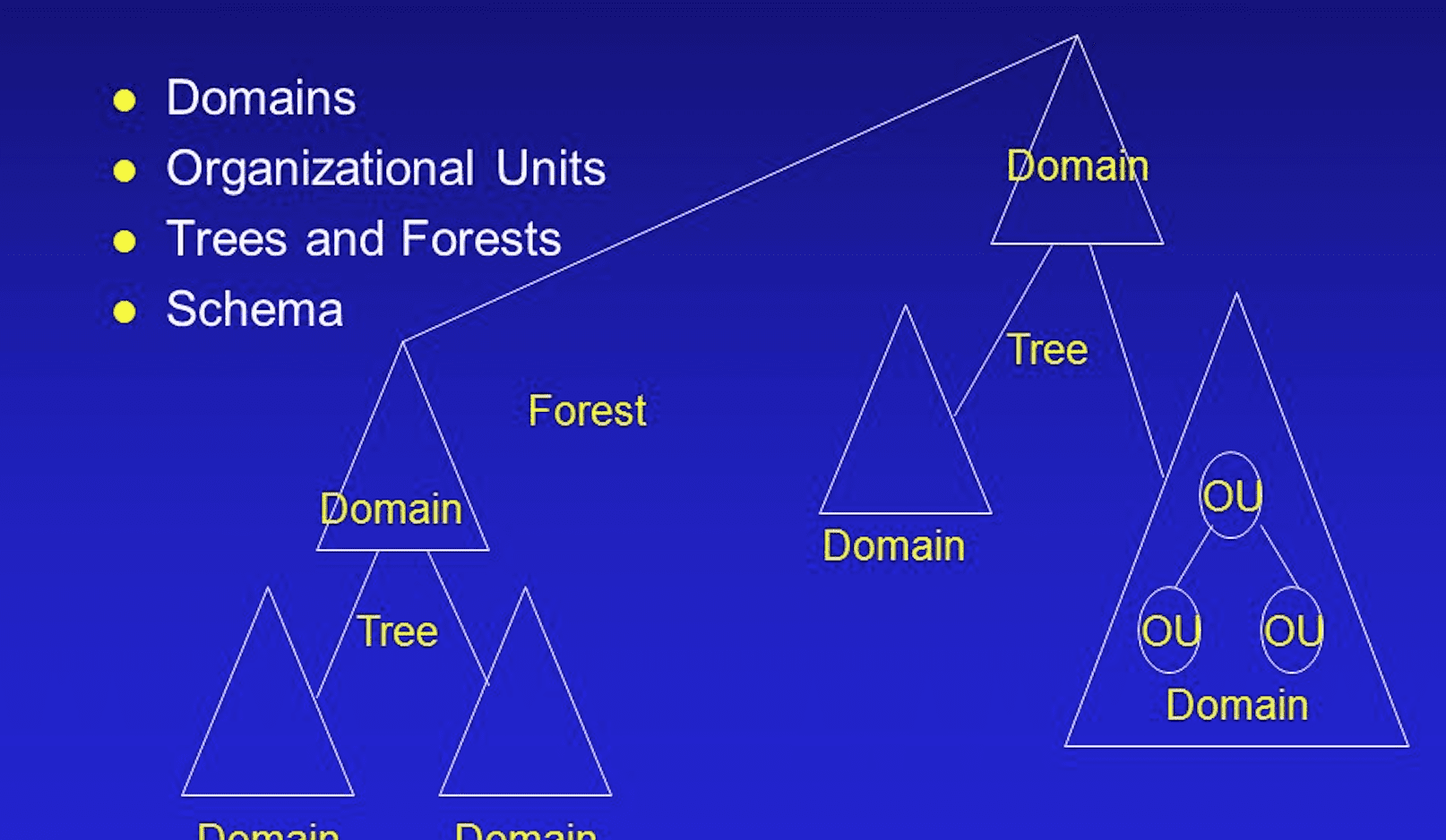
Active Directory Forest: A forest is a collection of trees that share a common global catalog, directory schema, logical structure, and directory configuration. The forest represents the security boundary within which users, computers, groups, and other objects are accessible. Active Directory 域林:域林是多个域树的集合,这些域树共享统一的全局编录、目录架构、逻辑结构和目录配置。域林是一个安全边界,该边界内的用户、计算机、组和其他对象可实现相互访问。
A forest is a collection of one or more domains that may have one or more trees. What makes a forest unique is that it shares the same schema. The schema defines what and how Active Directory objects are stored. 域林是一个或多个域的集合,其中可包含一个或多个域树。域林的独特性在于,林内所有域共享同一目录架构,该架构定义了 Active Directory 对象的存储类型和存储方式。
A forest is a group of trees that do not share a contiguous namespace. 域林是由多个不共享连续命名空间的域树组成的集合。
Active Directory Domain: A domain is defined as a logical group of network objects (computers, users, devices) that share the same Active Directory database. Active Directory 域:域是网络对象(计算机、用户、设备)的逻辑分组,同一域中的所有对象共享同一个 Active Directory 数据库。
When you add a domain to an existing tree, the new domain is a child domain of an existing parent domain. 当向现有域树中添加新域时,该新域将成为现有父域的子域。
Active Directory Tree: A tree is a collection of one or more domains and domain trees in a contiguous namespace and is linked in a transitive trust hierarchy. When you have multiple domains in the same namespace (e.g., techdirect.local, zone.techdirect.local), they are considered to be in the same tree. The tree also supports multiple levels of domains. Active Directory 域树:域树是一个或多个域/子域树的集合,这些域共享连续的命名空间,并通过可传递信任层次结构相互关联。当多个域处于同一命名空间中时(例如techdirect.local、zone.techdirect.local),这些域被视作处于同一域树中。域树同时支持多层级的域嵌套。
A tree is a hierarchical arrangement of Windows domains that share a contiguous namespace. 域树是共享连续命名空间的 Windows 域的层级化组织形式。
Some other information on AD Forest – Trees and Domain and Sites
AD 域林、域树、域与站点的其他相关信息
Parent and child domains are automatically linked by the trust. Users in different domains can use these trusts to access resources in another domain assuming that they have access. 父域和子域之间会自动建立信任关系,不同域中的用户,若拥有相应权限,可通过该信任关系访问其他域中的资源。
Trees in the forest are linked together via a trust automatically. This ensures that any users in any domain in the forest can access any resource in the forest to which they have access. 域林中的各个域树之间也会自动建立信任关系,这确保了域林中任意域的用户,都能访问林内所有拥有权限的资源。
-
Global Catalog In order for users to find resources in any domain in the forest (remember that each domain has a separate database). Domain Controllers can be made into Global Catalog Servers. A Global Catalog Server contains partial information about every object in the forest. Using this information, the user can conduct searches. 全局编录:为了让用户能查找域林中任意域的资源(需注意每个域都有独立的数据库),可将域控制器配置为全局编录服务器。全局编录服务器存储着域林中所有对象的部分属性信息,用户可通过这些信息实现跨域资源检索。
-
Trust relationship: A logical relationship established between domains that allow pass-through authentication. Providing for users in a trusted domain to access resources in a trusting domain without having a user account in the trusting domain. 信任关系:域之间建立的一种逻辑关系,支持直通式身份验证。受信任域中的用户,无需在信任域中创建账户,即可访问信任域中的资源。
-
Organizational units (OU) are containers that hold other Active Directory objects like users, computers, printers, shared folders, and even other organizational Units. The advantage of OU is that it can be used to set security policies and delegate administrative control. 组织单元(OU):用于存储 Active Directory 对象的容器,可存放用户、计算机、打印机、共享文件夹,甚至其他组织单元。组织单元的优势在于,可通过其配置安全策略并委派管理权限。
Reasons to Create Additional Domain
创建额外域的原因
There will be many occasions in which you will need to create additional domains. Multiple domains are useful when you are dealing with 实际部署中,存在多种需要创建额外域的场景,以下情况中,多域架构会更具实用性:
-
Different password requirements between organizations 不同组织存在不同的密码策略要求
-
Large numbers of objects 域内对象数量规模过大
-
Different internet domain names 拥有不同的公网域名
-
Better control of replication, and 更便于控制复制流量
-
Decentralized network administration 实现分散式的网络管理
In order for you to decide whether to create multiple domains and how to use them to the best effect. You need to have a clear understanding of the relationship between trees and forests, known as a trust relationship. 若要判断是否需要创建多域架构,以及如何最大化发挥多域架构的作用,你需要清晰理解域树和域林之间的信任关系。
While forests, trees, and domains are all logical grouping of objects, the physical grouping of objects is made possible using a site. 域林、域树和域均是对对象的逻辑分组,而站点则是对对象的物理分组。
A site group objects based on IP addresses. Hence it cannot span across different physical locations. For example, if there are various branches of your organization located at different places, each location can be identified using a site. 站点基于 IP 地址对对象进行分组,因此一个站点无法跨多个物理位置。例如,若企业在不同地区设有分支机构,每个分支机构可单独配置为一个站点。
A site is mainly used for replication and traffic control purposes. It is important to understand that sites and domains are not interrelated. A site can contain multiple domains and a single domain could span across multiple sites. 站点的主要作用是控制复制行为和网络流量。需要明确的是,站点和域之间不存在关联关系,一个站点中可包含多个域,一个域也可跨多个站点部署。
I hope you found this blog post on “Active Directory Forest – Trees and Domain and Sites” helpful. If you have any questions, please let me know in the comment section. 希望这篇关于“Active Directory 域林——域树、域与站点”的博文能为你提供帮助。若有任何问题,可在评论区留言。
Install and configure Active Directory Domain Services on Windows Server
Windows Server 中 Active Directory 域服务的安装与配置
Posted on 30/11/2021 By Imoh Etuk
In this write-up, I will take you through the step-by-step guide on how to install and configure Active Directory Domain Services on Windows Server
2022
2022
2022. Before we delve into the hands-on session of this write-up, let’s take a look at some of the amazing new features that Windows Server
2022
2022
2022 brings. A quick peep into when Windows Server
2022
2022
2022 was released as it that a preview program started in March
2021
2021
2021. 本文将为你逐步讲解 Windows Server
2022
2022
2022 中 Active Directory 域服务(AD DS)的安装和配置方法。在进入实操环节前,我们先了解一下 Windows Server
2022
2022
2022 带来的全新特性,同时简单介绍其发布时间:该系统的预览版于
2021
2021
2021年 3 月推出。
Note: The general availability of Windows Server
2022
2022
2022 was announced on 1 September
2021
2021
2021, with a launch event as part of the Windows Server Summit on 16 September. 注:Windows Server
2022
2022
2022 的正式版于
2021
2021
2021年 9 月 1 日官宣发布,并在
2021
2021
2021年 9 月 16 日的 Windows Server 峰会中举办了发布活动。
Windows Server 2022 Security capabilities
Windows Server
2022
2022
2022 的安全功能
Windows Server
2022
2022
2022 is built on the strong foundation of Windows Server
2019
2019
2019 and brings new security capabilities to combine with other security capabilities in Windows Server across multiple areas to provide defense-in-depth protection against advanced threats. Windows Server
2022
2022
2022 基于 Windows Server
2019
2019
2019 的成熟架构进行开发,新增了多项安全功能,并与 Windows Server 原有的多领域安全功能相结合,实现对高级威胁的纵深防御。
Advanced multi-layer security in Windows Server
2022
2022
2022 provides the comprehensive protection that servers need today. Windows Server
2022
2022
2022 的高级多层安全架构,能为服务器提供当下所需的全方位安全防护。
In addition, it brings many innovations on three key themes: security, Azure hybrid integration and management, and application platform. 此外,该系统在三大核心方向上实现了多项创新:安全、Azure 混合集成与管理、应用平台。
Also, Windows Server
2022
2022
2022 Datacenter: Azure Edition helps you use the benefits of the cloud to keep your VMs up to date while minimizing downtime. 同时,Windows Server
2022
2022
2022 数据中心版:Azure 版可充分发挥云服务的优势,在最大限度减少停机时间的前提下,实现虚拟机(VM)的持续更新。
What is Active Directory Domain Services (ADDS)?
什么是 Active Directory 域服务(AD DS)?
Active Directory Domain Services is a technology that allows us to build and centrally manage a scalable Microsoft Enterprise network. Looking at the overview of the lab session we’re going to carry out in this post, we are going to do the following: Active Directory 域服务是一项能帮助我们搭建并集中管理可扩展微软企业网络的技术。本文的实操实验将包含以下内容:
Installing a new instance of Active Directory 安装全新的 Active Directory 实例
Adding and configuring a new forest which is the overall container for Active Directory Domain Services and all its subjects 添加并配置新的域林,域林是 Active Directory 域服务及其所有相关对象的顶级容器
We will create the first Domain in the Forest which is known as the Forest Root Domain. We will give a fully qualified domain name (FQDN). Here, I am going to use blog.techdirectarchive.com as domain.
创建域林中的第一个域,即 林根域,并为其配置完全限定域名(FQDN),本文中将使用 blog.techdirectarchive.com 作为林根域的域名
We will install DNS because we must have the Microsoft Active Directory Integrate with the DNS Server. 安装 DNS 服务,因为 Microsoft Active Directory 必须与 DNS 服务器集成使用
After we have successfully installed and configured the Active Directory Domain Name Services, the Server will become a Domain Controller which is popularly codenamed DC. 成功安装并配置 Active Directory 域服务后,该服务器将成为域控制器(常简称为 DC)。
Download Windows 2022
下载 Windows Server
2022
2022
2022
All you need to get started with me in the demo session is a copy of Windows Server
2022
2022
2022 installed on your PC. To download the ISO file under the evaluation copy click here. Don’t forget you can also try a copy of it directly on Azure (see screenshot below). 要跟随本文完成实操演示,你需要在电脑上安装 Windows Server
2022
2022
2022,可点击此处下载评估版的 ISO 镜像文件。此外,你也可以直接在 Azure 云平台中体验该系统(见下方截图)。
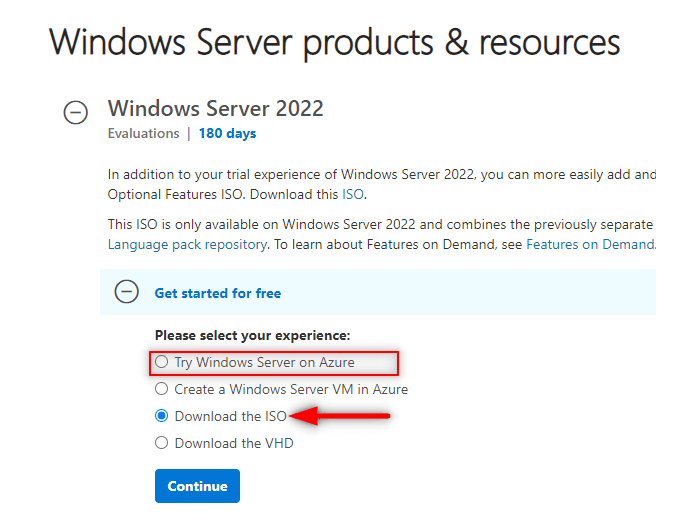 Windows Server 2022 Evaluation Copy
You can also install a copy of the Windows Server
2022
2022
2022 via Oracle VirtualBox or VMWare. 你也可以通过 Oracle VirtualBox 或 VMWare 虚拟机安装 Windows Server
2022
2022
2022。
In case you run into the failed to open session error while trying to launch your VM Image on VirtualBox, 若你在 VirtualBox 中启动虚拟机镜像时遇到“打开会话失败”的错误,可参考相关解决方案。
How to install and configure Active Directory Domain Services on Windows Server 2022
Windows Server
2022
2022
2022 中 Active Directory 域服务的安装与配置步骤
As confirmed by the screenshot below, we have our Windows Server
2022
2022
2022 set up completely on our PC. 如下图所示,我们已在电脑上完成 Windows Server
2022
2022
2022 的基础安装。
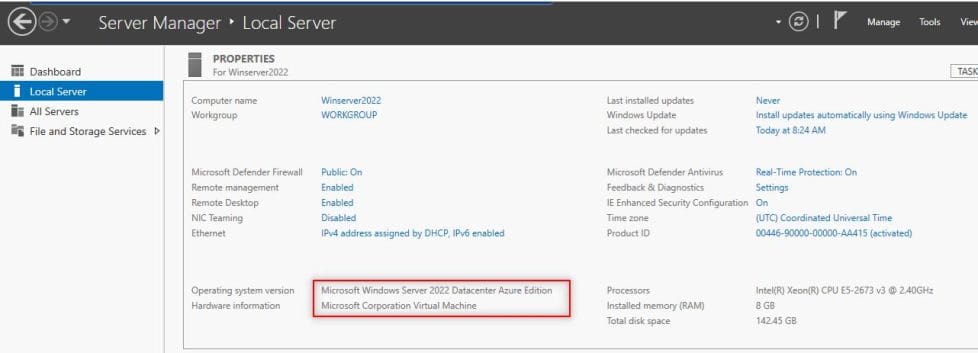
Windows Server 2022
Now let’s take the following steps to have the Active Directory Domain Services (ADDS) installed. 接下来,我们按以下步骤安装 Active Directory 域服务(AD DS)。
Step 1. Open Server Manager – To open the server manager, hit the Windows key on your keyboard and type “Server Manager” to search for the application. Once it is open as illustrated by the figure below, we would proceed to the next step of installing Active Directory Domain Services. 步骤 1 打开服务器管理器——按下键盘上的Windows键,输入“Server Manager”搜索该程序。打开服务器管理器后(如下图所示),即可进入 Active Directory 域服务的下一步安装流程。
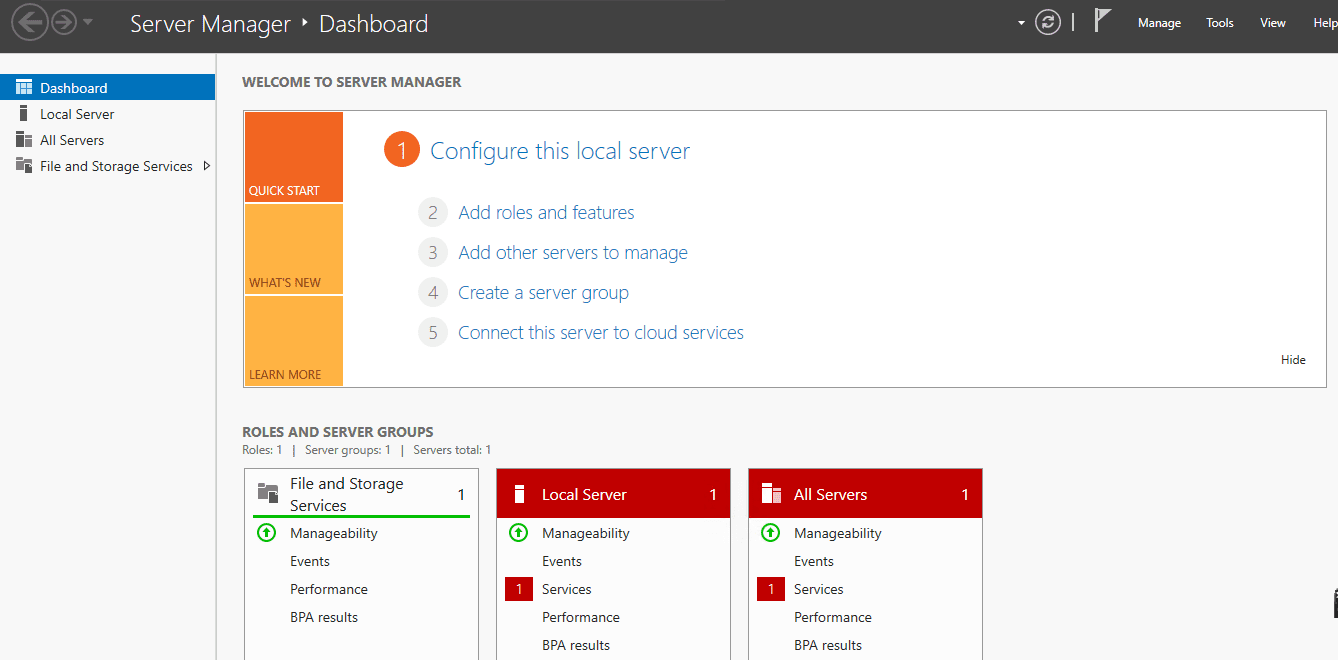 Server Manager 服务器管理器
Step 2: Add Roles and Features
步骤 2:添加角色和功能
Right-click on “Manage” on the “Server Manager” window and choose “Add Roles and Features“. This will open the “Add Roles and Features Wizard” which ushers us to the part where we install Active Directory Domain Services. Click on next. 在“服务器管理器”窗口中,右键点击“管理”选项,选择“添加角色和功能”,此时会弹出“添加角色和功能向导”窗口,该向导将引导我们完成 Active Directory 域服务的安装,点击下一步。
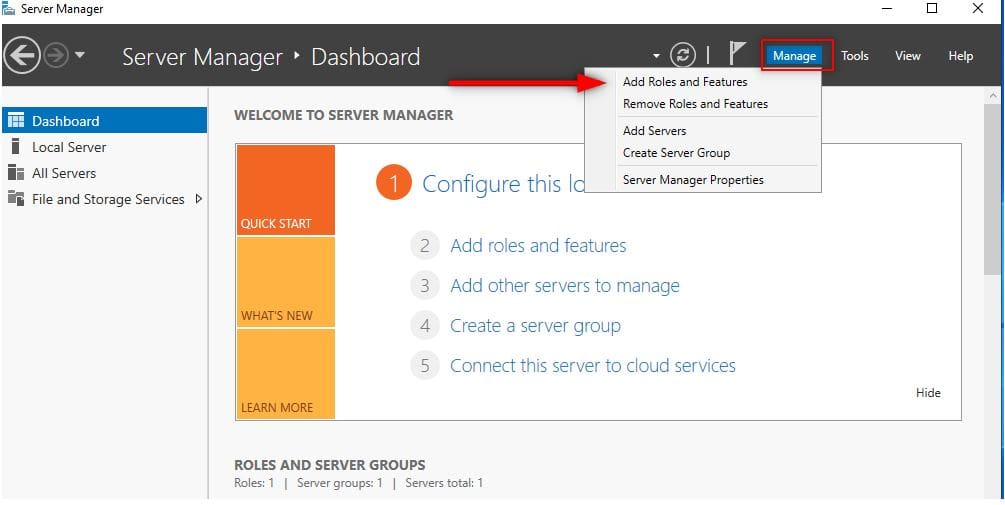
Add Roles and Features 添加角色和功能
On the Before you begin page, click on next. 在“开始之前”页面,点击下一步。
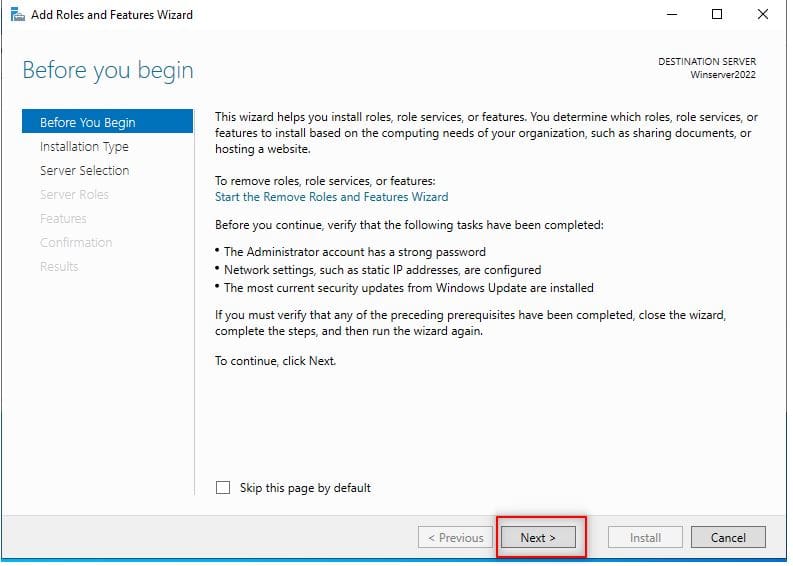 Click Next to Add Roles and Features 点击下一步继续添加角色和功能
Step 3: Installation Type
步骤 3:选择安装类型
On the “Installation Type”, leave “Role-based or feature-based installation” radio button selected and click on next (see screenshot below). 在“安装类型”页面,保持“基于角色或基于功能的安装”单选按钮的选中状态,点击下一步(见下图)。
[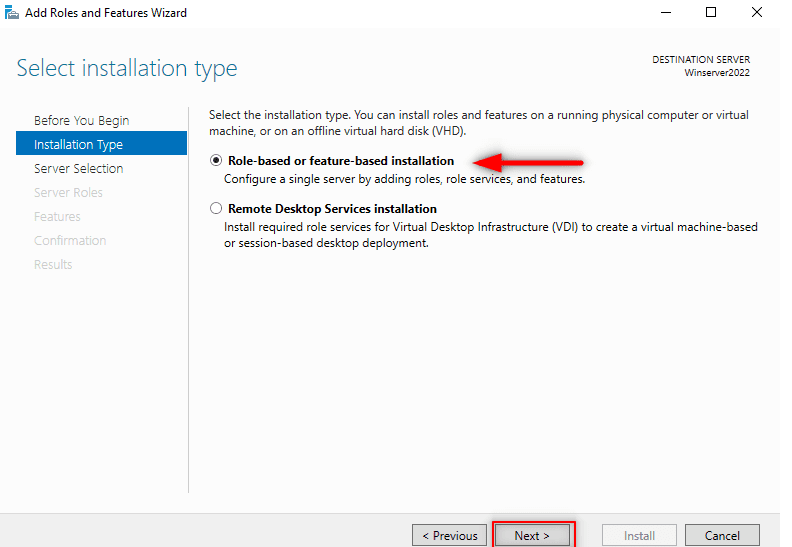
Select Role-Based Installation type 选择基于角色的安装类型
Step 4: Server Selection
步骤 4:选择目标服务器
On this interface titled “Select destination server“, select the server you are to install AD DS and click next. I am going to choose my local server. 在“选择目标服务器”页面,选择要安装 AD DS 的服务器,点击下一步。本文中将选择本地服务器作为目标服务器。
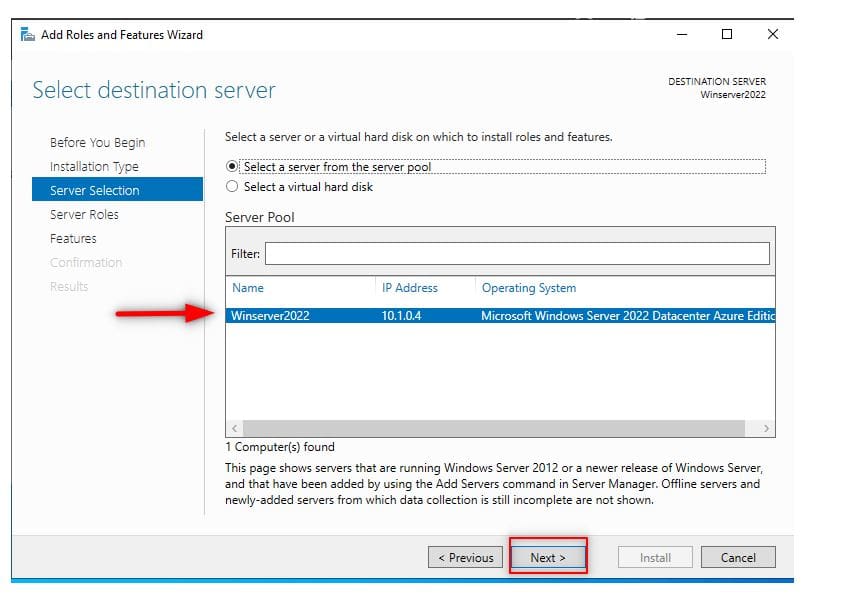
Server Selection
Step 5: Server Roles
步骤 5:选择服务器角色
The previous step will lead you to the next page as shown below. Here, you will see many options with square checklist box beside them. As you can see, we are choosing “Active Directory Domain Services“. 完成上一步后,进入如下所示的页面,该页面包含多个带复选框的选项,我们需要勾选“Active Directory 域服务”。
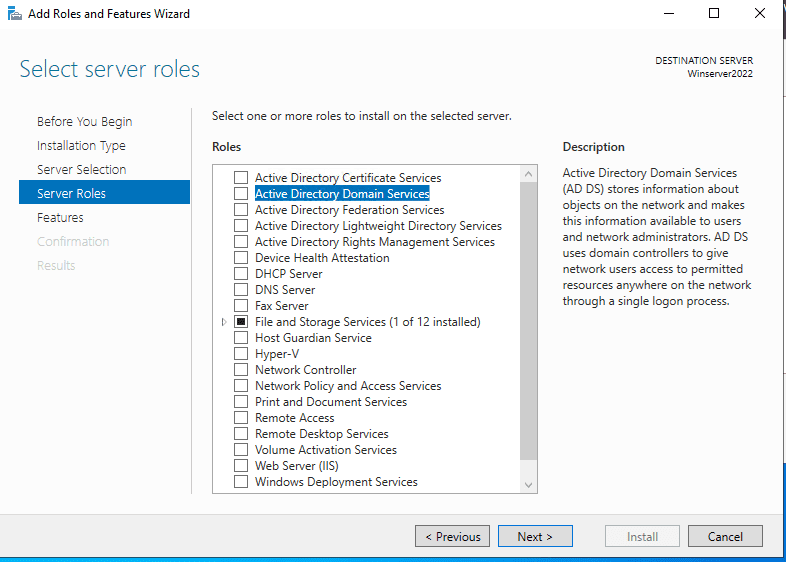
Server Roles 选择服务器角色
Step 6: Add Features
步骤 6:添加功能
Immediately you choose that option, a new part pops up. On the page, just click on “Add Features” tab and hit “Next“. 勾选“Active Directory 域服务”后,会弹出功能添加提示框,点击框中的“添加功能”按钮,再点击下一步。
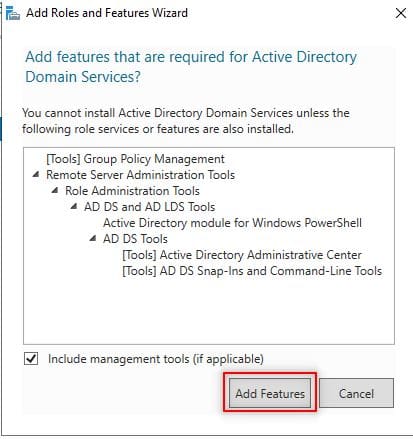
Add AD DS Features 添加 AD DS 相关功能
Step 7: Select Features
步骤 7:选择功能
On the next page after Step 6 titled “Select features“, just hit “Next” to lead you to installations of AD DS. 完成步骤 6 后,进入“选择功能”页面,直接点击下一步,进入 AD DS 的安装确认环节。
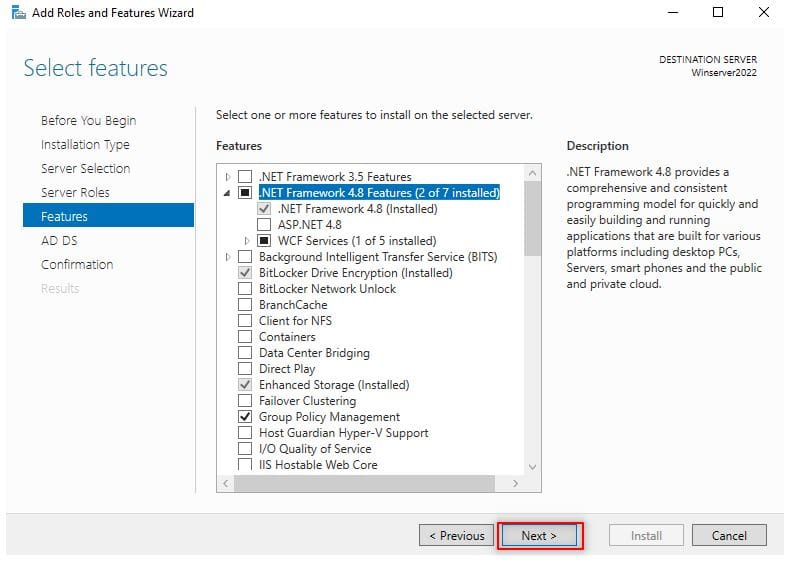
Select the Features 选择功能
Step 8: AD DS
步骤 8:AD DS 安装说明
As shown below, you will be presented with the next page titled “Active Directory Domain Services“. Here, click on “Next“ 进入如下所示的“Active Directory 域服务”说明页面,直接点击下一步。
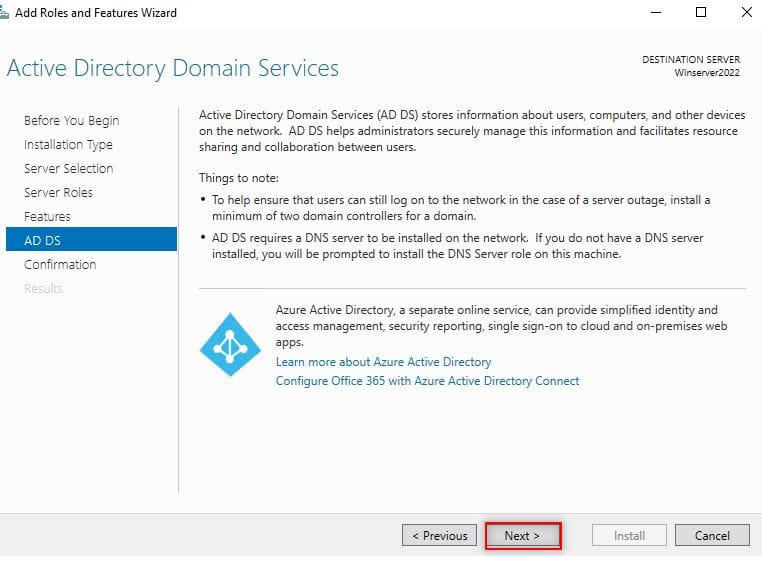
AD DS Installation Window AD DS 安装说明页面
Step 9: Confirm your selections
步骤 9:确认安装选择
The next page is about Confirming that you want to install AD DS before actually installing it. Here, if you are sure about the installation, click on install. 进入“确认安装选择”页面,该页面用于在正式安装前确认所有配置,确认无误后点击安装。
You can optionally choose the option that restarts the server whenever required which we are not choosing it in our own case. Click on close once it is done. 你可根据需要勾选“需要时自动重启目标服务器”选项,本文中不勾选该选项。安装完成后,点击关闭。

Confirm the AD DS Installation 确认 AD DS 安装选择
Close the Installation Complete Screen Wizard or go ahead with the next configuration of promoting the server to a domain controller which will be our next step as shown on the screenshot below 关闭安装完成的向导窗口后,即可进入下一步配置——将该服务器提升为域控制器,具体操作见下图。

Configuring Active Directory Domain Services (ADDS)
配置 Active Directory 域服务(AD DS)
Now that the installation has completed successfully. We going to go ahead to configure the AD DS following the steps below: Active Directory 域服务已安装完成,接下来按以下步骤完成该服务的配置:
Step 1: Promote to Domain Controller and Add the Forest
步骤 1:将服务器提升为域控制器并创建域林
After you have finished installing Active Directory Domain Services, the next step is to promote it to a Domain Controller (DC). On the same “Installation Complete Window” as shown on the screenshot above, Click on “Promote this server to a domain controller”. 安装完 Active Directory 域服务后,下一步是将其提升为域控制器(DC)。在上述的安装完成窗口中,点击“将此服务器提升为域控制器”。
Since this is a brand new Active Directory Domain Name Services, so we’re going to choose "Add a New Forest" (see the screenshot below). 由于本次搭建的是全新的 Active Directory 域服务,因此选择**“添加新域林”**(见下图)。

Promote the Server to a DC 将服务器提升为域控制器
Since a forest is the overall container for AD DS and its services, we are going create the first domain within the forest which is known as the "Forest Root Domain" and specify a name which must be a fully qualified domain name (FQDN) as blog.techdirectarchive.com. 域林是 AD DS 及其所有服务的顶级容器,因此我们需要在域林中创建第一个域(即 “林根域”),并为其配置完全限定域名(FQDN),本文中配置为 blog.techdirectarchive.com。
You are free to specify your fully qualified domain name based on your organization’s needs. Remember to specify the Active Directory Domain Services restored mode password as well. 你可根据企业需求自定义林根域的完全限定域名,同时需要设置 Active Directory 域服务的还原模式密码。
Note: One suggested methods is to use a subdomain of a public registered domain. In my case techdirectarchive.com is my public registered domain name while blog.techdirectarchive.com is the subdomain. In some situations, you may see something like techdirectarchive.local. Now, one thing to note here is the .local is an unofficial top-level domain name which is not supported by internet standard and unofficial domain name should really only be used in a test lab environment. Avoid using it in the production environment because it causes issue with certificates. But for the purpose of the demo session in this post, if you don’t have your public registered domain name you can go ahead and use the .local. 注:推荐使用公共注册域名的子域名作为林根域的域名。本文中,techdirectarchive.com 是公共注册域名,blog.techdirectarchive.com 是其子域名。实际部署中,你可能会看到 techdirectarchive.local 这类域名,需要注意的是,.local 是未被互联网标准认可的非官方顶级域名,仅建议在测试实验室环境中使用,切勿在生产环境中部署,否则会引发证书相关的问题。如果没有公共注册域名,可在本文的演示实验中使用.local 后缀的域名。

Add the Domain Controller 配置域控制器
At this stage, this is where you are to specify the forest and domain functional levels. This determines the AD DS and forest capabilities as well as determine which operating system can be run in the controller. 本步骤中需要配置域林功能级别和域功能级别,该配置将决定 AD DS 和域林的功能特性,同时也会限制域控制器可运行的操作系统版本。
Note one time that as shown on the screenshot above, the current functional level is Windows Server 2016. This means that all Domain Controller within the forest must have Windows Server 2016 and above because Windows Server 2016 is the latest we can choose because there have not been any significant changes since the Windows Server 2016 version. 注:如下图所示,本次配置选择的功能级别为 Windows Server
2016
2016
2016,这意味着域林中所有的域控制器都必须运行 Windows Server
2016
2016
2016 及更高版本的系统。选择该版本是因为 Windows Server
2016
2016
2016 之后的系统在域功能级别上未进行重大更新。
Step 2: DNS Options
步骤 2:DNS 选项配置
On the next page ( DNS Options ), you will probably see an error on top with the words “A delegation for this DNS server cannot be created because the authoritative parent zone nameserver cannot be found” (see the screenshot below). Ignore it and click “Next“ 进入“DNS 选项”页面后,页面顶部可能会出现报错提示:“由于找不到权威父区域名称服务器,无法为此 DNS 服务器创建委派”(见下图),忽略该报错,直接点击下一步。

DNS Options DNS 选项配置
Step 3: NetBIOS domain name
步骤 3:NetBIOS 域名配置
On the next page, leave the NetBIOS domain name as default or you can change it as long as it is not longer than 15 characters. Click “Next” after that. 进入 NetBIOS 域名配置页面,可保留默认的 NetBIOS 域名,也可自定义(字符数不超过 15),配置完成后点击下一步。

NetBIOS Domain Name NetBIOS 域名配置
Step 4: Paths
步骤 4:数据库路径配置
Leave paths as default and click “Next” as shown below. 保留默认的数据库、日志文件和 SYSVOL 文件夹路径,直接点击下一步(见下图)。

Database Paths AD DS 数据库路径配置
Step 5: Review Selections
步骤 5:检查配置选择
In this step, the server allows you to review what you have done so far. If you are good with the selections you have done, click “Next” to proceed to the next stage. 本步骤为配置检查环节,可查看此前的所有配置项,确认无误后点击下一步,进入先决条件检查环节。

Review Window 配置检查页面
Step 6: Prerequisites Check
步骤 6:先决条件检查
In the prerequisites step, the system will be validated before Active Directory Domain Services is installed. If you get any errors here, please look at it and fix anything in the previous steps. If all is okay, click “Install“. In our own case as shown in the screenshot below, all prerequisite check have been passed. 先决条件检查环节中,系统会验证所有配置是否满足 AD DS 的安装要求。若检查出现报错,需返回此前步骤修正配置;若检查全部通过,点击安装。本文中的实验环境已通过所有先决条件检查(见下图)。

Prerequisite Check Window 先决条件检查页面
The configuration of the ADDS is in progress AD DS 正在配置中

DC Installation Window 域控制器配置页面
After that, the Server will reboot and you can then log into the Domain with the credentials you set in Step 1 as shown below: 配置完成后,服务器会自动重启,重启后可使用步骤 1 中设置的凭据登录域(见下图):

Domain Controller Logon Screen 域控制器登录界面
Finally, if we check through the Server Manager and click on the “Tools” then select the “Active Directory Users and Computers” you will see that our domain name is there. 最后,打开服务器管理器,点击“工具”,选择“Active Directory 用户和计算机”,即可看到我们创建的域。
In our case we have created on Organizational Unit (OU) which serves as department and created an account for myself as the user (see the screenshot below). 本文中,我们已创建了一个作为部门使用的组织单元(OU),并为本人创建了一个用户账户(见下图)。

Locate Active Direct Users and Computers 打开 Active Directory 用户和计算机

OU and User 创建的组织单元和用户账户
Conclusion on how to Install and Configure Active Directory Domain Services on Windows
Windows 中 Active Directory 域服务安装与配置的总结
In conclusion, one of the best features that make Windows Server to be widely adopted in the Enterprise environments is Active Directory. 综上,Active Directory 是 Windows Server 能在企业环境中被广泛应用的核心特性之一。
This single Sign-on feature that seamlessly and easily integrates with most of Microsoft products makes user management among other tasks quite easy and fun. Congratulations, in this article you have learnt how to set it up from start to finish on Windows Server 2022. 这项可与绝大多数微软产品无缝便捷集成的单点登录功能,让用户管理及其他各类相关操作任务变得十分简便、易于上手。恭喜你,通过本篇文章,你已掌握在 Windows Server 2022 中从头至尾完整搭建该服务的方法。
I hope you found this blog post helpful on how to install and configure Active Directory Domain Services on Windows Server 2022. If you have any questions, please let me know in the comment section. 希望这篇博文能为你搭建 Windows Server 2022 中的 Active Directory 域服务提供实操帮助。若你还有任何问题,可在评论区留言告知。
How to add a second Domain Controller
如何添加第二台域控制器
Posted on 08/01/2020 By Christian

A domain controller (DC) is a server computer that responds to authentication requests. It participates in the replication and contains a complete copy of all directory information for their domain. If your environment requires high availability of IT systems when one DC fails, another takes over to ensure successful login, etc. 域控制器(DC)是一台用于响应身份验证请求的服务器,它参与目录数据的复制过程,且存储着所在域的全部目录信息的完整副本。若你的 IT 环境对高可用性有要求,那么当一台域控制器发生故障时,另一台域控制器可立即接管工作,保障用户登录等操作的正常执行。
If you wish to install an additional domain controller to balance the load and increase fault tolerance. This how-to guide describes the steps needed to add a domain controller to your existing Active Directory (AD) environment. 若你希望部署额外的域控制器以实现负载均衡、提升架构的容错能力,本文将详细讲解在现有 Active Directory(AD)环境中添加域控制器的具体步骤。
Add a second Domain Controller
添加第二台域控制器
Kindly follow the steps discussed below to add an additional DC to your domain. You will have to install the AD DS role and promote it as a Domain Controller. 请按照下述步骤为你的域添加额外的域控制器,整个过程需要先安装 AD DS 角色,再将该服务器提升为域控制器。
Add a domain controller into an existing domain
在现有域中添加一台域控制器

Note: You can decide to join this server to the domain before promoting it as a domain controller. 注:你可选择先将该服务器加入域,再将其提升为域控制器。
But in my case, I did not join the second Domain Controller to the domain previously. Because, when adding a new domain controller into an existing domain, this action will be performed by default. 但在本次实操中,我并未提前将这台第二台域控制器加入域,原因是在现有域中添加新域控制器时,该操作会被系统自动执行。
If you previously joined the Server to the Domain before promoting it, it will move the computer object out of the computer OU to the Domain Controller OU (Container) Next click on Change to enter the credential needed to join the domain. 若你提前将服务器加入域后再执行提升操作,系统会将该服务器对应的计算机对象从计算机组织单元(OU)移至域控制器组织单元(容器)。接下来点击“更改”按钮,输入加入域所需的凭据信息。

You may encounter an error in this stage if you are using the default administrator account. 若你使用默认的管理员账户执行此操作,本步骤可能会出现报错。
Create a new account and add the user as a member of the domain Administrator. This works! Remember to uncheck the Domain Name System Here (DNS) server. We do not need it as there is an existing DNS server. 此时可新建一个用户账户,并将该账户添加至域管理员组,采用此方式即可正常执行操作。注意取消勾选“此处的域名系统(DNS)服务器”选项,由于当前环境中已有可用的 DNS 服务器,因此无需再为此服务器配置 DNS 服务。

Specify Replication Server
指定复制源服务器
Under Additional Options, select “Replicate from” using the drop-down button to specify the DC to replicate from. 在“其他选项”栏中,点击下拉按钮选择“从以下服务器复制”,指定该域控制器的目录数据复制源服务器。

Under paths, you can decide to store them in a different location as best practice. I will leave them as default. 从最佳实践角度出发,你可在“路径”栏中修改 AD DS 数据库、日志文件和 SYSVOL 文件夹的存储位置,本次实操中将保留系统默认配置。

Under the review Option, click on next as this gives you an opportunity to review what you have done. 进入“检查选项”页面,点击“下一步”,该页面可让你复核此前的所有配置项。
Here it will perform the prerequisite checks and if it passes, it will prompt you to install Active Directory Domain Services. 系统将在此处执行先决条件检查,若检查全部通过,会弹出提示让你安装 Active Directory 域服务。

After installation, the computer will reboot. Now both DCs are global catalogs and can respond to user queries. 安装完成后,该服务器将自动重启。此时,两台域控制器均已配置为全局编录服务器,可响应用户的目录查询请求。

That is all. Verify the replication from Active Directory Sites and Services. I will be blogging on how to perform manual replication and testing if replication works. Keep an eye on this site for this. 操作到此全部完成。你可通过“Active Directory 站点和服务”工具验证目录数据的复制情况。
I hope you found this blog post helpful on how to add a second Domain Controller. 希望这篇博文能为你添加第二台域控制器的操作提供帮助。
Relationship between Domain Trees and Forests
域树与域林的关系
As you expand upon and organize Active Directory, you will create trees and forests. In Windows NT, the namespace was flat. Although NT domains could be configured to trust one another, each was a completely separate entity. 在拓展和规划 Active Directory 的过程中,你会搭建域树和域林。在 Windows NT 系统中,命名空间为扁平结构。尽管 NT 域可配置为彼此信任,但每个域都是完全独立的实体。
With Windows 2000 and later Windows versions, you can create a group of subdomains branching off from a root domain; these subdomains form a tree [1]. Subdomains are also called child domains [2], as they use the namespace of the root domains in which they reside. For instance, if the root domain is named domain.com, a child domain created under it would be named something like child1.domain.com. 在 Windows 2000 及后续的 Windows 版本中,你可以从根域分支创建一组子域,这些子域共同构成一个域树。子域也被称作子域,因为它们会沿用所在根域的命名空间。例如,若根域的域名为 domain.com,在其下创建的子域可命名为 child1.domain.com 这类形式。

This shows a child domain and its relationship to a root domain. 该图展示了子域及其与根域的关联关系。
In organizing Active Directory, you may also want to join groups of domains together into a structure, called a forest [3] Forests are collections of root domains (they do not share a contiguous namespace). The root domain, the first domain that you create, contains the configuration and schema for the forest. Additional domains are added to the root domain to form the tree structure or the forest structure, depending on the domain name requirements. Domains within a forest share two-way transitive trust relationships and share a common schema and global catalog. 在规划 Active Directory 时,你还可将多个域组整合为一个名为域林的架构。域林是根域的集合,这些根域之间不共享连续的命名空间。你创建的第一个域即为根域,其中存储着域林的配置和架构信息。可根据域名的需求,在根域中添加额外的域,以此形成域树或域林架构。域林中的所有域之间均存在双向可传递信任关系,且共享统一的架构和全局编录。
Question: What are trees and what are forests? 问题: 什么是域树?什么是域林?
Answer: Trees are a cohesive group of domains, known as subdomains or child domains, that grow from a root domain. All the domains within a tree share a contiguous namespace. Forests are collections of root domains. They do not share a contiguous namespace. 答案: 域树是从根域延伸而来的、相互关联的域组,这些域也被称作子域。同一个域树中的所有域共享连续的命名空间。域林是根域的集合,这些根域之间不共享连续的命名空间。
Why create Multiple Domains?
为何创建多个域?
There will be many occasions in which you will need to create additional domains. Multiple domains are useful when you are dealing with: 实际部署中,存在多种需要创建额外域的场景,在以下情况中,多域架构具备实际应用价值:
Different password requirements between organizations 不同组织单元存在不同的密码策略要求
Large numbers of objects 域内存在大量的对象
Different internet domain names 企业拥有不同的公网域名
Better control of replication 更便于管控目录数据的复制过程
Decentralized network administration 实现分散式的网络管理
In order for you to decide whether to create multiple domains and how to use them to best effect, you need to have a clear understanding of the relationship between trees and forests-known as a trust relationship [4]. The series of images below will explain to you the workings of the trust relationship. 若要判断是否需要创建多域架构,以及如何最大化发挥多域架构的作用,你需要清晰理解域树与域林之间的关联关系,即信任关系。以下一系列图示将为你解析信任关系的工作机制。
Hierarchical Arrangement of Windows Domains Windows 域的层级化组织形式
A tree is a hierarchical arrangement of Windows domains that share a continuous namespace. 域树是共享连续命名空间的 Windows 域的层级化组织形式。 
When you add a domain to an existing tree, the new domain is a child domain of an existing parent domain. The name of the child domain is combined with the name of the parent domain to form its DNS name. 当向现有域树中添加新域时,该新域将成为现有父域的子域,子域的名称会与父域的名称结合,构成其域名系统(DNS)名称。 
A forest is a group of trees that do not share a contiguous namespace. The trees in a forest share a common configuration, schema, and global catalog. 域林是由多个不共享连续命名空间的域树组成的集合,域林中的所有域树共享统一的配置、架构和全局编录。 
By default, the name of the root tree, or the first tree that is created in the forest, is used to refer to a given forest. Each tree in a forest has its own unique namespace. 默认情况下,根树(即域林中创建的第一个域树)的名称被用于指代特定的域林,域林中的每个域树都拥有自身唯一的命名空间。 
In order for you to decide how to administer a forest, you need to determine the kind of trust relationship your trees or domains will have. By default, all root domains within a forest have a two-way transitive trust relationship with one another. 若要确定域林的管理方式,你需要先定义域树或域之间的信任关系类型。默认情况下,域林中的所有根域之间均存在双向可传递信任关系。 
Active Directory supports two forms of trust relationships: 1) one-way, non-transitive trusts and 2) two-way transitive trusts. One-way, non-transitive trusts must be explicitly created by the administrator. If you have Windows Server 2016 domains coexisting with Windows domains on your network, the trust relationship between the Server and Windows domains are always explicitly one-way non-transitive trusts. Active Directory 支持两种信任关系类型:1) 单向不可传递信任;2) 双向可传递信任。单向不可传递信任必须由管理员手动创建。若你的网络中同时存在 Windows Server 2016 域和早期 Windows 域,两类域之间的信任关系始终为手动配置的单向不可传递信任。 
In a one-way non-transitive trust relationship, if domain green trusts domain yellow, domain yellow does not automatically trust domain green. 在单向不可传递信任关系中,若 green 域信任 yellow 域,yellow 域并不会自动信任 green 域。 
Windows networks use one-way, non-transitive trust relationships. You manually create these relationships between existing domains. In a large network, this imposes a lot of administrative overhead. Active Directory supports one-way non-transitive trusts for connections to Windows networks and between Active Directory domains. 早期 Windows 网络采用单向不可传递信任关系,这类信任关系需要管理员在现有域之间手动创建,在大型网络中会增加大量的管理工作负担。Active Directory 为与早期 Windows 网络的连接,以及 Active Directory 域之间的连接,均提供了单向不可传递信任的支持。 
In a two-way transitive trust relationship, if domain green trusts domain blue, then domain blue automatically trusts domain green. 在双向可传递信任关系中,若 green 域信任 blue 域,blue 域会自动信任 green 域。 
If a two-way transitive trust exists between two domains, you can grant permissions to resources in one domain to user and group accounts in the other domain, and vice versa. Two-way, transitive trust relationships are the default between Windows domains. 若两个域之间存在双向可传递信任关系,可将一个域中的资源访问权限授予另一个域的用户和组账户,反之亦然。双向可传递信任是 Windows 域之间的默认信任关系类型。 
Enhancing Hierarchy and Simplifying Management
强化层级架构与简化管理工作
In the context of Active Directory (AD) domains, a continuous namespace [5] plays a pivotal role in organizing and managing resources within Forests and Trees. A continuous namespace consists of a hierarchical and contiguous structure of domain names that share a common root domain. This structure enables efficient administration, seamless navigation, and streamlined access to resources, while also simplifying the process of implementing security policies and trust relationships. 在 Active Directory(AD)域的架构体系中,连续命名空间在域林和域树内的资源组织与管理工作中发挥着关键作用。连续命名空间是指共享同一根域、呈层级化连续结构的域名体系。该结构不仅能实现高效的管理、无缝的资源检索和便捷的资源访问,还能简化安全策略与信任关系的实施流程。
The benefits and significance of a continuous namespace in Active Directory domains using Forests and Trees can be highlighted in the following key aspects: 在基于域林和域树的 Active Directory 域架构中,连续命名空间的优势与意义主要体现在以下核心方面:
Hierarchy and Organization: A continuous namespace provides a well-structured hierarchy, allowing for a clear organization of resources and domains. This hierarchy facilitates the arrangement of domains within Trees and Forests, making it easier for administrators to manage resources and users in a large-scale environment. 层级架构与组织性:连续命名空间提供了结构清晰的层级体系,可实现资源与域的有序组织。该层级体系便于在域树和域林中规划域的布局,让管理员能更高效地在大规模网络环境中管理资源和用户。
Simplified Trust Relationships: Trust relationships are crucial for granting access to resources across different domains within a Forest. A continuous namespace ensures that parent and child domains share a common root domain, which automatically establishes a transitive trust relationship between them. This simplification reduces the administrative overhead of manually creating and maintaining trust relationships. 简化的信任关系:信任关系是实现域林内跨域资源访问授权的关键。连续命名空间确保父域与子域共享同一根域,二者之间会自动建立可传递信任关系,这一特性减少了手动创建和维护信任关系的管理工作负担。
Name Resolution and Resource Access: A continuous namespace improves name resolution and resource access within an Active Directory Forest. As domain names are contiguous, the Domain Name System (DNS) can resolve names more efficiently, ensuring that users and services can quickly locate and access resources across the Forest. 优化名称解析与资源访问:连续命名空间能提升 Active Directory 域林内的名称解析效率和资源访问体验。由于域名呈连续结构,域名系统(DNS)可更高效地完成名称解析,确保用户和服务能快速在域林中定位并访问资源。
Streamlined Group Policy Implementation: Implementing Group Policy Objects (GPOs) is essential for managing and configuring settings within an Active Directory environment. A continuous namespace enables administrators to efficiently apply GPOs across the entire domain hierarchy, ensuring that policies are enforced consistently and reliably throughout the Forest. 便捷的组策略实施:组策略对象(GPO)的配置是管理 Active Directory 环境各项设置的核心方式。连续命名空间让管理员能在整个域层级中高效部署组策略对象,确保策略在域林中得到一致且可靠的执行。
Scalability and Flexibility: Continuous namespaces offer greater scalability and flexibility when expanding the domain infrastructure. By adding new child domains or Trees under the common root domain, organizations can accommodate growth and evolving requirements without disrupting the existing namespace or introducing complexity. 高可扩展性与灵活性:在拓展域架构时,连续命名空间具备更强的可扩展性和灵活性。企业可在公共根域下添加新的子域或域树,以此适应业务发展和需求变化,且不会破坏现有的命名空间,也不会增加架构的复杂性。
A continuous namespace plays a critical role in Active Directory domains using Forests and Trees by enhancing hierarchy, simplifying management, and streamlining resource access. By providing a well-structured, scalable, and flexible foundation, continuous namespaces contribute to the overall efficiency and effectiveness of Active Directory-based infrastructures. 在基于域林和域树的 Active Directory 域架构中,连续命名空间通过强化层级架构、简化管理工作、优化资源访问,发挥着至关重要的作用。其为 Active Directory 架构提供了结构清晰、可扩展且灵活的基础,进而提升了整个基于 Active Directory 的网络架构的效率与实用性。
Domains and Forests
域与域林
Question: What Are Domains and Forests? 问题: 什么是域和域林?
The Logical Structure of Active Directory Active Directory 的逻辑结构 Active Directory stores network object information and implements the services that make this information available and usable to users. Active Directory presents this information through a standardized, logical structure that helps you establish and understand the organization of domains and domain resources in a useful way. This presentation of object information is referred to as the logical structure because it is independent of the physical aspects of the Active Directory infrastructure, such as the domain controllers required for each domain in the network. Active Directory 存储网络对象的相关信息,并提供相应服务为用户开放该信息的访问和使用权限。Active Directory 通过标准化的逻辑结构展示这些信息,助力管理员合理规划并理解域和域资源的组织方式。该对象信息的展示方式被称作逻辑结构,原因是其独立于 Active Directory 架构的物理层面,例如网络中每个域所需的域控制器等物理组件。
Benefits of the Logical Structure 逻辑结构的优势 The logical structure provides a number of benefits for deploying, managing, and securing network services and resources. These benefits include: Active Directory 的逻辑结构为网络服务与资源的部署、管理和安全防护带来诸多优势,具体包括:
Increased network security. The logical structure can provide security measures such as autonomy for individual groups or complete isolation of specific resources. 提升网络安全性。逻辑结构可实现各类安全防护措施,例如为各组织单元配置权限自治,或对特定资源进行完全隔离。
Simplified network management. The hierarchical nature of the logical structure simplifies configuration, control, and administration of the network, including managing user and group accounts and all network resources. 简化网络管理。逻辑结构的层级化特性,让网络的配置、控制和管理工作更简便,其中包括用户和组账户的管理,以及所有网络资源的管理。
Simplified resource sharing. The logical structure of domains and forests and the relationships established between them can simplify the sharing of resources across an organization. 简化资源共享。域和域林的逻辑结构,以及二者之间建立的关联关系,能让企业内部的资源共享更便捷。
Low total cost of ownership. The reduced administration costs for network management and the reduced load on network resources that can be achieved with the Active Directory logical structure can significantly lower the total cost of ownership. 降低总体拥有成本。Active Directory 的逻辑结构能减少网络管理的人工成本,降低网络资源的负载,进而大幅降低企业的总体拥有成本。
An efficient Active Directory logical structure also facilitates the system integration of features such as Group Policy, enabling desktop lockdown, software distribution, and administration of users, groups, workstations, and servers. In addition, the logical structure can facilitate the integration of services such as Exchange 2000, public key infrastructure (PKI), and domain-based distributed file system (DFS). 高效的 Active Directory 逻辑结构还能推动组策略等功能的系统集成,实现桌面环境的管控、软件分发,以及对用户、组、工作站和服务器的统一管理。此外,该逻辑结构还能助力 Exchange 2000、公钥基础设施(PKI)和基于域的分布式文件系统(DFS)等服务的集成部署。
Domain Trees Forest – Exercise
域树与域林——实操练习
[1] Trees: A tree is a collection of domains that share a contiguous namespace. [1] 域树:域树是共享连续命名空间的多个域的集合。
[2] Child domains: A domain located in the namespace tree directly under another domain name (the parent domain), which contains the name of the parent in its own name. Example: sales.tacteam.net is a child domain of the tacteam.net parent domain. [2] 子域:子域是在命名空间树中直接隶属于另一域名(父域)的域,其域名中包含父域的名称。示例:sales.tacteam.net 是父域 tacteam.net 的子域。
[3] Forests: Two or more domain trees which do not share a contiguous namespace can be joined in a forest. [3] 域林:两个及以上不共享连续命名空间的域树,可整合为一个域林。
[4] Trust relationship: A logical relationship established between domains that allows pass-through authentication, providing for users in a trusted domain to access resources in a trusting domain, without having a user account in the trusting domain. [4] 信任关系:信任关系是域之间建立的一种逻辑关系,支持直通式身份验证,让受信任域中的用户无需在信任域中创建账户,即可访问信任域中的资源。
[5] continuous namespace: A continuous namespace in Active Directory is a hierarchical domain structure where child domains are subdomains of the parent domain. For example, if the parent domain is example.com, a continuous child domain would be child.example.com. [5] 连续命名空间:Active Directory 中的连续命名空间,是指子域作为父域的下级子域的层级化域结构。例如,若父域为example.com,则其连续子域可为child.example.com。
Windows Server 中域、域树、域森林的区别与联系
anyzt520 于 2018-08-31 10:57:42 发布
域(Domain)
在阐述域的概念前,首先对工作组的网络管理特性进行梳理,工作组的管理特征可归纳为以下五点:
在企业信息化建设的过程中,当网络内计算机数量从 8 台扩张至 50 台时,工作组的分散式管理模式会显现出明显的局限性,不仅会增加网络故障的处理成本,还易出现病毒传播、浏览器首页篡改、内部网络恶意攻击等问题,无法满足企业的网络管理需求。由此便需要一种可实现集中化管理的网络组织模式,域的概念也由此产生。
若将工作组的管理模式类比为无统一管理的分散式组织形式,那么域则是具备集中化管理体系的网络组织形式,该概念最早在微软 NT 操作系统时代被提出,单域环境可满足规模较小、地域跨度较窄的企业网络管理需求。而对于跨地域、大规模的企业网络管理需求,需依托域树与域森林的层级化管理体系,实现多个域的联合管理,减少重复管理操作,同时提升不同域之间的资源调用效率。
域与域之间的关联及域内资源的访问,需依托域名系统(DNS)实现定位与解析,DNS 可类比为网络中的定位管理体系,为域的访问、加入及资源调用提供地址解析与路径指引。在域环境的搭建与使用中,域控制器(DC)是域环境中的管理节点,实质为安装了 Active Directory(AD)活动目录的物理服务器,域内所有用户的账户信息、计算机信息均统一存储在域控制器中。
在实际操作中,常会出现客户端无法加入域的情况,其中最典型的问题为无法联系到域控制器。以实验场景为例,操作人员完成 dcpromo 命令执行并搭建域控制器后,客户端执行加入域操作时提示无法联系到域控制器,经 ping 命令检测,客户端与域控制器的网络连通性正常,进一步通过 nslookup 命令检测域名解析,发现客户端无法解析域控制器域名,排查后确定为客户端 DNS 服务器地址未配置,填写正确的 DNS 服务器地址后,客户端可成功加入域。由此可见,DNS 在域环境中占据不可替代的地位,其并非单一的网络服务,而是由若干台 DNS 服务器与 DNS 成员机构成的计算机组织体系。
在域环境中,DNS 的作用可归纳为以下三点:
结合实际操作经验,客户端加入域的过程中,需重点关注以下三方面的问题,同时做好对应的检测与配置工作:
1 网络连通与域名解析问题
a) 通过 ping 命令检测客户端与 DC、DNS 服务器的网络连通性,确保二者之间的网络通信正常; b) 通过 DNS 服务完成 DC 的域名解析,客户端可通过nslookup 域名的命令组合,检测本地 DNS 服务器地址的配置是否正确。
2 权限验证问题
客户端加入域时,需输入具备域加入权限的用户账户与密码。实际操作中存在认知误区,即认为仅 Administrator 账户具备域加入的验证权限,实则普通的 Domain User 账户也可完成非域成员机的域加入验证操作,域内的普通用户账户均可协助完成新计算机的域加入操作。
3 域登录配置问题
客户端成功加入域后,若直接使用 Administrator 账户登录,默认将登录至本地计算机,而非域环境。需在登录界面中点击登录选项,在“登录到”的下拉菜单中选择已加入的域,方可完成域环境的登录操作。
特殊问题处理
a) SID 重复问题:若待加入域的计算机系统通过 GHOST 工具安装,且未完成系统重新封装,会出现 SID 重复的情况,此类计算机无法正常加入域,需对系统进行重新封装处理,关于 SID 的详细说明及系统封装方法可参考《微软级 DNA 手术-新 SID 的诞生之系统封装》; b) DNS 服务器故障问题:若客户端已正确配置内网 DNS 服务器地址,且可通过 ping 命令连通 DNS 服务器与 DC,但仍无法联系到 DC,大概率为 DNS 服务器出现故障。域控制器的定位信息存储在 DNS 服务的 SRV 资源记录中,该问题多由 SRV 资源记录未生效或不存在导致,解决方法为在 DNS 服务器中,通过运行services.msc打开服务管理器,重启 Net Logon 服务即可。
对域环境的相关知识点进行梳理,可总结为以下三点:
域既是 Windows 网络系统的逻辑组织单元,也是 Internet 的逻辑组织单元,在 Windows 操作系统中,域是网络的安全边界。域管理员的管理权限仅覆盖域的内部,除非其他域为其赋予明确的管理权限,否则域管理员无法访问或管理其他域。每个域均具备独立的安全策略,且与其他域之间可建立自定义的安全信任关系。
域与工作组的管理模式可通过对比实现更清晰的理解:工作组模式下,所有系统配置与策略均在本地计算机完成,用户登录为本地登录,账户密码的验证依托本地系统数据库实现;域模式下,所有系统配置与策略由域控制器统一制定,用户账户与密码的验证依托域控制器的数据库实现,同一域的用户账户可在域内任意一台计算机完成登录操作。
若将工作组类比为无准入限制的开放式网络组织,域则为具备严格准入与管理机制的网络组织;工作组内的计算机可自由加入与退出,而域对计算机的加入与退出设置了严格的权限与验证机制。域的本质是由服务器控制网络计算机加入权限的计算机组合,基于该组合形式的管理需求,需建立严格的管理机制,这一机制对提升网络安全性具有重要意义。在对等网模式下,任意一台计算机接入网络后,均可访问全网的共享资源,即便共享文件设置访问密码,也存在较高的破解风险,且在 Windows 9x 构成的对等网中,数据传输过程不具备安全防护能力。
在域模式下,网络中至少存在一台服务器,专门完成联入网络的计算机与用户的身份验证工作,该服务器即为域控制器(Domain Controller,简写为 DC)。域控制器中存储有包含域账户、密码、域内计算机信息的数据库,当计算机接入网络时,域控制器会依次验证计算机的域归属、用户登录账户的有效性、登录密码的正确性,若任一验证项不通过,域控制器将拒绝该用户从该计算机完成域登录操作。未完成域登录的用户,无法访问域内受权限保护的资源,仅能以对等网用户的身份访问 Windows 开放的共享资源,以此实现域内资源的安全防护。
将计算机加入域的操作,并非仅实现计算机与域控制器在网络中的互通即可,还需由网络管理员在域控制器中完成对应的配置,将该计算机添加至域的设备列表中,方可实现域内文件共享与集中化管理。
域是域环境中最基本的管理单元,同时也是最基层的容器,可实现对员工、计算机等基础数据的存储。在一个 Active Directory 中,可根据企业的管理需求创建多个域,例如甲公司的财务科、人事科、销售科可分别创建独立的域,因上述域同属甲公司的管理体系,可将其整合为一棵域树进行统一管理;若甲公司、乙公司、丙公司同属 A 集团的管理体系,为实现 A 集团对旗下子公司的层级化管理,可将各子公司的域树进一步整合为域森林,此时 A 集团可按照“子公司(域树)→部门(域)→员工”的层级结构实现网络资源的管理。Active Directory 的该种层次结构,使企业网络具备较强的扩展性,同时便于网络资源的组织、管理与目录定位。若企业的部门名称发生变更,例如甲公司的人事科更名为人力资源部,对应的域名需从“人事科.甲公司.A 集团”更改为“人力资源部.甲公司.A 集团”,此时便产生域更名的需求。
OU(Organizational Unit,组织单元)
OU 是一种容器对象,可将域中的各类对象划分为不同的逻辑组,因此 OU 属于纯粹的逻辑概念,其主要作用为简化域的管理工作。OU 可包含多种类型的对象,例如用户账户、用户组、计算机、打印机,同时也可包含其他 OU。基于该特性,可利用 OU 将域中的对象构建为完全的逻辑层次结构,针对企业的管理需求,可按照部门、地理位置、功能与权限等不同维度,构建对应的 OU 层次结构。
OU 的层次结构仅局限于域的内部,不同域中的 OU 层次结构相互独立,彼此之间无关联关系。
域树
多个域通过信任关系建立连接后,所有域将共享统一的架构(Schema)、配置信息与全局目录(Global Catalog),由此形成的域组织体系即为域树。域树由多个域构成,域树内的所有域共享相同的架构与配置信息,且具备连续的名字空间,域树内的域之间通过信任关系实现互通与管理。在一个 Active Directory 中,可包含一棵或多棵域树。
域森林
域森林是由一棵或多棵不具备连续名字空间的域树构成的域组织体系。域森林内的所有域树共享统一的架构(Schema)、配置信息与全局目录(Global Catalog),域树之间通过 Kerberos 信任关系建立连接,因此每一棵域树均可识别森林内的 Kerberos 信任关系,不同域树之间可实现对象的交叉引用。
Active Directory 与站点的关系
站点是 Active Directory 中的重要概念,也是初学者易产生理解误区的内容,主要误区集中在站点与域的区别、二者的管理范围界定、站点存在的实际意义等方面,下文将对站点的概念与设计初衷进行阐述,明确站点与域的管理边界与协同关系。
域是共享用户账户、计算机账户及安全策略的一组计算机,该定义基于网络逻辑因素进行界定,只要用户与计算机处于同一个 Active Directory 内,即被纳入域的安全边界范围。从域的定义可看出,域的管理体系未考虑网络传输速率等物理因素,无论计算机与域控制器之间为高速物理连接还是低速物理连接,域的管理策略均保持一致。但在实际的企业生产环境中,若忽略网络传输速率的物理因素,域的管理工作将出现诸多效率问题,以下通过实际案例进行说明:
某域的域控制器分布于北京、上海两个地域,北京部署有 A、B、C 3 台域控制器,上海部署有 D、E、F 3 台域控制器;北京与上海的本地局域网均为千兆以太网,两地之间通过 128 K 的专线实现网络连通。当域控制器 A 的 Active Directory 配置发生更改时,需将该更改同步至其他 5 台域控制器,从网络传输效率的角度,最优的同步策略为:域控制器 A 先将配置更改同步至同地域的 B、C 两台域控制器,再通过跨地域专线将配置更改同步至上海的域控制器 D,最后由域控制器 D 同步至上海的 E、F 两台域控制器。该策略仅需通过跨地域低速链路完成一次数据传输,可最大限度提升同步效率。
若域的管理体系不考虑网络传输速率,知识一致性检查器(KCC)规划的复制拓扑可能出现非最优的情况,例如同步顺序为 A→D→B→E→C→F,该种拓扑需通过跨地域低速链路完成 5 次数据传输,大幅降低 Active Directory 配置的同步效率。除此之外,用户日常的域登录身份验证也会受此影响,若北京的用户通过上海的域控制器完成身份验证,将显著降低登录效率。
由此可见,在域的实际运维工作中,网络传输速率的物理因素无法被忽略,微软因此引入站点的概念,实现对计算机的物理维度管理。站点的定义为:由高速网络连接的一组计算机,该概念突出了网络传输速率的物理因素,而域的概念则突出了 Active Directory 共享的逻辑因素,将站点与域结合,可从物理与逻辑两个维度实现对计算机的全方位管理。该种管理思路在微软的其他产品中也有应用,例如 Exchange 中的管理组与路由组,管理组对应逻辑维度的管理,路由组对应物理维度的管理,与域和站点的管理逻辑一致。
基于站点的管理体系,可有效解决上述域管理中的效率问题:根据北京与上海之间的低速链路,将北京的计算机划分为一个站点,上海的计算机划分为另一个站点。站点的管理机制可实现两项优化:一是用户登录时,将优先选择本站点内的域控制器完成身份验证;二是知识一致性检查器(KCC)在规划复制拓扑时,将优先完成本站点内域控制器的 Active Directory 复制,再进行跨站点的复制操作。同时,跨站点的 Active Directory 复制会对数据进行压缩处理,可有效减少低速链路的网络数据传输量,提升跨站点复制的效率。
域、域树、域林、根域
FLy_鹏程万里 转载于 2018-06-14 13:03:29 发布

如图所示,contoso 公司的 IT 环境中存在多种类型的 IT 资源,且所有资源均处于分散式管理的状态,该种管理模式不仅增加了企业的 IT 管理成本,还导致企业的管理制度无法在生产环境中落地执行。
针对 IT 资源分散式管理的问题,需建立一种逻辑层面的集中化管理体系,如同不同地域、不同社会关系的个体,均归属于同一国家的逻辑管理体系,通过国家的逻辑边界实现对境内物理资源与人员的统一管理,企业的 IT 资源也可通过该种逻辑集中化的方式实现管理优化。


域的概念正是基于企业 IT 资源的逻辑集中化管理需求提出,通过域可将企业 IT 环境中的所有资源纳入统一的逻辑管理体系,实现资源的集中化管理。contoso 公司通过创建 contoso.com 域,解决了企业内部 IT 资源的分散管理问题,有效降低了企业的 IT 管理成本。
随着企业业务的发展,contoso 公司在北京、上海设立了子公司,跨地域的业务布局使 IT 资源的管理范围进一步扩大,分散式的管理模式再次显现出局限性,此时可通过域的层级化扩展实现跨地域 IT 资源的集中管理。

以 contoso.com 为父域,为北京、上海子公司分别创建 bj.contoso.com 与 sh.contoso.com 子域,子域的域名与父域的域名具备连续的名字空间,父域与子域之间形成父子级的域管理关系。

由父域与若干子域通过信任关系构建的、具备连续名字空间的域组织体系,即为域树。通过域树的管理模式,contoso 公司实现了对跨地域分支机构 IT 资源的集中化管理,进一步降低了企业的管理成本。
企业在发展过程中,常会开展多项目的运营模式,且为不同项目配置独立的管理团队与管理机制,该种模式可提升企业经营的可靠性,降低单一项目运营的风险。多项目运营模式下,企业需要一种可兼顾集中管理与项目独立性的 IT 资源管理体系,域环境的扩展特性可满足该种需求。
contoso 公司在运营主项目的同时,开展了 seattle 项目的运营,为该项目创建独立的 seattle.com 域,该域与 contoso.com 域同属 contoso 公司的域森林管理体系,二者的域名不具备连续的名字空间,但可通过域森林实现集中化管理。该种模式既通过域森林实现了企业对多项目 IT 资源的统一管理,又通过独立的域保证了 seattle 项目的管理独立性。后续 seattle 项目设立了分支机构,为其创建 work.seattle.com 子域,形成了 seattle 项目独立的域树。

由一棵或多棵不具备连续名字空间的域树构成的域组织体系,即为域林(域森林)。
企业多项目运营模式下,主营项目在 IT 环境管理中需具备优先性,域环境通过根域的设置实现该种管理需求。

在域森林中,第一个被创建的域被称为根域,根域在域森林的管理体系中具备独特的管理属性,且一个域森林中仅能存在一个根域,通过根域可实现企业主营项目在 IT 环境管理中的优先性管控,满足企业多项目运营的风险管控与管理需求。

在多域环境的管理中,可通过域控制器的组配置特征快速识别根域:根域的域控制器中会存在两个特殊的用户组,分别为Enterprise Admins与Schema Admins,而域森林中其他域的域控制器中,均不会存在这两个用户组。
以上为域、域树、域林、根域的概念与管理特征阐述,可帮助管理人员理解域环境在企业 IT 资源管理中的应用方式。关于多域企业管理环境的搭建方法,将在后续内容中进行详细说明。
关于活动目录域、域树、域林、子域
深海天哥 于 2020-03-22 21:19:36 发布
1 概念解释与技术选型
1.1 基本概念界定
1.2 分支机构技术选型
工程师在 winsnet.com 域网络的基础上,为外域新组建的子公司设计活动目录域网络管理方案时,应选择域树的网络管理模式,通过为子公司创建子域,形成以 winsnet.com 为父域的域树,实现总公司对子公司 IT 资源的集中化管理与跨地域资源互通。
2 实验步骤
本实验分别在 Windows Server 2008 R2、Windows Server 2012 平台完成,实验目标为将一台全新的 Windows Server 2008 R2 服务器配置为域控制器,同时完成客户端加入域、域用户管理、域组管理等操作。
2.1 实验环境准备
打开全新的 Windows Server 2008 R2 虚拟机,通过快照还原至“系统安装”状态,为后续域控制器配置做准备。

2.2 服务器 TCP/IP 参数配置
为服务器配置 TCP/IP 静态参数,具体配置要求如下:
2.3 域控制器升级配置
通过运行 dcpromo 命令,将该服务器升级为 winsnet.com 域的域控制器,其中域名中的 X 为实验室计算机编号,具体操作步骤对应以下截图:


2.4 域用户创建
在域控制器中创建域用户 user01,该账户作为客户端加入域的认证凭证,具体操作截图如下:


2.5 域用户登录时间配置
为 user01 用户配置登录时间限制,仅允许该用户在每日早上 8:00-12:00、下午 15:00-18:00 完成域登录操作,具体配置截图如下:


2.6 客户端加入域配置
准备两台安装客户端操作系统的虚拟机,一台为 Windows XP 系统,一台为 Windows 7 系统,为两台客户端配置 IP 地址与 DNS 服务器地址(均指向 192.168.1.X),随后完成域加入操作,具体步骤如下:


2.7 域用户登录权限验证
在非授权时间内,使用 user01 账户在 Windows XP 与 Windows 7 客户端尝试完成域登录,系统将提示登录时间限制并拒绝登录,验证截图如下:


2.8 域本地组创建与用户添加
在域控制器中创建域本地组 shichangs,并将 user01 用户添加至该组的成员列表,具体操作步骤如下:


via:
- The Domain, the Tree and the Forest :: https://ad4noobs.justin-p.me/terminology_installing_a_active_directory/domain_tree_forest/
- Active Directory Forest – Trees and Domain and Sites – https://techdirectarchive.com/2020/04/11/what-is-active-directory-forest-trees-and-domain/
- Install and configure Active Directory Domain Services on Windows https://techdirectarchive.com/2021/11/30/how-to-install-configure-active-directory-domain-services-on-windows-server-2022/
- How to add a second Domain Controller https://techdirectarchive.com/2020/01/08/how-to-setup-a-dc-adding-a-second-domain-controller/ – —
- What is Active Directory tree (AD tree)? https://www.techtarget.com/searchwindowsserver/definition/Active-Directory-tree-AD-tree
- 使用组织域林模型 | Microsoft Learn https://learn.microsoft.com/zh-cn/windows-server/identity/ad-ds/plan/using-the-organizational-domain-forest-model —
- 深入理解父域、子域、树域和林域_子域和树域的区别-CSDN 博客 https://blog.csdn.net/AIBB_520/article/details/134841147
- Windows sever 中域、域树、域森林之间的区别与联系-CSDN 博客 https://blog.csdn.net/weixin_43028329/article/details/82220876
- 域、域树、域林、根域_域森林根域-CSDN 博客 https://blog.csdn.net/Fly_hps/article/details/80635803
- 关于活动目录域、域树、树林、子域_子域和树域的区别-CSDN 博客 https://blog.csdn.net/qwf869/article/details/104859442





评论前必须登录!
注册