 网硕互联帮助中心
概述
开源(GitHub,50 K Star,10 Fork;Gitee,539 Star,132 Fork)客户端,使用MyBatisPlus的方式操作向量数据库Milvus,支持Spring和Solon。
特性
- 无侵入:只做增强不做改变,引入它不会对现有工程产生影响,如丝般顺滑
- 损耗小:启动即会自动注入基本CURD,性能基本无损耗,直接面向对象操作
- 强大CRUD操作:通用MilvusMapper,仅仅通过少量配置即可实现CRUD操作,更有强大的条件构造器,满足各类使用需求
- 直观API:直接API设计简化数据库操作,MilvusService提供丰富的API
- 支持Lambda形式调用:通过Lambda表达式,方便的编写各类查询条件,无需再担心字段写错
- 支持主键自动生成:完美解决主键问题
- 支持自定义全局通用操作:支持全局通用方法注入
- 注解式配置:采用与MyBatis-Plus类似的注解方式配置实体模型
- 易于扩展:核心设计注重可扩展性
- 类型安全:利用Java类型安全减少错误
应用场景
- 相似性搜索:快速检索与给定向量最相似的项
- 推荐系统:根据用户行为和偏好推荐相关内容
- 图像检索:在大规模图像库中找到与查询图像最相似的图像
- 自然语言处理:将文本转换为向量并执行语义搜索
- 生物信息学:分析和比较生物序列,如蛋白质和基因组数据
原理
底层依赖于官方提供的milvus-sdk-java客户端,多Maven模块化目录结构 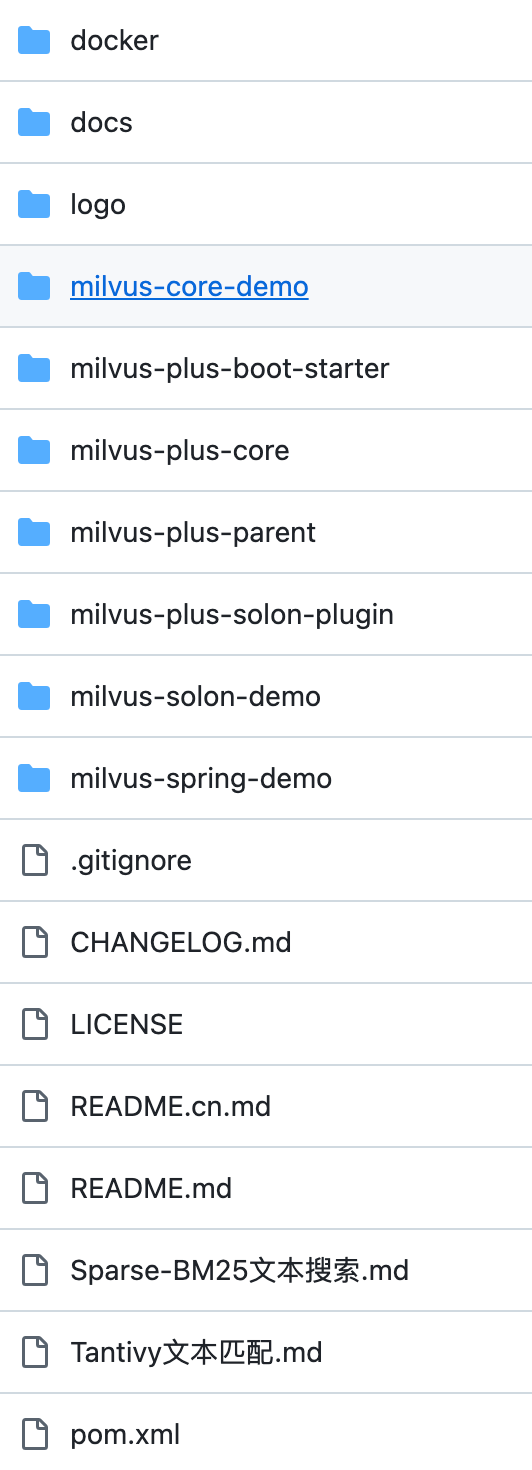
注解
使用自定义注解自动化Milvus数据库集成的显著优势:
- 简化开发流程:通过注解直接在代码中声明数据库结构,不用手动创建集合、属性、索引、分区,项目启动即自动构建,减少手动编写Milvus API调用的需要
- 提高开发效率:注解驱动的方式使得数据库结构的创建和管理更加快捷,加快开发速度
- 增强代码可读性:将数据库结构定义与业务逻辑代码紧密结合,提高代码可读性和可维护性
- 减少错误:自动化创建数据库结构减少人为错误的可能性,提高系统稳定性
- 易于维护:注解的使用使得数据库结构的变更更加集中和明确,便于后期维护和升级
@ExtraParam注解
- 用途:定义索引或其他自定义功能的额外参数
- 属性:
- key():参数的键名
- value():参数的值
@MilvusCollection注解
- 用途:定义Milvus数据库中的集合
- 属性:
- name():集合名称
@MilvusField注解
- 用途:定义Milvus集合中的字段
- 属性:
- name():字段名称,默认为Java字段名
- dataType():数据类型,默认为FLOAT_VECTOR
- dimension():向量维度,默认为-1
- isPrimaryKey():是否为主键,默认为false
- autoID():是否自动生成ID,默认为false
- description():字段描述,默认为空
- elementType():元素类型,默认为None
- maxLength():最大长度,默认为-1
- maxCapacity():最大容量,默认为-1
- isPartitionKey():是否为分区键,默认为false
@MilvusIndex注解
- 用途:定义Milvus集合中的索引
- 属性:
- indexType():索引类型,默认为FLAT
- metricType():度量类型,默认为L2
- indexName():索引名称,默认为空
- extraParams():额外参数,使用ExtraParam注解定义
@MilvusPartition注解
- 用途:定义Milvus集合的分区
- 属性:
- name():分区的名称数组
通过这些注解,开发者可轻松地定义和管理Milvus数据库的结构,实现项目启动时自动构建所需数据库结构的目标。
索引与度量类型
索引类型(IndexType)
- INVALID:无效索引类型,仅用于内部标记
- FLAT:暴力搜索,适用于小规模数据集
- IVF_FLAT:倒排索引平面模式,适用于中等规模数据集
- IVF_SQ8:倒排索引量化模式,适用于大规模数据集,牺牲精度提升速度
- IVF_PQ:倒排索引产品量化模式,适用于大规模高维数据集,平衡速度和精度
- HNSW:分层导航小世界图,提供快速搜索,适用于大规模数据集
- DISKANN:基于磁盘的近似最近邻搜索,适用于存储在磁盘上的大规模数据集
- AUTOINDEX:自动选择最优索引类型
- SCANN:使用扫描和树结构加速搜索
- GPU_IVF_FLAT、GPU_IVF_PQ:GPU加速索引,适用于GPU环境
- BIN_FLAT、BIN_IVF_FLAT:二进制向量专用索引
- TRIE:适用于字符串类型的字典树索引
- STL_SORT:适用于标量字段的排序索引
度量类型(MetricType)
- INVALID:无效度量类型,仅用于内部标记
- L2:欧几里得距离,适用于浮点向量
- IP:内积,用于计算余弦相似度
- COSINE:余弦相似度,适用于文本和图像搜索
- HAMMING:汉明距离,适用于二进制向量
- JACCARD:杰卡德相似系数,适用于集合相似度计算
MilvusMapper
用于操作Milvus数据库的通用接口,提供一系列的数据操作方法,包括查询、删除、更新和插入。一个泛型抽象类,继承自BaseMilvusMapper,提供与Milvus客户端交互的基本方法:
- 获取Milvus客户端:getClient(),返回MilvusClientV2实例
BaseMilvusMapper
抽象类,定义与Milvus数据库交互的基础操作:
- 创建搜索构建器实例:queryWrapper(),创建LambdaQueryWrapper实例
- 创建删除构建器实例:deleteWrapper(),创建LambdaDeleteWrapper实例
- 创建更新构建器实例:updateWrapper(),创建LambdaUpdateWrapper实例
- 创建新增构建器实例:insertWrapper(),创建LambdaInsertWrapper实例
数据操作
- 通过ID获取数据getById(Serializable … ids) 功能:根据提供的ID列表查询数据 参数:ids,一个可序列化的ID列表 返回:MilvusResp<List<MilvusResult<T>>>,包含查询结果的响应
- 删除数据removeById(Serializable … ids) 功能:根据提供的ID列表删除数据 参数:ids,一个可序列化的ID列表 返回:MilvusResp<DeleteResp>,删除操作的响应
- 更新数据updateById(T … entity) 功能:根据提供的实体更新数据 参数:entity,一个实体对象列表 返回:MilvusResp<UpsertResp>,更新操作的响应
- 插入数据insert(T … entity) 功能:插入提供的实体到数据库 参数:entity,一个实体对象列表 返回:MilvusResp<InsertResp>,插入操作的响应
构建器方法:创建通用构建器实例:lambda(Wrapper<W, T> wrapper),初始化并返回构建器实例。
LambdaQueryWrapper
LambdaQueryWrapper<T>,一个用于构建和执行Milvus搜索查询的构建器类,提供一系列方法来设置查询参数,并最终执行查询。
构造函数
- LambdaQueryWrapper():无参构造函数
- LambdaQueryWrapper(String collectionName, MilvusClientV2 client, ConversionCache conversionCache, Class entityType):构造函数,初始化集合名称、Milvus客户端、类型转换缓存和实体类型
分区设置
- partition(String … partitionName):添加一个或多个分区名称到查询中
- partition(FieldFunction<T,?>… partitionName):根据提供的字段函数添加分区名称
搜索参数设置:searchParams(Map<String, Object> searchParams):支持参数:
- metric_type:String类型,指定搜索操作使用的度量类型。必须与索引向量字段时使用的度量类型一致。示例:searchParams.put("metric_type", "L2");,可选值:
- L2:欧几里得距离,适用于高维空间的向量搜索
- IP:内积,适用于余弦相似度搜索
- COSINE:余弦相似度,与内积相同,适用于测量向量间的夹角
- radius:float类型,设置搜索操作的最小相似度阈值。当metric_type设置为L2时,此值应大于range_filter;否则,应小于range_filter。示例:searchParams.put("radius", 0.5f);
- range_filter:float类型,限定搜索操作的相似度范围。当metric_type设置为IP或COSINE时,此值应大于radius;否则,应小于radius。示例:searchParams.put("range_filter", 0.3f);
示例:
Map<String, Object> searchParams = new HashMap<>();
searchParams.put("metric_type", "L2");
searchParams.put("radius", 0.5f);
searchParams.put("range_filter", 0.3f);
- radius(Object radius):设置搜索半径
- rangeFilter(Object rangeFilter):设置范围过滤器
- metricType(Object metric_type):设置度量类型
结果设置
- outputFields(List outputFields):设置要返回的字段
- roundDecimal(int roundDecimal):设置返回的距离值的小数位数
查询条件构建
- eq(String fieldName, Object value):添加等于条件
- ne(String fieldName, Object value):添加不等于条件
- gt(String fieldName, Object value):添加大于条件
- ge(String fieldName, Object value):添加大于等于条件
- lt(String fieldName, Object value):添加小于条件
- le(String fieldName, Object value):添加小于等于条件
- between(String fieldName, Object start, Object end):添加范围条件
- isNull(String fieldName):添加空值检查条件
- isNotNull(String fieldName):添加非空值检查条件
- in(String fieldName, List<?> values):添加 IN 条件
- like(String fieldName, String value):添加 LIKE 条件
JSON和数组操作
- jsonContains(String fieldName, Object value):添加JSON包含条件
- jsonContainsAll(String fieldName, List<?> values):添加JSON包含所有值的条件
- jsonContainsAny(String fieldName, List<?> values):添加JSON包含任意值的条件
- arrayContains(String fieldName, Object value):添加数组包含条件
- arrayContainsAll(String fieldName, List<?> values):添加数组包含所有值的条件
- arrayContainsAny(String fieldName, List<?> values):添加数组包含任意值的条件
- arrayLength(String fieldName, int length):添加数组长度条件
逻辑操作
- and(ConditionBuilder other):添加AND条件
- or(ConditionBuilder other):添加OR条件
- not():添加NOT条件
向量搜索设置
- annsField(String annsField):设置要搜索的向量字段
- vector(List<?> vector):添加要搜索的向量
- vector(String annsField, List<?> vector):设置向量字段并添加要搜索的向量
- topK(Integer topK):设置返回top-k结果
- limit(Long limit):设置查询结果的数量限制
执行查询
- query():构建并执行搜索请求,返回封装MilvusResp对象,其中包含查询结果
- query(FieldFunction<T,?> … outputFields):设置输出字段并执行查询
- query(String … outputFields):设置输出字段并执行查询
- getById(Serializable … ids):通过ID获取数据
辅助方法
- buildSearch():构建完整的搜索请求对象
- buildQuery():构建查询请求对象
LambdaQueryWrapper<T> 类提供丰富的方法来构建复杂的搜索查询,支持各种条件、逻辑操作、JSON和数组操作,以及向量搜索。通过链式调用这些方法,用户可灵活地构造搜索请求并获取所需的查询结果
LambdaDeleteWrapper
构建器类,用于构建和执行删除操作:
- 添加分区:partition(String partitionName)
- 添加等于条件:eq(String fieldName, Object value)
- 添加不等于条件:ne(String fieldName, Object value)
- 添加ID到删除列表:id(Object id)
执行删除
- 执行删除:remove(),构建并执行删除请求
- 通过ID删除:removeById(Serializable … ids)
LambdaUpdateWrapper
构建器类,用于构建和执行更新操作。
- 添加分区:partition(String partitionName)
- 设置更新条件:与LambdaDeleteWrapper相同
执行更新
- 更新数据:update(T t),构建并执行更新请求
- 通过ID更新:updateById(T … t)
LambdaInsertWrapper
构建器类,用于构建和执行插入操作:
- 添加分区:partition(String partitionName)
- 添加字段值:put(String fieldName, Object value)
执行插入
- 插入数据:insert(),构建并执行插入请求
- 插入多个数据:insert(T … t)
MilvusService
一个综合性服务,提供对 Milvus数据库的全面管理,实现多个接口:IAMService(身份访问管理服务)、ICMService(集合管理服务)和IVecMService(向量管理服务)。
IAMService
提供用户和角色的创建、删除、查询以及权限的授予和撤销等功能:
- 创建角色:createRole(String roleName)
- 创建用户:createUser(String userName, String password)
- 查询角色权限:describeRole(String roleName)
- 查询用户信息:describeUser(String userName)
- 删除角色:dropRole(String roleName)
- 删除用户:dropUser(String userName)
- 授予角色权限:grantPrivilege(String roleName, String objectType, String privilege, String objectName)
- 授予用户角色:grantRole(String roleName, String userName)
- 列出所有角色:listRoles()
- 列出所有用户:listUsers()
- 撤销角色权限:revokePrivilege(String roleName, String objectType, String privilege, String objectName, String databaseName)
- 撤销用户角色:revokeRole(String roleName, String userName)
- 更新用户密码:updatePassword(String userName, String password, String newPassword)
ICMService
提供集合的创建、删除、查询、重命名、索引创建和管理等功能:
- 创建集合:createCollection(MilvusEntity milvusEntity)
- 添加字段:addField(String collectionName, AddFieldReq … addFieldReq)
- 获取字段:getField(String collectionName, String fieldName)
- 获取集合详细信息:describeCollection(String collectionName)
- 删除集合:dropCollection(String collectionName)
- 检查集合是否存在:hasCollection(String collectionName)
- 获取集合统计信息:getCollectionStats(String collectionName)
- 重命名集合:renameCollection(String oldCollectionName, String newCollectionName)
- 为集合创建索引:createIndex(String collectionName, List<IndexParam> indexParams)
- 获取集合索引信息:describeIndex(String collectionName, String fieldName)
- 删除集合索引:dropIndex(String collectionName, String fieldName)
- 获取集合或分区的加载状态:getLoadState(String collectionName, String partitionName)
- 加载集合数据到内存:loadCollection(String collectionName)
- 从内存中释放集合数据:releaseCollection(String collectionName)
- 创建集合分区:createPartition(String collectionName, String partitionName)
- 删除集合分区:dropPartition(String collectionName, String partitionName)
- 检查分区是否存在:hasPartition(String collectionName, String partitionName)
- 列出集合中的所有分区:listPartitions(String collectionName)
- 加载集合分区到内存:loadPartitions(String collectionName, List<String> partitionNames)
- 从内存中释放集合分区:releasePartitions(String collectionName, List<String> partitionNames)
IVecMService
提供向量的插入、更新、查询、删除以及相似性搜索等功能:
- 删除实体:delete(String collectionName, String partitionName, String filter, List<Object> ids)
- 根据ID获取实体:get(String collectionName, String partitionName, List<Object> ids, List<String> outputFields)
- 插入数据:insert(String collectionName, List<JSONObject> data, String partitionName)
- 根据标量过滤条件查询:query(String collectionName, List<String> partitionNames, List<String> outputFields, List<Object> ids, String filter, ConsistencyLevel consistencyLevel, long offset, long limit)
- 执行向量相似性搜索:search(String collectionName, List<String> partitionNames, String annsField, int topK, String filter, List<String> outputFields, List<Object> data, long offset, long limit, int roundDecimal, Map<String, Object> searchParams, long guaranteeTimestamp, long gracefulTime, ConsistencyLevel consistencyLevel, boolean ignoreGrowing)
- 插入或更新数据:upsert(String collectionName, String partitionName, List<JSONObject> data)
除上述功能,MilvusService还提供一个公共方法来获取MilvusClientV2实例:
- 获取Milvus客户端:`getClient()
实战
普通项目引入如下依赖:
<dependency>
<groupId>org.dromara.milvus-plus</groupId>
<artifactId>milvus-plus-core</artifactId>
<version>2.3.0</version>
</dependency>
Spring Boot应用引入
<dependency>
<groupId>org.dromara.milvus-plus</groupId>
<artifactId>milvus-plus-boot-starter</artifactId>
<version>2.3.0</version>
</dependency>
Solon应用引入
<dependency>
<groupId>org.dromara.milvus-plus</groupId>
<artifactId>milvus-plus-solon-plugin</artifactId>
<version>2.3.0</version>
</dependency>
application.yaml配置文件:
milvus:
uri:https://in03–a5357975ab80da7.api.gcp–us–west1.zillizcloud.com
token:x'x'x'x
enable:true
open–log:true # 默认false不打印
db–name:
username:
password:
# 集合结构同步:IGNORE(默认兼容) / VALIDATE / AUTO_ADD(推荐新项目) / RECREATE(危险)
schema–mode:AUTO_ADD
# 仅schema-mode=RECREATE时生效,生产务必false
enable–recreate:false
packages:
– com.example.entity
解读:
- uri:Milvus服务的URI,应用程序通过URI与Milvus服务进行通信
- token:用于验证和授权的令牌(Token),确保访问Milvus服务的安全性
- enable:用于指示Milvus模块是否应该被启用
- packages:自定义实体类所在的包
- schema-mode:实体注解与服务端collection的同步策略
- enable-recreate:是否允许RECREATE删表重建
API片段示例
// 自动补齐实体新增字段
milvusService.ensureSchema(Face.class);
// 动态集合(分表/租户)
faceMapper.forCollection("face_" + tenantId).insert(face);
// 语义化向量检索
faceMapper.queryWrapper()
.vectorSearch(Face::getFaceVector, embedding)
.eq(Face::getPersonName, "张三")
.top(10)
.options(opt -> opt.metricType(IndexParam.MetricType.IP))
.query();
// 文本检索,BM25,无需手写_sparse
faceMapper.queryWrapper()
.textSearch(Face::getContent, "关键词")
.top(10)
.query();
// 标量分页
faceMapper.queryWrapper().eq(Face::getStatus, 1).page(1, 20);
// 部分更新
faceMapper.updateWrapper().partial().updateById(face);
// 类SQL WHERE(实验子集,不是完整MySQL
faceMapper.queryWrapper()
.sqlWhere("status = 1 AND name LIKE '%张%' OR type IN ('A','B')")
.top(10)
.query();
// 原生滤器表达式(Milvus boolean expression)
faceMapper.queryWrapper()
.filter("status == 1 && array_contains(tags, \\"vip\\")")
.query();
向量搜索的示例:
@Data
@MilvusCollection(name = "face_collection") // 指定Milvus集合的名称
public class Face {
@MilvusField(
name = "person_id", // 字段名称
dataType = DataType.Int64, // 64位整数
isPrimaryKey = true, // 主键
)
private Long personId; // 人员的唯一标识符
@MilvusField(
name = "face_vector",
dataType = DataType.FloatVector, // 浮点型向量
dimension = 128, // 向量维度
)
@MilvusIndex(
indexType = IndexParam.IndexType.IVF_FLAT, // 使用IVF_FLAT索引类型
metricType = IndexParam.MetricType.L2, // 使用L2距离度量类型
indexName = "face_index", // 索引名称
extraParams = { // 指定额外索引参数
@ExtraParam(key = "nlist", value = "100") // 例如,IVF的nlist参数
}
)
private List<Float> faceVector; // 存储人脸特征的向量
}
@Component
public class FaceMilvusMapper extends MilvusMapper<Face> {
}
@Component
@Slf4j
public class ApplicationRunnerTest implements ApplicationRunner {
private final FaceMilvusMapper mapper;
public ApplicationRunnerTest(FaceMilvusMapper mapper) {
this.mapper = mapper;
}
@Override
public void run(ApplicationArguments args) {
Face face = new Face();
List<Float> vector = new ArrayList<>();
for (int i = 0; i < 128; i++) {
vector.add((float) (Math.random() * 100));
}
face.setPersonId(1l);
face.setFaceVector(vector);
List<Face> faces = new ArrayList<>();
for (int i = 1; i < 10 ;i++) {
Face face1 = new Face();
face1.setPersonId(Long.valueOf(i));
List<Float> vector1 = new ArrayList<>();
for (int j = 0; j < 128; j++) {
vector1.add((float) (Math.random() * 100));
}
face1.setFaceVector(vector1);
faces.add(face1);
}
MilvusResp<InsertResp> insert = mapper.insert(faces.toArray(faces.toArray(new Face[0])));
log.info("insert–{}", JSONObject.toJSONString(insert));
//id查询
MilvusResp<List<MilvusResult<Face>>> query = mapper.getById(9l);
log.info("query–getById—{}", JSONObject.toJSONString(query));
//向量查询
MilvusResp<List<MilvusResult<Face>>> query1 = mapper.queryWrapper()
.vector(Face::getFaceVector, vector)
.ne(Face::getPersonId, 1L)
.topK(3)
.query();
log.info("向量查询query–queryWrapper—{}", JSONObject.toJSONString(query1));
//标量查询
MilvusResp<List<MilvusResult<Face>>> query2 = mapper.queryWrapper()
.eq(Face::getPersonId, 2L)
.limit(3)
.query();
log.info("标量查询query–queryWrapper—{}", JSONObject.toJSONString(query2));
// 更新
vector.clear();
for (int i = 0; i < 128; i++) {
vector.add((float) (Math.random() * 100));
}
MilvusResp<UpsertResp> update = mapper.updateById(face);
log.info("update–{}", JSONObject.toJSONString(update));
// id查询
MilvusResp<List<MilvusResult<Face>>> query3 = mapper.getById(1L);
log.info("query–getById—{}", JSONObject.toJSONString(query3));
// 删除
MilvusResp<DeleteResp> remove = mapper.removeById(1L);
log.info("remove–{}", JSONObject.toJSONString(remove));
// 查询
MilvusResp<List<MilvusResult<Face>>> query4 = mapper.getById(1L);
log.info("query–{}", JSONObject.toJSONString(query4));
}
}




评论前必须登录!
注册