 网硕互联帮助中心
【HarmonyOS 7新能力|045】LazyLayoutAlgorithm工程封装:把接入逻辑放进可维护的分层结构
常规列表能覆盖多数场景,但瀑布流、时间轴、分组卡片或不规则画廊往往需要自定义布局。数据量上升后,如果一次测量并放置全部节点,首屏、滚动和内存都会承受不必要开销。懒布局的关键不是“少创建组件”这一句话,而是只对可视区及合理预取范围做工作,同时维持稳定索引、正确尺寸和可恢复滚动位置。
说明:本文用 LazyLayoutAlgorithm 讨论工程方法,示例接口为教学抽象,不代表当前 HarmonyOS SDK 的完整真实签名。组件能力、生命周期与测量规则请以官方文档和目标 SDK 为准。
1. 明确布局算法的输入与输出
算法输入包括父约束、滚动偏移、数据数量、间距与已知尺寸;输出是需要物化的索引范围、每个节点的位置和整体内容范围。业务数据内容不应进入几何计算。
export interface LazyLayoutInput {
viewportWidth: number
viewportHeight: number
scrollOffset: number
itemCount: number
gap: number
overscan: number
}
export interface ItemPlacement {
index: number
x: number
y: number
width: number
height: number
}
输入保持纯数据后,核心算法可以脱离 UI 环境测试。
2. 四层架构隔离业务与测量
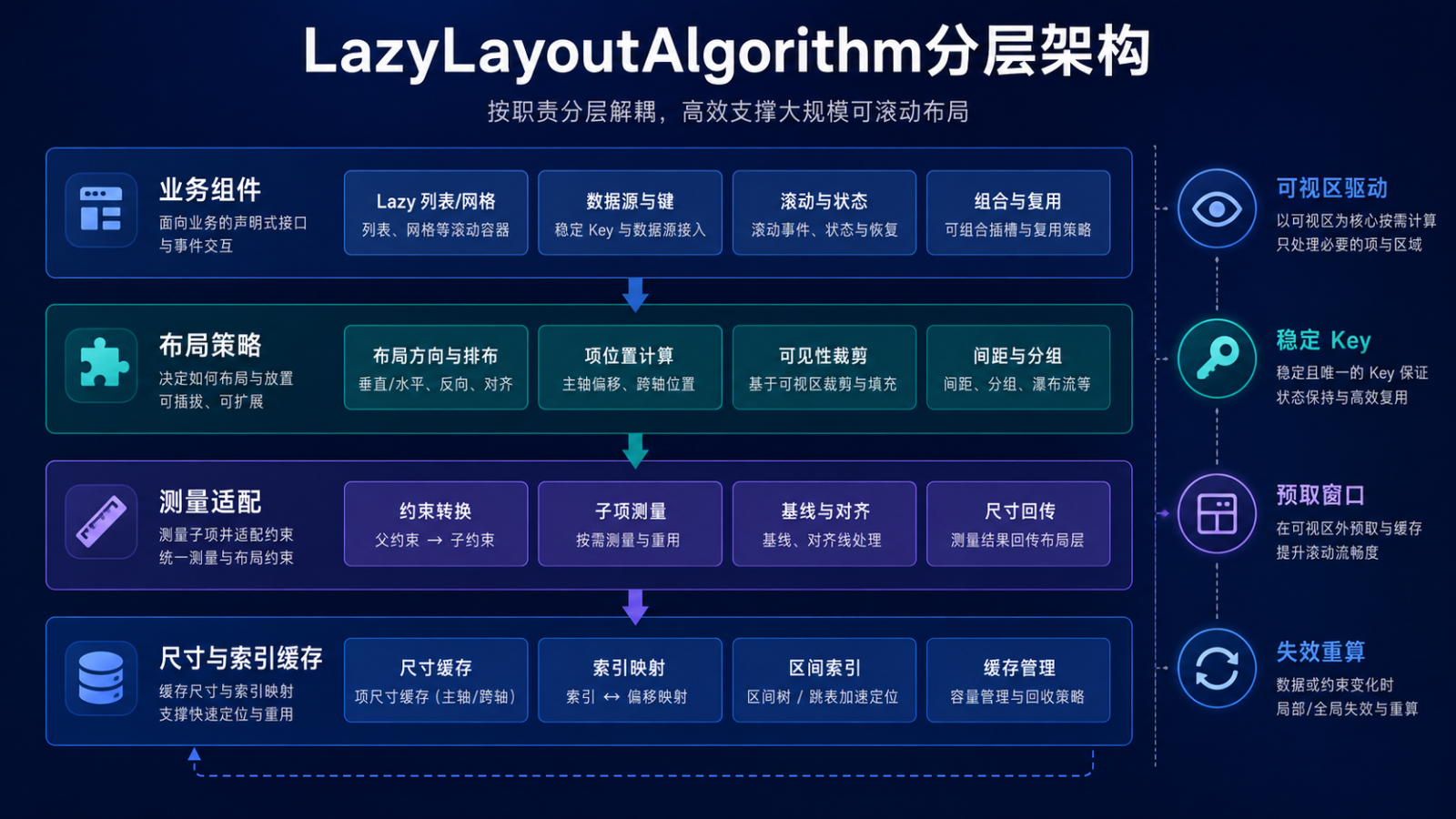
业务组件声明数据源、稳定 Key 与布局意图;布局策略计算方向、分组和位置;测量适配层把父约束转换为子项约束并调用平台测量;尺寸与索引缓存维护估算、真实尺寸和偏移映射。
export interface ItemMeasurePort {
measure(index: number, constraint: ChildConstraint): Promise<ItemSize>
}
export interface LayoutCache {
getSize(key: string): ItemSize | undefined
putSize(key: string, size: ItemSize): void
invalidate(keys: readonly string[]): void
}
算法不直接读取页面状态,缓存也不持有组件实例。
3. 稳定 Key 是状态复用前提
索引会随插入、删除和排序变化,不能作为长期身份。数据源为每项提供稳定且唯一的 Key,布局缓存与组件状态都围绕 Key 关联。
export interface LazyDataSource<T> {
count(): number
keyAt(index: number): string
itemAt(index: number): T
}
function assertUniqueKeys(source: LazyDataSource<unknown>): void {
const keys = new Set<string>()
for (let index = 0; index < source.count(); index += 1) {
const key = source.keyAt(index)
if (keys.has(key)) throw new Error('DUPLICATE_ITEM_KEY')
keys.add(key)
}
}
重复 Key 会造成尺寸、状态和动画错误,应在开发与测试阶段立即暴露。
4. 从可视区反推候选索引
等高项可以直接按偏移计算索引;不等高项则使用累计尺寸索引或区间树定位。未知尺寸先用分组估算值,不能为了找到起点从第零项逐个测量。
export function estimateRange(
scrollOffset: number,
viewportHeight: number,
estimatedExtent: number,
itemCount: number,
overscan: number
): [number, number] {
const start = Math.max(0, Math.floor(scrollOffset / estimatedExtent) – overscan)
const end = Math.min(itemCount – 1,
Math.ceil((scrollOffset + viewportHeight) / estimatedExtent) + overscan)
return [start, end]
}
估算只用于缩小候选范围,真实放置仍以测量结果为准。
5. 懒布局计算流程
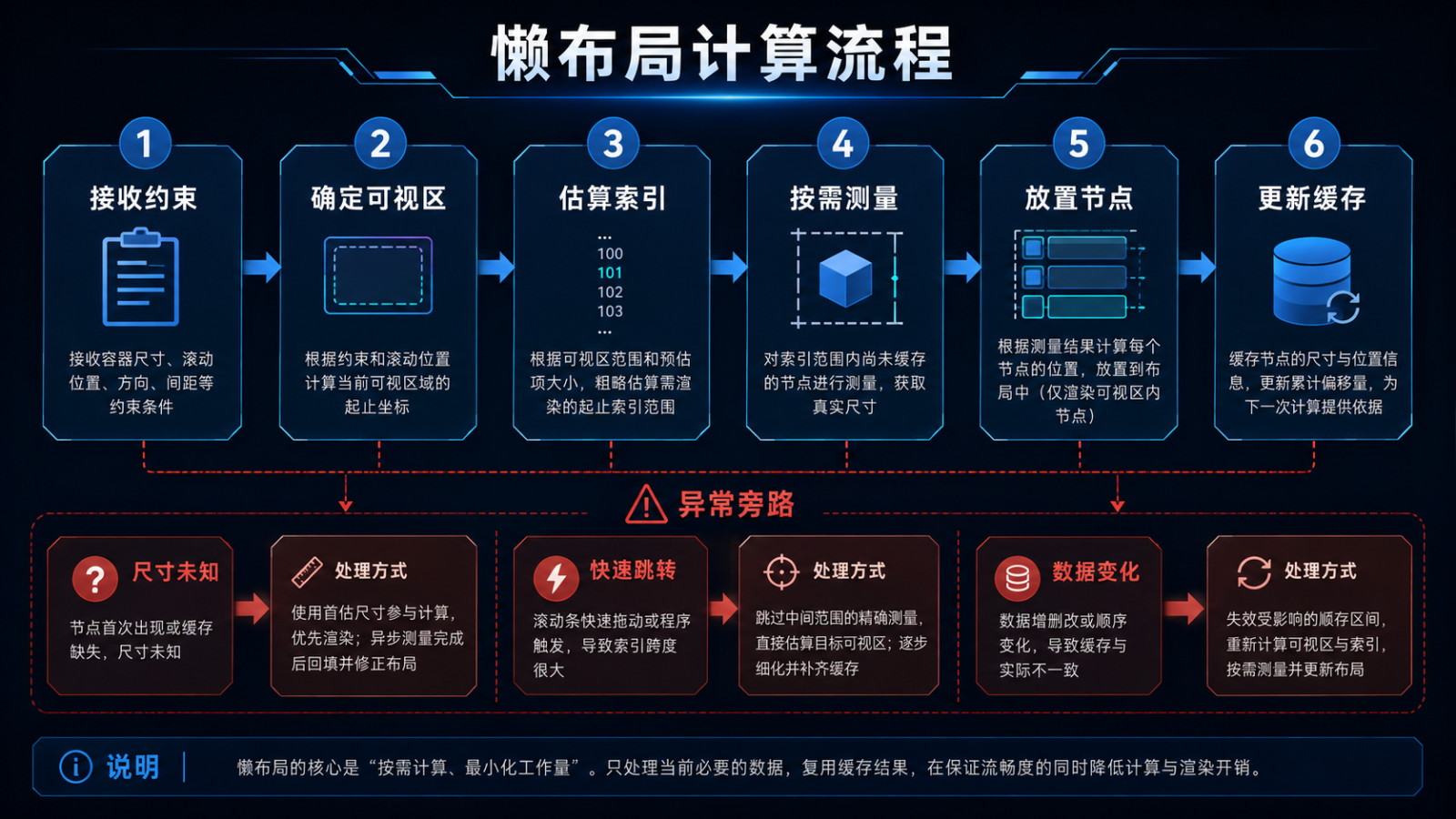
算法依次接收约束、确定可视区、估算候选索引、按需测量、放置节点并更新缓存。尺寸未知时先估算,快速跳转时直接定位附近区间,数据变化则局部失效。
export interface LayoutPassResult {
placements: readonly ItemPlacement[]
contentExtent: number
anchor: { key: string; offset: number }
measuredKeys: readonly string[]
}
布局结果保留锚点,用于尺寸修正后稳定视口。
6. 约束转换必须确定
父容器给出可用宽高,布局策略结合列数、间距与跨列规则生成子约束。相同输入必须得到相同约束,避免测量与放置阶段使用不同公式。
export interface ChildConstraint {
minWidth: number
maxWidth: number
minHeight: number
maxHeight: number
}
function columnConstraint(width: number, columns: number, gap: number): ChildConstraint {
const itemWidth = (width – gap * (columns – 1)) / columns
return { minWidth: itemWidth, maxWidth: itemWidth, minHeight: 0, maxHeight: Infinity }
}
列数变化会影响所有项宽度,应使相关尺寸缓存整体失效。
7. 按需测量与估算协作
首次出现的节点没有真实尺寸,可以先用类型或分组平均值估算。进入预取区后完成测量并更新索引;若尺寸差异影响可视区之前的内容,则通过锚点补偿偏移。
export interface SizeEntry {
key: string
estimated: ItemSize
measured?: ItemSize
constraintHash: string
}
function effectiveSize(entry: SizeEntry): ItemSize {
return entry.measured ?? entry.estimated
}
缓存键包含约束摘要,屏幕宽度或列数变化后不会复用不兼容尺寸。
8. 预取窗口需要预算
预取能减少滚动到新区域时的空白,但过大窗口会退化为全量布局。预算结合滚动方向、速度、节点成本和内存压力动态调整。
export interface OverscanPolicy {
minItems: number
maxItems: number
velocityFactor: number
memoryPressure: 'normal' | 'high'
}
function resolveOverscan(speed: number, policy: OverscanPolicy): number {
if (policy.memoryPressure === 'high') return policy.minItems
return Math.min(policy.maxItems,
policy.minItems + Math.floor(Math.abs(speed) * policy.velocityFactor))
}
快速滚动只扩大前进方向的预取,避免两侧都无效工作。
9. 快速跳转不能逐项补测
拖动滚动条或调用跳转时,目标可能距离当前区域很远。算法利用累计尺寸索引估算目标偏移,直接构建目标附近节点,再根据真实尺寸小幅校正。
export interface OffsetIndex {
offsetOf(index: number): number
indexAt(offset: number): number
update(index: number, oldExtent: number, newExtent: number): void
}
索引结构把定位复杂度与数据规模解耦,避免长距离跳转冻结界面。
10. 数据变化采用局部失效
插入、删除、移动和内容尺寸变化影响范围不同。数据源发送带 Key 的变更集,缓存只清理受影响节点及后续偏移,而不是每次全量重算。
export type DataMutation =
| { kind: 'insert'; index: number; keys: readonly string[] }
| { kind: 'remove'; index: number; keys: readonly string[] }
| { kind: 'move'; from: number; to: number; key: string }
| { kind: 'resize'; key: string }
变更批次带版本号,迟到的测量结果不能写入新版本布局。
11. 锚点与滚动位置恢复
仅保存像素偏移在内容变化后不可靠。保存顶部可见项的 Key 与项内偏移,恢复时先定位 Key,再应用相对偏移;Key 不存在时选择邻近项。
export interface ScrollAnchor {
key: string
innerOffset: number
dataVersion: number
}
function restoreAnchor(anchor: ScrollAnchor, source: LazyDataSource<unknown>): number {
const index = findIndexByKey(source, anchor.key)
return index >= 0 ? offsetIndex.offsetOf(index) + anchor.innerOffset : 0
}
这能降低异步图片加载和数据刷新引起的视口跳动。
12. 验收清单与总结
测试覆盖空数据、单项、万级数据、等高与不等高、插入删除、快速跳转、正反向滚动、宽度变化和大字体。验证只测量可视与预取区、Key 唯一、缓存按约束失效、旧测量不污染新版本、恢复锚点稳定。性能检查同时观察布局耗时、节点数量、内存和滚动帧稳定性。
LazyLayoutAlgorithm 的工程核心是把布局工作限制在当前真正需要的区域。通过稳定 Key、区间索引、估算与真实测量协作、方向性预取、局部失效和锚点恢复,自定义布局才能在数据规模扩大后仍保持正确、流畅且可维护。



评论前必须登录!
注册