 网硕互联帮助中心
环境: VS2022+.Net Framework4.8
NuGet包:WindowsAPICodePack-Core 1.1.2 ;
WindowsAPICodePack-Shell 1.1.1
程序名:WpfA_OpenFileFolderDemo
一、功能概述
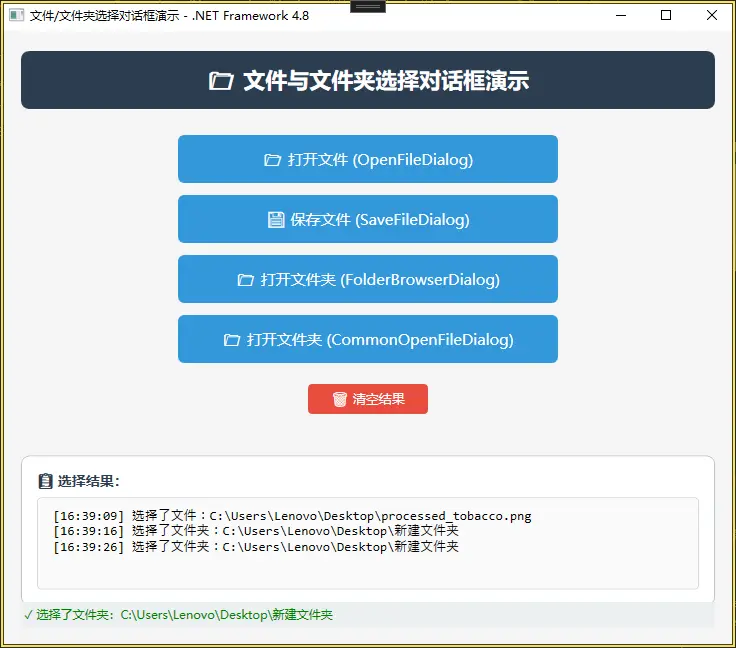
这是一个WPF用户控件,演示了四种不同的文件和文件夹选择对话框:
- 打开文件对话框(OpenFileDialog):使用Win32标准对话框选择图片文件
- 保存文件对话框(SaveFileDialog):使用Win32标准对话框保存BMP图像
- 文件夹浏览对话框(FolderBrowserDialog):使用WinForms组件选择文件夹
- 通用打开文件对话框(CommonOpenFileDialog):使用Windows API Code Pack选择文件夹
二、技术组件
- FolderBrowserDialog:传统样式,使用WinForms,需要添加System.Windows.Forms引用
- CommonOpenFileDialog:现代化Vista风格对话框,通过IsFolderPicker=true切换到文件夹选择模式,界面更美观
- 添加引用
右键点击项目 → 选择 “添加” → “引用”
在引用管理器中,左侧选择 “程序集” → “框架”
在右侧列表中,找到并勾选:
System.Windows.Forms
System.Drawing
点击 “确定”
三、WindowsAPICodePack.Dialogs 属性与方法
CommonOpenFileDialog 主要属性
| Title | string | 对话框标题 |
| IsFolderPicker | bool | true时选择文件夹,false时选择文件 |
| Multiselect | bool | 是否允许多选 |
| DefaultFileName | string | 默认文件名 |
| InitialDirectory | string | 初始目录 |
| FileName | string | 用户选择的文件/文件夹路径 |
| FileNames | ICollection | 多选时的所有文件路径集合 |
| Filters | IList | 文件类型过滤器 |
| EnsurePathExists | bool | 确保路径存在 |
| EnsureValidNames | bool | 确保文件名有效 |
| EnsureReadOnly | bool | 确保文件为只读 |
常用方法
- ShowDialog()
显示对话框,返回CommonFileDialogResult枚举 - ShowDialog(Window owner)
指定所有者窗口显示
##CommonFileDialogResult 枚举值 - Ok:用户点击确定
- Cancel:用户取消
四、程序
1、MainWindow.xaml
<Window x:Class="WpfA_OpenFileFolderDemo.MainWindow"
xmlns="http://schemas.microsoft.com/winfx/2006/xaml/presentation"
xmlns:x="http://schemas.microsoft.com/winfx/2006/xaml"
xmlns:d="http://schemas.microsoft.com/expression/blend/2008"
xmlns:mc="http://schemas.openxmlformats.org/markup-compatibility/2006"
xmlns:local="clr-namespace:WpfA_OpenFileFolderDemo"
Title="文件/文件夹选择对话框演示 – .NET Framework 4.8"
Height="550"
Width="750"
WindowStartupLocation="CenterScreen"
Background="#F5F5F5">
<Window.Resources>
<!– TextBox圆角样式 –>
<Style TargetType="TextBox" x:Key="RoundedTextBox">
<Setter Property="Template">
<Setter.Value>
<ControlTemplate TargetType="TextBox">
<Border Background="{TemplateBinding Background}"
BorderBrush="{TemplateBinding BorderBrush}"
BorderThickness="{TemplateBinding BorderThickness}"
CornerRadius="4">
<ScrollViewer x:Name="PART_ContentHost"
Margin="5,2"
VerticalScrollBarVisibility="Auto"/>
</Border>
</ControlTemplate>
</Setter.Value>
</Setter>
</Style>
<Style TargetType="Button" x:Key="DemoButton">
<Setter Property="Width" Value="380"/>
<Setter Property="Height" Value="48"/>
<Setter Property="Margin" Value="0,6"/>
<Setter Property="FontSize" Value="15"/>
<Setter Property="Cursor" Value="Hand"/>
<Setter Property="Background" Value="#3498DB"/>
<Setter Property="Foreground" Value="White"/>
<Setter Property="BorderThickness" Value="0"/>
<Setter Property="Template">
<Setter.Value>
<ControlTemplate TargetType="Button">
<Border Background="{TemplateBinding Background}"
CornerRadius="6"
BorderThickness="0">
<ContentPresenter HorizontalAlignment="Center"
VerticalAlignment="Center"
Margin="10,0"/>
</Border>
<ControlTemplate.Triggers>
<Trigger Property="IsMouseOver" Value="True">
<Setter Property="Background" Value="#2980B9"/>
</Trigger>
<Trigger Property="IsPressed" Value="True">
<Setter Property="Background" Value="#1A5276"/>
</Trigger>
</ControlTemplate.Triggers>
</ControlTemplate>
</Setter.Value>
</Setter>
</Style>
<Style TargetType="Button" x:Key="ClearButton">
<Setter Property="Width" Value="120"/>
<Setter Property="Height" Value="30"/>
<Setter Property="FontSize" Value="13"/>
<Setter Property="Background" Value="#E74C3C"/>
<Setter Property="Foreground" Value="White"/>
<Setter Property="BorderThickness" Value="0"/>
<Setter Property="Cursor" Value="Hand"/>
<Setter Property="Template">
<Setter.Value>
<ControlTemplate TargetType="Button">
<Border Background="{TemplateBinding Background}"
CornerRadius="4">
<ContentPresenter HorizontalAlignment="Center"
VerticalAlignment="Center"/>
</Border>
<ControlTemplate.Triggers>
<Trigger Property="IsMouseOver" Value="True">
<Setter Property="Background" Value="#C0392B"/>
</Trigger>
<Trigger Property="IsPressed" Value="True">
<Setter Property="Background" Value="#922B21"/>
</Trigger>
</ControlTemplate.Triggers>
</ControlTemplate>
</Setter.Value>
</Setter>
</Style>
</Window.Resources>
<Grid Margin="20">
<Grid.RowDefinitions>
<RowDefinition Height="Auto"/>
<RowDefinition Height="Auto"/>
<RowDefinition Height="*"/>
</Grid.RowDefinitions>
<Border Grid.Row="0" Background="#2C3E50" CornerRadius="8" Padding="15" Margin="0,0,0,20">
<TextBlock Text="📁 文件与文件夹选择对话框演示"
FontSize="22"
FontWeight="Bold"
Foreground="White"
HorizontalAlignment="Center"/>
</Border>
<StackPanel Grid.Row="1" Orientation="Vertical" HorizontalAlignment="Center">
<Button Style="{StaticResource DemoButton}"
Content="📂 打开文件 (OpenFileDialog)"
Click="OpenFile_Click"
ToolTip="使用Win32标准对话框选择图片文件"/>
<Button Style="{StaticResource DemoButton}"
Content="💾 保存文件 (SaveFileDialog)"
Click="SaveFile_Click"
ToolTip="使用Win32标准对话框保存BMP图像"/>
<Button Style="{StaticResource DemoButton}"
Content="📁 打开文件夹 (FolderBrowserDialog)"
Click="FolderBrowser_Click"
ToolTip="使用WinForms组件选择文件夹 (传统样式)"/>
<Button Style="{StaticResource DemoButton}"
Content="📁 打开文件夹 (CommonOpenFileDialog)"
Click="CommonOpenFile_Click"
ToolTip="使用Windows API Code Pack选择文件夹 (Vista风格)"/>
<Button Style="{StaticResource ClearButton}"
Content="🗑️ 清空结果"
Margin="0,15,0,0"
Click="ClearResult_Click"/>
</StackPanel>
<Border Grid.Row="2"
Margin="0,20,0,0"
Padding="15"
Background="White"
BorderBrush="#BDC3C7"
BorderThickness="1"
CornerRadius="8"
Height="150">
<Grid>
<Grid.RowDefinitions>
<RowDefinition Height="Auto"/>
<RowDefinition Height="*"/>
</Grid.RowDefinitions>
<TextBlock Grid.Row="0"
Text="📋 选择结果:"
FontWeight="Bold"
FontSize="14"
Margin="0,0,0,8"
Foreground="#2C3E50"/>
<TextBox Grid.Row="1"
x:Name="ResultTextBox"
Style="{StaticResource RoundedTextBox}"
TextWrapping="Wrap"
AcceptsReturn="True"
VerticalScrollBarVisibility="Auto"
IsReadOnly="True"
Background="#FAFAFA"
BorderBrush="#D5D8DC"
BorderThickness="1"
FontFamily="Consolas"
FontSize="13"
Padding="8"/>
</Grid>
</Border>
<StatusBar Grid.Row="2"
VerticalAlignment="Bottom"
Height="25"
Background="#ECF0F1">
<StatusBarItem>
<TextBlock x:Name="StatusText"
Text="就绪"
FontSize="12"
Foreground="#7F8C8D"/>
</StatusBarItem>
</StatusBar>
</Grid>
</Window>
2、MainWindow.xaml.cs
using System;
using System.Windows;
using Microsoft.Win32;
using Microsoft.WindowsAPICodePack.Dialogs;
namespace WpfA_OpenFileFolderDemo
{
public partial class MainWindow : Window
{
public MainWindow()
{
InitializeComponent();
}
/// <summary>
/// 更新结果文本框和状态栏
/// </summary>
private void UpdateResult(string message, bool isSuccess = true)
{
string timestamp = DateTime.Now.ToString("HH:mm:ss");
string icon = isSuccess ? "✅" : "❌";
// 在结果框中追加内容
string newLine = $"[{timestamp}] {message}";
if (string.IsNullOrEmpty(ResultTextBox.Text))
{
ResultTextBox.Text = newLine;
}
else
{
ResultTextBox.Text += Environment.NewLine + newLine;
}
// 滚动到底部
ResultTextBox.ScrollToEnd();
// 更新状态栏
StatusText.Text = isSuccess ? $"✓ {message}" : $"✗ {message}";
StatusText.Foreground = isSuccess ?
System.Windows.Media.Brushes.Green :
System.Windows.Media.Brushes.Red;
}
/// <summary>
/// 清空结果
/// </summary>
private void ClearResult_Click(object sender, RoutedEventArgs e)
{
ResultTextBox.Clear();
StatusText.Text = "已清空";
StatusText.Foreground = System.Windows.Media.Brushes.Gray;
}
/// <summary>
/// 打开文件 – OpenFileDialog
/// </summary>
private void OpenFile_Click(object sender, RoutedEventArgs e)
{
try
{
OpenFileDialog dialog = new OpenFileDialog
{
Title = "选择图片文件",
Filter = "图像文件 (*.jpg;*.png;*.bmp;*.gif)|*.jpg;*.png;*.bmp;*.gif|所有文件 (*.*)|*.*",
RestoreDirectory = true,
Multiselect = false,
InitialDirectory = Environment.GetFolderPath(Environment.SpecialFolder.MyPictures)
};
bool? result = dialog.ShowDialog();
if (result == true)
{
UpdateResult($"选择了文件:{dialog.FileName}", true);
}
else
{
UpdateResult("用户取消了操作", true);
}
}
catch (Exception ex)
{
UpdateResult($"错误:{ex.Message}", false);
}
}
/// <summary>
/// 保存文件 – SaveFileDialog
/// </summary>
private void SaveFile_Click(object sender, RoutedEventArgs e)
{
try
{
SaveFileDialog dialog = new SaveFileDialog
{
Title = "保存图像文件",
Filter = "BMP图像 (*.bmp)|*.bmp|PNG图像 (*.png)|*.png|JPEG图像 (*.jpg)|*.jpg",
RestoreDirectory = true,
FileName = $"Image_{DateTime.Now:yyyyMMdd_HHmmss}.bmp",
DefaultExt = ".bmp",
AddExtension = true,
InitialDirectory = Environment.GetFolderPath(Environment.SpecialFolder.MyDocuments)
};
bool? result = dialog.ShowDialog();
if (result == true)
{
UpdateResult($"保存路径:{dialog.FileName}", true);
}
else
{
UpdateResult("用户取消了操作", true);
}
}
catch (Exception ex)
{
UpdateResult($"错误:{ex.Message}", false);
}
}
/// <summary>
/// 打开文件夹 – FolderBrowserDialog (WinForms)
/// </summary>
private void FolderBrowser_Click(object sender, RoutedEventArgs e)
{
try
{
System.Windows.Forms.FolderBrowserDialog dialog =
new System.Windows.Forms.FolderBrowserDialog
{
Description = "请选择目标文件夹",
ShowNewFolderButton = true,
RootFolder = Environment.SpecialFolder.Desktop
};
// 使用WinForms的对话框
System.Windows.Forms.DialogResult result = dialog.ShowDialog();
if (result == System.Windows.Forms.DialogResult.OK)
{
string foldername = dialog.SelectedPath.Trim();
UpdateResult($"选择了文件夹:{foldername}", true);
}
else
{
UpdateResult("用户取消了操作", true);
}
}
catch (Exception ex)
{
UpdateResult($"错误:{ex.Message}", false);
}
}
/// <summary>
/// 打开文件夹 – CommonOpenFileDialog (Windows API Code Pack)
/// </summary>
private void CommonOpenFile_Click(object sender, RoutedEventArgs e)
{
try
{
// 检查操作系统版本(Vista+)
if (Environment.OSVersion.Version.Major < 6)
{
UpdateResult("需要 Windows Vista 或更高版本才能使用此功能", false);
return;
}
using (CommonOpenFileDialog dialog = new CommonOpenFileDialog())
{
dialog.Title = "请选择目标文件夹 (Vista+ 风格)";
dialog.IsFolderPicker = true;
dialog.Multiselect = false;
dialog.EnsurePathExists = true;
dialog.EnsureValidNames = true;
dialog.InitialDirectory = Environment.GetFolderPath(
Environment.SpecialFolder.Desktop
);
// 显示对话框
CommonFileDialogResult result = dialog.ShowDialog();
if (result == CommonFileDialogResult.Ok)
{
string folderName = dialog.FileName;
UpdateResult($"选择了文件夹:{folderName}", true);
}
else
{
UpdateResult("用户取消了操作", true);
}
}
}
catch (Exception ex)
{
UpdateResult($"错误:{ex.Message}", false);
}
}
}
}
五、资料
【1.8 HandyControl:80余种控件使用案例】WPF案例代码解析 – 知乎](https://zhuanlan.zhihu.com/p/393756032)






评论前必须登录!
注册