 网硕互联帮助中心
Rust+Slint 实现动态轮播图源码分享,支持动态删除、添加
- 一、效果展示
- 二、源码分享
-
- 1、工程结构
- 2、main.rs
- 3、build.rs
- 4、main.slint
- 5、Cargo.toml
- 6、完整工程下载
- 三、实现原理
-
- 1、数据模型与状态管理
- 2、 视觉布局与动画
-
- 位置与层级计算
- 视觉变换
- 3、用户交互
- 4、自动轮播机制
- 5、 组件化与数据绑定
- 7、总结
一、效果展示
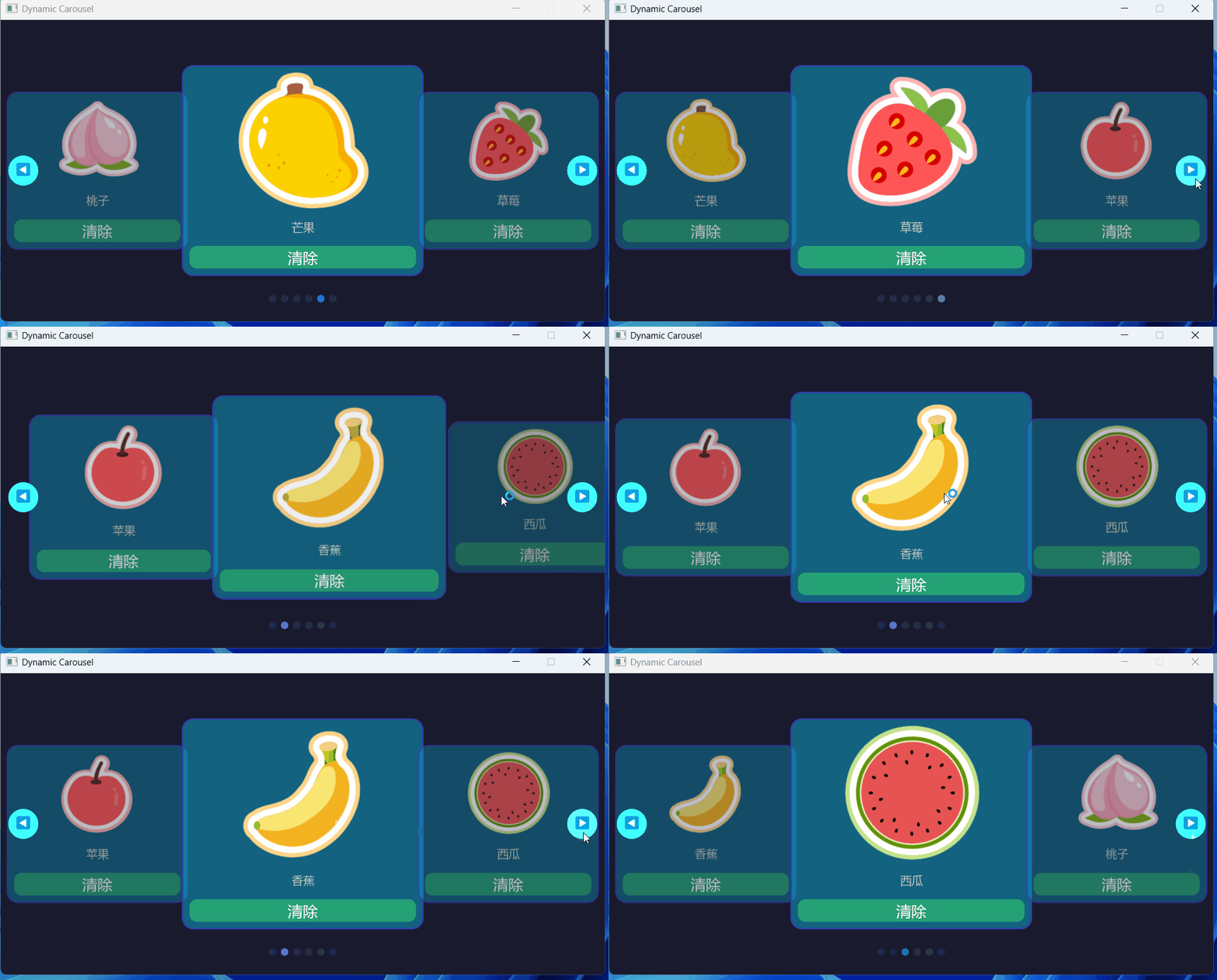

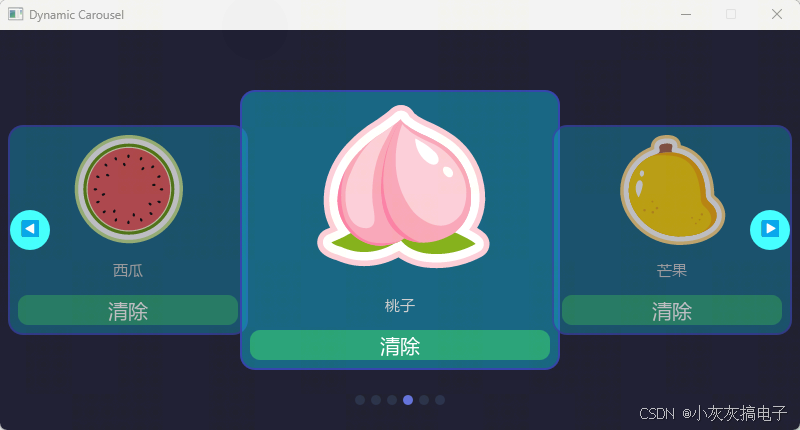
二、源码分享
1、工程结构
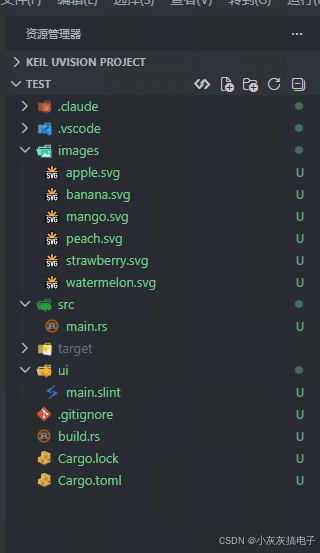
2、main.rs
slint::include_modules!();
use slint::{ModelRc, SharedString, Timer, TimerMode, VecModel, Weak,Image};
use std::cell::RefCell;
use std::rc::Rc;
use std::time::Duration;
fn make_timer_callback(weak_win: Weak<MainWindow>) -> impl Fn() {
move || {
let Some(win) = weak_win.upgrade() else { return };
if win.get_hover_detected() {
return;
}
let current = win.get_current_index();
let count = win.get_item_count();
if count > 0 {
let next = if (current.round() as i32) + 1 < count {
current + 1.0
} else {
0.0
};
win.set_current_index(next);
}
}
}
fn main() -> Result<(), slint::PlatformError> {
let main_window = MainWindow::new()?;
// Create initial error items matching ShowItem { number: int, note: string, image: image }
let initial_items = vec![
ShowItem {
number: 1,
note: SharedString::from("苹果"),
image: Image::load_from_path(std::path::Path::new("images/apple.svg")).unwrap(),
},
ShowItem {
number: 2,
note: SharedString::from("香蕉"),
image: Image::load_from_path(std::path::Path::new("images/banana.svg")).unwrap(),
},
ShowItem {
number: 3,
note: SharedString::from("西瓜"),
image: Image::load_from_path(std::path::Path::new("images/watermelon.svg")).unwrap(),
},
ShowItem {
number: 4,
note: SharedString::from("桃子"),
image: Image::load_from_path(std::path::Path::new("images/peach.svg")).unwrap(),
},
ShowItem {
number: 5,
note: SharedString::from("芒果"),
image: Image::load_from_path(std::path::Path::new("images/mango.svg")).unwrap(),
},
ShowItem {
number: 6,
note: SharedString::from("草莓"),
image: Image::load_from_path(std::path::Path::new("images/strawberry.svg")).unwrap(),
},
];
let model = Rc::new(VecModel::from(initial_items));
main_window.set_error_items(ModelRc::from(model.clone()));
// Set up the remove-item callback
let model_for_remove = model.clone();
main_window.on_remove_item(move |index: i32| {
model_for_remove.remove(index as usize);
});
// Set up the clear-error callback (receives int number now)
main_window.on_clear_error(move |number: i32| {
println!("Clear error: {}", number);
});
// Auto-rotation timer (3 seconds)
let weak_window = main_window.as_weak();
let timer = Rc::new(RefCell::new(Timer::default()));
timer.borrow().start(
TimerMode::Repeated,
Duration::from_secs(3),
make_timer_callback(weak_window.clone()),
);
// Reset-timer callback: restart the 3-second timer from scratch
let timer_for_reset = timer.clone();
let weak_window_for_reset = weak_window.clone();
main_window.on_reset_timer(move || {
timer_for_reset.borrow().start(
TimerMode::Repeated,
Duration::from_secs(3),
make_timer_callback(weak_window_for_reset.clone()),
);
});
// Keep timer alive for the lifetime of the application
std::mem::forget(timer);
main_window.run()
}
3、build.rs
fn main(){
slint_build::compile("ui/main.slint")
.unwrap()
}
4、main.slint
struct ShowItem {
number: int,
note: string,
image: image,
}
// Individual carousel card component
component CarouselCard inherits Rectangle {
in property <int> number;
in property <string> note;
in property <image> image;
callback clear–clicked();
border–radius: 15px;
background: #09b1db79;
border–width: 2px;
border–color: #3040aaff;
HorizontalLayout {
padding–left: 10px;
padding–right: 10px;
padding–top: 10px;
padding–bottom: 10px;
// Left side: image + text content
VerticalLayout {
horizontal–stretch: 1;
// Error image
Image {
source: image;
horizontal–alignment: center;
vertical–stretch: 2;
}
// Note text
Text {
//width: parent.width;
height: 50px;
text: note;
font–size: 15px;
color: #ccccccff;
horizontal–alignment: center;
vertical–alignment: center;
vertical–stretch: 1;
}
// Right side: clear/delete button
Rectangle {
//width: parent.width;
height: 30px;
border–radius: 10px;
background: btn–touch.pressed ? #80ff4444 : #40ff6666;
Text {
text: "清除";
color: white;
font–size: 20px;
horizontal–alignment: center;
vertical–alignment: center;
}
btn–touch := TouchArea {
clicked => {
clear–clicked();
}
}
animate background { duration: 150ms; }
}
}
}
}
export component MainWindow inherits Window {
width: 800px;
height: 400px;
title: "Dynamic Carousel";
background: #1a1a2e;
in property <[ShowItem]> error–items;
in–out property <float> current–index: 0;
in–out property <int> item–count: error–items.length;
in–out property <bool> hover–detected: touch–area.has–hover;
callback remove–item(int);
callback clear–error(int);
callback reset–timer();
// Card dimensions
property <length> card–w: root.width * 0.40;
property <length> card–h: root.height * 0.70;
property <length> side–offset: root.width * 0.34;
// Hover detection area
touch–area := TouchArea {
width: root.width;
height: root.height;
}
// Carousel cards: single for loop, all cards always rendered
for item[idx] in error–items : CarouselCard {
// Integer offset from current center
property <int> ci: round(current–index);
property <int> raw: idx – ci;
// Normalization range: [-(N-1)/2, N/2] – ensures single item stays centered
property <int> low: 0 – (item–count – 1) / 2;
property <int> high: item–count / 2;
property <int> norm: raw < low ? raw + item–count :
raw > high ? raw – item–count : raw;
property <float> abs–n: norm < 0 ? (0 – norm) * 1.0 : norm * 1.0;
// Computed size (independent property, avoids self.width feedback loop)
property <float> sf: 1.0 – abs–n * 0.25;
property <length> cw: card–w * sf;
property <length> ch: card–h * sf;
// Smooth opacity falloff
opacity: abs–n <= 0.0 ? 1.0 :
abs–n <= 1.0 ? 0.85 – (abs–n – 0.0) * 0.15 :
abs–n <= 2.0 ? 0.7 – (abs–n – 1.0) * 0.5 :
abs–n <= 3.0 ? 0.2 – (abs–n – 2.0) * 0.2 :
0.0;
width: cw;
height: ch;
x: root.width / 2 + norm * side–offset – cw / 2;
y: root.height / 2 – ch / 2;
// Smooth slide/fade animation
animate x { duration: 400ms; easing: ease–in–out; }
animate y { duration: 400ms; easing: ease–in–out; }
animate width { duration: 400ms; easing: ease–in–out; }
animate height { duration: 400ms; easing: ease–in–out; }
animate opacity { duration: 400ms; }
// Content from model
number: error–items[idx].number;
note: error–items[idx].note;
image:error–items[idx].image;
clear–clicked => {
reset–timer();
remove–item(idx);
clear–error(error–items[idx].number);
}
}
// Navigation dots
HorizontalLayout {
y: root.height – 35px;
width: root.width;
height: 24px;
alignment: center;
spacing: 6px;
for item[idx] in error–items : Rectangle {
width: 10px;
height: 10px;
border–radius: 5px;
background: idx == round(current–index) ? #6070ddff : #30406080;
animate background { duration: 300ms; }
}
}
// Left navigation arrow
left–arrow := Rectangle {
x: 10px;
y: root.height / 2 – 20px;
width: 40px;
height: 40px;
border–radius: 20px;
background: touch–left.pressed ? #80ffffff : #40ffffff;
Text {
text: "◀";
color: white;
font–size: 18px;
horizontal–alignment: center;
vertical–alignment: center;
}
touch–left := TouchArea {
clicked => {
reset–timer();
if current–index > 0 {
current–index = current–index – 1;
} else if item–count > 0 {
current–index = item–count – 1;
}
}
}
animate background { duration: 150ms; }
}
// Right navigation arrow
right–arrow := Rectangle {
x: root.width – 50px;
y: root.height / 2 – 20px;
width: 40px;
height: 40px;
border–radius: 20px;
background: touch–right.pressed ? #80ffffff : #40ffffff;
Text {
text: "▶";
color: white;
font–size: 18px;
horizontal–alignment: center;
vertical–alignment: center;
}
touch–right := TouchArea {
clicked => {
reset–timer();
if round(current–index) + 1 < item–count {
current–index = current–index + 1;
} else {
current–index = 0;
}
}
}
animate background { duration: 150ms; }
}
}
5、Cargo.toml
[package]
name = "chart"
version = "0.1.0"
edition = "2024"
[dependencies]
slint = { version = "1.16.1", features = ["renderer-winit-femtovg"] }
[build–dependencies]
slint–build = "1.16.1"
6、完整工程下载
https://download.csdn.net/download/qq_15181569/93274167
三、实现原理
本项目的核心是一个基于 Slint GUI 框架实现的动态、可交互的轮播组件。其实现原理可以分解为以下几个关键部分:
1、数据模型与状态管理
轮播的数据源是一个 ShowItem 结构体数组,每个元素包含编号 (number)、说明 (note) 和图片 (image)。在 Rust 后端 (main.rs) 中,这个数组被包装进 VecModel,再转换为 Slint 的 ModelRc 类型,从而建立起一个可被前端 UI (main.slint) 观察和绑定的响应式数据模型。
- current-index: 一个浮点数属性,表示当前“中心”卡片的索引。它驱动着所有卡片的位置、大小和透明度计算。
- item-count: 绑定到数据模型长度,用于各种边界计算。
- hover-detected: 布尔属性,用于检测用户悬停,以暂停自动轮播。
2、 视觉布局与动画
轮播的视觉效果通过 main.slint 中一个 for 循环动态渲染所有 CarouselCard 组件来实现,而非传统的只渲染可见项。其核心算法如下:
位置与层级计算
视觉变换
- 缩放 (sf): 1.0 – abs-n * 0.25。距离中心越远的卡片,缩放比例越小,营造出景深效果。
- 透明度 (opacity): 根据 abs-n 分段设置,距离中心越远,透明度越低,直至完全消失。
- 位置 (x, y): 卡片水平位置由 root.width / 2 + norm * side-offset – cw / 2 计算得出,使其沿水平线均匀分布。side-offset 是控制卡片间间距的关键参数。
所有视觉属性(x, y, width, height, opacity)都应用了 400ms 的缓动动画,使轮播切换过程平滑流畅。
3、用户交互
- 手动导航: 通过左右箭头按钮(left-arrow, right-arrow)的 TouchArea 组件捕获点击事件,直接修改 current-index 属性。
- 项目删除: 每个 CarouselCard 上的“清除”按钮绑定了 clear-clicked 回调。点击后会触发 reset-timer()(重置自动轮播计时器)、remove-item(idx)(从数据模型中移除该项)以及 clear-error(number)(执行后端业务逻辑)。
- 悬停检测: 整个窗口覆盖了一个透明的 TouchArea (touch-area),其 has-hover 状态被绑定到 hover-detected 属性。当检测到悬停时,自动轮播会暂停。
4、自动轮播机制
自动轮播由 Rust 后端的 Timer 驱动 (main.rs 中的 make_timer_callback 函数):
5、 组件化与数据绑定
项目采用了清晰的组件化架构:
- CarouselCard 组件: 封装了单个卡片的视觉和交互逻辑,通过 in property 接收数据,通过 callback 向上传递事件。
- MainWindow 根组件: 管理数据模型 (error-items)、轮播状态 (current-index) 和全局交互。它通过 for 循环将数据模型实例化为多个 CarouselCard,并处理它们发出的事件(如 remove-item)。
- 数据绑定: Slint 的声明式语法使得 UI 属性(如卡片位置、导航点颜色)能够直接绑定到 Rust 后端的数据和状态上,实现了数据与 UI 的自动同步。
7、总结
该轮播实现巧妙地结合了 响应式数据绑定、声明式 UI 布局 和 基于物理的动画计算,在 Slint 框架下构建了一个高性能、流畅且交互丰富的动态组件。其核心在于利用 current-index 这一单一状态源,驱动整个视觉系统的计算与更新,并通过计时器和用户输入来改变这一状态,从而实现自动与手动轮播。





评论前必须登录!
注册