 网硕互联帮助中心
一、qml说明书预览实现方式
1、pdf转换成图片+多张图片预览。
2、qrc资源pdf文件+pdfDocument+Image
3、qrc资源pdf文件+PdfPageView/PdfMultiPageView
4、WebEngineView+加载http://xxx.pdf或者qrc资源pdf文件。
5、popplerPlugin插件方式
6、WebEngineView+加载html文件(pdftohtml将pdf转换成html)
注意:
1)1-4方式,无法动态加载file:// 协议的pdf文件。
2)第5种方式,可以动态加载file:// 协议的pdf文件。但在嵌入式系统中运行,会出现 EGLFS: OpenGL windows cannot be mixed with others. 解决方法:执行进程时,增加参数 -platform xcb
3)第6种方式,可以动态加载file:// 协议的pdf文件。在嵌入式系统中也支持。
二、常见方式具体实现步骤
2.1 选择并使用 PDF 视图组件
使用 Qt PDF 模块
你的 .pro 项目文件中添加 pdf 模块:
qmake
QT += pdf
QtQuick.Pdf 提供了三种主要的视图组件,你可以根据需求选择:
| PdfPageView | 一次显示一页,无滚动条,页面完整显示。 | 适用于电子书、幻灯片等需要整页阅读的场景。 |
| PdfScrollablePageView | 一次显示一页,但页面可以通过滚动条平移查看。 | 适用于页面较大,需要放大局部查看的场景。 |
| PdfMultiPageView | 连续显示多页,可滚动浏览,体验类似常见PDF阅读器。 |
最通用的选择,适合大多数文档浏览需求。 |
import QtQuick 2.15
import QtQuick.Window 2.15
import QtQuick.Pdf 5.15 // 导入 PDF 模块
Window {
width: 800
height: 600
visible: true
title: "PDF Viewer"
PdfMultiPageView {
id: pdfView
anchors.fill: parent
// 关键:通过 document 属性加载 PDF 文件
document: PdfDocument {
source: "file:///path/to/your/document.pdf" // 替换为你的文件路径
}
}
}
注意:没有找到 PdfMultiPageView定义时,在qt安装目录中qml/pdf中找到对应的*.qml文件,拷贝到工程中。
2.2 PdfDocument + Image
将 PDF 的数据源(PdfDocument)与显示(Image)分离,便于管理状态和加载更多信息。
import QtQuick 2.15
import QtQuick.Window 2.15
import QtQuick.Pdf 5.15 // 或 Qt 6.x 的对应版本
Window {
width: 400
height: 600
visible: true
PdfDocument {
id: doc
source: "file:///path/to/your/document.pdf"
// 这里可以监听 status 变化等
}
// 注意:PdfPageImage 是 Qt 6.4+ 的类型
Image {
anchors.fill: parent
source: doc.source // 使用文档的路径
currentFrame: 0
fillMode: Image.PreserveAspectFit
// 为了更紧密地绑定文档状态,可能需要一些额外代码
}
}
2.3 WebEngineView
在 QML 中,用 WebEngineView 加载这个 viewer.html,并通过 URL 参数将 PDF 文件地址传递过去。
你的 .pro 项目文件中添加 WebEngineView 模块:
qmake
QT += webengine
import QtQuick 2.15
import QtQuick.Window 2.15
import QtWebEngine 1.10 // 导入 WebEngine 模块
Window {
width: 800
height: 600
visible: true
WebEngineView {
anchors.fill: parent
// 加载 pdf.js 的查看器,并通过 'file' 参数指定你的 PDF 文件
url: "file:///path/to/pdfjs-version/web/viewer.html?file=file:///path/to/your/document.pdf"
}
}
WebEngineView默认情况下qt安装包不包含。需要编译Qt5.15.2 qtwebengine模块,具体参考:编译Qt5.15.2 qtwebengine模块_qt 安装目录src 下的qtwebengine 怎么编译-CSDN博客
2.4 popplerPlugin插件方式
具体参考文章:https://chenzhengyi.blog.csdn.net/article/details/163642988?spm=1011.2415.3001.5331
2.5 WebEngineView+加载html文件
通过pdftohtml将pdf转换成html,再利用WebEngineView加载hmtl文件。
具体参考文章:https://chenzhengyi.blog.csdn.net/article/details/163775668?spm=1011.2415.3001.5331
三、实例
helpset.qml
import QtQuick 2.14
import QtQuick.Controls 2.14
import QtQuick.Layouts 1.15
Item {
width: parent.width
height: 1200-80
property int fontDefaultSize: 30
//帮助 title
Rectangle {
y:20
id: rectHelpSetByContent
width: parent.width
height: 40
color: "#383838"
//border.color:"blue"
Text {
anchors.centerIn: parent
id: labelHelpSetByContent
text: qsTr("帮助")
color: "#F5F5F5"
font.pixelSize: fontDefaultSize
}
}
ColumnLayout{
y:90
width:parent.width
height: 80
spacing: 0
//用户手册
Rectangle {
Layout.fillWidth: true
Layout.preferredHeight: 80
color: "#4A4A4A" // 背景色
border{
color: "#FFFFFF"
width: 1
}
Layout.alignment: Qt.AlignTop
RowLayout {
width: parent.width
spacing: 10
anchors.centerIn: parent
Label {
id: labelUserManualByContent
Layout.fillWidth: true
text: qsTr("用户手册")
color: "#F5F5F5"
font.pixelSize: fontDefaultSize
Layout.leftMargin: 30
}
Label {
text: qsTr("详情")
color: "#F5F5F5"
font.pixelSize: fontDefaultSize
Layout.alignment:Qt.AlignRight
}
Label {
text: qsTr(">")
color: "#F5F5F5"
font.pixelSize: fontDefaultSize
Layout.alignment:Qt.AlignRight
Layout.rightMargin: 30
MouseArea{
anchors.fill:parent
onClicked: {
console.log("–详情按钮触发")
pageLoader.source = "help.qml"
pageLoader.item.setLanguage(0)
}
}
}
}
}
}
Loader {
id: pageLoader
y:90
width:parent.width
height:1200 – 170
source: "" // 默认空
}
}
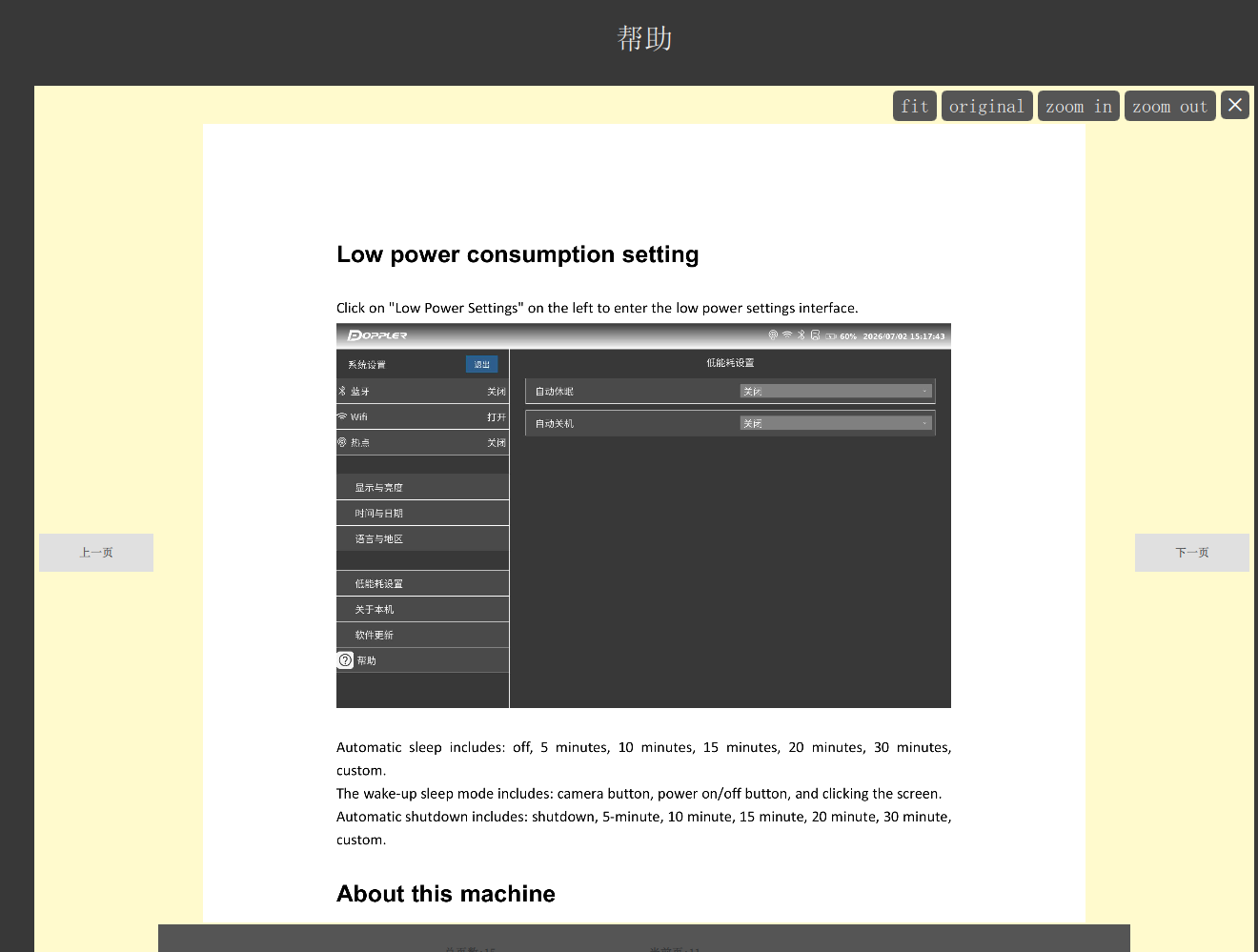
help.qml(多张png图片)
import QtQuick 2.14
import QtQuick.Controls 2.14
import QtQuick.Layouts 1.15
Rectangle{
id:helpToolDialog
width: parent.width
height: parent.height
anchors.fill: parent
color: "#FFFACD" /*"transparent"*/
visible: true
property int langType: 0
// 当前显示的图片索引
property int currentIndex: 0
// 缩放因子(1.0 = 原始像素大小)
property real scaleFactor: 1.0
// 计算“适应屏幕”的缩放值(在图片加载完成后计算)
property real fitScale: 1.0
function setLanguage(value){
langType = value
}
function getHelpBookPageCount(){
if( 0 === langType){
console.log("helpbookImagePathsModelByChinese.length:", helpbookImagePathsModelByChinese.length)
return helpbookImagePathsModelByChinese.length
}
else{
return helpbookImagePathsModelByChinese.length
}
}
function getHelpBookDefaultUrl(){
if( 0 === langType){
if(helpbookImagePathsModelByChinese.length > 0){
console.log("helpbookImagePathsModelByChinese[0]:", helpbookImagePathsModelByChinese[0])
return helpbookImagePathsModelByChinese[0]
}
else{
return ""
}
}
else{
if(helpbookImagePathsModelByEnglish.length > 0){
return helpbookImagePathsModelByEnglish[0]
}
else{
return ""
}
}
}
function updateHelpBookUrl(){
if( 0 === langType){
if(helpbookImagePathsModelByChinese.length > 0 && currentIndex < helpbookImagePathsModelByChinese.length){
currentHelpImage.source = helpbookImagePathsModelByChinese[currentIndex]
}
}
else{
if(helpbookImagePathsModelByEnglish.length > 0 && currentIndex < helpbookImagePathsModelByEnglish.length){
currentHelpImage.source = helpbookImagePathsModelByEnglish[currentIndex]
}
}
}
// ———- 缩放控制函数 ———-
function zoomIn() {
scaleFactor = Math.min(scaleFactor * 1.25, 10.0) // 最大放大 10 倍
}
function zoomOut() {
scaleFactor = Math.max(scaleFactor / 1.25, 0.1) // 最小缩小 0.1 倍
}
function zoomFit() {
if (currentHelpImage.status === Image.Ready) {
scaleFactor = fitScale
}
}
function zoomOriginal() {
scaleFactor = 1.0 // 1:1 原始像素
}
Button{
id: zoomOutBtn//缩小
anchors {
top: parent.top
right: closeBtn.left
margins: 5
}
text:qsTr("zoom out")
font.pixelSize: 20
font.bold: true
z: 1
background: Rectangle {
color: parent.pressed ? "#AA4444" : "#555555"
radius: 5
}
contentItem: Text {
text: parent.text
color: "white"
horizontalAlignment: Text.AlignHCenter
verticalAlignment: Text.AlignVCenter
font.pixelSize: parent.font.pixelSize
}
onClicked: {
zoomOut()
}
}
Button{
id: zoomInBtn//放大
anchors {
top: parent.top
right: zoomOutBtn.left
margins: 5
}
text:qsTr("zoom in")
font.pixelSize: 20
font.bold: true
z: 1
background: Rectangle {
color: parent.pressed ? "#AA4444" : "#555555"
radius: 5
}
contentItem: Text {
text: parent.text
color: "white"
horizontalAlignment: Text.AlignHCenter
verticalAlignment: Text.AlignVCenter
font.pixelSize: parent.font.pixelSize
}
onClicked: {
zoomIn()
}
}
Button{
id: originalBtn //原始大小
anchors {
top: parent.top
right: zoomInBtn.left
margins: 5
}
text:qsTr("original")
font.pixelSize: 20
font.bold: true
z: 1
background: Rectangle {
color: parent.pressed ? "#AA4444" : "#555555"
radius: 5
}
contentItem: Text {
text: parent.text
color: "white"
horizontalAlignment: Text.AlignHCenter
verticalAlignment: Text.AlignVCenter
font.pixelSize: parent.font.pixelSize
}
onClicked: {
zoomOriginal()
}
}
Button{
id: fitBtn //适应屏幕
anchors {
top: parent.top
right: originalBtn.left
margins: 5
}
text:qsTr("fit")
font.pixelSize: 20
font.bold: true
z: 1
background: Rectangle {
color: parent.pressed ? "#AA4444" : "#555555"
radius: 5
}
contentItem: Text {
text: parent.text
color: "white"
horizontalAlignment: Text.AlignHCenter
verticalAlignment: Text.AlignVCenter
font.pixelSize: parent.font.pixelSize
}
onClicked: {
zoomFit()
}
}
Button{
id: closeBtn
anchors {
top: parent.top
right: parent.right
margins: 5
}
width: 30
height: 30
text: "✕" // 或者用 "X"
font.pixelSize: 20
font.bold: true
z: 1
background: Rectangle {
color: parent.pressed ? "#AA4444" : "#555555"
radius: 5
}
contentItem: Text {
text: parent.text
color: "white"
horizontalAlignment: Text.AlignHCenter
verticalAlignment: Text.AlignVCenter
font.pixelSize: parent.font.pixelSize
}
onClicked: {
pageLoader.source = ""
}
}
RowLayout{
width: parent.width
height:parent.height – 40 – 90
y: 40
spacing: 5
Layout.alignment: Qt.AlignTop
Button{
Layout.preferredWidth: 120
Layout.alignment:Qt.AlignLeft
Layout.leftMargin: 5
text: qsTr("上一页")
onClicked: {
if( 0 === langType){
if(helpbookImagePathsModelByChinese.length > 0 && (currentIndex-1) >= 0){
currentIndex = currentIndex – 1
updateHelpBookUrl()
}
}
else{
if(helpbookImagePathsModelByEnglish.length > 0 && (currentIndex-1) >= 0){
currentIndex = currentIndex – 1
updateHelpBookUrl()
}
}
}
}
Item {
Layout.fillWidth: true
Layout.fillHeight: true
Layout.alignment: Qt.AlignHCenter | Qt.AlignVCenter
ColumnLayout{
Layout.fillWidth: true
Layout.fillHeight: true
anchors.fill: parent
spacing: 2
Flickable {
id: imageFlickable
Layout.fillWidth: true
Layout.fillHeight: true
Layout.alignment: Qt.AlignHCenter | Qt.AlignVCenter
clip: true
// 内容尺寸跟随图片实际绘制尺寸
contentWidth: currentHelpImage.paintedWidth
contentHeight: currentHelpImage.paintedHeight
// 居中包装 Item
Item {
width: Math.max(imageFlickable.width, currentHelpImage.paintedWidth)
height: Math.max(imageFlickable.height, currentHelpImage.paintedHeight)
Image {
id: currentHelpImage
source: getHelpBookDefaultUrl()
asynchronous: true
smooth: true
fillMode: Image.PreserveAspectFit //不裁剪,不拉伸
// 固定为原始尺寸(若需要固定其他尺寸,直接写数值)
width: sourceSize.width * scaleFactor
height: sourceSize.height * scaleFactor
anchors.centerIn: parent
// 加载完成后更新适应屏幕的缩放值
onStatusChanged: {
if (status === Image.Ready) {
fitScale = Math.min(
imageFlickable.width / sourceSize.width,
imageFlickable.height / sourceSize.height
)
// 默认以“适应屏幕”显示
scaleFactor = fitScale
scaleFactor = Math.min(scaleFactor * 1.25, 10.0) // 最大放大 10 倍
scaleFactor = Math.min(scaleFactor * 1.25, 10.0) // 最大放大 10 倍
}
}
}
}
}
/*
Image {
id: currentHelpImage
Layout.fillWidth: true
Layout.fillHeight: true
source: getHelpBookDefaultUrl()
fillMode: Image.Pad
}
*/
Rectangle{
Layout.fillWidth: true
Layout.preferredHeight: 60
color: "#555555"
RowLayout{
width: parent.width
//height: parent.height
spacing: 10
//Layout.alignment: Qt.AlignCenter
anchors.fill: parent
Label{
Layout.leftMargin:300
text: {
return qsTr("总页数:") + getHelpBookPageCount().toString()
}
}
Label{
Layout.rightMargin:300
text: {
if(getHelpBookPageCount() > 0){
return qsTr("当前页:") + (currentIndex+1).toString()
}
else{
return qsTr("当前页:") + "0"
}
}
}
}
}
}
}
Button{
Layout.preferredWidth: 120
Layout.alignment:Qt.AlignRight
Layout.rightMargin: 5
text: qsTr("下一页")
onClicked: {
if( 0 === langType){
if(helpbookImagePathsModelByChinese.length > 0 && (currentIndex+1) < helpbookImagePathsModelByChinese.length){
currentIndex = currentIndex + 1
updateHelpBookUrl()
}
}
else{
if(helpbookImagePathsModelByEnglish.length > 0 && (currentIndex+1) < helpbookImagePathsModelByEnglish.length){
currentIndex = currentIndex + 1
updateHelpBookUrl()
}
}
}
}
}
}
help.qml(单个pdf)
import QtQuick 2.14
import QtQuick.Controls 2.14
import QtQuick.Layouts 1.15
import QtQuick.Pdf 5.15 // 导入PDF模块
Rectangle{
id:helpToolDialog
width: parent.width
height: parent.height
anchors.fill: parent
color: "#FFFACD" /*"transparent"*/
visible: true
property int langType: 0
// 当前显示的图片索引
property int currentIndex: 0
// 缩放因子(1.0 = 原始像素大小)
property real scaleFactor: 1.0
// 计算“适应屏幕”的缩放值(在图片加载完成后计算)
property real fitScale: 1.0
property real fitScaleByEnglishBook: 1.0
property bool currentHelpImageIsReadyed:false
function setLanguage(value){
langType = value
}
function getHelpBookDefaultUrl(){
if( 0 === langType){
return "qrc:/helpbook/help-cn.pdf"
}
else{
return "qrc:/helpbook/help-en.pdf"
}
}
function updateHelpBookUrl(){
if( 0 === langType){
myDocument.source = "qrc:/helpbook/help-cn.pdf"
}
else{
myDocument.source = "qrc:/helpbook/help-cn.pdf"
}
}
// ———- 缩放控制函数 ———-
function zoomIn() {
scaleFactor = Math.min(scaleFactor * 1.25, 10.0) // 最大放大 10 倍
}
function zoomOut() {
scaleFactor = Math.max(scaleFactor / 1.25, 0.1) // 最小缩小 0.1 倍
}
function zoomFit() {
if (currentHelpImageIsReadyed) {
if(0 === langType){
scaleFactor = fitScale
}
else{
scaleFactor = fitScaleByEnglishBook
}
}
}
function zoomOriginal() {
scaleFactor = 1.0 // 1:1 原始像素
}
PdfDocument {
id: myDocument
source: {
return getHelpBookDefaultUrl();
}
}
Button{
id: zoomOutBtn//缩小
anchors {
top: parent.top
right: closeBtn.left
margins: 5
}
text:qsTr("zoom out")
font.pixelSize: 20
font.bold: true
z: 1
background: Rectangle {
color: parent.pressed ? "#AA4444" : "#555555"
radius: 5
}
contentItem: Text {
text: parent.text
color: "white"
horizontalAlignment: Text.AlignHCenter
verticalAlignment: Text.AlignVCenter
font.pixelSize: parent.font.pixelSize
}
onClicked: {
zoomOut()
}
}
Button{
id: zoomInBtn//放大
anchors {
top: parent.top
right: zoomOutBtn.left
margins: 5
}
text:qsTr("zoom in")
font.pixelSize: 20
font.bold: true
z: 1
background: Rectangle {
color: parent.pressed ? "#AA4444" : "#555555"
radius: 5
}
contentItem: Text {
text: parent.text
color: "white"
horizontalAlignment: Text.AlignHCenter
verticalAlignment: Text.AlignVCenter
font.pixelSize: parent.font.pixelSize
}
onClicked: {
zoomIn()
}
}
Button{
id: originalBtn //原始大小
anchors {
top: parent.top
right: zoomInBtn.left
margins: 5
}
text:qsTr("original")
font.pixelSize: 20
font.bold: true
z: 1
background: Rectangle {
color: parent.pressed ? "#AA4444" : "#555555"
radius: 5
}
contentItem: Text {
text: parent.text
color: "white"
horizontalAlignment: Text.AlignHCenter
verticalAlignment: Text.AlignVCenter
font.pixelSize: parent.font.pixelSize
}
onClicked: {
zoomOriginal()
}
}
Button{
id: fitBtn //适应屏幕
anchors {
top: parent.top
right: originalBtn.left
margins: 5
}
text:qsTr("fit")
font.pixelSize: 20
font.bold: true
z: 1
background: Rectangle {
color: parent.pressed ? "#AA4444" : "#555555"
radius: 5
}
contentItem: Text {
text: parent.text
color: "white"
horizontalAlignment: Text.AlignHCenter
verticalAlignment: Text.AlignVCenter
font.pixelSize: parent.font.pixelSize
}
onClicked: {
zoomFit()
}
}
Button{
id: closeBtn
anchors {
top: parent.top
right: parent.right
margins: 5
}
width: 30
height: 30
text: "✕" // 或者用 "X"
font.pixelSize: 20
font.bold: true
z: 1
background: Rectangle {
color: parent.pressed ? "#AA4444" : "#555555"
radius: 5
}
contentItem: Text {
text: parent.text
color: "white"
horizontalAlignment: Text.AlignHCenter
verticalAlignment: Text.AlignVCenter
font.pixelSize: parent.font.pixelSize
}
onClicked: {
pageLoader.source = ""
}
}
RowLayout{
width: parent.width
height:parent.height – 40 – 90
y: 40
spacing: 5
Layout.alignment: Qt.AlignTop
ListView {
id: pdfListView
Layout.fillWidth: true
Layout.fillHeight: true
Layout.alignment: Qt.AlignHCenter | Qt.AlignVCenter
clip: true
model: myDocument.pageCount
delegate: Item {
width: pdfListView.width – (vbar.visible ? vbar.width : 0)
height: myDocument.pagePointSize(index).height * helpToolDialog.scaleFactor
Image {
id: currentHelpImage
source: myDocument.source
currentFrame: index
fillMode: Image.PreserveAspectFit
// 尺寸 = 原始尺寸(点) * 缩放因子(假设 1 点 = 1 像素,若偏小可乘以 DPI 系数)
width: myDocument.pagePointSize(index).width * helpToolDialog.scaleFactor
height: myDocument.pagePointSize(index).height * helpToolDialog.scaleFactor
anchors.centerIn: parent
// 加载完成后更新适应屏幕的缩放值
onStatusChanged: {
if (status === Image.Ready && index === 0) {
let availW = currentHelpImage.width – vbar.width
let availH = currentHelpImage.height
fitScale = Math.min(availW / myDocument.pagePointSize(index).width, availH / myDocument.pagePointSize(index).height)
console.log("fitScale:", fitScale, "height:", availH)
scaleFactor = fitScale
//english book
fitScaleByEnglishBook = Math.min(scaleFactor * 1.0, 10.0) // 最大放大 10 倍
//chinese book
fitScale = Math.min(scaleFactor * 1.25, 10.0) // 最大放大 10 倍
fitScale = Math.min(fitScale * 1.25, 10.0) // 最大放大 10 倍
console.log("fitScale:", scaleFactor, " fitScaleByEnglishBook:", fitScaleByEnglishBook)
if( 0 === langType){
scaleFactor = fitScale
console.log("langType:0 fitScale:", scaleFactor)
}
else{
scaleFactor = fitScaleByEnglishBook
console.log("langType:1 fitScale:", scaleFactor)
}
currentHelpImageIsReadyed = true
}
}
}
}
ScrollBar.vertical: ScrollBar {
id: vbar
policy: ScrollBar.AlwaysOn
}
}
}
}
main.cpp(多图片)
#include <QGuiApplication>
#include <QQmlApplicationEngine>
int main(int argc, char *argv[])
{
QApplication::setAttribute(Qt::AA_EnableHighDpiScaling);
//qputenv("QT_IM_MODULE", QByteArray("qtvirtualkeyboard"));
QApplication app(argc, argv);
QQmlApplicationEngine engine;
system.setEngine(&engine);
// get helpbook image list
// 获取程序目录
QString appDir = QCoreApplication::applicationDirPath();
QDir dirChineseHelpbookImage(appDir + "/helpbook/cn");
QDir dirEnglishHelpbookImage(appDir + "/helpbook/en");
// 只取文件,且只取 PNG(可选)
dirChineseHelpbookImage.setFilter(QDir::Files);
dirChineseHelpbookImage.setNameFilters(QStringList() << "*.png"); // 只保留 PNG
dirChineseHelpbookImage.setSorting(QDir::Name); // 按名称升序
// 获取文件信息列表,得到完整路径
QFileInfoList infoListByChinese = dirChineseHelpbookImage.entryInfoList();
QStringList filePathsByChinese;
foreach (const QFileInfo &info, infoListByChinese) {
filePathsByChinese.append(info.absoluteFilePath()); // 绝对路径
}
QList<QUrl> urlPathsByChinese;
for (const QString &path : filePathsByChinese) {
urlPathsByChinese.append(QUrl::fromLocalFile(path));
}
dirEnglishHelpbookImage.setFilter(QDir::Files);
dirEnglishHelpbookImage.setNameFilters(QStringList() << "*.png"); // 只保留 PNG
dirEnglishHelpbookImage.setSorting(QDir::Name); // 按名称升序
// 获取文件信息列表,得到完整路径
QFileInfoList infoListByEnglish = dirEnglishHelpbookImage.entryInfoList();
QStringList filePathsByEnglish;
foreach (const QFileInfo &info, infoListByEnglish) {
filePathsByEnglish.append(info.absoluteFilePath()); // 绝对路径
}
QList<QUrl> urlPathsByEnglish;
for (const QString &path : filePathsByEnglish) {
urlPathsByEnglish.append(QUrl::fromLocalFile(path));
}
// 创建模型并暴露给 QML
engine.rootContext()->setContextProperty("helpbookImagePathsModelByChinese", QVariant::fromValue(urlPathsByChinese));
engine.rootContext()->setContextProperty("helpbookImagePathsModelByEnglish", QVariant::fromValue(urlPathsByEnglish));
engine.load(QUrl(QStringLiteral("qrc:/main.qml")));//main.qml中引用helpset.qml
return app.exec();
}
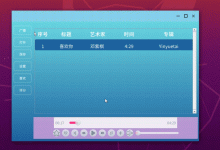
示例效果
main.cpp(单个pdf),将pdf文件添加资源文件中。
#include <QGuiApplication>
#include <QQmlApplicationEngine>
int main(int argc, char *argv[])
{
QApplication::setAttribute(Qt::AA_EnableHighDpiScaling);
//qputenv("QT_IM_MODULE", QByteArray("qtvirtualkeyboard"));
QApplication app(argc, argv);
QQmlApplicationEngine engine;
system.setEngine(&engine);
engine.load(QUrl(QStringLiteral("qrc:/main.qml")));//main.qml中引用helpset.qml
return app.exec();
}
pdf插件加载qrc资源文件可以正常预览,但是加载本地pdf文件无法预览。采用WebEngineView方式解决问题。
WebEngineView {
id: webView
anchors.fill: parent
settings.pluginsEnabled: true
url: "https://www.adobe.com/support/products/enterprise/knowledgecenter/media/c4611_sample_explain.pdf" // 测试在线 PDF
onLoadingError: {
console.error("错误:", errorString, "URL:", failingUrl)
}
}
既然您已经确认 WebEngineView 可以加载在线 PDF(应该没问题),但本地 file:///D:/help.pdf 失败,可能的原因:
跨域限制:本地文件可能被视为“不安全来源”,需要设置环境变量或命令行参数关闭安全策略(仅用于开发)。
-
在 main.cpp 中 QGuiApplication 初始化前添加:
qputenv("QTWEBENGINE_DISABLE_SANDBOX", "1");
qputenv("QTWEBENGINE_REMOTE_DEBUGGING", "9222"); // 可选,便于调试
2.默认情况下,出于安全考虑,file:// 协议被禁止加载任何本地资源,包括 PDF 文件。要解决这个问题,需要从根源上放宽这些限制。
在你的 main.cpp 文件中,创建 QApplication 或 QGuiApplication 实例时,通过命令行参数传递 –disable-web-security 标志。
代码示例:
#include <QGuiApplication>
#include <QQmlApplicationEngine>
int main(int argc, char *argv[])
{
// 1. 准备传递给 QGuiApplication 的参数
// 关键:将 "–disable-web-security" 添加到参数列表中
char* new_argv[] = { argv[0], const_cast<char*>("–disable-web-security") };
int new_argc = 2;
// 2. 使用新的参数列表创建 QGuiApplication
QGuiApplication app(new_argc, new_argv);
// … 你其他的初始化代码 …
QQmlApplicationEngine engine;
engine.load(QUrl(QStringLiteral("qrc:/main.qml")));
return app.exec();
}
安全警告:–disable-web-security 会完全禁用同源策略,仅建议在开发测试或完全受控的内部应用中使用。严禁在面向公网或不信任用户的应用中使用此参数,这会带来严重的安全风险。



评论前必须登录!
注册