 网硕互联帮助中心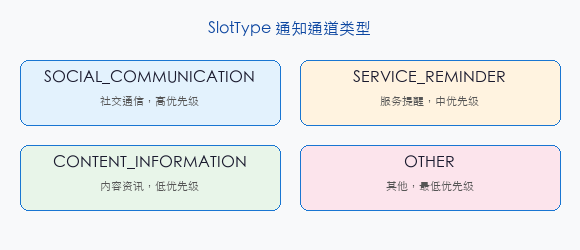
前言
addSlot 是 NotificationKit 中创建通知渠道的 API。不同用途的通知使用不同的 Slot 分类,用户可以单独控制每类通知的开关和响铃方式。
一、创建 Slot
import { notificationManager } from '@kit.NotificationKit';
async function initSlots(): Promise<void> {
// 创建游戏提醒渠道
await notificationManager.addSlot(
notificationManager.SlotType.OTHER,
'game_reminder',
'游戏提醒'
);
// 创建活动通知渠道
await notificationManager.addSlot(
notificationManager.SlotType.SOCIAL_COMMUNICATION,
'game_activity',
'活动通知'
);
}
二、SlotType 类型
| SOCIAL_COMMUNICATION | 社交消息 | 弹窗、声音 |
| SERVICE_REMINDER | 服务提醒 | 声音、震动 |
| CONTENT_INFORMATION | 内容资讯 | 静默通知 |
| OTHER | 游戏通知 | 普通通知 |
三、发送到指定 Slot
async function sendGameNotification(): Promise<void> {
const request: notificationManager.NotificationRequest = {
id: 1001,
slotType: notificationManager.SlotType.OTHER,
content: {
contentType: notificationManager.ContentType.NOTIFICATION_CONTENT_BASIC_TEXT,
normal: {
title: '🐱 猫猫大作战',
text: '每日签到奖励已发放!',
},
},
};
await notificationManager.publish(request);
}
四、最佳实践
总结
addSlot 创建通知渠道分类管理游戏通知。核心要点:addSlot(type, slotName) 创建渠道、 不同用途不同 SlotType、 用户可单独控制开关。
如果这篇文章对你有帮助,欢迎点赞👍、收藏⭐、关注🔔,你的支持是我持续创作的动力!
相关资源:
- addSlot API 文档
- 第 151 篇:notification
- 第 153 篇:PushKit
- 第 164 篇:Reminder


评论前必须登录!
注册