 网硕互联帮助中心
一、安装与驱动准备
1. 安装ipmitool
# Ubuntu/Debian
sudo apt-get install ipmitool
# CentOS/RHEL
sudo yum install ipmitool
windows版:
a. 笔记本等电脑终端安装此工具,用于对远端服务器BMC发送指令,实现带外管理:
工具下载(点击下载):IPMIToolWin1.8.18.zip
安装步骤:
1) 将IPMIToolWin.zip压缩包解压后,将整个文件夹放到C盘任一目录,并复制ipmitool.exe所在目录;
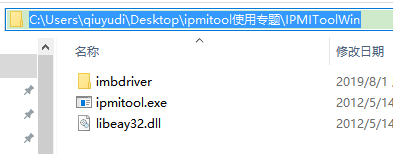
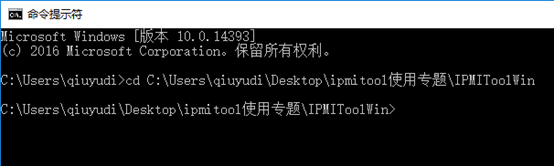
2) 点击电脑桌面左下角【开始】,输入cmd,调出命令行界面;

3) 敲入cd+空格,点击鼠标右键粘贴刚刚复制的工具所在目录,敲回车进入目录;
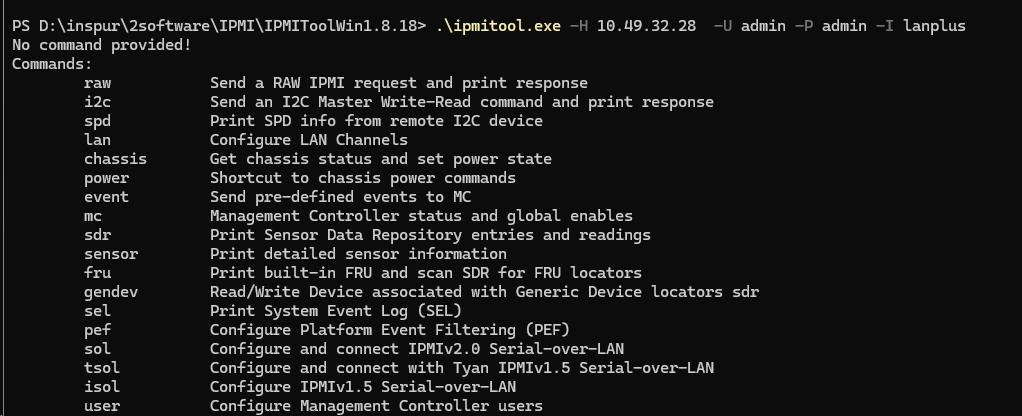
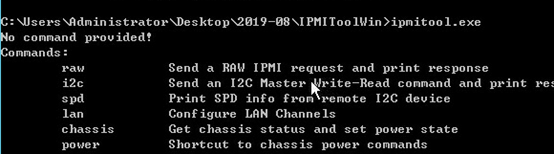
4) 执行相应远端bmc ip的指令后,出现下图说明安装正常。
b. 服务器本地win系统下安装此工具,用于对自身服务器BMC发送指令,实现带内管理:
工具下载(点击下载):IPMIToolWin.zip
安装步骤:
1) 将IPMIToolWin.zip压缩包解压后,将整个文件夹放到C盘任一目录,首先安装对应操作系统版本的imbdriver;
64位操作系统,选择x64;32位操作系统,选择x86;
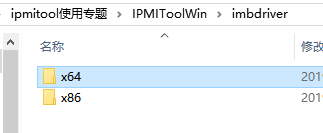
2) 注意:安装需要进入cmd命令行界面,并进入驱动所在目录,安装时须指定安装目录(任意目录),例如:install.cmd C:\\IMBDRV\\Test ;
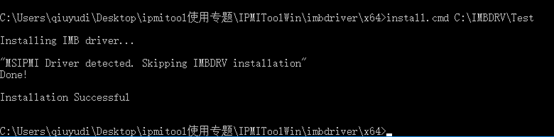
3) 其他步骤,与 a 笔记本等电脑终端设备安装步骤相同,最后一步执行对自身bmc发送指令时不需要ip地址等字段:
2、linux版:
一般安装在 linux 服务器操作系统下
工具下载(点击下载):ipmitool-1.8.18.tar.gz.zip
安装步骤:
1) 将工具上传至系统任一目录下
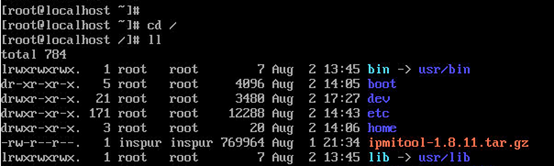
2) 执行tar命令,解压工具包,并cd到工具目录下;
tar -xvzf ipmitool-1.8.11.tar.gz 
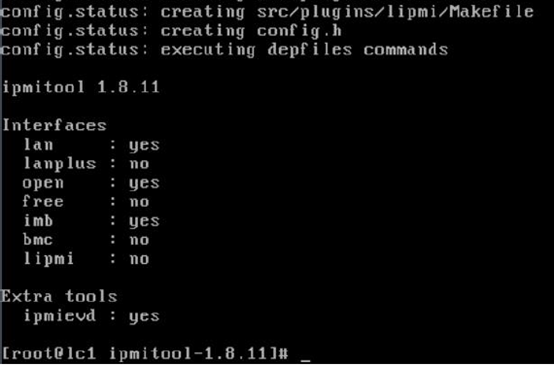
3) 执行config脚本,生成makefile
./configure

执行完成后的状态如图:
4) 继续依次执行以下命令进行安装:
make

make install

2. 加载IPMI驱动
sudo modprobe ipmi_si
sudo modprobe ipmi_devintf
sudo modprobe ipmi_msghandler
3. 验证驱动加载
lsmod | grep ipmi
注意
:如果重启OS后,需要重新执行上述驱动加载命令。
二、常用命令详解
1. 基础信息查询
# 查看传感器信息(温度、电压、风扇转速等)
ipmitool sensor list
# 获取FRU信息(硬件配置详情,如主板型号、序列号等)
ipmitool fru print
# 查看底盘状态(电源状态、工作状态等)
ipmitool chassis status
# 查看上次系统重启的原因
ipmitool chassis restart_cause
2. 电源管理
# 查看电源状态
ipmitool chassis power status
# 远程开机
ipmitool chassis power on
# 远程关机
ipmitool chassis power off
# 强制重启(硬重启)
ipmitool chassis power reset
3. 系统事件日志
# 查看系统事件日志(SEL)
ipmitool sel list
# 清除系统事件日志
ipmitool sel clear
4. 远程管理(通过LAN)
# 远程连接超微服务器(替换为您的IP、用户名和密码)
ipmitool -I lan -H 192.168.1.100 -U admin -P password chassis status
# 查看LAN配置
ipmitool -I lan -H 192.168.1.100 -U admin -P password lan print
# 设置LAN IP地址
ipmitool -I lan -H 192.168.1.100 -U admin -P password lan set 1 ipaddr 192.168.1.101
5. 用户管理
# 列出BMC用户
ipmitool -I lan -H 192.168.1.100 -U admin -P password user list
# 修改用户密码(用户ID为2)
ipmitool -I lan -H 192.168.1.100 -U admin -P password user set password 2 newpassword
6. 高级功能
# 读取FRU数据到文件
ipmitool fru read 0 fru_data.bin
# 设置传感器阈值(例如温度阈值)
ipmitool sensor thresh "Temperature" lower 20 15 10
# 使用交互式shell
ipmitool -I lan -H 192.168.1.100 -U admin -P password shell
# 批量执行命令(创建commands.txt文件包含多个命令)
ipmitool -I lan -H 192.168.1.100 -U admin -P password exec commands.txt
三、超微服务器使用注意事项
IPMI接口类型
:超微服务器通常使用
-I open
(本地BMC)或
-I lan
(远程IPMI)接口
默认凭据
:超微服务器默认用户名通常是
admin
,密码可能为
admin
或
password
,建议首次登录后修改
OEM命令
:超微服务器可能有特定的OEM命令,但标准ipmitool命令已覆盖大部分管理需求
远程管理
:使用
-I lan
参数进行远程管理时,确保IPMI网络配置正确
驱动兼容性
:超微服务器可能需要特定的IPMI驱动,如果遇到问题,建议从超微官网下载最新驱动
四、快速上手示例
# 连接超微服务器并查看传感器信息
ipmitool -I lan -H 192.168.1.100 -U admin -P password sensor list
# 远程开机
ipmitool -I lan -H 192.168.1.100 -U admin -P password chassis power on
# 查看系统事件日志
ipmitool -I lan -H 192.168.1.100 -U admin -P password sel list
提示
:对于超微服务器,如果需要特定的OEM命令,建议查阅超微服务器的IPMI文档或联系超微技术支持获取详细信息。
希望这个指南对您使用ipmitool管理超微服务器有所帮助!



评论前必须登录!
注册