 网硕互联帮助中心
HAProxy七层代理学习笔记
一、负载均衡基础
1.1 什么是负载均衡
负载均衡(Load Balance,简称LB)是一种服务或基于硬件设备实现的高可用反向代理技术。它将特定的业务(如Web服务、网络流量)分担给一个或多个后端服务器,从而提高并发处理能力、保证业务高可用性,并方便业务后期的水平扩展。
参考:阿里云SLB介绍 https://yq.aliyun.com/articles/1803
1.2 为什么使用负载均衡
- 动态水平扩展:对用户无感知,可随时增加后端服务器。
- 提升并发处理能力:突破单服务器性能瓶颈。
- 节约公网IP:多个后端共享一个公网IP,降低成本。
- 隐藏内部服务器IP:提高安全性。
- 配置简单:使用固定格式的配置文件。
- 功能丰富:支持四层和七层代理,支持动态上下线主机。
- 性能强劲:可支撑数万甚至数十万并发连接。
1.3 负载均衡类型
1.3.1 硬件负载均衡
常见硬件设备:
- F5(美国F5公司)
- Netscaler(思杰)
- Array(华耀)
- AD-1000(深信服)
1.3.2 四层负载均衡
- 基于IP和端口(传输层)进行流量分发。
- 对流量做NAT转发,记录TCP/UDP连接状态,后续流量仍发往同一台后端服务器。
- 代表软件:LVS(重量级)、Nginx(四层通过stream模块)、HAProxy(模拟四层转发)。
1.3.3 七层负载均衡
- 基于应用层信息(如URL、HTTP头部、Cookie等)进行流量分发。
- 代理服务器与客户端和后端分别建立连接(如Nginx的proxy_pass)。
- 代表软件:Nginx(七层)、HAProxy(支持会话保持、路径匹配等)。
1.3.4 四层和七层的区别
| 分层位置 | 传输层及以下 | 应用层及以下 |
| 性能 | 高,无需解析报文内容 | 较低,需解析应用层信息 |
| 原理 | 基于IP+端口 | 基于虚拟URL、主机名等 |
| 功能类比 | 类似路由器 | 类似代理服务器 |
| 安全性 | 无法识别DDoS攻击 | 可防御SYN Cookie/Flood等攻击 |
二、HAProxy简介
HAProxy是由法国开发者Willy Tarreau于2000年使用C语言开发的开源软件,是一款高性能(万级以上并发)的TCP/HTTP负载均衡器。支持基于Cookie的持久性、自动故障切换、正则表达式及Web状态统计。
- 企业版网站:https://www.haproxy.com
- 社区版网站:http://www.haproxy.org
- GitHub:https://github.com/haprox
三、HAProxy的安装与服务信息
3.1 实验环境设定
- HAProxy主机拥有双网卡,分别连接外部网络(172.25.254.0/24)和内部服务器网络(192.168.0.0/24)。
- 后端Web服务器只有内网IP,通过HAProxy转发请求。
- 开启内核IP转发:echo net.ipv4.ip_forward=1 >> /etc/sysctl.conf 并执行 sysctl -p。
1.haproxy主机
[root@haproxy ~]# sysctl -a | grep ip_forward
net.ipv4.ip_forward = 0
net.ipv4.ip_forward_update_priority = 1
net.ipv4.ip_forward_use_pmtu = 0
[root@haproxy ~]# echo net.ipv4.ip_forward=1 > /etc/sysctl.conf
[root@haproxy ~]# sysctl -p
net.ipv4.ip_forward = 1
2.weberver1
[root@webserver1 ~]# vmset.sh eth0 192.168.0.10 webserver1 noroute
连接已成功激活(D-Bus 活动路径:/org/freedesktop/NetworkManager/ActiveConnection/4)
2: eth0: <BROADCAST,MULTICAST,UP,LOWER_UP> mtu 1500 qdisc mq state UP group default qlen 1000
link/ether 00:0c:29:8c:96:72 brd ff:ff:ff:ff:ff:ff
altname enp3s0
altname ens160
inet 192.168.0.10/24 brd 192.168.0.255 scope global noprefixroute eth0
valid_lft forever preferred_lft forever
inet6 fe80::20c:29ff:fe8c:9672/64 scope link tentative noprefixroute
valid_lft forever preferred_lft forever
webserver1
[root@webserver1 ~]# dnf install httpd -y
[root@webserver1 ~]# echo yu – webserver1 – 192.168.0.10 > /var/www/html/index.html
[root@webserver1 ~]# systemctl enable –now httpd
Created symlink /etc/systemd/system/multi-user.target.wants/httpd.service → /usr/lib/systemd/system/httpd.service.
webserver2配置类似webserver1 3.验证配置 
3.2 软件安装
下载与安装
[root@haproxy ~]# dnf install haproxy -y
[root@haproxy ~]# systemctl enable –now haproxy
Created symlink /etc/systemd/system/multi-user.target.wants/haproxy.service → /usr/lib/systemd/system/haproxy.service.
# 查看版本
[root@haproxy ~]# haproxy -v
HAProxy version 2.4.22-f8e3218 2023/02/14 – https://haproxy.org/
Status: long-term supported branch – will stop receiving fixes around Q2 2026.
Known bugs: http://www.haproxy.org/bugs/bugs-2.4.22.html
Running on: Linux 5.14.0-570.12.1.el9_6.x86_64 #1 SMP PREEMPT_DYNAMIC Fri Apr 4 10:41:31 EDT 2025 x86_64
启动服务
[root@haproxy ~]# systemctl enable –now haproxy
3.3 Haproxy的基本配置
HAProxy配置文件 /etc/haproxy/haproxy.cfg 由两大部分组成:global(全局配置)和 proxies(代理配置)。proxies段又分为defaults、frontend、backend、listen。
3.3.1 global配置
常用参数:
- log 127.0.0.1 local2:定义syslog服务器。
- chroot /var/lib/haproxy:锁定运行目录。
- pidfile /var/run/haproxy.pid:PID文件路径。
- maxconn 100000:最大连接数。
- user haproxy / group haproxy:运行用户和组。
- daemon:以守护进程方式运行。
- stats socket /var/lib/haproxy/stats:Unix套接字文件,用于运行时管理。
- nbproc 2:启动2个工作进程(多进程)。
- cpu-map 1 0 / cpu-map 2 1:绑定进程到CPU核心。
- nbthread 2:每个进程启用2个线程(与nbproc互斥)。
3.3.2 proxies配置
1. defaults
为后续的frontend、backend、listen提供默认参数,例如:
defaults
mode http
log global
option httplog
option dontlognull
option http-server-close
option forwardfor except 127.0.0.0/8 # 开启IP透传
option redispatch
retries 3
timeout http-request 10s
timeout queue 1m
timeout connect 10s
timeout client 1m
timeout server 1m
timeout http-keep-alive 10s
timeout check 10s
maxconn 3000
2. frontend
定义前端监听的地址和端口,并关联后端。
frontend webcluster
bind *:80
mode http
use_backend webserver-80
3. backend
定义后端服务器组。
backend webserver-80
mode http
server web1 192.168.0.10:80 check inter 3s fall 3 rise 5
server web2 192.168.0.20:80 check inter 3s fall 3 rise 5
- check:启用健康检查。
- inter 3s:检查间隔3秒。
- fall 3:连续3次失败标记为down。
- rise 5:连续5次成功标记为up。
- weight:权重,默认为1。
5. listen
将frontend和backend合并,简化配置。
listen webcluster
bind *:80
mode http
server web1 192.168.0.10:80 check inter 3s fall 3 rise 5
server web2 192.168.0.20:80 check inter 3s fall 3 rise 5
3.4 haproxy基本配置实战
1. 实验最基本的负载
#可将原文件内容注释掉
[root@haproxy ~]# vim /etc/haproxy/haproxy.cfg
frontend webcluster
bind *:80
mode http
use_backend webserver-80
backend webserver-80
server web1 192.168.0.10:80 check inter 3s fall 3 rise 5
server web2 192.168.0.20:80 check inter 3s fall 3 rise 5
[root@haproxy ~]# systemctl restart haproxy.service
测试  2. 使用listen方式实现最简单的HTTP负载均衡:
[root@haproxy ~]# vim /etc/haproxy/haproxy.cfg
listen webcluster
bind *:80
mode http
server web1 192.168.0.10:80 check inter 3s fall 3 rise 5
server web2 192.168.0.20:80 check inter 3s fall 3 rise 5
[root@haproxy ~]# systemctl restart haproxy.service
测试 可以看到请求轮流分发到两台后端服务器。 
2. 日志配置实验
HAProxy的日志通过log指令发送到指定的syslog服务器。实验中将日志发送到后端服务器192.168.0.10。
在192.168.0.10webserver1上启用rsyslog的UDP接收:
# 把下面两行取消注释
[root@webserver1 ~]# vim /etc/rsyslog.conf
32 module(load="imudp") # needs to be done just once
33 input(type="imudp" port="514")
[root@webserver1 ~]# systemctl restart rsyslog.service
#测试接受日志端口是否开启
[root@webserver1 ~]# netstat -lntupae | grep rsyslog
udp 0 0 0.0.0.0:514 0.0.0.0:* 0 74140 30965/rsyslogd
udp6 0 0 :::514 :::* 0 74141 30965/rsyslogd
在haproxy主机中设定日志发送信息
[root@haproxy haproxy]# vim haproxy.cfg
log 192.168.0.10 local2
[root@haproxy haproxy]# systemctl restart haproxy.service
测试  在webserever1上查看日志
3. haproxy实现多进程
haproxy默认是单进程
[root@haproxy ~]# pstree -p | grep haproxy
|-haproxy(1922)—haproxy(1924)—{haproxy}(1925)
#修改配置文件使其成为2个进程
[root@haproxy ~]# vim /etc/haproxy/haproxy.cfg
nbproc 2
[root@haproxy ~]# systemctl restart haproxy.service
测试 
4. 多进程cpu绑定
[root@haproxy ~]# vim /etc/haproxy/haproxy.cfg
nbproc 2
cpu-map 1 0
cpu-map 2 1
[root@haproxy ~]# systemctl restart haproxy.service
5. 为不同进程准备不同套接字
[root@haproxy ~]# systemctl stop haproxy.service
[root@haproxy ~]# rm -rf /var/lib/haproxy/stats
[root@haproxy ~]# vim /etc/haproxy/haproxy.cfg
stats socket /var/lib/haproxy/haproxy1 mode 600 level admin process 1
stats socket /var/lib/haproxy/haporxy2 mode 660 level admin process 1
[root@haproxy ~]# systemctl restart haproxy.service
测试 
6. haproxy实现多线程
注意多线程不能和多进程同时启用,需要将上面实验加入配置的注释掉
[root@haproxy ~]# pstree -p | grep haproxy
|-haproxy(2180)-+-haproxy(2182)
| `-haproxy(2183)
[root@haproxy ~]# cat /proc/2182/status | grep Threads
Threads: 1
[root@haproxy ~]# vim /etc/haproxy/haproxy.cfg
#nbproc 2
#cpu-map 1 0
#cpu-map 2 1
nbthread 2
# turn on stats unix socket
stats socket /var/lib/haproxy/stats
#stats socket /var/lib/haproxy/haproxy1 mode 600 level admin process 1
#stats socket /var/lib/haproxy/haporxy2 mode 660 level admin process 1
[root@haproxy ~]# systemctl restart haproxy.service
测试 
7. 透传客户端真实IP至后端web服务器
[root@webserver1 ~]# vim /etc/httpd/conf/httpd.conf
201 LogFormat "%h %l %u %t \\"%r\\" %>s %b \\"%{Referer}i\\" \\"%{User-Agent}i\\" \\"%{X-Forwarded-For}i\\" " combined
[root@webserver1 ~]# systemctl restart httpd.service
测试  在webserver1中可以观察到,之前没有开启透传之前,不会显示真实的客户端IP;在刚刚我们测试中开启了透传后,最后一行显示真实测试端的IP
# 编辑配置文件启用多进程
[root@haproxy ~]# vim /etc/haproxy/haproxy.cfg
global
nbproc 2
cpu-map 1 0
cpu-map 2 1
stats socket /var/lib/haproxy/haproxy1 mode 600 level admin process 1
stats socket /var/lib/haproxy/haproxy2 mode 600 level admin process 2
# 重启后查看进程
[root@haproxy ~]# pstree -p | grep haproxy
|-haproxy(31549)-+-haproxy(31551)
| `-haproxy(31552)
3.5 socat工具——动态管理HAProxy
socat是Linux下的多功能网络工具,可用于与HAProxy的Unix套接字通信,实现动态调整权重、上下线服务器等操作。即在服务或软件不停止的情况下更新软件或服务的工作方式,完成对软件不停工更新,典型的热更新设备,usb,在使用usb进行插拔时,电脑系统时不需要停止工作的,这中设备叫热插拔设备。
1. 安装socat
[root@haproxy ~]# dnf install socat -y
2. 常用命令
- 查看帮助:echo "help" | socat stdio /var/lib/haproxy/stats
- 查看服务器状态:echo "show servers state" | socat stdio /var/lib/haproxy/stats
例如
[root@haproxy ~]# echo "show servers state" | socat stdio /var/lib/haproxy/stats
1
# be_id be_name srv_id srv_name srv_addr srv_op_state srv_admin_state srv_uweight srv_iweight srv_time_since_last_change srv_check_status srv_check_result srv_check_health srv_check_state srv_agent_state bk_f_forced_id srv_f_forced_id srv_fqdn srv_port srvrecord srv_use_ssl srv_check_port srv_check_addr srv_agent_addr srv_agent_port
2 webcluster 1 yu1 192.168.0.10 2 0 1 1 1939 6 3 7 6 0 0 0 – 80 – 0 0 – – 0
2 webcluster 2 yu2 192.168.0.20 2 0 1 1 1939 6 3 7 6 0 0 0 – 80 – 0 0 – – 0
- 获取权重:echo "get weight webcluster/haha" | socat stdio /var/lib/haproxy/stats
- 设置权重:echo "set weight webcluster/haha 2" | socat stdio /var/lib/haproxy/stats
- 下线服务器:echo "disable server webcluster/haha" | socat stdio /var/lib/haproxy/stats
- 上线服务器:echo "enable server webcluster/haha" | socat stdio /var/lib/haproxy/stats
3. 注意权限
默认socket文件权限为600,仅root可读写。如需普通用户管理,可在配置中指定level admin:
stats socket /var/lib/haproxy/stats mode 600 level admin
4. haproxy实战之动态调整权重
利用socat更改haproxy信息
查看当前权重
[root@haproxy ~]# echo "get weight webcluster/yu1" | socat stdio /var/lib/haproxy/stats
1 (initial 1)
[root@haproxy ~]# echo "get weight webcluster/yu2" | socat stdio /var/lib/haproxy/stats
1 (initial 1)
修改权重为4
[root@haproxy ~]# echo "set weight webcluster/yu1 4" | socat stdio /var/lib/haproxy/stats
Permission denied
像上面这样,如果直接修改,会产生报错,所以我们需要对socket进行授权
[root@haproxy ~]# vim /etc/haproxy/haproxy.cfg
stats socket /var/lib/haproxy/stats mode 600 level admin
[root@haproxy ~]# rm -rf /var/lib/haproxy/*
[root@haproxy ~]# systemctl restart haproxy.service
[root@haproxy ~]# ll /var/lib/haproxy/
总用量 0
srw——- 1 root root 0 2月 24 19:28 stats
授权成功,然后执行权重更改
[root@haproxy ~]# echo "set weight webcluster/yu1 4" | socat stdio /var/lib/haproxy/stats
[root@haproxy ~]# echo "get weight webcluster/yu1" | socat stdio /var/lib/haproxy/stats
4 (initial 1)
测试轮询效果(权重高者获得更多请求) 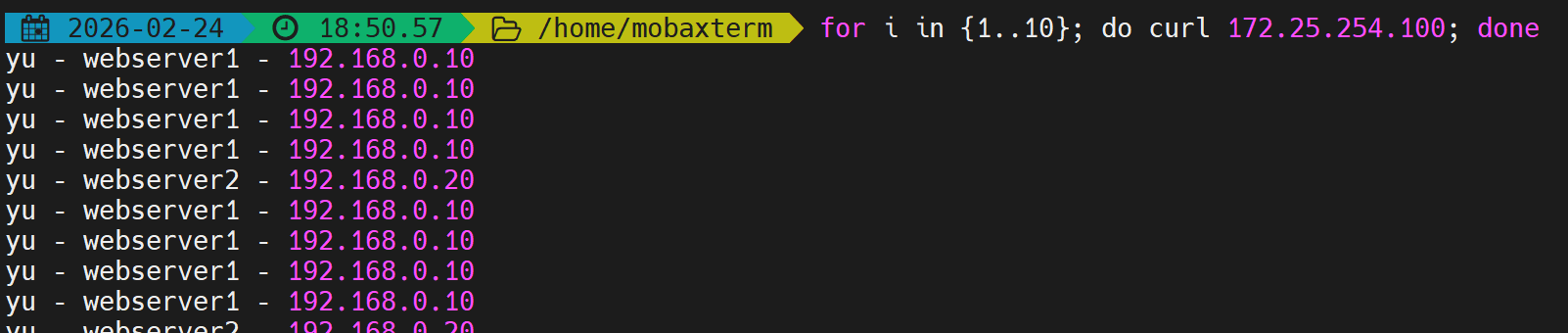
四、HAProxy调度算法
HAProxy通过balance关键字指定后端服务器的调度算法,可配置在listen或backend中。算法分为静态算法、动态算法和混合算法(可根据hash-type改变性质)。
4.1 静态算法
静态算法按照固定规则轮询,不关心后端实时负载,权重只能在配置中设置,运行时无法动态调整(只能设为0或100%)。
4.1.1 static-rr:基于权重的轮询
- 类似于LVS的wrr,按权重轮流分配。
- 不支持运行时动态调整权重。
- 实验验证:[root@haproxy ~]# vim /etc/haproxy/haproxy.cfg
listen webcluster
bind *:80
balance static-rr
server yu1 192.168.0.10:80 weight 2 check inter 3s fall 3 rise 5
server yu2 192.168.0.20:80 weight 1 check inter 3s fall 3 rise 5[root@haproxy ~]# systemctl restart haproxy
测试请求分布 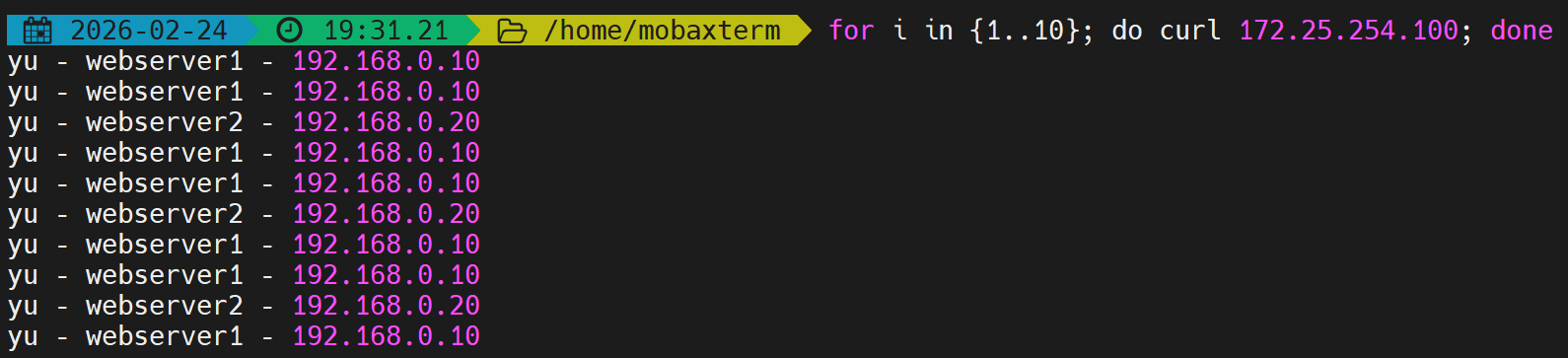 检测是否支持热更新(不支持)
[root@haproxy ~]# echo "set weight webcluster/yu1 1" | socat stdio /var/lib/haproxy/stats
Backend is using a static LB algorithm and only accepts weights '0%' and '100%'.
4.1.2 first:优先调度第一个可用服务器
- 按服务器在配置中的顺序,只有当第一台的连接数达到maxconn上限后,新请求才会分配给下一台。
- 忽略权重,不支持动态调整。
- 实验验证:[root@haproxy ~]# vim /etc/haproxy/haproxy.cfg
listen webcluster
bind *:80
balance first
server yu1 192.168.0.10:80 maxconn 1 check inter 3s fall 3 rise 5
server yu2 192.168.0.20:80 check inter 3s fall 3 rise 5[root@haproxy ~]# systemctl restart haproxy
# 在一个终端持续访问,另一个终端也发起请求,观察何时出现第二台服务器
# 当第一个连接未释放时(maxconn=1),第二个请求会转发到第二台
测试效果: 在一个shell中执行持续访问 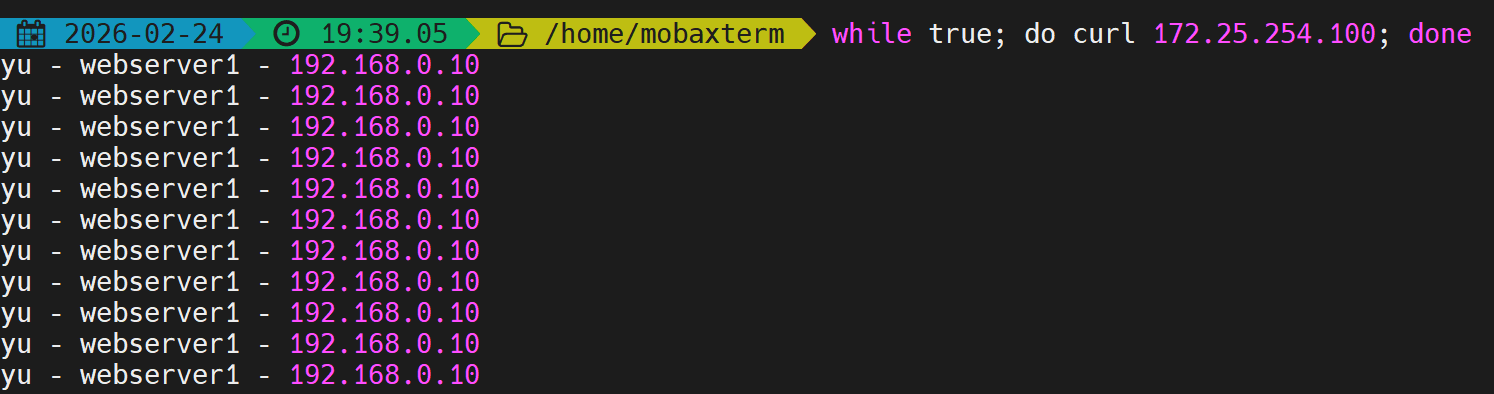 在第二个shell中建立持续访问并观察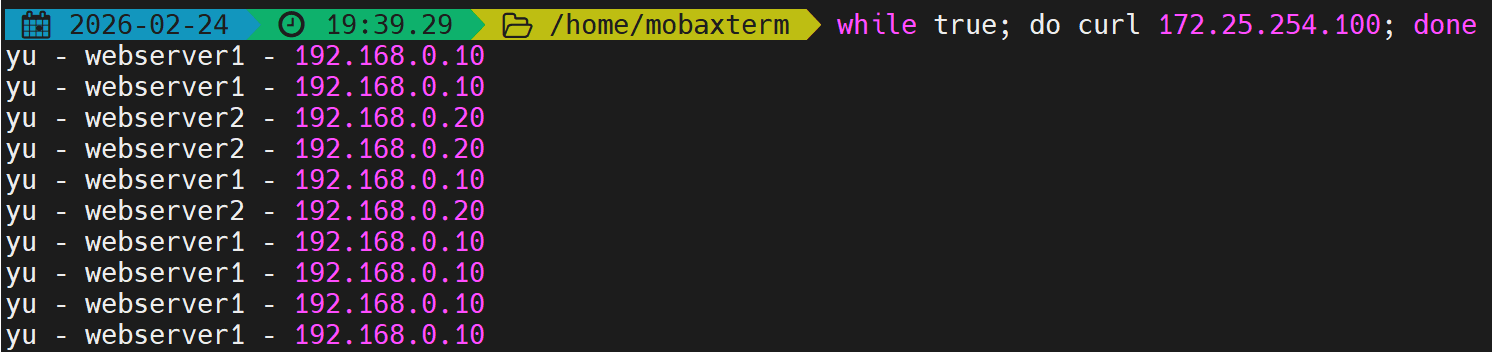
4.2 动态算法
动态算法根据后端实时负载(如连接数)进行调度,支持运行时调整权重和慢启动。
4.2.1 roundrobin(默认)
- 基于权重的轮询,支持权重动态调整,最多支持4095台后端服务器。
- 支持慢启动(新加入服务器逐渐增加转发数)。
- 实验验证:[root@haproxy ~]# vim /etc/haproxy/haproxy.cfg
listen webcluster
bind *:80
balance roundrobin
server yu1 192.168.0.10:80 weight 2 check inter 3s fall 3 rise 5
server yu2 192.168.0.20:80 weight 1 check inter 3s fall 3 rise 5[root@haproxy ~]# systemctl restart haproxy
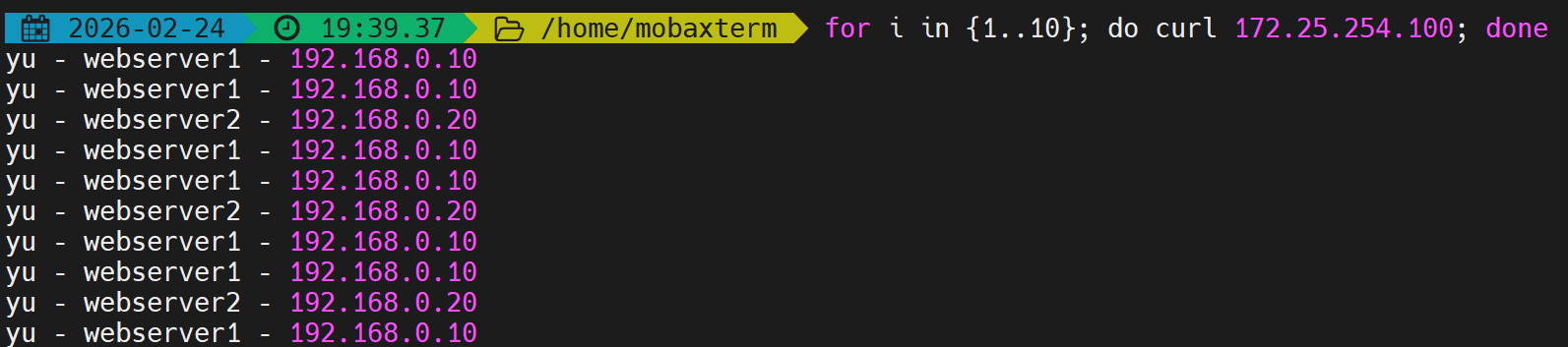 动态调整权重
[root@haproxy ~]# echo "set weight webcluster/yu1 1" | socat stdio /var/lib/haproxy/stats
[root@haproxy ~]# echo "get weight webcluster/yu1" | socat stdio /var/lib/haproxy/stats
1 (initial 2)
测试轮询效果(此时权重1:1,轮流) 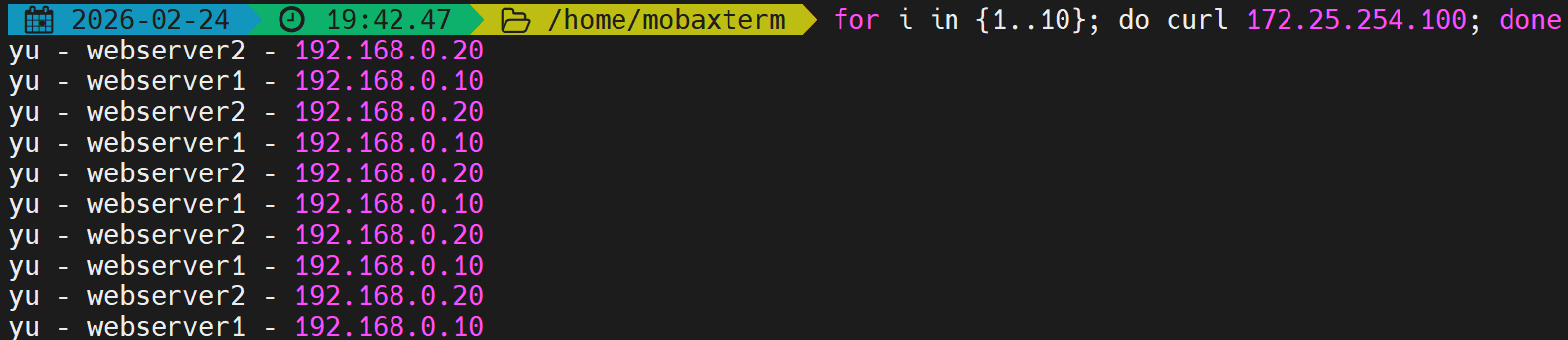
4.2.2 leastconn
- 加权最少连接,优先将新请求分配给当前活动连接数最少的后端服务器。
- 适合长连接场景(如MySQL、Redis)。
- 实验验证:[root@haproxy ~]# vim /etc/haproxy/haproxy.cfg
listen webcluster
bind *:80
balance leastconn
server yu1 192.168.0.10:80 weight 1 check inter 3s fall 3 rise 5
server yu2 192.168.0.20:80 weight 1 check inter 3s fall 3 rise 5[root@haproxy ~]# systemctl restart haproxy
测试结果与roundrobin类似,但在长连接场景下更均衡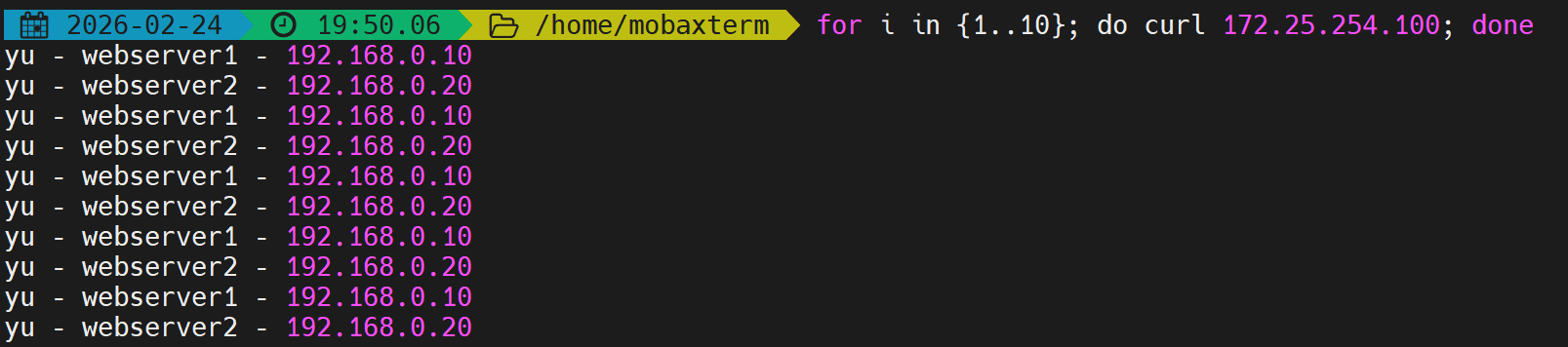
4.3 混合算法(可静态可动态)
通过hash-type可改变算法性质:map-based(静态取模)或consistent(动态一致性哈希)。
4.3.1 source
- 基于源IP地址的哈希,确保同一源IP的请求始终发往同一后端服务器(会话保持)。
- 默认静态(map-based),可通过hash-type consistent变为动态一致性哈希。
- 实验:[root@haproxy ~]# vim /etc/haproxy/haproxy.cfg
listen webcluster
bind *:80
balance source
hash-type consistent # 启用动态一致性哈希;如果是默认静态算法,这个行不用写
server yu1 192.168.0.10:80 weight 1 check inter 3s fall 3 rise 5
server yu2 192.168.0.20:80 weight 1 check inter 3s fall 3 rise 5[root@haproxy ~]# systemctl restart haproxy
同一客户端多次请求始终指向同一后端 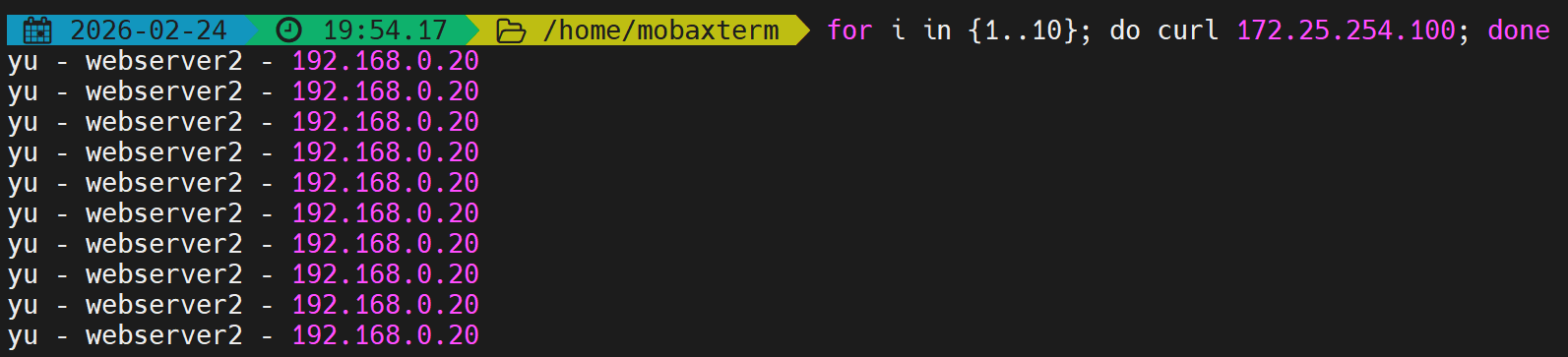
4.3.2 uri
- 对请求的URI(整个或左半部分)做哈希,适用于缓存服务器场景,确保相同URI请求到同一后端。
- 支持map-based(静态)和consistent(动态)。
- 实验:
# 在后端准备不同URI的内容
[root@webserver1 ~]# echo yu – RS1 – 192.168.0.10 > /var/www/html/index1.html
[root@webserver1 ~]# echo yu – RS1 – 192.168.0.10 > /var/www/html/index2.html
[root@webserver2 ~]# echo yu – RS2 – 192.168.0.20 > /var/www/html/index1.html
[root@webserver2 ~]# echo yu – RS2 – 192.168.0.20 > /var/www/html/index2.html
[root@haproxy ~]# vim /etc/haproxy/haproxy.cfg
listen webcluster
bind *:80
balance uri
hash-type consistent
server yu1 192.168.0.10:80 weight 1 check inter 3s fall 3 rise 5
server yu2 192.168.0.20:80 weight 1 check inter 3s fall 3 rise 5
[root@haproxy ~]# systemctl restart haproxy
测试相同URI指向相同后端 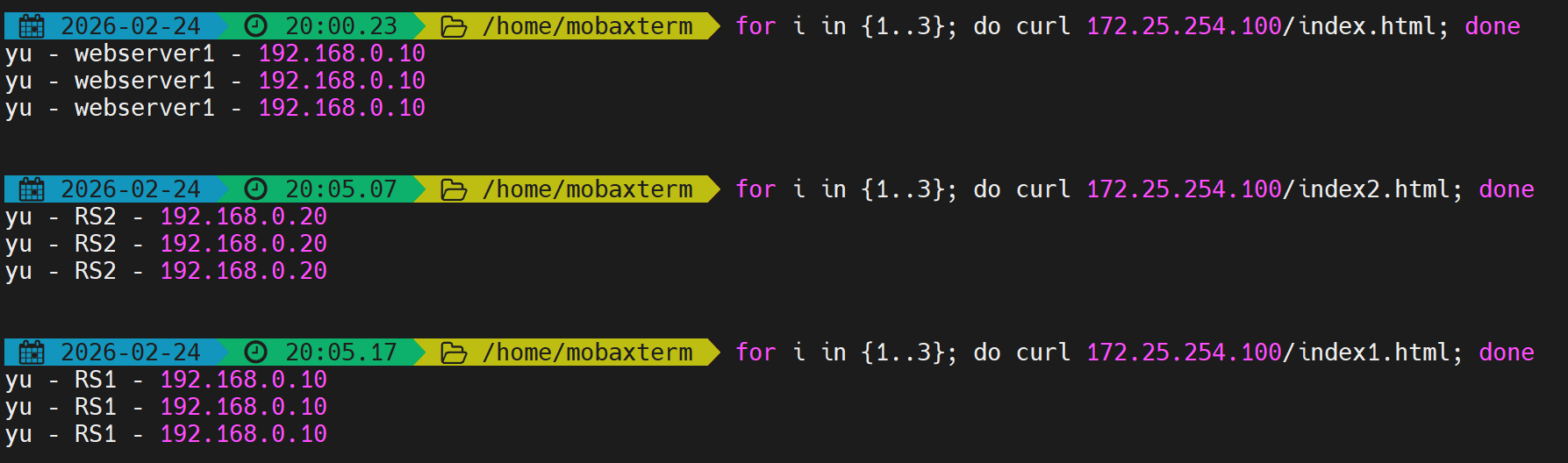
4.3.3 url_param
- 对URL中指定参数的值做哈希,例如 ?name=lee,常用于追踪用户实现会话保持。
- 若参数不存在,则使用roundrobin。
- 实验:[root@haproxy ~]# vim /etc/haproxy/haproxy.cfg
listen webcluster
bind *:80
balance url_param name
hash-type consistent
server yu1 192.168.0.10:80 weight 1 check inter 3s fall 3 rise 5
server yu2 192.168.0.20:80 weight 1 check inter 3s fall 3 rise 5[root@haproxy ~]# systemctl restart haproxy
测试相同参数值指向同一后端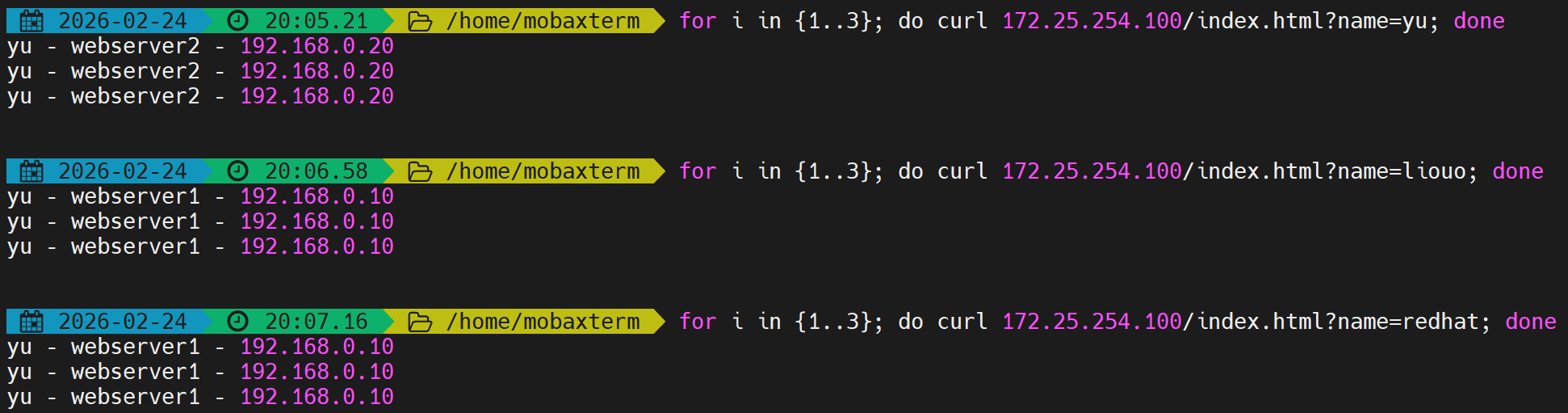
4.3.4 hdr
balance hdr()算法括号内可以填写的是HTTP请求头的字段名称。这个字段将作为哈希计算的依据,决定请求被分配到哪个后端服务器。 可以通过下面方式进行查询:
[root@haproxy ~]# curl -v 172.25.254.100
* Trying 172.25.254.100:80...
* Connected to 172.25.254.100 (172.25.254.100) port 80 (#0)
> GET / HTTP/1.1
> Host: 172.25.254.100
> User-Agent: curl/7.76.1
> Accept: */*
>
* Mark bundle as not supporting multiuse
< HTTP/1.1 200 OK
< date: Tue, 24 Feb 2026 12:08:45 GMT
< server: Apache/2.4.62 (Red Hat Enterprise Linux)
< last-modified: Mon, 23 Feb 2026 13:55:24 GMT
< etag: "1f-64b7e1f5c6f05"
< accept-ranges: bytes
< content-length: 31
< content-type: text/html; charset=UTF-8
<
yu – webserver1 – 192.168.0.10
* Connection #0 to host 172.25.254.100 left intact
- 对HTTP请求头中指定字段的值做哈希,例如 User-Agent。
- 实验:[root@haproxy ~]# vim /etc/haproxy/haproxy.cfg
listen webcluster
bind *:80
balance hdr(User-Agent)
hash-type consistent
server yu1 192.168.0.10:80 weight 1 check inter 3s fall 3 rise 5
server yu2 192.168.0.20:80 weight 1 check inter 3s fall 3 rise 5[root@haproxy ~]# systemctl restart haproxy
测试相同User-Agent指向同一后端 
4.4 算法总结
| static-rr | 静态 | 简单轮询,不需动态调整 | 不支持 |
| first | 静态 | 按优先级使用服务器 | 不支持 |
| roundrobin | 动态 | 通用HTTP负载均衡 | 支持 |
| leastconn | 动态 | 长连接(MySQL、Redis) | 支持 |
| source | 混合 | 基于源IP的会话保持 | 取决于hash-type |
| uri | 混合 | 缓存服务器(相同URI缓存) | 取决于hash-type |
| url_param | 混合 | 基于URL参数的会话保持 | 取决于hash-type |
| hdr | 混合 | 基于HTTP头部的会话保持 | 取决于hash-type |
五、高级功能及配置
5.1 基于Cookie的会话保持
通过插入Cookie实现更精细的会话保持(同一浏览器访问同一后端),比源地址哈希更精准,但会增加Haproxy负载。
配置参数
- cookie <name> [ rewrite | insert | prefix ] [ indirect ] [ nocache ]
- insert:插入新的Cookie。
- indirect:如果客户端已有Cookie,则不再发送。
- nocache:禁止中间缓存缓存Cookie。
实验配置
[root@haproxy ~]# vim /etc/haproxy/haproxy.cfg
listen webcluster
bind *:80
balance roundrobin
hash-type consistent
cookie WEBCOOKIE insert nocache indirect
server yu1 192.168.0.10:80 cookie web1 check inter 3s fall 3 rise 5 weight 1
server yu2 192.168.0.20:80 cookie web2 check inter 3s fall 3 rise 5 weight 1
[root@haproxy ~]# systemctl restart haproxy
验证
- 首次访问时,响应头中包含Set-Cookie: WEBCOOKIE=web1,后续请求携带此Cookie会被定向到相同后端。
- 使用不同浏览器测试,各自保持会话。

5.2 HAProxy状态页
提供Web界面查看HAProxy的运行状态和后端服务器健康情况。
配置参数
- stats enable:启用状态页。
- stats uri <prefix>:自定义URI,默认为/haproxy?stats。
- stats auth <user>:<passwd>:认证信息。
- stats refresh <delay>:自动刷新间隔。
- stats admin { if | unless } <cond>:启用管理功能(可在线上下线服务器)。
实验配置
[root@haproxy ~]# vim /etc/haproxy/haproxy.cfg
listen stats
mode http
bind 0.0.0.0:4321
stats enable
log global
# stats refresh
stats uri /stats
stats auth yu:yu
[root@haproxy ~]# systemctl restart haproxy.service
访问 http://172.25.254.100:4321/stats,输入用户名密码即可查看。  开启自动刷新
[root@haproxy ~]# vim /etc/haproxy/haproxy.cfg
listen stats
mode http
bind 0.0.0.0:4321
stats enable
log global
stats refresh 1
stats uri /status
stats auth yu:yu
[root@haproxy ~]# systemctl restart haproxy.service
 模拟设备下线
[root@webserver1 ~]# systemctl stop httpd

状态页信息解读
- pid/uptime:进程ID和运行时间。
- active UP/backup UP:在线服务器状态。
- session rate/sessions:连接速率和总连接数。
- 可在此页面手动禁用/启用后端服务器(若启用stats admin)。
5.3 IP透传
使后端服务器能记录客户端的真实IP,而非HAProxy的IP。
5.3.1 七层IP透传
HAProxy在转发HTTP请求时添加X-Forwarded-For头部。
- 实验环境
[root@haproxy ~]# vim /etc/haproxy/haproxy.cfg
listen webcluster
bind *:80
# mode http
balance roundrobin
server yu1 192.168.0.10:80 check inter 3s fall 3 rise 5 weight 1
server yu2 192.168.0.20:80 check inter 3s fall 3 rise 5 weight 1
[root@haproxy ~]# systemctl restart haproxy.service
测试环境 
- 配置:
# RS主机中默认是不开启透传功能
[root@webserver2 ~]# cat /etc/httpd/logs/access_log
192.168.0.100 – – [24/Feb/2026:21:51:51 +0800] "GET / HTTP/1.1" 200 31 "-" "curl/8.4.0"
# 开启IP透传方式
[root@webserver2 ~]# vim /etc/httpd/conf/httpd.conf
201 LogFormat "%h %l %u %t \\"%r\\" %>s %b \\"%{X-Forwarded-For}i\\" \\"%{Referer}i\\" \\"%{User-Agent}i \\"" combined
- 测试: 访问HAProxy后,查看后端Apache日志,可以看到X-Forwarded-For记录了客户端真实IP(这里是172.25.254.1)。

5.3.2 四层IP透传(PROXY protocol)
四层模式下,通过PROXY protocol传递客户端IP。
- 环境设置
[root@webserver1 ~]# systemctl disable –now httpd.service
Removed "/etc/systemd/system/multi-user.target.wants/httpd.service".
[root@webserver2 ~]# systemctl disable –now httpd.service
Removed "/etc/systemd/system/multi-user.target.wants/httpd.service".
- 部署nginx
[root@webserver1 ~]# dnf install nginx -y
[root@webserver1 ~]# echo yu – RS1 – 192.168.0.10 > /usr/share/nginx/html/index.html
[root@webserver1 ~]# systemctl enable –now nginx
Created symlink /etc/systemd/system/multi-user.target.wants/nginx.service → /usr/lib/systemd/system/nginx.service.
[root@webserver2 ~]# dnf install nginx -y
[root@webserver2 ~]# echo yu – RS2 – 192.168.0.20 > /usr/share/nginx/html/index.html
[root@webserver2 ~]# systemctl enable –now nginx
Created symlink /etc/systemd/system/multi-user.target.wants/nginx.service → /usr/lib/systemd/system/nginx.service.
- 测环境

- 后端Nginx配置:
[root@webserver1 ~]# vim /etc/nginx/nginx.conf
server {
listen 80 proxy_protocol;#启用四层访问控制
listen [::]:80;
server_name _;
root /usr/share/nginx/html;
# Load configuration files for the default server block.
include /etc/nginx/default.d/*.conf;
error_page 404 /404.html;
location = /404.html {
}
[root@webserver2 ~]# vim /etc/nginx/nginx.conf
server {
listen 80 proxy_protocol;#启用四层访问控制
listen [::]:80;
server_name _;
root /usr/share/nginx/html;
# Load configuration files for the default server block.
include /etc/nginx/default.d/*.conf;
error_page 404 /404.html;
location = /404.html {
}
[root@webserver1 ~]# systemctl restart nginx.service
[root@webserver2 ~]# systemctl restart nginx.service
-
测试
 出现上述报错标识nginx只支持四层访问
 -
HAProxy配置:
[root@haproxy ~]# vim /etc/haproxy/haproxy.cfg
listen webcluster
bind *:80
mode tcp
balance roundrobin
server yu1 192.168.0.10:80 send-proxy check inter 3s fall 3 rise 5 weight 1
server yu2 192.168.0.20:80 send-proxy check inter 3s fall 3 rise 5 weight 1
[root@haproxy ~]# systemctl restart haproxy.service
- 测试

- 设置四层IP透传
- 实验步骤:
- 在后端安装Nginx并配置proxy_protocol。
- 修改HAProxy为mode tcp并添加send-proxy。
- 访问测试,后端Nginx日志中通过$proxy_protocol_addr变量记录真实IP。
# webserver1与webserver2一致
[root@webserver1 ~]# vim /etc/nginx/nginx.conf
http {
log_format main '$remote_addr – $remote_user [$time_local] "$request" '
'"$proxy_protocol_addr"'
'$status $body_bytes_sent "$http_referer" '
'"$http_user_agent" "$http_x_forwarded_for"';

- 注意:启用四层透传后,后端只能接受PROXY protocol连接,无法直接通过普通HTTP访问。
六、Haproxy的四层负载均衡
6.1 环境设定
webserver2设定与webserver1类似,这里以webserver1为例
[root@webserver1 ~]# dnf install mariadb-server mariadb -y
[root@webserver1 ~]# vim /etc/my.cnf.d/mariadb-server.cnf
[mysqld]
server_id=10 #webserver2设置server_id=20
datadir=/var/lib/mysql
socket=/var/lib/mysql/mysql.sock
log-error=/var/log/mariadb/mariadb.log
pid-file=/run/mariadb/mariadb.pid
[root@webserver1 ~]# systemctl restart mariadb.service
[root@webserver1 ~]# mysql
Welcome to the MariaDB monitor. Commands end with ; or \\g.
Your MariaDB connection id is 3
Server version: 10.5.27-MariaDB MariaDB Server
Copyright (c) 2000, 2018, Oracle, MariaDB Corporation Ab and others.
Type 'help;' or '\\h' for help. Type '\\c' to clear the current input statement.
MariaDB [(none)]> create user 'yu'@'%' identified by 'yu';
Query OK, 0 rows affected (0.001 sec)
MariaDB [(none)]> grant all on *.* to 'yu'@'%';
Query OK, 0 rows affected (0.001 sec)
基础测试 
- 四层负载操作
[root@haproxy ~]# vim /etc/haproxy/haproxy.cfg
listen mariadbcluster
bind *:6663
mode tcp
balance roundrobin
server yu1 192.168.0.10:3306 check inter 3s fall 3 rise 5 weight 1
server yu2 192.168.0.20:3306 check inter 3s fall 3 rise 5 weight 1
[root@haproxy ~]# systemctl restart haproxy.service
[root@haproxy ~]# netstat -lntupae | grep haproxy
tcp 0 0 0.0.0.0:6663 0.0.0.0:* LISTEN 0 65741 3073/haproxy
tcp 0 0 0.0.0.0:4321 0.0.0.0:* LISTEN 0 65742 3073/haproxy
tcp 0 0 0.0.0.0:80 0.0.0.0:* LISTEN 0 65740 3073/haproxy
- 测试 在测试机上安装mysql包

6.2 设置backup参数
[root@haproxy ~]# vim /etc/haproxy/haproxy.cfg
listen mariadbcluster
bind *:6663
mode tcp
balance roundrobin
server yu1 192.168.0.10:3306 check inter 3s fall 3 rise 5 weight 1
server yu2 192.168.0.20:3306 check inter 3s fall 3 rise 5 weight 1 backup
[root@haproxy ~]# systemctl restart haproxy.service
- 测试

关闭10的mariadb并等待1分钟
[root@webserver1 ~]# systemctl stop mariadb.service
测试 
HAProxy支持对TCP协议的应用做负载均衡,如MySQL、Redis、Memcached等。 (补充) 连接到六、负载均衡配置 与七层类似,只需将mode设为tcp。
MySQL负载均衡
[root@webserver1 ~]# vim /etc/my.cnf.d/mariadb-server.cnf
[mysqld]
server_id=10
# webserver2设为20
[root@webserver1 ~]# systemctl start mariadb
# 创建远程用户
MariaDB [(none)]> CREATE USER 'lee'@'%' IDENTIFIED BY 'lee';
MariaDB [(none)]> GRANT ALL ON *.* TO 'lee'@'%';
bind *:3306
mode tcp
balance leastconn
server mysql1 192.168.0.10:3306 check inter 3s fall 3 rise 5
server mysql2 192.168.0.20:3306 check inter 3s fall 3 rise 5
+————-+
| @@server_id |
+————-+
| 10 |
+————-+
多次执行,会轮流显示10和20。
七、自定义Haproxy错误界面
- 将错误页面保存为HTTP格式文件,通过errorfile指定。
- 支持错误码:200,400,403,405,408,425,429,500,502,503,504。
7.1 sorryserver的设定
Sorry Server(备用服务器) 当所有业务服务器都宕机时,提供一个友好的临时页面。 正常的所有服务器如果出现宕机,那么客户将被定向到指定的主机中,这个当业务主机出问题时被临时访问的主机叫做sorryserver
[root@haproxy ~]# vim /etc/httpd/conf/httpd.conf
[root@haproxy ~]# systemctl enable –now httpd
Created symlink /etc/systemd/system/multi-user.target.wants/httpd.service → /usr/lib/systemd/system/httpd.service.
[root@haproxy ~]# echo "This is a page for sorryserver!" > /var/www/html/index.html
[root@haproxy ~]# vim /etc/haproxy/haproxy.cfg
listen webcluster
bind *:80
mode tcp
balance roundrobin
server yu1 192.168.0.10:80 send-proxy check inter 3s fall 3 rise 5 weight 1
server yu2 192.168.0.20:80 send-proxy check inter 3s fall 3 rise 5 weight 1
server sorrypage 192.168.0.100:8080 backup
[root@haproxy ~]# systemctl restart haproxy.service
测试,第一次显示1和2轮询;停止webserver1上的nginx服务,第二次测试只有2;最后关闭webserver2上的nginx服务,显示sorrypage页面。 
7.2 自定义错误页面
当所有主机包括sorryserver都宕机了,那么haproxy会提供一个默认访问的错误页面,这个错误页面跟报错代码有关,这个页面可以通过定义来进行设置
[root@haproxy ~]# mkdir -p /errorpage/html/
[root@haproxy ~]# vim /errorpage/html/503.http
HTTP/1.0 503 Service Unavailable
Cache-Control: no-cache
Connection: close
Content-Type: text/html
<html>
<body>
<h1>服务暂时不可用 (503)</h1>
<p>所有后端服务器都挂了,请稍后再试。</p>
</body>
</html>
[root@haproxy ~]# vim /etc/haproxy/haproxy.cfg
defaults
mode http
log global
option httplog
option dontlognull
option http-server-close
option forwardfor except 127.0.0.0/8
option redispatch
retries 3
timeout http-request 10s
timeout queue 1m
timeout connect 10s
timeout client 1m
timeout server 1m
timeout http-keep-alive 10s
timeout check 10s
maxconn 3000
errorfile 503 /errorpage/html/503.http#error 页面
[root@haproxy ~]# systemctl restart haproxy.service
#测试
[Administrator.DESKTOP-VJ307M3] ➤ curl 172.25.254.100
<html>
<body>
<h1>服务暂时不可用 (503)</h1>
<p>所有后端服务器都挂了,请稍后再试。</p>
</body>
</html>
7.3 3.从定向错误到指定网站
[root@haproxy ~]# vim /etc/haproxy/haproxy.cfg
defaults
mode http
log global
option httplog
option dontlognull
option http-server-close
option forwardfor except 127.0.0.0/8
option redispatch
retries 3
timeout http-request 10s
timeout queue 1m
timeout connect 10s
timeout client 1m
timeout server 1m
timeout http-keep-alive 10s
timeout check 10s
maxconn 3000
errorloc 503 http://www.baidu.com#error 页面
[root@haproxy ~]# systemctl restart haproxy.service

八、ACL访问控制
ACL(Access Control List)用于根据请求内容进行条件匹配,然后执行相应操作(如选择后端、拒绝请求、重定向等)。
8.1 ACL语法
acl <aclname> <criterion> [flags] [operator] <value>
- aclname:自定义名称,区分大小写。
- criterion:匹配条件,如hdr_dom(host)、path_beg、src等。
- flags:-i忽略大小写,-m指定匹配方法。
- operator:整数比较(eq、ge等)或字符串匹配。
- value:匹配的值。
8.2 常用匹配条件
| hdr_dom(host) | 匹配Host的域名 | hdr_dom(host) -i .com |
| hdr_beg(host) | Host开头匹配 | hdr_beg(host) -i www. |
| hdr_end(host) | Host结尾匹配 | hdr_end(host) -i .org |
| path_beg | URL路径开头匹配 | path_beg -i /static/ |
| path_end | URL路径结尾匹配 | path_end -i .jpg .png |
| path_sub | URL路径包含子串 | path_sub -i images |
| src | 源IP地址 | src 192.168.1.0/24 |
| src_port | 源端口 | src_port 1024-65535 |
| method | HTTP方法 | method GET POST |
| url_param | URL参数 | url_param(name) -m sub lee |
8.3 ACL实验示例
8.3.1 基于域名匹配
frontend webcluster
bind *:80
mode http
acl domain_com hdr_end(host) -i .com
use_backend webserver-80-web1 if domain_com
default_backend webserver-80-web2
backend webserver-80-web1
server web1 192.168.0.10:80 check
backend webserver-80-web2
server web2 192.168.0.20:80 check
- 测试:访问www.yu.com → 10,访问www.yu.org → 20。
8.3.2 基于路径匹配
acl path_static path_end -i .jpg .png .css .js
acl path_php path_end -i .php
use_backend static_host if path_static
use_backend php_host if path_php
8.3.3 基于源IP的黑白名单
acl blacklist src 172.25.254.1
http-request deny if blacklist
# 白名单
acl whitelist src 172.25.254.10
http-request allow if whitelist
http-request deny
8.3.4 基于浏览器类型
acl bad_browser hdr_sub(User-Agent) -i curl wget
http-request deny if bad_browser
8.4 多个ACL的组合
- 与:默认,if acl1 acl2 需同时满足。
- 或:使用or或||,如if acl1 or acl2。
- 非:使用!,如if ! acl1。
九、ACL访问控制进阶实验
9.1 域名匹配与默认后端
结合多个ACL实现基于域名的分流,并设置默认后端。
- 配置
frontend webcluster
bind *:80
mode http
acl is_com hdr_end(host) -i .com
acl is_bbs hdr_beg(host) -i bbs.
use_backend bbs_servers if is_bbs
use_backend com_servers if is_com
default_backend default_servers
backend bbs_servers
server bbs1 192.168.0.10:80 check
backend com_servers
server com1 192.168.0.20:80 check
backend default_servers
server default1 192.168.0.10:80 check
9.2 路径匹配实现动静分离
frontend webcluster
bind *:80
mode http
acl static_path path_end -i .jpg .png .css .js
acl static_path path_beg -i /static/ /images/
acl api_path path_beg -i /api/
use_backend static_servers if static_path
use_backend api_servers if api_path
default_backend dynamic_servers
9.3 基于浏览器类型的访问控制
acl bad_browser hdr_sub(User-Agent) -i curl wget
http-request deny if bad_browser
9.4 基于源IP的访问控制
acl internal src 192.168.0.0/24
http-request allow if internal
http-request deny
9.5 复杂组合
acl valid_method method GET HEAD
acl valid_ua hdr_sub(User-Agent) -i Mozilla
acl valid_ip src 172.25.254.0/24
http-request deny if ! valid_method or ! valid_ua or ! valid_ip
十、HAProxy HTTPS实现(全站加密)
HAProxy可以作为SSL终端,处理来自客户端的HTTPS请求,然后以HTTP转发给后端,减轻后端SSL压力。
10.1 制作自签名证书
[root@haproxy ~]# mkdir /etc/haproxy/certs
[root@haproxy ~]# openssl req -newkey rsa:2048 -nodes -sha256 \\
-keyout /etc/haproxy/certs/timinglee.org.key \\
-x509 -days 365 \\
-out /etc/haproxy/certs/timinglee.org.crt
# 填写证书信息(CN可设为域名)
[root@haproxy ~]# cat /etc/haproxy/certs/timinglee.org.{key,crt} > /etc/haproxy/certs/timinglee.pem
10.2 配置HTTPS前端
frontend http-in
bind *:80
redirect scheme https if !{ ssl_fc } # 将HTTP重定向到HTTPS
frontend https-in
bind *:443 ssl crt /etc/haproxy/certs/timinglee.pem
mode http
default_backend webcluster
backend webcluster
mode http
balance roundrobin
server web1 192.168.0.10:80 check
server web2 192.168.0.20:80 check
10.3 测试
# 访问HTTP自动跳转到HTTPS
[Administrator.DESKTOP-VJ307M3] ➤ curl -k -L http://172.25.254.100
# 直接HTTPS访问
[Administrator.DESKTOP-VJ307M3] ➤ curl -k https://172.25.254.100
- -k选项忽略自签名证书验证。
十一、总结
11.1学习总结
通过以上理论与实践结合的学习,我们掌握了:
11.2 实验过程中遇到的问题与解决方法
1. 环境配置阶段
双网卡配置后网络不通?
- 现象:配置完 eth0 和 eth1 后,无法从外网访问 haproxy。
- 原因:未开启内核路由转发。
- 解决:echo net.ipv4.ip_forward=1 > /etc/sysctl.conf
sysctl -p
2. Haproxy 安装与基础配置
配置文件语法错误导致服务启动失败
- 现象:systemctl restart haproxy.service 失败
journalctl -xe 提示 unknown keyword - 原因:手误将 fall 写成 dall,或参数写错位置(如在 defaults 中写 nbproc)。
- 解决:
- 使用 systemctl status haproxy.service 查看具体错误行。
- 修正拼写错误,确保参数写在正确的作用域(全局 / defaults / listen / backend)。
3. 日志配置问题
haproxy 日志未发送到远程主机
- 现象:/var/log/messages 中无 haproxy 日志。
- 原因:远程主机未开启 UDP 514 端口接收日志。
- 解决:# 在 webserver1 上启用 rsyslog UDP 模块
vim /etc/rsyslog.conf
取消注释:
module(load="imudp")
input(type="imudp" port="514")
systemctl restart rsyslog
4.多进程与多线程配置冲突
同时启用 nbproc 和 nbthread 导致冲突
- 现象:haproxy 启动失败,提示配置不合法。
- 原因:多进程与多线程不能同时启用。
- 解决:注释掉 nbproc,只保留 nbthread。
5. socat 热更新权限问题
使用 socat 修改权重时提示 Permission denied
- 现象:echo "set weight webcluster/haha 2" | socat stdio /var/lib/haproxy/stats
Permission denied - 原因:socket 文件权限不足,未授权 admin 级别。
- 解决:vim /etc/haproxy/haproxy.cfg
stats socket /var/lib/haproxy/stats mode 600 level admin
rm -rf /var/lib/haproxy/*
systemctl restart haproxy
6. 算法实验中的问题
(1) static-rr 不支持动态权重修改
- 现象:使用 set weight 修改权重失败。
- 原因:static-rr 是静态算法,不支持动态调整。
- 解决:改用动态算法如 roundrobin。
(2) first 算法下高并发测试未触发备用服务器
- 现象:即使 maxconn=1,仍一直访问同一台。
- 原因:first 会优先使用第一个服务器直到满载,测试并发数不足。
- 解决:开启多个终端同时压测,触发备用服务器。
7. IP 透传配置问题
七层透传后日志仍显示 haproxy IP
- 现象:后端日志中 %h 仍为 192.168.0.100。
- 原因:未修改 httpd 的 LogFormat,未开启 option forwardfor。
- 解决:# haproxy 配置
option forwardfor except 127.0.0.0/8# httpd 配置
LogFormat "%h %l %u %t \\"%r\\" %>s %b \\"%{X-Forwarded-For}i\\" …" combined
四层透传后 nginx 报 502
- 现象:启用 send-proxy 后 nginx 返回 502。
- 原因:nginx 未开启 proxy_protocol 支持。
- 解决:listen 80 proxy_protocol;
log_format main '$proxy_protocol_addr – …';
8. ACL 访问控制问题
黑名单未生效
- 现象:即使写了 http-request deny if invalid_src,仍可访问。
- 原因:ACL 定义写在了 use_backend 之后,未提前匹配。
- 解决:将 ACL 和 http-request deny 放在 use_backend 之前。
9. 全站加密问题
证书生成后 haproxy 无法启动
- 现象:启动失败,提示 no certificate found。
- 原因:未将 .key 和 .crt 合并为 .pem 文件。
- 解决:cat timinglee.org.key timinglee.org.crt > timinglee.pem
HTTP 跳转 HTTPS 未生效
- 现象:访问 http:// 仍返回 200,未跳转。
- 原因:未在 frontend 中配置 redirect scheme https。
- 解决:frontend webcluster-http
bind *:80
redirect scheme https if !{ ssl_fc }
11.3 排错技巧总结
- 使用 systemctl status haproxy.service 查看错误行。
- 使用 journalctl -xeu haproxy.service 查看详细日志。
- 配置文件修改后务必用 haproxy -f /etc/haproxy/haproxy.cfg -c 检查语法。
- 多进程/多线程、socket 权限、日志格式等问题是常见陷阱,需重点关注。
通过以上排查思路,绝大部分实验问题都能得到解决。建议大家在实验过程中记录每一步的输出,便于回溯定位。如果在实验过程中遇到任何技术问题或操作困惑,欢迎在文章下方的评论区留言交流~ 大家一起讨论~ 对于文章中可能存在的技术性错误、表述不清的内容或需要改进的部分,欢迎大家批评指正~ 期待与大家共同进步!




评论前必须登录!
注册