 网硕互联帮助中心
目录
1. 异常的概念与体系结构
1.1 异常的概念
1.1.1 算术异常
1.1.2 数组越界异常
1.1.3 空指针异常
1.2 异常的体系结构
1.3 异常的分类
1.3.1 编译时异常
1.3.1.1 例子1:
1.3.1.2 例子2:
1.3.2 运行时异常
2. 异常的处理
2.1 防御式编程
2.1.1 LBYL: Look Before You Leap. 在操作之前就做充分的检查。即:事前防御型
2.1.2 EAFP: It's Easier to Ask Forgiveness than Permission. "事后获取原谅比事前获取许可更容易". 也就是先操作, 遇到问题再处理. 即: 事后认错型
2.2 异常的抛出-throw
2.3 异常的声明-throws
2.4 异常的捕获-try-catch捕获并处理异常
【关于异常的处理方式】1、2、3
【注意事项】1、2、3、4、5
2.5 finally
2.6 异常的处理流程
3. 自定义异常
4. 小试牛刀(9道题)
17.2025-03-24-异常 + 18.2025-03-26异常完
15. 异常
【本章目标】
异常概念与体系结构
异常的处理方式
异常的处理流程
自定义异常类
1. 异常的概念与体系结构
1.1 异常的概念
异常是在程序执行过程中发生的一种特殊情况或错误状态。它打断了程序的正常流程,需要特别处理。
在日常开发中,程序员绞尽脑汁将代码写的尽善尽美,在程序运行过程中,难免会出现一些奇奇怪怪的问题。有时通过代码很难去控制,比如:数据格式不对、网络不通畅、内存报警等。
在Java中,将程序执行过程中发生的不正常行为称为异常,比如之前写代码时经常遇到的:
1.1.1 算术异常
public static void main(String[] args) {
System.out.println(10 / 0);
}
Exception in thread "main" java.lang.ArithmeticException: / by zero
at LibrarySystem.main(LibrarySystem.java:97)
1.1.2 数组越界异常
public static void main(String[] args) {
int[] array = {1, 2, 3};
System.out.println(array[100]);
}
Exception in thread "main" java.lang.ArrayIndexOutOfBoundsException: Index 100 out of bounds for length 3
at LibrarySystem.main(LibrarySystem.java:98)
1.1.3 空指针异常
public static void main(String[] args) {
int[] array = null;
System.out.println(array.length);
}
Exception in thread "main" java.lang.NullPointerException: Cannot read the array length because "array" is null
at LibrarySystem.main(LibrarySystem.java:98)
从上述过程中可以看到,java中不同类型的异常,都有与其对应的类来进行描述。
1.2 异常的体系结构
异常种类繁多,为了对不同异常或者错误进行很好的分类管理,Java内部维护了一个异常的体系结构:
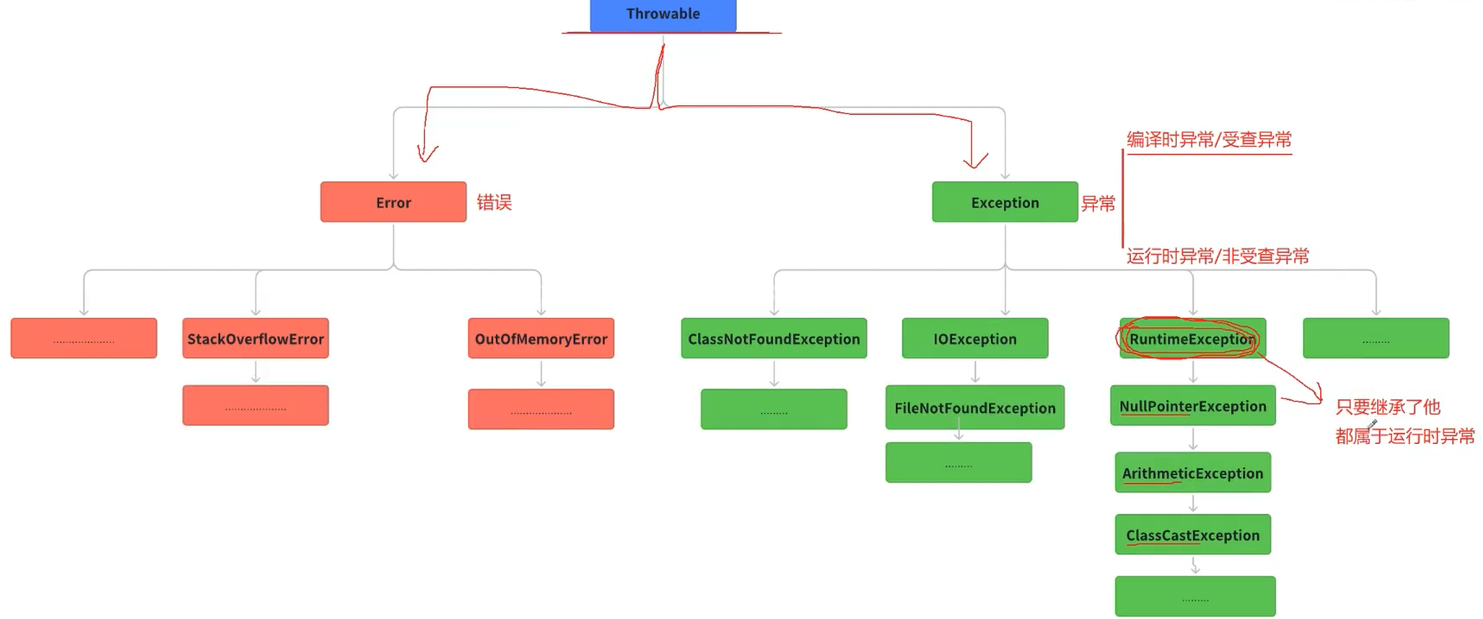
从上图中可以看到:
Throwable:是异常体系的顶层类,其派生出两个重要的子类,Error 和 Exception
Error:指的是Java虚拟机无法解决的严重问题,比如:JVM的内部错误、资源耗尽等,典型代表:StackOverflowError和OutOfMemoryError,一旦发生回力乏术。
Exception:异常产生后程序员可以通过代码进行处理,使程序继续执行。比如:感冒、发烧。我们平时所说的异常就是Exception。
1.3 异常的分类
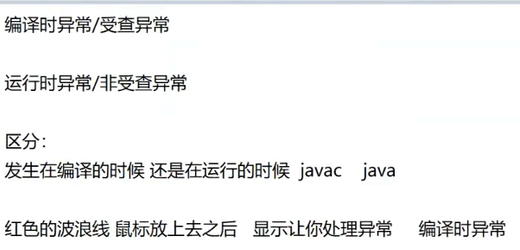
异常可能在编译时发生,也可能在程序运行时发生,根据发生的时机不同,可以将异常分为:
1.3.1 编译时异常
1.3.1.1 例子1:
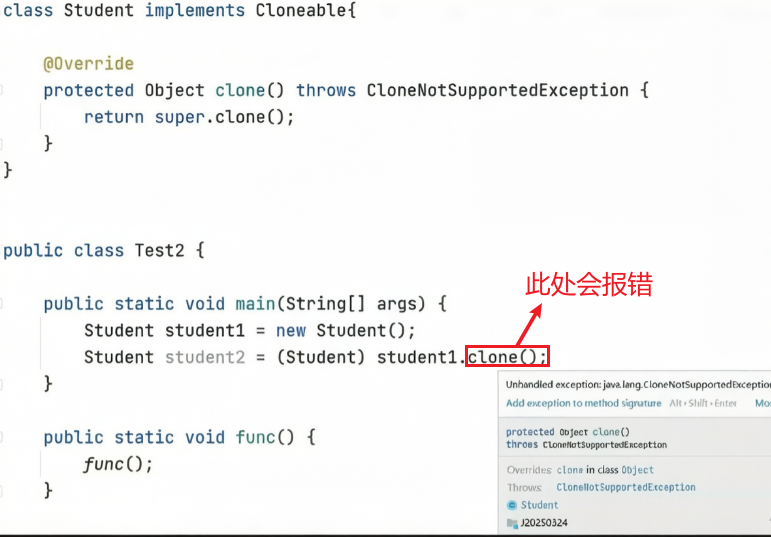
处理异常–throws: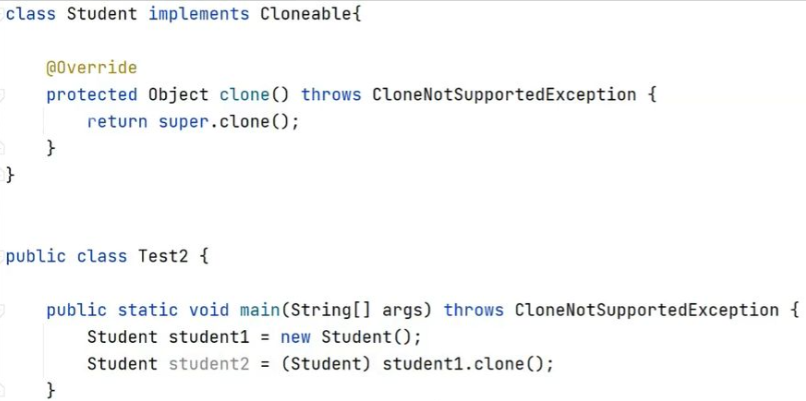
1.3.1.2 例子2:
import java.io.FileInputStream;
import java.io.FileNotFoundException;
public class CheckedExceptionExample {
public static void main(String[] args) {
try {
// 尝试打开一个可能不存在的文件
FileInputStream fis = new FileInputStream("hello.txt");
System.out.println("文件打开成功");
} catch (FileNotFoundException e) {
// 捕获并处理文件未找到异常
System.out.println("错误:文件不存在");
e.printStackTrace();
}
}
}
在 Java 中,FileInputStream构造方法在编译时会强制检查 FileNotFoundException,这属于受查异常(Checked Exception)。由于受查异常必须在编译阶段被显式处理,代码中使用了 try-catch块来捕获该异常,确保即使文件不存在程序也能给出明确的错误提示而非直接崩溃。这种机制要求开发者必须考虑并处理潜在的错误情况,从而增强代码的健壮性。
在程序编译期间发生的异常,称为编译时异常,也称为受检查异常(Checked Exception)
public class Person {
private String name;
private String gender;
int age;
// 想要让该类支持深拷贝,覆写Object类的clone方法即可
@Override
public Person clone() {
return (Person)super.clone();
}
}
编译时报错:
Error:(17, 35) java: 未报告的异常错误java.lang.CloneNotSupportedException;
必须对其进行捕获或声明以便抛出
1.3.2 运行时异常
在程序执行期间发生的异常,称为运行时异常,也称为非受检查异常(Unchecked Exception)
RuntimeException以及其子类对应的异常,都称为运行时异常。比如:NullPointerException、ArrayIndexOutOfBoundsException、ArithmeticException。
NullPointerException:
int[] array = null;
System.out.println(array.length);
//编译时不报错,运行后才会报错
注意:编译时出现的语法性错误,不能称之为异常。例如将 System.out.println 拼写错了,写成了 system.out.println。此时编译过程中就会出错,这是“编译期”出错。而运行时指的是程序已经编译通过得到 class 文件了,再由 JVM 执行过程中出现的错误。
2. 异常的处理
2.1 防御式编程
错误在代码中是客观存在的。因此我们要让程序出现问题的时候及时通知程序员。主要的方式
2.1.1 LBYL: Look Before You Leap. 在操作之前就做充分的检查。即:事前防御型
boolean ret = false;
ret = 登陆游戏();
if (!ret) {
处理登陆游戏错误;
return;
}
ret = 开始匹配();
if (!ret) {
处理匹配错误;
return;
}
ret = 游戏确认();
if (!ret) {
处理游戏确认错误;
return;
}
ret = 选择英雄();
if (!ret) {
处理选择英雄错误;
return;
}
ret = 载入游戏画面();
if (!ret) {
处理载入游戏错误;
return;
}
……
缺陷:正常流程和错误处理流程代码混在一起,代码整体显的比较混乱。
2.1.2 EAFP: It's Easier to Ask Forgiveness than Permission. "事后获取原谅比事前获取许可更容易". 也就是先操作, 遇到问题再处理. 即: 事后认错型
try {
登陆游戏();
开始匹配();
游戏确认();
选择英雄();
载入游戏画面();
…
} catch (登陆游戏异常) {
处理登陆游戏异常;
} catch (开始匹配异常) {
处理开始匹配异常;
} catch (游戏确认异常) {
处理游戏确认异常;
…
} catch (选择英雄异常) {
处理选择英雄异常;
} catch (载入游戏画面异常) {
处理载入游戏异常;
……
}
优势:正常流程和错误流程是分离开的, 程序员更关注正常流程, 代码更清晰, 容易理解代码
异常处理的核心思想就是 EAFP。
在Java中, 异常处理主要的5个关键字: throw、try、catch、finally、throws。
2.2 异常的抛出-throw
在编写程序时,如果程序中出现错误,此时就需要将错误的信息告知给调用者,比如:参数检测。
在Java中,可以借助throw关键字,抛出一个指定的异常对象,将错误信息告知给调用者。具体语法如下:
throw new XXXException("异常产生的原因");
【需求】:实现一个获取数组中任意位置元素的方法。
public static int getElement(int[] array, int index){
if(null == array){
throw new NullPointerException("传递的数组为null");
}
if(index < 0 || index >= array.length){
throw new ArrayIndexOutOfBoundsException("传递的数组下标越界");
}
return array[index];
}
public static void main(String[] args) {
int[] array = {1,2,3};
getElement(array, 3);
}
【注意事项】
throw必须写在方法体内部
抛出的对象必须(在异常的范畴里面)是Exception 或者 Exception 的子类对象
如果抛出的是 RunTimeException 或者 RunTimeException 的子类,则可以不用处理,直接交给 JVM来处理
如果抛出的是编译时异常,用户必须处理,否则无法通过编译
异常一旦抛出,其后的代码就不会执行
2.3 异常的声明-throws
throws 关键字用于在方法声明中列出该方法可能抛出的异常,它告诉调用者这个方法可能会抛出某些异常,调用者需要处理这些异常。使用 throws 实际上是将异常的处理责任转移给了调用该方法的代码。
语法格式:
修饰符 返回值类型 方法名(参数列表) throws 异常类型1, 异常类型2…{
}
需求:加载指定的配置文件config.ini
public class Config {
File file;
/*
FileNotFoundException : 编译时异常,表明文件不存在
此处不处理,也没有能力处理,应该将错误信息报告给调用者,让调用者检查文件名字是否给错了
*/
public void OpenConfig(String filename) throws FileNotFoundException{
if(filename.equals("config.ini")){
throw new FileNotFoundException("配置文件名字不对");
}
// 打开文件
}
public void readConfig(){
}
}
【注意事项】
throws必须跟在方法的参数列表之后
声明的异常必须(在异常的范畴里面)是 Exception 或者 Exception 的子类
方法内部如果抛出了多个异常,throws之后必须跟多个异常类型,之间用逗号隔开,如果抛出多个异常类型具有父子关系,直接声明父类即可。
public class Config {
File file;
// FileNotFoundException 继承自 IOException
public void OpenConfig(String filename) throws IOException{
if(!filename.endsWith(".ini")){
throw new IOException("文件不是.ini文件");
}
if(!filename.equals("config.ini")){
throw new FileNotFoundException("配置文件名字不对");
}
// 打开文件
}
public void readConfig(){
}
}
4. 调用声明抛出异常的方法时,如果该异常是编译时异常/受查异常时,调用者必须对该异常进行处理,或者继续使用throws抛出
public static void main(String[] args) throws IOException {
Config config = new Config();
config.openConfig("config.ini");
}
将光标放在抛出异常方法上,alt + Insert 快速 处理:
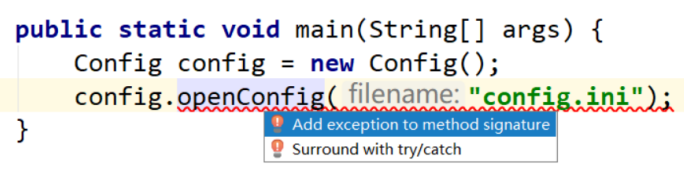
2.4 异常的捕获-try-catch捕获并处理异常
throws对异常并没有真正处理,而是将异常报告给抛出异常方法的调用者,由调用者处理。如果真正要对异常进行处理,就需要try-catch。
语法格式:
try{
// 将可能出现异常的代码放在这里
}catch(要捕获的异常类型 e){
// 如果try中的代码抛出异常了,此处catch捕获时异常类型与try中抛出的异常类型一致
// 时,或者是try中抛出异常的基类时,就会被捕获到
// 对异常就可以正常处理,处理完成后,跳出try-catch结构,继续执行后续代码
}catch(异常类型 e){
// 对异常进行处理
}finally{
// 此处代码一定会被执行到
}
// 后序代码
// 当异常被捕获到时,异常就被处理了,这里的后序代码一定会执行
// 如果捕获了,由于捕获到类型不对,那就没有捕获到,这里的代码就不会被执行
注意:
[]中表示可选项,可以添加,也可以不用添加
try中的代码可能会抛出异常,也可能不会
需求:读取配置文件,如果配置文件名字不是指定名字,抛出异常,调用者进行异常处理
public class Config {
File file;
public void openConfig(String filename) throws FileNotFoundException{
if(!filename.equals("config.ini")){
throw new FileNotFoundException("配置文件名字不对");
}
// 打开文件
}
public void readConfig(){
}
}
public static void main(String[] args) {
Config config = new Config();
try {
config.openConfig("config.txt");
System.out.println("文件打开成功");
} catch (IOException e) {
// 异常的处理方式
//System.out.println(e.getMessage());
//System.out.println(e);
e.printStackTrace();
}
// 一旦异常被捕获处理了,此处的代码会执行
System.out.println("异常如果被处理了,这里的代码也可以执行");
}
【关于异常的处理方式】1、2、3
异常的种类有很多,我们要根据不同的业务场景来决定。
对于比较严重的问题(例如和算钱相关的场景),应该让程序直接崩溃,防止造成更严重的后果
对于不太严重的问题(大多数场景),可以记录错误日志,并通过监控报警程序及时通知程序猿
对于可能会恢复的问题(和网络相关的场景),可以尝试进行重试。
在我们当前的代码中采取的是经过简化的第二种方式。我们记录的错误日志是出现异常的方法调用信息,能很快速的让我们找到出现异常的位置。以后在实际工作中我们会采取更完备的方式来记录异常信息。
【注意事项】1、2、3、4、5
1. try块内抛出异常位置之后的代码将不会被执行
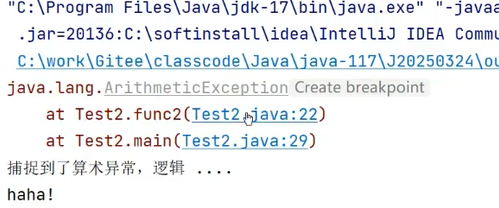
2. 如果抛出异常类型与catch中异常类型不匹配,即异常不会被成功捕获,也就不会被处理,继续往外抛,直到JVM收到后中断程序—-异常是按照类型来捕获的
public class Test2 {
public static void func2(int a) throws ArithmeticException{
if(a == 0) {
22 throw new ArithmeticException();
}
System.out.println(10/a);
}
public static void main(String[] args) {
try {
func2(a: 0); // 可能发生异常的代码
}catch (ArithmeticException e) { // 捕获的 try当中 可能发生的异常
e.printStackTrace();
System.out.println("捕捉到了算术异常,逻辑 . . . .");
}
System.out.println("haha!");
}
}
public static void main(String[] args) {
try {
int[] array = {1, 2, 3};
System.out.println(array[3]); // 此处会抛出数组越界异常
} catch (NullPointerException e) { // 捕获时候捕获的是空指针异常–真正的异常无法被捕获到
e.printStackTrace();
}
System.out.println("后续代码");
}
Exception in thread "main" java.lang.ArrayIndexOutOfBoundsException: 3
at day20210917.ArrayOperator.main(ArrayOperator.java:24)
3. try中可能会抛出多个不同的异常对象,则必须用多个catch来捕获—-即多种异常,多次捕获
public static void main(String[] args) {
int[] array = {1, 2, 3};
try {
System.out.println("before");
// array = null;
System.out.println(array[100]);
System.out.println("after");
} catch (ArrayIndexOutOfBoundsException e) {
System.out.println("这是个数组下标越界异常");
e.printStackTrace();
} catch (NullPointerException e) {
System.out.println("这是个空指针异常");
e.printStackTrace();
}
System.out.println("after try catch");
}
如果多个异常的处理方式是完全相同,也可以写成这样(语法支持但不建议):
catch (ArrayIndexOutOfBoundsException | NullPointerException e) {
…
}
如果异常之间具有父子关系,一定是子类异常在前catch,父类异常在后catch,否则语法错误:
public static void main(String[] args) {
int[] arr = {1, 2, 3};
try {
System.out.println("before");
arr = null;
System.out.println(arr[100]);
System.out.println("after");
} catch (Exception e) { // Exception可以捕获到所有异常
e.printStackTrace();
} catch (NullPointerException e) { // 永远都捕获执行到
e.printStackTrace();
}
System.out.println("after try catch");
}
Error:(33, 10) java: 已捕获到异常错误java.lang.NullPointerException
4. 可以通过一个catch捕获所有的异常,即多个异常,一次捕获(不推荐)
public static void main(String[] args) {
int[] arr = {1, 2, 3};
try {
System.out.println("before");
arr = null;
System.out.println(arr[100]);
System.out.println("after");
} catch (Exception e) {
e.printStackTrace();
}
System.out.println("after try catch");
}
由于 Exception 类是所有异常类的父类,因此可以用这个类型表示捕捉所有异常。
备注:catch 进行类型匹配的时候,不光会匹配相同类型的异常对象,也会捕捉目标异常类型的子类对象。
如刚才的代码,NullPointerException 和 ArrayIndexOutOfBoundsException 都是 Exception 的子类,因此都能被捕获到。
5. 父类异常(家长)作为后盾–放在后面
public class Test3 {
public static void main(String[] args) {
int[] array = {1, 2, 3};
try {
System.out.println("before");
array = null;
//System.out.println(array.length);
System.out.println(array[100]);
System.out.println("after");
} catch (ArrayIndexOutOfBoundsException e) {
System.out.println("这是个数组下标越界异常");
e.printStackTrace();
} catch (NullPointerException e) {
System.out.println("这是个空指针异常");
e.printStackTrace();
} catch (RuntimeException e) {
e.printStackTrace();
}
System.out.println("after try catch");
}
}
2.5 finally
在写程序时,有些特定的代码,不论程序是否发生异常,都需要执行,比如程序中打开的资源:网络连接、数据库连接、IO流等,在程序正常或者异常退出时,必须要对资源进行回收。另外,因为异常会引发程序的跳转,可能导致有些语句执行不到,finally就是用来解决这个问题的。
语法格式:
try{
// 可能会发生异常的代码
}catch(异常类型 e){
// 对捕获到的异常进行处理
}finally{
// 此处的语句无论是否发生异常,都会被执行到
}
// 如果没有抛出异常,或者异常被捕获处理了,这里的代码也会执行
public static void main(String[] args) {
try{
int[] array = {1, 2, 3};
array [100] = 10;
array [0] = 10;
}catch (ArrayIndexOutOfBoundsException e){
System.out.println(e);
}finally {
System.out.println("Finally中的代码一定会执行");
}
System.out.println("如果没有抛出异常,或者异常被处理了,try-catch后的代码也会执行");
}
问题:既然 finally 和 try-catch-finally 后的代码都会执行,那为什么还要有 finally 呢?
需求:实现getData方法,内部输入一个整型数字,然后将该数字返回,并再main方法中打印。
public class TestFinally {
public static int getData(){
Scanner sc = null;
try{
sc = new Scanner(System.in);
int data = sc.nextInt();
return data;
}catch (InputMismatchException e){
e.printStackTrace();
}finally {
System.out.println("finally中代码");
}
System.out.println("try-catch-finally之后代码");
if(null != sc){
sc.close();
}
return 0;
}
public static void main(String[] args) {
int data = getData();
System.out.println(data);
}
}
// 正常输入时程序运行结果:
100
finally中代码
100
此外,上述代码等价于下面代码(更简便,且不用写close但idea也会自动回收资源):
public static int getData(){
try (Scanner sc = new Scanner(System.in)) {
int data = sc.nextInt();
return data;
} catch (InputMismatchException e) {
e.printStackTrace();
} finally {
System.out.println("finally中代码");
}
System.out.println("try-catch-finally之后代码");
return 0;
}
上述程序,如果正常输入,成功接收输入后程序就返回了,try-catch-finally之后的代码根本就没有执行,即输入流就没有被释放,造成资源泄漏。
注意:finally中的代码一定会执行的,一般在finally中进行一些资源清理的扫尾工作。
// 下面程序输出什么?
public static void main(String[] args) {
System.out.println(func());
}
public static int func() {
try {
return 10;
} finally {
return 20;
}
}
A: 10 B: 20 C: 30 D: 编译失败
答案:B
finally 执行的时机是在方法返回之前(try 或者 catch 中如果有 return 会在这个 return 之前执行 finally)。但是如果 finally 中也存在 return 语句,那么就会执行 finally 中的 return,从而不会执行到 try 中原有的 return。
一般我们不建议在 finally 中写 return (被编译器当做一个警告)。
2.6 异常的处理流程
关于“调用栈”
方法之间是存在相互调用关系的,这种调用关系我们可以用“调用栈”来描述。在 JVM 中有一块内存空间称为“虚拟机栈”专门存储方法之间的调用关系。当代码中出现异常的时候,我们就可以使用 e.printStackTrace();的方式查看出现异常代码的调用栈。
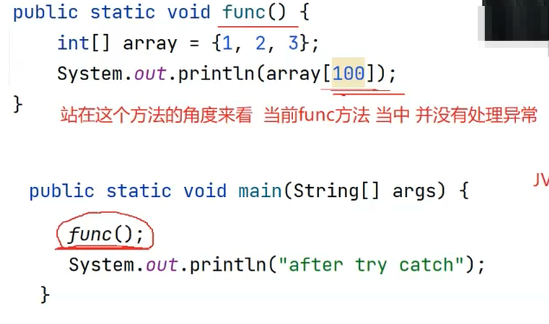
如果本方法中没有合适的处理异常的方式,就会沿着调用栈向上传递。
public static void main(String[] args) {
try {
func();
} catch (ArrayIndexOutOfBoundsException e) {
e.printStackTrace();
}
System.out.println("after try catch");
}
public static void func() {
int[] array = {1, 2, 3};
System.out.println(array[100]);
}
运行结果:
java.lang.ArrayIndexOutOfBoundsException: Index 100 out of bounds for length 3
at LibrarySystem.func(LibrarySystem.java:107)
at LibrarySystem.main(LibrarySystem.java:98)
after try catch
如果向上传递都没有合适的方法处理异常,最终就会交给 JVM 处理,程序就会异常终止(和我们最开始未使用 try catch 时是一样的)。
public static void main(String[] args) {
func();
System.out.println("after try catch");
}
public static void func() {
int[] arr = {1, 2, 3};
System.out.println(arr[100]);
}
运行结果:
Exception in thread "main" java.lang.ArrayIndexOutOfBoundsException: Index 100 out of bounds for length 3
at LibrarySystem.func(LibrarySystem.java:103)
at LibrarySystem.main(LibrarySystem.java:97)
很明显:after try catch 并没有被打印
【异常处理流程总结】
-
程序先执行 try 中的代码
-
如果 try 中的代码出现异常,就会结束 try 中的代码,看和 catch 中的异常类型是否匹配。
-
如果找到匹配的异常类型,就会执行 catch 中的代码
-
如果没有找到匹配的异常类型,就会将异常向上传递到上层调用者。
-
无论是否找到匹配的异常类型,finally 中的代码都会被执行到(在该方法结束之前执行)。
-
如果上层调用者也没有处理了的异常,就继续向上传递。
-
一直到 main 方法也没有合适的代码处理异常,就会交给 JVM 来进行处理,此时程序就会异常终止。

3. 自定义异常
Java 中虽然已经内置了丰富的异常类,但是并不能完全表示实际开发中所遇到的一些异常,此时就需要维护符合我们实际情况的异常结构。
例如,我们实现一个用户登陆功能。
public class Login {
private String userName = "admin";
private String password = "123456";
public void loginInfo(String userName, String password) {
if (!this.userName.equals(userName)) {
System.out.println("用户名错误!");
return;
}
if (!this.password.equals(password)) {
System.out.println("密码错误!");
return;
}
System.out.println("登陆成功");
}
public static void main(String[] args) {
Login login = new Login();
login.loginInfo("admin111", "123456");
}
}
此时我们在处理用户名密码错误的时候可能就需要抛出两种异常。我们可以基于已有的异常类进行扩展(继承),创建和我们业务相关的异常类。
3.1 实现自定义异常
具体方式:
自定义异常类,然后继承自 Exception 或者 RunTimeException
实现一个带有 String 类型参数的构造方法,参数含义:出现异常的原因
class UserNameException extends Exception {
public UserNameException(String message) {
super(message);
}
}
class PasswordException extends Exception {
public PasswordException(String message) {
super(message);
}
}
PS:
Java官方规定自定义异常继承Exception则该自定义异常为编译时异常,
但当它继承RuntimeException则该自定义异常为运行时异常。
此时我们的 login 代码可以改成:
public class Login {
private String userName = "admin";
private String password = "123456";
public void loginInfo(String userName, String password)
throws UserNameException, PasswordException {
if (!this.userName.equals(userName)) {
throw new UserNameException("用户名错误!");
}
if (!this.password.equals(password)) {
throw new PasswordException("用户名错误!");
}
System.out.println("登陆成功");
}
public static void main(String[] args) {
try {
Login login = new Login();
login.loginInfo("admin", "123456");
} catch (UserNameException e) {
e.printStackTrace();
} catch (PasswordException e) {
e.printStackTrace();
}
}
}
注意事项
-
自定义异常通常会继承自 Exception 或者 RuntimeException
-
继承自 Exception 的异常默认是受查异常
-
继承自 RuntimeException 的异常默认是非受查异常
4. 小试牛刀(9道题)
1. 以下哪个不是Java中的受检异常(checked exception)?
A. IOException
B. SQLException
C. NullPointerException
D. ClassNotFoundException
答案:C
2. 关于try-catch-finally语句,以下哪个说法是正确的?
A. finally块总是会执行,即使try块中有return语句
B. 如果catch块中抛出异常,finally块就不会执行
C. 一个try块后面必须跟着至少一个catch块
D. finally块中的return语句会覆盖try或catch块中的return语句
答案:AD
3. 关于异常处理,以下哪个说法是错误的?
A. 子类方法抛出的异常范围不能大于父类方法声明的异常范围
B. 可以在catch块中捕获多个异常类型
C. RuntimeException及其子类都是非受检异常
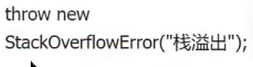
D. 使用throw关键字可以手动抛出异常,但不能抛出Error
答案:D,(比如下图:)虽然语法支持,但不建议这么做
4. 请分析程序会输出什么内容
public static void main(String[] args) {
func();
System.out.println("main:after try catch");
}
public static void func() {
try {
int[] array = {1, 2, 3};
System.out.println(array[100]);
} catch (ArrayIndexOutOfBoundsException e) {
e.printStackTrace();
}
System.out.println("func:after try catch");
}
//这个会输出什么?怎么分析?
预期输出结果:
java.lang.ArrayIndexOutOfBoundsException: Index 100 out of bounds for length 3 at YourClassName.func(YourClassName.java:行号) at YourClassName.main(YourClassName.java:行号) func:after try catch main:after try catch
5. Java异常处理机制
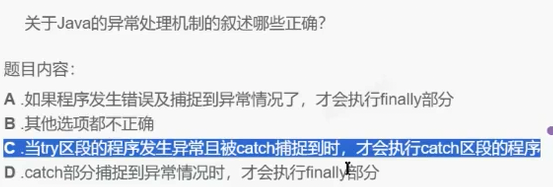
C
6. 分析代码
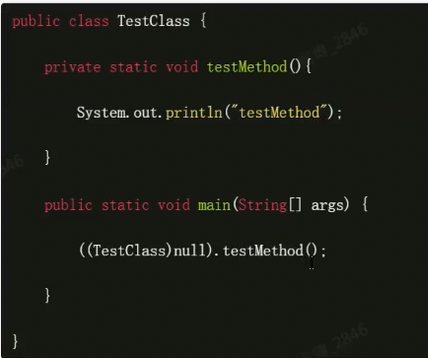
会正常输出:testMethod
7. 分析程序运行结果
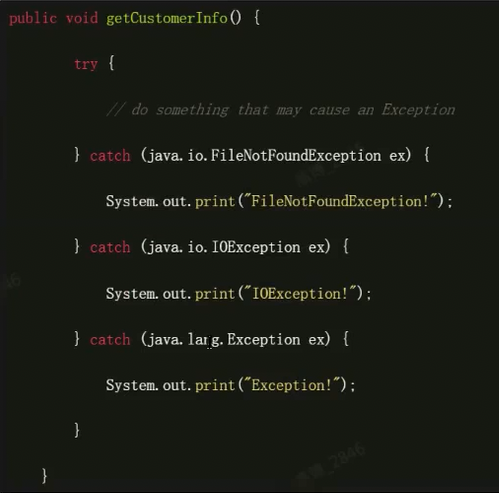
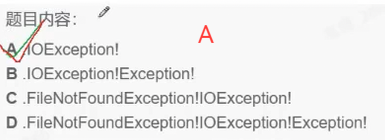
排除法,因为同一时刻只能抛出一个异常
8. 单选
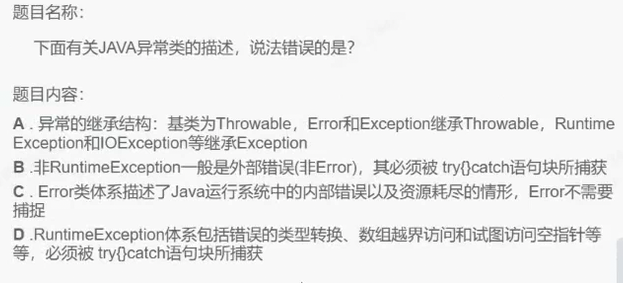
答案:BD
B:编译时异常可以拿throws来处理
D:比如空指针异常可以用throws关键字一直将异常往外抛直到让JVM去处理
9.
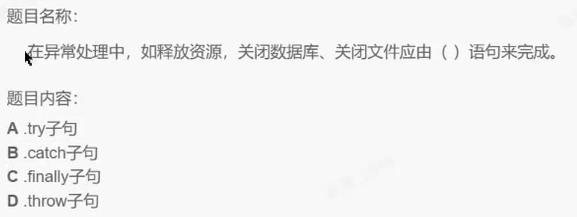
C

![[玩转Spring]盘点 Spring 常用扩展点:BeanFactoryPostProcessor、BeanPostProcessor、@Enable、自动配置到底该用哪个?-网硕互联帮助中心](https://www.wsisp.com/helps/wp-content/uploads/2026/10/20261011164102-6acbbc1e47136-220x150.png)

评论前必须登录!
注册