 网硕互联帮助中心
首先感谢通义千问,步骤如下:
1、安装ocr依赖
# 激活环境
conda activate 20260218NEW
# 安装 OCR 相关库
pip install easyocr pillow numpy –i https://pypi.tuna.tsinghua.edu.cn/simple
# 安装 PyInstaller(如果还没有)
pip install pyinstaller –i https://pypi.tuna.tsinghua.edu.cn/simple
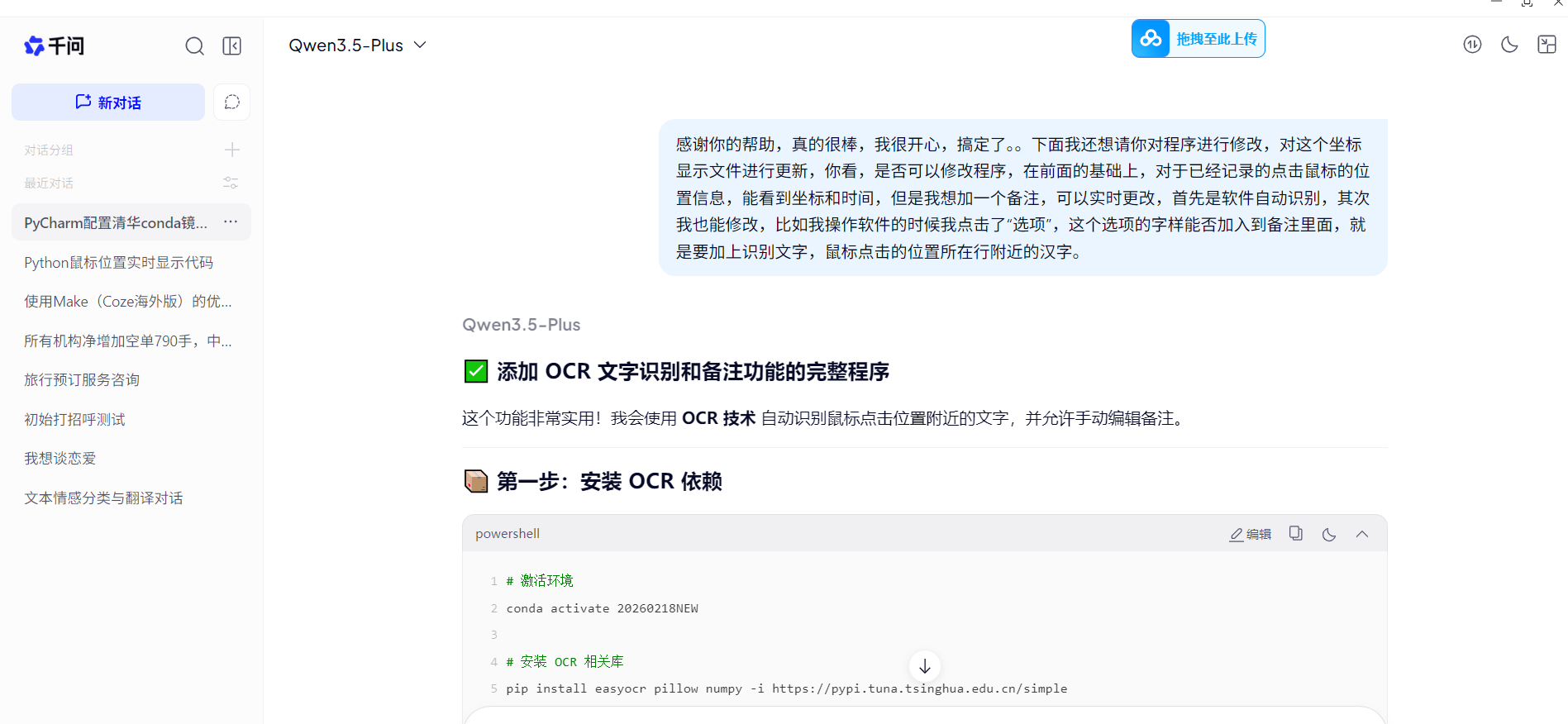
运行效果:
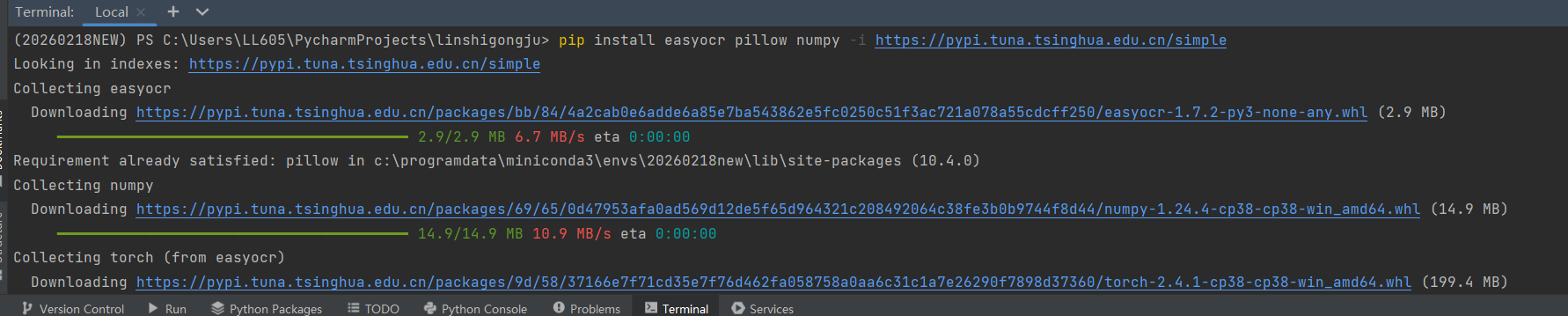
最终安装完成效果:

2、第一版程序运行效果:
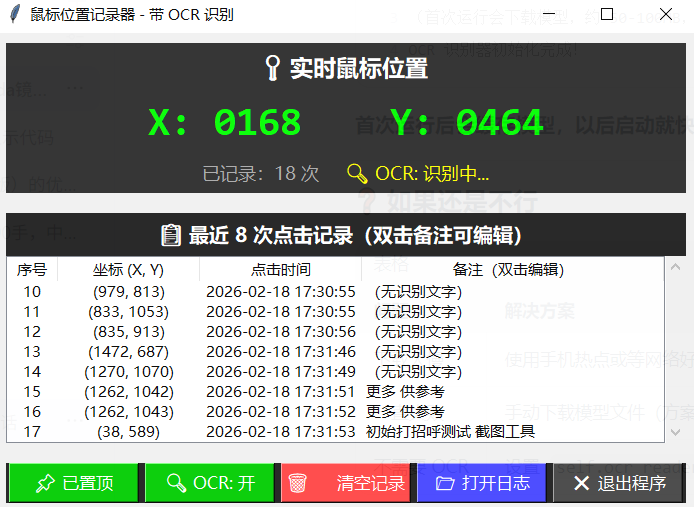
3、发现问题:鼠标会阻挡识别,给通义千问提示词如下:
有个问题,鼠标点击的时候位置已经记录下来了,能否等鼠标移开后再编辑备注信息,因为鼠标挡着,信息不全面,考虑到界面变化问题,可以取两次照片,变化很大就选第一次的,变化不大,就参考两次中更清晰的,请修改python程序!
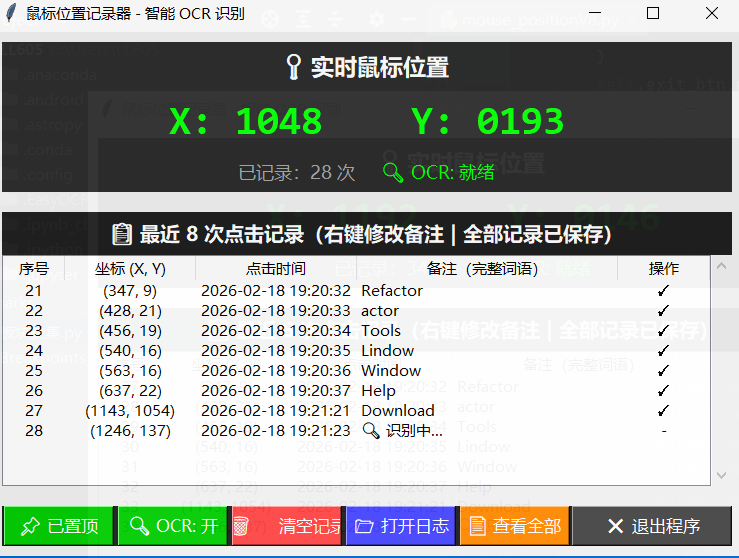
4、最终的定稿程序:
# -*- coding: utf-8 -*-
import tkinter as tk
from tkinter import ttk, simpledialog, Menu
import pyautogui
import time
import os
from datetime import datetime
from pynput import mouse, keyboard
from threading import Thread, Event
import ctypes
import ssl
import easyocr
from PIL import Image, ImageGrab
import numpy as np
import cv2
import re
# 禁用 SSL 验证
ssl._create_default_https_context = ssl._create_unverified_context
class MousePositionLogger:
def __init__(self):
# 获取桌面路径
self.desktop_path = os.path.join(os.path.expanduser("~"), "Desktop")
self.log_file_path = os.path.join(self.desktop_path, "坐标记录.txt")
# 初始化变量
self.current_x = 0
self.current_y = 0
self.record_count = 0
self.running = True
self.click_history = []
self.max_display = 8
self.is_topmost = True
# ========== OCR 优化参数 ==========
self.ocr_width = 150
self.ocr_height = 60
# 鼠标移开检测
self.pending_clicks = []
self.mouse_move_threshold = 50
self.ocr_delay = 0.2
# 图片对比阈值
self.image_diff_threshold = 0.3
# 初始化 OCR 识别器
print("正在初始化 OCR 识别器,请稍候…")
try:
self.ocr_reader = easyocr.Reader(['ch_sim', 'en'], gpu=False, verbose=False)
print("OCR 识别器初始化完成!")
except Exception as e:
print("OCR 初始化失败:" + str(e))
self.ocr_reader = None
# 初始化日志文件
self.init_log_file()
# 创建 GUI 窗口
self.create_gui()
# 启动鼠标监听器
self.mouse_listener = mouse.Listener(on_click=self.on_mouse_click, on_move=self.on_mouse_move)
self.mouse_listener.start()
# 启动键盘监听器
self.keyboard_listener = keyboard.Listener(on_press=self.on_key_press)
self.keyboard_listener.start()
# 启动 GUI 更新线程
self.update_thread = Thread(target=self.update_gui_loop, daemon=True)
self.update_thread.start()
# 启动 OCR 检测线程
self.ocr_thread = Thread(target=self.ocr_detection_loop, daemon=True)
self.ocr_thread.start()
# 启动主窗口
self.root.mainloop()
def init_log_file(self):
"""初始化日志文件"""
try:
if not os.path.exists(self.log_file_path):
with open(self.log_file_path, 'w', encoding='utf-8') as f:
f.write("=" * 70 + "\\n")
f.write("鼠标位置记录日志(智能 OCR 识别)\\n")
f.write("创建时间:" + datetime.now().strftime("%Y-%m-%d %H:%M:%S") + "\\n")
f.write("=" * 70 + "\\n\\n")
else:
with open(self.log_file_path, 'a', encoding='utf-8') as f:
f.write("\\n" + "=" * 70 + "\\n")
f.write("新会话开始:" + datetime.now().strftime("%Y-%m-%d %H:%M:%S") + "\\n")
f.write("=" * 70 + "\\n\\n")
except Exception as e:
print("错误:无法创建日志文件 – " + str(e))
def create_gui(self):
"""创建 GUI 窗口"""
self.root = tk.Tk()
self.root.title("鼠标位置记录器 – 智能 OCR 识别")
self.root.geometry("750×550")
self.root.resizable(True, True)
# 窗口始终在最前面
self.root.attributes('-topmost', True)
self.root.attributes('-alpha', 0.95)
# ========== 上栏:实时坐标显示 ==========
self.top_frame = tk.Frame(self.root, bg='#2b2b2b', height=150)
self.top_frame.pack(fill=tk.X, padx=10, pady=10)
self.title_label = tk.Label(
self.top_frame, text="📍 实时鼠标位置",
font=('Microsoft YaHei UI', 14, 'bold'), bg='#2b2b2b', fg='#ffffff'
)
self.title_label.pack(pady=5)
self.coord_label = tk.Label(
self.top_frame, text="X: 0000 Y: 0000",
font=('Consolas', 24, 'bold'), bg='#2b2b2b', fg='#00ff00'
)
self.coord_label.pack(pady=5)
self.info_frame = tk.Frame(self.top_frame, bg='#2b2b2b')
self.info_frame.pack(pady=5)
self.count_label = tk.Label(
self.info_frame, text="已记录:0 次",
font=('Microsoft YaHei UI', 11), bg='#2b2b2b', fg='#aaaaaa'
)
self.count_label.pack(side=tk.LEFT, padx=10)
self.ocr_status_label = tk.Label(
self.info_frame, text="🔍 OCR: 就绪",
font=('Microsoft YaHei UI', 11), bg='#2b2b2b', fg='#00ff00'
)
self.ocr_status_label.pack(side=tk.LEFT, padx=10)
# ========== 下栏:最近 8 次点击记录 ==========
self.bottom_frame = tk.Frame(self.root, bg='#1e1e1e')
self.bottom_frame.pack(fill=tk.BOTH, expand=True, padx=10, pady=10)
self.history_title = tk.Label(
self.bottom_frame,
text="📋 最近 8 次点击记录(右键修改备注 | 全部记录已保存)",
font=('Microsoft YaHei UI', 12, 'bold'), bg='#1e1e1e', fg='#ffffff'
)
self.history_title.pack(pady=5)
columns = ('序号', '坐标', '时间', '备注', '操作')
self.tree = ttk.Treeview(self.bottom_frame, columns=columns, show='headings', height=8)
self.tree.heading('序号', text='序号')
self.tree.heading('坐标', text='坐标 (X, Y)')
self.tree.heading('时间', text='点击时间')
self.tree.heading('备注', text='备注(完整词语)')
self.tree.heading('操作', text='操作')
self.tree.column('序号', width=50, anchor='center')
self.tree.column('坐标', width=120, anchor='center')
self.tree.column('时间', width=150, anchor='center')
self.tree.column('备注', width=250, anchor='w')
self.tree.column('操作', width=80, anchor='center')
self.tree.bind('<Button-3>', self.on_tree_right_click)
scrollbar = ttk.Scrollbar(self.bottom_frame, orient=tk.VERTICAL, command=self.tree.yview)
self.tree.configure(yscrollcommand=scrollbar.set)
self.tree.pack(side=tk.LEFT, fill=tk.BOTH, expand=True)
scrollbar.pack(side=tk.RIGHT, fill=tk.Y)
# ========== 底部按钮栏 ==========
self.button_frame = tk.Frame(self.root, bg='#1e1e1e')
self.button_frame.pack(fill=tk.X, padx=10, pady=10)
# 前 5 个按钮固定宽度
self.topmost_btn = tk.Button(
self.button_frame, text="📌 已置顶", command=self.toggle_topmost,
bg='#00cc00', fg='white', font=('Microsoft YaHei UI', 10), cursor='hand2', width=10
)
self.topmost_btn.pack(side=tk.LEFT, padx=2)
self.ocr_btn = tk.Button(
self.button_frame, text="🔍 OCR: 开", command=self.toggle_ocr,
bg='#00cc00', fg='white', font=('Microsoft YaHei UI', 10), cursor='hand2', width=10
)
self.ocr_btn.pack(side=tk.LEFT, padx=2)
self.clear_btn = tk.Button(
self.button_frame, text="🗑️ 清空记录", command=self.clear_history,
bg='#ff4444', fg='white', font=('Microsoft YaHei UI', 10), cursor='hand2', width=10
)
self.clear_btn.pack(side=tk.LEFT, padx=2)
self.open_log_btn = tk.Button(
self.button_frame, text="📂 打开日志", command=self.open_log_file,
bg='#4444ff', fg='white', font=('Microsoft YaHei UI', 10), cursor='hand2', width=10
)
self.open_log_btn.pack(side=tk.LEFT, padx=2)
self.view_all_btn = tk.Button(
self.button_frame, text="📄 查看全部", command=self.view_all_records,
bg='#ff8800', fg='white', font=('Microsoft YaHei UI', 10), cursor='hand2', width=10
)
self.view_all_btn.pack(side=tk.LEFT, padx=2)
# 最后一个按钮自动填充剩余空间(expand=True, fill=tk.X)
self.exit_btn = tk.Button(
self.button_frame, text="❌ 退出程序", command=self.cleanup,
bg='#444444', fg='white', font=('Microsoft YaHei UI', 10), cursor='hand2'
)
self.exit_btn.pack(side=tk.RIGHT, fill=tk.X, expand=True)
self.status_label = tk.Label(
self.root, text="左键点击记录 | 右键修改备注 | 按 ESC 退出 | 完整词语识别",
font=('Microsoft YaHei UI', 9), bg='#0066cc', fg='white', anchor='w'
)
self.status_label.pack(fill=tk.X, side=tk.BOTTOM)
self.ocr_enabled = True
# 创建右键菜单
self.context_menu = Menu(self.root, tearoff=0)
self.context_menu.add_command(label="✏️ 右键改备注", command=self.edit_selected_remark)
self.context_menu.add_command(label="📋 复制备注", command=self.copy_selected_remark)
self.context_menu.add_separator()
self.context_menu.add_command(label="🗑️ 删除此条", command=self.delete_selected_record)
def toggle_topmost(self):
self.is_topmost = not self.is_topmost
self.root.attributes('-topmost', self.is_topmost)
self.topmost_btn.config(text="📌 已置顶" if self.is_topmost else "📍 未置顶",
bg='#00cc00' if self.is_topmost else '#ff8800')
def toggle_ocr(self):
self.ocr_enabled = not self.ocr_enabled
self.ocr_btn.config(text="🔍 OCR: 开" if self.ocr_enabled else "🔍 OCR: 关",
bg='#00cc00' if self.ocr_enabled else '#888888')
self.ocr_status_label.config(text="🔍 OCR: 就绪" if self.ocr_enabled else "🔍 OCR: 已关闭",
fg='#00ff00' if self.ocr_enabled else '#888888')
def capture_screenshot(self, x, y):
"""截取点击位置附近的屏幕区域"""
left = max(0, x – self.ocr_width // 2)
top = max(0, y – self.ocr_height)
right = left + self.ocr_width
bottom = top + self.ocr_height
screenshot = ImageGrab.grab(bbox=(left, top, right, bottom))
return screenshot, np.array(screenshot)
def calculate_image_difference(self, img1, img2):
"""计算两张图片的差异程度(0-1)"""
try:
if len(img1.shape) == 3:
gray1 = cv2.cvtColor(img1, cv2.COLOR_RGB2GRAY)
else:
gray1 = img1
if len(img2.shape) == 3:
gray2 = cv2.cvtColor(img2, cv2.COLOR_RGB2GRAY)
else:
gray2 = img2
gray1 = cv2.resize(gray1, (100, 50))
gray2 = cv2.resize(gray2, (100, 50))
diff = cv2.absdiff(gray1, gray2)
diff_percent = np.sum(diff > 30) / diff.size
return min(diff_percent * 2, 1.0)
except Exception as e:
print("图片对比失败:" + str(e))
return 0.5
def calculate_image_clarity(self, image_array):
"""计算图片清晰度"""
try:
if len(image_array.shape) == 3:
gray = cv2.cvtColor(image_array, cv2.COLOR_RGB2GRAY)
else:
gray = image_array
clarity = cv2.Laplacian(gray, cv2.CV_64F).var()
return clarity
except Exception as e:
print("清晰度计算失败:" + str(e))
return 0
def extract_complete_word(self, recognized_text):
"""
提取完整的单词或词语(简化版,恢复识别效果)
"""
if not recognized_text:
return ""
# 清理文本
text = recognized_text.strip()
# 去除特殊字符,保留中英文、数字、连字符
text = re.sub(r'[^\\w\\s\\u4e00-\\u9fff\\-_]', ' ', text)
text = re.sub(r'\\s+', ' ', text).strip()
if not text:
return ""
# ========== 智能提取完整词语 ==========
words = text.split()
# 常见菜单关键词(优先匹配)
menu_keywords = [
'文件', '编辑', '视图', '插入', '格式', '工具', '帮助',
'File', 'Edit', 'View', 'Insert', 'Format', 'Tools', 'Help',
'保存', '打开', '新建', '退出', '确定', '取消', '应用',
'Save', 'Open', 'New', 'Exit', 'OK', 'Cancel', 'Apply',
'选项', '设置', '配置', '属性', '首选项', '打印',
'Options', 'Settings', 'Config', 'Properties', 'Preferences', 'Print',
'复制', '粘贴', '剪切', '撤销', '重做', '查找', '替换',
'Copy', 'Paste', 'Cut', 'Undo', 'Redo', 'Find', 'Replace',
'是', '否', '确定', '取消', '关闭', '最小化', '最大化',
'Yes', 'No', 'OK', 'Cancel', 'Close', 'Minimize', 'Maximize'
]
# 1. 优先匹配菜单关键词
for keyword in menu_keywords:
if keyword in text:
return keyword
# 2. 找最长的有效词(保持完整)
best_word = ""
for word in words:
clean_word = word.strip()
# 有效词:长度 2-20,包含字母或中文
if 2 <= len(clean_word) <= 20:
has_valid_char = any(c.isalpha() or '\\u4e00' <= c <= '\\u9fff' for c in clean_word)
if has_valid_char and len(clean_word) > len(best_word):
best_word = clean_word
# 3. 如果没有合适的,返回第一个有效词
if not best_word:
for word in words:
clean_word = word.strip()
if clean_word and len(clean_word) >= 1:
return clean_word[:15]
return best_word[:15] if best_word else ""
def recognize_text_compare(self, x, y, first_array, second_array):
"""对比两次截图,选择最佳识别结果(简化预处理,恢复识别效果)"""
try:
self.ocr_status_label.config(text="🔍 OCR: 对比分析…", fg='#ffff00')
self.root.update()
# 计算图片差异
diff = self.calculate_image_difference(first_array, second_array)
# 计算清晰度
clarity1 = self.calculate_image_clarity(first_array)
clarity2 = self.calculate_image_clarity(second_array)
# 智能选择
if diff > self.image_diff_threshold:
use_first = True
self.ocr_status_label.config(text="🔍 OCR: 界面变化,用第一次", fg='#00ff00')
else:
use_first = clarity1 >= clarity2
self.ocr_status_label.config(text="🔍 OCR: 界面稳定,选清晰", fg='#00ff00')
# 执行 OCR 识别(简化参数)
if use_first:
results = self.ocr_reader.readtext(first_array, detail=0, paragraph=True, min_size=10)
else:
results = self.ocr_reader.readtext(second_array, detail=0, paragraph=True, min_size=10)
# 合并识别结果
recognized_text = " ".join(results).strip()
# 提取完整词语
complete_word = self.extract_complete_word(recognized_text)
self.ocr_status_label.config(text="🔍 OCR: 就绪", fg='#00ff00')
print(f"OCR 结果:{complete_word} (原:{recognized_text[:30]})")
return complete_word
except Exception as e:
self.ocr_status_label.config(text="🔍 OCR: 失败", fg='#ff0000')
print("OCR 对比失败:" + str(e))
return ""
def on_mouse_move(self, x, y):
"""处理鼠标移动事件"""
self.current_x = int(x)
self.current_y = int(y)
if self.pending_clicks and self.ocr_enabled:
for pending in self.pending_clicks[:]:
distance = ((x – pending['x']) ** 2 + (y – pending['y']) ** 2) ** 0.5
if distance > self.mouse_move_threshold and not pending['moved_away']:
pending['moved_away'] = True
pending['moved_away_time'] = time.time()
try:
second_img, second_array = self.capture_screenshot(pending['x'], pending['y'])
pending['second_array'] = second_array
except Exception as e:
print("第二次截图失败:" + str(e))
def on_mouse_click(self, x, y, button, pressed):
"""处理鼠标点击事件"""
if pressed and button == mouse.Button.left:
current_time = datetime.now().strftime("%Y-%m-%d %H:%M:%S")
self.record_count += 1
record = {
'index': self.record_count,
'x': int(x),
'y': int(y),
'time': current_time,
'remark': '',
'pending': True,
'moved_away': False,
'moved_away_time': None,
'first_array': None,
'second_array': None
}
self.click_history.append(record)
self.pending_clicks.append(record)
self.root.after(0, self.update_history_table)
# 第一次截图
if self.ocr_enabled and self.ocr_reader is not None:
try:
first_img, first_array = self.capture_screenshot(x, y)
record['first_array'] = first_array
except Exception as e:
print("第一次截图失败:" + str(e))
self._save_record_to_file(record)
def ocr_detection_loop(self):
"""OCR 检测循环"""
while self.running:
if self.pending_clicks and self.ocr_enabled and self.ocr_reader is not None:
current_time = time.time()
for pending in self.pending_clicks[:]:
if pending['moved_away'] and pending.get('second_array') is not None:
if current_time – pending['moved_away_time'] >= self.ocr_delay:
remark = self.recognize_text_compare(
pending['x'],
pending['y'],
pending['first_array'],
pending['second_array']
)
pending['remark'] = remark
pending['pending'] = False
self.pending_clicks.remove(pending)
self._save_record_to_file(pending)
self.root.after(0, self.update_history_table)
elif pending['moved_away'] and current_time – pending['moved_away_time'] > 5:
pending['remark'] = "(超时)"
pending['pending'] = False
self.pending_clicks.remove(pending)
self.root.after(0, self.update_history_table)
time.sleep(0.05)
def _save_record_to_file(self, record):
"""保存记录到日志文件"""
log_entry = "[{}] 位置:({}, {}) 备注:{}\\n".format(
record['time'], record['x'], record['y'], record['remark']
)
try:
with open(self.log_file_path, 'a', encoding='utf-8') as f:
f.write(log_entry)
except Exception as e:
print("错误:无法写入日志文件 – " + str(e))
def on_tree_right_click(self, event):
"""右键点击表格"""
item = self.tree.identify_row(event.y)
if item:
self.tree.selection_set(item)
self.context_menu.post(event.x_root, event.y_root)
def edit_selected_remark(self):
"""编辑选中项的备注"""
item = self.tree.selection()
if not item:
return
values = self.tree.item(item[0])['values']
if len(values) < 4:
return
index = values[0]
current_remark = values[3]
new_remark = simpledialog.askstring("右键修改备注", "请输入备注信息,回车确认:", initialvalue=current_remark,
parent=self.root)
if new_remark is not None:
self.tree.item(item[0], values=(values[0], values[1], values[2], new_remark, "已修改"))
for record in self.click_history:
if record['index'] == index:
record['remark'] = new_remark
break
self._rewrite_log_file()
def copy_selected_remark(self):
"""复制选中项的备注"""
item = self.tree.selection()
if not item:
return
values = self.tree.item(item[0])['values']
if len(values) < 4:
return
remark = values[3]
self.root.clipboard_clear()
self.root.clipboard_append(remark)
self.ocr_status_label.config(text="📋 已复制到剪贴板", fg='#00ff00')
def delete_selected_record(self):
"""删除选中项"""
item = self.tree.selection()
if not item:
return
values = self.tree.item(item[0])['values']
if len(values) < 4:
return
index = values[0]
if ctypes.windll.user32.MessageBoxW(0, "确定要删除这条记录吗?", "确认删除", 0x34) == 6:
self.tree.delete(item[0])
for record in self.click_history:
if record['index'] == index:
record['deleted'] = True
break
self._rewrite_log_file()
def view_all_records(self):
"""查看全部记录"""
all_window = tk.Toplevel(self.root)
all_window.title("全部记录")
all_window.geometry("600×400")
text_widget = tk.Text(all_window, font=('Consolas', 10))
text_widget.pack(fill=tk.BOTH, expand=True, padx=10, pady=10)
for record in self.click_history:
line = "[{}] 序号:{} 位置:({}, {}) 备注:{}\\n".format(
record['time'], record['index'], record['x'], record['y'],
record['remark'] if record['remark'] else "(无)"
)
text_widget.insert(tk.END, line)
text_widget.config(state='disabled')
def _rewrite_log_file(self):
"""重写日志文件"""
try:
with open(self.log_file_path, 'w', encoding='utf-8') as f:
f.write("=" * 70 + "\\n")
f.write("鼠标位置记录日志(智能 OCR 识别)\\n")
f.write("创建时间:" + datetime.now().strftime("%Y-%m-%d %H:%M:%S") + "\\n")
f.write("最后更新:" + datetime.now().strftime("%Y-%m-%d %H:%M:%S") + "\\n")
f.write("总记录数:" + str(len(self.click_history)) + "\\n")
f.write("=" * 70 + "\\n\\n")
for record in self.click_history:
if not record.get('deleted', False):
f.write("[{}] 位置:({}, {}) 备注:{}\\n".format(
record['time'], record['x'], record['y'], record['remark']))
except Exception as e:
print("错误:无法更新日志文件 – " + str(e))
def on_key_press(self, key):
try:
if key == keyboard.Key.esc:
self.root.after(0, self.cleanup)
return False
except:
pass
def update_gui_loop(self):
while self.running:
try:
self.root.after(0, self.update_coord_display)
except:
pass
time.sleep(0.05)
def update_coord_display(self):
self.coord_label.config(text="X: {:04d} Y: {:04d}".format(self.current_x, self.current_y))
self.count_label.config(text="已记录:{} 次".format(self.record_count))
def update_history_table(self):
"""更新表格,只显示最近 8 条"""
for item in self.tree.get_children():
self.tree.delete(item)
valid_records = [r for r in self.click_history if not r.get('deleted', False)]
recent_records = valid_records[–self.max_display:]
for record in reversed(recent_records):
if record['pending']:
if record.get('first_array') is not None and record.get('second_array') is None:
remark_display = "📸 等待移开…"
else:
remark_display = "🔍 识别中…"
operation = "-"
else:
remark_display = record['remark'] if record['remark'] else "(无识别)"
operation = "✓"
self.tree.insert('', 0, values=(
record['index'],
"({}, {})".format(record['x'], record['y']),
record['time'],
remark_display,
operation
))
def clear_history(self):
"""清空历史记录"""
if ctypes.windll.user32.MessageBoxW(0, "确定要清空所有记录吗?", "确认清空", 0x34) == 6:
self.click_history.clear()
self.pending_clicks.clear()
for item in self.tree.get_children():
self.tree.delete(item)
self.record_count = 0
self.count_label.config(text="已记录:0 次")
self._rewrite_log_file()
def open_log_file(self):
"""打开日志文件"""
try:
os.startfile(self.log_file_path)
except Exception as e:
ctypes.windll.user32.MessageBoxW(0, "无法打开日志文件:" + str(e), "错误", 0x10)
def cleanup(self):
"""清理资源并退出"""
self.running = False
try:
self.mouse_listener.stop()
self.keyboard_listener.stop()
except:
pass
ctypes.windll.user32.MessageBoxW(
0,
"程序已退出\\n本次会话共记录 {} 个位置\\n日志文件:{}".format(self.record_count, self.log_file_path),
"鼠标位置记录器", 0x40
)
self.root.destroy()
if __name__ == "__main__":
try:
try:
ctypes.windll.shcore.SetProcessDpiAwareness(1)
except:
pass
logger = MousePositionLogger()
except Exception as e:
ctypes.windll.user32.MessageBoxW(0, "程序启动失败:" + str(e), "错误", 0x10)
5、最终文件地址:
https://download.csdn.net/download/weixin_42241864/92666887
https://download.csdn.net/download/weixin_42241864/92666886
6、请记得回复了再下载,感谢你的鼓励!
请记得回复了再下载,感谢你的鼓励!
请记得回复了再下载,感谢你的鼓励!
请记得回复了再下载,感谢你的鼓励!



评论前必须登录!
注册