 网硕互联帮助中心
欢迎加入开源鸿蒙跨平台社区:https://openharmonycrossplatform.csdn.net

前言
在 Web 开发中,Nginx/Apache 是静态文件服务的霸主。但在 Flutter/Dart 开发的移动应用或嵌入式设备中,如果我们需要将本地文件(如 HTML5 离线包、下载的视频、日志文件)暴露给 WebView 或局域网其他设备访问,引入 Nginx 显然太重了。
Shelf 是 Dart 官方维护的 Web Server 框架(类似于 Node.js 的 Express 核心)。而 shelf_static 则是其官方提供的中间件,专门用于处理静态文件请求。这不仅仅是简单的“读文件返回”,它还处理了缓存控制(Cache-Control)、MIME 类型推断、尤其是 Range Request(断点续传/视频流) 等复杂协议细节。
对于 OpenHarmony 开发者,这意味着你可以轻松地将你的 App 变成一个微型 Web 服务器,无论是服务于内置的 ArkWeb 组件,还是实现跨设备文件传输。
一、核心原理与 HTTP 协议深度解析
1.1 静态资源响应流程
当浏览器请求 GET /index.html 时,shelf_static 会做以下几件事:
1.2 Range Request(视频流的核心)
为什么用 shelf_static 而不是自己写 File(path).readAsBytes()? 最关键的原因是 Range 请求。
当你拖动视频进度条时,浏览器发送的请求头包含: Range: bytes=1000-2000
服务器必须解析这个头,定位文件指针,只读取 1000 到 2000 字节,并返回 206 Partial Content,响应头包含: Content-Range: bytes 1000-2000/50000
shelf_static 完美封装了这一逻辑。如果自己写,你需要处理极其繁琐的边界情况。
#mermaid-svg-LpGIYK8sZ3laJcKs{font-family:\”trebuchet ms\”,verdana,arial,sans-serif;font-size:16px;fill:#333;}@keyframes edge-animation-frame{from{stroke-dashoffset:0;}}@keyframes dash{to{stroke-dashoffset:0;}}#mermaid-svg-LpGIYK8sZ3laJcKs .edge-animation-slow{stroke-dasharray:9,5!important;stroke-dashoffset:900;animation:dash 50s linear infinite;stroke-linecap:round;}#mermaid-svg-LpGIYK8sZ3laJcKs .edge-animation-fast{stroke-dasharray:9,5!important;stroke-dashoffset:900;animation:dash 20s linear infinite;stroke-linecap:round;}#mermaid-svg-LpGIYK8sZ3laJcKs .error-icon{fill:#552222;}#mermaid-svg-LpGIYK8sZ3laJcKs .error-text{fill:#552222;stroke:#552222;}#mermaid-svg-LpGIYK8sZ3laJcKs .edge-thickness-normal{stroke-width:1px;}#mermaid-svg-LpGIYK8sZ3laJcKs .edge-thickness-thick{stroke-width:3.5px;}#mermaid-svg-LpGIYK8sZ3laJcKs .edge-pattern-solid{stroke-dasharray:0;}#mermaid-svg-LpGIYK8sZ3laJcKs .edge-thickness-invisible{stroke-width:0;fill:none;}#mermaid-svg-LpGIYK8sZ3laJcKs .edge-pattern-dashed{stroke-dasharray:3;}#mermaid-svg-LpGIYK8sZ3laJcKs .edge-pattern-dotted{stroke-dasharray:2;}#mermaid-svg-LpGIYK8sZ3laJcKs .marker{fill:#333333;stroke:#333333;}#mermaid-svg-LpGIYK8sZ3laJcKs .marker.cross{stroke:#333333;}#mermaid-svg-LpGIYK8sZ3laJcKs svg{font-family:\”trebuchet ms\”,verdana,arial,sans-serif;font-size:16px;}#mermaid-svg-LpGIYK8sZ3laJcKs p{margin:0;}#mermaid-svg-LpGIYK8sZ3laJcKs .label{font-family:\”trebuchet ms\”,verdana,arial,sans-serif;color:#333;}#mermaid-svg-LpGIYK8sZ3laJcKs .cluster-label text{fill:#333;}#mermaid-svg-LpGIYK8sZ3laJcKs .cluster-label span{color:#333;}#mermaid-svg-LpGIYK8sZ3laJcKs .cluster-label span p{background-color:transparent;}#mermaid-svg-LpGIYK8sZ3laJcKs .label text,#mermaid-svg-LpGIYK8sZ3laJcKs span{fill:#333;color:#333;}#mermaid-svg-LpGIYK8sZ3laJcKs .node rect,#mermaid-svg-LpGIYK8sZ3laJcKs .node circle,#mermaid-svg-LpGIYK8sZ3laJcKs .node ellipse,#mermaid-svg-LpGIYK8sZ3laJcKs .node polygon,#mermaid-svg-LpGIYK8sZ3laJcKs .node path{fill:#ECECFF;stroke:#9370DB;stroke-width:1px;}#mermaid-svg-LpGIYK8sZ3laJcKs .rough-node .label text,#mermaid-svg-LpGIYK8sZ3laJcKs .node .label text,#mermaid-svg-LpGIYK8sZ3laJcKs .image-shape .label,#mermaid-svg-LpGIYK8sZ3laJcKs .icon-shape .label{text-anchor:middle;}#mermaid-svg-LpGIYK8sZ3laJcKs .node .katex path{fill:#000;stroke:#000;stroke-width:1px;}#mermaid-svg-LpGIYK8sZ3laJcKs .rough-node .label,#mermaid-svg-LpGIYK8sZ3laJcKs .node .label,#mermaid-svg-LpGIYK8sZ3laJcKs .image-shape .label,#mermaid-svg-LpGIYK8sZ3laJcKs .icon-shape .label{text-align:center;}#mermaid-svg-LpGIYK8sZ3laJcKs .node.clickable{cursor:pointer;}#mermaid-svg-LpGIYK8sZ3laJcKs .root .anchor path{fill:#333333!important;stroke-width:0;stroke:#333333;}#mermaid-svg-LpGIYK8sZ3laJcKs .arrowheadPath{fill:#333333;}#mermaid-svg-LpGIYK8sZ3laJcKs .edgePath .path{stroke:#333333;stroke-width:2.0px;}#mermaid-svg-LpGIYK8sZ3laJcKs .flowchart-link{stroke:#333333;fill:none;}#mermaid-svg-LpGIYK8sZ3laJcKs .edgeLabel{background-color:rgba(232,232,232, 0.8);text-align:center;}#mermaid-svg-LpGIYK8sZ3laJcKs .edgeLabel p{background-color:rgba(232,232,232, 0.8);}#mermaid-svg-LpGIYK8sZ3laJcKs .edgeLabel rect{opacity:0.5;background-color:rgba(232,232,232, 0.8);fill:rgba(232,232,232, 0.8);}#mermaid-svg-LpGIYK8sZ3laJcKs .labelBkg{background-color:rgba(232, 232, 232, 0.5);}#mermaid-svg-LpGIYK8sZ3laJcKs .cluster rect{fill:#ffffde;stroke:#aaaa33;stroke-width:1px;}#mermaid-svg-LpGIYK8sZ3laJcKs .cluster text{fill:#333;}#mermaid-svg-LpGIYK8sZ3laJcKs .cluster span{color:#333;}#mermaid-svg-LpGIYK8sZ3laJcKs div.mermaidTooltip{position:absolute;text-align:center;max-width:200px;padding:2px;font-family:\”trebuchet ms\”,verdana,arial,sans-serif;font-size:12px;background:hsl(80, 100%, 96.2745098039%);border:1px solid #aaaa33;border-radius:2px;pointer-events:none;z-index:100;}#mermaid-svg-LpGIYK8sZ3laJcKs .flowchartTitleText{text-anchor:middle;font-size:18px;fill:#333;}#mermaid-svg-LpGIYK8sZ3laJcKs rect.text{fill:none;stroke-width:0;}#mermaid-svg-LpGIYK8sZ3laJcKs .icon-shape,#mermaid-svg-LpGIYK8sZ3laJcKs .image-shape{background-color:rgba(232,232,232, 0.8);text-align:center;}#mermaid-svg-LpGIYK8sZ3laJcKs .icon-shape p,#mermaid-svg-LpGIYK8sZ3laJcKs .image-shape p{background-color:rgba(232,232,232, 0.8);padding:2px;}#mermaid-svg-LpGIYK8sZ3laJcKs .icon-shape rect,#mermaid-svg-LpGIYK8sZ3laJcKs .image-shape rect{opacity:0.5;background-color:rgba(232,232,232, 0.8);fill:rgba(232,232,232, 0.8);}#mermaid-svg-LpGIYK8sZ3laJcKs .label-icon{display:inline-block;height:1em;overflow:visible;vertical-align:-0.125em;}#mermaid-svg-LpGIYK8sZ3laJcKs .node .label-icon path{fill:currentColor;stroke:revert;stroke-width:revert;}#mermaid-svg-LpGIYK8sZ3laJcKs :root{–mermaid-font-family:\”trebuchet ms\”,verdana,arial,sans-serif;}
GET /video.mp4 Range:0-1MB
解析请求头 (Parse Header)
打开文件 (Open File)
定位并读取 (Seek & Read)
206 部分内容响应 (206 Partial Content)
浏览器 (WebView/Browser)
Shelf 服务器
静态处理器 (shelf_static)
文件系统 (File System)
数据块 (Data Chunk)
二、核心 API 详解
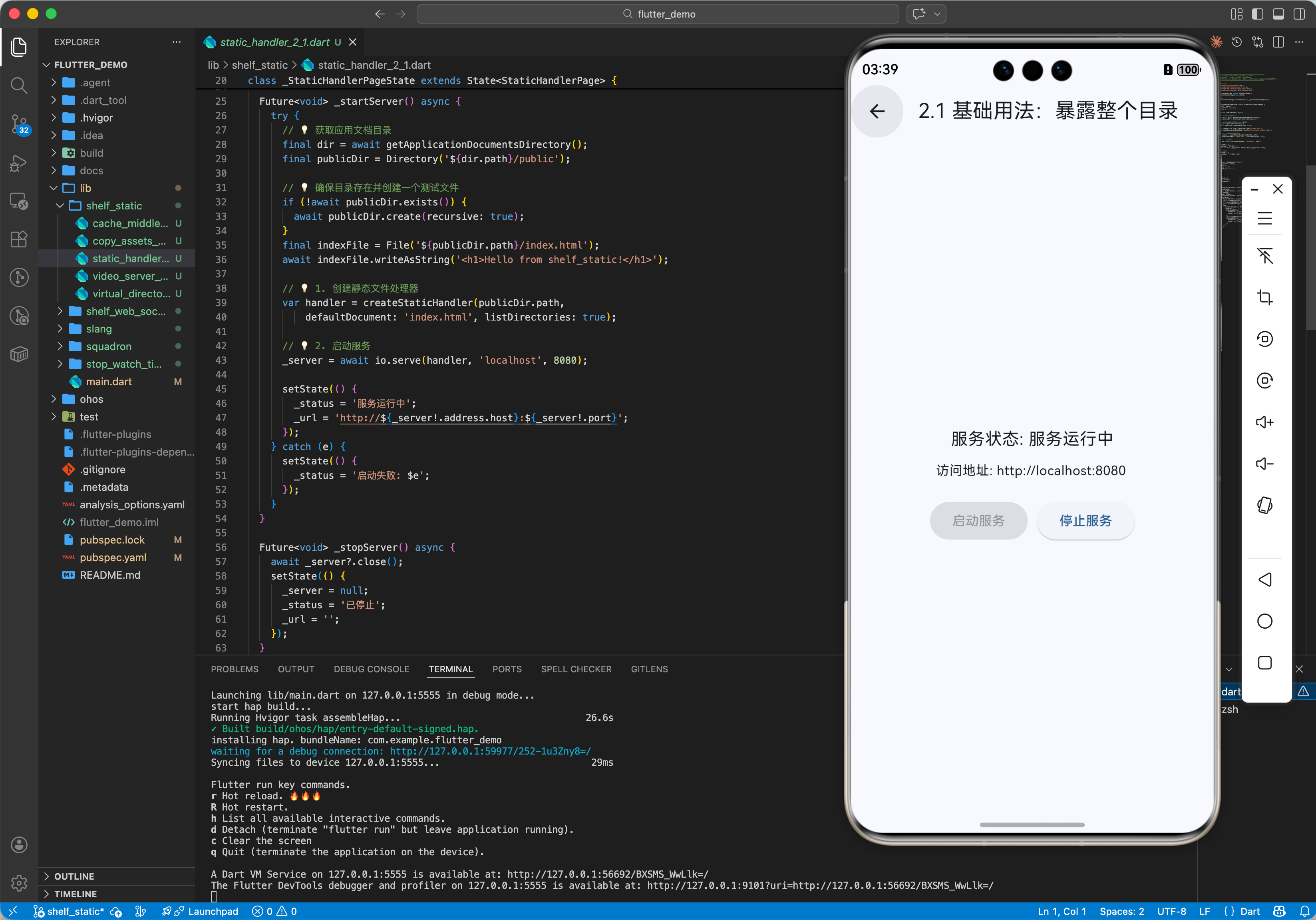
2.1 基础用法:暴露整个目录
import 'package:shelf/shelf.dart';
import 'package:shelf/shelf_io.dart' as io;
import 'package:shelf_static/shelf_static.dart';
void main() async {
// 1. 创建静态文件处理器
// defaultDocument: 访问根目录时默认返回的文件
// listDirectories: 是否允许列出文件目录(生产环境建议 false)
var handler = createStaticHandler(
'public',
defaultDocument: 'index.html',
listDirectories: true
);
// 2. 启动服务
var server = await io.serve(handler, 'localhost', 8080);
print('Serving at http://${server.address.host}:${server.port}');
}
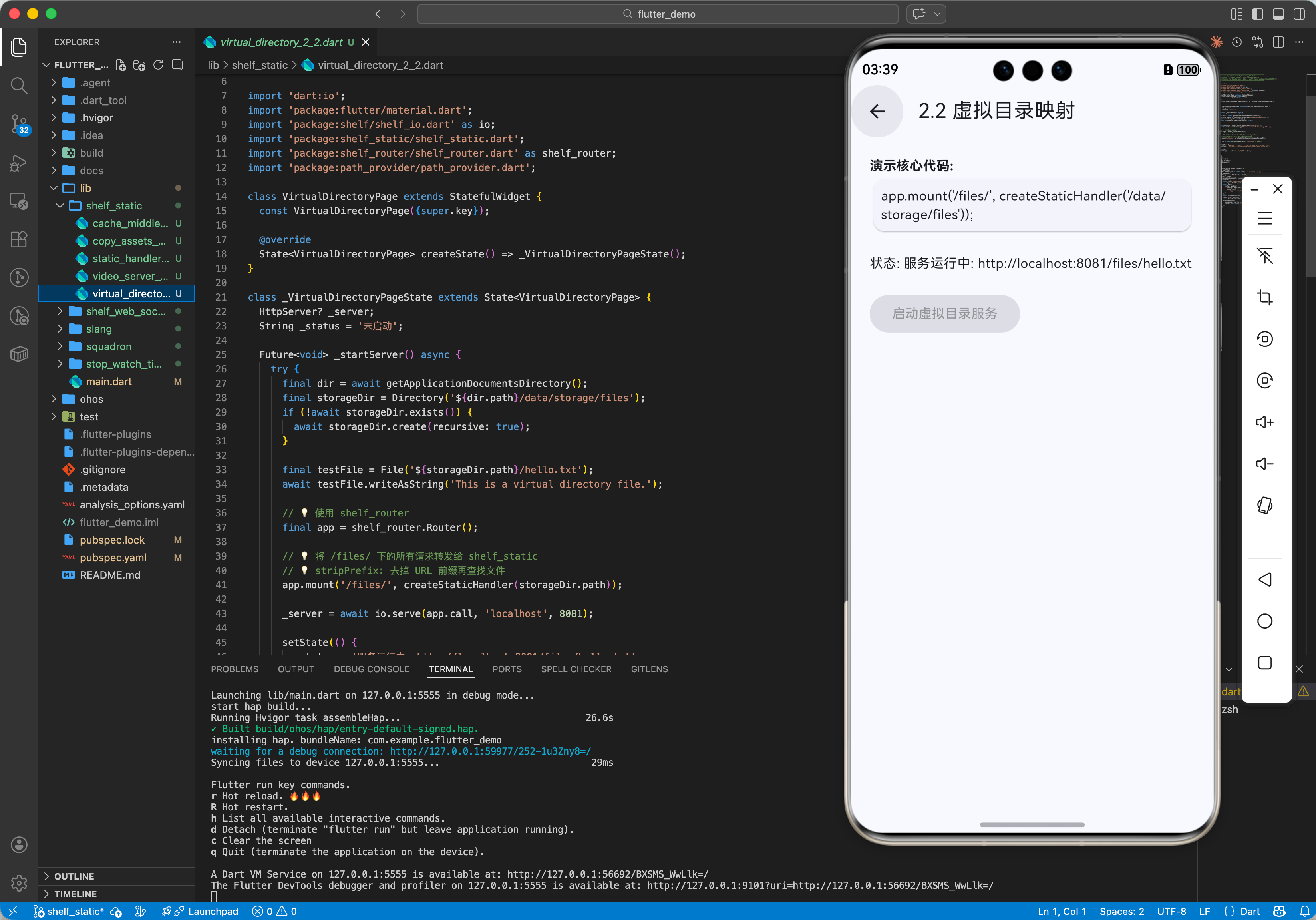
2.2 虚拟目录映射(Virtual Directory)
有时候我们想将 /static/ 路径映射到物理目录 /data/files/。这时结合 shelf_router 使用效果更佳。
import 'package:shelf_router/shelf_router.dart';
final app = Router();
// 将 /files/ 下的所有请求转发给 shelf_static
// 注意:web_files 必须是物理存在的目录
// stripPrefix: 去掉 URL 前缀再查找文件
app.mount('/files/', createStaticHandler('/data/storage/files'));
三、OpenHarmony 平台适配实战
在鸿蒙系统上,最典型的应用场景是:App内置微服务,供 Web 组件调用。
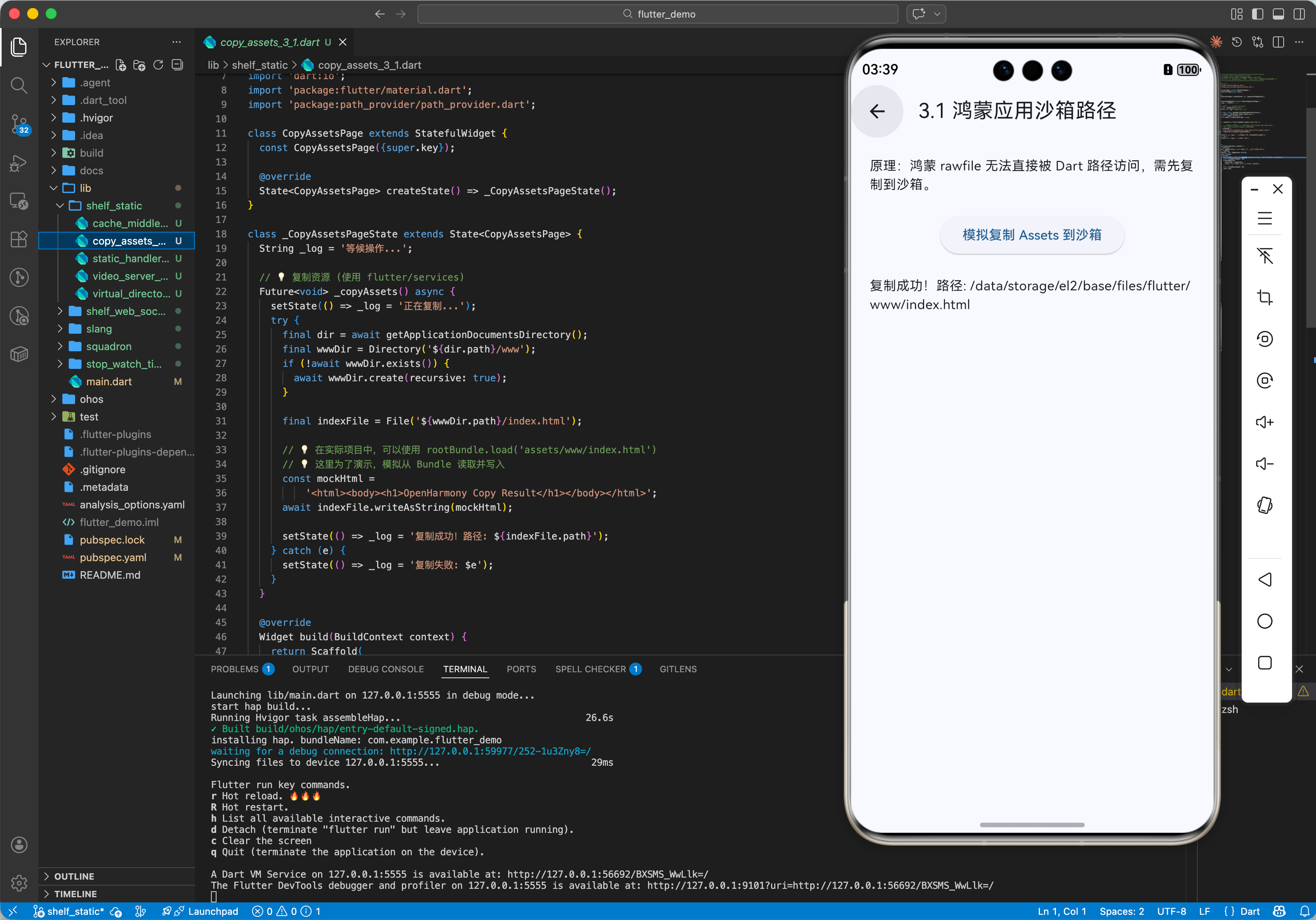
3.1 鸿蒙应用沙箱路径
鸿蒙的沙箱机制非常严格。如果你的 H5 资源打包在 assets 中(在鸿蒙是 rawfile),Dart 是无法直接通过文件路径访问的(因为 rawfile 在 hap 包内,是压缩的)。
解决方案:
// 1. 复制资源 (使用 flutter/services)
Future<void> copyAssets() async {
final dir = await getApplicationDocumentsDirectory();
final indexFile = File('${dir.path}/www/index.html');
if (!indexFile.existsSync()) {
// 读取 Asset
final bytes = await rootBundle.load('assets/www/index.html');
// 写入文件系统
await indexFile.create(recursive: true);
await indexFile.writeAsBytes(bytes.buffer.asUint8List());
}
}
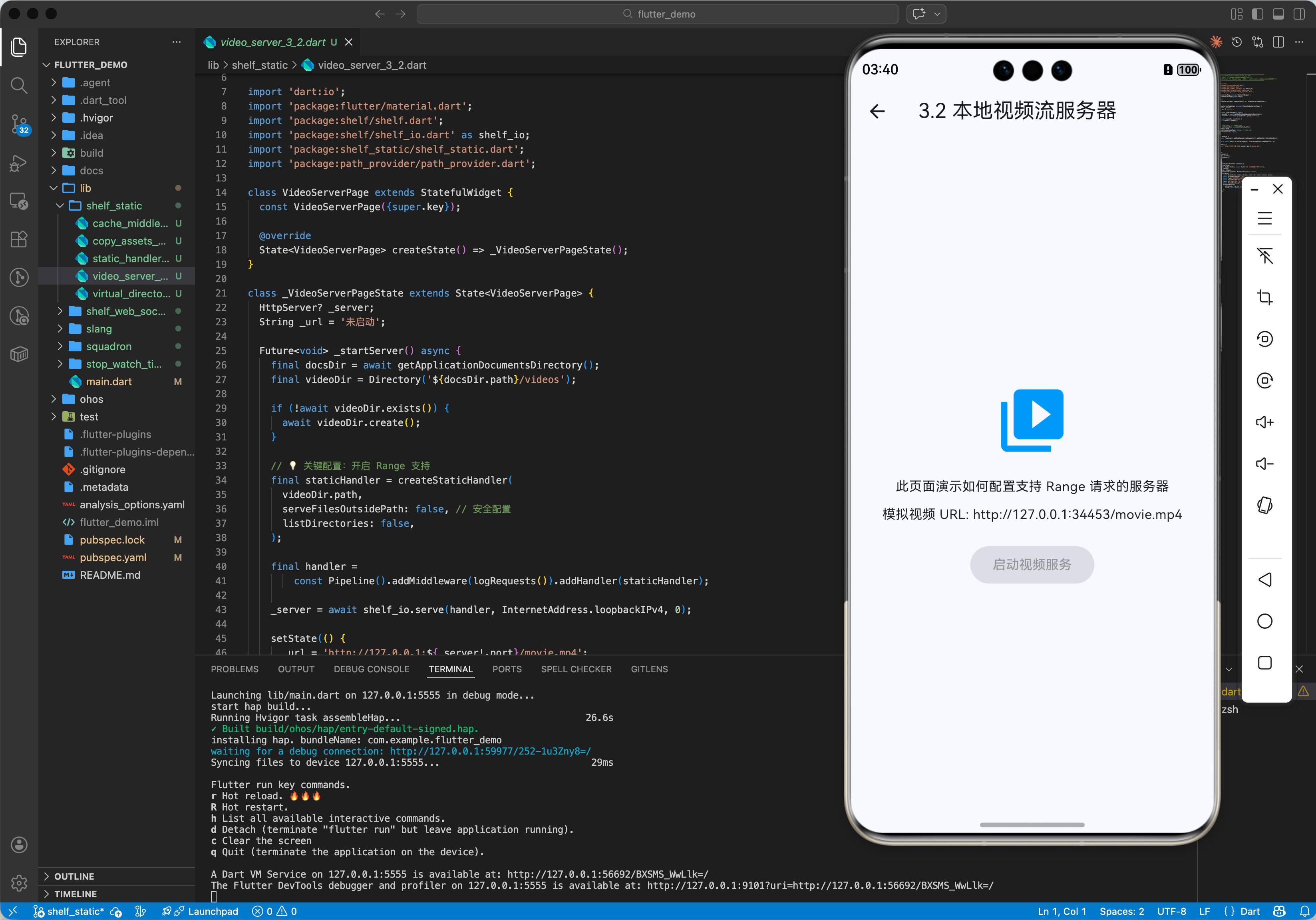
3.2 实战:本地视频流服务器
这是一个非常有用的功能。很多视频播放器不支持直接播放私有目录下的文件,或者不支持复杂的加密流。我们可以用 Shelf 搭建一个本地代理。
import 'dart:io';
import 'package:shelf/shelf.dart';
import 'package:shelf/shelf_io.dart' as shelf_io;
import 'package:shelf_static/shelf_static.dart';
import 'package:path_provider/path_provider.dart';
class VideoServer {
HttpServer? _server;
int get port => _server?.port ?? 0;
Future<void> start() async {
final docsDir = await getApplicationDocumentsDirectory();
final videoDir = Directory('${docsDir.path}/videos');
// 确保目录存在
if (!await videoDir.exists()) {
await videoDir.create();
}
// 关键配置:开启 Range 支持
final staticHandler = createStaticHandler(
videoDir.path,
serveFilesOutsidePath: false, // 安全配置
listDirectories: false,
);
// 增加日志中间件
final handler = Pipeline()
.addMiddleware(logRequests())
.addHandler(staticHandler);
// 绑定 localhost (仅本机可访问,更安全)
_server = await shelf_io.serve(handler, InternetAddress.loopbackIPv4, 0);
print('Video Server running on port ${_server!.port}');
}
// 获取视频播放 URL
String getVideoUrl(String filename) {
return 'http://127.0.0.1:$port/$filename';
}
}
3.3 在 Web 组件中使用
启动 Server 后,我们在 Flutter 的 WebView 或鸿蒙原生的 ArkWeb 中加载:
// 假设已启动 Server
final url = videoServer.getVideoUrl('movie.mp4');
// 使用 video_player 也是一样的原理
VideoPlayerController.network(url)..initialize();
由于 shelf_static 支持 HTTP Range,视频播放器可以:
四、高级进阶:安全性与性能优化
4.1 目录遍历攻击 (Directory Traversal)
这是静态文件服务最大的安全隐患。攻击者可能请求 GET /../../../../etc/passwd。 shelf_static 默认启用了防御机制,它会规范化路径并在访问前检查是否逃逸出了 root 目录。 但是,如果你开启了符号链接(Symlink)支持,需格外小心。
建议:始终设置 serveFilesOutsidePath: false。
4.2 缓存策略 (Cache-Control)
对于静态资源,合理的缓存能减少 IO,提升加载速度。
// 自定义 Header 中间件
Handler cacheMiddleware(Handler innerHandler) {
return (request) async {
final response = await innerHandler(request);
// 如果是图片,缓存 1 天
if (response.mimeType?.startsWith('image/') ?? false) {
return response.change(headers: {
'Cache-Control': 'public, max-age=86400',
});
}
return response;
};
}
4.3 性能:Sendfile
在 Linux/Android 上,高性能 Web Server(如 Nginx)会使用内核级的 sendfile 系统调用(零拷贝)。 Dart 的 shelf_static 目前主要是应用层读写。对于超大文件并发(如 100 人同时下载),性能不如 Nginx。但对于移动端本地服务(通常只有 1 个客户端),性能绰绰有余。
五、总结
shelf_static 是 Dart 全栈开发中不可或缺的一块拼图。它用极少的代码极其优雅地解决了“文件服务”这一基础需求。
在 OpenHarmony 平台上,它展现了强大的生命力:
最佳实践:
- 不要在 UI 线程启动 Server(虽然是异步 IO,但请求处理逻辑在 Isolate 内)。建议放在独立的 Isolate 启动 shelf 服务,特别是需要处理大量并发请求时。



评论前必须登录!
注册