 网硕互联帮助中心
单表约束_介绍
约束介绍:
概述:
约束可以理解为在数据类型的基础上, 继续都某列数据值 做限定, 例如: 不能重复, 不能为空等…
专业版: 约束是用来保证数据的完整性 和 安全性的.
分类:
单表约束:
主键约束: primary key
特点: 非空, 唯一, 一般结合 auto_increment(自动增长) 一起使用.
非空约束: not null
特点: 该列值不能为空, 但是可以: 重复.
唯一约束: unique
特点: 该列值不能重复, 但是可以: 为空.
默认约束: default 默认值
特点: 如果添加数据的时候没有给值, 就用默认值填充. 类似于Python中的 缺省参数(默认参数)
多表约束:
主外键约束: foreign key
# ——————— 单表约束 ———————
/*
约束介绍:
概述:
约束可以理解为在数据类型的基础上, 继续都某列数据值 做限定, 例如: 不能重复, 不能为空等…
专业版: 约束是用来保证数据的完整性 和 安全性的.
分类:
单表约束:
主键约束: primary key
特点: 非空, 唯一, 一般结合 auto_increment(自动增长) 一起使用.
非空约束: not null
特点: 该列值不能为空, 但是可以: 重复.
唯一约束: unique
特点: 该列值不能重复, 但是可以: 为空.
默认约束: default 默认值
特点: 如果添加数据的时候没有给值, 就用默认值填充. 类似于Python中的 缺省参数(默认参数)
多表约束:
主外键约束: foreign key
*/
— 1. 创建数据库.
drop database tb;
create database tb charset 'utf8';
— 2. 切库.
use tb;
— 3. 查看数据表.
show tables;
— 4. 创建数据表, 用于演示单表约束.
create table if not exists stu(
id int primary key auto_increment, # id列, 主键列(非空,唯一), 自增
name varchar(10) not null, # 姓名, 不能为空
phone varchar(11) unique, # 手机号, 唯一
gender varchar(2), # 性别, 没有限定.
address varchar(10) default '北京' # 默认约束
);
# 5. 往表中添加数据, 用于测试: 约束.
# 正常添加结果
insert into stu values(null, '杨过', '111', '男', '上海');
insert into stu values(null, '郭靖', '222', '男', '广州');
insert into stu values(null, '黄蓉', '333', '女', '深圳');
# 测试 默认约束
insert into stu(id, name, phone, gender) values(null, '尹志平', '444', '男');
# 测试 非空约束.
insert into stu values(null, null, '555', '女', '深圳'); # 报错, Column 'name' cannot be null
# 测试 唯一约束
insert into stu values(null, '黄蓉', '555', '女', '深圳');
insert into stu values(null, '黄蓉', null, '女', '深圳');
insert into stu values(null, '黄蓉', '555', '女', '深圳'); # 报错, Duplicate entry '555' for key 'phone'
# 6. 查看表数据.
select * from stu;
# 7. 查看表结构
desc stu;
单表查询_简单查询
单表查询, 完整查询格式如下:
select
[distinct] 列名1 as 别名, 列名2 as 别名, …
from
数据表名
where
组前筛选
group by
分组字段
having
组后筛选
order by
排序字段 [asc | desc]
limit
起始索引, 数据条数;
# ——————— 单表查询 -> 简单查询 ———————
/*
单表查询, 完整查询格式如下:
select
[distinct] 列名1 as 别名, 列名2 as 别名, …
from
数据表名
where
组前筛选
group by
分组字段
having
组后筛选
order by
排序字段 [asc | desc]
limit
起始索引, 数据条数;
*/
# 1. 创建商品表.
create table product
(
pid int primary key auto_increment, # 商品id, 主键
pname varchar(20), # 商品名
price double, # 商品单价
category_id varchar(32) # 商品的分类id
);
# 2. 添加表数据.
INSERT INTO product(pid,pname,price,category_id) VALUES(null,'联想',5000,'c001');
INSERT INTO product(pid,pname,price,category_id) VALUES(null,'海尔',3000,'c001');
INSERT INTO product(pid,pname,price,category_id) VALUES(null,'雷神',5000,'c001');
INSERT INTO product(pid,pname,price,category_id) VALUES(null,'杰克琼斯',800,'c002');
INSERT INTO product(pid,pname,price,category_id) VALUES(null,'真维斯',200, null);
INSERT INTO product(pid,pname,price,category_id) VALUES(null,'花花公子',440,'c002');
INSERT INTO product(pid,pname,price,category_id) VALUES(null,'劲霸',2000,'c002');
INSERT INTO product(pid,pname,price,category_id) VALUES(null,'香奈儿',800,'c003');
INSERT INTO product(pid,pname,price,category_id) VALUES(null,'相宜本草',200, null);
INSERT INTO product(pid,pname,price,category_id) VALUES(null,'面霸',5,'c003');
INSERT INTO product(pid,pname,price,category_id) VALUES(null,'好想你枣',56,'c004');
INSERT INTO product(pid,pname,price,category_id) VALUES(null,'香飘飘奶茶',1,'c005');
INSERT INTO product(pid,pname,price,category_id) VALUES(null,'海澜之家',1,'c002');
# 3. 查看表数据.
# 需求1: 查询所有的商品信息
select * from product;
select pid, pname, price, category_id from product; # 效果同上.
# 需求2: 查看商品名 和 商品价格.
select pname, price from product;
# 扩展: 起别名, 列名, 表名都可以起别名.
# 格式: 列名 as 别名 或者 表名 as 别名, 其中 as 可以省略不写.
select pname as 商品名, price 商品价格 from product as p;
# 需求3: 查看结果是表达式, 将所有的商品价格+10, 进行展示.
select pname, price + 10 from product;
select pname, price + 10 as price from product;
条件查询_比较运算符
# ——————— 单表查询 -> 条件查询 ———————
# 格式: select 列名1, 列名2… from 数据表名 where 条件;
# 场景1: 比较运算符, >, >=, <, <=, =, !=, <>
# 需求1: 查询商品名称为“花花公子”的商品所有信息:
select * from product where pname ='花花公子';
# 需求2: 查询价格为800商品
select * from product where price=800;
# 需求3: 查询价格不是800的所有商品
select * from product where price!=800;
select * from product where price<>800;
# 需求4: 查询商品价格大于60元的所有商品信息
select * from product where price > 60;
# 需求5: 查询商品价格小于等于800元的所有商品信息
select * from product where price <= 800;
条件查询_逻辑运算符和范围查询
# 场景2: 范围查询. between 值1 and 值2 -> 适用于连续的区间, in (值1, 值2..) -> 适用于 固定值的判断.
# 场景3: 逻辑运算符. and, or, not
# 需求6: 查询商品价格在200到800之间所有商品
select * from product where price between 200 and 800; # 包左包右.
select * from product where price >= 200 and price <= 800;
# 需求7: 查询商品价格是200或800的所有商品
select * from product where price in (200, 800);
select * from product where price=200 or price=800;
# 需求8: 查询价格不是800的所有商品
select * from product where price != 800;
select * from product where not price = 800;
select * from product where price not in (800);
条件判断_模糊查询和非空判断
# 场景4: 模糊查询. 字段名 like '_内容%' _ 代表任意的1个字符; %代表任意的多个字符, 至少0个, 至多无所谓.
# 需求9: 查询以'香'开头的所有商品
select * from product where pname like '香%';
# 需求10: 查询第二个字为'想'的所有商品
select * from product where pname like '_想%';
select * from product where pname like '_想'; # 只能查出 *想 两个字的, 不符合题设.
# 场景5: 非空查询. is null, is not null, 不能用=来判断空.
# 需求11: 查询没有分类的商品
select * from product where category_id=null; # 不报错,但是没结果.
select * from product where category_id is null; # 正确的, 判空操作.
# 需求12: 查询有分类的商品
select * from product where category_id is not null; # 正确的, 非空判断操作.
排序查询
# ——————— 单表查询 -> 排序查询 ———————
# 格式: select * from 表名 order by 排序的字段1 [asc | desc], 排序的字段2 [asc | desc], …;
# 解释1: ascending: 升序, descending: 降序.
# 解释2: 默认是升序, 所以asc可以省略不写.
# 需求1: 根据价格降序排列.
select * from product order by price; # 默认是: 升序.
select * from product order by price asc; # 效果同上.
select * from product order by price desc; # 价格降序排列.
# 需求2: 根据价格降序排列, 价格一样的情况下, 根据分类降序排列.
select * from product order by price desc, category_id desc;
聚合查询
聚合查询(多进一出)介绍:
概述:
聚合查询是对表中的某列数据做操作.
常用的聚合函数:
count() 统计某列值的个数, 只统计非空值. 一般用于统计 表中数据的总条数.
sum() 求和
max() 求最大值
min() 求最小值
avg() 求平均值
面试题: count(), count(1), count(列)的区别是什么?
区别1: 是否统计空值
count(列): 只统计该列的非空值.
count(1), count(): 统计所有数据, 包括空值.
区别2: 效率问题.
1. COUNT() 和 COUNT(1) —— 最快
InnoDB 会直接读取聚簇索引(PRIMARY KEY)的行数计数器(近似 O(1)),无需扫描数据页。
优化器将两者视为等价,生成相同执行计划。
✅ 推荐用于统计总行数。
2. COUNT(主键列) —— 次快
主键列是聚簇索引的一部分,InnoDB 可通过遍历主键索引(B+树叶子节点)计数。
虽然仍需扫描索引页,但避免回表,比全表扫描快。
⚠️ 若主键是联合主键或非整型,性能略低于 COUNT()。
3. COUNT(普通列) —— 最慢
若该列无索引:需全表扫描(type: ALL),逐行判断是否为 NULL。
若该列有二级索引:可能走索引扫描(type: index),但仍需访问索引页并过滤 NULL。
❗ 当列含大量 NULL 时,优化器无法使用元数据,必须实际计算。
# ——————— 单表查询 -> 聚合查询 ———————
/*
聚合查询(多进一出)介绍:
概述:
聚合查询是对表中的某列数据做操作.
常用的聚合函数:
count() 统计某列值的个数, 只统计非空值. 一般用于统计 表中数据的总条数.
sum() 求和
max() 求最大值
min() 求最小值
avg() 求平均值
面试题: count(*), count(1), count(列)的区别是什么?
区别1: 是否统计空值
count(列): 只统计该列的非空值.
count(1), count(*): 统计所有数据, 包括空值.
区别2: 效率问题.
1. COUNT(*) 和 COUNT(1) —— 最快
InnoDB 会直接读取聚簇索引(PRIMARY KEY)的行数计数器(近似 O(1)),无需扫描数据页。
优化器将两者视为等价,生成相同执行计划。
✅ 推荐用于统计总行数。
2. COUNT(主键列) —— 次快
主键列是聚簇索引的一部分,InnoDB 可通过遍历主键索引(B+树叶子节点)计数。
虽然仍需扫描索引页,但避免回表,比全表扫描快。
⚠️ 若主键是联合主键或非整型,性能略低于 COUNT(*)。
3. COUNT(普通列) —— 最慢
若该列无索引:需全表扫描(type: ALL),逐行判断是否为 NULL。
若该列有二级索引:可能走索引扫描(type: index),但仍需访问索引页并过滤 NULL。
❗ 当列含大量 NULL 时,优化器无法使用元数据,必须实际计算。
*/
# 需求1: 查询商品的总条数
select count(pid) as total_cnt from product;
select count(category_id) as total_cnt from product;
select count(*) as total_cnt from product;
select count(1) as total_cnt from product;
# 需求2: 查询价格大于200商品的总条数
select count(pid) as total_cnt from product where price > 200;
# 需求3: 查询分类为'c001'的所有商品价格的总和
select sum(price) as total_price from product where category_id='c001';
# 需求4: 查询分类为'c002'所有商品的平均价格
select avg(price) as avg_price from product where category_id='c002';
# 需求5: 查询商品的最大价格和最小价格 扩展: ctrl + alt + 字母L 代码格式化.
select
max(price) as max_price,
min(price) as min_price
from
product;
分组查询
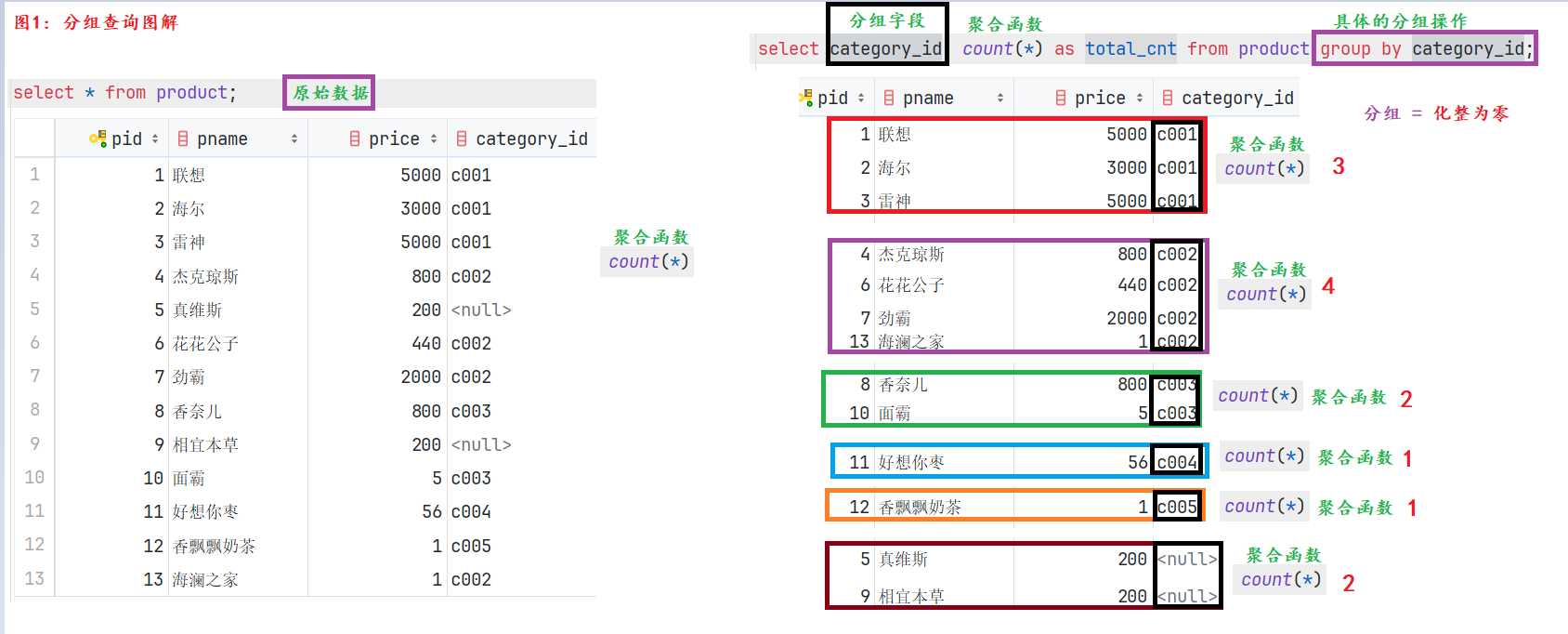
分组查询介绍:
概述:
简单理解为, 根据分组字段, 把表数据 化整为零, 然后基于每个分组后的每个部分, 进行对应的聚合运算.
格式:
select 列1, 列2… from 数据表名 where 组前筛选 group by 分组字段 having 组后筛选;
细节:
1. 分组查询 一般要结合 聚合函数一起使用, 且根据谁分组, 就根据谁查询.
2. 组前筛选用where, 组后筛选用having.
3. 面试题: where 和 having的区别是什么?
where: 组前筛选, 后边不能跟聚合函数.
having: 组后筛选, 后边可以跟聚合函数.
4. 分组查询的查询列 只能出现 分组字段, 聚合函数.
5. 如果只分组, 没有写聚合, 可以理解为是: 基于分组字段, 进行去重查询
# ——————— 单表查询 -> 分组查询 ———————
/*
分组查询介绍:
概述:
简单理解为, 根据分组字段, 把表数据 化整为零, 然后基于每个分组后的每个部分, 进行对应的聚合运算.
格式:
select 列1, 列2… from 数据表名 where 组前筛选 group by 分组字段 having 组后筛选;
细节:
1. 分组查询 一般要结合 聚合函数一起使用, 且根据谁分组, 就根据谁查询.
2. 组前筛选用where, 组后筛选用having.
3. 面试题: where 和 having的区别是什么?
where: 组前筛选, 后边不能跟聚合函数.
having: 组后筛选, 后边可以跟聚合函数.
4. 分组查询的查询列 只能出现 分组字段, 聚合函数.
5. 如果只分组, 没有写聚合, 可以理解为是: 基于分组字段, 进行去重查询
*/
# 需求1: 统计各个分类商品的个数.
select category_id, count(*) as total_cnt from product group by category_id;
# 需求2: 统计各个分类商品的个数, 且只显示个数大于1的信息.
select
category_id,
count(*) as total_cnt
from
product
group by
category_id # 根据商品类别分组.
having
total_cnt > 1; # 组后筛选
# 需求3: 演示 如果只分组, 没有写聚合, 可以理解为是: 基于分组字段, 进行去重查询
select category_id from product group by category_id;
select category_id from product group by category_id;
# 还可以通过 distinct 关键字来实现去重.
select distinct category_id from product;
# 此时是: 按照category_id 和 price作为整体, 然后去重.
select distinct category_id, price from product;
select category_id, price from product group by category_id, price; # 效果同上.
分页查询
分页查询介绍:
概述:
分页查询 = 每次从数据表中查询出固定条数的数据, 一方面可以降低服务器的压力, 另一方面可以降低浏览器端的压力, 且可以提高用户体验.
实际开发中非常常用.
格式:
limit 起始索引, 数据条数;
细节:
1. 表中每条数据都有自己的索引, 且索引是从0开始的.
2. 如果是从索引0开始获取数据的, 则索引0可以省略不写.
学好分页, 掌握如下的几个参数计算规则即可:
数据总条数: count() 函数
每页的数据条数: 产品说了算
每页的起始索引: (当前的页数 – 1) * 每页的数据条数
总页数: (数据总条数 + 每页的数据条数 – 1) // 每页的数据条数
(13 + 5 – 1) // 5 = 17 // 5 = 3页
(14 + 5 – 1) // 5 = 18 // 5 = 3页
(15 + 5 – 1) // 5 = 19 // 5 = 3页
(16 + 5 – 1) // 5 = 20 // 5 = 4页
# ——————— 单表查询 -> 分页查询 ———————
/*
分页查询介绍:
概述:
分页查询 = 每次从数据表中查询出固定条数的数据, 一方面可以降低服务器的压力, 另一方面可以降低浏览器端的压力, 且可以提高用户体验.
实际开发中非常常用.
格式:
limit 起始索引, 数据条数;
细节:
1. 表中每条数据都有自己的索引, 且索引是从0开始的.
2. 如果是从索引0开始获取数据的, 则索引0可以省略不写.
学好分页, 掌握如下的几个参数计算规则即可:
数据总条数: count() 函数
每页的数据条数: 产品说了算
每页的起始索引: (当前的页数 – 1) * 每页的数据条数
总页数: (数据总条数 + 每页的数据条数 – 1) // 每页的数据条数
(13 + 5 – 1) // 5 = 17 // 5 = 3页
(14 + 5 – 1) // 5 = 18 // 5 = 3页
(15 + 5 – 1) // 5 = 19 // 5 = 3页
(16 + 5 – 1) // 5 = 20 // 5 = 4页
*/
# 需求1: 5条/页.
select * from product limit 5; # 第1页, 从索引0开始, 获取5条.
select * from product limit 0, 5; # 第1页, 从索引0开始, 获取5条, 效果同上.
select * from product limit 0, 5; # 第1页, 从索引0开始, 获取5条.
select * from product limit 5, 5; # 第2页, 从索引5开始, 获取5条.
# 需求2: 3条/页
select * from product limit 0, 3; # 第1页, 从索引0开始, 获取3条.
select * from product limit 3, 3; # 第2页, 从索引3开始, 获取3条.
select * from product limit 6, 3; # 第3页, 从索引6开始, 获取3条.
select * from product limit 9, 3; # 第4页, 从索引9开始, 获取3条.
select * from product limit 12, 3; # 第5页, 从索引12开始, 获取3条.
# 总结, 回顾单表查询的格式
/*
select
[distinct] 列1 as 别名, 列2
from
数据表名
where
组前筛选
group by
分组字段
having
组后筛选
order by
排序字段 [asc | desc]
limit
起始索引, 数据条数;
*/
# 需求: 统计商品表中, 每类商品的单价总和, 只统计单价在100以上的商品, 只查看单价总和在500以上的分类, 按照商品总价降序排列, 只获取商品总价高的前2条数信息.
select
category_id,
sum(price) total_price
from
product
where # 组前筛选
price > 100
group by # 分组
category_id
having # 组后筛选
total_price > 500
order by # 排序
total_price desc
limit 0, 2; # 分页
多表建表_一对多
-
图解
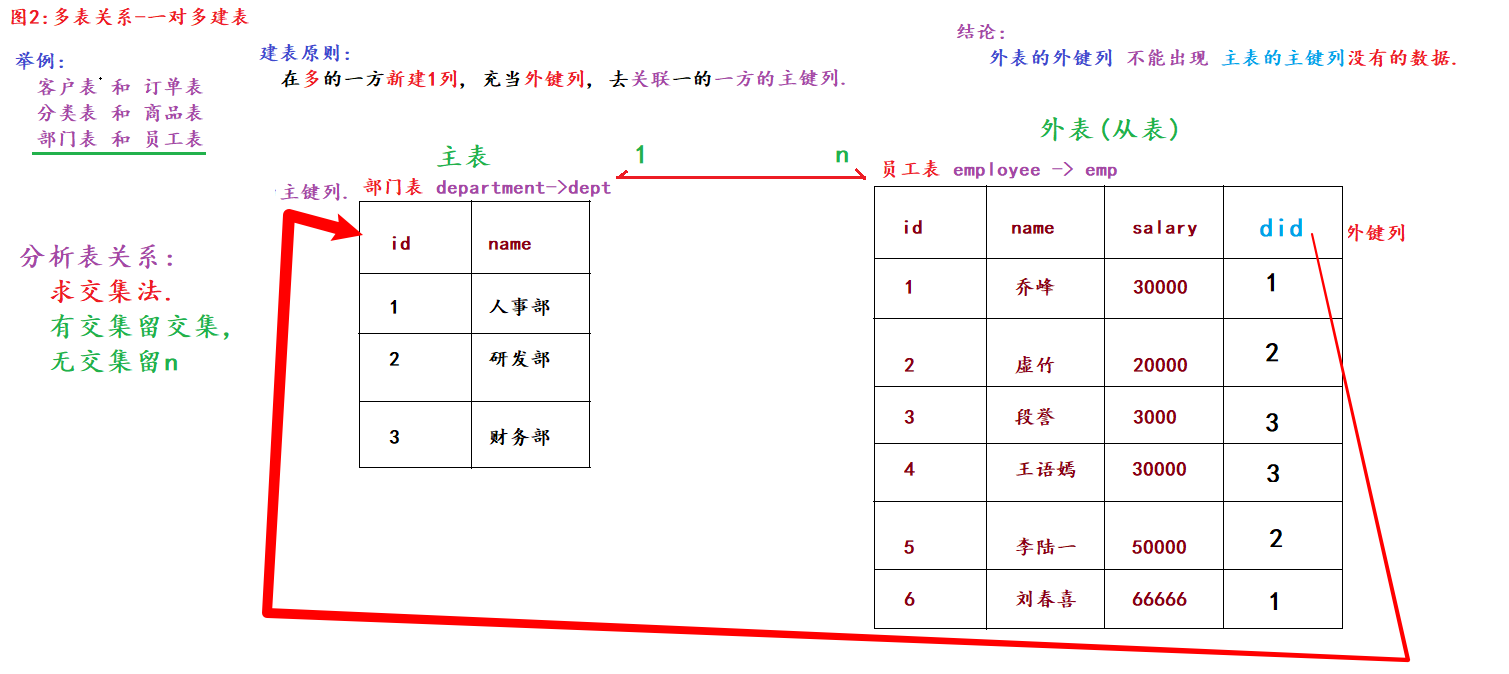
多表关系解释:
概述:
MySQL是一种关系型数据库, 采用 数据表 来存储数据, 且表与表之间是有关系的.
例如: 一对多, 多对多, 一对一…
举例:
一对多: 部门表和员工表, 客户表和订单表, 分类表和商品表…
多对多: 学生表和选修课表, 订单表和商品表, 学生表和老师表…
一对一: 一个人有1个身份证号, 1家公司只有1个注册地址, 1个法人.
建表原则:
一对多: 在多的一方新建1列, 充当外键列, 去关联1的一方的主键列.
多对多: 新建中间表. 该表至少有3列(自身主键, 剩下两个当外键), 分别去关联多的两方的主键列.
一对一: 直接放到一张表中.
结论(记忆):
1. 外表的外键列, 不能出现主表的主键列没有的数据.
2. 约束是用来保证数据的完整性和安全性的.
3. 添加 和 删除外键约束的格式如下:
添加外键约束: alter table 外表名 add [constraint 外键约束名] foreign key(外键列名) references 主表名(主键列名);
删除外键约束: alter table 外表名 drop foreign key 外键约束名;
-
代码
# ———————- 多表建表 一对多关系 ———————-
/*
多表关系解释:
概述:
MySQL是一种关系型数据库, 采用 数据表 来存储数据, 且表与表之间是有关系的.
例如: 一对多, 多对多, 一对一…
举例:
一对多: 部门表和员工表, 客户表和订单表, 分类表和商品表…
多对多: 学生表和选修课表, 订单表和商品表, 学生表和老师表…
一对一: 一个人有1个身份证号, 1家公司只有1个注册地址, 1个法人.
建表原则:
一对多: 在多的一方新建1列, 充当外键列, 去关联1的一方的主键列.
多对多: 新建中间表. 该表至少有3列(自身主键, 剩下两个当外键), 分别去关联多的两方的主键列.
一对一: 直接放到一张表中.
结论(记忆):
1. 外表的外键列, 不能出现主表的主键列没有的数据.
2. 约束是用来保证数据的完整性和安全性的.
3. 添加 和 删除外键约束的格式如下:
添加外键约束: alter table 外表名 add [constraint 外键约束名] foreign key(外键列名) references 主表名(主键列名);
删除外键约束: alter table 外表名 drop foreign key 外键约束名;
*/
# 1. 切库, 查表.
use tb;
show tables;# 2. 新建部门表.
drop table dept;
create table dept(
id int primary key auto_increment, # 部门id
name varchar(10) # 部门名字
);# 3. 新建员工表, 指定外键列.
drop table emp;
create table emp(
id int primary key auto_increment, # 员工id
name varchar(10), # 员工姓名
salary int, # 员工工资
dept_id int # 员工所属的部门id
# 方式1: 建表时, 直接添加外键.
# , constraint fk_dept_emp foreign key(dept_id) references dept(id)
, foreign key(dept_id) references dept(id)
);# 方式2: 建表后, 添加外键.
alter table emp add constraint fk_01 foreign key(dept_id) references dept(id);# 4. 添加数据.
insert into dept values(null, '人事部'), (null, '研发部'), (null, '财务部');
insert into emp values
(null, '乔峰', 30000, 1),
(null, '虚竹', 20000, 2),
(null, '段誉', 3000, 3);
# 尝试添加脏数据.
insert into emp values(null, '喜哥', 66666, 10);
# 5. 查看表数据.
select * from dept;
select * from emp;
# 6. 删除外键约束.
alter table emp drop foreign key emp_ibfk_1;
多表查询_交叉查询
# ———————- 多表查询 准备数据 ———————-
# 1. 创建hero表
create table hero (
hid int primary key auto_increment, # 英雄id
hname varchar(255), # 英雄名
kongfu_id int # 功夫id
);
# 2. 创建kongfu表
create table kongfu (
kid int primary key auto_increment, # 功夫id
kname varchar(255) # 功夫名
);
# 3. 添加表数据.
# 插入hero数据
insert into hero values(1, '鸠摩智', 9),(3, '乔峰', 1),(4, '虚竹', 4),(5, '段誉', 12);
# 插入kongfu数据
insert into kongfu values(1, '降龙十八掌'),(2, '乾坤大挪移'),(3, '猴子偷桃'),(4, '天山折梅手');
# 4. 查看表数据.
select * from hero;
select * from kongfu;
# 多表查询的精髓是: 根据 关联条件 和 组合方式, 把多张表组成1张表, 然后进行 单表查询.
# ———————- 多表查询 交叉查询 ———————-
# 格式: select * from 表A, 表B;
# 结果: 表A的总条数 * 表B的总条数 -> 笛卡尔积, 一般不用.
select * from hero, kongfu;
多表查询_内连接
# ———————- 多表查询 连接查询 ———————-
# 场景1: 内连接, 查询结果 = 表的交集.
# 格式1: select * from 表A inner join 表B on 关联条件; 显式内连接(推荐)
select * from hero h inner join kongfu kf on h.kongfu_id = kf.kid;
select * from hero h join kongfu kf on h.kongfu_id = kf.kid; # inner可以省略不写.
select * from hero h join kongfu kf on kongfu_id = kid; # 如果两张表没有重名字段, 则: 可以省略 表名. 的方式.
# 格式2: select * from 表A, 表B where 关联条件; 隐式内连接,性能堪忧
select * from hero h, kongfu kf where h.kongfu_id = kf.kid;
多表查询_外连接
# 场景2: 外连接
# 格式1: 左外连接, 查询结果 = 左表的全集 + 表的交集.
# 格式: select * from 表A left outer join 表B on 关联条件;
select * from hero h left outer join kongfu kf on h.kongfu_id = kf.kid;
select * from hero left join kongfu on kongfu_id = kid; # 简化版写法.
# 格式2: 右外连接, 查询结果 = 右表的全集 + 表的交集.
# 格式: select * from 表A right outer join 表B on 关联条件;
select * from hero h right outer join kongfu kf on h.kongfu_id = kf.kid;
select * from hero right join kongfu on kongfu_id = kid; # 简化版写法.
# 结论: 如果交换了表的顺序, 则左外连接和右外连接, 查询结果可以是一样的. 掌握一种即可, 推荐: 左外连接.
# 左外连接.
select * from kongfu left join hero on kongfu_id = kid;
# 右外连接.
select * from hero right join kongfu on kongfu_id = kid;
多表查询_子查询
# ———————- 多表查询 子查询(套娃写法,不推荐,性能堪忧,可以选择用联表查来代替) ———————-
/*
概述:
如果1个查询语句的 查询条件 需要依赖另一个SQL语句的查询结果, 这种写法就称之为: 子查询.
叫法:
里边的查询叫: 子查询.
外边的查询叫: 父查询(主查询)
*/
# 1. 查看商品表的数据信息.
select * from product;
# 2. 需求: 查询商品表中所有单价在 均价之上的商品信息.
# 扩展: 四舍五入, 保留3位小数.
select round(1346.3846153846155, 3);
# 思路1: 分解版.
# step1: 查询所有商品的均价.
select round(avg(price), 3) avg_price from product;
# step2: 查询商品表中所有单价在 均价之上的商品信息.
select * from product where price > 1346.385;
# 思路2: 子查询.(套娃)
# 主查询(父查询) 子查询
select * from product where price > (select round(avg(price), 3) avg_price from product);
#思路3: 性能版(推荐)
select * from product
join (select round(avg(price),3) avg_price from product) avg_tb
on price > avg_price;
多表查询_自关联查询
-
图解
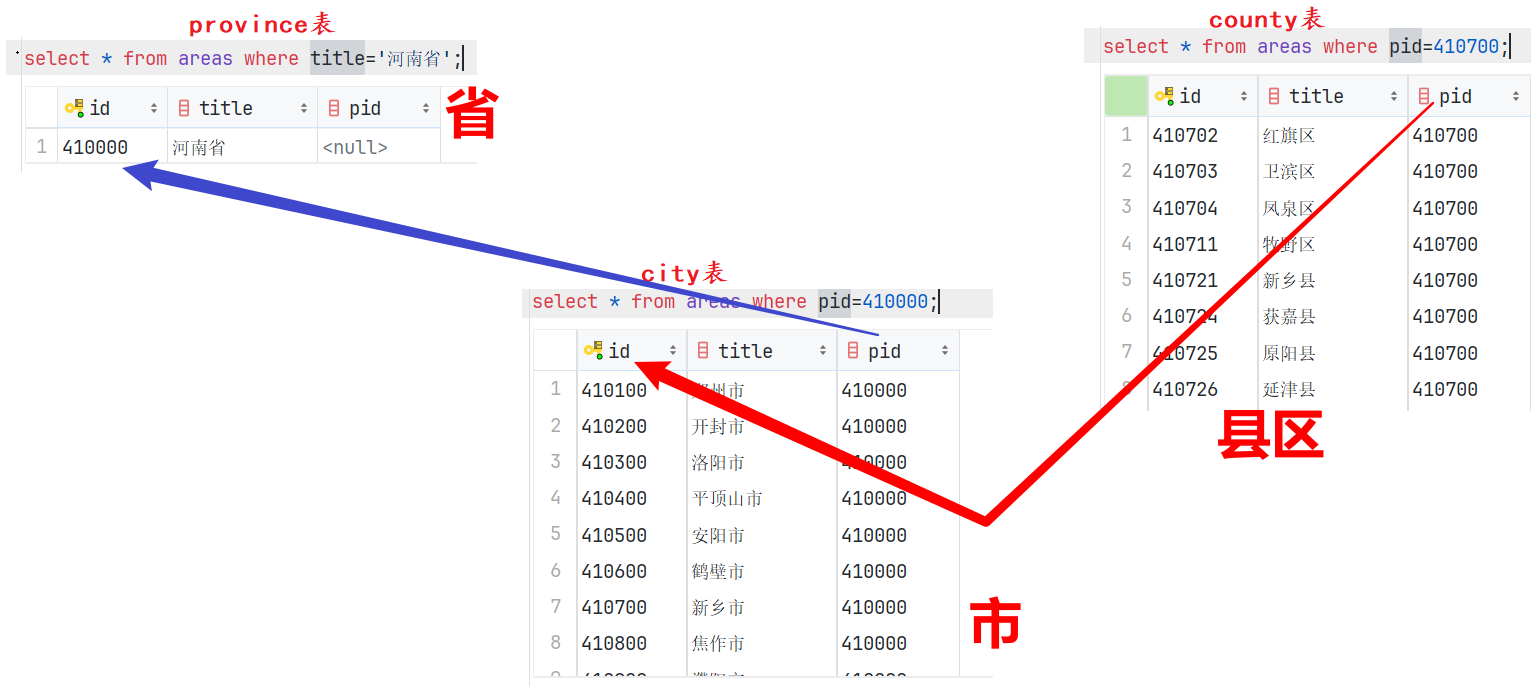
-
代码
# ———————-多表查询 自关联查询 ———————-
/*
解释:
表自己和自己做关联查询, 称之为: 自关联(自连接)查询.
写法:
可以是交叉查询, 内连接, 外连接…
经典案例:
行政区域表 -> 省市区.例如: 记录省市区的信息,
复杂的写法: 搞三张表, 分别记录省, 市, 区的关系.
简单的写法: 用1张表存储, 然后用的时候, 通过 自关联查询 实现即可.
字段: 自身id 自身名字 父级id
410000 河南省 0410100 郑州市 410000
410200 开封市 410000
410300 洛阳市 410000
410700 新乡市 410000410101 二七区 410100
410102 经开区 410100
410701 红旗区 410700
410702 卫滨区 410700
410721 新乡县 410700
*/
# 1. 查看区域表的信息.
select * from areas;# 2. 查询河南省的信息.
select * from areas where title='河南省';# 3. 查看河南省所有的市.
select * from areas where pid=410000;# 4. 查看新乡市所有的县区.
select * from areas where pid=410700;# 5. 查看河南省所有的市, 县区信息.
select
province.id, province.title, # 省的id, 名字
city.id, city.title, # 市的id, 名字
county.id, county.title # 县区的id, 名字
from
areas as county # 县区
join
areas as city on county.pid = city.id # 市
join
areas as province on city.pid = province.id # 省
where
province.title='河南省';# 6. 根据你的身份证号前6位, 查询你的家乡.
select
province.id, province.title, # 省的id, 名字
city.id, city.title, # 市的id, 名字
county.id, county.title # 县区的id, 名字
from
areas as county # 县区
join
areas as city on county.pid = city.id # 市
join
areas as province on city.pid = province.id # 省
where
county.id='320321';case when写法
格式1: 通用写法.
case
when 条件1 then 结果1
when 条件2 then 结果2
…
else 结果n
end [as 别名]
格式2: 针对于格式1的语法糖, 要满足两点 -> 1.都是操作同1个字段. 2.都是等于的判断.
case 字段名
when 值1 then 结果1
when 值2 then 结果2
…
else 结果n
end [as 别名]
select * from product;
/*
格式1: 通用写法.
case
when 条件1 then 结果1
when 条件2 then 结果2
…
else 结果n
end [as 别名]
格式2: 针对于格式1的语法糖, 要满足两点 -> 1.都是操作同1个字段. 2.都是等于的判断.
case 字段名
when 值1 then 结果1
when 值2 then 结果2
…
else 结果n
end [as 别名]
*/
# 需求: c001 -> 电脑, c002 -> 服装, c003 -> 化妆品, c004 -> 零食, c005 -> 饮料, null -> 未知类别
select
*,
case
when category_id = 'c001' then '电脑'
when category_id = 'c002' then '服装'
when category_id = 'c003' then '化妆品'
when category_id = 'c004' then '零食'
when category_id = 'c005' then '饮料'
else '未知类别'
end as category_name
from
product;
# 上述格式可以简化为
select
*,
case category_id
when 'c001' then '电脑'
when 'c002' then '服装'
when 'c003' then '化妆品'
when 'c004' then '零食'
when 'c005' then '饮料'
else '未知类别'
end as category_name
from
product;
if判断
select if(2 > 1, 2, 1); # if函数: if(条件,2,1),成立返回2,不成立返回1,等价于python中的三元表达式
# 需求:统计所有的订单,将价格分为高中低三档,报表输出三个字段统计数量情况
select
count(if(price<=500,1,null)) as 低,
count(if(price>500 and price<=2000,1,null)) as 中,
count(if(price>2000,1,null)) as 高
from product;
# 当然上述需求还可以这样完成
select case
when price > 2000 then '高'
when price <= 500 then '低'
else '中'
end as price_leavel,
count(1) as count
from product
group by price_leavel;
/*
以下是我问的ai的两种解法的对比情况,朋友们自行选择
方案一:单行聚合(COUNT(IF(…)))
特点:
结果格式:单行三列(低, 中, 高),适合报表直接展示。
逻辑:
IF(condition, 1, NULL):满足条件返回 1,否则 NULL
COUNT(expr) 仅统计非 NULL 值 → 实现条件计数
性能:
仅一次全表扫描(type: ALL)
无排序、无分组,开销最小
若需求明确为“输出三列统计数”,用方案一
方案二:分组聚合(CASE + GROUP BY)
特点:
结果格式:多行两列(每档一行),适合后续程序处理或动态渲染。
逻辑:
CASE 动态生成分档标签
GROUP BY price_leavel 按标签分组计数
性能:
一次全表扫描 + 内部哈希分组(InnoDB 中 GROUP BY 可能使用临时表或 filesort)
比方案一略慢(尤其数据量大时)
优势:
语义更清晰,易于扩展(如加新档位、排序)
自动处理边界:price = 500 或 2000 归入 中(因 ELSE 覆盖)
若需灵活扩展或对接后端 API,用方案二(更符合 SQL 标准实践)
*/
窗口函数(M有SQL8.X 新特性)
窗口函数解释:
概述:
它是MySQL8.x的新特性, 主要用于 给表新增1列, 至于新增的内容是什么, 取决于你用什么 窗口函数.
格式:
窗口函数 over([partition by 分组字段 order by 排序字段 asc | desc])
常用的窗口函数:
row_number(): 做行号标记的, 即: 1, 2, 3, 4…
rank(): 做稀疏排名的.
dense_rank(): 做密集排名的.
大白话解释:
假设数据集是 100, 90, 90, 60, 则三个函数的排名结果分别是:
row_number(): 1, 2, 3, 4
rank(): 1, 2, 2, 4
dense_rank(): 1, 2, 2, 3
细节:
1. 窗口函数 = 给表新增1列, 至于新增的是什么, 取决于和什么函数一起用.
2. 如果不写partition by, 则统计的是全表数据, 如果写了, 则统计的是组内的数据.
3. 如果不写order by, 则统计的是组内所有的数据, 如果写了, 则统计的是组内从第一行, 截止到当前行的数据.
4. 可以尝试玩下其它的窗口函数结合over()一起用,
例如: count(), max(), min(), sum(), avg(), ntile(n), lag(), lead(), first_value(), last_value()…
总结: 关于窗口函数, 至少掌握两点:
1. 分组排名.
2. 分组排名求TopN
# ———————- 窗口函数(M有SQL8.X 新特性) ———————-
/*
窗口函数解释:
概述:
它是MySQL8.x的新特性, 主要用于 给表新增1列, 至于新增的内容是什么, 取决于你用什么 窗口函数.
格式:
窗口函数 over([partition by 分组字段 order by 排序字段 asc | desc])
常用的窗口函数:
row_number(): 做行号标记的, 即: 1, 2, 3, 4…
rank(): 做稀疏排名的.
dense_rank(): 做密集排名的.
大白话解释:
假设数据集是 100, 90, 90, 60, 则三个函数的排名结果分别是:
row_number(): 1, 2, 3, 4
rank(): 1, 2, 2, 4
dense_rank(): 1, 2, 2, 3
细节:
1. 窗口函数 = 给表新增1列, 至于新增的是什么, 取决于和什么函数一起用.
2. 如果不写partition by, 则统计的是全表数据, 如果写了, 则统计的是组内的数据.
3. 如果不写order by, 则统计的是组内所有的数据, 如果写了, 则统计的是组内从第一行, 截止到当前行的数据.
4. 可以尝试玩下其它的窗口函数结合over()一起用,
例如: count(), max(), min(), sum(), avg(), ntile(n), lag(), lead(), first_value(), last_value()…
总结: 关于窗口函数, 至少掌握两点:
1. 分组排名.
2. 分组排名求TopN
*/
# 准备数据 -> 建库, 切库, 查表
# drop database dd;
create database dd;
use dd;
show tables;
# 准备数据 -> 建表, 添加数据.
create table employee (empid int,ename varchar(20) ,deptid int ,salary decimal(10,2));
insert into employee values(1,'刘备',10,5500.00);
insert into employee values(2,'赵云',10,4500.00);
insert into employee values(2,'张飞',10,3500.00);
insert into employee values(2,'关羽',10,4500.00);
insert into employee values(3,'曹操',20,1900.00);
insert into employee values(4,'许褚',20,4800.00);
insert into employee values(5,'张辽',20,6500.00);
insert into employee values(6,'徐晃',20,14500.00);
insert into employee values(7,'孙权',30,44500.00);
insert into employee values(8,'周瑜',30,6500.00);
insert into employee values(9,'陆逊',30,7500.00);
# 查看数据.
select * from employee;
# 案例1: 分组排名, 需求: 按照部门id(deptid)分组, 按照工资(salary)降序排名.
# 场景1: 如何给表新增1列.
select *, '金庸' from employee;
select *, 10 / 3 from employee;
select *, deptid + 100 from employee;
# 场景2: 引入 窗口函数.
select
*,
# sum(salary) over () as total_sum # 没写partition by, 统计全表
# sum(salary) over (partition by deptid) as total_sum # 写了partition by, 统计全组
sum(salary) over (partition by deptid order by salary desc) as total_sum # 写了order by, 统计全组
from
employee;
# 场景3: 分组排名: 按照部门id(deptid)分组, 按照工资(salary)降序排名.
select
*,
row_number() over(partition by deptid order by salary desc) as rn,
rank() over(partition by deptid order by salary desc) as rk,
dense_rank() over(partition by deptid order by salary desc) as dr
from
employee;
# 场景4: 分组排名求TopN, 需求: 找出每组工资最高的2人的信息(考虑并列).
# 如下代码, 思路没问题, 但是语法格式错误, 因为where后边的字段必须是表中 已有的字段.
select
*,
rank() over(partition by deptid order by salary desc) rk
from
employee
where
rk <= 2;
# 解决方案如下
# 思路1: 用 子查询 解决.
select * from (
select
*,
rank() over(partition by deptid order by salary desc) rk
from
employee
) t1 where rk <= 2;
# 思路2: 用CTE 公共表表达式, 可以把常用的数据集封装成新表, 方便操作.
/*
格式:
with 表名1 as (select …..),
表名2 as (select ….),
表名3 as ….
select * from t1 ….; # 这里正常写SQL, 使用上述的 表名即可.
*/
with t1 as (select *, rank() over(partition by deptid order by salary desc) rk from employee)
select * from t1 where rk <= 2;
# 扩展: 1个需求表示 CTE表达式的强大之处.
with t1 as (select * from employee),
t2 as (select * from employee where deptid=10),
t3 as (select * from employee where deptid=20),
t4 as (select * from employee where deptid=30),
t5 as (select *, sum(salary) over() as total_salary from employee)
select * from t5;



评论前必须登录!
注册