 网硕互联帮助中心
在VB6开发的过程中,有时候需要用到邮件验证码,可是用Outlook组件发送需要用户安装了Outlook才行,实际开发中非常不便。而CDO组件就十分合适,它可以通过API方式调用,对大部分Windows操作系统都支持,所以本教程将使用CDO组件发送邮件并且附验证码验证教程。
首先,发送者需要一个邮箱,如 12345abc@163.com ,接着,需要设置客户端授权码,以网易邮箱为例:1.登录网易邮箱。2.在主界面上面点击“设置”
然后点击这个项:
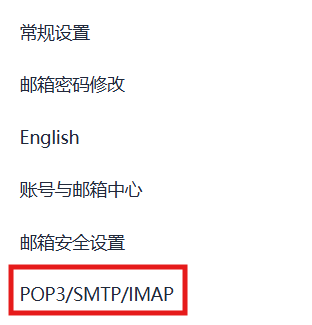
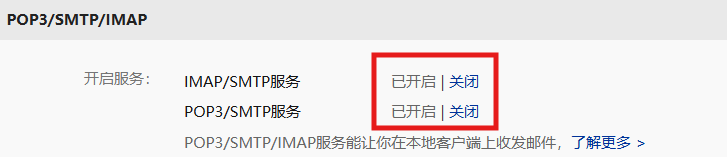
接着把这两个设置打开(默认关闭),会显示一个授权码,可以将这个授权码保存到一个文件,避免忘记
下一步,打开VB6,新建一个标准EXE,放置一个按钮,双击按钮,输入如下代码:
Private Sub Command1_Click()
Dim objMessage As Object
Dim objConfig As Object
Set objConfig = CreateObject("CDO.Configuration")
With objConfig.Fields
.Item("http://schemas.microsoft.com/cdo/configuration/sendusing") = 2'使用网络SMTP服务器
.Item("http://schemas.microsoft.com/cdo/configuration/smtpserver") = "smtp.163.com"
.Item("http://schemas.microsoft.com/cdo/configuration/smtpserverport") = 465
.Item("http://schemas.microsoft.com/cdo/configuration/smtpauthenticate") = 1 ' 基本认证
.Item("http://schemas.microsoft.com/cdo/configuration/sendusername") = "发件人@163.com"
.Item("http://schemas.microsoft.com/cdo/configuration/sendpassword") = "授权码"
.Item("http://schemas.microsoft.com/cdo/configuration/smtpusessl") = 1
.Item("http://schemas.microsoft.com/cdo/configuration/smtpconnectiontimeout") = 60
.Update
End With
' 创建邮件对象并设置配置
Set objMessage = CreateObject("CDO.Message")
Set objMessage.Configuration = objConfig
With objMessage
.From = "发件人@163.com"
.To = "收件人@xxx.com"
.Subject = "标题"
.TextBody = "发件内容"
.Send
End With
End Sub
运行之后,点击Command1,此时收件人邮箱会出现一封邮件。
接下来,就可以制作验证码功能了。
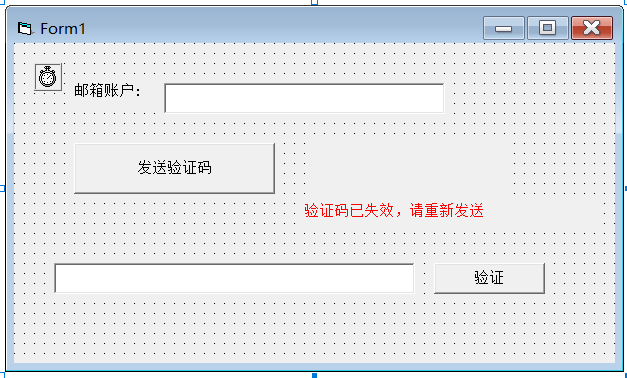
首先,在窗口上放置一个text1,用于输入收件人的邮箱地址。放置Command1用于发送验证码。放置Timer1用于计时验证码失效时间和一分钟后可重新发送。放置text2用于输入得到的验证码。放置Command2用于校验验证码。放置Label1,提示邮箱地址。放置Label2,清空Caption属性。再放置Label3,吧ForeColor设置为红色,吧Caption设置为“验证码已失效,请重新发送”。具体如下图:
输入如下代码:
Option Explicit
Dim code As String
Dim s As Integer
Private Sub Command1_Click()
Dim objMessage As Object
Dim objConfig As Object
Label3.Visible = False
Label1.Caption = ""
s = 60
Command1.Enabled = False
Randomize
code = Replace(Str(Int((1000000 * Rnd) + 100000)), " ", "") '生成10000到100000之间的随机数做为验证码
' 创建邮件配置对象
Set objConfig = CreateObject("CDO.Configuration")
Timer1.Enabled = True
Timer2.Enabled = True
' 配置SMTP服务器
If Replace(Text1.Text, " ", "") <> "" Then
With objConfig.Fields
.Item("http://schemas.microsoft.com/cdo/configuration/sendusing") = 2 ' 使用网络SMTP服务器
.Item("http://schemas.microsoft.com/cdo/configuration/smtpserver") = "smtp.163.com"
.Item("http://schemas.microsoft.com/cdo/configuration/smtpserverport") = 465
.Item("http://schemas.microsoft.com/cdo/configuration/smtpauthenticate") = 1 ' 基本认证
.Item("http://schemas.microsoft.com/cdo/configuration/sendusername") = "发件人@163.com"
.Item("http://schemas.microsoft.com/cdo/configuration/sendpassword") = "授权码"
.Item("http://schemas.microsoft.com/cdo/configuration/smtpusessl") = 1
.Item("http://schemas.microsoft.com/cdo/configuration/smtpconnectiontimeout") = 60
.Update
End With
' 创建邮件对象并设置配置
Set objMessage = CreateObject("CDO.Message")
Set objMessage.Configuration = objConfig
' 设置邮件内容
With objMessage
.From = "发件人@163.com"
.To = Text1.Text
.Subject = "dd团队 – 邮箱验证码"
.TextBody = "尊敬的 " + Text1.Text + " ,您好!" + vbCrLf + "您在" + Str(Now()) + "登录的验证码为 " + code + vbCrLf + "请在1分钟内使用,1分钟后将失效"
.Send
End With
' 释放资源
Set objMessage = Nothing
Set objConfig = Nothing
End If
End Sub
Private Sub Command2_Click()
If Replace(Text2.Text, " ", "") <> "" And Replace(Text2.Text, " ", "") = code Then MsgBox "验证成功", 64, "dd" Else:: MsgBox "验证失败", 16, "dd"
End Sub
Private Sub Form_Load()
s = 60
End Sub
Private Sub Timer1_Timer()
s = s – 1
Label1.Caption = Str(s) + "秒后重发"
If s = 0 Then
Label1.Caption = ""
Command1.Enabled = True
Label3.Visible = True
code = ""
Timer1.Enabled = False
End If
End Sub
至此,VB6邮箱验证码制作就成功了!打开窗口,在Text1中输入邮箱地址,接着收到后输入到Text2,点击验证,会弹出验证成功,时间过了一分钟后或验证码不对,会弹出验证失败。





评论前必须登录!
注册