 网硕互联帮助中心
Flutter for OpenHarmony从基础到专业:深度解析新版番茄钟的倒计时优化
在上一版《习惯打卡》应用中,番茄钟功能虽已可用,但交互单一、视觉平淡。而本次升级则是一次全方位的专业化跃迁——通过引入圆形进度可视化、多时长预设、动态状态指示、微调控制与沉浸式完成反馈,将一个简单的倒计时器转变为真正符合番茄工作法理念的专注力引擎。本文将聚焦于倒计时模块的五大核心优化。
完整效果展示 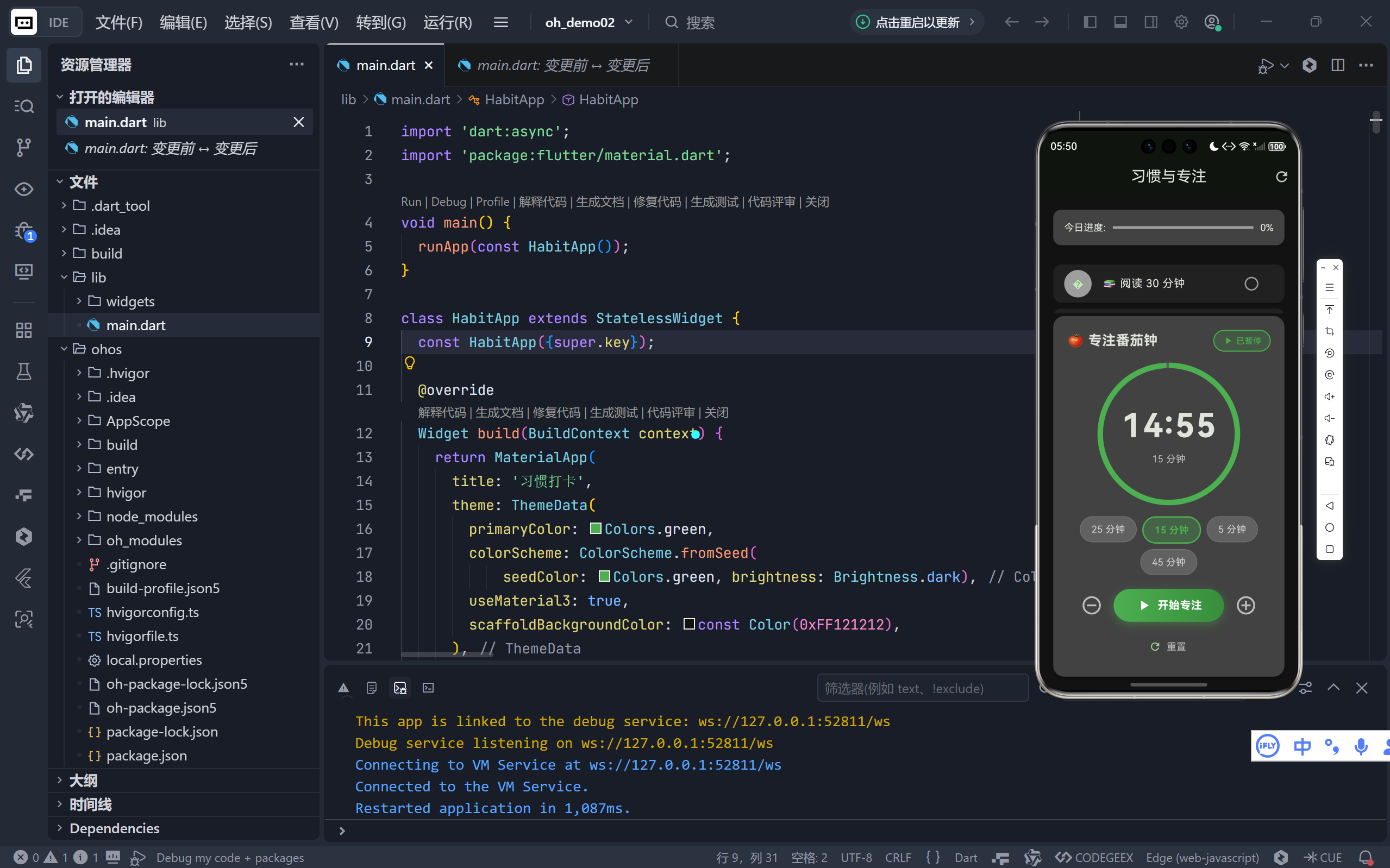
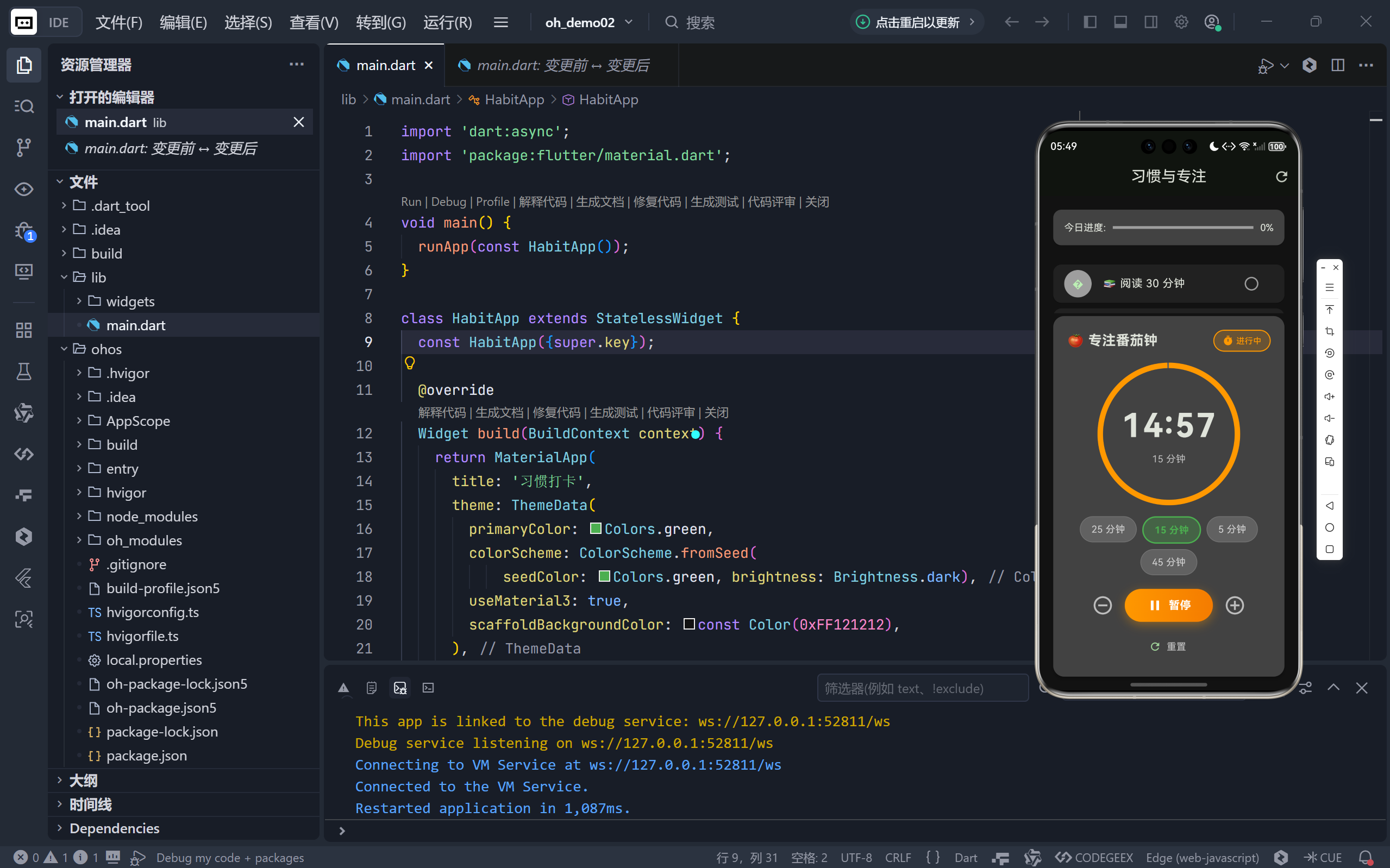
一、视觉革命:圆形进度条取代数字孤岛
1. 空间利用与信息密度
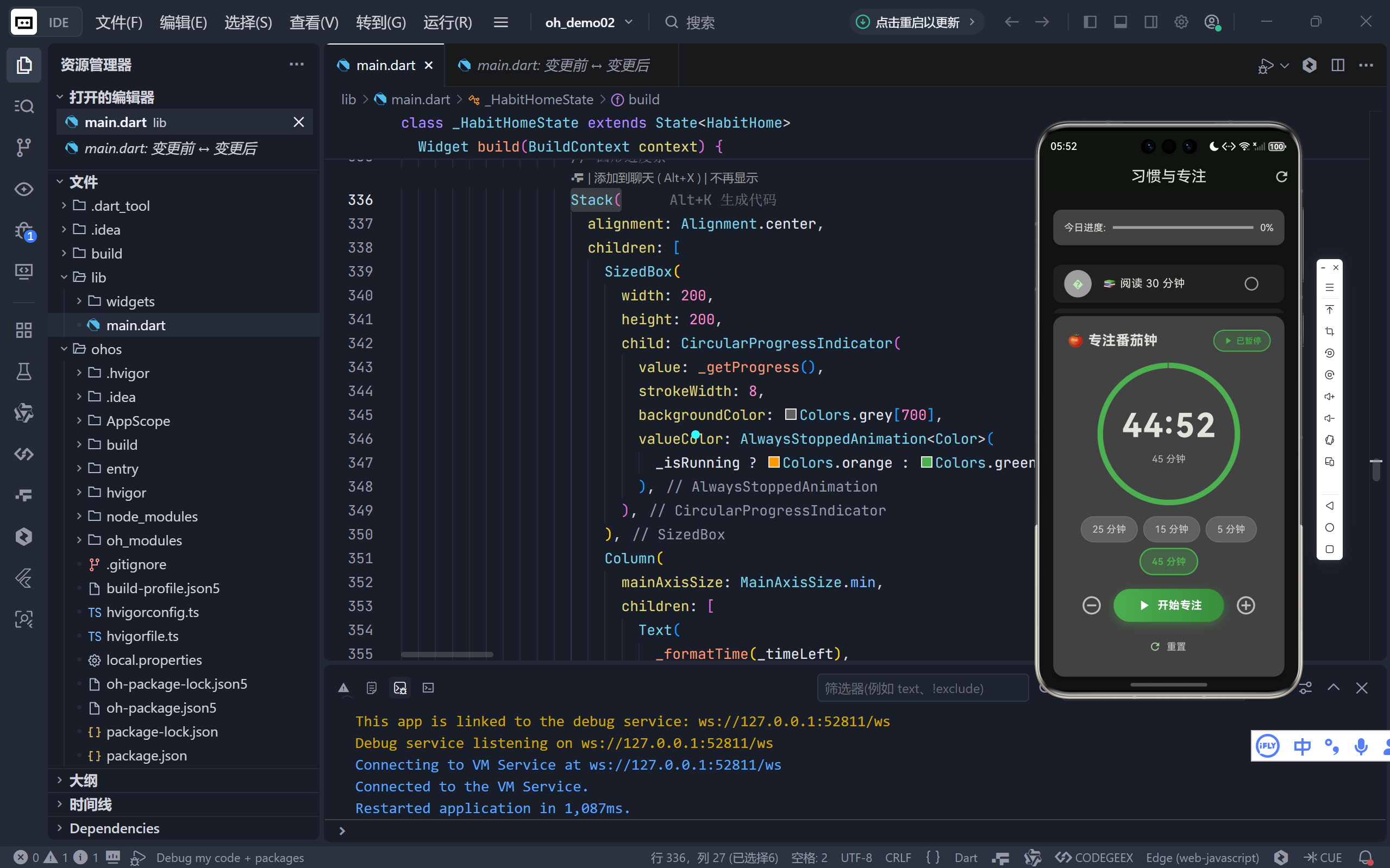
旧版仅显示大号时间文本(40px),新版采用 Stack 布局叠加圆形进度条 + 中心时间:
Stack(
alignment: Alignment.center,
children: [
SizedBox(
width: 200,
height: 200,
child: CircularProgressIndicator(
value: _getProgress(), // 动态计算进度
strokeWidth: 8,
backgroundColor: Colors.grey[700],
valueColor: AlwaysStoppedAnimation<Color>(
_isRunning ? Colors.orange : Colors.green,
),
),
),
Column(
children: [
Text(_formatTime(_timeLeft), style: TextStyle(fontSize: 48)),
Text('$_selectedDuration 分钟', style: TextStyle(color: Colors.grey[400])),
],
),
],
)
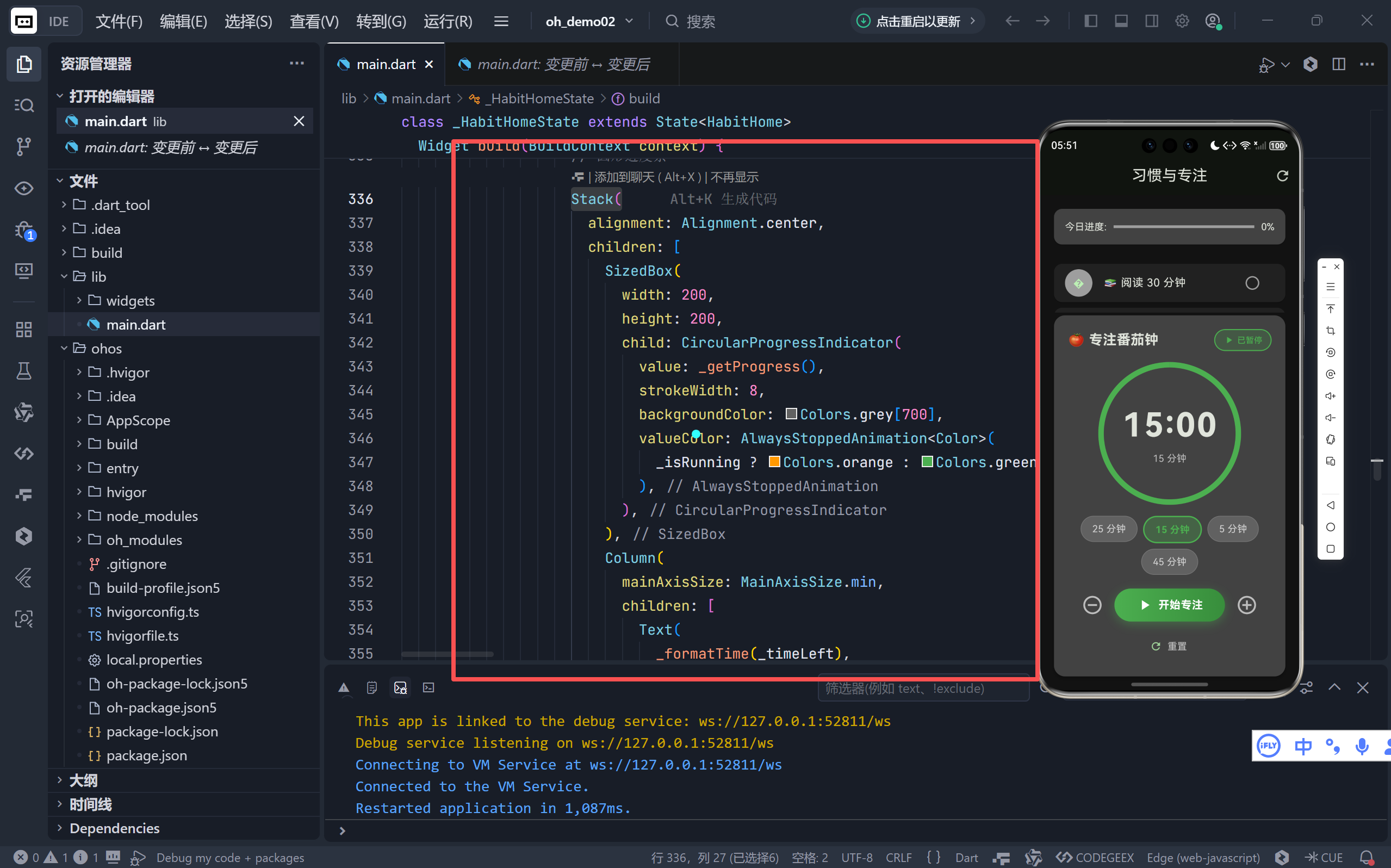
- 外环:灰色背景表示总时长,彩色弧线表示剩余时间比例;
- 中心:超大时间数字(48px)确保远距离可读;
- 底部标签:明确标注当前选择的时长(如“25 分钟”),避免用户遗忘设置。
💡 设计原理:人类对圆形进度的感知比线性条更直观,尤其适合倒计时场景。
2. 动态色彩语义
- 运行中:进度条为 orange(警示色),暗示“时间正在流逝”;
- 暂停/待机:进度条变为 green(安全色),传递“可控”状态;
- 色彩变化与按钮、状态标签同步,形成统一的视觉语言系统。
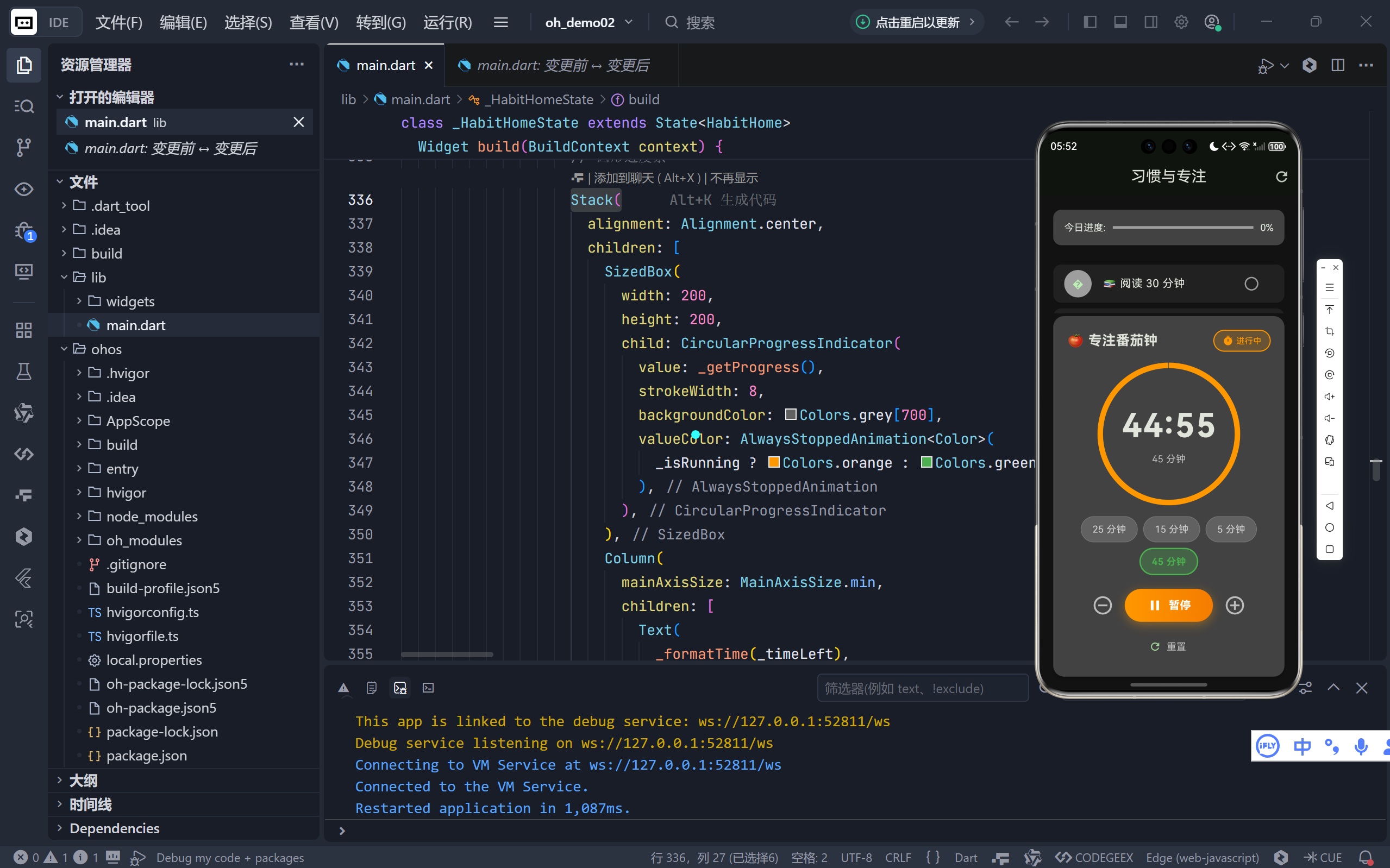
二、灵活时长:预设选项满足多元场景
1. 四档专业配置
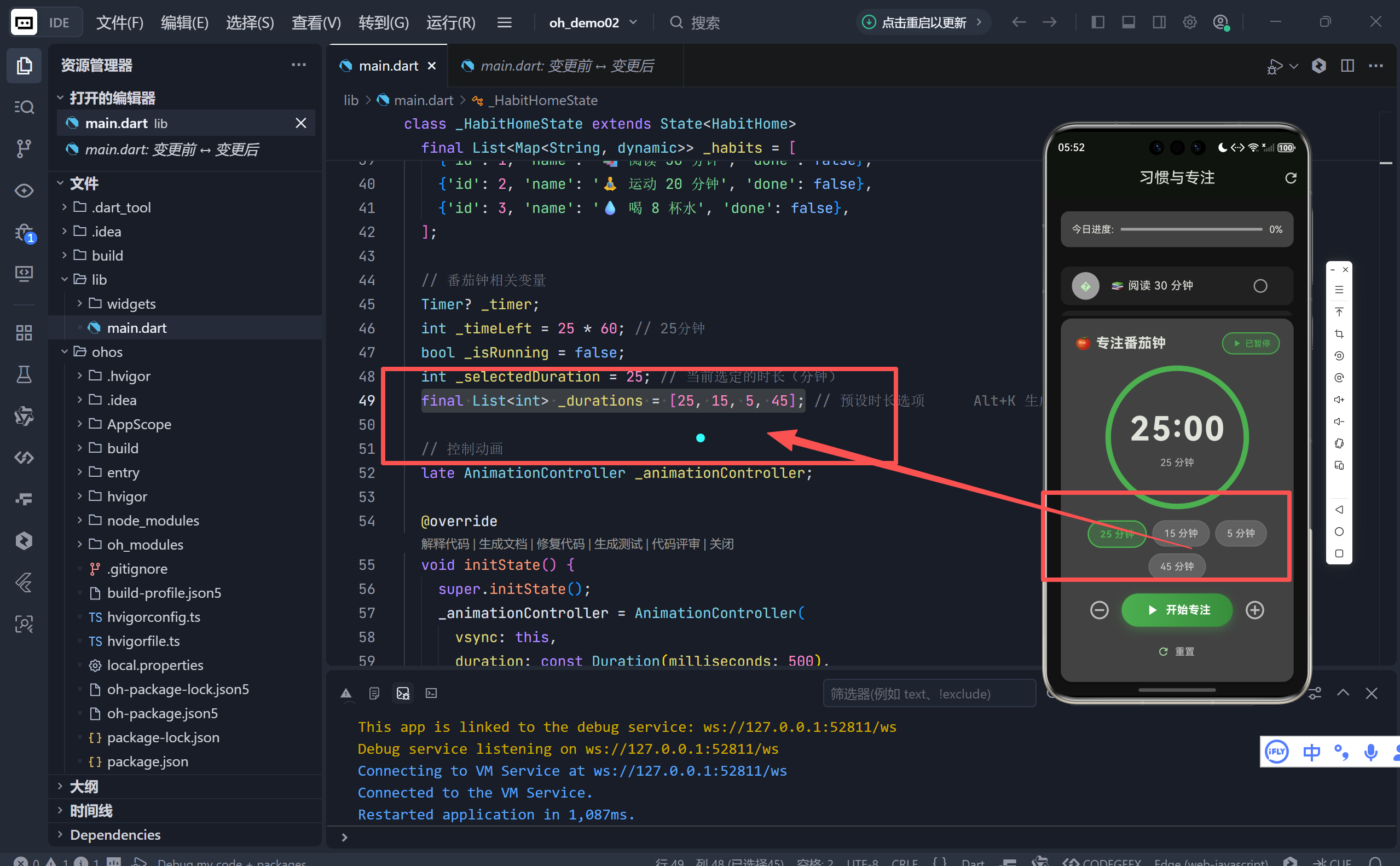
final List<int> _durations = [25, 15, 5, 45];
- 25分钟:标准番茄钟(适合深度工作);
- 15分钟:短任务冲刺(如回复邮件);
- 5分钟:快速冥想或休息倒计时;
- 45分钟:长时间专注(适合写作、编程)。
2. 交互式选择器
Wrap(
children: _durations.map((duration) {
final isSelected = duration == _selectedDuration;
return InkWell(
onTap: () => _changeDuration(duration),
child: Container(
decoration: BoxDecoration(
color: isSelected ? Colors.green.withValues(alpha: 0.3) : Colors.grey[700],
border: Border.all(
color: isSelected ? Colors.green : Colors.grey[600]!,
width: isSelected ? 2 : 1,
),
),
child: Text('$duration 分钟', style: TextStyle(
color: isSelected ? Colors.green : Colors.white70,
fontWeight: isSelected ? FontWeight.bold : FontWeight.normal,
)),
),
);
}).toList(),
)
- 选中高亮:绿色边框 + 加粗文字 + 半透明背景;
- Wrap 布局:自动换行适配不同屏幕宽度;
- 即时生效:切换时自动重置倒计时,无需额外确认。
✅ 用户不再被“25分钟”束缚,可根据任务性质自由选择节奏。
三、精细控制:±1分钟微调打破僵化
1. 人性化时间调整
Row(
children: [
IconButton(
onPressed: _timeLeft > 60 ? () => _addTime(–1) : null,
icon: Icon(Icons.remove_circle_outline),
),
// 开始按钮
IconButton(
onPressed: () => _addTime(1),
icon: Icon(Icons.add_circle_outline),
),
],
)
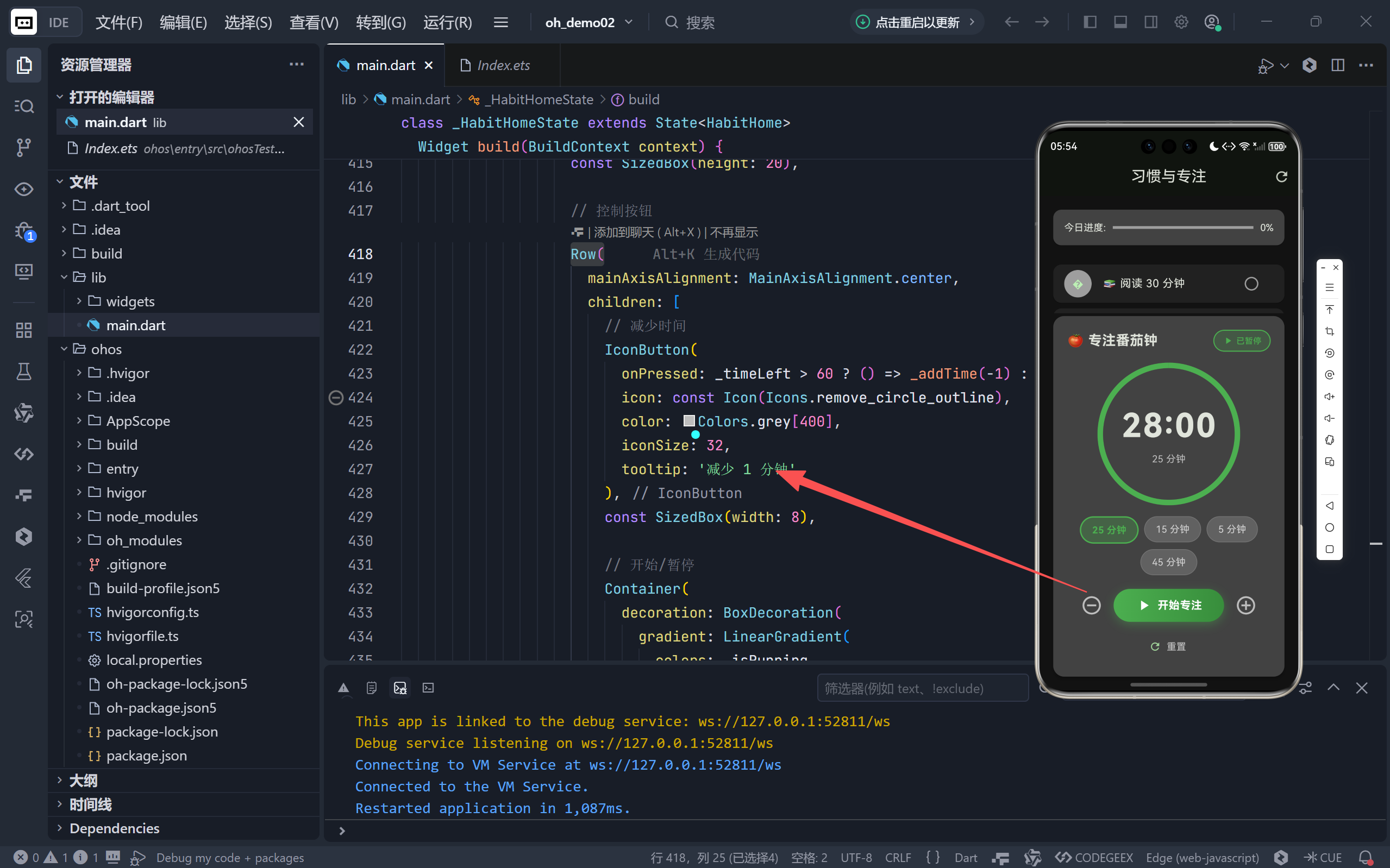
- 增加时间:随时点击“+”延长专注(如任务未完成);
- 减少时间:仅当剩余 >1 分钟时可减,防止误操作归零;
- Tooltip 提示:悬停显示“增加/减少 1 分钟”,提升可用性。
2. 动态禁用逻辑
onPressed: _timeLeft > 60 ? () => _addTime(–1) : null
- 当剩余时间 ≤60 秒时,“-”按钮自动禁用(变灰不可点);
- 避免用户将时间减至负数或 0 的异常状态。
四、状态感知:实时运行指示器
1. 顶部状态标签
Container(
decoration: BoxDecoration(
color: _isRunning ? Colors.orange.withValues(alpha: 0.2) : Colors.green.withValues(alpha: 0.2),
border: Border.all(color: _isRunning ? Colors.orange : Colors.green),
),
child: Row(
children: [
Icon(_isRunning ? Icons.timer : Icons.play_arrow),
Text(_isRunning ? '进行中' : '已暂停'),
],
),
)
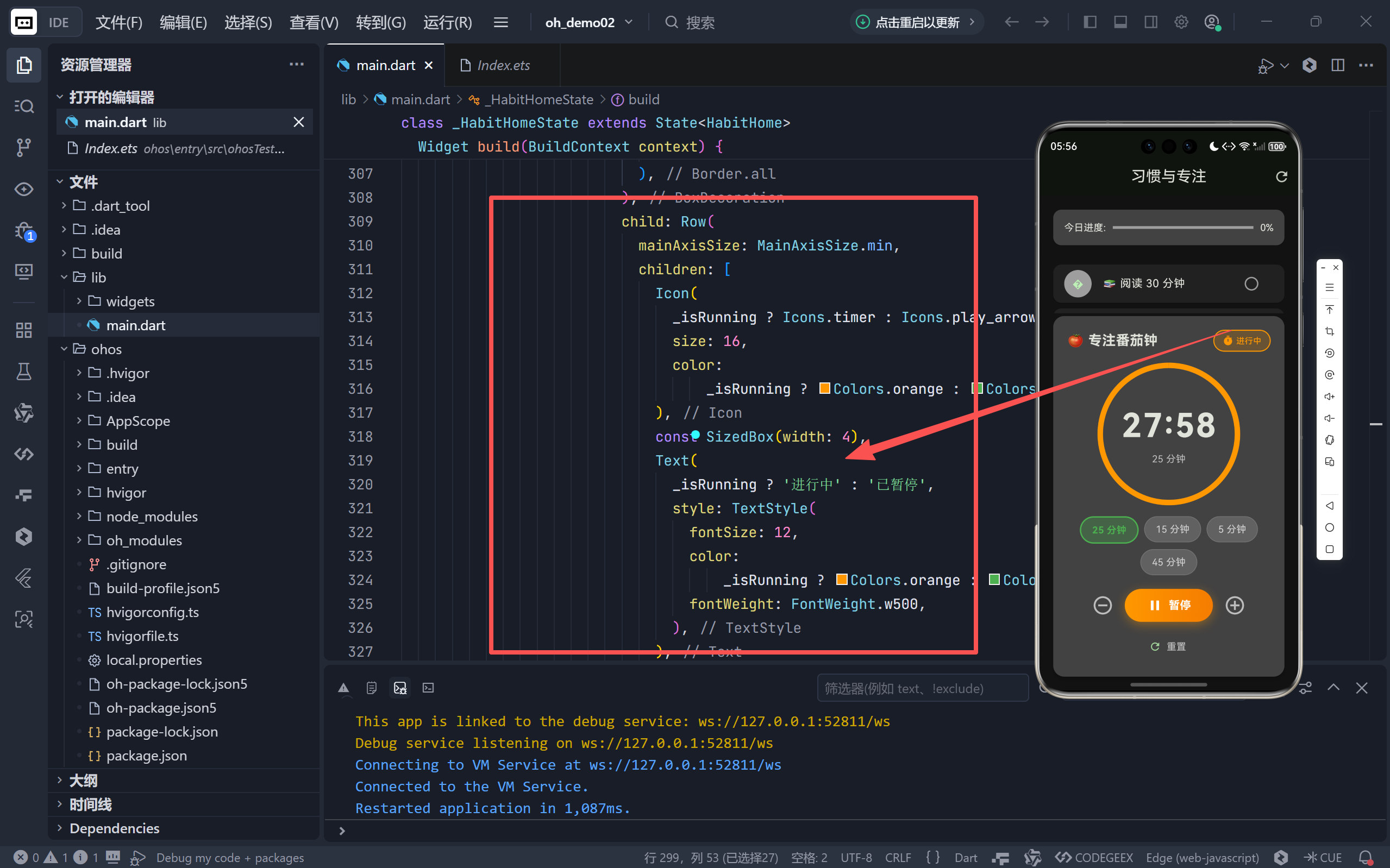
- 运行中:橙色标签 + timer 图标 + “进行中”文字;
- 暂停/待机:绿色标签 + play_arrow 图标 + “已暂停”文字;
- 位置醒目:位于番茄钟区域右上角,一眼可知当前状态。
🎯 解决了旧版“仅靠按钮文字判断状态”的认知负担。
五、完成仪式:对话框强化正向反馈
1. 沉浸式完成弹窗
showDialog(
barrierDismissible: false, // 禁止点击外部关闭
builder: (context) => AlertDialog(
title: Row(children: [
Icon(Icons.check_circle, color: Colors.green),
Text('🎉 专注完成!'),
]),
content: Text('恭喜你完成了一个番茄钟!\\n现在可以休息一下了。'),
actions: [
TextButton(onPressed: () { Navigator.pop(); _resetTimer(); }, child: Text('开始新的专注')),
ElevatedButton(onPressed: () { Navigator.pop(); }, child: Text('稍后继续')),
],
),
)
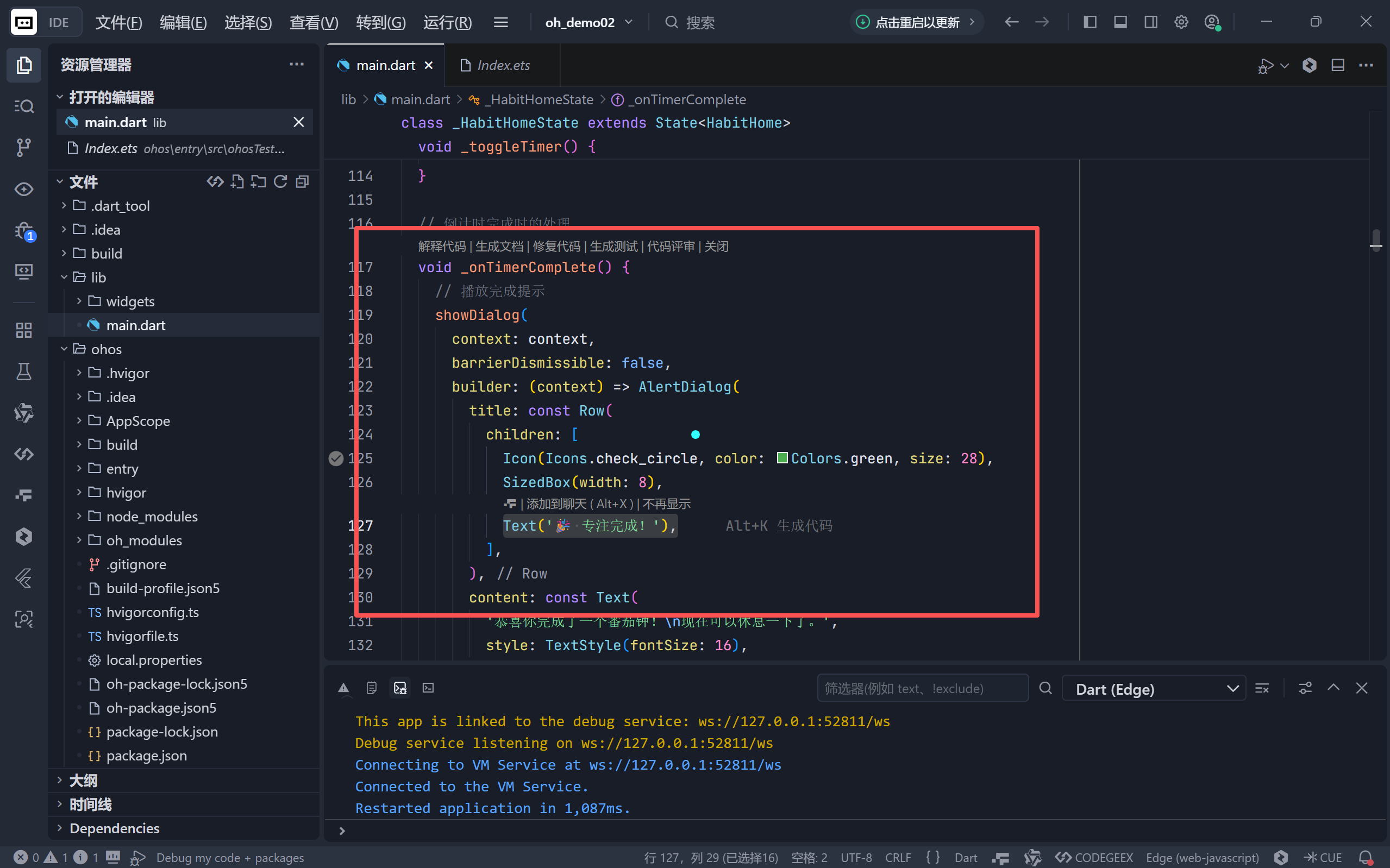
- 强制中断:barrierDismissible: false 确保用户必须处理完成事件;
- 情感化文案:“恭喜你”、“🎉”营造成就感;
- 双选项引导:
- “开始新的专注”:一键重置并启动新番茄钟;
- “稍后继续”:仅关闭弹窗,保留当前状态。
2. 行为心理学应用
- 完成番茄钟是高价值行为,理应获得强烈正反馈;
- 弹窗设计促使用户主动决策下一步,而非无意识继续
工作。
六、工程细节:健壮性与扩展性
mounted 检查 定时器回调中加入 if (!mounted) return;,防止页面销毁后 setState 报错。
进度计算封装 _getProgress() 方法独立计算 (剩余时间 / 总时间),逻辑清晰可复用。
动画预留接口 虽未使用 _animationController,但保留初始化代码,为未来添加完成动画(如粒子效果)留扩展点。
震动/音效占位 _playTickSound() 方法虽为空,但结构完整,便于后续集成声音库(如 audioplayers)。
结语:倒计时背后的产品哲学
这次番茄钟升级远不止“加了个圆圈”那么简单。它体现了三个深层设计理念:
🌐 加入社区
欢迎加入 开源鸿蒙跨平台开发者社区,获取最新资源与技术支持: 👉 开源鸿蒙跨平台开发者社区 完整代码
import 'dart:async';
import 'package:flutter/material.dart';
void main() {
runApp(const HabitApp());
}
class HabitApp extends StatelessWidget {
const HabitApp({super.key});
@override
Widget build(BuildContext context) {
return MaterialApp(
title: '习惯打卡',
theme: ThemeData(
primaryColor: Colors.green,
colorScheme: ColorScheme.fromSeed(
seedColor: Colors.green, brightness: Brightness.dark),
useMaterial3: true,
scaffoldBackgroundColor: const Color(0xFF121212),
),
home: const HabitHome(),
debugShowCheckedModeBanner: false,
);
}
}
class HabitHome extends StatefulWidget {
const HabitHome({super.key});
@override
State<HabitHome> createState() => _HabitHomeState();
}
class _HabitHomeState extends State<HabitHome>
with SingleTickerProviderStateMixin {
// 习惯列表 (id, 名称, 是否完成)
final List<Map<String, dynamic>> _habits = [
{'id': 1, 'name': '📚 阅读 30 分钟', 'done': false},
{'id': 2, 'name': '🧘♂️ 运动 20 分钟', 'done': false},
{'id': 3, 'name': '💧 喝 8 杯水', 'done': false},
];
// 番茄钟相关变量
Timer? _timer;
int _timeLeft = 25 * 60; // 25分钟
bool _isRunning = false;
int _selectedDuration = 25; // 当前选定的时长(分钟)
final List<int> _durations = [25, 15, 5, 45]; // 预设时长选项
// 控制动画
late AnimationController _animationController;
@override
void initState() {
super.initState();
_animationController = AnimationController(
vsync: this,
duration: const Duration(milliseconds: 500),
);
_playTickSound();
}
@override
void dispose() {
_timer?.cancel();
_animationController.dispose();
super.dispose();
}
// 切换习惯完成状态
void _toggleHabit(int id) {
setState(() {
final habit = _habits.firstWhere((h) => h['id'] == id);
habit['done'] = !habit['done'];
if (habit['done']) {
_animationController.forward().then((_) {
_animationController.reverse();
});
}
});
}
// 播放滴答声效果(通过震动模拟)
void _playTickSound() async {
// 这里可以添加实际的声音播放逻辑
// 当前只是占位符
}
// 番茄钟开始/暂停
void _toggleTimer() {
if (_isRunning) {
_timer?.cancel();
} else {
_timer = Timer.periodic(const Duration(seconds: 1), (timer) {
if (!mounted) {
timer.cancel();
return;
}
setState(() {
if (_timeLeft > 0) {
_timeLeft—;
} else {
_timer?.cancel();
_isRunning = false;
_onTimerComplete();
}
});
});
}
setState(() {
_isRunning = !_isRunning;
});
}
// 倒计时完成时的处理
void _onTimerComplete() {
// 播放完成提示
showDialog(
context: context,
barrierDismissible: false,
builder: (context) => AlertDialog(
title: const Row(
children: [
Icon(Icons.check_circle, color: Colors.green, size: 28),
SizedBox(width: 8),
Text('🎉 专注完成!'),
],
),
content: const Text(
'恭喜你完成了一个番茄钟!\\n现在可以休息一下了。',
style: TextStyle(fontSize: 16),
),
actions: [
TextButton(
onPressed: () {
Navigator.of(context).pop();
_resetTimer();
},
child: const Text('开始新的专注'),
),
ElevatedButton(
onPressed: () {
Navigator.of(context).pop();
},
style: ElevatedButton.styleFrom(
backgroundColor: Colors.green,
),
child: const Text('稍后继续'),
),
],
),
);
}
// 重置番茄钟
void _resetTimer() {
_timer?.cancel();
setState(() {
_timeLeft = _selectedDuration * 60;
_isRunning = false;
});
}
// 切换倒计时时长
void _changeDuration(int minutes) {
_timer?.cancel();
setState(() {
_selectedDuration = minutes;
_timeLeft = minutes * 60;
_isRunning = false;
});
}
// 增加时间
void _addTime(int minutes) {
if (_timeLeft > 0) {
setState(() {
_timeLeft += minutes * 60;
});
}
}
// 格式化时间 (秒 –> MM:SS)
String _formatTime(int seconds) {
int minutes = seconds ~/ 60;
int secs = seconds % 60;
return '${minutes.toString().padLeft(2, '0')}:${secs.toString().padLeft(2, '0')}';
}
// 计算进度百分比
double _getProgress() {
return _timeLeft / (_selectedDuration * 60);
}
@override
Widget build(BuildContext context) {
// 计算完成进度
int completed = _habits.where((h) => h['done']).length;
double progress = _habits.isEmpty ? 0 : completed / _habits.length;
return Scaffold(
appBar: AppBar(
title: const Text('习惯与专注'),
centerTitle: true,
actions: [
IconButton(
icon: const Icon(Icons.refresh),
onPressed: () {
setState(() {
for (var h in _habits) {
h['done'] = false;
}
});
},
)
],
),
body: Padding(
padding: const EdgeInsets.all(16.0),
child: Column(
children: [
// 进度条
Card(
color: Colors.grey[800],
child: Padding(
padding: const EdgeInsets.all(16),
child: Row(
children: [
const Text('今日进度:'),
const SizedBox(width: 10),
Expanded(
child: LinearProgressIndicator(
value: progress,
backgroundColor: Colors.grey,
color: Colors.green,
),
),
const SizedBox(width: 10),
Text('${(progress * 100).toInt()}%'),
],
),
),
),
const SizedBox(height: 20),
// 习惯列表
Expanded(
child: ListView.builder(
itemCount: _habits.length,
itemBuilder: (context, index) {
final habit = _habits[index];
return Card(
color: habit['done']
? Colors.green.withValues(alpha: 0.2)
: Colors.grey[900],
child: ListTile(
leading: CircleAvatar(
backgroundColor:
habit['done'] ? Colors.green : Colors.grey,
child: Text(habit['name'][0]),
),
title: Text(habit['name']),
trailing: IconButton(
icon: Icon(
habit['done']
? Icons.check_circle
: Icons.radio_button_unchecked,
color: habit['done'] ? Colors.green : Colors.grey,
),
onPressed: () => _toggleHabit(habit['id']),
),
),
);
},
),
),
// 番茄钟区域
Card(
color: Colors.grey[800],
elevation: 4,
shape: RoundedRectangleBorder(
borderRadius: BorderRadius.circular(16),
),
child: Padding(
padding: const EdgeInsets.all(20),
child: Column(
children: [
Row(
mainAxisAlignment: MainAxisAlignment.spaceBetween,
children: [
const Text('🍅 专注番茄钟',
style: TextStyle(
fontSize: 20, fontWeight: FontWeight.bold)),
Container(
padding: const EdgeInsets.symmetric(
horizontal: 12, vertical: 6),
decoration: BoxDecoration(
color: _isRunning
? Colors.orange.withValues(alpha: 0.2)
: Colors.green.withValues(alpha: 0.2),
borderRadius: BorderRadius.circular(20),
border: Border.all(
color: _isRunning ? Colors.orange : Colors.green,
width: 1.5,
),
),
child: Row(
mainAxisSize: MainAxisSize.min,
children: [
Icon(
_isRunning ? Icons.timer : Icons.play_arrow,
size: 16,
color:
_isRunning ? Colors.orange : Colors.green,
),
const SizedBox(width: 4),
Text(
_isRunning ? '进行中' : '已暂停',
style: TextStyle(
fontSize: 12,
color:
_isRunning ? Colors.orange : Colors.green,
fontWeight: FontWeight.w500,
),
),
],
),
),
],
),
const SizedBox(height: 20),
// 圆形进度条
Stack(
alignment: Alignment.center,
children: [
SizedBox(
width: 200,
height: 200,
child: CircularProgressIndicator(
value: _getProgress(),
strokeWidth: 8,
backgroundColor: Colors.grey[700],
valueColor: AlwaysStoppedAnimation<Color>(
_isRunning ? Colors.orange : Colors.green,
),
),
),
Column(
mainAxisSize: MainAxisSize.min,
children: [
Text(
_formatTime(_timeLeft),
style: const TextStyle(
fontSize: 48,
fontWeight: FontWeight.bold,
letterSpacing: 2,
),
),
const SizedBox(height: 4),
Text(
'$_selectedDuration 分钟',
style: TextStyle(
fontSize: 14,
color: Colors.grey[400],
),
),
],
),
],
),
const SizedBox(height: 20),
// 时长选择
Wrap(
spacing: 8,
runSpacing: 8,
alignment: WrapAlignment.center,
children: _durations.map((duration) {
final isSelected = duration == _selectedDuration;
return InkWell(
onTap: () => _changeDuration(duration),
borderRadius: BorderRadius.circular(20),
child: Container(
padding: const EdgeInsets.symmetric(
horizontal: 16, vertical: 8),
decoration: BoxDecoration(
color: isSelected
? Colors.green.withValues(alpha: 0.3)
: Colors.grey[700],
borderRadius: BorderRadius.circular(20),
border: Border.all(
color: isSelected
? Colors.green
: Colors.grey[600]!,
width: isSelected ? 2 : 1,
),
),
child: Text(
'$duration 分钟',
style: TextStyle(
color:
isSelected ? Colors.green : Colors.white70,
fontWeight: isSelected
? FontWeight.bold
: FontWeight.normal,
),
),
),
);
}).toList(),
),
const SizedBox(height: 20),
// 控制按钮
Row(
mainAxisAlignment: MainAxisAlignment.center,
children: [
// 减少时间
IconButton(
onPressed: _timeLeft > 60 ? () => _addTime(-1) : null,
icon: const Icon(Icons.remove_circle_outline),
color: Colors.grey[400],
iconSize: 32,
tooltip: '减少 1 分钟',
),
const SizedBox(width: 8),
// 开始/暂停
Container(
decoration: BoxDecoration(
gradient: LinearGradient(
colors: _isRunning
? [Colors.orange, Colors.orange.shade700]
: [Colors.green, Colors.green.shade700],
),
borderRadius: BorderRadius.circular(30),
boxShadow: [
BoxShadow(
color:
(_isRunning ? Colors.orange : Colors.green)
.withValues(alpha: 0.4),
blurRadius: 12,
offset: const Offset(0, 4),
),
],
),
child: InkWell(
onTap: _toggleTimer,
borderRadius: BorderRadius.circular(30),
child: Padding(
padding: const EdgeInsets.symmetric(
horizontal: 32, vertical: 12),
child: Row(
mainAxisSize: MainAxisSize.min,
children: [
Icon(
_isRunning ? Icons.pause : Icons.play_arrow,
color: Colors.white,
),
const SizedBox(width: 8),
Text(
_isRunning ? '暂停' : '开始专注',
style: const TextStyle(
color: Colors.white,
fontSize: 16,
fontWeight: FontWeight.bold,
),
),
],
),
),
),
),
const SizedBox(width: 8),
// 增加时间
IconButton(
onPressed: () => _addTime(1),
icon: const Icon(Icons.add_circle_outline),
color: Colors.grey[400],
iconSize: 32,
tooltip: '增加 1 分钟',
),
],
),
const SizedBox(height: 12),
// 重置按钮
TextButton.icon(
onPressed: _resetTimer,
icon: const Icon(Icons.refresh, size: 18),
label: const Text('重置'),
style: TextButton.styleFrom(
foregroundColor: Colors.grey[400],
),
),
],
),
),
),
],
),
),
);
}
}







评论前必须登录!
注册