 网硕互联帮助中心
框架:RuoYi-Vue-Plus
下载地址:
(1)后端代码 https://www.gitlink.org.cn/dromara-org/RuoYi-Vue-Plus/tree/5.X
或
https://gitee.com/dromara/RuoYi-Vue-Plus
或
https://gitee.com/dromara/RuoYi-Cloud-Plus
(2)前端代码 https://gitee.com/JavaLionLi/plus-ui
前端vue主动发消息给后台,后台将数据通过websocket返回给前端
1.后台
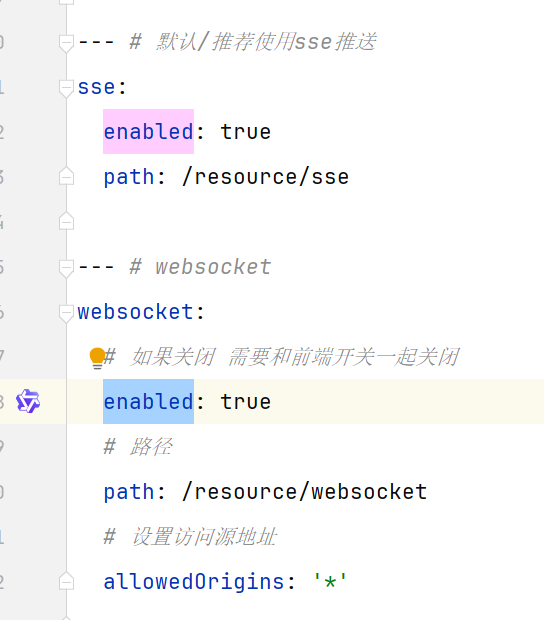
1.1 开启websocket、sse
在 application.yml 中,找到 sse 及 websocket 的配置项,将 enabled 的值改为 true
1.2 业务模块引入 websocket 依赖
业务模块在 ruoyi-modules 下,如:ruoyi-xxx
<dependency>
<groupId>org.dromara</groupId>
<artifactId>ruoyi-common-websocket</artifactId>
</dependency>
ruoyi-common-websocket 为若依框架自带的公共组件,位于 ruoyi-common 下。
1.3 websocket 配置类
import org.springframework.context.annotation.Bean;
import org.springframework.context.annotation.Configuration;
import org.springframework.web.socket.config.annotation.EnableWebSocket;
import org.springframework.web.socket.server.standard.ServerEndpointExporter;
@Configuration
@EnableWebSocket
public class HisWebSocketConfig {
@Bean
public ServerEndpointExporter serverEndpointExporter() {
return new ServerEndpointExporter();
}
}
1.4 websocket 消息接收、处理
import com.alibaba.fastjson.JSON;
import com.alibaba.fastjson.serializer.SerializerFeature;
import jakarta.annotation.PostConstruct;
import jakarta.annotation.Resource;
import jakarta.websocket.OnClose;
import jakarta.websocket.OnError;
import jakarta.websocket.OnMessage;
import jakarta.websocket.OnOpen;
import jakarta.websocket.Session;
import jakarta.websocket.server.ServerEndpoint;
import lombok.extern.slf4j.Slf4j;
import org.apache.commons.lang3.StringUtils;
import org.dromara.common.core.enums.FormatsType;
import org.dromara.common.core.utils.DateUtils;
import org.dromara.common.core.utils.JsonUtils;
import org.dromara.common.core.utils.SpringUtils;
import org.dromara.common.mybatis.core.page.TableDataInfo;
import org.dromara.common.websocket.utils.WebSocketUtils;
import org.springframework.stereotype.Component;
import java.util.Collections;
import java.util.HashMap;
import java.util.HashSet;
import java.util.List;
import java.util.Map;
import java.util.Set;
/**
* websocket 消息处理
*
* @author
* @date 2026/1/16 星期五
* @since JDK 17
*/
@Slf4j
@Component
@ServerEndpoint("/websocket/message")
public class HisWebSocketServer {
@Resource
private IWebsocketService websocketService;
/**
* 静态变量,用来记录当前在线连接数。应该把它设计成线程安全的。
*/
private static int onlineCount = 0;
/**
* 存储在线会话. concurrent包的线程安全Set,用来存放每个客户端对应的MyWebSocket对象。
*/
private static final Set<Session> SESSIONS = Collections.synchronizedSet(new HashSet<>());
/**
* 初始化方法,订阅WebSocket消息主题
*/
@PostConstruct
public void init() {
log.info("初始化HisWebSocketServer, 订阅WebSocket消息主题");
// 订阅WebSocket消息
WebSocketUtils.subscribeMessage((message) -> {
log.info("HisWebSocketServer收到订阅消息: {}", message);
// 发送消息给所有连接的客户端
HisWebSocketServer.sendMessageToAll(message.getMessage());
});
}
/**
* 连接建立成功调用的方法
*/
@OnOpen
public void onOpen(Session session) {
// log.info("Websocket连接建立成功");
// 添加会话到集合中
SESSIONS.add(session);
// 在线数加1
addOnlineCount();
}
@OnClose
public void onClose(Session session) {
// log.info("Websocket连接关闭");
// 从集合中移除会话
SESSIONS.remove(session);
// 在线数减1
subOnlineCount();
}
/**
* 抛出异常时处理
*/
@OnError
public void onError(Session session, Throwable exception) throws Exception {
log.error("Websocket抛出异常时处理.", exception);
// 从集合中移除出错的会话
SESSIONS.remove(session);
// 在线数减1
subOnlineCount();
}
/**
* 服务器接收到客户端消息时调用的方法
*/
@OnMessage
public void onMessage(String message, Session session) {
log.info("Websocket接收到客户端消息.sessionId:{}, 消息:{}", session.getId(), message);
if (StringUtils.isBlank(message)) {
log.info("Websocket接收到的客户端消息为空,不做处理.sessionId:{}", session.getId());
try {
Map<String, Object> result = new HashMap<>(3);
result.put("code", "400");
result.put("msg", "消息不能为空");
result.put("data", "");
session.getBasicRemote().sendText(JSON.toJSONString(result));
} catch (Exception e) {
log.error("Websocket接收到客户端消息-异常:{}", e.getMessage(), e);
}
return;
}
try {
// JSON格式
String regex = "^(\\\\{.*\\\\}|\\\\[.*\\\\])$";
if (!message.matches(regex)) {
log.info("Websocket接收到的客户端消息不是JSON格式,不做处理.sessionId:{}, 消息:{}", session.getId(), message);
Map<String, Object> result = new HashMap<>(3);
result.put("code", "400");
result.put("msg", "消息不是JSON格式");
result.put("data", "");
session.getBasicRemote().sendText(JSON.toJSONString(result));
return;
}
// 处理业务逻辑
this.handleBizLogic(message, session);
// session.getBasicRemote().sendText("服务器已收到消息");
} catch (Exception e) {
log.error("Websocket接收到客户端消息处理-异常:{}", e.getMessage(), e);
}
}
/**
* 处理业务逻辑
*
* @date 2026-01-17
* @param message 客户端消息
* @param session 会话
* @since JDK 17
* @author
*/
private void handleBizLogic(String message, Session session) throws Exception {
// 客户端请求参数
HisWebSocketReqVo reqVo = JSON.parseObject(message.trim(), HisWebSocketReqVo.class);
// TODO 具体业务处理
// 发送消息到客户端(前端),可以是JSON格式,也可以是其他格式,和前端定好就行
session.getBasicRemote().sendText(JSON.toJSONString(bespeakList, SerializerFeature.WriteDateUseDateFormat));
}
/**
* 获取在线连接数
* @return 在线连接数
*/
public static synchronized int getOnlineCount() {
return onlineCount;
}
/**
* 在线连接数加1
*/
public static synchronized void addOnlineCount() {
HisWebSocketServer.onlineCount++;
}
/**
* 在线连接数减1
*/
public static synchronized void subOnlineCount() {
HisWebSocketServer.onlineCount–;
}
/**
* 发送消息给所有连接的客户端
* @param message 消息内容
*/
public static void sendMessageToAll(String message) {
log.info("发送WebSocket消息给所有客户端, 消息内容: {}", message);
// 循环在线会话
for (Session session : SESSIONS) {
try {
if (session.isOpen()) {
session.getBasicRemote().sendText(message);
log.info("成功发送WebSocket消息给客户端, sessionId: {}", session.getId());
} else {
log.warn("客户端连接已关闭, 跳过发送, sessionId: {}", session.getId());
// 移除关闭的会话
SESSIONS.remove(session);
subOnlineCount();
}
} catch (Exception e) {
log.error("发送WebSocket消息给客户端失败, sessionId: {}, 异常: {}", session.getId(), e.getMessage(), e);
}
}
}
}
在 @Component 引入 @Resource,websocketService=null,所以需要SpringUtils 重新实例化。
具体的业务处理,包括 调用service、dao(mapper)等。
到这儿,后台的配置就完成了。
2.前端
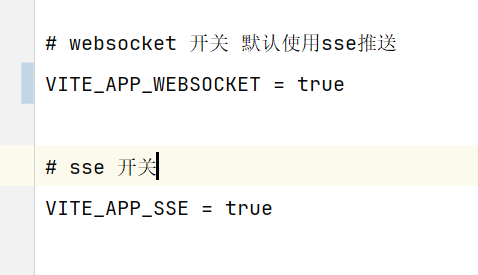
2.1 启用websocket、sse
全局搜索 VITE_APP_WEBSOCKET、VITE_APP_SSE,将其值改为 true
这样才能调用到后台服务。
2.2 引入websocket依赖
在使用到websocket的页面,引入依赖。
import { initWebSocket } from '@/utils/websocket';
2.3 具体代码
其中的 ws://127.0.0.1:18080/websocket/message 即为后台的websocket 链接。
(1)127.0.0.1:18080 为后台服务的IP、端口号
(2)/websocket/message 为后台代码 HisWebSocketServer 定义的。
// WebSocket连接
const baseClassListSocket = ref<any>(null);
// 初始化
onMounted(async () => {
console.log('onMounted开始执行');
// 创建WebSocket连接
console.log('开始创建WebSocket连接');
baseClassListSocket.value = createBaseClassListSocket();
});
// 组件销毁前重置isInitialized并关闭WebSocket连接
onBeforeUnmount(() => {
// 关闭WebSocket连接
if (baseClassListSocket.value) {
baseClassListSocket.value.close();
console.log('排班列表WebSocket连接已关闭');
}
});
// 创建排班列表WebSocket连接
const createBaseClassListSocket = () => {
// 使用后端提供的完整WebSocket地址
const wsUrl = 'ws://127.0.0.1:18080/websocket/message';
const connName = '排班列表WebSocket';
console.log('创建排班列表WebSocket连接,URL:', wsUrl);
return initWebSocket(wsUrl, {
onConnected() {
console.log(`${connName}已经连接`);
},
onDisconnected() {
console.log(`${connName}已经断开`);
},
onMessage: (e) => {
console.log(`${connName}收到原始消息:`, e.data);
if (!e.data || e.data.indexOf('ping') > 0) {
return;
}
try {
const message = JSON.parse(e.data);
console.log(`${connName}收到解析后消息:`, message);
// 处理排班列表消息
if (message.code === 200 && Array.isArray(message.data)) {
handleBaseClassListMessage(message.data);
}
} catch (error) {
console.error(`${connName}消息解析错误:`, error);
}
}
});
};
// 处理排班列表WebSocket消息
const handleBaseClassListMessage = (data: any[]) => {
// 合并结果,构建映射表
const newMap: Record<string, any> = {};
// 处理所有排班数据(包括医生和咨询师)
data.forEach((userTypeGroup) => {
if (userTypeGroup?.list) {
userTypeGroup.list.forEach((user) => {
if (user?.userId && user?.baseWorkClassList) {
const userId = user.userId.toString();
const duty = user.duty?.toString() || '';
// 根据duty区分医生(1)和咨询师(11)
if (duty === '1') {
newMap[`doctor_${userId}`] = user.baseWorkClassList;
} else if (duty === '11') {
newMap[`consultant_${userId}`] = user.baseWorkClassList;
}
}
});
}
});
userBaseClassMap.value = newMap;
};
// 加载排班信息
const loadUserBaseClassList = async () => {
try {
isLoading.value = true;
let startDateStr, endDateStr;
if (boardViewMode.value === '日') {
startDateStr = dayjs(dayInfoList.value[0].date).format('YYYY-MM-DD');
endDateStr = startDateStr;
} else {
startDateStr = dayjs(dayInfoList.value[0].date).format('YYYY-MM-DD');
endDateStr = dayjs(dayInfoList.value[6].date).format('YYYY-MM-DD');
}
// 通过WebSocket发送请求
if (baseClassListSocket.value?.send) {
const requestData = {
startDate: startDateStr,
endDate: endDateStr,
duty: '' // 空字符串表示获取所有岗位
};
baseClassListSocket.value.send(JSON.stringify(requestData));
console.log('排班列表WebSocket请求已发送:', requestData);
} else {
console.error('排班列表WebSocket连接未建立');
}
} catch (error) {
console.error('加载排班信息失败', error);
} finally {
isLoading.value = false;
}
};
3. Nginx配置
18080 是后台接口端口号。
# 普通 API 请求
location /dev-api/ {
proxy_pass http://localhost:18080/;
proxy_set_header Host $host;
proxy_set_header X-Real-IP $remote_addr;
proxy_set_header X-Forwarded-For $proxy_add_x_forwarded_for;
proxy_set_header X-Forwarded-Proto $scheme;
}
# WebSocket 专用路径(必须单独配置!)
location /dev-api/websocket/ {
proxy_pass http://localhost:18080/websocket/; # 注意结尾斜杠匹配
proxy_http_version 1.1;
proxy_set_header Upgrade $http_upgrade; # ⭐ 关键:支持协议升级
proxy_set_header Connection "upgrade"; # ⭐ 关键:触发 101 切换
proxy_set_header Host $host;
proxy_set_header X-Real-IP $remote_addr;
proxy_set_header X-Forwarded-For $proxy_add_x_forwarded_for;
proxy_set_header X-Forwarded-Proto $scheme;
}




评论前必须登录!
注册