 网硕互联帮助中心
nginx部署vue3+vite应用防踩坑指南
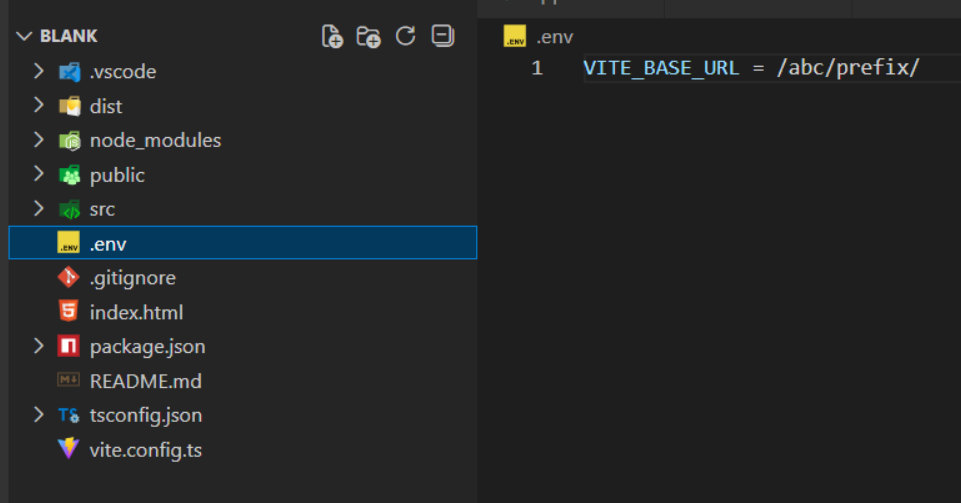
项目结构:
这里我用环境变量来存系统配置信息
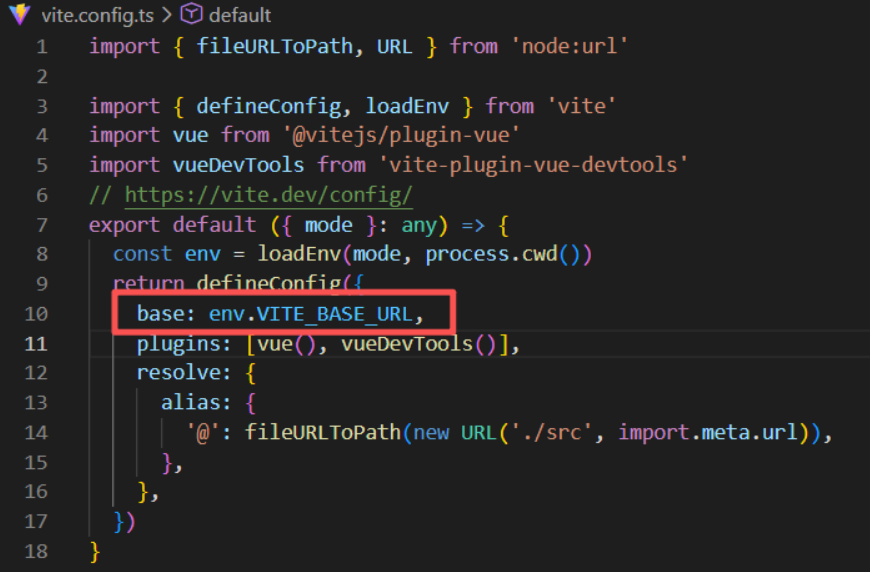
1. 在vite.config中获取之前环境变量配置的静态资源路径**
通过以下方式获取, 赋值给base
const env = loadEnv(mode, process.cwd()) // 获取环境变量
2. 同时在创建router时传入这个参数
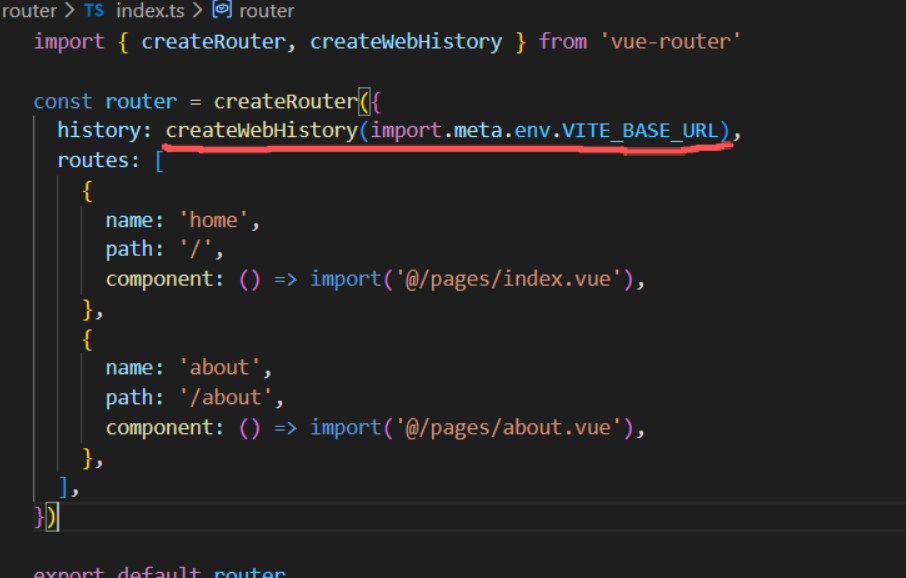
web-history模式才需要,但是可以都传 (hash路由不走请求)
3. 打包
pnpm build
4. 打包结果分析和nginx配置
vite在打包结果中,把index.html中引用的本地静态资源加上了vite.config配置的base前缀
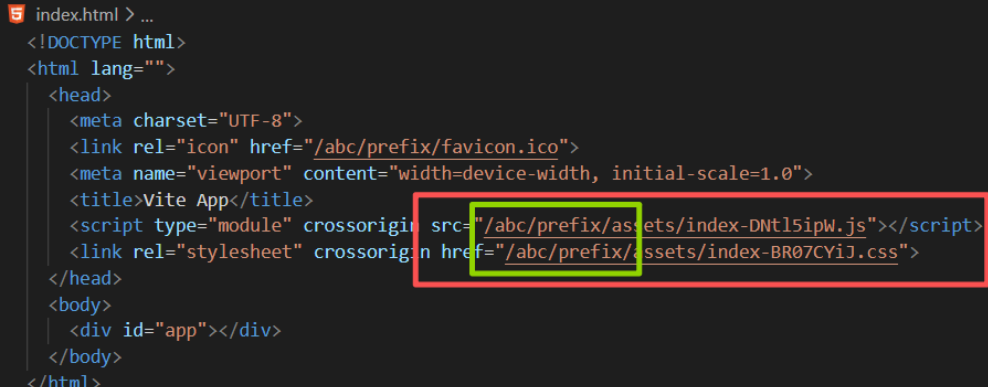
这段
4.1 什么是根路径(/) ?
/abc/prefix/xxx.js 里最前面的那个 / 到底是谁的“根”?它不是磁盘根,也不是 Nginx 的 root/alias 根,而是 URL 的站点根(web root)。
/ 是浏览器眼中的“站点根路径”
它指的是:
http(s)://你的域名:端口/
例如:
http://localhost:89/
所以:
/abc/prefix/xxx.js
表示浏览器会请求:
http://localhost:89/abc/prefix/xxx.js
4.2 那 Nginx 的 root/alias 起什么作用?
- root —— 把 URL 拼接到 root 后面
如果你写:
location /abc/prefix/ {
root /var/www;
}
请求 /abc/prefix/xxx.js 会映射到磁盘:
/var/www/abc/prefix/xxx.js
- alias —— 用 alias 替换掉 location 前缀
location /abc/prefix/ {
alias /var/www/dist/;
}
请求 /abc/prefix/xxx.js 会映射到磁盘:
/var/www/dist/xxx.js
⚠️ root 后面的路径可以不加’/‘, alias 后面必须加’/’
关键点总结
- / 是 URL 根,不是磁盘根
它永远指向:
http://域名:端口/
- root/alias 决定的是“URL → 磁盘路径”的映射
它们不会改变 URL 的含义,只决定 Nginx 去哪里找文件。
- Vite 的 base 决定 index.html 里生成的 URL
例如:
base: '/abc/prefix/'
就会生成:
<script src="/abc/prefix/assets/index.js"></script>
浏览器就会请求:
http://host:port/abc/prefix/assets/index.js
然后 Nginx 再根据 root/alias 去磁盘找文件。
4.3 index index.html什么意思
🌟 含义:当请求的是一个“目录”时,自动返回该目录下的 index.html 文件
也就是说:
- 用户访问 /abc/prefix/
- Nginx 会自动尝试读取:
/abc/prefix/index.html
如果你写:
index index.html index.htm;
那表示:
- 先找 index.html
- 找不到再找 index.htm
4.3.1 为什么 SPA(Vue3 + Vite)必须写 index?
因为 SPA 的入口文件就是 index.html,用户访问:
/abc/prefix/
你希望 Nginx 自动返回:
dist/index.html
否则用户访问目录时会看到 403 或下载文件列表。
4.3.2 index 只对“目录请求”生效,不对“文件请求”生效
例如:
- /abc/prefix/ → 会触发 index 机制
- /abc/prefix/index.html → 直接返回文件
- /abc/prefix/app.js → 不会触发 index
4.3.3 index 与 try_files 的关系
典型 SPA 配置:
location /abc/prefix/ {
alias /var/www/dist/;
index index.html;
try_files $uri $uri/ /abc/prefix/index.html;
}
- index index.html:处理目录访问
- try_files:处理前端路由刷新(history 模式)
两者配合才能让 Vue3 应用正常运行。
4.4 什么情况必须写 try_files
前端使用 history 路由(如 Vue Router 的 createWebHistory())
- 浏览器刷新 /abc/prefix/dashboard 会向服务器请求这个路径。
- 如果没有 try_files,Nginx 会尝试找 /abc/prefix/dashboard 这个目录或文件,结果 404。
- 加上 try_files,可以回退到 index.html,由前端路由接管。
✍️ 怎么写 try_files
🔹 标准写法(部署在子路径 /abc/prefix/)
location /abc/prefix/ {
root /var/www/html; # 或 alias /var/www/dist/;
index index.html;
try_files $uri $uri/ /abc/prefix/index.html;
}
🔹 根路径部署(base 为 '/')
location / {
root /var/www/html;
index index.html;
try_files $uri $uri/ /index.html;
}
🔹 alias 配合
location /abc/prefix/ {
alias /var/www/dist/;
index index.html;
try_files $uri $uri/ /abc/prefix/index.html;
}
✅ 总结口诀
SPA + history 路由 → 必须 try_files 回退到 index.html;路径要与 location 对齐。
5. 案例
server {
listen 89;
server_name localhost;
location /abc/prefix/ {
root www;
index index.html index.htm;
try_files $uri $uri/ /abc/prefix/index.html;
}
}
nginx根目录结构
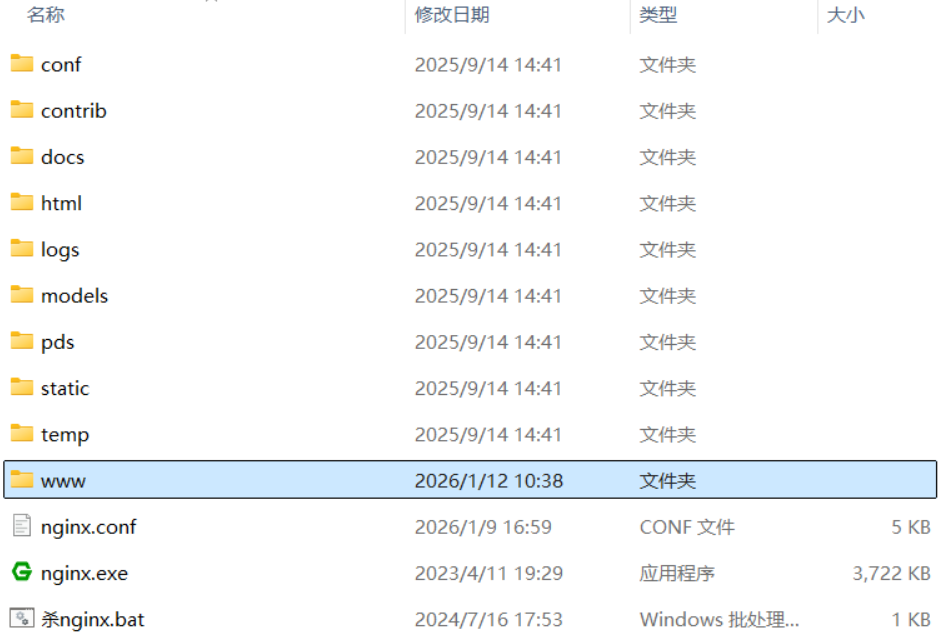
打包文件存放位置
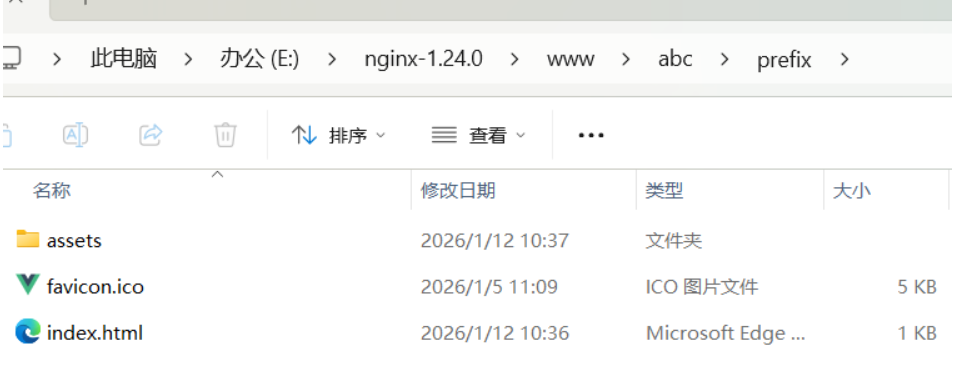
成果预览

6. 速查版
不填base, 或者base为"/"
✅️root 版
部署路径: /var/www/demo
location / {
root /var/www/demo;
index index.html;
try_files $uri $uri/ /index.html;
}
浏览器访问 http://localhost/ 实际访问 /var/www/demo/index.html
(如果有路由路径也会走到try_files最后也是请求的index.html)
而index.html引用的本地静态资源路径为**‘/assets/xxx’**, 这个路径会基于root去找
最终你只需要保证在 root /var/www/demo文件夹下,包含assets等打包文件就行了
伪代码说明!!!
const requstURL = '/assets/test.js' // 打包后的资源路径(浏览器访问index.html时发起请求)
const locationPath = '/' // nginx 的 location 路径
const rootPath = '/var/www/demo' // nginx 的 root 路径
// 实际访问 /var/www/demo/assets/test.js
const access = `${rootPath}${locationPath}${requstURL}`
❌️alias 版 (极度不建议使用alias匹配根路径’/')
部署路径: /var/www/demo
location / {
alias /var/www/demo/;
index index.html;
try_files $uri $uri/ /index.html;
}
浏览器访问 http://localhost/ 实际访问 /var/www/demo/index.html
伪代码说明!!!
const requstURL = '/assets/test.js' // 打包后的资源路径(浏览器访问index.html时发起请求)
let locationPath = '/' // nginx 的 location 路径
const aliasPath = '/var/www/demo/' // nginx 的 alias 路径, 必须'/'结尾
// 实际访问 /var/www/demo/assets/test.js
const access = requstURL.replace(locationPath, aliasPath)
base为"/prefix"或"/prefix/"
✅️root 版
部署路径: /var/www/prefix (需要建和base一样的文件夹)
location /prefix/ {
root /var/www;
index index.html;
try_files $uri $uri/ /prefix/index.html;
}
浏览器访问 http://localhost/prefix/ 实际访问 /var/www/prefix/index.html
伪代码说明!!!
const requstURL = '/assets/test.js' // 打包后的资源路径(浏览器访问index.html时发起请求)
const locationPath = '/prefix/' // nginx 的 location 路径
const rootPath = '/var/www' // nginx 的 root 路径
// 实际访问 /var/www/prefix/assets/test.js
const access = `${rootPath}${locationPath}${requstURL}`
✅️alias 版
部署路径: /var/www/任意单级或多级文件夹(/a, /a/b, a/b/c, …)
location /prefix/ {
alias /var/www/任意单级或多级文件夹;
index index.html;
try_files $uri $uri/ /prefix/index.html;
}
伪代码说明!!!
const requstURL = '/assets/test.js' // 打包后的资源路径(浏览器访问index.html时发起请求)
let locationPath = '/prefix/' // nginx 的 location 路径
const aliasPath = '/var/www/任意单级或多级文件夹/' // nginx 的 alias 路径, 必须'/'结尾
// 实际访问 /var/www/任意单级或多级文件夹/assets/test.js
const access = requstURL.replace(locationPath, aliasPath)
最后⚠️ :
- try_files 最后一个回退地址需与 Vite 的 base 路径完全一致(如 base: ‘/prefix/’,则回退地址为 /prefix/index.html);
s/test.js’ // 打包后的资源路径(浏览器访问index.html时发起请求)
let locationPath = '/prefix/' // nginx 的 location 路径
const aliasPath = '/var/www/任意单级或多级文件夹/' // nginx 的 alias 路径, 必须'/'结尾
// 实际访问 /var/www/任意单级或多级文件夹/assets/test.js
const access = requstURL.replace(locationPath, aliasPath)
最后⚠️:
- try_files 最后一个回退地址需与 Vite 的 base 路径完全一致(如 base: ‘/prefix/’,则回退地址为 /prefix/index.html);
- 不建议用’./’




评论前必须登录!
注册