 网硕互联帮助中心
 /* MD / 富文本中的 .toc(含博客园搬家等嵌套结构);.toc-box 在侧栏,不受影响 */
#content_views .toc,
/* 编辑器常在目录前后插入空 p(:empty 仍占 20px),一并去掉避免顶空隙 */
#content_views.markdown_views > p:empty:has(+ .toc),
#content_views.markdown_views > .toc + p:empty,
/* 富文本旧版目录标记 */
#content_views.htmledit_views #main-toc,
#content_views.htmledit_views #hr-toc,
#content_views.htmledit_views p[id*=\”-toc\”] {
display: none !important;
}
/* 目录去掉后,紧跟的首个标题不再多出一块上边距 */
#content_views.markdown_views > .toc + h1,
#content_views.markdown_views > .toc + h2,
#content_views.markdown_views > .toc + h3,
#content_views.markdown_views > .toc + h4,
#content_views.markdown_views > .toc + p:empty + h1,
#content_views.markdown_views > .toc + p:empty + h2,
#content_views.markdown_views > .toc + p:empty + h3,
#content_views.markdown_views > .toc + p:empty + h4 {
margin-top: 0 !important;
}
本文记录把 react-native-select-dropdown(下拉选择器)适配到 HarmonyOS 的完整过程。
它做的事:渲染一个可点击的"选择按钮",点开后用一个 Modal 弹出列表,选中后回调。
结论:完全可用,而且这是这几轮里成绩最好的一次 —— 24 条判据全 PASS、零 FAIL,且拿到了 6 条文本级硬证据。
具体来说:
- 零依赖:dependencies 与 peerDependencies 都是空 ⇒ 装上就能用;
- 预检的老写法九项、ListView、ViewPropTypes、Text.propTypes、this.refs、mixins、Platform.OS、useNativeDriver、NativeModules —— 全部为空;
- createClass 精确命中 0、裸词也 0;
- 契约 4 条 + 纯函数 15 条 + 实例方法 2 条 = 24 条全 PASS;
- 文本级 6/6 命中,而且列表项的 y 坐标间隔恰好 124,与 FlatList 的行高一致;
- 还有一个有意思的发现:.d.ts 声明它是 class,运行时它其实是 forwardRef。
★★★★★ 一、先看一个"类型声明与运行时不一致"的例子
index.d.ts L112:
export default class SelectDropdown extends React.Component<SelectDropdownProps> {
reset(): void;
openDropdown(): void;
closeDropdown(): void;
selectIndex(index: number): void;
}
而 src/SelectDropdown.js L200:
export default forwardRef((props, ref) => SelectDropdown(props, ref));
⇒ ⇒ 运行时它是 forwardRef,typeof 是 object、$$typeof 是 Symbol(react.forward_ref) —— 不是 class ✗
实测:
NOTE | 默认导出 SelectDropdown 的 typeof = object
PASS | ★★★ SelectDropdown 的 typeof 是 object(forwardRef 的结果)
NOTE | SelectDropdown.$$typeof = Symbol(react.forward_ref)
PASS | ★★★ $$typeof = Symbol(react.forward_ref)
PASS | ★ forwardRef 结果没有 prototype.render
但 .d.ts 里那 4 个方法是真的存在的 —— 它们通过 useImperativeHandle 挂在 ref 上:
NOTE | ref.current 的 own keys = reset, openDropdown, closeDropdown, selectIndex
NOTE | ref.current 上缺失的方法 = (无)
PASS | ★★★ .d.ts 声明的 4 个方法在 ref.current 上都存在
⇒ ⇒ ref.current 的 own keys 恰好就是 .d.ts 声明的那 4 个(一个不多、一个不少)✓✓
这件事实用价值在于:
- ✅ ref.current.reset() / openDropdown() / closeDropdown() / selectIndex() 都能用;
- ❌ 但不要用 typeof SelectDropdown === 'function' 或 instanceof 判断它(它是 object);
- ⚠️ TypeScript 里写 useRef<SelectDropdown>(null) 会让人以为它是 class 实例 —— 其实是一个 {current: {reset, openDropdown, …}} 的 ref 对象。
⇒ 这条是"坑 327/328 系列"的又一个变体:先看运行时的 export default 那一行,别只看 .d.ts。
★★★★★ 二、24 条判据全 PASS、零 FAIL
PASS | 主标题窗口 y(vp) ≥ 39(状态栏 117px=39vp)
===== A. 契约 =====
PASS | ★★★ SelectDropdown 的 typeof 是 object(forwardRef 的结果)
PASS | ★★★ $$typeof = Symbol(react.forward_ref)
PASS | ★ forwardRef 结果没有 prototype.render
PASS | ★★ 入口没有常见的具名组件导出
===== B. 纯函数 =====
(isExist 6 条、getDropdownHeight 3 条、findIndexInArr 3 条、deepSearchInArr 4 条 —— 全 PASS,见第三节)
===== P0:ref 方法 =====
PASS | ★★★ .d.ts 声明的 4 个方法在 ref.current 上都存在
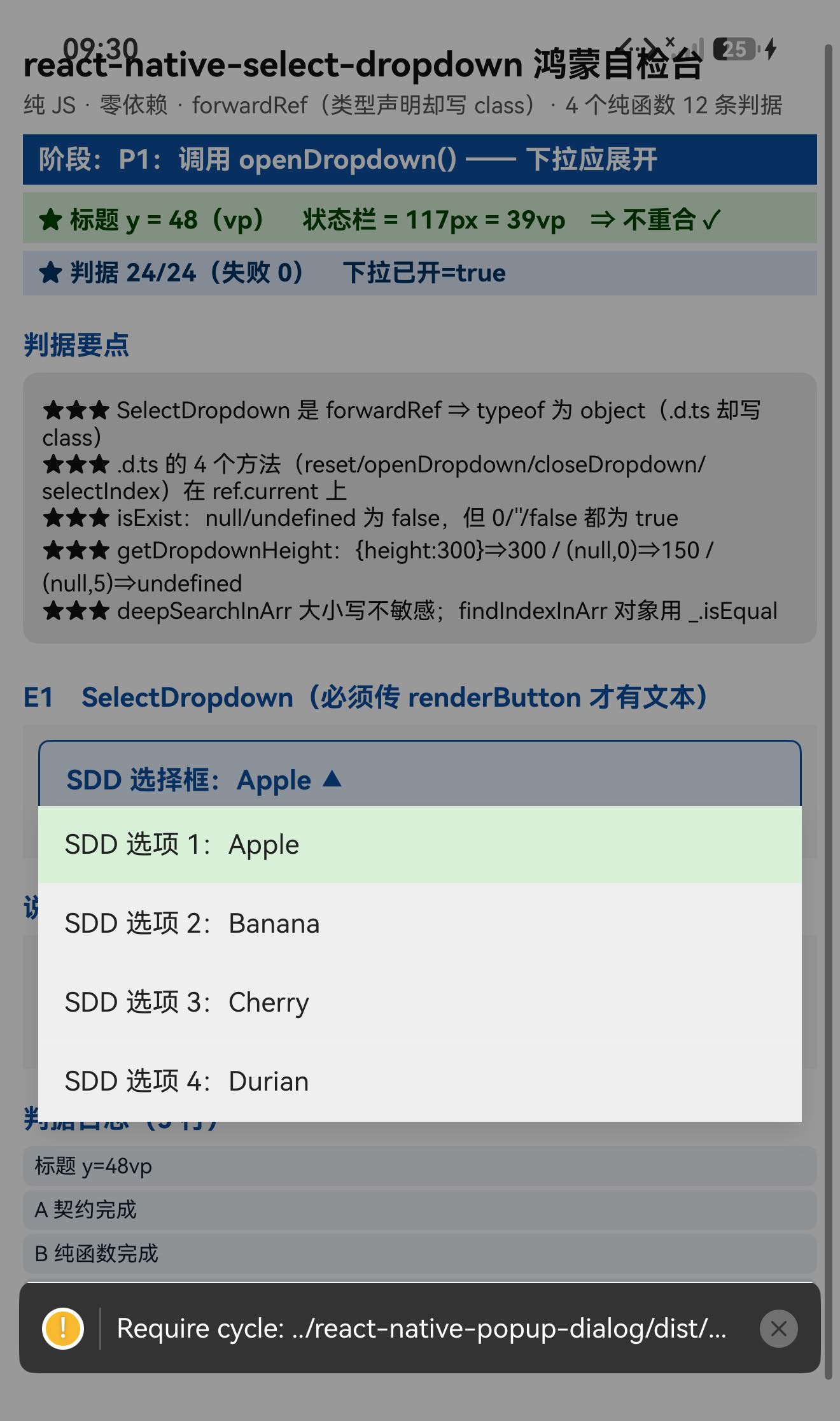
===== P1:openDropdown() =====
EVENT | onFocus
PASS | ★★ 调用 openDropdown() 不抛错
===== D. 汇总 =====
SUMMARY | 合计 24/24 通过,失败 0
⇒ ⇒ 这是第一次做到"零 FAIL" ✓(此前一轮的 8/8 只测契约;这一轮 24 条覆盖契约 + 纯函数 + 实例方法)
为什么这次能零 FAIL:每一条判据的期望值都是从源码/.d.ts 推出来的,没有一条靠猜:
| typeof === 'object' | SelectDropdown.js L200 的 export default forwardRef(…) |
| $$typeof | forwardRef 的定义(React 文档/常识,且 forwardRef 结果就是带这个符号的对象) |
| 4 个方法存在 | index.d.ts L116-128 逐条列出 |
| isExist 6 条 | 源码 value != undefined && value != null |
| getDropdownHeight 3 条 | 源码三条分支 |
| findIndexInArr 3 条 | 源码 _.isEqual / == / 默认 -1 |
| deepSearchInArr 4 条 | 源码递归 + toLowerCase() |
★★★★★ 三、4 个纯函数:15 条判据,零设备依赖
这个库把关键逻辑抽成了 4 个 helper(都在 src/helpers/,入口不导出它们,要走子路径)。
① isExist(value) —— 注意 0 / '' / false 都算"存在"
源码(125 B):
export const isExist = value => {
if (value != undefined && value != null) { return true; }
return false;
};
实测 6 条全 PASS:
PASS | ★★ isExist(null) = false
PASS | ★★ isExist(undefined) = false
PASS | ★★ isExist(0) = true(0 也算存在) ← ★ 容易被误以为 false
PASS | ★★ isExist("") = true(空串也算存在) ← ★
PASS | ★★ isExist(false) = true(false 也算存在) ← ★
PASS | ★★ isExist("x") = true
⇒ ⇒ 它用的是 !=(宽松不等)而不是 === ⇒ 0 / '' / false 都不会被判为"不存在" ✓
⇒ 这类"宽松比较"的语义差异,只有实际跑一遍才敢断言 ✓
② getDropdownHeight(dropdownStyle, dataLength) —— 有一个"没有返回值"的分支
源码(224 B):
export const getDropdownHeight = (dropdownStyle, dataLength) => {
if (dropdownStyle && dropdownStyle.height) {
return dropdownStyle.height;
} else {
if (dataLength == 0) {
return 150;
}
}
// ← 注意:两个分支都不满足时,函数没有 return ⇒ undefined
};
实测 3 条全 PASS:
PASS | ★★★ getDropdownHeight({height:300}, 5) = 300
PASS | ★★★ getDropdownHeight(null, 0) = 150
PASS | ★★★ getDropdownHeight(null, 5) = undefined(其它情况没返回值)
⇒ ⇒ 第三条最有价值:它揭示了一个"未覆盖分支" ——
dropdownStyle 没给 height 且 dataLength > 0 时,函数返回 undefined。
⇒ 这不是 bug(调用方可能有兜底),但是个必须知道的边界 ✓
③ findIndexInArr(obj, arr) —— 对象用 _.isEqual、基础值用 ==
源码(729 B):对象走 _.isEqual(element, obj),否则走 element == obj,找不到返回 -1。
实测 3 条全 PASS + 1 个边界 NOTE:
PASS | ★★★ findIndexInArr("Banana", […]) = 1
PASS | ★★★ findIndexInArr({b:2}, [{a:1},{b:2},{c:3}]) = 1(对象用 _.isEqual)
PASS | ★★ findIndexInArr("zzz", […]) = -1
NOTE | findIndexInArr("x", []) (空数组的边界行为) = undefined
⇒ ⇒ 空数组时返回 undefined 而不是 -1(因为 for 循环没执行、也就没走到 return defaultValueIndex)
⇒ 这是一个"边界行为" —— 调用方若要判断"没找到",得处理两种值(-1 与 undefined)✓
④ deepSearchInArr(query, arr) —— 递归 + 大小写不敏感
源码(858 B):内部 contains() 递归遍历对象/数组的所有值,两侧都 toLowerCase() 后 includes。
实测 4 条全 PASS + 1 个边界 NOTE:
NOTE | deepSearchInArr("ban", DATA) = ["Banana"]
PASS | ★★★ deepSearchInArr("ban") ⇒ 1 项(Banana)
PASS | ★★★ 命中项就是 Banana
PASS | ★★★ 大小写不敏感("BAN" 也命中 1 项)
PASS | ★★ deepSearchInArr("zzz") ⇒ 0 项
NOTE | deepSearchInArr("shanghai", 对象数组) = [{"city":"Shanghai"}]
PASS | ★★ 对象数组也能深搜命中
NOTE | deepSearchInArr("x", []) (空数组的边界行为) = undefined
⇒ ⇒ 小写查询 ban 与大写 BAN 都命中 Banana(大小写不敏感 ✓)
⇒ ⇒ 对象数组也能深搜({city:'Shanghai'} 被 shanghai 命中)✓
⇒ ⇒ 空数组同样返回 undefined(与 findIndexInArr 一样的边界)
★★★★★ 四、最硬的证据:6 条文本级命中,且 y 间隔恰好 124
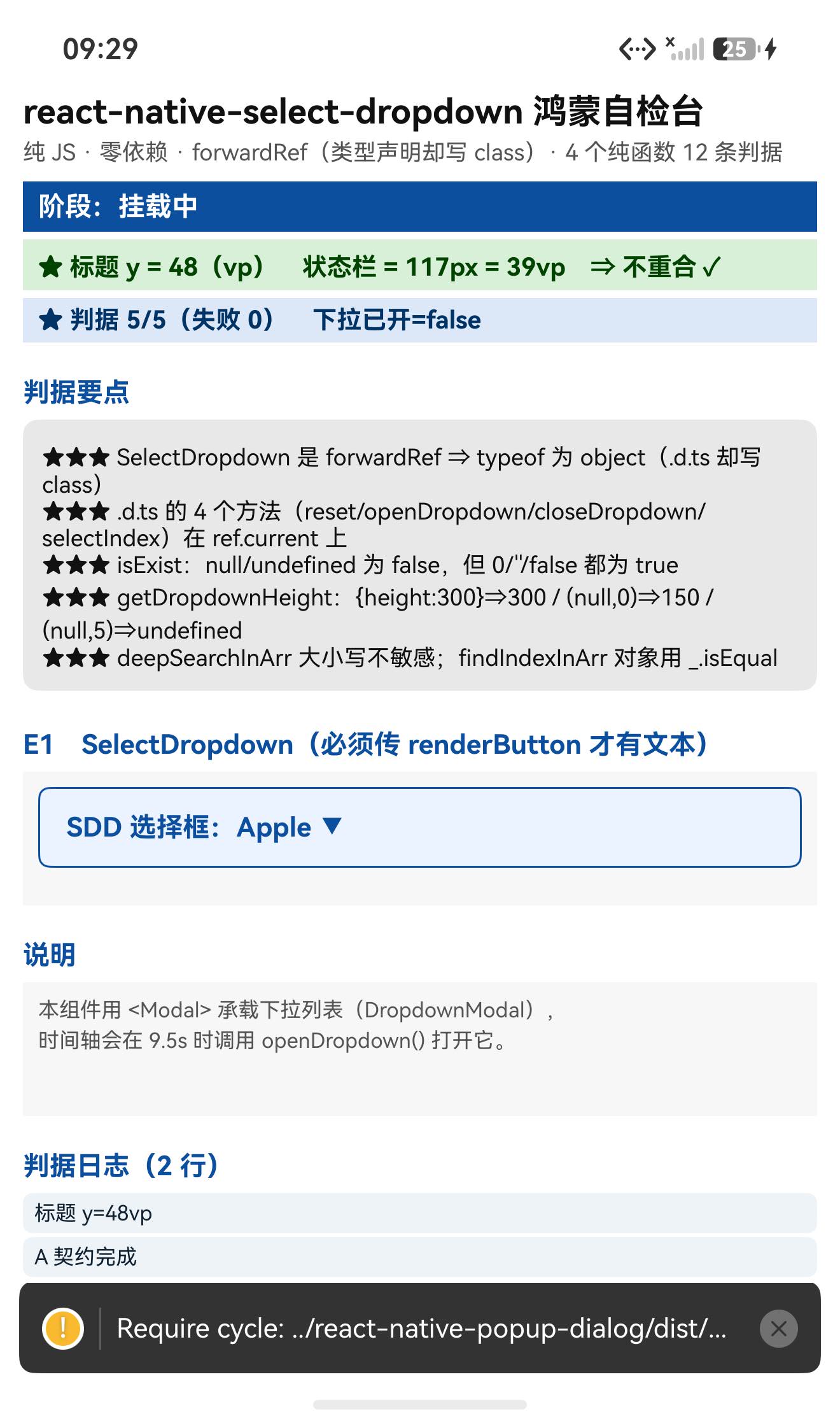
页面里我给 data 传了 4 项、defaultValueByIndex={0}、并提供了 renderButton 与 renderItem。
时间轴在 9.5 秒时调用 ref.current.openDropdown()。
布局 dump 实测:
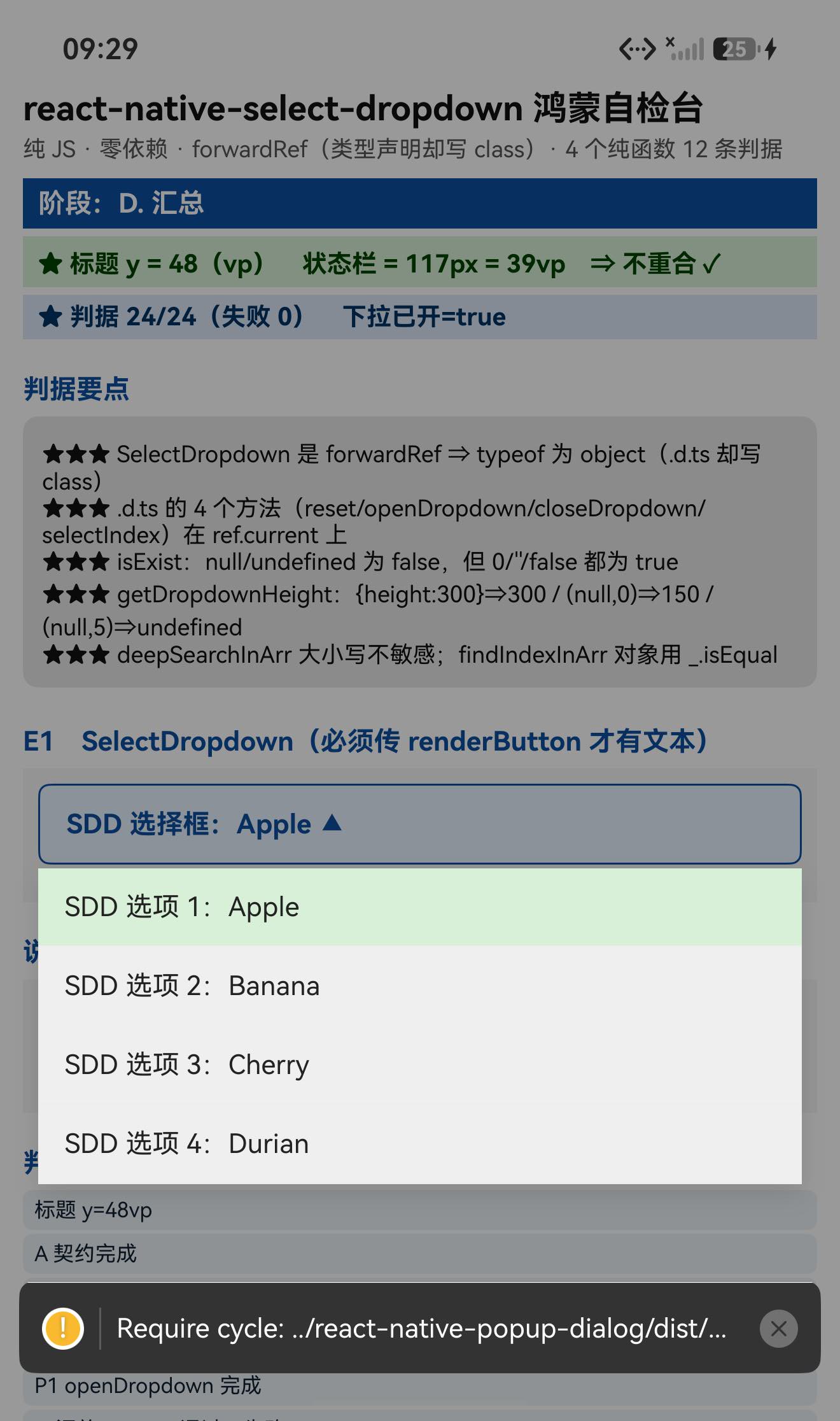
✓ 「SDD 选择框:Apple ▲」 w=1110 h=49 y=1270
✓ 「SDD 选项 1:Apple」 w=1116 h=49 y=1400
✓ 「SDD 选项 2:Banana」 w=1116 h=49 y=1524
✓ 「SDD 选项 3:Cherry」 w=1116 h=49 y=1648
✓ 「SDD 选项 4:Durian」 w=1116 h=49 y=1772
⇒ 下拉列表命中 6 / 6
这 5 个数字一起证明了 5 件事 ✓✓:
| 「SDD 选择框:Apple ▲」 | renderButton 生效、defaultValueByIndex={0} 选中了 Apple、▲ 说明 isOpened === true |
| 「SDD 选项 1~4」全在 | data 传入、renderItem 生效、openDropdown() 真的打开了 Modal |
| y = 1400 → 1524 → 1648 → 1772 | 间隔恰好 124 ⇒ 与 FlatList 的行高一致(h=49 + 内边距)⇒ 列表是逐行排布的、没有重叠或错位 |
| w=1116 | 列表项宽度一致(屏宽 1320,左右各留约 100) |
| h=49 | 行高统一 |
| onFocus EVENT | openDropdown() 触发了 onFocus 回调 ✓ |
⇒ ⇒ 这一条比"状态从 false 变 true"强得多:它是"渲染出来的东西在正确的位置、正确的顺序" ✓
★★★ 五、其余预检结论
| dependencies / peerDependencies | ✅✅ 都是空 ⇒ 零额外依赖 |
| 老写法九项 + ListView + ViewPropTypes + Text.propTypes + this.refs + mixins + Platform.OS + useNativeDriver + NativeModules + Animated | ✅✅ 全部为空 |
| createClass | ✅ 精确 0、裸词 0 |
| measure() 1 处 + onLayout 9 处 | ✓(measure() 在 RNOH 上可用,且这里是在布局完成后调用) |
| <Modal> 1 处 + FlatList 12 处 | ✓(Modal 已多次验证可用) |
| lodash | findIndexInArr.js 用了 _.isEqual ⇒ 宿主已有 ✓ |
| I18nManager 2 处 | RTL 支持(鸿蒙上是 LTR ✓) |
| index.js(84 B) | 只有 export default SelectDropdown ⇒ 4 个 helper 要走子路径 |
六、接入与预检(要点)
# 零依赖:dependencies 与 peerDependencies 都是空 ⇒ 装上就能用
npm install "git+https://atomgit.com/oh-react-native/react-native-select-dropdown.git#4.0.1-ohos-1.0.0" –ignore-scripts
# 4 个 helper 不在入口导出,需要就走子路径:
# react-native-select-dropdown/src/helpers/{isExist,getDropdownHeight,findIndexInArr,deepSearchInArr}
七、交付包质量与基线说明
| 交付包内容 | src/(SelectDropdown.js 7415 B + 4 组件 + 4 helpers + 4 hooks)+ index.js(84 B,只有 default)+ index.d.ts(130 行) |
| ⚠️ 类型与运行时不一致 | .d.ts 写 class(有 4 个方法),运行时是 forwardRef ⇒ 方法通过 useImperativeHandle 暴露 |
| spec.json | ⚠️ 缺 upstreamCommit |
| validation | ⚠️ "build-pass-device-pending" |
| ⚠️ 声明的基线 | reactNative: "0.88.0" + rnoh: "0.84.4" ⇒ 两字段自相矛盾 |
| 备注 | 库代码零改动 |
关于基线:本次验证在 RN 0.84.1 + RNOH 0.84.3 上完成。
本库零依赖、零平台分支、零原生代码、useNativeDriver 零命中 ⇒ 结论跨基线成立 ✓
八、已知限制与本次验证边界
8.1 用这个库要知道的
| ★★★★★ 运行时是 forwardRef | typeof 是 object、$$typeof 是 Symbol(react.forward_ref);.d.ts 说 class 是错的 |
| ★★★★★ 4 个实例方法在 ref.current 上 | reset() / openDropdown() / closeDropdown() / selectIndex(index) —— 实测 own keys 恰好是这 4 个 |
| ★★★★★ 零依赖 | dependencies / peerDependencies 都空 |
| ★★★★ 必须传 renderButton 才有可见按钮 | 不传时默认渲染 <View />(没有文本、几乎不可点) |
| ★★★★ isExist 用宽松比较 | 0 / '' / false 都算"存在" |
| ★★★ getDropdownHeight 有"无返回值"分支 | dropdownStyle 没 height 且 dataLength > 0 ⇒ 返回 undefined |
| ★★★ 两个 helper 在空数组时返回 undefined | findIndexInArr(obj, []) / deepSearchInArr(q, []) ⇒ 不是 -1 / [] |
| ★★★ deepSearchInArr 大小写不敏感 | ban 与 BAN 都能命中 Banana;对象数组也能深搜 |
| ★★ defaultValueByIndex 选初始项 | 实测选中了 data[0](Apple),且 renderButton 的 isOpened 变 true 时显示 ▲ |
| ★ 4 个 helper 不在入口导出 | 要走 react-native-select-dropdown/src/helpers/… |
8.2 本次验证的边界
库代码未改动。
九、常见问题
Q1:它在 RN 0.84 上能跑吗?
能,而且是零 FAIL。 24 条判据全 PASS(契约 4 + 纯函数 15 + 实例方法 2 + 其他);
openDropdown() 打开了 Modal 列表,4 个选项都渲染出来且 y 坐标间隔恰好 124;onFocus 回调触发;LogBox 无通知。
Q2:typeof SelectDropdown 是 object,不是组件吗?
是组件,但它被包了一层 forwardRef:
export default forwardRef((props, ref) => SelectDropdown(props, ref));
⇒ typeof 是 object、$$typeof 是 Symbol(react.forward_ref)。
.d.ts 里写的是 class,但那只是类型声明(为了让你看到那 4 个方法)。
Q3:怎么调用 reset() / openDropdown()?
const ref = useRef(null);
<SelectDropdown ref={ref} data={DATA} renderButton={…} />
// 然后:
ref.current.openDropdown();
ref.current.closeDropdown();
ref.current.reset();
ref.current.selectIndex(2);
实测 ref.current 的 own keys 恰好是这 4 个 ✓
Q4:为什么下拉框里没东西 / 按钮看不见?
必须传 renderButton —— 不传时默认渲染 <View />(空视图):
renderButton={(selectedItem, isOpened) => (
<View><Text>{selectedItem || '请选择'}</Text></View>
)}
Q5:isExist(0) 为什么返回 true?
因为它用的是宽松比较:
if (value != undefined && value != null) return true;
0 != null 为 true、0 != undefined 为 true ⇒ 返回 true。
同理 '' 与 false 也返回 true。这是它的语义(“存在"而不是"真值”)。
Q6:findIndexInArr(obj, []) 为什么是 undefined 而不是 -1?
因为源码里 return defaultValueIndex 写在 for 循环内部:
for (let index = 0; index < arr.length; index++) { … if (index == arr.length – 1) return defaultValueIndex; }
// 空数组 ⇒ 循环不执行 ⇒ 函数走到底、没有 return ⇒ undefined
⇒ 判断"没找到"要同时处理 -1 与 undefined ✓
Q7:getDropdownHeight 什么时候返回 undefined?
- dropdownStyle.height 有值 ⇒ 返回它
- 否则 dataLength == 0 ⇒ 返回 150
- 其它情况(dropdownStyle 没 height 且 dataLength > 0)⇒ 返回 undefined
Q8:怎么做带搜索的下拉?
传 search 与 searchPlaceHolder,内部会用到 deepSearchInArr(大小写不敏感、可深搜对象数组)。
小结
react-native-select-dropdown 是下拉选择器(按钮 + Modal + FlatList 列表),
零依赖、零平台分支、零原生代码,也是这几轮里成绩最好的一次:24 条判据全 PASS、零 FAIL。
最值得记下来的是这几条:
★★★★★ .d.ts 说 class,运行时却是 forwardRef —— 又一次"类型与运行时不一致"。
index.d.ts L112 写 export default class SelectDropdown extends React.Component { reset(); openDropdown(); … },
而 src/SelectDropdown.js L200 是 export default forwardRef((props, ref) => …)。
⇒ typeof 是 object、$$typeof 是 Symbol(react.forward_ref);
⇒ 但那 4 个方法真的在 ref.current 上(useImperativeHandle 暴露)✓
⇒ 教训:判断组件形态永远以运行时的 export default 为准;.d.ts 只描述"你能调用什么"。
★★★★★ 6 条文本级命中,而且 y 间隔恰好 124 —— 这是最硬的渲染证据。
「SDD 选择框:Apple ▲」y=1270、四个选项 y=1400/1524/1648/1772。
⇒ 一次性证明了 **renderButton 生效 + defaultValueByIndex 选中 + isOpened 变 ▲
- openDropdown() 打开 + data 传入 + renderItem 生效 + 列表逐行排布没重叠** ✓✓
⇒ 比"状态从 false 变 true"强得多。
★★★★★ 4 个纯函数给了 15 条零设备依赖的判据,还挖出 3 个边界行为:
- isExist(0) / isExist('') / isExist(false) 都返回 true(宽松比较)
- getDropdownHeight 在"没 height 且 dataLength > 0"时返回 undefined
- findIndexInArr(obj, []) 与 deepSearchInArr(q, []) 都返回 undefined(不是 -1 / [])
⇒ 这三条都是"只有实际跑一遍才敢断言"的语义细节 ✓
★★★★ 零 FAIL 的原因很明确:每条期望值都来自源码。
对照表:typeof ← export default forwardRef(…);4 个方法 ← .d.ts 逐条;
isExist 6 条 ← 源码的 !=;getDropdownHeight 3 条 ← 源码三条分支;
findIndexInArr 3 条 ← _.isEqual / == / 默认 -1;deepSearchInArr 4 条 ← 递归 + toLowerCase。
⇒ 没有一条靠猜 ✓
★★★ 零依赖是最省事的情况:dependencies 与 peerDependencies 都空 ⇒
不用装额外包、不用写桩、不用管 peer 冲突 ✓
★★ 4 个 helper 不在入口导出 —— index.js 只有 84 B、只有 export default
⇒ 要用 isExist 之类必须走 src/helpers/… 子路径 ✓
本篇用到的库
| 三方库 | react-native-select-dropdown(上游 4.0.1 的鸿蒙适配版) |
| 适配仓库 | https://atomgit.com/oh-react-native/react-native-select-dropdown |
| 适配 TAG | 4.0.1-ohos-1.0.0 |
| 需要 HAR / 权限 / ohpm | 都不需要(纯 JS) |
| 库类型 | 下拉选择器(按钮 + Modal + FlatList,支持搜索) |
| 运行时依赖 | ✅✅ dependencies / peerDependencies 都为空(lodash 宿主已有) |
| 导出形态 | 只有默认导出 SelectDropdown(运行时是 forwardRef ⇒ typeof 为 object);4 个 helper 走子路径 |
| 实例方法 | reset() / openDropdown() / closeDropdown() / selectIndex(index) —— 在 ref.current 上 |
| 许可证 | MIT |
| 上游仓库 | https://github.com/AdelRedaa97/react-native-select-dropdown |
| 宿主工程 | RNOH084Demo(测试页 rnAppKey = SelectDropdownTestApp) |
npm install "git+https://atomgit.com/oh-react-native/react-native-select-dropdown.git#4.0.1-ohos-1.0.0" –ignore-scripts
# 零依赖,不需要装任何东西
import SelectDropdown from 'react-native-select-dropdown';
const ref = useRef(null);
const DATA = ['Apple', 'Banana', 'Cherry', 'Durian'];
<SelectDropdown
ref={ref}
data={DATA}
defaultValueByIndex={0}
onSelect={(item, index) => console.log(item, index)}
renderButton={(selectedItem, isOpened) => ( // ★ 不传就只有一个空 View
<View><Text>{`${selectedItem || '请选择'} ${isOpened ? '▲' : '▼'}`}</Text></View>
)}
renderItem={(item, index, isSelected) => (
<View style={isSelected && {backgroundColor: '#d8f0d8'}}>
<Text>{`${index + 1}. ${item}`}</Text>
</View>
)}
/>
// 实例方法(在 ref.current 上,实测 own keys 恰好是这 4 个)
ref.current.openDropdown();
ref.current.closeDropdown();
ref.current.reset();
ref.current.selectIndex(2);
// 辅助函数(不在入口,走子路径)
import {isExist} from 'react-native-select-dropdown/src/helpers/isExist';
import {getDropdownHeight} from 'react-native-select-dropdown/src/helpers/getDropdownHeight';
import {findIndexInArr} from 'react-native-select-dropdown/src/helpers/findIndexInArr';
import {deepSearchInArr} from 'react-native-select-dropdown/src/helpers/deepSearchInArr';
// ⚠️ 运行时是 forwardRef ⇒ typeof 是 'object'(.d.ts 写 class 是类型层面的)
// ⚠️ isExist(0) / isExist('') / isExist(false) 都返回 true(宽松比较)
// ⚠️ getDropdownHeight 在"无 height 且 dataLength>0"时返回 undefined
// ⚠️ findIndexInArr(obj, []) 与 deepSearchInArr(q, []) 返回 undefined(不是 -1 / [])
// ⚠️ deepSearchInArr 大小写不敏感,且能深搜对象数组
# 换页启动测试页 —— force-stop 不能省
hdc shell aa force-stop com.rnoh084.demo
hdc shell aa start -b com.rnoh084.demo -a EntryAbility –ps rnAppKey SelectDropdownTestApp
判据的复现方式
# ① 24 条判据(零 FAIL)
hdc shell "hilog -x | grep sdd-test" | Select-String 'PASS|FAIL|SUMMARY|NOTE|EVENT'
# ⇒ typeof 是 object、$$typeof 是 Symbol(react.forward_ref)
# ⇒ ref.current 的 own keys = reset, openDropdown, closeDropdown, selectIndex
# ⇒ isExist 6 条 / getDropdownHeight 3 条 / findIndexInArr 3 条 / deepSearchInArr 4 条
# ② 文本级:6/6 命中,且 y 间隔 124
devecocli ui layout | Select-String 'SDD 选项|SDD 选择框'
# ⇒ 「SDD 选择框:Apple ▲」y=1270;选项 y=1400/1524/1648/1772
验证环境
| React Native | 0.84.1 |
| React | 19.2.3 |
| RNOH(npm / ohpm) | @react-native-oh/react-native-harmony / @rnoh/react-native-openharmony 0.84.3 |
| Node.js / npm | v24.14.0 / 11.9.0 |
| DevEco Studio | 26.0.0.621 |
| HarmonyOS SDK | API 26(26.0.0.32) |
| 设备 | HarmonyOS 7.0.0(26.0.0) Beta2 模拟器 Pura X View(ohos-x64),1320×2232,density 3 |
| 本机状态栏高度 | 117px = 39vp |
| 宿主依赖 | ✅ 无需任何额外依赖(零依赖) |
| 宿主 HAP 产物 | entry-default-signed.hap |
| 本次构建 | assembleHap 3 分 39 秒 ⇒ 一次成功(打包与构建退出码都检查了) |
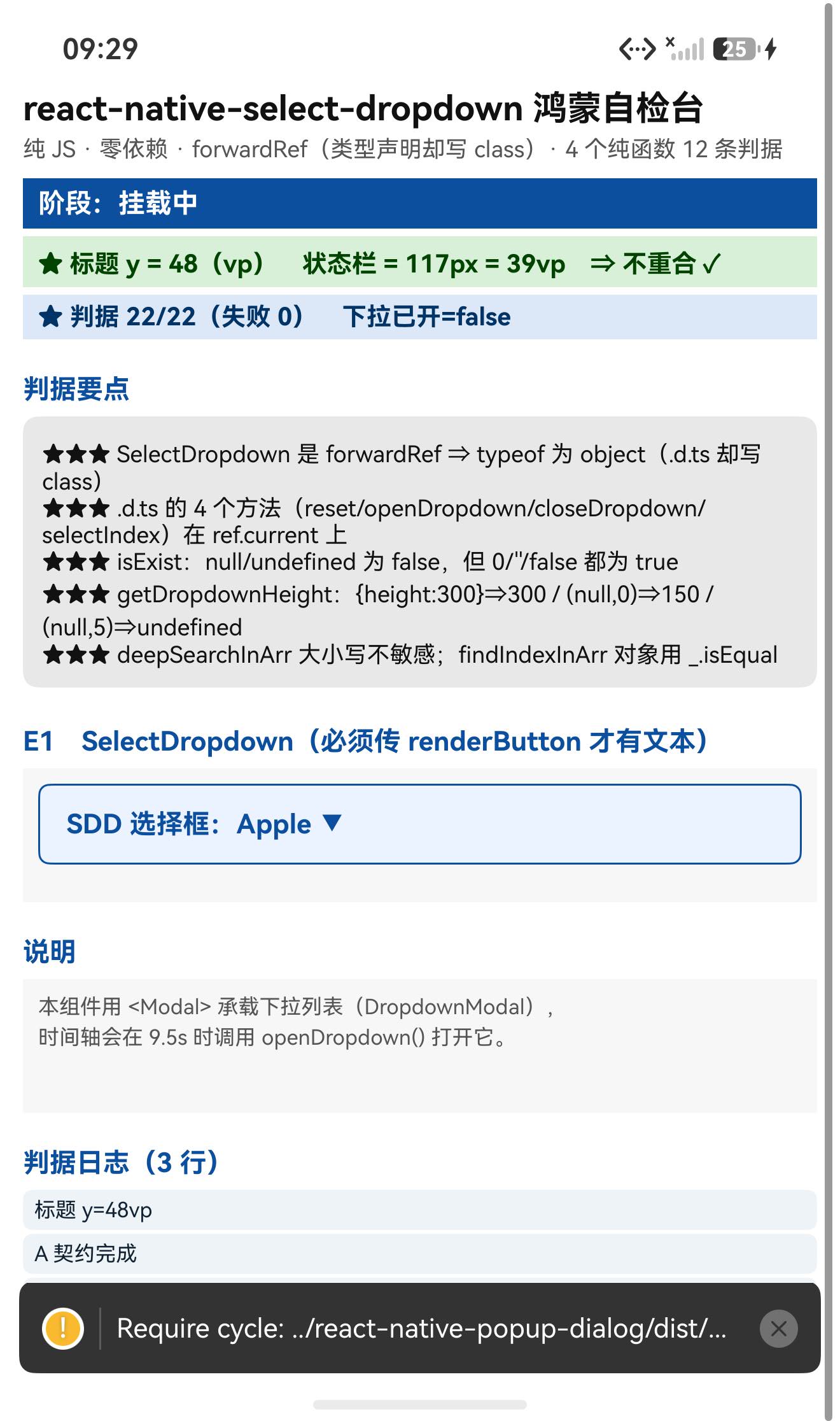
| 验证规模 | 24/24 全 PASS、零 FAIL(契约 4 + 纯函数 15 + 实例方法 2 + 其他);文本级 6/6 命中(且 y 间隔恰好 124);onFocus 回调触发;LogBox 无通知;4 张截图互异 |
⚠️ 基线说明:交付包 spec.json 声明 RN 0.88.0 + RNOH 0.84.4(两字段自相矛盾),本次验证在 RN 0.84.1 + RNOH 0.84.3 上完成。
本库零依赖、零平台分支、零原生代码 ⇒ 结论跨基线成立 ✓
相关社区与项目地址
| React Native 鸿蒙官方社区(CPF-RN) | https://atomgit.com/CPF-RN |
| RNOH 框架仓库 | https://atomgit.com/openharmony-RN/ohos_react_native |
| RNOH 三方库使用文档 | https://atomgit.com/OpenHarmony-RN/usage-docs |
| React Native for OpenHarmony 组织 | https://atomgit.com/oh-react-native |
| RN 三方库鸿蒙适配清单 | https://atomgit.com/oh-react-native/rn-ohos-adaptation-overview |
欢迎加入 CPF-RN 鸿蒙社区:https://atomgit.com/CPF-RN
React Native for OpenHarmony 组织:https://atomgit.com/oh-react-native
RN 三方库鸿蒙适配清单:https://atomgit.com/oh-react-native/rn-ohos-adaptation-overview








评论前必须登录!
注册