 网硕互联帮助中心
1 OSS多种上传方案如下图
官网地址:https://help.aliyun.com/zh/oss/user-guide/object-overview?spm=a2c4g.11186623.help-menu-31815.d_0_3_0.159e7dc0FoaPTQ 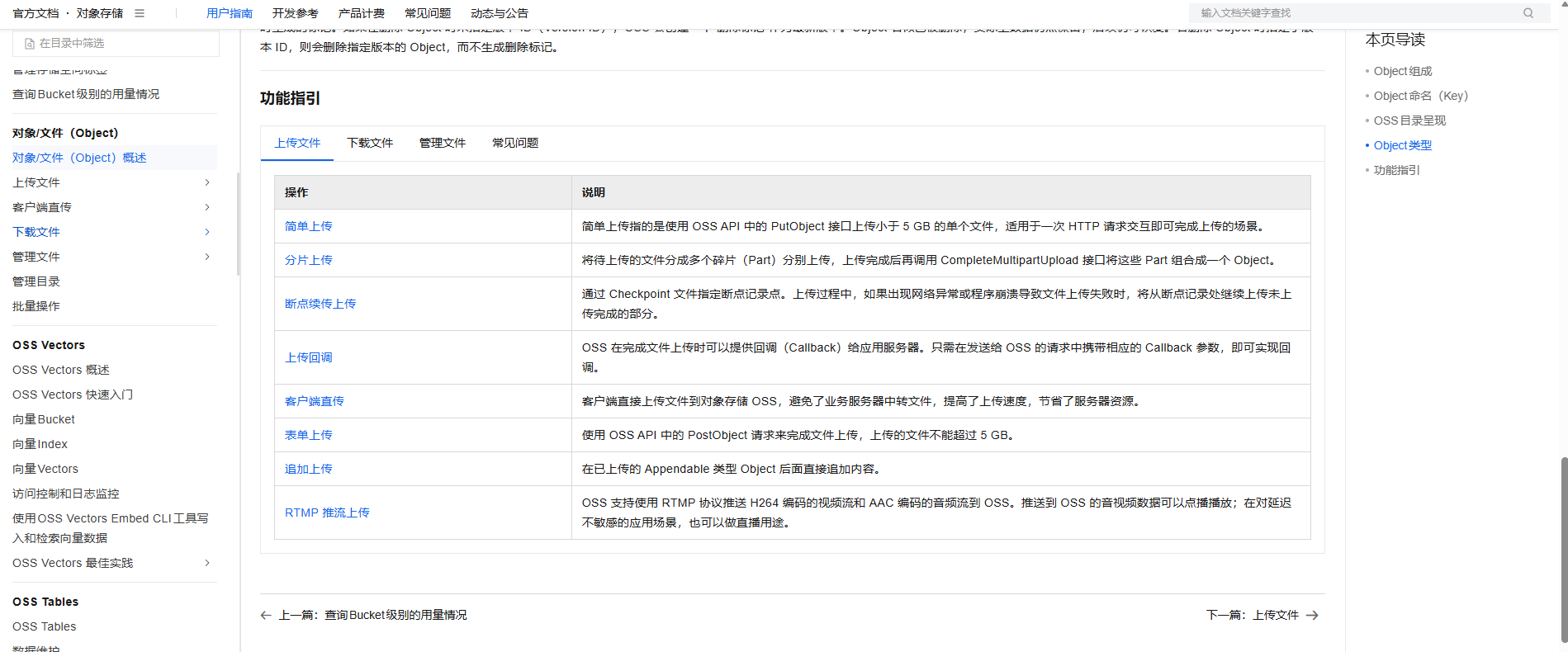
2 OSS云服务的初始配置
2.1 购买云存储服务
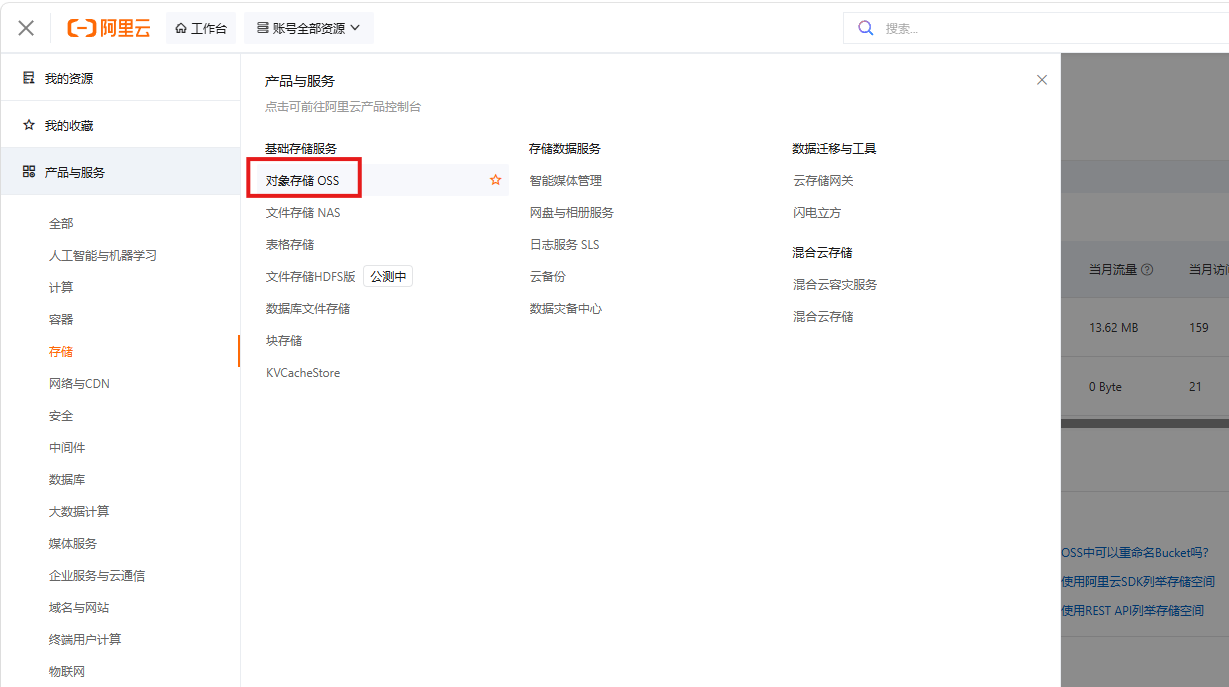
2.2 新增oss Bucket存储空间 并配置
- 新增存储空间
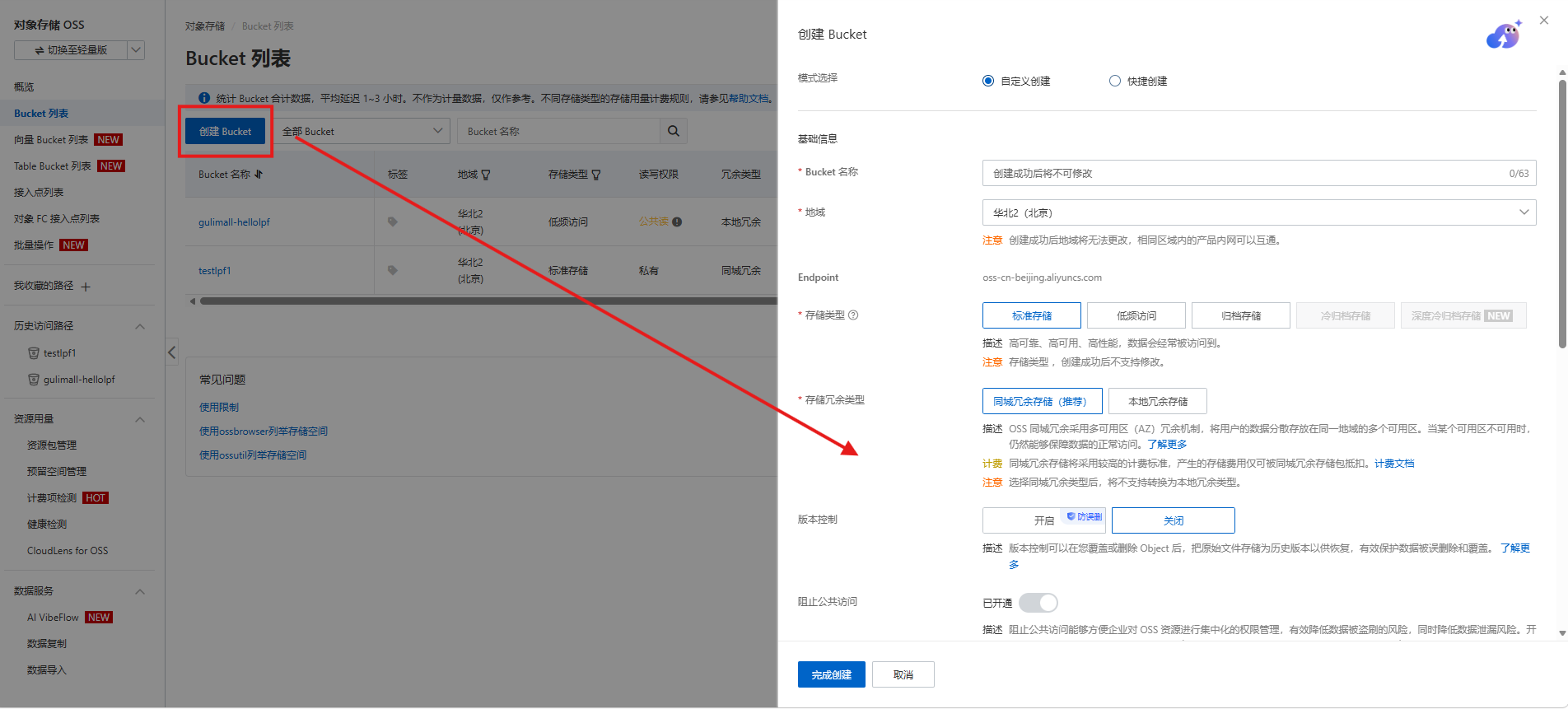
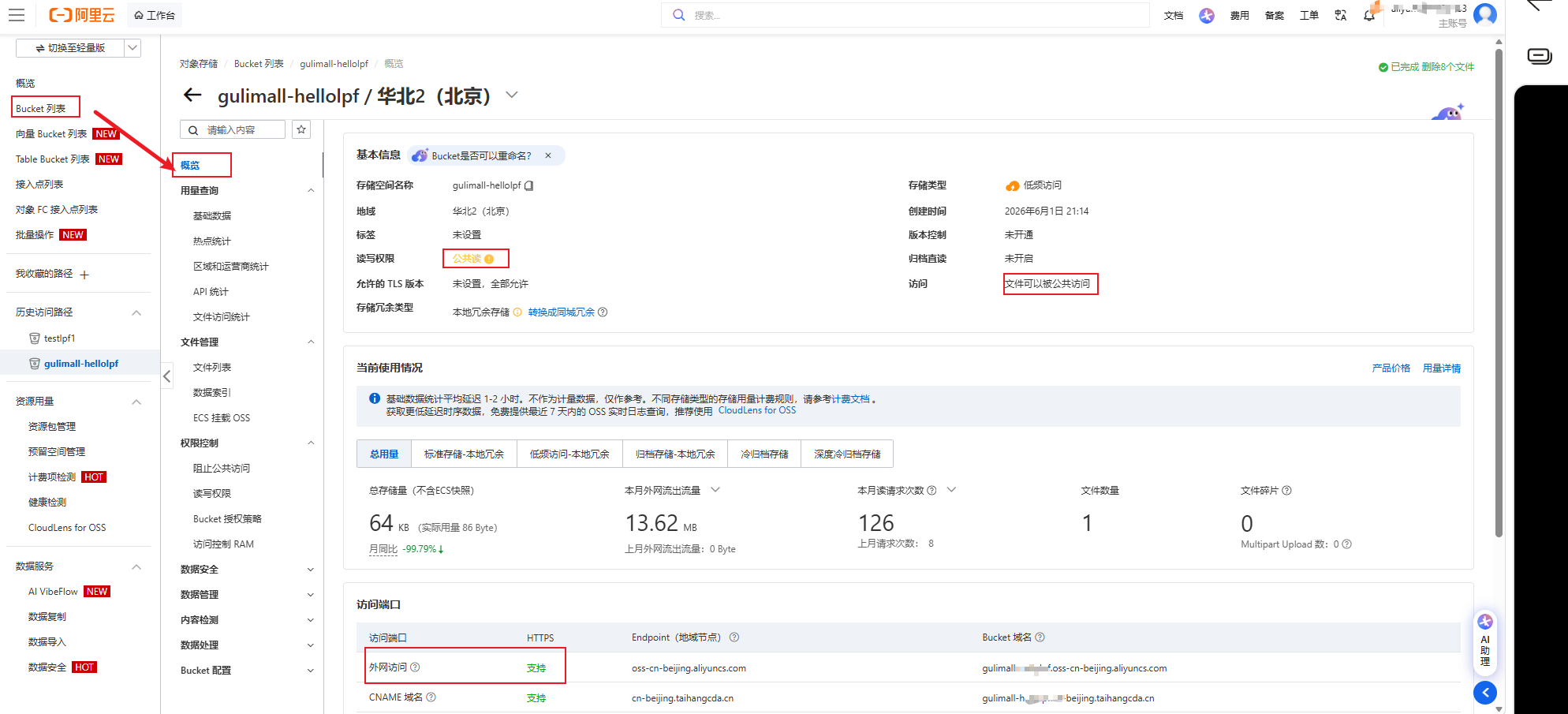
- 检查存储空间配置 ,可以在左侧权限控制里面修改配置管理
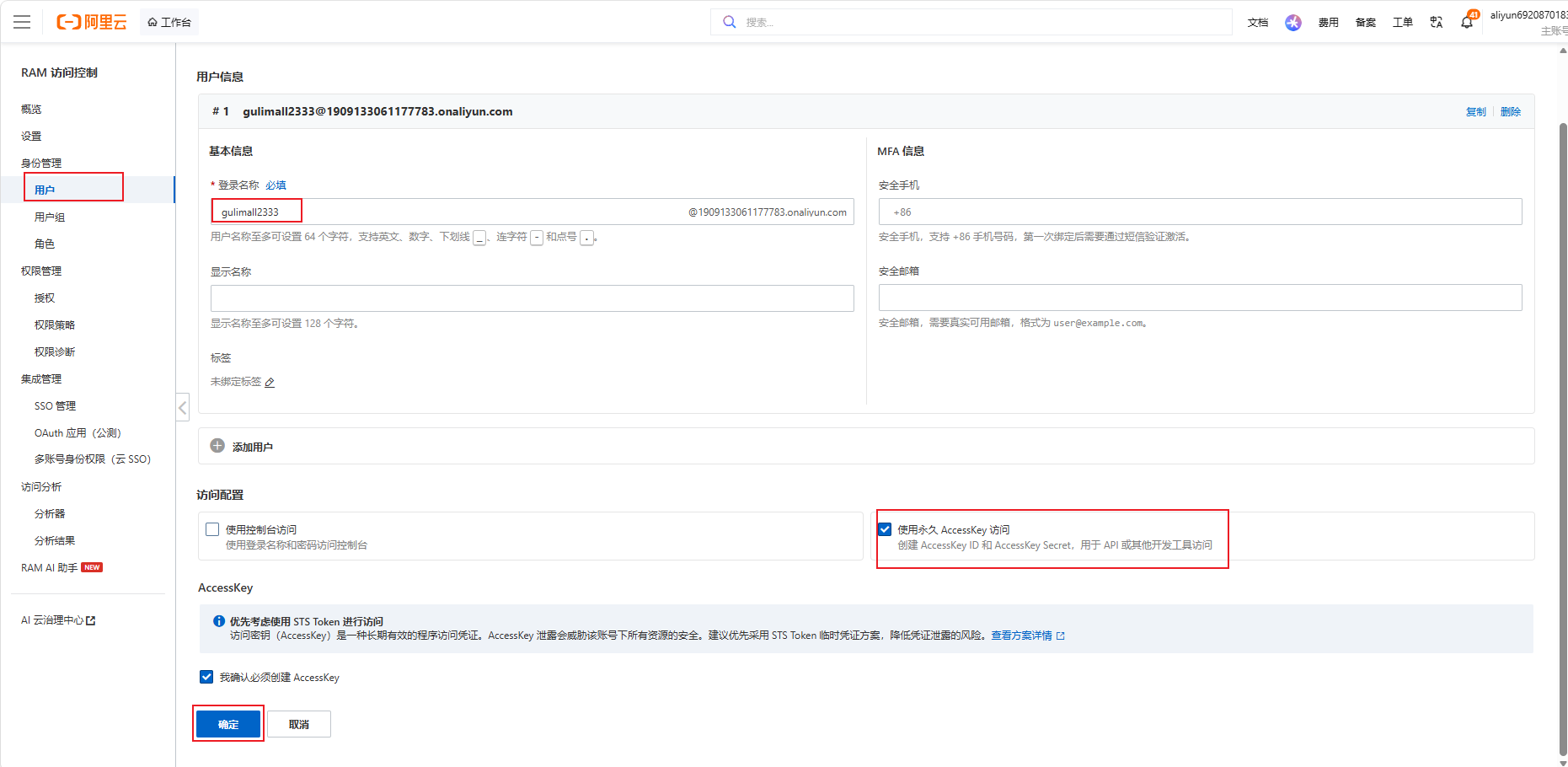
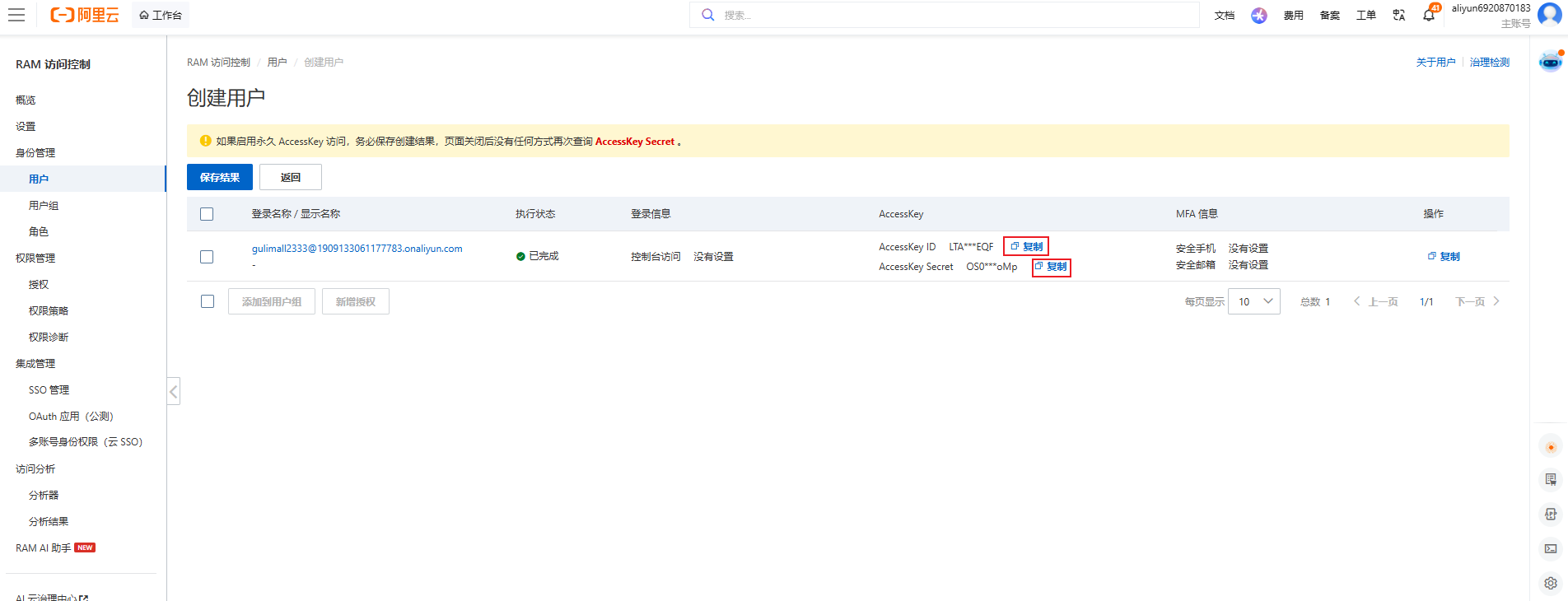
2.3 创建AccessKeyId以及AccessSecret
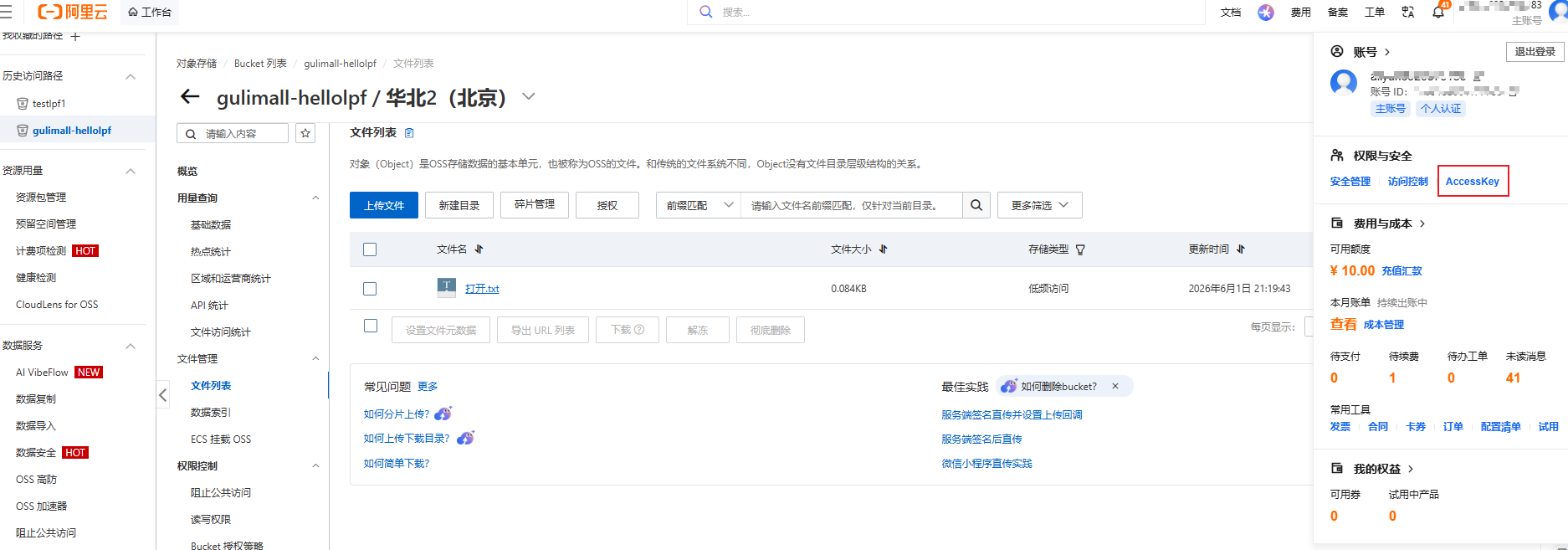
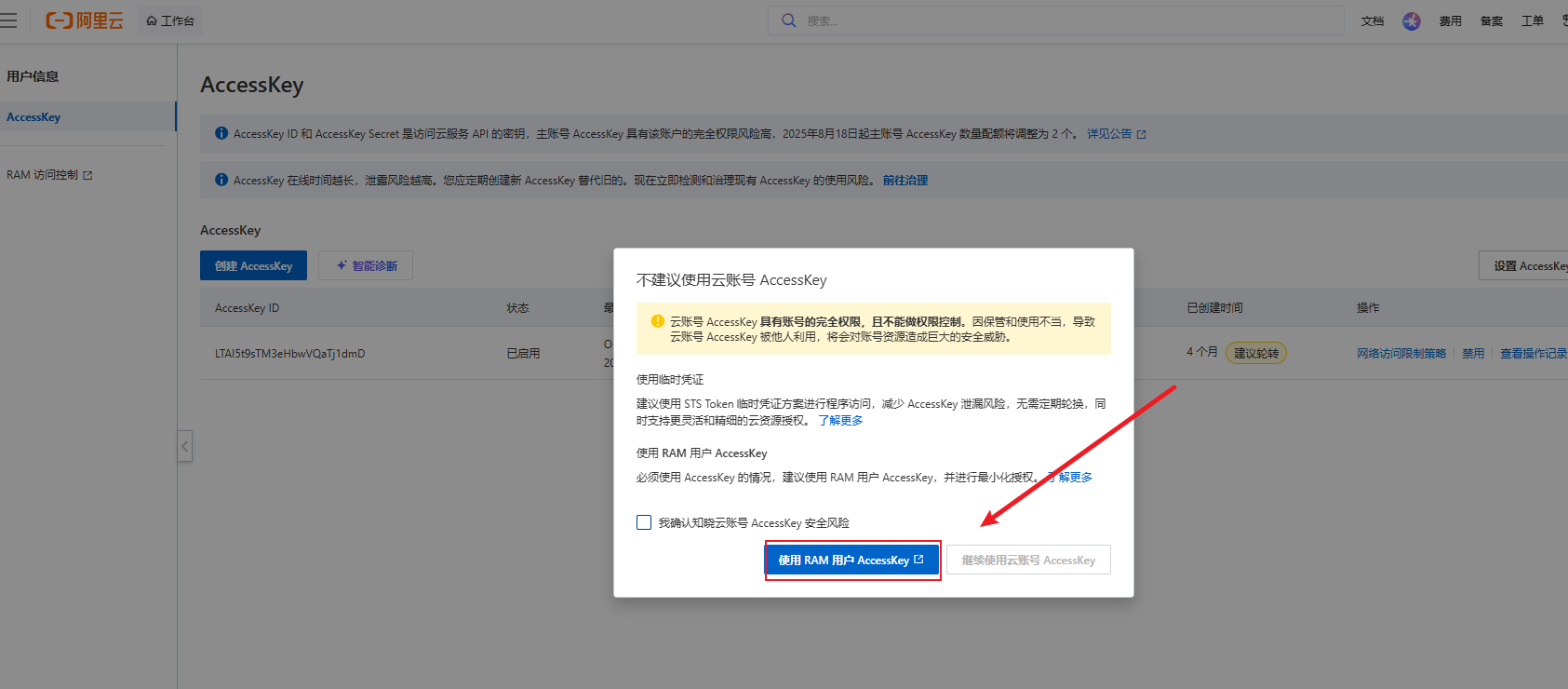
2.3.1创建用户
2.3.2记住用户ID和密钥
3 服务端直接上传(上传测试)
官方文档: https://github.com/alibaba/aliyun-spring-boot/blob/master/aliyun-spring-boot-samples/aliyun-oss-spring-boot-sample/README-zh.md
3.1 引入依赖
<dependency>
<groupId>com.alibaba.cloud</groupId>
<artifactId>spring-cloud-starter-alicloud-oss</artifactId>
<version>2.2.0.RELEASE</version>
</dependency>
3.2 将用户ID和密钥配置到springboot的yml文件中
spring:
alicloud:
access-key: # 2.3.2中用户id
secret-key: # 2.3.2中用户key
oss:
endpoint: #oss-cn-beijing.aliyuncs.com # 2.2中,检查配置最下面可以查阅到Endpoint(地域节点)
bucket: # gulimall-hellolpf # 2.2中创建的Bucket名字
3.3 测试用例
@SpringBootTest
class GulimallThirdPartyApplicationTests {
@Autowired
OSS ossClient;
@Test
void contextLoads() throws FileNotFoundException {
FileInputStream inputStream = new FileInputStream("C:\\\\Users\\\\24861\\\\Pictures\\\\Screenshots\\\\屏幕截图 2026-09-12 233720.png");
ossClient.putObject("gulimall-hellolpf","屏幕截图 2026-09-12 233720.pngg",inputStream);
ossClient.shutdown();
System.out.println("上传成功");
}
}
3.4 上传成功
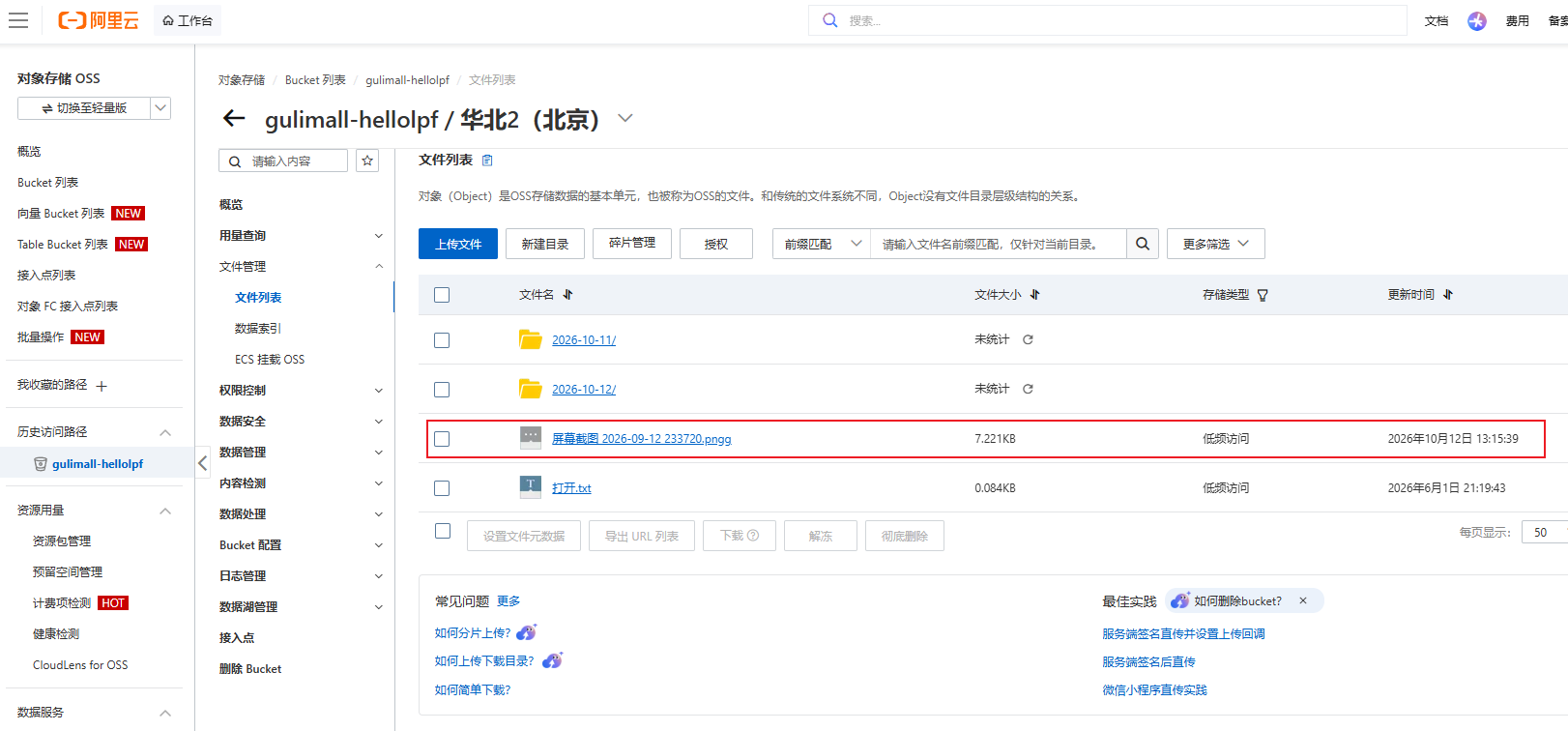
4 web表单上传方案(谷粒商城的实现方式)
官方: 官方参考文档 使用PostObject接口,将文件直接从 Web 端上传到 OSS,服务器生成的签名为直传操作提供安全保障,同时支持配置上传策略(Policy)以限制上传操作并满足业务需求。 即:java服务端根据2.3.2的密钥对postPolicy加密后生成post签名 并返回给前端,前端将postPolicy和post签名一起传给OSS服务器,OSS服务器自己也存了密钥,将postPolicy加密后的字串与`post签名对比,如果一致则验证通过。 
1.1 配置OSS
引入依赖
<dependency>
<groupId>com.alibaba.cloud</groupId>
<artifactId>spring-cloud-starter-alicloud-oss</artifactId>
<version>2.2.0.RELEASE</version>
</dependency>
将用户ID和密钥配置到springboot的yml文件中
spring:
alicloud:
access-key: # 2.3.2中用户id
secret-key: # 2.3.2中用户key
oss:
endpoint: #oss-cn-beijing.aliyuncs.com # 2.2中,检查配置最下面可以查阅到Endpoint(地域节点)
bucket: # gulimall-hellolpf # 2.2中创建的Bucket名字
1.2 配置java服务端
@RestController
@RequestMapping("/oss")
public class OssController {
@Autowired
OSS ossClient;
/**
* 获取yml中配置
*/
@Value("${spring.cloud.alicloud.oss.endpoint}")
private String endpoint;
@Value("${spring.cloud.alicloud.oss.bucket}")
private String bucket;
@Value("${spring.cloud.alicloud.access-key}")
private String accessId;
/**
* 获取对象签名
*/
@RequestMapping ("/policy")
public R policy() {
// https://gulimall-wan.oss-cn-shanghai.aliyuncs.com
String host = "https://" + bucket + "." + endpoint;
// 文件在bucket存储目录,若不存在则会自动创建路径。使用日期作为目录
String dir = new SimpleDateFormat("yyyy-MM-dd").format(new Date()) + "/";
Map<String, String> respMap = null;
try {
long expireTime = 30;
long expireEndTime = System.currentTimeMillis() + expireTime * 1000;
Date expiration = new Date(expireEndTime);//
// PostObject请求最大可支持的文件大小为5 GB,即CONTENT_LENGTH_RANGE为5*1024*1024*1024。
PolicyConditions policyConds = new PolicyConditions();
policyConds.addConditionItem(PolicyConditions.COND_CONTENT_LENGTH_RANGE, 0, 1048576000);
policyConds.addConditionItem(MatchMode.StartWith, PolicyConditions.COND_KEY, dir);
//postPolicy
String postPolicy = ossClient.generatePostPolicy(expiration, policyConds);
byte[] binaryData = postPolicy.getBytes("utf-8");
//传给oss服务器的原始postPolicy
String encodedPolicy = BinaryUtil.toBase64String(binaryData);
//密钥加密后的postSignature
String postSignature = ossClient.calculatePostSignature(postPolicy);
respMap = new LinkedHashMap<String, String>();
respMap.put("accessid", accessId);
respMap.put("policy", encodedPolicy);
respMap.put("signature", postSignature);
respMap.put("dir", dir);
respMap.put("host", host);
respMap.put("expire", String.valueOf(expireEndTime / 1000));
} catch (Exception e) {
System.out.println(e.getMessage());
} finally {
ossClient.shutdown();
}
return R.ok().put("data", respMap);
}
}
1.3 配置Web端(结合官方用例修改的HTML上传界面)
- 注意,这两行一定要根据实际情况修改。 const baseUrl = “http://localhost:88/api/thirdparty”; fetch(baseUrl + “/oss/policy”, { method: “GET” })
- 遇到请求跨域的问题, 请参考2.2.3 https://blog.csdn.net/qq_43190347/article/details/167496275?spm=1011.2415.3001.10575&sharefrom=mp_manage_link
<!DOCTYPE html>
<html lang="zh-CN">
<head>
<meta charset="UTF-8" />
<meta name="viewport" content="width=device-width, initial-scale=1.0" />
<title>服务端生成签名上传文件到OSS</title>
</head>
<body>
<div class="container">
<form>
<div class="mb-3">
<label for="file" class="form-label">选择文件:</label>
<input type="file" class="form-control" id="file" name="file" required />
</div>
<button type="submit" class="btn btn-primary">上传</button>
</form>
</div>
<script type="text/javascript">
document.addEventListener('DOMContentLoaded', function () {
const form = document.querySelector("form");
const fileInput = document.querySelector("#file");
form.addEventListener("submit", (event) => {
event.preventDefault();
const file = fileInput.files[0];
if (!file) {
alert('请选择一个文件再上传。');
return;
}
// 后端网关地址,按实际情况修改
const baseUrl = "http://localhost:88/api/thirdparty";
fetch(baseUrl + "/oss/policy", { method: "GET" })
.then((response) => {
if (!response.ok) {
throw new Error("获取签名失败");
}
return response.json();
})
.then((result) => {
// 后端返回结构为 { code, msg, data: { accessid, policy, signature, dir, host, expire } }
if (result.code !== 0) {
throw new Error("获取签名失败: " + result.msg);
}
const data = result.data;
// file 必须为最后一个表单域
// key 使用 dir 前缀 + 时间戳 + 文件名,避免同名覆盖
const key = data.dir + Date.now() + "-" + file.name;
let formData = new FormData();
formData.append("key", key);
formData.append("policy", data.policy);
formData.append("OSSAccessKeyId", data.accessid);
formData.append("success_action_status", "200");
formData.append("signature", data.signature);
formData.append("file", file);
return fetch(data.host, {
method: "POST",
body: formData
});
})
.then((response) => {
if (response.ok) {
console.log("上传成功");
alert("文件已上传");
} else {
console.log("上传失败", response);
alert("上传失败,请稍后再试");
}
})
.catch((error) => {
console.error("发生错误:", error);
});
});
});
</script>
</body>
</html>




评论前必须登录!
注册