 网硕互联帮助中心
文章目录
- 为什么默认点击会被识别
- 贝塞尔鼠标:从「瞬移」到「曲线到达」
-
- 三次贝塞尔采样
- 记住上一次指针位置
- 点击落点不要死盯中心
- 节奏层:停顿比「再慢一点」更有效
- 指纹层:playwright-stealth 怎么配才不打架
-
- 启动参数取舍
- Stealth 初始化
- 启动后自检
- 业务封装时的几条硬约束
用 Playwright 做 UI 自动化时,locator.click()、fill() 一上来就到位,轨迹是直线、耗时几乎为 0。对功能回归够用;一旦页面侧有行为风控(鼠标采样、输入节奏、navigator.webdriver),这套「瞬间操作」很容易暴露。本文讲两件事怎么叠在一起落地:环境指纹(stealth)和操作轨迹(贝塞尔移鼠标 + 随机延时),并给出可直接改的参数区间。
为什么默认点击会被识别
风控常见两类信号:
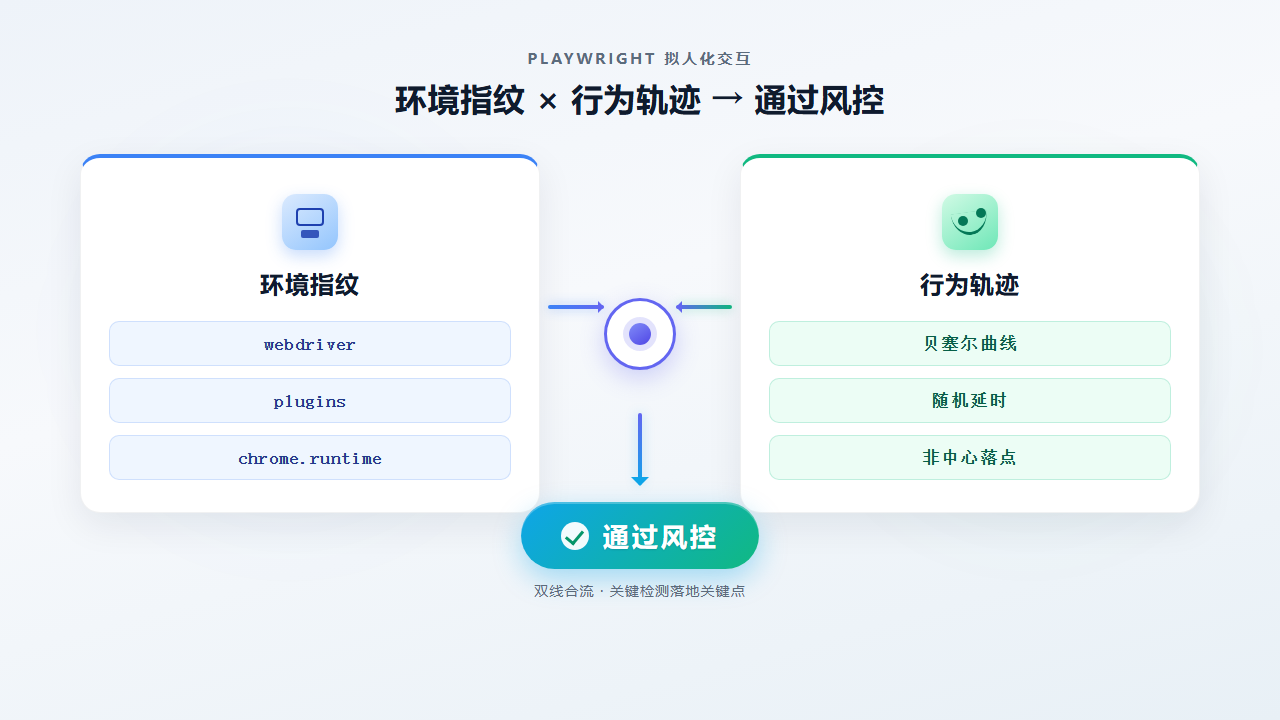
| 环境 | navigator.webdriver、无 chrome.runtime、Headless UA、插件数为 0 | 无头/自动化标记易露出 |
| 行为 | 鼠标直线瞬移、点击无按下时长、整段 fill 无键间隔 | 轨迹与时间分布不像真人 |
只改启动参数、不改操作层,行为特征仍在;只做慢速 type、不处理 webdriver,环境侧仍过不了。落地时通常是有头真机 Chrome + stealth 脚本 + 拟人交互封装三条一起上。
#mermaid-svg-Cw0TGVI9UYy2l4cf{font-family:\”trebuchet ms\”,verdana,arial,sans-serif;font-size:16px;fill:#333;}@keyframes edge-animation-frame{from{stroke-dashoffset:0;}}@keyframes dash{to{stroke-dashoffset:0;}}#mermaid-svg-Cw0TGVI9UYy2l4cf .edge-animation-slow{stroke-dasharray:9,5!important;stroke-dashoffset:900;animation:dash 50s linear infinite;stroke-linecap:round;}#mermaid-svg-Cw0TGVI9UYy2l4cf .edge-animation-fast{stroke-dasharray:9,5!important;stroke-dashoffset:900;animation:dash 20s linear infinite;stroke-linecap:round;}#mermaid-svg-Cw0TGVI9UYy2l4cf .error-icon{fill:#552222;}#mermaid-svg-Cw0TGVI9UYy2l4cf .error-text{fill:#552222;stroke:#552222;}#mermaid-svg-Cw0TGVI9UYy2l4cf .edge-thickness-normal{stroke-width:1px;}#mermaid-svg-Cw0TGVI9UYy2l4cf .edge-thickness-thick{stroke-width:3.5px;}#mermaid-svg-Cw0TGVI9UYy2l4cf .edge-pattern-solid{stroke-dasharray:0;}#mermaid-svg-Cw0TGVI9UYy2l4cf .edge-thickness-invisible{stroke-width:0;fill:none;}#mermaid-svg-Cw0TGVI9UYy2l4cf .edge-pattern-dashed{stroke-dasharray:3;}#mermaid-svg-Cw0TGVI9UYy2l4cf .edge-pattern-dotted{stroke-dasharray:2;}#mermaid-svg-Cw0TGVI9UYy2l4cf .marker{fill:#333333;stroke:#333333;}#mermaid-svg-Cw0TGVI9UYy2l4cf .marker.cross{stroke:#333333;}#mermaid-svg-Cw0TGVI9UYy2l4cf svg{font-family:\”trebuchet ms\”,verdana,arial,sans-serif;font-size:16px;}#mermaid-svg-Cw0TGVI9UYy2l4cf p{margin:0;}#mermaid-svg-Cw0TGVI9UYy2l4cf .label{font-family:\”trebuchet ms\”,verdana,arial,sans-serif;color:#333;}#mermaid-svg-Cw0TGVI9UYy2l4cf .cluster-label text{fill:#333;}#mermaid-svg-Cw0TGVI9UYy2l4cf .cluster-label span{color:#333;}#mermaid-svg-Cw0TGVI9UYy2l4cf .cluster-label span p{background-color:transparent;}#mermaid-svg-Cw0TGVI9UYy2l4cf .label text,#mermaid-svg-Cw0TGVI9UYy2l4cf span{fill:#333;color:#333;}#mermaid-svg-Cw0TGVI9UYy2l4cf .node rect,#mermaid-svg-Cw0TGVI9UYy2l4cf .node circle,#mermaid-svg-Cw0TGVI9UYy2l4cf .node ellipse,#mermaid-svg-Cw0TGVI9UYy2l4cf .node polygon,#mermaid-svg-Cw0TGVI9UYy2l4cf .node path{fill:#ECECFF;stroke:#9370DB;stroke-width:1px;}#mermaid-svg-Cw0TGVI9UYy2l4cf .rough-node .label text,#mermaid-svg-Cw0TGVI9UYy2l4cf .node .label text,#mermaid-svg-Cw0TGVI9UYy2l4cf .image-shape .label,#mermaid-svg-Cw0TGVI9UYy2l4cf .icon-shape .label{text-anchor:middle;}#mermaid-svg-Cw0TGVI9UYy2l4cf .node .katex path{fill:#000;stroke:#000;stroke-width:1px;}#mermaid-svg-Cw0TGVI9UYy2l4cf .rough-node .label,#mermaid-svg-Cw0TGVI9UYy2l4cf .node .label,#mermaid-svg-Cw0TGVI9UYy2l4cf .image-shape .label,#mermaid-svg-Cw0TGVI9UYy2l4cf .icon-shape .label{text-align:center;}#mermaid-svg-Cw0TGVI9UYy2l4cf .node.clickable{cursor:pointer;}#mermaid-svg-Cw0TGVI9UYy2l4cf .root .anchor path{fill:#333333!important;stroke-width:0;stroke:#333333;}#mermaid-svg-Cw0TGVI9UYy2l4cf .arrowheadPath{fill:#333333;}#mermaid-svg-Cw0TGVI9UYy2l4cf .edgePath .path{stroke:#333333;stroke-width:2.0px;}#mermaid-svg-Cw0TGVI9UYy2l4cf .flowchart-link{stroke:#333333;fill:none;}#mermaid-svg-Cw0TGVI9UYy2l4cf .edgeLabel{background-color:rgba(232,232,232, 0.8);text-align:center;}#mermaid-svg-Cw0TGVI9UYy2l4cf .edgeLabel p{background-color:rgba(232,232,232, 0.8);}#mermaid-svg-Cw0TGVI9UYy2l4cf .edgeLabel rect{opacity:0.5;background-color:rgba(232,232,232, 0.8);fill:rgba(232,232,232, 0.8);}#mermaid-svg-Cw0TGVI9UYy2l4cf .labelBkg{background-color:rgba(232, 232, 232, 0.5);}#mermaid-svg-Cw0TGVI9UYy2l4cf .cluster rect{fill:#ffffde;stroke:#aaaa33;stroke-width:1px;}#mermaid-svg-Cw0TGVI9UYy2l4cf .cluster text{fill:#333;}#mermaid-svg-Cw0TGVI9UYy2l4cf .cluster span{color:#333;}#mermaid-svg-Cw0TGVI9UYy2l4cf div.mermaidTooltip{position:absolute;text-align:center;max-width:200px;padding:2px;font-family:\”trebuchet ms\”,verdana,arial,sans-serif;font-size:12px;background:hsl(80, 100%, 96.2745098039%);border:1px solid #aaaa33;border-radius:2px;pointer-events:none;z-index:100;}#mermaid-svg-Cw0TGVI9UYy2l4cf .flowchartTitleText{text-anchor:middle;font-size:18px;fill:#333;}#mermaid-svg-Cw0TGVI9UYy2l4cf rect.text{fill:none;stroke-width:0;}#mermaid-svg-Cw0TGVI9UYy2l4cf .icon-shape,#mermaid-svg-Cw0TGVI9UYy2l4cf .image-shape{background-color:rgba(232,232,232, 0.8);text-align:center;}#mermaid-svg-Cw0TGVI9UYy2l4cf .icon-shape p,#mermaid-svg-Cw0TGVI9UYy2l4cf .image-shape p{background-color:rgba(232,232,232, 0.8);padding:2px;}#mermaid-svg-Cw0TGVI9UYy2l4cf .icon-shape .label rect,#mermaid-svg-Cw0TGVI9UYy2l4cf .image-shape .label rect{opacity:0.5;background-color:rgba(232,232,232, 0.8);fill:rgba(232,232,232, 0.8);}#mermaid-svg-Cw0TGVI9UYy2l4cf .label-icon{display:inline-block;height:1em;overflow:visible;vertical-align:-0.125em;}#mermaid-svg-Cw0TGVI9UYy2l4cf .node .label-icon path{fill:currentColor;stroke:revert;stroke-width:revert;}#mermaid-svg-Cw0TGVI9UYy2l4cf :root{–mermaid-font-family:\”trebuchet ms\”,verdana,arial,sans-serif;}
启动有头 Chrome
注入 stealth evasion
自检 webdriver / plugins
贝塞尔移动 + 随机停顿
click / type / paste
贝塞尔鼠标:从「瞬移」到「曲线到达」
三次贝塞尔采样
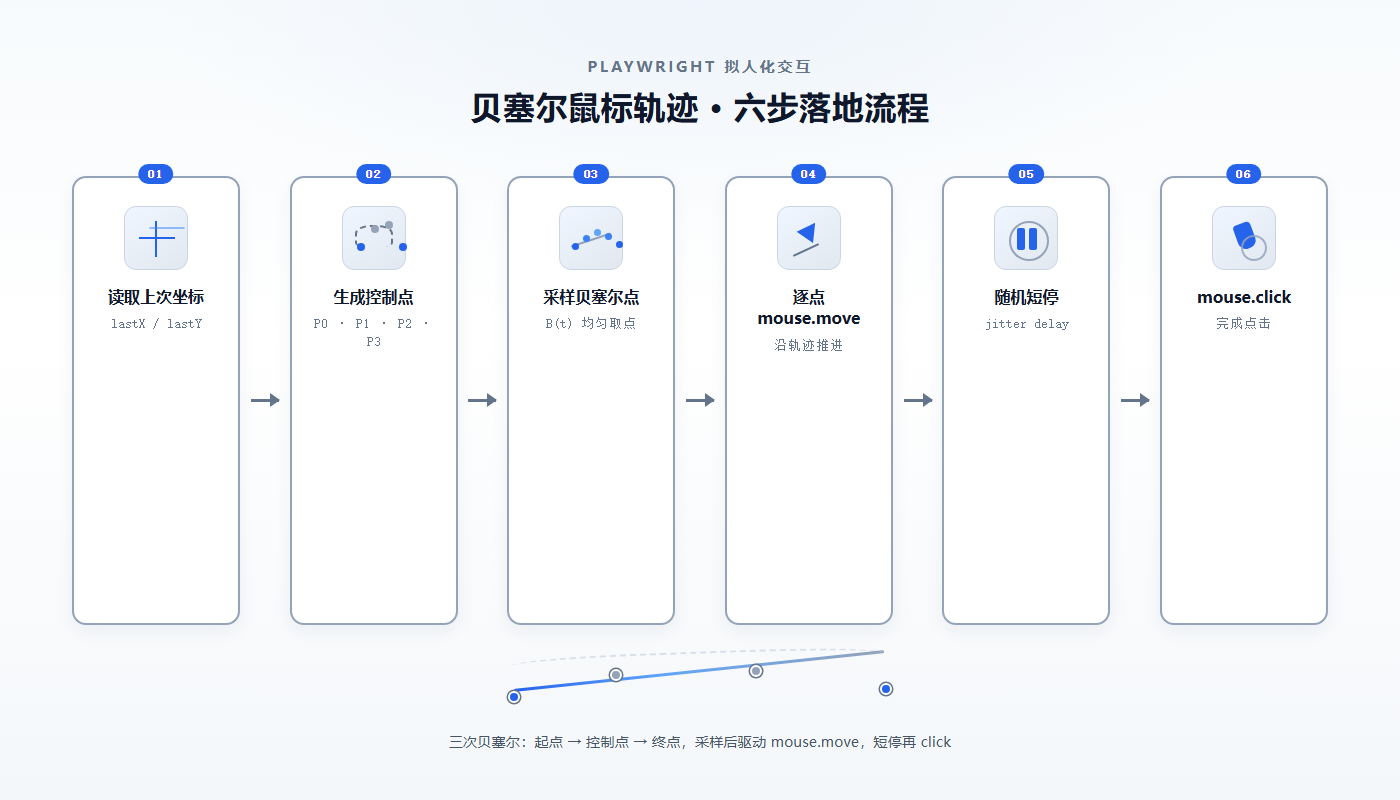
真人鼠标很少走直线。三次贝塞尔用起点 (x0,y0)、终点 (x1,y1) 和两个控制点,按参数 t ∈ (0,1] 离散成一串点,再逐点 mouse.move:
import random
def bezier_points(x0, y0, x1, y1, steps):
cx1 = x0 + (x1 – x0) * random.uniform(0.2, 0.5) + random.uniform(–80, 80)
cy1 = y0 + (y1 – y0) * random.uniform(0.0, 0.4) + random.uniform(–80, 80)
cx2 = x0 + (x1 – x0) * random.uniform(0.5, 0.8) + random.uniform(–80, 80)
cy2 = y0 + (y1 – y0) * random.uniform(0.6, 1.0) + random.uniform(–80, 80)
pts = []
for i in range(1, steps + 1):
t = i / steps
u = 1.0 – t
x = u**3 * x0 + 3 * u**2 * t * cx1 + 3 * u * t**2 * cx2 + t**3 * x1
y = u**3 * y0 + 3 * u**2 * t * cy1 + 3 * u * t**2 * cy2 + t**3 * y1
pts.append((x, y))
return pts
控制点在主方向上按比例落在 0.2–0.8 区间,再叠 ±80px 抖动,同一段路程每次弧度都不同。steps 建议 random.randint(12, 28):太少像折线,太多拖慢脚本且采样过密反而像机器。
记住上一次指针位置
若每次都从视口左上角起跳,风控仍能看出「瞬移」。把坐标挂在 page 对象上(例如 _human_mx / _human_my),下次移动以上次终点为起点;首次则从视口左上 1/4 区域随机取点:
async def human_move_to(page, x, y):
sx = getattr(page, "_human_mx", random.uniform(40, 480))
sy = getattr(page, "_human_my", random.uniform(40, 270))
steps = random.randint(12, 28)
for px, py in bezier_points(sx, sy, x, y, steps):
await page.mouse.move(px, py)
await asyncio.sleep(random.uniform(0.004, 0.016))
page._human_mx, page._human_my = x, y
点间间隔 4–16ms,对应约 60–250Hz 的移动节奏,接近人手拖动。
点击落点不要死盯中心
取 bounding_box() 后,在宽高的 30%–70% 范围内随机取点,再移过去点击;mouse.click 的 delay 用 40–120ms,模拟按下到抬起。找不到 box 时再退回 locator.click(delay=…),避免元素不可见时整条链路挂死。
节奏层:停顿比「再慢一点」更有效
单纯把 delay 调大,分布仍是固定区间。更稳的做法是分层随机:
- 页面加载后:800–2000ms,约 10% 概率再「走神」1–3s
- 步骤之间:400–1200ms
- 点击前:120–400ms
- 逐字输入:每键 40–140ms;遇到空格、逗号、句号额外停 100–300ms
长文输入可用剪贴板粘贴(先授权 clipboard-write,失败再退到临时 textarea + execCommand('copy')),粘贴前后各留 300–1500ms,比几千次 keyboard.type 更接近真人写长内容。
指纹层:playwright-stealth 怎么配才不打架
启动参数取舍
有头 + 本机 Chrome(channel="chrome")+ launch_persistent_context 时,不要硬改 UA / Client Hints:脚本在启动前拿不到真机指纹,乱覆盖反而和真实 Chrome 不一致。推荐:
- ignore_default_args 去掉 –enable-automation(以及不必要的 –no-sandbox)
- 不要再加 –disable-blink-features=AutomationControlled:新版稳定版 Chrome 会弹「不受支持的命令行标记」黄条,等于自我曝光
- locale / –accept-lang 与业务地区一致(如 zh-CN)
- viewport / window 固定一组常用分辨率(如 1920×1080),避免每次随机导致会话内突变
Stealth 初始化
from playwright_stealth import Stealth
stealth = Stealth(
navigator_languages_override=("zh-CN", "zh"),
navigator_platform_override="Win32", # macOS 用 MacIntel,Linux 用 Linux x86_64
navigator_user_agent=False,
navigator_user_agent_data=False,
sec_ch_ua=False,
init_scripts_only=True,
)
await stealth.apply_stealth_async(context)
init_scripts_only=True 只靠注入脚本做 evasion,避免和 persistent context 的其它补丁叠床架屋。
启动后自检
打开 about:blank 后跑一段页面内探测,至少看这几项:
({
webdriver: navigator.webdriver,
uaHeadless: /HeadlessChrome/i.test(navigator.userAgent || ''),
pluginsLen: navigator.plugins ? navigator.plugins.length : 0,
hasChrome: !!(window.chrome && window.chrome.runtime),
})
期望大致是:webdriver 为 falsy、uaHeadless 为 false、pluginsLen > 0、hasChrome 为 true。自检失败先修环境,再调行为参数,否则你会在「轨迹已经很像人」上浪费时间。
业务封装时的几条硬约束
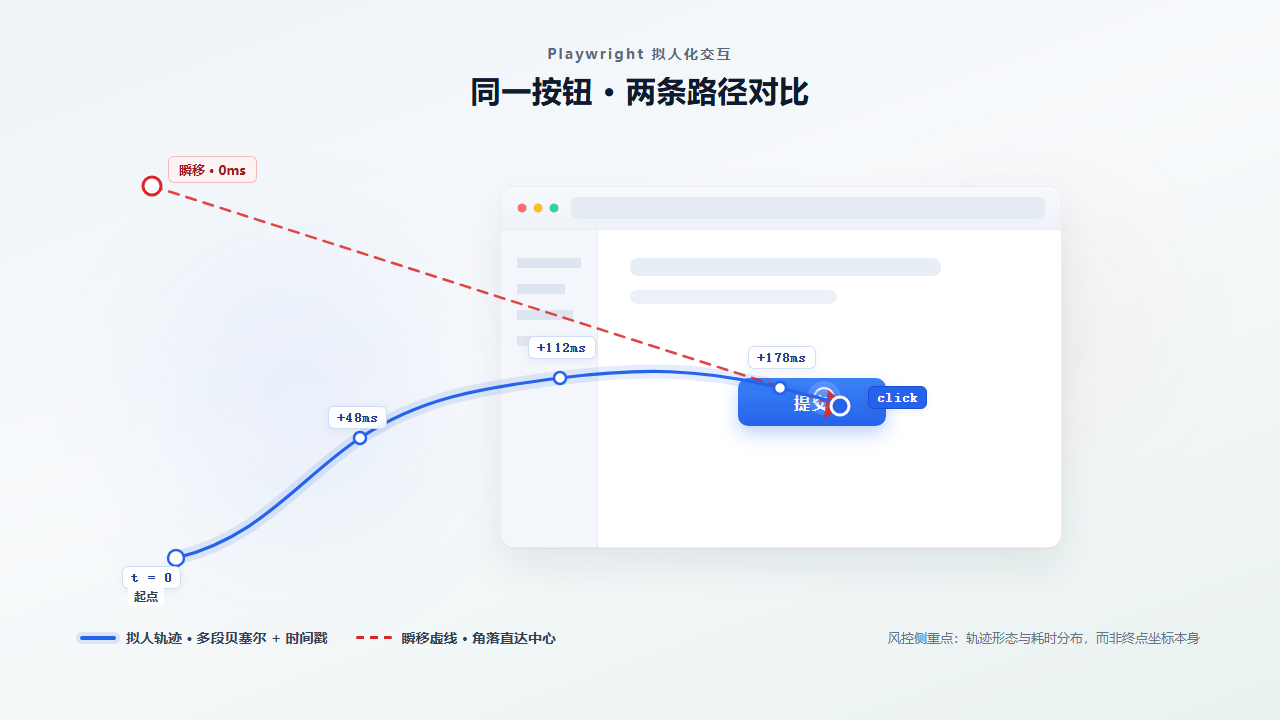
把「曲线移动 + 分层延时」做成可复用模块,再叠一层经自检的 stealth,Playwright 脚本从「能点通」进到「操作分布更接近真人」。后续要加滚动、拖拽、文件选择,也沿用同一套:先到可视区、再贝塞尔到位、再带 delay 的按下抬起。


评论前必须登录!
注册