 网硕互联帮助中心
第10章:重定向机制原理
10.1 重定向的基本概念
10.1.1 重定向的定义与本质
HTTP重定向是一种客户端-服务器通信机制,当请求的资源位置发生变化或需要从不同位置获取时,服务器指示客户端向新地址重新发起请求。从本质上讲,重定向不是资源本身,而是关于资源位置的"元信息"。
技术定义:
-
协议层面:HTTP/1.1规范RFC 7231定义3xx状态码为"重定向状态码"
-
功能层面:位置转移指令,通常伴随Location响应头
-
语义层面:资源表示在不同URI下可用
10.1.2 重定向的历史演进
HTTP重定向机制随着协议版本演进不断成熟:
HTTP/0.9和早期HTTP/1.0:
-
仅有基础重定向概念
-
实现不一致,缺乏标准化
HTTP/1.0 (RFC 1945, 1996):
-
正式定义了301和302状态码
-
但规范相对简单,导致浏览器实现差异
HTTP/1.1 (RFC 2616, 1999 → RFC 7231, 2014):
-
引入303、307状态码
-
明确重定向缓存语义
-
规范方法保持行为
现代HTTP/2和HTTP/3:
-
协议改变不影响重定向语义
-
但传输效率优化影响重定向性能考虑
10.1.3 重定向的哲学思考:REST架构视角
从REST(表述性状态转移)架构风格看,重定向体现了几个重要原则:
统一接口:重定向是标准化的客户端-服务器交互模式
分层系统:重定向允许在架构不同层级处理位置变更
按需代码:重定向可视为服务器向客户端提供的"执行指令"
Roy Fielding博士在论文中强调,重定向是REST架构中"状态转移"的重要机制,使客户端状态能够随着资源位置变化而正确迁移。
10.2 重定向的执行流程
10.2.1 标准重定向流程详析
单次重定向的详细步骤:
初始请求发起
http
GET /old-path HTTP/1.1
Host: example.com
User-Agent: Mozilla/5.0
Accept: text/html,application/xhtml+xml
服务器响应重定向
http
HTTP/1.1 301 Moved Permanently
Location: https://example.com/new-path
Content-Type: text/html; charset=utf-8
Content-Length: 178
Date: Mon, 21 Oct 2024 09:00:00 GMT
Cache-Control: public, max-age=3600
<!DOCTYPE html>
<html><head><title>301 Moved Permanently</title></head>
<body><h1>Moved Permanently</h1></body></html>
客户端处理逻辑:
-
解析状态码,确认是重定向
-
检查Location头部获取新URL
-
验证重定向是否安全(防止重定向循环)
-
决定是否保持原始请求方法(根据状态码类型)
-
向新URL发起请求
重定向请求发送:
http
GET /new-path HTTP/1.1
Host: example.com
User-Agent: Mozilla/5.0
Accept: text/html,application/xhtml+xml
Referer: https://example.com/old-path
最终响应接收:
http
HTTP/1.1 200 OK
Content-Type: text/html; charset=utf-8
Content-Length: 2456
<!DOCTYPE html>
<html>…实际内容…</html>
10.2.2 浏览器处理重定向的内部机制
现代浏览器实现重定向处理时包含复杂逻辑:
请求-响应管道优化:
text
原始请求 → 解析响应 → 检查状态码 →
缓存检查 → 安全验证 → 构建新请求 →
连接复用检查 → 发送新请求
连接管理策略:
-
如果新旧URL在同一域名下,尽可能复用TCP连接
-
HTTP/2和HTTP/3下利用多路复用优化
-
连接池管理避免重复握手
安全限制与防护:
-
最大重定向限制(通常20次,防循环)
-
跨域重定向安全策略
-
敏感信息保护(如Authorization头传递)
10.2.3 重定向链与循环检测
重定向链示例:
text
客户端 → A (302 → B) → B (301 → C) → C (307 → D) → D (200 OK)
循环检测算法:
javascript
// 简化的重定向循环检测逻辑
class RedirectHandler {
constructor(maxRedirects = 20) {
this.maxRedirects = maxRedirects;
this.visitedUrls = new Set();
this.redirectCount = 0;
}
handleRedirect(response, currentUrl) {
// 检查重定向次数限制
if (this.redirectCount >= this.maxRedirects) {
throw new Error('Too many redirects');
}
// 获取重定向目标
const location = response.headers.get('Location');
const redirectUrl = new URL(location, currentUrl).href;
// 检查循环
if (this.visitedUrls.has(redirectUrl)) {
throw new Error('Redirect loop detected');
}
// 记录并继续
this.visitedUrls.add(currentUrl);
this.redirectCount++;
return redirectUrl;
}
}
实际案例分析:知名网站重定向链
-
Twitter:t.co短链接服务多层重定向
-
Google搜索:地域化重定向链
-
CDN服务:边缘节点到源站的重定向
10.3 重定向的分类维度
10.3.1 按持久性分类
永久重定向(301、308):
-
语义:资源已永久移动到新位置
-
缓存行为:
http
HTTP/1.1 301 Moved Permanently
Location: /new-url
Cache-Control: public, max-age=31536000 # 通常1年缓存 -
客户端处理:
-
更新书签和收藏
-
搜索引擎更新索引
-
后续请求直接访问新URL
-
临时重定向(302、303、307):
-
语义:资源临时位于不同位置
-
缓存行为:
http
HTTP/1.1 302 Found
Location: /temporary-location
Cache-Control: no-store, no-cache # 通常不缓存
Expires: 0 -
客户端处理:
-
不更新书签
-
搜索引擎继续抓取原始URL
-
每次访问都可能重定向
-
10.3.2 按方法保持分类
方法保持重定向(301、302的原始意图、307、308):
-
保持原始HTTP方法(GET保持GET,POST保持POST)
-
适用于API和表单提交场景
方法变更重定向(303):
-
总是将请求方法转为GET
-
适用于POST后展示结果的场景
浏览器实际行为的历史演变:
| 早期浏览器 | POST→GET(错误) | POST→GET(错误) | 未引入 |
| 中期实现 | 部分保持 | POST→GET | 严格保持 |
| 现代浏览器 | 理论上应保持 | 实际常转GET | 严格保持 |
10.3.3 按缓存策略分类
可缓存重定向:
-
301、308可被客户端和代理缓存
-
缓存时间由Cache-Control和Expires控制
-
代理服务器可能存储重定向映射
不可缓存重定向:
-
302、303、307通常不缓存
-
每次都需要向原始服务器验证
-
代理服务器应传递每次请求
10.3.4 按触发场景分类
服务器驱动重定向:
-
基于服务器配置(.htaccess、Nginx配置)
-
基于应用逻辑(PHP header()、Express redirect())
-
基于内容协商(语言、设备类型)
客户端驱动重定向:
-
JavaScript重定向:window.location.href = '/new'
-
Meta标签重定向:<meta http-equiv="refresh" content="5;url=/new">
-
HTTP刷新头:Refresh: 5; url=/new-path
混合策略重定向:
-
Service Worker拦截和重写请求
-
边缘计算平台(Cloudflare Workers)的重定向逻辑
-
API网关的重定向规则
10.4 重定向的实现方式
10.4.1 服务器端配置实现
Apache服务器 (.htaccess):
apache
# 永久重定向
Redirect 301 /old-path /new-path
# 正则表达式重定向
RedirectMatch 301 ^/blog/(.*)$ https://newsite.com/articles/$1
# 条件重定向
RewriteEngine On
RewriteCond %{HTTP_HOST} ^oldsite.com$ [NC]
RewriteRule ^(.*)$ https://newsite.com/$1 [R=301,L]
# 基于查询参数的重定向
RewriteCond %{QUERY_STRING} ^id=([0-9]+)$
RewriteRule ^product\\.php$ /products/%1? [R=301,L]
Nginx配置:
nginx
server {
listen 80;
server_name example.com;
# 简单重定向
location = /old-url {
return 301 /new-url;
}
# 正则匹配重定向
location ~ ^/blog/([0-9]{4})/([0-9]{2})/(.*)$ {
return 301 /archives/$1/$2/$3;
}
# 条件重定向
if ($http_user_agent ~* "bot|crawler|spider") {
return 301 /bot-page;
}
# 保留查询参数
location /search {
return 301 https://$server_name/search$is_args$args;
}
}
IIS服务器 (web.config):
xml
<configuration>
<system.webServer>
<rewrite>
<rules>
<rule name="Redirect to HTTPS" stopProcessing="true">
<match url="(.*)" />
<conditions>
<add input="{HTTPS}" pattern="^OFF$" />
</conditions>
<action type="Redirect" url="https://{HTTP_HOST}/{R:1}"
redirectType="Permanent" />
</rule>
<rule name="Redirect old pages">
<match url="^old-folder/(.*)$" />
<action type="Redirect" url="/new-folder/{R:1}"
redirectType="Permanent" />
</rule>
</rules>
</rewrite>
</system.webServer>
</configuration>
10.4.2 编程语言框架实现
Node.js/Express示例:
javascript
const express = require('express');
const app = express();
// 永久重定向
app.get('/legacy-page', (req, res) => {
res.redirect(301, '/modern-page');
});
// 临时重定向
app.post('/submit-form', (req, res) => {
// 处理表单数据…
res.redirect(302, '/thank-you');
});
// 保持方法的重定向
app.post('/api/v1/resource', (req, res) => {
// 迁移到新版本API
res.redirect(308, '/api/v2/resource');
});
// 条件重定向
app.get('/user-profile', (req, res) => {
if (!req.session.user) {
res.redirect(302, '/login');
} else {
res.render('profile');
}
});
// 带查询参数的重定向
app.get('/search', (req, res) => {
const { q, page } = req.query;
// 规范化搜索URL
res.redirect(301, `/search?query=${encodeURIComponent(q)}&page=${page || 1}`);
});
Python/Django示例:
python
from django.http import HttpResponseRedirect, HttpResponsePermanentRedirect
from django.shortcuts import redirect
from django.urls import reverse
def legacy_view(request):
# 永久重定向
return HttpResponsePermanentRedirect('/new-url/')
def temp_redirect(request):
# 临时重定向
return HttpResponseRedirect('/temporary-url/')
# 使用redirect快捷方式
def product_view(request, product_id):
if product_id < 1000:
# 重定向到新产品ID系统
return redirect('product-detail', product_id=product_id+10000,
permanent=True)
return render(request, 'product.html')
# 基于条件的重定向
def auth_required_view(request):
if not request.user.is_authenticated:
return redirect('%s?next=%s' % (settings.LOGIN_URL, request.path))
return render(request, 'protected.html')
PHP示例:
php
<?php
// 永久重定向
header("HTTP/1.1 301 Moved Permanently");
header("Location: https://newsite.com/new-page.php");
exit();
// 临时重定向
header("Location: /maintenance.php", true, 302);
exit();
// 带延迟的重定向
header("Refresh: 10; url=/new-location.php");
echo "页面将在10秒后跳转…";
// 条件重定向
if ($_SERVER['HTTPS'] != "on") {
$redirect_url = "https://" . $_SERVER['HTTP_HOST'] . $_SERVER['REQUEST_URI'];
header("Location: $redirect_url", true, 301);
exit();
}
// 基于用户代理的重定向
$user_agent = $_SERVER['HTTP_USER_AGENT'];
if (preg_match('/iPhone|Android|Mobile/i', $user_agent)) {
header("Location: /mobile/", true, 302);
exit();
}
?>
10.4.3 前端JavaScript实现
基础重定向方法:
javascript
// 立即重定向
window.location.href = '/new-url';
window.location.replace('/new-url'); // 不保留历史记录
// 延迟重定向
setTimeout(() => {
window.location.href = '/new-url';
}, 3000);
// 条件重定向
if (!localStorage.getItem('user_token')) {
window.location.href = '/login';
}
// 基于浏览器特性的重定向
if (window.innerWidth < 768) {
window.location.href = '/mobile-version';
}
现代框架中的路由重定向:
React Router示例:
jsx
import { Navigate, useNavigate } from 'react-router-dom';
// 组件内重定向
function ProtectedRoute({ children }) {
const isAuthenticated = useSelector(state => state.auth.isAuthenticated);
if (!isAuthenticated) {
return <Navigate to="/login" replace state={{ from: location }} />;
}
return children;
}
// 编程式导航
function ProductPage() {
const navigate = useNavigate();
const params = useParams();
const handleProductUpdate = async () => {
try {
await updateProduct(params.id);
// 成功后重定向
navigate('/products', {
replace: true,
state: { message: 'Product updated successfully' }
});
} catch (error) {
console.error('Update failed:', error);
}
};
return (
<div>
<button onClick={handleProductUpdate}>Update Product</button>
</div>
);
}
Vue Router示例:
javascript
// 路由配置中的重定向
const routes = [
{
path: '/',
redirect: '/home' // 默认重定向
},
{
path: '/old-product/:id',
redirect: to => {
// 动态重定向逻辑
return `/products/${to.params.id}`;
}
}
];
// 导航守卫中的重定向
router.beforeEach((to, from, next) => {
const isAuthenticated = store.getters.isAuthenticated;
if (to.meta.requiresAuth && !isAuthenticated) {
next({
path: '/login',
query: { redirect: to.fullPath }
});
} else {
next();
}
});
10.4.4 HTML Meta标签实现
html
<!DOCTYPE html>
<html>
<head>
<!– 基本重定向 –>
<meta http-equiv="refresh" content="0;url=/new-page.html">
<!– 延迟重定向 –>
<meta http-equiv="refresh" content="5;url=/new-page.html">
<title>页面跳转中…</title>
</head>
<body>
<p>页面将在5秒后自动跳转,<a href="/new-page.html">立即跳转</a></p>
</body>
</html>
Meta重定向的局限性:
-
不支持HTTP状态码(总是302行为)
-
无法设置缓存策略
-
对搜索引擎不友好
-
无法处理POST请求重定向
10.4.5 边缘计算和CDN实现
Cloudflare Workers重定向:
javascript
// Cloudflare Workers脚本
addEventListener('fetch', event => {
event.respondWith(handleRequest(event.request));
});
async function handleRequest(request) {
const url = new URL(request.url);
// 基于路径的重定向
if (url.pathname.startsWith('/legacy/')) {
const newPath = url.pathname.replace('/legacy/', '/modern/');
return Response.redirect(`https://${url.hostname}${newPath}`, 301);
}
// 基于地理位置的重定向
const country = request.cf.country;
if (country === 'CN') {
return Response.redirect('https://cn.example.com' + url.pathname, 302);
}
// 基于设备类型的重定向
const userAgent = request.headers.get('User-Agent');
if (/mobile|android|iphone/i.test(userAgent)) {
url.hostname = 'm.example.com';
return Response.redirect(url.toString(), 302);
}
// 正常请求处理
return fetch(request);
}
AWS Lambda@Edge重定向:
javascript
exports.handler = async (event) => {
const request = event.Records[0].cf.request;
const headers = request.headers;
// 检查是否需要重定向到HTTPS
if (headers['cloudfront-forwarded-proto'] &&
headers['cloudfront-forwarded-proto'][0].value === 'http') {
return {
status: '301',
statusDescription: 'Moved Permanently',
headers: {
location: [{
key: 'Location',
value: `https://${headers.host[0].value}${request.uri}`
}]
}
};
}
// 路径重写/重定向
if (request.uri.startsWith('/old/')) {
const newUri = request.uri.replace('/old/', '/new/');
return {
status: '302',
statusDescription: 'Found',
headers: {
location: [{
key: 'Location',
value: newUri
}]
}
};
}
return request;
};
10.5 重定向的常见问题与调试方法
10.5.1 常见问题分类
重定向循环:
text
客户端 → A (301 → B) → B (301 → A) → A (301 → B) → …
原因分析:
配置错误导致相互重定向
条件逻辑错误
缓存导致过时重定向规则
解决方案:
-
使用工具检测循环链
-
检查重定向条件逻辑
-
清除浏览器和代理缓存
方法丢失问题:
-
POST请求经过302重定向变为GET
-
表单数据丢失
-
API调用失败
解决方案:
-
对API使用307/308状态码
-
使用中间页保存数据
-
实现客户端重试逻辑
SEO问题:
-
过多重定向链影响爬虫效率
-
权重传递不正确
-
索引混乱
解决方案:
-
简化重定向链(最好1次跳转)
-
使用正确状态码(301传递权重)
-
定期审核重定向地图
10.5.2 调试工具与技术
命令行工具调试:
cURL命令示例:
bash
# 基本重定向跟踪
curl -I https://example.com/old-url
# 跟踪重定向链(-L 跟随重定向)
curl -L -v https://example.com/old-url
# 限制重定向次数
curl -L –max-redirs 5 https://example.com
# 保持POST方法(-X POST)
curl -X POST -L -d "param=value" https://example.com/form
# 查看详细头部信息
curl -I -H "User-Agent: Mozilla/5.0" https://example.com
wget命令示例:
bash
# 下载并跟随重定向
wget https://example.com/old-url
# 查看重定向过程
wget –server-response –spider https://example.com/old-url
# 保存重定向链信息
wget –save-headers -O output.html https://example.com/old-url
浏览器开发者工具调试:
Chrome DevTools网络面板:
打开Network标签
勾选"Preserve log"保留重定向日志
查看状态码为3xx的请求
检查Response Headers中的Location头
性能影响分析:
-
查看每个重定向的Timing标签
-
分析DNS查找、TCP连接、SSL握手时间
-
计算总重定向耗时
浏览器扩展工具:
-
Redirect Path (Chrome扩展)
-
HTTP Header Live
-
Redirect Detective
10.5.3 专业调试工具
Screaming Frog SEO Spider:
-
爬取网站所有重定向
-
分析重定向链长度
-
识别重定向循环
-
导出重定向地图
Ahrefs Site Audit:
-
扫描全站重定向问题
-
检查301 vs 302使用
-
分析重定向对SEO的影响
-
提供修复建议
自定义脚本监控:
python
import requests
from urllib.parse import urljoin
from collections import defaultdict
class RedirectAnalyzer:
def __init__(self):
self.redirect_chains = defaultdict(list)
self.max_redirects = 10
def analyze_url(self, url):
chain = []
current_url = url
for _ in range(self.max_redirects):
try:
response = requests.head(current_url, allow_redirects=False, timeout=5)
chain.append({
'url': current_url,
'status': response.status_code,
'headers': dict(response.headers)
})
if response.status_code in [301, 302, 303, 307, 308]:
location = response.headers.get('Location')
if location:
current_url = urljoin(current_url, location)
else:
break
else:
break
if current_url in [step['url'] for step in chain]:
chain.append({'error': 'Redirect loop detected'})
break
except Exception as e:
chain.append({'error': str(e)})
break
self.redirect_chains[url] = chain
return chain
def generate_report(self):
report = {
'total_urls': len(self.redirect_chains),
'chains_by_length': defaultdict(int),
'status_codes': defaultdict(int),
'issues': []
}
for url, chain in self.redirect_chains.items():
report['chains_by_length'][len(chain)] += 1
for step in chain:
if 'status' in step:
report['status_codes'][step['status']] += 1
# 检测问题
if len(chain) > 5:
report['issues'].append(f"Long chain detected for {url}: {len(chain)} redirects")
if chain and 'error' in chain[-1]:
report['issues'].append(f"Error for {url}: {chain[-1]['error']}")
return report
# 使用示例
analyzer = RedirectAnalyzer()
analyzer.analyze_url('https://example.com/old-page')
report = analyzer.generate_report()
print(report)
10.5.4 性能优化策略
减少重定向链长度:
text
# 不佳:多层重定向
原始URL → A → B → C → 目标
# 优化:直接重定向
原始URL → 目标
连接复用优化:
-
确保重定向在同一域名下
-
使用HTTP/2或HTTP/3的多路复用
-
预连接优化
缓存策略优化:
http
# 对永久重定向设置长缓存
HTTP/1.1 301 Moved Permanently
Location: /new-url
Cache-Control: public, max-age=31536000 # 1年
CDN边缘重定向:
-
在CDN边缘节点处理重定向
-
减少回源延迟
-
分布式处理
10.5.5 安全考虑
重定向安全威胁:
开放重定向漏洞:
http
# 危险的重定向实现
GET /redirect?url=https://evil.com HTTP/1.1
HTTP/1.1 302 Found
Location: https://evil.com # 用户被重定向到恶意网站
防御措施:
python
def safe_redirect(request, default_url='/home'):
target = request.GET.get('url', '')
# 验证目标URL
if not target:
return redirect(default_url)
# 白名单验证
allowed_domains = ['example.com', 'trusted-site.com']
parsed_url = urlparse(target)
if parsed_url.netloc not in allowed_domains:
return redirect(default_url)
# 防止协议滥用
if parsed_url.scheme not in ['http', 'https']:
return redirect(default_url)
return redirect(target)
HTTP严格传输安全(HSTS):
http
# 防止SSL剥离攻击
Strict-Transport-Security: max-age=31536000; includeSubDomains; preload
敏感信息保护:
-
重定向时不传递Authorization头
-
使用Referrer-Policy控制referrer信息
-
对敏感操作使用POST+303而非GET重定向
第11章:301 Moved Permanently – 永久重定向
11.1 规范定义与技术细节
11.1.1 RFC规范演进
RFC 2616 (HTTP/1.1, 1999):
text
10.3.2 301 Moved Permanently
The requested resource has been assigned a new permanent URI and any
future references to this resource SHOULD use one of the returned URIs.
RFC 7231 (HTTP/1.1 Semantics, 2014) – 现行标准:
text
6.4.2. 301 Moved Permanently
The 301 (Moved Permanently) status code indicates that the target
resource has been assigned a new permanent URI and any future
references to this resource ought to use one of the enclosed URIs.
关键变化:
-
"SHOULD"变为"ought to"(语气更强)
-
强调未来引用都应使用新URI
-
明确缓存和代理处理要求
11.1.2 技术特性详解
语义特征:
-
永久性:资源位置永久改变
-
不可逆性:旧URI不应再被使用
-
可链接性:新URI应被视为资源的规范地址
方法保持要求:
http
POST /old-endpoint HTTP/1.1
Content-Type: application/json
Content-Length: 32
{"action": "create", "data": "value"}
HTTP/1.1 301 Moved Permanently
Location: /new-endpoint
规范要求:客户端应保持POST方法重新请求 现实情况:许多浏览器将POST转为GET(历史原因)
缓存行为规范:
-
客户端可无限期缓存重定向
-
代理服务器应更新缓存映射
-
缓存时间建议:1年或更长
11.2 使用场景与最佳实践
11.2.1 网站重构与迁移
域名变更场景:
nginx
# old-example.com → new-example.com 全面迁移
server {
listen 80;
server_name old-example.com www.old-example.com;
return 301 https://new-example.com$request_uri;
}
# 保留路径结构
server {
listen 80;
server_name old-example.com;
location / {
return 301 https://new-example.com$request_uri;
}
}
路径结构调整:
apache
# 扁平化URL结构重定向
RedirectMatch 301 ^/products/category/([^/]+)/([^/]+)$ /$1-$2
# 日期格式标准化
RedirectMatch 301 ^/blog/([0-9]{4})/([0-9]{1,2})/([0-9]{1,2})/(.*)$ \\
/articles/$1/$2/$3/$4
协议升级(HTTP → HTTPS):
apache
<VirtualHost *:80>
ServerName example.com
ServerAlias www.example.com
# 301重定向到HTTPS
RewriteEngine On
RewriteCond %{HTTPS} off
RewriteRule ^(.*)$ https://%{HTTP_HOST}$1 [R=301,L]
# 或者使用Redirect指令
Redirect permanent / https://example.com/
</VirtualHost>
11.2.2 URL规范化与SEO优化
www与非www规范化:
nginx
# 方案1:www重定向到非www
server {
listen 80;
server_name www.example.com;
return 301 $scheme://example.com$request_uri;
}
server {
listen 80;
server_name example.com;
# 主站点配置
}
# 方案2:非www重定向到www
server {
listen 80;
server_name example.com;
return 301 $scheme://www.example.com$request_uri;
}
尾部斜杠规范化:
nginx
# 确保一致性:无斜杠 → 有斜杠
location ~ ^(/[^./]+)$ {
return 301 $scheme://$http_host$1/;
}
# 或者:有斜杠 → 无斜杠
location ~ ^(.+)/$ {
return 301 $scheme://$http_host$1;
}
大小写规范化:
nginx
# 将所有URL转为小写
if ($request_uri ~ [A-Z]) {
rewrite ^(.*)$ $scheme://$host${lowercase:$1} permanent;
}
重复内容合并:
apache
# 多个URL指向同一内容时选择主版本
<IfModule mod_rewrite.c>
RewriteEngine On
# 参数规范化
RewriteCond %{QUERY_STRING} ^id=123&lang=en$
RewriteRule ^product\\.php$ /products/123? [R=301,L]
# 排序参数忽略
RewriteCond %{QUERY_STRING} ^(.*)&?sort=[^&]+&?(.*)$
RewriteRule ^(.*)$ /$1?%1%2 [R=301,L]
</IfModule>
11.2.3 API版本管理
API端点迁移:
python
# Django API版本迁移示例
from django.http import JsonResponse, HttpResponsePermanentRedirect
from django.views.decorators.http import require_http_methods
@require_http_methods(["GET", "POST", "PUT", "DELETE"])
def legacy_api_v1(request, resource_id=None):
"""
API v1 端点 – 已弃用,重定向到v2
"""
# 构建v2端点URL
path = request.path.replace('/api/v1/', '/api/v2/')
# 对于GET请求,直接重定向
if request.method == 'GET':
return HttpResponsePermanentRedirect(path)
# 对于其他方法,返回详细错误信息
return JsonResponse({
'error': 'API v1 is deprecated',
'message': 'Please use API v2',
'new_endpoint': path,
'docs': 'https://api.example.com/docs/v2'
}, status=301)
版本控制策略:
yaml
# API版本控制配置示例
api_redirects:
v1_to_v2:
pattern: "^/api/v1/(.*)"
replacement: "/api/v2/$1"
status: 301
methods: ["GET", "HEAD", "OPTIONS"]
exceptions:
– "/api/v1/admin/" # 管理端点不重定向
v2_to_v3:
pattern: "^/api/v2/(.*)"
replacement: "/api/v3/$1"
status: 301
sunset: "2024-12-31" # 日落时间
11.3 响应头与缓存控制
11.3.1 标准响应头配置
基础配置示例:
http
HTTP/1.1 301 Moved Permanently
Location: https://example.com/new-path
Date: Mon, 21 Oct 2024 09:00:00 GMT
Server: nginx/1.18.0
Content-Type: text/html; charset=utf-8
Content-Length: 178
Connection: close
优化配置:
http
HTTP/1.1 301 Moved Permanently
Location: https://example.com/new-path
Cache-Control: public, max-age=31536000 # 1年缓存
Expires: Tue, 21 Oct 2025 09:00:00 GMT
Date: Mon, 21 Oct 2024 09:00:00 GMT
Server: nginx/1.18.0
Content-Type: text/html; charset=utf-8
Content-Length: 178
X-Redirect-By: ExampleApp/2.0
X-Redirect-Reason: Site migration 2024
11.3.2 缓存策略详解
客户端缓存控制:
http
# 长期缓存(推荐)
Cache-Control: public, max-age=31536000, immutable
# 中等缓存
Cache-Control: public, max-age=86400 # 1天
# 不缓存(特殊情况)
Cache-Control: no-cache, no-store, must-revalidate
代理服务器缓存:
-
透明代理:遵循客户端缓存指令
-
显式代理:可能实现自己的缓存策略
-
CDN边缘缓存:配置传播和失效策略
缓存失效策略:
nginx
# Nginx配置缓存头
location ~ "^/old/(.*)$" {
add_header Cache-Control "public, max-age=31536000";
add_header Expires $expires;
# 根据条件调整缓存
if ($args ~ "nocache") {
add_header Cache-Control "no-cache";
}
return 301 /new/$1;
}
11.3.3 响应体设计
用户友好的HTML响应:
html
<!DOCTYPE html>
<html lang="en">
<head>
<meta charset="UTF-8">
<meta name="viewport" content="width=device-width, initial-scale=1.0">
<title>Page Moved Permanently</title>
<style>
body {
font-family: Arial, sans-serif;
max-width: 600px;
margin: 50px auto;
padding: 20px;
}
.redirect-message {
background: #f8f9fa;
padding: 20px;
border-radius: 5px;
border-left: 4px solid #007bff;
}
</style>
</head>
<body>
<div class="redirect-message">
<h1>Page Moved</h1>
<p>This page has been permanently moved to a new location.</p>
<p>You are being redirected to:
<a href="https://example.com/new-path">https://example.com/new-path</a>
</p>
<p>If you are not redirected automatically, please click the link above.</p>
<p><small>HTTP 301 Moved Permanently</small></p>
</div>
<script>
// 备用重定向机制
setTimeout(function() {
window.location.href = "https://example.com/new-path";
}, 5000);
</script>
</body>
</html>
机器可读的响应格式:
JSON响应(API场景):
json
{
"status": 301,
"message": "Resource moved permanently",
"new_location": "https://api.example.com/v2/resource/123",
"documentation": "https://docs.example.com/api/migration-guide",
"deprecated": true,
"sunset_date": "2024-12-31T23:59:59Z"
}
XML响应:
xml
<?xml version="1.0" encoding="UTF-8"?>
<redirect>
<status>301</status>
<message>Moved Permanently</message>
<location>https://example.com/new-path</location>
<cache>
<duration>31536000</duration>
<unit>seconds</unit>
</cache>
<timestamp>2024-10-21T09:00:00Z</timestamp>
</redirect>
11.4 SEO影响与优化策略
11.4.1 搜索引擎处理机制
Google搜索的301处理:
爬虫发现:Googlebot遇到301状态码
索引更新:将旧URL替换为新URL
权重传递:PageRank和链接权益传递
索引清理:旧URL从索引中移除(需要时间)
传递因素:
-
90-99%的PageRank传递(根据Google官方)
-
锚文本和上下文信号
-
抓取预算分配调整
时间线:
text
发现301 → 重新抓取新URL → 验证关系 →
传递权重 → 更新索引 → 清理旧URL
整个过程:数天到数周
11.4.2 最佳SEO实践
迁移检查清单:
前期准备:
bash
# 1. 创建重定向映射表
old_url,new_url,status_code
/old-page,/new-page,301
/products/item1,/items/product-1,301
# 2. 验证新URL可访问
curl -I https://example.com/new-page
# 3. 检查重定向链长度
curl -L –max-redirs 10 -I https://example.com/old-page
实施监控:
python
# 监控重定向的SEO影响
import requests
from datetime import datetime
class RedirectMonitor:
def check_redirect_status(self, url):
try:
response = requests.head(url, allow_redirects=True)
final_url = response.url
status_history = [r.status_code for r in response.history]
return {
'original_url': url,
'final_url': final_url,
'status_chain': status_history,
'redirect_count': len(response.history),
'checked_at': datetime.now().isoformat()
}
except Exception as e:
return {'error': str(e), 'url': url}
工具验证:
-
Google Search Console的URL检查工具
-
Screaming Frog SEO Spider批量检查
-
Ahrefs/SEMrush的站点审计
避免常见SEO错误:
重定向链过长:
text
# 错误:多重跳转
A → B → C → D → E
# 正确:直接重定向
A → E
循环重定向:
-
使用工具检测循环
-
定期审计重定向规则
-
实现监控告警
丢失参数或片段:
nginx
# 错误:丢失查询参数
location /search {
return 301 /new-search; # 丢失?q=keyword
}
# 正确:保留参数
location /search {
return 301 /new-search$is_args$args;
}
11.4.3 迁移场景的特殊考虑
大规模网站迁移:
分阶段实施: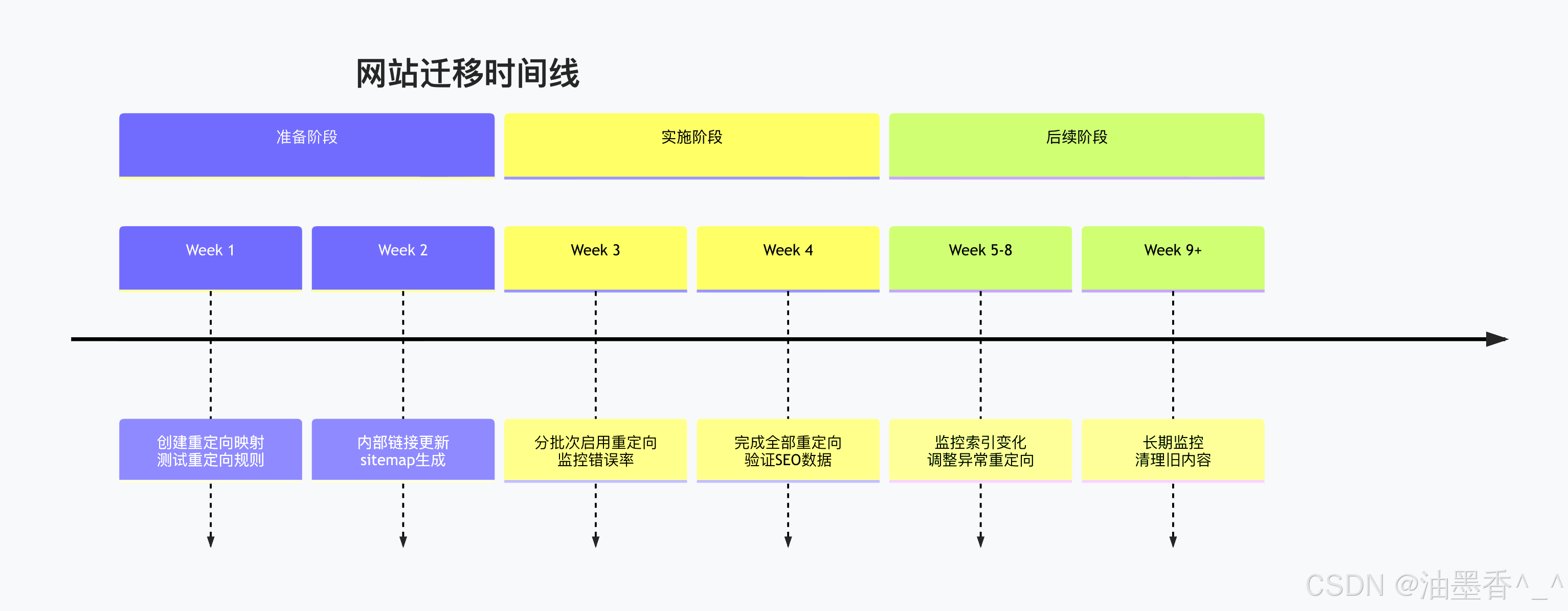
监控指标:
yaml
migration_metrics:
crawl_errors: < 0.1% # 抓取错误率
redirect_chains:
max_length: 2 # 最大重定向链长度
avg_length: 1.2 # 平均链长度
index_coverage:
old_urls_in_index: decreasing # 旧URL索引数量下降
new_urls_in_index: increasing # 新URL索引数量上升
performance:
redirect_time_p95: < 200ms # 95%分位重定向时间
success_rate: > 99.9% # 重定向成功率
多语言/多地区网站:
nginx
# 多语言重定向策略
map $http_accept_language $lang_redirect {
default "";
~*^zh "/zh-CN";
~*^en "/en-US";
~*^ja "/ja-JP";
}
server {
listen 80;
server_name example.com;
# 根据浏览器语言重定向
if ($lang_redirect) {
return 301 $scheme://$http_host$lang_redirect$request_uri;
}
# 默认语言
return 301 $scheme://$http_host/en-US$request_uri;
}
11.5 配置方法与实际案例
11.5.1 主流服务器配置
Apache详细配置:
apache
# .htaccess 永久重定向配置
# 启用重写引擎
RewriteEngine On
# 1. 域名变更(完整迁移)
RewriteCond %{HTTP_HOST} ^old-domain\\.com$ [NC,OR]
RewriteCond %{HTTP_HOST} ^www\\.old-domain\\.com$ [NC]
RewriteRule ^(.*)$ https://new-domain.com/$1 [R=301,L]
# 2. HTTP转HTTPS
RewriteCond %{HTTPS} off
RewriteRule ^(.*)$ https://%{HTTP_HOST}/$1 [R=301,L]
# 3. www规范化
RewriteCond %{HTTP_HOST} ^example\\.com$ [NC]
RewriteRule ^(.*)$ https://www.example.com/$1 [R=301,L]
# 4. 路径重定向(带通配符)
RewriteRule ^old-path/(.*)$ /new-path/$1 [R=301,L]
# 5. 查询参数处理
RewriteCond %{QUERY_STRING} ^id=([0-9]+)$
RewriteRule ^product\\.php$ /products/%1? [R=301,L]
# 6. 条件重定向(基于IP或UA)
RewriteCond %{REMOTE_ADDR} ^192\\.168\\.1\\.
RewriteRule ^(.*)$ /internal/$1 [R=301,L]
# 7. 排除某些路径
RewriteCond %{REQUEST_URI} !^/(admin|api)/
RewriteRule ^blog/(.*)$ /articles/$1 [R=301,L]
# 8. 保留或修改查询参数
RewriteCond %{QUERY_STRING} ^(.+)&page=([0-9]+)&?(.*)$
RewriteRule ^search$ /search/%2?%1%3 [R=301,L]
Nginx高级配置:
nginx
# nginx.conf 永久重定向配置
# 映射表驱动重定向
map $request_uri $new_uri {
include /etc/nginx/redirects.map;
}
server {
listen 80;
server_name example.com;
# 使用映射表重定向
if ($new_uri) {
return 301 $new_uri;
}
# 基于变量的重定向
set $redirect_reason "";
# 协议升级
if ($scheme = "http") {
set $redirect_reason "https_upgrade";
return 301 https://$server_name$request_uri;
}
# 域名规范化
if ($host = "example.com") {
set $redirect_reason "www_canonical";
return 301 https://www.$host$request_uri;
}
# 路径模式重定向
location ~ "^/legacy/(.*)" {
# 记录重定向日志
access_log /var/log/nginx/redirect.log redirect_log;
# 设置缓存头
add_header Cache-Control "public, max-age=31536000";
# 执行重定向
return 301 /modern/$1;
}
# 正则表达式重定向
location ~* "^/category/([^/]+)/([^/]+)$" {
return 301 /shop/$1-$2;
}
# 代理重定向(复杂场景)
location /api/old/ {
proxy_pass http://backend;
proxy_redirect /api/new/ /api/old/;
}
}
# 自定义日志格式
log_format redirect_log '$remote_addr – $remote_user [$time_local] '
'"$request" $status $body_bytes_sent '
'"$http_referer" "$http_user_agent" '
'"$redirect_reason" "$new_uri"';
IIS详细配置:
xml
<!– web.config 永久重定向配置 –>
<configuration>
<system.webServer>
<rewrite>
<rules>
<!– 域名重定向 –>
<rule name="Domain Redirect" stopProcessing="true">
<match url=".*" />
<conditions logicalGrouping="MatchAny">
<add input="{HTTP_HOST}" pattern="^old-domain\\.com$" />
<add input="{HTTP_HOST}" pattern="^www\\.old-domain\\.com$" />
</conditions>
<action type="Redirect" url="https://new-domain.com/{R:0}"
redirectType="Permanent" />
</rule>
<!– HTTP转HTTPS –>
<rule name="Force HTTPS" stopProcessing="true">
<match url="(.*)" />
<conditions>
<add input="{HTTPS}" pattern="^OFF$" />
</conditions>
<action type="Redirect" url="https://{HTTP_HOST}/{R:1}"
redirectType="Permanent" />
</rule>
<!– 路径重定向 –>
<rule name="Redirect old pages" stopProcessing="true">
<match url="^old-folder/(.*)$" />
<action type="Redirect" url="/new-folder/{R:1}"
redirectType="Permanent" />
</rule>
<!– 查询参数重定向 –>
<rule name="Product Redirect" stopProcessing="true">
<match url="^product\\.aspx$" />
<conditions>
<add input="{QUERY_STRING}" pattern="^id=([0-9]+)$" />
</conditions>
<action type="Redirect" url="/products/{C:1}"
redirectType="Permanent" />
</rule>
</rules>
<!– 出站规则(修改响应) –>
<outboundRules>
<rule name="Add Redirect Header">
<match serverVariable="RESPONSE_X_Redirected_By" pattern=".*" />
<action type="Rewrite" value="IIS-Rewrite-Module" />
</rule>
</outboundRules>
</rewrite>
<!– HTTP响应头 –>
<httpProtocol>
<customHeaders>
<add name="X-Redirect-Type" value="Permanent" />
<add name="Cache-Control" value="public, max-age=31536000" />
</customHeaders>
</httpProtocol>
</system.webServer>
</configuration>
11.5.2 云平台配置
AWS S3静态网站重定向:
json
{
"RedirectAllRequestsTo": {
"HostName": "new-domain.com",
"Protocol": "https"
}
}
// 或单个对象重定向
{
"IndexDocument": {
"Suffix": "index.html"
},
"RoutingRules": [
{
"Condition": {
"KeyPrefixEquals": "old-path/"
},
"Redirect": {
"HostName": "new-domain.com",
"ReplaceKeyPrefixWith": "new-path/",
"HttpRedirectCode": "301",
"Protocol": "https"
}
}
]
}
Cloudflare页面规则:
text
1. 模式: http://example.com/old/*
设置: 转发URL
状态码: 301 – 永久重定向
目标URL: https://example.com/new/$1
2. 模式: http://example.com/*
设置: 强制HTTPS
状态码: 301
3. 模式: example.com/legacy/*
设置: 重定向
目标: https://example.com/modern/$1
Azure App Service:
json
{
"httpPlatform": {
"redirectRules": [
{
"source": "/old/<segment>",
"destination": "/new/<segment>",
"permanent": true
}
]
}
}
11.5.3 实际案例分析
案例1:电商网站URL结构重构
nginx
# 旧结构:/product.php?id=123&category=electronics
# 新结构:/products/electronics/smartphone-123
# 重定向规则
location = /product.php {
if ($arg_id ~ "^([0-9]+)$") {
# 查询数据库获取产品信息(伪代码)
# set $product_slug get_product_slug($1);
# set $category_slug get_category_slug($arg_category);
return 301 /products/$category_slug/$product_slug-$1;
}
return 404;
}
# 备用方案:使用映射文件
map $arg_id $product_redirect {
include /etc/nginx/product_redirects.map;
}
location = /product.php {
if ($product_redirect) {
return 301 $product_redirect;
}
return 410; # Gone
}
案例2:多地区网站合并
apache
# 合并多个地区子域名到主域名子目录
RewriteCond %{HTTP_HOST} ^uk\\.example\\.com$ [NC]
RewriteRule ^(.*)$ https://example.com/en-gb/$1 [R=301,L]
RewriteCond %{HTTP_HOST} ^fr\\.example\\.com$ [NC]
RewriteRule ^(.*)$ https://example.com/fr-fr/$1 [R=301,L]
RewriteCond %{HTTP_HOST} ^de\\.example\\.com$ [NC]
RewriteRule ^(.*)$ https://example.com/de-de/$1 [R=301,L]
# 处理语言参数
RewriteCond %{QUERY_STRING} (^|&)lang=([^&]+) [NC]
RewriteRule ^(.*)$ https://example.com/%2/$1? [R=301,L]
案例3:API版本管理
python
# Flask API版本重定向
from flask import Flask, redirect, request
import re
app = Flask(__name__)
# API版本重定向映射
API_REDIRECTS = {
'v1': {
'pattern': r'^/api/v1/(.*)',
'replacement': '/api/v2/\\\\1',
'status': 301,
'exclude': ['/api/v1/admin/', '/api/v1/status']
},
'v2': {
'pattern': r'^/api/v2/(.*)',
'replacement': '/api/v3/\\\\1',
'status': 301,
'sunset': '2024-12-31'
}
}
@app.before_request
def handle_api_redirects():
path = request.path
for version, config in API_REDIRECTS.items():
# 检查排除路径
for exclude in config.get('exclude', []):
if path.startswith(exclude):
return None
# 检查日落时间
if 'sunset' in config:
if datetime.now() > parse_date(config['sunset']):
continue
# 执行重定向
if re.match(config['pattern'], path):
new_path = re.sub(config['pattern'], config['replacement'], path)
return redirect(new_path, code=config['status'])
return None
11.6 注意事项与最佳实践
11.6.1 性能考虑
重定向性能影响:
text
原始请求时间 = DNS + TCP + TLS + 请求 + 响应
重定向时间 = 上述时间 × (1 + 重定向次数)
优化目标:最小化重定向链长度
性能优化策略:
减少DNS查询:
nginx
# 确保重定向在同一域名下
return 301 https://same-domain.com/new-path;
# 避免跨域名重定向(增加DNS查询)
return 301 https://different-domain.com/new-path; # 不佳
连接复用:
http
# HTTP/2和HTTP/3支持多路复用
# 确保服务器支持最新协议
# 保持alive连接
Connection: keep-alive
Keep-Alive: timeout=30, max=100
预连接提示:
html
<!– 提示浏览器预连接到新域名 –>
<link rel="preconnect" href="https://new-domain.com">
<link rel="dns-prefetch" href="https://new-domain.com">
11.6.2 可维护性考虑
重定向管理策略:
集中化管理:
yaml
# redirects.yaml – 集中管理重定向规则
redirects:
– from: /old-page
to: /new-page
status: 301
created: 2024-01-15
reason: Site restructuring
owner: web-team
– from: /legacy/(.*)
to: /modern/$1
status: 301
created: 2024-01-20
reason: URL normalization
owner: seo-team
# 生成配置文件
python generate_redirects.py redirects.yaml > nginx_redirects.conf
版本控制:
bash
# 重定向配置的Git管理
/configs/
├── redirects/
│ ├── v1.0.0/
│ │ ├── apache.conf
│ │ ├── nginx.conf
│ │ └── iis.config
│ ├── v1.1.0/
│ └── current -> v1.1.0/
└── scripts/
├── validate_redirects.py
└── deploy_redirects.py
文档化:
markdown
# 重定向文档模板
## 重定向规则: /old-path → /new-path
**基本信息**
– 状态码: 301
– 创建日期: 2024-01-15
– 负责人: web-team@example.com
**技术细节**
– 匹配模式: 精确匹配
– 查询参数处理: 保留
– 缓存策略: 1年
**业务原因**
– 原因: 网站重构
– 预期效果: 合并重复内容
– SEO影响: PageRank传递
**监控指标**
– 使用量: 1000次/天
– 错误率: < 0.1%
– 最后验证: 2024-10-21
11.6.3 安全考虑
安全最佳实践:
输入验证:
python
def safe_redirect_url(target, base_domain='example.com'):
# 解析目标URL
parsed = urlparse(target)
# 验证协议
if parsed.scheme not in ('http', 'https', ''):
raise ValueError('Invalid scheme')
# 验证域名
if parsed.netloc and parsed.netloc != base_domain:
# 只允许重定向到信任的域名
allowed_domains = get_trusted_domains()
if parsed.netloc not in allowed_domains:
raise ValueError('Untrusted domain')
# 防止开放重定向
if parsed.path.startswith('//'):
raise ValueError('Invalid path')
return urljoin(f'https://{base_domain}', target)
HTTP安全头:
http
HTTP/1.1 301 Moved Permanently
Location: /safe-new-path
Content-Security-Policy: default-src 'self'
X-Content-Type-Options: nosniff
X-Frame-Options: DENY
Referrer-Policy: strict-origin-when-cross-origin
敏感信息保护:
-
重定向时不传递Authorization头
-
使用Referrer-Policy控制referrer泄露
-
对敏感操作使用POST+303而非GET重定向
11.6.4 监控与告警
监控指标设计:
健康检查:
python
class RedirectHealthCheck:
def __init__(self):
self.metrics = {
'total_redirects': 0,
'failed_redirects': 0,
'redirect_times': [],
'chain_lengths': []
}
def check_redirect(self, url, expected_target):
start_time = time.time()
try:
response = requests.head(
url,
allow_redirects=True,
timeout=5
)
elapsed = time.time() – start_time
# 记录指标
self.metrics['total_redirects'] += 1
self.metrics['redirect_times'].append(elapsed)
self.metrics['chain_lengths'].append(len(response.history))
# 验证重定向目标
if response.url != expected_target:
self.metrics['failed_redirects'] += 1
return False, f"Wrong target: {response.url}"
return True, "OK"
except Exception as e:
self.metrics['failed_redirects'] += 1
return False, str(e)
告警规则:
yaml
alerts:
redirect_failure_rate:
condition: failed_redirects / total_redirects > 0.01
severity: warning
message: "重定向失败率超过1%"
long_redirect_chains:
condition: avg(chain_lengths) > 2
severity: warning
message: "平均重定向链长度超过2"
slow_redirects:
condition: p95(redirect_times) > 500
severity: warning
message: "95%分位重定向时间超过500ms"
可视化仪表板:
json
{
"dashboard": {
"panels": [
{
"title": "重定向成功率",
"type": "stat",
"targets": [
"100 * (1 – failed_redirects / total_redirects)"
],
"thresholds": [90, 95]
},
{
"title": "重定向链长度分布",
"type": "histogram",
"targets": ["chain_lengths"]
}
]
}
}
第12章:302 Found – 临时重定向
12.1 历史演变与规范争议
12.1.1 历史背景与问题根源
HTTP/1.0时代的混乱:
-
1996年RFC 1945首次定义302状态码
-
规范描述模糊:"The requested resource resides temporarily under a different URI"
-
未明确说明请求方法是否应该保持
浏览器实现的分歧:
http
POST /form-submit HTTP/1.0
Content-Type: application/x-www-form-urlencoded
name=John&action=submit
HTTP/1.0 302 Found
Location: /thank-you
# 早期浏览器行为:
# Netscape Navigator: POST → GET (丢失表单数据)
# Internet Explorer: 尝试保持POST (不一致)
# 其他浏览器: 各自实现
RFC 2616 (1999)的澄清尝试:
text
10.3.3 302 Found
The requested resource resides temporarily under a different URI.
Since the redirection might be altered on occasion, the client SHOULD
continue to use the Request-URI for future requests.
-
明确客户端"SHOULD"继续使用原始URI
-
但方法保持问题仍未彻底解决
-
实际浏览器实现继续将POST转为GET
12.1.2 303/307的引入与职责划分
RFC 2616的解决方案:
text
10.3.4 303 See Other
10.3.8 307 Temporary Redirect
职责明确划分:
| 302 Found | 不明确 | 历史遗留,临时重定向 |
| 303 See Other | 转为GET | POST后显示结果 |
| 307 Temporary Redirect | 保持方法 | 临时重定向且保持方法 |
现实世界的困惑:
-
大量现有代码使用302
-
浏览器对302的行为已"标准化"为POST→GET
-
开发者习惯难以改变
12.2 使用场景与最佳实践
12.2.1 临时重定向的适用场景
A/B测试与实验:
nginx
# 将30%用户重定向到测试页面
map $cookie_ab_test $ab_version {
default "control";
"test" "test";
}
split_clients "${remote_addr}${http_user_agent}" $ab_group {
30% "test";
70% "control";
}
server {
location /home {
# 设置cookie或基于IP分配
add_header Set-Cookie "ab_test=$ab_group; Path=/; Max-Age=3600";
if ($ab_group = "test") {
return 302 /home-new-design;
}
# 控制组继续原有页面
try_files $uri $uri/ =404;
}
}
地理重定向与本地化:
python
# Django地理重定向示例
from django.shortcuts import redirect
from django.utils.translation import activate, get_language
from geoip2.database import Reader
class GeoRedirectMiddleware:
def __init__(self, get_response):
self.get_response = get_response
self.geoip_reader = Reader('/path/to/GeoLite2-Country.mmdb')
def __call__(self, request):
# 检查是否已设置语言
if 'preferred_language' in request.session:
activate(request.session['preferred_language'])
return self.get_response(request)
# 基于IP的地理定位
ip_address = self.get_client_ip(request)
try:
response = self.geoip_reader.country(ip_address)
country_code = response.country.iso_code
# 国家到语言的映射
country_to_lang = {
'US': 'en-us',
'GB': 'en-gb',
'FR': 'fr',
'DE': 'de',
'JP': 'ja',
'CN': 'zh-cn',
# … 更多映射
}
language = country_to_lang.get(country_code, 'en-us')
# 临时重定向到本地化版本
if language != 'en-us':
new_path = f'/{language}{request.path}'
return redirect(new_path, status=302)
except Exception:
pass
return self.get_response(request)
维护页面重定向:
html
<!DOCTYPE html>
<html>
<head>
<title>系统维护中</title>
<meta http-equiv="refresh" content="30;url=/">
<style>
.maintenance {
text-align: center;
padding: 50px;
font-family: Arial, sans-serif;
}
.countdown {
font-size: 24px;
color: #e74c3c;
margin: 20px 0;
}
</style>
</head>
<body>
<div class="maintenance">
<h1>🛠️ 系统维护中</h1>
<p>我们正在对系统进行维护升级,以提供更好的服务。</p>
<div class="countdown">30秒后自动返回首页</div>
<p>预计完成时间: 2024-10-22 02:00 UTC</p>
<p><a href="/">点击此处立即返回</a></p>
</div>
<script>
let seconds = 30;
const countdownEl = document.querySelector('.countdown');
const timer = setInterval(() => {
seconds–;
countdownEl.textContent = `${seconds}秒后自动返回首页`;
if (seconds <= 0) {
clearInterval(timer);
window.location.href = '/';
}
}, 1000);
</script>
</body>
</html>
登录状态验证:
python
# Flask登录重定向示例
from flask import Flask, redirect, request, session, url_for
from functools import wraps
app = Flask(__name__)
app.secret_key = 'your-secret-key'
def login_required(f):
@wraps(f)
def decorated_function(*args, **kwargs):
if 'user_id' not in session:
# 临时重定向到登录页,记录原始目标
session['next'] = request.url
return redirect(url_for('login'), code=302)
return f(*args, **kwargs)
return decorated_function
@app.route('/login', methods=['GET', 'POST'])
def login():
if request.method == 'POST':
# 验证登录逻辑
username = request.form['username']
password = request.form['password']
if validate_credentials(username, password):
session['user_id'] = username
# 重定向回原始请求页面
next_page = session.pop('next', None)
if next_page:
return redirect(next_page, code=302)
return redirect(url_for('dashboard'), code=302)
return '''
<form method="post">
<input type="text" name="username" placeholder="用户名">
<input type="password" name="password" placeholder="密码">
<button type="submit">登录</button>
</form>
'''
@app.route('/dashboard')
@login_required
def dashboard():
return "欢迎来到控制面板"
12.2.2 302 vs 301的决策指南
决策流程图: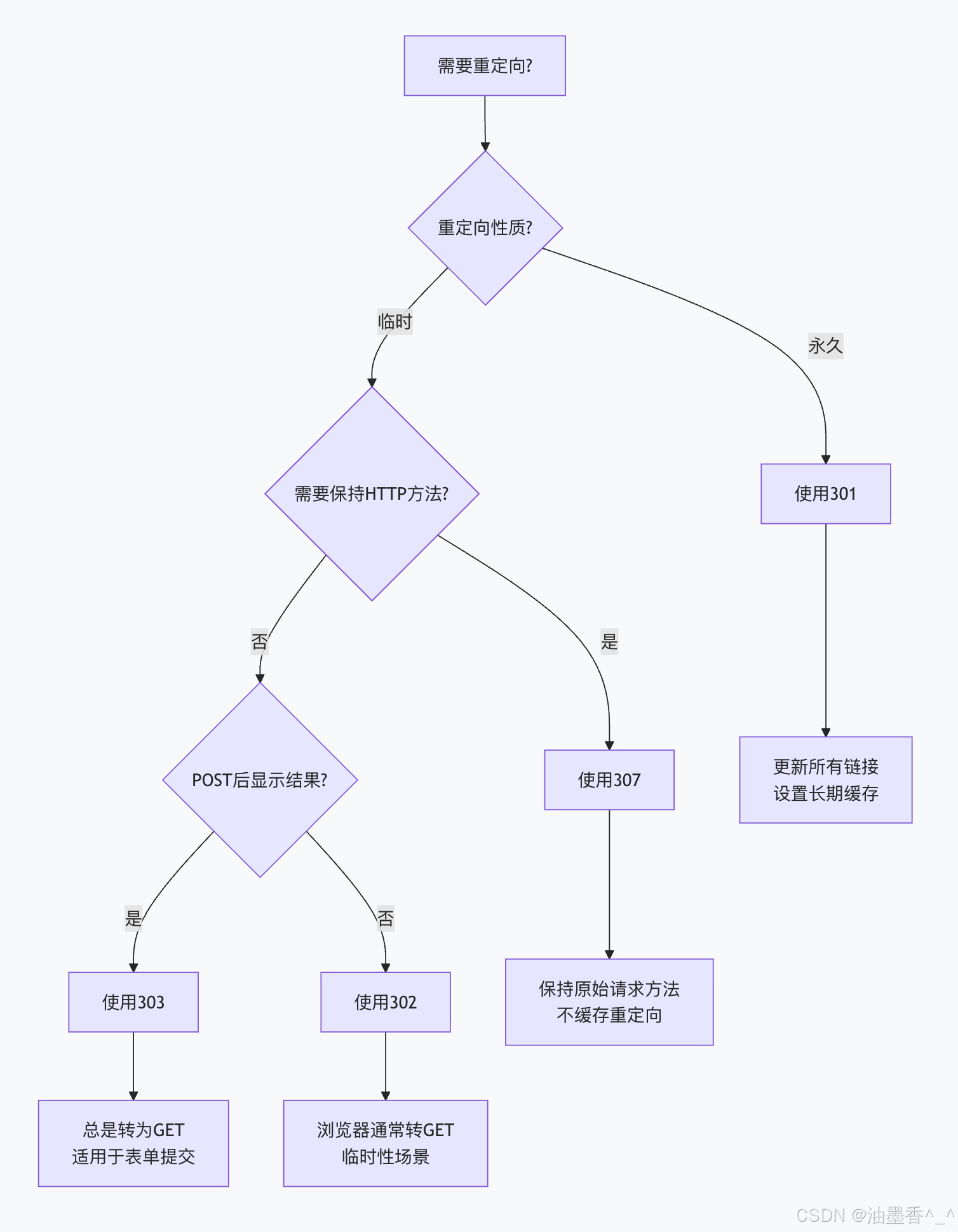
具体场景决策:
URL规范化(www/non-www):301
HTTP → HTTPS:301
网站重构(永久):301
A/B测试:302
地理重定向:302
维护页面:302
登录重定向:302
表单提交后显示结果:303
API临时迁移:307
临时维护端点:307
12.2.3 响应头配置
标准响应头:
http
HTTP/1.1 302 Found
Location: /temporary-location
Date: Mon, 21 Oct 2024 09:00:00 GMT
Server: nginx/1.18.0
Content-Type: text/html; charset=utf-8
Content-Length: 162
Connection: close
优化配置(明确临时性):
http
HTTP/1.1 302 Found
Location: /temporary-location
Cache-Control: private, no-cache, no-store, must-revalidate
Pragma: no-cache
Expires: 0
X-Redirect-Type: Temporary
X-Redirect-Expires: 2024-10-22T02:00:00Z # 明确过期时间
Date: Mon, 21 Oct 2024 09:00:00 GMT
HTML响应体示例:
html
<!DOCTYPE html>
<html lang="en">
<head>
<meta charset="UTF-8">
<meta name="viewport" content="width=device-width, initial-scale=1.0">
<title>Temporary Redirect</title>
<meta http-equiv="refresh" content="0;url=/temporary-location">
<style>
body {
font-family: Arial, sans-serif;
text-align: center;
padding: 50px;
}
.redirect-info {
background: #fff3cd;
border: 1px solid #ffeaa7;
border-radius: 5px;
padding: 20px;
margin: 20px auto;
max-width: 600px;
}
</style>
</head>
<body>
<h1>📋 临时重定向</h1>
<div class="redirect-info">
<p>此页面已临时移动到新位置。</p>
<p>您将在 <strong>3秒</strong> 内被自动重定向。</p>
<p>如果未自动跳转,请点击:</p>
<p><a href="/temporary-location">https://example.com/temporary-location</a></p>
<p><small>HTTP 302 Found – 临时重定向</small></p>
<p><small>预计恢复正常时间: 2024-10-22 02:00 UTC</small></p>
</div>
<script>
// 备用重定向机制
setTimeout(function() {
window.location.href = "/temporary-location";
}, 3000);
</script>
</body>
</html>
12.3 方法保持问题详解
12.3.1 浏览器行为分析
现代浏览器测试结果(2024年):
javascript
// 测试302重定向的方法保持行为
async function testRedirectBehavior() {
const testCases = [
{ method: 'POST', data: { test: 'value' } },
{ method: 'PUT', data: { update: 'data' } },
{ method: 'DELETE', data: {} },
{ method: 'PATCH', data: { change: 'partial' } }
];
const results = {};
for (const testCase of testCases) {
try {
const response = await fetch('/test-redirect-endpoint', {
method: testCase.method,
headers: {
'Content-Type': 'application/json',
'X-Test-Method': testCase.method
},
body: JSON.stringify(testCase.data)
});
// 检查最终请求方法
const finalMethod = response.headers.get('X-Final-Method');
results[testCase.method] = {
original: testCase.method,
final: finalMethod,
changed: testCase.method !== finalMethod
};
} catch (error) {
results[testCase.method] = { error: error.message };
}
}
return results;
}
// 典型结果(基于真实浏览器测试):
/*
{
"POST": { "original": "POST", "final": "GET", "changed": true },
"PUT": { "original": "PUT", "final": "GET", "changed": true },
"DELETE": { "original": "DELETE", "final": "GET", "changed": true },
"PATCH": { "original": "PATCH", "final": "GET", "changed": true }
}
*/
浏览器兼容性表:
| Chrome | 120+ | 是 | 是 | 是 | 是 |
| Firefox | 120+ | 是 | 是 | 是 | 是 |
| Safari | 17+ | 是 | 是 | 是 | 是 |
| Edge | 120+ | 是 | 是 | 是 | 是 |
| 移动浏览器 | 最新 | 是 | 是 | 是 | 是 |
12.3.2 问题影响与后果
数据丢失场景:
http
POST /submit-order HTTP/1.1
Content-Type: application/json
Content-Length: 87
{
"items": [{"id": 123, "quantity": 2}],
"shipping": "express",
"payment": "credit_card"
}
HTTP/1.1 302 Found
Location: /thank-you
# 浏览器发送新请求:
GET /thank-you HTTP/1.1
# 订单数据完全丢失!
API调用失败:
http
DELETE /api/users/123 HTTP/1.1
Authorization: Bearer xyz
HTTP/1.1 302 Found
Location: /api/temp/users/456
# 实际发送:
GET /api/temp/users/456 HTTP/1.1
Authorization: Bearer xyz
# 应该是DELETE操作,却变成了GET!
12.3.3 解决方案与变通方法
方案1:使用307状态码(推荐):
python
# Django示例:保持方法的临时重定向
from django.http import HttpResponseRedirect
def temporary_resource_move(request):
if request.method in ['POST', 'PUT', 'DELETE', 'PATCH']:
# 使用307保持方法
response = HttpResponseRedirect('/new-temp-location', status=307)
else:
# GET/HEAD等使用302
response = HttpResponseRedirect('/new-temp-location', status=302)
return response
方案2:客户端处理重定向:
javascript
// 前端JavaScript处理重定向,保持方法
class SafeRedirectHandler {
constructor() {
this.maxRedirects = 5;
}
async fetchWithRedirectHandling(url, options = {}) {
let currentUrl = url;
let redirectCount = 0;
let currentOptions = { …options };
while (redirectCount < this.maxRedirects) {
const response = await fetch(currentUrl, currentOptions);
if (response.status === 302 || response.status === 307) {
redirectCount++;
const location = response.headers.get('Location');
if (!location) break;
// 解析新URL
const newUrl = new URL(location, currentUrl);
currentUrl = newUrl.href;
// 对于307,保持原始方法
if (response.status === 307) {
// 保持所有原始选项
continue;
}
// 对于302,根据规范应该保持方法
// 但实际可能需要特殊处理
if (currentOptions.method === 'POST') {
// 警告开发者,建议使用307
console.warn('302 redirect with POST method – data may be lost');
// 可以尝试重新发送POST
continue;
}
continue;
}
// 非重定向响应,直接返回
return response;
}
throw new Error(`Too many redirects: ${redirectCount}`);
}
}
// 使用示例
const handler = new SafeRedirectHandler();
handler.fetchWithRedirectHandling('/submit-form', {
method: 'POST',
body: JSON.stringify({ data: 'important' })
});
方案3:服务器端状态保持:
python
# 使用会话或数据库保持状态
from flask import Flask, request, redirect, session
import uuid
app = Flask(__name__)
app.secret_key = 'your-secret-key'
@app.route('/submit-data', methods=['POST'])
def submit_data():
# 生成唯一ID保存数据
request_id = str(uuid.uuid4())
# 将数据保存到数据库或缓存
save_temporary_data(request_id, {
'method': request.method,
'data': request.form.to_dict(),
'headers': dict(request.headers)
})
# 重定向到处理页面,传递ID
return redirect(f'/process-request/{request_id}', code=302)
@app.route('/process-request/<request_id>')
def process_request(request_id):
# 恢复原始请求数据
original_request = load_temporary_data(request_id)
if not original_request:
return "Request data expired", 410
# 处理原始请求
if original_request['method'] == 'POST':
result = handle_post_request(original_request['data'])
# 清理临时数据
delete_temporary_data(request_id)
return result
return "Unsupported method", 405
12.4 配置示例与实现
12.4.1 服务器配置示例
Nginx配置:
nginx
# 临时重定向配置示例
server {
listen 80;
server_name example.com;
# 基础302重定向
location = /old-temp-page {
return 302 /new-temp-page;
}
# 带查询参数的临时重定向
location /search {
# 临时重定向到新搜索系统
return 302 /new-search$is_args$args;
}
# 基于条件的临时重定向
location /special-offer {
# 检查用户代理或cookie
if ($http_user_agent ~* "(mobile|android|iphone)") {
return 302 /mobile-offer;
}
# 检查时间条件
if ($time_iso8601 ~ "^2024-10-21") {
return 302 /daily-deal;
}
# 默认行为
try_files $uri $uri/ =404;
}
# 维护模式重定向
location / {
# 检查维护标志文件
if (-f /var/www/maintenance.flag) {
# 排除管理页面
if ($request_uri !~ "^/admin/") {
return 302 /maintenance.html;
}
}
try_files $uri $uri/ =404;
}
# 登录重定向
location /dashboard {
# 检查认证cookie
if ($cookie_session != "valid") {
# 记录原始URL
add_header Set-Cookie "redirect_to=$request_uri; Path=/";
return 302 /login;
}
proxy_pass http://backend;
}
}
Apache配置:
apache
# .htaccess 临时重定向配置
# 启用重写引擎
RewriteEngine On
# 1. 临时页面重定向
Redirect 302 /temporary-page /new-temporary-location
# 2. 基于时间的重定向
RewriteCond %{TIME_YEAR}%{TIME_MON}%{TIME_DAY} ^20241021$
RewriteRule ^event-page$ /special-event [R=302,L]
# 3. 基于IP的重定向(A/B测试)
RewriteCond %{REMOTE_ADDR} ^123\\.456\\.789\\.
RewriteRule ^test-page$ /variant-b [R=302,L]
# 4. 用户代理检测
RewriteCond %{HTTP_USER_AGENT} (iPhone|Android|Mobile)
RewriteRule ^desktop-page$ /mobile-page [R=302,L]
# 5. 参数化重定向
RewriteCond %{QUERY_STRING} ^promo=summer2024$
RewriteRule ^landing$ /promotions/summer-2024? [R=302,L]
# 6. 排除某些路径
RewriteCond %{REQUEST_URI} !^/(admin|api)/
RewriteRule ^old-section/(.*)$ /new-section/$1 [R=302,L]
# 7. 临时维护重定向
RewriteCond %{DOCUMENT_ROOT}/maintenance.flag -f
RewriteCond %{REQUEST_URI} !^/maintenance\\.html$
RewriteCond %{REQUEST_URI} !^/admin/
RewriteRule ^(.*)$ /maintenance.html [R=302,L]
12.4.2 编程框架实现
Spring Boot示例:
java
// Spring Boot控制器中的302重定向
@Controller
public class RedirectController {
// 简单的302重定向
@GetMapping("/old-url")
public String redirectOldUrl() {
return "redirect:/new-url"; // Spring默认使用302
}
// 显式指定302状态码
@GetMapping("/temp-redirect")
public ResponseEntity<Void> temporaryRedirect() {
HttpHeaders headers = new HttpHeaders();
headers.setLocation(URI.create("/temporary-location"));
return new ResponseEntity<>(headers, HttpStatus.FOUND); // 302
}
// 条件重定向
@PostMapping("/submit-form")
public String handleFormSubmission(@ModelAttribute FormData formData) {
if (formData.isValid()) {
// 临时重定向到成功页面
return "redirect:/success";
} else {
// 重定向回表单页(带错误信息)
return "redirect:/form?error=invalid";
}
}
// 基于会话的重定向
@GetMapping("/dashboard")
public String dashboard(HttpSession session) {
if (session.getAttribute("user") == null) {
// 临时重定向到登录页
session.setAttribute("redirectAfterLogin", "/dashboard");
return "redirect:/login";
}
return "dashboard";
}
// 处理查询参数的重定向
@GetMapping("/search")
public String search(@RequestParam String q,
@RequestParam(defaultValue = "1") int page) {
// 临时重定向到新搜索系统
return "redirect:/new-search?query=" +
URLEncoder.encode(q, StandardCharsets.UTF_8) +
"&page=" + page;
}
}
Ruby on Rails示例:
ruby
# Rails控制器中的302重定向
class ApplicationController < ActionController::Base
# 临时重定向方法
def temporary_redirect
# 基本重定向(Rails默认302)
redirect_to new_location_path
# 或显式指定状态码
redirect_to new_location_path, status: :found # 302
# 带闪存消息
redirect_to login_path, notice: "请先登录", status: 302
# 带参数的临时重定向
redirect_to product_path(@product), status: 302
end
# 条件重定向
def check_access
unless current_user.admin?
redirect_to root_path,
alert: "没有访问权限",
status: 302
end
end
# 维护模式重定向
before_action :check_maintenance
def check_maintenance
if Maintenance.enabled? && !admin_user?
redirect_to maintenance_path, status: 302
end
end
# API临时端点
def legacy_api
# 临时重定向到新API端点
redirect_to api_v2_url(params),
status: 302,
headers: {
'X-API-Version' => 'deprecated',
'X-New-Endpoint' => api_v2_url(params)
}
end
end
# 路由层重定向
Rails.application.routes.draw do
# 临时重定向路由
get '/old-path', to: redirect('/new-path', status: 302)
# 动态重定向
get '/products/:id',
to: redirect { |params, req|
"/items/#{params[:id]}"
},
status: 302
# 条件重定向
get '/special-offer',
constraints: ->(req) { req.env['HTTP_USER_AGENT'] =~ /Mobile/ },
to: redirect('/mobile-offer', status: 302)
end
12.4.3 边缘计算实现
Cloudflare Workers高级重定向:
javascript
// Cloudflare Workers实现智能临时重定向
export default {
async fetch(request, env, ctx) {
const url = new URL(request.url);
const userAgent = request.headers.get('User-Agent') || '';
const country = request.cf?.country || 'US';
// 1. A/B测试重定向
const abTestGroup = getABTestGroup(request);
if (abTestGroup === 'variant_b' && url.pathname === '/home') {
return Response.redirect(`${url.origin}/home-variant-b`, 302);
}
// 2. 地理重定向
const geoRedirects = {
'CN': '/zh-cn',
'JP': '/ja',
'DE': '/de',
'FR': '/fr',
// … 其他国家和地区
};
if (geoRedirects[country] && url.pathname === '/') {
const newPath = geoRedirects[country] + url.pathname;
return Response.redirect(`${url.origin}${newPath}`, 302);
}
// 3. 设备类型重定向
const isMobile = /mobile|android|iphone/i.test(userAgent);
if (isMobile && url.pathname.startsWith('/desktop/')) {
const mobilePath = url.pathname.replace('/desktop/', '/mobile/');
return Response.redirect(`${url.origin}${mobilePath}`, 302);
}
// 4. 临时维护重定向
const isUnderMaintenance = await env.KV.get('maintenance_mode');
if (isUnderMaintenance === 'true' && !url.pathname.startsWith('/admin')) {
return Response.redirect(`${url.origin}/maintenance`, 302);
}
// 5. 基于时间的重定向
const now = new Date();
const hour = now.getUTCHours();
if (hour >= 22 || hour < 6) { // 维护窗口
if (url.pathname.startsWith('/api/')) {
return Response.redirect(`${url.origin}/api/nightly-maintenance`, 302);
}
}
// 6. 速率限制重定向
const clientKey = request.headers.get('CF-Connecting-IP') || 'anonymous';
const rateLimitKey = `rate_limit:${clientKey}`;
const requestCount = await env.KV.get(rateLimitKey) || 0;
if (requestCount > 100) { // 超过限制
return Response.redirect(`${url.origin}/rate-limit-warning`, 302);
}
// 更新计数
await env.KV.put(rateLimitKey, (parseInt(requestCount) + 1).toString(), {
expirationTtl: 60 // 60秒过期
});
// 正常请求
return fetch(request);
}
};
// 辅助函数:获取A/B测试分组
function getABTestGroup(request) {
const clientId = request.headers.get('CF-Connecting-IP') || 'default';
const hash = simpleHash(clientId);
return hash % 100 < 30 ? 'variant_b' : 'control'; // 30%用户进入B组
}
function simpleHash(str) {
let hash = 0;
for (let i = 0; i < str.length; i++) {
hash = ((hash << 5) – hash) + str.charCodeAt(i);
hash |= 0; // 转换为32位整数
}
return Math.abs(hash);
}
AWS Lambda@Edge重定向:
javascript
// Lambda@Edge实现临时重定向
exports.handler = async (event) => {
const request = event.Records[0].cf.request;
const headers = request.headers;
// 1. 基于用户代理的重定向
const userAgent = headers['user-agent']?.[0]?.value || '';
const isBot = /bot|crawler|spider/i.test(userAgent);
if (isBot && request.uri === '/') {
return {
status: '302',
statusDescription: 'Found',
headers: {
'location': [{
key: 'Location',
value: '/bot-landing'
}],
'cache-control': [{
key: 'Cache-Control',
value: 'no-cache, no-store'
}]
}
};
}
// 2. 基于国家/地区的重定向
const country = headers['cloudfront-viewer-country']?.[0]?.value;
if (country === 'RU' && request.uri.startsWith('/news/')) {
return {
status: '302',
statusDescription: 'Found',
headers: {
'location': [{
key: 'Location',
value: '/regional-news'
}]
}
};
}
// 3. 临时促销重定向
const now = new Date();
const promoStart = new Date('2024-10-20T00:00:00Z');
const promoEnd = new Date('2024-10-28T23:59:59Z');
if (now >= promoStart && now <= promoEnd && request.uri === '/products') {
return {
status: '302',
statusDescription: 'Found',
headers: {
'location': [{
key: 'Location',
value: '/black-friday-sale'
}],
'x-promo-active': [{
key: 'X-Promo-Active',
value: 'true'
}]
}
};
}
// 4. 临时维护重定向
const maintenanceFlag = await getMaintenanceFlag();
if (maintenanceFlag && !request.uri.startsWith('/admin')) {
return {
status: '302',
statusDescription: 'Found',
headers: {
'location': [{
key: 'Location',
value: '/maintenance'
}],
'retry-after': [{
key: 'Retry-After',
value: '3600' // 1小时后重试
}]
}
};
}
// 正常请求
return request;
};
async function getMaintenanceFlag() {
// 从S3或DynamoDB获取维护标志
// 返回true/false
return false;
}
12.5 与301的对比与选择指南
12.5.1 技术对比表
| 状态码 | 301 | 302 |
| 语义 | 永久移动 | 临时移动 |
| 缓存行为 | 客户端和代理可缓存 | 通常不缓存 |
| 缓存时间 | 长期(推荐1年) | 短期或不缓存 |
| 方法保持 | 规范要求保持,实际常转GET | 规范要求保持,实际常转GET |
| SEO影响 | 传递权重,更新索引 | 不传递权重,保持原索引 |
| 浏览器行为 | 更新书签,可能更新历史记录 | 不更新书签 |
| 适用场景 | 永久URL变更,域名迁移 | A/B测试,维护页面,登录重定向 |
| 实现复杂度 | 简单 | 简单 |
| 风险等级 | 高(影响SEO和用户体验) | 低(临时性) |
12.5.2 决策矩阵
yaml
decision_matrix:
permanent_changes:
– domain_change: true
protocol_change: true
url_restructure: true
canonicalization: true
recommended_status: 301
temporary_changes:
– ab_testing: true
geo_redirect: true
maintenance: true
login_redirect: true
seasonal_promo: true
recommended_status: 302
special_cases:
– post_after_submit:
description: "表单提交后显示结果页"
recommended_status: 303
– api_temp_redirect:
description: "API端点临时迁移且需保持方法"
recommended_status: 307
– unsure_permanent:
description: "不确定是否永久变更"
recommendation: "使用302,确认后再改为301"
– large_scale_migration:
description: "大规模网站迁移"
recommendation: "分批使用301,监控后再全面实施"
12.5.3 迁移策略与转换
从302转换为301的时机:
python
class RedirectUpgrader:
"""监控302重定向使用情况,建议升级到301"""
def __init__(self, redirect_logs):
self.logs = redirect_logs
self.analysis_results = {}
def analyze_redirects(self):
"""分析重定向使用模式"""
for url, data in self.logs.items():
# 计算指标
usage_duration = self.get_usage_duration(data['first_seen'], data['last_seen'])
request_count = data['request_count']
user_agents = data['user_agents']
# 分析模式
is_stable = usage_duration.days > 30
is_high_traffic = request_count > 1000
is_consistent = self.check_consistency(user_agents)
# 判断是否应该升级到301
should_upgrade = (
is_stable and
is_high_traffic and
is_consistent and
not data.get('temporary_reason')
)
self.analysis_results[url] = {
'should_upgrade': should_upgrade,
'confidence_score': self.calculate_confidence(
is_stable, is_high_traffic, is_consistent
),
'metrics': {
'duration_days': usage_duration.days,
'request_count': request_count,
'unique_users': len(user_agents)
}
}
return self.analysis_results
def generate_upgrade_plan(self, threshold=0.8):
"""生成升级计划"""
plan = {
'immediate': [],
'monitor': [],
'keep_as_is': []
}
for url, analysis in self.analysis_results.items():
if analysis['confidence_score'] >= threshold:
plan['immediate'].append(url)
elif analysis['confidence_score'] >= 0.6:
plan['monitor'].append(url)
else:
plan['keep_as_is'].append(url)
return plan
安全转换流程: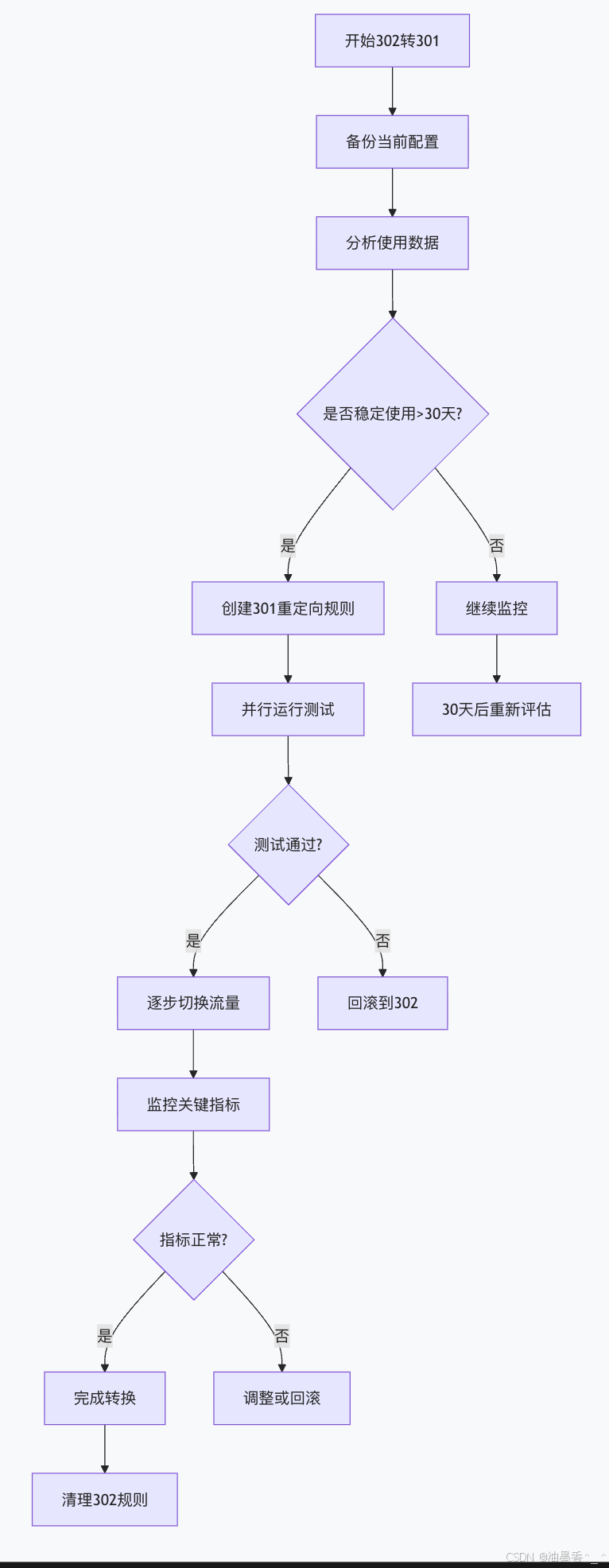
12.5.4 监控与度量
关键性能指标:
yaml
monitoring_metrics:
basic_metrics:
– total_302_redirects: "总302重定向次数"
– unique_sources: "唯一来源URL数量"
– success_rate: "重定向成功率"
performance_metrics:
– avg_redirect_time: "平均重定向时间"
– p95_redirect_time: "95%分位重定向时间"
– chain_length_distribution: "重定向链长度分布"
business_metrics:
– user_experience_score: "用户体验评分"
– conversion_rate_impact: "转化率影响"
– seo_impact: "SEO影响指标"
alerting_thresholds:
– high_failure_rate: "失败率 > 1%"
– slow_redirects: "p95重定向时间 > 500ms"
– long_chains: "平均链长度 > 2"
监控仪表板示例:
python
class RedirectDashboard:
def __init__(self):
self.metrics = {
'status_codes': defaultdict(int),
'response_times': [],
'chain_lengths': []
}
def update_metrics(self, redirect_data):
"""更新监控指标"""
# 状态码分布
self.metrics['status_codes'][redirect_data.status] += 1
# 响应时间
if redirect_data.response_time:
self.metrics['response_times'].append(redirect_data.response_time)
# 链长度
self.metrics['chain_lengths'].append(redirect_data.chain_length)
# 保留最近1000个样本
for key in ['response_times', 'chain_lengths']:
if len(self.metrics[key]) > 1000:
self.metrics[key] = self.metrics[key][-1000:]
def generate_report(self):
"""生成监控报告"""
report = {
'summary': {
'total_redirects': sum(self.metrics['status_codes'].values()),
'status_distribution': dict(self.metrics['status_codes']),
'avg_response_time': self._calculate_avg(self.metrics['response_times']),
'avg_chain_length': self._calculate_avg(self.metrics['chain_lengths'])
},
'percentiles': {
'response_time_p95': self._calculate_percentile(
self.metrics['response_times'], 95
),
'chain_length_p95': self._calculate_percentile(
self.metrics['chain_lengths'], 95
)
},
'alerts': self._check_alerts()
}
return report
def _check_alerts(self):
"""检查告警条件"""
alerts = []
# 检查失败率
total = sum(self.metrics['status_codes'].values())
if total > 0:
failure_rate = self.metrics['status_codes'].get(500, 0) / total
if failure_rate > 0.01:
alerts.append({
'level': 'warning',
'message': f'重定向失败率过高: {failure_rate:.2%}',
'metric': 'failure_rate'
})
# 检查响应时间
p95_response = self._calculate_percentile(self.metrics['response_times'], 95)
if p95_response > 500:
alerts.append({
'level': 'warning',
'message': f'95%分位响应时间过长: {p95_response:.0f}ms',
'metric': 'response_time'
})
return alerts
第13章:304 Not Modified – 缓存验证
13.1 特殊性质与设计哲学
13.1.1 缓存验证机制的本质
304 Not Modified的独特地位:
-
并非真正的"重定向",而是条件GET的优化响应
-
设计目的:减少网络传输,提高性能
-
语义:资源未改变,可使用客户端缓存副本
条件请求-响应循环: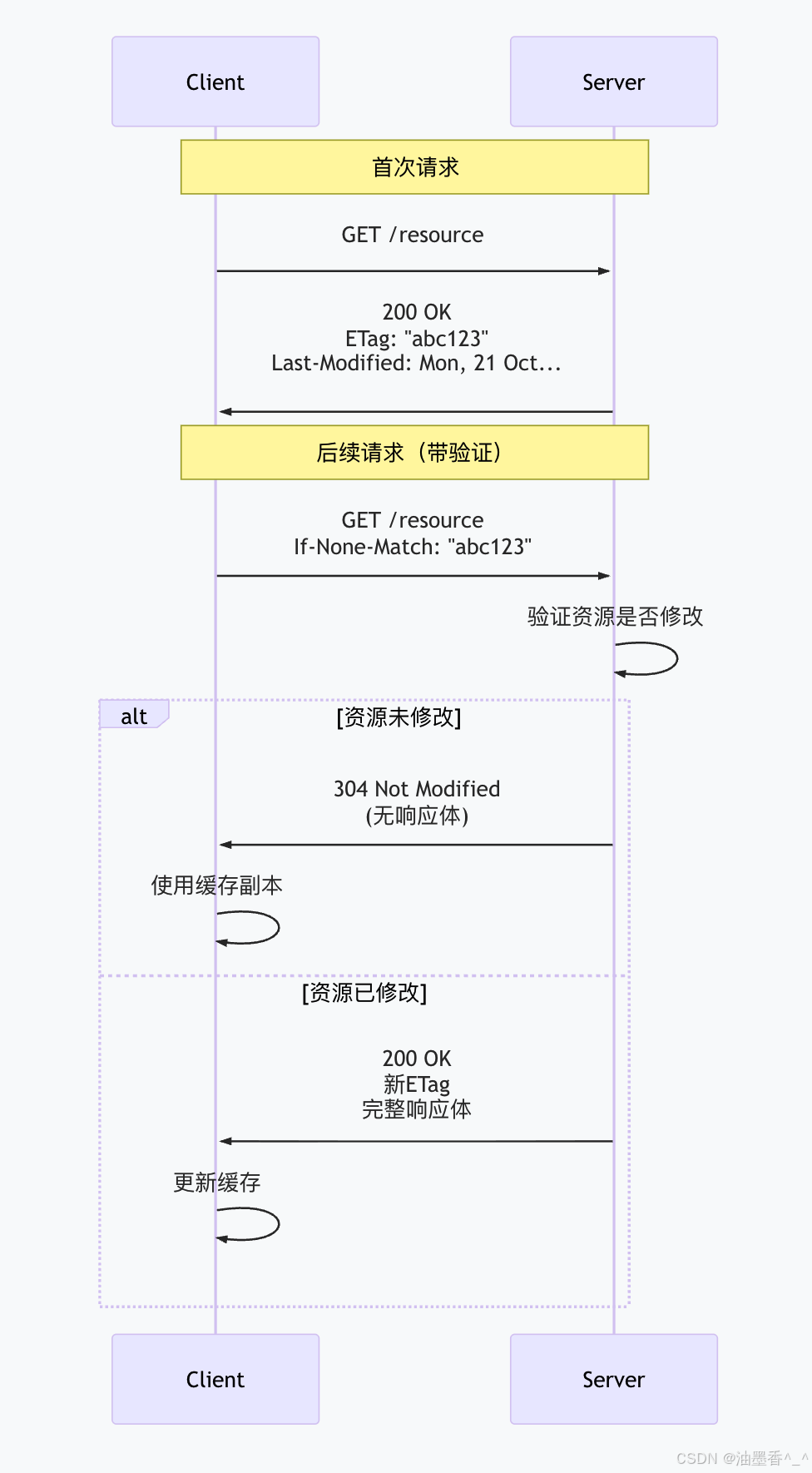
设计哲学:RESTful缓存:
-
遵循REST架构的"无状态"原则
-
客户端负责缓存管理
-
服务器负责验证逻辑
-
减少不必要的数据传输
13.1.2 与真正重定向的区别
比较表:
| 目的 | 位置转移 | 缓存优化 |
| 响应体 | 通常有HTML主体 | 无响应体 |
| Location头 | 必需 | 无 |
| 缓存行为 | 可能缓存重定向本身 | 验证缓存有效性 |
| 客户端动作 | 向新URL发起请求 | 使用本地缓存 |
| 网络传输 | 至少两次完整请求 | 一次轻量验证 |
实际网络流量对比:
text
# 301重定向流量
客户端 → 请求A → 服务器
客户端 ← 301响应 (300字节) ← 服务器
客户端 → 请求B → 服务器
客户端 ← 200响应 (50KB) ← 服务器
总流量: ~50.3KB
# 304缓存验证流量
客户端 → 条件请求 → 服务器 (带验证头)
客户端 ← 304响应 (200字节) ← 服务器
客户端使用本地缓存 (50KB)
总流量: ~0.2KB
节省: 99.6% 的流量
13.2 工作原理与技术实现
13.2.1 验证器类型与机制
强验证器 vs 弱验证器:
| 强验证器 | ETag: "abc123" | 字节级精确匹配 | 精确内容验证 |
| ETag: W/"abc123" | 弱验证器,语义相同即可 | 内容语义相同 | |
| 时间验证器 | Last-Modified | 基于修改时间 | 时间戳比较 |
ETag生成策略:
python
import hashlib
import json
from datetime import datetime
class ETagGenerator:
"""ETag生成器,支持不同策略"""
@staticmethod
def generate_strong_etag(content):
"""生成强ETag(基于内容哈希)"""
content_hash = hashlib.md5(content).hexdigest()
return f'"{content_hash}"'
@staticmethod
def generate_weak_etag(content):
"""生成弱ETag(W/前缀)"""
# 弱ETag:语义相同即可,可忽略微小差异(如空格、时间戳)
normalized = content.strip().replace('\\r\\n', '\\n')
content_hash = hashlib.md5(normalized.encode()).hexdigest()[:8]
return f'W/"{content_hash}"'
@staticmethod
def generate_version_etag(version):
"""基于版本号的ETag"""
return f'"v{version}"'
@staticmethod
def generate_composite_etag(content, last_modified):
"""复合ETag:内容哈希 + 时间戳"""
content_hash = hashlib.md5(content).hexdigest()[:8]
timestamp = int(last_modified.timestamp())
return f'"{content_hash}-{timestamp}"'
13.2.2 条件请求头详解
客户端发送的验证头:
If-None-Match(ETag验证):
http
GET /resource HTTP/1.1
If-None-Match: "abc123", "def456", W/"ghi789"
-
服务器检查当前ETag是否匹配列表中的任何一个
-
使用 * 匹配任何ETag(无条件请求)
If-Modified-Since(时间验证):
http
GET /resource HTTP/1.1
If-Modified-Since: Mon, 21 Oct 2024 09:00:00 GMT
-
服务器检查资源是否在指定时间后修改过
组合使用:
http
GET /resource HTTP/1.1
If-None-Match: "abc123"
If-Modified-Since: Mon, 21 Oct 2024 09:00:00 GMT
-
ETag优先:如果提供ETag,忽略时间戳
-
保守策略:只有两个条件都满足未修改,才返回304
服务器验证逻辑:
python
def validate_request(headers, resource_info):
"""
验证条件请求,决定返回304还是200
"""
# 检查If-None-Match
if_none_match = headers.get('If-None-Match')
if if_none_match:
if if_none_match == '*':
# 无条件匹配任何ETag
return False # 需要返回完整响应
# 解析ETag列表
etags = [etag.strip().strip('"') for etag in if_none_match.split(',')]
# 检查是否有匹配的ETag
current_etag = resource_info.get('etag', '').strip('"')
for etag in etags:
# 弱验证器比较(忽略W/前缀)
if etag.startswith('W/'):
etag_value = etag[2:]
if current_etag.startswith('W/'):
current_value = current_etag[2:]
else:
current_value = current_etag
if etag_value == current_value:
return True # 返回304
else:
# 强验证器精确匹配
if etag == current_etag:
return True # 返回304
# 检查If-Modified-Since
if_modified_since = headers.get('If-Modified-Since')
if if_modified_since:
try:
client_time = parse_http_date(if_modified_since)
server_time = resource_info.get('last_modified')
if server_time and server_time <= client_time:
return True # 返回304
except ValueError:
pass
return False # 需要返回完整响应
13.2.3 响应头配置
标准304响应:
http
HTTP/1.1 304 Not Modified
Date: Mon, 21 Oct 2024 09:00:00 GMT
ETag: "abc123"
Cache-Control: public, max-age=3600
Expires: Mon, 21 Oct 2024 10:00:00 GMT
Last-Modified: Mon, 21 Oct 2024 08:00:00 GMT
重要注意事项:
无响应体:304响应必须没有消息体
必须包含的头部:
-
Date:响应生成时间
-
缓存验证头(ETag或Last-Modified至少一个)
可选头部:
-
Cache-Control:更新缓存指令
-
Expires:更新过期时间
-
其他缓存相关头部
服务器配置示例:
nginx
# Nginx静态文件304配置
location ~* \\.(jpg|jpeg|png|gif|ico|css|js)$ {
# 启用ETag
etag on;
# 启用最后修改时间
if_modified_since exact;
# 缓存控制
add_header Cache-Control "public, max-age=31536000, immutable";
# 对静态文件自动处理条件请求
# Nginx会自动处理If-Modified-Since和If-None-Match
}
# 动态内容的304处理
location /api/data {
proxy_pass http://backend;
# 传递条件请求头到后端
proxy_set_header If-Modified-Since $http_if_modified_since;
proxy_set_header If-None-Match $http_if_none_match;
# 处理后端的304响应
proxy_intercept_errors on;
error_page 304 = @handle_304;
}
location @handle_304 {
# 返回304,保持缓存头
return 304;
}
13.3 缓存头与缓存策略
13.3.1 缓存控制头详解
Cache-Control指令:
| public | – | 响应可被任何缓存存储 | Cache-Control: public |
| private | – | 响应仅供单个用户缓存 | Cache-Control: private |
| max-age | 秒数 | 新鲜度生命周期 | max-age=3600 |
| s-maxage | 秒数 | 共享缓存(CDN)有效期 | s-maxage=86400 |
| no-cache | – | 每次需向服务器验证 | Cache-Control: no-cache |
| no-store | – | 不缓存任何部分 | Cache-Control: no-store |
| must-revalidate | – | 过期后必须验证 | must-revalidate |
| immutable | – | 内容永不变,无需验证 | immutable |
组合策略示例:
http
# 静态资源:长期缓存,内容不变
Cache-Control: public, max-age=31536000, immutable
ETag: "abc123"
# 用户个人数据:私有缓存,短期
Cache-Control: private, max-age=300, must-revalidate
ETag: W/"def456"
# 动态内容:需每次验证
Cache-Control: no-cache
Last-Modified: Mon, 21 Oct 2024 09:00:00 GMT
# CDN优化:不同缓存策略
Cache-Control: public, s-maxage=86400, max-age=3600
13.3.2 ETag生成最佳实践
不同资源类型的ETag策略:
python
class ResourceETagStrategy:
"""根据资源类型选择合适的ETag策略"""
strategies = {
'static_file': {
'type': 'strong',
'method': 'content_hash',
'description': '静态文件使用内容哈希'
},
'api_json': {
'type': 'weak',
'method': 'semantic_hash',
'description': 'API响应使用语义哈希'
},
'database_content': {
'type': 'version',
'method': 'row_version',
'description': '数据库内容使用行版本号'
},
'computed_result': {
'type': 'composite',
'method': 'input_hash',
'description': '计算结果使用输入参数哈希'
}
}
@staticmethod
def generate_etag(resource_type, content, metadata=None):
"""根据资源类型生成ETag"""
strategy = ResourceETagStrategy.strategies.get(resource_type, {})
if strategy['method'] == 'content_hash':
# 静态文件:基于完整内容
return hashlib.md5(content).hexdigest()
elif strategy['method'] == 'semantic_hash':
# JSON API:规范化后哈希
if isinstance(content, dict):
# 规范化JSON(排序键,标准化格式)
normalized = json.dumps(
content,
sort_keys=True,
separators=(',', ':')
)
return 'W/"' + hashlib.md5(normalized.encode()).hexdigest()[:8] + '"'
elif strategy['method'] == 'row_version':
# 数据库内容:版本号
version = metadata.get('version', 0) if metadata else 0
return f'"v{version}"'
elif strategy['method'] == 'input_hash':
# 计算结果:输入参数哈希
input_hash = hashlib.md5(str(metadata).encode()).hexdigest()[:12]
return f'"{input_hash}"'
# 默认:强ETag
return '"' + hashlib.md5(content).hexdigest() + '"'
ETag生成的成本考量:
python
class CostAwareETagGenerator:
"""考虑计算成本的ETag生成器"""
def __init__(self):
self.cache = {} # 缓存已计算的ETag
def generate_etag(self, content, strategy='auto'):
"""
智能生成ETag,平衡准确性和性能
"""
# 小内容:直接计算
if len(content) < 1024: # 小于1KB
return self._generate_strong_etag(content)
# 大内容:根据策略选择
if strategy == 'auto':
# 自动选择:基于内容类型和大小
if self._is_binary(content):
# 二进制文件:使用文件属性和部分哈希
return self._generate_composite_etag(content)
else:
# 文本文件:使用弱ETag(更高效)
return self._generate_weak_etag(content)
elif strategy == 'fast':
# 快速模式:仅使用文件属性和大小
return self._generate_lightweight_etag(content)
elif strategy == 'accurate':
# 精确模式:完整内容哈希
return self._generate_strong_etag(content)
def _generate_lightweight_etag(self, content):
"""轻量级ETag:基于大小和修改时间"""
size = len(content)
mtime = os.path.getmtime(filename) if hasattr(content, 'filename') else 0
return f'W/"s{size}-t{int(mtime)}"'
def _generate_composite_etag(self, content):
"""复合ETag:头部哈希 + 文件属性"""
# 只哈希文件头部(提高性能)
header_hash = hashlib.md5(content[:1024]).hexdigest()[:8]
size = len(content)
return f'"{header_hash}-{size}"'
13.3.3 缓存层次与验证流程
多层次缓存架构:
text
客户端缓存 → 代理缓存 → CDN边缘缓存 → 源服务器
验证请求传播: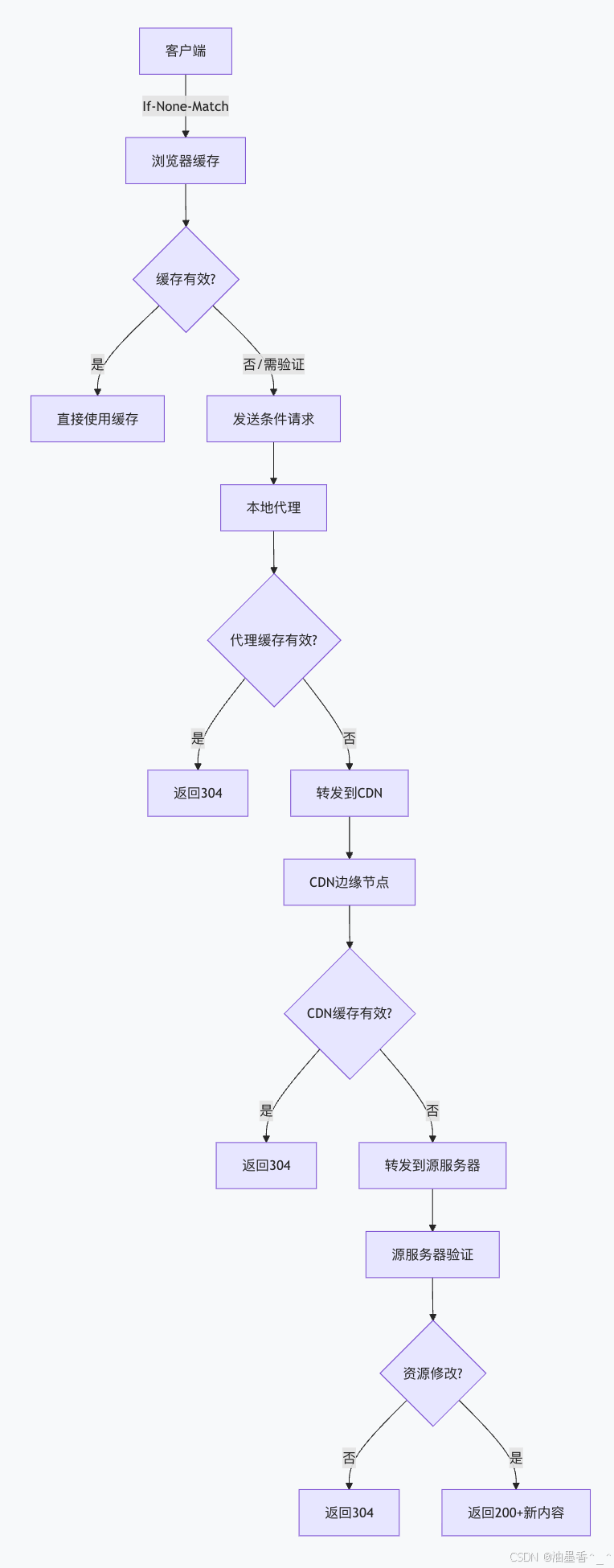
缓存验证优化策略:
python
class CacheValidationOptimizer:
"""缓存验证优化器"""
def __init__(self):
self.stats = {
'cache_hits': 0,
'cache_misses': 0,
'validation_requests': 0
}
def should_revalidate(self, cache_entry, request_headers):
"""
智能决定是否需要验证
"""
# 1. 检查缓存是否过期
if self._is_fresh(cache_entry):
self.stats['cache_hits'] += 1
return False # 无需验证
# 2. 检查是否有条件请求头
has_validation_headers = any(
header in request_headers
for header in ['If-None-Match', 'If-Modified-Since']
)
if not has_validation_headers:
self.stats['cache_misses'] += 1
return True # 需要完整请求
# 3. 检查缓存条目的验证器强度
cache_has_strong_validator = cache_entry.get('etag', '').startswith('"')
cache_has_weak_validator = cache_entry.get('etag', '').startswith('W/')
cache_has_timestamp = 'last_modified' in cache_entry
# 如果只有弱验证器且资源很重要,可以重新获取
if cache_has_weak_validator and not cache_has_timestamp:
# 重要资源:即使有弱验证器也重新获取
if self._is_important_resource(cache_entry['url']):
self.stats['validation_requests'] += 1
return True
# 默认:发送验证请求
self.stats['validation_requests'] += 1
return True
def _is_fresh(self, cache_entry):
"""检查缓存是否新鲜"""
max_age = cache_entry.get('max_age', 0)
cached_at = cache_entry.get('cached_at', 0)
if max_age == 0:
return False
current_time = time.time()
age = current_time – cached_at
return age < max_age
13.4 使用场景与最佳实践
13.4.1 适用场景分析
高缓存命中率场景:
静态资源文件:
nginx
# 图片、CSS、JS等静态资源
location ~* \\.(css|js|jpg|jpeg|png|gif|ico|woff|woff2|ttf|svg)$ {
expires 1y;
add_header Cache-Control "public, immutable";
etag on;
# 重要的:不要设置no-cache,否则每次都会验证
# 使用immutable表示内容永不改变
}
API响应缓存:
python
# Django REST Framework API缓存
from django.views.decorators.cache import cache_page
from django.views.decorators.vary import vary_on_headers
@api_view(['GET'])
@cache_page(60 * 15) # 缓存15分钟
@vary_on_headers('Authorization', 'Accept-Language')
def product_list(request):
products = Product.objects.all()
serializer = ProductSerializer(products, many=True)
# 设置ETag
response = Response(serializer.data)
response['ETag'] = generate_etag(serializer.data)
response['Cache-Control'] = 'public, max-age=900'
return response
内容分发网络(CDN):
http
# CDN边缘节点配置
Cache-Control: public, s-maxage=86400, max-age=3600
ETag: "abc123"
Vary: Accept-Encoding, User-Agent
# CDN处理逻辑:
# 1. 检查s-maxage(CDN缓存时间)
# 2. 检查If-None-Match
# 3. 必要时回源验证
不适合304的场景:
高度动态内容:
-
实时股票价格
-
聊天消息
-
在线游戏状态
个性化数据:
python
# 用户个人数据不适合公共缓存
@cache_page(60)
@vary_on_cookie # 基于用户会话
def user_profile(request):
# 每个用户的缓存独立
pass
POST/PUT/DELETE请求:
-
修改操作不应返回304
-
应使用200/201/204等状态码
13.4.2 性能优化策略
缓存预热策略:
python
class CacheWarmer:
"""缓存预热管理器"""
def __init__(self, cache_client):
self.cache = cache_client
self.warmup_queue = []
def schedule_warmup(self, urls, priority='medium'):
"""计划缓存预热任务"""
for url in urls:
self.warmup_queue.append({
'url': url,
'priority': priority,
'scheduled_at': time.time()
})
# 按优先级排序
self.warmup_queue.sort(key=lambda x: (
0 if x['priority'] == 'high' else
1 if x['priority'] == 'medium' else 2
))
def execute_warmup(self, concurrency=5):
"""执行缓存预热"""
async def warm_url(url):
try:
# 发送请求,触发缓存
async with aiohttp.ClientSession() as session:
async with session.get(url) as response:
if response.status == 200:
print(f"预热成功: {url}")
return True
except Exception as e:
print(f"预热失败 {url}: {e}")
return False
# 并发预热
tasks = []
for item in self.warmup_queue[:concurrency]:
tasks.append(warm_url(item['url']))
# 移除已处理的任务
self.warmup_queue = self.warmup_queue[concurrency:]
return tasks
条件请求优化:
nginx
# Nginx条件请求优化配置
http {
# 启用条件请求处理
if_modified_since before;
# ETag配置
etag on;
# 静态文件处理优化
location ~* \\.(jpg|jpeg|png|gif|ico|css|js)$ {
# 使用sendfile高效传输
sendfile on;
sendfile_max_chunk 1m;
# 启用缓存
open_file_cache max=1000 inactive=20s;
open_file_cache_valid 30s;
open_file_cache_min_uses 2;
open_file_cache_errors on;
# 缓存控制
expires 1y;
add_header Cache-Control "public, immutable";
}
# 动态内容缓存
location /api/ {
proxy_cache api_cache;
proxy_cache_key "$scheme$request_method$host$request_uri";
proxy_cache_valid 200 302 5m;
proxy_cache_valid 404 1m;
proxy_cache_use_stale error timeout invalid_header updating
http_500 http_502 http_503 http_504;
# 传递条件请求头
proxy_set_header If-Modified-Since $http_if_modified_since;
proxy_set_header If-None-Match $http_if_none_match;
proxy_pass http://backend;
}
}
客户端缓存策略:
javascript
// 前端缓存控制最佳实践
class ClientCacheManager {
constructor() {
this.cacheName = 'app-cache-v1';
this.precacheList = [
'/',
'/styles/main.css',
'/scripts/app.js',
'/images/logo.png'
];
}
async setupCaching() {
// 1. 注册Service Worker
if ('serviceWorker' in navigator) {
try {
const registration = await navigator.serviceWorker.register('/sw.js');
console.log('ServiceWorker 注册成功');
} catch (error) {
console.log('ServiceWorker 注册失败:', error);
}
}
// 2. 预缓存关键资源
await this.precacheCriticalResources();
// 3. 设置缓存策略
this.setupCacheHeaders();
}
async precacheCriticalResources() {
const cache = await caches.open(this.cacheName);
// 预缓存关键资源
await cache.addAll(this.precacheList);
// 设置缓存版本
await cache.put(
new Request('/cache-version'),
new Response(JSON.stringify({ version: '1.0.0' }))
);
}
setupCacheHeaders() {
// 通过fetch API控制缓存行为
const originalFetch = window.fetch;
window.fetch = async function(resource, init = {}) {
// 对GET请求添加缓存控制
const isGet = !init.method || init.method.toUpperCase() === 'GET';
if (isGet) {
// 添加条件请求头(如果本地有缓存)
const cached = await caches.match(resource);
if (cached) {
const etag = cached.headers.get('ETag');
const lastModified = cached.headers.get('Last-Modified');
if (!init.headers) init.headers = {};
if (etag) {
init.headers['If-None-Match'] = etag;
}
if (lastModified) {
init.headers['If-Modified-Since'] = lastModified;
}
}
// 设置缓存模式
init.cache = 'default'; // 或 'no-store', 'reload', 'no-cache', 'force-cache', 'only-if-cached'
}
return originalFetch(resource, init);
};
}
async getWithCache(url, options = {}) {
// 首先尝试从缓存获取
const cache = await caches.open(this.cacheName);
const cachedResponse = await cache.match(url);
if (cachedResponse && this.isCacheFresh(cachedResponse)) {
// 缓存新鲜,直接使用
return cachedResponse;
}
// 缓存过期或不存在,发起网络请求
const networkResponse = await fetch(url, options);
if (networkResponse.ok) {
// 更新缓存
await cache.put(url, networkResponse.clone());
}
return networkResponse;
}
isCacheFresh(cachedResponse) {
// 检查缓存是否新鲜
const cacheControl = cachedResponse.headers.get('Cache-Control');
const date = cachedResponse.headers.get('Date');
if (!cacheControl || !date) return false;
// 解析max-age
const maxAgeMatch = cacheControl.match(/max-age=(\\d+)/);
if (!maxAgeMatch) return false;
const maxAge = parseInt(maxAgeMatch[1], 10);
const cachedTime = new Date(date).getTime();
const currentTime = Date.now();
return (currentTime – cachedTime) < maxAge * 1000;
}
}
13.4.3 监控与调试
缓存命中率监控:
python
class CacheMonitor:
"""缓存性能监控器"""
def __init__(self):
self.metrics = {
'requests': 0,
'cache_hits': 0,
'cache_misses': 0,
'conditional_requests': 0,
'304_responses': 0,
'response_times': []
}
def record_request(self, request_headers):
"""记录请求指标"""
self.metrics['requests'] += 1
# 检查是否为条件请求
if any(h in request_headers for h in ['If-None-Match', 'If-Modified-Since']):
self.metrics['conditional_requests'] += 1
def record_response(self, response_status, response_time):
"""记录响应指标"""
if response_status == 304:
self.metrics['304_responses'] += 1
self.metrics['cache_hits'] += 1
elif response_status == 200:
self.metrics['cache_misses'] += 1
self.metrics['response_times'].append(response_time)
# 保留最近1000个样本
if len(self.metrics['response_times']) > 1000:
self.metrics['response_times'] = self.metrics['response_times'][-1000:]
def get_stats(self):
"""获取统计信息"""
total = self.metrics['requests']
hits = self.metrics['cache_hits']
misses = self.metrics['cache_misses']
hit_rate = hits / total if total > 0 else 0
return {
'total_requests': total,
'cache_hit_rate': f"{hit_rate:.1%}",
'conditional_requests': self.metrics['conditional_requests'],
'304_responses': self.metrics['304_responses'],
'avg_response_time': sum(self.metrics['response_times']) / len(self.metrics['response_times']) if self.metrics['response_times'] else 0,
'p95_response_time': self._calculate_percentile(self.metrics['response_times'], 95)
}
def _calculate_percentile(self, values, percentile):
"""计算百分位数"""
if not values:
return 0
sorted_values = sorted(values)
index = (percentile / 100) * (len(sorted_values) – 1)
if index.is_integer():
return sorted_values[int(index)]
else:
lower = int(index)
upper = lower + 1
weight = index – lower
return sorted_values[lower] * (1 – weight) + sorted_values[upper] * weight
调试工具与技术:
浏览器开发者工具:
javascript
// 检查缓存状态的JavaScript代码
async function checkCacheStatus(url) {
console.group('缓存状态检查:', url);
// 1. 检查Service Worker缓存
if ('caches' in window) {
const cache = await caches.open('app-cache');
const cached = await cache.match(url);
if (cached) {
console.log('Service Worker缓存:', cached);
console.log('ETag:', cached.headers.get('ETag'));
console.log('Cache-Control:', cached.headers.get('Cache-Control'));
console.log('Last-Modified:', cached.headers.get('Last-Modified'));
}
}
// 2. 发起条件请求
const response = await fetch(url, {
headers: {
'Cache-Control': 'no-cache'
}
});
console.log('网络响应状态:', response.status);
console.log('响应头:', Object.fromEntries(response.headers.entries()));
console.groupEnd();
return response;
}
命令行调试:
bash
# 使用curl检查缓存头
curl -I https://example.com/resource
# 检查ETag和Last-Modified
curl -I -H "Cache-Control: no-cache" https://example.com/resource
# 发送条件请求
curl -I -H 'If-None-Match: "abc123"' https://example.com/resource
curl -I -H 'If-Modified-Since: Mon, 21 Oct 2024 09:00:00 GMT' https://example.com/resource
# 详细跟踪
curl -v -H 'If-None-Match: "abc123"' https://example.com/resource
浏览器扩展工具:
-
Chrome: "Cache Killer" 扩展
-
Firefox: "Cache Status" 扩展
-
通用: "ModHeader" 修改请求头
13.5 常见问题与解决方案
13.5.1 缓存一致性问题
问题场景:
-
多个CDN节点缓存不一致
-
客户端缓存与服务端数据不同步
-
缓存污染或失效
解决方案:
缓存清除策略:
python
class CacheInvalidationManager:
"""缓存失效管理器"""
def __init__(self):
self.invalidation_queue = []
def invalidate_cache(self, url_pattern, reason='content_update'):
"""标记缓存需要失效"""
self.invalidation_queue.append({
'pattern': url_pattern,
'reason': reason,
'timestamp': time.time(),
'status': 'pending'
})
async def execute_invalidation(self):
"""执行缓存失效"""
for item in self.invalidation_queue:
if item['status'] == 'pending':
try:
# 1. 清除CDN缓存
await self.purge_cdn_cache(item['pattern'])
# 2. 清除反向代理缓存
await self.purge_proxy_cache(item['pattern'])
# 3. 通知客户端(通过版本号)
await self.update_client_cache_version()
item['status'] = 'completed'
print(f"缓存失效完成: {item['pattern']}")
except Exception as e:
item['status'] = 'failed'
item['error'] = str(e)
print(f"缓存失效失败: {e}")
async def purge_cdn_cache(self, pattern):
"""清除CDN缓存"""
# 调用CDN API清除缓存
pass
async def update_client_cache_version(self):
"""更新客户端缓存版本"""
# 更新Service Worker缓存版本
# 或通过API响应头通知客户端
pass
版本化缓存策略:
nginx
# 版本化静态资源URL
location ~* "^/static/(v\\d+/.*)$" {
alias /var/www/static/$1;
expires 1y;
add_header Cache-Control "public, immutable";
# 版本号变化时,URL变化,自然缓存失效
}
13.5.2 性能问题
问题场景:
-
过多的304响应(验证请求开销)
-
ETag计算成本高
-
缓存验证导致延迟
优化方案:
智能ETag生成:
python
class SmartETagGenerator:
"""智能ETag生成,平衡准确性和性能"""
def __init__(self, config):
self.config = config
self.cache = {} # 缓存ETag计算结果
def generate_etag(self, content, content_type):
"""根据内容类型智能生成ETag"""
# 检查缓存
cache_key = f"{hash(content)}_{content_type}"
if cache_key in self.cache:
return self.cache[cache_key]
etag = None
# 根据内容类型选择策略
if content_type.startswith('image/') or content_type.startswith('video/'):
# 大文件:使用弱ETag(文件大小 + 修改时间)
etag = self._generate_lightweight_etag(content)
elif content_type == 'application/json':
# JSON:规范化后生成弱ETag
etag = self._generate_json_etag(content)
elif content_type.startswith('text/'):
# 文本:完整内容哈希
etag = self._generate_strong_etag(content)
else:
# 默认:弱ETag
etag = self._generate_weak_etag(content)
# 缓存结果
if etag and len(content) > 1024: # 只缓存大文件的ETag
self.cache[cache_key] = etag
return etag
缓存预热与预验证:
python
class CachePreValidator:
"""缓存预验证,减少304请求"""
def __init__(self):
self.validation_schedule = {}
def schedule_prevalidation(self, url, ttl):
"""计划预验证"""
expiration_time = time.time() + ttl * 0.8 # 在过期前20%时预验证
self.validation_schedule[url] = {
'expiration_time': expiration_time,
'last_validated': time.time(),
'ttl': ttl
}
async def run_prevalidation(self):
"""执行预验证"""
current_time = time.time()
urls_to_validate = []
for url, info in self.validation_schedule.items():
if current_time >= info['expiration_time']:
urls_to_validate.append(url)
# 并发预验证
for url in urls_to_validate:
try:
response = await self.validate_url(url)
if response.status == 304:
# 缓存仍然有效,更新预验证时间
self.validation_schedule[url]['last_validated'] = current_time
self.validation_schedule[url]['expiration_time'] = current_time + self.validation_schedule[url]['ttl']
elif response.status == 200:
# 缓存失效,清除相关缓存
await self.invalidate_cache(url)
# 重新缓存新内容
await self.cache_new_content(url, response)
except Exception as e:
print(f"预验证失败 {url}: {e}")
13.5.3 安全性问题
缓存安全考虑:
敏感信息缓存:
http
# 个人数据:私有缓存
Cache-Control: private, max-age=300
# 或完全避免缓存
Cache-Control: no-store
缓存投毒防护:
nginx
# 使用Vary头防止缓存混乱
location /api/data {
proxy_pass http://backend;
# 根据这些头部区分缓存
proxy_set_header Vary "Accept-Encoding, User-Agent, Authorization";
# 防止缓存投毒
proxy_cache_key "$scheme$request_method$host$request_uri$http_authorization";
}
HTTPS与缓存:
http
# HTTPS响应默认不缓存(除非明确设置)
# 需要显式设置缓存头
Cache-Control: public, max-age=3600
第14章:307/308 – 方法保持重定向
14.1 307 Temporary Redirect – 临时重定向(保持方法)
14.1.1 规范定义与设计目的
RFC 7231定义:
text
6.4.7. 307 Temporary Redirect
The 307 (Temporary Redirect) status code indicates that the target
resource resides temporarily under a different URI and the user agent
MUST NOT change the request method if it performs an automatic
redirection to that URI.
关键特性:
临时性:与302相同,资源临时移动
方法保持:必须保持原始HTTP方法
明确性:解决了302的方法保持模糊问题
设计动机:
-
澄清302的模糊语义
-
为需要保持方法的重定向提供明确选项
-
支持API和RESTful服务
14.1.2 浏览器兼容性与实现
现代浏览器支持(2024年):
javascript
// 测试浏览器对307的支持
async function test307Support() {
const testEndpoint = 'https://httpbin.org/status/307';
const methods = ['GET', 'POST', 'PUT', 'DELETE', 'PATCH'];
const results = {};
for (const method of methods) {
try {
const response = await fetch(testEndpoint, {
method: method,
redirect: 'manual' // 手动处理重定向
});
results[method] = {
status: response.status,
location: response.headers.get('Location'),
supported: response.status === 307
};
} catch (error) {
results[method] = { error: error.message };
}
}
return results;
}
// 典型测试结果:
/*
{
"GET": { "status": 307, "supported": true },
"POST": { "status": 307, "supported": true },
"PUT": { "status": 307, "supported": true },
"DELETE": { "status": 307, "supported": true },
"PATCH": { "status": 307, "supported": true }
}
*/
兼容性表:
| Chrome | 所有现代版本 | 完全支持 |
| Firefox | 所有现代版本 | 完全支持 |
| Safari | 所有现代版本 | 完全支持 |
| Edge | 所有现代版本 | 完全支持 |
| Node.js (fetch) | 18+ | 需要手动处理 |
| curl | 7.49.0+ | 支持-L跟随 |
14.1.3 使用场景
API端点临时维护:
python
# Flask API临时维护重定向
from flask import Flask, request, redirect, jsonify
app = Flask(__name__)
@app.route('/api/v1/users/<user_id>', methods=['GET', 'POST', 'PUT', 'DELETE'])
def legacy_user_api(user_id):
# 临时重定向到新端点,保持方法
new_url = f'/api/v2/users/{user_id}'
# 构建307响应
response = redirect(new_url, code=307)
# 添加额外信息头
response.headers['X-API-Version'] = 'v1 (deprecated)'
response.headers['X-New-Endpoint'] = new_url
response.headers['Sunset'] = 'Mon, 31 Dec 2024 23:59:59 GMT'
return response
@app.route('/api/v2/users/<user_id>', methods=['GET', 'POST', 'PUT', 'DELETE'])
def new_user_api(user_id):
# 新API实现
if request.method == 'GET':
return jsonify({'id': user_id, 'name': 'John Doe'})
elif request.method == 'POST':
return jsonify({'status': 'created', 'id': user_id}), 201
# … 其他方法处理
负载均衡与故障转移:
nginx
# Nginx配置:临时将请求重定向到备用服务器
upstream primary_backend {
server backend1.example.com;
server backend2.example.com;
}
upstream backup_backend {
server backup1.example.com;
server backup2.example.com;
}
server {
location /api/ {
# 检查主后端健康状态
if ($backend_health = "unhealthy") {
# 临时重定向到备用服务器,保持方法
return 307 https://backup-cluster.example.com$request_uri;
}
proxy_pass http://primary_backend;
proxy_redirect off;
}
}
A/B测试需要保持方法:
javascript
// Node.js Express:A/B测试保持POST方法
const express = require('express');
const app = express();
app.post('/submit-order', (req, res) => {
// A/B测试:50%用户使用新流程
const useNewFlow = Math.random() < 0.5;
if (useNewFlow) {
// 临时重定向到新订单处理端点,保持POST方法
res.redirect(307, '/new-order-flow');
} else {
// 原有处理逻辑
processOrder(req.body);
res.json({ status: 'success' });
}
});
app.post('/new-order-flow', (req, res) => {
// 新订单处理逻辑
console.log('New flow – Order data:', req.body);
processOrderNew(req.body);
res.json({ status: 'success', flow: 'new' });
});
14.2 308 Permanent Redirect – 永久重定向(保持方法)
14.2.1 规范定义与特性
RFC 7538定义:
text
3. 308 Permanent Redirect
The 308 (Permanent Redirect) status code indicates that the target
resource has been assigned a new permanent URI and any future
references to this resource ought to use one of the enclosed URIs.
Clients with link-editing capabilities ought to automatically re-link
references to the effective request URI to one or more of the new
references sent by the server, where possible.
关键特性:
永久性:与301相同,资源永久移动
方法保持:必须保持原始HTTP方法
明确性:解决了301的方法保持模糊问题
与301的核心区别:
text
# 301:永久重定向,方法可能改变(POST→GET)
POST /old → 301 → GET /new
# 308:永久重定向,方法必须保持
POST /old → 308 → POST /new
14.2.2 使用场景与最佳实践
API版本永久迁移:
python
# Django API永久迁移示例
from django.http import HttpResponseRedirect
from django.views.decorators.http import require_http_methods
@require_http_methods(["GET", "POST", "PUT", "DELETE", "PATCH"])
def legacy_api(request, endpoint):
"""
旧API版本,永久重定向到新版本
"""
# 构建新API端点URL
new_endpoint = endpoint.replace('/api/v1/', '/api/v2/')
new_url = f'https://api.example.com{new_endpoint}'
# 创建308响应
response = HttpResponseRedirect(new_url, status=308)
# 添加迁移信息头
response['X-API-Migration'] = 'v1→v2'
response['X-Deprecation-Date'] = '2024-12-31'
response['X-New-Endpoint'] = new_url
response['Link'] = f'<{new_url}>; rel="successor-version"'
return response
HTTPS强制升级保持方法:
nginx
# Nginx配置:HTTP到HTTPS永久重定向,保持方法
server {
listen 80;
server_name api.example.com;
# 对所有请求进行308重定向到HTTPS
location / {
# 308永久重定向,保持原始方法
return 308 https://$server_name$request_uri;
}
}
# 对比301方案的问题:
# 使用301时,POST请求可能变为GET,导致API调用失败
# 使用308确保所有方法都正确重定向
RESTful资源永久移动:
java
// Spring Boot REST API资源永久移动
@RestController
@RequestMapping("/api/v1")
public class LegacyResourceController {
@RequestMapping(value = "/resources/{id}", method = {RequestMethod.GET,
RequestMethod.POST,
RequestMethod.PUT,
RequestMethod.DELETE})
public ResponseEntity<Void> handleLegacyResource(
HttpServletRequest request,
@PathVariable String id) {
// 构建新资源URL
String newUrl = "/api/v2/resources/" + id;
// 创建308响应
HttpHeaders headers = new HttpHeaders();
headers.setLocation(URI.create(newUrl));
headers.set("X-Resource-Moved", "permanently");
headers.set("X-New-Location", newUrl);
return new ResponseEntity<>(headers, HttpStatus.PERMANENT_REDIRECT);
}
}
14.2.3 浏览器与客户端实现
浏览器支持状态:
javascript
// 检测308支持的客户端代码
function check308Support() {
const support = {
browser: false,
fetch: false,
xhr: false
};
// 检查fetch API支持
if (typeof fetch === 'function') {
support.fetch = true;
// 注意:fetch API默认自动处理重定向
// 需要手动模式才能看到308状态码
}
// 检查XMLHttpRequest支持
if (typeof XMLHttpRequest !== 'undefined') {
const xhr = new XMLHttpRequest();
try {
// 大多数现代浏览器支持308
support.xhr = true;
} catch (e) {
support.xhr = false;
}
}
// 浏览器总体支持(基于User Agent检测)
const ua = navigator.userAgent;
const chromeMatch = ua.match(/Chrome\\/(\\d+)/);
const firefoxMatch = ua.match(/Firefox\\/(\\d+)/);
const safariMatch = ua.match(/Version\\/(\\d+).*Safari/);
if (chromeMatch && parseInt(chromeMatch[1]) >= 49) {
support.browser = true;
} else if (firefoxMatch && parseInt(firefoxMatch[1]) >= 51) {
support.browser = true;
} else if (safariMatch && parseInt(safariMatch[1]) >= 10) {
support.browser = true;
}
return support;
}
客户端处理逻辑:
javascript
class RedirectHandler308 {
constructor() {
this.maxRedirects = 5;
this.visitedUrls = new Set();
}
async fetchWith308Support(url, options = {}) {
let currentUrl = url;
let redirectCount = 0;
let currentOptions = { …options };
while (redirectCount < this.maxRedirects) {
// 检查循环
if (this.visitedUrls.has(currentUrl)) {
throw new Error(`Redirect loop detected: ${currentUrl}`);
}
this.visitedUrls.add(currentUrl);
// 发送请求,不自动处理重定向
const response = await fetch(currentUrl, {
…currentOptions,
redirect: 'manual' // 手动处理重定向
});
// 处理重定向
if (response.status === 301 || response.status === 302 ||
response.status === 303 || response.status === 307 ||
response.status === 308) {
redirectCount++;
const location = response.headers.get('Location');
if (!location) {
throw new Error('Redirect response missing Location header');
}
// 解析新URL
const newUrl = new URL(location, currentUrl);
currentUrl = newUrl.href;
// 对于303,总是转为GET
if (response.status === 303) {
currentOptions.method = 'GET';
delete currentOptions.body;
delete currentOptions.headers['Content-Type'];
}
// 对于301和302,浏览器通常转GET,但我们尝试保持
if (response.status === 301 || response.status === 302) {
// 警告:可能丢失数据
console.warn(`${response.status} redirect – method may change to GET`);
}
// 对于307和308,保持原始方法
if (response.status === 307 || response.status === 308) {
// 保持所有原始选项
continue;
}
continue;
}
// 非重定向响应
return response;
}
throw new Error(`Too many redirects: ${redirectCount}`);
}
}
14.3 与301/302的详细对比
14.3.1 技术特性对比表
| 状态码 | 301 | 302 | 303 | 307 | 308 |
| 语义 | 永久移动 | 临时移动 | See Other | 临时重定向 | 永久重定向 |
| 方法保持 | 理论上应保持,实际常转GET | 理论上应保持,实际常转GET | 总是转为GET | 必须保持 | 必须保持 |
| 缓存性 | 可缓存 | 通常不缓存 | 通常不缓存 | 通常不缓存 | 可缓存 |
| SEO影响 | 传递权重 | 不传递权重 | 不传递权重 | 不传递权重 | 传递权重 |
| 引入时间 | HTTP/1.0 | HTTP/1.0 | HTTP/1.1 | HTTP/1.1 | HTTP/1.1 (RFC 7538) |
| 主要用途 | 永久URL变更 | 临时重定向 | POST后显示结果 | 临时重定向且需保持方法 | 永久重定向且需保持方法 |
14.3.2 方法保持行为对比
不同状态码的方法保持行为:
python
# 测试不同重定向状态码的方法保持行为
def test_method_preservation():
test_cases = [
{'method': 'POST', 'data': {'test': 'value'}},
{'method': 'PUT', 'data': {'update': 'data'}},
{'method': 'DELETE', 'data': {}},
{'method': 'PATCH', 'data': {'change': 'partial'}}
]
results = {}
for status_code in [301, 302, 303, 307, 308]:
results[status_code] = {}
for test in test_cases:
# 模拟重定向处理
final_method = simulate_redirect(status_code, test['method'])
results[status_code][test['method']] = {
'original': test['method'],
'final': final_method,
'changed': test['method'] != final_method,
'data_preserved': test['method'] == final_method
}
return results
def simulate_redirect(status_code, original_method):
"""模拟浏览器对不同状态码的处理"""
if status_code == 303:
# 303:总是转为GET
return 'GET'
elif status_code == 301 or status_code == 302:
# 301/302:规范要求保持,但浏览器通常转GET
# 实际行为:大多数浏览器会将POST转为GET
if original_method in ['POST', 'PUT', 'DELETE', 'PATCH']:
return 'GET' # 实际浏览器行为
else:
return original_method
elif status_code == 307 or status_code == 308:
# 307/308:必须保持原始方法
return original_method
return original_method
# 预期结果:
"""
{
301: {
'POST': {'original': 'POST', 'final': 'GET', 'changed': True},
'PUT': {'original': 'PUT', 'final': 'GET', 'changed': True},
…
},
302: { … 类似301 … },
303: { … 全部转为GET … },
307: { … 全部保持原方法 … },
308: { … 全部保持原方法 … }
}
"""
14.3.3 缓存行为对比
缓存头配置差异:
http
# 301 – 可缓存,长期
HTTP/1.1 301 Moved Permanently
Location: /new-location
Cache-Control: public, max-age=31536000
# 302 – 通常不缓存
HTTP/1.1 302 Found
Location: /temporary-location
Cache-Control: no-cache, no-store
# 303 – 通常不缓存
HTTP/1.1 303 See Other
Location: /result-page
Cache-Control: no-cache
# 307 – 通常不缓存(临时)
HTTP/1.1 307 Temporary Redirect
Location: /temp-redirect
Cache-Control: no-cache, no-store
# 308 – 可缓存,长期
HTTP/1.1 308 Permanent Redirect
Location: /permanent-new-location
Cache-Control: public, max-age=31536000
代理服务器处理差异:
nginx
# Nginx代理缓存配置示例
proxy_cache_path /var/cache/nginx levels=1:2 keys_zone=redirect_cache:10m;
server {
location / {
proxy_pass http://backend;
proxy_cache redirect_cache;
# 只缓存301和308响应
proxy_cache_valid 301 308 1h;
# 不缓存302、303、307
proxy_cache_valid 302 303 307 0s;
# 缓存键包含状态码
proxy_cache_key "$scheme$request_method$host$request_uri$status";
}
}
14.4 使用场景详解
14.4.1 API设计与版本控制
渐进式API迁移:
python
# API版本迁移策略示例
from flask import Flask, request, redirect, jsonify
from datetime import datetime
app = Flask(__name__)
class APIVersionManager:
def __init__(self):
self.migration_schedule = {
'v1': {
'status': 'deprecated',
'sunset_date': '2024-12-31',
'redirect_to': 'v2',
'redirect_type': 308 # 永久重定向,保持方法
},
'v2': {
'status': 'current',
'sunset_date': None,
'redirect_to': None
}
}
def should_redirect(self, version):
"""检查是否需要重定向"""
config = self.migration_schedule.get(version)
if not config or config['status'] != 'deprecated':
return None
# 检查是否已过日落期
if config['sunset_date']:
sunset = datetime.fromisoformat(config['sunset_date'])
if datetime.now() > sunset:
return 410 # Gone – 完全移除
return config['redirect_type']
# API版本中间件
version_manager = APIVersionManager()
@app.before_request
def handle_api_version():
# 检查请求路径中的API版本
if request.path.startswith('/api/'):
path_parts = request.path.split('/')
if len(path_parts) > 2 and path_parts[1] == 'api':
version = path_parts[2] # 例如:v1, v2
redirect_status = version_manager.should_redirect(version)
if redirect_status:
# 构建新URL
new_path = request.path.replace(f'/{version}/', f'/v2/')
if redirect_status == 410:
# 完全移除,返回410 Gone
return jsonify({
'error': 'API version removed',
'message': f'API {version} has been sunset',
'current_version': 'v2',
'docs': 'https://api.example.com/docs/v2'
}), 410
elif redirect_status in [301, 308]:
# 永久重定向
response = redirect(new_path, code=redirect_status)
# 添加迁移信息
response.headers['X-API-Version'] = version
response.headers['X-New-Version'] = 'v2'
response.headers['Link'] = f'<{new_path}>; rel="successor-version"'
if redirect_status == 308:
response.headers['X-Method-Preserved'] = 'true'
return response
elif redirect_status in [302, 307]:
# 临时重定向
return redirect(new_path, code=redirect_status)
# 当前版本API端点
@app.route('/api/v2/users/<user_id>', methods=['GET', 'POST', 'PUT', 'DELETE'])
def user_endpoint_v2(user_id):
# 实现逻辑…
pass
14.4.2 负载均衡与故障转移
智能故障转移策略:
nginx
# Nginx高级负载均衡与重定向配置
http {
upstream primary_cluster {
zone backend 64k;
server backend1.example.com max_fails=3 fail_timeout=30s;
server backend2.example.com max_fails=3 fail_timeout=30s;
server backend3.example.com max_fails=3 fail_timeout=30s;
# 健康检查
health_check interval=5s fails=3 passes=2 uri=/health;
}
upstream backup_cluster {
server backup1.example.com;
server backup2.example.com;
}
# 共享内存区域存储健康状态
lua_shared_dict health_status 10m;
server {
listen 80;
location /api/ {
# 检查主集群健康状态
access_by_lua_block {
local health = ngx.shared.health_status
local is_healthy = health:get("primary_healthy")
if is_healthy == false then
— 主集群不健康,临时重定向到备份集群
— 使用307保持请求方法
return ngx.redirect("https://backup.example.com" .. ngx.var.request_uri, 307)
end
}
proxy_pass http://primary_cluster;
# 错误处理
proxy_next_upstream error timeout invalid_header http_500 http_502 http_503 http_504;
proxy_next_upstream_tries 3;
# 处理代理错误
proxy_intercept_errors on;
error_page 500 502 503 504 = @handle_backend_error;
}
location @handle_backend_error {
# 记录错误
ngx.log(ngx.WARN, "Primary backend error, marking as unhealthy")
— 标记主集群为不健康
local health = ngx.shared.health_status
health:set("primary_healthy", false, 60) — 60秒内认为不健康
— 临时重定向到备份集群,保持方法
return 307 https://backup.example.com$request_uri;
}
}
}
14.4.3 安全重定向场景
安全认证重定向:
python
# Django安全重定向中间件
from django.shortcuts import redirect
from django.utils.deprecation import MiddlewareMixin
from urllib.parse import urlparse, urlunparse
class SecureRedirectMiddleware(MiddlewareMixin):
"""安全重定向中间件,防止开放重定向漏洞"""
ALLOWED_DOMAINS = ['example.com', 'trusted-partner.com']
ALLOWED_SCHEMES = ['http', 'https']
def process_response(self, request, response):
# 检查是否是重定向响应
if response.status_code in [301, 302, 303, 307, 308]:
location = response.get('Location', '')
if location:
# 验证重定向目标
if not self.is_safe_redirect(location, request):
# 不安全的重定向,重定向到默认页面
response.status_code = 302
response['Location'] = '/'
# 记录安全事件
self.log_security_event(request, location)
return response
def is_safe_redirect(self, target_url, request):
"""验证重定向目标是否安全"""
try:
parsed = urlparse(target_url)
# 检查协议
if parsed.scheme and parsed.scheme not in self.ALLOWED_SCHEMES:
return False
# 检查域名
if parsed.netloc:
domain = parsed.netloc.split(':')[0] # 移除端口
# 允许相对路径和当前域名
if domain and domain not in self.ALLOWED_DOMAINS:
# 检查是否当前域名的子域名
current_domain = request.get_host().split(':')[0]
if not domain.endswith('.' + current_domain):
return False
# 防止恶意路径
if parsed.path and '//' in parsed.path:
return False
return True
except Exception:
return False
def log_security_event(self, request, malicious_url):
"""记录安全事件"""
import logging
security_logger = logging.getLogger('security')
security_logger.warning(
'Blocked unsafe redirect attempt',
extra={
'ip': request.META.get('REMOTE_ADDR'),
'user_agent': request.META.get('HTTP_USER_AGENT'),
'target_url': malicious_url,
'referer': request.META.get('HTTP_REFERER'),
'path': request.path
}
)
14.5 配置示例与实现
14.5.1 服务器配置示例
Apache配置:
apache
# .htaccess 307/308重定向配置
# 启用重写引擎
RewriteEngine On
# 1. 临时重定向保持方法(307)
# 将POST请求临时重定向到新端点
RewriteCond %{REQUEST_METHOD} ^(POST|PUT|DELETE|PATCH)$
RewriteRule ^old-api-endpoint$ /new-api-endpoint [R=307,L]
# 2. 永久重定向保持方法(308)
# API版本迁移
RewriteRule ^api/v1/(.*)$ https://api.example.com/v2/$1 [R=308,L]
# 3. 基于条件的307重定向
# 仅在维护模式下重定向
RewriteCond %{ENV:MAINTENANCE_MODE} ^true$
RewriteCond %{REQUEST_URI} !^/maintenance\\.html$
RewriteRule ^(.*)$ /maintenance.html [R=307,L]
# 4. 负载均衡故障转移
RewriteCond %{ENV:BACKEND_STATUS} ^unhealthy$
RewriteRule ^api/(.*)$ https://backup-cluster.example.com/api/$1 [R=307,L]
# 5. A/B测试保持方法
RewriteCond %{QUERY_STRING} ^ab=test$
RewriteCond %{REQUEST_METHOD} ^(POST|PUT|DELETE|PATCH)$
RewriteRule ^submit-endpoint$ /new-submit-flow [R=307,L]
Nginx配置:
nginx
# nginx.conf 307/308配置示例
# 1. API版本永久迁移(308)
server {
listen 80;
server_name api.example.com;
location ~ "^/api/v1/(.*)" {
# 永久重定向到v2,保持方法
return 308 https://api.example.com/api/v2/$1;
}
}
# 2. 临时维护重定向(307)
server {
listen 80;
server_name example.com;
# 检查维护标志
if (-f /var/www/maintenance.flag) {
# 临时重定向到维护页面,保持方法
return 307 /maintenance.html;
}
location / {
# 正常处理
proxy_pass http://backend;
}
}
# 3. 负载均衡故障转移
upstream primary {
server backend1.example.com;
server backend2.example.com;
}
upstream backup {
server backup1.example.com;
server backup2.example.com;
}
server {
location /api/ {
# 检查主集群健康
if ($backend_health = "unhealthy") {
# 临时重定向到备份集群,保持方法
return 307 https://backup.example.com$request_uri;
}
proxy_pass http://primary;
}
}
# 4. HTTPS强制升级(308保持方法)
server {
listen 80;
server_name secure.example.com;
# 永久重定向到HTTPS,保持所有请求方法
return 308 https://$server_name$request_uri;
}
14.5.2 云服务配置
AWS API Gateway:
yaml
# AWS API Gateway OpenAPI定义中的308重定向
openapi: 3.0.1
info:
title: API with 308 Redirects
version: 1.0.0
paths:
/api/v1/users/{userId}:
get:
responses:
'308':
description: Permanent Redirect to v2
headers:
Location:
schema:
type: string
example: /api/v2/users/{userId}
post:
responses:
'308':
description: Permanent Redirect to v2
headers:
Location:
schema:
type: string
example: /api/v2/users/{userId}
/api/v2/users/{userId}:
get:
# v2实现…
post:
# v2实现…
# AWS CloudFormation配置API Gateway重定向
AWSTemplateFormatVersion: '2010-09-09'
Resources:
ApiGatewayRestApi:
Type: AWS::ApiGateway::RestApi
Properties:
Name: MyApi
Body:
openapi: 3.0.1
# … 上面的OpenAPI定义 …
ApiGatewayMethod:
Type: AWS::ApiGateway::Method
Properties:
RestApiId: !Ref ApiGatewayRestApi
ResourceId: !GetAtt ApiGatewayRestApi.RootResourceId
HttpMethod: ANY
AuthorizationType: NONE
Integration:
Type: HTTP
Uri: http://example.com
IntegrationHttpMethod: ANY
ConnectionType: INTERNET
PassthroughBehavior: WHEN_NO_MATCH
MethodResponses:
– StatusCode: '308'
ResponseParameters:
method.response.header.Location: true
Cloudflare Workers:
javascript
// Cloudflare Workers实现307/308重定向
export default {
async fetch(request, env, ctx) {
const url = new URL(request.url);
const method = request.method;
// 1. API版本迁移(308永久重定向)
if (url.pathname.startsWith('/api/v1/')) {
const newPath = url.pathname.replace('/api/v1/', '/api/v2/');
const newUrl = new URL(newPath, url);
return Response.redirect(newUrl.toString(), 308);
}
// 2. 临时维护模式(307临时重定向)
const maintenanceMode = await env.KV.get('maintenance_mode');
if (maintenanceMode === 'true' && method !== 'GET') {
// 对于非GET请求,使用307保持方法
return Response.redirect(`${url.origin}/maintenance`, 307);
}
// 3. A/B测试保持方法
if (url.pathname === '/submit' && method === 'POST') {
const abTestGroup = getABTestGroup(request);
if (abTestGroup === 'experimental') {
// 保持POST方法重定向到实验端点
return Response.redirect(`${url.origin}/submit-experimental`, 307);
}
}
// 4. 负载均衡故障转移
const primaryHealthy = await checkBackendHealth('primary');
if (!primaryHealthy && method !== 'GET') {
// 非GET请求故障转移到备份,保持方法
return Response.redirect('https://backup.example.com' + url.pathname, 307);
}
// 正常请求处理
return fetch(request);
}
};
// 辅助函数
function getABTestGroup(request) {
const cookie = request.headers.get('Cookie') || '';
const match = cookie.match(/ab_test=([^;]+)/);
return match ? match[1] : 'control';
}
async function checkBackendHealth(backend) {
try {
const response = await fetch(`https://${backend}.example.com/health`);
return response.ok;
} catch {
return false;
}
}
14.5.3 编程框架实现
Spring Boot完整示例:
java
// Spring Boot 307/308重定向控制器
@RestController
@RequestMapping("/api")
public class RedirectController {
private final RedirectService redirectService;
public RedirectController(RedirectService redirectService) {
this.redirectService = redirectService;
}
// 1. API版本迁移 – 308永久重定向
@RequestMapping(value = "/v1/**", method = {RequestMethod.GET, RequestMethod.POST,
RequestMethod.PUT, RequestMethod.DELETE,
RequestMethod.PATCH})
public ResponseEntity<Void> redirectV1ToV2(HttpServletRequest request) {
String originalPath = request.getRequestURI();
String newPath = originalPath.replace("/api/v1/", "/api/v2/");
// 构建新URL
URI newUri = UriComponentsBuilder
.fromHttpUrl(getBaseUrl(request))
.path(newPath)
.query(request.getQueryString())
.build()
.toUri();
// 创建308响应
HttpHeaders headers = new HttpHeaders();
headers.setLocation(newUri);
headers.set("X-API-Version", "v1 (deprecated)");
headers.set("X-New-Version", "v2");
headers.set("Link", String.format("<%s>; rel=\\"successor-version\\"", newUri));
return new ResponseEntity<>(headers, HttpStatus.PERMANENT_REDIRECT);
}
// 2. 临时维护重定向 – 307临时重定向
@PostMapping("/submit")
public ResponseEntity<?> submitData(@RequestBody SubmitData data,
HttpServletRequest request) {
if (redirectService.isUnderMaintenance()) {
// 临时重定向到维护端点,保持POST方法
URI maintenanceUri = UriComponentsBuilder
.fromHttpUrl(getBaseUrl(request))
.path("/api/maintenance-submit")
.build()
.toUri();
HttpHeaders headers = new HttpHeaders();
headers.setLocation(maintenanceUri);
headers.set("X-Maintenance-Mode", "true");
headers.set("Retry-After", "3600"); // 1小时后重试
return new ResponseEntity<>(headers, HttpStatus.TEMPORARY_REDIRECT);
}
// 正常处理逻辑
return ResponseEntity.ok(redirectService.processData(data));
}
// 3. A/B测试重定向 – 307保持方法
@PostMapping("/checkout")
public ResponseEntity<?> checkout(@RequestBody Order order,
@RequestHeader("User-Agent") String userAgent) {
// 根据用户决定使用哪个流程
String flow = redirectService.determineFlow(userAgent);
if ("new".equals(flow)) {
// 重定向到新结账流程,保持POST方法
URI newCheckoutUri = UriComponentsBuilder
.fromPath("/api/checkout-new")
.build()
.toUri();
HttpHeaders headers = new HttpHeaders();
headers.setLocation(newCheckoutUri);
headers.set("X-Flow-Version", "new");
return new ResponseEntity<>(headers, HttpStatus.TEMPORARY_REDIRECT);
}
// 原有流程
return ResponseEntity.ok(redirectService.processCheckout(order));
}
private String getBaseUrl(HttpServletRequest request) {
String scheme = request.getScheme();
String serverName = request.getServerName();
int serverPort = request.getServerPort();
StringBuilder url = new StringBuilder();
url.append(scheme).append("://").append(serverName);
if (serverPort != 80 && serverPort != 443) {
url.append(":").append(serverPort);
}
return url.toString();
}
}
// 重定向服务类
@Service
class RedirectService {
@Value("${app.maintenance.enabled:false}")
private boolean maintenanceEnabled;
@Value("${app.ab-test.new-flow-percentage:50}")
private int newFlowPercentage;
public boolean isUnderMaintenance() {
return maintenanceEnabled;
}
public String determineFlow(String userAgent) {
// 简单的A/B测试逻辑
Random random = new Random(userAgent.hashCode());
int roll = random.nextInt(100);
return roll < newFlowPercentage ? "new" : "old";
}
public ProcessResult processData(SubmitData data) {
// 数据处理逻辑
return new ProcessResult("success", "Data processed");
}
public OrderResult processCheckout(Order order) {
// 结账处理逻辑
return new OrderResult("order_processed", order.getId());
}
}
Node.js/Express高级示例:
javascript
// Express.js 307/308重定向中间件和路由
const express = require('express');
const app = express();
const crypto = require('crypto');
// 中间件:安全重定向验证
const validateRedirect = (req, res, next) => {
const allowedDomains = ['example.com', 'trusted.com'];
// 检查重定向目标(如果存在)
if (req.query.redirect) {
try {
const url = new URL(req.query.redirect, `${req.protocol}://${req.get('host')}`);
const domain = url.hostname;
if (!allowedDomains.includes(domain)) {
// 不安全的重定向,拒绝
return res.status(400).json({
error: 'Unsafe redirect destination',
allowedDomains
});
}
// 安全的重定向,继续
req.safeRedirect = url.toString();
} catch (error) {
return res.status(400).json({ error: 'Invalid redirect URL' });
}
}
next();
};
// 中间件:API版本处理
const apiVersionHandler = (req, res, next) => {
const path = req.path;
// 检查是否是已弃用的v1 API
if (path.startsWith('/api/v1/')) {
const newPath = path.replace('/api/v1/', '/api/v2/');
// 根据请求方法选择重定向状态码
const method = req.method;
if (method === 'GET' || method === 'HEAD') {
// 对GET/HEAD可以使用301
res.redirect(301, newPath);
} else {
// 对POST/PUT/DELETE等使用308保持方法
res.redirect(308, newPath);
}
// 添加信息头
res.setHeader('X-API-Version', 'v1 (deprecated)');
res.setHeader('X-New-Version', 'v2');
res.setHeader('Sunset', 'Mon, 31 Dec 2024 23:59:59 GMT');
return;
}
next();
};
// 应用中间件
app.use(validateRedirect);
app.use(apiVersionHandler);
// 路由:临时维护重定向
app.post('/api/submit', (req, res) => {
// 检查维护模式
if (process.env.MAINTENANCE_MODE === 'true') {
// 临时重定向到维护端点,保持POST方法
res.status(307);
res.setHeader('Location', '/api/maintenance-submit');
res.setHeader('Retry-After', '3600');
res.setHeader('X-Maintenance', 'true');
res.end();
return;
}
// 正常处理
res.json({ status: 'submitted', data: req.body });
});
// 路由:A/B测试重定向(保持方法)
app.post('/api/order', (req, res) => {
// 确定用户分组
const userId = req.headers['x-user-id'] || req.ip;
const hash = crypto.createHash('md5').update(userId).digest('hex');
const group = parseInt(hash.slice(0, 2), 16) % 100; // 0-99
if (group < 30) { // 30%用户进入新流程
// 临时重定向到新订单流程,保持POST方法
res.redirect(307, '/api/order-new');
return;
}
// 70%用户使用原有流程
processOrder(req.body, (result) => {
res.json(result);
});
});
// 路由:负载均衡故障转移
app.all('/api/data/*', async (req, res) => {
const method = req.method;
const originalUrl = req.originalUrl;
try {
// 尝试主后端
const response = await fetch(`http://primary-backend${originalUrl}`, {
method: method,
headers: req.headers,
body: method !== 'GET' && method !== 'HEAD' ? JSON.stringify(req.body) : undefined
});
// 转发响应
res.status(response.status);
for (const [key, value] of response.headers) {
res.setHeader(key, value);
}
const body = await response.text();
res.send(body);
} catch (error) {
// 主后端失败,临时重定向到备份
console.error('Primary backend failed, redirecting to backup:', error);
if (method === 'GET' || method === 'HEAD') {
// GET/HEAD使用302
res.redirect(302, `http://backup-backend${originalUrl}`);
} else {
// 其他方法使用307保持方法
res.redirect(307, `http://backup-backend${originalUrl}`);
}
}
});
// 启动服务器
const PORT = process.env.PORT || 3000;
app.listen(PORT, () => {
console.log(`Server running on port ${PORT}`);
});
// 辅助函数
function processOrder(orderData, callback) {
// 订单处理逻辑
setTimeout(() => {
callback({ status: 'processed', orderId: Date.now() });
}, 100);
}
14.6 监控、调试与最佳实践
14.6.1 监控指标
关键监控指标:
python
# 重定向监控指标收集器
class RedirectMetricsCollector:
def __init__(self):
self.metrics = {
'by_status_code': defaultdict(int),
'by_method': defaultdict(int),
'response_times': defaultdict(list),
'error_codes': defaultdict(int),
'redirect_chains': []
}
def record_redirect(self, status_code, method, response_time,
source_url, target_url, error_code=None):
"""记录重定向事件"""
# 记录状态码分布
self.metrics['by_status_code'][status_code] += 1
# 记录方法分布
self.metrics['by_method'][method] += 1
# 记录响应时间
self.metrics['response_times'][status_code].append(response_time)
# 记录错误(如果有)
if error_code:
self.metrics['error_codes'][error_code] += 1
# 记录重定向链(简化)
self.metrics['redirect_chains'].append({
'from': source_url,
'to': target_url,
'status': status_code,
'method': method,
'timestamp': time.time()
})
# 保留最近1000条记录
if len(self.metrics['redirect_chains']) > 1000:
self.metrics['redirect_chains'] = self.metrics['redirect_chains'][-1000:]
def get_stats(self):
"""获取统计报告"""
stats = {
'total_redirects': sum(self.metrics['by_status_code'].values()),
'status_code_distribution': dict(self.metrics['by_status_code']),
'method_distribution': dict(self.metrics['by_method']),
'avg_response_times': {},
'error_summary': dict(self.metrics['error_codes'])
}
# 计算平均响应时间
for status_code, times in self.metrics['response_times'].items():
if times:
stats['avg_response_times'][status_code] = sum(times) / len(times)
# 检测问题
stats['issues'] = self.detect_issues()
return stats
def detect_issues(self):
"""检测潜在问题"""
issues = []
# 检查重定向循环
chains = self.metrics['redirect_chains']
if len(chains) > 10:
# 简化循环检测:检查重复的源-目标对
pairs = {}
for chain in chains:
pair_key = f"{chain['from']}→{chain['to']}"
pairs[pair_key] = pairs.get(pair_key, 0) + 1
for pair_key, count in pairs.items():
if count > 5: # 同一重定向发生多次
issues.append({
'type': 'possible_loop',
'pair': pair_key,
'count': count
})
# 检查方法不匹配
for chain in chains[-20:]: # 检查最近20个
if chain['status'] in [307, 308]:
# 307/308应该保持方法,检查客户端是否正确处理
pass
return issues
14.6.2 调试工具与技术
浏览器开发者工具调试:
javascript
// 客户端调试脚本
class RedirectDebugger {
constructor() {
this.requests = [];
this.originalFetch = window.fetch;
this.interceptRequests();
}
interceptRequests() {
// 拦截fetch请求
window.fetch = async (…args) => {
const startTime = Date.now();
const [resource, init = {}] = args;
// 记录请求
const requestInfo = {
url: resource,
method: init.method || 'GET',
timestamp: new Date().toISOString(),
headers: { …init.headers }
};
try {
const response = await this.originalFetch(…args);
// 记录响应
requestInfo.response = {
status: response.status,
statusText: response.statusText,
headers: Object.fromEntries(response.headers.entries()),
duration: Date.now() – startTime
};
// 处理重定向
if (response.redirected) {
requestInfo.redirected = true;
requestInfo.finalUrl = response.url;
}
this.requests.push(requestInfo);
console.log('Redirect debug:', requestInfo);
return response;
} catch (error) {
requestInfo.error = error.message;
this.requests.push(requestInfo);
console.error('Redirect debug error:', requestInfo);
throw error;
}
};
}
getRedirectLog() {
return this.requests.filter(req =>
req.response &&
(req.response.status >= 300 && req.response.status < 400) ||
req.redirected
);
}
clearLog() {
this.requests = [];
}
}
// 使用示例
const debugger = new RedirectDebugger();
// 检查重定向日志
console.log('Redirects:', debugger.getRedirectLog());
命令行调试:
bash
# 使用curl测试307/308重定向
# 1. 测试GET请求的307重定向
curl -v -L http://example.com/redirect-307
# 2. 测试POST请求的307重定向(保持方法)
curl -v -L -X POST -d '{"test":"data"}' \\
-H "Content-Type: application/json" \\
http://example.com/redirect-307
# 3. 测试308永久重定向
curl -v -L http://example.com/redirect-308
# 4. 测试POST请求的308重定向
curl -v -L -X POST -d '{"test":"data"}' \\
-H "Content-Type: application/json" \\
http://example.com/redirect-308
# 5. 手动处理重定向(查看中间状态)
curl -v -i –post301 –post302 –post303 \\
-X POST -d 'data' http://example.com/redirect
# 6. 使用wget测试
wget –method=POST –body-data='test=data' \\
–header='Content-Type: application/x-www-form-urlencoded' \\
–server-response http://example.com/redirect-307
14.6.3 最佳实践总结
选择正确的状态码: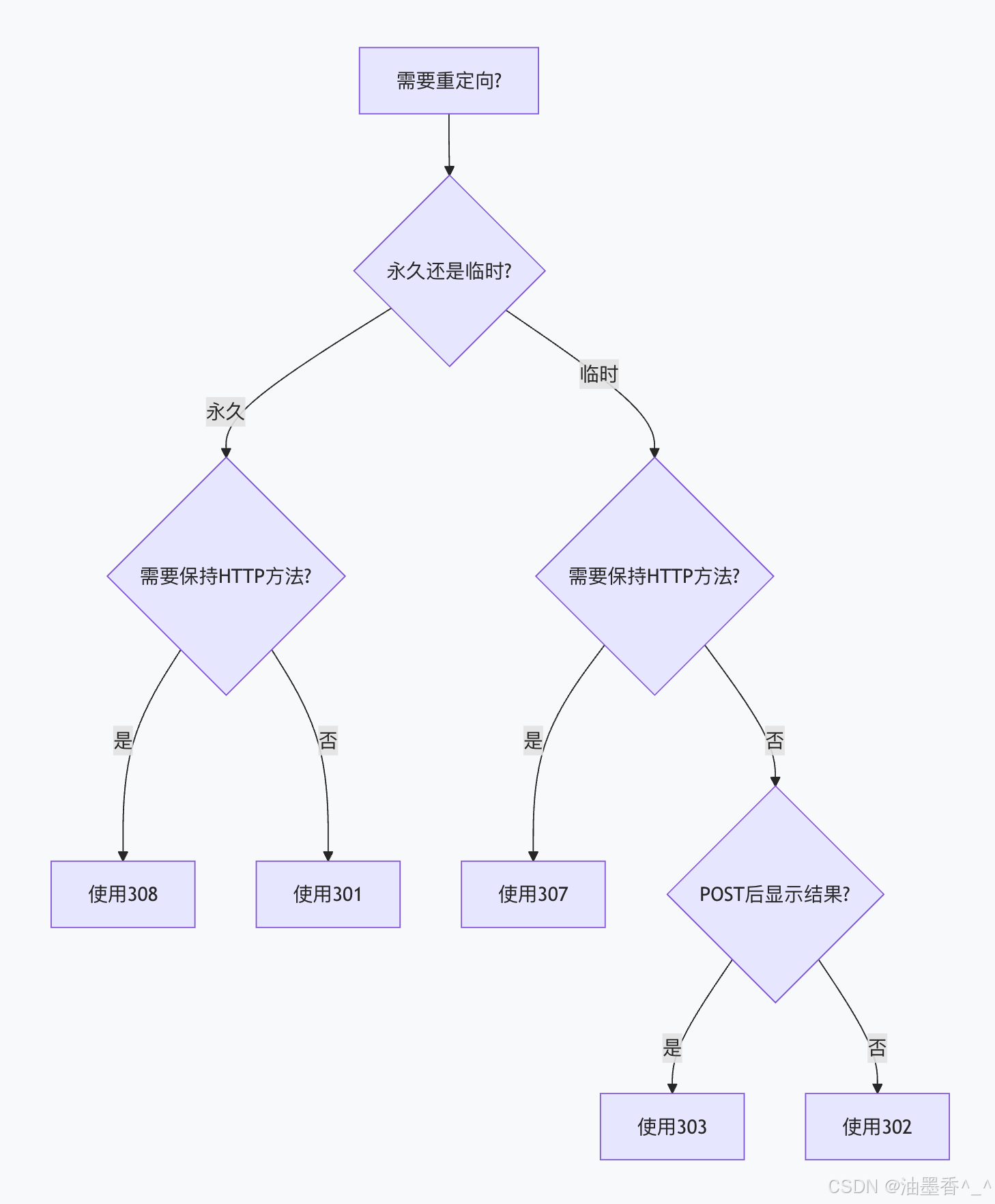
安全最佳实践:
输入验证:
python
def safe_redirect_url(url, request):
"""安全的重定向URL验证"""
# 解析URL
parsed = urlparse(url)
# 1. 验证协议
allowed_schemes = ['http', 'https', '']
if parsed.scheme not in allowed_schemes:
raise ValueError(f"Invalid scheme: {parsed.scheme}")
# 2. 验证域名
allowed_domains = ['example.com', 'trusted.com']
if parsed.netloc:
domain = parsed.netloc.split(':')[0]
if domain not in allowed_domains:
# 检查子域名
current_domain = request.get_host().split(':')[0]
if not domain.endswith('.' + current_domain):
raise ValueError(f"Untrusted domain: {domain}")
# 3. 防止开放重定向
if parsed.path and '//' in parsed.path:
raise ValueError("Invalid path")
# 4. 构建安全URL
safe_url = urlunparse((
parsed.scheme or 'https',
parsed.netloc or request.get_host(),
parsed.path,
parsed.params,
parsed.query,
parsed.fragment
))
return safe_url
HTTPS强制:
nginx
# 总是重定向到HTTPS,使用308保持方法
server {
listen 80;
server_name api.example.com;
location / {
return 308 https://$server_name$request_uri;
}
}
安全头设置:
http
HTTP/1.1 308 Permanent Redirect
Location: https://example.com/new-path
Content-Security-Policy: default-src 'self'
X-Content-Type-Options: nosniff
X-Frame-Options: DENY
Referrer-Policy: strict-origin-when-cross-origin
X-Redirect-By: MyApp/1.0
性能优化实践:
减少重定向链:
nginx
# 不佳:多重重定向
location /old {
return 308 /intermediate;
}
location /intermediate {
return 308 /new;
}
# 优化:直接重定向
location /old {
return 308 /new;
}
连接复用:
nginx
# 确保重定向在同一域名下,复用连接
location /api/v1/ {
return 308 https://$server_name/api/v2/$1;
}
缓存策略:
http
# 对308设置合理缓存
HTTP/1.1 308 Permanent Redirect
Location: /new-location
Cache-Control: public, max-age=31536000 # 1年
# 对307通常不缓存
HTTP/1.1 307 Temporary Redirect
Location: /temp-location
Cache-Control: no-cache, no-store
监控告警:
yaml
# 监控告警配置示例
alerts:
high_redirect_rate:
condition: rate(redirects_total[5m]) > 1000
severity: warning
message: "高重定向率检测"
redirect_errors:
condition: rate(redirect_errors_total[5m]) > 10
severity: critical
message: "重定向错误率过高"
long_redirect_chains:
condition: avg(redirect_chain_length) > 3
severity: warning
message: "重定向链过长影响性能"
method_changes:
condition: rate(method_change_events[5m]) > 50
severity: warning
message: "HTTP方法变更频繁,可能影响API功能"
总结
HTTP重定向状态码3xx是Web架构中的重要组成部分,每种状态码都有其特定的语义和用途:
-
301 Moved Permanently:永久重定向,适合网站重构、域名迁移等永久性变更
-
302 Found:临时重定向,传统但方法保持模糊,适合A/B测试、维护页面等临时场景
-
303 See Other:明确转为GET的重定向,适合POST后显示结果页
-
304 Not Modified:缓存验证机制,优化性能,减少不必要的数据传输
-
307 Temporary Redirect:临时重定向且保持方法,解决302的模糊性,适合API临时迁移
-
308 Permanent Redirect:永久重定向且保持方法,解决301的模糊性,适合API版本迁移
核心建议:
明确意图:根据资源移动的永久性和方法保持需求选择合适的状态码
方法安全:对API和表单提交使用307/308确保方法保持
性能优化:尽量减少重定向链长度,合理设置缓存头
安全考虑:验证重定向目标,防止开放重定向漏洞
监控维护:建立监控告警,定期审计重定向规则
第15章:其他3xx状态码(300、303、305、306)万字详解
15.1 300 Multiple Choices(多种选择)
15.1.1 定义与语义
300 Multiple Choices 状态码表示目标资源有多个表示形式,每个表示都有自己的特定位置。服务器可以提供资源特征和位置的列表,以便用户或用户代理(如浏览器)可以选择最合适的表示并进行重定向。
15.1.2 历史演变
-
HTTP/1.0:300状态码首次定义,但规范较为模糊
-
RFC 1945(1996):初步规范
-
RFC 2616(1999):HTTP/1.1的正式定义
-
RFC 7231(2014):当前标准定义,语义有所调整
15.1.3 技术规范
状态行
text
HTTP/1.1 300 Multiple Choices
必需的头字段
服务器应该包含以下头字段之一:
-
Location:如果服务器有首选的表示形式
-
实体主体:包含选择列表(通常是HTML格式)
可选的头字段
-
Content-Type:描述实体主体的媒体类型
-
Content-Language:描述实体主体的语言
-
Vary:指示服务器根据哪些请求头选择表示
15.1.4 工作原理
服务器行为
检测到客户端请求的资源有多个表示形式
根据请求头(如Accept、Accept-Language)无法自动选择最合适的
返回300状态码并提供选择列表
客户端行为
接收300响应
解析实体主体中的选择列表
用户或自动逻辑选择其中一个
向选择的URI发送新请求
15.1.5 详细示例
场景描述
一个国际化的文档资源,支持三种语言版本:英语、法语和西班牙语。服务器无法根据客户端的Accept-Language头确定首选语言(或客户端未发送该头)。
请求示例
http
GET /document HTTP/1.1
Host: example.com
User-Agent: Mozilla/5.0
Accept: text/html
响应示例
http
HTTP/1.1 300 Multiple Choices
Date: Mon, 15 Jan 2024 12:00:00 GMT
Content-Type: text/html; charset=utf-8
Content-Language: en
Vary: Accept-Language
<!DOCTYPE html>
<html lang="en">
<head>
<title>Multiple Representations Available</title>
</head>
<body>
<h1>Available Representations</h1>
<p>The resource you requested is available in multiple languages:</p>
<ul>
<li><a href="/document/en">English version</a></li>
<li><a href="/document/fr">French version</a></li>
<li><a href="/document/es">Spanish version</a></li>
</ul>
<p>Please select one of the options above.</p>
</body>
</html>
更复杂的示例(包含媒体类型选择)
http
HTTP/1.1 300 Multiple Choices
Date: Mon, 15 Jan 2024 12:00:00 GMT
Content-Type: application/json
Vary: Accept
{
"message": "Multiple representations available",
"choices": [
{
"uri": "/resource/document.pdf",
"content_type": "application/pdf",
"description": "PDF document (formatted)",
"size": "245KB"
},
{
"uri": "/resource/document.html",
"content_type": "text/html",
"description": "HTML version (web view)",
"size": "45KB"
},
{
"uri": "/resource/document.json",
"content_type": "application/json",
"description": "JSON data (structured)",
"size": "32KB"
}
],
"default": "/resource/document.html"
}
15.1.6 使用场景与最佳实践
适用场景
内容协商失败时:当服务器无法根据Accept*头字段确定最佳表示
多格式资源:资源同时提供PDF、HTML、JSON等多种格式
多语言内容:资源有多种语言版本,且无法自动选择
设备特定内容:资源有针对桌面、移动、平板的不同版本
最佳实践
提供清晰的用户界面:如果返回HTML,确保选择列表易于理解
包含元数据:在每个选项中提供内容类型、语言、大小等信息
设置默认选项:如果有推荐选项,通过Location头或标记默认项
缓存考虑:通常不应缓存300响应,或设置较短缓存时间
SEO优化:对于搜索引擎,考虑使用其他方法(如hreflang)
不推荐的使用方式
作为常规重定向使用(应使用301/302/303)
替代服务器端内容协商
当可以自动选择时仍返回300
15.1.7 实现示例
Python Flask实现
python
from flask import Flask, request, jsonify, make_response
app = Flask(__name__)
@app.route('/document')
def get_document():
accept_language = request.headers.get('Accept-Language', '')
# 如果客户端指定了明确的语言偏好
if 'en' in accept_language:
return redirect_to('/document/en')
elif 'fr' in accept_language:
return redirect_to('/document/fr')
elif 'es' in accept_language:
return redirect_to('/document/es')
else:
# 无法确定,返回选择列表
response = make_response('''
<html>
<body>
<h1>Select Language</h1>
<ul>
<li><a href="/document/en">English</a></li>
<li><a href="/document/fr">French</a></li>
<li><a href="/document/es">Spanish</a></li>
</ul>
</body>
</html>
''')
response.status_code = 300
response.headers['Content-Type'] = 'text/html'
return response
def redirect_to(url):
from flask import redirect
return redirect(url, code=302)
Node.js Express实现
javascript
const express = require('express');
const app = express();
app.get('/api/data', (req, res) => {
const acceptHeader = req.headers.accept || '';
const representations = [
{
url: '/api/data.json',
type: 'application/json',
description: 'JSON representation'
},
{
url: '/api/data.xml',
type: 'application/xml',
description: 'XML representation'
},
{
url: '/api/data.csv',
type: 'text/csv',
description: 'CSV representation'
}
];
// 检查是否接受JSON
if (acceptHeader.includes('application/json')) {
res.redirect('/api/data.json');
}
// 检查是否接受XML
else if (acceptHeader.includes('application/xml')) {
res.redirect('/api/data.xml');
}
// 无法确定,返回300
else {
res.status(300);
res.set('Content-Type', 'application/json');
res.json({
message: 'Multiple representations available',
choices: representations,
default: '/api/data.json'
});
}
});
15.1.8 客户端处理策略
浏览器处理
大多数现代浏览器将300响应视为需要用户交互的情况:
显示服务器返回的HTML页面
用户点击链接后继续
不会自动重定向(除非有Location头)
API客户端处理
API客户端应能解析300响应并做出决策:
python
import requests
def handle_300_response(response):
if response.status_code == 300:
content_type = response.headers.get('Content-Type', '')
if 'application/json' in content_type:
data = response.json()
# 自动选择默认选项或第一个选项
if 'default' in data:
return requests.get(data['default'])
elif 'choices' in data and len(data['choices']) > 0:
return requests.get(data['choices'][0]['uri'])
elif 'text/html' in content_type:
# 对于HTML,可能需要用户交互
# 这里简单选择第一个链接
import re
links = re.findall(r'href="([^"]+)"', response.text)
if links:
return requests.get(links[0])
return response
# 使用示例
response = requests.get('http://example.com/document')
if response.status_code == 300:
response = handle_300_response(response)
15.1.9 缓存行为
300响应的缓存特性:
-
默认不可缓存:除非明确设置缓存头
-
缓存键:应考虑Vary头字段
-
建议:通常设置Cache-Control: no-cache或较短的最大年龄
http
HTTP/1.1 300 Multiple Choices
Cache-Control: max-age=3600, public
Vary: Accept, Accept-Language
15.1.10 安全考虑
信息泄露:选择列表可能暴露内部URL结构
重定向安全:确保所有选项指向可信位置
CSRF保护:如果涉及敏感操作,需验证重定向目标
点击劫持:确保选择页面有适当的X-Frame-Options
15.1.11 与其他状态码的比较
| 自动重定向 | 否(通常) | 是 | 是 |
| 方法保持 | 不适用 | 通常改变为GET | 必须改为GET |
| 用户交互 | 通常需要 | 不需要 | 不需要 |
| 缓存性 | 通常不缓存 | 通常不缓存 | 通常不缓存 |
| 典型用途 | 内容协商 | 临时重定向 | POST后重定向 |
15.1.12 实际应用案例
案例1:REST API版本协商
http
GET /api/users HTTP/1.1
Host: api.example.com
Accept: application/vnd.example.user+json
http
HTTP/1.1 300 Multiple Choices
Content-Type: application/json
{
"error": "API version not specified",
"available_versions": [
{
"version": "1.0",
"url": "/api/v1.0/users",
"status": "stable"
},
{
"version": "2.0",
"url": "/api/v2.0/users",
"status": "beta"
},
{
"version": "3.0-alpha",
"url": "/api/v3.0/users",
"status": "alpha"
}
],
"documentation": "https://api.example.com/versions"
}
案例2:多格式文档服务
http
GET /reports/annual-2023 HTTP/1.1
Host: docs.company.com
http
HTTP/1.1 300 Multiple Choices
Content-Type: text/html; charset=utf-8
<!DOCTYPE html>
<html>
<head>
<title>Annual Report 2023 – Available Formats</title>
</head>
<body>
<h1>Annual Report 2023</h1>
<p>Available in multiple formats:</p>
<div class="format-options">
<div class="option">
<h2><a href="/reports/annual-2023.pdf">PDF Version</a></h2>
<p>High-quality printable document (15MB)</p>
<p><small>Includes charts and high-resolution images</small></p>
</div>
<div class="option">
<h2><a href="/reports/annual-2023.html">Web Version</a></h2>
<p>Accessible HTML version (1.2MB)</p>
<p><small>Optimized for screen readers and mobile devices</small></p>
</div>
<div class="option">
<h2><a href="/reports/annual-2023.txt">Plain Text</a></h2>
<p>Text-only version (450KB)</p>
<p><small>Minimal formatting, fastest download</small></p>
</div>
</div>
</body>
</html>
15.2 303 See Other(参见其他)
15.2.1 定义与语义
303 See Other 状态码表示服务器将客户端重定向到另一个资源,该资源位于不同的URI,并且客户端应该使用GET方法(无论原始请求使用什么方法)请求该资源。
15.2.2 历史背景与设计目的
303状态码是在HTTP/1.1中引入的,主要目的是解决302状态码的语义模糊性:
HTTP/1.0中的302问题:
-
302最初定义为"Temporary Redirect"
-
但实际实现中,有些客户端保持原始方法,有些改为GET
-
这导致了不一致性和潜在的安全问题
HTTP/1.1的解决方案:
-
302被重新定义为"Found",语义保持不变但模糊
-
引入303,明确要求必须使用GET方法
-
引入307,明确要求必须保持原始方法
15.2.3 技术规范
状态行
text
HTTP/1.1 303 See Other
必需的头字段
-
Location:必须包含,指定客户端应该请求的新URI
建议的头字段
-
Content-Type:如果包含响应实体
-
Cache-Control:通常设置为不缓存
15.2.4 核心特性
1. 方法变更
-
原始请求:可以是任何HTTP方法(POST、PUT、DELETE等)
-
重定向请求:必须使用GET方法
2. 自动重定向
大多数用户代理(浏览器)会自动处理303重定向,无需用户干预。
3. 不缓存性
303响应通常不应该被缓存,除非有明确的缓存指令。
15.2.5 详细工作流程
典型场景:表单提交后的重定向
text
用户填写表单 → POST提交 → 服务器处理 → 返回303 → 浏览器GET重定向 → 显示结果页面
请求-响应序列
text
1. 客户端 → 服务器: POST /submit-form
Content-Type: application/x-www-form-urlencoded
name=John&email=john@example.com
2. 服务器 → 客户端: HTTP/1.1 303 See Other
Location: /success-page
Content-Type: text/html
<html>…</html>
3. 客户端 → 服务器: GET /success-page
4. 服务器 → 客户端: HTTP/1.1 200 OK
Content-Type: text/html
<html>Thank you for your submission!</html>
15.2.6 实际应用示例
示例1:用户注册流程
python
# Flask示例
from flask import Flask, request, redirect, url_for, session
app = Flask(__name__)
app.secret_key = 'your-secret-key'
@app.route('/register', methods=['POST'])
def register_user():
# 处理用户注册
username = request.form['username']
email = request.form['email']
password = request.form['password']
# 保存用户到数据库
user_id = save_user_to_database(username, email, password)
# 设置会话
session['user_id'] = user_id
session['username'] = username
# 使用303重定向到欢迎页面
return redirect(url_for('welcome'), code=303)
@app.route('/welcome')
def welcome():
if 'user_id' not in session:
return redirect(url_for('login'))
return f'''
<html>
<head><title>Welcome</title></head>
<body>
<h1>Welcome, {session['username']}!</h1>
<p>Your registration was successful.</p>
</body>
</html>
'''
示例2:文件上传处理
javascript
// Node.js Express示例
const express = require('express');
const multer = require('multer');
const app = express();
const upload = multer({ dest: 'uploads/' });
app.post('/upload', upload.single('file'), (req, res) => {
if (!req.file) {
return res.status(400).send('No file uploaded');
}
// 处理文件(如保存到数据库、处理内容等)
const fileInfo = {
filename: req.file.originalname,
size: req.file.size,
mimetype: req.file.mimetype,
uploadedAt: new Date()
};
// 保存文件信息
saveFileInfo(fileInfo);
// 303重定向到文件详情页面
res.redirect(303, `/files/${req.file.filename}`);
});
app.get('/files/:filename', (req, res) => {
const fileInfo = getFileInfo(req.params.filename);
res.send(`
<h1>File Uploaded Successfully</h1>
<p><strong>Name:</strong> ${fileInfo.filename}</p>
<p><strong>Size:</strong> ${fileInfo.size} bytes</p>
<p><strong>Type:</strong> ${fileInfo.mimetype}</p>
<p><strong>Uploaded:</strong> ${fileInfo.uploadedAt}</p>
`);
});
15.2.7 与POST/重定向/GET模式(PRG模式)
PRG模式概述
POST/Redirect/GET是一种Web开发模式,用于防止表单重复提交:
POST:客户端提交表单数据
Redirect:服务器处理数据后返回重定向(通常303)
GET:客户端获取结果页面
PRG模式的优势
防止重复提交:刷新GET请求不会重新提交表单
书签友好:结果页面可以添加到书签
后退按钮友好:用户可以使用后退按钮而不触发警告
清晰的URL:结果页面有独立的URL
PRG模式实现
python
# Django示例
from django.shortcuts import render, redirect
from django.views.decorators.http import require_POST
@require_POST
def process_order(request):
# 处理订单逻辑
order_id = create_order(request.POST)
# 设置闪存消息
from django.contrib import messages
messages.success(request, 'Order placed successfully!')
# 303重定向到订单确认页面
return redirect('order_confirmation', order_id=order_id)
def order_confirmation(request, order_id):
# 获取订单信息
order = get_order(order_id)
# 显示确认页面
return render(request, 'orders/confirmation.html', {
'order': order
})
15.2.8 与302状态码的区别
| HTTP版本 | HTTP/1.1引入 | HTTP/1.0已有 |
| 方法处理 | 必须改为GET | 应该改为GET(但不强制) |
| 语义清晰度 | 明确 | 模糊 |
| 典型用途 | POST后的重定向 | 临时重定向 |
| 缓存行为 | 通常不缓存 | 通常不缓存 |
15.2.9 客户端处理
浏览器行为
现代浏览器对303的处理:
自动跟随Location头重定向
使用GET方法请求新URL
不携带原始请求的正文
可能携带原始请求的某些头(如Referer)
JavaScript Fetch API处理
javascript
// 使用Fetch API处理303重定向
async function submitForm(formData) {
try {
const response = await fetch('/api/submit', {
method: 'POST',
body: formData,
redirect: 'follow' // 自动跟随重定向
});
// 注意:如果设置了redirect: 'follow'
// 最终的response是重定向后的响应
const result = await response.text();
console.log('Result:', result);
} catch (error) {
console.error('Error:', error);
}
}
// 手动处理重定向
async function submitFormManual(formData) {
const response = await fetch('/api/submit', {
method: 'POST',
body: formData,
redirect: 'manual' // 不自动跟随重定向
});
if (response.status === 303) {
const redirectUrl = response.headers.get('Location');
// 手动进行GET请求
const getResponse = await fetch(redirectUrl);
const result = await getResponse.json();
return result;
}
return await response.json();
}
15.2.10 缓存注意事项
303响应通常不应该被缓存,但可以设置特定缓存头:
http
HTTP/1.1 303 See Other
Location: /new-location
Cache-Control: no-cache, no-store, must-revalidate
Pragma: no-cache
Expires: 0
如果确实需要缓存(罕见情况):
http
HTTP/1.1 303 See Other
Location: /new-location
Cache-Control: public, max-age=3600
Vary: Cookie, Authorization
15.2.11 安全考虑
1. 开放重定向风险
python
# 不安全的实现 – 可能被用于钓鱼攻击
@app.route('/redirect')
def unsafe_redirect():
target = request.args.get('url')
# 危险:直接重定向到用户提供的URL
return redirect(target, code=303)
# 安全的实现
@app.route('/safe-redirect')
def safe_redirect():
target = request.args.get('url')
# 验证目标URL是否在白名单内
allowed_domains = ['example.com', 'trusted-site.org']
from urllib.parse import urlparse
parsed_url = urlparse(target)
if parsed_url.netloc in allowed_domains:
return redirect(target, code=303)
else:
return redirect('/default-safe-page', code=303)
2. CSRF保护
使用303时仍需考虑CSRF防护:
python
# Django示例 – 结合CSRF保护
from django.views.decorators.csrf import csrf_exempt, csrf_protect
@csrf_protect
def process_payment(request):
if request.method == 'POST':
# 验证CSRF令牌
# 处理支付
payment_id = process_payment_transaction(request.POST)
# 303重定向到收据页面
return redirect(f'/receipt/{payment_id}', code=303)
return render(request, 'payment_form.html')
15.2.12 最佳实践
始终用于POST后重定向:确保表单数据不会因刷新而重复提交
设置适当的缓存头:通常设为no-cache
验证重定向目标:防止开放重定向漏洞
提供有意义的Location URL:结果页面应反映操作结果
考虑用户体验:
-
在重定向前可设置闪存消息
-
确保重定向目标快速加载
-
为JavaScript客户端提供API兼容性
完整示例:电子商务订单处理
python
# Flask完整示例
from flask import Flask, request, redirect, url_for, flash, session
from flask.views import MethodView
app = Flask(__name__)
app.secret_key = 'your-secret-key-here'
class CheckoutView(MethodView):
def get(self):
"""显示结账页面"""
cart = session.get('cart', [])
total = sum(item['price'] * item['quantity'] for item in cart)
return f'''
<h1>Checkout</h1>
<p>Total: ${total:.2f}</p>
<form method="post">
<input type="text" name="card_number" placeholder="Card Number" required>
<input type="text" name="expiry" placeholder="MM/YY" required>
<input type="text" name="cvc" placeholder="CVC" required>
<button type="submit">Place Order</button>
</form>
'''
def post(self):
"""处理订单并重定向"""
# 验证支付信息
card_number = request.form.get('card_number')
expiry = request.form.get('expiry')
cvc = request.form.get('cvc')
if not validate_payment(card_number, expiry, cvc):
flash('Invalid payment information', 'error')
return redirect(url_for('checkout'))
# 创建订单
cart = session.get('cart', [])
order_id = create_order(cart, request.form)
# 清空购物车
session.pop('cart', None)
# 设置成功消息
flash('Order placed successfully!', 'success')
# 303重定向到订单确认页面
return redirect(url_for('order_confirmation', order_id=order_id), code=303)
class OrderConfirmationView(MethodView):
def get(self, order_id):
"""显示订单确认页面"""
order = get_order(order_id)
return f'''
<h1>Order Confirmation</h1>
<p>Order ID: {order['id']}</p>
<p>Status: {order['status']}</p>
<p>Total: ${order['total']:.2f}</p>
<a href="/">Continue Shopping</a>
'''
# 注册路由
app.add_url_rule('/checkout', view_func=CheckoutView.as_view('checkout'))
app.add_url_rule('/order/<order_id>', view_func=OrderConfirmationView.as_view('order_confirmation'))
15.3 305 Use Proxy(使用代理)
15.3.1 定义与语义
305 Use Proxy 状态码表示请求的资源必须通过代理访问。代理的位置在响应的Location头字段中指定。客户端应该重新发送请求到指定的代理。
15.3.2 历史背景
-
引入:在HTTP/1.1中首次定义
-
废弃:由于安全考虑,在后续规范中被标记为"已废弃"
-
现状:现代浏览器和客户端通常不支持此状态码
15.3.3 废弃原因
安全风险:
-
可能被用于中间人攻击
-
代理可能记录或修改敏感数据
-
缺乏代理身份验证机制
配置问题:
-
与系统级代理配置冲突
-
难以管理多个代理设置
实际使用有限:
-
很少被实际部署
-
替代方案更受欢迎(如PAC文件、WPAD)
15.3.4 技术规范
状态行
text
HTTP/1.1 305 Use Proxy
必需的头字段
-
Location:必须包含代理的URI
响应实体
应该包含一个简短的人类可读消息,解释需要使用代理
15.3.5 工作原理
正常流程
text
客户端 → 服务器: GET /resource
服务器 → 客户端: 305 Use Proxy
Location: http://proxy.example.com:8080
客户端 → 代理: GET http://proxy.example.com:8080/resource
代理 → 服务器: GET /resource
服务器 → 代理: 200 OK
代理 → 客户端: 200 OK
示例实现
python
# 服务器端实现(理论上)
from flask import Flask, request, make_response
app = Flask(__name__)
@app.route('/restricted-resource')
def get_restricted_resource():
# 检查客户端IP是否在允许的直接访问列表中
client_ip = request.remote_addr
if client_ip not in ALLOWED_DIRECT_IPS:
# 需要代理访问
response = make_response('''
<html>
<head><title>Use Proxy Required</title></head>
<body>
<h1>Proxy Required</h1>
<p>This resource must be accessed through the corporate proxy.</p>
<p>Proxy URL: http://proxy.corporate.com:3128</p>
</body>
</html>
''')
response.status_code = 305
response.headers['Location'] = 'http://proxy.corporate.com:3128'
return response
# 直接访问允许
return 'Restricted resource content'
15.3.6 现代替代方案
1. 代理自动配置(PAC)
javascript
// proxy.pac 文件
function FindProxyForURL(url, host) {
// 对内部资源使用代理
if (shExpMatch(host, "*.internal.company.com")) {
return "PROXY proxy.internal.company.com:8080";
}
// 对其他资源直接连接
return "DIRECT";
}
2. Web代理自动发现协议(WPAD)
http
# DHCP或DNS配置
option wpad code 252 = text;
option wpad "http://config.company.com/wpad.dat";
3. 配置管理工具
-
组策略(Windows)
-
移动设备管理(MDM)
-
配置管理数据库(CMDB)
15.3.7 安全考虑与风险
潜在攻击场景
python
# 恶意服务器可能尝试重定向到恶意代理
@app.route('/malicious')
def malicious_redirect():
response = make_response()
response.status_code = 305
# 重定向到攻击者控制的代理
response.headers['Location'] = 'http://evil-proxy.com:8080'
return response
防护措施
python
# 客户端防护示例
import requests
from urllib.parse import urlparse
class SafeHTTPClient:
def __init__(self):
self.allowed_proxies = [
'proxy.company.com',
'backup-proxy.company.com'
]
def request(self, method, url, **kwargs):
response = requests.request(method, url, **kwargs)
# 检查305响应
if response.status_code == 305:
proxy_url = response.headers.get('Location')
if proxy_url:
parsed = urlparse(proxy_url)
proxy_host = parsed.hostname
# 验证代理是否可信
if proxy_host in self.allowed_proxies:
# 使用可信代理重新请求
proxies = {
'http': proxy_url,
'https': proxy_url
}
return requests.request(method, url, proxies=proxies, **kwargs)
else:
raise SecurityError(f'Untrusted proxy: {proxy_host}')
return response
15.3.8 实际应用案例(历史)
案例1:企业网络访问控制
text
# 2000年代早期的企业网络设置
# 内部服务器配置
<VirtualHost *:80>
ServerName internal-app.company.com
# 只允许通过企业代理访问
RewriteEngine On
RewriteCond %{REMOTE_ADDR} !^10\\.10\\.1\\.100$ # 代理服务器IP
RewriteRule ^ – [R=305]
Header always set Location "http://corporate-proxy:3128"
</VirtualHost>
案例2:学术机构资源控制
text
# 大学图书馆数据库访问
# 只有通过校园代理才能访问付费数据库
# Apache配置示例
<Location "/research-databases">
# 检查客户端IP
SetEnvIf Remote_Addr "^131\\.104\\." on_campus
Order deny,allow
Deny from all
Allow from env=on_campus
# 不在校园网络,需要代理
ErrorDocument 305 "Please use the campus proxy: http://library-proxy.university.edu:8080"
</Location>
15.3.9 客户端处理
现代浏览器行为
大多数现代浏览器:
忽略305响应:不自动配置代理
显示错误页面:将305视为错误
不跟随Location头:出于安全考虑
自定义客户端实现
java
// Java HttpClient示例(展示如何处理305)
import java.net.http.*;
import java.net.URI;
public class CustomHttpClient {
private final HttpClient client;
private final List<String> trustedProxies;
public CustomHttpClient() {
this.client = HttpClient.newBuilder()
.followRedirects(HttpClient.Redirect.NEVER) // 不自动重定向
.build();
this.trustedProxies = List.of(
"proxy.company.com",
"backup.company.com"
);
}
public HttpResponse<String> sendRequest(HttpRequest request)
throws Exception {
HttpResponse<String> response = client.send(
request, HttpResponse.BodyHandlers.ofString()
);
// 处理305响应
if (response.statusCode() == 305) {
Optional<String> proxyLocation = response.headers()
.firstValue("Location");
if (proxyLocation.isPresent()) {
URI proxyUri = URI.create(proxyLocation.get());
String proxyHost = proxyUri.getHost();
// 验证代理
if (isTrustedProxy(proxyHost)) {
// 通过代理重新发送请求
HttpClient proxyClient = HttpClient.newBuilder()
.proxy(ProxySelector.of(
new InetSocketAddress(proxyHost, proxyUri.getPort())
))
.build();
return proxyClient.send(request,
HttpResponse.BodyHandlers.ofString());
} else {
throw new SecurityException(
"Untrusted proxy: " + proxyHost);
}
}
}
return response;
}
private boolean isTrustedProxy(String hostname) {
return trustedProxies.contains(hostname);
}
}
15.3.10 替代305的现代方案
方案1:HTTP状态码307与代理头
http
# 服务器响应
HTTP/1.1 307 Temporary Redirect
Location: https://api.company.com/v2/resource
Proxy-Authenticate: Basic realm="Corporate Proxy"
X-Proxy-Required: true
X-Proxy-Server: proxy.company.com:3128
方案2:使用自定义头字段
http
# API响应
HTTP/1.1 403 Forbidden
Content-Type: application/json
{
"error": "proxy_required",
"message": "Access through corporate proxy required",
"proxy_configuration": {
"http": "http://proxy.company.com:3128",
"https": "http://proxy.company.com:3128",
"no_proxy": "localhost,127.0.0.1,.internal"
},
"documentation": "https://wiki.company.com/proxy-setup"
}
方案3:配置发现服务
python
# 代理配置发现API
@app.route('/api/proxy-config')
def get_proxy_config():
client_ip = request.remote_addr
network = identify_network(client_ip)
if network == 'corporate':
return jsonify({
'proxy_required': False,
'direct_access': True
})
elif network == 'partner':
return jsonify({
'proxy_required': True,
'proxy_server': 'partner-gateway.company.com:8080',
'authentication': 'basic',
'credentials_required': True
})
else:
return jsonify({
'proxy_required': True,
'proxy_server': 'external-gateway.company.com:3128',
'authentication': 'certificate',
'certificate_url': '/api/client-certificate'
})
15.3.11 最佳实践(如果必须使用)
虽然305已废弃,但在某些受限环境中可能仍需要:
严格验证代理:
python
# 服务器端验证
ALLOWED_PROXIES = {
'internal-proxy.company.com': '192.168.1.100',
'dmz-proxy.company.com': '10.0.0.50'
}
def require_proxy_access():
proxy_host = get_configured_proxy()
if proxy_host not in ALLOWED_PROXIES:
raise ConfigurationError(f'Invalid proxy: {proxy_host}')
response = make_response()
response.status_code = 305
response.headers['Location'] = f'http://{proxy_host}:3128'
response.headers['X-Proxy-Version'] = '1.0'
response.headers['X-Proxy-Auth-Type'] = 'Kerberos'
return response
提供备用访问方式:
html
<!– 在305响应中提供备选方案 –>
HTTP/1.1 305 Use Proxy
Location: http://proxy.company.com:3128
Content-Type: text/html
<html>
<head><title>Proxy Required</title></head>
<body>
<h1>Proxy Access Required</h1>
<p>This resource requires access through the corporate proxy.</p>
<h2>Automatic Configuration</h2>
<p>The system will automatically configure your proxy.</p>
<h2>Manual Configuration</h2>
<p>If automatic configuration fails:</p>
<ol>
<li>Open network settings</li>
<li>Configure proxy: <code>proxy.company.com:3128</code></li>
<li>Authentication: Use your corporate credentials</li>
</ol>
<h2>Alternative Access</h2>
<p><a href="/vpn-instructions">VPN access instructions</a></p>
<p><a href="/api/access-token">Request API token for direct access</a></p>
</body>
</html>
15.4 306 Switch Proxy(切换代理)
15.4.1 定义与历史
306 Switch Proxy 状态码是一个历史上存在但从未正式成为标准的实验性状态码。它在早期的HTTP草案中短暂出现,但从未被纳入任何正式RFC标准。
15.4.2 历史背景
-
起源:在HTTP/1.1的早期草案中出现
-
目的:指示客户端切换到不同的代理服务器
-
状态:从未正式标准化,已被弃用
-
现状:不应在现代应用中使用
15.4.3 理论上的语义
如果曾经标准化,306可能用于:
负载均衡:将客户端重定向到另一个代理
故障转移:当前代理不可用时切换到备用代理
地理位置优化:重定向到地理上更近的代理
15.4.4 与现代替代方案的对比
| 负载均衡 | 306重定向 | DNS轮询、Anycast、负载均衡器 |
| 故障转移 | 306切换到备用代理 | 健康检查、自动故障转移 |
| 地理位置优化 | 306重定向到最近代理 | CDN、GeoDNS、Anycast |
15.4.5 现代替代实现
使用307重定向实现代理切换
python
from flask import Flask, request, jsonify
import hashlib
app = Flask(__name__)
# 代理服务器池
PROXY_POOL = [
{'url': 'http://proxy-us-east-1.company.com:3128', 'region': 'us-east', 'load': 0},
{'url': 'http://proxy-us-west-1.company.com:3128', 'region': 'us-west', 'load': 0},
{'url': 'http://proxy-eu-west-1.company.com:3128', 'region': 'eu-west', 'load': 0},
{'url': 'http://proxy-ap-southeast-1.company.com:3128', 'region': 'ap-southeast', 'load': 0},
]
def select_proxy(client_ip, requested_resource):
"""基于地理位置和负载选择代理"""
# 1. 基于IP确定区域
client_region = geolocate_ip(client_ip)
# 2. 筛选区域匹配的代理
regional_proxies = [p for p in PROXY_POOL if p['region'] == client_region]
if not regional_proxies:
# 回退到全局代理
regional_proxies = PROXY_POOL
# 3. 选择负载最低的代理
selected_proxy = min(regional_proxies, key=lambda x: x['load'])
# 4. 更新负载计数
selected_proxy['load'] += 1
return selected_proxy['url']
@app.route('/proxy-aware-resource')
def get_resource():
client_ip = request.remote_addr
# 检查是否已通过正确代理访问
via_header = request.headers.get('Via', '')
expected_proxy = select_proxy(client_ip, request.path)
# 提取当前使用的代理
current_proxy = None
if via_header:
# 解析Via头,获取代理信息
# 格式: "1.1 proxy1, 1.1 proxy2"
via_parts = via_header.split(',')
if via_parts:
last_hop = via_parts[-1].strip()
# 提取代理主机名
if ' ' in last_hop:
current_proxy = last_hop.split(' ')[1]
# 如果未通过代理,或通过错误代理访问
if not current_proxy or not is_correct_proxy(current_proxy, expected_proxy):
# 返回307重定向到正确代理
response = jsonify({
'error': 'proxy_mismatch',
'message': 'Please use the recommended proxy server',
'recommended_proxy': expected_proxy,
'proxy_configuration_help': 'https://docs.company.com/proxy-setup'
})
response.status_code = 307
response.headers['Location'] = expected_proxy + request.full_path
response.headers['X-Recommended-Proxy'] = expected_proxy
return response
# 通过正确代理访问,返回资源
return jsonify({'data': 'resource content here'})
def is_correct_proxy(current_proxy, expected_proxy):
"""检查当前代理是否正确"""
# 简单的域名匹配
from urllib.parse import urlparse
current_host = urlparse(f'http://{current_proxy}').hostname
expected_host = urlparse(expected_proxy).hostname
return current_host == expected_host
15.4.6 代理自动发现与切换的现代方案
方案1:动态PAC文件
javascript
// dynamic-proxy.pac – 动态代理配置
function FindProxyForURL(url, host) {
// 调用配置服务获取最佳代理
var proxyConfig = getProxyConfiguration(host);
if (proxyConfig.useProxy) {
// 负载均衡:基于URL哈希选择代理
var proxyServers = [
"PROXY proxy1.company.com:3128",
"PROXY proxy2.company.com:3128",
"PROXY proxy3.company.com:3128"
];
var hash = md5(url);
var index = parseInt(hash.substr(0, 8), 16) % proxyServers.length;
return proxyServers[index];
}
return "DIRECT";
}
// 辅助函数:获取动态配置
function getProxyConfiguration(host) {
// 这里可以调用内部API获取最新配置
// 例如:fetch('https://config.company.com/proxy-rules')
return {
useProxy: host.includes(".company.com"),
bypassLocal: true
};
}
方案2:代理配置API
python
# 代理配置服务
from flask import Flask, request, jsonify
import geoip2.database
app = Flask(__name__)
geoip_reader = geoip2.database.Reader('GeoLite2-City.mmdb')
@app.route('/api/proxy-config')
def get_proxy_config():
"""为客户端提供动态代理配置"""
client_ip = request.headers.get('X-Forwarded-For', request.remote_addr)
user_agent = request.headers.get('User-Agent', '')
try:
# 获取地理位置
geo_response = geoip_reader.city(client_ip)
country = geo_response.country.iso_code
city = geo_response.city.name
# 基于地理位置选择代理
proxies = {
'US': ['us-proxy1.company.com', 'us-proxy2.company.com'],
'GB': ['uk-proxy1.company.com', 'uk-proxy2.company.com'],
'JP': ['jp-proxy1.company.com', 'jp-proxy2.company.com'],
'AU': ['au-proxy1.company.com', 'au-proxy2.company.com']
}
# 选择代理
proxy_pool = proxies.get(country, proxies['US'])
# 简单的负载均衡:基于IP哈希
import hashlib
ip_hash = int(hashlib.md5(client_ip.encode()).hexdigest()[:8], 16)
selected_proxy = proxy_pool[ip_hash % len(proxy_pool)]
# 构建配置
config = {
'proxy_server': f'http://{selected_proxy}:3128',
'fallback_servers': [f'http://{p}:3128' for p in proxy_pool if p != selected_proxy],
'bypass_list': [
'localhost',
'127.0.0.1',
'*.local',
'*.internal'
],
'config_version': '2024.01.15',
'expires_in': 3600, # 1小时
'refresh_url': '/api/proxy-config'
}
return jsonify(config)
except Exception as e:
# 出错时返回默认配置
return jsonify({
'proxy_server': 'http://global-proxy.company.com:3128',
'error': str(e),
'config_version': 'default'
})
15.4.7 客户端代理管理示例
python
# 智能HTTP客户端,支持代理发现和故障转移
import requests
from urllib.parse import urlparse
import time
class SmartHTTPClient:
def __init__(self, config_service_url=None):
self.config_service_url = config_service_url
self.proxy_config = None
self.config_expiry = 0
self.session = requests.Session()
def get_proxy_config(self, force_refresh=False):
"""获取或刷新代理配置"""
current_time = time.time()
if (force_refresh or
not self.proxy_config or
current_time > self.config_expiry):
if self.config_service_url:
try:
response = self.session.get(
self.config_service_url,
timeout=5
)
if response.status_code == 200:
self.proxy_config = response.json()
self.config_expiry = current_time + self.proxy_config.get('expires_in', 300)
except:
# 配置服务不可用,使用默认
self.proxy_config = self.get_default_config()
else:
self.proxy_config = self.get_default_config()
return self.proxy_config
def get_default_config(self):
"""默认配置"""
return {
'proxy_server': None, # 直连
'fallback_servers': [],
'bypass_list': ['localhost', '127.0.0.1'],
'config_version': 'default'
}
def should_bypass_proxy(self, url):
"""检查URL是否应该绕过代理"""
parsed = urlparse(url)
hostname = parsed.hostname
if not hostname:
return True
bypass_list = self.proxy_config.get('bypass_list', [])
for pattern in bypass_list:
if pattern.startswith('*.'):
# 通配符匹配:*.example.com
domain = pattern[2:]
if hostname.endswith('.' + domain) or hostname == domain:
return True
elif pattern == hostname:
return True
return False
def request_with_proxy_failover(self, method, url, **kwargs):
"""支持故障转移的请求"""
# 获取最新配置
config = self.get_proxy_config()
# 检查是否应该绕过代理
if self.should_bypass_proxy(url):
return self.session.request(method, url, **kwargs)
# 构建代理列表(主代理 + 备用代理)
proxies_to_try = []
main_proxy = config.get('proxy_server')
if main_proxy:
proxies_to_try.append({
'http': main_proxy,
'https': main_proxy
})
# 添加备用代理
fallback_servers = config.get('fallback_servers', [])
for server in fallback_servers:
proxies_to_try.append({
'http': server,
'https': server
})
# 如果没有配置代理,直连
if not proxies_to_try:
return self.session.request(method, url, **kwargs)
# 尝试每个代理,直到成功
last_exception = None
for proxy_config in proxies_to_try:
try:
response = self.session.request(
method, url,
proxies=proxy_config,
timeout=kwargs.get('timeout', 30),
**{k: v for k, v in kwargs.items() if k != 'timeout'}
)
return response
except requests.exceptions.RequestException as e:
last_exception = e
continue
# 所有代理都失败,尝试直连
try:
return self.session.request(method, url, **kwargs)
except:
# 如果直连也失败,抛出最后一个异常
if last_exception:
raise last_exception
else:
raise
# 使用示例
client = SmartHTTPClient('https://config.company.com/api/proxy-config')
try:
response = client.request_with_proxy_failover(
'GET',
'https://api.company.com/data',
headers={'Authorization': 'Bearer token123'}
)
print(f'Success: {response.status_code}')
except Exception as e:
print(f'Request failed: {e}')
15.5 综合比较与应用场景
15.5.1 状态码对比矩阵
| 状态码 | 300 | 303 | 305 | 306 |
| HTTP版本 | HTTP/1.0+ | HTTP/1.1+ | HTTP/1.1 | 实验性,未标准化 |
| 当前状态 | 标准,但少用 | 标准,常用 | 已废弃 | 从未标准化 |
| 自动重定向 | 通常否 | 是 | 是(但浏览器不支持) | N/A |
| 方法变更 | N/A | 必须改为GET | 保持原方法 | N/A |
| Location头 | 可选(首选表示) | 必需 | 必需(代理URI) | 理论需要 |
| 缓存建议 | 通常不缓存 | 通常不缓存 | 不缓存 | N/A |
| 主要用途 | 内容协商 | POST后重定向 | 强制代理访问 | 代理切换 |
15.5.2 应用场景指南
场景1:用户提交表单后显示结果页
推荐:303 See Other
python
# 最佳实践:POST/Redirect/GET模式
@app.route('/submit-form', methods=['POST'])
def submit_form():
# 处理表单数据
result_id = process_form_data(request.form)
# 303重定向到结果页
return redirect(url_for('show_result', id=result_id), code=303)
@app.route('/result/<id>')
def show_result(id):
# 显示结果,可刷新、可收藏
return render_template('result.html', result=get_result(id))
场景2:API提供多种数据格式
推荐:300 Multiple Choices
python
@app.route('/api/data')
def get_data():
accept = request.headers.get('Accept', '')
if 'application/json' in accept:
return jsonify({'data': 'json'})
elif 'application/xml' in accept:
return xml_response('<data>xml</data>')
elif 'text/csv' in accept:
return 'data,csv\\nvalue1,value2'
else:
# 无法确定,返回选择列表
response = jsonify({
'message': 'Multiple representations available',
'formats': [
{'type': 'application/json', 'url': '/api/data?format=json'},
{'type': 'application/xml', 'url': '/api/data?format=xml'},
{'type': 'text/csv', 'url': '/api/data?format=csv'}
]
})
response.status_code = 300
return response
场景3:企业环境中的代理访问
不推荐:305 Use Proxy(已废弃) 替代方案:
python
# 使用307重定向和自定义头
@app.route('/internal-resource')
def internal_resource():
client_ip = request.remote_addr
if not is_internal_ip(client_ip):
response = jsonify({
'error': 'proxy_required',
'message': 'This resource requires access through corporate proxy',
'proxy_config': {
'server': 'proxy.company.com:3128',
'auth_type': 'ntlm',
'config_url': 'https://it.company.com/proxy-setup'
}
})
response.status_code = 307
response.headers['Location'] = 'https://gateway.company.com/auth'
return response
return jsonify({'data': 'internal resource'})
15.5.3 性能与缓存考虑
缓存策略总结
| 300 | Cache-Control: max-age=3600 | 包含Vary: Accept, Accept-Language |
| 303 | Cache-Control: no-cache | 通常不缓存 |
| 305 | Cache-Control: no-store | 不应缓存 |
| 306 | N/A | N/A |
性能优化建议
python
# 300响应的缓存优化
@app.route('/multi-format-resource')
def multi_format_resource():
# 基于Accept头生成不同的缓存键
accept_header = request.headers.get('Accept', '')
cache_key = f"resource:{hash(accept_header)}"
cached = cache.get(cache_key)
if cached and cached.get('status') == 300:
response = make_response(cached['body'])
response.status_code = 300
for key, value in cached['headers'].items():
response.headers[key] = value
return response
# 生成响应
response_data = generate_response()
# 缓存300响应(短期)
cache.set(cache_key, {
'body': response_data,
'headers': {'Content-Type': 'application/json'},
'status': 300
}, timeout=300) # 5分钟
response = make_response(response_data)
response.status_code = 300
response.headers['Cache-Control'] = 'public, max-age=300'
response.headers['Vary'] = 'Accept'
return response
15.5.4 安全最佳实践
1. 重定向验证
python
def safe_redirect(target_url, code=303):
"""安全的重定向函数"""
# 验证目标URL
from urllib.parse import urlparse
parsed = urlparse(target_url)
# 检查协议
if parsed.scheme not in ['http', 'https', '']:
raise ValueError(f'Unsupported scheme: {parsed.scheme}')
# 检查域名(防止开放重定向)
allowed_domains = [
'example.com',
'trusted-partner.com'
]
if parsed.netloc and parsed.netloc not in allowed_domains:
# 重定向到安全默认页
target_url = '/error/invalid-redirect'
# 创建响应
from flask import redirect
return redirect(target_url, code=code)
2. 内容协商安全
python
@app.route('/document')
def get_document():
# 只允许特定的媒体类型
accept = request.headers.get('Accept', '')
allowed_types = [
'text/html',
'application/json',
'application/pdf'
]
# 检查请求的类型是否被允许
requested_types = [t.strip() for t in accept.split(',')]
valid_types = [t for t in requested_types if t in allowed_types]
if not valid_types:
# 返回300,只列出允许的类型
response = jsonify({
'message': 'Please specify a valid Accept header',
'allowed_formats': allowed_types,
'example_request': 'Accept: application/json'
})
response.status_code = 300
return response
# 正常处理请求
return generate_document(valid_types[0])
15.5.5 未来趋势与弃用建议
状态码的使用建议
| 300 | 谨慎使用,考虑服务器端协商 | 使用Vary头+200状态码 |
| 303 | 推荐使用,PRG模式标准 | 继续使用 |
| 305 | 完全避免 | 代理自动配置(PAC/WPAD) |
| 306 | 不应使用 | 从未标准化,不使用 |
现代Web开发中的最佳实践
python
# 现代API设计示例,避免过度使用300
@app.route('/api/v2/resource')
def api_resource_v2():
# 使用内容协商,而非300响应
accept = request.headers.get('Accept', 'application/json')
# 优先处理JSON(API标准)
if 'application/json' in accept or '*/*' in accept:
return jsonify({'data': 'json response'})
# 支持其他格式,但通过不同端点
elif 'application/xml' in accept:
# 重定向到专门端点
return redirect('/api/v2/resource.xml', code=307)
else:
# 返回406 Not Acceptable,而非300
response = jsonify({
'error': 'not_acceptable',
'message': 'Requested format not supported',
'supported_formats': ['application/json', 'application/xml'],
'default_format': 'application/json'
})
response.status_code = 406
return response
15.5.6 总结与关键要点
300 Multiple Choices:
-
用于内容协商失败时提供选择
-
实践中较少使用,通常由服务器自动选择
-
可以提供更好的用户体验,但增加了复杂性
303 See Other:
-
POST/Redirect/GET模式的关键
-
防止表单重复提交
-
现代Web开发中的最佳实践
305 Use Proxy:
-
已废弃,不应使用
-
安全风险大,浏览器不支持
-
使用现代代理配置方案替代
306 Switch Proxy:
-
从未正式标准化
-
历史遗留,不应使用
-
代理管理通过其他机制实现
决策流程图
text
开始
├─ 需要内容协商?
│ ├─ 能自动选择最佳表示? → 返回200
│ └─ 需要用户选择? → 返回300
├─ 表单提交后重定向?
│ └─ 是 → 返回303
├─ 需要强制代理访问?
│ ├─ 是 → 避免305,使用代理配置API
│ └─ 否 → 继续
└─ 其他重定向需求?
├─ 永久重定向 → 301/308
├─ 临时重定向,保持方法 → 307
└─ 临时重定向,可改方法 → 302
通过本章的详细分析,我们可以看到虽然HTTP定义了多个3xx状态码,但在实际开发中,303是最常用且最有价值的,300在特定场景下有用,而305和306应避免使用。理解每个状态码的语义和适用场景,有助于构建更健壮、更安全的Web应用。
总结
HTTP重定向状态码3xx是Web架构中的重要组成部分,每种状态码都有其特定的语义和用途:
-
301 Moved Permanently:永久重定向,适合网站重构、域名迁移等永久性变更
-
302 Found:临时重定向,传统但方法保持模糊,适合A/B测试、维护页面等临时场景
-
303 See Other:明确转为GET的重定向,适合POST后显示结果页
-
304 Not Modified:缓存验证机制,优化性能,减少不必要的数据传输
-
307 Temporary Redirect:临时重定向且保持方法,解决302的模糊性,适合API临时迁移
-
308 Permanent Redirect:永久重定向且保持方法,解决301的模糊性,适合API版本迁移
核心建议:
明确意图:根据资源移动的永久性和方法保持需求选择合适的状态码
方法安全:对API和表单提交使用307/308确保方法保持
性能优化:尽量减少重定向链长度,合理设置缓存头
安全考虑:验证重定向目标,防止开放重定向漏洞
监控维护:建立监控告警,定期审计重定向规则


![【LMP】规范精讲[6]: 从陌生到互信——安全简单配对(SSP)的四步握手-网硕互联帮助中心](https://www.wsisp.com/helps/wp-content/uploads/2026/10/20261024191700-6add042c4303e-220x150.png)


评论前必须登录!
注册