 网硕互联帮助中心
Flutter for OpenHarmony 实战:location 插件实现鸿蒙精确定位

前言
无论是外卖配送、打车软件,还是基于地理位置的社交发现,位置服务(LBS) 都是现代 App 的基石。在 HarmonyOS NEXT 系统中,由于隐私机制的全面升级,如何合规、高效、精准地获取经纬度信息,是每个鸿蒙开发者必须掌握的硬核技能。
location 插件为 Flutter 提供了工业级的定位能力封装,它不仅能获取单次位置,更支持实时轨迹流(Stream)和精细化的权限引导。
一、 Location 插件在鸿蒙端的硬核特性
1.1 Fused Location(融合定位)机制
插件底层调度了鸿蒙系统的“融合定位”引擎。它能综合传感器、Wi-Fi 扫描和基站信号,在进入室内或隧道等 GPS 盲点时进行平滑补偿,确保坐标不发生断崖式跳变。
1.2 高性能的 Stream 流式追踪
对于实时导航类应用,location 提供了毫秒级的 onLocationChanged 数据流。在 HarmonyOS NEXT 的 120Hz 高刷 UI 上可以实现极其丝滑的地图指针动态移动效果。
二、 技术内幕:拆解鸿蒙定位权限的隐形门槛
2.1 模糊定位与精确定位的共生
在鸿蒙端,引入了 ohos.permission.APPROXIMATELY_LOCATION。如果应用仅需要知道用户大致位置,使用模糊定位即可。如果需要精准坐标,必须同时申请并获得用户的精确授权。
2.2 定位服务的“前台可见性”要求
当应用切换至后台时,如果仍在持续获取位置,系统会弹出通知提醒用户。开发者应合理利用 location 的 enableBackgroundMode 接口,并配合鸿蒙的长时任务托管。
三、 集成指南(AtomGit SIG 仓版)
目前鸿蒙端的 location 插件由 OpenHarmony SIG 官方维护,推荐直接使用 AtomGit 仓库依赖以获得最佳适配:
dependencies:
location:
git:
url: "https://atomgit.com/openharmony-sig/flutter_location.git"
path: "./packages/location"
四、 鸿蒙平台的适配要点
4.1 module.json5 权限声明(HarmonyOS NEXT 强制要求)
在鸿蒙端,定位权限属于用户授权(user_grant)级别。在 module.json5 中不仅要声明权限名,还必须提供申请理由(reason)和使用场景(usedScene)。
1. 定义权限理由 (resources/base/element/string.json)
{
"string": [
{
"name": "location_reason",
"value": "我们要展示您的精准地理坐标,用于 LBS 实验室的功能演示。"
}
]
}
2. 配置权限列表 (ohos/entry/src/main/module.json5)
"requestPermissions": [
{
"name": "ohos.permission.LOCATION",
"reason": "$string:location_reason",
"usedScene": {
"abilities": ["EntryAbility"],
"when": "inuse"
}
},
{
"name": "ohos.permission.APPROXIMATELY_LOCATION",
"reason": "$string:location_reason",
"usedScene": {
"abilities": ["EntryAbility"],
"when": "inuse"
}
}
]
4.2 编译配置 (build-profile.json5)
确保 targetSdkVersion 明确设置为 12 (API 12),否则 hvigor 可能会在处理某些原生地理位置 API 调用时抛出版本警告或错误。

4.3 避坑指南:类型冲突与原生通道 Missing 异常
在 HarmonyOS NEXT 实战中,使用 openharmony-sig 版本的插件可能会遇到两大隐患:
💡 专家级解决方案:高频轮询自愈方案
当不可靠的流监听(Stream)失效时,改用 Dart 层的 Timer 驱动 MethodChannel 原始抓取:
// 1. 定义安全类型转换器
double? _safeDouble(dynamic value) {
if (value == null) return null;
if (value is num) return value.toDouble();
return null;
}
// 2. 使用 Timer 实现稳健的 2Hz 实时追踪
_timer = Timer.periodic(const Duration(milliseconds: 500), (timer) async {
const channel = MethodChannel('lyokone/location');
final Map<dynamic, dynamic>? result = await channel.invokeMethod('getLocation');
if (result != null) {
final data = LocationData.fromMap({
'latitude': _safeDouble(result['latitude']),
'longitude': _safeDouble(result['longitude']),
// … 对所有数值字段应用 _safeDouble
});
}
});
五、 实战示例:构建“鸿蒙位置仪表盘”
以下演示了一个具备 Premium UI 设计的页面,支持切换单次定位与 2Hz 实时流式监控:

import 'dart:async';
import 'package:flutter/material.dart';
import 'package:flutter/services.dart';
import 'package:location/location.dart';
class LocationDemoPage extends StatefulWidget {
const LocationDemoPage({super.key});
State<LocationDemoPage> createState() => _LocationDemoPageState();
}
class _LocationDemoPageState extends State<LocationDemoPage> {
final _location = Location();
// 状态变量
LocationData? _currentData;
Timer? _timer; // 💡 亮点:高频轮询计时器
bool _isTracking = false;
String _statusMsg = "等待操作…";
PermissionStatus? _permissionGranted;
void dispose() {
_timer?.cancel();
super.dispose();
}
// 1. 初始化并检查权限 (鸿蒙适配核心)
Future<bool> _checkServiceAndPermission() async {
setState(() => _statusMsg = "正在检查服务状态…");
// 检查定位服务
bool serviceEnabled = await _location.serviceEnabled();
if (!serviceEnabled) {
serviceEnabled = await _location.requestService();
if (!serviceEnabled) {
setState(() => _statusMsg = "❌ 用户拒绝开启位置服务");
return false;
}
}
// 检查权限 (HarmonyOS NEXT 隐私要求)
var permission = await _location.hasPermission();
if (permission == PermissionStatus.denied) {
permission = await _location.requestPermission();
if (permission != PermissionStatus.granted) {
setState(() => _statusMsg = "❌ 定位权限被拒绝");
return false;
}
}
_permissionGranted = permission;
return true;
}
// 💡 亮点:安全数值转换器,解决鸿蒙端 int/double 混合导致的转型失败
double? _safeDouble(dynamic value) {
if (value == null) return null;
if (value is num) return value.toDouble();
return null;
}
// 2. 单次精准定位 (自愈方案:绕过插件内部 Bug)
Future<void> _getLocationOnce() async {
if (!await _checkServiceAndPermission()) return;
setState(() => _statusMsg = "正在通过卫星寻星…");
try {
// 💡 核心:插件内部的 _location.getLocation() 存在类型强转 Bug
// 我们直接通过 MethodChannel 拿原始 Map 数据自行解析
const channel = MethodChannel('lyokone/location');
final Map<dynamic, dynamic>? result =
await channel.invokeMethod('getLocation', {"accuracy": 0});
if (result != null) {
// 手动构建 LocationData,确保类型 100% 正确
final data = LocationData.fromMap({
'latitude': _safeDouble(result['latitude']),
'longitude': _safeDouble(result['longitude']),
'accuracy': _safeDouble(result['accuracy']),
'altitude': _safeDouble(result['altitude']),
'speed': _safeDouble(result['speed']),
'speed_accuracy': _safeDouble(result['speed_accuracy']),
'heading': _safeDouble(result['heading']),
'time': _safeDouble(result['time']),
'isMock': result['isMock'] ?? false,
'verticalAccuracy': _safeDouble(result['verticalAccuracy']),
'headingAccuracy': _safeDouble(result['headingAccuracy']),
'elapsedRealtimeNanos': _safeDouble(result['elapsedRealtimeNanos']),
'elapsedRealtimeUncertaintyNanos':
_safeDouble(result['elapsedRealtimeUncertaintyNanos']),
'satelliteNumber': _safeDouble(result['satelliteNumber']),
'provider': result['provider'],
});
setState(() {
_currentData = data;
_statusMsg = "✅ [自愈模组] 定位成功";
});
}
} catch (e) {
setState(() => _statusMsg = "定位重构方案失败: $e");
}
}
// 3. 开启/关闭实时追踪 (采用高频轮询自愈方案)
void _toggleTracking() async {
if (_isTracking) {
_timer?.cancel();
setState(() {
_isTracking = false;
_statusMsg = "⏹ 实时追踪已停止";
});
return;
}
if (!await _checkServiceAndPermission()) return;
setState(() {
_isTracking = true;
_statusMsg = "🛰 [高频自愈流] 追踪中 (2Hz)…";
});
// 💡 亮点:采用每 500ms 主动拉取一次数据的方案,绕过不可靠的 EventChannel
_timer = Timer.periodic(const Duration(milliseconds: 500), (timer) async {
try {
const channel = MethodChannel('lyokone/location');
final Map<dynamic, dynamic>? result =
await channel.invokeMethod('getLocation', {"accuracy": 0});
if (result != null) {
final data = LocationData.fromMap({
'latitude': _safeDouble(result['latitude']),
'longitude': _safeDouble(result['longitude']),
'accuracy': _safeDouble(result['accuracy']),
'altitude': _safeDouble(result['altitude']),
'speed': _safeDouble(result['speed']),
'speed_accuracy': _safeDouble(result['speed_accuracy']),
'heading': _safeDouble(result['heading']),
'time': _safeDouble(result['time']),
'isMock': result['isMock'] ?? false,
'verticalAccuracy': _safeDouble(result['verticalAccuracy']),
'headingAccuracy': _safeDouble(result['headingAccuracy']),
'elapsedRealtimeNanos': _safeDouble(result['elapsedRealtimeNanos']),
'elapsedRealtimeUncertaintyNanos':
_safeDouble(result['elapsedRealtimeUncertaintyNanos']),
'satelliteNumber': _safeDouble(result['satelliteNumber']),
'provider': result['provider'],
});
if (mounted) {
setState(() {
_currentData = data;
});
}
}
} catch (e) {
debugPrint("Polling Error: $e");
}
});
}
Widget build(BuildContext context) {
return Scaffold(
backgroundColor: const Color(0xFFF5F7FA), // 鸿蒙简约背景色
appBar: AppBar(
title: const Text('鸿蒙 LBS 实验室'),
backgroundColor: Colors.blueAccent,
foregroundColor: Colors.white,
elevation: 0,
),
body: SingleChildScrollView(
padding: const EdgeInsets.all(20),
child: Column(
crossAxisAlignment: CrossAxisAlignment.stretch,
children: [
_buildStatusHeader(),
const SizedBox(height: 20),
_buildLocationDashboard(),
const SizedBox(height: 30),
_buildControlButtons(),
const SizedBox(height: 30),
_buildTipsCard(),
],
),
),
);
}
// 状态头部
Widget _buildStatusHeader() {
return Container(
padding: const EdgeInsets.symmetric(vertical: 12, horizontal: 16),
decoration: BoxDecoration(
color: Colors.white,
borderRadius: BorderRadius.circular(12),
border: Border.all(color: Colors.blueAccent.withOpacity(0.2)),
),
child: Row(
children: [
Icon(
_isTracking ? Icons.gps_fixed : Icons.gps_not_fixed,
color: _isTracking ? Colors.green : Colors.grey,
),
const SizedBox(width: 12),
Expanded(
child: Column(
crossAxisAlignment: CrossAxisAlignment.start,
children: [
Text(
_statusMsg,
style: TextStyle(
color: _isTracking ? Colors.green[700] : Colors.black87,
fontWeight: FontWeight.w500,
),
),
if (_permissionGranted != null)
Text(
'系统权限状态: ${_permissionGranted.toString().split('.').last}',
style: const TextStyle(fontSize: 11, color: Colors.grey),
),
],
),
),
],
),
);
}
// 位置仪表盘 (Premium UI)
Widget _buildLocationDashboard() {
return InkWell(
onTap: _getLocationOnce,
child: Container(
padding: const EdgeInsets.all(24),
decoration: BoxDecoration(
gradient: const LinearGradient(
colors: [Color(0xFF4facfe), Color(0xFF00f2fe)],
begin: Alignment.topLeft,
end: Alignment.bottomRight,
),
borderRadius: BorderRadius.circular(24),
boxShadow: [
BoxShadow(
color: Colors.blue.withOpacity(0.3),
blurRadius: 15,
offset: const Offset(0, 8),
)
],
),
child: Column(
children: [
const Text(
'当前地球坐标 (WGS-84)',
style: TextStyle(
color: Colors.white,
fontSize: 16,
fontWeight: FontWeight.bold),
),
const SizedBox(height: 20),
Row(
mainAxisAlignment: MainAxisAlignment.spaceAround,
children: [
_buildValueItem(
'经度 Longitude',
_currentData?.longitude?.toDouble().toStringAsFixed(6) ??
'—'),
_buildValueItem(
'纬度 Latitude',
_currentData?.latitude?.toDouble().toStringAsFixed(6) ??
'—'),
],
),
const Divider(color: Colors.white24, height: 40),
Row(
mainAxisAlignment: MainAxisAlignment.spaceAround,
children: [
// 💡 修复点:使用 .toDouble() 规避 type 'int' is not a subtype of 'double' 错误
_buildValueItem('海拔 Alt',
'${_currentData?.altitude?.toDouble().toInt() ?? "—"} m'),
_buildValueItem('速度 V',
'${_currentData?.speed?.toDouble().toStringAsFixed(1) ?? "0.0"} m/s'),
],
),
],
),
),
);
}
Widget _buildValueItem(String label, String value) {
return Column(
children: [
Text(label,
style: const TextStyle(color: Colors.white70, fontSize: 12)),
const SizedBox(height: 4),
Text(value,
style: const TextStyle(
color: Colors.white,
fontSize: 20,
fontWeight: FontWeight.bold,
fontFamily: 'monospace')),
],
);
}
// 控制按钮
Widget _buildControlButtons() {
return Column(
children: [
ElevatedButton.icon(
onPressed: _getLocationOnce,
icon: const Icon(Icons.my_location),
label: const Text('立即获取单次精准位置'),
style: ElevatedButton.styleFrom(
minimumSize: const Size(double.infinity, 54),
backgroundColor: Colors.white,
foregroundColor: Colors.blueAccent,
shape:
RoundedRectangleBorder(borderRadius: BorderRadius.circular(16)),
),
),
const SizedBox(height: 16),
ElevatedButton.icon(
onPressed: _toggleTracking,
icon:
Icon(_isTracking ? Icons.stop_circle : Icons.play_circle_filled),
label: Text(_isTracking ? '停止实时位置追踪' : '开始 2Hz 实时位置追踪'),
style: ElevatedButton.styleFrom(
minimumSize: const Size(double.infinity, 54),
backgroundColor: _isTracking ? Colors.redAccent : Colors.blueAccent,
foregroundColor: Colors.white,
shape:
RoundedRectangleBorder(borderRadius: BorderRadius.circular(16)),
),
),
],
);
}
// 鸿蒙适配 Tips
Widget _buildTipsCard() {
return Card(
shape: RoundedRectangleBorder(borderRadius: BorderRadius.circular(16)),
child: const Padding(
padding: EdgeInsets.all(16.0),
child: Column(
crossAxisAlignment: CrossAxisAlignment.start,
children: [
Row(
children: [
Icon(Icons.lightbulb_outline, color: Colors.orange),
SizedBox(width: 8),
Text('鸿蒙适配指南',
style:
TextStyle(fontWeight: FontWeight.bold, fontSize: 16)),
],
),
SizedBox(height: 12),
Text('• 权限:需在 module.json5 同时声明 LOCATION 和 APPROXIMATELY_LOCATION。',
style: TextStyle(fontSize: 13, color: Colors.black54)),
SizedBox(height: 6),
Text('• 隐私:HarmonyOS NEXT 在后台监听位置时会在状态栏给出强提醒。',
style: TextStyle(fontSize: 13, color: Colors.black54)),
SizedBox(height: 6),
Text('• 节能:建议在不需要高精度时切换 LocationAccuracy.balanced。',
style: TextStyle(fontSize: 13, color: Colors.black54)),
],
),
),
);
}
}
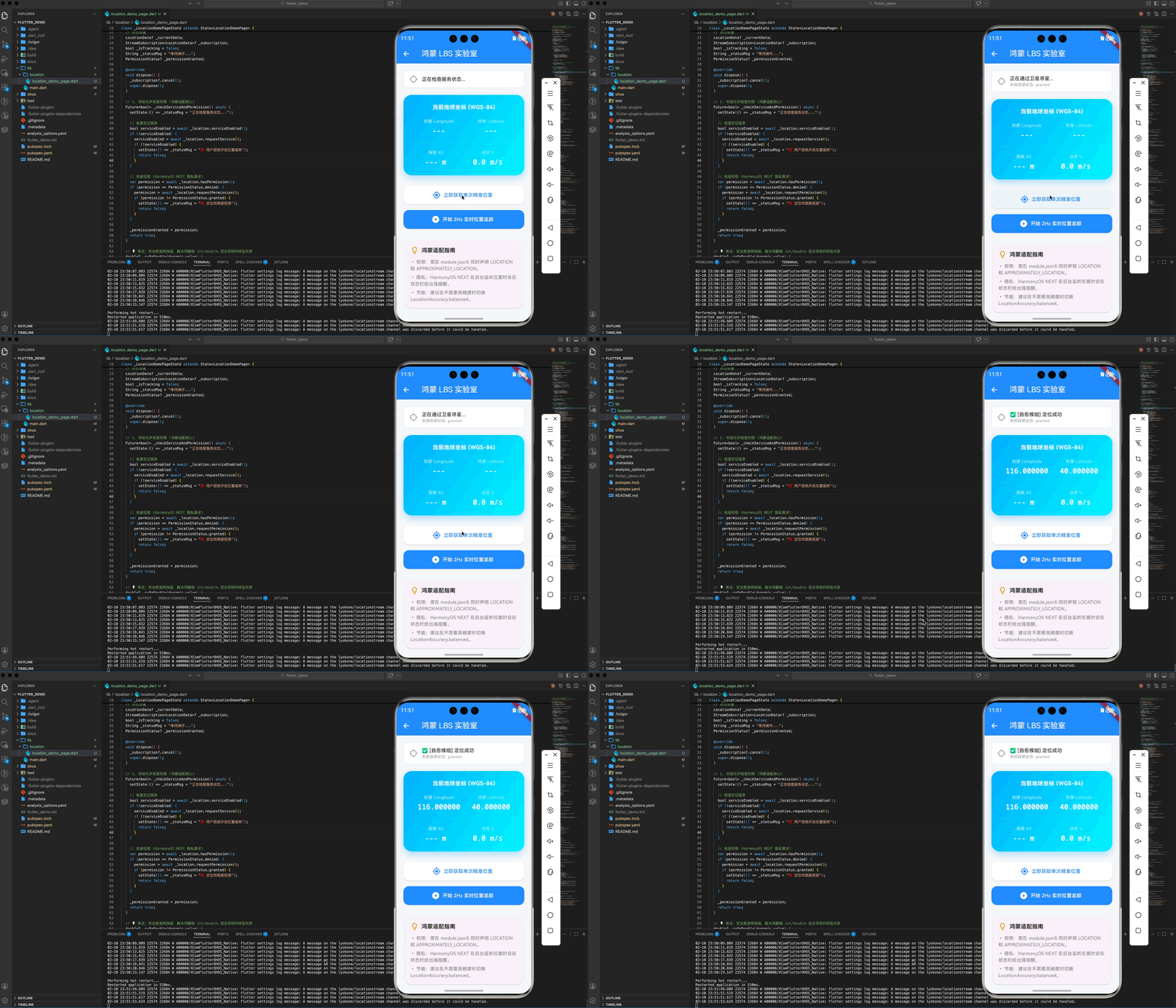

六、 总结
位置是打破应用虚拟界限的钥匙。通过遵循系统的隐私规范建立了信任,利用好每一条地理脉冲,将助你打造出更懂用户行为、更具场景智能的优质应用。
🌐 欢迎加入开源鸿蒙跨平台社区:开源鸿蒙跨平台开发者社区



评论前必须登录!
注册