 网硕互联帮助中心
一、Spring Authorization Server概述
1.1 什么是Spring Authorization Server
Spring Authorization Server是Spring官方推出的新一代认证授权框架,提供了OAuth 2.1和OpenID Connect 1.0规范的完整实现。它建立在Spring Security之上,为构建身份提供者和授权服务器提供了安全、轻量级且可定制的基础。
核心特性:
-
完全支持OAuth 2.1和OpenID Connect 1.0
-
模块化设计,易于扩展和定制
-
内置多种授权模式支持
-
与Spring生态系统无缝集成
官方资源:
-
官网:https://spring.io/projects/spring-authorization-server
-
版本要求:
-
Spring Authorization Server: 1.1.2+
-
JDK: 17+
-
Spring Boot: 3.1.4+
-
1.2 为什么需要Spring Authorization Server
随着网络和设备的发展,原有的OAuth 2.0协议已无法满足现代应用的安全需求。OAuth社区推出了OAuth 2.1协议,对原有授权模式进行了优化和调整:
-
移除了密码模式(password)和简化模式(implicit)
-
增加了设备授权码模式
-
为授权码模式增加了PKCE扩展
Spring Security团队因此重新开发了Spring Authorization Server,以替代原有的Spring Security OAuth 2.0项目。
二、OAuth 2.0协议详解
2.1 OAuth 2.0核心概念
四个关键角色:
客户端(Client):第三方应用,请求访问用户资源
资源服务器(Resource Server):存储受保护资源的服务器
资源所有者(Resource Owner):拥有资源的用户
授权服务器(Authorization Server):验证用户身份并颁发令牌
2.2 OAuth 2.0工作流程
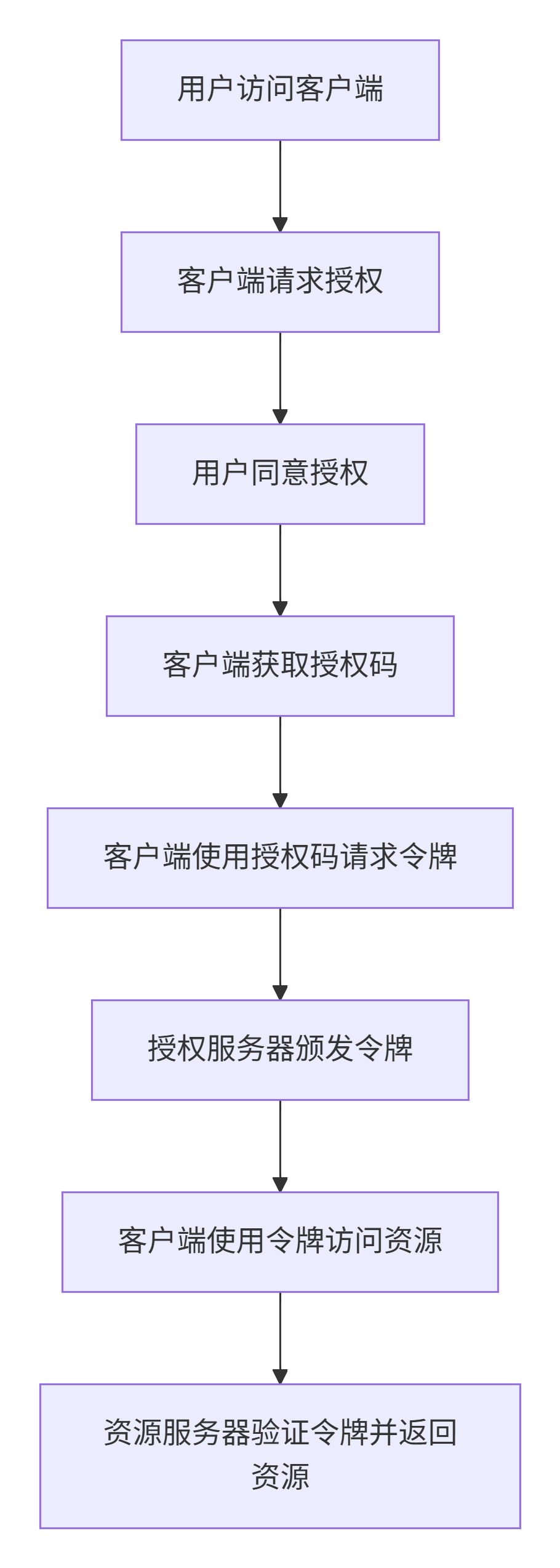
令牌(Token)与密码(Password)的区别:
-
令牌是短期的,到期自动失效
-
令牌可以被资源所有者随时撤销
-
令牌有权限范围(scope),密码拥有完整权限
2.3 OAuth 2.0应用场景
社交媒体登录:使用微信、QQ等第三方账号登录
第三方应用集成:应用间数据共享和API调用
移动应用访问API:移动端应用访问后端服务
云服务授权:访问Google Drive、Dropbox等云存储
IoT设备访问:物联网设备安全访问云服务
2.4 OAuth 2.0授权模式
2.4.1 客户端模式(Client Credentials Grant)
text
适用于:服务端应用间的通信
流程:客户端直接使用client_id和client_secret获取令牌
请求示例:
text
POST /oauth2/token
grant_type=client_credentials
&client_id=CLIENT_ID
&client_secret=CLIENT_SECRET
2.4.2 密码模式(Resource Owner Password Credentials Grant)
text
适用于:高度信任的内部应用
流程:用户提供用户名密码,客户端代理获取令牌
注意:OAuth 2.1中已移除此模式
请求示例:
text
POST /oauth2/token
grant_type=password
&username=USERNAME
&password=PASSWORD
&client_id=CLIENT_ID
&client_secret=CLIENT_SECRET
2.4.3 授权码模式(Authorization Code Grant)
text
适用于:Web应用、移动应用
流程:通过授权码中间步骤,安全性最高
流程步骤:
客户端引导用户到授权服务器
用户登录并授权
授权服务器返回授权码
客户端使用授权码交换令牌
请求示例:
text
# 1. 获取授权码
GET /oauth2/authorize?
response_type=code
&client_id=CLIENT_ID
&redirect_uri=CALLBACK_URL
&scope=read
# 2. 使用授权码获取令牌
POST /oauth2/token
grant_type=authorization_code
&code=AUTHORIZATION_CODE
&client_id=CLIENT_ID
&client_secret=CLIENT_SECRET
&redirect_uri=CALLBACK_URL
2.4.4 简化模式(Implicit Grant)
text
适用于:单页应用(SPA)
流程:直接返回令牌,跳过授权码步骤
注意:OAuth 2.1中已移除此模式
2.4.5 刷新令牌模式(Refresh Token Grant)
text
适用于:令牌续期
流程:使用refresh_token获取新的access_token
请求示例:
text
POST /oauth2/token
grant_type=refresh_token
&client_id=CLIENT_ID
&client_secret=CLIENT_SECRET
&refresh_token=REFRESH_TOKEN
三、OAuth 2.1协议新特性
3.1 授权码模式+PKCE扩展
PKCE(Proof Key for Code Exchange)用于防止授权码被拦截攻击:
工作流程:
客户端生成code_verifier和code_challenge
授权请求时发送code_challenge
交换令牌时发送code_verifier
服务器验证两者匹配关系
3.2 设备授权码模式
适用于智能电视、打印机等输入受限设备:
工作流程:
设备请求设备码和用户码
用户在另一设备访问验证页面输入用户码
设备轮询获取令牌
3.3 拓展授权模式
虽然OAuth 2.1移除了密码模式,但可通过拓展授权模式实现类似功能。
四、OpenID Connect 1.0协议
OpenID Connect是建立在OAuth 2.0之上的身份层,主要增加了id_token:
核心特性:
-
基于JWT格式的id_token
-
用户信息端点(UserInfo Endpoint)
-
标准化声明(Claims)
id_token示例:
json
{
"iss": "https://server.example.com",
"sub": "24400320",
"aud": "s6BhdRkqt3",
"exp": 1311281970,
"iat": 1311280970,
"auth_time": 1311280969,
"nonce": "n-0S6_WzA2Mj"
}
五、Spring Authorization Server实战
5.1 授权服务器搭建
5.1.1 项目依赖
xml
<dependency>
<groupId>org.springframework.boot</groupId>
<artifactId>spring-boot-starter-oauth2-authorization-server</artifactId>
</dependency>
5.1.2 核心配置类
java
@Configuration
@EnableWebSecurity
public class SecurityConfig {
// 授权服务器安全过滤器链
@Bean
@Order(1)
public SecurityFilterChain authorizationServerSecurityFilterChain(HttpSecurity http)
throws Exception {
OAuth2AuthorizationServerConfiguration.applyDefaultSecurity(http);
http
.getConfigurer(OAuth2AuthorizationServerConfigurer.class)
.oidc(Customizer.withDefaults()); // 开启OpenID Connect
return http.build();
}
// 默认安全过滤器链
@Bean
@Order(2)
public SecurityFilterChain defaultSecurityFilterChain(HttpSecurity http)
throws Exception {
http
.authorizeHttpRequests(authorize -> authorize
.anyRequest().authenticated()
)
.formLogin(Customizer.withDefaults());
return http.build();
}
// 用户信息服务
@Bean
public UserDetailsService userDetailsService() {
UserDetails userDetails = User.withDefaultPasswordEncoder()
.username("fox")
.password("123456")
.roles("USER")
.build();
return new InMemoryUserDetailsManager(userDetails);
}
// 客户端注册信息
@Bean
public RegisteredClientRepository registeredClientRepository() {
RegisteredClient oidcClient = RegisteredClient.withId(UUID.randomUUID().toString())
.clientId("oidc-client")
.clientSecret("{noop}secret")
.clientAuthenticationMethod(ClientAuthenticationMethod.CLIENT_SECRET_BASIC)
.authorizationGrantType(AuthorizationGrantType.AUTHORIZATION_CODE)
.authorizationGrantType(AuthorizationGrantType.REFRESH_TOKEN)
.authorizationGrantType(AuthorizationGrantType.CLIENT_CREDENTIALS)
.redirectUri("http://www.baidu.com")
.scope(OidcScopes.OPENID)
.scope(OidcScopes.PROFILE)
.clientSettings(ClientSettings.builder()
.requireAuthorizationConsent(true)
.build())
.build();
return new InMemoryRegisteredClientRepository(oidcClient);
}
// JWT密钥配置
@Bean
public JWKSource<SecurityContext> jwkSource() {
KeyPair keyPair = generateRsaKey();
RSAPublicKey publicKey = (RSAPublicKey) keyPair.getPublic();
RSAPrivateKey privateKey = (RSAPrivateKey) keyPair.getPrivate();
RSAKey rsaKey = new RSAKey.Builder(publicKey)
.privateKey(privateKey)
.keyID(UUID.randomUUID().toString())
.build();
JWKSet jwkSet = new JWKSet(rsaKey);
return new ImmutableJWKSet<>(jwkSet);
}
// 生成RSA密钥对
private static KeyPair generateRsaKey() {
KeyPair keyPair;
try {
KeyPairGenerator keyPairGenerator = KeyPairGenerator.getInstance("RSA");
keyPairGenerator.initialize(2048);
keyPair = keyPairGenerator.generateKeyPair();
} catch (Exception ex) {
throw new IllegalArgumentException(ex);
}
return keyPair;
}
}
5.1.3 测试端点
获取授权服务器配置信息:
text
GET http://127.0.0.1:9000/.well-known/openid-configuration
授权码模式测试:
获取授权码:
text
GET http://localhost:9000/oauth2/authorize?
response_type=code
&client_id=oidc-client
&scope=profile openid
&redirect_uri=http://www.baidu.com
使用授权码获取令牌:
bash
curl -X POST http://localhost:9000/oauth2/token \\
-H "Content-Type: application/x-www-form-urlencoded" \\
-u "oidc-client:secret" \\
-d "grant_type=authorization_code" \\
-d "code={授权码}" \\
-d "redirect_uri=http://www.baidu.com"
5.2 OAuth2客户端搭建
5.2.1 项目依赖
xml
<dependency>
<groupId>org.springframework.boot</groupId>
<artifactId>spring-boot-starter-oauth2-client</artifactId>
</dependency>
<dependency>
<groupId>org.springframework.boot</groupId>
<artifactId>spring-boot-starter-web</artifactId>
</dependency>
5.2.2 配置文件
yaml
server:
port: 9001
spring:
application:
name: spring-oauth-client
security:
oauth2:
client:
provider:
oauth-server:
issuer-uri: http://spring-oauth-server:9000
authorization-uri: http://spring-oauth-server:9000/oauth2/authorize
token-uri: http://spring-oauth-server:9000/oauth2/token
registration:
messaging-client-oidc:
provider: oauth-server
client-name: web平台
client-id: web-client-id
client-secret: secret
client-authentication-method: client_secret_basic
authorization-grant-type: authorization_code
redirect-uri: http://spring-oauth-client:9001/login/oauth2/code/messaging-client-oidc
scope:
– profile
– openid
注意:需要在hosts文件中添加域名映射:
text
127.0.0.1 spring-oauth-client spring-oauth-server
5.2.3 客户端控制器
java
@RestController
public class AuthenticationController {
@GetMapping("/token")
@ResponseBody
public OAuth2AuthorizedClient token(
@RegisteredOAuth2AuthorizedClient OAuth2AuthorizedClient oAuth2AuthorizedClient) {
return oAuth2AuthorizedClient;
}
}
5.3 资源服务器搭建
5.3.1 项目依赖
xml
<dependency>
<groupId>org.springframework.boot</groupId>
<artifactId>spring-boot-starter-oauth2-resource-server</artifactId>
</dependency>
<dependency>
<groupId>org.springframework.boot</groupId>
<artifactId>spring-boot-starter-web</artifactId>
</dependency>
5.3.2 配置文件
yaml
server:
port: 9002
spring:
application:
name: spring-oauth-resource
security:
oauth2:
resource-server:
jwt:
issuer-uri: http://spring-oauth-server:9000
5.3.3 安全配置
java
@Configuration
@EnableWebSecurity
@EnableMethodSecurity(jsr250Enabled = true, securedEnabled = true)
public class ResourceServerConfig {
@Bean
SecurityFilterChain securityFilterChain(HttpSecurity http) throws Exception {
http
.authorizeHttpRequests(authorize -> authorize
.anyRequest().authenticated()
)
.oauth2ResourceServer(oauth2 -> oauth2
.jwt(Customizer.withDefaults())
);
return http.build();
}
}
5.3.4 资源接口
java
@RestController
public class MessagesController {
@GetMapping("/messages1")
public String getMessages1() {
return "hello Message 1";
}
@GetMapping("/messages2")
@PreAuthorize("hasAuthority('SCOPE_profile')")
public String getMessages2() {
return "hello Message 2";
}
@GetMapping("/messages3")
@PreAuthorize("hasAuthority('SCOPE_Message')")
public String getMessages3() {
return "hello Message 3";
}
}
5.3.5 自定义异常处理
java
// 认证异常处理
@Component
public class MyAuthenticationEntryPoint implements AuthenticationEntryPoint {
@Override
public void commence(HttpServletRequest request, HttpServletResponse response,
AuthenticationException authException) throws IOException {
if (authException instanceof InvalidBearerTokenException) {
ResponseResult.exceptionResponse(response, "令牌无效或已过期");
} else {
ResponseResult.exceptionResponse(response, "需要带上令牌进行访问");
}
}
}
// 授权异常处理
@Component
public class MyAccessDeniedHandler implements AccessDeniedHandler {
@Override
public void handle(HttpServletRequest request, HttpServletResponse response,
AccessDeniedException accessDeniedException) throws IOException {
ResponseResult.exceptionResponse(response, "权限不足");
}
}
配置异常处理器:
java
http.oauth2ResourceServer(resourceServer -> resourceServer
.jwt(Customizer.withDefaults())
.authenticationEntryPoint(new MyAuthenticationEntryPoint())
.accessDeniedHandler(new MyAccessDeniedHandler())
);
六、基于数据库存储改造
6.1 数据库表结构
6.1.1 客户端信息表
sql
CREATE TABLE oauth2_registered_client (
id VARCHAR(100) NOT NULL,
client_id VARCHAR(100) NOT NULL,
client_id_issued_at TIMESTAMP DEFAULT CURRENT_TIMESTAMP NOT NULL,
client_secret VARCHAR(200) DEFAULT NULL,
client_secret_expires_at TIMESTAMP DEFAULT NULL,
client_name VARCHAR(200) NOT NULL,
client_authentication_methods VARCHAR(1000) NOT NULL,
authorization_grant_types VARCHAR(1000) NOT NULL,
redirect_uris VARCHAR(1000) DEFAULT NULL,
post_logout_redirect_uris VARCHAR(1000) DEFAULT NULL,
scopes VARCHAR(1000) NOT NULL,
client_settings VARCHAR(2000) NOT NULL,
token_settings VARCHAR(2000) NOT NULL,
PRIMARY KEY (id)
);
6.1.2 授权确认表
sql
CREATE TABLE oauth2_authorization_consent (
registered_client_id VARCHAR(100) NOT NULL,
principal_name VARCHAR(200) NOT NULL,
authorities VARCHAR(1000) NOT NULL,
PRIMARY KEY (registered_client_id, principal_name)
);
6.1.3 授权信息表
sql
CREATE TABLE oauth2_authorization (
id VARCHAR(100) NOT NULL,
registered_client_id VARCHAR(100) NOT NULL,
principal_name VARCHAR(200) NOT NULL,
authorization_grant_type VARCHAR(100) NOT NULL,
authorized_scopes VARCHAR(1000) DEFAULT NULL,
attributes BLOB DEFAULT NULL,
state VARCHAR(500) DEFAULT NULL,
authorization_code_value BLOB DEFAULT NULL,
authorization_code_issued_at TIMESTAMP DEFAULT NULL,
authorization_code_expires_at TIMESTAMP DEFAULT NULL,
authorization_code_metadata BLOB DEFAULT NULL,
access_token_value BLOB DEFAULT NULL,
access_token_issued_at TIMESTAMP DEFAULT NULL,
access_token_expires_at TIMESTAMP DEFAULT NULL,
access_token_metadata BLOB DEFAULT NULL,
access_token_type VARCHAR(100) DEFAULT NULL,
access_token_scopes VARCHAR(1000) DEFAULT NULL,
oidc_id_token_value BLOB DEFAULT NULL,
oidc_id_token_issued_at TIMESTAMP DEFAULT NULL,
oidc_id_token_expires_at TIMESTAMP DEFAULT NULL,
oidc_id_token_metadata BLOB DEFAULT NULL,
refresh_token_value BLOB DEFAULT NULL,
refresh_token_issued_at TIMESTAMP DEFAULT NULL,
refresh_token_expires_at TIMESTAMP DEFAULT NULL,
refresh_token_metadata BLOB DEFAULT NULL,
user_code_value BLOB DEFAULT NULL,
user_code_issued_at TIMESTAMP DEFAULT NULL,
user_code_expires_at TIMESTAMP DEFAULT NULL,
user_code_metadata BLOB DEFAULT NULL,
device_code_value BLOB DEFAULT NULL,
device_code_issued_at TIMESTAMP DEFAULT NULL,
device_code_expires_at TIMESTAMP DEFAULT NULL,
device_code_metadata BLOB DEFAULT NULL,
PRIMARY KEY (id)
);
6.1.4 用户表
sql
CREATE TABLE sys_user (
id BIGINT NOT NULL AUTO_INCREMENT COMMENT 'id',
username VARCHAR(20) NOT NULL DEFAULT '' COMMENT '用户名',
password VARCHAR(255) NOT NULL DEFAULT '' COMMENT '密码',
name VARCHAR(50) DEFAULT NULL COMMENT '姓名',
description VARCHAR(255) DEFAULT NULL COMMENT '描述',
status TINYINT DEFAULT NULL COMMENT '状态(1:正常 0:停用)',
PRIMARY KEY (id),
UNIQUE KEY idx_username (username)
) ENGINE=InnoDB DEFAULT CHARSET=utf8mb4 COMMENT='用户表';
6.2 数据库配置
6.2.1 配置文件
yaml
spring:
application:
name: spring-oauth-server
datasource:
driver-class-name: com.mysql.cj.jdbc.Driver
url: jdbc:mysql://localhost:3306/oauth-server?serverTimezone=UTC&useUnicode=true&characterEncoding=utf-8
username: root
password: root
6.2.2 数据库服务配置
java
@Configuration
public class DatabaseConfig {
// 客户端信息存储
@Bean
public RegisteredClientRepository registeredClientRepository(JdbcTemplate jdbcTemplate) {
return new JdbcRegisteredClientRepository(jdbcTemplate);
}
// 授权信息存储
@Bean
public OAuth2AuthorizationService authorizationService(
JdbcTemplate jdbcTemplate,
RegisteredClientRepository registeredClientRepository) {
return new JdbcOAuth2AuthorizationService(jdbcTemplate, registeredClientRepository);
}
// 授权确认存储
@Bean
public OAuth2AuthorizationConsentService authorizationConsentService(
JdbcTemplate jdbcTemplate,
RegisteredClientRepository registeredClientRepository) {
return new JdbcOAuth2AuthorizationConsentService(jdbcTemplate, registeredClientRepository);
}
// 密码编码器
@Bean
public PasswordEncoder passwordEncoder() {
return new BCryptPasswordEncoder();
}
}
6.2.3 自定义用户详情服务
java
@Service
public class UserDetailsServiceImpl implements UserDetailsService {
@Resource
private SysUserService sysUserService;
@Override
public UserDetails loadUserByUsername(String username)
throws UsernameNotFoundException {
SysUserEntity sysUserEntity = sysUserService.selectByUsername(username);
List<SimpleGrantedAuthority> authorities = Arrays.asList("USER").stream()
.map(SimpleGrantedAuthority::new)
.collect(Collectors.toList());
return new User(
username,
sysUserEntity.getPassword(),
authorities
);
}
}
七、单点登录(SSO)实战
7.1 SSO架构设计
text
┌─────────────┐ ┌─────────────┐ ┌─────────────┐
│ 订单服务 │ │ 商品服务 │ │ 认证服务器 │
│ (客户端) │ │ (客户端) │ │ (授权服务器) │
└──────┬──────┘ └──────┬──────┘ └──────┬──────┘
│ │ │
└──────────────────┼──────────────────┘
│
┌─────┴─────┐
│ 用户 │
│ (浏览器) │
└───────────┘
7.2 订单服务配置
yaml
server:
ip: spring-oauth-client-order
port: 9003
spring:
application:
name: spring-oauth-client-order
security:
oauth2:
client:
provider:
oauth-server:
issuer-uri: http://spring-oauth-server:9000
authorization-uri: http://spring-oauth-server:9000/oauth2/authorize
token-uri: http://spring-oauth-server:9000/oauth2/token
registration:
messaging-client-oidc:
provider: oauth-server
client-name: web平台-SSO客户端-订单服务
client-id: web-client-id-order
client-secret: secret
client-authentication-method: client_secret_basic
authorization-grant-type: authorization_code
redirect-uri: http://spring-oauth-client-order:9003/login/oauth2/code/messaging-client-oidc
scope:
– profile
– openid
7.3 商品服务配置
yaml
server:
ip: spring-oauth-client-product
port: 9004
spring:
application:
name: spring-oauth-client-product
security:
oauth2:
client:
provider:
oauth-server:
issuer-uri: http://spring-oauth-server:9000
authorization-uri: http://spring-oauth-server:9000/oauth2/authorize
token-uri: http://spring-oauth-server:9000/oauth2/token
registration:
messaging-client-oidc:
provider: oauth-server
client-name: web平台-SSO客户端-商品服务
client-id: web-client-id-product
client-secret: secret
client-authentication-method: client_secret_basic
authorization-grant-type: authorization_code
redirect-uri: http://spring-oauth-client-product:9004/login/oauth2/code/messaging-client-oidc
scope:
– profile
– openid
7.4 SSO测试流程
首次访问订单服务:跳转到认证服务器登录
登录成功后:返回订单服务页面
跳转到商品服务:无需重新登录,直接访问
无感授权配置:设置require-authorization-consent=false跳过授权确认
八、微服务网关整合OAuth2
8.1 网关安全架构
text
┌─────────────┐ ┌─────────────┐ ┌─────────────┐
│ 用户 │───▶│ 网关 │───▶│ 认证服务器 │
│ (浏览器) │ │ (Gateway) │ │ (OAuth2) │
└─────────────┘ └──────┬──────┘ └─────────────┘
│
┌─────┴─────┐
│ 资源服务 │
│ (微服务) │
└───────────┘
8.2 网关配置
8.2.1 项目依赖
xml
<!– OAuth2客户端 –>
<dependency>
<groupId>org.springframework.boot</groupId>
<artifactId>spring-boot-starter-oauth2-client</artifactId>
<version>3.1.4</version>
</dependency>
<!– OAuth2资源服务器 –>
<dependency>
<groupId>org.springframework.boot</groupId>
<artifactId>spring-boot-starter-oauth2-resource-server</artifactId>
<version>3.1.4</version>
</dependency>
8.2.2 配置文件
yaml
server:
port: 8888
spring:
application:
name: mall-gateway
security:
oauth2:
# 资源服务器配置
resourceserver:
jwt:
issuer-uri: http://spring-oauth-server:9000
# 客户端配置
client:
provider:
oauth-server:
issuer-uri: http://spring-oauth-server:9000
authorization-uri: http://spring-oauth-server:9000/oauth2/authorize
token-uri: http://spring-oauth-server:9000/oauth2/token
registration:
messaging-client-oidc:
provider: oauth-server
client-name: 网关服务
client-id: mall-gateway-id
client-secret: secret
client-authentication-method: client_secret_basic
authorization-grant-type: authorization_code
redirect-uri: http://mall-gateway:8888/login/oauth2/code/messaging-client-oidc
scope:
– profile
– openid
cloud:
gateway:
default-filters:
# 令牌中继,自动传递token到下游服务
– TokenRelay=
8.2.3 安全配置
java
@Configuration
@EnableWebFluxSecurity
@EnableReactiveMethodSecurity
public class WebSecurityConfig {
@Bean
public SecurityWebFilterChain defaultSecurityFilterChain(ServerHttpSecurity http) {
// 所有请求都需要认证
http.authorizeExchange(authorize -> authorize
.anyExchange().authenticated()
);
// 开启OAuth2登录
http.oauth2Login(Customizer.withDefaults());
// 配置资源服务器
http.oauth2ResourceServer(resourceServer -> resourceServer
.jwt(Customizer.withDefaults())
);
// 禁用CSRF和CORS
http.csrf(csrf -> csrf.disable());
http.cors(cors -> cors.disable());
return http.build();
}
}
8.3 微服务资源服务器配置
8.3.1 项目依赖
xml
<dependency>
<groupId>org.springframework.boot</groupId>
<artifactId>spring-boot-starter-oauth2-resource-server</artifactId>
<version>3.1.4</version>
</dependency>
8.3.2 配置文件
yaml
spring:
security:
oauth2:
resourceserver:
jwt:
issuer-uri: http://spring-oauth-server:9000
8.3.3 安全配置
java
@Configuration
@EnableWebSecurity
@EnableMethodSecurity(jsr250Enabled = true, securedEnabled = true)
public class ResourceServerConfig {
@Bean
SecurityFilterChain securityFilterChain(HttpSecurity http) throws Exception {
http
.authorizeHttpRequests(authorize -> authorize
.anyRequest().authenticated()
)
.oauth2ResourceServer(oauth2 -> oauth2
.jwt(Customizer.withDefaults())
);
return http.build();
}
}
8.3.4 Feign拦截器(令牌传递)
java
@Slf4j
@Component
public class FeignAuthRequestInterceptor implements RequestInterceptor {
@Override
public void apply(RequestTemplate template) {
ServletRequestAttributes attributes =
(ServletRequestAttributes) RequestContextHolder.getRequestAttributes();
if (attributes != null) {
HttpServletRequest request = attributes.getRequest();
String accessToken = request.getHeader("Authorization");
log.info("从Request中解析请求头: {}", accessToken);
// 设置token到Feign请求头
template.header("Authorization", accessToken);
}
}
}
8.4 测试流程
访问网关受保护接口:http://mall-gateway:8888/user/findOrderByUserId/1
网关检测未认证:重定向到认证服务器登录页面
用户登录授权:输入用户名密码,确认授权
返回网关页面:携带token,正常访问资源
网关转发请求:自动传递token到下游微服务
微服务验证token:验证通过,返回数据
九、总结与最佳实践
9.1 版本选择建议
| Spring Boot | 3.1.4+ | 支持Spring Authorization Server最新特性 |
| Spring Authorization Server | 1.1.2+ | 稳定版本,功能完整 |
| JDK | 17+ | Spring Boot 3.x要求 |
| MySQL | 8.0+ | 支持JSON字段,性能更好 |
9.2 安全建议
令牌管理:
-
Access Token有效期建议设置为30分钟
-
Refresh Token有效期建议设置为7天
-
使用HTTPS传输令牌
客户端安全:
-
使用BCrypt加密存储client_secret
-
定期轮换客户端密钥
-
限制客户端IP白名单
权限控制:
-
最小权限原则,按需分配scope
-
使用@PreAuthorize注解进行方法级权限控制
-
记录敏感操作日志
9.3 性能优化
缓存策略:
-
缓存JWK公钥,减少网络请求
-
使用Redis缓存用户信息
-
数据库连接池优化
数据库优化:
-
为oauth2_authorization表添加索引
-
定期清理过期令牌记录
-
使用读写分离架构
9.4 监控与告警
监控指标:
-
认证成功/失败率
-
令牌发放频率
-
接口响应时间
告警规则:
-
异常登录尝试
-
令牌滥用检测
-
系统异常率
9.5 扩展功能
多因素认证:集成短信、邮箱验证码
社交登录:集成微信、QQ等第三方登录
设备管理:管理已授权设备,支持一键下线
审计日志:完整记录认证授权操作日志
十、常见问题解决
10.1 跨域问题
解决方案:
java
@Bean
public CorsConfigurationSource corsConfigurationSource() {
CorsConfiguration configuration = new CorsConfiguration();
configuration.setAllowedOrigins(Arrays.asList("http://localhost:8080"));
configuration.setAllowedMethods(Arrays.asList("GET", "POST", "PUT", "DELETE"));
configuration.setAllowedHeaders(Arrays.asList("Authorization", "Content-Type"));
UrlBasedCorsConfigurationSource source = new UrlBasedCorsConfigurationSource();
source.registerCorsConfiguration("/**", configuration);
return source;
}
10.2 会话管理
配置分布式会话:
yaml
spring:
session:
store-type: redis
redis:
namespace: spring:session
10.3 令牌刷新
自动刷新令牌策略:
java
@Component
public class TokenRefreshService {
@Scheduled(fixedDelay = 5 * 60 * 1000) // 每5分钟检查一次
public void refreshTokens() {
// 检查即将过期的token并刷新
}
}
参考资料:
-
Spring Authorization Server官方文档
-
OAuth 2.1规范
-
OpenID Connect规范
本文基于Spring Authorization Server 1.1.2和Spring Boot 3.1.4编写,涵盖了从基础概念到生产级部署的全流程。在实际项目中,建议根据具体业务需求和安全要求进行调整和优化。



评论前必须登录!
注册